engine FORD TRANSIT 2017 5.G User Guide
[x] Cancel search | Manufacturer: FORD, Model Year: 2017, Model line: TRANSIT, Model: FORD TRANSIT 2017 5.GPages: 484, PDF Size: 11.45 MB
Page 60 of 484
LOCKING AND UNLOCKING
Note:
Make sure you have locked your
vehicle before leaving it unattended.
Note: Do not leave the keys in your vehicle.
Locking
Locking With the Key
Turn the top of the key toward the rear of
your vehicle.
Locking With the Remote Control Press the button.
Note: You can lock the driver door with the
key. Use the key when the remote control
is not functioning.
Unlocking
Unlocking With the Key
Turn the top of the key toward the front of
your vehicle.
Unlocking With the Remote Control Press the button.
Note: You can unlock the driver door with
the key. Use the key when the remote
control is not functioning.
Note: When you leave your vehicle
unattended for several weeks, the remote
control turns off.
Note: Unlock your vehicle and start the
engine using the key. Unlocking and starting
your vehicle once enables the remote
control.
Unlocking the Rear Cargo Doors Press the button. Reprogramming the Unlocking
Function
You can reprogram the unlocking function
so that only the driver door unlocks. See
Remote Control (page 48).
Locking and Unlocking
Confirmation
When you lock the doors, the direction
indicators flash twice.
When you unlock the doors, the direction
indicators flash once and a tone sounds.
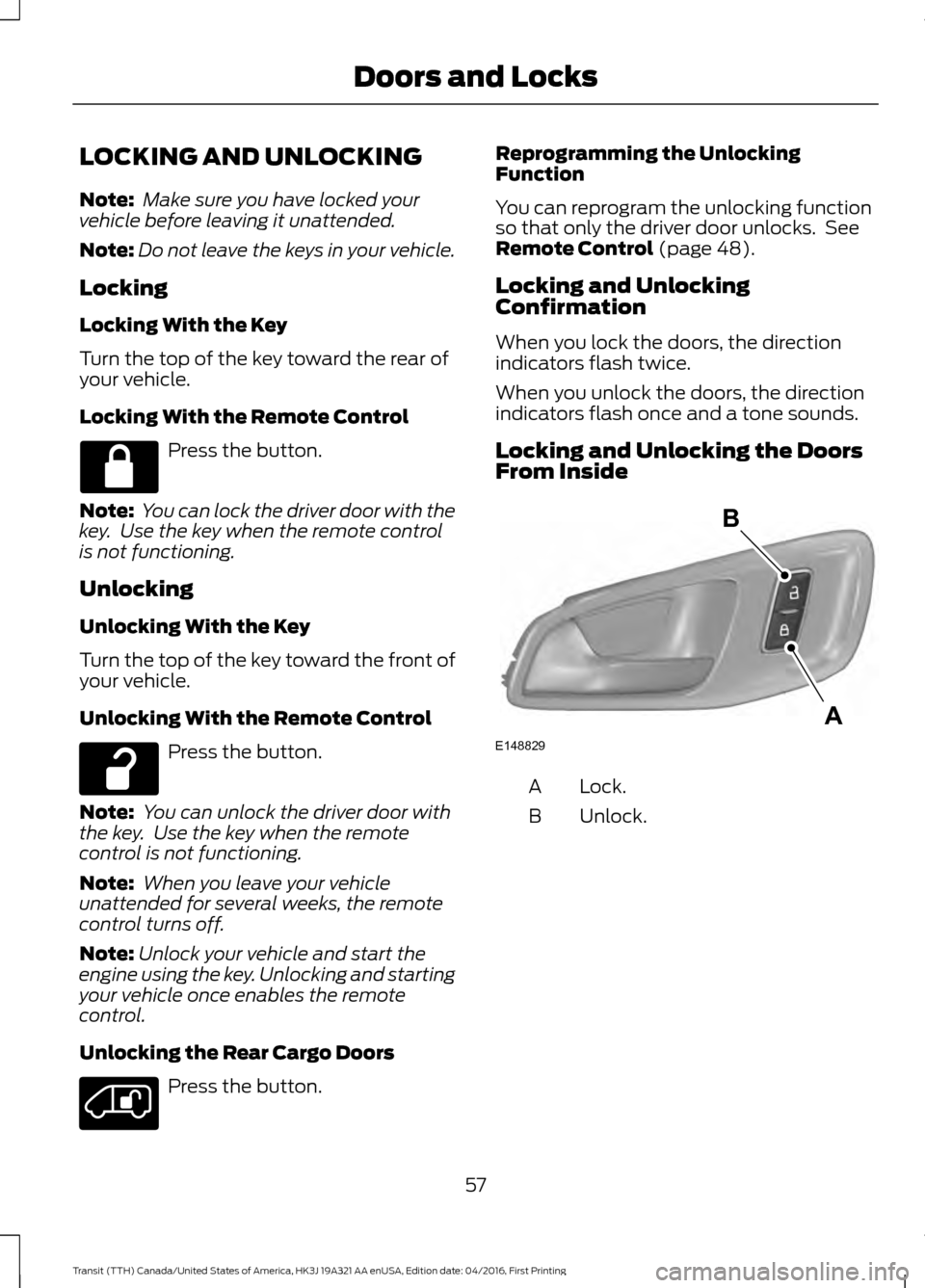
Locking and Unlocking the Doors
From Inside Lock.
A
Unlock.
B
57
Transit (TTH) Canada/United States of America, HK3J 19A321 AA enUSA, Edition date: 04/2016, First Printing Doors and Locks E148829
A
B
Page 65 of 484
PASSIVE ANTI-THEFT
SYSTEM (If Equipped)
Note: The system is not compatible with
non-Ford aftermarket remote start systems.
Use of these systems may result in vehicle
starting problems and a loss of security
protection.
Note: Metallic objects, electronic devices
or a second coded key on the same key
chain may cause vehicle starting problems
if they are too close to the key when starting
the engine. Prevent these objects from
touching the coded key while starting the
engine. Switch the ignition off, move all
objects on the key chain away from the
coded key and restart the engine if a
problem occurs.
Note: Do not leave a duplicate coded key
in the vehicle. Always take your keys and
lock all doors when leaving the vehicle.
SecuriLock®
The system is an engine immobilization
system. It is designed to help prevent the
engine from being started unless a
correctly coded key for your vehicle is used.
Using an incorrectly coded key may
prevent the engine from starting. A
message may appear in the information
display.
If you are unable to start the engine with a
correctly coded key, a malfunction has
happened and a message may appear in
the information display.
Automatic Arming
The engine immobilization system arms
immediately after you switch the ignition
off. Automatic Disarming
Switching the ignition on with a correctly
coded key disarms the engine
immobilization system.
Replacement Keys
The integrated keyhead transmitter
functions as a programmed ignition key
that operates all the locks and starts your
vehicle, as well as a remote control.
If your keys are lost or stolen and you do
not have a spare correctly coded key, you
will need to have your vehicle towed to an
authorized dealer. You need to erase the
coded keys from your vehicle and program
new coded keys.
Store an extra correctly coded key away
from the vehicle in a safe place to help
prevent any inconveniences. See an
authorized dealer to purchase additional
spare or replacement keys.
Programming a Spare Integrated
Keyhead Transmitter
You can program your own integrated
keyhead transmitter or standard
SecuriLock coded keys to your vehicle. This
procedure will program both the engine
immobilizer keycode and the remote entry
portion of the remote control to your
vehicle
Only use integrated keyhead transmitters
or standard SecuriLock keys.
You must have two previously
programmed correctly coded keys and the
new unprogrammed key readily accessible.
See an authorized dealer to have the spare
key programmed if two previously
programmed correctly coded keys are not
available.
Read and understand the entire procedure
before you begin.
1.
Insert the first previously programmed
correctly coded key into the ignition.
62
Transit (TTH) Canada/United States of America, HK3J 19A321 AA enUSA, Edition date: 04/2016, First Printing Security
Page 66 of 484
2.
Switch the ignition from off to on. Keep
the ignition on for at least three
seconds, but no more than 10 seconds.
3. Switch the ignition off and remove the
first correctly coded key from the
ignition.
4. After three seconds but within 10 seconds of switching the ignition off,
insert the second previously correctly
coded key into the ignition.
5. Switch the ignition from off to on. Keep
the ignition on for at least three
seconds, but no more than 10 seconds.
6. Switch the ignition off and remove the
second previously programmed
correctly coded key from the ignition.
7. After three seconds but within 10 seconds of switching the ignition off
and removing the previously
programmed correctly coded key,
insert the new unprogrammed key into
the ignition.
8. Switch the ignition from off to on. Keep
the ignition on for at least six seconds.
9. Remove the newly programmed correctly coded key from the ignition.
If the key has been successfully
programmed it will start the engine and
operate the remote entry system (if the
new key is an integrated keyhead
transmitter).
If the key was not successfully
programmed, wait 10 seconds and repeat
Steps 1 through 8. If you are still
unsuccessful, take your vehicle to an
authorized dealer.
Note: You can program a maximum of eight
coded keys to your vehicle. All eight can be
integrated keyhead transmitters. ANTI-THEFT ALARM
Alarm System
The perimeter alarm is a deterrent against
unauthorized access to your vehicle
through the doors, luggage compartment
and the hood.
Triggering the Alarm
Once armed, the alarm is triggered in any
of the following ways:
•
If someone opens a door, cargo area
or the hood without a valid key or
remote control.
• If you switch the ignition on without a
valid key.
If the alarm is triggered, the horn will sound
for 30 seconds and the hazard warning
flasher will flash for five minutes.
Any further attempts to perform one of the
above will trigger the alarm again.
Arming the Alarm
To arm the alarm, lock your vehicle. See
Doors and Locks (page 57).
Disarming the Alarm
Disarm and silence the alarm by unlocking
the doors with the key and switching the
ignition on with a correctly coded key
within 12 seconds, or by unlocking the
doors or the cargo area with the remote
control.
63
Transit (TTH) Canada/United States of America, HK3J 19A321 AA enUSA, Edition date: 04/2016, First Printing Security
Page 67 of 484
USING POWER RUNNING
BOARDS
WARNINGS
In extreme climates, excessive ice
buildup may occur, causing the
running boards not to deploy. Make
sure that the running boards have
deployed, and have finished moving before
attempting to step on them. The running
boards will resume normal function once
the blockage is cleared. Switch off the running boards before
jacking or placing any object under
your vehicle. Never place your hand
between the extended running board and
your vehicle. A moving running board may
cause injury. Note:
Do not use the power running boards,
front and rear hinge assemblies, running
board motors or the running board
underbody mounts to lift your vehicle when
jacking. Always use proper jacking points.
Note: The power running boards may
operate more slowly in cool temperatures.
Note: The running board mechanism may
trap debris such as mud, dirt, snow, ice and
salt. This may cause unwanted noise. If this
happens, manually set the power running
boards to the deployed position. Then wash
the system in particular the front and rear
hinge arms with a high-pressure car wash
wand.
Note: If you drive off when the power
running boards are deployed the engine may
stop.
Note: In the event of a malfunction you can
stow the power running boards manually. Automatic Power Deploy
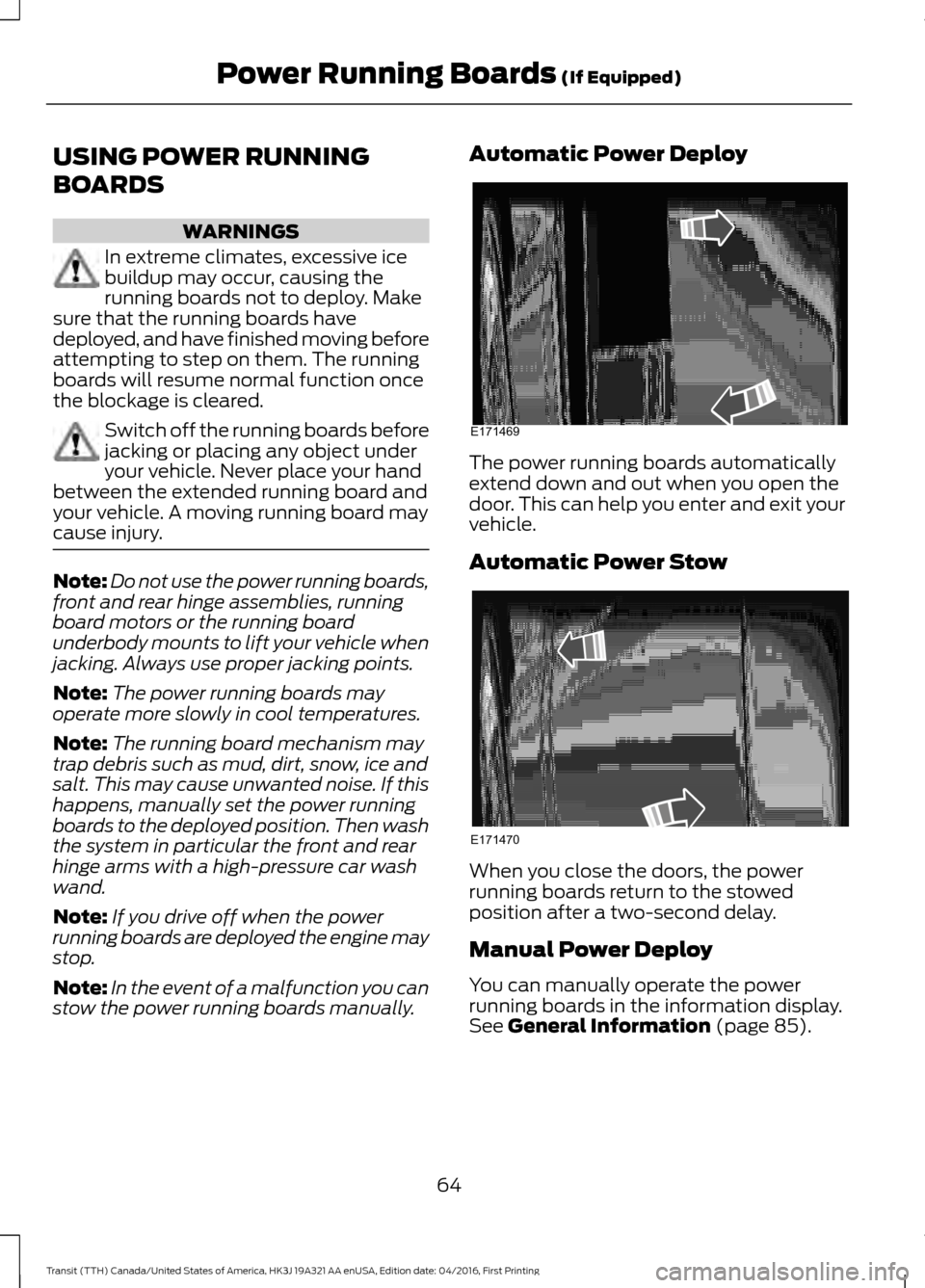
The power running boards automatically
extend down and out when you open the
door. This can help you enter and exit your
vehicle.
Automatic Power Stow
When you close the doors, the power
running boards return to the stowed
position after a two-second delay.
Manual Power Deploy
You can manually operate the power
running boards in the information display.
See General Information (page 85).
64
Transit (TTH) Canada/United States of America, HK3J 19A321 AA enUSA, Edition date: 04/2016, First Printing Power Running Boards
(If Equipped)E171469 E171470
Page 82 of 484
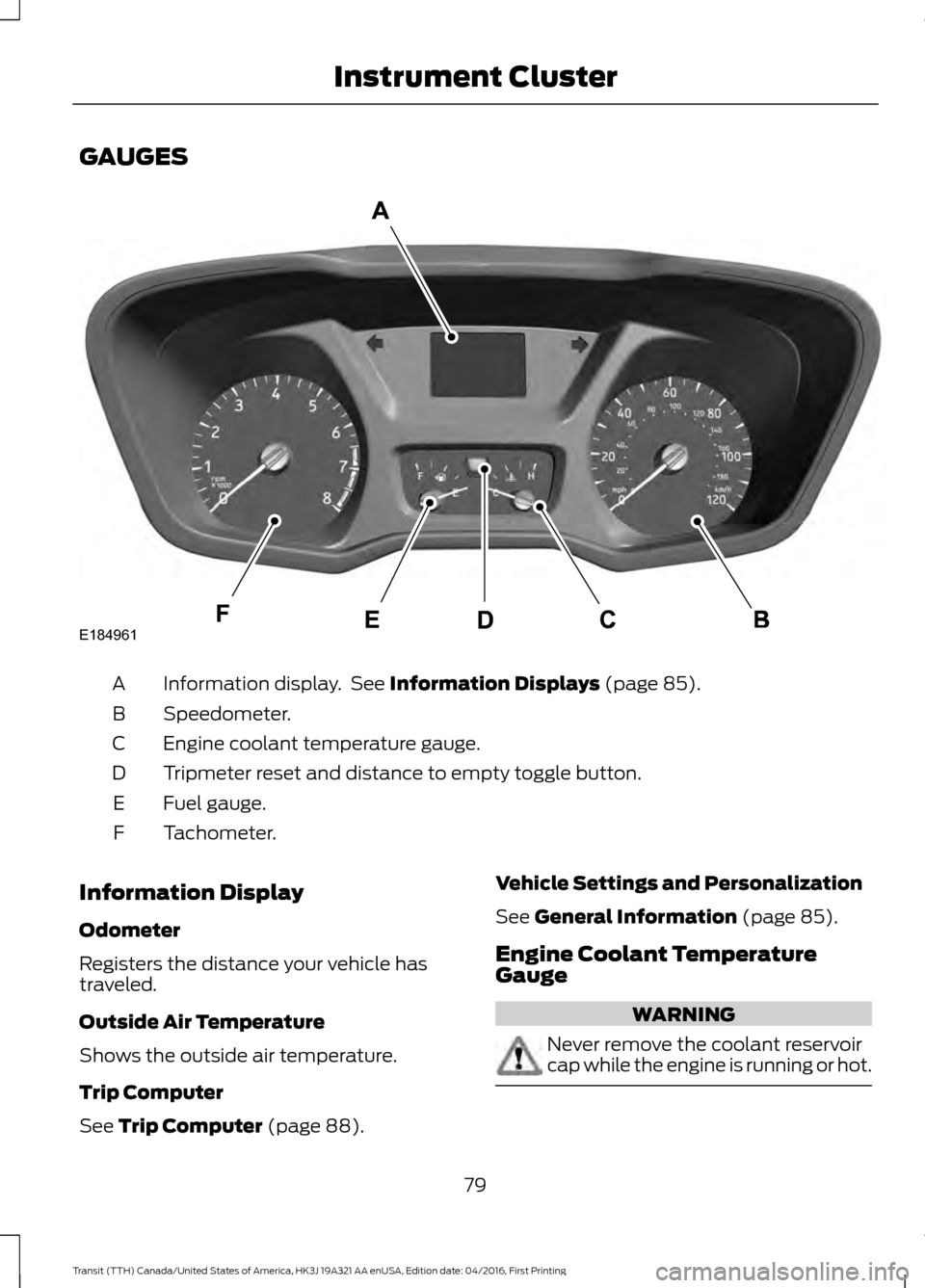
GAUGES
Information display. See Information Displays (page 85).
A
Speedometer.
B
Engine coolant temperature gauge.
C
Tripmeter reset and distance to empty toggle button.
D
Fuel gauge.
E
Tachometer.
F
Information Display
Odometer
Registers the distance your vehicle has
traveled.
Outside Air Temperature
Shows the outside air temperature.
Trip Computer
See
Trip Computer (page 88). Vehicle Settings and Personalization
See
General Information (page 85).
Engine Coolant Temperature
Gauge WARNING
Never remove the coolant reservoir
cap while the engine is running or hot.
79
Transit (TTH) Canada/United States of America, HK3J 19A321 AA enUSA, Edition date: 04/2016, First Printing Instrument ClusterE184961
Page 83 of 484
At normal operating temperature, the
needle will remain in the center section.
If the needle enters the red section, the
engine is overheating. Stop your vehicle as
soon as it is safe to do so and switch the
engine off. Determine the cause once the
engine has cooled down. See Engine
Coolant Check (page 218).
Note: Do not restart the engine until the
cause of overheating has been determined
and resolved.
Tripmeter Reset and Distance to
Empty
(If Equipped)
Press the button to change between the
tripmeter and distance to empty
information. Press and hold the button to
reset the tripmeter.
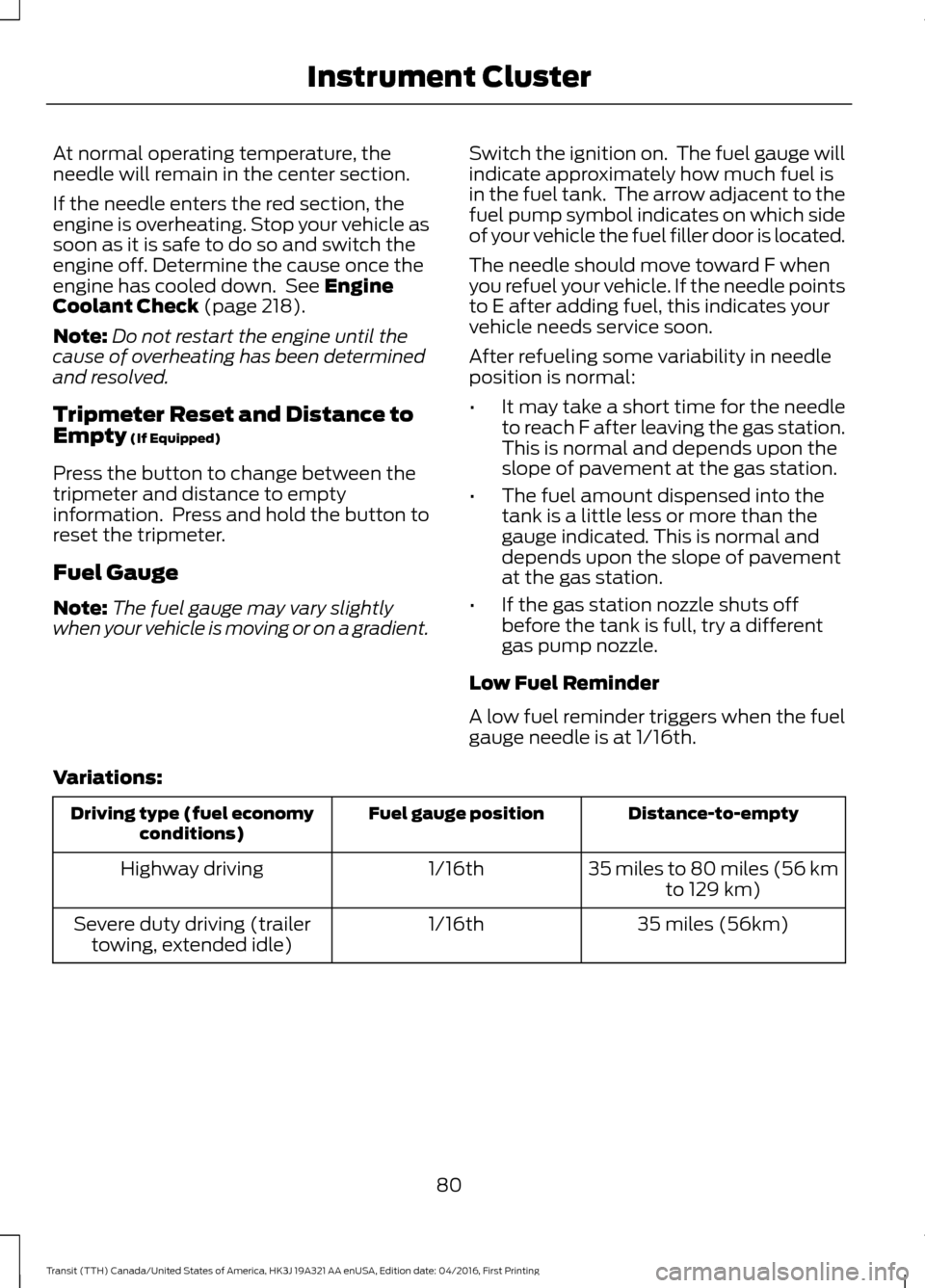
Fuel Gauge
Note: The fuel gauge may vary slightly
when your vehicle is moving or on a gradient. Switch the ignition on. The fuel gauge will
indicate approximately how much fuel is
in the fuel tank. The arrow adjacent to the
fuel pump symbol indicates on which side
of your vehicle the fuel filler door is located.
The needle should move toward F when
you refuel your vehicle. If the needle points
to E after adding fuel, this indicates your
vehicle needs service soon.
After refueling some variability in needle
position is normal:
•
It may take a short time for the needle
to reach F after leaving the gas station.
This is normal and depends upon the
slope of pavement at the gas station.
• The fuel amount dispensed into the
tank is a little less or more than the
gauge indicated. This is normal and
depends upon the slope of pavement
at the gas station.
• If the gas station nozzle shuts off
before the tank is full, try a different
gas pump nozzle.
Low Fuel Reminder
A low fuel reminder triggers when the fuel
gauge needle is at 1/16th.
Variations: Distance-to-empty
Fuel gauge position
Driving type (fuel economy
conditions)
35 miles to 80 miles (56 kmto 129 km)
1/16th
Highway driving
35 miles (56km)
1/16th
Severe duty driving (trailer
towing, extended idle)
80
Transit (TTH) Canada/United States of America, HK3J 19A321 AA enUSA, Edition date: 04/2016, First Printing Instrument Cluster
Page 84 of 484
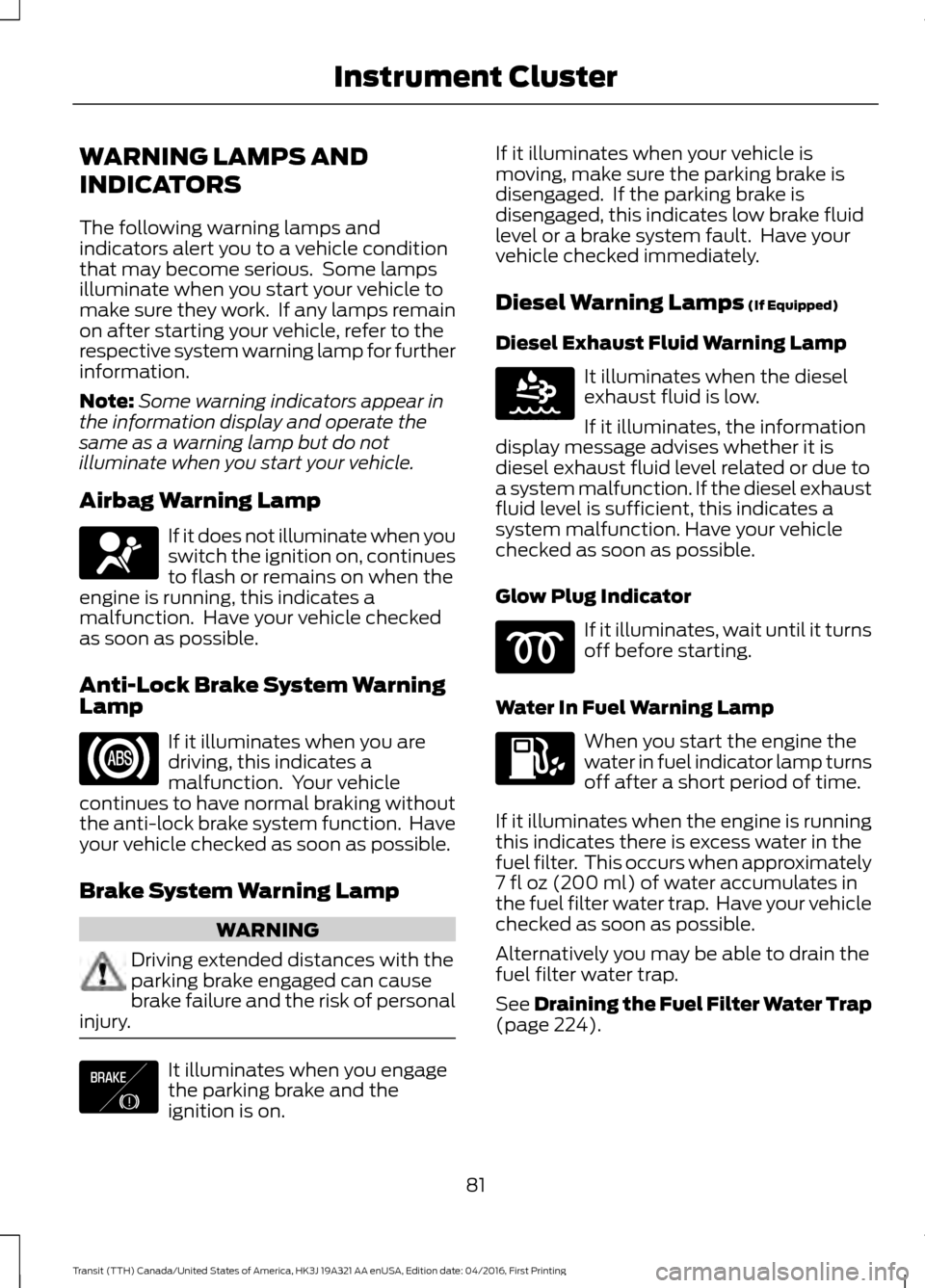
WARNING LAMPS AND
INDICATORS
The following warning lamps and
indicators alert you to a vehicle condition
that may become serious. Some lamps
illuminate when you start your vehicle to
make sure they work. If any lamps remain
on after starting your vehicle, refer to the
respective system warning lamp for further
information.
Note:
Some warning indicators appear in
the information display and operate the
same as a warning lamp but do not
illuminate when you start your vehicle.
Airbag Warning Lamp If it does not illuminate when you
switch the ignition on, continues
to flash or remains on when the
engine is running, this indicates a
malfunction. Have your vehicle checked
as soon as possible.
Anti-Lock Brake System Warning
Lamp If it illuminates when you are
driving, this indicates a
malfunction. Your vehicle
continues to have normal braking without
the anti-lock brake system function. Have
your vehicle checked as soon as possible.
Brake System Warning Lamp WARNING
Driving extended distances with the
parking brake engaged can cause
brake failure and the risk of personal
injury. It illuminates when you engage
the parking brake and the
ignition is on. If it illuminates when your vehicle is
moving, make sure the parking brake is
disengaged. If the parking brake is
disengaged, this indicates low brake fluid
level or a brake system fault. Have your
vehicle checked immediately.
Diesel Warning Lamps (If Equipped)
Diesel Exhaust Fluid Warning Lamp It illuminates when the diesel
exhaust fluid is low.
If it illuminates, the information
display message advises whether it is
diesel exhaust fluid level related or due to
a system malfunction. If the diesel exhaust
fluid level is sufficient, this indicates a
system malfunction. Have your vehicle
checked as soon as possible.
Glow Plug Indicator If it illuminates, wait until it turns
off before starting.
Water In Fuel Warning Lamp When you start the engine the
water in fuel indicator lamp turns
off after a short period of time.
If it illuminates when the engine is running
this indicates there is excess water in the
fuel filter. This occurs when approximately
7 fl oz (200 ml)
of water accumulates in
the fuel filter water trap. Have your vehicle
checked as soon as possible.
Alternatively you may be able to drain the
fuel filter water trap.
See
Draining the Fuel Filter Water Trap
(page 224).
81
Transit (TTH) Canada/United States of America, HK3J 19A321 AA enUSA, Edition date: 04/2016, First Printing Instrument Cluster E138644 E163176
Page 85 of 484
Note:
If it illuminates when the engine is
running after draining the fuel filter water
trap, this indicates a fuel filter service is
required. Have your vehicle checked as soon
as possible.
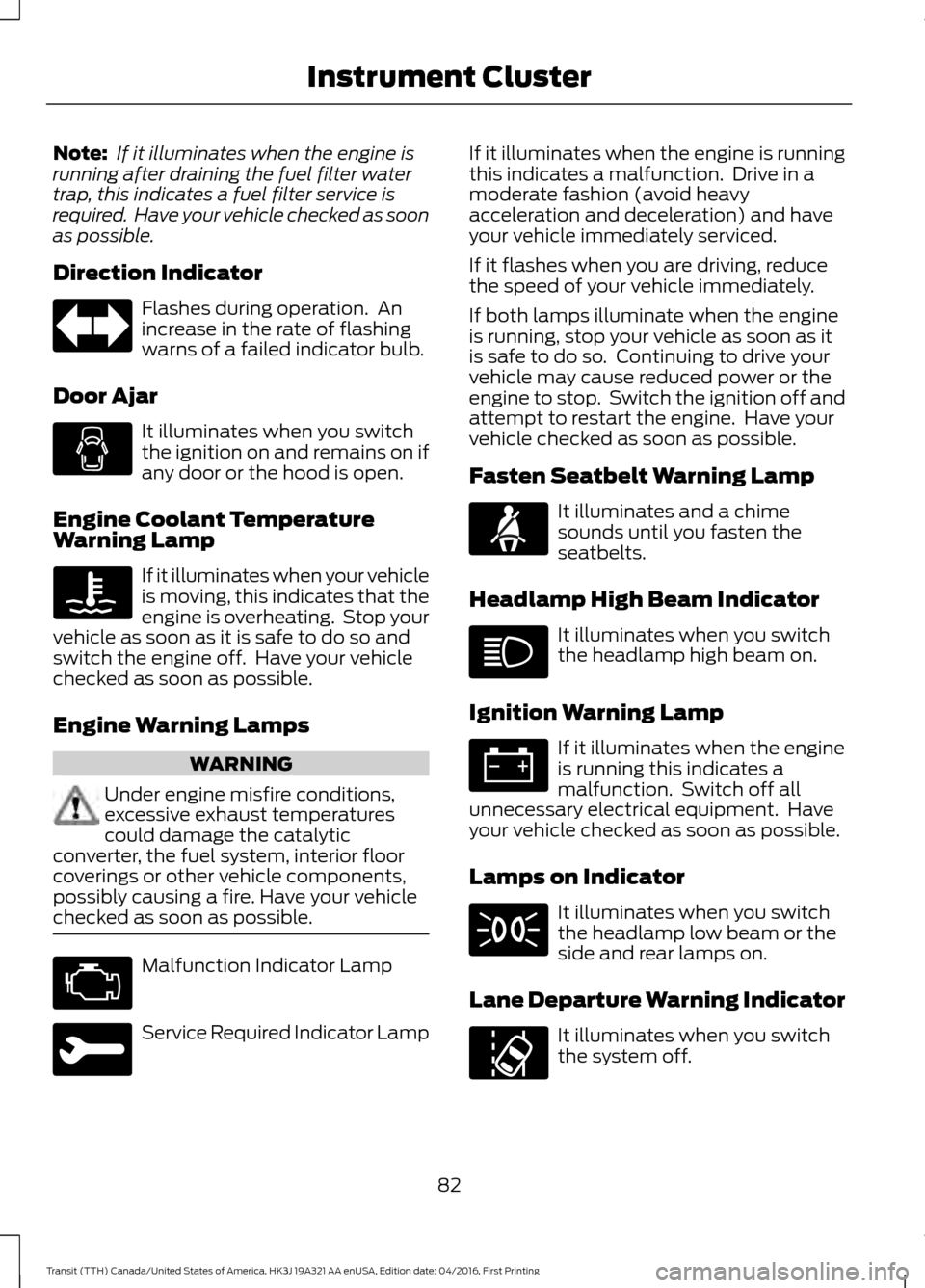
Direction Indicator Flashes during operation. An
increase in the rate of flashing
warns of a failed indicator bulb.
Door Ajar It illuminates when you switch
the ignition on and remains on if
any door or the hood is open.
Engine Coolant Temperature
Warning Lamp If it illuminates when your vehicle
is moving, this indicates that the
engine is overheating. Stop your
vehicle as soon as it is safe to do so and
switch the engine off. Have your vehicle
checked as soon as possible.
Engine Warning Lamps WARNING
Under engine misfire conditions,
excessive exhaust temperatures
could damage the catalytic
converter, the fuel system, interior floor
coverings or other vehicle components,
possibly causing a fire. Have your vehicle
checked as soon as possible. Malfunction Indicator Lamp
Service Required Indicator Lamp If it illuminates when the engine is running
this indicates a malfunction. Drive in a
moderate fashion (avoid heavy
acceleration and deceleration) and have
your vehicle immediately serviced.
If it flashes when you are driving, reduce
the speed of your vehicle immediately.
If both lamps illuminate when the engine
is running, stop your vehicle as soon as it
is safe to do so. Continuing to drive your
vehicle may cause reduced power or the
engine to stop. Switch the ignition off and
attempt to restart the engine. Have your
vehicle checked as soon as possible.
Fasten Seatbelt Warning Lamp
It illuminates and a chime
sounds until you fasten the
seatbelts.
Headlamp High Beam Indicator It illuminates when you switch
the headlamp high beam on.
Ignition Warning Lamp If it illuminates when the engine
is running this indicates a
malfunction. Switch off all
unnecessary electrical equipment. Have
your vehicle checked as soon as possible.
Lamps on Indicator It illuminates when you switch
the headlamp low beam or the
side and rear lamps on.
Lane Departure Warning Indicator It illuminates when you switch
the system off.
82
Transit (TTH) Canada/United States of America, HK3J 19A321 AA enUSA, Edition date: 04/2016, First Printing Instrument Cluster
Page 86 of 484
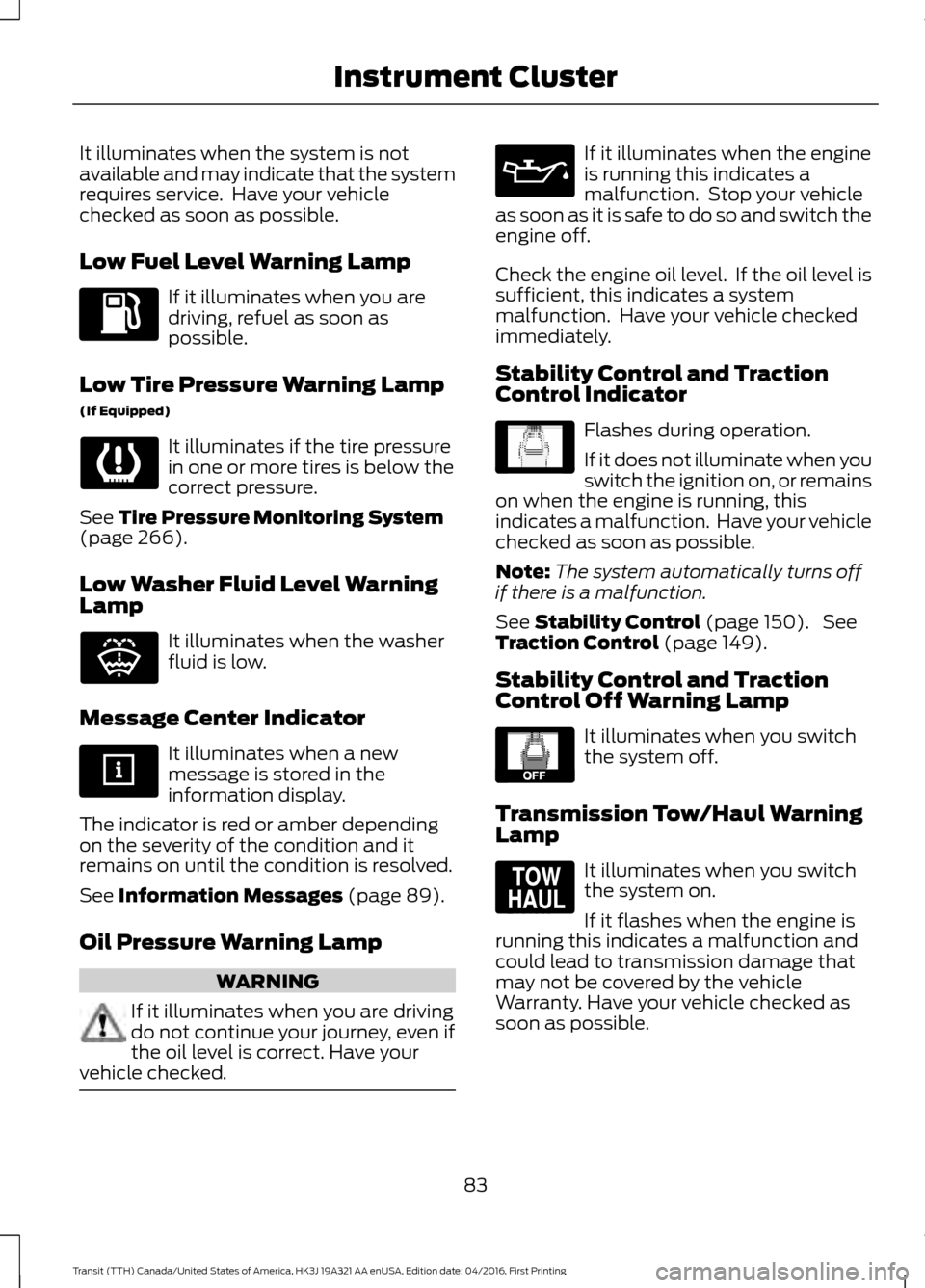
It illuminates when the system is not
available and may indicate that the system
requires service. Have your vehicle
checked as soon as possible.
Low Fuel Level Warning Lamp
If it illuminates when you are
driving, refuel as soon as
possible.
Low Tire Pressure Warning Lamp
(If Equipped) It illuminates if the tire pressure
in one or more tires is below the
correct pressure.
See Tire Pressure Monitoring System
(page 266).
Low Washer Fluid Level Warning
Lamp It illuminates when the washer
fluid is low.
Message Center Indicator It illuminates when a new
message is stored in the
information display.
The indicator is red or amber depending
on the severity of the condition and it
remains on until the condition is resolved.
See
Information Messages (page 89).
Oil Pressure Warning Lamp WARNING
If it illuminates when you are driving
do not continue your journey, even if
the oil level is correct. Have your
vehicle checked. If it illuminates when the engine
is running this indicates a
malfunction. Stop your vehicle
as soon as it is safe to do so and switch the
engine off.
Check the engine oil level. If the oil level is
sufficient, this indicates a system
malfunction. Have your vehicle checked
immediately.
Stability Control and Traction
Control Indicator Flashes during operation.
If it does not illuminate when you
switch the ignition on, or remains
on when the engine is running, this
indicates a malfunction. Have your vehicle
checked as soon as possible.
Note: The system automatically turns off
if there is a malfunction.
See
Stability Control (page 150). See
Traction Control (page 149).
Stability Control and Traction
Control Off Warning Lamp It illuminates when you switch
the system off.
Transmission Tow/Haul Warning
Lamp It illuminates when you switch
the system on.
If it flashes when the engine is
running this indicates a malfunction and
could lead to transmission damage that
may not be covered by the vehicle
Warranty. Have your vehicle checked as
soon as possible.
83
Transit (TTH) Canada/United States of America, HK3J 19A321 AA enUSA, Edition date: 04/2016, First Printing Instrument Cluster E132353 E138639 E130458 E161509
Page 89 of 484
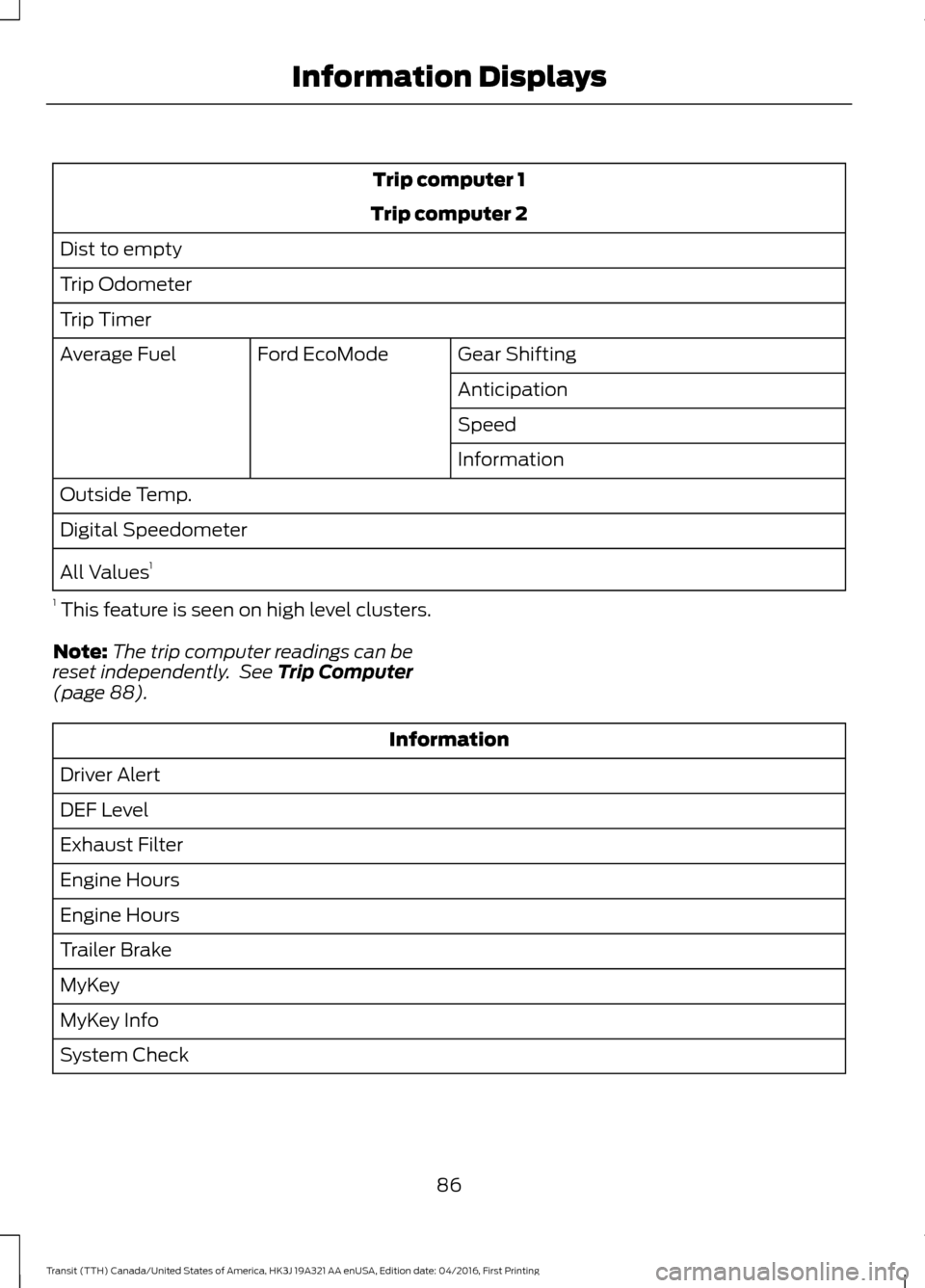
Trip computer 1
Trip computer 2
Dist to empty
Trip Odometer
Trip Timer Gear Shifting
Ford EcoMode
Average Fuel
Anticipation
Speed
Information
Outside Temp.
Digital Speedometer
All Values 1
1 This feature is seen on high level clusters.
Note: The trip computer readings can be
reset independently. See Trip Computer
(page 88). Information
Driver Alert
DEF Level
Exhaust Filter
Engine Hours
Engine Hours
Trailer Brake
MyKey
MyKey Info
System Check
86
Transit (TTH) Canada/United States of America, HK3J 19A321 AA enUSA, Edition date: 04/2016, First Printing Information Displays