fuel FORD TRANSIT 2017 5.G User Guide
[x] Cancel search | Manufacturer: FORD, Model Year: 2017, Model line: TRANSIT, Model: FORD TRANSIT 2017 5.GPages: 484, PDF Size: 11.45 MB
Page 86 of 484
It illuminates when the system is not
available and may indicate that the system
requires service. Have your vehicle
checked as soon as possible.
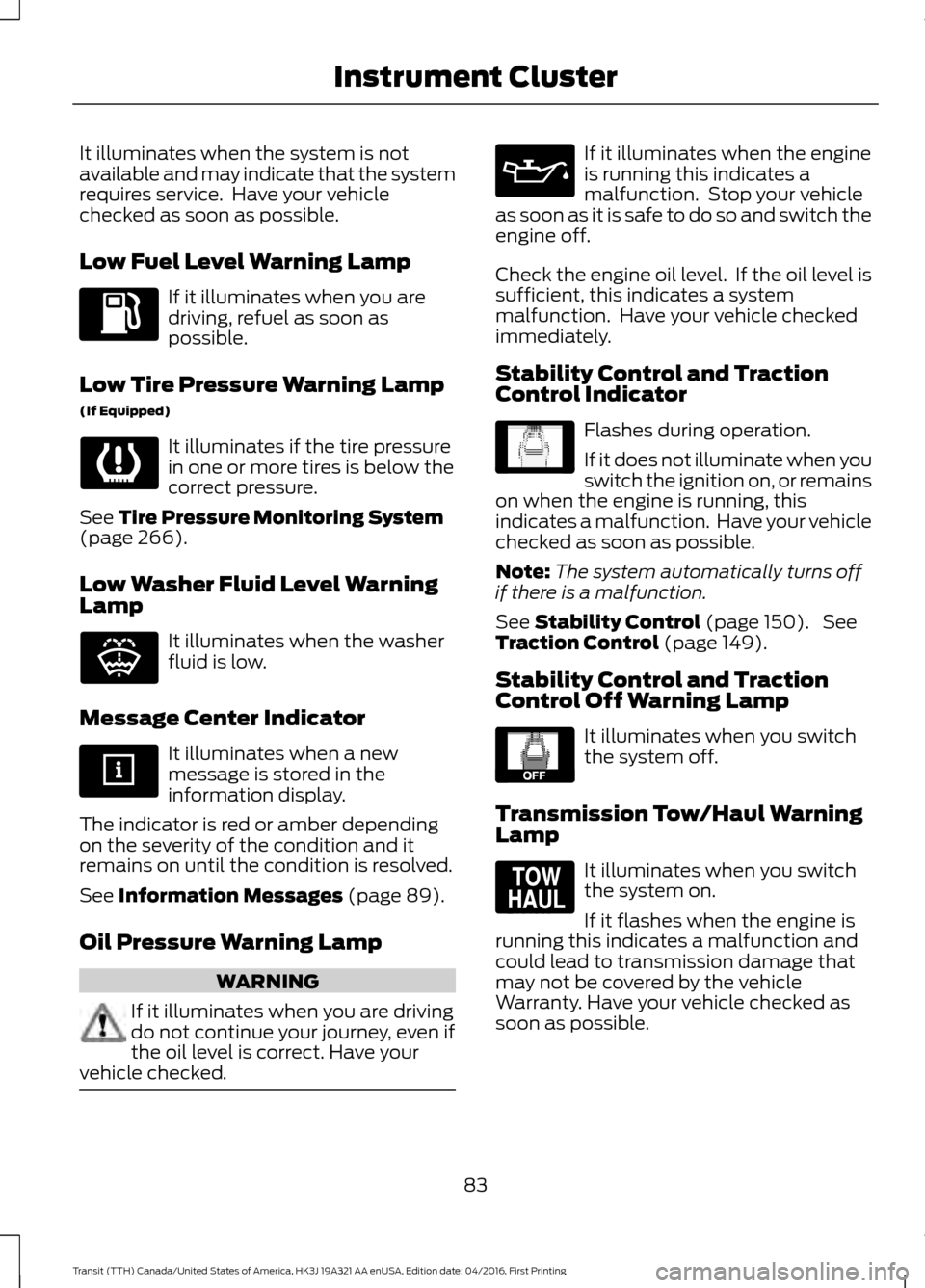
Low Fuel Level Warning Lamp
If it illuminates when you are
driving, refuel as soon as
possible.
Low Tire Pressure Warning Lamp
(If Equipped) It illuminates if the tire pressure
in one or more tires is below the
correct pressure.
See Tire Pressure Monitoring System
(page 266).
Low Washer Fluid Level Warning
Lamp It illuminates when the washer
fluid is low.
Message Center Indicator It illuminates when a new
message is stored in the
information display.
The indicator is red or amber depending
on the severity of the condition and it
remains on until the condition is resolved.
See
Information Messages (page 89).
Oil Pressure Warning Lamp WARNING
If it illuminates when you are driving
do not continue your journey, even if
the oil level is correct. Have your
vehicle checked. If it illuminates when the engine
is running this indicates a
malfunction. Stop your vehicle
as soon as it is safe to do so and switch the
engine off.
Check the engine oil level. If the oil level is
sufficient, this indicates a system
malfunction. Have your vehicle checked
immediately.
Stability Control and Traction
Control Indicator Flashes during operation.
If it does not illuminate when you
switch the ignition on, or remains
on when the engine is running, this
indicates a malfunction. Have your vehicle
checked as soon as possible.
Note: The system automatically turns off
if there is a malfunction.
See
Stability Control (page 150). See
Traction Control (page 149).
Stability Control and Traction
Control Off Warning Lamp It illuminates when you switch
the system off.
Transmission Tow/Haul Warning
Lamp It illuminates when you switch
the system on.
If it flashes when the engine is
running this indicates a malfunction and
could lead to transmission damage that
may not be covered by the vehicle
Warranty. Have your vehicle checked as
soon as possible.
83
Transit (TTH) Canada/United States of America, HK3J 19A321 AA enUSA, Edition date: 04/2016, First Printing Instrument Cluster E132353 E138639 E130458 E161509
Page 89 of 484
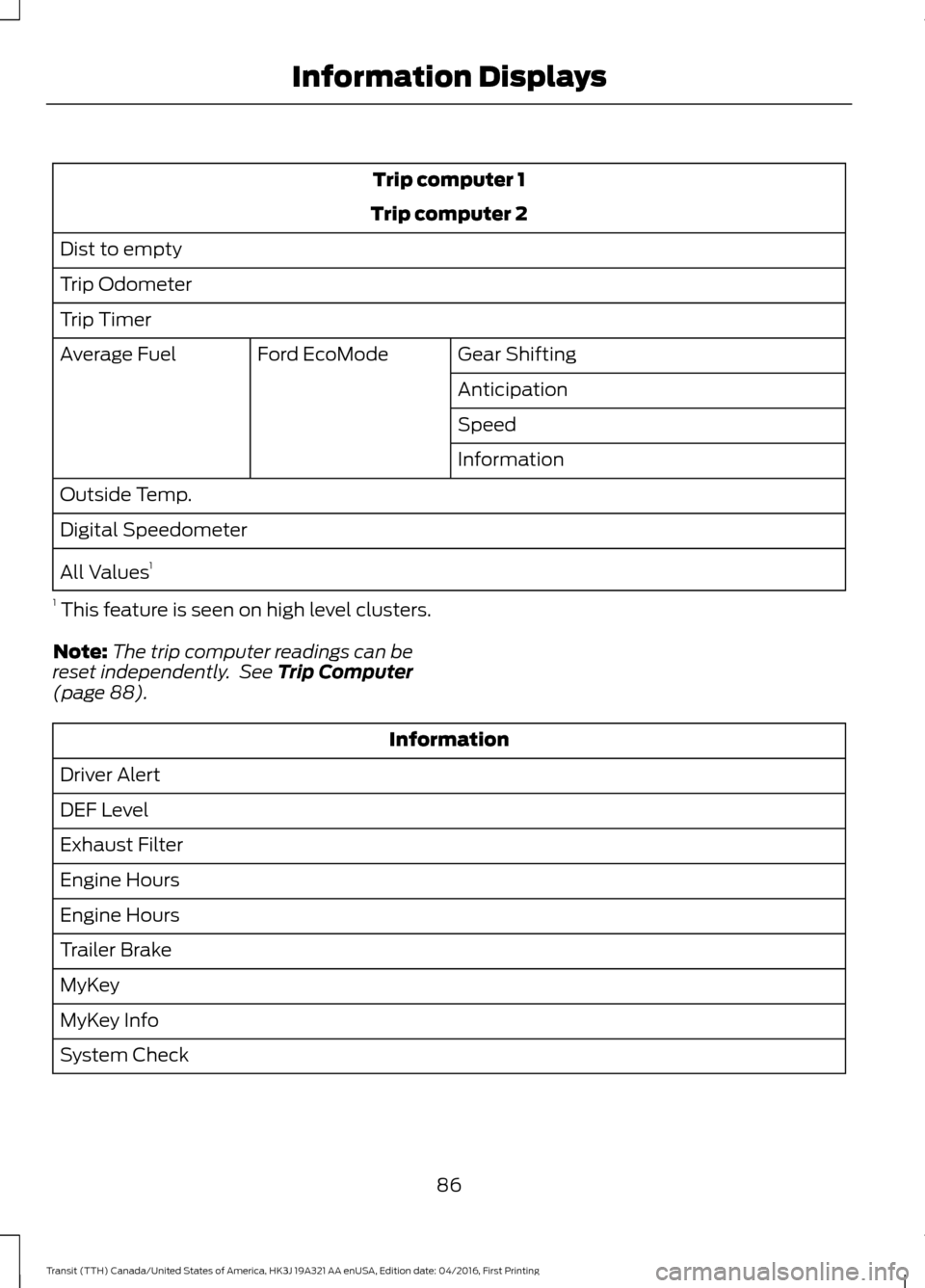
Trip computer 1
Trip computer 2
Dist to empty
Trip Odometer
Trip Timer Gear Shifting
Ford EcoMode
Average Fuel
Anticipation
Speed
Information
Outside Temp.
Digital Speedometer
All Values 1
1 This feature is seen on high level clusters.
Note: The trip computer readings can be
reset independently. See Trip Computer
(page 88). Information
Driver Alert
DEF Level
Exhaust Filter
Engine Hours
Engine Hours
Trailer Brake
MyKey
MyKey Info
System Check
86
Transit (TTH) Canada/United States of America, HK3J 19A321 AA enUSA, Edition date: 04/2016, First Printing Information Displays
Page 91 of 484
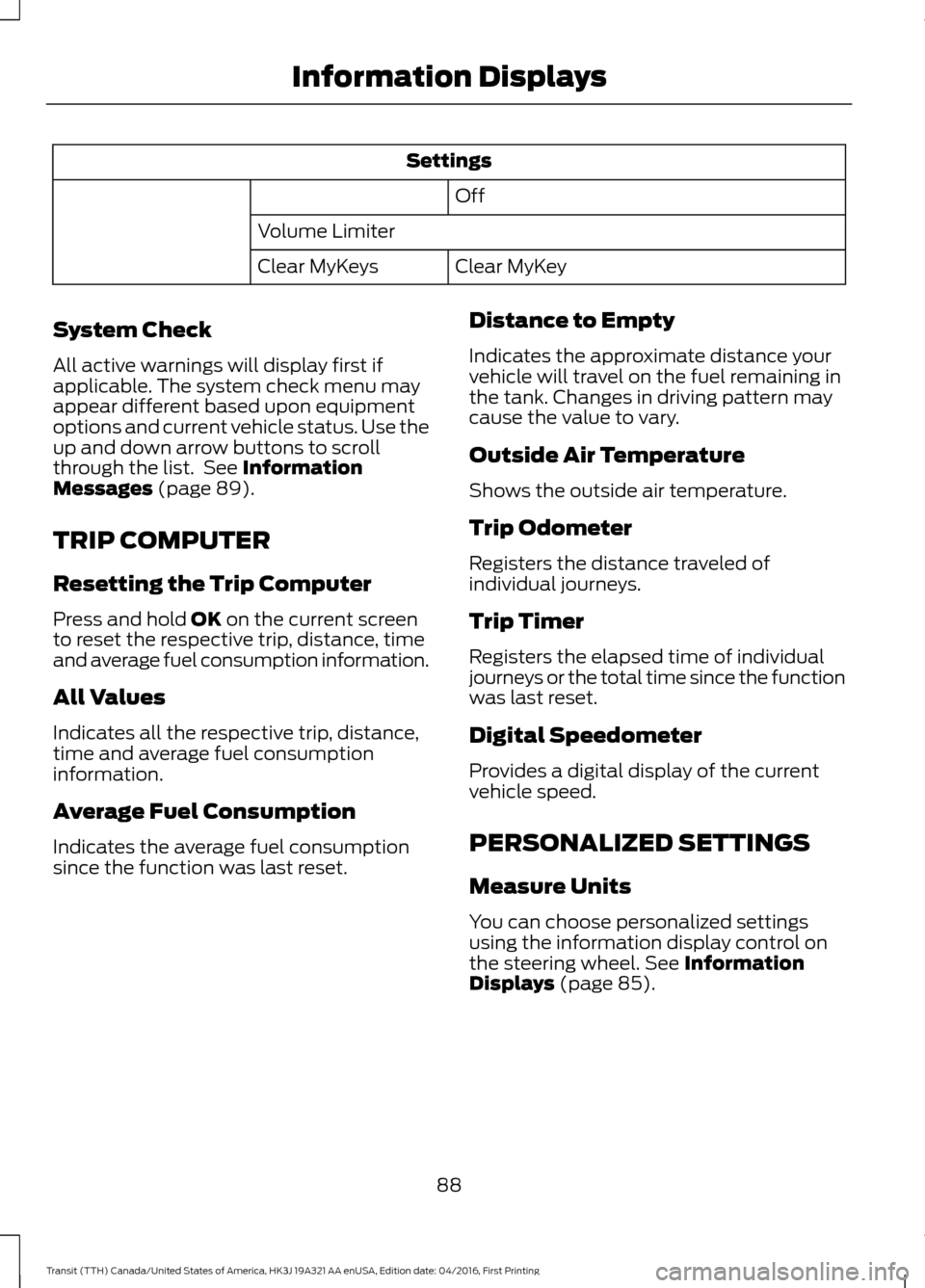
Settings
Off
Volume Limiter Clear MyKey
Clear MyKeys
System Check
All active warnings will display first if
applicable. The system check menu may
appear different based upon equipment
options and current vehicle status. Use the
up and down arrow buttons to scroll
through the list. See Information
Messages (page 89).
TRIP COMPUTER
Resetting the Trip Computer
Press and hold
OK on the current screen
to reset the respective trip, distance, time
and average fuel consumption information.
All Values
Indicates all the respective trip, distance,
time and average fuel consumption
information.
Average Fuel Consumption
Indicates the average fuel consumption
since the function was last reset. Distance to Empty
Indicates the approximate distance your
vehicle will travel on the fuel remaining in
the tank. Changes in driving pattern may
cause the value to vary.
Outside Air Temperature
Shows the outside air temperature.
Trip Odometer
Registers the distance traveled of
individual journeys.
Trip Timer
Registers the elapsed time of individual
journeys or the total time since the function
was last reset.
Digital Speedometer
Provides a digital display of the current
vehicle speed.
PERSONALIZED SETTINGS
Measure Units
You can choose personalized settings
using the information display control on
the steering wheel.
See Information
Displays (page 85).
88
Transit (TTH) Canada/United States of America, HK3J 19A321 AA enUSA, Edition date: 04/2016, First Printing Information Displays
Page 92 of 484
To swap between imperial and metric units, scroll to:
Action and Description
Message
Press the OK button.
Display
Choose your applicable setting. Press the
OK button.
Measure unit
Swapping between imperial and metric units will affect the
following displays:
•Average fuel consumption.
• Distance to empty.
• Odometer.
• Outside temperature units.
• Trip odometer.
• Digital Speedometer.
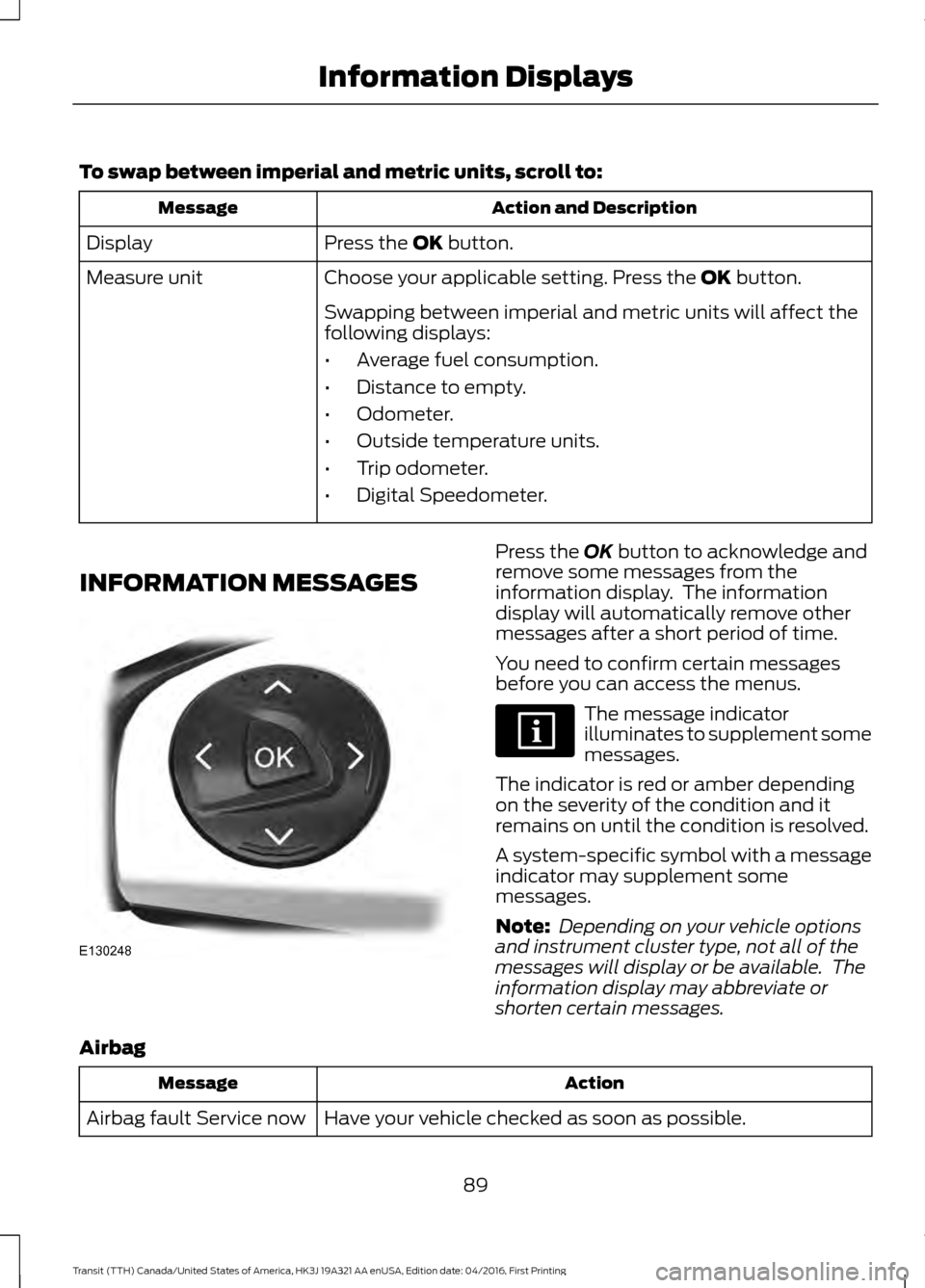
INFORMATION MESSAGES Press the
OK button to acknowledge and
remove some messages from the
information display. The information
display will automatically remove other
messages after a short period of time.
You need to confirm certain messages
before you can access the menus. The message indicator
illuminates to supplement some
messages.
The indicator is red or amber depending
on the severity of the condition and it
remains on until the condition is resolved.
A system-specific symbol with a message
indicator may supplement some
messages.
Note: Depending on your vehicle options
and instrument cluster type, not all of the
messages will display or be available. The
information display may abbreviate or
shorten certain messages.
Airbag Action
Message
Have your vehicle checked as soon as possible.
Airbag fault Service now
89
Transit (TTH) Canada/United States of America, HK3J 19A321 AA enUSA, Edition date: 04/2016, First Printing Information DisplaysE130248
Page 95 of 484
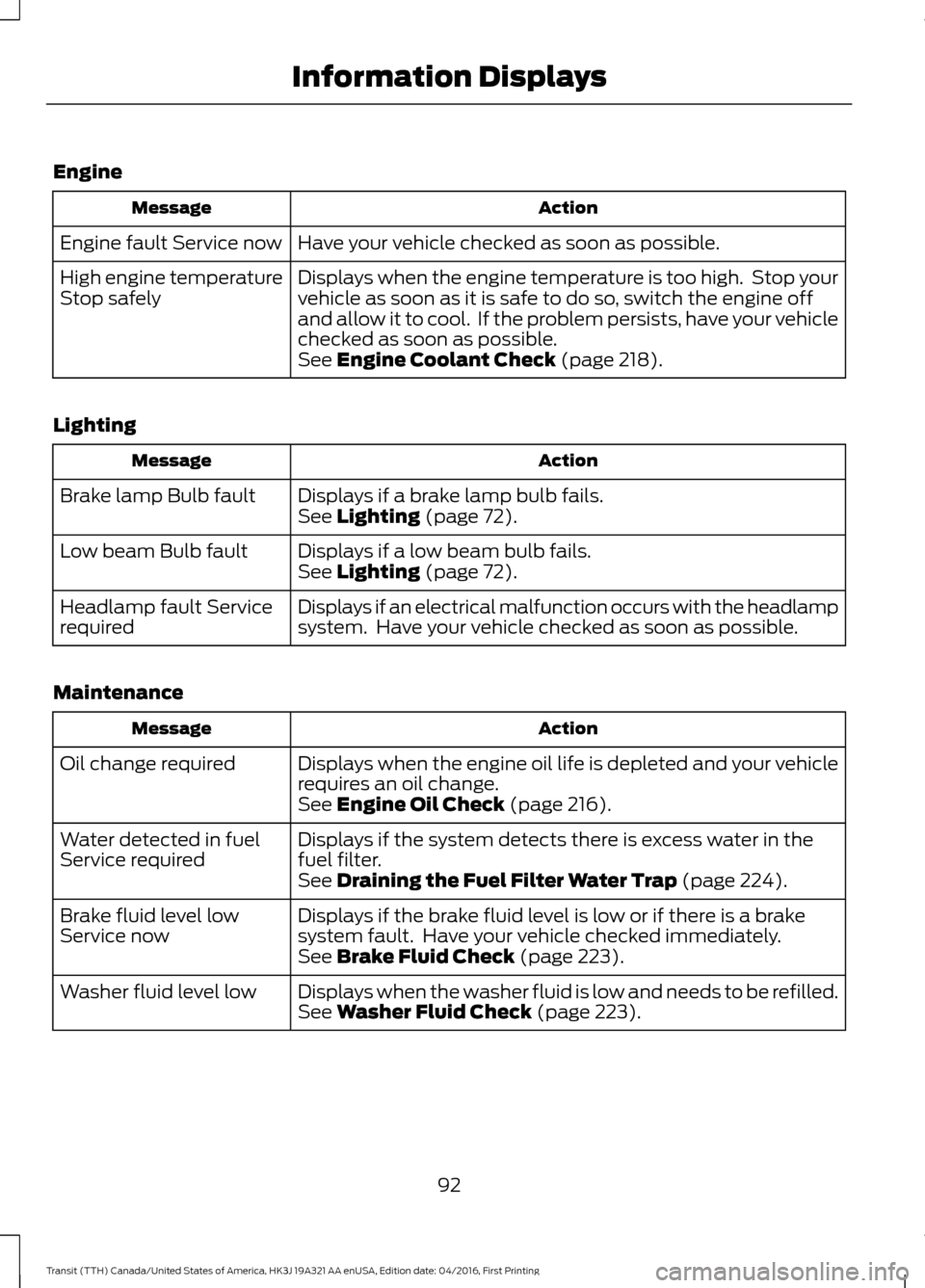
Engine
Action
Message
Have your vehicle checked as soon as possible.
Engine fault Service now
Displays when the engine temperature is too high. Stop your
vehicle as soon as it is safe to do so, switch the engine off
and allow it to cool. If the problem persists, have your vehicle
checked as soon as possible.
High engine temperature
Stop safely
See Engine Coolant Check (page 218).
Lighting Action
Message
Displays if a brake lamp bulb fails.
Brake lamp Bulb fault
See
Lighting (page 72).
Displays if a low beam bulb fails.
Low beam Bulb fault
See
Lighting (page 72).
Displays if an electrical malfunction occurs with the headlamp
system. Have your vehicle checked as soon as possible.
Headlamp fault Service
required
Maintenance Action
Message
Displays when the engine oil life is depleted and your vehicle
requires an oil change.
Oil change required
See
Engine Oil Check (page 216).
Displays if the system detects there is excess water in the
fuel filter.
Water detected in fuel
Service required
See
Draining the Fuel Filter Water Trap (page 224).
Displays if the brake fluid level is low or if there is a brake
system fault. Have your vehicle checked immediately.
Brake fluid level low
Service now
See
Brake Fluid Check (page 223).
Displays when the washer fluid is low and needs to be refilled.
Washer fluid level low
See
Washer Fluid Check (page 223).
92
Transit (TTH) Canada/United States of America, HK3J 19A321 AA enUSA, Edition date: 04/2016, First Printing Information Displays
Page 101 of 484
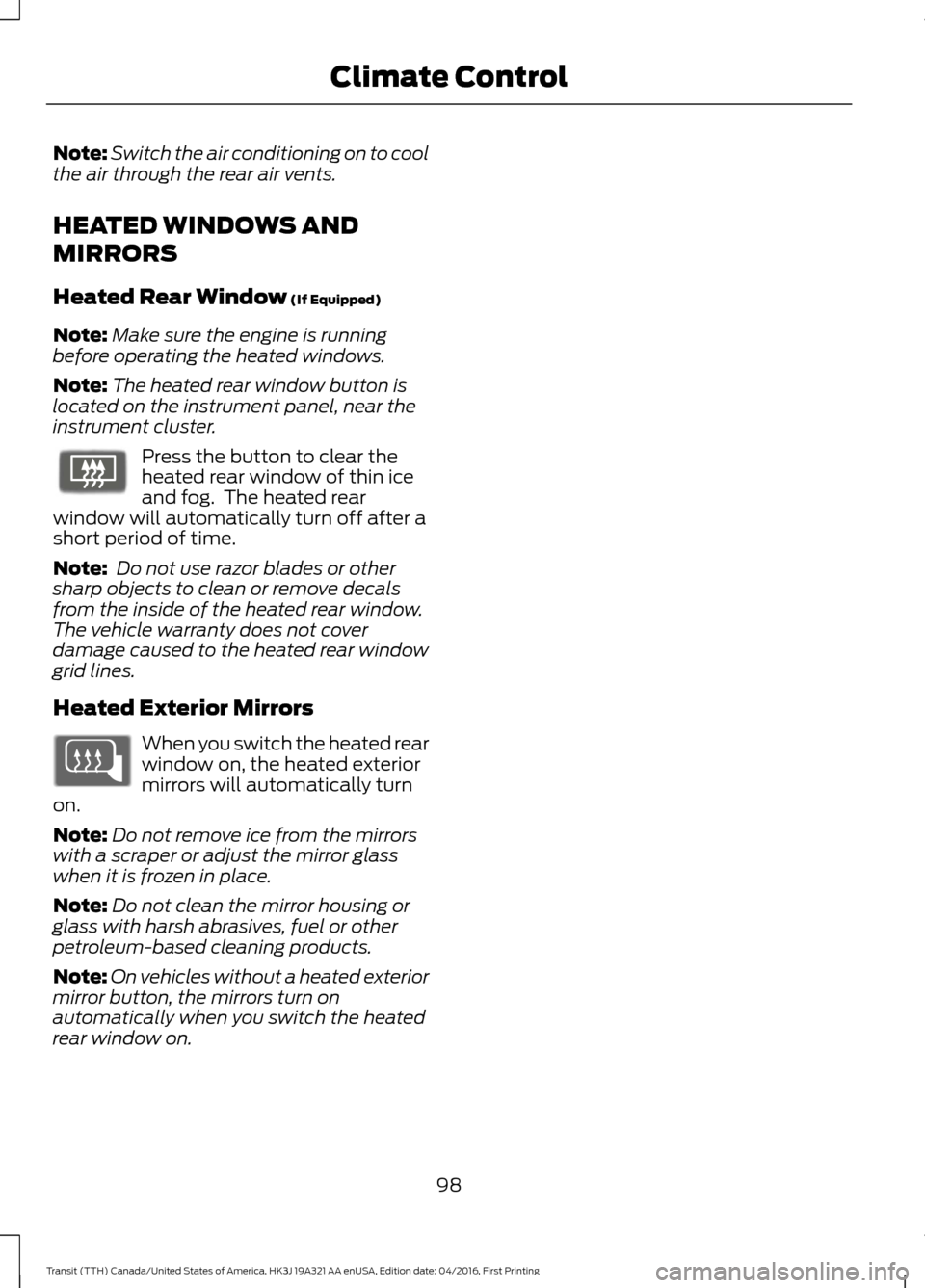
Note:
Switch the air conditioning on to cool
the air through the rear air vents.
HEATED WINDOWS AND
MIRRORS
Heated Rear Window (If Equipped)
Note: Make sure the engine is running
before operating the heated windows.
Note: The heated rear window button is
located on the instrument panel, near the
instrument cluster. Press the button to clear the
heated rear window of thin ice
and fog. The heated rear
window will automatically turn off after a
short period of time.
Note: Do not use razor blades or other
sharp objects to clean or remove decals
from the inside of the heated rear window.
The vehicle warranty does not cover
damage caused to the heated rear window
grid lines.
Heated Exterior Mirrors When you switch the heated rear
window on, the heated exterior
mirrors will automatically turn
on.
Note: Do not remove ice from the mirrors
with a scraper or adjust the mirror glass
when it is frozen in place.
Note: Do not clean the mirror housing or
glass with harsh abrasives, fuel or other
petroleum-based cleaning products.
Note: On vehicles without a heated exterior
mirror button, the mirrors turn on
automatically when you switch the heated
rear window on.
98
Transit (TTH) Canada/United States of America, HK3J 19A321 AA enUSA, Edition date: 04/2016, First Printing Climate ControlE72507
Page 116 of 484
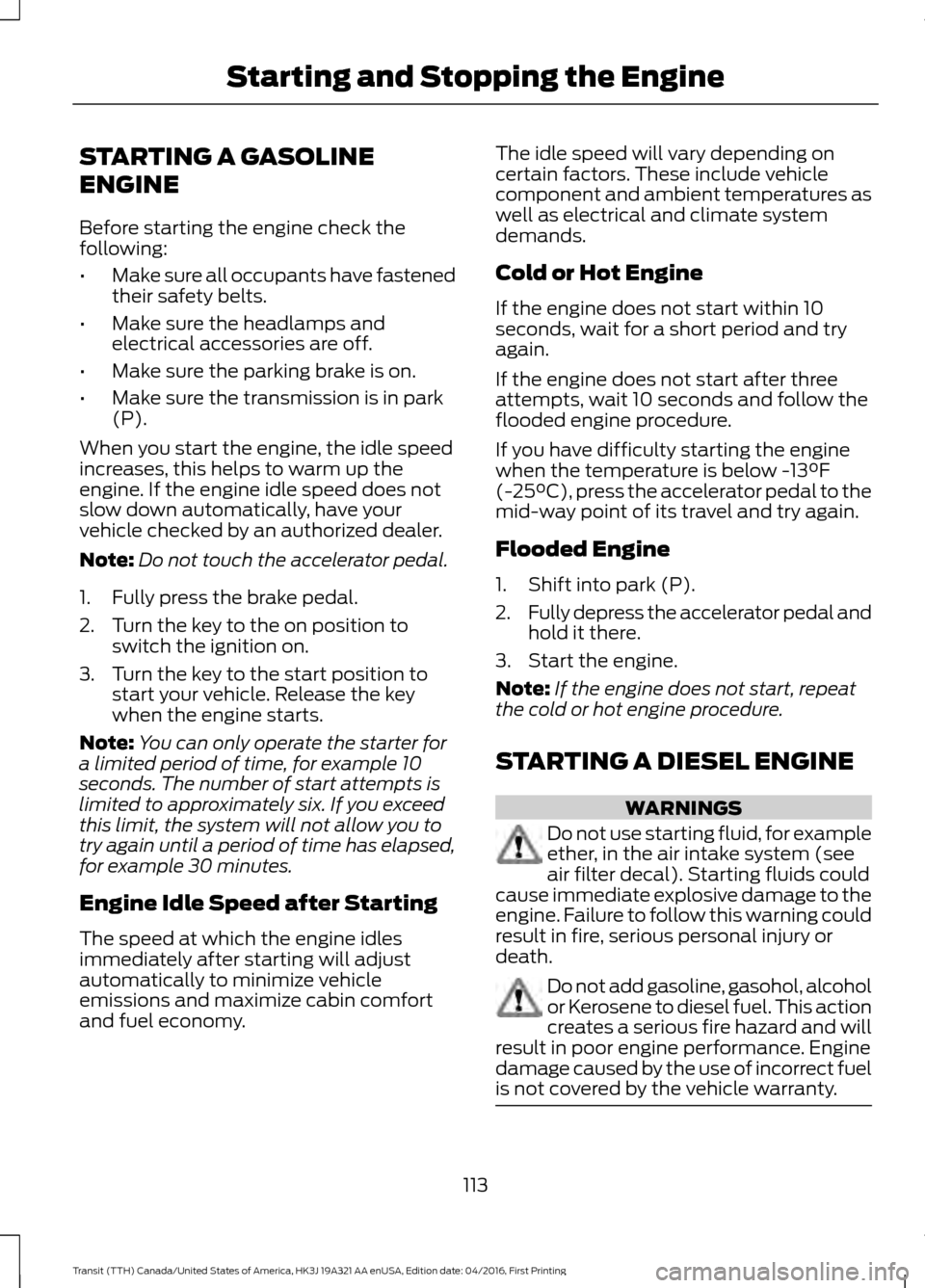
STARTING A GASOLINE
ENGINE
Before starting the engine check the
following:
•
Make sure all occupants have fastened
their safety belts.
• Make sure the headlamps and
electrical accessories are off.
• Make sure the parking brake is on.
• Make sure the transmission is in park
(P).
When you start the engine, the idle speed
increases, this helps to warm up the
engine. If the engine idle speed does not
slow down automatically, have your
vehicle checked by an authorized dealer.
Note: Do not touch the accelerator pedal.
1. Fully press the brake pedal.
2. Turn the key to the on position to switch the ignition on.
3. Turn the key to the start position to start your vehicle. Release the key
when the engine starts.
Note: You can only operate the starter for
a limited period of time, for example 10
seconds. The number of start attempts is
limited to approximately six. If you exceed
this limit, the system will not allow you to
try again until a period of time has elapsed,
for example 30 minutes.
Engine Idle Speed after Starting
The speed at which the engine idles
immediately after starting will adjust
automatically to minimize vehicle
emissions and maximize cabin comfort
and fuel economy. The idle speed will vary depending on
certain factors. These include vehicle
component and ambient temperatures as
well as electrical and climate system
demands.
Cold or Hot Engine
If the engine does not start within 10
seconds, wait for a short period and try
again.
If the engine does not start after three
attempts, wait 10 seconds and follow the
flooded engine procedure.
If you have difficulty starting the engine
when the temperature is below -13°F
(-25°C), press the accelerator pedal to the
mid-way point of its travel and try again.
Flooded Engine
1. Shift into park (P).
2. Fully depress the accelerator pedal and
hold it there.
3. Start the engine.
Note: If the engine does not start, repeat
the cold or hot engine procedure.
STARTING A DIESEL ENGINE WARNINGS
Do not use starting fluid, for example
ether, in the air intake system (see
air filter decal). Starting fluids could
cause immediate explosive damage to the
engine. Failure to follow this warning could
result in fire, serious personal injury or
death. Do not add gasoline, gasohol, alcohol
or Kerosene to diesel fuel. This action
creates a serious fire hazard and will
result in poor engine performance. Engine
damage caused by the use of incorrect fuel
is not covered by the vehicle warranty. 113
Transit (TTH) Canada/United States of America, HK3J 19A321 AA enUSA, Edition date: 04/2016, First Printing Starting and Stopping the Engine
Page 118 of 484
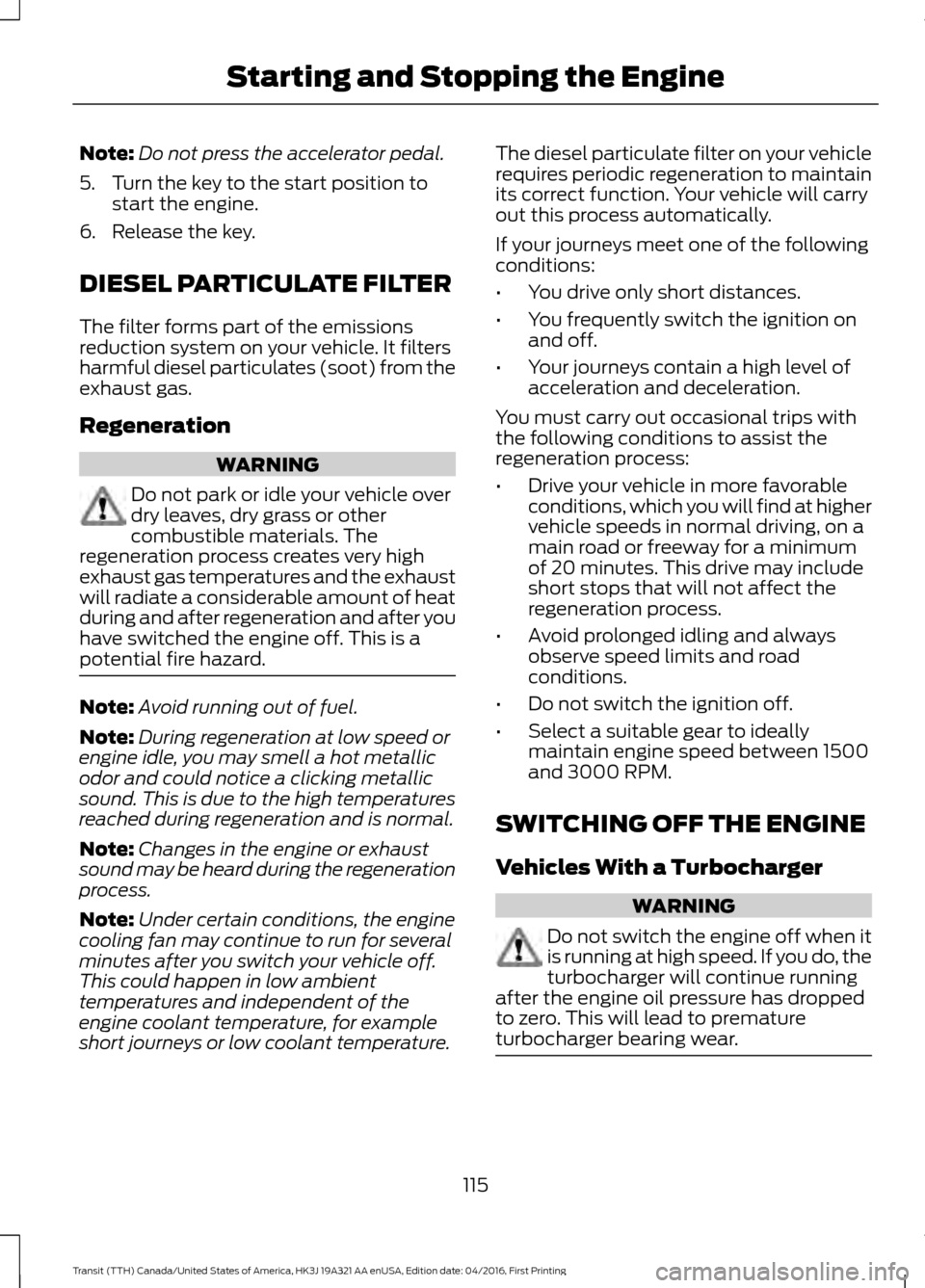
Note:
Do not press the accelerator pedal.
5. Turn the key to the start position to start the engine.
6. Release the key.
DIESEL PARTICULATE FILTER
The filter forms part of the emissions
reduction system on your vehicle. It filters
harmful diesel particulates (soot) from the
exhaust gas.
Regeneration WARNING
Do not park or idle your vehicle over
dry leaves, dry grass or other
combustible materials. The
regeneration process creates very high
exhaust gas temperatures and the exhaust
will radiate a considerable amount of heat
during and after regeneration and after you
have switched the engine off. This is a
potential fire hazard. Note:
Avoid running out of fuel.
Note: During regeneration at low speed or
engine idle, you may smell a hot metallic
odor and could notice a clicking metallic
sound. This is due to the high temperatures
reached during regeneration and is normal.
Note: Changes in the engine or exhaust
sound may be heard during the regeneration
process.
Note: Under certain conditions, the engine
cooling fan may continue to run for several
minutes after you switch your vehicle off.
This could happen in low ambient
temperatures and independent of the
engine coolant temperature, for example
short journeys or low coolant temperature. The diesel particulate filter on your vehicle
requires periodic regeneration to maintain
its correct function. Your vehicle will carry
out this process automatically.
If your journeys meet one of the following
conditions:
•
You drive only short distances.
• You frequently switch the ignition on
and off.
• Your journeys contain a high level of
acceleration and deceleration.
You must carry out occasional trips with
the following conditions to assist the
regeneration process:
• Drive your vehicle in more favorable
conditions, which you will find at higher
vehicle speeds in normal driving, on a
main road or freeway for a minimum
of 20 minutes. This drive may include
short stops that will not affect the
regeneration process.
• Avoid prolonged idling and always
observe speed limits and road
conditions.
• Do not switch the ignition off.
• Select a suitable gear to ideally
maintain engine speed between 1500
and 3000 RPM.
SWITCHING OFF THE ENGINE
Vehicles With a Turbocharger WARNING
Do not switch the engine off when it
is running at high speed. If you do, the
turbocharger will continue running
after the engine oil pressure has dropped
to zero. This will lead to premature
turbocharger bearing wear. 115
Transit (TTH) Canada/United States of America, HK3J 19A321 AA enUSA, Edition date: 04/2016, First Printing Starting and Stopping the Engine
Page 120 of 484
SAFETY PRECAUTIONS
WARNINGS
Do not overfill the fuel tank. The
pressure in an overfilled tank may
cause leakage and lead to fuel spray
and fire. The fuel system may be under
pressure. If you hear a hissing sound
near the fuel filler inlet, do not refuel
until the sound stops. Otherwise, fuel may
spray out, which could cause serious
personal injury. Fuels can cause serious injury or
death if misused or mishandled.
Flow of fuel through a fuel pump
nozzle can produce static electricity.
This can cause a fire if you are filling
an ungrounded fuel container. Fuel may contain benzene, which is
a cancer-causing agent.
When refueling always shut the
engine off and never allow sparks or
open flames near the fuel tank filler
valve. Never smoke or use a cell phone
while refueling. Fuel vapor is extremely
hazardous under certain conditions. Avoid
inhaling excess fumes. Observe the following guidelines when
handling automotive fuel:
•
Extinguish all smoking materials and
any open flames before refueling your
vehicle.
• Always turn off the vehicle before
refueling. •
Automotive fuels can be harmful or
fatal if swallowed. Fuel such as
gasoline is highly toxic and if
swallowed can cause death or
permanent injury. If fuel is swallowed,
call a physician immediately, even if no
symptoms are immediately apparent.
The toxic effects of fuel may not be
visible for hours.
• Avoid inhaling fuel vapors. Inhaling too
much fuel vapor of any kind can lead
to eye and respiratory tract irritation.
In severe cases, excessive or prolonged
breathing of fuel vapor can cause
serious illness and permanent injury.
• Avoid getting fuel liquid in your eyes. If
fuel is splashed in the eyes, remove
contact lenses (if worn), flush with
water for 15 minutes and seek medical
attention. Failure to seek proper
medical attention could lead to
permanent injury.
• Fuels can also be harmful if absorbed
through the skin. If fuel is splashed on
the skin, clothing or both, promptly
remove contaminated clothing and
wash skin thoroughly with soap and
water. Repeated or prolonged skin
contact with fuel liquid or vapor causes
skin irritation.
• Be particularly careful if you are taking
Antabuse or other forms of Disulfiram
for the treatment of alcoholism.
Breathing gasoline vapors could cause
an adverse reaction, serious personal
injury or sickness. If fuel is splashed on
the skin, wash the affected areas
immediately with plenty of soap and
water. Consult a physician immediately
if you experience any adverse reactions.
117
Transit (TTH) Canada/United States of America, HK3J 19A321 AA enUSA, Edition date: 04/2016, First Printing Fuel and Refueling
Page 121 of 484
FUEL QUALITY - GASOLINE
Choosing the Right Fuel
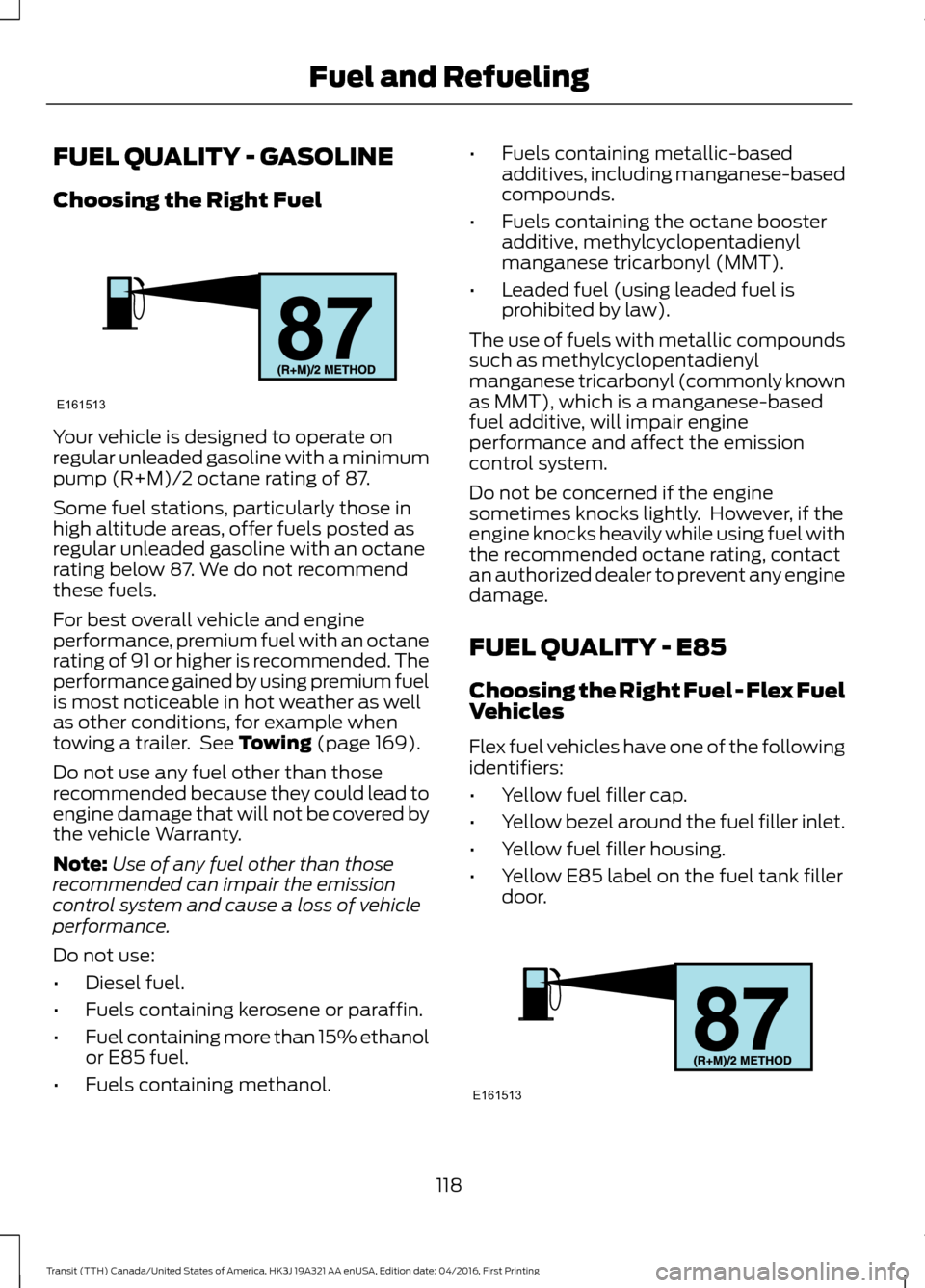
Your vehicle is designed to operate on
regular unleaded gasoline with a minimum
pump (R+M)/2 octane rating of 87.
Some fuel stations, particularly those in
high altitude areas, offer fuels posted as
regular unleaded gasoline with an octane
rating below 87. We do not recommend
these fuels.
For best overall vehicle and engine
performance, premium fuel with an octane
rating of 91 or higher is recommended. The
performance gained by using premium fuel
is most noticeable in hot weather as well
as other conditions, for example when
towing a trailer. See Towing (page 169).
Do not use any fuel other than those
recommended because they could lead to
engine damage that will not be covered by
the vehicle Warranty.
Note: Use of any fuel other than those
recommended can impair the emission
control system and cause a loss of vehicle
performance.
Do not use:
• Diesel fuel.
• Fuels containing kerosene or paraffin.
• Fuel containing more than 15% ethanol
or E85 fuel.
• Fuels containing methanol. •
Fuels containing metallic-based
additives, including manganese-based
compounds.
• Fuels containing the octane booster
additive, methylcyclopentadienyl
manganese tricarbonyl (MMT).
• Leaded fuel (using leaded fuel is
prohibited by law).
The use of fuels with metallic compounds
such as methylcyclopentadienyl
manganese tricarbonyl (commonly known
as MMT), which is a manganese-based
fuel additive, will impair engine
performance and affect the emission
control system.
Do not be concerned if the engine
sometimes knocks lightly. However, if the
engine knocks heavily while using fuel with
the recommended octane rating, contact
an authorized dealer to prevent any engine
damage.
FUEL QUALITY - E85
Choosing the Right Fuel - Flex Fuel
Vehicles
Flex fuel vehicles have one of the following
identifiers:
• Yellow fuel filler cap.
• Yellow bezel around the fuel filler inlet.
• Yellow fuel filler housing.
• Yellow E85 label on the fuel tank filler
door. 118
Transit (TTH) Canada/United States of America, HK3J 19A321 AA enUSA, Edition date: 04/2016, First Printing Fuel and RefuelingE161513 E161513