reset FORD TRANSIT 2017 5.G User Guide
[x] Cancel search | Manufacturer: FORD, Model Year: 2017, Model line: TRANSIT, Model: FORD TRANSIT 2017 5.GPages: 484, PDF Size: 11.45 MB
Page 91 of 484
Settings
Off
Volume Limiter Clear MyKey
Clear MyKeys
System Check
All active warnings will display first if
applicable. The system check menu may
appear different based upon equipment
options and current vehicle status. Use the
up and down arrow buttons to scroll
through the list. See Information
Messages (page 89).
TRIP COMPUTER
Resetting the Trip Computer
Press and hold
OK on the current screen
to reset the respective trip, distance, time
and average fuel consumption information.
All Values
Indicates all the respective trip, distance,
time and average fuel consumption
information.
Average Fuel Consumption
Indicates the average fuel consumption
since the function was last reset. Distance to Empty
Indicates the approximate distance your
vehicle will travel on the fuel remaining in
the tank. Changes in driving pattern may
cause the value to vary.
Outside Air Temperature
Shows the outside air temperature.
Trip Odometer
Registers the distance traveled of
individual journeys.
Trip Timer
Registers the elapsed time of individual
journeys or the total time since the function
was last reset.
Digital Speedometer
Provides a digital display of the current
vehicle speed.
PERSONALIZED SETTINGS
Measure Units
You can choose personalized settings
using the information display control on
the steering wheel.
See Information
Displays (page 85).
88
Transit (TTH) Canada/United States of America, HK3J 19A321 AA enUSA, Edition date: 04/2016, First Printing Information Displays
Page 112 of 484
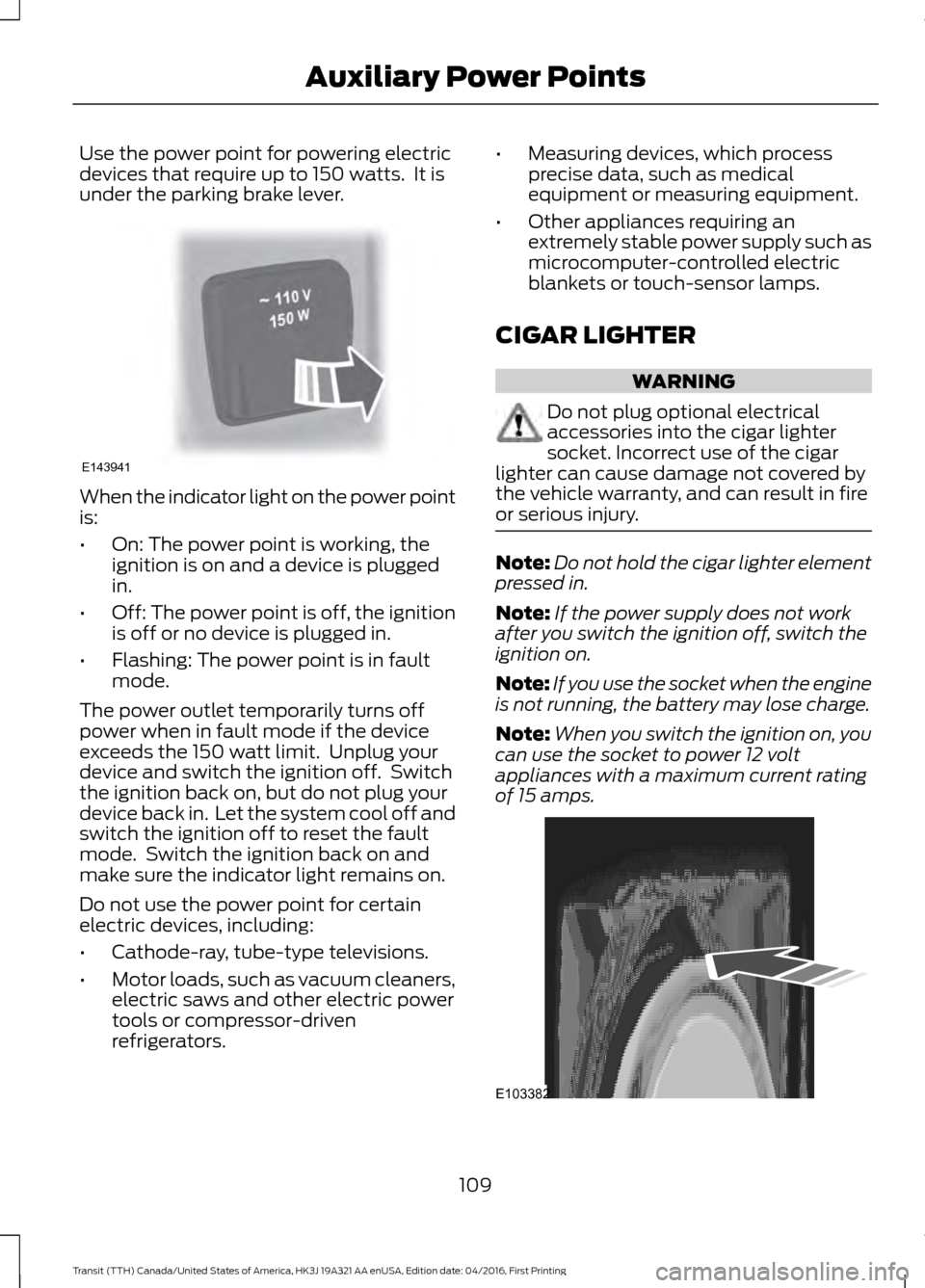
Use the power point for powering electric
devices that require up to 150 watts. It is
under the parking brake lever.
When the indicator light on the power point
is:
•
On: The power point is working, the
ignition is on and a device is plugged
in.
• Off: The power point is off, the ignition
is off or no device is plugged in.
• Flashing: The power point is in fault
mode.
The power outlet temporarily turns off
power when in fault mode if the device
exceeds the 150 watt limit. Unplug your
device and switch the ignition off. Switch
the ignition back on, but do not plug your
device back in. Let the system cool off and
switch the ignition off to reset the fault
mode. Switch the ignition back on and
make sure the indicator light remains on.
Do not use the power point for certain
electric devices, including:
• Cathode-ray, tube-type televisions.
• Motor loads, such as vacuum cleaners,
electric saws and other electric power
tools or compressor-driven
refrigerators. •
Measuring devices, which process
precise data, such as medical
equipment or measuring equipment.
• Other appliances requiring an
extremely stable power supply such as
microcomputer-controlled electric
blankets or touch-sensor lamps.
CIGAR LIGHTER WARNING
Do not plug optional electrical
accessories into the cigar lighter
socket. Incorrect use of the cigar
lighter can cause damage not covered by
the vehicle warranty, and can result in fire
or serious injury. Note:
Do not hold the cigar lighter element
pressed in.
Note: If the power supply does not work
after you switch the ignition off, switch the
ignition on.
Note: If you use the socket when the engine
is not running, the battery may lose charge.
Note: When you switch the ignition on, you
can use the socket to power 12 volt
appliances with a maximum current rating
of 15 amps. 109
Transit (TTH) Canada/United States of America, HK3J 19A321 AA enUSA, Edition date: 04/2016, First Printing Auxiliary Power PointsE143941 E103382
Page 132 of 484
1. Stop your vehicle as soon as safely
possible and shift the transmission into
park (P) or neutral (N).
2. Apply the parking brake and switch the
ignition off.
3. Fully open the fuel tank filler door until
it engages.
4. Check the fuel filler inlet and the area around it for any items or debris that
may be obstructing its movement.
5. Insert a fuel pump nozzle or the fuel filler funnel provided with your vehicle
in to the fuel tank filler pipe opening.
This action should dislodge any debris
that may be preventing the fuel filler
inlet from fully closing.
Note: If this action corrects the problem
the message may not reset immediately. If
the message remains and the service engine
soon warning lamp appears in the
information display, have your vehicle
checked as soon as possible.
FUEL CONSUMPTION
Empty reserve is the amount of fuel
remaining in the tank after the fuel gauge
indicates empty. The amount of usable
fuel in the empty reserve varies and should
not be relied upon to increase driving range. •
The usable capacity of the fuel tank is
the amount of fuel that you can add to
the fuel tank when the fuel gauge
indicates empty, before the first fuel
filler nozzle automatic shutoff event.
• The advertised capacity is equal to the
volumetric difference between actual
fuel fill before the first fuel filler nozzle
automatic shutoff event and the fuel
quantity when the fuel gauge indicates
empty. See Capacities and
Specifications (page 281). It is the
usable capacity minus the empty
reserve.
• Due to the empty reserve, you may be
able to add more fuel than the
advertised capacity of the fuel tank
when the fuel gauge indicates empty.
Filling the Fuel Tank
For consistent results when refueling:
• Turn the ignition off before fueling; an
inaccurate reading results if the engine
is left running.
• Use the same fill rate
(low-medium-high) each time the tank
is filled.
• Allow no more than one automatic
shut-off when refueling.
Results are most accurate when the filling
method is consistent.
Calculating Fuel Economy
Do not measure fuel economy during the
first
1,000 mi (1,600 km) of driving (this is
your engine ’s break-in period). A more
accurate measurement is obtained after
2,000 mi (3,200 km)
to 3,000 mi
(4,800 km). Also, fuel expense, frequency
of fill ups or fuel gauge readings are not
accurate ways to measure fuel economy.
1. Fill the fuel tank completely and record
the initial odometer reading.
129
Transit (TTH) Canada/United States of America, HK3J 19A321 AA enUSA, Edition date: 04/2016, First Printing Fuel and Refueling
Page 163 of 484
The warning system has two stages:
1.
A temporary warning is issued to advise
you to take a rest. This message only
appears for a short time.
2. If you do not rest and the system continues to detect that your driving
deteriorates, it issues a further warning.
This remains in the information display
until you cancel it. See Information
Messages (page 89).
Press
OK on the steering wheel control to
remove the warning.
System Display
When active the system runs automatically
in the background and only issue warnings
if required. You can view the status at any
time using the information display. See
General Information
(page 85).
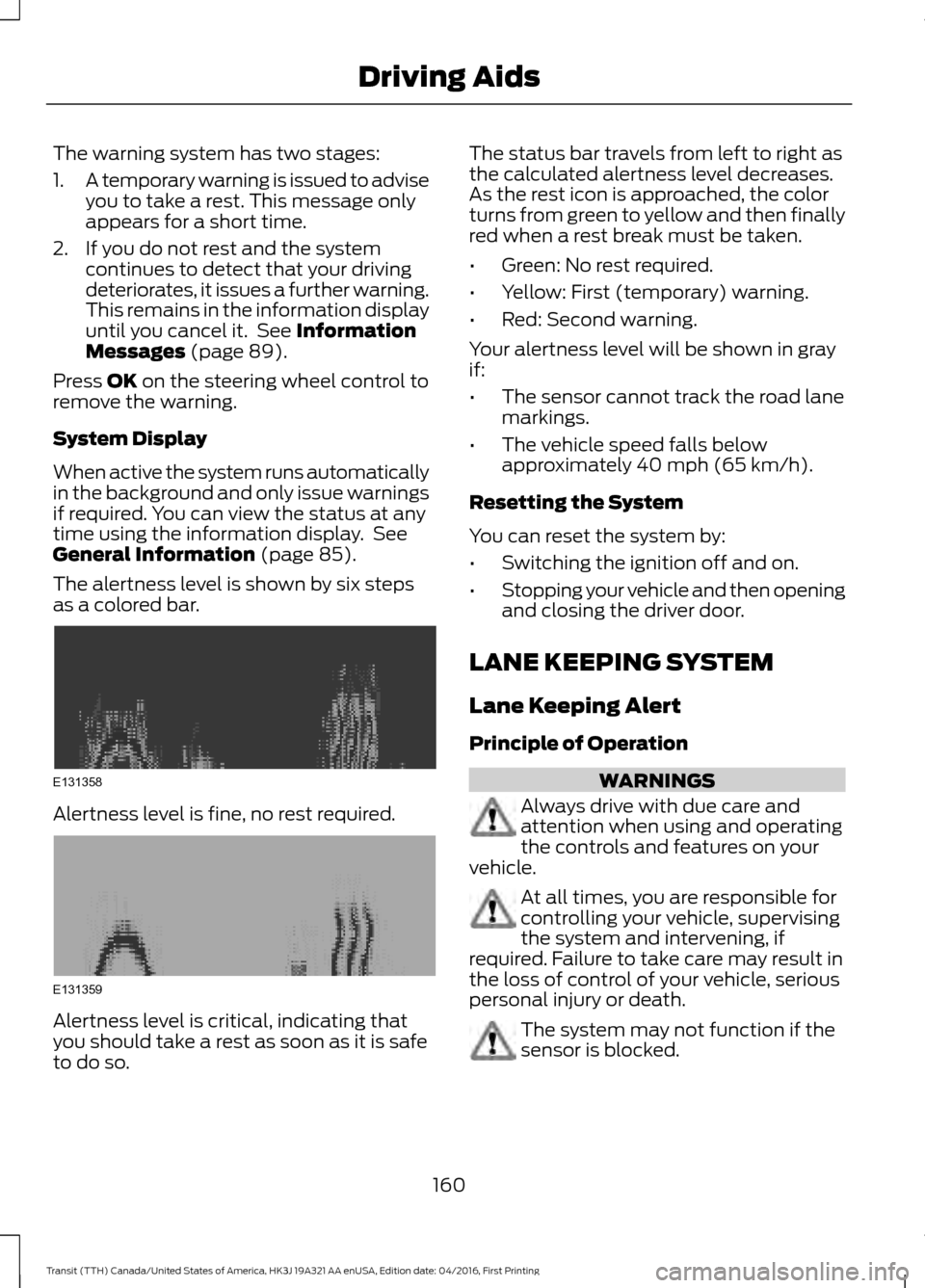
The alertness level is shown by six steps
as a colored bar. Alertness level is fine, no rest required.
Alertness level is critical, indicating that
you should take a rest as soon as it is safe
to do so. The status bar travels from left to right as
the calculated alertness level decreases.
As the rest icon is approached, the color
turns from green to yellow and then finally
red when a rest break must be taken.
•
Green: No rest required.
• Yellow: First (temporary) warning.
• Red: Second warning.
Your alertness level will be shown in gray
if:
• The sensor cannot track the road lane
markings.
• The vehicle speed falls below
approximately
40 mph (65 km/h).
Resetting the System
You can reset the system by:
• Switching the ignition off and on.
• Stopping your vehicle and then opening
and closing the driver door.
LANE KEEPING SYSTEM
Lane Keeping Alert
Principle of Operation WARNINGS
Always drive with due care and
attention when using and operating
the controls and features on your
vehicle. At all times, you are responsible for
controlling your vehicle, supervising
the system and intervening, if
required. Failure to take care may result in
the loss of control of your vehicle, serious
personal injury or death. The system may not function if the
sensor is blocked.
160
Transit (TTH) Canada/United States of America, HK3J 19A321 AA enUSA, Edition date: 04/2016, First Printing Driving AidsE131358 E131359
Page 220 of 484
Adding Engine Oil
WARNINGS
Only add oil when the engine is cold.
If the engine is hot, wait 10 minutes
for the engine to cool down.
Do not remove the filler cap when
the engine is running.
1. Remove the engine oil filler cap.
2. Add engine oil that meets Ford
specifications. See Capacities and
Specifications (page 281).
3. Replace the engine oil filler cap. Turn it until you feel a strong resistance.
Note: Do not add oil further than the
maximum mark. Oil levels above the
maximum mark may cause engine damage.
Note: Soak up any spillage with an
absorbent cloth immediately.
CHANGING THE ENGINE OIL
AND OIL FILTER WARNINGS
Prolonged and repeated skin contact
with mineral oil will result in the
removal of natural fats from the skin,
leading to dryness, irritation and dermatitis.
In addition, used engine oil contains
potentially harmful contaminants, which
may cause skin cancer. If skin contact
occurs, wash the area thoroughly with
soap or skin cleanser and water
immediately. Do not dispose of engine oils or oil
filters in the household refuse or the
public sewage system. Use an
authorized waste disposal facility. Do not remove the oil pan drain plug
when the engine is running. WARNINGS
Do not remove the oil filter when the
engine is running.
1.
Remove the oil pan drain plug and wait
for the oil to drain into a suitable
container.
2. Renew the oil filter.
3. Reinstall the oil pan drain plug.
4. Refill the engine with new oil that meets Ford specifications. See
Capacities and Specifications (page
281).
Note: Do not add oil further than the
maximum mark. Oil levels above the
maximum mark may cause engine damage.
Note: Soak up any spillage with an
absorbent cloth immediately.
5. Reset the Intelligent Oil Life Monitor. See
Oil Change Indicator Reset
(page 218).
Engine Lubrication for Severe
Service Operation
The following conditions define severe
service operation. The Intelligent Oil Life
Monitor will determine engine oil and oil
filter change intervals.
• Frequent or extended idling.
• Frequent low-speed operation at
25 mph (40 km/h)
or less.
• Frequent severe dust condition
operation.
• Frequent off-road operation.
• Sustained ambient temperatures of
-9°F (-23°C)
or below.
• Sustained ambient temperatures of
100°F (38°C)
or above.
• Sustained towing operation above
1,000 mi (1,600 km)
.
217
Transit (TTH) Canada/United States of America, HK3J 19A321 AA enUSA, Edition date: 04/2016, First Printing Maintenance
Page 221 of 484
•
Sustained high-speed driving at Gross
Vehicle Weight Rating (maximum
loaded weight for vehicle operation).
• Sustained use of diesel fuel other than
ultra-low sulfur diesel (ULSD).
OIL CHANGE INDICATOR
RESET
Resetting the Oil Life Monitoring
System
Only reset the oil life monitoring system
after changing the engine oil and oil filter.
1. Switch the ignition on. Do not start the
engine. For vehicles with push-button
start, press and hold the start button
for two seconds without pressing the
brake pedal. Do not start the engine.
2. Press the accelerator and brake pedals
at the same time.
3. Keep the accelerator and brake pedals
fully pressed.
4. After three seconds, a message confirming that the reset is in progress
will be displayed.
5. After 25 seconds, a message confirming that the reset is complete
will be displayed.
6. Release the accelerator and brake pedals.
7. The message confirming that the reset
is complete will no longer be displayed.
8. Switch the ignition off. For vehicles with
push-button start, press the start
button to switch the ignition off.
ENGINE COOLING FAN - E85/
GASOLINE WARNING
Keep your hands and clothing clear
of the engine cooling fan. Under certain conditions, the engine
cooling fan may continue to run for several
minutes after you switch your vehicle off.
ENGINE COOLING FAN -
DIESEL
WARNING
Keep your hands and clothing clear
of the engine cooling fan.
Under certain conditions, the engine
cooling fan may continue to run for several
minutes after you switch your vehicle off.
This could happen in low ambient
temperatures and independent of the
engine coolant temperature, for example
short journeys or low coolant temperature.
See Diesel Particulate Filter (page 115).
ENGINE COOLANT CHECK
WARNINGS
Do not add engine coolant when the
engine is hot. Steam and scalding
liquids released from a hot cooling
system can burn you badly. Also, spilling
coolant on hot engine parts can burn you. Do not put engine coolant in the
windshield washer fluid container. If
sprayed on the windshield, engine
coolant could make it difficult to see
through the windshield. To reduce the risk of personal injury,
make sure the engine is cool before
unscrewing the coolant pressure
relief cap. The cooling system is under
pressure. Steam and hot liquid can come
out forcefully when you loosen the cap
slightly. Do not add coolant further than the
MAX mark.
218
Transit (TTH) Canada/United States of America, HK3J 19A321 AA enUSA, Edition date: 04/2016, First Printing Maintenance
Page 224 of 484
Fail-Safe Cooling
Fail-safe cooling allows you to temporarily
drive your vehicle before any incremental
component damage occurs. The fail-safe
distance depends on ambient
temperature, vehicle load and terrain.
How Fail-Safe Cooling Works
If the engine begins to overheat, the
coolant temperature gauge moves toward
the red zone:
A warning lamp illuminates and
a message may appear in the
information display.
If the engine reaches a preset
over-temperature condition, the engine
automatically switches to alternating
cylinder operation. Each disabled cylinder
acts as an air pump and cools the engine.
When this occurs, your vehicle still
operates, however:
• Engine power is limited.
• The air conditioning system turns off.
Continued operation increases the engine
temperature, causing the engine to
completely shut down. Your steering and
braking effort increases in this situation.
When the engine temperature cools, you
can re-start the engine. Have your vehicle
checked as soon as possible to minimize
engine damage.
When Fail-Safe Mode Is Activated WARNINGS
Fail-safe mode is for use during
emergencies only. Operate your
vehicle in fail-safe mode only as long
as necessary to bring your vehicle to rest
in a safe location and seek immediate
repairs. When in fail-safe mode, your WARNINGS
vehicle will have limited power, will not be
able to maintain high-speed operation, and
may completely shut down without
warning, potentially losing engine power,
power steering assist, and power brake
assist, which may increase the possibility
of a crash resulting in serious injury. Never remove the coolant reservoir
cap when the engine is running or
hot.
Your vehicle has limited engine power
when in the fail-safe mode, drive your
vehicle with caution. Your vehicle does not
maintain high-speed operation and the
engine may operate poorly.
Remember that the engine is capable of
automatically shutting down to prevent
engine damage. In this situation:
1. Pull off the road as soon as safely
possible and switch the engine off.
2. If you are a member of a roadside assistance program, we recommend
that you contact your roadside
assistance service provider.
3. If this is not possible, wait a short period for the engine to cool.
4. Check the coolant level. If the coolant level is at or below the minimum mark,
add prediluted coolant immediately.
5. When the engine temperature cools, you can re-start the engine. Have your
vehicle checked as soon as possible to
minimize engine damage.
Note: Driving your vehicle without repair
increases the chance of engine damage.
221
Transit (TTH) Canada/United States of America, HK3J 19A321 AA enUSA, Edition date: 04/2016, First Printing Maintenance
Page 248 of 484
We engineer and test all motor vehicles
and their components for reliable, regular
driving. Under various conditions,
long-term storage may lead to degraded
engine performance or failure unless you
use specific precautions to preserve engine
components.
General
•
Store all vehicles in a dry, ventilated
place.
• Protect from sunlight, if possible.
• If vehicles are stored outside, they
require regular maintenance to protect
against rust and damage.
Body
• Wash your vehicle thoroughly to
remove dirt, grease, oil, tar or mud from
exterior surfaces, rear-wheel housing
and the underside of front fenders.
• Periodically wash your vehicle if it is
stored in exposed locations.
• Touch-up exposed or primed metal to
prevent rust.
• Cover chrome and stainless steel parts
with a thick coat of auto wax to prevent
discoloration. Re-wax as necessary
when you wash your vehicle.
• Lubricate all hood, door and luggage
compartment hinges and latches with
a light grade oil.
• Cover interior trim to prevent fading.
• Keep all rubber parts free from oil and
solvents. Engine
•
Change the engine oil and filter prior to
storage because used engine oil
contains contaminates which may
cause engine damage.
• Start the engine every 15 days for a
minimum of 15 minutes. Run at fast idle
with the climate controls set to defrost
until the engine reaches normal
operating temperature.
• With your foot on the brake, shift
through all the gears while the engine
is running.
• We recommend that you change the
engine oil before you use your vehicle
again.
Fuel system
• Fill the fuel tank with high-quality fuel
until the first automatic shutoff of the
fuel pump nozzle.
Cooling system
• Protect against freezing temperatures.
• When removing your vehicle from
storage, check coolant fluid level.
Confirm that there are no cooling
system leaks and that fluid is at the
recommended level.
Battery
• Check and recharge as necessary. Keep
connections clean.
• If storing your vehicle for more than 30
days without recharging the battery,
we recommend that you disconnect
the battery cables to maintain battery
charge for quick starting.
Note: It is necessary to reset memory
features if battery cables are disconnected.
245
Transit (TTH) Canada/United States of America, HK3J 19A321 AA enUSA, Edition date: 04/2016, First Printing Vehicle Care
Page 267 of 484
Tire Rotation
WARNING
If the tire label shows
different tire pressures for the
front and rear tires and the vehicle
has a tire pressure monitoring
system, then you need to update
the settings for the system
sensors. Always perform the
system reset procedure after tire
rotation. If you do not reset the
system, it may not provide a low
tire pressure warning when
necessary. See Tire Pressure
Monitoring System (page 266). Rotating the tires at the
recommended interval detailed in
the Scheduled Maintenance
chapter will help the tires wear
more evenly, providing better tire
performance and longer tire life.
Sometimes irregular tire wear can
be corrected by rotating the tires.
Note:
After rotating the tires the
inflation pressure must be checked
and adjusted to the vehicle
requirements.
Note: If the tires show uneven
wear ask an authorized dealer to
check for and correct any wheel
misalignment, tire imbalance or
mechanical problem involved
before tire rotation. Note:
Your vehicle may have a
dissimilar spare wheel and tire
assembly. A dissimilar spare wheel
and tire assembly is defined as a
spare wheel and tire assembly that
is different in brand, size or
appearance from the road tires and
wheels. If you have a dissimilar
spare wheel and tire assembly it is
intended for temporary use only
and should not be used in a tire
rotation.
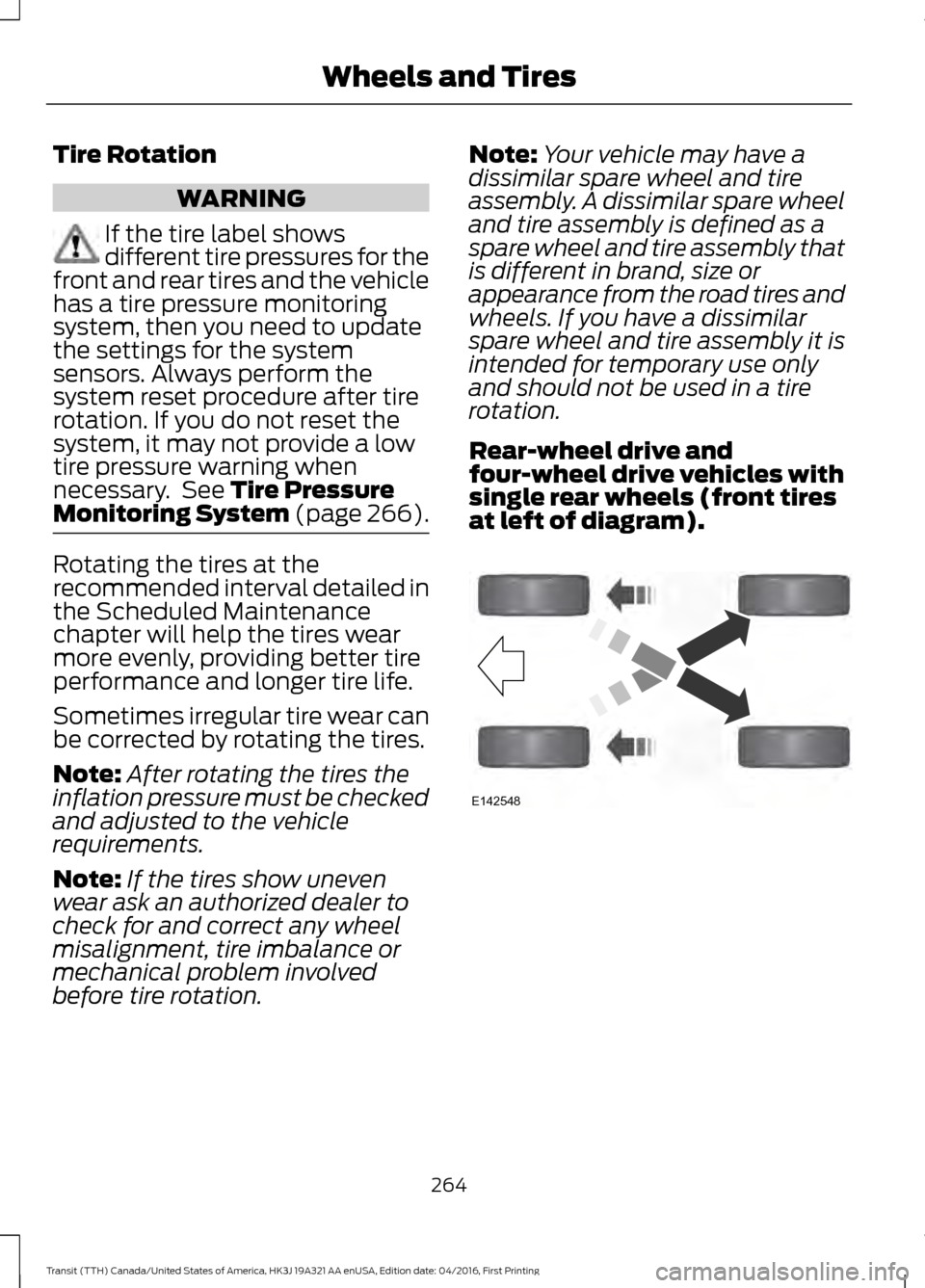
Rear-wheel drive and
four-wheel drive vehicles with
single rear wheels (front tires
at left of diagram). 264
Transit (TTH) Canada/United States of America, HK3J 19A321 AA enUSA, Edition date: 04/2016, First Printing Wheels and TiresE142548
Page 272 of 484
When Inflating the Tires
When inflating the tires (for example; at a
gas station), the system may not respond
immediately to the air added to the tires.
It may take up to two minutes of driving
over 20 mph (32 km/h) for the light to turn
off after you have filled your tires to the
recommended inflation pressure.
How Temperature Affects the Tire
Pressures
While driving in a normal manner, tire
pressures may increase up to 4 psi (0.3
bar) from a cold start situation. If the
vehicle is stationary overnight and the
temperature significantly lower than the
daytime temperature, tire pressures may
decrease up to 3 psi (0.2 bar) for a drop of
30°F (17°C) in ambient temperature. This
lower pressure value will be detected by
the system as being significantly lower
than the correct inflation pressure and the
warning light will illuminate.
If the warning light is on:
•
Check each tire to verify that none are
flat.
• If one or more tires are flat, repair as
necessary.
• Check the tire pressures and Inflate all
the tires to the correct pressure.
Tire Pressure Monitoring System
Reset Procedure
Carry out the tire pressure monitoring
system reset procedure after:
• Every tire rotation.
• Each tire replacement, only when the
sensor stays the same and does not
change.
Note: The tire pressure monitoring system
reset procedure will not work with a new
sensor until an authorized dealer programs
the new sensor. Overview WARNING
To determine the required
pressure(s) for your vehicle, see the
Safety Compliance Certification
Label (on the door hinge pillar, door-latch
post or the door edge that meets the
door-latch post, next to the driver seat) or
the Tire Label on the B-Pillar or the edge
of the driver door. To maintain your vehicle
’s load carrying
capability, this vehicle requires different
tire pressures in the front tires compared
to the rear tires. The system on your vehicle
is designed to illuminate the warning light
at different pressures for the front and rear
tires.
The tires need to be periodically rotated
to provide consistent performance and
maximum tire life, the system needs to
know when the tires have been rotated to
determine which set of tires are on the
front and rear axles. With this information,
the system can detect and correctly warn
of low tire pressures.
System Reset Tips:
• To reduce the chance of interference
from another vehicle, the system reset
procedure should be carried out at
least three feet (one meter) away from
another Ford vehicle undergoing the
system reset procedure.
• Do not wait more than two minutes
between resetting each tire sensor or
the system will time-out and the entire
procedure will have to be repeated on
all four wheels. A double horn chirp
indicates the need to repeat the
procedure.
269
Transit (TTH) Canada/United States of America, HK3J 19A321 AA enUSA, Edition date: 04/2016, First Printing Wheels and Tires