eco mode FORD TRANSIT 2017 5.G Owner's Guide
[x] Cancel search | Manufacturer: FORD, Model Year: 2017, Model line: TRANSIT, Model: FORD TRANSIT 2017 5.GPages: 484, PDF Size: 11.45 MB
Page 393 of 484
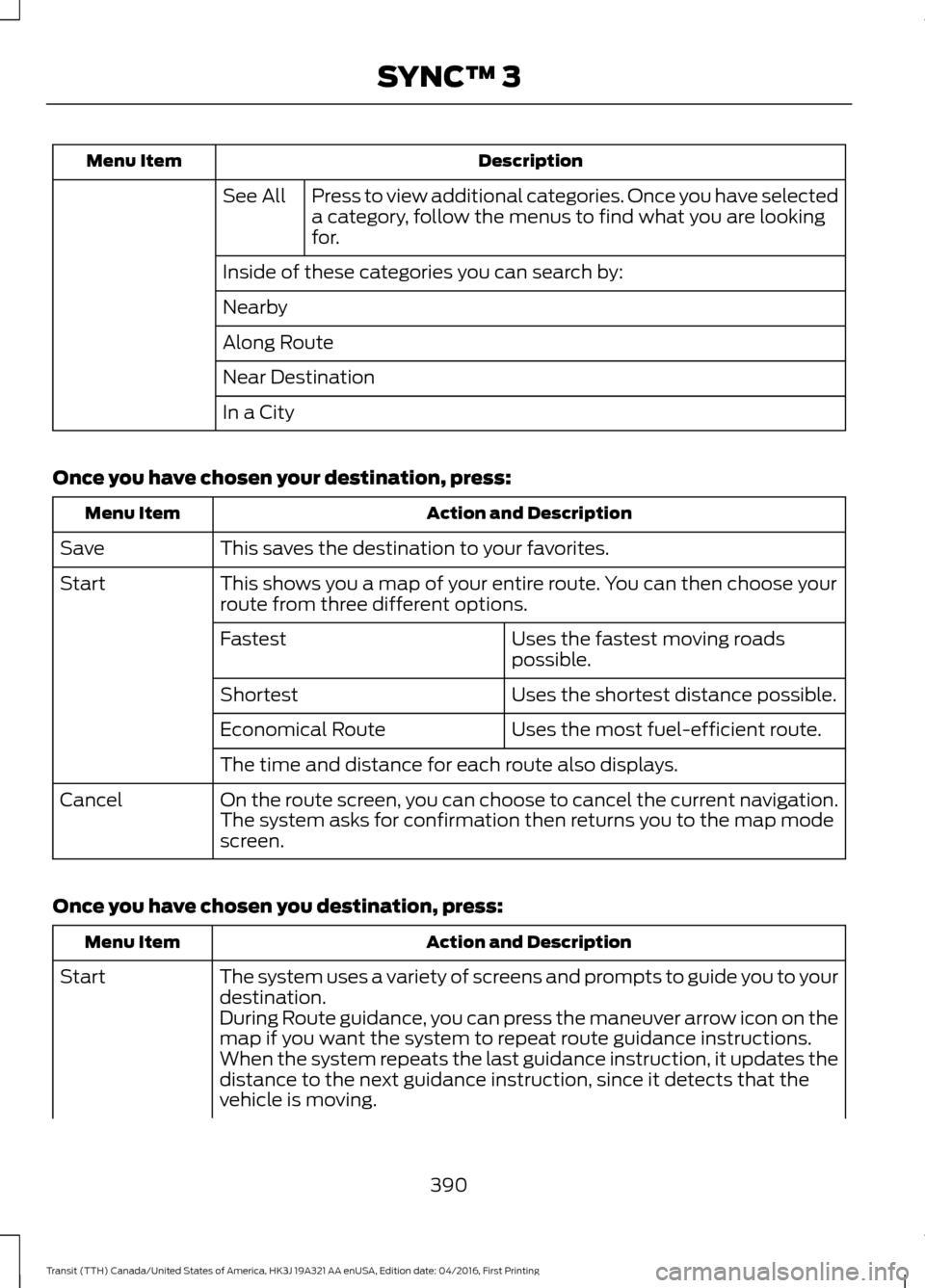
Description
Menu Item
Press to view additional categories. Once you have selected
a category, follow the menus to find what you are looking
for.
See All
Inside of these categories you can search by:
Nearby
Along Route
Near Destination
In a City
Once you have chosen your destination, press: Action and Description
Menu Item
This saves the destination to your favorites.
Save
This shows you a map of your entire route. You can then choose your
route from three different options.
Start
Uses the fastest moving roads
possible.
Fastest
Uses the shortest distance possible.
Shortest
Uses the most fuel-efficient route.
Economical Route
The time and distance for each route also displays.
On the route screen, you can choose to cancel the current navigation.
The system asks for confirmation then returns you to the map mode
screen.
Cancel
Once you have chosen you destination, press: Action and Description
Menu Item
The system uses a variety of screens and prompts to guide you to your
destination.
Start
During Route guidance, you can press the maneuver arrow icon on the
map if you want the system to repeat route guidance instructions.
When the system repeats the last guidance instruction, it updates the
distance to the next guidance instruction, since it detects that the
vehicle is moving.
390
Transit (TTH) Canada/United States of America, HK3J 19A321 AA enUSA, Edition date: 04/2016, First Printing SYNC™ 3
Page 397 of 484
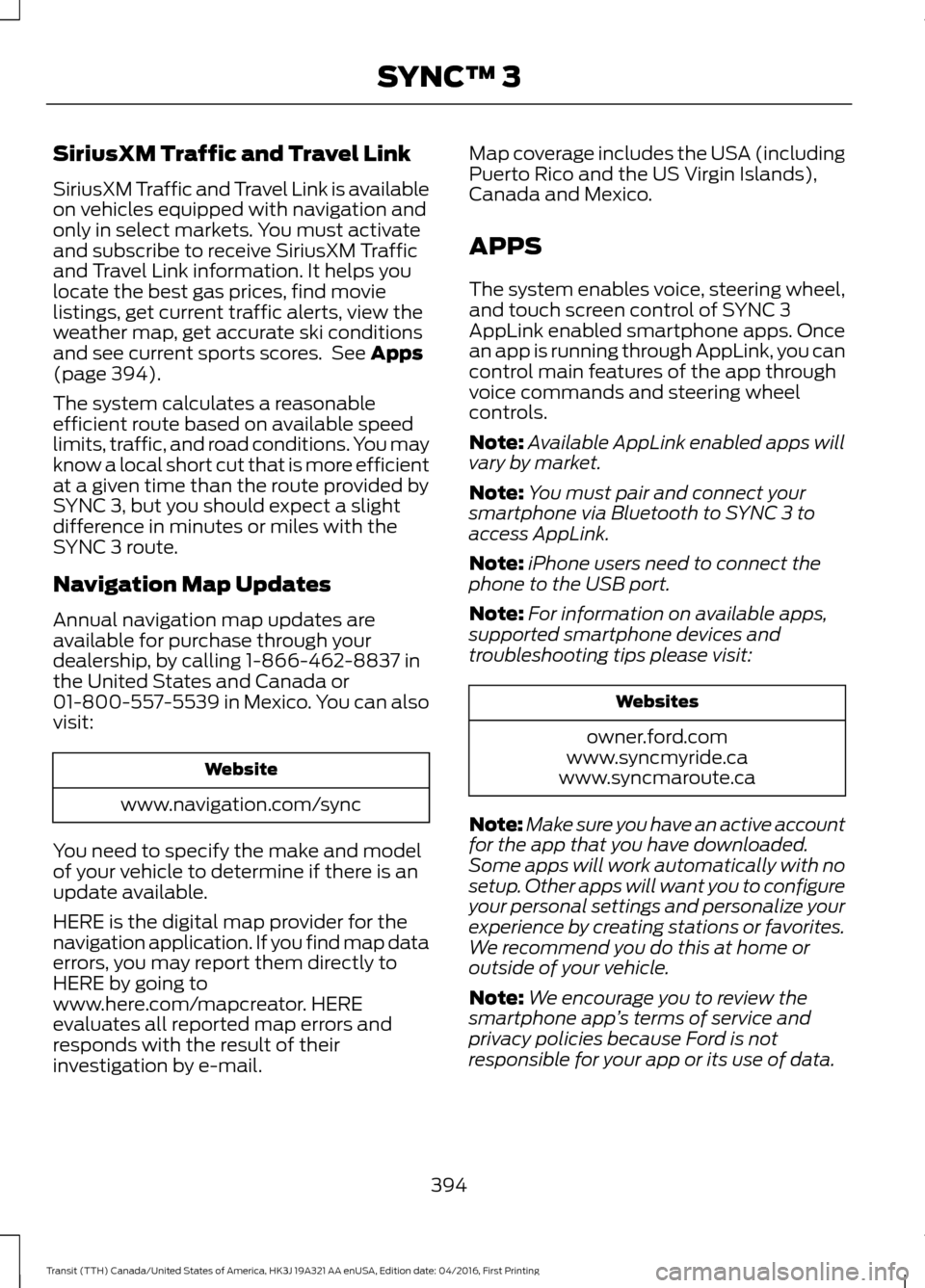
SiriusXM Traffic and Travel Link
SiriusXM Traffic and Travel Link is available
on vehicles equipped with navigation and
only in select markets. You must activate
and subscribe to receive SiriusXM Traffic
and Travel Link information. It helps you
locate the best gas prices, find movie
listings, get current traffic alerts, view the
weather map, get accurate ski conditions
and see current sports scores. See Apps
(page 394).
The system calculates a reasonable
efficient route based on available speed
limits, traffic, and road conditions. You may
know a local short cut that is more efficient
at a given time than the route provided by
SYNC 3, but you should expect a slight
difference in minutes or miles with the
SYNC 3 route.
Navigation Map Updates
Annual navigation map updates are
available for purchase through your
dealership, by calling 1-866-462-8837 in
the United States and Canada or
01-800-557-5539 in Mexico. You can also
visit: Website
www.navigation.com/sync
You need to specify the make and model
of your vehicle to determine if there is an
update available.
HERE is the digital map provider for the
navigation application. If you find map data
errors, you may report them directly to
HERE by going to
www.here.com/mapcreator. HERE
evaluates all reported map errors and
responds with the result of their
investigation by e-mail. Map coverage includes the USA (including
Puerto Rico and the US Virgin Islands),
Canada and Mexico.
APPS
The system enables voice, steering wheel,
and touch screen control of SYNC 3
AppLink enabled smartphone apps. Once
an app is running through AppLink, you can
control main features of the app through
voice commands and steering wheel
controls.
Note:
Available AppLink enabled apps will
vary by market.
Note: You must pair and connect your
smartphone via Bluetooth to SYNC 3 to
access AppLink.
Note: iPhone users need to connect the
phone to the USB port.
Note: For information on available apps,
supported smartphone devices and
troubleshooting tips please visit: Websites
owner.ford.com
www.syncmyride.ca
www.syncmaroute.ca
Note: Make sure you have an active account
for the app that you have downloaded.
Some apps will work automatically with no
setup. Other apps will want you to configure
your personal settings and personalize your
experience by creating stations or favorites.
We recommend you do this at home or
outside of your vehicle.
Note: We encourage you to review the
smartphone app ’s terms of service and
privacy policies because Ford is not
responsible for your app or its use of data.
394
Transit (TTH) Canada/United States of America, HK3J 19A321 AA enUSA, Edition date: 04/2016, First Printing SYNC™ 3
Page 412 of 484
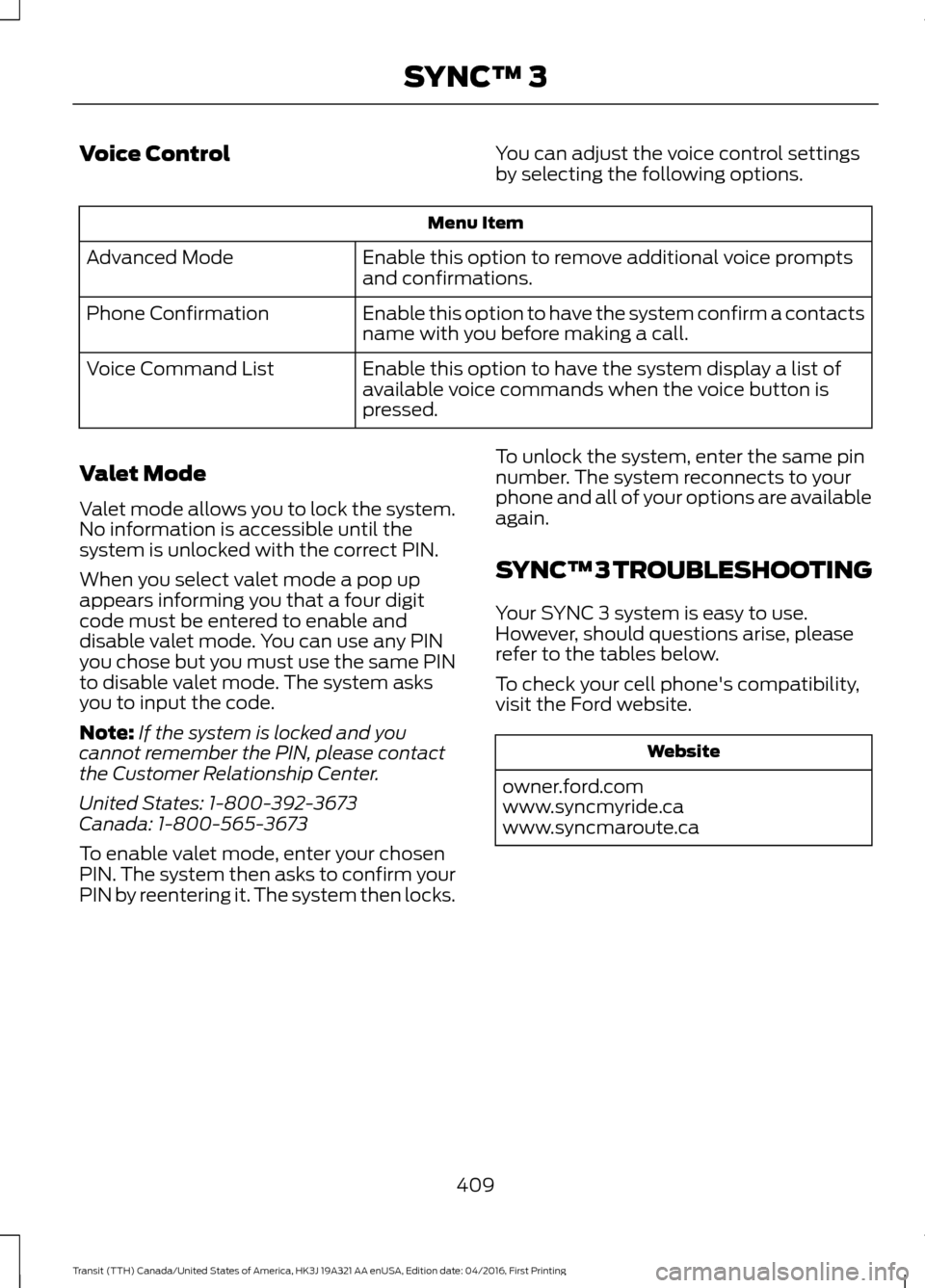
Voice Control
You can adjust the voice control settings
by selecting the following options.Menu Item
Enable this option to remove additional voice prompts
and confirmations.
Advanced Mode
Enable this option to have the system confirm a contacts
name with you before making a call.
Phone Confirmation
Enable this option to have the system display a list of
available voice commands when the voice button is
pressed.
Voice Command List
Valet Mode
Valet mode allows you to lock the system.
No information is accessible until the
system is unlocked with the correct PIN.
When you select valet mode a pop up
appears informing you that a four digit
code must be entered to enable and
disable valet mode. You can use any PIN
you chose but you must use the same PIN
to disable valet mode. The system asks
you to input the code.
Note: If the system is locked and you
cannot remember the PIN, please contact
the Customer Relationship Center.
United States: 1-800-392-3673
Canada: 1-800-565-3673
To enable valet mode, enter your chosen
PIN. The system then asks to confirm your
PIN by reentering it. The system then locks. To unlock the system, enter the same pin
number. The system reconnects to your
phone and all of your options are available
again.
SYNC™ 3 TROUBLESHOOTING
Your SYNC 3 system is easy to use.
However, should questions arise, please
refer to the tables below.
To check your cell phone's compatibility,
visit the Ford website. Website
owner.ford.com
www.syncmyride.ca
www.syncmaroute.ca
409
Transit (TTH) Canada/United States of America, HK3J 19A321 AA enUSA, Edition date: 04/2016, First Printing SYNC™ 3
Page 414 of 484
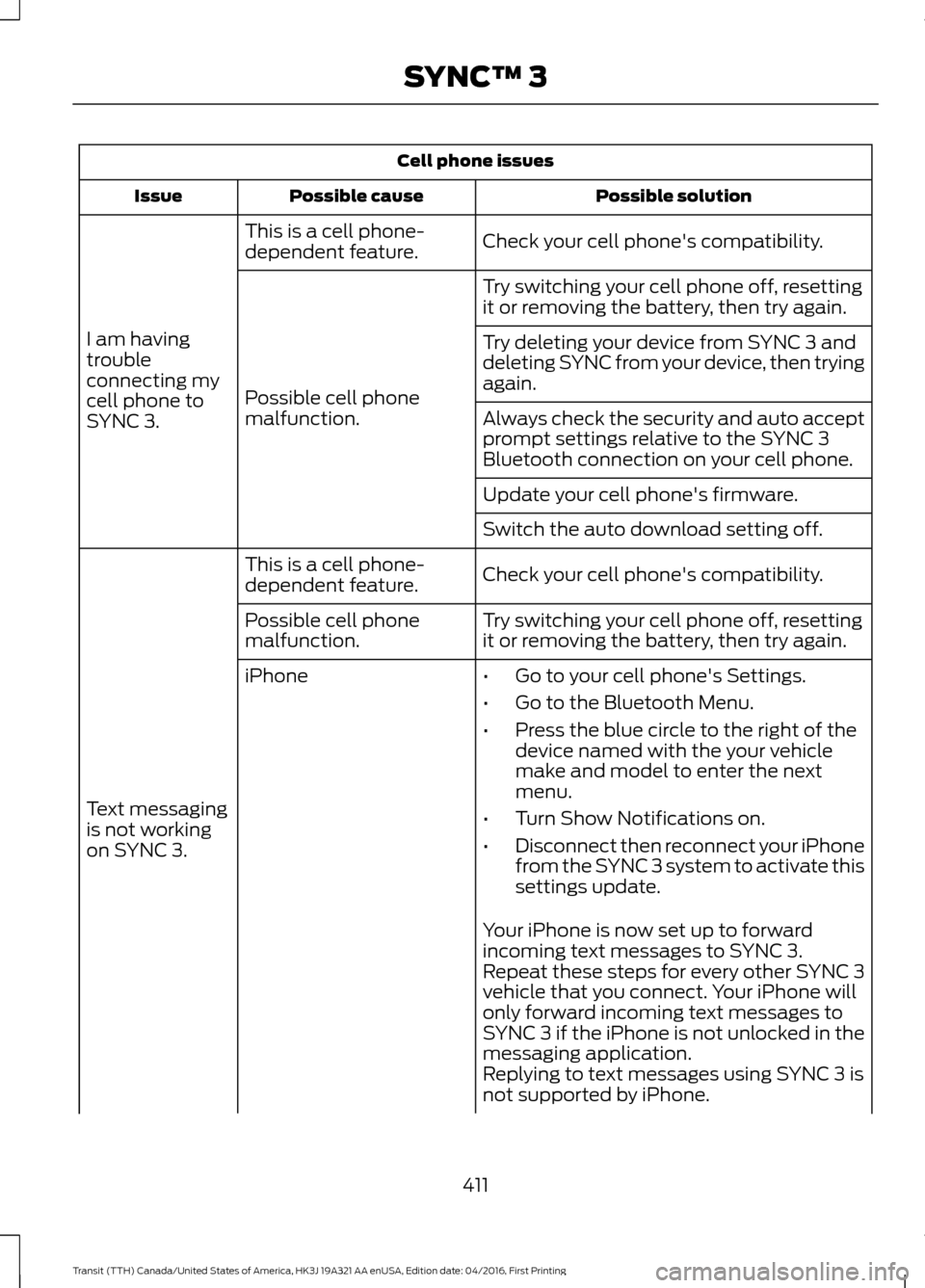
Cell phone issues
Possible solution
Possible cause
Issue
Check your cell phone's compatibility.
This is a cell phone-
dependent feature.
I am having
trouble
connecting my
cell phone to
SYNC 3. Try switching your cell phone off, resetting
it or removing the battery, then try again.
Possible cell phone
malfunction. Try deleting your device from SYNC 3 and
deleting SYNC from your device, then trying
again.
Always check the security and auto accept
prompt settings relative to the SYNC 3
Bluetooth connection on your cell phone.
Update your cell phone's firmware.
Switch the auto download setting off.
Check your cell phone's compatibility.
This is a cell phone-
dependent feature.
Text messaging
is not working
on SYNC 3. Try switching your cell phone off, resetting
it or removing the battery, then try again.
Possible cell phone
malfunction.
iPhone
•Go to your cell phone's Settings.
• Go to the Bluetooth Menu.
• Press the blue circle to the right of the
device named with the your vehicle
make and model to enter the next
menu.
• Turn Show Notifications on.
• Disconnect then reconnect your iPhone
from the SYNC 3 system to activate this
settings update.
Your iPhone is now set up to forward
incoming text messages to SYNC 3.
Repeat these steps for every other SYNC 3
vehicle that you connect. Your iPhone will
only forward incoming text messages to
SYNC 3 if the iPhone is not unlocked in the
messaging application.
Replying to text messages using SYNC 3 is
not supported by iPhone.
411
Transit (TTH) Canada/United States of America, HK3J 19A321 AA enUSA, Edition date: 04/2016, First Printing SYNC™ 3
Page 415 of 484
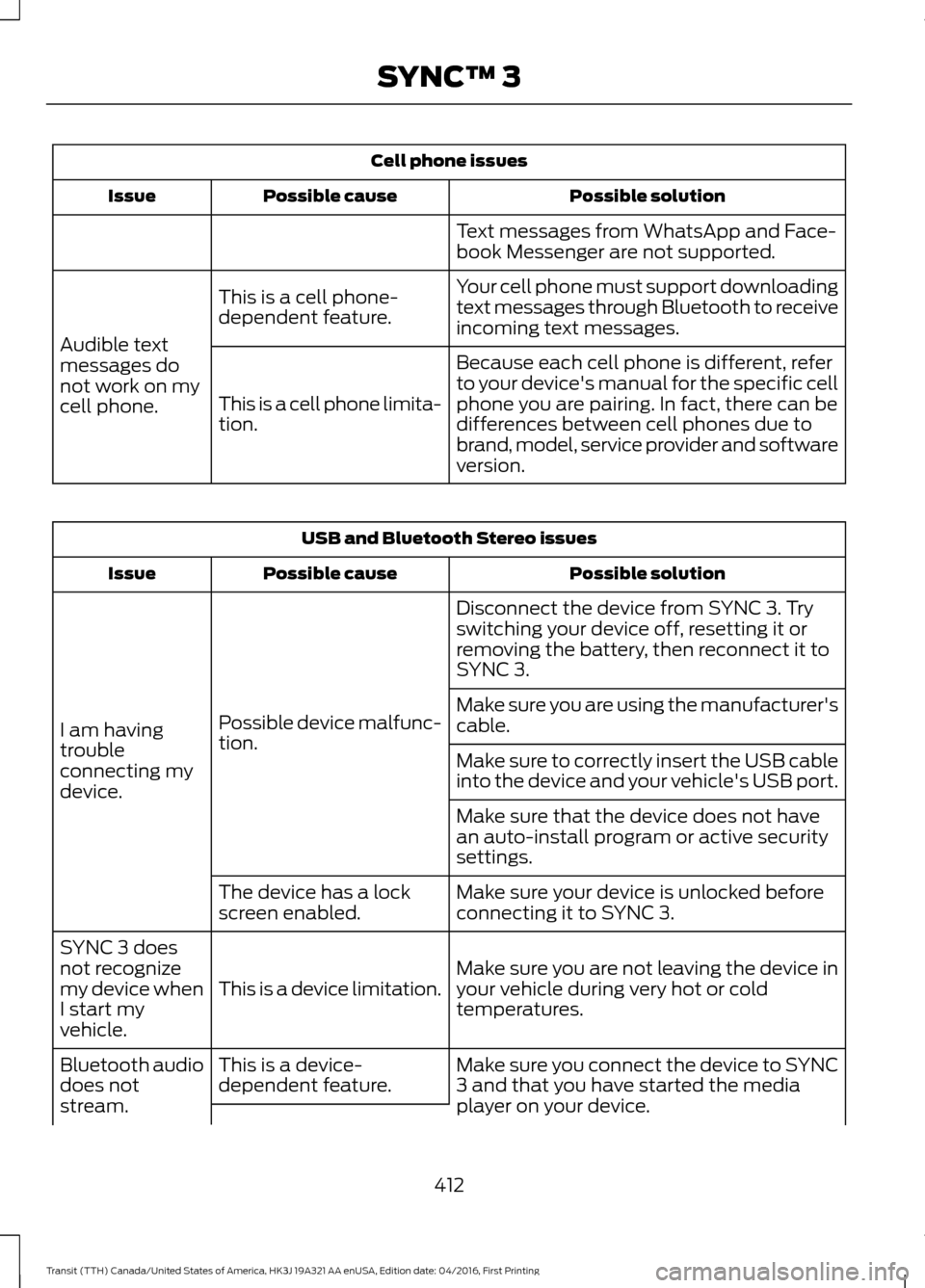
Cell phone issues
Possible solution
Possible cause
Issue
Text messages from WhatsApp and Face-
book Messenger are not supported.
Your cell phone must support downloading
text messages through Bluetooth to receive
incoming text messages.
This is a cell phone-
dependent feature.
Audible text
messages do
not work on my
cell phone. Because each cell phone is different, refer
to your device's manual for the specific cell
phone you are pairing. In fact, there can be
differences between cell phones due to
brand, model, service provider and software
version.
This is a cell phone limita-
tion. USB and Bluetooth Stereo issues
Possible solution
Possible cause
Issue
Disconnect the device from SYNC 3. Try
switching your device off, resetting it or
removing the battery, then reconnect it to
SYNC 3.
Possible device malfunc-
tion.
I am having
trouble
connecting my
device. Make sure you are using the manufacturer's
cable.
Make sure to correctly insert the USB cable
into the device and your vehicle's USB port.
Make sure that the device does not have
an auto-install program or active security
settings.
Make sure your device is unlocked before
connecting it to SYNC 3.
The device has a lock
screen enabled.
Make sure you are not leaving the device in
your vehicle during very hot or cold
temperatures.
This is a device limitation.
SYNC 3 does
not recognize
my device when
I start my
vehicle.
Make sure you connect the device to SYNC
3 and that you have started the media
player on your device.
This is a device-
dependent feature.
Bluetooth audio
does not
stream.
412
Transit (TTH) Canada/United States of America, HK3J 19A321 AA enUSA, Edition date: 04/2016, First Printing SYNC™ 3
Page 433 of 484
NORMAL SCHEDULED
MAINTENANCE
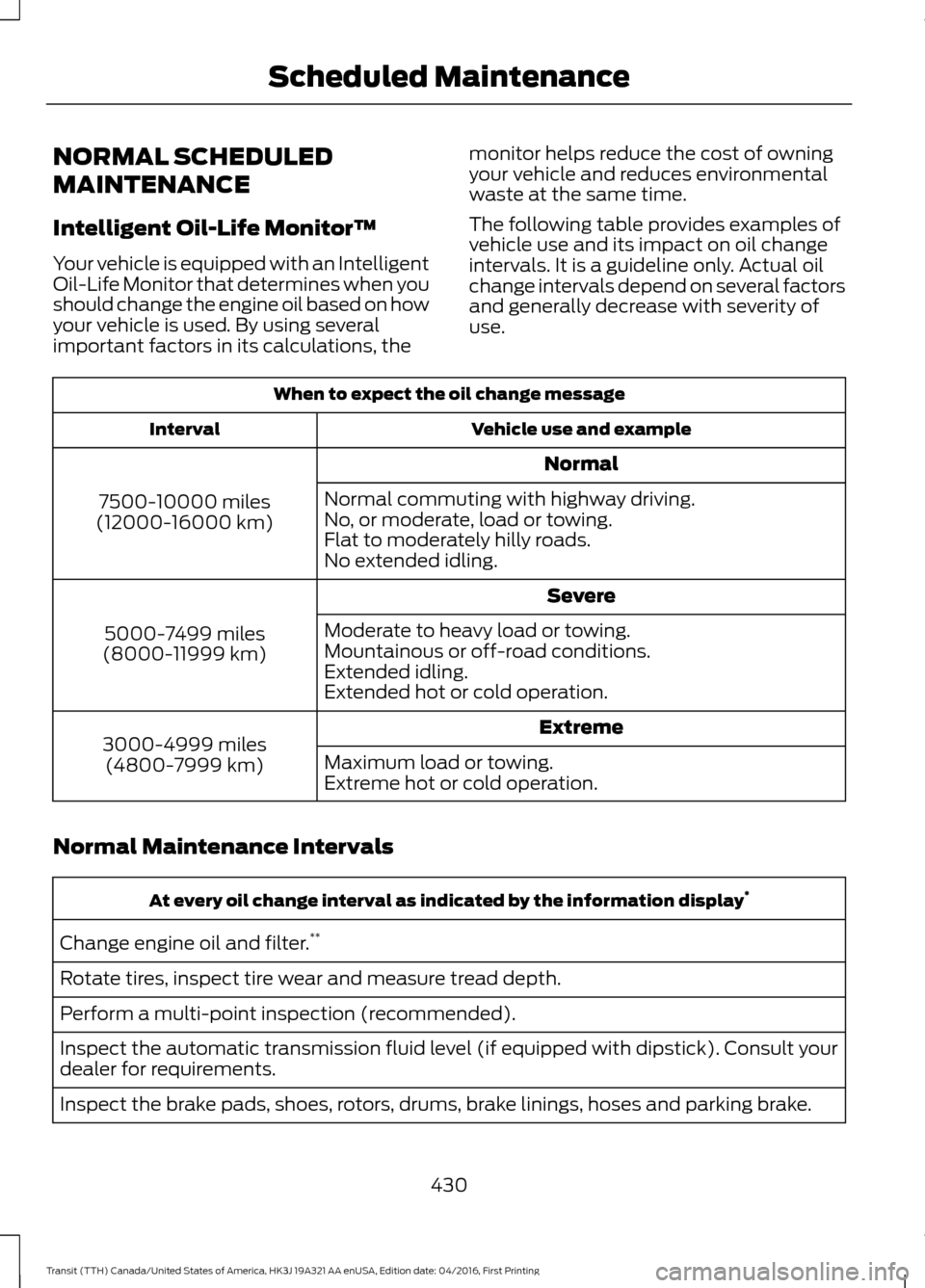
Intelligent Oil-Life Monitor™
Your vehicle is equipped with an Intelligent
Oil-Life Monitor that determines when you
should change the engine oil based on how
your vehicle is used. By using several
important factors in its calculations, the
monitor helps reduce the cost of owning
your vehicle and reduces environmental
waste at the same time.
The following table provides examples of
vehicle use and its impact on oil change
intervals. It is a guideline only. Actual oil
change intervals depend on several factors
and generally decrease with severity of
use.When to expect the oil change message
Vehicle use and example
Interval
Normal
7500-10000 miles
(12000-16000 km) Normal commuting with highway driving.
No, or moderate, load or towing.
Flat to moderately hilly roads.
No extended idling.
Severe
5000-7499 miles
(8000-11999 km) Moderate to heavy load or towing.
Mountainous or off-road conditions.
Extended idling.
Extended hot or cold operation.
Extreme
3000-4999 miles
(4800-7999 km) Maximum load or towing.
Extreme hot or cold operation.
Normal Maintenance Intervals At every oil change interval as indicated by the information display
*
Change engine oil and filter. **
Rotate tires, inspect tire wear and measure tread depth.
Perform a multi-point inspection (recommended).
Inspect the automatic transmission fluid level (if equipped with dipstick). Consult your
dealer for requirements.
Inspect the brake pads, shoes, rotors, drums, brake linings, hoses and parking brake.
430
Transit (TTH) Canada/United States of America, HK3J 19A321 AA enUSA, Edition date: 04/2016, First Printing Scheduled Maintenance
Page 477 of 484
Entertainment................................................371
AM/FM Radio....................................................... 372
Apps....................................................................... 380
Bluetooth Stereo or USB................................. 379
CD........................................................................\
.... 378
HD Radio ™ Information (If
Available)......................................................... 375
SIRIUS® Satellite Radio (If Activated)......................................................... 372
Sources................................................................... 371
Supported Media Players, Formats and Metadata Information................................ 380
USB Ports............................................................. 380
Environment......................................................14
Essential Towing Checks............................172 Before Towing a Trailer...................................... 177
Launching or Retrieving a Boat or Personal Water Craft (PWC)........................................ 178
Safety Chains........................................................ 173
Tow Hitch............................................................... 173
Trailer Brakes........................................................ 173
Trailer Lamps......................................................... 177
Trailer Towing Connector................................. 172
When Towing a Trailer....................................... 177
Event Data Recording See: Data Recording.............................................. 9
Export Unique Options..................................13
Exterior Mirrors.................................................77
Fold-Away Exterior Mirrors................................ 77
Power Exterior Mirrors......................................... 77
F
Fan See: Engine Cooling Fan - Diesel.................. 218
See: Engine Cooling Fan - E85/ Gasoline............................................................ 218
Fastening the Seatbelts
................................31
Seatbelt Locking Modes.................................... 32
Using Seatbelts During Pregnancy.................31
Floor Mats
........................................................181
Ford Credit.........................................................10
US Only..................................................................... 10
Ford Protect
...................................................425
Ford Protect (CANADA ONLY)..................... 426
Ford Protect Extended Service Plans (U.S. Only).................................................................. 425
Fuel and Refueling
.........................................117 Fuel Consumption
........................................129
Calculating Fuel Economy.............................. 129
Filling the Fuel Tank........................................... 129
Fuel Filler Funnel Location........................122
Fuel Filter - Gasoline
...................................226
Fuel Quality - Diesel....................................120
Biodiesel.................................................................. 121
Diesel Fuel Additives ......................................... 122
Fuel Requirements - Choosing The Right Fuel: Vehicles Operated Where
Ultra-Low Sulfur Diesel Fuel Is Not
Required ........................................................... 120
Fuel Requirements - Choosing the Right Fuel: Vehicles Operated Where
Ultra-Low Sulfur Diesel Fuel is Required
(United States/Canada/Puerto Rico/U.S.
Virgin Islands and Other Locales)...........120
Fuel Quality - E85.........................................118 Choosing the Right Fuel - Flex Fuel
Vehicles.............................................................. 118
Switching Between E85 and Gasoline........119
Fuel Quality - Gasoline................................118 Choosing the Right Fuel.................................... 118
Fuel Shutoff
...................................................184
Fuse Box Locations.....................................196 Body Control Module Fuse Box.................... 196
Engine Compartment Fuse Box................... 196
Passenger Compartment Fuse Box............196
Pre-fuse Box......................................................... 196
Fuses.................................................................196
Fuse Specification Chart............................197 Body Control Module....................................... 207
Engine Compartment Fuse Box.................... 197
Passenger Compartment Fuse Panel........201
Pre-fuse Box........................................................ 205
G
Gauges................................................................79 Engine Coolant Temperature Gauge.............79
Fuel Gauge............................................................. 80
Information Display............................................. 79
Tripmeter Reset and Distance to Empty.................................................................. 80
General Information on Radio Frequencies...................................................48
General Maintenance Information
........427
Multi-point Inspection..................................... 429
474
Transit (TTH) Canada/United States of America, HK3J 19A321 AA enUSA, Edition date: 04/2016, First Printing Index
Page 479 of 484
Headlamp High Beam........................................
73
Lighting Control Positions................................. 72
Parking Lamps....................................................... 72
Lighting...............................................................72 General Information............................................ 72
Load Carrying.................................................164
Load Limit.......................................................164 Special Loading Instructions for Owners of
Pick-up Trucks and Utility-type
Vehicles............................................................. 168
Vehicle Loading - with and without a Trailer................................................................. 164
Load Retaining Fixtures.............................164 Securing Cargo.................................................... 164
Locking and Unlocking
.................................57
Automatic Locking............................................... 61
Automatic Unlocking........................................... 61
Configurable Unlocking...................................... 61
Locking...................................................................... 57
Locking and Unlocking Confirmation............57
Locking and Unlocking the Doors From Inside.................................................................... 57
One-Stage Unlocking.......................................... 61
Opening and Closing the Double Rear Doors.................................................................... 59
Opening and Closing the Sliding Door.........58
Rear Emergency Exit.......................................... 60
Two-Stage Unlocking.......................................... 61
Unlocking................................................................. 57
Zone Re-Locking................................................... 61
Lug Nuts See: Changing a Road Wheel........................ 270
M
Maintenance....................................................211 General Information............................................ 211
Manual Climate Control..............................95
Manual Seats
................................................100
Adjusting the Armrest....................................... 102
Adjusting the Lumbar Support...................... 101
Moving the Seat Backward or Forward............................................................. 100
Recline Adjustment............................................ 101
Media Hub
.......................................................314
Message Center See: Information Displays................................. 85Mirrors
See: Heated Windows and Mirrors................98
See: Windows and Mirrors................................ 76
Mobile Communications Equipment
.......12
Motorcraft Parts - 3.2L Power Stroke Diesel.............................................................285
Motorcraft Parts - 3.5L Ecoboost™.................................................283
Motorcraft Parts - 3.7L..............................284
MyKey Troubleshooting...............................55
MyKey ™..............................................................51
Principle of Operation.......................................... 51
N
Navigation
......................................................386
cityseeker.............................................................. 393
Destination Mode.............................................. 388
Map Mode............................................................ 386
Navigation Map Updates................................ 394
Navigation Menu................................................. 391
SiriusXM Traffic and Travel Link................... 394
Waypoints............................................................ 392
Normal Scheduled Maintenance
..........430
Intelligent Oil-Life Monitor™........................ 430
Normal Maintenance Intervals.................... 430
O
Oil Change Indicator Reset.......................218 Resetting the Oil Life Monitoring
System............................................................... 218
Oil Check See: Engine Oil Check....................................... 216
Opening and Closing the Hood................211 Closing the Hood................................................. 212
Opening the Hood............................................... 211
Ordering Additional Owner's Literature......................................................193
Obtaining a French Owner ’s Manual..........194
Overhead Console
..........................................111
Overhead Storage Compartments................111
P
Parking Aid......................................................152 Switching the Parking Aid System
Off........................................................................\
153
476
Transit (TTH) Canada/United States of America, HK3J 19A321 AA enUSA, Edition date: 04/2016, First Printing Index
Page 481 of 484
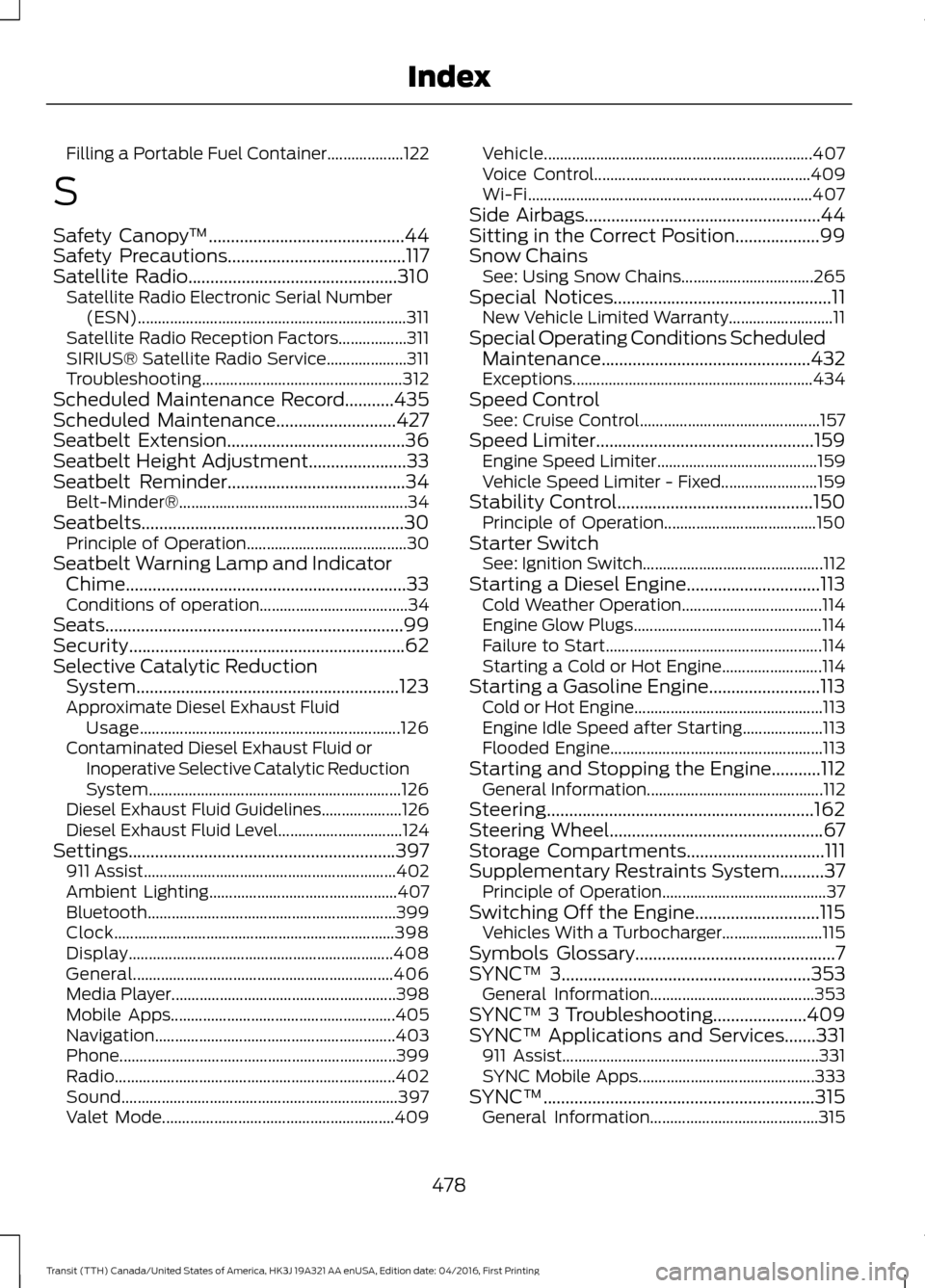
Filling a Portable Fuel Container...................
122
S
Safety Canopy ™............................................44
Safety Precautions........................................117
Satellite Radio...............................................310
Satellite Radio Electronic Serial Number
(ESN)................................................................... 311
Satellite Radio Reception Factors.................311
SIRIUS® Satellite Radio Service.................... 311
Troubleshooting.................................................. 312
Scheduled Maintenance Record
...........435
Scheduled Maintenance...........................427
Seatbelt Extension........................................36
Seatbelt Height Adjustment
......................33
Seatbelt Reminder........................................34
Belt-Minder®......................................................... 34
Seatbelts...........................................................30 Principle of Operation........................................ 30
Seatbelt Warning Lamp and Indicator Chime...............................................................33
Conditions of operation..................................... 34
Seats...................................................................99
Security..............................................................62
Selective Catalytic Reduction System...........................................................123
Approximate Diesel Exhaust Fluid Usage................................................................. 126
Contaminated Diesel Exhaust Fluid or Inoperative Selective Catalytic Reduction
System............................................................... 126
Diesel Exhaust Fluid Guidelines.................... 126
Diesel Exhaust Fluid Level............................... 124
Settings............................................................397 911 Assist............................................................... 402
Ambient Lighting............................................... 407
Bluetooth.............................................................. 399
Clock...................................................................... 398
Display
.................................................................. 408
General................................................................. 406
Media Player........................................................ 398
Mobile Apps........................................................ 405
Navigation............................................................ 403
Phone..................................................................... 399
Radio...................................................................... 402
Sound..................................................................... 397
Valet Mode.......................................................... 409Vehicle...................................................................
407
Voice Control...................................................... 409
Wi-Fi....................................................................... 407
Side Airbags
.....................................................44
Sitting in the Correct Position...................99
Snow Chains See: Using Snow Chains................................. 265
Special Notices
.................................................11
New Vehicle Limited Warranty.......................... 11
Special Operating Conditions Scheduled Maintenance...............................................432
Exceptions............................................................ 434
Speed Control See: Cruise Control............................................. 157
Speed Limiter
.................................................159
Engine Speed Limiter........................................ 159
Vehicle Speed Limiter - Fixed........................ 159
Stability Control
............................................150
Principle of Operation...................................... 150
Starter Switch See: Ignition Switch............................................. 112
Starting a Diesel Engine..............................113 Cold Weather Operation................................... 114
Engine Glow Plugs............................................... 114
Failure to Start...................................................... 114
Starting a Cold or Hot Engine......................... 114
Starting a Gasoline Engine.........................113 Cold or Hot Engine............................................... 113
Engine Idle Speed after Starting.................... 113
Flooded Engine..................................................... 113
Starting and Stopping the Engine...........112 General Information............................................ 112
Steering............................................................162
Steering Wheel
................................................67
Storage Compartments...............................111
Supplementary Restraints System..........37 Principle of Operation......................................... 37
Switching Off the Engine............................115 Vehicles With a Turbocharger......................... 115
Symbols Glossary
.............................................7
SYNC™ 3........................................................353
General Information......................................... 353
SYNC™ 3 Troubleshooting.....................409
SYNC™ Applications and Services
.......331
911 Assist................................................................ 331
SYNC Mobile Apps............................................ 333
SYNC™.............................................................315 General Information.......................................... 315
478
Transit (TTH) Canada/United States of America, HK3J 19A321 AA enUSA, Edition date: 04/2016, First Printing Index