display FORD TRANSIT 2017 5.G Workshop Manual
[x] Cancel search | Manufacturer: FORD, Model Year: 2017, Model line: TRANSIT, Model: FORD TRANSIT 2017 5.GPages: 484, PDF Size: 11.45 MB
Page 173 of 484
RV & Trailer Towing Guide Online
http://www.fleet.ford.com/towing-guides/
Website
TRAILER SWAY CONTROL
Note: This feature does not prevent trailer
sway, but reduces it once it begins.
Note: This feature cannot stop all trailers
from swaying.
Note: In some cases, if your vehicle speed
is too high, the system may turn on multiple
times, gradually reducing your vehicle speed.
This feature applies your vehicle brakes at
individual wheels and if necessary, reduces
engine power. If the trailer begins to sway,
the traction control warning lamp flashes
and a message will appear in the
information display. Slow your vehicle
down, pull safely to the side of the road
and check for correct load distribution.
See Load Carrying (page 164).
RECOMMENDED TOWING
WEIGHTS
Note: Make sure to take into
consideration trailer frontal area.
Vehicles equipped with the Trailer
Tow Package or the Heavy Duty
Payload Package should not
exceed 55 ft² (5.1 m²) trailer frontal
area. Note:
Exceeding this limitation
may significantly reduce the
performance of your towing
vehicle. Selecting a trailer with a
low aerodynamic drag and rounded
front design helps optimize
performance and fuel economy.
Note: For high altitude operation,
reduce the gross combined weight
by 2% per
1,000 ft (300 m)
starting at the 1,000 ft (300 m)
elevation point.
Note: Certain states require
electric trailer brakes for trailers
over a specified weight. Be sure to
check state regulations for this
specified weight. The maximum
trailer weights listed may be limited
to this specified weight, as your
vehicle's electrical system may not
include the wiring connector
needed to use electric trailer
brakes.
Your vehicle may tow a trailer
provided the maximum trailer
weight is less than or equal to the
maximum trailer weight listed for
your vehicle configuration on the
following charts.
170
Transit (TTH) Canada/United States of America, HK3J 19A321 AA enUSA, Edition date: 04/2016, First Printing Towing
Page 177 of 484
Integrated Trailer Brake Controller
WARNING
The Ford trailer brake controller has
been verified to be compatible with
trailers having electric-actuated
drum brakes (one to four axles) and
electric-over-hydraulic brakes. It will not
turn on the hydraulic surge-style trailer
brakes. It is the responsibility of the
customer to make sure that the trailer
brakes are adjusted appropriately,
functioning normally and all electric
connections are correctly made. Failure to
do so may result in loss of vehicle control,
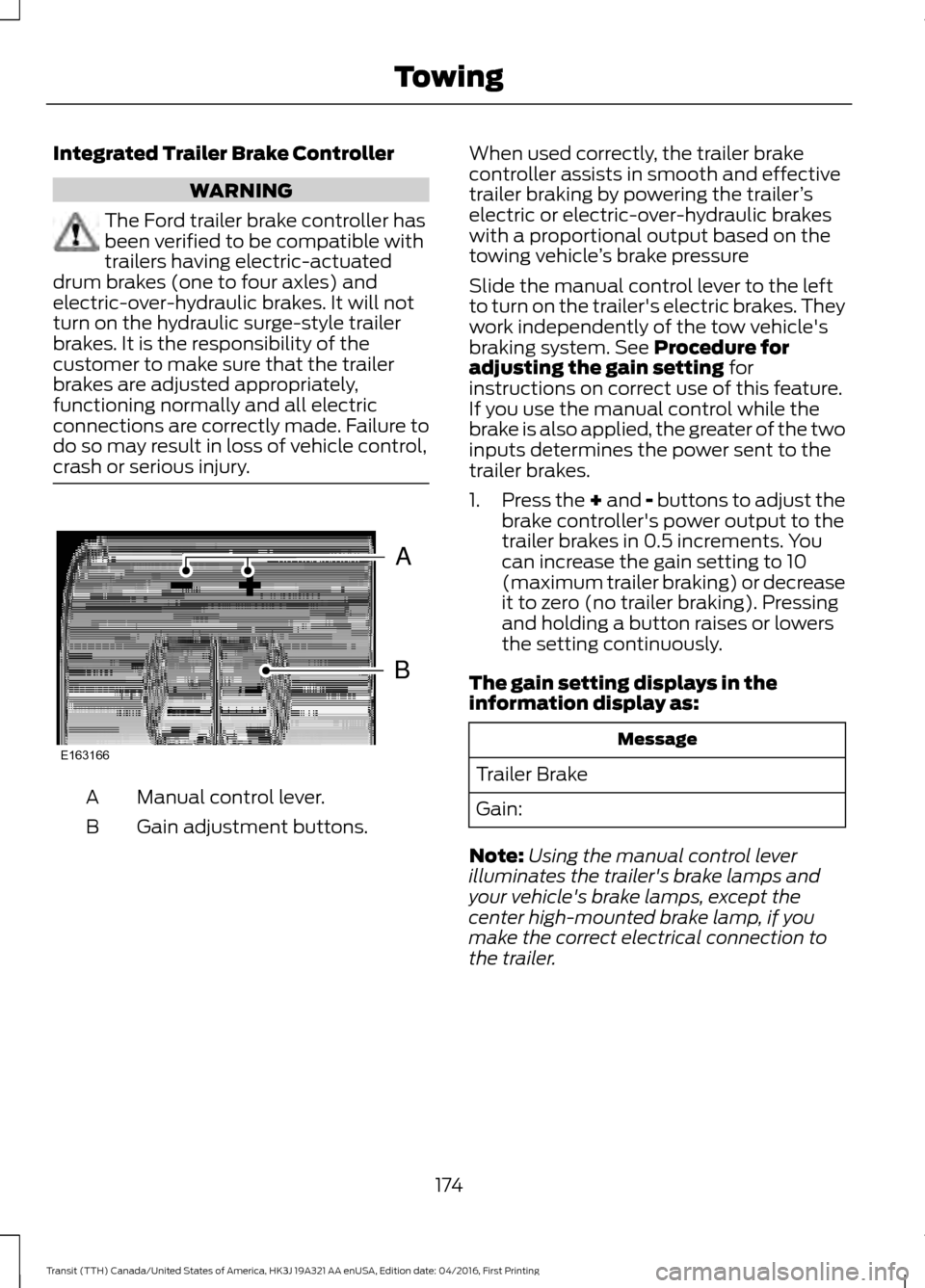
crash or serious injury. Manual control lever.
A
Gain adjustment buttons.
B When used correctly, the trailer brake
controller assists in smooth and effective
trailer braking by powering the trailer
’s
electric or electric-over-hydraulic brakes
with a proportional output based on the
towing vehicle ’s brake pressure
Slide the manual control lever to the left
to turn on the trailer's electric brakes. They
work independently of the tow vehicle's
braking system. See Procedure for
adjusting the gain setting for
instructions on correct use of this feature.
If you use the manual control while the
brake is also applied, the greater of the two
inputs determines the power sent to the
trailer brakes.
1. Press the + and - buttons to adjust the
brake controller's power output to the
trailer brakes in 0.5 increments. You
can increase the gain setting to 10
(maximum trailer braking) or decrease
it to zero (no trailer braking). Pressing
and holding a button raises or lowers
the setting continuously.
The gain setting displays in the
information display as: Message
Trailer Brake
Gain:
Note: Using the manual control lever
illuminates the trailer's brake lamps and
your vehicle's brake lamps, except the
center high-mounted brake lamp, if you
make the correct electrical connection to
the trailer.
174
Transit (TTH) Canada/United States of America, HK3J 19A321 AA enUSA, Edition date: 04/2016, First Printing TowingB
A
E163166
Page 178 of 484
The controller shows gain setting, output bar graph and the trailer connectivity
status in the information display as follows:
Action and Description
Message
Displays the current gain setting during a given ignition cycle
and when adjusting the gain setting. This also displays if you
use the manual control lever or make gain adjustments with
no trailer connected.
Trailer Brake
Gain:
No Trailer
Displays when you press your vehicle's brake pedal, or upon
use of the manual control lever. Bar indicators illuminate in
the information display to indicate the amount of power going
to the trailer brakes relative to the brake pedal or manual
control input. One bar indicates the least amount of output;
six bars indicate maximum output.
Trailer Brake
Gain:
Output:
Displays when the system senses a correct trailer wiring
connection during a given ignition cycle. For example a trailer
with electric trailer brakes.
Trailer Connected
Displays when the system senses a trailer connection and
then a disconnection, either intentional or unintentional,
during a given ignition cycle, this is accompanied by a single
audible tone. It also displays if a vehicle or trailer-wiring fault
occurs causing the trailer to appear disconnected. This
message can also display if you use the manual control lever
without a trailer connected.
Trailer Disconnected
Procedure for Adjusting the Gain Setting
The gain setting sets the trailer brake
controller for the specific towing condition.
You should change the setting as towing
conditions change. Changes to towing
conditions include trailer load, vehicle load,
road conditions and weather.
The gain should be set to provide the
maximum trailer braking assistance while
making sure the trailer wheels do not lock
when using the brakes. Locked trailer
wheels may lead to trailer instability.
Note: Only carry out this procedure in a
traffic-free environment at speeds of
approximately 20-25 mph (30-40 km/h). 1.
Make sure the trailer brakes are in good
working condition, functioning normally
and correctly adjusted. See a trailer
dealer if necessary.
2. Hook up the trailer and make the electrical connections according to the
trailer manufacturer's instructions.
3. Use the gain adjustment + and -
buttons to increase or decrease the
gain setting to the desired starting
point. A gain setting of six is a good
starting point for heavier loads.
4. In a traffic-free environment, tow the trailer on a dry, level surface at a speed
of 20-25 mph (30-40 km/h) and slide
the manual control lever completely.
175
Transit (TTH) Canada/United States of America, HK3J 19A321 AA enUSA, Edition date: 04/2016, First Printing Towing
Page 179 of 484
5. If the trailer wheels lock, indicated by
squealing tires, reduce the gain setting.
If the trailer wheels turn freely, increase
the gain setting. Repeat steps four and
five until the gain setting is at a point just below trailer wheel lock. If towing
a heavier trailer, trailer wheel lock may
not be attainable even with the
maximum gain setting of 10.
System Warning Messages Action and Description
Message
Displays in response to faults sensed by the trailer brake
controller, accompanied by a single tone. If this message
appears, contact an authorized dealer as soon as possible
for diagnosis and repair. The controller may still function, but
performance may be degraded.
Trailer Brake Module
Fault
Displays when there is a short circuit on the electric brake
output wire. If the message displays, accompanied by a single
tone, with no trailer connected, the problem is with your
vehicle wiring between the trailer brake controller and the 7-
pin connector. If the message only displays with a trailer
connected, the problem is with the trailer wiring. Consult a
trailer dealer for assistance. This can be a short to ground,
for example a chaffed wire, short to voltage, for example a
pulled pin on trailer emergency breakaway battery or the
trailer brakes may be drawing too much current.
Wiring Fault on Trailer
Note: An authorized dealer can diagnose the trailer brake controller to determine exactly
which trailer fault has occurred. However, the Ford Warranty does not cover this diagnosis
if the fault is with the trailer.
Points to Remember
• Do not attempt removal of the trailer
brake controller without consulting the
Workshop Manual. Damage to the unit
may result.
• Adjust gain setting before using the
trailer brake controller for the first time.
• Adjust gain setting, using the procedure
above, whenever road, weather and
trailer or vehicle loading conditions
change from when the gain was initially
set. •
Only use the manual control lever for
correct adjustment of the gain during
trailer setup. Misuse, such as
application during trailer sway, could
cause instability of trailer or tow
vehicle.
• Avoid towing in adverse weather
conditions. The trailer brake controller
does not provide anti-lock control of
the trailer wheels. Trailer wheels can
lock up on slippery surfaces, resulting
in instability of trailer or tow vehicle.
176
Transit (TTH) Canada/United States of America, HK3J 19A321 AA enUSA, Edition date: 04/2016, First Printing Towing
Page 180 of 484
•
The trailer brake controller is fitted with
a feature that reduces output at vehicle
speeds below 11 mph (18 km/h) so
trailer and vehicle braking is not jerky
or harsh. This feature is only available
when applying the brakes using your
vehicle's brake pedal, not the
controller.
• The controller interacts with the brake
control system and powertrain control
system of your vehicle to provide the
best performance on different road
conditions.
• Your vehicle's brake system and the
trailer brake system work
independently of each other. Changing
the gain setting on the controller does
not affect the operation of your
vehicle's brake system whether you
attach a trailer or not.
• When you switch the engine off, the
controller output is disabled and the
display and module shut down. The
controller module and display turn on
when you switch the ignition on.
• The trailer brake controller is only a
factory-installed or dealer-installed
item. Ford is not responsible for
warranty or performance of the
controller due to misuse or customer
installation.
Trailer Lamps WARNING
Never connect any trailer lamp wiring
to the vehicle's tail lamp wiring; this
may damage the electrical system
resulting in fire. Contact an authorized
dealer as soon as possible for assistance
in correct trailer tow wiring installation.
Additional electrical equipment may be
required. Trailer lamps are required on most towed
vehicles. Make sure all running lamps,
brake lamps, turn signals and hazard
warning lamps are working.
Before Towing a Trailer
Practice turning, stopping and backing up
to get the feel of your vehicle-trailer
combination before starting on a trip.
When turning, make wider turns so the
trailer wheels clear curbs and other
obstacles.
When Towing a Trailer
•
Do not drive faster than
70 mph
(113 km/h) until you drive your vehicle
at least 495 mi (800 km). See
Breaking-In (page 180).
• Do not make full-throttle starts.
• Check the tow hitch, electrical
connections and trailer wheel lug nuts
thoroughly after you have traveled
50 mi (80 km)
.
• When stopped in congested or heavy
traffic during hot weather, place the
gearshift in position park (
P) to aid
engine and transmission cooling and
to help A/C performance.
• Turn off the speed control with heavy
loads or on hilly terrain. The speed
control may turn off automatically
when you are towing on long, steep
grades.
• Shift to a lower gear when driving down
a long or steep hill. Do not apply the
brakes continuously, as they may
overheat and become less effective.
• If the transmission is fitted with a
Grade Assist, Tow/Haul
feature, use
this feature when towing. This provides
engine braking and helps eliminate
excessive transmission shifting for
optimum fuel economy and
transmission cooling.
177
Transit (TTH) Canada/United States of America, HK3J 19A321 AA enUSA, Edition date: 04/2016, First Printing Towing
Page 212 of 484
Circuits protected
Fuse rating
Fuse
Front control/display interface module.
5A
F19
Ignition passive anti-theft system.
5A
F20
Accessory relay, customer access feed.
3A
F21
CHANGING A FUSE
Fuses WARNING
Always replace a fuse with one that
has the specified amperage rating.
Using a fuse with a higher amperage
rating can cause severe wire damage and
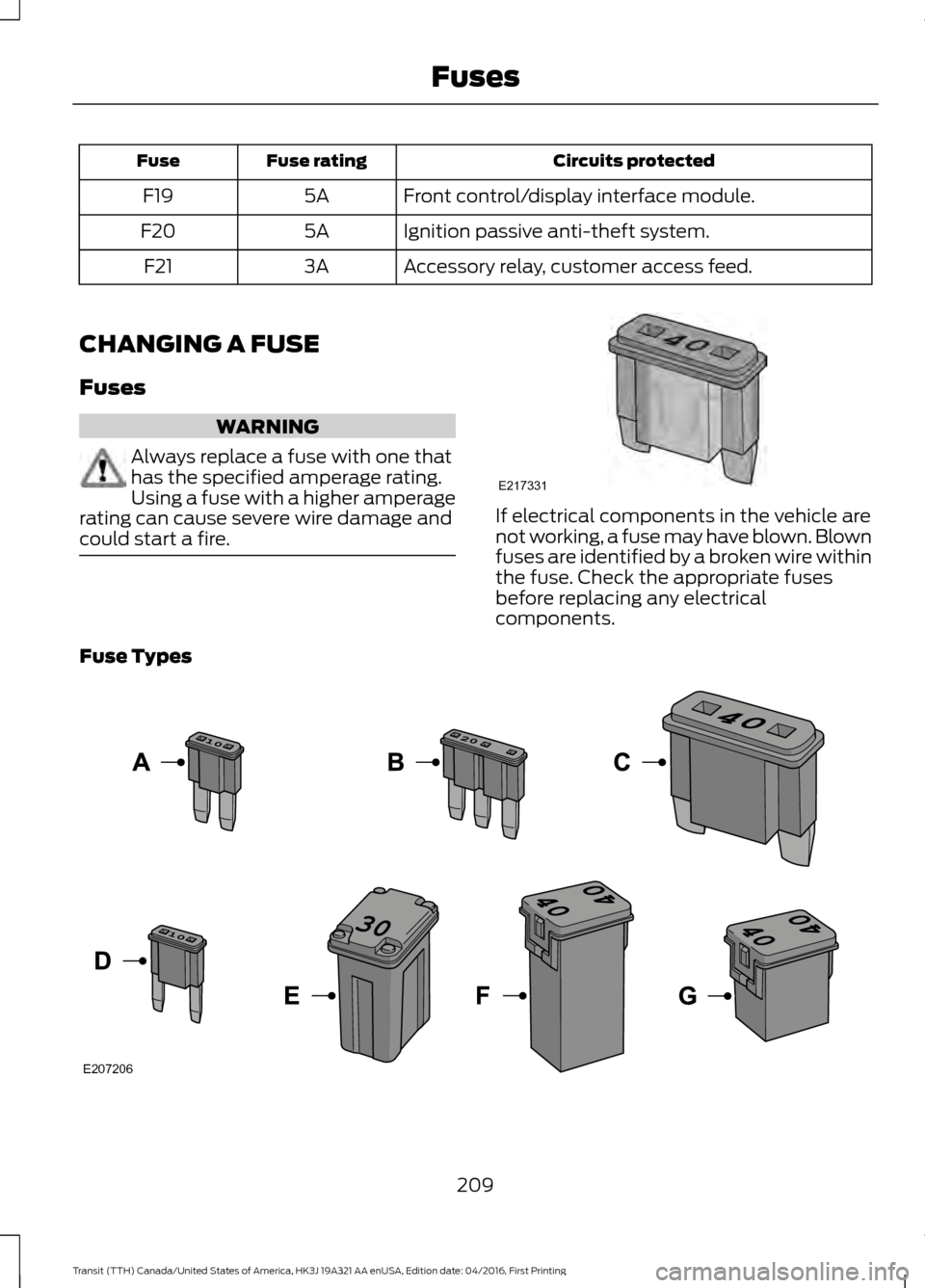
could start a fire. If electrical components in the vehicle are
not working, a fuse may have blown. Blown
fuses are identified by a broken wire within
the fuse. Check the appropriate fuses
before replacing any electrical
components.
Fuse Types 209
Transit (TTH) Canada/United States of America, HK3J 19A321 AA enUSA, Edition date: 04/2016, First Printing FusesE217331 E207206
Page 221 of 484
•
Sustained high-speed driving at Gross
Vehicle Weight Rating (maximum
loaded weight for vehicle operation).
• Sustained use of diesel fuel other than
ultra-low sulfur diesel (ULSD).
OIL CHANGE INDICATOR
RESET
Resetting the Oil Life Monitoring
System
Only reset the oil life monitoring system
after changing the engine oil and oil filter.
1. Switch the ignition on. Do not start the
engine. For vehicles with push-button
start, press and hold the start button
for two seconds without pressing the
brake pedal. Do not start the engine.
2. Press the accelerator and brake pedals
at the same time.
3. Keep the accelerator and brake pedals
fully pressed.
4. After three seconds, a message confirming that the reset is in progress
will be displayed.
5. After 25 seconds, a message confirming that the reset is complete
will be displayed.
6. Release the accelerator and brake pedals.
7. The message confirming that the reset
is complete will no longer be displayed.
8. Switch the ignition off. For vehicles with
push-button start, press the start
button to switch the ignition off.
ENGINE COOLING FAN - E85/
GASOLINE WARNING
Keep your hands and clothing clear
of the engine cooling fan. Under certain conditions, the engine
cooling fan may continue to run for several
minutes after you switch your vehicle off.
ENGINE COOLING FAN -
DIESEL
WARNING
Keep your hands and clothing clear
of the engine cooling fan.
Under certain conditions, the engine
cooling fan may continue to run for several
minutes after you switch your vehicle off.
This could happen in low ambient
temperatures and independent of the
engine coolant temperature, for example
short journeys or low coolant temperature.
See Diesel Particulate Filter (page 115).
ENGINE COOLANT CHECK
WARNINGS
Do not add engine coolant when the
engine is hot. Steam and scalding
liquids released from a hot cooling
system can burn you badly. Also, spilling
coolant on hot engine parts can burn you. Do not put engine coolant in the
windshield washer fluid container. If
sprayed on the windshield, engine
coolant could make it difficult to see
through the windshield. To reduce the risk of personal injury,
make sure the engine is cool before
unscrewing the coolant pressure
relief cap. The cooling system is under
pressure. Steam and hot liquid can come
out forcefully when you loosen the cap
slightly. Do not add coolant further than the
MAX mark.
218
Transit (TTH) Canada/United States of America, HK3J 19A321 AA enUSA, Edition date: 04/2016, First Printing Maintenance
Page 224 of 484
Fail-Safe Cooling
Fail-safe cooling allows you to temporarily
drive your vehicle before any incremental
component damage occurs. The fail-safe
distance depends on ambient
temperature, vehicle load and terrain.
How Fail-Safe Cooling Works
If the engine begins to overheat, the
coolant temperature gauge moves toward
the red zone:
A warning lamp illuminates and
a message may appear in the
information display.
If the engine reaches a preset
over-temperature condition, the engine
automatically switches to alternating
cylinder operation. Each disabled cylinder
acts as an air pump and cools the engine.
When this occurs, your vehicle still
operates, however:
• Engine power is limited.
• The air conditioning system turns off.
Continued operation increases the engine
temperature, causing the engine to
completely shut down. Your steering and
braking effort increases in this situation.
When the engine temperature cools, you
can re-start the engine. Have your vehicle
checked as soon as possible to minimize
engine damage.
When Fail-Safe Mode Is Activated WARNINGS
Fail-safe mode is for use during
emergencies only. Operate your
vehicle in fail-safe mode only as long
as necessary to bring your vehicle to rest
in a safe location and seek immediate
repairs. When in fail-safe mode, your WARNINGS
vehicle will have limited power, will not be
able to maintain high-speed operation, and
may completely shut down without
warning, potentially losing engine power,
power steering assist, and power brake
assist, which may increase the possibility
of a crash resulting in serious injury. Never remove the coolant reservoir
cap when the engine is running or
hot.
Your vehicle has limited engine power
when in the fail-safe mode, drive your
vehicle with caution. Your vehicle does not
maintain high-speed operation and the
engine may operate poorly.
Remember that the engine is capable of
automatically shutting down to prevent
engine damage. In this situation:
1. Pull off the road as soon as safely
possible and switch the engine off.
2. If you are a member of a roadside assistance program, we recommend
that you contact your roadside
assistance service provider.
3. If this is not possible, wait a short period for the engine to cool.
4. Check the coolant level. If the coolant level is at or below the minimum mark,
add prediluted coolant immediately.
5. When the engine temperature cools, you can re-start the engine. Have your
vehicle checked as soon as possible to
minimize engine damage.
Note: Driving your vehicle without repair
increases the chance of engine damage.
221
Transit (TTH) Canada/United States of America, HK3J 19A321 AA enUSA, Edition date: 04/2016, First Printing Maintenance
Page 225 of 484
Engine Coolant Temperature
Management (If Equipped)
WARNING
To reduce the risk of crash and injury,
be prepared that the vehicle speed
may reduce and the vehicle may not
be able to accelerate with full power until
the coolant temperature reduces. If you tow a trailer with your vehicle, the
engine may temporarily reach a higher
temperature during severe operating
conditions, for example ascending a long
or steep grade in high ambient
temperatures.
At this time, you may notice the coolant
temperature gauge moves toward the red
zone and a message may appear in the
information display.
You may notice a reduction in vehicle
speed caused by reduced engine power.
In order to manage the engine coolant
temperature. Your vehicle may enter this
mode if certain high-temperature and
high-load conditions take place. The
amount of speed reduction depends on
vehicle loading, grade and ambient
temperature. If this occurs, there is no need
to pull off the road. You can continue to
drive your vehicle.
The air conditioning may automatically
turn on and off during severe operating
conditions to protect the engine from
overheating. When the coolant
temperature decreases to the normal
operating temperature, the air conditioning
turns on.
If the coolant temperature gauge moves
fully into the red zone, or if the coolant
temperature warning or service engine
soon messages appear in your information
display, do the following: 1. Pull off the road as soon as safely
possible and shift the transmission into
park (P).
2. Leave the engine running until the coolant temperature gauge needle
returns to the normal position. After
several minutes, if the temperature
does not drop, follow the remaining
steps.
3. Switch the engine off and wait for it to
cool. Check the coolant level.
4. If the coolant level is at or below the minimum mark, add prediluted coolant
immediately.
5. If the coolant level is normal, restart the engine and continue.
AUTOMATIC TRANSMISSION
FLUID CHECK
The automatic transmission does not have
a transmission fluid dipstick.
Have an authorized dealer check and
change the transmission fluid at the
correct service interval. See
Scheduled
Maintenance (page 427). Your
transmission does not consume fluid.
However, if the transmission slips, shifts
slowly or if you notice a sign of leaking
fluid, contact an authorized dealer.
Do not use supplemental transmission
fluid additives, treatments or cleaning
agents. The use of these materials may
affect transmission operation and result
in damage to internal transmission
components.
222
Transit (TTH) Canada/United States of America, HK3J 19A321 AA enUSA, Edition date: 04/2016, First Printing Maintenance
Page 227 of 484
DRAINING THE FUEL FILTER
WATER TRAP - 3.2L POWER
STROKE DIESEL
WARNING
Do not dispose of fuel in the
household refuse or the public
sewage system. Use an authorized
waste disposal facility. Your vehicle is fitted with a diesel fuel
conditioner module located behind the fuel
tank.
A warning lamp will illuminate
and a message will be displayed
when approximately 3.38 fl oz
(100 ml) of water accumulates in the
module. If you allow the water level to
exceed this level, the water may pass
through to the engine and may cause fuel
injection equipment damage.
Note: To drain the fuel filter water trap,
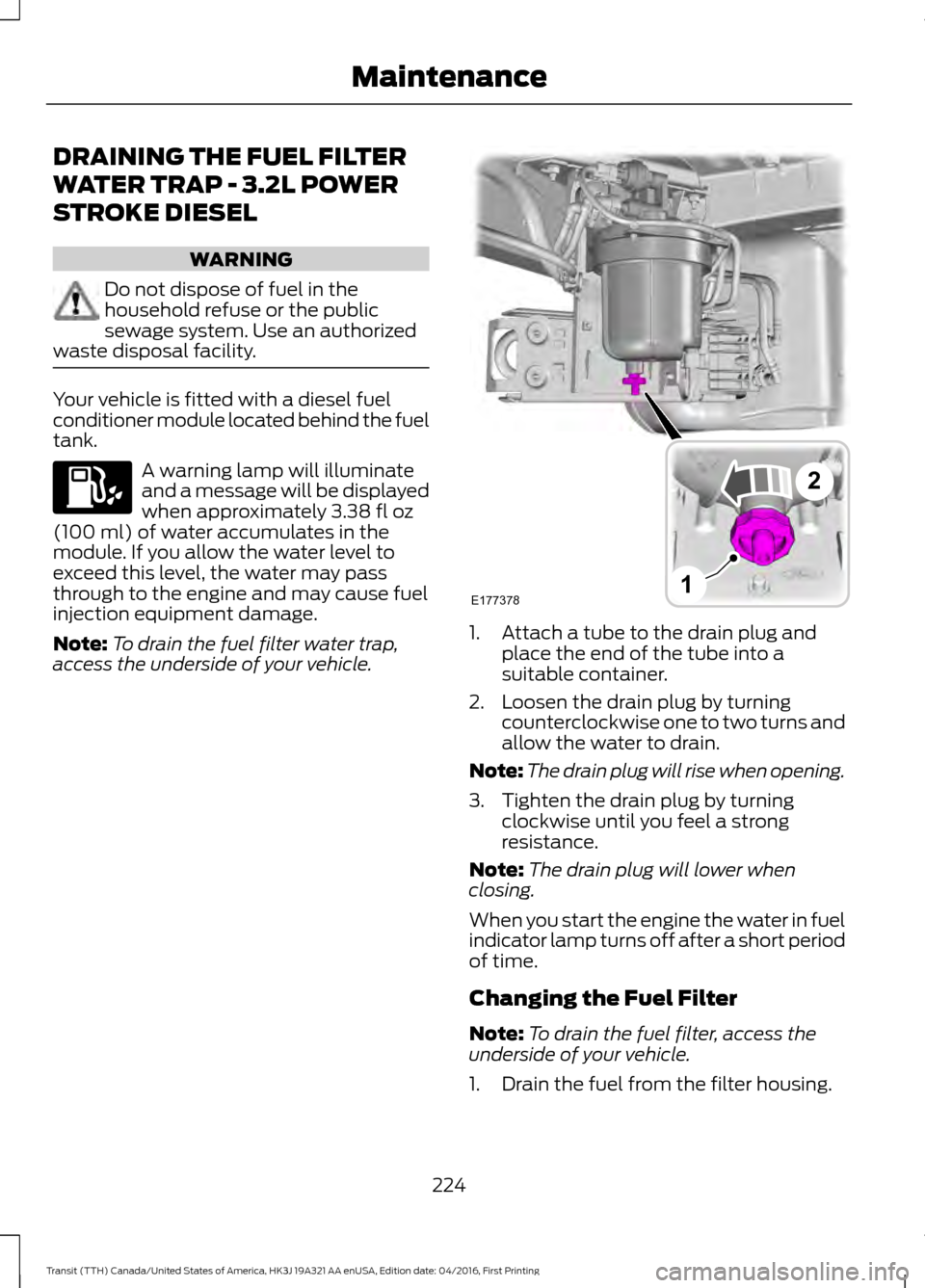
access the underside of your vehicle. 1. Attach a tube to the drain plug and
place the end of the tube into a
suitable container.
2. Loosen the drain plug by turning counterclockwise one to two turns and
allow the water to drain.
Note: The drain plug will rise when opening.
3. Tighten the drain plug by turning clockwise until you feel a strong
resistance.
Note: The drain plug will lower when
closing.
When you start the engine the water in fuel
indicator lamp turns off after a short period
of time.
Changing the Fuel Filter
Note: To drain the fuel filter, access the
underside of your vehicle.
1. Drain the fuel from the filter housing.
224
Transit (TTH) Canada/United States of America, HK3J 19A321 AA enUSA, Edition date: 04/2016, First Printing Maintenance E177378
2
1