AUX FORD TRANSIT 2018 User Guide
[x] Cancel search | Manufacturer: FORD, Model Year: 2018, Model line: TRANSIT, Model: FORD TRANSIT 2018Pages: 521, PDF Size: 8.65 MB
Page 226 of 521
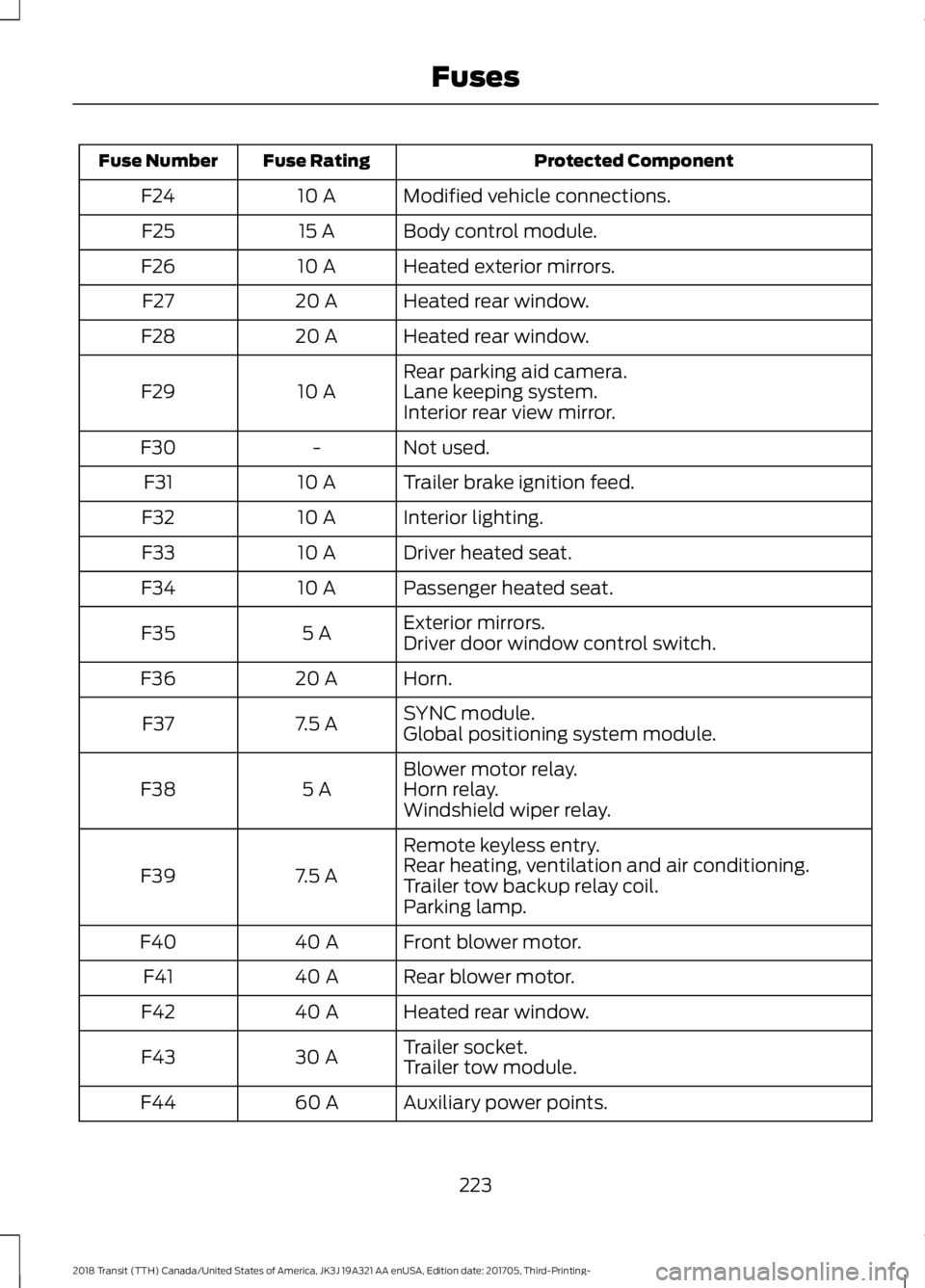
Protected Component
Fuse Rating
Fuse Number
Modified vehicle connections.
10 A
F24
Body control module.
15 A
F25
Heated exterior mirrors.
10 A
F26
Heated rear window.
20 A
F27
Heated rear window.
20 A
F28
Rear parking aid camera.
10 A
F29 Lane keeping system.
Interior rear view mirror.
Not used.
-
F30
Trailer brake ignition feed.
10 A
F31
Interior lighting.
10 A
F32
Driver heated seat.
10 A
F33
Passenger heated seat.
10 A
F34
Exterior mirrors.
5 A
F35
Driver door window control switch.
Horn.
20 A
F36
SYNC module.
7.5 A
F37
Global positioning system module.
Blower motor relay.
5 A
F38 Horn relay.
Windshield wiper relay.
Remote keyless entry.
7.5 A
F39 Rear heating, ventilation and air conditioning.
Trailer tow backup relay coil.
Parking lamp.
Front blower motor.
40 A
F40
Rear blower motor.
40 A
F41
Heated rear window.
40 A
F42
Trailer socket.
30 A
F43
Trailer tow module.
Auxiliary power points.
60 A
F44
223
2018 Transit (TTH) Canada/United States of America, JK3J 19A321 AA enUSA, Edition date: 201705, Third-Printing- Fuses
Page 227 of 521
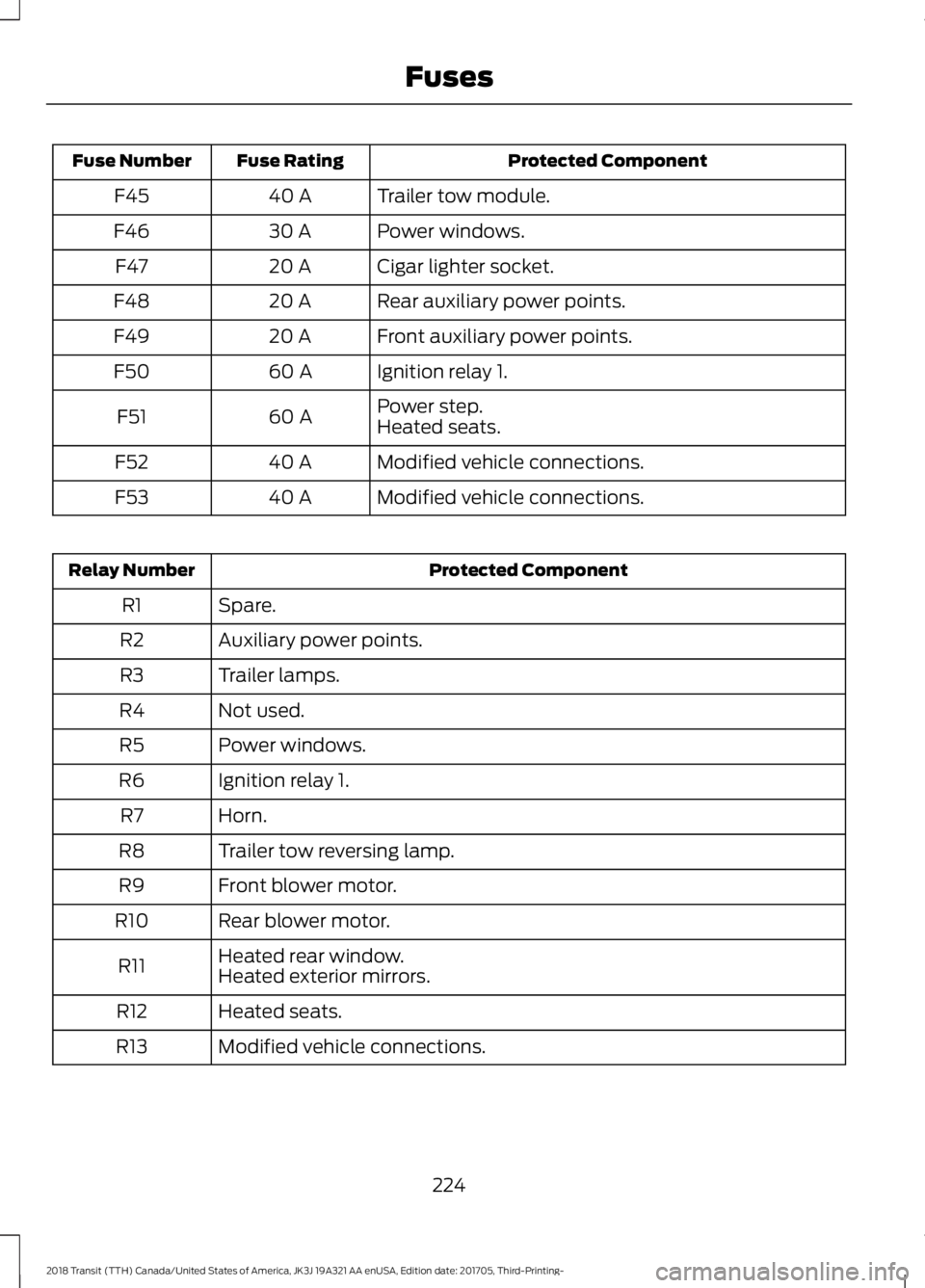
Protected Component
Fuse Rating
Fuse Number
Trailer tow module.
40 A
F45
Power windows.
30 A
F46
Cigar lighter socket.
20 A
F47
Rear auxiliary power points.
20 A
F48
Front auxiliary power points.
20 A
F49
Ignition relay 1.
60 A
F50
Power step.
60 A
F51
Heated seats.
Modified vehicle connections.
40 A
F52
Modified vehicle connections.
40 A
F53 Protected Component
Relay Number
Spare.
R1
Auxiliary power points.
R2
Trailer lamps.
R3
Not used.
R4
Power windows.
R5
Ignition relay 1.
R6
Horn.
R7
Trailer tow reversing lamp.
R8
Front blower motor.
R9
Rear blower motor.
R10
Heated rear window.
R11 Heated exterior mirrors.
Heated seats.
R12
Modified vehicle connections.
R13
224
2018 Transit (TTH) Canada/United States of America, JK3J 19A321 AA enUSA, Edition date: 201705, Third-Printing- Fuses
Page 229 of 521
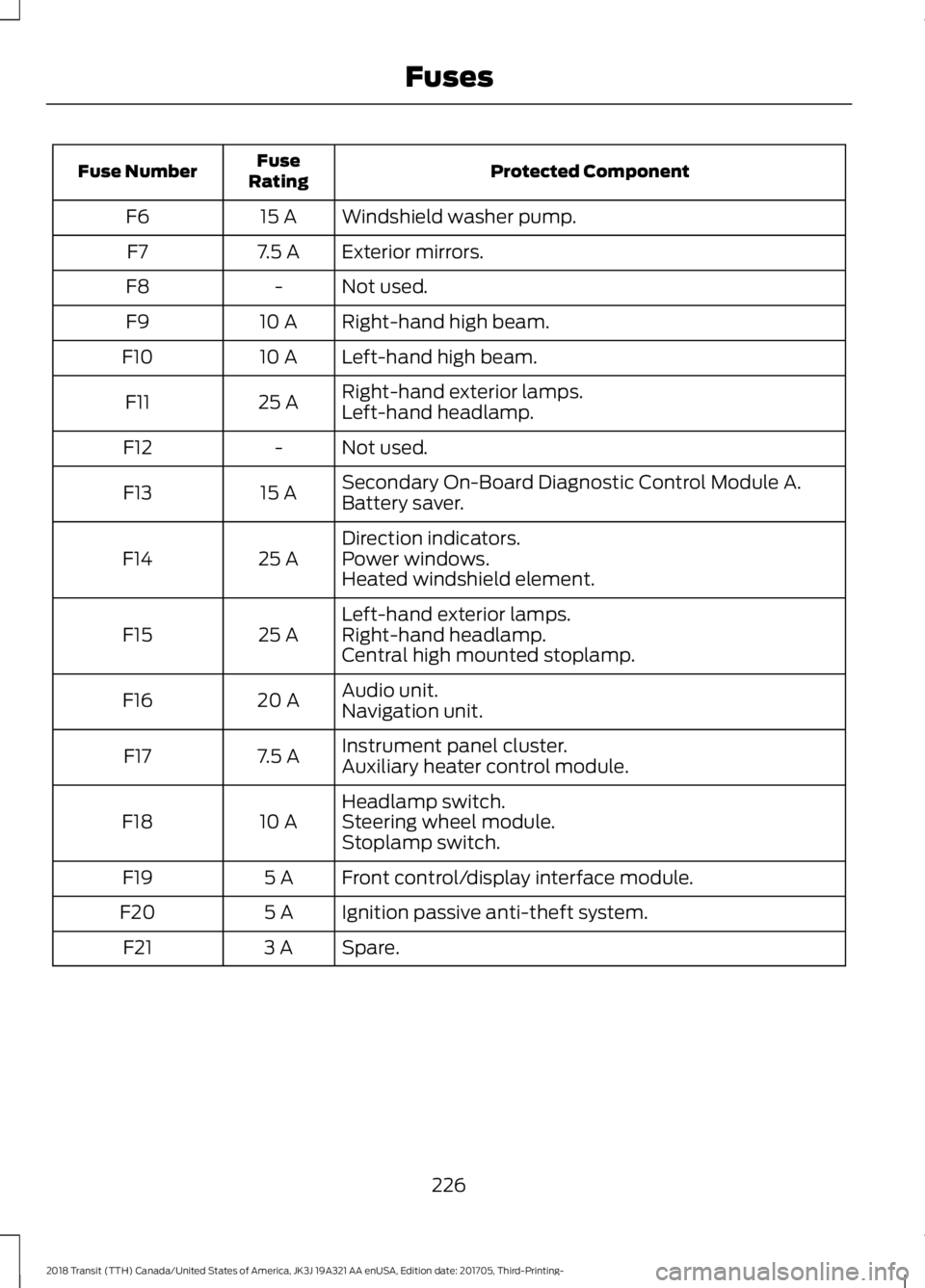
Protected Component
Fuse
Rating
Fuse Number
Windshield washer pump.
15 A
F6
Exterior mirrors.
7.5 A
F7
Not used.
-
F8
Right-hand high beam.
10 A
F9
Left-hand high beam.
10 A
F10
Right-hand exterior lamps.
25 A
F11
Left-hand headlamp.
Not used.
-
F12
Secondary On-Board Diagnostic Control Module A.
15 A
F13
Battery saver.
Direction indicators.
25 A
F14 Power windows.
Heated windshield element.
Left-hand exterior lamps.
25 A
F15 Right-hand headlamp.
Central high mounted stoplamp.
Audio unit.
20 A
F16
Navigation unit.
Instrument panel cluster.
7.5 A
F17
Auxiliary heater control module.
Headlamp switch.
10 A
F18 Steering wheel module.
Stoplamp switch.
Front control/display interface module.
5 A
F19
Ignition passive anti-theft system.
5 A
F20
Spare.
3 A
F21
226
2018 Transit (TTH) Canada/United States of America, JK3J 19A321 AA enUSA, Edition date: 201705, Third-Printing- Fuses
Page 316 of 521
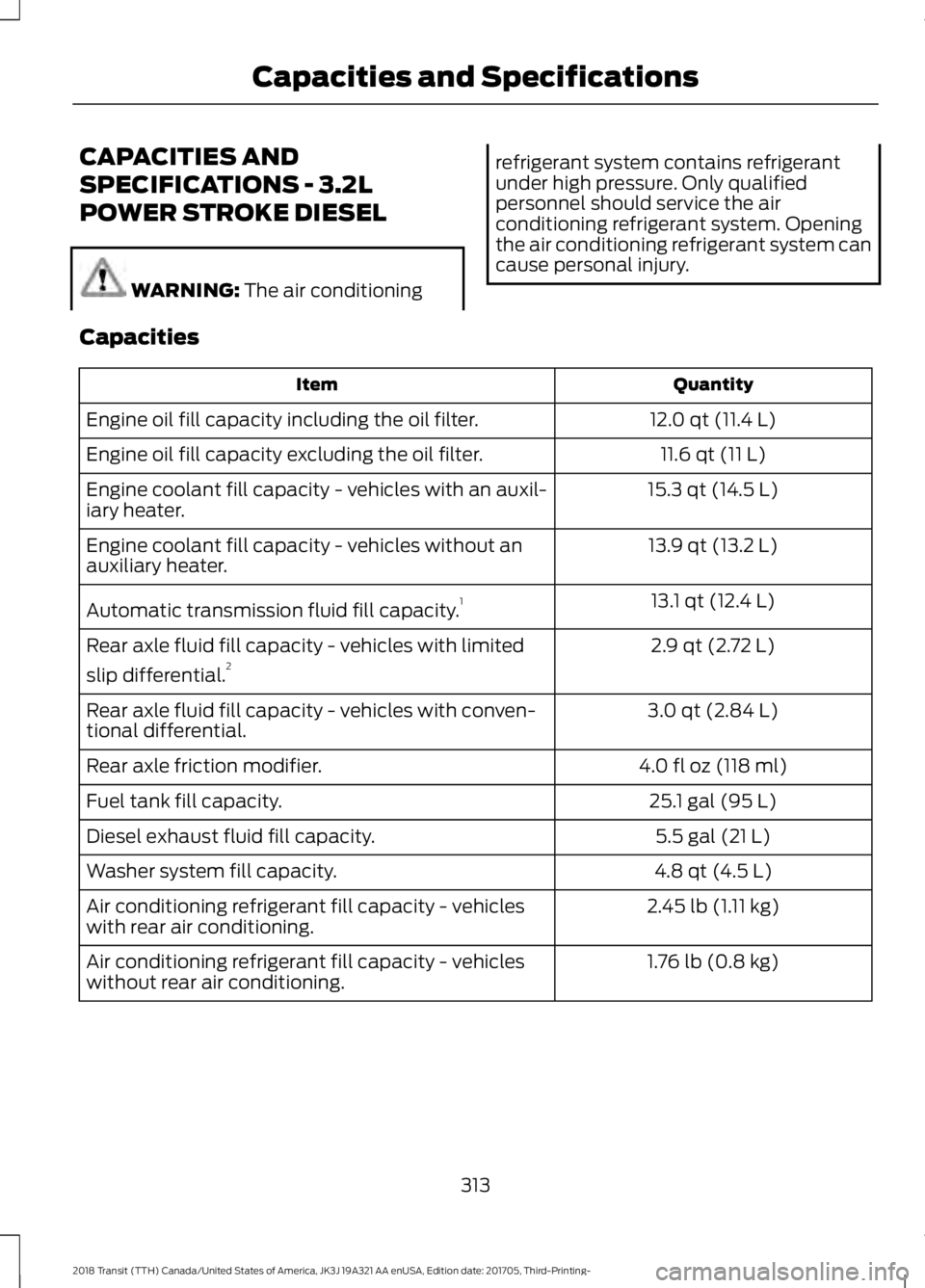
CAPACITIES AND
SPECIFICATIONS - 3.2L
POWER STROKE DIESEL
WARNING: The air conditioning refrigerant system contains refrigerant
under high pressure. Only qualified
personnel should service the air
conditioning refrigerant system. Opening
the air conditioning refrigerant system can
cause personal injury.
Capacities Quantity
Item
12.0 qt (11.4 L)
Engine oil fill capacity including the oil filter.
11.6 qt (11 L)
Engine oil fill capacity excluding the oil filter.
15.3 qt (14.5 L)
Engine coolant fill capacity - vehicles with an auxil-
iary heater.
13.9 qt (13.2 L)
Engine coolant fill capacity - vehicles without an
auxiliary heater.
13.1 qt (12.4 L)
Automatic transmission fluid fill capacity. 1
2.9 qt (2.72 L)
Rear axle fluid fill capacity - vehicles with limited
slip differential. 2
3.0 qt (2.84 L)
Rear axle fluid fill capacity - vehicles with conven-
tional differential.
4.0 fl oz (118 ml)
Rear axle friction modifier.
25.1 gal (95 L)
Fuel tank fill capacity.
5.5 gal (21 L)
Diesel exhaust fluid fill capacity.
4.8 qt (4.5 L)
Washer system fill capacity.
2.45 lb (1.11 kg)
Air conditioning refrigerant fill capacity - vehicles
with rear air conditioning.
1.76 lb (0.8 kg)
Air conditioning refrigerant fill capacity - vehicles
without rear air conditioning.
313
2018 Transit (TTH) Canada/United States of America, JK3J 19A321 AA enUSA, Edition date: 201705, Third-Printing- Capacities and Specifications
Page 320 of 521
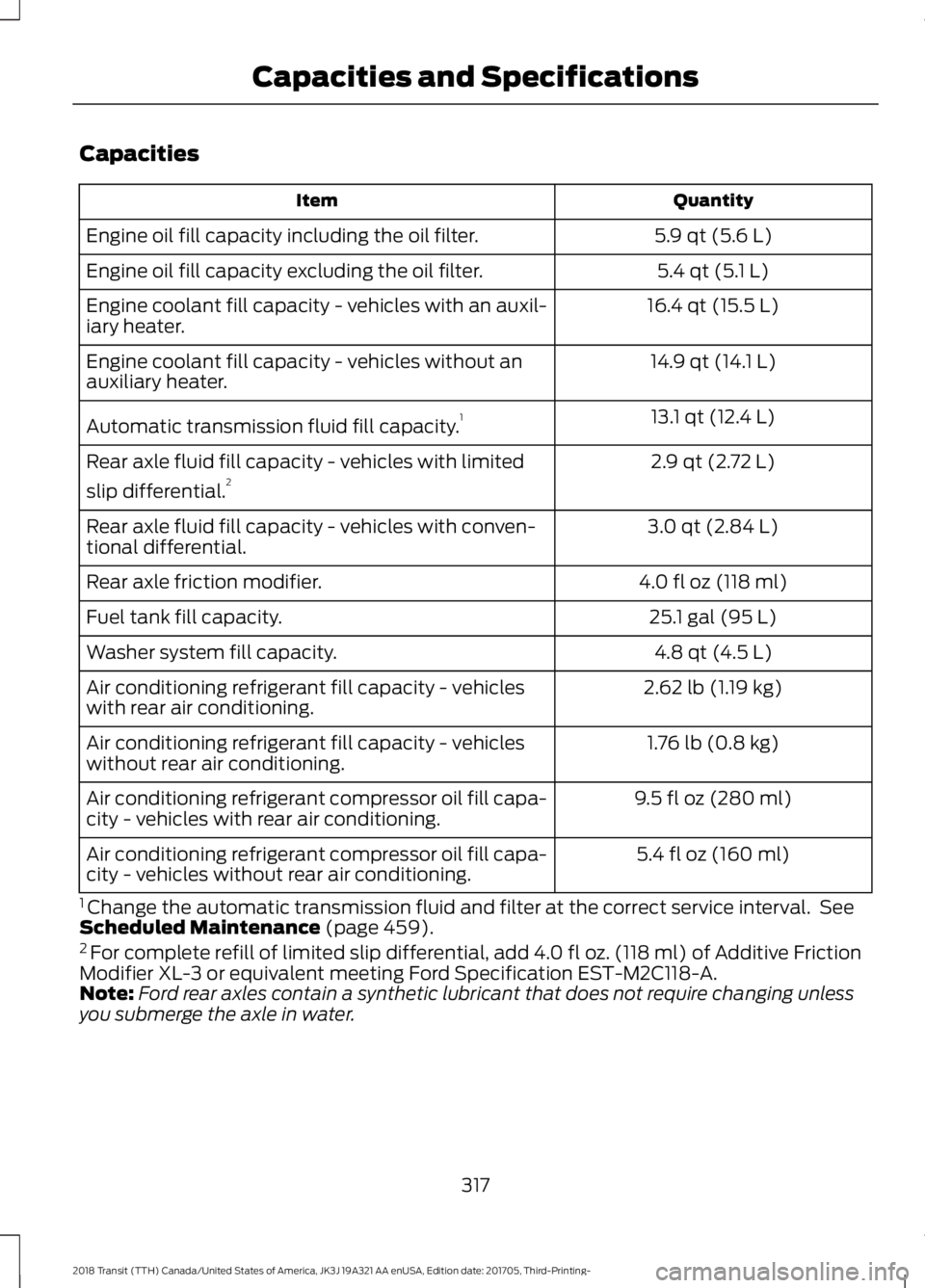
Capacities
Quantity
Item
5.9 qt (5.6 L)
Engine oil fill capacity including the oil filter.
5.4 qt (5.1 L)
Engine oil fill capacity excluding the oil filter.
16.4 qt (15.5 L)
Engine coolant fill capacity - vehicles with an auxil-
iary heater.
14.9 qt (14.1 L)
Engine coolant fill capacity - vehicles without an
auxiliary heater.
13.1 qt (12.4 L)
Automatic transmission fluid fill capacity. 1
2.9 qt (2.72 L)
Rear axle fluid fill capacity - vehicles with limited
slip differential. 2
3.0 qt (2.84 L)
Rear axle fluid fill capacity - vehicles with conven-
tional differential.
4.0 fl oz (118 ml)
Rear axle friction modifier.
25.1 gal (95 L)
Fuel tank fill capacity.
4.8 qt (4.5 L)
Washer system fill capacity.
2.62 lb (1.19 kg)
Air conditioning refrigerant fill capacity - vehicles
with rear air conditioning.
1.76 lb (0.8 kg)
Air conditioning refrigerant fill capacity - vehicles
without rear air conditioning.
9.5 fl oz (280 ml)
Air conditioning refrigerant compressor oil fill capa-
city - vehicles with rear air conditioning.
5.4 fl oz (160 ml)
Air conditioning refrigerant compressor oil fill capa-
city - vehicles without rear air conditioning.
1 Change the automatic transmission fluid and filter at the correct service interval. See
Scheduled Maintenance (page 459).
2 For complete refill of limited slip differential, add 4.0 fl oz. (118 ml) of Additive Friction
Modifier XL-3 or equivalent meeting Ford Specification EST-M2C118-A.
Note: Ford rear axles contain a synthetic lubricant that does not require changing unless
you submerge the axle in water.
317
2018 Transit (TTH) Canada/United States of America, JK3J 19A321 AA enUSA, Edition date: 201705, Third-Printing- Capacities and Specifications
Page 324 of 521
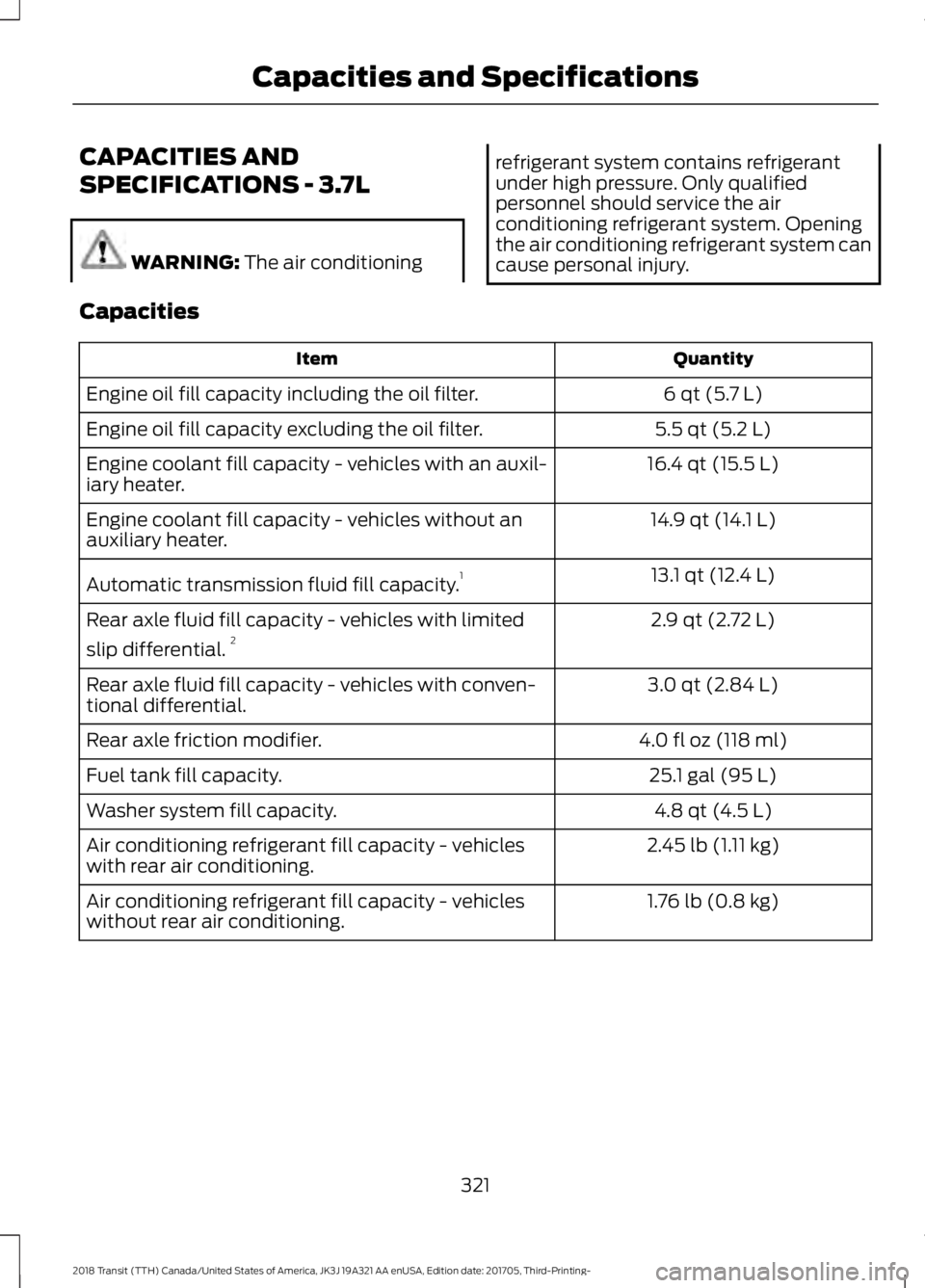
CAPACITIES AND
SPECIFICATIONS - 3.7L
WARNING: The air conditioning refrigerant system contains refrigerant
under high pressure. Only qualified
personnel should service the air
conditioning refrigerant system. Opening
the air conditioning refrigerant system can
cause personal injury.
Capacities Quantity
Item
6 qt (5.7 L)
Engine oil fill capacity including the oil filter.
5.5 qt (5.2 L)
Engine oil fill capacity excluding the oil filter.
16.4 qt (15.5 L)
Engine coolant fill capacity - vehicles with an auxil-
iary heater.
14.9 qt (14.1 L)
Engine coolant fill capacity - vehicles without an
auxiliary heater.
13.1 qt (12.4 L)
Automatic transmission fluid fill capacity. 1
2.9 qt (2.72 L)
Rear axle fluid fill capacity - vehicles with limited
slip differential. 2
3.0 qt (2.84 L)
Rear axle fluid fill capacity - vehicles with conven-
tional differential.
4.0 fl oz (118 ml)
Rear axle friction modifier.
25.1 gal (95 L)
Fuel tank fill capacity.
4.8 qt (4.5 L)
Washer system fill capacity.
2.45 lb (1.11 kg)
Air conditioning refrigerant fill capacity - vehicles
with rear air conditioning.
1.76 lb (0.8 kg)
Air conditioning refrigerant fill capacity - vehicles
without rear air conditioning.
321
2018 Transit (TTH) Canada/United States of America, JK3J 19A321 AA enUSA, Edition date: 201705, Third-Printing- Capacities and Specifications
Page 337 of 521
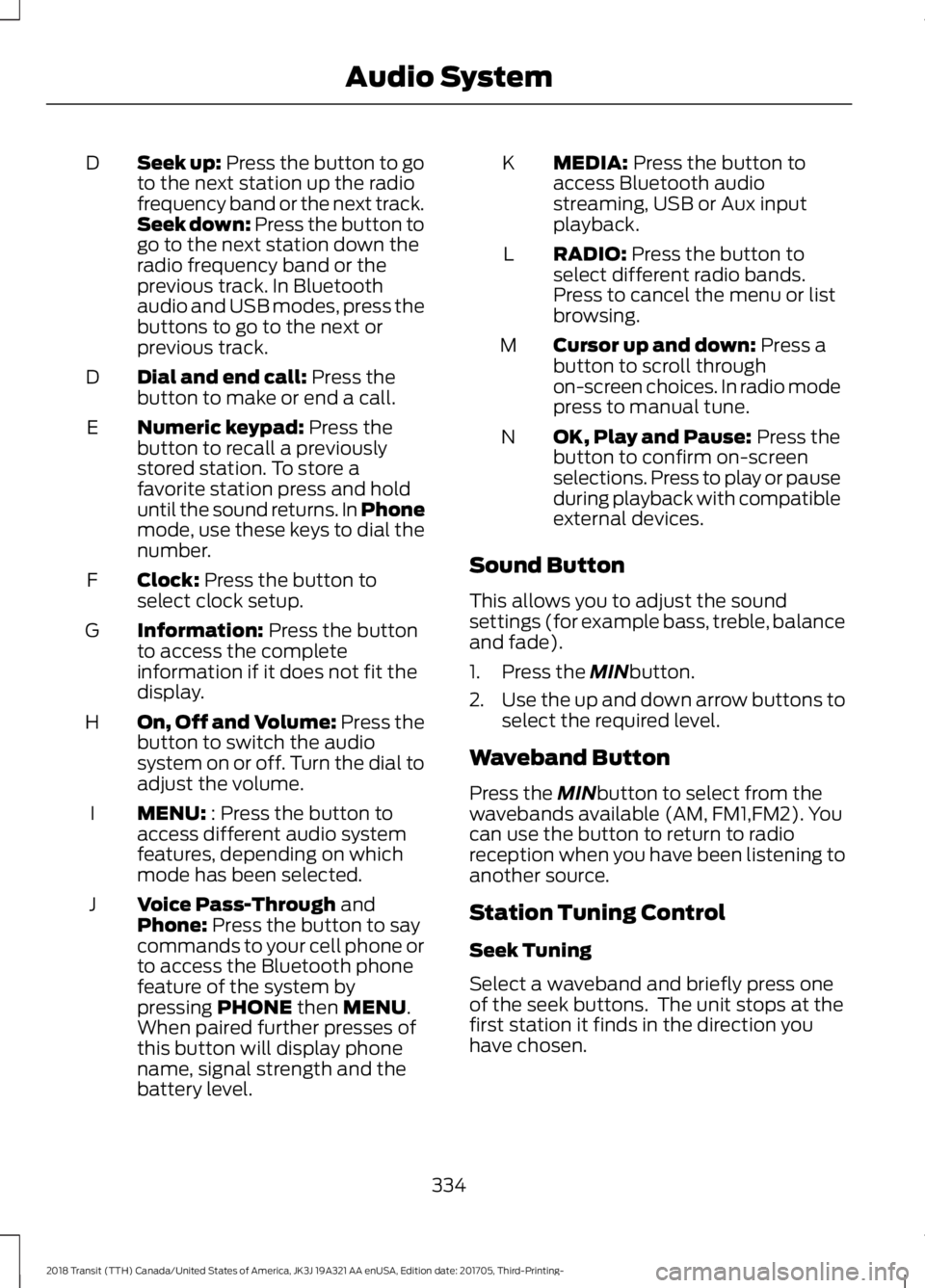
Seek up: Press the button to go
to the next station up the radio
frequency band or the next track.
Seek down: Press the button to
go to the next station down the
radio frequency band or the
previous track. In Bluetooth
audio and USB modes, press the
buttons to go to the next or
previous track.
D
Dial and end call:
Press the
button to make or end a call.
D
Numeric keypad:
Press the
button to recall a previously
stored station. To store a
favorite station press and hold
until the sound returns. In Phone
mode, use these keys to dial the
number.
E
Clock:
Press the button to
select clock setup.
F
Information:
Press the button
to access the complete
information if it does not fit the
display.
G
On, Off and Volume:
Press the
button to switch the audio
system on or off. Turn the dial to
adjust the volume.
H
MENU:
: Press the button to
access different audio system
features, depending on which
mode has been selected.
I
Voice Pass-Through
and
Phone: Press the button to say
commands to your cell phone or
to access the Bluetooth phone
feature of the system by
pressing
PHONE then MENU.
When paired further presses of
this button will display phone
name, signal strength and the
battery level.
J MEDIA:
Press the button to
access Bluetooth audio
streaming, USB or Aux input
playback.
K
RADIO:
Press the button to
select different radio bands.
Press to cancel the menu or list
browsing.
L
Cursor up and down:
Press a
button to scroll through
on-screen choices. In radio mode
press to manual tune.
M
OK, Play and Pause:
Press the
button to confirm on-screen
selections. Press to play or pause
during playback with compatible
external devices.
N
Sound Button
This allows you to adjust the sound
settings (for example bass, treble, balance
and fade).
1. Press the
MINbutton.
2. Use the up and down arrow buttons to
select the required level.
Waveband Button
Press the
MINbutton to select from the
wavebands available (AM, FM1,FM2). You
can use the button to return to radio
reception when you have been listening to
another source.
Station Tuning Control
Seek Tuning
Select a waveband and briefly press one
of the seek buttons. The unit stops at the
first station it finds in the direction you
have chosen.
334
2018 Transit (TTH) Canada/United States of America, JK3J 19A321 AA enUSA, Edition date: 201705, Third-Printing- Audio System
Page 343 of 521
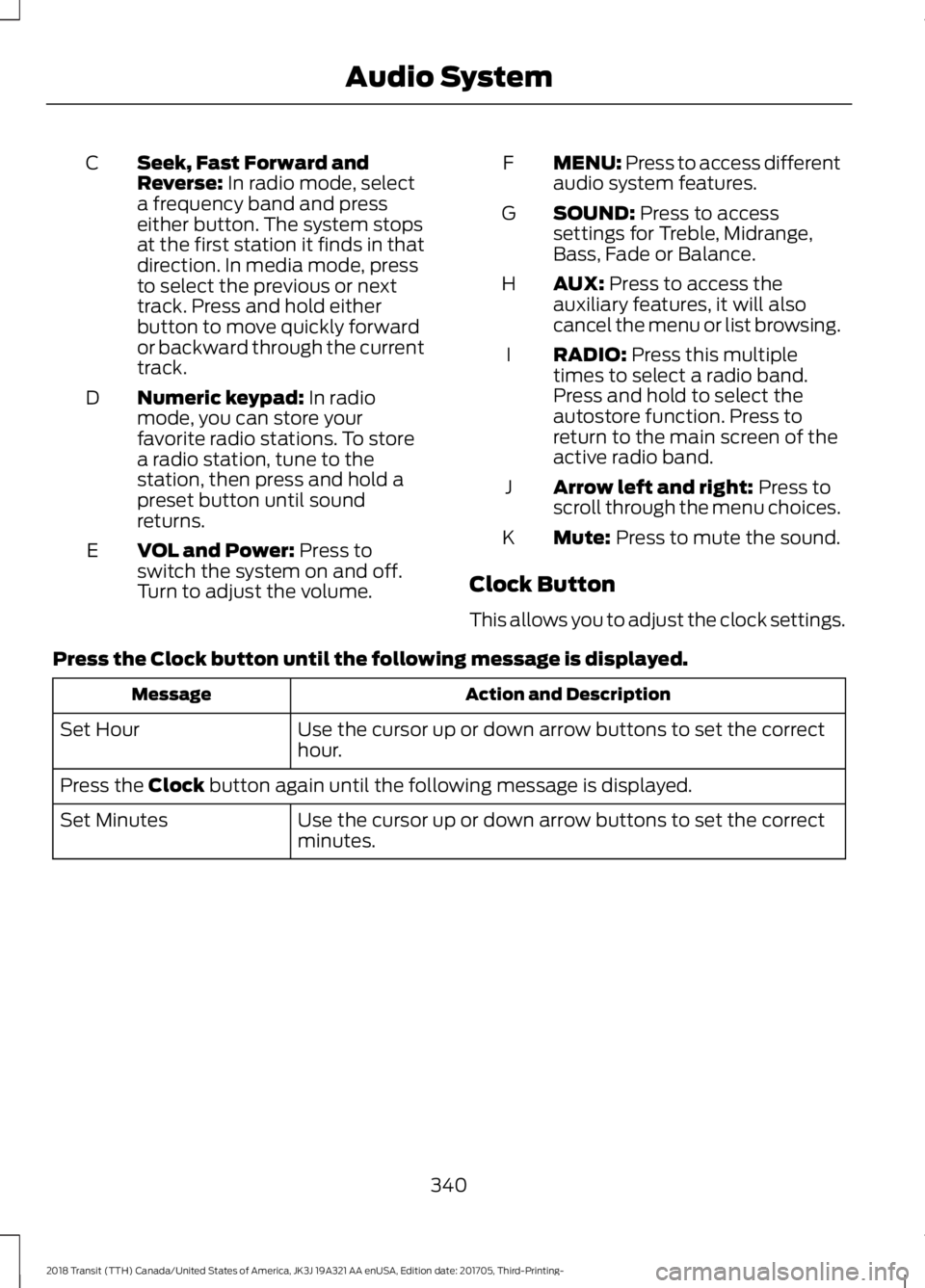
Seek, Fast Forward and
Reverse: In radio mode, select
a frequency band and press
either button. The system stops
at the first station it finds in that
direction. In media mode, press
to select the previous or next
track. Press and hold either
button to move quickly forward
or backward through the current
track.
C
Numeric keypad:
In radio
mode, you can store your
favorite radio stations. To store
a radio station, tune to the
station, then press and hold a
preset button until sound
returns.
D
VOL and Power:
Press to
switch the system on and off.
Turn to adjust the volume.
E MENU: Press to access different
audio system features.
F
SOUND:
Press to access
settings for Treble, Midrange,
Bass, Fade or Balance.
G
AUX:
Press to access the
auxiliary features, it will also
cancel the menu or list browsing.
H
RADIO:
Press this multiple
times to select a radio band.
Press and hold to select the
autostore function. Press to
return to the main screen of the
active radio band.
I
Arrow left and right:
Press to
scroll through the menu choices.
J
Mute:
Press to mute the sound.
K
Clock Button
This allows you to adjust the clock settings.
Press the
Clock button until the following message is displayed. Action and Description
Message
Use the cursor up or down arrow buttons to set the correct
hour.
Set Hour
Press the
Clock button again until the following message is displayed.
Use the cursor up or down arrow buttons to set the correct
minutes.
Set Minutes
340
2018 Transit (TTH) Canada/United States of America, JK3J 19A321 AA enUSA, Edition date: 201705, Third-Printing- Audio System
Page 344 of 521
Setting 24 Hour or 12 Hour Display
Press the Menu button until the following message is displayed.
Action and Description
Message
Use the cursor up or down arrow buttons to select one of the
following:
24 Hour
12 Hour
24 Hour
Note: The default setting is 24 hour.
Station Tuning Buttons
Seek Tuning
Select a frequency band and briefly press
one of the seek buttons. The unit will stop
at the first station it finds in the direction
you have chosen.
Manual Tuning
Use the cursor up or down arrow buttons
to tune up or down the frequency band in
small increments. To increment quickly,
press and hold until you find a station you
want to listen to.
Station Preset Buttons
This feature allows you to store your
favorite stations. They can be recalled by
selecting the appropriate frequency band
and pressing one of the preset buttons.
1. Select a frequency band.
2. Tune to the station required.
3. Press and hold one of the preset buttons. The audio unit will also mute
momentarily as confirmation.
You can repeat this on each frequency
band and for each preset button. Menu Button
This allows you to adjust all of the audio
system settings. Press the button
repeatedly until the required setting is
displayed. Use the cursor up or down arrow
buttons to adjust the following settings:
•
Clock hour.
• Clock minutes.
• 24 hour, 12 hour.
• Bass.
• Treble.
• Balance.
• Fade.
• RDS.
Sound Button
This allows you to adjust the sound
settings for bass, treble, balance or fade.
1. Press the sound button until the required setting is displayed.
2. Use the cursor up or down arrow buttons to select the required level.
Note: Fade settings are only adjustable if
there are speakers in the rear of your vehicle.
AUX Button
Connect your media device to the audio
unit. See
USB Port (page 347).
341
2018 Transit (TTH) Canada/United States of America, JK3J 19A321 AA enUSA, Edition date: 201705, Third-Printing- Audio System
Page 345 of 521
Select your media device as the audio
source by pressing the AUX button. After
connecting your media device, the first
track will start to play automatically.
DIGITAL RADIO
Note: HD Radio broadcasts are not
available in all markets.
HD Radio technology is the digital
evolution of analog AM/FM radio. Your
system has a special receiver that allows
it to receive digital broadcasts (where
available) in addition to the analog
broadcasts, it already receives. Digital
broadcasts provide a better sound quality
than analog broadcasts with free,
crystal-clear audio and no static or
distortion. For more information, and a
guide to available stations and
programming, please visit
www.hdradio.com.
When HD Radio is on and you tune to a
station broadcasting HD Radio technology,
you may notice the HD Radio logo on your
screen. When this logo is available, you
may also see Title and Artist fields
on-screen. The multicast indicator appears in FM
mode (only) if the current station is
broadcasting multiple digital broadcasts.
The highlighted numbers signify available
digital channels where new or different
content is available. HD1 signifies the main
programming status and is available in
analog and digital broadcasts. Other
multicast stations (HD2 through HD7) are
only available digitally.
When HD Radio broadcasts are active, you
can access the following functions:
•
Scan
allows you to hear a brief
sampling of all available stations. This
feature still works when HD Radio
reception is on, although it does not
scan for HD2-HD7 channels. You may
see the HD logo appear if the station
has a digital broadcast.
• Memory presets
allow you to save an
active channel as a memory preset.
Touch and hold a memory preset slot
until the sound returns. There is a brief
mute while the radio saves the station.
Sound returns when finished. When
switching to an HD2 or HD3 memory
preset, the sound mutes before the
digital audio plays, because the system
has to reacquire the digital signal.
Note: As with any saved radio station, you
cannot access the saved station if your
vehicle is outside the station ’s reception
area.
342
2018 Transit (TTH) Canada/United States of America, JK3J 19A321 AA enUSA, Edition date: 201705, Third-Printing- Audio System