remote control FORD TRANSIT 2018 User Guide
[x] Cancel search | Manufacturer: FORD, Model Year: 2018, Model line: TRANSIT, Model: FORD TRANSIT 2018Pages: 521, PDF Size: 8.65 MB
Page 73 of 521
LOCKING AND UNLOCKING
Locking
Locking With the Key
Turn the top of the key toward the rear of
your vehicle.
Locking With the Remote Control
Press the button once. The
direction indicators will flash.
Press the button again within
three seconds to confirm that all the doors
are closed. The horn sounds and the
direction indicators flash.
Note: You can lock the driver door with the
key. Use the key when the remote control
is not functioning.
Note: Make sure you have locked your
vehicle before leaving it unattended.
Note: Do not leave the keys in your vehicle.
Unlocking
Unlocking With the Key
Turn the top of the key toward the front of
your vehicle.
Unlocking With the Remote Control Press the button once. The
direction indicators will flash.
Note: You can unlock the driver door with
the key. Use the key when the remote
control is not functioning.
Note: When you leave your vehicle
unattended for several weeks, the remote
control turns off.
Note: Unlock your vehicle and start the
engine using the key. Unlocking and starting
your vehicle once enables the remote
control. Unlocking the Rear Cargo Doors Press the button.
Reprogramming the Unlocking
Function
Note: When you press the unlock button,
either all the doors are unlocked or only the
driver and passenger doors are unlocked.
You can reprogram the unlocking function
so that all doors are unlocked.
Press and hold the unlock and lock buttons
on the remote control simultaneously for
at least four seconds with the ignition off.
The direction indicators flash twice to
confirm the change.
To return to the original unlocking function,
repeat the process.
You can also change between the
unlocking modes using the information
display. See General Information (page
99).
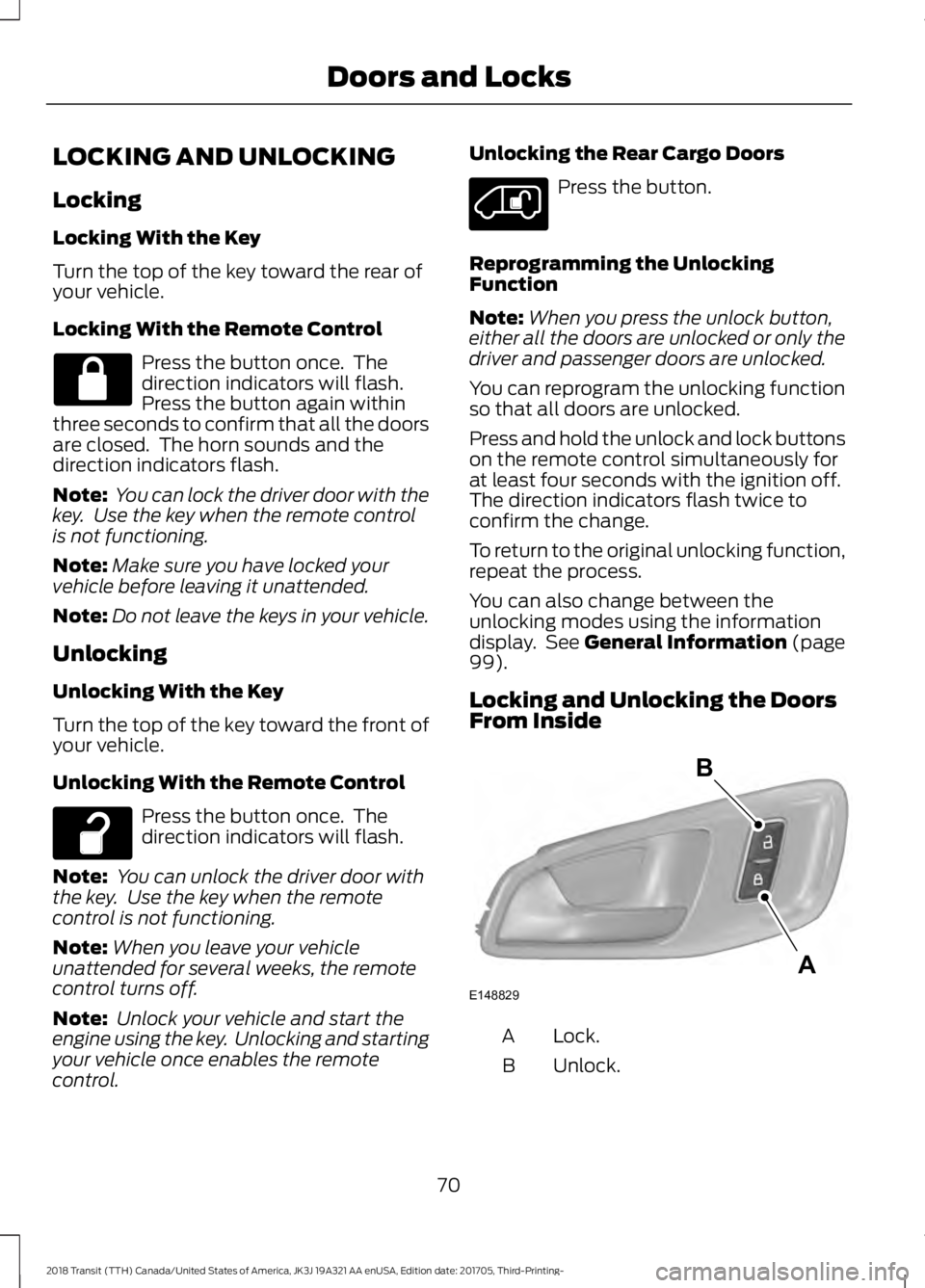
Locking and Unlocking the Doors
From Inside Lock.
A
Unlock.
B
70
2018 Transit (TTH) Canada/United States of America, JK3J 19A321 AA enUSA, Edition date: 201705, Third-Printing- Doors and Locks E148829
A
B
Page 77 of 521
•
You shift into any gear putting your
vehicle in motion.
• Your vehicle reaches a speed greater
than 5 mph (8 km/h).
Use the interior door unlock button or
switch the ignition off and use the key or
remote control to unlock the rear or sliding
door.
Autounlock
Autounlock unlocks all doors within 10
minutes of the end of a drive cycle, when
the driver door is opened and the ignition
is off.
Enabling or Disabling Autounlock
You can enable or disable autounlock in
the information display. See Information
Displays
(page 99).
One-Stage Unlocking
You can switch on this function using the
information display. See
Information
Displays (page 99).
If you have switched on this function, you
unlock all doors including the rear doors
and the sliding door.
You unlock all of the doors when you:
• Press the unlock button on the remote
control once.
• Press the interior unlock button once.
Two-Stage Unlocking
You unlock the front doors when you:
• Press the unlock button on the remote
control once.
• Press the interior unlock button once. You unlock the front doors and cargo area
when you:
•
Press the unlock button on the remote
control once.
• Press the unlock button on the remote
control twice within three seconds.
Zone Re-Locking
(If Equipped)
If you enable zone re-locking and open one
door, all other doors remain locked. See an
authorized dealer for further information.
The locks on van, bus or wagon have two
zones, cabin and cargo. For van, the cargo
area includes the rear doors and the sliding
door. For bus or wagon, the cargo area
includes the rear doors.
• Exit your vehicle and press the lock
button.
• Press the unlock button or the cargo
area unlock button once to open the
respective zone.
If you now open a door within the unlocked
zone, the other doors in that zone
automatically lock.
Configurable Unlocking
Configurable unlocking is set when you
purchase your vehicle. It allows you to
select which doors unlock when you press,
once or twice, the unlock button or the
cargo area unlock button on your remote
control. You cannot switch this feature
back on if you had it switched off. See an
authorized dealer for further information.
74
2018 Transit (TTH) Canada/United States of America, JK3J 19A321 AA enUSA, Edition date: 201705, Third-Printing- Doors and Locks
Page 78 of 521
PASSIVE ANTI-THEFT
SYSTEM (If Equipped)
Note: The system is not compatible with
non-Ford aftermarket remote start systems.
Use of these systems may result in vehicle
starting problems and a loss of security
protection.
Note: Metallic objects, electronic devices
or a second coded key on the same key
chain may cause vehicle starting problems
if they are too close to the key when starting
the engine. Prevent these objects from
touching the coded key while starting the
engine. Switch the ignition off, move all
objects on the key chain away from the
coded key and restart the engine if a
problem occurs.
Note: Do not leave a duplicate coded key
in the vehicle. Always take your keys and
lock all doors when leaving the vehicle.
SecuriLock®
The system is an engine immobilization
system. It is designed to help prevent the
engine from being started unless a
correctly coded key for your vehicle is used.
Using an incorrectly coded key may
prevent the engine from starting. A
message may appear in the information
display.
If you are unable to start the engine with a
correctly coded key, a malfunction has
happened and a message may appear in
the information display.
Automatic Arming
The engine immobilization system arms
immediately after you switch the ignition
off. Automatic Disarming
Switching the ignition on with a correctly
coded key disarms the engine
immobilization system.
Replacement Keys
The integrated keyhead transmitter
functions as a programmed ignition key
that operates all the locks and starts your
vehicle, as well as a remote control.
If your keys are lost or stolen and you do
not have a spare correctly coded key, you
will need to have your vehicle towed to an
authorized dealer. You need to erase the
coded keys from your vehicle and program
new coded keys.
Store an extra correctly coded key away
from the vehicle in a safe place to help
prevent any inconveniences. See an
authorized dealer to purchase additional
spare or replacement keys.
Programming a Spare Integrated
Keyhead Transmitter
You can program your own integrated
keyhead transmitter or standard
SecuriLock coded keys to your vehicle. This
procedure will program both the engine
immobilizer keycode and the remote entry
portion of the remote control to your
vehicle
Only use integrated keyhead transmitters
or standard SecuriLock keys.
You must have two previously
programmed correctly coded keys and the
new unprogrammed key readily accessible.
See an authorized dealer to have the spare
key programmed if two previously
programmed correctly coded keys are not
available.
Read and understand the entire procedure
before you begin.
1.
Insert the first previously programmed
correctly coded key into the ignition.
75
2018 Transit (TTH) Canada/United States of America, JK3J 19A321 AA enUSA, Edition date: 201705, Third-Printing- Security
Page 79 of 521
2.
Switch the ignition from off to on. Keep
the ignition on for at least three
seconds, but no more than 10 seconds.
3. Switch the ignition off and remove the
first correctly coded key from the
ignition.
4. After three seconds but within 10 seconds of switching the ignition off,
insert the second previously correctly
coded key into the ignition.
5. Switch the ignition from off to on. Keep
the ignition on for at least three
seconds, but no more than 10 seconds.
6. Switch the ignition off and remove the
second previously programmed
correctly coded key from the ignition.
7. After three seconds but within 10 seconds of switching the ignition off
and removing the previously
programmed correctly coded key,
insert the new unprogrammed key into
the ignition.
8. Switch the ignition from off to on. Keep
the ignition on for at least six seconds.
9. Remove the newly programmed correctly coded key from the ignition.
If the key has been successfully
programmed it will start the engine and
operate the remote entry system (if the
new key is an integrated keyhead
transmitter).
If the key was not successfully
programmed, wait 10 seconds and repeat
Steps 1 through 8. If you are still
unsuccessful, take your vehicle to an
authorized dealer.
Note: You can program a maximum of eight
coded keys to your vehicle. All eight can be
integrated keyhead transmitters. ANTI-THEFT ALARM
Alarm System
The perimeter alarm is a deterrent against
unauthorized access to your vehicle
through the doors, luggage compartment
and the hood.
Triggering the Alarm
Once armed, the alarm is triggered in any
of the following ways:
•
If someone opens a door, cargo area
or the hood without a valid key or
remote control.
• If you switch the ignition on without a
valid key.
If the alarm is triggered, the horn will sound
for 30 seconds and the hazard warning
flasher will flash for five minutes.
Any further attempts to perform one of the
above will trigger the alarm again.
Arming the Alarm
To arm the alarm, lock your vehicle. See
Doors and Locks (page 70).
Disarming the Alarm
Disarm and silence the alarm by unlocking
the doors with the key and switching the
ignition on with a correctly coded key
within 12 seconds, or by unlocking the
doors or the cargo area with the remote
control.
76
2018 Transit (TTH) Canada/United States of America, JK3J 19A321 AA enUSA, Edition date: 201705, Third-Printing- Security
Page 115 of 521
Note:
Do not clean the mirror housing or
glass with harsh abrasives, fuel or other
petroleum-based cleaning products.
Note: On vehicles without a heated exterior
mirror button, the mirrors turn on
automatically when you switch the heated
rear window on.
REMOTE START (If Equipped)
When you remote start your vehicle using
a Ford Original Accessory remote start
system, the engine shuts down if you do
any of the following:
• Unlock your vehicle and open any door.
• Insert the key in the ignition.
• Press the brake pedal.
For more information, refer to the separate
Vehicle Security and Remote Start
Systems Owner ’s Manual
provided with
your vehicle or contact an authorized
dealer.
112
2018 Transit (TTH) Canada/United States of America, JK3J 19A321 AA enUSA, Edition date: 201705, Third-Printing- Climate Control
Page 201 of 521
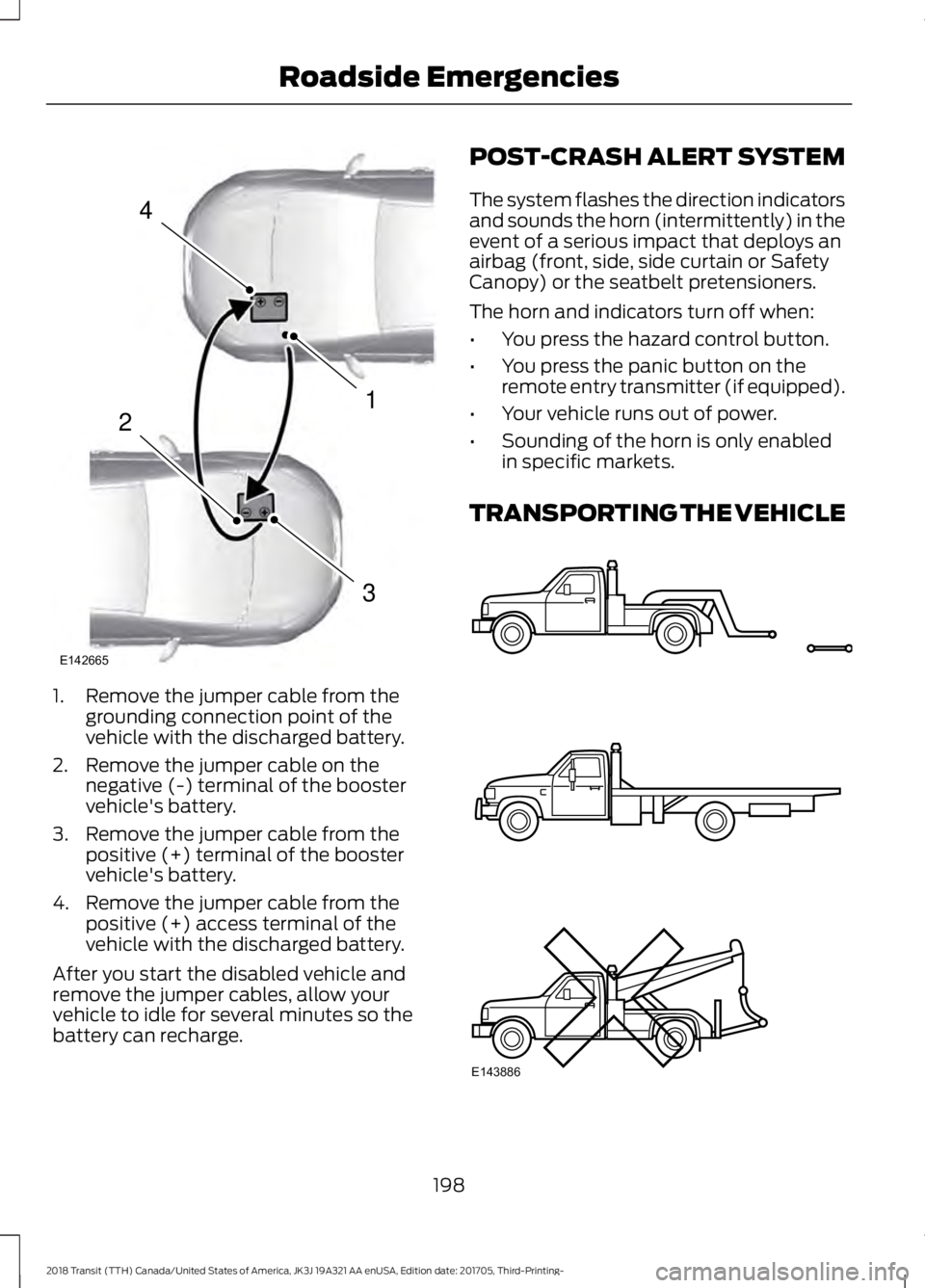
1. Remove the jumper cable from the
grounding connection point of the
vehicle with the discharged battery.
2. Remove the jumper cable on the negative (-) terminal of the booster
vehicle's battery.
3. Remove the jumper cable from the positive (+) terminal of the booster
vehicle's battery.
4. Remove the jumper cable from the positive (+) access terminal of the
vehicle with the discharged battery.
After you start the disabled vehicle and
remove the jumper cables, allow your
vehicle to idle for several minutes so the
battery can recharge. POST-CRASH ALERT SYSTEM
The system flashes the direction indicators
and sounds the horn (intermittently) in the
event of a serious impact that deploys an
airbag (front, side, side curtain or Safety
Canopy) or the seatbelt pretensioners.
The horn and indicators turn off when:
•
You press the hazard control button.
• You press the panic button on the
remote entry transmitter (if equipped).
• Your vehicle runs out of power.
• Sounding of the horn is only enabled
in specific markets.
TRANSPORTING THE VEHICLE 198
2018 Transit (TTH) Canada/United States of America, JK3J 19A321 AA enUSA, Edition date: 201705, Third-Printing- Roadside Emergencies4
1
3
2
E142665 E143886
Page 217 of 521
Protected Component
Fuse Rating
Fuse Number
Modified vehicle connections.
10 A
F24
Body control module.
15 A
F25
Heated exterior mirrors.
10 A
F26
Heated rear window.
20 A
F27
Heated rear window.
20 A
F28
Rear parking aid camera.
10 A
F29 Lane keeping system.
Interior rear view mirror.
Not used.
-
F30
Trailer brake ignition feed.
10 A
F31
Interior lighting.
10 A
F32
Driver heated seat.
10 A
F33
Passenger heated seat.
10 A
F34
Exterior mirrors.
5 A
F35
Driver door window control switch.
Horn.
20 A
F36
SYNC module.
7.5 A
F37
Global positioning system module.
Blower motor relay.
5 A
F38 Horn relay.
Windshield wiper relay.
Remote keyless entry.
7.5 A
F39 Rear heating, ventilation and air conditioning.
Trailer tow backup relay coil.
Parking lamp.
Front blower motor.
40 A
F40
Rear blower motor.
40 A
F41
Heated rear window.
40 A
F42
Trailer socket.
30 A
F43
Trailer tow module.
Auxiliary power points.
60 A
F44
214
2018 Transit (TTH) Canada/United States of America, JK3J 19A321 AA enUSA, Edition date: 201705, Third-Printing- Fuses
Page 226 of 521
Protected Component
Fuse Rating
Fuse Number
Modified vehicle connections.
10 A
F24
Body control module.
15 A
F25
Heated exterior mirrors.
10 A
F26
Heated rear window.
20 A
F27
Heated rear window.
20 A
F28
Rear parking aid camera.
10 A
F29 Lane keeping system.
Interior rear view mirror.
Not used.
-
F30
Trailer brake ignition feed.
10 A
F31
Interior lighting.
10 A
F32
Driver heated seat.
10 A
F33
Passenger heated seat.
10 A
F34
Exterior mirrors.
5 A
F35
Driver door window control switch.
Horn.
20 A
F36
SYNC module.
7.5 A
F37
Global positioning system module.
Blower motor relay.
5 A
F38 Horn relay.
Windshield wiper relay.
Remote keyless entry.
7.5 A
F39 Rear heating, ventilation and air conditioning.
Trailer tow backup relay coil.
Parking lamp.
Front blower motor.
40 A
F40
Rear blower motor.
40 A
F41
Heated rear window.
40 A
F42
Trailer socket.
30 A
F43
Trailer tow module.
Auxiliary power points.
60 A
F44
223
2018 Transit (TTH) Canada/United States of America, JK3J 19A321 AA enUSA, Edition date: 201705, Third-Printing- Fuses
Page 285 of 521
Tire Age
WARNING: Tires degrade
over time depending on many
factors such as weather, storage
conditions, and conditions of use
(load, speed, inflation pressure)
the tires experience throughout
their lives. WARNING:
In general, tires
should be replaced after six years
regardless of tread wear.
However, heat caused by hot
climates or frequent high loading
conditions can accelerate the
aging process and may require
tires to be replaced more
frequently. WARNING:
You should
replace your spare tire when you
replace the road tires or after six
years due to aging even if it has
not been used.
Tire Replacement
Requirements WARNING:
Only use
replacement tires and wheels that
are the same size, load index,
speed rating and type (such as
P-metric versus LT-metric or
all-season versus all-terrain) as
those originally provided by Ford.
The recommended tire and wheel
size may be found on either the
Safety Compliance Certification
Label (affixed to either the door hinge pillar, door-latch post, or the
door edge that meets the
door-latch post, next to the
driver's seating position), or the
Tire Label which is located on the
B-Pillar or edge of the driver's
door. If this information is not
found on these labels, then you
should contact your authorized
dealer as soon as possible. Use of
any tire or wheel not
recommended by Ford can affect
the safety and performance of
your vehicle, which could result in
an increased risk of loss of vehicle
control, vehicle rollover, personal
injury and death.
WARNING:
Always inflate
steel carcass tires with a remote
air fill with the person inflating
standing at a minimum of
12 ft
(3.66 m) away from the wheel
and tire assembly.
Your vehicle is fitted with tires
designed to provide a safe ride
and handling capability.
We recommend that the two front
tires or two rear tires generally be
replaced as a pair.
Note: The wheel valve stems must
also be replaced when the road
tires are replaced on your vehicle.
282
2018 Transit (TTH) Canada/United States of America, JK3J 19A321 AA enUSA, Edition date: 201705, Third-Printing- Wheels and Tires
Page 513 of 521
Hill Start Assist..............................................158
Switching the System On and Off...............159
Using Hill Start Assist....................................... 158
Hints on Controlling the Interior Climate...........................................................110
Cooling the Interior Quickly............................. 110
General Hints........................................................ 110
Heating the Interior Quickly............................. 110
Maximum Cooling Performance in Instrument Panel or Instrument Panel
and Footwell Positions.................................. 111
Recommended Settings for Cooling ..........110
Recommended Settings for Heating...........110
Side Window Defogging in Cold Weather............................................................... 111
Vehicle Stationary for Extended Periods During Extreme High Ambient
Temperatures................................................... 110
Hints on Driving With Anti-Lock Brakes............................................................156
Home Screen................................................396
Hood Lock See: Opening and Closing the Hood..........229
I
Ignition Switch...............................................126
In California (U.S. Only)............................202
Information Display Control.......................82
Information Displays....................................99 General Information........................................... 99
Information Messages
................................103
Installing Child Restraints............................18
Child Safety Restraint.......................................... 18
Using Lap and Shoulder Belts.......................... 19
Using Lower Anchors and Tethers for Children (LATCH)............................................. 21
Using Tether Straps............................................. 27
Instrument Cluster
.........................................93
Instrument Lighting Dimmer......................87
Interior Lamps
.................................................88
Courtesy Lamp..................................................... 88
Reading Lamps..................................................... 88
Interior Mirror
...................................................92
Automatic Dimming Mirror............................... 92
Manual Dimming Mirror..................................... 92
Introduction.........................................................7 J
Jump Starting the Vehicle.........................196
Connecting the Jumper Cables..................... 197
Jump Starting....................................................... 197
Preparing Your Vehicle..................................... 196
Removing the Jumper Cables........................ 197
K
Keys and Remote Controls
.........................59
Principle of Operation........................................ 59
L
Lane Keeping System.................................170 Lane Keeping Alert............................................. 170
Lighting Control
..............................................85
Headlamp Flasher............................................... 86
Headlamp High Beam....................................... 86
Lighting Control Positions................................ 85
Parking Lamps...................................................... 85
Lighting..............................................................85 General Information............................................ 85
Load Carrying
..................................................174
Load Limit........................................................174
Special Loading Instructions for Owners of
Pick-up Trucks and Utility-type
Vehicles.............................................................. 179
Vehicle Loading - with and without a Trailer.................................................................. 174
Load Retaining Fixtures
..............................174
Securing Cargo..................................................... 174
Locking and Unlocking.................................70 Autolock................................................................... 73
Autounlock.............................................................. 74
Configurable Unlocking...................................... 74
Locking..................................................................... 70
Locking and Unlocking the Doors From Inside.................................................................... 70
One-Stage Unlocking.......................................... 74
Opening and Closing the Sliding Door..........71
Opening the Double Rear Doors..................... 72
Rear Emergency Exit............................................ 73
Two-Stage Unlocking......................................... 74
Unlocking................................................................. 70
Zone Re-Locking................................................... 74
510
2018 Transit (TTH) Canada/United States of America, JK3J 19A321 AA enUSA, Edition date: 201705, Third-Printing- Index