service FORD TRANSIT 2018 User Guide
[x] Cancel search | Manufacturer: FORD, Model Year: 2018, Model line: TRANSIT, Model: FORD TRANSIT 2018Pages: 521, PDF Size: 8.65 MB
Page 51 of 521
WARNING: An airbag ON and OFF
switch may be installed in this vehicle.
Before driving, always look at the face of
the switch to be sure the switch is in the
proper position in accordance with these
instructions and warnings. Failure to put
the switch in a proper position can increase
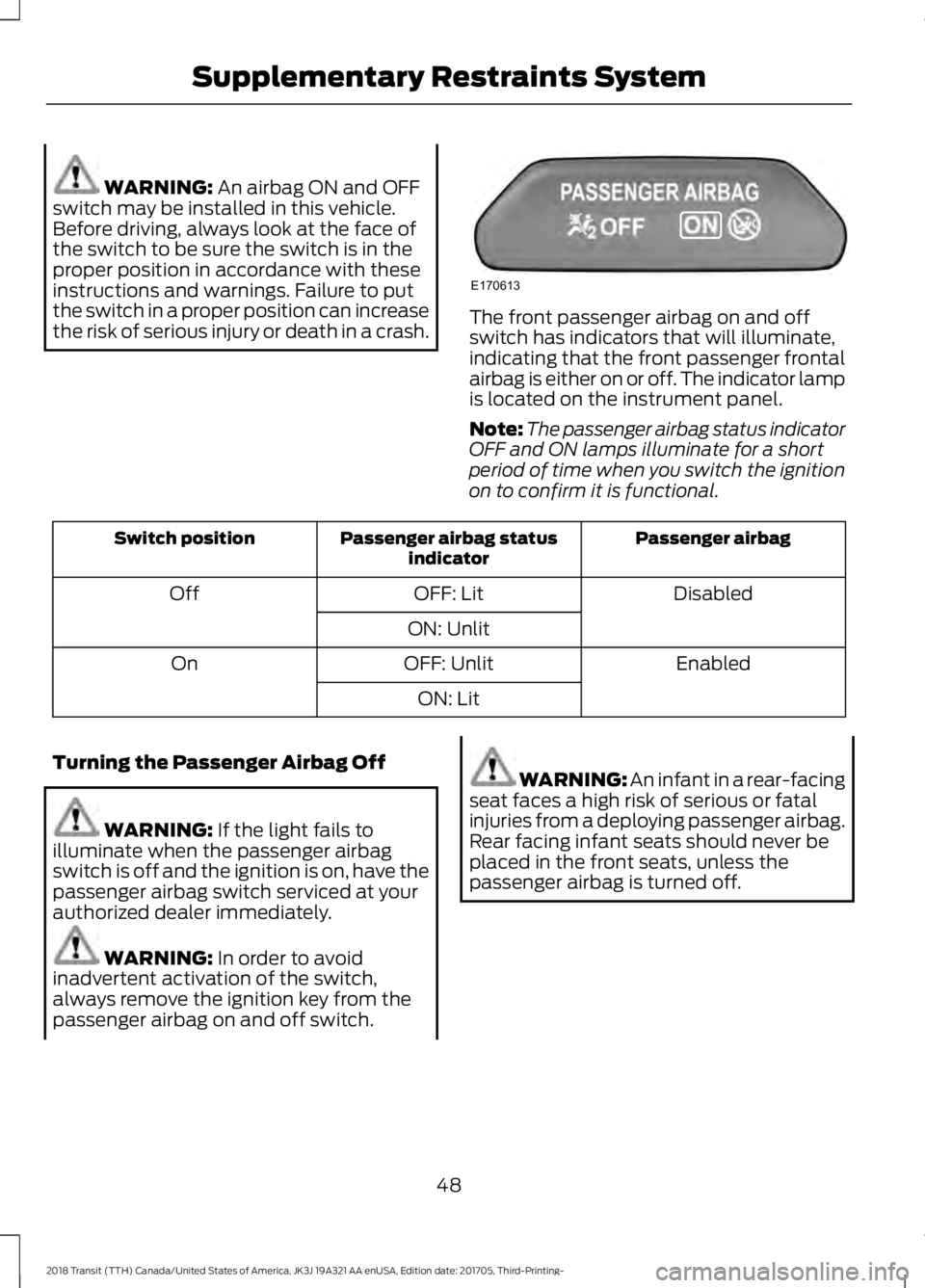
the risk of serious injury or death in a crash. The front passenger airbag on and off
switch has indicators that will illuminate,
indicating that the front passenger frontal
airbag is either on or off. The indicator lamp
is located on the instrument panel.
Note:
The passenger airbag status indicator
OFF and ON lamps illuminate for a short
period of time when you switch the ignition
on to confirm it is functional. Passenger airbag
Passenger airbag status
indicator
Switch position
Disabled
OFF: Lit
Off
ON: Unlit Enabled
OFF: Unlit
On
ON: Lit
Turning the Passenger Airbag Off WARNING:
If the light fails to
illuminate when the passenger airbag
switch is off and the ignition is on, have the
passenger airbag switch serviced at your
authorized dealer immediately. WARNING:
In order to avoid
inadvertent activation of the switch,
always remove the ignition key from the
passenger airbag on and off switch. WARNING: An infant in a rear-facing
seat faces a high risk of serious or fatal
injuries from a deploying passenger airbag.
Rear facing infant seats should never be
placed in the front seats, unless the
passenger airbag is turned off.
48
2018 Transit (TTH) Canada/United States of America, JK3J 19A321 AA enUSA, Edition date: 201705, Third-Printing- Supplementary Restraints SystemE170613
Page 52 of 521
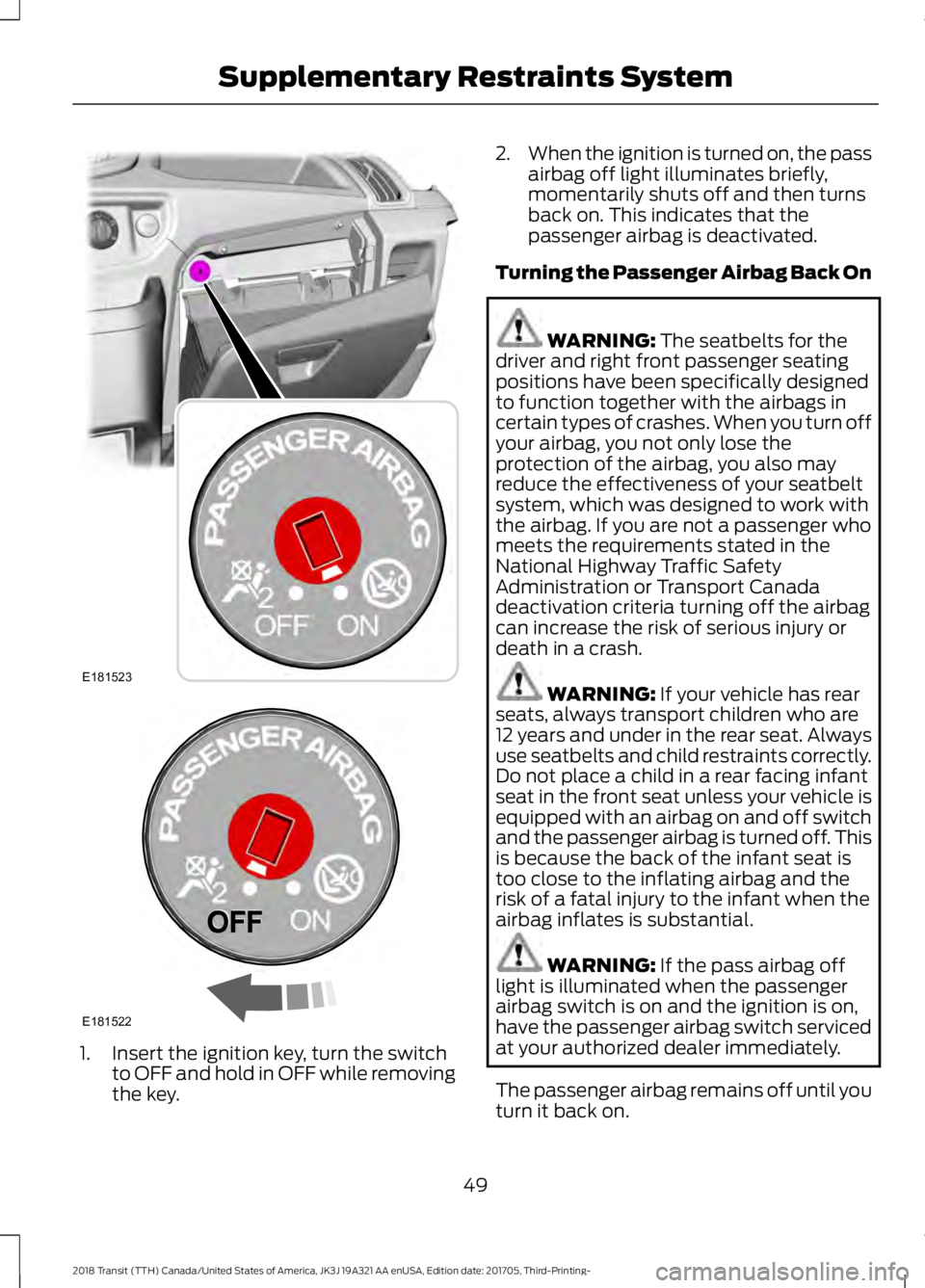
1. Insert the ignition key, turn the switch
to OFF and hold in OFF while removing
the key. 2.
When the ignition is turned on, the pass
airbag off light illuminates briefly,
momentarily shuts off and then turns
back on. This indicates that the
passenger airbag is deactivated.
Turning the Passenger Airbag Back On WARNING: The seatbelts for the
driver and right front passenger seating
positions have been specifically designed
to function together with the airbags in
certain types of crashes. When you turn off
your airbag, you not only lose the
protection of the airbag, you also may
reduce the effectiveness of your seatbelt
system, which was designed to work with
the airbag. If you are not a passenger who
meets the requirements stated in the
National Highway Traffic Safety
Administration or Transport Canada
deactivation criteria turning off the airbag
can increase the risk of serious injury or
death in a crash. WARNING:
If your vehicle has rear
seats, always transport children who are
12 years and under in the rear seat. Always
use seatbelts and child restraints correctly.
Do not place a child in a rear facing infant
seat in the front seat unless your vehicle is
equipped with an airbag on and off switch
and the passenger airbag is turned off. This
is because the back of the infant seat is
too close to the inflating airbag and the
risk of a fatal injury to the infant when the
airbag inflates is substantial. WARNING:
If the pass airbag off
light is illuminated when the passenger
airbag switch is on and the ignition is on,
have the passenger airbag switch serviced
at your authorized dealer immediately.
The passenger airbag remains off until you
turn it back on.
49
2018 Transit (TTH) Canada/United States of America, JK3J 19A321 AA enUSA, Edition date: 201705, Third-Printing- Supplementary Restraints SystemE181523 E181522
Page 56 of 521
WARNING: Do not use accessory
seat covers. The use of accessory seat
covers may prevent the deployment of the
side airbags and increase the risk of injury
in an accident. WARNING:
Do not lean your head
on the door. The side airbag could injure
you as it deploys from the side of the
seatback. WARNING:
Do not attempt to
service, repair, or modify the airbag, its
fuses or the seat cover on a seat containing
an airbag as you could be seriously injured
or killed. Contact your authorized dealer
as soon as possible. WARNING:
If the side airbag has
deployed, the airbag will not function
again. The side airbag system (including
the seat) must be inspected and serviced
by an authorized dealer. If the airbag is not
replaced, the unrepaired area will increase
the risk of injury in a crash.
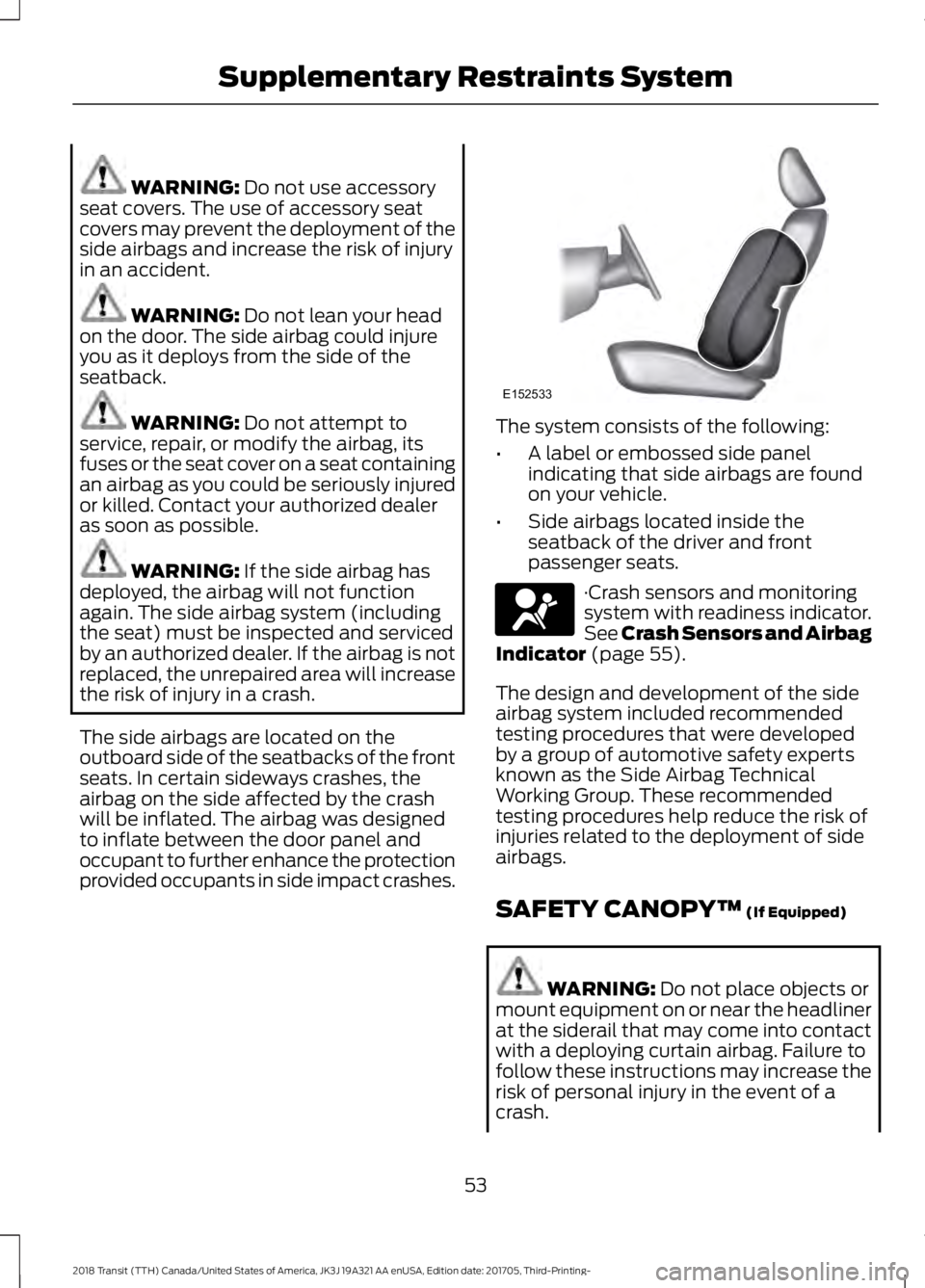
The side airbags are located on the
outboard side of the seatbacks of the front
seats. In certain sideways crashes, the
airbag on the side affected by the crash
will be inflated. The airbag was designed
to inflate between the door panel and
occupant to further enhance the protection
provided occupants in side impact crashes. The system consists of the following:
•
A label or embossed side panel
indicating that side airbags are found
on your vehicle.
• Side airbags located inside the
seatback of the driver and front
passenger seats. ·Crash sensors and monitoring
system with readiness indicator.
See Crash Sensors and Airbag
Indicator
(page 55).
The design and development of the side
airbag system included recommended
testing procedures that were developed
by a group of automotive safety experts
known as the Side Airbag Technical
Working Group. These recommended
testing procedures help reduce the risk of
injuries related to the deployment of side
airbags.
SAFETY CANOPY™
(If Equipped) WARNING:
Do not place objects or
mount equipment on or near the headliner
at the siderail that may come into contact
with a deploying curtain airbag. Failure to
follow these instructions may increase the
risk of personal injury in the event of a
crash.
53
2018 Transit (TTH) Canada/United States of America, JK3J 19A321 AA enUSA, Edition date: 201705, Third-Printing- Supplementary Restraints SystemE152533 E67017
Page 57 of 521
WARNING: Do not lean your head
on the door. The curtain airbag could injure
you as it deploys from the headliner. WARNING:
Do not attempt to
service, repair, or modify the
supplementary restraint system or
associated components. Failure to follow
this instruction could result in personal
injury or death. WARNING:
All occupants of your
vehicle, including the driver, should always
properly wear their seatbelts, even when
an airbag supplemental restraint system
is provided. Failure to properly wear your
seatbelt could seriously increase the risk
of injury or death. WARNING:
To reduce risk of injury,
do not obstruct or place objects in the
deployment path of the airbag. WARNING:
If a supplementary
restraint system component has deployed,
it will not function again. Have the system
and associated components inspected as
soon as possible. Failure to follow this
instruction could result in personal injury
or death.
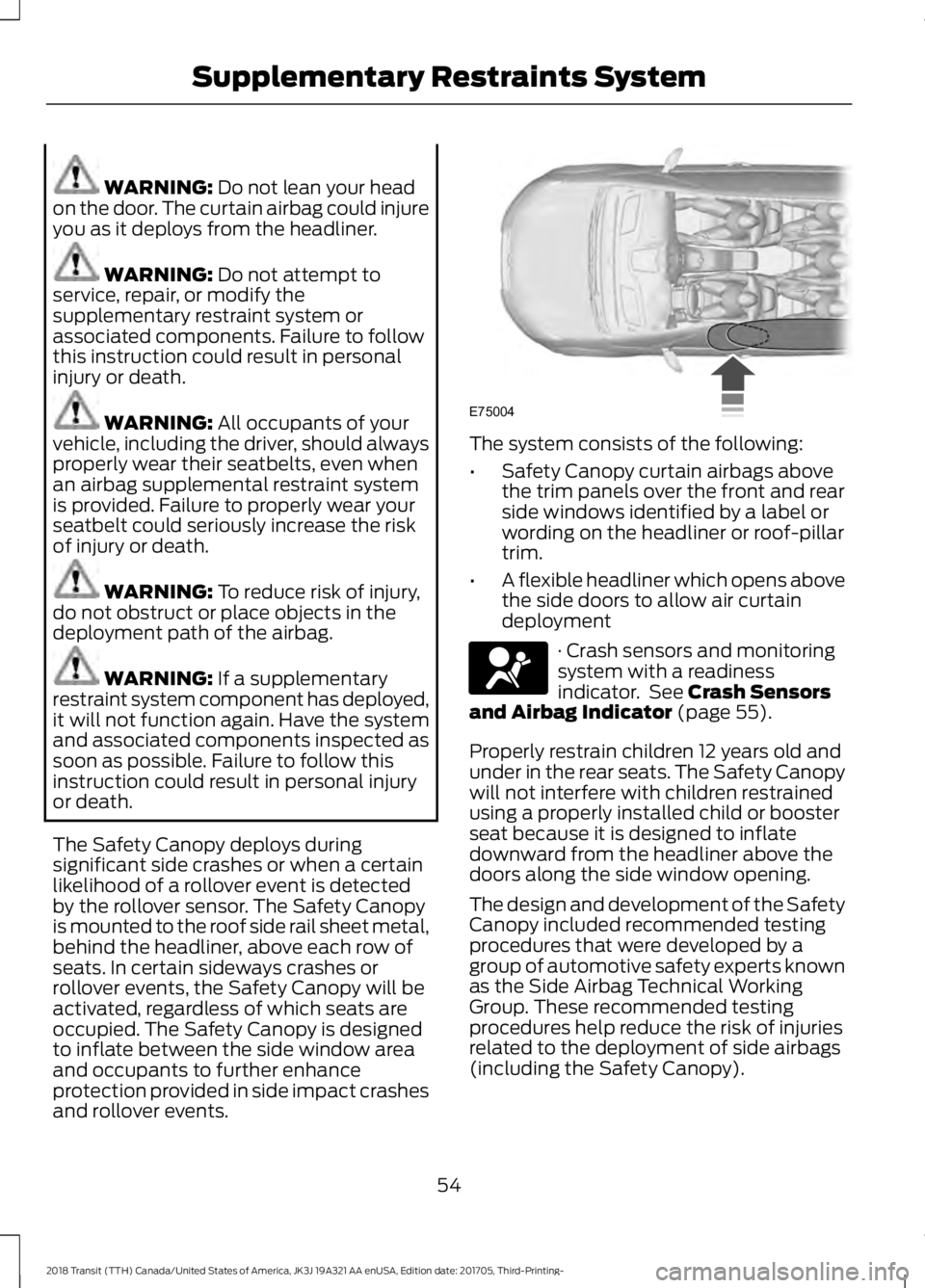
The Safety Canopy deploys during
significant side crashes or when a certain
likelihood of a rollover event is detected
by the rollover sensor. The Safety Canopy
is mounted to the roof side rail sheet metal,
behind the headliner, above each row of
seats. In certain sideways crashes or
rollover events, the Safety Canopy will be
activated, regardless of which seats are
occupied. The Safety Canopy is designed
to inflate between the side window area
and occupants to further enhance
protection provided in side impact crashes
and rollover events. The system consists of the following:
•
Safety Canopy curtain airbags above
the trim panels over the front and rear
side windows identified by a label or
wording on the headliner or roof-pillar
trim.
• A flexible headliner which opens above
the side doors to allow air curtain
deployment · Crash sensors and monitoring
system with a readiness
indicator. See Crash Sensors
and Airbag Indicator (page 55).
Properly restrain children 12 years old and
under in the rear seats. The Safety Canopy
will not interfere with children restrained
using a properly installed child or booster
seat because it is designed to inflate
downward from the headliner above the
doors along the side window opening.
The design and development of the Safety
Canopy included recommended testing
procedures that were developed by a
group of automotive safety experts known
as the Side Airbag Technical Working
Group. These recommended testing
procedures help reduce the risk of injuries
related to the deployment of side airbags
(including the Safety Canopy).
54
2018 Transit (TTH) Canada/United States of America, JK3J 19A321 AA enUSA, Edition date: 201705, Third-Printing- Supplementary Restraints SystemE75004 E67017
Page 60 of 521
911 ASSIST
WARNING: Unless the 911 Assist
setting is set on before a crash, the system
will not dial for help which could delay
response time, potentially increasing the
risk of serious injury or death after a crash. WARNING: Do not wait for 911 Assist
to make an emergency call if you can do it
yourself. Dial emergency services
immediately to avoid delayed response
time which could increase the risk of
serious injury or death after a crash. If you
do not hear 911 Assist within five seconds
of the crash, the system or phone may be
damaged or non-functional. WARNING: Always place your phone
in a secure location in your vehicle so it
does not become a projectile or get
damaged in a crash. Failure to do so may
cause serious injury to someone or damage
the phone which could prevent 911 Assist
from working properly.
Note: The SYNC 911 Assist feature must be
set on before the incident.
Note: The SYNC 911 Assist feature only
operates in the U.S., Canada or in a territory
in which 911 is the emergency number.
Note: Before setting this feature on, make
sure that you read the 911 Assist Privacy
Notice later in this section for important
information.
Note: If any user sets 911 Assist to on or off,
that setting applies for all paired phones. If
911 Assist is switched off and the phone is
connected to SYNC, an icon displays on the
status bar.
Note: Every phone operates differently.
While SYNC 911 Assist works with most
cellular phones, some may have trouble
using this feature. If a crash deploys an airbag (excluding
knee airbags and rear inflatable seatbelts
[if equipped]) or activates the fuel pump
shut-off, your SYNC-equipped vehicle may
be able to contact emergency services by
dialing 911 through a paired and connected
Bluetooth-enabled phone. You can learn
more about the 911 Assist feature, by
visiting:
Website
www.owner.ford.com
www.syncmyride.ca
www.syncmaroute.ca
For important information about airbag
deployment and the fuel pump shut-off
please see the Supplementary Restrains
and Roadside Emergencies sections of
your owner manual.
To switch 911 Assist on and off please view
the settings information. See
Settings
(page 428).
To make sure that 911 Assist works
correctly:
• SYNC must be powered and working
properly at the time of the incident and
throughout feature activation and use.
• The 911 Assist feature must be set on
before the incident.
• You must pair and connect a
Bluetooth-enabled and compatible
cell phone to SYNC.
• A connected Bluetooth-enabled phone
must have the ability to make and
maintain an outgoing call at the time
of the incident.
• A connected Bluetooth-enabled phone
must have adequate network coverage,
battery power and signal strength.
• The vehicle must have battery power
and be located in the U.S., Canada or
in a territory in which 911 is the
emergency number.
57
2018 Transit (TTH) Canada/United States of America, JK3J 19A321 AA enUSA, Edition date: 201705, Third-Printing- Automatic Crash Notification System
Page 61 of 521
In the Event of a Crash
Not all crashes will deploy an airbag or
activate the fuel pump shut-off (the
triggers for 911 Assist). If a connected cell
phone sustains damage or loses its
connection to SYNC during a crash, SYNC
will search for and try to connect to a
previously paired cell phone; SYNC will
then attempt to call the emergency
services.
Before making the call:
•
SYNC provides a short window of time
(about 10 seconds) to cancel the call.
If you fail to cancel the call, SYNC
attempts to dial 911.
• SYNC says the following, or a similar
message: "SYNC will attempt to call
911, to cancel the call, press Cancel on
your screen or press and hold the
phone button on your steering wheel."
If you do not cancel the call, and SYNC
makes a successful call, a pre-recorded
message plays for the 911 operator, and
then the occupant(s) in your vehicle is able
to talk with the operator. Be prepared to
provide your name, phone number and
location immediately, because not all 911
systems are capable of receiving this
information electronically.
911 Assist May Not Work If
• Your cellular phone or 911 Assist
hardware sustains damage in a crash.
• The vehicle's battery or the SYNC
system has no power.
• The phone(s) thrown from your vehicle
are the ones paired and connected to
the system. 911 Assist Privacy Notice
When you switch on 911 Assist, it may
disclose to emergency services that your
vehicle has been in a crash involving the
deployment of an airbag or activation of
the fuel pump shut-off. Certain versions or
updates to 911 Assist may also be capable
of electronically or verbally disclosing to
911 operators your vehicle location or other
details about your vehicle or crash to assist
911 operators to provide the most
appropriate emergency services. If you do
not want to disclose this information, do
not switch the feature on.
58
2018 Transit (TTH) Canada/United States of America, JK3J 19A321 AA enUSA, Edition date: 201705, Third-Printing- Automatic Crash Notification System
Page 93 of 521
POWER WINDOWS
WARNING: To avoid risk of injury, do
not leave children or pets unattended in
your vehicle. WARNING: When closing the power
windows, you should verify they are free
of obstructions and make sure that
children and pets are not in the proximity
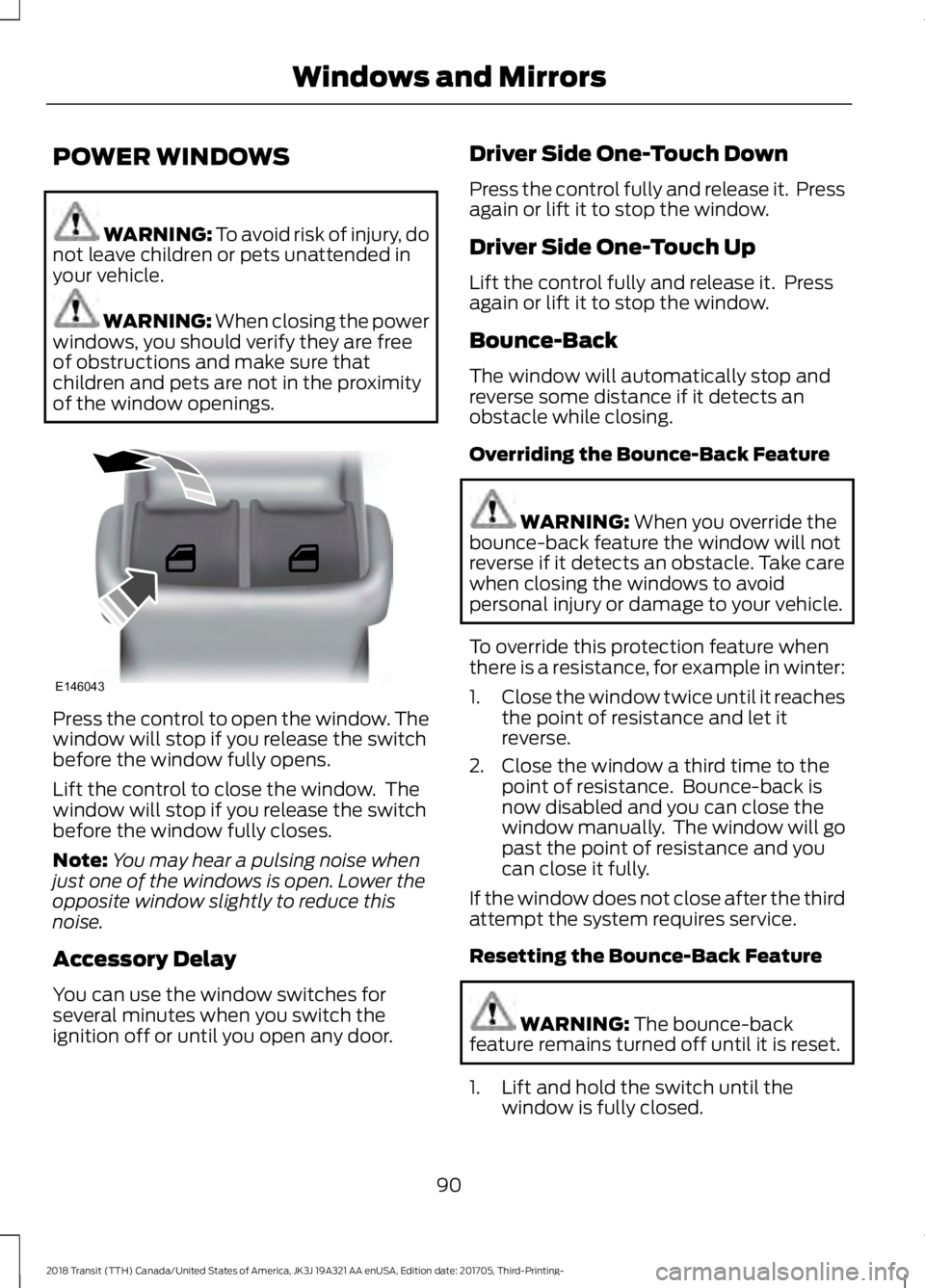
of the window openings. Press the control to open the window. The
window will stop if you release the switch
before the window fully opens.
Lift the control to close the window. The
window will stop if you release the switch
before the window fully closes.
Note:
You may hear a pulsing noise when
just one of the windows is open. Lower the
opposite window slightly to reduce this
noise.
Accessory Delay
You can use the window switches for
several minutes when you switch the
ignition off or until you open any door. Driver Side One-Touch Down
Press the control fully and release it. Press
again or lift it to stop the window.
Driver Side One-Touch Up
Lift the control fully and release it. Press
again or lift it to stop the window.
Bounce-Back
The window will automatically stop and
reverse some distance if it detects an
obstacle while closing.
Overriding the Bounce-Back Feature
WARNING:
When you override the
bounce-back feature the window will not
reverse if it detects an obstacle. Take care
when closing the windows to avoid
personal injury or damage to your vehicle.
To override this protection feature when
there is a resistance, for example in winter:
1. Close the window twice until it reaches
the point of resistance and let it
reverse.
2. Close the window a third time to the point of resistance. Bounce-back is
now disabled and you can close the
window manually. The window will go
past the point of resistance and you
can close it fully.
If the window does not close after the third
attempt the system requires service.
Resetting the Bounce-Back Feature WARNING:
The bounce-back
feature remains turned off until it is reset.
1. Lift and hold the switch until the window is fully closed.
90
2018 Transit (TTH) Canada/United States of America, JK3J 19A321 AA enUSA, Edition date: 201705, Third-Printing- Windows and MirrorsE146043
Page 97 of 521
If the needle enters the red section, the
engine is overheating. Stop your vehicle as
soon as it is safe to do so and switch the
engine off. Determine the cause once the
engine has cooled down. See Engine
Coolant Check (page 236).
Note: Do not restart the engine until the
cause of overheating has been determined
and resolved.
Tripmeter Reset and Distance to
Empty
(If Equipped)
Press the button to change between the
tripmeter and distance to empty
information. Press and hold the button to
reset the tripmeter.
Fuel Gauge
Note: The fuel gauge may vary slightly
when your vehicle is moving or on a gradient.
Switch the ignition on. The fuel gauge will
indicate approximately how much fuel is
in the fuel tank. The arrow adjacent to the
fuel pump symbol indicates on which side
of your vehicle the fuel filler door is located. The needle should move toward F when
you refuel your vehicle. If the needle points
to E after adding fuel, this indicates your
vehicle needs service soon.
After refueling some variability in needle
position is normal:
•
It may take a short time for the needle
to reach F after leaving the gas station.
This is normal and depends upon the
slope of pavement at the gas station.
• The fuel amount dispensed into the
tank is a little less or more than the
gauge indicated. This is normal and
depends upon the slope of pavement
at the gas station.
• If the gas station nozzle shuts off
before the tank is full, try a different
gas pump nozzle.
Low Fuel Reminder
A low fuel reminder triggers when the fuel
gauge needle is at 1/16th.
Variations: Distance-to-empty
Fuel gauge position
Driving type (fuel economy
conditions)
35 miles to 80 miles (56 kmto 129 km)
1/16th
Highway driving
35 miles (56km)
1/16th
Severe duty driving (trailer
towing, extended idle)
94
2018 Transit (TTH) Canada/United States of America, JK3J 19A321 AA enUSA, Edition date: 201705, Third-Printing- Instrument Cluster
Page 99 of 521
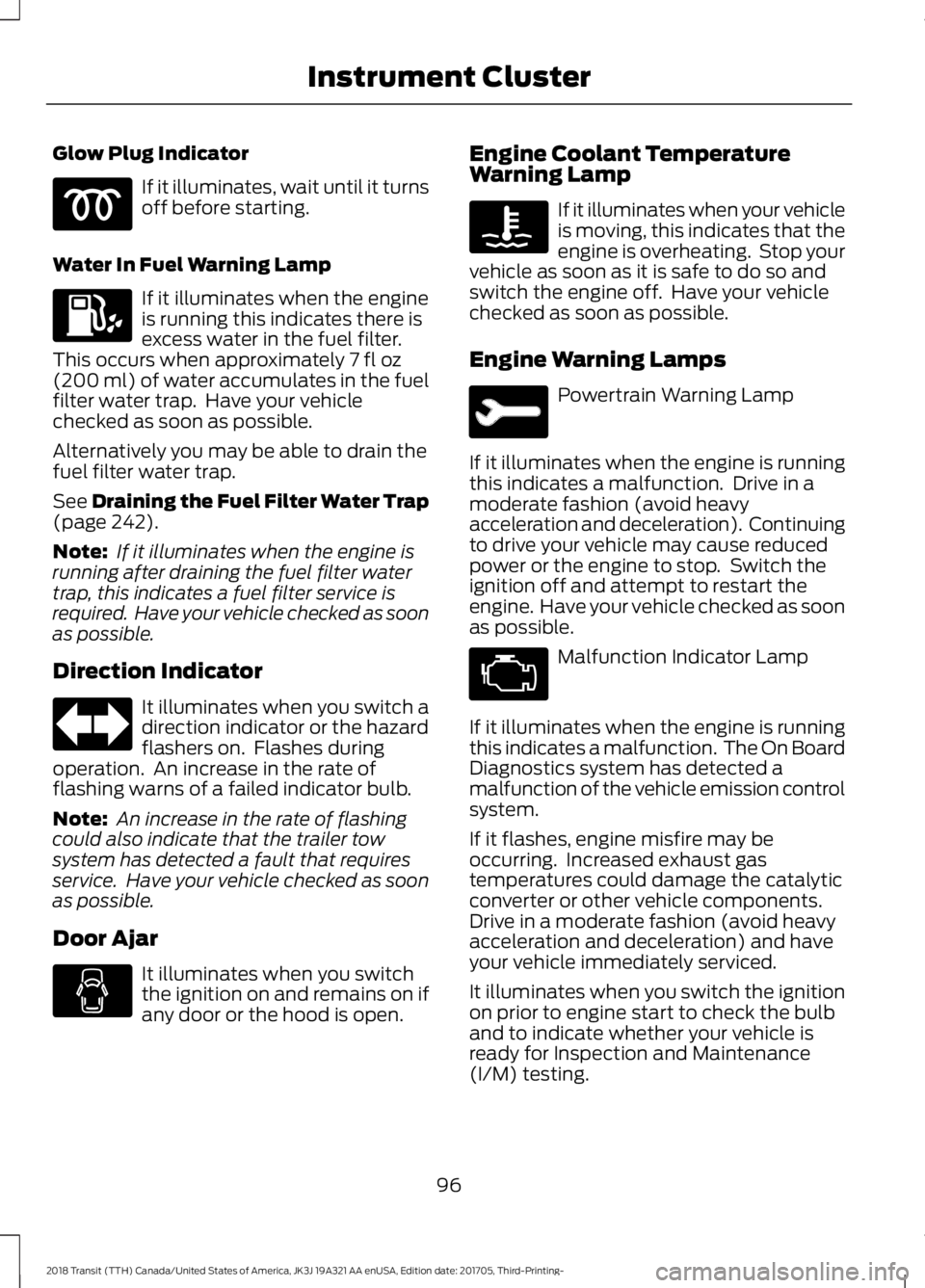
Glow Plug Indicator
If it illuminates, wait until it turns
off before starting.
Water In Fuel Warning Lamp If it illuminates when the engine
is running this indicates there is
excess water in the fuel filter.
This occurs when approximately 7 fl oz
(200 ml) of water accumulates in the fuel
filter water trap. Have your vehicle
checked as soon as possible.
Alternatively you may be able to drain the
fuel filter water trap.
See
Draining the Fuel Filter Water Trap
(page 242).
Note: If it illuminates when the engine is
running after draining the fuel filter water
trap, this indicates a fuel filter service is
required. Have your vehicle checked as soon
as possible.
Direction Indicator It illuminates when you switch a
direction indicator or the hazard
flashers on. Flashes during
operation. An increase in the rate of
flashing warns of a failed indicator bulb.
Note: An increase in the rate of flashing
could also indicate that the trailer tow
system has detected a fault that requires
service. Have your vehicle checked as soon
as possible.
Door Ajar It illuminates when you switch
the ignition on and remains on if
any door or the hood is open. Engine Coolant Temperature
Warning Lamp If it illuminates when your vehicle
is moving, this indicates that the
engine is overheating. Stop your
vehicle as soon as it is safe to do so and
switch the engine off. Have your vehicle
checked as soon as possible.
Engine Warning Lamps Powertrain Warning Lamp
If it illuminates when the engine is running
this indicates a malfunction. Drive in a
moderate fashion (avoid heavy
acceleration and deceleration). Continuing
to drive your vehicle may cause reduced
power or the engine to stop. Switch the
ignition off and attempt to restart the
engine. Have your vehicle checked as soon
as possible. Malfunction Indicator Lamp
If it illuminates when the engine is running
this indicates a malfunction. The On Board
Diagnostics system has detected a
malfunction of the vehicle emission control
system.
If it flashes, engine misfire may be
occurring. Increased exhaust gas
temperatures could damage the catalytic
converter or other vehicle components.
Drive in a moderate fashion (avoid heavy
acceleration and deceleration) and have
your vehicle immediately serviced.
It illuminates when you switch the ignition
on prior to engine start to check the bulb
and to indicate whether your vehicle is
ready for Inspection and Maintenance
(I/M) testing.
96
2018 Transit (TTH) Canada/United States of America, JK3J 19A321 AA enUSA, Edition date: 201705, Third-Printing- Instrument Cluster
Page 100 of 521
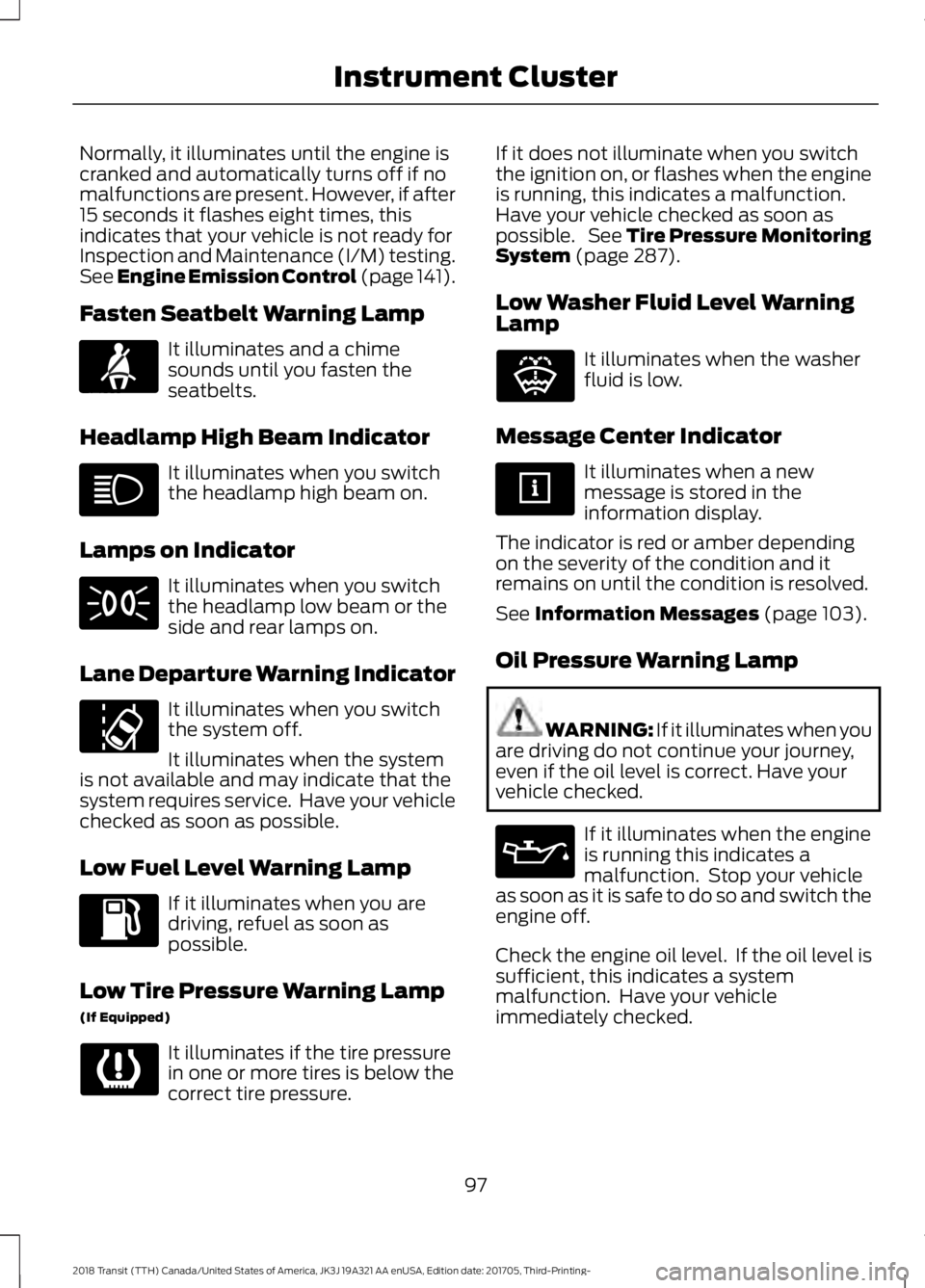
Normally, it illuminates until the engine is
cranked and automatically turns off if no
malfunctions are present. However, if after
15 seconds it flashes eight times, this
indicates that your vehicle is not ready for
Inspection and Maintenance (I/M) testing.
See Engine Emission Control (page 141).
Fasten Seatbelt Warning Lamp
It illuminates and a chime
sounds until you fasten the
seatbelts.
Headlamp High Beam Indicator It illuminates when you switch
the headlamp high beam on.
Lamps on Indicator It illuminates when you switch
the headlamp low beam or the
side and rear lamps on.
Lane Departure Warning Indicator It illuminates when you switch
the system off.
It illuminates when the system
is not available and may indicate that the
system requires service. Have your vehicle
checked as soon as possible.
Low Fuel Level Warning Lamp If it illuminates when you are
driving, refuel as soon as
possible.
Low Tire Pressure Warning Lamp
(If Equipped) It illuminates if the tire pressure
in one or more tires is below the
correct tire pressure. If it does not illuminate when you switch
the ignition on, or flashes when the engine
is running, this indicates a malfunction.
Have your vehicle checked as soon as
possible. See Tire Pressure Monitoring
System (page 287).
Low Washer Fluid Level Warning
Lamp It illuminates when the washer
fluid is low.
Message Center Indicator It illuminates when a new
message is stored in the
information display.
The indicator is red or amber depending
on the severity of the condition and it
remains on until the condition is resolved.
See
Information Messages (page 103).
Oil Pressure Warning Lamp WARNING: If it illuminates when you
are driving do not continue your journey,
even if the oil level is correct. Have your
vehicle checked. If it illuminates when the engine
is running this indicates a
malfunction. Stop your vehicle
as soon as it is safe to do so and switch the
engine off.
Check the engine oil level. If the oil level is
sufficient, this indicates a system
malfunction. Have your vehicle
immediately checked.
97
2018 Transit (TTH) Canada/United States of America, JK3J 19A321 AA enUSA, Edition date: 201705, Third-Printing- Instrument ClusterE71880 E132353