transmission FORD TRANSIT 2018 User Guide
[x] Cancel search | Manufacturer: FORD, Model Year: 2018, Model line: TRANSIT, Model: FORD TRANSIT 2018Pages: 521, PDF Size: 8.65 MB
Page 130 of 521
STARTING A GASOLINE
ENGINE
Before starting the engine check the
following:
•
Make sure all occupants have fastened
their seatbelts.
• Make sure the headlamps and
electrical accessories are off.
• Make sure the parking brake is on.
• Make sure the transmission is in park
(P).
When you start the engine, the idle speed
increases, this helps to warm up the
engine. If the engine idle speed does not
slow down automatically, have your
vehicle checked by an authorized dealer.
Note: Do not touch the accelerator pedal.
1. Fully press the brake pedal.
2. Turn the key to the on position to switch the ignition on.
3. Turn the key to the start position to start your vehicle. Release the key
when the engine starts.
Note: You can only operate the starter for
a limited period of time, for example 10
seconds. The number of start attempts is
limited to approximately six. If you exceed
this limit, the system will not allow you to
try again until a period of time has elapsed,
for example 30 minutes.
Engine Idle Speed after Starting
The speed at which the engine idles
immediately after starting will adjust
automatically to minimize vehicle
emissions and maximize cabin comfort
and fuel economy. The idle speed will vary depending on
certain factors. These include vehicle
component and ambient temperatures as
well as electrical and climate system
demands.
Cold or Hot Engine
If the engine does not start within 10
seconds, wait for a short period and try
again.
If the engine does not start after three
attempts, wait 10 seconds and follow the
flooded engine procedure.
If you have difficulty starting the engine
when the temperature is below -13°F
(-25°C), press the accelerator pedal to the
mid-way point of its travel and try again.
Flooded Engine
1. Shift into park (P).
2. Fully depress the accelerator pedal and
hold it there.
3. Start the engine.
Note: If the engine does not start, repeat
the cold or hot engine procedure.
STARTING A DIESEL ENGINE WARNING:
Do not use starting fluid,
for example ether, in the air intake system.
Such fluid could cause immediate
explosive damage to the engine and
possible personal injury. WARNING:
Do not mix diesel with
gasoline, gasohol or alcohol. This could
cause an explosion.
127
2018 Transit (TTH) Canada/United States of America, JK3J 19A321 AA enUSA, Edition date: 201705, Third-Printing- Starting and Stopping the Engine
Page 151 of 521
The automatic regeneration process is
most effective when you drive at a steady
vehicle speed of 30 mph (48 km/h) or
above for approximately 20 minutes. The
frequency and duration of the regeneration
process varies by how you drive your
vehicle, the outside air temperature and
altitude. Frequency varies between 100 mi
(160 km)
and 310 mi (500 km) and each
regeneration process lasts between 10 and
20 minutes.
Note: Changes in the engine or exhaust
sound may be heard during the regeneration
process.
Note: During regeneration at low speed or
engine idle, you could smell a hot metallic
odor and could notice a clicking metallic
sound. This is due to the high temperatures
reached during the regeneration process.
This is normal.
Diesel Particulate Filter Manual
Regeneration
(If Equipped) WARNING:
Do not park or idle your
vehicle over dry leaves, dry grass or other
combustible materials. The regeneration
process creates very high exhaust gas
temperatures and the exhaust will radiate
a considerable amount of heat during and
after regeneration and after you have
switched the engine off. This is a potential
fire hazard. WARNING:
The normal operating
temperature of the exhaust system is very
high. Never work around or attempt to
repair any part of the exhaust system until
it has cooled. Use special care when
working around the diesel oxidation catalytic converter or the diesel particulate
filter. The diesel oxidation catalytic
converter and the diesel particulate filter
heat up to very high temperatures after
only a short period of engine operation and
remain hot after you switch the engine off.
Diesel particulate filter warning
lamp.
If the diesel particulate filter is
near or at saturation, the warning lamp
appears advising you to initiate diesel
particulate filter manual regeneration.
Before you start manual regeneration, do
the following:
• Park your vehicle outside of any
enclosed structure.
• Make sure the transmission is in park
(P) or neutral (N).
• Make sure the parking brake is on.
• Park your vehicle a minimum of
10 ft
(3 m) from any obstructions and
materials that can easily combust or
melt, for example, paper, leaves, fuels,
plastics and other dry organic material.
• Make sure there is a minimum of 3.2 gal
(12 L)
of fuel in the fuel tank.
• Check the engine oil level.
• Check the engine coolant level.
Manual Regeneration
Where vehicle use has significant engine
idle operation, frequent vehicle speed less
than
25 mph (40 km/h), or driving short
distances where the engine does not fully
warm up, manual regeneration allows you
to start diesel particulate filter cleaning
when the engine is idling.
148
2018 Transit (TTH) Canada/United States of America, JK3J 19A321 AA enUSA, Edition date: 201705, Third-Printing- Engine Emission ControlE95449
Page 154 of 521
AUTOMATIC TRANSMISSION
WARNING: Always fully apply the
parking brake. Make sure you shift into park
(P) for vehicles with an automatic
transmission. Switch the ignition off and
remove the key whenever you leave your
vehicle. WARNING:
Do not apply the brake
pedal and accelerator pedal
simultaneously. Applying both pedals
simultaneously for more than a few
seconds will limit engine performance,
which may result in difficulty maintaining
speed in traffic and could lead to serious
injury.
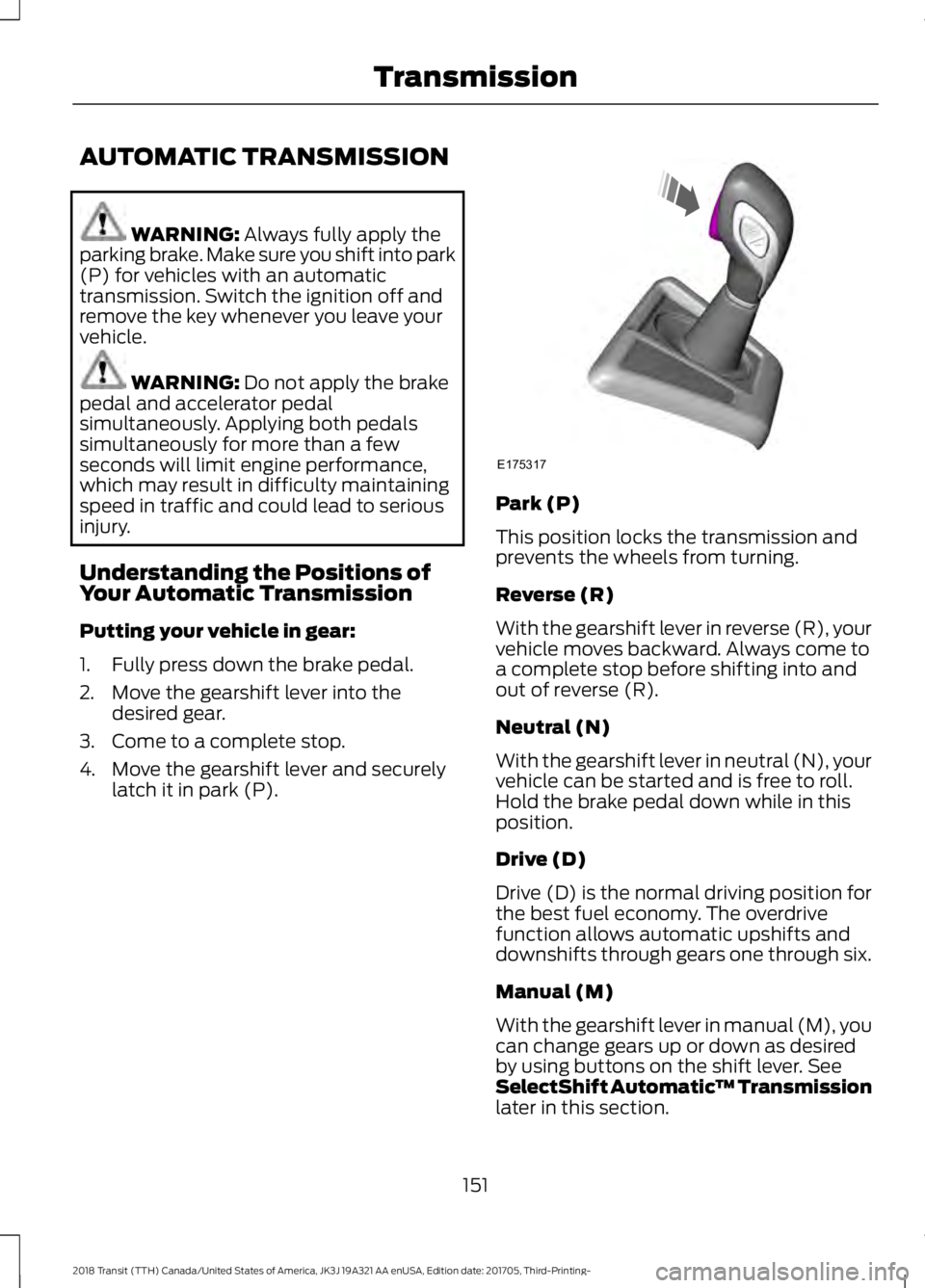
Understanding the Positions of
Your Automatic Transmission
Putting your vehicle in gear:
1. Fully press down the brake pedal.
2. Move the gearshift lever into the desired gear.
3. Come to a complete stop.
4. Move the gearshift lever and securely latch it in park (P). Park (P)
This position locks the transmission and
prevents the wheels from turning.
Reverse (R)
With the gearshift lever in reverse (R), your
vehicle moves backward. Always come to
a complete stop before shifting into and
out of reverse (R).
Neutral (N)
With the gearshift lever in neutral (N), your
vehicle can be started and is free to roll.
Hold the brake pedal down while in this
position.
Drive (D)
Drive (D) is the normal driving position for
the best fuel economy. The overdrive
function allows automatic upshifts and
downshifts through gears one through six.
Manual (M)
With the gearshift lever in manual (M), you
can change gears up or down as desired
by using buttons on the shift lever. See
SelectShift Automatic
™ Transmission
later in this section.
151
2018 Transit (TTH) Canada/United States of America, JK3J 19A321 AA enUSA, Edition date: 201705, Third-Printing- TransmissionE175317
Page 155 of 521
To return to normal drive (D) position,
move the shift lever back from manual (M)
to drive (D).
SelectShift Automatic
™
Transmission (If Equipped)
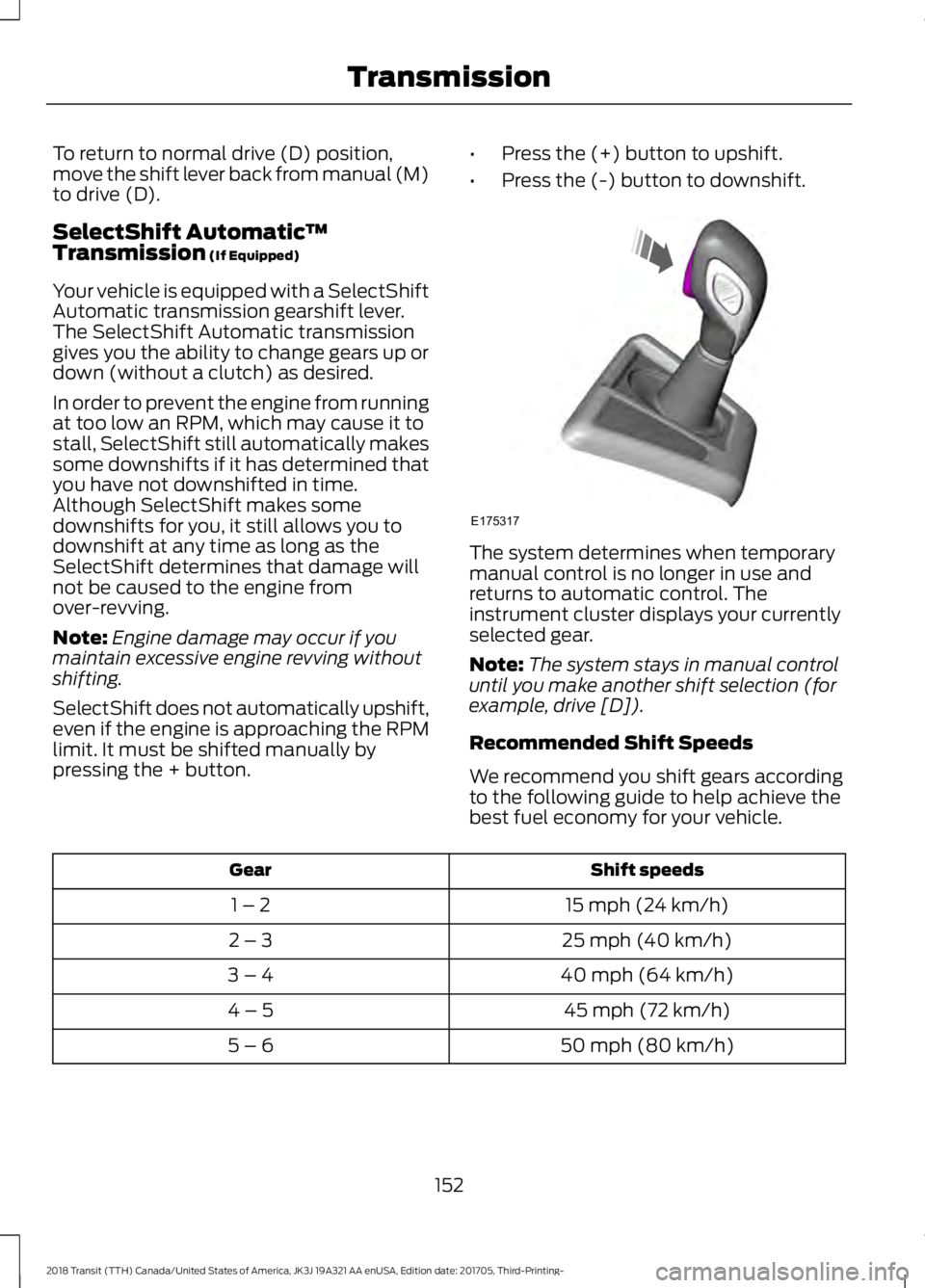
Your vehicle is equipped with a SelectShift
Automatic transmission gearshift lever.
The SelectShift Automatic transmission
gives you the ability to change gears up or
down (without a clutch) as desired.
In order to prevent the engine from running
at too low an RPM, which may cause it to
stall, SelectShift still automatically makes
some downshifts if it has determined that
you have not downshifted in time.
Although SelectShift makes some
downshifts for you, it still allows you to
downshift at any time as long as the
SelectShift determines that damage will
not be caused to the engine from
over-revving.
Note: Engine damage may occur if you
maintain excessive engine revving without
shifting.
SelectShift does not automatically upshift,
even if the engine is approaching the RPM
limit. It must be shifted manually by
pressing the + button. •
Press the (+) button to upshift.
• Press the (-) button to downshift. The system determines when temporary
manual control is no longer in use and
returns to automatic control. The
instrument cluster displays your currently
selected gear.
Note:
The system stays in manual control
until you make another shift selection (for
example, drive [D]).
Recommended Shift Speeds
We recommend you shift gears according
to the following guide to help achieve the
best fuel economy for your vehicle. Shift speeds
Gear
15 mph (24 km/h)
1 – 2
25 mph (40 km/h)
2 – 3
40 mph (64 km/h)
3 – 4
45 mph (72 km/h)
4 – 5
50 mph (80 km/h)
5 – 6
152
2018 Transit (TTH) Canada/United States of America, JK3J 19A321 AA enUSA, Edition date: 201705, Third-Printing- TransmissionE175317
Page 156 of 521
Brake-Shift Interlock
WARNING: Do not drive your vehicle
until you verify that the stoplamps are
working. WARNING: When doing this
procedure, you need to take the
transmission out of park (P) which means
your vehicle can roll freely. To avoid
unwanted vehicle movement, always fully
apply the parking brake prior to doing this
procedure. Use wheels chocks if
appropriate. WARNING:
If the parking brake is
fully released, but the brake warning lamp
remains illuminated, the brakes may not
be working properly. Have your vehicle
checked as soon as possible.
Note: See your authorized dealer as soon
as possible if this procedure is used.
This prevents you from shifting the
gearshift lever from the park (P) position,
unless the brake pedal is pressed.
In the event of an electrical malfunction,
or if the vehicle battery has run out of
charge, use the following procedure to shift
the gearshift lever from the park (P)
position.
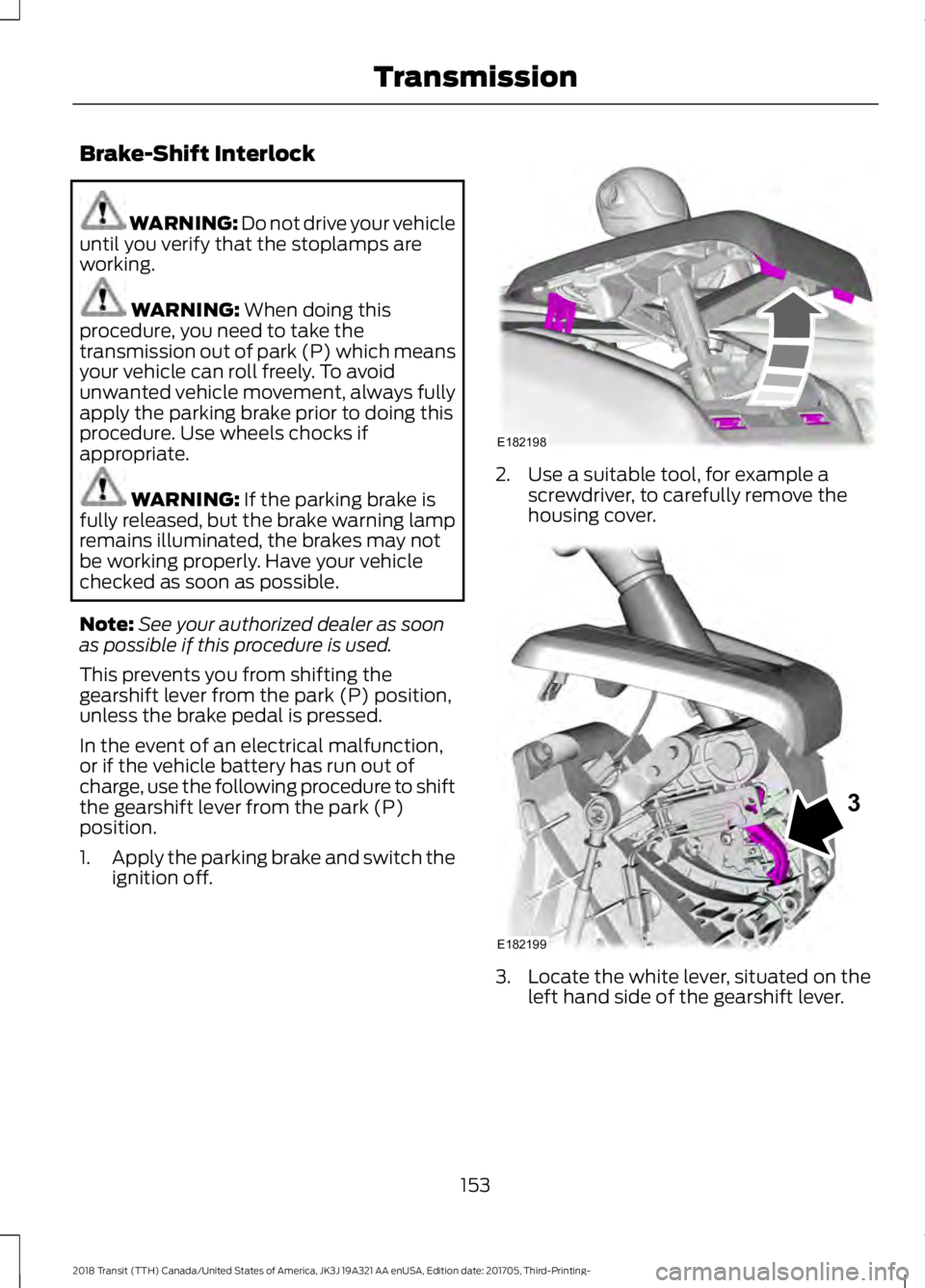
1. Apply the parking brake and switch the
ignition off. 2. Use a suitable tool, for example a
screwdriver, to carefully remove the
housing cover. 3. Locate the white lever, situated on the
left hand side of the gearshift lever.
153
2018 Transit (TTH) Canada/United States of America, JK3J 19A321 AA enUSA, Edition date: 201705, Third-Printing- TransmissionE182198 E182199
3
Page 157 of 521
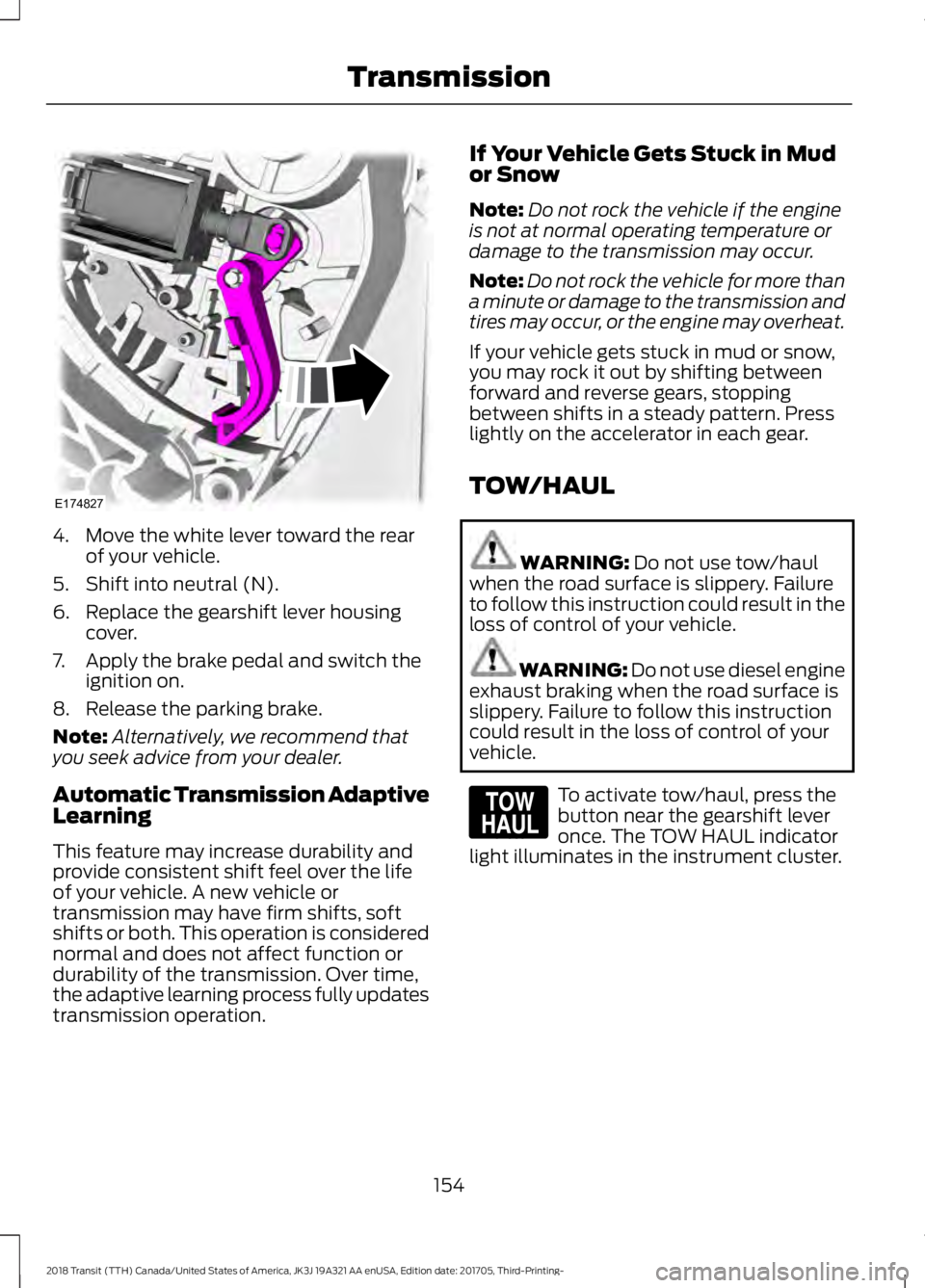
4. Move the white lever toward the rear
of your vehicle.
5. Shift into neutral (N).
6. Replace the gearshift lever housing cover.
7. Apply the brake pedal and switch the ignition on.
8. Release the parking brake.
Note: Alternatively, we recommend that
you seek advice from your dealer.
Automatic Transmission Adaptive
Learning
This feature may increase durability and
provide consistent shift feel over the life
of your vehicle. A new vehicle or
transmission may have firm shifts, soft
shifts or both. This operation is considered
normal and does not affect function or
durability of the transmission. Over time,
the adaptive learning process fully updates
transmission operation. If Your Vehicle Gets Stuck in Mud
or Snow
Note:
Do not rock the vehicle if the engine
is not at normal operating temperature or
damage to the transmission may occur.
Note: Do not rock the vehicle for more than
a minute or damage to the transmission and
tires may occur, or the engine may overheat.
If your vehicle gets stuck in mud or snow,
you may rock it out by shifting between
forward and reverse gears, stopping
between shifts in a steady pattern. Press
lightly on the accelerator in each gear.
TOW/HAUL WARNING: Do not use tow/haul
when the road surface is slippery. Failure
to follow this instruction could result in the
loss of control of your vehicle. WARNING:
Do not use diesel engine
exhaust braking when the road surface is
slippery. Failure to follow this instruction
could result in the loss of control of your
vehicle. To activate tow/haul, press the
button near the gearshift lever
once. The TOW HAUL indicator
light illuminates in the instrument cluster.
154
2018 Transit (TTH) Canada/United States of America, JK3J 19A321 AA enUSA, Edition date: 201705, Third-Printing- TransmissionE174827 E161509
Page 158 of 521
The tow/haul feature:
•
Delays upshifts to reduce the frequency
of transmission shifting.
• Provides engine braking in all forward
gears, which will slow your vehicle and
assist you in controlling your vehicle
when descending a grade.
• Depending on driving conditions and
load conditions, may downshift the
transmission, slow your vehicle and
control your vehicle speed when
descending a hill, without pressing the
accelerator pedal. The amount of
downshift braking provided will vary
based upon the amount the brake
pedal is pressed.
The tow/haul feature improves
transmission operation when towing a
trailer or a heavy load. All transmission
gear ranges are available when using
tow/haul.
To deactivate the tow/haul feature and
return to normal driving mode, press the
button near the gearshift lever twice. The
TOW HAUL light will deactivate. Tow/haul
also deactivates when you power down
your vehicle.
155
2018 Transit (TTH) Canada/United States of America, JK3J 19A321 AA enUSA, Edition date: 201705, Third-Printing- Transmission
Page 162 of 521
Switching the System On and Off
Vehicles with Manual Transmission
You can switch this feature on or off in the
information display. The system
remembers the last setting when you start
your vehicle.
Vehicles with Automatic Transmission
You cannot turn the system on or off.
When you switch the ignition on, the
system automatically turns on.
159
2018 Transit (TTH) Canada/United States of America, JK3J 19A321 AA enUSA, Edition date: 201705, Third-Printing- Brakes
Page 166 of 521
PRINCIPLE OF OPERATION
WARNING: To help avoid personal
injury, please read and understand the
limitations of the system as contained in
this section. Sensing is only an aid for some
(generally large and fixed) objects when
moving on a flat surface at parking speeds.
Certain objects with surfaces that absorb
ultrasonic waves, surrounding vehicle's
parking aid systems, traffic control
systems, fluorescent lamps, inclement
weather, air brakes, and external motors
and fans may also affect the function of
the sensing system; this may include
reduced performance or a false activation. WARNING:
To help avoid personal
injury, always use caution when in reverse
(R) and when using the sensing system. WARNING:
This system is not
designed to prevent contact with small or
moving objects. The system is designed to
provide a warning to assist the driver in
detecting large stationary objects to avoid
damaging your vehicle. The system may
not detect smaller objects, particularly
those close to the ground. WARNING:
Certain add-on devices
such as large trailer hitches, bike or
surfboard racks and any device that may
block the normal detection zone of the
system, may create false beeps.
Note: Keep the sensors, located on the
bumper or fascia, free from snow, ice and
large accumulations of dirt. If the sensors
are covered, the system ’s accuracy can be
affected. Do not clean the sensors with
sharp objects. Note:
If your vehicle sustains damage to
the bumper or fascia, leaving it misaligned
or bent, the sensing zone may be altered
causing inaccurate measurement of
obstacles or false alarms.
Note: The sensing system cannot be turned
off when a MyKey is present. See Principle
of Operation
(page 64).
Note: If you attach certain add-on devices
such as a trailer or bike rack, the rear sensing
system may detect that add-on device and
therefore provide warnings. It is suggested
that you disable the rear sensing system
when you attach an add-on device to your
vehicle to prevent these warnings.
The sensing system warns the driver of
obstacles within a certain range of your
vehicle. The system turns on automatically
whenever you switch the ignition on. You can turn the system on or
off by pressing the parking aid
button. If your vehicle does not
have a parking aid button, the system can
be switched off through the information
display menu or from the pop-up message
that appears once you shift the
transmission into reverse (R). See
Information Messages
(page 103).
If a fault is present in the system, a warning
message appears in the information
display. See
General Information (page
99).
PARKING AID WARNING:
The parking aid system
can only assist you to detect objects when
your vehicle is moving at parking speeds.
To help avoid personal injury you must take
care when using the parking aid system.
163
2018 Transit (TTH) Canada/United States of America, JK3J 19A321 AA enUSA, Edition date: 201705, Third-Printing- Parking Aids
(If Equipped)E139213
Page 168 of 521
Press the button to switch the system off.
The system remains off until you switch
the ignition off.
REAR VIEW CAMERA
WARNING: The rear view camera
system is a reverse aid supplement device
that still requires the driver to use it in
conjunction with the interior and exterior
mirrors for maximum coverage. WARNING:
Objects that are close
to either corner of the bumper or under the
bumper, might not be seen on the screen
due to the limited coverage of the camera
system. WARNING:
Reverse your vehicle
slowly. Failure to follow this instruction
could result in the loss of control of your
vehicle, personal injury or death.
The rear view camera provides an image
of the area behind your vehicle. During
operation, lines appear in the display that
represents the path of your vehicle and
proximity to objects behind it.
Rear View Camera Locations WARNING:
Use caution when the
rear cargo door is ajar. If the rear cargo door
is ajar, the camera will be out of position
and the video image may be incorrect. All
guidelines disappear when the rear cargo
door is ajar. Failure to follow this
instruction could result in personal injury.
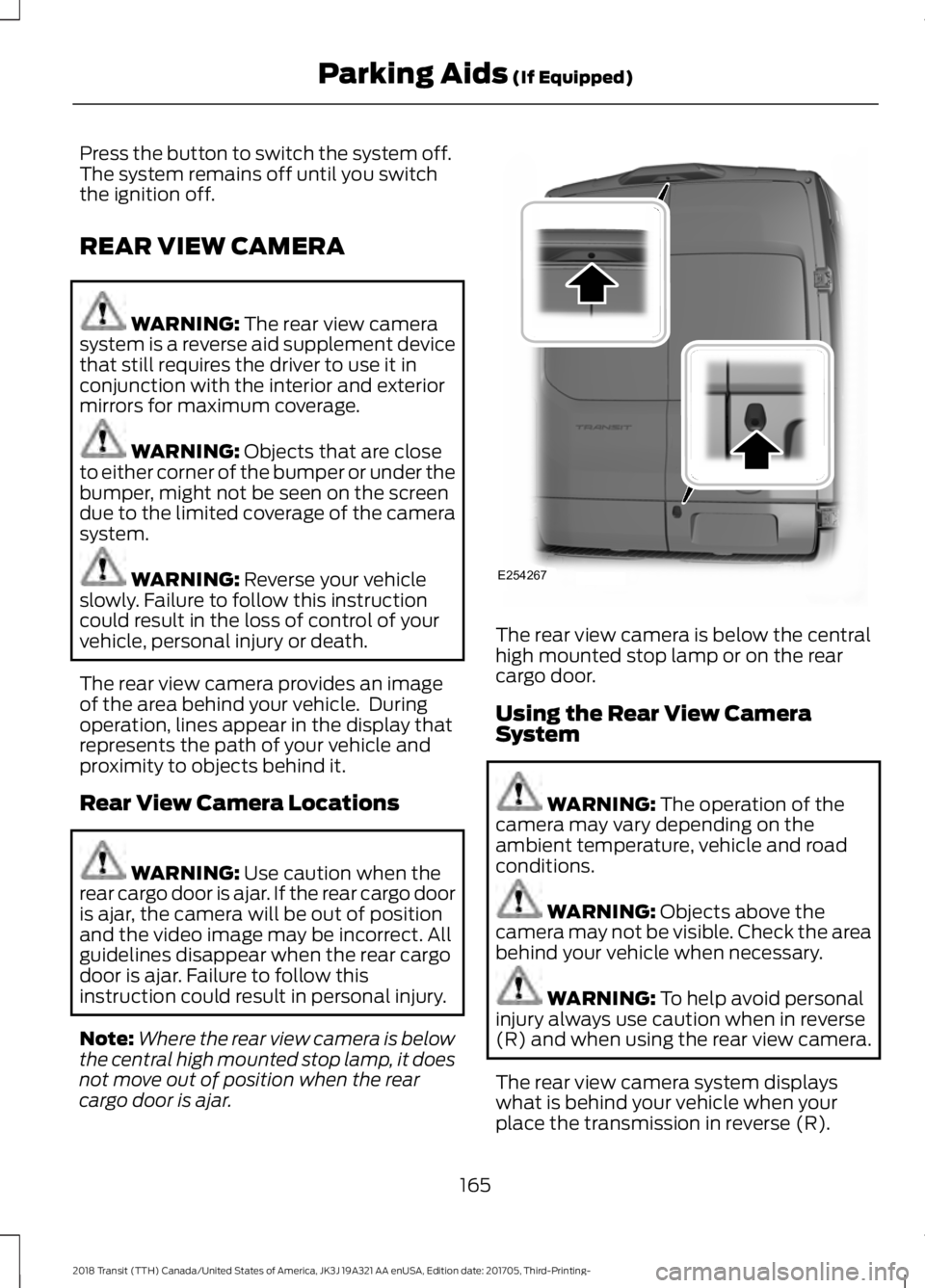
Note: Where the rear view camera is below
the central high mounted stop lamp, it does
not move out of position when the rear
cargo door is ajar. The rear view camera is below the central
high mounted stop lamp or on the rear
cargo door.
Using the Rear View Camera
System
WARNING:
The operation of the
camera may vary depending on the
ambient temperature, vehicle and road
conditions. WARNING:
Objects above the
camera may not be visible. Check the area
behind your vehicle when necessary. WARNING:
To help avoid personal
injury always use caution when in reverse
(R) and when using the rear view camera.
The rear view camera system displays
what is behind your vehicle when your
place the transmission in reverse (R).
165
2018 Transit (TTH) Canada/United States of America, JK3J 19A321 AA enUSA, Edition date: 201705, Third-Printing- Parking Aids
(If Equipped)E254267