mirror FORD TRANSIT 2018 Owners Manual
[x] Cancel search | Manufacturer: FORD, Model Year: 2018, Model line: TRANSIT, Model: FORD TRANSIT 2018Pages: 521, PDF Size: 8.65 MB
Page 5 of 521
Voice Control
...................................................81
Cruise Control ..................................................
81
Information Display Control ......................
82
Wipers and Washers
Windshield Wipers .......................................
83
Autowipers ......................................................
83
Windshield Washers ....................................
84
Lighting
General Information .....................................
85
Lighting Control .............................................
85
Autolamps .......................................................
86
Instrument Lighting Dimmer .....................
87
Daytime Running Lamps ............................
87
Direction Indicators .......................................
87
Interior Lamps ................................................
88
Cargo Lamps ..................................................
88
Windows and Mirrors
Power Windows ............................................
90
Exterior Mirrors ................................................
91
Interior Mirror ..................................................
92
Rear Quarter Windows ................................
92
Instrument Cluster
Gauges ..............................................................
93
Warning Lamps and Indicators ...............
95
Audible Warnings and Indicators ............
98
Information Displays
General Information ....................................
99
Trip Computer ...............................................
102
Personalized Settings ................................
102
Information Messages ...............................
103
Climate Control
Manual Climate Control ...........................
109Hints on Controlling the Interior Climate
........................................................................\
..
110
Rear Passenger Climate Controls ............
111
Heated Windows and Mirrors ...................
111
Remote Start ..................................................
112
Seats
Sitting in the Correct Position ..................
113
Head Restraints .............................................
113
Manual Seats .................................................
114
Power Seats ...................................................
116
Rear Seats .......................................................
118
Heated Seats ................................................
120
Auxiliary Power Points
Auxiliary Power Points ...............................
122
Cigar Lighter ...................................................
123
Storage Compartments
Cup Holders ...................................................
125
Overhead Console .......................................
125
Bottle Holder .................................................
125
Front Door Storage Compartment .......
125
Starting and Stopping the Engine
General Information ...................................
126
Ignition Switch ..............................................
126
Starting a Gasoline Engine .......................
127
Starting a Diesel Engine .............................
127
Switching Off the Engine ..........................
129
Engine Block Heater ...................................
129
Fuel and Refueling
Safety Precautions .......................................
131
Fuel Quality - Diesel ....................................
132
Fuel Quality - Gasoline ..............................
134
Fuel Quality - E85 ........................................
135
Fuel Filler Funnel Location .......................
136
Running Out of Fuel ...................................
136
2
2018 Transit (TTH) Canada/United States of America, JK3J 19A321 AA enUSA, Edition date: 201705, Third-Printing- Table of Contents
Page 86 of 521
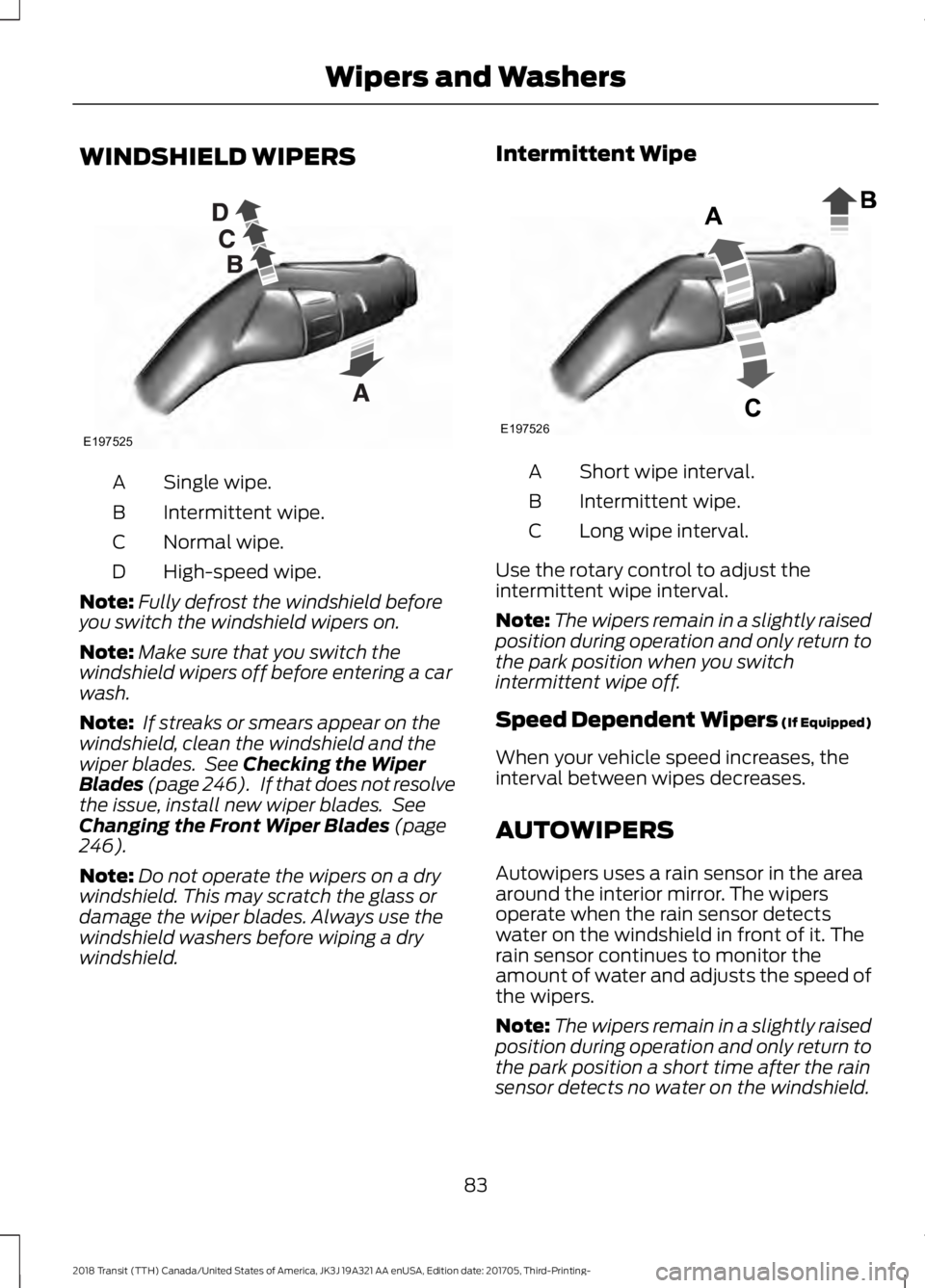
WINDSHIELD WIPERS
Single wipe.
A
Intermittent wipe.
B
Normal wipe.
C
High-speed wipe.
D
Note: Fully defrost the windshield before
you switch the windshield wipers on.
Note: Make sure that you switch the
windshield wipers off before entering a car
wash.
Note: If streaks or smears appear on the
windshield, clean the windshield and the
wiper blades. See Checking the Wiper
Blades (page 246). If that does not resolve
the issue, install new wiper blades. See
Changing the Front Wiper Blades
(page
246).
Note: Do not operate the wipers on a dry
windshield. This may scratch the glass or
damage the wiper blades. Always use the
windshield washers before wiping a dry
windshield. Intermittent Wipe
Short wipe interval.
A
Intermittent wipe.
B
Long wipe interval.
C
Use the rotary control to adjust the
intermittent wipe interval.
Note: The wipers remain in a slightly raised
position during operation and only return to
the park position when you switch
intermittent wipe off.
Speed Dependent Wipers (If Equipped)
When your vehicle speed increases, the
interval between wipes decreases.
AUTOWIPERS
Autowipers uses a rain sensor in the area
around the interior mirror. The wipers
operate when the rain sensor detects
water on the windshield in front of it. The
rain sensor continues to monitor the
amount of water and adjusts the speed of
the wipers.
Note: The wipers remain in a slightly raised
position during operation and only return to
the park position a short time after the rain
sensor detects no water on the windshield.
83
2018 Transit (TTH) Canada/United States of America, JK3J 19A321 AA enUSA, Edition date: 201705, Third-Printing- Wipers and WashersE197525 E197526
Page 93 of 521
POWER WINDOWS
WARNING: To avoid risk of injury, do
not leave children or pets unattended in
your vehicle. WARNING: When closing the power
windows, you should verify they are free
of obstructions and make sure that
children and pets are not in the proximity
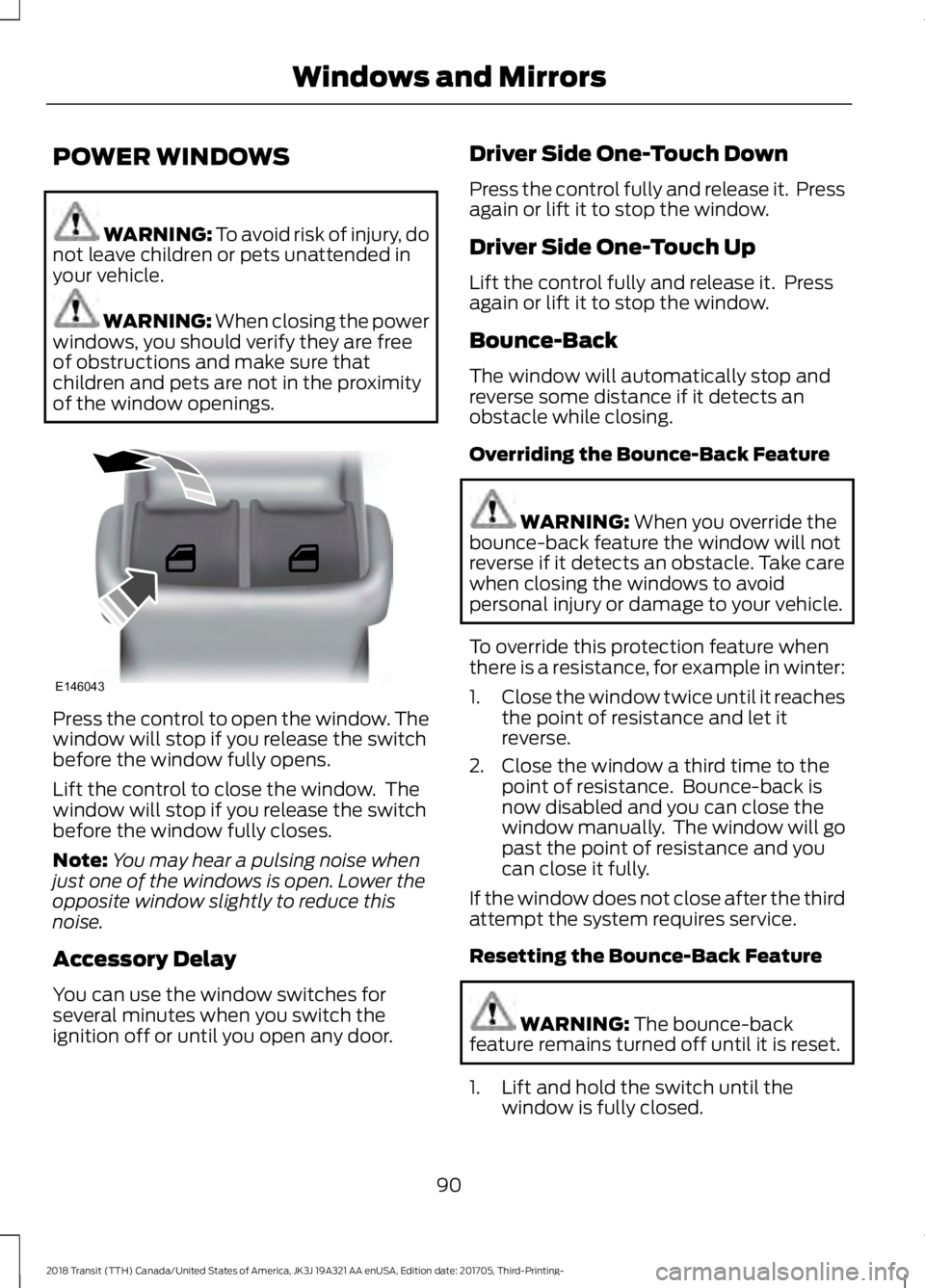
of the window openings. Press the control to open the window. The
window will stop if you release the switch
before the window fully opens.
Lift the control to close the window. The
window will stop if you release the switch
before the window fully closes.
Note:
You may hear a pulsing noise when
just one of the windows is open. Lower the
opposite window slightly to reduce this
noise.
Accessory Delay
You can use the window switches for
several minutes when you switch the
ignition off or until you open any door. Driver Side One-Touch Down
Press the control fully and release it. Press
again or lift it to stop the window.
Driver Side One-Touch Up
Lift the control fully and release it. Press
again or lift it to stop the window.
Bounce-Back
The window will automatically stop and
reverse some distance if it detects an
obstacle while closing.
Overriding the Bounce-Back Feature
WARNING:
When you override the
bounce-back feature the window will not
reverse if it detects an obstacle. Take care
when closing the windows to avoid
personal injury or damage to your vehicle.
To override this protection feature when
there is a resistance, for example in winter:
1. Close the window twice until it reaches
the point of resistance and let it
reverse.
2. Close the window a third time to the point of resistance. Bounce-back is
now disabled and you can close the
window manually. The window will go
past the point of resistance and you
can close it fully.
If the window does not close after the third
attempt the system requires service.
Resetting the Bounce-Back Feature WARNING:
The bounce-back
feature remains turned off until it is reset.
1. Lift and hold the switch until the window is fully closed.
90
2018 Transit (TTH) Canada/United States of America, JK3J 19A321 AA enUSA, Edition date: 201705, Third-Printing- Windows and MirrorsE146043
Page 94 of 521
2. Release the switch.
3. Lift the switch again for one second.
4. Release the switch.
5. Lift the switch again for one second.
6.
Open the window and then try to close
using the one-touch feature.
7. Repeat the procedure if the window does not close using the one-touch
feature.
Note: If you disconnect the battery, you
must reset the bounce-back memory.
EXTERIOR MIRRORS
Power Exterior Mirrors WARNING: Do not adjust the mirrors
when your vehicle is moving. This could
result in the loss of control of your vehicle,
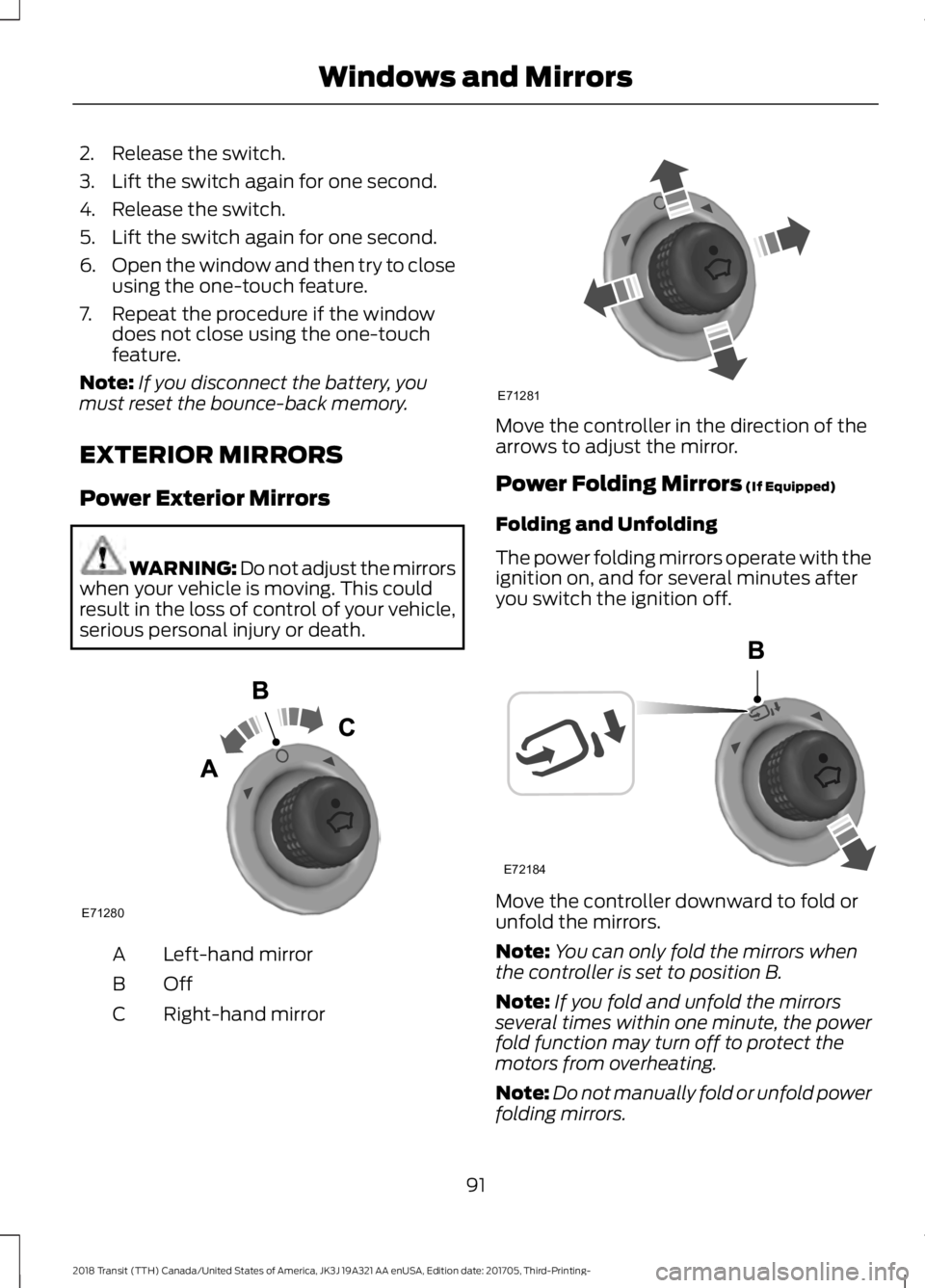
serious personal injury or death. Left-hand mirror
A
OffB
Right-hand mirror
C Move the controller in the direction of the
arrows to adjust the mirror.
Power Folding Mirrors (If Equipped)
Folding and Unfolding
The power folding mirrors operate with the
ignition on, and for several minutes after
you switch the ignition off. Move the controller downward to fold or
unfold the mirrors.
Note:
You can only fold the mirrors when
the controller is set to position B.
Note: If you fold and unfold the mirrors
several times within one minute, the power
fold function may turn off to protect the
motors from overheating.
Note: Do not manually fold or unfold power
folding mirrors.
91
2018 Transit (TTH) Canada/United States of America, JK3J 19A321 AA enUSA, Edition date: 201705, Third-Printing- Windows and MirrorsE71280 E71281 E72184
Page 95 of 521
Fold-Away Exterior Mirrors
Push the mirror toward the door window
glass. Make sure that you fully engage the
mirror in its support when you unfold it.
INTERIOR MIRROR
Manual Dimming Mirror
WARNING: Do not adjust the mirrors
when your vehicle is moving. This could
result in the loss of control of your vehicle,
serious personal injury or death.
Pull the tab below the mirror toward you
to reduce the effect of bright light from
behind.
Automatic Dimming Mirror (If Equipped) WARNING: Do not adjust the mirrors
when your vehicle is moving. This could
result in the loss of control of your vehicle,
serious personal injury or death.
The mirror dims to reduce the effect of
bright light from behind. It returns to
normal when the bright light from behind
is no longer present or if you shift into
reverse (R).
Do not block the sensors on the front and
back of the mirror.
Note: A rear center passenger or raised rear
center head restraint could prevent light
from reaching the sensor. REAR QUARTER WINDOWS
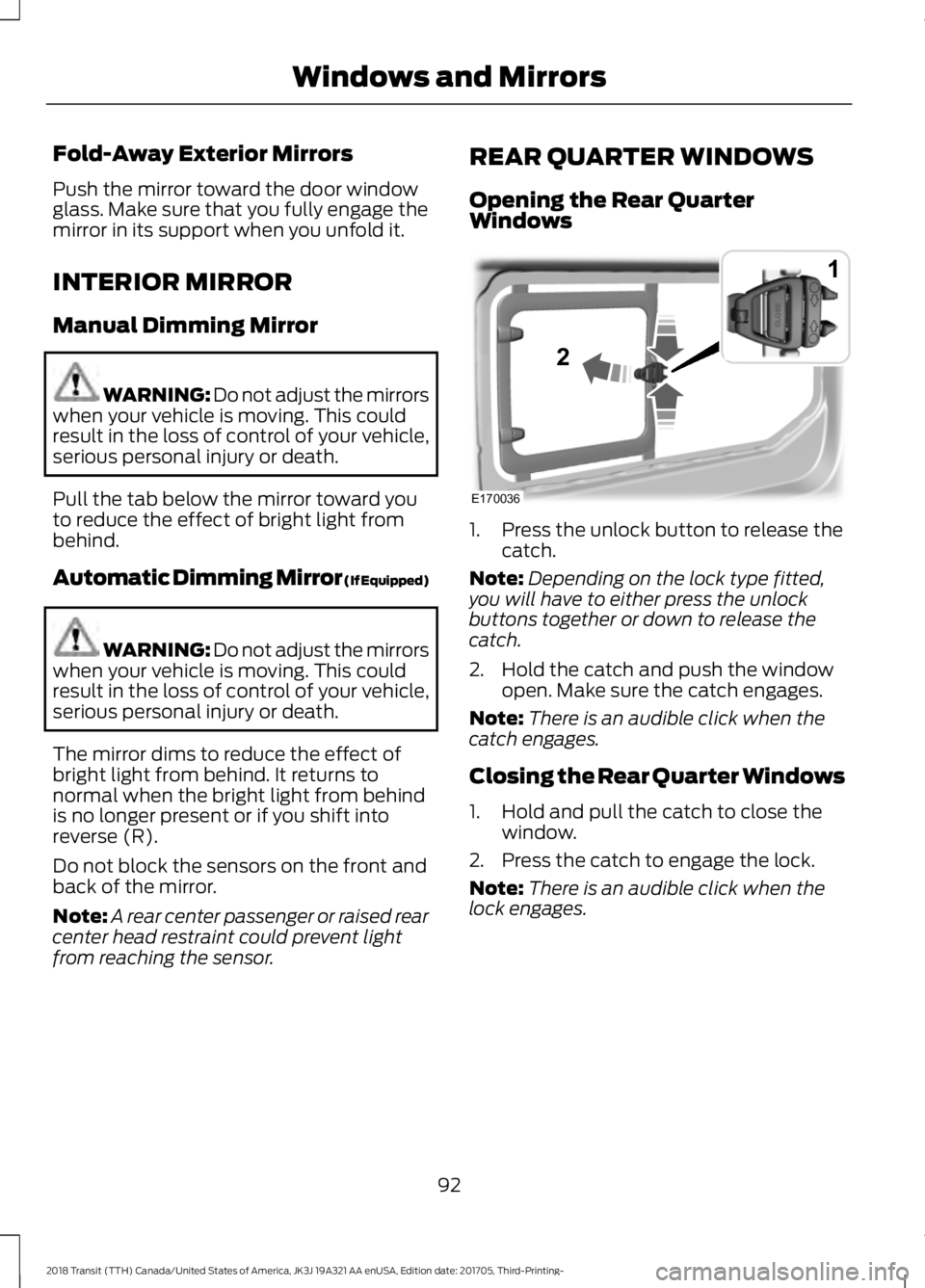
Opening the Rear Quarter
Windows
1. Press the unlock button to release the
catch.
Note: Depending on the lock type fitted,
you will have to either press the unlock
buttons together or down to release the
catch.
2. Hold the catch and push the window open. Make sure the catch engages.
Note: There is an audible click when the
catch engages.
Closing the Rear Quarter Windows
1. Hold and pull the catch to close the window.
2. Press the catch to engage the lock.
Note: There is an audible click when the
lock engages.
92
2018 Transit (TTH) Canada/United States of America, JK3J 19A321 AA enUSA, Edition date: 201705, Third-Printing- Windows and MirrorsE170036
1
2
Page 114 of 521
•
Adjust the temperature control to the
MAX A/C position.
• Adjust the fan speed to the lowest
speed setting.
Side Window Defogging in Cold
Weather
• Adjust the air distribution control to the
instrument panel and windshield air
vents positions.
• Press the
A/C button.
• Adjust the temperature control to the
desired setting.
• Adjust the fan speed to the highest
setting.
• Direct the instrument panel side air
vents toward the side windows.
• Close the instrument panel vents.
Maximum Cooling Performance in
Instrument Panel or Instrument
Panel and Footwell Positions
• Adjust the temperature control to the
lowest setting.
• Press the
A/C and recirculated air
buttons.
• Adjust the fan speed to the highest
setting initially and then adjust it to suit
the desired comfort level.
REAR PASSENGER CLIMATE
CONTROLS
Adjusting the Blower Motor Speed Directing Air to the Overhead Air
Vents
When you direct air to the
overhead air vents, the system
distributes cold air. Directing Air to the Footwell Air
Vents When you direct air to the
footwell air vents, the system
distributes hot air.
Directing Air to the Overhead Air
Vents and the Footwell Air Vents When you direct air to the
Overhead and footwell air vents,
the system distributes warm air.
HEATED WINDOWS AND
MIRRORS
Heated Rear Window
(If Equipped)
Note: Make sure the engine is running
before operating the heated windows.
Note: The heated rear window button is
located on the instrument panel, near the
instrument cluster. Press the button to clear the
heated rear window of thin ice
and fog. The heated rear
window will automatically turn off after a
short period of time.
Note: Do not use razor blades or other
sharp objects to clean or remove decals
from the inside of the heated rear window.
The vehicle warranty does not cover
damage caused to the heated rear window
grid lines.
Heated Exterior Mirrors When you switch the heated rear
window on, the heated exterior
mirrors will automatically turn
on.
Note: Do not remove ice from the mirrors
with a scraper or adjust the mirror glass
when it is frozen in place.
111
2018 Transit (TTH) Canada/United States of America, JK3J 19A321 AA enUSA, Edition date: 201705, Third-Printing- Climate Control E72507
Page 115 of 521
Note:
Do not clean the mirror housing or
glass with harsh abrasives, fuel or other
petroleum-based cleaning products.
Note: On vehicles without a heated exterior
mirror button, the mirrors turn on
automatically when you switch the heated
rear window on.
REMOTE START (If Equipped)
When you remote start your vehicle using
a Ford Original Accessory remote start
system, the engine shuts down if you do
any of the following:
• Unlock your vehicle and open any door.
• Insert the key in the ignition.
• Press the brake pedal.
For more information, refer to the separate
Vehicle Security and Remote Start
Systems Owner ’s Manual
provided with
your vehicle or contact an authorized
dealer.
112
2018 Transit (TTH) Canada/United States of America, JK3J 19A321 AA enUSA, Edition date: 201705, Third-Printing- Climate Control
Page 168 of 521
Press the button to switch the system off.
The system remains off until you switch
the ignition off.
REAR VIEW CAMERA
WARNING: The rear view camera
system is a reverse aid supplement device
that still requires the driver to use it in
conjunction with the interior and exterior
mirrors for maximum coverage. WARNING:
Objects that are close
to either corner of the bumper or under the
bumper, might not be seen on the screen
due to the limited coverage of the camera
system. WARNING:
Reverse your vehicle
slowly. Failure to follow this instruction
could result in the loss of control of your
vehicle, personal injury or death.
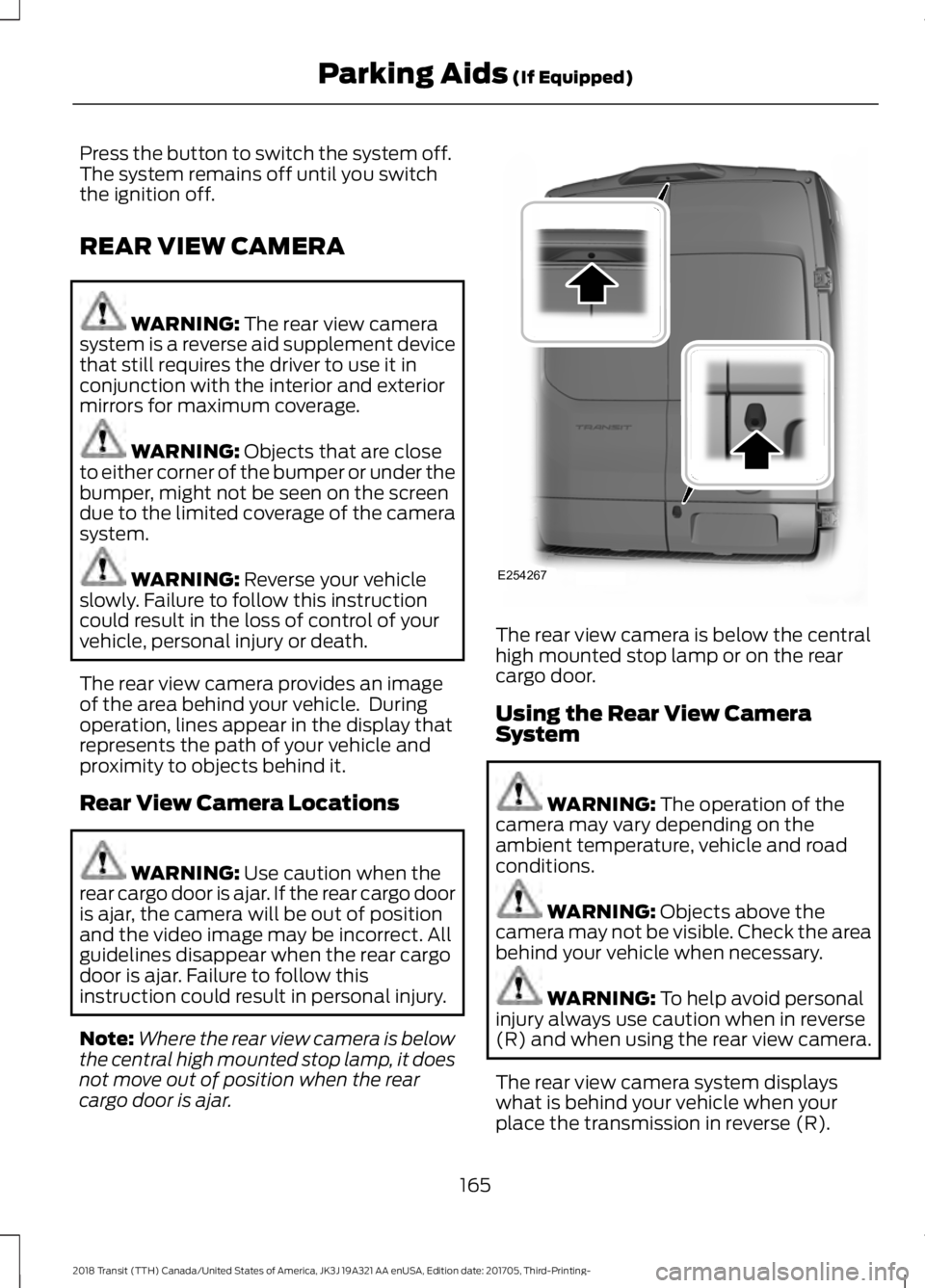
The rear view camera provides an image
of the area behind your vehicle. During
operation, lines appear in the display that
represents the path of your vehicle and
proximity to objects behind it.
Rear View Camera Locations WARNING:
Use caution when the
rear cargo door is ajar. If the rear cargo door
is ajar, the camera will be out of position
and the video image may be incorrect. All
guidelines disappear when the rear cargo
door is ajar. Failure to follow this
instruction could result in personal injury.
Note: Where the rear view camera is below
the central high mounted stop lamp, it does
not move out of position when the rear
cargo door is ajar. The rear view camera is below the central
high mounted stop lamp or on the rear
cargo door.
Using the Rear View Camera
System
WARNING:
The operation of the
camera may vary depending on the
ambient temperature, vehicle and road
conditions. WARNING:
Objects above the
camera may not be visible. Check the area
behind your vehicle when necessary. WARNING:
To help avoid personal
injury always use caution when in reverse
(R) and when using the rear view camera.
The rear view camera system displays
what is behind your vehicle when your
place the transmission in reverse (R).
165
2018 Transit (TTH) Canada/United States of America, JK3J 19A321 AA enUSA, Edition date: 201705, Third-Printing- Parking Aids
(If Equipped)E254267
Page 170 of 521
The fixed and active guidelines fade in and
out depending on the steering wheel
position. When the steering wheel position
is straight the active guidelines are not
visible. Objects in the red zone are closest
to your vehicle and objects in the green
zone are further from your vehicle.
Objects are getting closer to your vehicle
as they move from the green zone to the
yellow or red zones. Use the side view
mirrors and rear view mirror to get better
coverage on both sides and rear of the
vehicle.
Manual Zoom
WARNING: When manual zoom is
on, the full area behind your vehicle may
not show. Be aware of your surroundings
when using the manual zoom feature.
Manual zoom is only available when you
shift the transmission into reverse (R).
Selectable settings for this feature are
Zoom in (+) and Zoom out (-). Press the
symbol in the camera screen to change the
view. The default setting is Zoom OFF.
This allows you to get a closer view of an
object behind your vehicle. The zoomed
image keeps the bumper in the image to
provide a reference. The zoom is only
active while the transmission is in reverse
(R).
Note: Only the centerline shows when you
switch on manual zoom.
Rear View Camera Delay WARNING:
Use caution when
turning camera features on or off when the
transmission is not in park (P). Make sure
your vehicle is not moving. You can switch this feature on or off using
the vehicle settings menu in the
information display. The default setting is
off.
When shifting the transmission out of
reverse (R) and into any gear other than
park (P), the camera image remains in the
display until:
•
Your vehicle speed sufficiently
increases.
• You shift your vehicle into park (P).
Vehicles with Parking Aid
The system uses red, yellow and green
colored distance bars that indicate the
approximate distance of an object from
the rear bumper. The distance bars appear
on the camera guidelines when the sensing
system detects an object.
167
2018 Transit (TTH) Canada/United States of America, JK3J 19A321 AA enUSA, Edition date: 201705, Third-Printing- Parking Aids
(If Equipped)
Page 174 of 521
WARNING: The system may not
function if the sensor is blocked. WARNING:
The sensor may
incorrectly track lane markings as other
structures or objects. This can result in a
false or missed warning. WARNING:
In cold and severe
weather conditions the system may not
function. Rain, snow and spray can all limit
sensor performance. WARNING:
The system will not
operate if the sensor cannot track the road
lane markings. WARNING:
If damage occurs in the
immediate area surrounding the sensor,
have your vehicle checked as soon as
possible. WARNING:
The system may not
correctly operate if your vehicle is fitted
with a suspension kit not approved by us.
Note: Keep the windshield free from
obstructions for example bird droppings,
insects and snow or ice.
Note: The system may assist you when
driving on fast main roads and freeways.
Note: The system may not operate on roads
with sharp bends, narrow lanes, areas under
construction, during hard braking or
acceleration and when you are intentionally
steering your vehicle.
Note: Do not carry out windshield repairs
in the immediate area surrounding the
sensor.
Note: The system operates with a minimum
of one tracked lane marking. Note:
The system only operates above
vehicle speeds of approximately
40 mph
(65 km/h).
The sensor is behind the interior mirror. It
continuously monitors conditions to alert
you of unintentional lane drifting at high
speeds.
The system automatically detects and
tracks the lane markings on the road. If the
system detects that your vehicle is
unintentionally drifting toward the lane
markings, a warning is shown in the
information display. There is also a warning
given in the form of a vibration felt through
the steering wheel.
Note: The vibration intensity from the
steering wheel may decrease depending on
the quality of the road surface.
Using Lane Keeping Alert
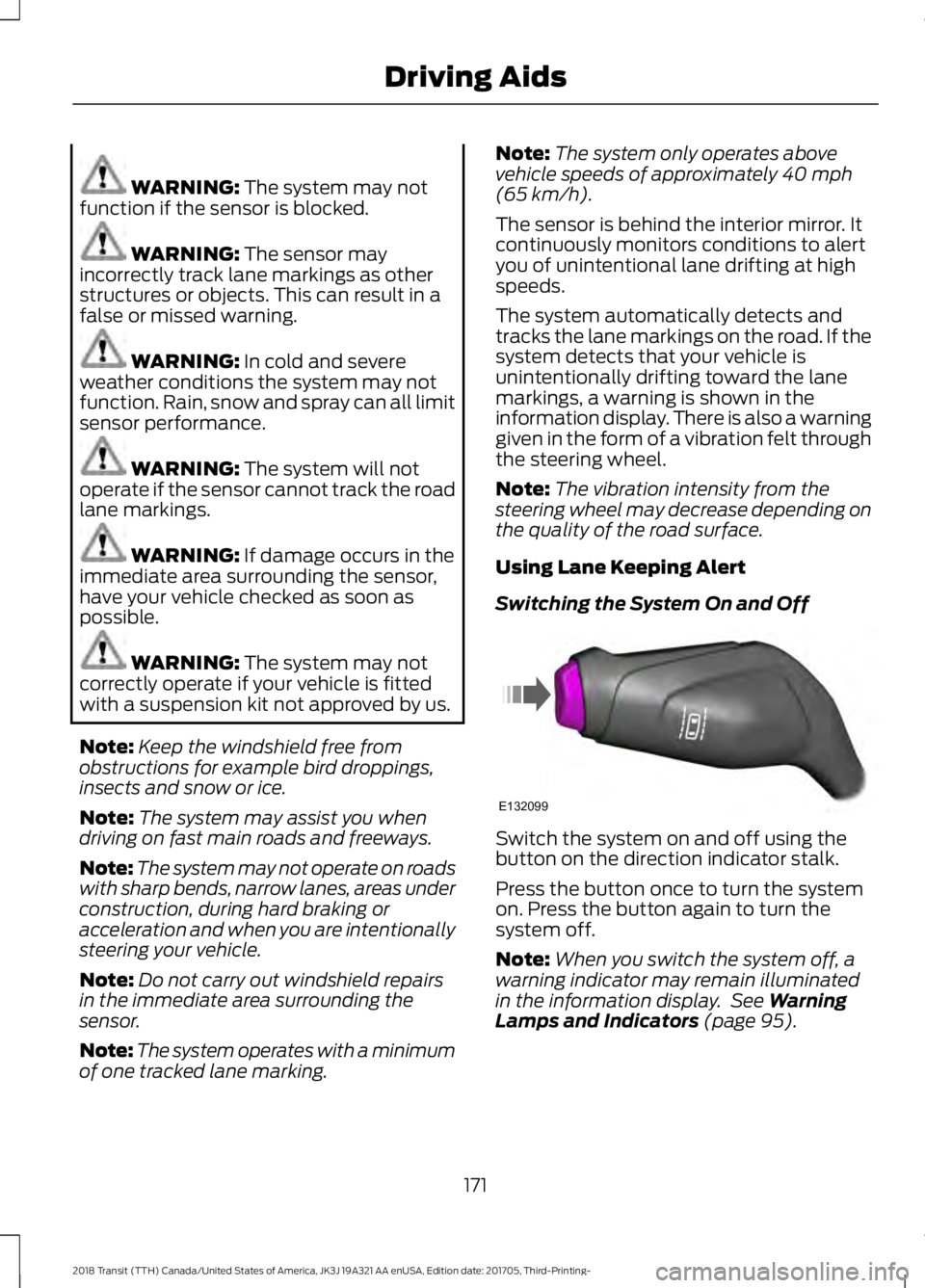
Switching the System On and Off Switch the system on and off using the
button on the direction indicator stalk.
Press the button once to turn the system
on. Press the button again to turn the
system off.
Note:
When you switch the system off, a
warning indicator may remain illuminated
in the information display. See
Warning
Lamps and Indicators (page 95).
171
2018 Transit (TTH) Canada/United States of America, JK3J 19A321 AA enUSA, Edition date: 201705, Third-Printing- Driving AidsE132099