air condition FORD TRANSIT 2019 Service Manual
[x] Cancel search | Manufacturer: FORD, Model Year: 2019, Model line: TRANSIT, Model: FORD TRANSIT 2019Pages: 529, PDF Size: 8.57 MB
Page 330 of 529
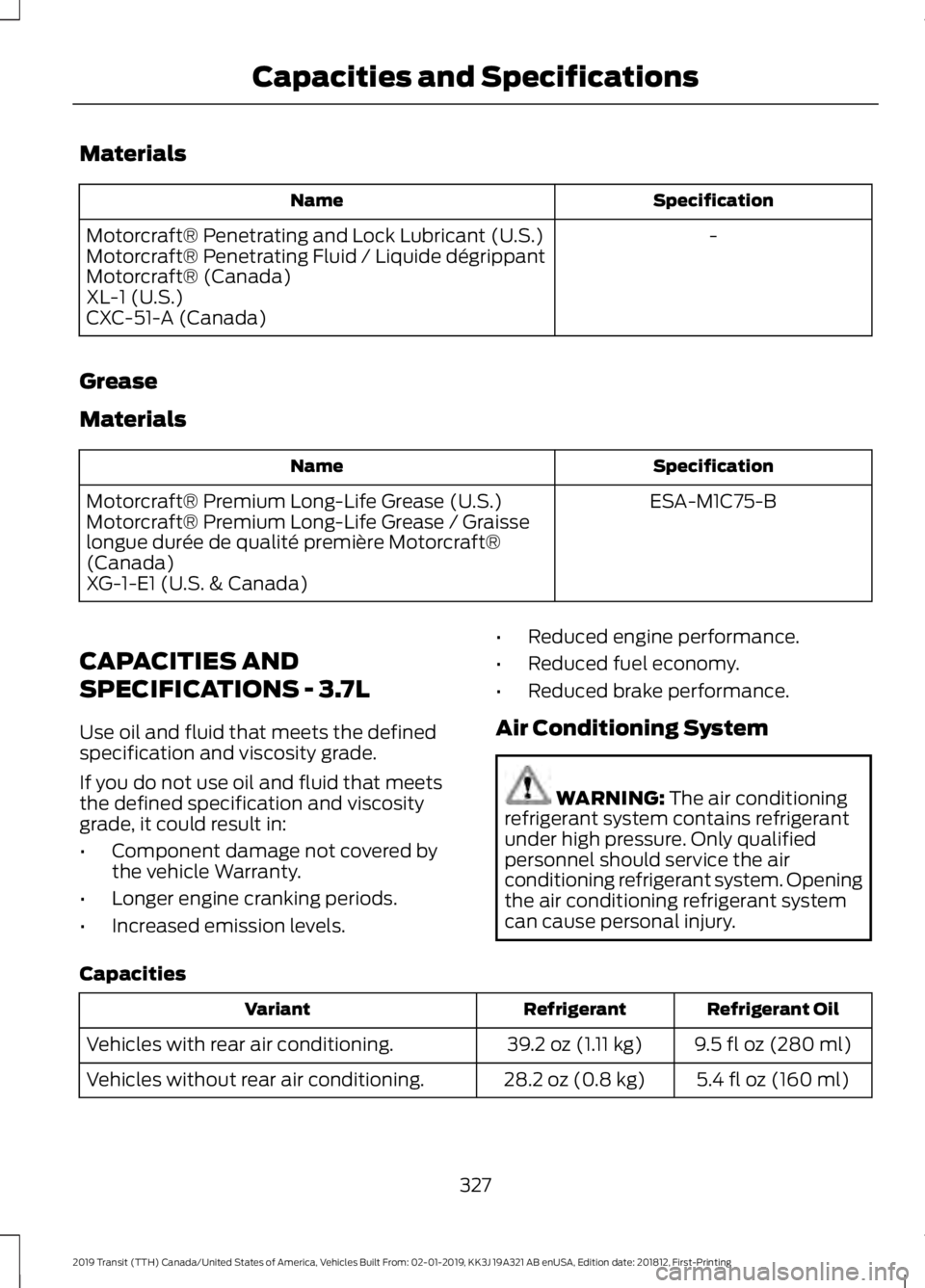
Materials
Specification
Name
-
Motorcraft® Penetrating and Lock Lubricant (U.S.)
Motorcraft® Penetrating Fluid / Liquide dégrippant
Motorcraft® (Canada)
XL-1 (U.S.)
CXC-51-A (Canada)
Grease
Materials Specification
Name
ESA-M1C75-B
Motorcraft® Premium Long-Life Grease (U.S.)
Motorcraft® Premium Long-Life Grease / Graisse
longue durée de qualité première Motorcraft®
(Canada)
XG-1-E1 (U.S. & Canada)
CAPACITIES AND
SPECIFICATIONS - 3.7L
Use oil and fluid that meets the defined
specification and viscosity grade.
If you do not use oil and fluid that meets
the defined specification and viscosity
grade, it could result in:
• Component damage not covered by
the vehicle Warranty.
• Longer engine cranking periods.
• Increased emission levels. •
Reduced engine performance.
• Reduced fuel economy.
• Reduced brake performance.
Air Conditioning System WARNING: The air conditioning
refrigerant system contains refrigerant
under high pressure. Only qualified
personnel should service the air
conditioning refrigerant system. Opening
the air conditioning refrigerant system
can cause personal injury.
Capacities Refrigerant Oil
Refrigerant
Variant
9.5 fl oz (280 ml)
39.2 oz (1.11 kg)
Vehicles with rear air conditioning.
5.4 fl oz (160 ml)
28.2 oz (0.8 kg)
Vehicles without rear air conditioning.
327
2019 Transit (TTH) Canada/United States of America, Vehicles Built From: 02-01-2019, KK3J 19A321 AB enUSA, Edition date: 201812, First-Printing Capacities and Specifications
Page 360 of 529
Sunday, 10:30am-7:30pm EST.
In the United States, call 1-800-392-3673.
In Canada, call 1-800-565-3673.
Times are subject to change due to
holidays.
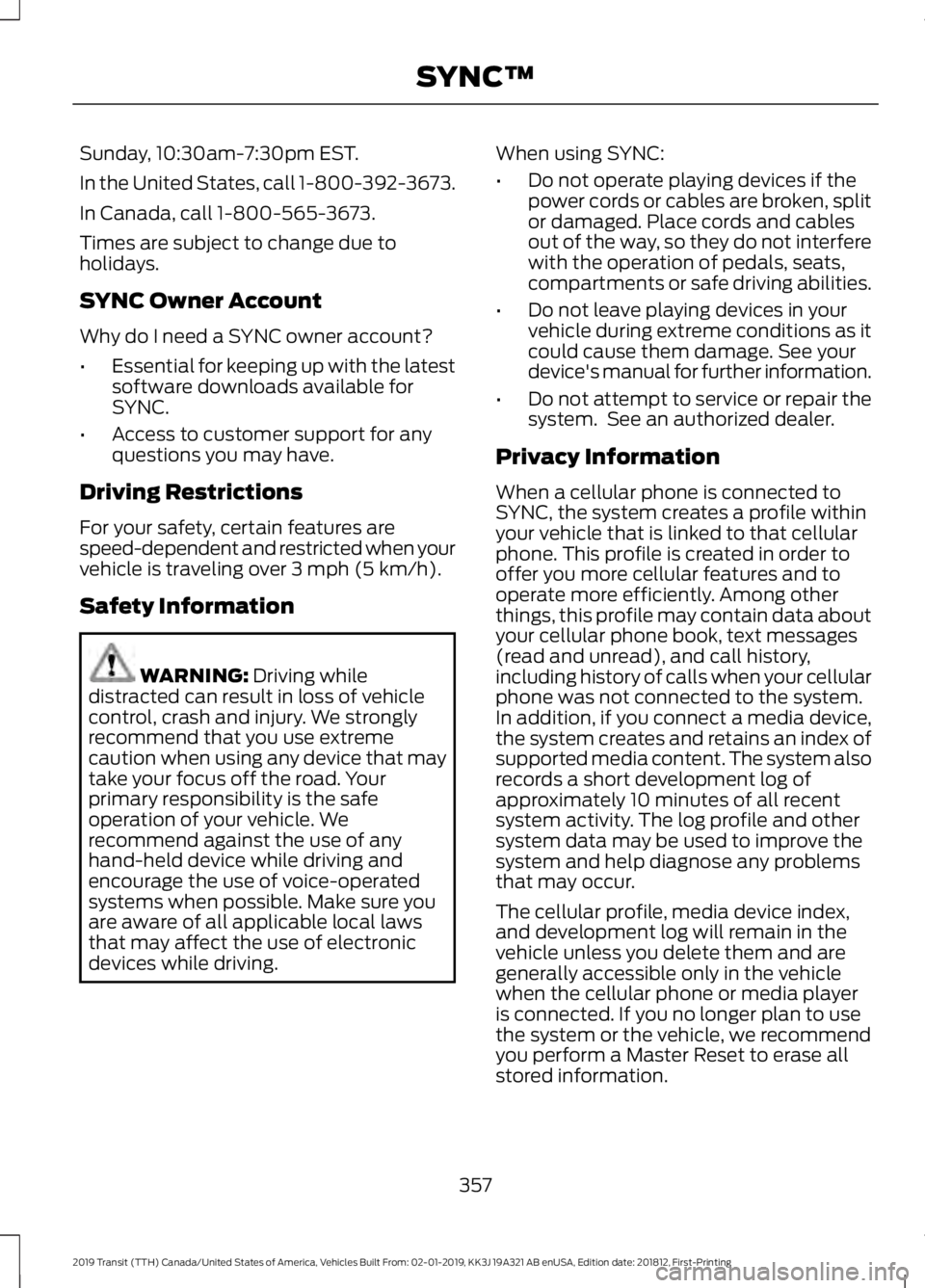
SYNC Owner Account
Why do I need a SYNC owner account?
•
Essential for keeping up with the latest
software downloads available for
SYNC.
• Access to customer support for any
questions you may have.
Driving Restrictions
For your safety, certain features are
speed-dependent and restricted when your
vehicle is traveling over 3 mph (5 km/h).
Safety Information WARNING:
Driving while
distracted can result in loss of vehicle
control, crash and injury. We strongly
recommend that you use extreme
caution when using any device that may
take your focus off the road. Your
primary responsibility is the safe
operation of your vehicle. We
recommend against the use of any
hand-held device while driving and
encourage the use of voice-operated
systems when possible. Make sure you
are aware of all applicable local laws
that may affect the use of electronic
devices while driving. When using SYNC:
•
Do not operate playing devices if the
power cords or cables are broken, split
or damaged. Place cords and cables
out of the way, so they do not interfere
with the operation of pedals, seats,
compartments or safe driving abilities.
• Do not leave playing devices in your
vehicle during extreme conditions as it
could cause them damage. See your
device's manual for further information.
• Do not attempt to service or repair the
system. See an authorized dealer.
Privacy Information
When a cellular phone is connected to
SYNC, the system creates a profile within
your vehicle that is linked to that cellular
phone. This profile is created in order to
offer you more cellular features and to
operate more efficiently. Among other
things, this profile may contain data about
your cellular phone book, text messages
(read and unread), and call history,
including history of calls when your cellular
phone was not connected to the system.
In addition, if you connect a media device,
the system creates and retains an index of
supported media content. The system also
records a short development log of
approximately 10 minutes of all recent
system activity. The log profile and other
system data may be used to improve the
system and help diagnose any problems
that may occur.
The cellular profile, media device index,
and development log will remain in the
vehicle unless you delete them and are
generally accessible only in the vehicle
when the cellular phone or media player
is connected. If you no longer plan to use
the system or the vehicle, we recommend
you perform a Master Reset to erase all
stored information.
357
2019 Transit (TTH) Canada/United States of America, Vehicles Built From: 02-01-2019, KK3J 19A321 AB enUSA, Edition date: 201812, First-Printing SYNC™
Page 400 of 529
Note:
On some models, SEEK NEXT may
be combined with PHONE REJECT and
SEEK PREVIOUS may be combined with
PHONE ACCEPT.
M:
Touch the control repeatedly to switch
between media sources (modes).
See
Steering Wheel (page 79).
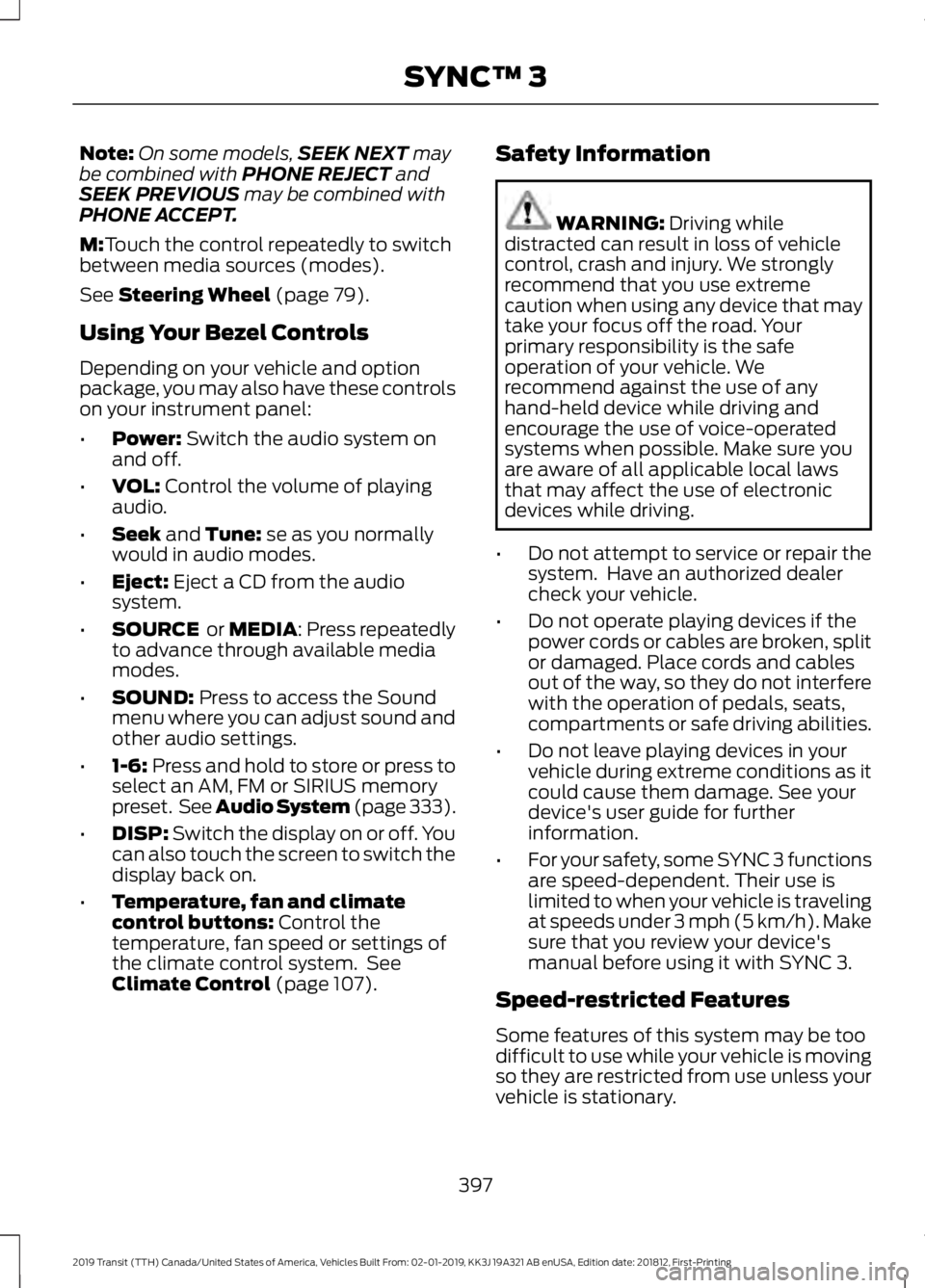
Using Your Bezel Controls
Depending on your vehicle and option
package, you may also have these controls
on your instrument panel:
• Power:
Switch the audio system on
and off.
• VOL:
Control the volume of playing
audio.
• Seek
and Tune: se as you normally
would in audio modes.
• Eject:
Eject a CD from the audio
system.
• SOURCE
or MEDIA: Press repeatedly
to advance through available media
modes.
• SOUND:
Press to access the Sound
menu where you can adjust sound and
other audio settings.
• 1-6:
Press and hold to store or press to
select an AM, FM or SIRIUS memory
preset. See Audio System (page 333).
• DISP:
Switch the display on or off. You
can also touch the screen to switch the
display back on.
• Temperature, fan and climate
control buttons:
Control the
temperature, fan speed or settings of
the climate control system. See
Climate Control
(page 107). Safety Information WARNING:
Driving while
distracted can result in loss of vehicle
control, crash and injury. We strongly
recommend that you use extreme
caution when using any device that may
take your focus off the road. Your
primary responsibility is the safe
operation of your vehicle. We
recommend against the use of any
hand-held device while driving and
encourage the use of voice-operated
systems when possible. Make sure you
are aware of all applicable local laws
that may affect the use of electronic
devices while driving.
• Do not attempt to service or repair the
system. Have an authorized dealer
check your vehicle.
• Do not operate playing devices if the
power cords or cables are broken, split
or damaged. Place cords and cables
out of the way, so they do not interfere
with the operation of pedals, seats,
compartments or safe driving abilities.
• Do not leave playing devices in your
vehicle during extreme conditions as it
could cause them damage. See your
device's user guide for further
information.
• For your safety, some SYNC 3 functions
are speed-dependent. Their use is
limited to when your vehicle is traveling
at speeds under 3 mph (5 km/h). Make
sure that you review your device's
manual before using it with SYNC 3.
Speed-restricted Features
Some features of this system may be too
difficult to use while your vehicle is moving
so they are restricted from use unless your
vehicle is stationary.
397
2019 Transit (TTH) Canada/United States of America, Vehicles Built From: 02-01-2019, KK3J 19A321 AB enUSA, Edition date: 201812, First-Printing SYNC™ 3
Page 401 of 529
•
Screens crowded with information,
such as Point of Interest reviews and
ratings, SiriusXM Traffic and Travel Link
sports scores, movie times or ski
conditions.
• Any action that requires you to use a
keyboard is restricted, such as entering
a navigation destination or editing
information. •
All lists are limited so the user can view
fewer entries (such as phone contacts
or recent phone call entries).
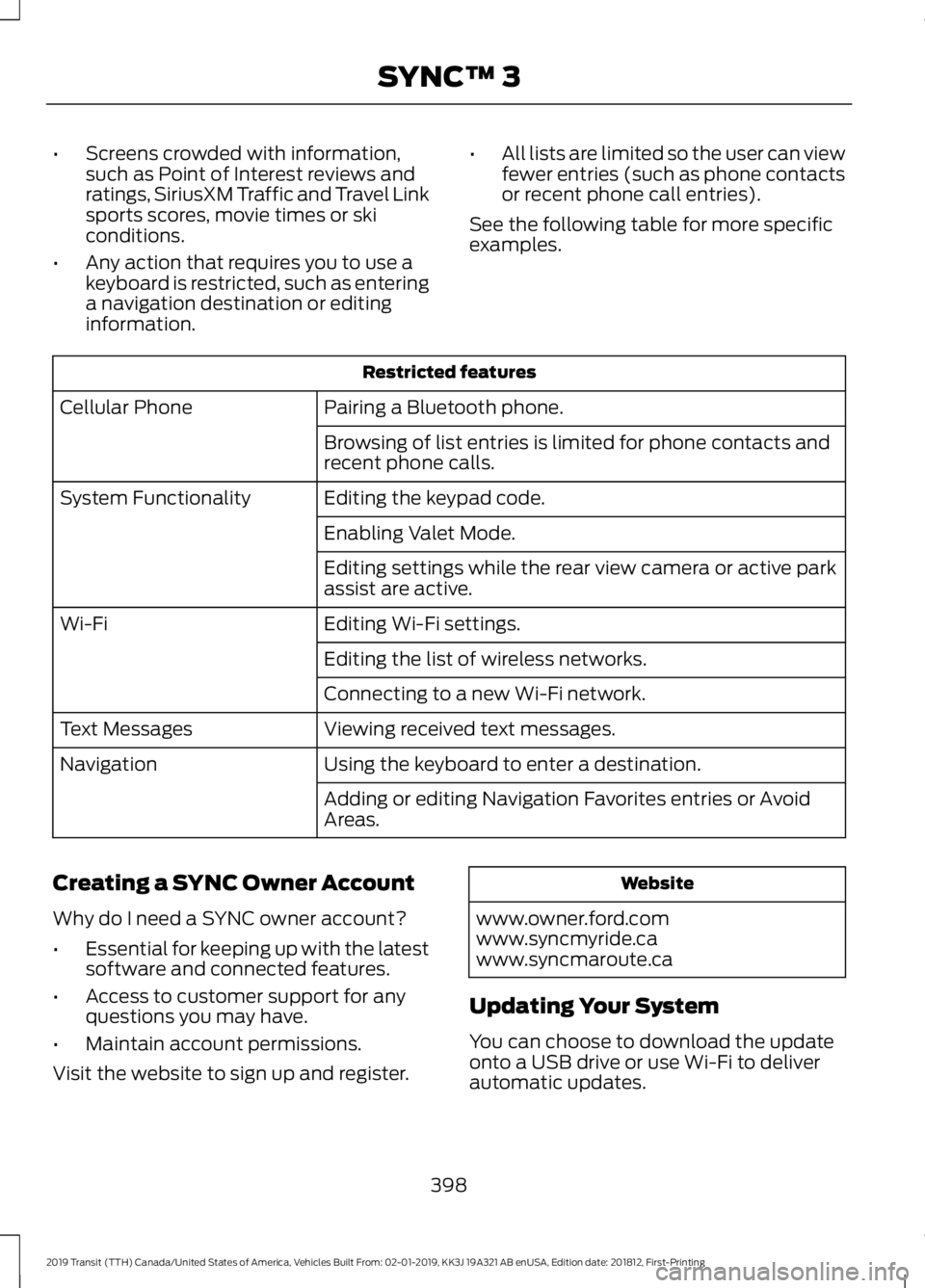
See the following table for more specific
examples. Restricted features
Pairing a Bluetooth phone.
Cellular Phone
Browsing of list entries is limited for phone contacts and
recent phone calls.
Editing the keypad code.
System Functionality
Enabling Valet Mode.
Editing settings while the rear view camera or active park
assist are active.
Editing Wi-Fi settings.
Wi-Fi
Editing the list of wireless networks.
Connecting to a new Wi-Fi network.
Viewing received text messages.
Text Messages
Using the keyboard to enter a destination.
Navigation
Adding or editing Navigation Favorites entries or Avoid
Areas.
Creating a SYNC Owner Account
Why do I need a SYNC owner account?
• Essential for keeping up with the latest
software and connected features.
• Access to customer support for any
questions you may have.
• Maintain account permissions.
Visit the website to sign up and register. Website
www.owner.ford.com
www.syncmyride.ca
www.syncmaroute.ca
Updating Your System
You can choose to download the update
onto a USB drive or use Wi-Fi to deliver
automatic updates.
398
2019 Transit (TTH) Canada/United States of America, Vehicles Built From: 02-01-2019, KK3J 19A321 AB enUSA, Edition date: 201812, First-Printing SYNC™ 3
Page 455 of 529
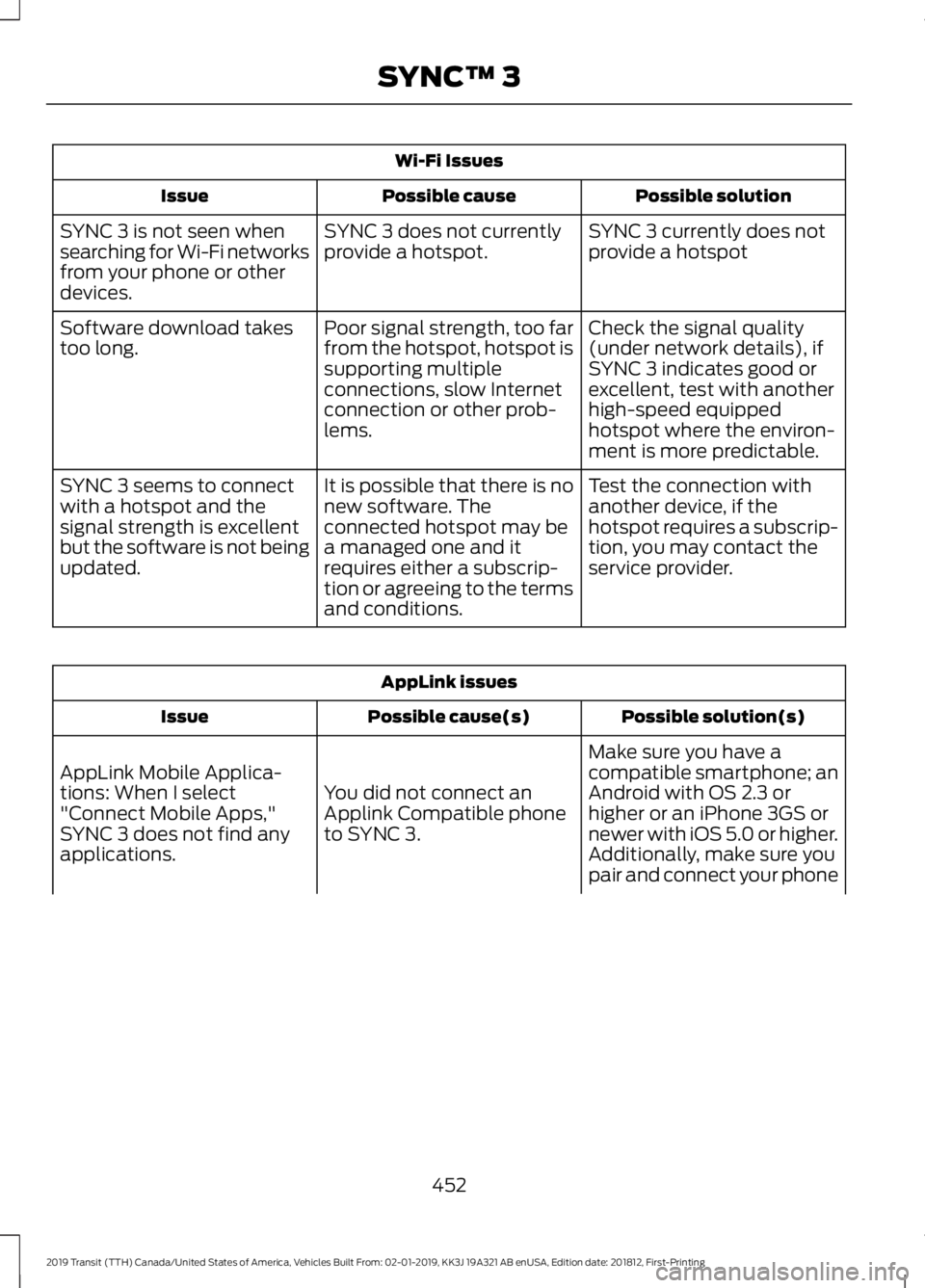
Wi-Fi Issues
Possible solution
Possible cause
Issue
SYNC 3 currently does not
provide a hotspot
SYNC 3 does not currently
provide a hotspot.
SYNC 3 is not seen when
searching for Wi-Fi networks
from your phone or other
devices.
Check the signal quality
(under network details), if
SYNC 3 indicates good or
excellent, test with another
high-speed equipped
hotspot where the environ-
ment is more predictable.
Poor signal strength, too far
from the hotspot, hotspot is
supporting multiple
connections, slow Internet
connection or other prob-
lems.
Software download takes
too long.
Test the connection with
another device, if the
hotspot requires a subscrip-
tion, you may contact the
service provider.
It is possible that there is no
new software. The
connected hotspot may be
a managed one and it
requires either a subscrip-
tion or agreeing to the terms
and conditions.
SYNC 3 seems to connect
with a hotspot and the
signal strength is excellent
but the software is not being
updated. AppLink issues
Possible solution(s)
Possible cause(s)
Issue
Make sure you have a
compatible smartphone; an
Android with OS 2.3 or
higher or an iPhone 3GS or
newer with iOS 5.0 or higher.
Additionally, make sure you
You did not connect an
Applink Compatible phone
to SYNC 3.
AppLink Mobile Applica-
tions: When I select
"Connect Mobile Apps,"
SYNC 3 does not find any
applications.
pair and connect your phone
452
2019 Transit (TTH) Canada/United States of America, Vehicles Built From: 02-01-2019, KK3J 19A321 AB enUSA, Edition date: 201812, First-Printing SYNC™ 3
Page 475 of 529
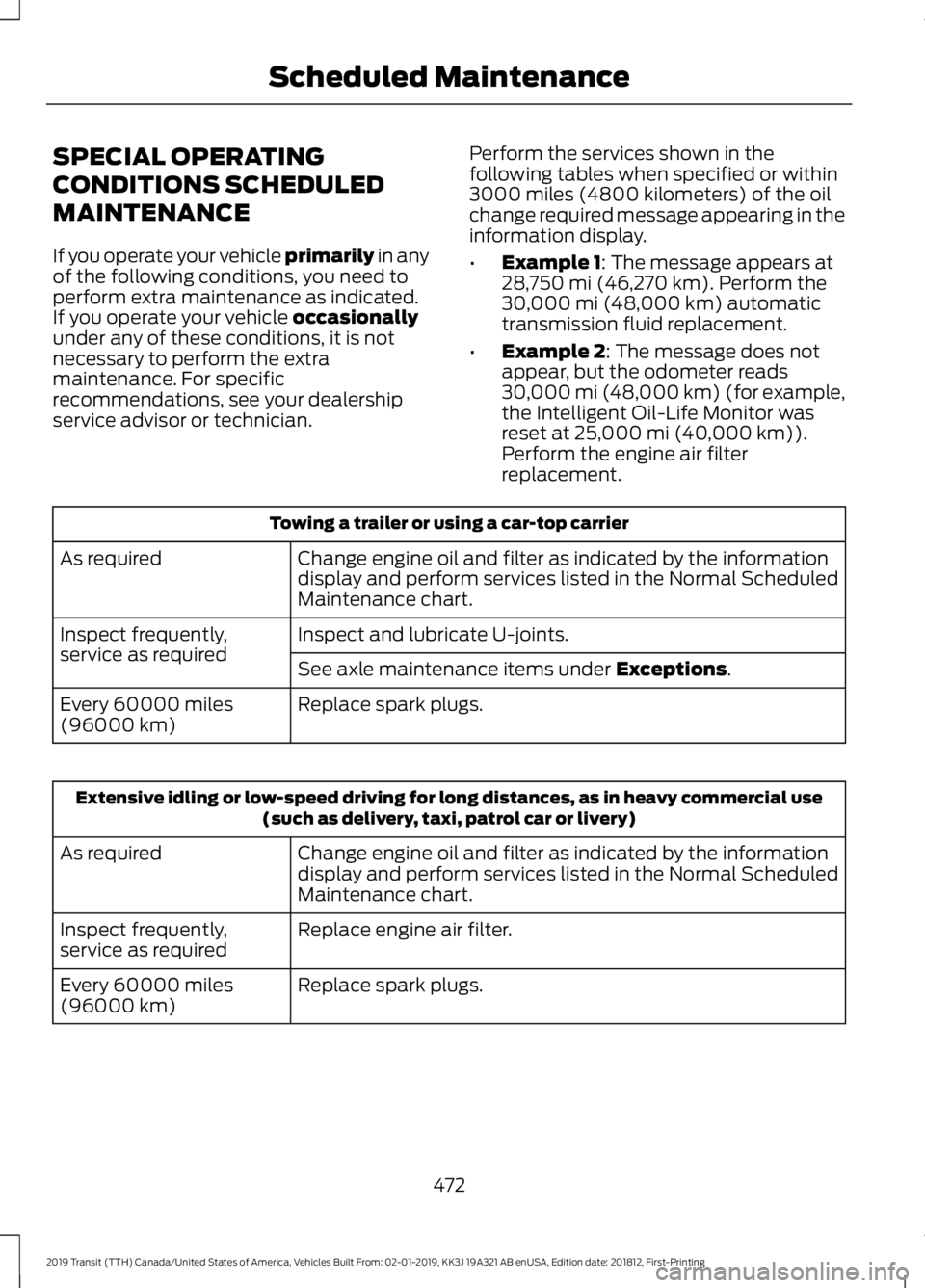
SPECIAL OPERATING
CONDITIONS SCHEDULED
MAINTENANCE
If you operate your vehicle primarily in any
of the following conditions, you need to
perform extra maintenance as indicated.
If you operate your vehicle
occasionally
under any of these conditions, it is not
necessary to perform the extra
maintenance. For specific
recommendations, see your dealership
service advisor or technician. Perform the services shown in the
following tables when specified or within
3000 miles (4800 kilometers) of the oil
change required message appearing in the
information display.
•
Example 1
: The message appears at
28,750 mi (46,270 km). Perform the
30,000 mi (48,000 km) automatic
transmission fluid replacement.
• Example 2
: The message does not
appear, but the odometer reads
30,000 mi (48,000 km) (for example,
the Intelligent Oil-Life Monitor was
reset at
25,000 mi (40,000 km)).
Perform the engine air filter
replacement. Towing a trailer or using a car-top carrier
Change engine oil and filter as indicated by the information
display and perform services listed in the Normal Scheduled
Maintenance chart.
As required
Inspect and lubricate U-joints.
Inspect frequently,
service as required
See axle maintenance items under
Exceptions.
Replace spark plugs.
Every 60000 miles
(96000 km) Extensive idling or low-speed driving for long distances, as in heavy commercial use
(such as delivery, taxi, patrol car or livery)
Change engine oil and filter as indicated by the information
display and perform services listed in the Normal Scheduled
Maintenance chart.
As required
Replace engine air filter.
Inspect frequently,
service as required
Replace spark plugs.
Every 60000 miles
(96000 km)
472
2019 Transit (TTH) Canada/United States of America, Vehicles Built From: 02-01-2019, KK3J 19A321 AB enUSA, Edition date: 201812, First-Printing Scheduled Maintenance
Page 476 of 529
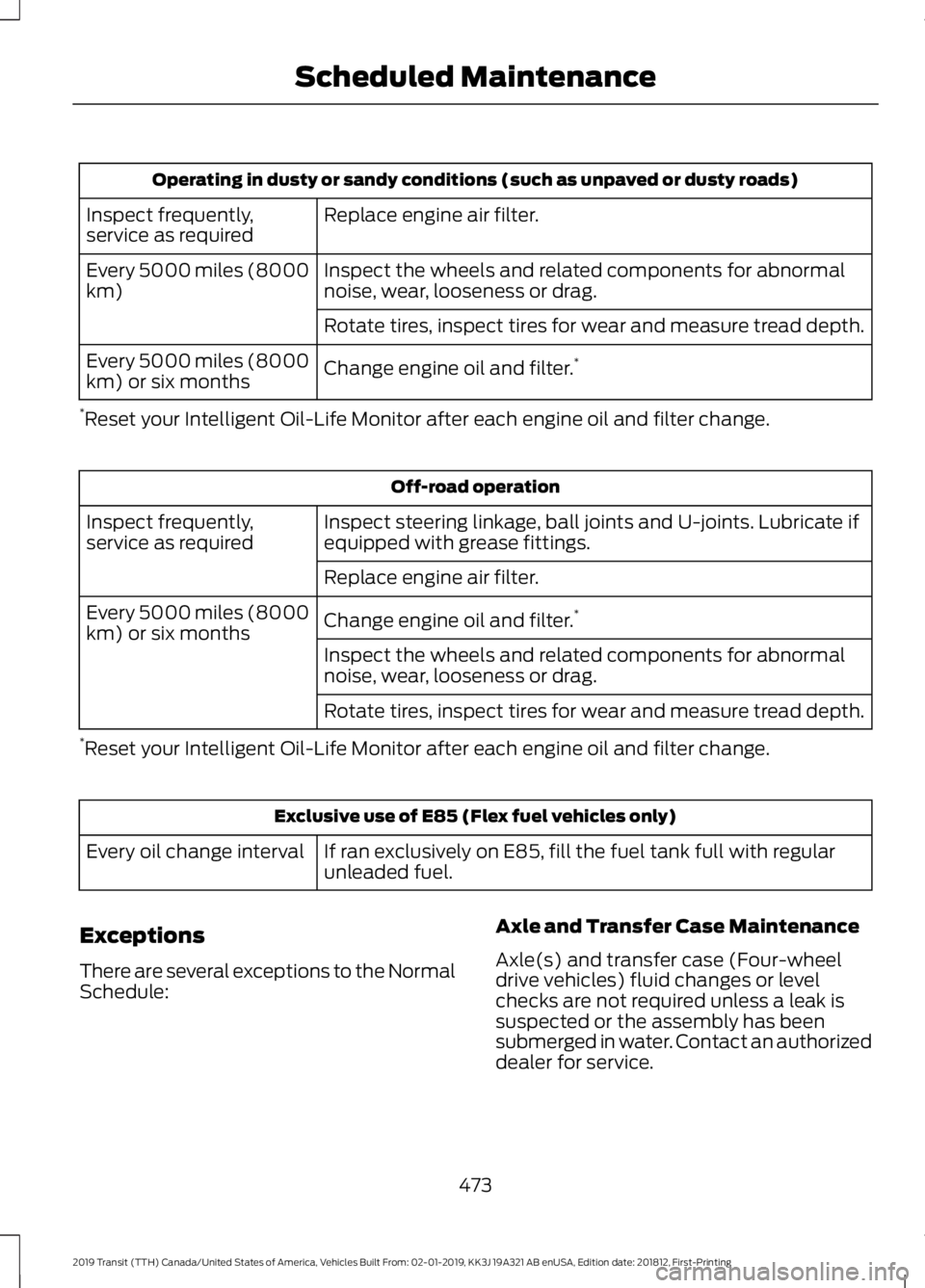
Operating in dusty or sandy conditions (such as unpaved or dusty roads)
Replace engine air filter.
Inspect frequently,
service as required
Inspect the wheels and related components for abnormal
noise, wear, looseness or drag.
Every 5000 miles (8000
km)
Rotate tires, inspect tires for wear and measure tread depth.
Change engine oil and filter. *
Every 5000 miles (8000
km) or six months
* Reset your Intelligent Oil-Life Monitor after each engine oil and filter change. Off-road operation
Inspect steering linkage, ball joints and U-joints. Lubricate if
equipped with grease fittings.
Inspect frequently,
service as required
Replace engine air filter.
Change engine oil and filter. *
Every 5000 miles (8000
km) or six months
Inspect the wheels and related components for abnormal
noise, wear, looseness or drag.
Rotate tires, inspect tires for wear and measure tread depth.
* Reset your Intelligent Oil-Life Monitor after each engine oil and filter change. Exclusive use of E85 (Flex fuel vehicles only)
If ran exclusively on E85, fill the fuel tank full with regular
unleaded fuel.
Every oil change interval
Exceptions
There are several exceptions to the Normal
Schedule: Axle and Transfer Case Maintenance
Axle(s) and transfer case (Four-wheel
drive vehicles) fluid changes or level
checks are not required unless a leak is
suspected or the assembly has been
submerged in water. Contact an authorized
dealer for service.
473
2019 Transit (TTH) Canada/United States of America, Vehicles Built From: 02-01-2019, KK3J 19A321 AB enUSA, Edition date: 201812, First-Printing Scheduled Maintenance
Page 477 of 529
California fuel filter replacement
If you register your vehicle in California, the
California Air Resources Board has
determined that the failure to perform this
maintenance item does not nullify the
emission warranty or limit recall liability
before the completion of your vehicle's
useful life. Ford Motor Company, however,
urges you to have all recommended
maintenance services performed at the
specified intervals and to record all vehicle
service.
Hot climate oil change intervals
Vehicles operating in the Middle East,
North Africa, Sub-Saharan Africa or
locations with similar climates using an
American Petroleum Institute (API)
Certified for Gasoline Engines (Certification
mark) oil of SM or SN quality, the normal
oil change interval is 5,000 mi (8,000 km).
If the available API SM or SN oils are not
available, then the oil change interval is
3,000 mi (4,800 km)
.
Engine air filter replacement
The life of the engine air filter is dependent
on exposure to dusty and dirty conditions.
Vehicles operated in these conditions
require frequent inspection and
replacement of the engine air filter.
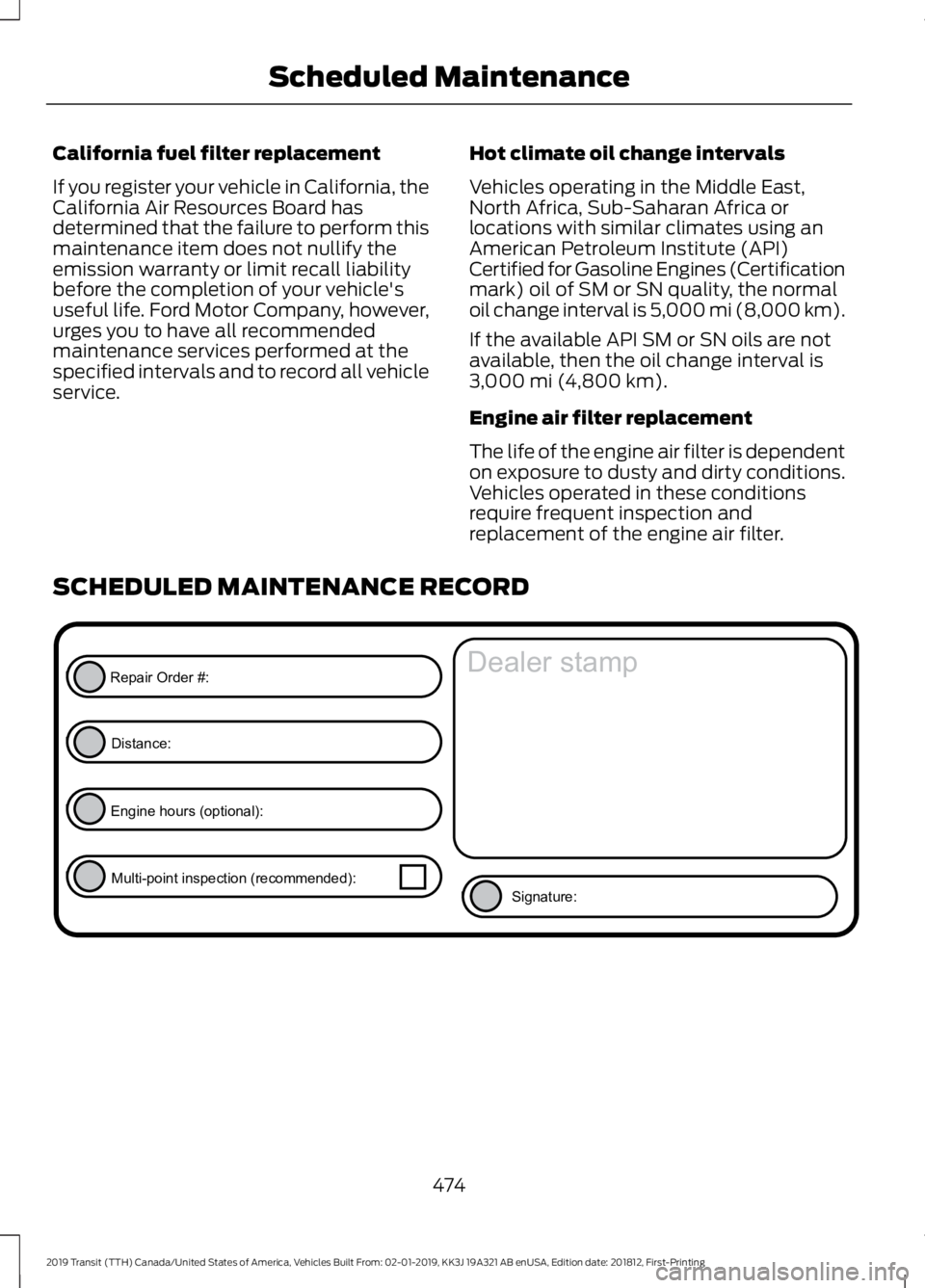
SCHEDULED MAINTENANCE RECORD 474
2019 Transit (TTH) Canada/United States of America, Vehicles Built From: 02-01-2019, KK3J 19A321 AB enUSA, Edition date: 201812, First-Printing Scheduled MaintenanceE146852
Repair Order #:Distance:
Engine hours (optional): Multi-point inspection (recommended): Signature:
Dealer stamp
Page 488 of 529
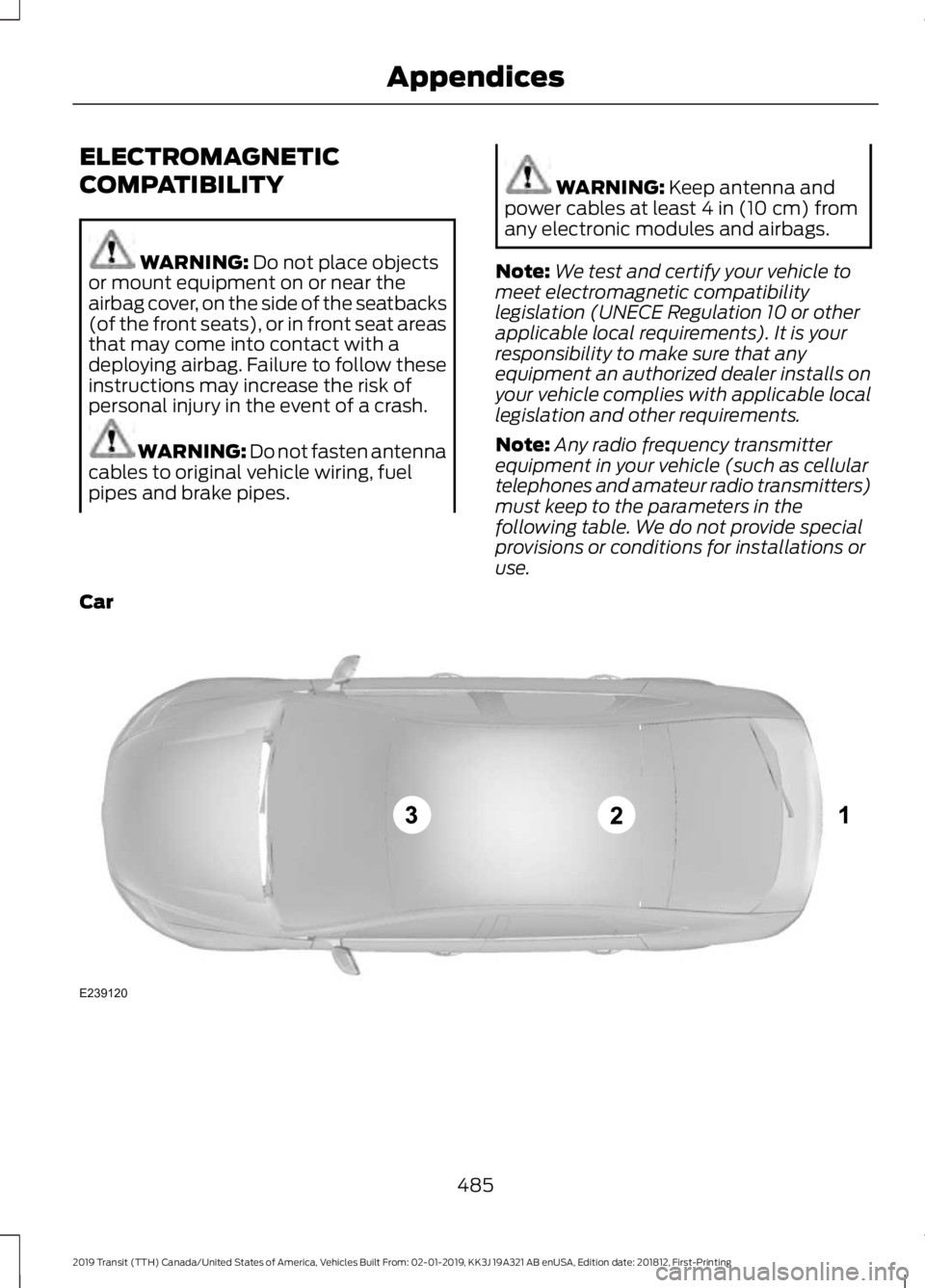
ELECTROMAGNETIC
COMPATIBILITY
WARNING: Do not place objects
or mount equipment on or near the
airbag cover, on the side of the seatbacks
(of the front seats), or in front seat areas
that may come into contact with a
deploying airbag. Failure to follow these
instructions may increase the risk of
personal injury in the event of a crash. WARNING:
Do not fasten antenna
cables to original vehicle wiring, fuel
pipes and brake pipes. WARNING:
Keep antenna and
power cables at least 4 in (10 cm) from
any electronic modules and airbags.
Note: We test and certify your vehicle to
meet electromagnetic compatibility
legislation (UNECE Regulation 10 or other
applicable local requirements). It is your
responsibility to make sure that any
equipment an authorized dealer installs on
your vehicle complies with applicable local
legislation and other requirements.
Note: Any radio frequency transmitter
equipment in your vehicle (such as cellular
telephones and amateur radio transmitters)
must keep to the parameters in the
following table. We do not provide special
provisions or conditions for installations or
use.
Car 485
2019 Transit (TTH) Canada/United States of America, Vehicles Built From: 02-01-2019, KK3J 19A321 AB enUSA, Edition date: 201812, First-Printing AppendicesE239120
Page 498 of 529
filing, AAA, and arbitrator
’s fees and
expenses. It will not seek its attorney ’s
fees or expenses from you in any
arbitration. Fees and expenses are not
counted in determining how much a
dispute involves.
(h) Claims or disputes must be filed
within one year. To the extent permitted
by law, any claim or dispute under this
EULA to which this Section applies must
be filed within one year in small claims
court (Section c) or in arbitration (Section
d). The one-year period begins when the
claim or dispute first could be filed. If such
a claim or dispute is not filed within one
year, it is permanently barred.
(I) Severability. If the class action waiver
(Section e) is found to be illegal or
unenforceable as to all or some parts of a
dispute, then that portion of Section e will
not apply to those parts. Instead, those
parts will be severed and proceed in a court
of law, with the remaining parts proceeding
in arbitration. If any other provision of that
portion Section e is found to be illegal or
unenforceable, that provision will be
severed with the remainder of Section e
remaining in full force and effect.
Telenav Software End User License
Agreement
Please read these terms and conditions
carefully before you use the TeleNav
Software. Your use of the TeleNav
Software indicates that you accept these
terms and conditions. If you do not accept
these terms and conditions, do not break
the seal of the package, launch, or
otherwise use the TeleNav Software.
TeleNav may revise this Agreement and
the privacy policy at any time, with or
without notice to you. You agree to visit
http://www.telenav.com from time to time
to review the then current version of this
Agreement and of the privacy policy. 1. Safe and Lawful Use
You acknowledge that devoting attention
to the TeleNav Software may pose a risk
of injury or death to you and others in
situations that otherwise require your
undivided attention, and you therefore
agree to comply with the following when
using the TeleNav Software:
(a) observe all traffic laws and otherwise
drive safely;
(b) use your own personal judgment while
driving. If you feel that a route suggested
by the TeleNav Software instructs you to
perform an unsafe or illegal maneuver,
places you in an unsafe situation, or directs
you into an area that you consider to be
unsafe, do not follow such instructions;
(c) do not input destinations, or otherwise
manipulate the TeleNav Software, unless
your vehicle is stationary and parked;
(d) do not use the TeleNav Software for
any illegal, unauthorized, unintended,
unsafe, hazardous, or unlawful purposes,
or in any manner inconsistent with this
Agreement;
(e) arrange all GPS and wireless devices
and cables necessary for use of the
TeleNav Software in a secure manner in
your vehicle so that they will not interfere
with your driving and will not prevent the
operation of any safety device (such as an
airbag).
You agree to indemnify and hold TeleNav
harmless against all claims resulting from
any dangerous or otherwise inappropriate
use of the TeleNav Software in any moving
vehicle, including as a result of your failure
to comply with the directions above.
495
2019 Transit (TTH) Canada/United States of America, Vehicles Built From: 02-01-2019, KK3J 19A321 AB enUSA, Edition date: 201812, First-Printing Appendices