warning FORD TRANSIT 2019 Workshop Manual
[x] Cancel search | Manufacturer: FORD, Model Year: 2019, Model line: TRANSIT, Model: FORD TRANSIT 2019Pages: 529, PDF Size: 8.57 MB
Page 100 of 529
GENERAL INFORMATION
WARNING: Driving while
distracted can result in loss of vehicle
control, crash and injury. We strongly
recommend that you use extreme
caution when using any device that may
take your focus off the road. Your
primary responsibility is the safe
operation of your vehicle. We
recommend against the use of any
hand-held device while driving and
encourage the use of voice-operated
systems when possible. Make sure you
are aware of all applicable local laws
that may affect the use of electronic
devices while driving.
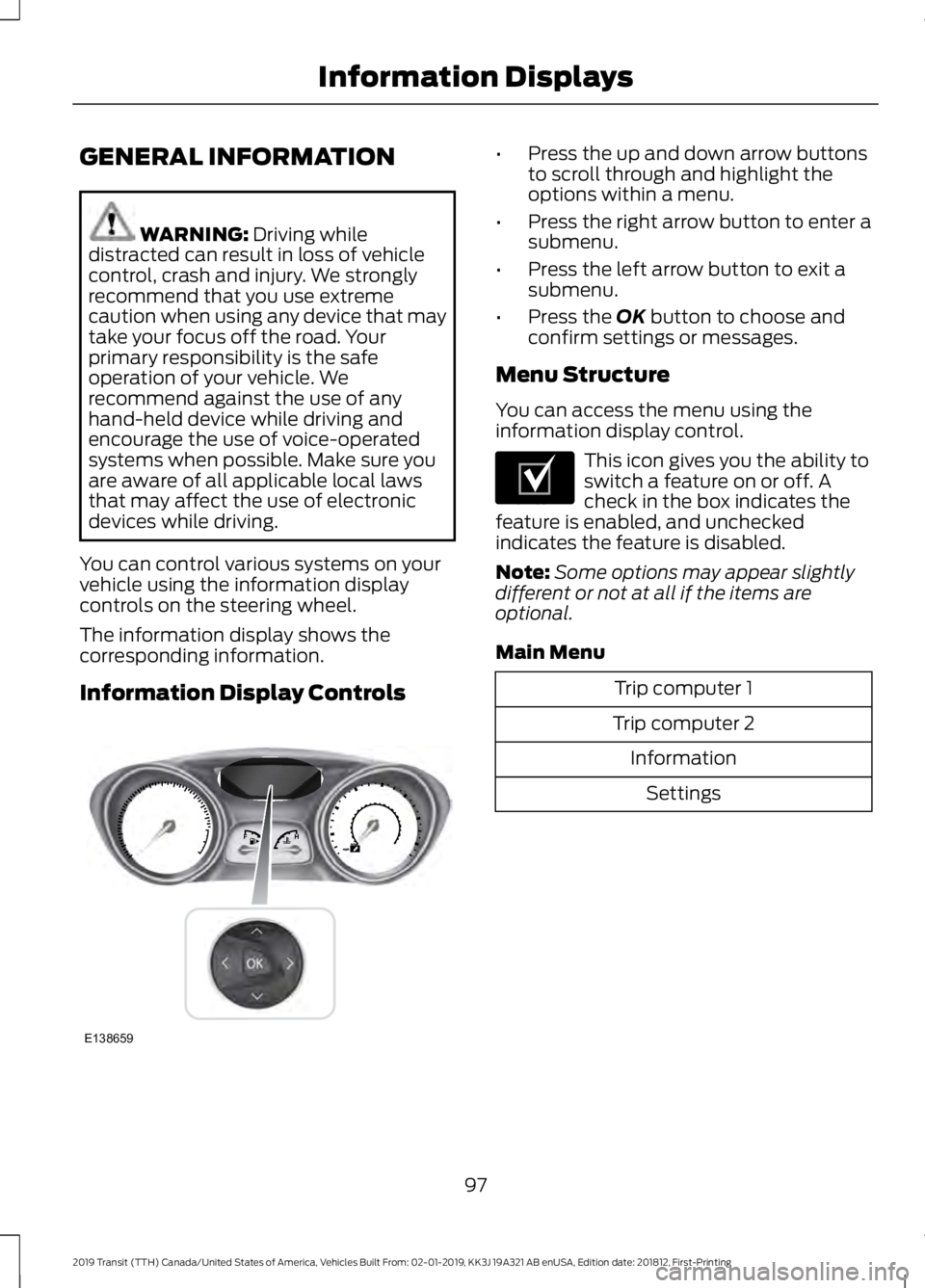
You can control various systems on your
vehicle using the information display
controls on the steering wheel.
The information display shows the
corresponding information.
Information Display Controls •
Press the up and down arrow buttons
to scroll through and highlight the
options within a menu.
• Press the right arrow button to enter a
submenu.
• Press the left arrow button to exit a
submenu.
• Press the
OK button to choose and
confirm settings or messages.
Menu Structure
You can access the menu using the
information display control. This icon gives you the ability to
switch a feature on or off. A
check in the box indicates the
feature is enabled, and unchecked
indicates the feature is disabled.
Note: Some options may appear slightly
different or not at all if the items are
optional.
Main Menu Trip computer 1
Trip computer 2 InformationSettings
97
2019 Transit (TTH) Canada/United States of America, Vehicles Built From: 02-01-2019, KK3J 19A321 AB enUSA, Edition date: 201812, First-Printing Information DisplaysE138659 E204495
Page 102 of 529
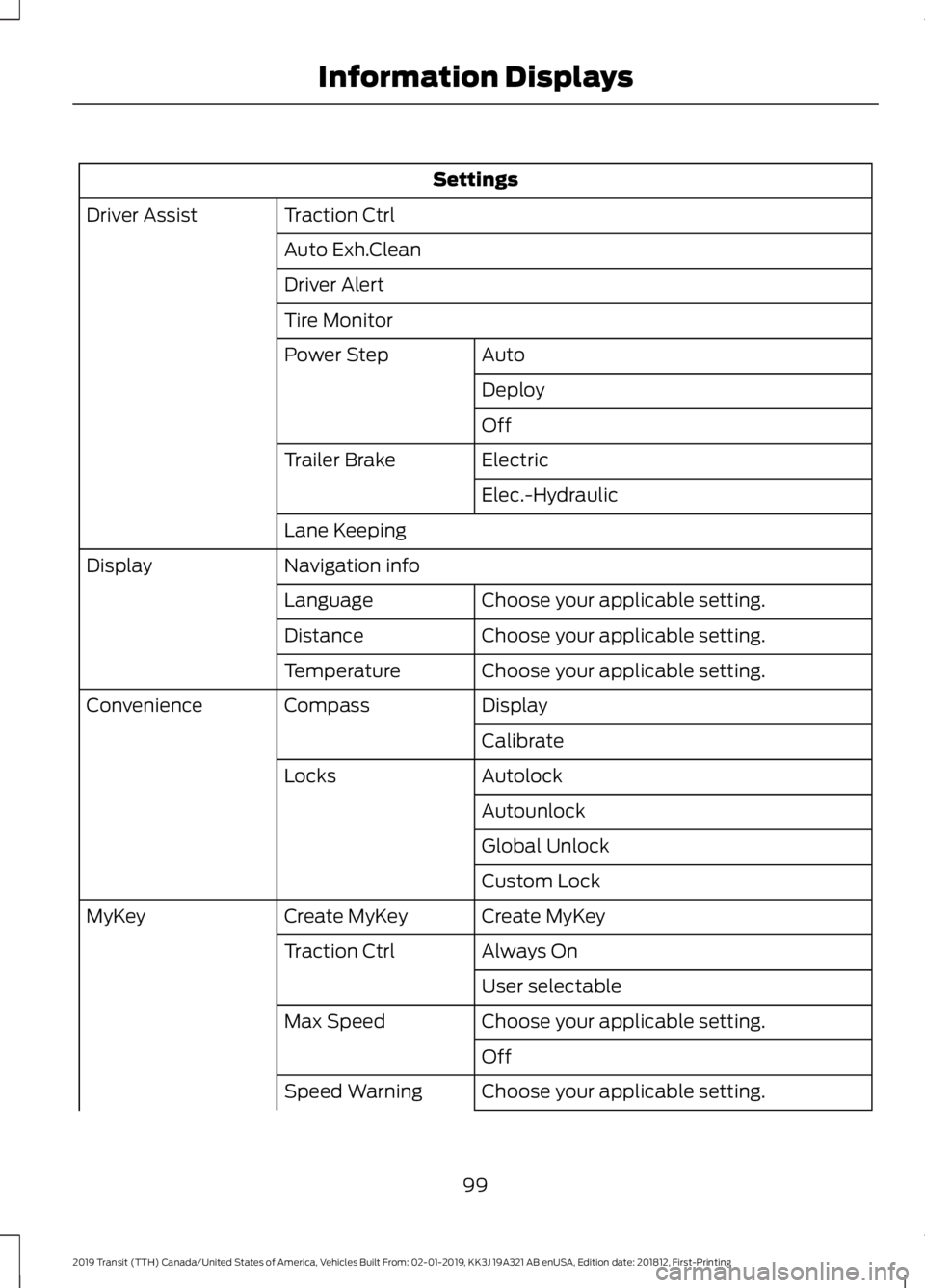
Settings
Traction Ctrl
Driver Assist
Auto Exh.Clean
Driver Alert
Tire MonitorAuto
Power Step
Deploy
Off
Electric
Trailer Brake
Elec.-Hydraulic
Lane Keeping
Navigation info
Display
Choose your applicable setting.
Language
Choose your applicable setting.
Distance
Choose your applicable setting.
Temperature
Display
Compass
Convenience
Calibrate
Autolock
Locks
Autounlock
Global Unlock
Custom Lock
Create MyKey
Create MyKey
MyKey
Always On
Traction Ctrl
User selectable
Choose your applicable setting.
Max Speed
Off
Choose your applicable setting.
Speed Warning
99
2019 Transit (TTH) Canada/United States of America, Vehicles Built From: 02-01-2019, KK3J 19A321 AB enUSA, Edition date: 201812, First-Printing Information Displays
Page 103 of 529
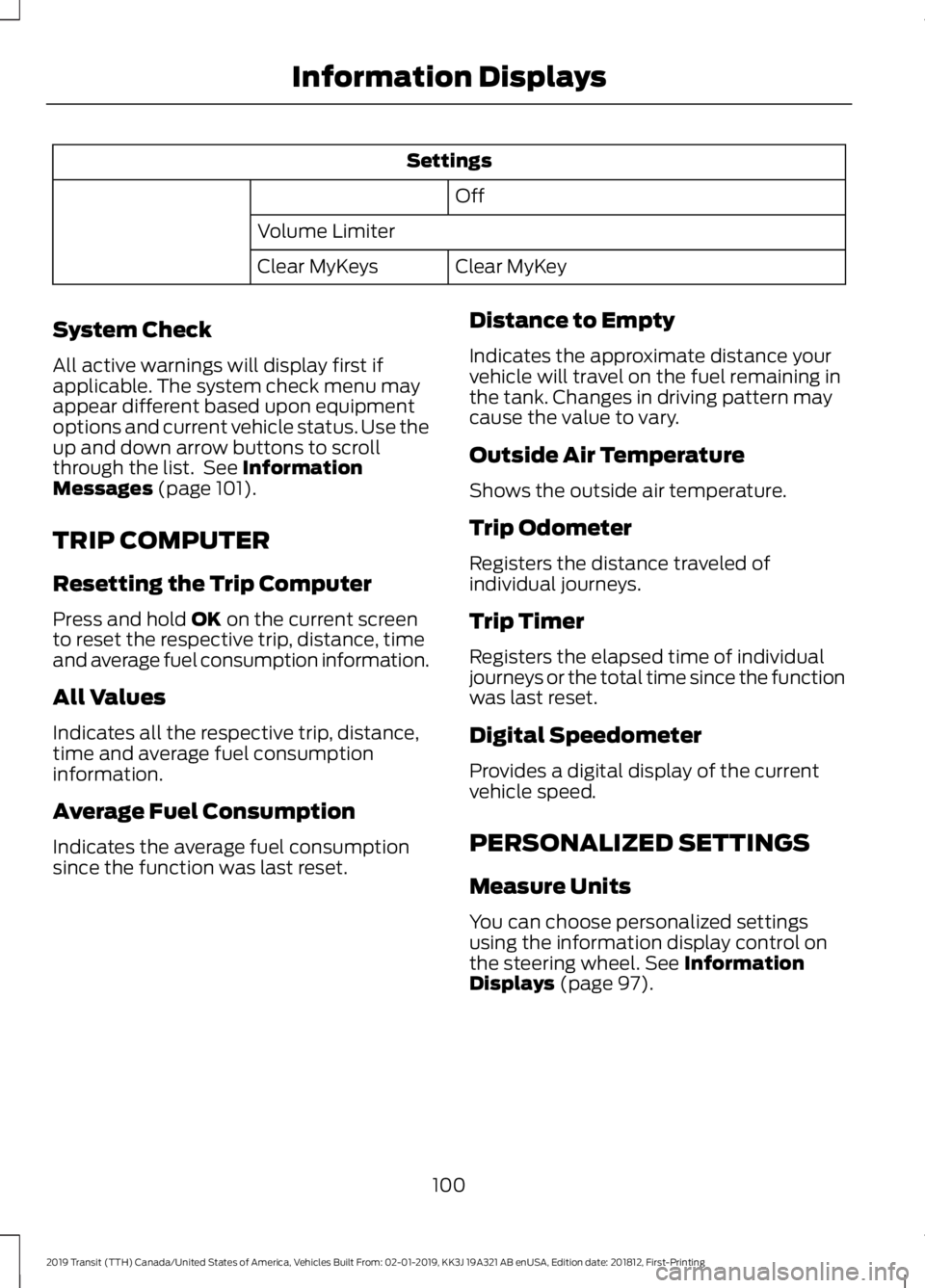
Settings
Off
Volume Limiter Clear MyKey
Clear MyKeys
System Check
All active warnings will display first if
applicable. The system check menu may
appear different based upon equipment
options and current vehicle status. Use the
up and down arrow buttons to scroll
through the list. See Information
Messages (page 101).
TRIP COMPUTER
Resetting the Trip Computer
Press and hold
OK on the current screen
to reset the respective trip, distance, time
and average fuel consumption information.
All Values
Indicates all the respective trip, distance,
time and average fuel consumption
information.
Average Fuel Consumption
Indicates the average fuel consumption
since the function was last reset. Distance to Empty
Indicates the approximate distance your
vehicle will travel on the fuel remaining in
the tank. Changes in driving pattern may
cause the value to vary.
Outside Air Temperature
Shows the outside air temperature.
Trip Odometer
Registers the distance traveled of
individual journeys.
Trip Timer
Registers the elapsed time of individual
journeys or the total time since the function
was last reset.
Digital Speedometer
Provides a digital display of the current
vehicle speed.
PERSONALIZED SETTINGS
Measure Units
You can choose personalized settings
using the information display control on
the steering wheel.
See Information
Displays (page 97).
100
2019 Transit (TTH) Canada/United States of America, Vehicles Built From: 02-01-2019, KK3J 19A321 AB enUSA, Edition date: 201812, First-Printing Information Displays
Page 108 of 529
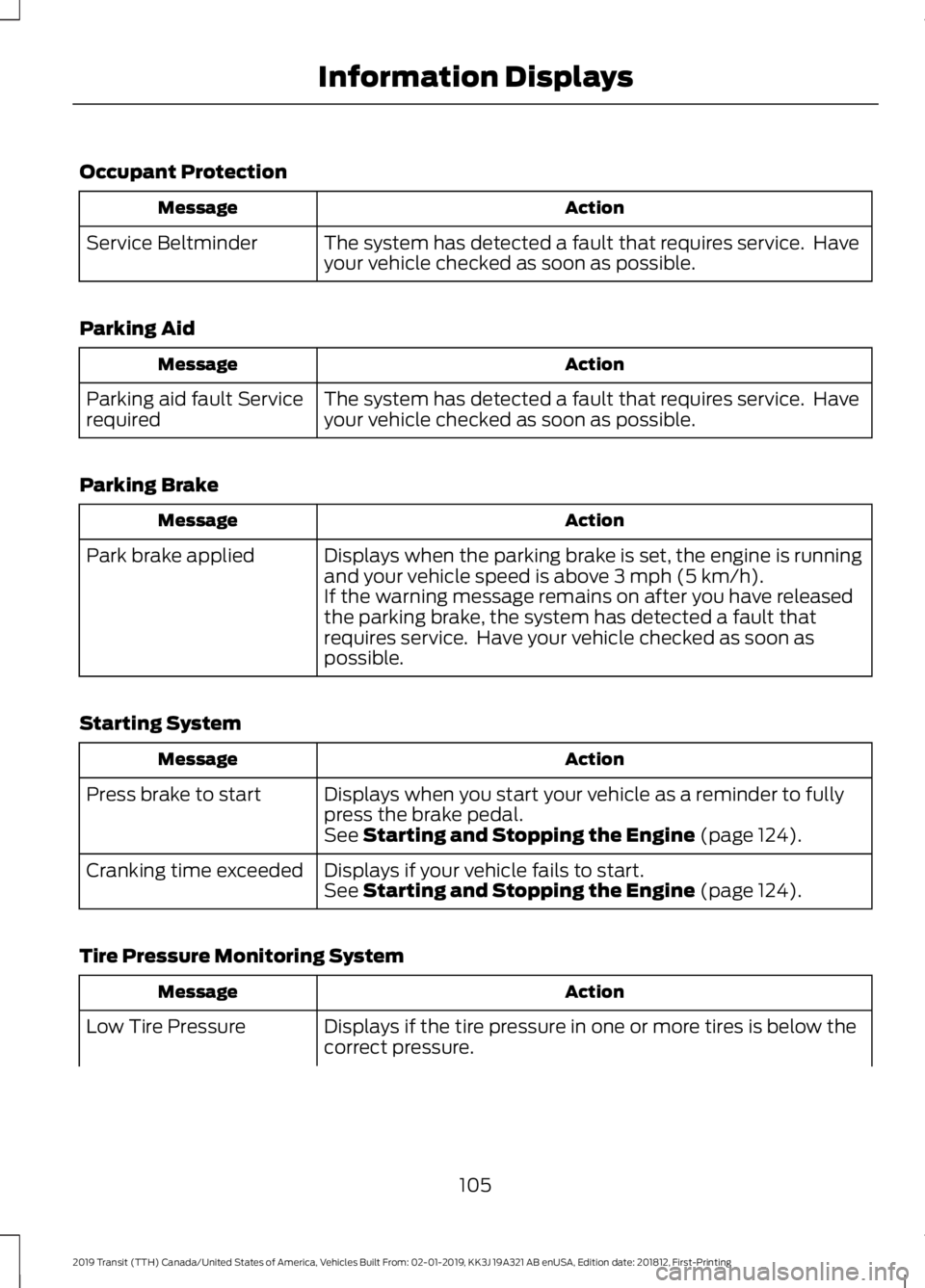
Occupant Protection
Action
Message
The system has detected a fault that requires service. Have
your vehicle checked as soon as possible.
Service Beltminder
Parking Aid Action
Message
The system has detected a fault that requires service. Have
your vehicle checked as soon as possible.
Parking aid fault Service
required
Parking Brake Action
Message
Displays when the parking brake is set, the engine is running
and your vehicle speed is above 3 mph (5 km/h).
Park brake applied
If the warning message remains on after you have released
the parking brake, the system has detected a fault that
requires service. Have your vehicle checked as soon as
possible.
Starting System Action
Message
Displays when you start your vehicle as a reminder to fully
press the brake pedal.
Press brake to start
See
Starting and Stopping the Engine (page 124).
Displays if your vehicle fails to start.
Cranking time exceeded
See
Starting and Stopping the Engine (page 124).
Tire Pressure Monitoring System Action
Message
Displays if the tire pressure in one or more tires is below the
correct pressure.
Low Tire Pressure
105
2019 Transit (TTH) Canada/United States of America, Vehicles Built From: 02-01-2019, KK3J 19A321 AB enUSA, Edition date: 201812, First-Printing Information Displays
Page 109 of 529
Action
Message
See Tire Pressure Monitoring System (page 288).
The system has detected a fault that requires service. Have
your vehicle checked as soon as possible.
Tire Pressure Monitor
Fault
See
Tire Pressure Monitoring System (page 288).
Displays if the system detects a fault with a tire pressure
sensor or the spare tire is in use.
Tire Pressure Sensor
Fault
See
Tire Pressure Monitoring System (page 288).
If the warning message remains on after you have checked
the tire pressures, the system has detected a fault that
requires service. Have your vehicle checked as soon as
possible.
106
2019 Transit (TTH) Canada/United States of America, Vehicles Built From: 02-01-2019, KK3J 19A321 AB enUSA, Edition date: 201812, First-Printing Information Displays
Page 114 of 529
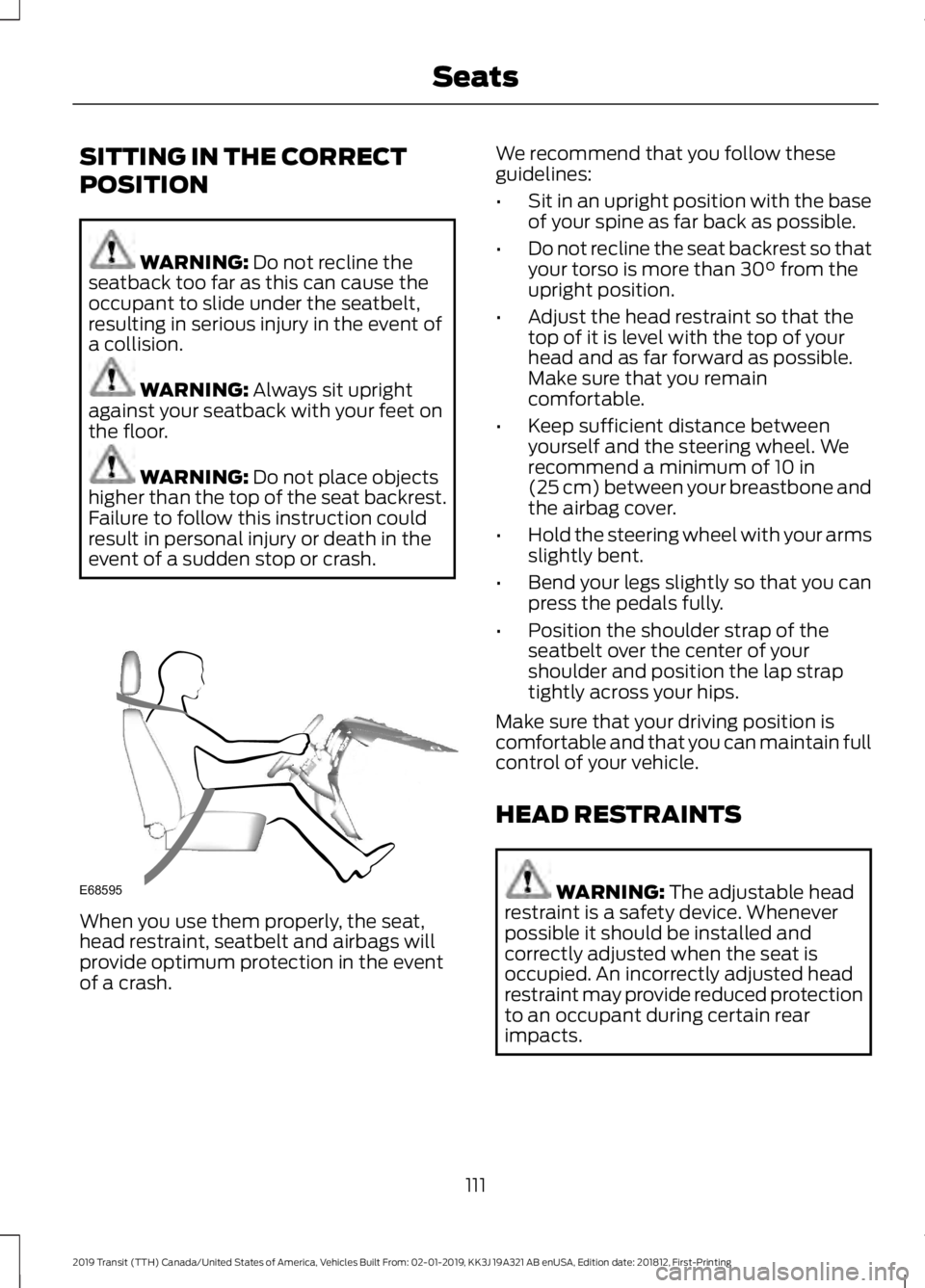
SITTING IN THE CORRECT
POSITION
WARNING: Do not recline the
seatback too far as this can cause the
occupant to slide under the seatbelt,
resulting in serious injury in the event of
a collision. WARNING:
Always sit upright
against your seatback with your feet on
the floor. WARNING:
Do not place objects
higher than the top of the seat backrest.
Failure to follow this instruction could
result in personal injury or death in the
event of a sudden stop or crash. When you use them properly, the seat,
head restraint, seatbelt and airbags will
provide optimum protection in the event
of a crash. We recommend that you follow these
guidelines:
•
Sit in an upright position with the base
of your spine as far back as possible.
• Do not recline the seat backrest so that
your torso is more than
30° from the
upright position.
• Adjust the head restraint so that the
top of it is level with the top of your
head and as far forward as possible.
Make sure that you remain
comfortable.
• Keep sufficient distance between
yourself and the steering wheel. We
recommend a minimum of
10 in
(25 cm) between your breastbone and
the airbag cover.
• Hold the steering wheel with your arms
slightly bent.
• Bend your legs slightly so that you can
press the pedals fully.
• Position the shoulder strap of the
seatbelt over the center of your
shoulder and position the lap strap
tightly across your hips.
Make sure that your driving position is
comfortable and that you can maintain full
control of your vehicle.
HEAD RESTRAINTS WARNING:
The adjustable head
restraint is a safety device. Whenever
possible it should be installed and
correctly adjusted when the seat is
occupied. An incorrectly adjusted head
restraint may provide reduced protection
to an occupant during certain rear
impacts.
111
2019 Transit (TTH) Canada/United States of America, Vehicles Built From: 02-01-2019, KK3J 19A321 AB enUSA, Edition date: 201812, First-Printing SeatsE68595
Page 115 of 529
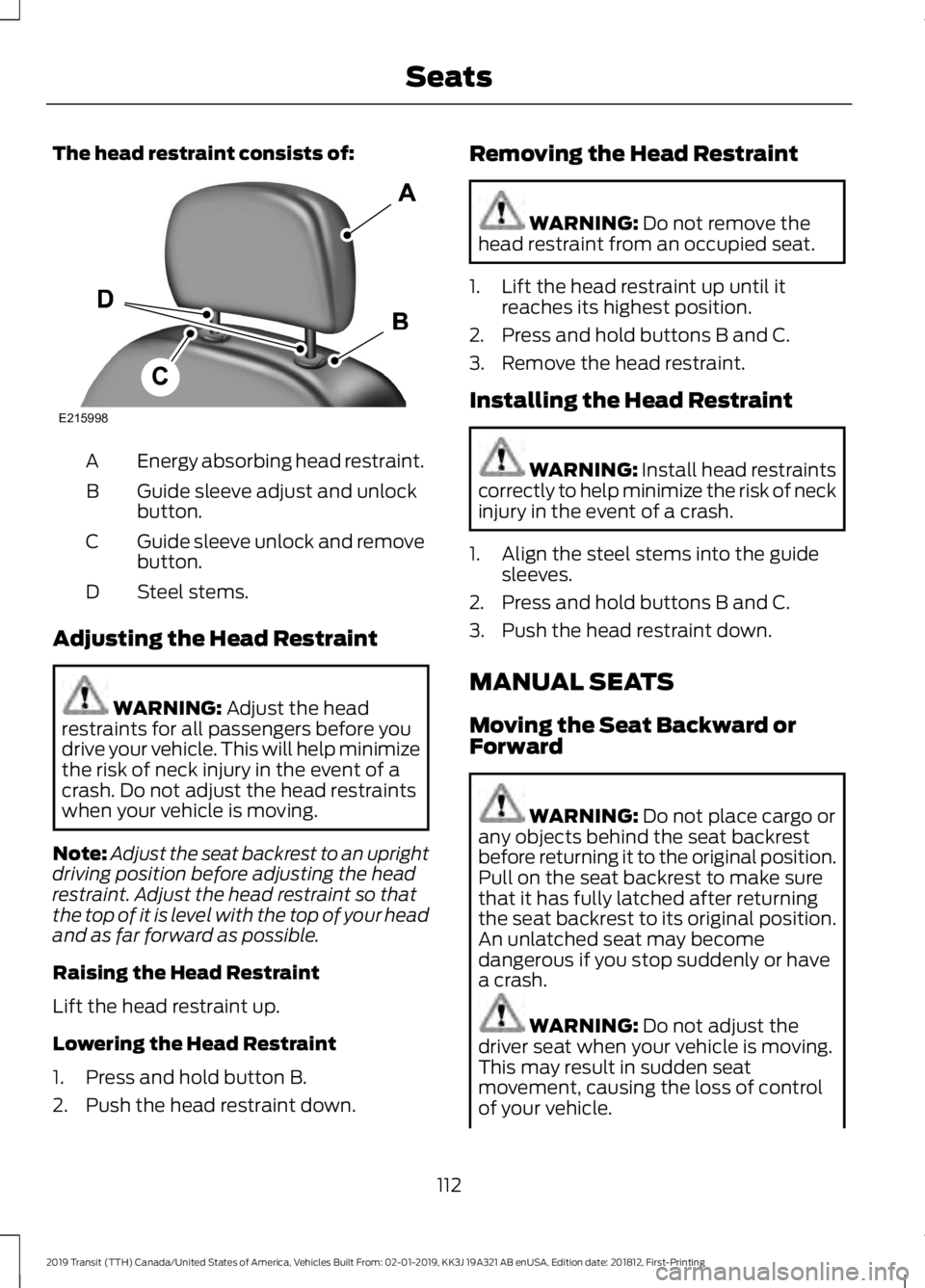
The head restraint consists of:
Energy absorbing head restraint.
A
Guide sleeve adjust and unlock
button.
B
Guide sleeve unlock and remove
button.
C
Steel stems.
D
Adjusting the Head Restraint WARNING: Adjust the head
restraints for all passengers before you
drive your vehicle. This will help minimize
the risk of neck injury in the event of a
crash. Do not adjust the head restraints
when your vehicle is moving.
Note: Adjust the seat backrest to an upright
driving position before adjusting the head
restraint. Adjust the head restraint so that
the top of it is level with the top of your head
and as far forward as possible.
Raising the Head Restraint
Lift the head restraint up.
Lowering the Head Restraint
1. Press and hold button B.
2. Push the head restraint down. Removing the Head Restraint WARNING:
Do not remove the
head restraint from an occupied seat.
1. Lift the head restraint up until it reaches its highest position.
2. Press and hold buttons B and C.
3. Remove the head restraint.
Installing the Head Restraint WARNING:
Install head restraints
correctly to help minimize the risk of neck
injury in the event of a crash.
1. Align the steel stems into the guide sleeves.
2. Press and hold buttons B and C.
3. Push the head restraint down.
MANUAL SEATS
Moving the Seat Backward or
Forward WARNING:
Do not place cargo or
any objects behind the seat backrest
before returning it to the original position.
Pull on the seat backrest to make sure
that it has fully latched after returning
the seat backrest to its original position.
An unlatched seat may become
dangerous if you stop suddenly or have
a crash. WARNING:
Do not adjust the
driver seat when your vehicle is moving.
This may result in sudden seat
movement, causing the loss of control
of your vehicle.
112
2019 Transit (TTH) Canada/United States of America, Vehicles Built From: 02-01-2019, KK3J 19A321 AB enUSA, Edition date: 201812, First-Printing SeatsE215998
Page 116 of 529
WARNING: Make sure the driver
seat fully locks into place by rocking it
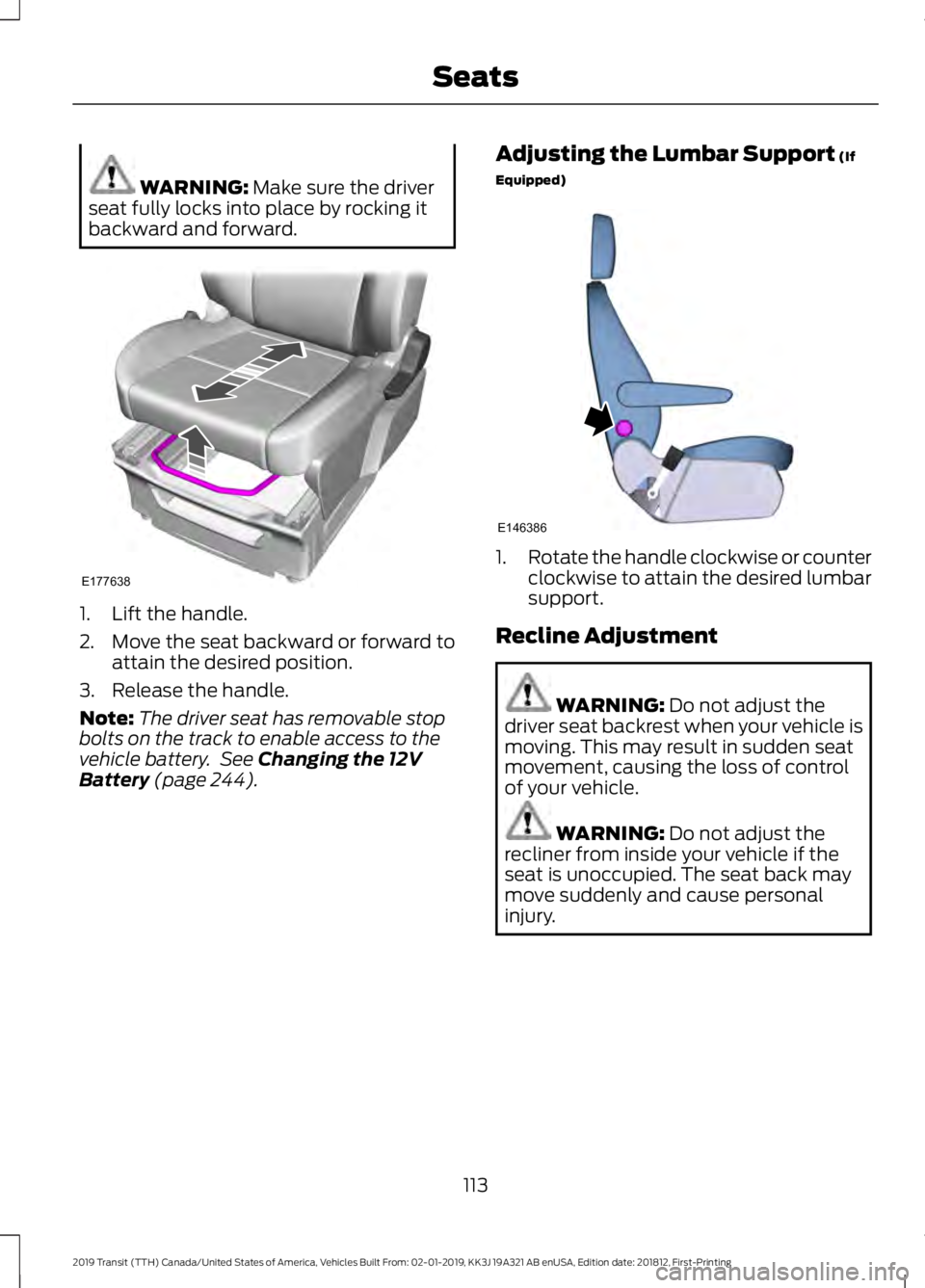
backward and forward. 1. Lift the handle.
2. Move the seat backward or forward to
attain the desired position.
3. Release the handle.
Note: The driver seat has removable stop
bolts on the track to enable access to the
vehicle battery. See
Changing the 12V
Battery (page 244). Adjusting the Lumbar Support
(If
Equipped) 1.
Rotate the handle clockwise or counter
clockwise to attain the desired lumbar
support.
Recline Adjustment WARNING:
Do not adjust the
driver seat backrest when your vehicle is
moving. This may result in sudden seat
movement, causing the loss of control
of your vehicle. WARNING:
Do not adjust the
recliner from inside your vehicle if the
seat is unoccupied. The seat back may
move suddenly and cause personal
injury.
113
2019 Transit (TTH) Canada/United States of America, Vehicles Built From: 02-01-2019, KK3J 19A321 AB enUSA, Edition date: 201812, First-Printing SeatsE177638 E146386
Page 117 of 529
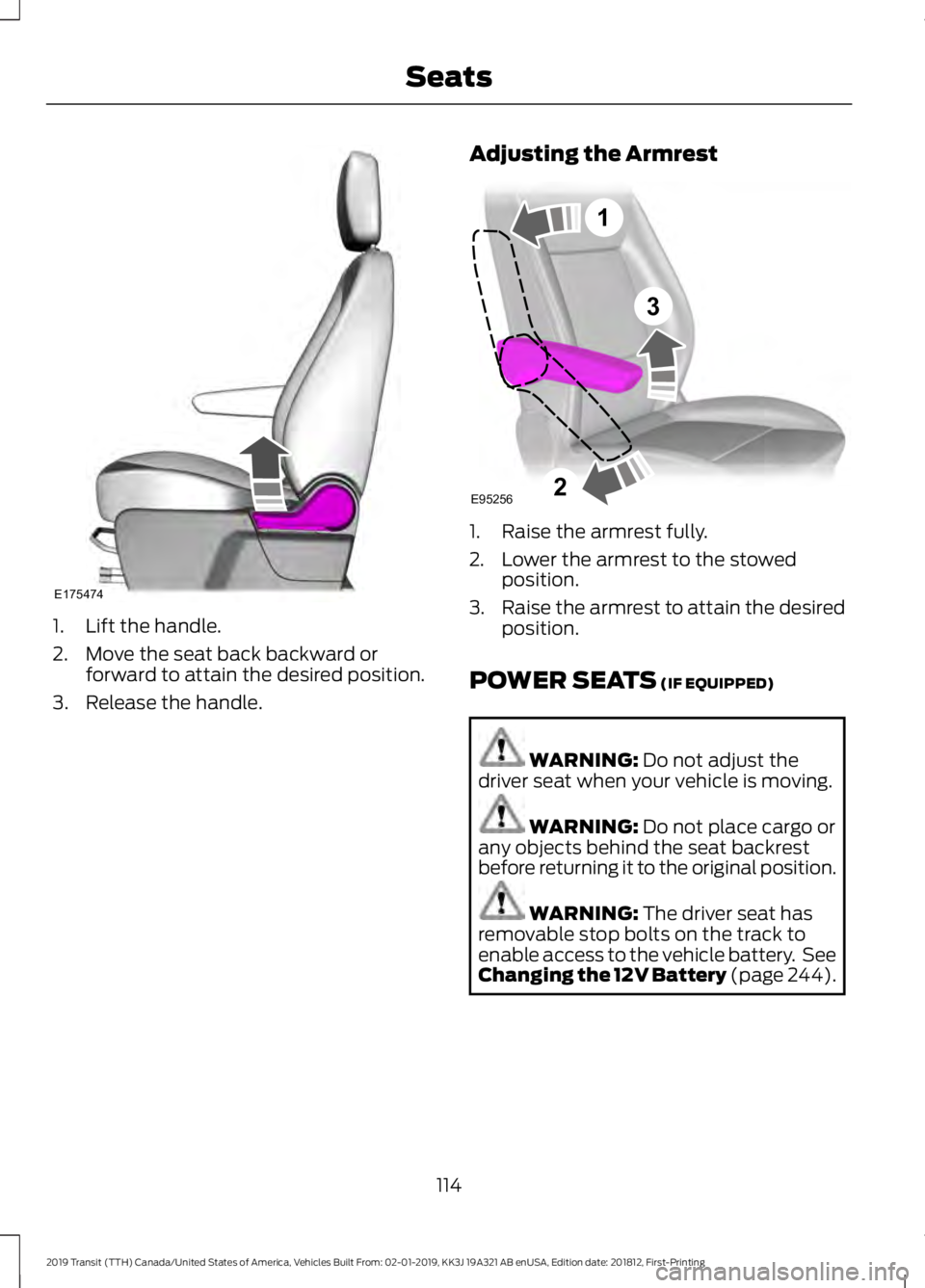
1. Lift the handle.
2. Move the seat back backward or
forward to attain the desired position.
3. Release the handle. Adjusting the Armrest 1. Raise the armrest fully.
2. Lower the armrest to the stowed
position.
3. Raise the armrest to attain the desired
position.
POWER SEATS (IF EQUIPPED) WARNING:
Do not adjust the
driver seat when your vehicle is moving. WARNING:
Do not place cargo or
any objects behind the seat backrest
before returning it to the original position. WARNING:
The driver seat has
removable stop bolts on the track to
enable access to the vehicle battery. See
Changing the 12V Battery (page 244).
114
2019 Transit (TTH) Canada/United States of America, Vehicles Built From: 02-01-2019, KK3J 19A321 AB enUSA, Edition date: 201812, First-Printing SeatsE175474 3
E95256
1
2
Page 119 of 529
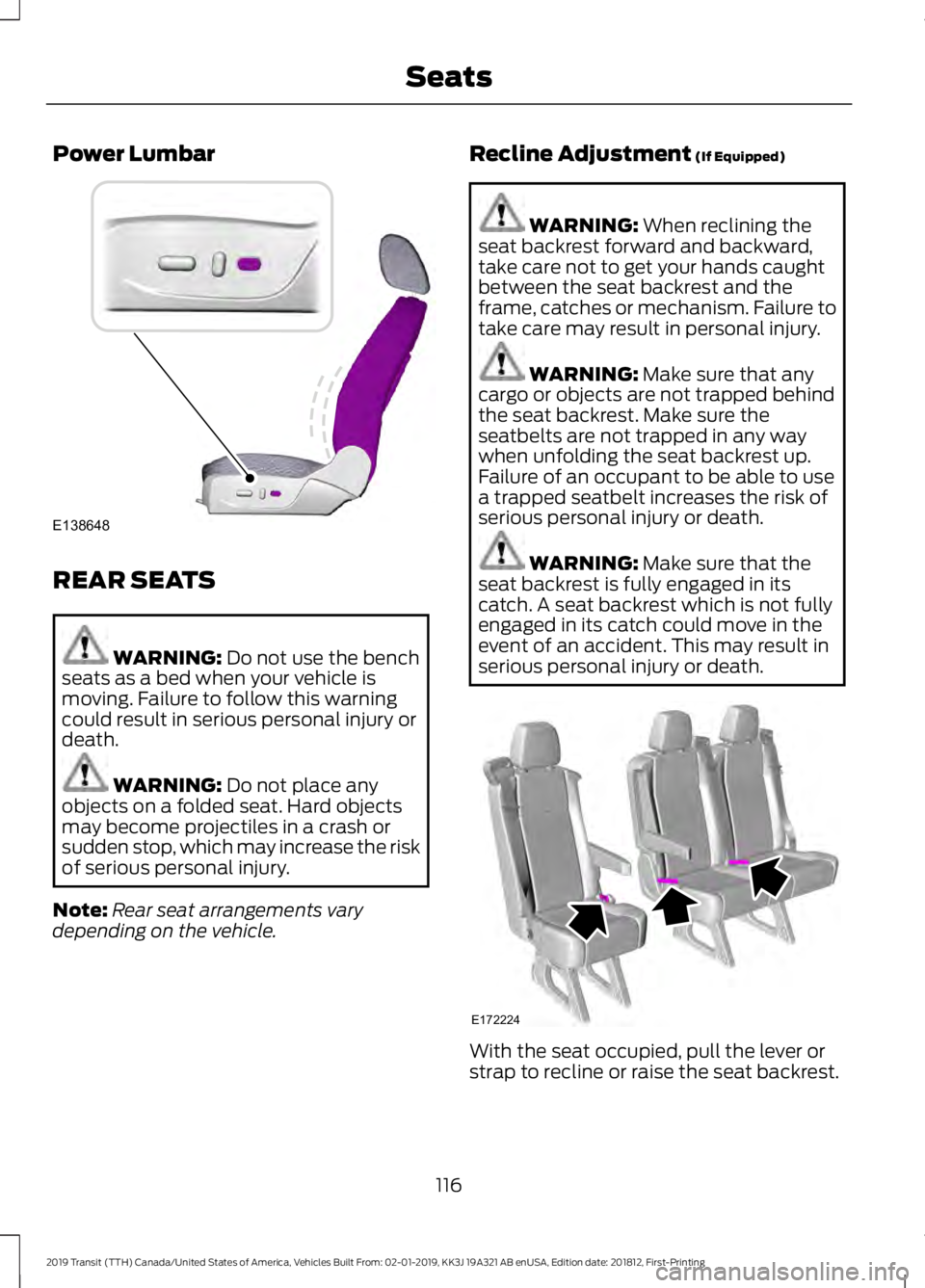
Power Lumbar
REAR SEATS
WARNING: Do not use the bench
seats as a bed when your vehicle is
moving. Failure to follow this warning
could result in serious personal injury or
death. WARNING:
Do not place any
objects on a folded seat. Hard objects
may become projectiles in a crash or
sudden stop, which may increase the risk
of serious personal injury.
Note: Rear seat arrangements vary
depending on the vehicle. Recline Adjustment
(If Equipped) WARNING:
When reclining the
seat backrest forward and backward,
take care not to get your hands caught
between the seat backrest and the
frame, catches or mechanism. Failure to
take care may result in personal injury. WARNING:
Make sure that any
cargo or objects are not trapped behind
the seat backrest. Make sure the
seatbelts are not trapped in any way
when unfolding the seat backrest up.
Failure of an occupant to be able to use
a trapped seatbelt increases the risk of
serious personal injury or death. WARNING:
Make sure that the
seat backrest is fully engaged in its
catch. A seat backrest which is not fully
engaged in its catch could move in the
event of an accident. This may result in
serious personal injury or death. With the seat occupied, pull the lever or
strap to recline or raise the seat backrest.
116
2019 Transit (TTH) Canada/United States of America, Vehicles Built From: 02-01-2019, KK3J 19A321 AB enUSA, Edition date: 201812, First-Printing SeatsE138648 E172224