cruise control FORD TRANSIT 2020 User Guide
[x] Cancel search | Manufacturer: FORD, Model Year: 2020, Model line: TRANSIT, Model: FORD TRANSIT 2020Pages: 529, PDF Size: 8.3 MB
Page 214 of 529
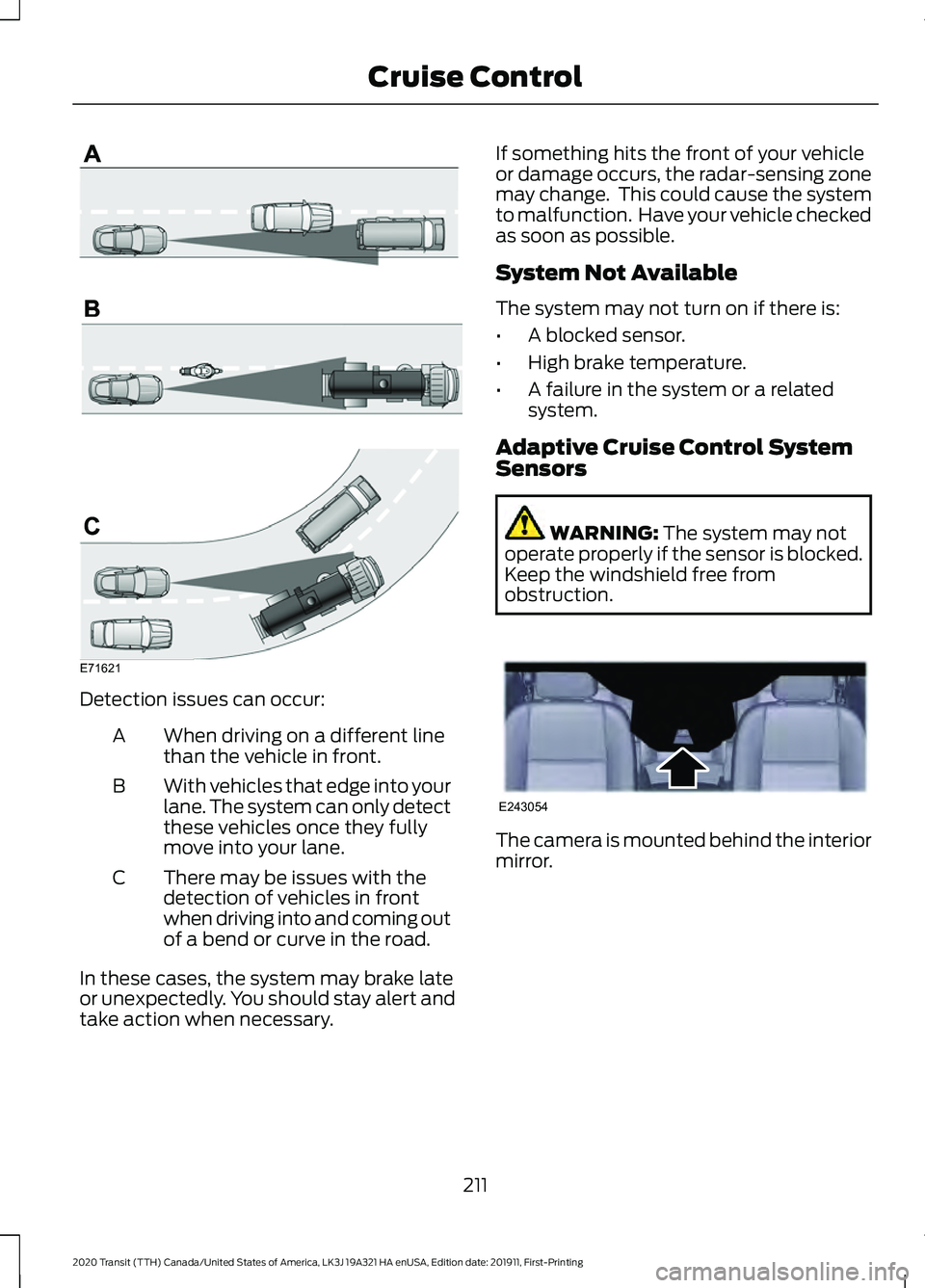
Detection issues can occur:
When driving on a different line
than the vehicle in front.
A
With vehicles that edge into your
lane. The system can only detect
these vehicles once they fully
move into your lane.
B
There may be issues with the
detection of vehicles in front
when driving into and coming out
of a bend or curve in the road.
C
In these cases, the system may brake late
or unexpectedly. You should stay alert and
take action when necessary. If something hits the front of your vehicle
or damage occurs, the radar-sensing zone
may change. This could cause the system
to malfunction. Have your vehicle checked
as soon as possible.
System Not Available
The system may not turn on if there is:
•
A blocked sensor.
• High brake temperature.
• A failure in the system or a related
system.
Adaptive Cruise Control System
Sensors WARNING: The system may not
operate properly if the sensor is blocked.
Keep the windshield free from
obstruction. The camera is mounted behind the interior
mirror.
211
2020 Transit (TTH) Canada/United States of America, LK3J 19A321 HA enUSA, Edition date: 201911, First-Printing Cruise ControlE71621 E243054
Page 215 of 529
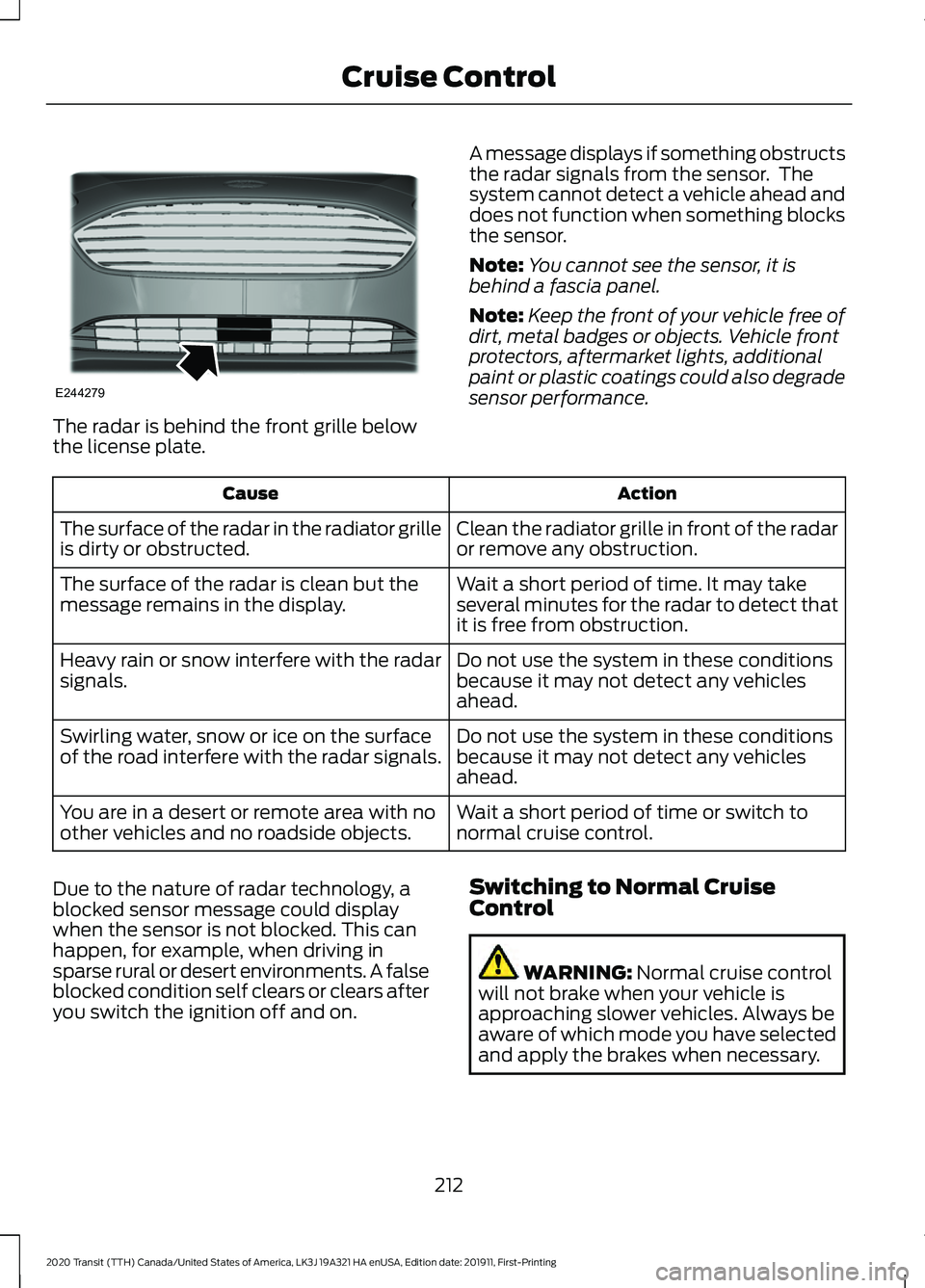
The radar is behind the front grille below
the license plate.
A message displays if something obstructs
the radar signals from the sensor. The
system cannot detect a vehicle ahead and
does not function when something blocks
the sensor.
Note:
You cannot see the sensor, it is
behind a fascia panel.
Note: Keep the front of your vehicle free of
dirt, metal badges or objects. Vehicle front
protectors, aftermarket lights, additional
paint or plastic coatings could also degrade
sensor performance. Action
Cause
Clean the radiator grille in front of the radar
or remove any obstruction.
The surface of the radar in the radiator grille
is dirty or obstructed.
Wait a short period of time. It may take
several minutes for the radar to detect that
it is free from obstruction.
The surface of the radar is clean but the
message remains in the display.
Do not use the system in these conditions
because it may not detect any vehicles
ahead.
Heavy rain or snow interfere with the radar
signals.
Do not use the system in these conditions
because it may not detect any vehicles
ahead.
Swirling water, snow or ice on the surface
of the road interfere with the radar signals.
Wait a short period of time or switch to
normal cruise control.
You are in a desert or remote area with no
other vehicles and no roadside objects.
Due to the nature of radar technology, a
blocked sensor message could display
when the sensor is not blocked. This can
happen, for example, when driving in
sparse rural or desert environments. A false
blocked condition self clears or clears after
you switch the ignition off and on. Switching to Normal Cruise
Control WARNING: Normal cruise control
will not brake when your vehicle is
approaching slower vehicles. Always be
aware of which mode you have selected
and apply the brakes when necessary.
212
2020 Transit (TTH) Canada/United States of America, LK3J 19A321 HA enUSA, Edition date: 201911, First-Printing Cruise ControlE244279
Page 216 of 529
You can change from adaptive cruise
control to cruise control using the
information display.
To switch between adaptive cruise control and normal cruise control, use the
information display controls on the steering wheel to select the following: Action
Menu Item
Press the menu button.
Driver Assist.
Press the OK button.
Cruise Control
Press the
OK button. Press the toggle button upward or
downward to choose your required setting. Press the OK
button.
Mode The cruise control indicator
replaces the adaptive cruise
control indicator if you select
normal cruise control. The gap setting
does not display, the system does not
automatically respond to lead vehicles and
adaptive braking does not activate. The
system remembers the last setting when
you start your vehicle. Adaptive Cruise Control Indicator The indicator appears when you
switch the system on.
The indicator appears in the information
display when the system is in standby
mode and when you set the adaptive
cruise speed.
Adaptive Cruise Control Information Messages Action
Message
The radar has reduced visibility.
Adaptive Cruise Not
Available Sensor Blocked
See Manual
The system is not available.
Adaptive Cruise Not
Available
The system has malfunctioned. Have your vehicle checked
as soon as possible.
Adaptive Cruise Malfunc-
tion
You have switched normal cruise control on. Adaptive braking
turns off.
Normal Cruise Active
Adaptive Braking Off
213
2020 Transit (TTH) Canada/United States of America, LK3J 19A321 HA enUSA, Edition date: 201911, First-Printing Cruise ControlE71340 E144524
Page 234 of 529
Description
Level of Functionality
When activated, a warning lamp flashes and an audible
warning sounds.
Alert
The system is designed to help reduce the impact speed by
preparing the brakes for rapid braking. The system does not
automatically apply the brakes. If you press the brake pedal,
the system could apply additional braking up to maximum
braking force, even if you lightly press the brake pedal.
Brake support
The system is designed to apply the brakes if it detects a
crash is imminent. This may help reduce impact or avoid the
crash.
Active braking
Switching Active Braking On and
Off
1. Using the information display controls on the steering wheel, select Driver
Assist..
2. Select
Pre-Collision Assist.
3. Switch
Active Braking on or off.
Distance Alert
(If Equipped)
A warning lamp illuminates if the distance
to the vehicle ahead is small.
Note: The warning lamp does not
illuminate if cruise control or adaptive cruise
control is active. Adjusting the Sensitivity of Distance
Alert
1. Using the information display controls
on the steering wheel, select
Driver
Assist..
2. Select
Pre-Collision Assist.
3. Select
Alert Sensitivity.
4. Select a setting and press the
OK
button.
Distance Indication
(If Equipped)
A graphical indication displays the time
gap to vehicles ahead of you traveling in
the same direction.
Note: The graphic does not display if you
switch on cruise control or adaptive cruise
control. Time Gap
Distance Gap
Distance Indic-
ator Color
System Sensit-
ivity
Vehicle Speed
Greater than 0.9seconds.
Greater than
82.0 ft (25 m)
.
Gray.
Normal.
62 mph
(100 km/h)
0.6-0.9
seconds.
55.8–82.0 ft
(17 –25 m)
Yellow.
Less than 0.6seconds.
Less than
55.8 ft (17 m)
.
Red.
231
2020 Transit (TTH) Canada/United States of America, LK3J 19A321 HA enUSA, Edition date: 201911, First-Printing Driving Aids
Page 282 of 529
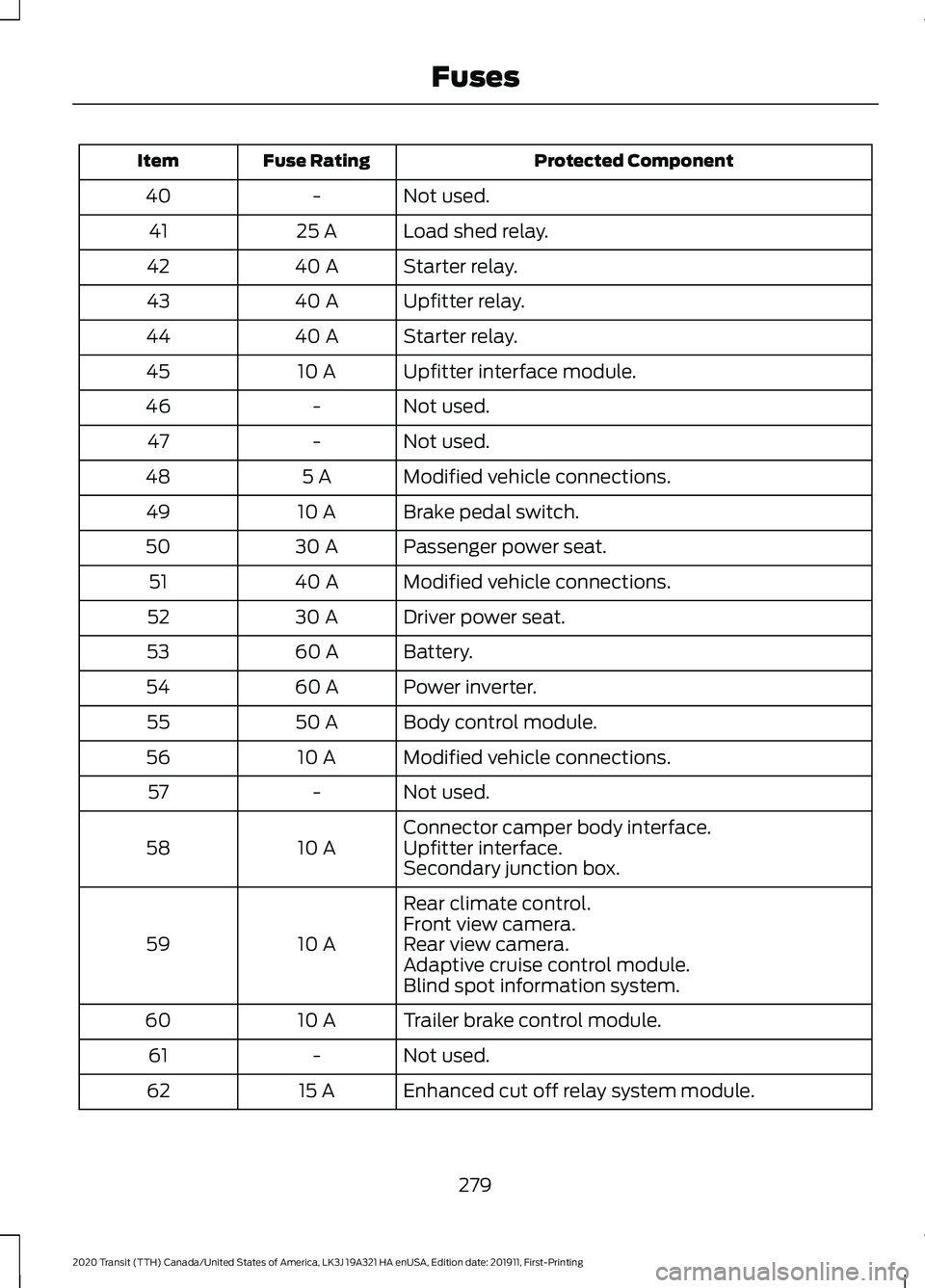
Protected Component
Fuse Rating
Item
Not used.
-
40
Load shed relay.
25 A
41
Starter relay.
40 A
42
Upfitter relay.
40 A
43
Starter relay.
40 A
44
Upfitter interface module.
10 A
45
Not used.
-
46
Not used.
-
47
Modified vehicle connections.
5 A
48
Brake pedal switch.
10 A
49
Passenger power seat.
30 A
50
Modified vehicle connections.
40 A
51
Driver power seat.
30 A
52
Battery.
60 A
53
Power inverter.
60 A
54
Body control module.
50 A
55
Modified vehicle connections.
10 A
56
Not used.
-
57
Connector camper body interface.
10 A
58 Upfitter interface.
Secondary junction box.
Rear climate control.
10 A
59 Front view camera.
Rear view camera.
Adaptive cruise control module.
Blind spot information system.
Trailer brake control module.
10 A
60
Not used.
-
61
Enhanced cut off relay system module.
15 A
62
279
2020 Transit (TTH) Canada/United States of America, LK3J 19A321 HA enUSA, Edition date: 201911, First-Printing Fuses
Page 512 of 529
1
180 Degree Camera....................................203
Camera Views.................................................... 204
Front View Camera........................................... 204
Using the 180 degree camera system.............................................................. 204
9
911 Assist...........................................................62
A
A/C See: Climate Control........................................... 121
About This Manual...........................................9
ABS See: Brakes............................................................ 182
ABS driving hints See: Hints on Driving With Anti-Lock
Brakes................................................................ 182
Accessories....................................................458
Accessories See: Replacement Parts
Recommendation............................................ 15
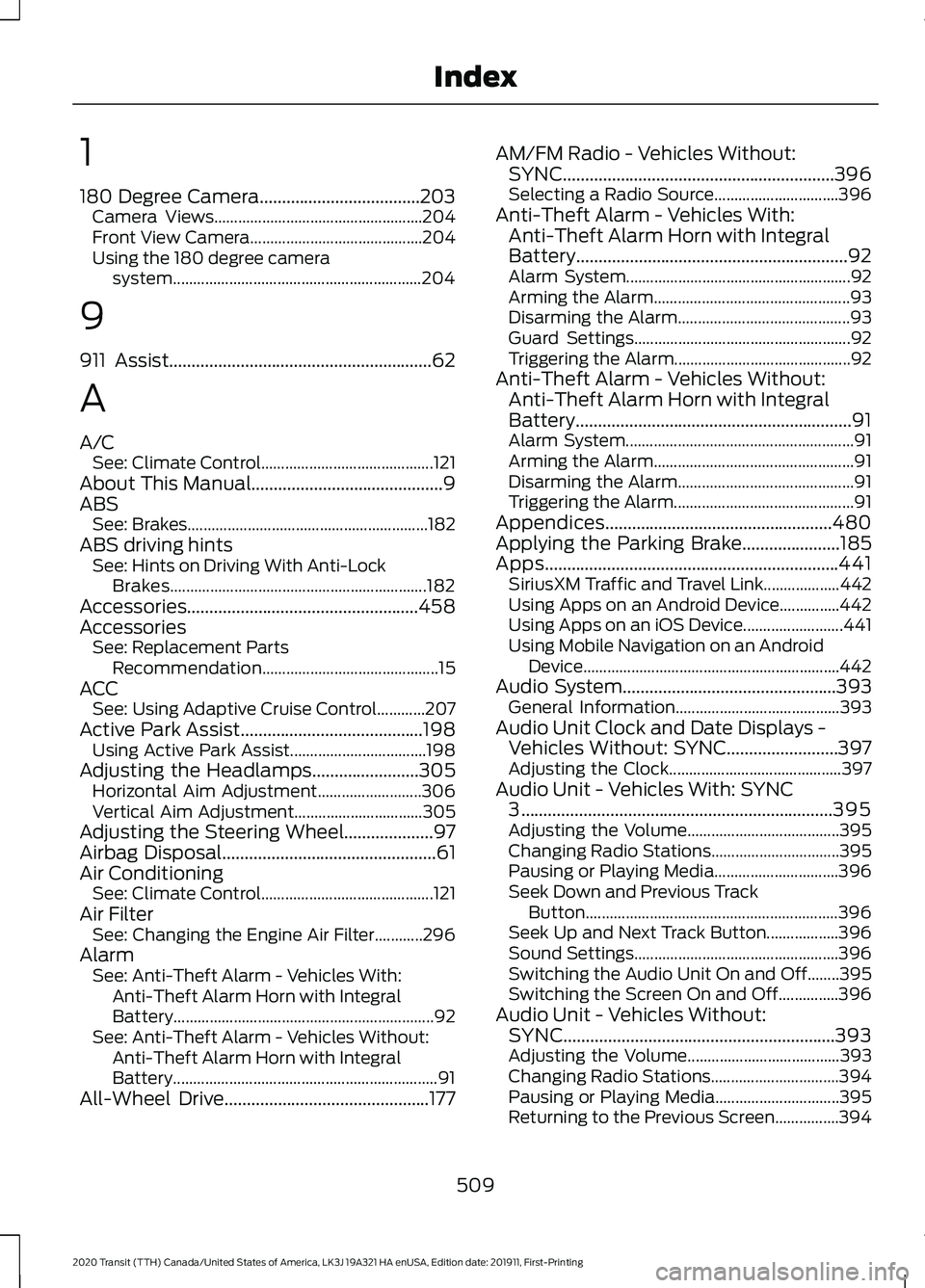
ACC See: Using Adaptive Cruise Control............207
Active Park Assist.........................................198 Using Active Park Assist.................................. 198
Adjusting the Headlamps........................305 Horizontal Aim Adjustment.......................... 306
Vertical Aim Adjustment................................ 305
Adjusting the Steering Wheel....................97
Airbag Disposal
................................................61
Air Conditioning See: Climate Control........................................... 121
Air Filter See: Changing the Engine Air Filter............296
Alarm See: Anti-Theft Alarm - Vehicles With:
Anti-Theft Alarm Horn with Integral
Battery................................................................. 92
See: Anti-Theft Alarm - Vehicles Without: Anti-Theft Alarm Horn with Integral
Battery.................................................................. 91
All-Wheel Drive
..............................................177 AM/FM Radio - Vehicles Without:
SYNC.............................................................396
Selecting a Radio Source............................... 396
Anti-Theft Alarm - Vehicles With: Anti-Theft Alarm Horn with Integral
Battery.............................................................92
Alarm System........................................................ 92
Arming the Alarm................................................. 93
Disarming the Alarm........................................... 93
Guard Settings...................................................... 92
Triggering the Alarm............................................ 92
Anti-Theft Alarm - Vehicles Without: Anti-Theft Alarm Horn with Integral
Battery..............................................................91
Alarm System......................................................... 91
Arming the Alarm.................................................. 91
Disarming the Alarm............................................ 91
Triggering the Alarm............................................. 91
Appendices...................................................480
Applying the Parking Brake......................185
Apps..................................................................441 SiriusXM Traffic and Travel Link................... 442
Using Apps on an Android Device...............442
Using Apps on an iOS Device......................... 441
Using Mobile Navigation on an Android Device................................................................ 442
Audio System
................................................393
General Information......................................... 393
Audio Unit Clock and Date Displays - Vehicles Without: SYNC.........................397
Adjusting the Clock........................................... 397
Audio Unit - Vehicles With: SYNC 3......................................................................395
Adjusting the Volume...................................... 395
Changing Radio Stations................................ 395
Pausing or Playing Media............................... 396
Seek Down and Previous Track Button............................................................... 396
Seek Up and Next Track Button.................. 396
Sound Settings................................................... 396
Switching the Audio Unit On and Off........395
Switching the Screen On and Off...............396
Audio Unit - Vehicles Without: SYNC.............................................................393
Adjusting the Volume...................................... 393
Changing Radio Stations................................ 394
Pausing or Playing Media............................... 395
Returning to the Previous Screen................394
509
2020 Transit (TTH) Canada/United States of America, LK3J 19A321 HA enUSA, Edition date: 201911, First-Printing Index
Page 515 of 529
Cleaning the Interior....................................318
Fabric, Carpets, Cloth Seats, Headliners
and Floor Mats................................................ 318
Instrument Cluster Screens, LCD Screens and Radio Screens....................................... 320
Leather Interior.................................................... 319
Mirrors.................................................................... 320
Rear Windows..................................................... 320
Seatbelts............................................................... 319
Storage Compartments, Cup Holders and Ashtrays........................................................... 320
Suede Micro Fiber Fabric................................. 319
Cleaning the Wheels...................................321
Cleaning the Windows and Wiper Blades............................................................318
Clearing All MyKeys.......................................74
Climate Control..............................................121
Closing the Sliding Door...............................81 Closing the Sliding Door From Inside Your
Vehicle.................................................................. 81
Closing the Sliding Door From Outside Your Vehicle................................................................. 82
Closing the Sliding Door With the Remote Control................................................................ 85
Cold Weather Precautions
.......................254
Connected Vehicle......................................388 Connecting the Vehicle to a Mobile
Network........................................................... 388
Connected Vehicle Limitations..............388
Connected Vehicle Requirements
........388
Connected Vehicle – Troubleshooting - Vehicles With: Modem
...........................389
Connected Vehicle – Troubleshooting - Vehicles With: SYNC 3...........................390
Connecting a Bluetooth® Device - Vehicles Without: SYNC.........................397
Pairing a Device.................................................. 397
Connecting the Vehicle to a Mobile Network.......................................................388
Connecting FordPass to the Modem.........388
Enabling and Disabling the Modem...........388
What Is the Modem.......................................... 388
Connecting the Vehicle to a Wi-Fi Network.......................................................388
Coolant Check See: Engine Coolant Check........................... 298
Crash Sensors and Airbag Indicator.......60 Creating a MyKey............................................72
MyKey Information Messages.......................... 72
Creating a Wi-Fi Hotspot..........................392 Connecting a Device to the Wi-Fi
Hotspot............................................................. 392
Finding the Wi-Fi Hotspot Name and Password......................................................... 392
Cross Traffic Alert........................................224 Cross Traffic Alert behavior when trailer is
attached........................................................... 226
Cross Traffic Alert Indicator........................... 226
Cross Traffic Alert Information Messages.......................................................... 227
Cross Traffic Alert System Limitations...................................................... 226
Cross Traffic Alert System Sensors............226
Switching the System On and Off..............226
Using Cross Traffic Alert.................................. 224
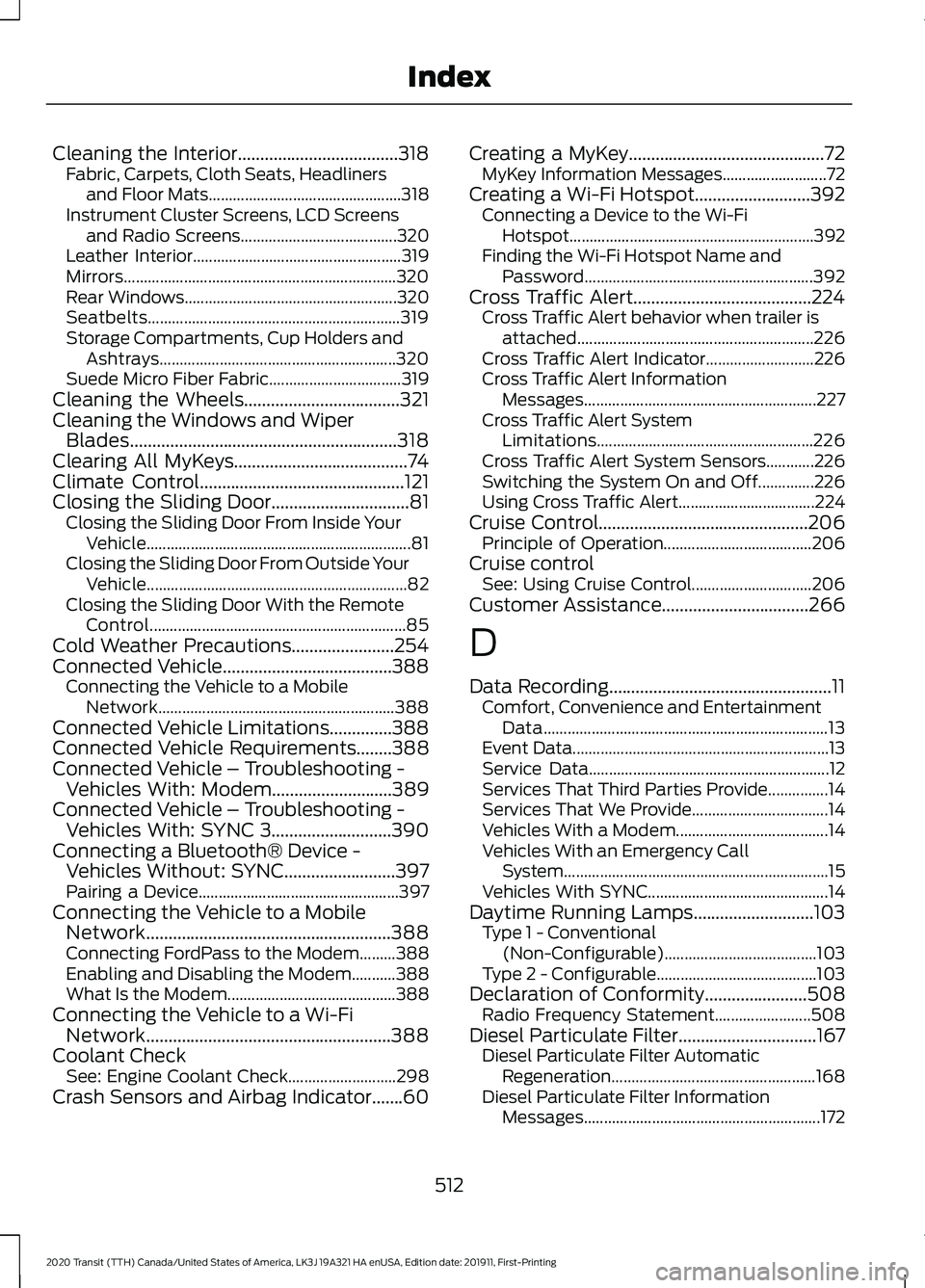
Cruise Control...............................................206 Principle of Operation..................................... 206
Cruise control See: Using Cruise Control.............................. 206
Customer Assistance.................................266
D
Data Recording
..................................................11
Comfort, Convenience and Entertainment
Data....................................................................... 13
Event Data................................................................ 13
Service Data............................................................ 12
Services That Third Parties Provide...............14
Services That We Provide.................................. 14
Vehicles With a Modem...................................... 14
Vehicles With an Emergency Call System.................................................................. 15
Vehicles With SYNC............................................. 14
Daytime Running Lamps
...........................103
Type 1 - Conventional
(Non-Configurable)...................................... 103
Type 2 - Configurable........................................ 103
Declaration of Conformity
.......................508
Radio Frequency Statement........................ 508
Diesel Particulate Filter
...............................167
Diesel Particulate Filter Automatic
Regeneration................................................... 168
Diesel Particulate Filter Information Messages........................................................... 172
512
2020 Transit (TTH) Canada/United States of America, LK3J 19A321 HA enUSA, Edition date: 201911, First-Printing Index
Page 523 of 529
Seatbelt Warning Lamp and Indicator
Chime...............................................................47
Conditions of operation..................................... 48
Seats.................................................................128
Security.............................................................90
Selective Catalytic Reductant System - 2.0L EcoBlue
...............................................164
Diesel Exhaust Fluid Guidelines.................... 164
Filling the Diesel Exhaust Fluid Tank..........164
Filling the Diesel Exhaust Fluid Tank Using a Container...................................................... 166
Filling the Diesel Exhaust Fluid Tank Using a Fuel Station Pump..................................... 165
Selective Catalytic Reductant System Warning Lamp................................................. 167
Settings...........................................................443 911 Assist............................................................... 444
Ambient Lighting............................................... 444
Audio...................................................................... 443
Automatic Updates.......................................... 444
Bluetooth.............................................................. 443
Charge Settings................................................. 444
Clock....................................................................... 443
Display................................................................... 444
Driver Assist......................................................... 444
FordPass............................................................... 444
General.................................................................. 444
Message Center................................................. 444
Mobile Apps........................................................ 444
Multi Contour Seats......................................... 444
Navigation............................................................ 444
Personal Profiles............................................... 444
Phone..................................................................... 443
Seats...................................................................... 444
Sound..................................................................... 443
Valet Mode........................................................... 444
Vehicle................................................................... 444
Voice Control...................................................... 444
Side Airbags
.....................................................58
Side Sensing System..................................196
Object Distance Indicator................................ 197
Sitting in the Correct Position..................128
Sliding Door Precautions.............................81
Sliding Door
.......................................................81
Closing the Sliding Door..................................... 81
Opening the Sliding Door................................... 81
Sliding Door – Troubleshooting..................... 86Sliding Door – Troubleshooting...............86
Sliding Door – Frequently Asked
Questions........................................................... 87
Sliding Door – Information Messages.........86
Snow Chains See: Using Snow Chains................................. 343
Spare Wheel See: Changing a Road Wheel....................... 349
Special Notices
................................................16
New Vehicle Limited Warranty........................ 16
Special Operating Conditions Scheduled Maintenance...............................................467
Exceptions........................................................... 469
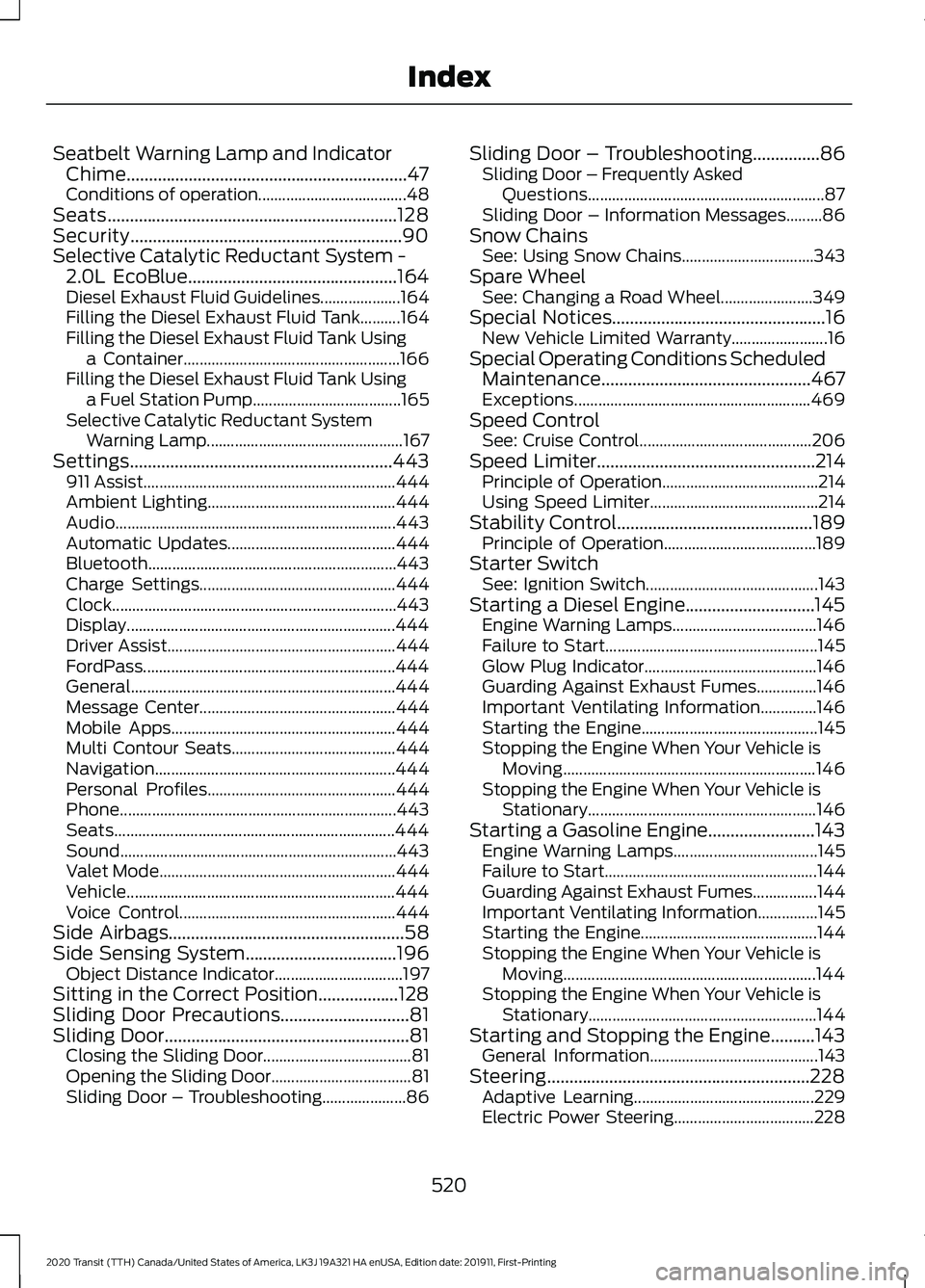
Speed Control See: Cruise Control........................................... 206
Speed Limiter
.................................................214
Principle of Operation....................................... 214
Using Speed Limiter.......................................... 214
Stability Control
............................................189
Principle of Operation...................................... 189
Starter Switch See: Ignition Switch........................................... 143
Starting a Diesel Engine.............................145 Engine Warning Lamps.................................... 146
Failure to Start..................................................... 145
Glow Plug Indicator........................................... 146
Guarding Against Exhaust Fumes...............146
Important Ventilating Information..............146
Starting the Engine............................................ 145
Stopping the Engine When Your Vehicle is Moving............................................................... 146
Stopping the Engine When Your Vehicle is Stationary......................................................... 146
Starting a Gasoline Engine........................143 Engine Warning Lamps.................................... 145
Failure to Start..................................................... 144
Guarding Against Exhaust Fumes................144
Important Ventilating Information...............145
Starting the Engine............................................ 144
Stopping the Engine When Your Vehicle is Moving............................................................... 144
Stopping the Engine When Your Vehicle is Stationary......................................................... 144
Starting and Stopping the Engine..........143 General Information.......................................... 143
Steering...........................................................228 Adaptive Learning............................................. 229
Electric Power Steering................................... 228
520
2020 Transit (TTH) Canada/United States of America, LK3J 19A321 HA enUSA, Edition date: 201911, First-Printing Index
Page 525 of 529
Resetting the Trip Computer...........................
118
Trip Odometer...................................................... 119
Trip Timer................................................................ 119
U
Under Hood Overview - 2.0L EcoBlue........................................................290
Under Hood Overview - 3.5L Duratec..........................................................291
Under Hood Overview - 3.5L Ecoboost™.................................................292
USB Port
.........................................................398
Using Adaptive Cruise Control................207 Adaptive Cruise Control Indicator................213
Adaptive Cruise Control Information
Messages.......................................................... 213
Adaptive Cruise Control System Sensors............................................................... 211
Automatic Cancellation................................... 210
Canceling the Set Speed................................. 210
Changing the Set Speed................................ 209
Detection Issues................................................. 210
Following a Vehicle........................................... 208
Hilly Condition Usage........................................ 210
Overriding the System..................................... 209
Resuming the Set Speed................................. 210
Setting the Adaptive Cruise Speed............208
Setting the Gap Distance............................... 209
Switching Adaptive Cruise Control Off....................................................................... 210
Switching Adaptive Cruise Control On....................................................................... 207
Switching to Normal Cruise Control............212
System Not Available......................................... 211
Using All-Wheel Drive..................................177 All-Wheel Drive Gauge...................................... 181
All-Wheel Drive Information Messages........................................................... 181
Driving In Special Conditions With All-Wheel Drive (AWD)................................ 177
Operating All-Wheel Drive (AWD) Vehicles with Mismatched Tires................................. 177
Using Cruise Control..................................206 Canceling the Set Speed................................ 206
Changing the Set Speed................................ 206
Cruise Control Indicator................................... 207
Resuming the Set Speed............................... 206Setting the Cruise Speed...............................
206
Switching Cruise Control Off........................ 206
Switching Cruise Control On......................... 206
Using MyKey With Remote Start Systems..........................................................76
Using Power Running Boards....................94 Automatic Power Deploy.................................. 94
Automatic Power Stow..................................... 94
Bounce-back......................................................... 95
Enabling and Disabling...................................... 95
Manual Operation................................................ 95
Manual Power Deploy........................................ 95
Resetting the System......................................... 96
Using Snow Chains.....................................343
Using Stability Control...............................190
Using SYNC™ With Your Media Player............................................................406
Audio Voice Commands................................. 407
Media Sources................................................... 406
Using SYNC™ With Your Phone............402 Accessing Features through the Phone
Menu................................................................. 403
Pairing a Phone.................................................. 402
Phone Controls.................................................. 403
Phone Voice Commands............................... 402
Using Traction Control...............................188 Switching the System Off or On................... 188
System Indicator Lights and Messages .......................................................... 188
Using Voice Recognition...........................398 Apps........................................................................\
423
Automatic Blower Motor Speed Reduction........................................................ 424
Climate.................................................................. 420
Entertainment
..................................................... 419
General................................................................... 418
Initiating a Voice Session............................... 400
Navigation............................................................. 422
Phone...................................................................... 421
Phone Voice Service......................................... 398
SiriusXM Traffic and Travel Link................... 423
System Interaction and Feedback..............401
Voice Settings..................................................... 424
Using Winter Tires.......................................342
Utilizing the Mediation/Arbitration Program (Canada Only)........................269
522
2020 Transit (TTH) Canada/United States of America, LK3J 19A321 HA enUSA, Edition date: 201911, First-Printing Index