height FORD TRANSIT 2020 User Guide
[x] Cancel search | Manufacturer: FORD, Model Year: 2020, Model line: TRANSIT, Model: FORD TRANSIT 2020Pages: 529, PDF Size: 8.3 MB
Page 107 of 529
AUTOMATIC HIGH BEAM
CONTROL
WARNING: The system does not
relieve you of your responsibility to drive
with due care and attention. You may
need to override the system if it does not
turn the high beams on or off. WARNING:
You may need to
override the system when approaching
other road users. WARNING:
You may need to
override the system during inclement
weather. WARNING:
Do not use the system
in poor visibility, for example fog, heavy
rain, spray or snow. WARNING:
The system may not
switch the high beams off if the lights of
oncoming vehicles are hidden by
obstacles, for example guard rails. WARNING: Inspect and replace the
windshield wiper blades regularly to
make sure the camera sensor has a clear
view. The windshield wiper blades must
be the correct length.
The system is designed to turn the high
beams on if all of the following occur:
• You switched the system on in the
information display.
• You set the lighting control to the
autolamps position. •
The ambient light level is low enough
that high beams are required.
• There is no traffic in front of your
vehicle.
• Your vehicle speed is greater than
approximately
32 mph (51 km/h).
The system is designed to turn the high
beams off if any of the following occur:
• You switch the system off in the
information display.
• You set the lighting control to any
position except autolamps.
• The ambient light level is high enough
that high beams are not required.
• The system detects an approaching
vehicle's headlamps or rear lamps.
• The system detects severe rain, snow
or fog.
• The system detects street lighting.
• The camera has reduced visibility.
• Your vehicle speed falls below
approximately
27 mph (44 km/h).
Note: The deactivation speed is lower on
curves.
Note: High beam reactivation may be
delayed in certain curvy road situations.
Note: Using much larger tires or equipping
vehicle accessories such as snowplows can
modify your vehicle's ride height and
degrade automatic high beam control
performance.
104
2020 Transit (TTH) Canada/United States of America, LK3J 19A321 HA enUSA, Edition date: 201911, First-Printing Lighting
Page 134 of 529

WARNING: Do not place cargo or
any objects behind the seatback before
returning it to the original position.
Moving the Seat Backward and
Forward WARNING: Make sure the seat fully
locks into place by rocking it backward
and forward. Not securing the seat into
the locked position can be dangerous in
a crash and could cause serious personal
injury or death. Note:
The driver seat has removable stop
bolts on the track to enable access to the
vehicle battery. See
Changing the 12V
Battery (page 303). Adjusting the Seat Backrest
Adjusting the Seat Height
131
2020 Transit (TTH) Canada/United States of America, LK3J 19A321 HA enUSA, Edition date: 201911, First-Printing SeatsE130249 E146385 E146384
Page 308 of 529
10.
Remove the positive (+) terminal and
remove the battery.
Note: Batteries are heavy.
11. Move the second battery toward the rear of your vehicle and remove the
negative (-) terminal.
12. Remove the positive (+) terminal and
remove the battery.
Replacing the Battery WARNING:
Make sure that you
securely fasten the seat runner bolts
before installing the covers.
You must replace the battery with one of
exactly the same specification.
To install, reverse the removal procedure.
Note: Make sure that you correctly install
the battery terminal covers, battery cover
and battery cable clips. ADJUSTING THE HEADLAMPS
Vertical Aim Adjustment
If your vehicle has been involved in a crash,
have the aim of the headlamp beam
checked by an authorized dealer.
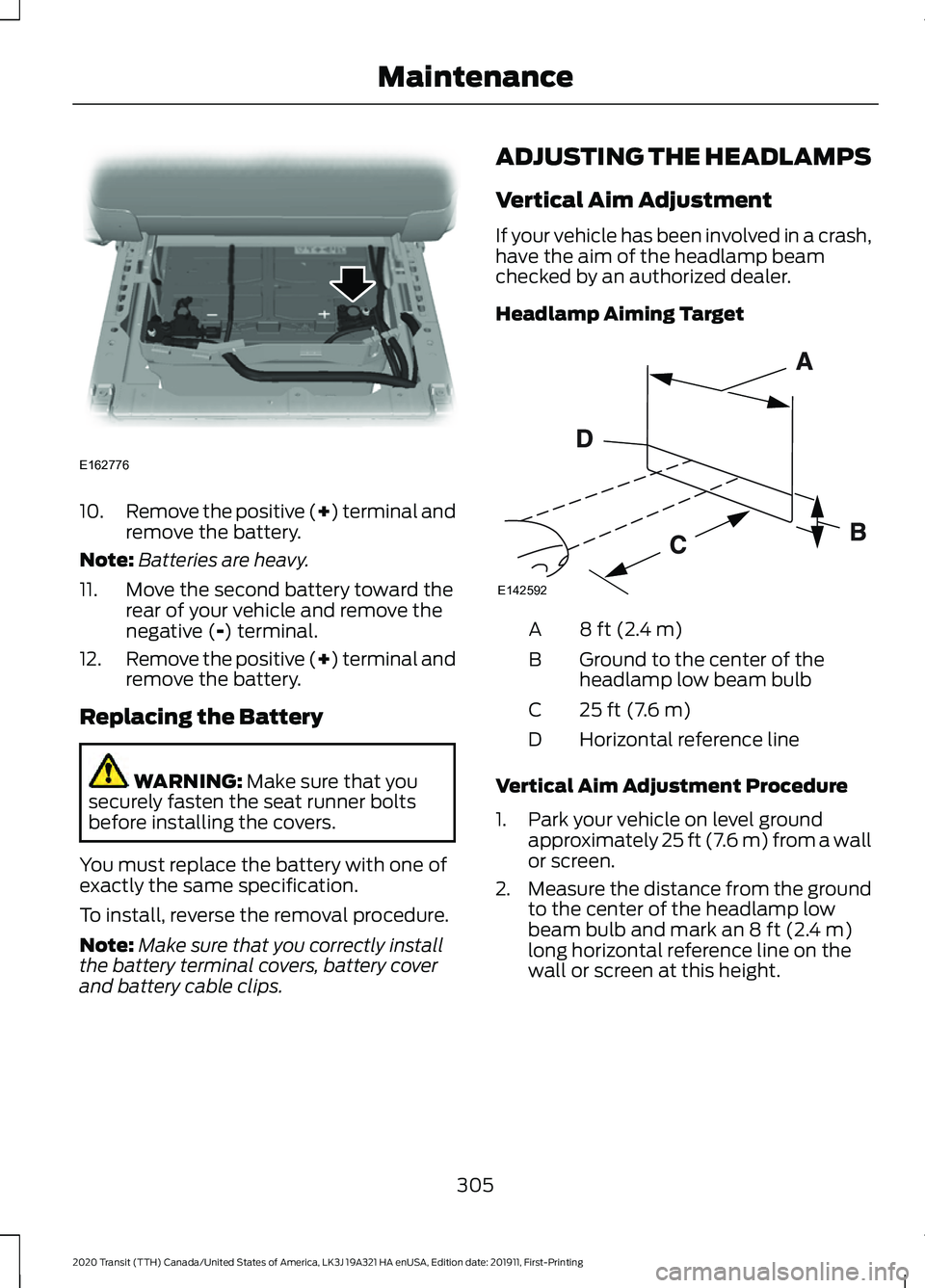
Headlamp Aiming Target
8 ft (2.4 m)
A
Ground to the center of the
headlamp low beam bulb
B
25 ft (7.6 m)
C
Horizontal reference line
D
Vertical Aim Adjustment Procedure
1. Park your vehicle on level ground approximately
25 ft (7.6 m) from a wall
or screen.
2. Measure the distance from the ground
to the center of the headlamp low
beam bulb and mark an
8 ft (2.4 m)
long horizontal reference line on the
wall or screen at this height.
305
2020 Transit (TTH) Canada/United States of America, LK3J 19A321 HA enUSA, Edition date: 201911, First-Printing MaintenanceE162776 E142592
Page 331 of 529
Information Contained on the
Tire Sidewall
United States of America, and
Canada Federal regulations
require tire manufacturers to place
standardized information on the
sidewall of all tires. This
information identifies and
describes the fundamental
characteristics of the tire and also
provides a United States of
America DOT Tire Identification
Number for safety standard
certification and in case of a recall.
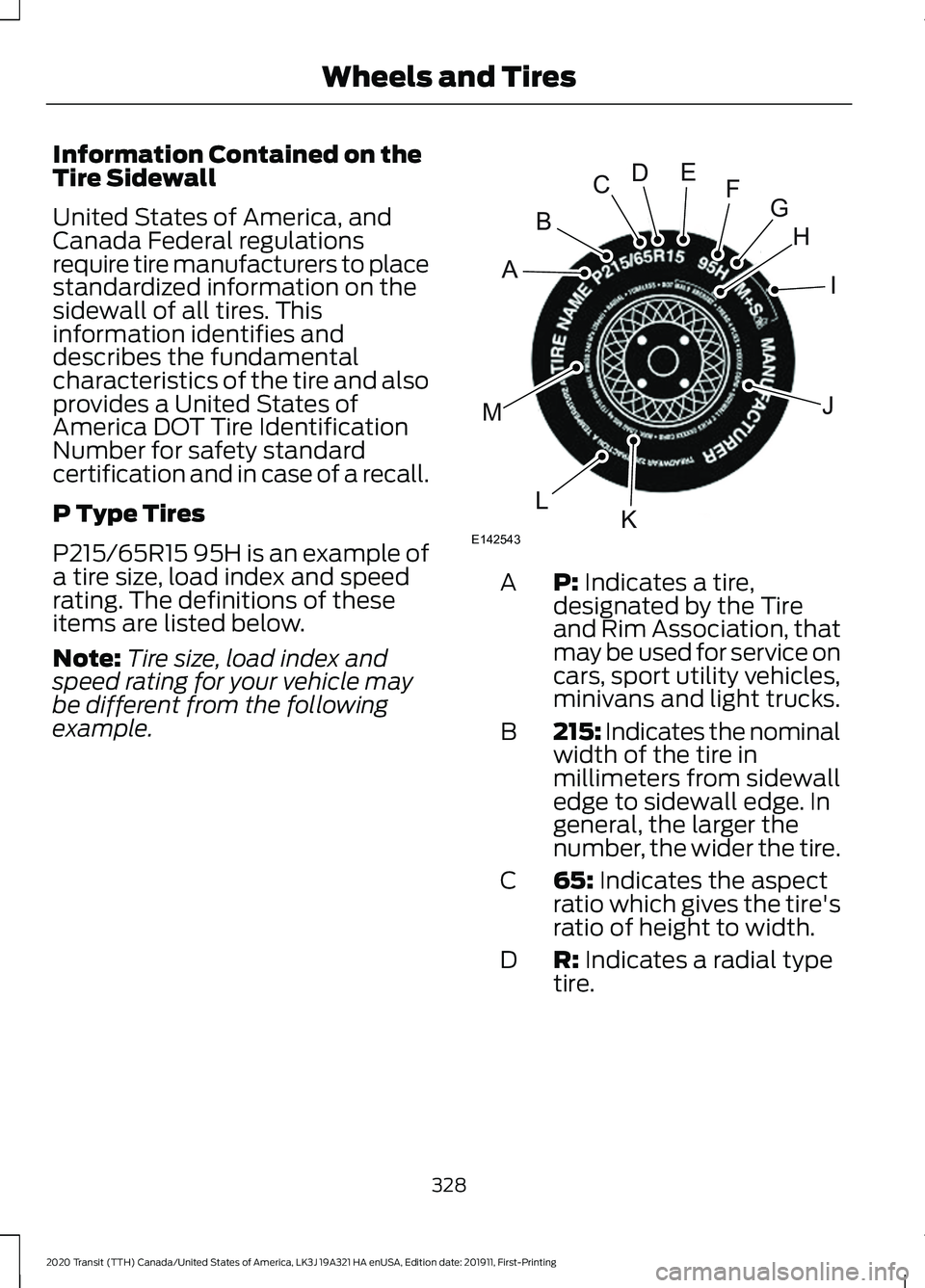
P Type Tires
P215/65R15 95H is an example of
a tire size, load index and speed
rating. The definitions of these
items are listed below.
Note:
Tire size, load index and
speed rating for your vehicle may
be different from the following
example. P: Indicates a tire,
designated by the Tire
and Rim Association, that
may be used for service on
cars, sport utility vehicles,
minivans and light trucks.
A
215: Indicates the nominal
width of the tire in
millimeters from sidewall
edge to sidewall edge. In
general, the larger the
number, the wider the tire.
B
65:
Indicates the aspect
ratio which gives the tire's
ratio of height to width.
C
R:
Indicates a radial type
tire.
D
328
2020 Transit (TTH) Canada/United States of America, LK3J 19A321 HA enUSA, Edition date: 201911, First-Printing Wheels and TiresH
I
J
KL
M
A
B
CDEFG
E142543
Page 335 of 529
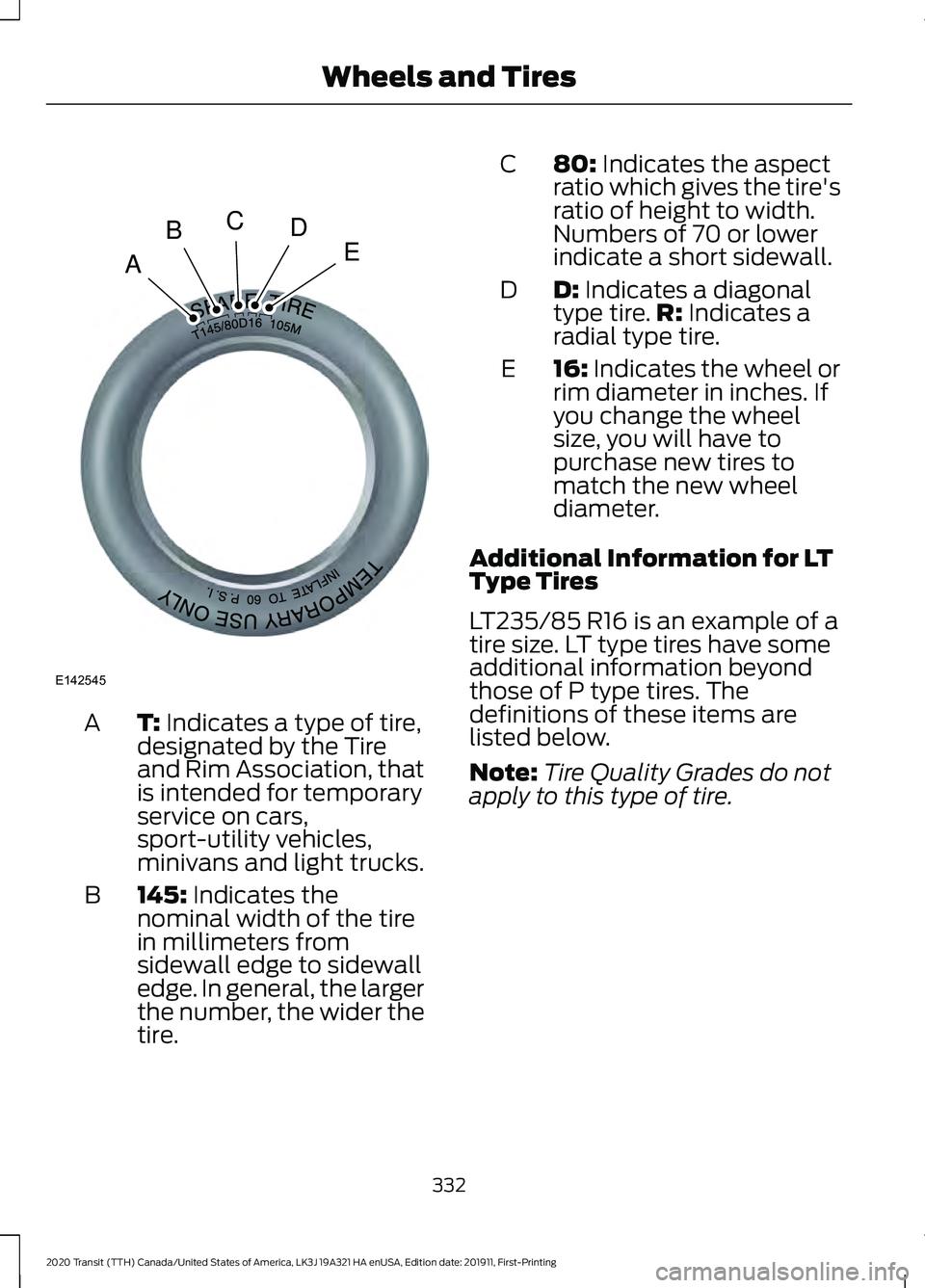
T: Indicates a type of tire,
designated by the Tire
and Rim Association, that
is intended for temporary
service on cars,
sport-utility vehicles,
minivans and light trucks.
A
145:
Indicates the
nominal width of the tire
in millimeters from
sidewall edge to sidewall
edge. In general, the larger
the number, the wider the
tire.
B 80:
Indicates the aspect
ratio which gives the tire's
ratio of height to width.
Numbers of 70 or lower
indicate a short sidewall.
C
D:
Indicates a diagonal
type tire. R: Indicates a
radial type tire.
D
16:
Indicates the wheel or
rim diameter in inches. If
you change the wheel
size, you will have to
purchase new tires to
match the new wheel
diameter.
E
Additional Information for LT
Type Tires
LT235/85 R16 is an example of a
tire size. LT type tires have some
additional information beyond
those of P type tires. The
definitions of these items are
listed below.
Note: Tire Quality Grades do not
apply to this type of tire.
332
2020 Transit (TTH) Canada/United States of America, LK3J 19A321 HA enUSA, Edition date: 201911, First-Printing Wheels and TiresA
BCDE
E142545
Page 340 of 529
Note:
Some spare tires operate at
a higher inflation pressure than the
other tires. For T-type mini-spare
tires, refer to the Dissimilar spare
wheel and tire assembly
information for a description. Store
and maintain at 60 psi (4.15 bar).
For full-size and dissimilar spare
tires, refer to the Dissimilar spare
wheel and tire assembly
information for a description. Store
and maintain at the higher of the
front and rear inflation pressure as
shown on the Tire Label.
Inspecting the Tires and Wheel
Valve Stems
Periodically inspect the tire treads
for uneven or excessive wear and
remove objects, for example
stones, nails or glass that may be
wedged in the tread grooves.
Check the tire and valve stems for
holes, cracks, or cuts that may
permit air leakage and repair or
replace the tire and replace the
valve stem. Inspect the tire
sidewalls for cracking, cuts,
bruises and other signs of damage
or excessive wear. If internal
damage to the tire is suspected,
have the tire removed and
inspected in case it needs to be
repaired or replaced. For your
safety, tires that are damaged or
show signs of excessive wear
should not be used because they
are more likely to blow out or fail. Incorrect or inadequate vehicle
maintenance can cause tires to
wear abnormally. Inspect all the
tires, including the spare,
frequently, and replace them if
one or more of the following
conditions exist:
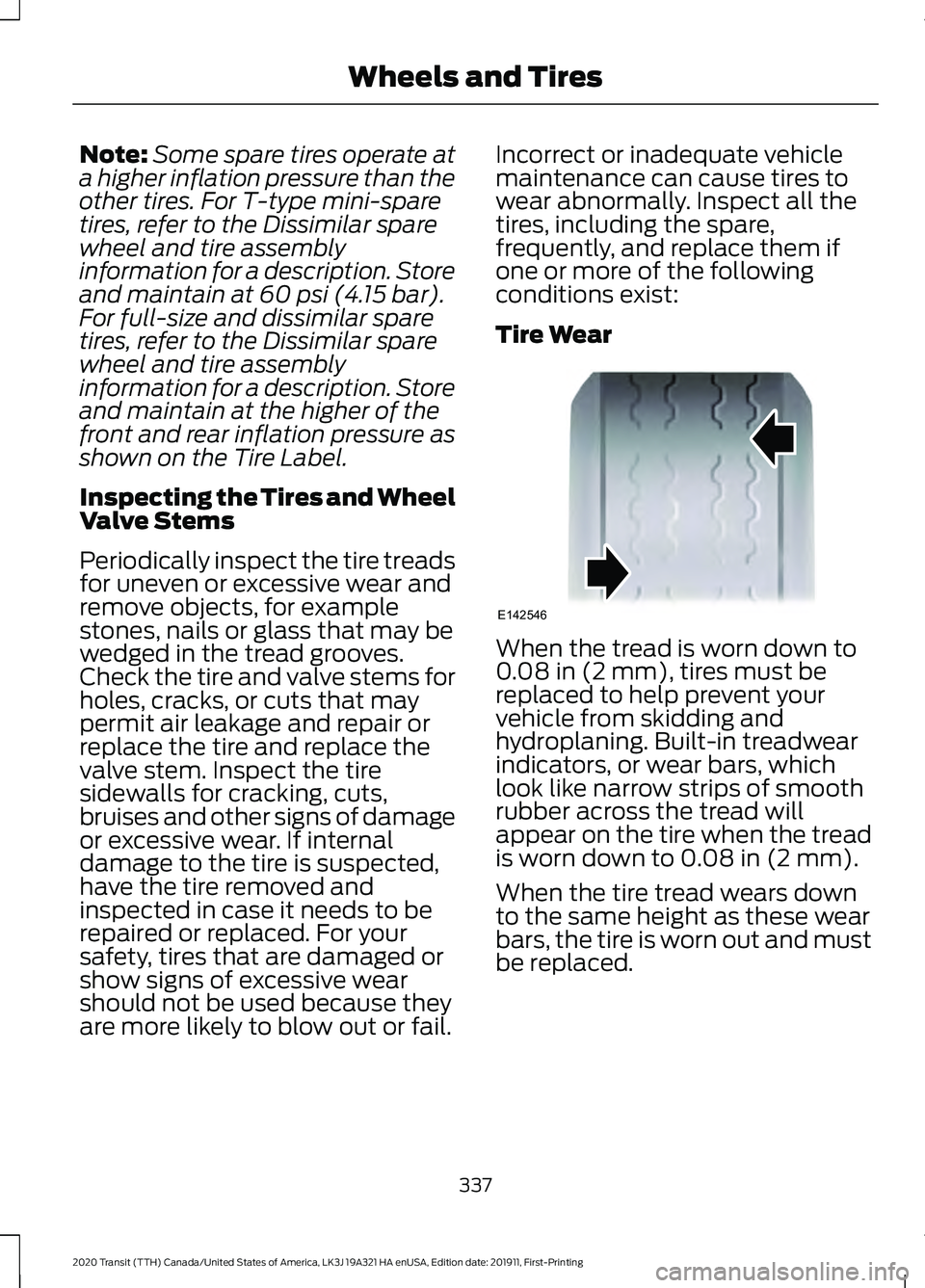
Tire Wear
When the tread is worn down to
0.08 in (2 mm)
, tires must be
replaced to help prevent your
vehicle from skidding and
hydroplaning. Built-in treadwear
indicators, or wear bars, which
look like narrow strips of smooth
rubber across the tread will
appear on the tire when the tread
is worn down to
0.08 in (2 mm).
When the tire tread wears down
to the same height as these wear
bars, the tire is worn out and must
be replaced.
337
2020 Transit (TTH) Canada/United States of America, LK3J 19A321 HA enUSA, Edition date: 201911, First-Printing Wheels and TiresE142546
Page 520 of 529
M
Maintenance.................................................288
General Information......................................... 288
Manual Climate Control..............................121 Directing Air to the Footwell Air Vents.........121
Directing Air to the Instrument Panel Air
Vents.................................................................... 121
Directing Air to the Windshield Air Vents.................................................................... 121
Setting the Blower Motor Speed................... 121
Setting the Temperature.................................. 122
Switching Maximum Cooling On and Off........................................................................\
. 121
Switching Maximum Defrost On and Off........................................................................\
. 121
Switching the Air Conditioning On and Off........................................................................\
. 121
Switching the Climate Control On and Off........................................................................\
. 121
Switching the Recirculated Air On and Off........................................................................\
. 121
Manual Seats - Vehicles With: 2-Way Manual Seat................................................129
Adjusting the Armrest....................................... 130
Adjusting the Lumbar Support..................... 130
Adjusting the Seat Backrest........................... 130
Moving the Seat Backward and Forward............................................................. 129
Manual Seats - Vehicles With: 4-Way Manual Seat................................................130
Adjusting the Armrest....................................... 132
Adjusting the Lumbar Support...................... 132
Adjusting the Seat Backrest............................ 131
Adjusting the Seat Cushion............................. 132
Adjusting the Seat Height................................. 131
Moving the Seat Backward and Forward.............................................................. 131
Swiveling the Seat.............................................. 132
Swivel Seat Audible Warning......................... 133
Master Access Code.....................................88 What Is the Master Access Code................... 88
Message Center See: Information Displays................................ 116
Mirrors See: Windows and Mirrors.............................. 108
Mobile Communications Equipment.......17
Motorcraft Parts - 2.0L EcoBlue............365 Motorcraft Parts - 3.5L Duratec
.............366
Motorcraft Parts - 3.5L Ecoboost™..................................................367
MyKey Settings
.................................................71
Configurable Settings.......................................... 71
Non-Configurable Settings................................ 71
MyKey – Troubleshooting
...........................76
What is an admin key?....................................... 76
Why can I not clear the MyKeys?................... 76
Why can I not create a MyKey?....................... 76
Why can I not program a MyKey?.................. 76
Why does the MyKey distance not accumulate?..................................................... 76
MyKey ™
..............................................................71
Principle of Operation.......................................... 71
N
Navigation
......................................................435
Changing the Format of the Map................437
cityseeker..............................................................439
Michelin Travel Guide...................................... 440
Navigation Map Accuracy and Updates............................................................. 441
Route Guidance................................................. 438
Setting a Destination....................................... 436
SiriusXM Traffic and Travel Link.................. 440
Zoom
...................................................................... 437
Normal Scheduled Maintenance..........465 Intelligent Oil-Life Monitor™........................ 465
Normal Maintenance Intervals.................... 465
O
Oil Change Indicator Reset - Diesel.............................................................295
Oil Change Indicator Reset - Gasoline.......................................................296
Resetting the Oil Life Monitoring System.............................................................. 296
Oil Check See: Engine Oil Check...................................... 293
Opening and Closing the Hood..............288 Closing the Hood............................................... 289
Opening the Hood............................................ 288
Opening the Sliding Door.............................81 Opening the Sliding Door From Inside Your
Vehicle.................................................................. 81
517
2020 Transit (TTH) Canada/United States of America, LK3J 19A321 HA enUSA, Edition date: 201911, First-Printing Index
Page 522 of 529
Rear View Camera Locations.........................
201
System Settings................................................. 203
Using the Rear View Camera......................... 201
Rear View Camera See: Rear View Camera.................................. 200
Recommended Towing Weights - Chassis Cab/Crew Van/Cutaway/
Van.................................................................243
Calculating the Maximum Loaded Trailer Weight for Your Vehicle.............................. 245
Recommended Towing Weights - M2 Bus..................................................................245
Calculating the Maximum Loaded Trailer
Weight for Your Vehicle............................... 247
Reduced Engine Performance
................254
Refueling..........................................................158 System Warnings............................................... 160
Releasing the Parking Brake.....................185
Remote Control - Vehicles With: Passive Anti-Theft System (PATS)......................66
Changing the Remote Control Battery.........67
Integrated Keyhead Transmitter.................... 66
Locating Your Vehicle.......................................... 67
Programming a New Remote Control..........67
Switching the Panic Alarm On and Off........................................................................\
. 68
Remote Control - Vehicles With: Power Sliding Door
..................................................68
Changing the Remote Control Battery........68
Locating Your Vehicle......................................... 69
Remote Control Information Messages............................................................ 70
Remote Control - Vehicles Without: Passive Anti-Theft System
(PATS).............................................................65
Changing the Remote Control Battery........65
Integrated Keyhead Transmitter.................... 65
Locating Your Vehicle......................................... 66
Programming a New Remote Control.........65
Switching the Panic Alarm On and Off........................................................................\
. 66
Remote Start
..................................................125
About Remote Start.......................................... 125
Enabling Remote Start..................................... 125
Remotely Starting the Engine........................ 125
Remotely Stopping the Engine...................... 125
Remote Start Limitations................................ 125
Remote Start Settings...................................... 125Removing a Headlamp
..............................307
Repairing Minor Paint Damage................321
Replacement Parts Recommendation
........................................15
Collision Repairs.................................................... 16
Scheduled Maintenance and Mechanical Repairs................................................................. 16
Warranty on Replacement Parts.................... 16
Replacing a Lost Key or Remote Control.............................................................70
Replacing the Cabin Air Filter...................127
Reporting Safety Defects (Canada Only)
...............................................................272
Reporting Safety Defects (U.S. Only)...............................................................271
Resetting the Power Sliding Door............85
Restarting the Engine
.................................149
Roadside Assistance..................................257
Vehicles Sold in Canada: Getting Roadside
Assistance....................................................... 258
Vehicles Sold in the United States: Getting Roadside Assistance.................................... 257
Vehicles Sold in the United States: Using Roadside Assistance.................................... 257
Roadside Emergencies
..............................257
Roof Racks and Load Carriers - Bus.................................................................236
Roof Racks and Load Carriers - Van.................................................................236
Running-In See: Breaking-In................................................. 255
Running Out of Fuel
.....................................157
Adding Fuel From a Portable Fuel
Container.......................................................... 158
Filling a Portable Fuel Container................... 157
S
Safety Canopy ™
............................................59
Safety Precautions.......................................152
Scheduled Maintenance Record...........469
Scheduled Maintenance
..........................462
Seatbelt Extensions......................................50
Seatbelt Height Adjustment......................47
Seatbelt Reminder........................................48 Belt-Minder™........................................................ 48
Seatbelts...........................................................44 Principle of Operation........................................ 44
519
2020 Transit (TTH) Canada/United States of America, LK3J 19A321 HA enUSA, Edition date: 201911, First-Printing Index