ignition FORD TRANSIT 2020 User Guide
[x] Cancel search | Manufacturer: FORD, Model Year: 2020, Model line: TRANSIT, Model: FORD TRANSIT 2020Pages: 529, PDF Size: 8.3 MB
Page 71 of 529
Note:
If locking was not successful, any
door is open, or if the hood is open on
vehicles with an alarm or remote start then
the horn sounds but the direction indicators
do not flash.
Switching the Panic Alarm On and
Off Press the button on the remote
control to switch the panic alarm
on. Press the button again or
switch the ignition on to switch the panic
alarm off.
We recommend you do not use this
method to locate your vehicle.
Note: The panic alarm only operates when
the ignition is off.
REMOTE CONTROL - VEHICLES
WITH: POWER SLIDING DOOR
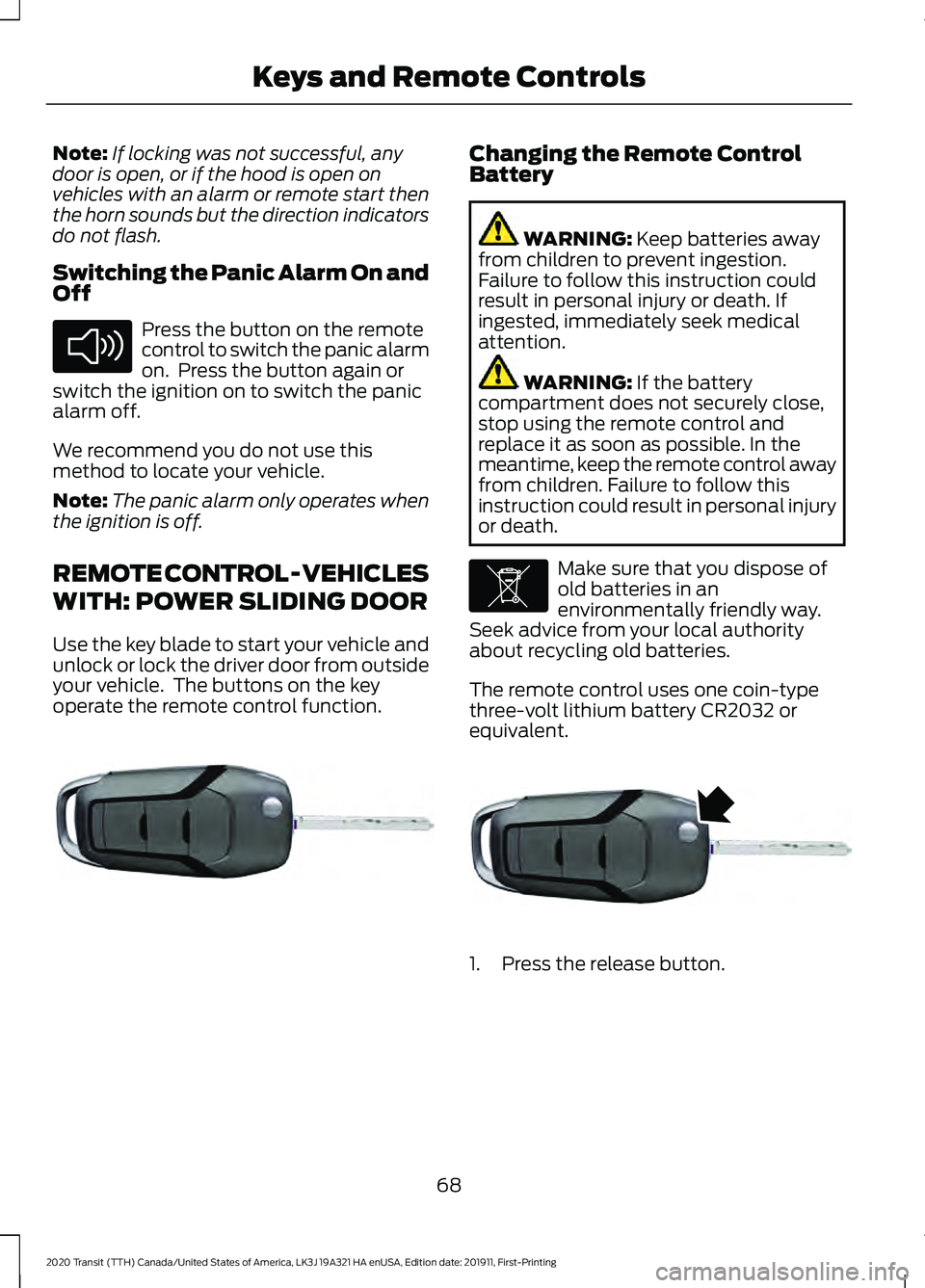
Use the key blade to start your vehicle and
unlock or lock the driver door from outside
your vehicle. The buttons on the key
operate the remote control function. Changing the Remote Control
Battery
WARNING: Keep batteries away
from children to prevent ingestion.
Failure to follow this instruction could
result in personal injury or death. If
ingested, immediately seek medical
attention. WARNING:
If the battery
compartment does not securely close,
stop using the remote control and
replace it as soon as possible. In the
meantime, keep the remote control away
from children. Failure to follow this
instruction could result in personal injury
or death. Make sure that you dispose of
old batteries in an
environmentally friendly way.
Seek advice from your local authority
about recycling old batteries.
The remote control uses one coin-type
three-volt lithium battery CR2032 or
equivalent. 1. Press the release button.
68
2020 Transit (TTH) Canada/United States of America, LK3J 19A321 HA enUSA, Edition date: 201911, First-Printing Keys and Remote ControlsE138624 E302820 E107998 E302821
Page 75 of 529
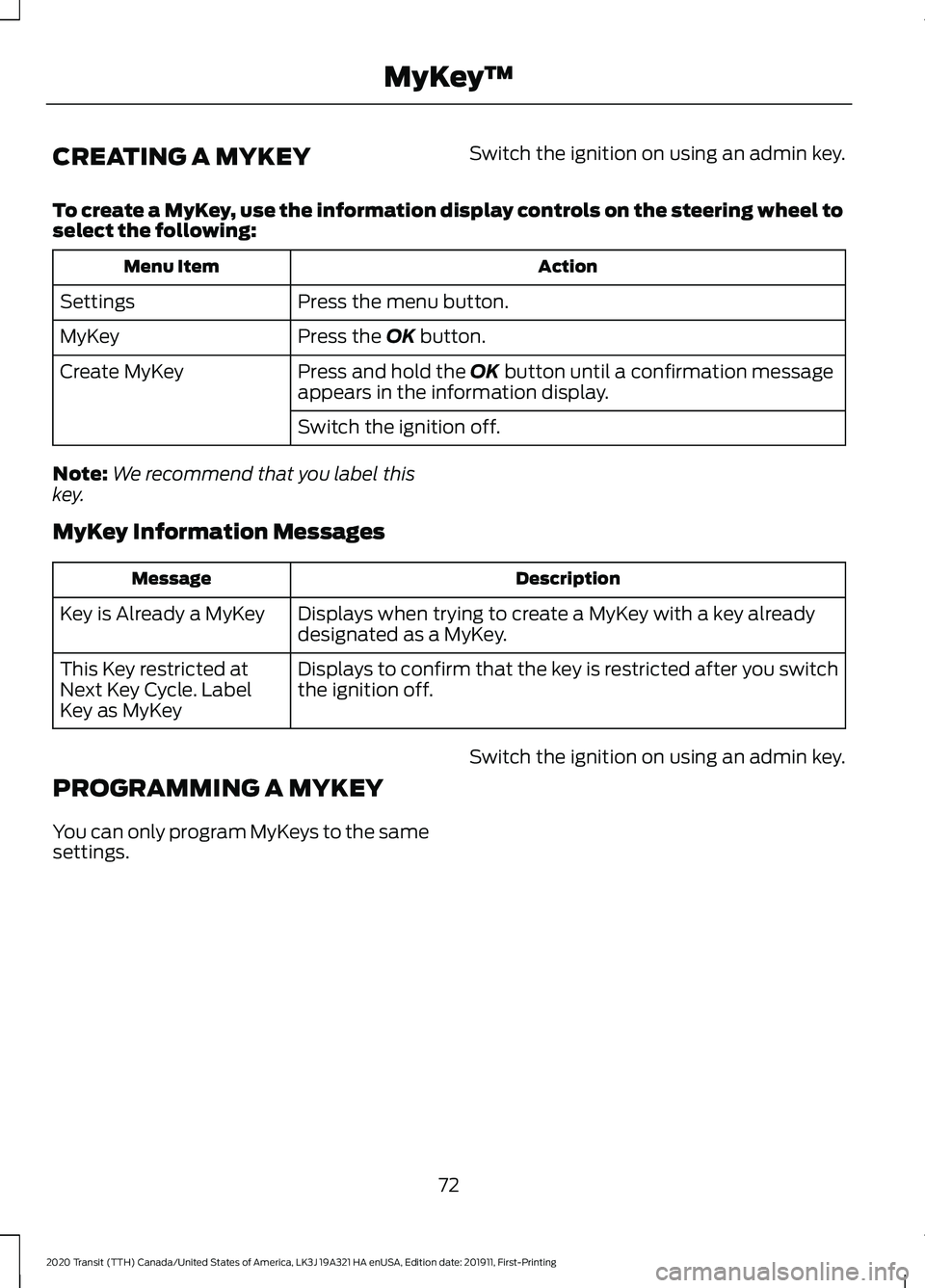
CREATING A MYKEY
Switch the ignition on using an admin key.
To create a MyKey, use the information display controls on the steering wheel to
select the following: Action
Menu Item
Press the menu button.
Settings
Press the OK button.
MyKey
Press and hold the
OK button until a confirmation message
appears in the information display.
Create MyKey
Switch the ignition off.
Note: We recommend that you label this
key.
MyKey Information Messages Description
Message
Displays when trying to create a MyKey with a key already
designated as a MyKey.
Key is Already a MyKey
Displays to confirm that the key is restricted after you switch
the ignition off.
This Key restricted at
Next Key Cycle. Label
Key as MyKey
PROGRAMMING A MYKEY
You can only program MyKeys to the same
settings. Switch the ignition on using an admin key.
72
2020 Transit (TTH) Canada/United States of America, LK3J 19A321 HA enUSA, Edition date: 201911, First-Printing MyKey
™
Page 76 of 529
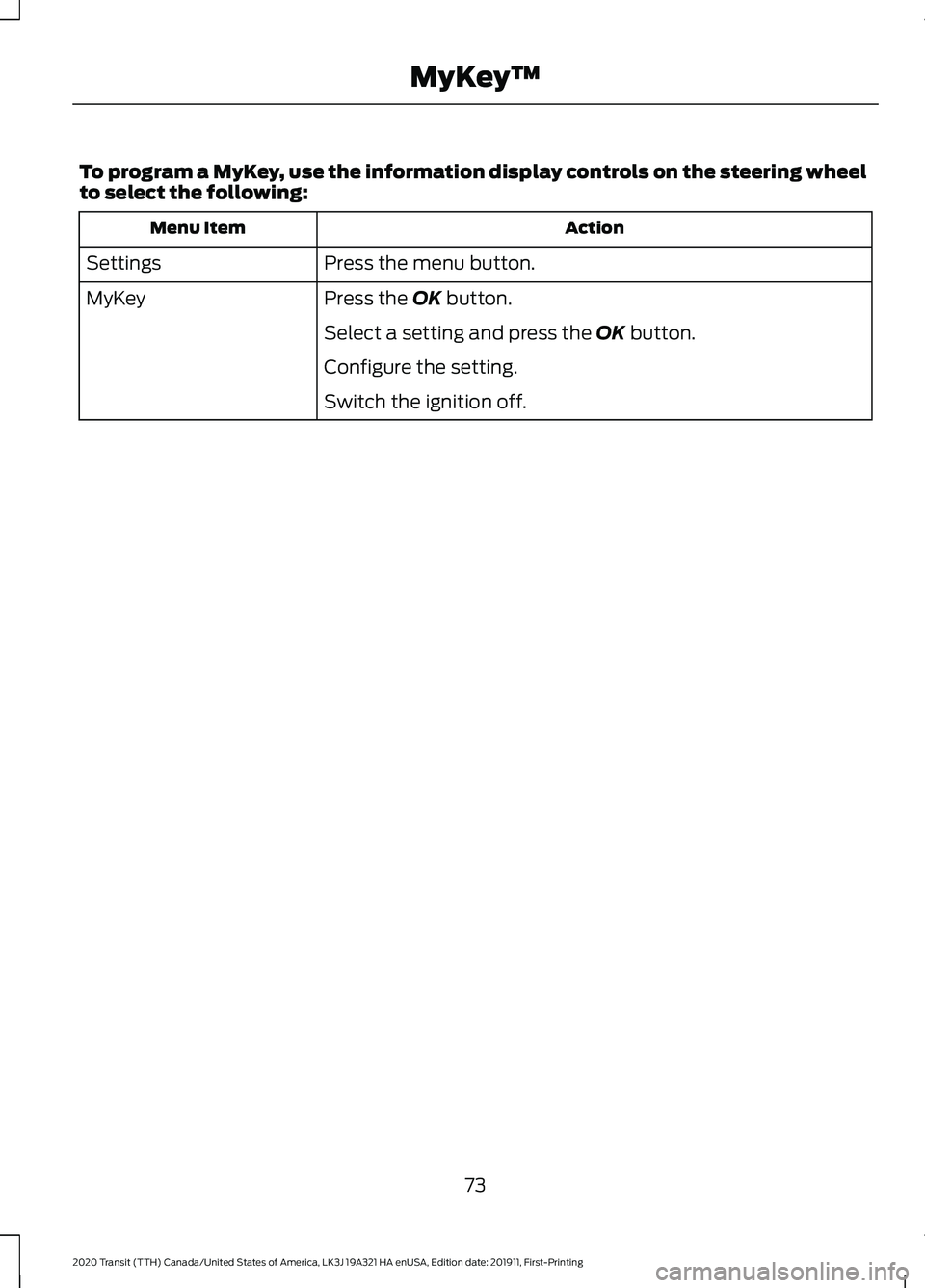
To program a MyKey, use the information display controls on the steering wheel
to select the following:
Action
Menu Item
Press the menu button.
Settings
Press the OK button.
MyKey
Select a setting and press the
OK button.
Configure the setting.
Switch the ignition off.
73
2020 Transit (TTH) Canada/United States of America, LK3J 19A321 HA enUSA, Edition date: 201911, First-Printing MyKey
™
Page 77 of 529
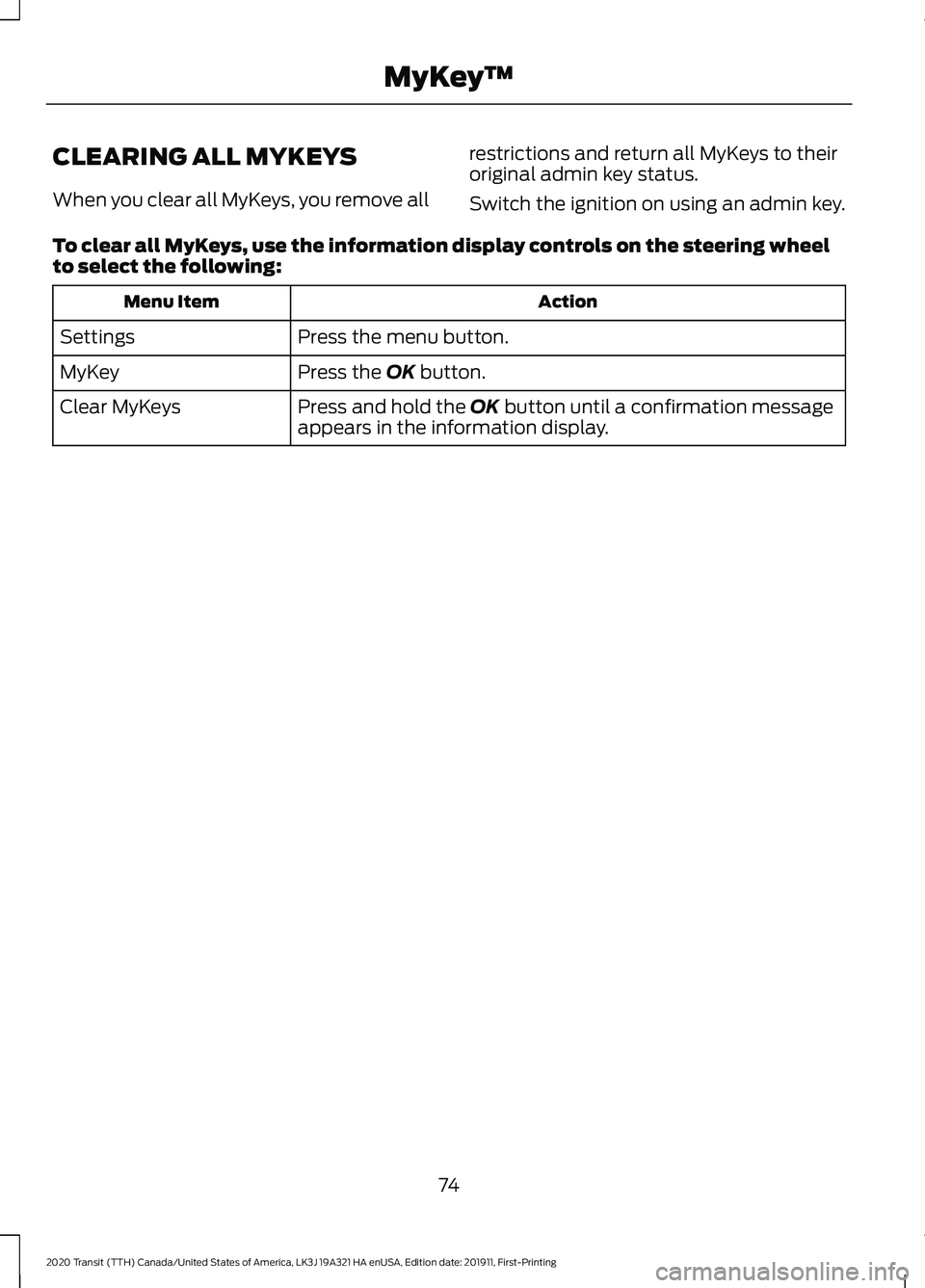
CLEARING ALL MYKEYS
When you clear all MyKeys, you remove all
restrictions and return all MyKeys to their
original admin key status.
Switch the ignition on using an admin key.
To clear all MyKeys, use the information display controls on the steering wheel
to select the following: Action
Menu Item
Press the menu button.
Settings
Press the OK button.
MyKey
Press and hold the
OK button until a confirmation message
appears in the information display.
Clear MyKeys
74
2020 Transit (TTH) Canada/United States of America, LK3J 19A321 HA enUSA, Edition date: 201911, First-Printing MyKey
™
Page 78 of 529
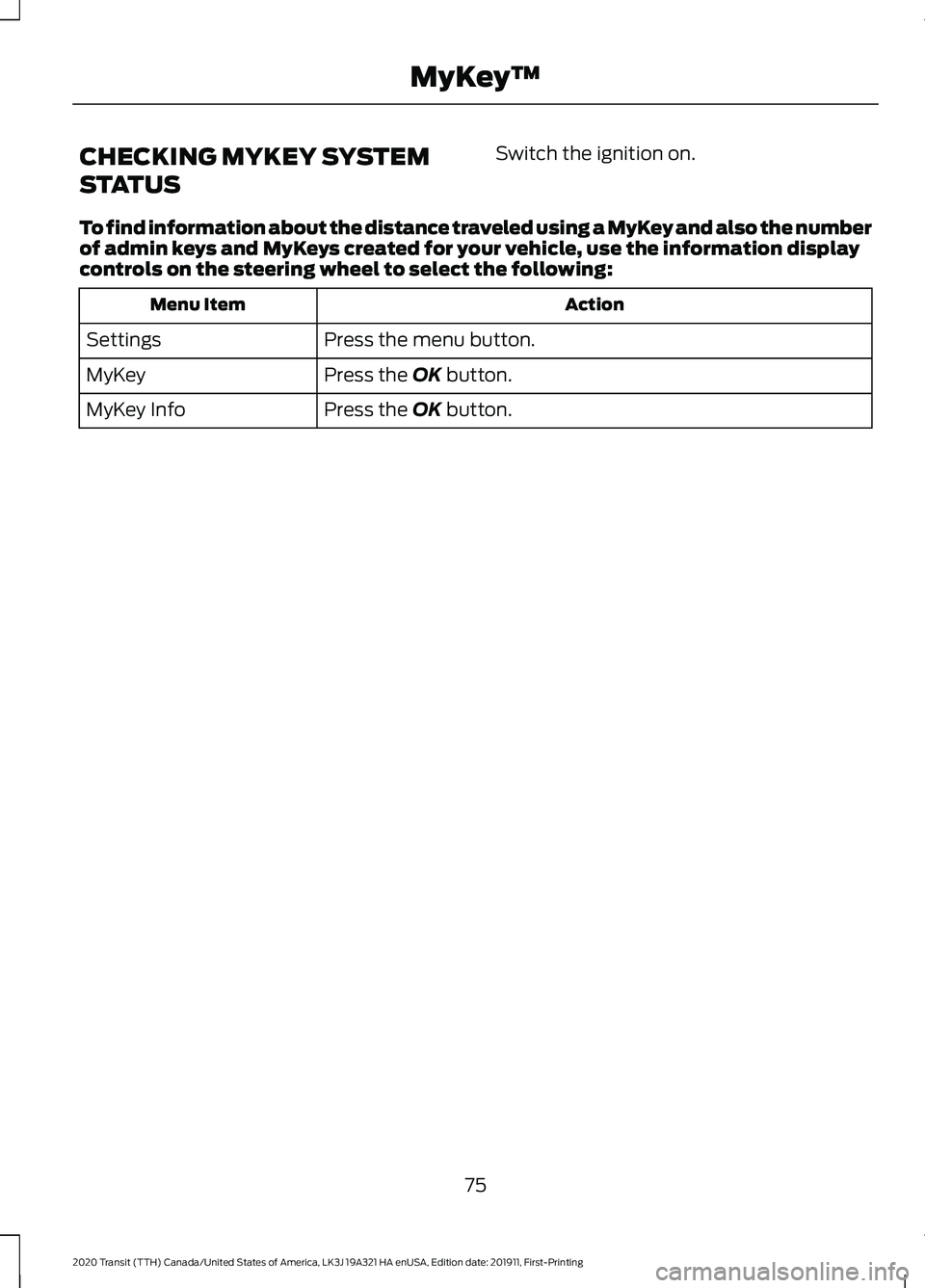
CHECKING MYKEY SYSTEM
STATUS
Switch the ignition on.
To find information about the distance traveled using a MyKey and also the number
of admin keys and MyKeys created for your vehicle, use the information display
controls on the steering wheel to select the following: Action
Menu Item
Press the menu button.
Settings
Press the OK button.
MyKey
Press the
OK button.
MyKey Info
75
2020 Transit (TTH) Canada/United States of America, LK3J 19A321 HA enUSA, Edition date: 201911, First-Printing MyKey
™
Page 79 of 529
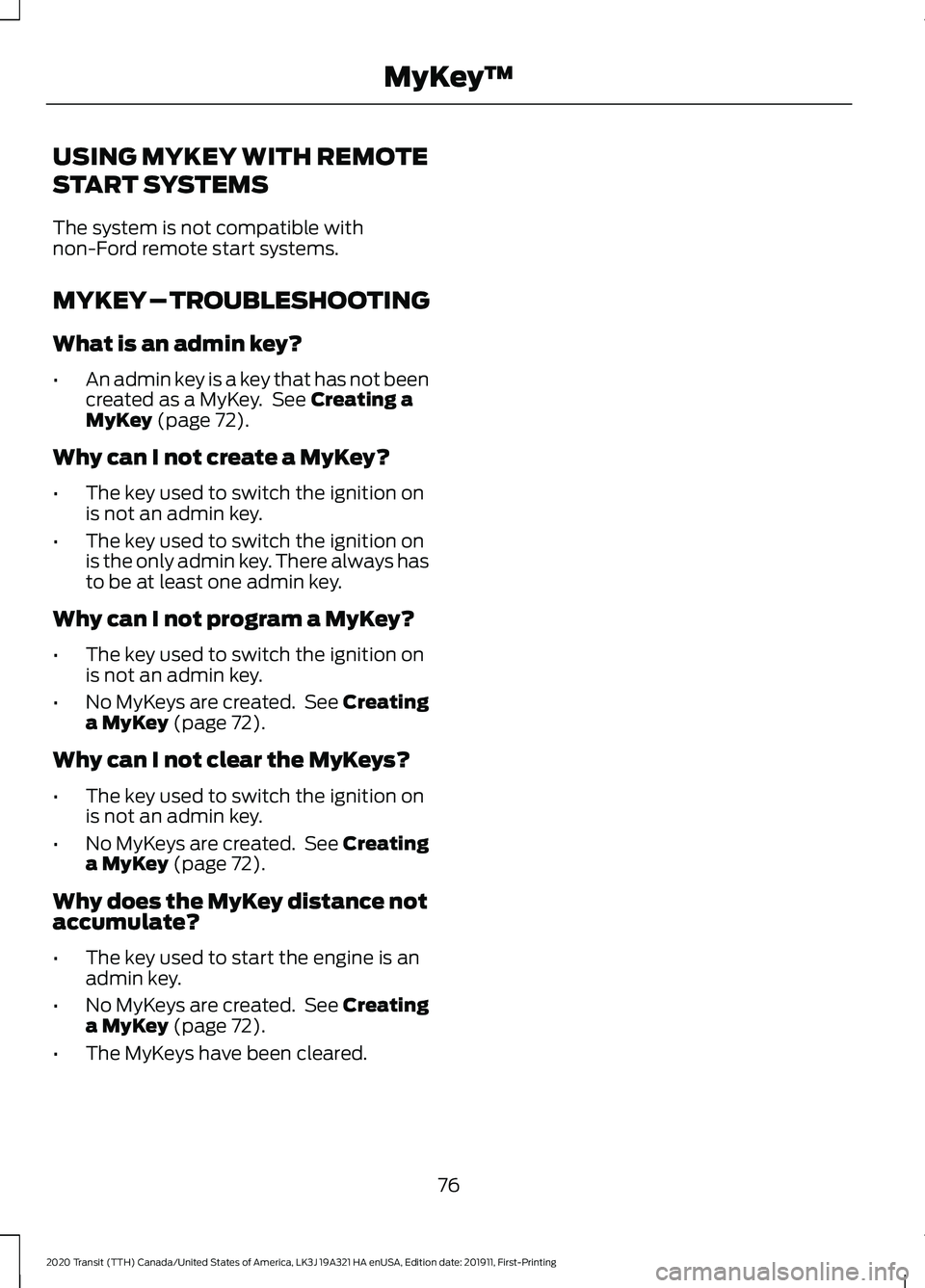
USING MYKEY WITH REMOTE
START SYSTEMS
The system is not compatible with
non-Ford remote start systems.
MYKEY – TROUBLESHOOTING
What is an admin key?
•
An admin key is a key that has not been
created as a MyKey. See Creating a
MyKey (page 72).
Why can I not create a MyKey?
• The key used to switch the ignition on
is not an admin key.
• The key used to switch the ignition on
is the only admin key. There always has
to be at least one admin key.
Why can I not program a MyKey?
• The key used to switch the ignition on
is not an admin key.
• No MyKeys are created. See Creating
a MyKey
(page 72).
Why can I not clear the MyKeys?
• The key used to switch the ignition on
is not an admin key.
• No MyKeys are created. See Creating
a MyKey
(page 72).
Why does the MyKey distance not
accumulate?
• The key used to start the engine is an
admin key.
• No MyKeys are created. See Creating
a MyKey
(page 72).
• The MyKeys have been cleared.
76
2020 Transit (TTH) Canada/United States of America, LK3J 19A321 HA enUSA, Edition date: 201911, First-Printing MyKey
™
Page 82 of 529
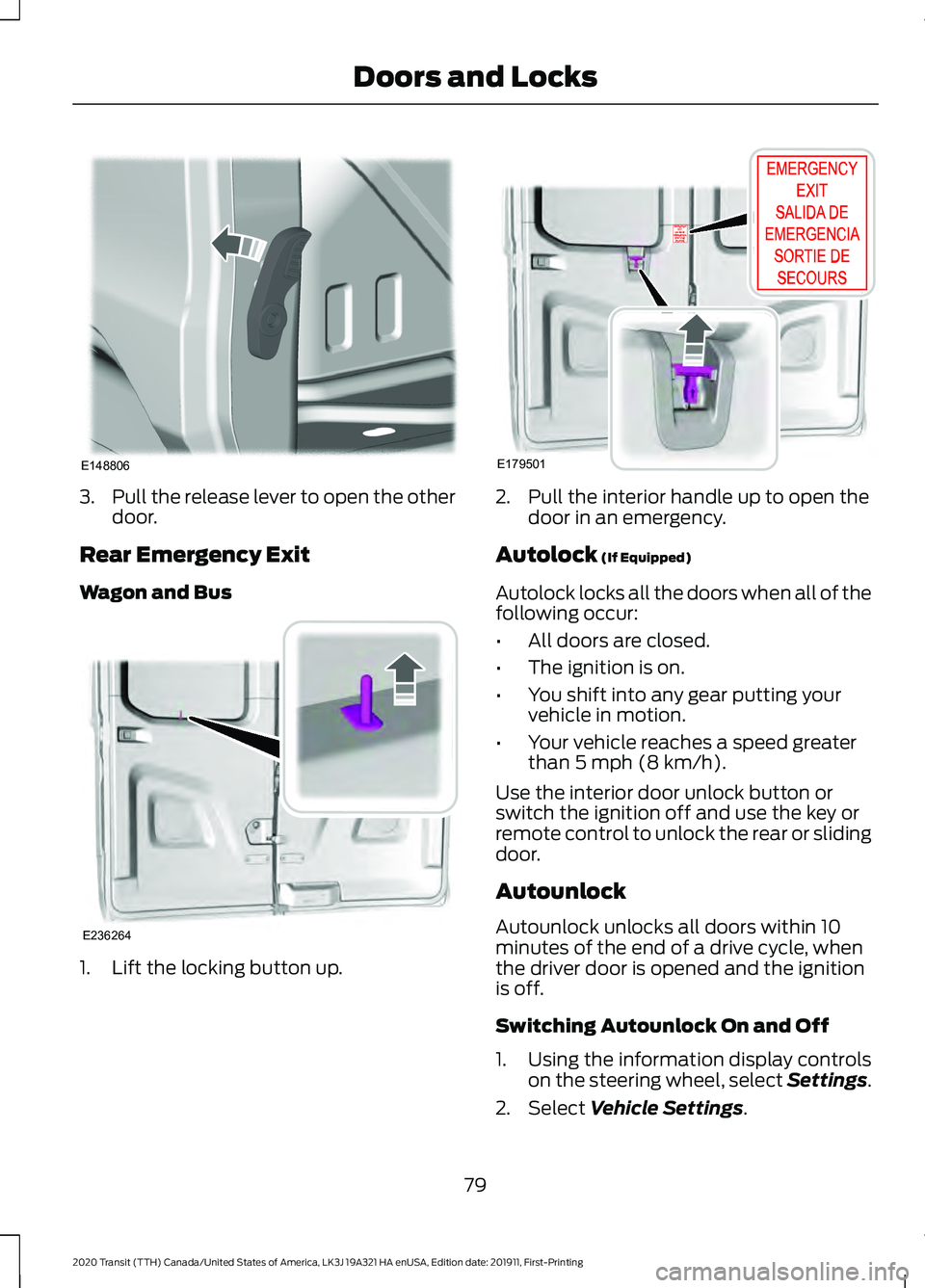
3.
Pull the release lever to open the other
door.
Rear Emergency Exit
Wagon and Bus 1. Lift the locking button up. 2. Pull the interior handle up to open the
door in an emergency.
Autolock (If Equipped)
Autolock locks all the doors when all of the
following occur:
• All doors are closed.
• The ignition is on.
• You shift into any gear putting your
vehicle in motion.
• Your vehicle reaches a speed greater
than
5 mph (8 km/h).
Use the interior door unlock button or
switch the ignition off and use the key or
remote control to unlock the rear or sliding
door.
Autounlock
Autounlock unlocks all doors within 10
minutes of the end of a drive cycle, when
the driver door is opened and the ignition
is off.
Switching Autounlock On and Off
1. Using the information display controls on the steering wheel, select Settings.
2. Select
Vehicle Settings.
79
2020 Transit (TTH) Canada/United States of America, LK3J 19A321 HA enUSA, Edition date: 201911, First-Printing Doors and LocksE148806 E236264 E179501
Page 91 of 529
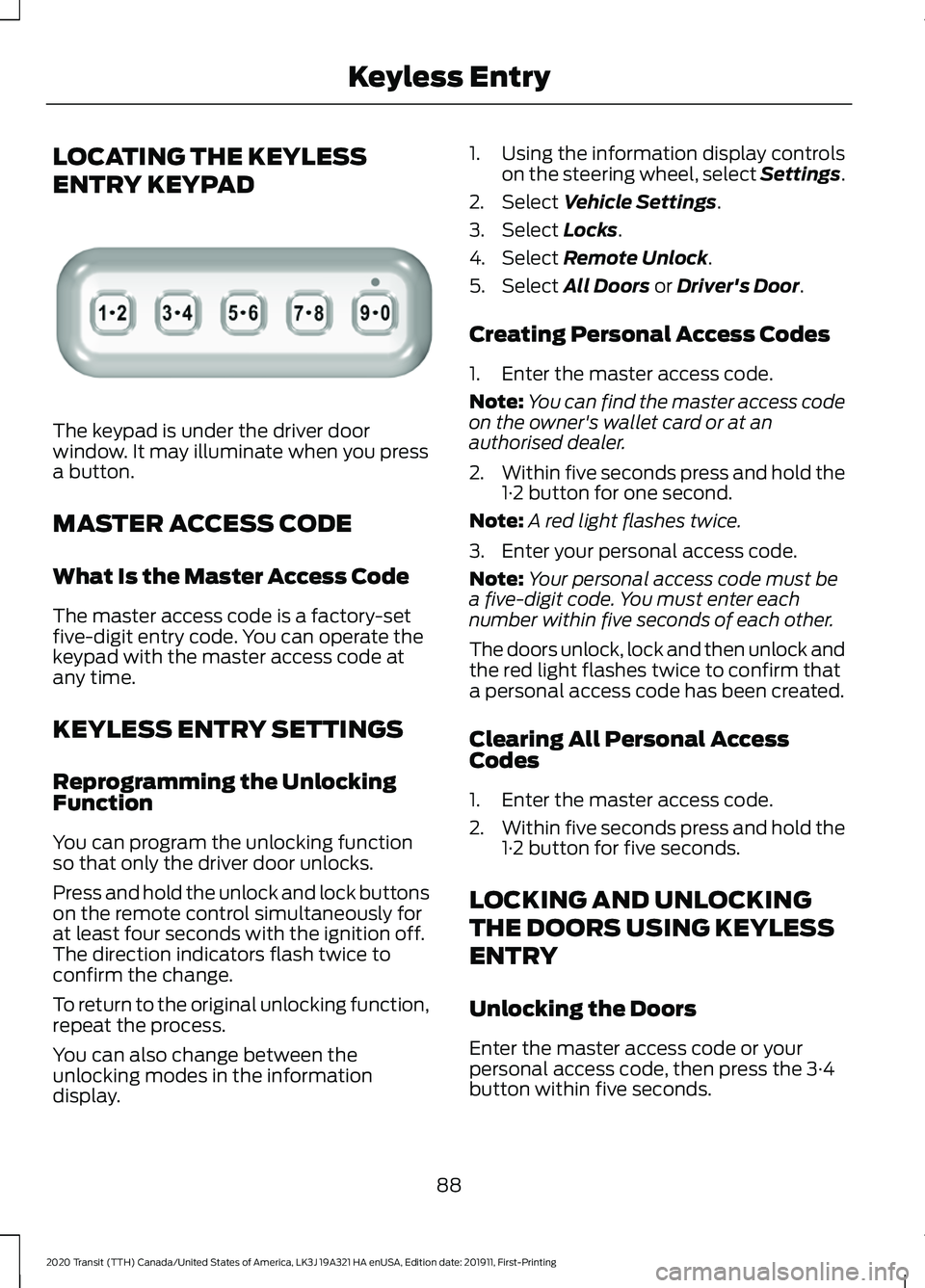
LOCATING THE KEYLESS
ENTRY KEYPAD
The keypad is under the driver door
window. It may illuminate when you press
a button.
MASTER ACCESS CODE
What Is the Master Access Code
The master access code is a factory-set
five-digit entry code. You can operate the
keypad with the master access code at
any time.
KEYLESS ENTRY SETTINGS
Reprogramming the Unlocking
Function
You can program the unlocking function
so that only the driver door unlocks.
Press and hold the unlock and lock buttons
on the remote control simultaneously for
at least four seconds with the ignition off.
The direction indicators flash twice to
confirm the change.
To return to the original unlocking function,
repeat the process.
You can also change between the
unlocking modes in the information
display. 1. Using the information display controls
on the steering wheel, select Settings.
2. Select Vehicle Settings.
3. Select
Locks.
4. Select
Remote Unlock.
5. Select
All Doors or Driver's Door.
Creating Personal Access Codes
1. Enter the master access code.
Note: You can find the master access code
on the owner's wallet card or at an
authorised dealer.
2. Within five seconds press and hold the
1·2 button for one second.
Note: A red light flashes twice.
3. Enter your personal access code.
Note: Your personal access code must be
a five-digit code. You must enter each
number within five seconds of each other.
The doors unlock, lock and then unlock and
the red light flashes twice to confirm that
a personal access code has been created.
Clearing All Personal Access
Codes
1. Enter the master access code.
2. Within five seconds press and hold the
1·2 button for five seconds.
LOCKING AND UNLOCKING
THE DOORS USING KEYLESS
ENTRY
Unlocking the Doors
Enter the master access code or your
personal access code, then press the 3·4
button within five seconds.
88
2020 Transit (TTH) Canada/United States of America, LK3J 19A321 HA enUSA, Edition date: 201911, First-Printing Keyless EntryE307685
Page 93 of 529
PASSIVE ANTI-THEFT
SYSTEM - VEHICLES WITH:
PASSIVE ANTI-THEFT
SYSTEM (PATS)
Note:
The system is not compatible with
non-Ford aftermarket remote start systems.
Use of these systems may result in vehicle
starting problems and a loss of security
protection.
Note: Metallic objects, electronic devices
or a second coded key on the same key
chain may cause vehicle starting problems
if they are too close to the key when starting
the engine. Prevent these objects from
touching the coded key while starting the
engine. Switch the ignition off, move all
objects on the key chain away from the
coded key and restart the engine if a
problem occurs.
Note: Do not leave a duplicate coded key
in the vehicle. Always take your keys and
lock all doors when leaving the vehicle.
SecuriLock®
The system is an engine immobilization
system. It is designed to help prevent the
engine from being started unless a
correctly coded key for your vehicle is used.
Using an incorrectly coded key may
prevent the engine from starting. A
message may appear in the information
display.
If you are unable to start the engine with a
correctly coded key, a malfunction has
happened and a message may appear in
the information display.
Automatic Arming
The engine immobilization system arms
immediately after you switch the ignition
off. Automatic Disarming
Switching the ignition on with a correctly
coded key disarms the engine
immobilization system.
Replacement Keys
The integrated keyhead transmitter
functions as a programmed ignition key
that operates all the locks and starts your
vehicle, as well as a remote control.
If your keys are lost or stolen and you do
not have a spare correctly coded key, you
will need to have your vehicle towed to an
authorized dealer. You need to erase the
coded keys from your vehicle and program
new coded keys.
Store an extra correctly coded key away
from the vehicle in a safe place to help
prevent any inconveniences. See an
authorized dealer to purchase additional
spare or replacement keys.
Programming a Spare Integrated
Keyhead Transmitter
You can program your own integrated
keyhead transmitter or standard
SecuriLock coded keys to your vehicle. This
procedure will program both the engine
immobilizer keycode and the remote entry
portion of the remote control to your
vehicle
Only use integrated keyhead transmitters
or standard SecuriLock keys.
You must have two previously
programmed correctly coded keys and the
new unprogrammed key readily accessible.
See an authorized dealer to have the spare
key programmed if two previously
programmed correctly coded keys are not
available.
Read and understand the entire procedure
before you begin.
1.
Insert the first previously programmed
correctly coded key into the ignition.
90
2020 Transit (TTH) Canada/United States of America, LK3J 19A321 HA enUSA, Edition date: 201911, First-Printing Security
Page 94 of 529
2.
Switch the ignition from off to on. Keep
the ignition on for at least three
seconds, but no more than 10 seconds.
3. Switch the ignition off and remove the
first correctly coded key from the
ignition.
4. After three seconds but within 10 seconds of switching the ignition off,
insert the second previously correctly
coded key into the ignition.
5. Switch the ignition from off to on. Keep
the ignition on for at least three
seconds, but no more than 10 seconds.
6. Switch the ignition off and remove the
second previously programmed
correctly coded key from the ignition.
7. After three seconds but within 10 seconds of switching the ignition off
and removing the previously
programmed correctly coded key,
insert the new unprogrammed key into
the ignition.
8. Switch the ignition from off to on. Keep
the ignition on for at least six seconds.
9. Remove the newly programmed correctly coded key from the ignition.
If the key has been successfully
programmed it will start the engine and
operate the remote entry system (if the
new key is an integrated keyhead
transmitter).
If the key was not successfully
programmed, wait 10 seconds and repeat
Steps 1 through 8. If you are still
unsuccessful, take your vehicle to an
authorized dealer.
Note: You can program a maximum of eight
coded keys to your vehicle. All eight can be
integrated keyhead transmitters. ANTI-THEFT ALARM -
VEHICLES WITHOUT: ANTI-
THEFT ALARM HORN WITH
INTEGRAL BATTERY
Alarm System
The perimeter alarm is a deterrent against
unauthorized access to your vehicle
through the doors, luggage compartment
and the hood.
Triggering the Alarm
Once armed, the alarm is triggered in any
of the following ways:
•
If someone opens a door, cargo area
or the hood without a valid key or
remote control.
• If you switch the ignition on without a
valid key.
If the alarm is triggered, the horn will sound
for 30 seconds and the hazard warning
flasher will flash for five minutes.
Any further attempts to perform one of the
above will trigger the alarm again.
Arming the Alarm
To arm the alarm, lock your vehicle. See
Doors and Locks (page 77).
Disarming the Alarm
Disarm and silence the alarm by unlocking
the doors with the key and switching the
ignition on with a correctly coded key
within 12 seconds, or by unlocking the
doors or the cargo area with the remote
control.
91
2020 Transit (TTH) Canada/United States of America, LK3J 19A321 HA enUSA, Edition date: 201911, First-Printing Security