warning FORD TRANSIT 2020 Owners Manual
[x] Cancel search | Manufacturer: FORD, Model Year: 2020, Model line: TRANSIT, Model: FORD TRANSIT 2020Pages: 529, PDF Size: 8.3 MB
Page 419 of 529
GENERAL INFORMATION
WARNING: Driving while distracted
can result in loss of vehicle control, crash
and injury. We strongly recommend that
you use extreme caution when using any
device that may take your focus off the
road. Your primary responsibility is the
safe operation of your vehicle. We
recommend against the use of any
hand-held device while driving and
encourage the use of voice-operated
systems when possible. Make sure you
are aware of all applicable local laws
that may affect the use of electronic
devices while driving.
About SYNC
The system allows you to interact with the
entertainment, information and
communication systems on your vehicle
using voice commands and a touchscreen.
The system provides easy interaction with
audio, phone, navigation, mobile apps and
settings.
Note: You can switch the system on and
use it for up to an hour without switching
the ignition on.
Note: You can use the system after you
switch the ignition off for up to 10 minutes
or until you open a door.
Note: For your safety, some features are
speed-dependent. Their use is limited to
when your vehicle speed is less than 3 mph
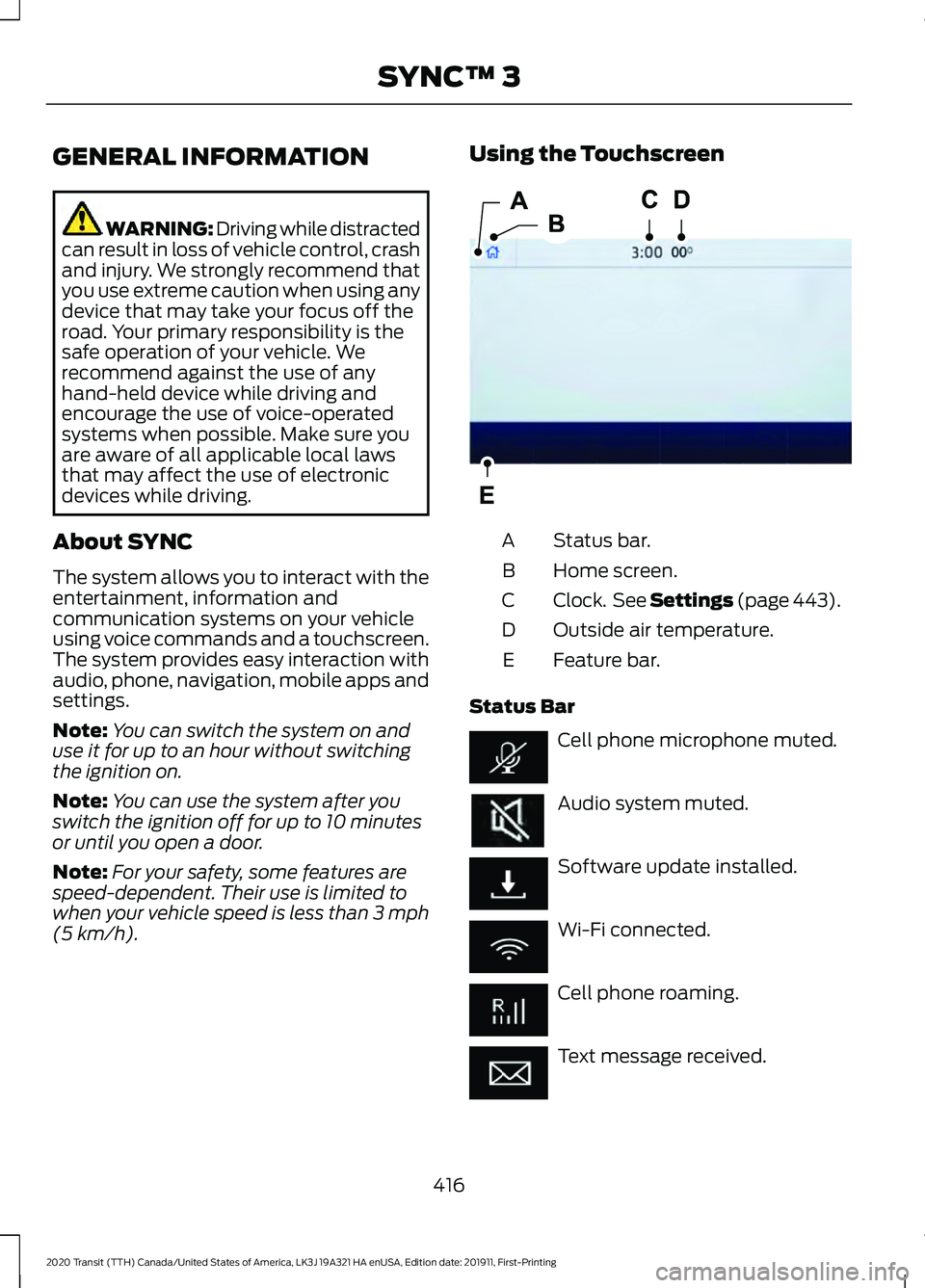
(5 km/h). Using the Touchscreen
Status bar.
A
Home screen.
B
Clock. See Settings (page 443).
C
Outside air temperature.
D
Feature bar.
E
Status Bar Cell phone microphone muted.
Audio system muted.
Software update installed.
Wi-Fi connected.
Cell phone roaming.
Text message received.
416
2020 Transit (TTH) Canada/United States of America, LK3J 19A321 HA enUSA, Edition date: 201911, First-Printing SYNC™ 3E293823
Page 437 of 529
Supported USB file systems include: FAT,
exFAT, and NTFS.
SYNC 3 is also able to organize the media
from your USB device by metadata tags.
Metadata tags, which are descriptive
software identifiers embedded in the
media files, provide information about the
file.
If your indexed media files contain no
information embedded in these metadata
tags, SYNC 3 may classify the empty
metadata tags as unknown.
SYNC 3 is capable of indexing up to
50,000 songs per USB device, for up to 10
devices.
PHONE
WARNING: Driving while distracted
can result in loss of vehicle control, crash
and injury. We strongly recommend that
you use extreme caution when using any
device that may take your focus off the
road. Your primary responsibility is the
safe operation of your vehicle. We
recommend against the use of any
hand-held device while driving and
encourage the use of voice-operated
systems when possible. Make sure you
are aware of all applicable local laws
that may affect the use of electronic
devices while driving.
Check the compatibility of your device on
the regional website.
Pairing Your Cell Phone for the
First Time
Go to the settings menu on your cell phone
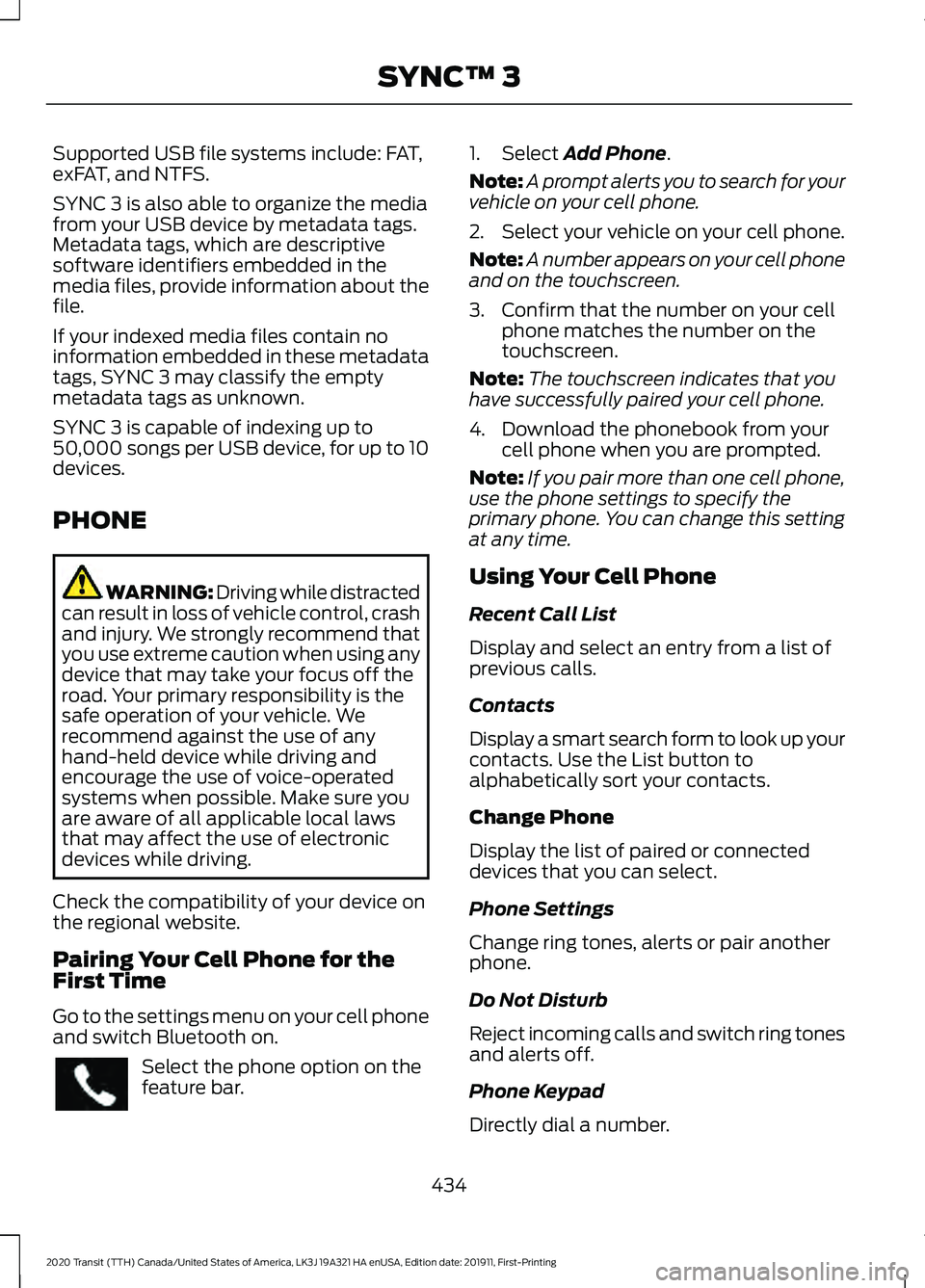
and switch Bluetooth on. Select the phone option on the
feature bar. 1. Select Add Phone.
Note: A prompt alerts you to search for your
vehicle on your cell phone.
2. Select your vehicle on your cell phone.
Note: A number appears on your cell phone
and on the touchscreen.
3. Confirm that the number on your cell phone matches the number on the
touchscreen.
Note: The touchscreen indicates that you
have successfully paired your cell phone.
4. Download the phonebook from your cell phone when you are prompted.
Note: If you pair more than one cell phone,
use the phone settings to specify the
primary phone. You can change this setting
at any time.
Using Your Cell Phone
Recent Call List
Display and select an entry from a list of
previous calls.
Contacts
Display a smart search form to look up your
contacts. Use the List button to
alphabetically sort your contacts.
Change Phone
Display the list of paired or connected
devices that you can select.
Phone Settings
Change ring tones, alerts or pair another
phone.
Do Not Disturb
Reject incoming calls and switch ring tones
and alerts off.
Phone Keypad
Directly dial a number.
434
2020 Transit (TTH) Canada/United States of America, LK3J 19A321 HA enUSA, Edition date: 201911, First-Printing SYNC™ 3
Page 445 of 529
Note:
If you close the apps on your device,
you will not be able to use them through the
system.
5. Select the app that you want to use on
the touchscreen.
Note: Connect your device to a USB port if
you want to use a navigation app. When
using a navigation app, keep your device
unlocked and the app open.
Using Apps on an Android Device Select the apps option on the
feature bar.
1. If your device is connected via USB, switch Android Auto off. See Phone
(page 434).
2. Pair your device. See Phone (page 434).
3. Start the apps on your device that you want to use through SYNC.
Note: If you close the apps on your device,
you will not be able to use them through the
system.
4. Select
Find Mobile Apps.
Note: The system searches and connects
to compatible apps that are running on your
device.
5. Select the app that you want to use on
the touchscreen.
Note: Mobile Apps on your device use the
USB port to establish a connection with
SYNC. Some devices may lose the ability to
play music over USB when Mobile Apps are
enabled.
Using Mobile Navigation on an
Android Device
1. Connect your device to a USB port.
2. Switch Android Auto off. See
Phone
(page 434).
3. Switch on
Enable Mobile Apps via
USB in the Mobile Apps Settings tile. 4. Select the apps option on the feature
bar.
5. Select the navigation app that you want to use on the touchscreen.
Note: When using a navigation app, keep
your device unlocked and the app open.
SiriusXM Traffic and Travel Link (If
Equipped) WARNING: Driving while distracted
can result in loss of vehicle control, crash
and injury. We strongly recommend that
you use extreme caution when using any
device that may take your focus off the
road. Your primary responsibility is the
safe operation of your vehicle. We
recommend against the use of any
hand-held device while driving and
encourage the use of voice-operated
systems when possible. Make sure you
are aware of all applicable local laws
that may affect the use of electronic
devices while driving.
Note: SiriusXM Traffic and Travel Link may
not be available in all markets.
Note: In order to use SiriusXM Traffic and
Travel Link, your vehicle must have
navigation.
Note: A paid subscription is required to
access and use these features. Go to
www.siriusxm.com/travellink for more
information.
Note: Visit www.siriusxm.com/traffic and
click on Coverage map and details for a
complete listing of all traffic areas covered
by SiriusXM Traffic and Travel Link.
Note: Neither Sirius nor Ford is responsible
for any errors or inaccuracies in the SiriusXM
Traffic and Travel Link services or its use in
vehicles.
442
2020 Transit (TTH) Canada/United States of America, LK3J 19A321 HA enUSA, Edition date: 201911, First-Printing SYNC™ 3
Page 467 of 529
Check every six months
Battery connections. Clean if necessary.
Body and door drain holes for obstruc-
tions. Clean if necessary.
Cooling system fluid level and coolant
strength.
Door weatherstrips for wear. Lubricate if
necessary.
Front door check arms for correct opera-
tion.
Hinges, latches and outside locks for
correct operation. Lubricate if necessary.
Parking brake for correct operation.
Seatbelts and seat latches for wear and
function.
Safety warning lamps (brake, ABS, airbag
and seatbelt) for operation.
Washer spray and wiper operation. Clean
or replace blades as necessary.
Multi-point Inspection
In order to keep your vehicle running
correctly, it is important to have the
systems on your vehicle checked regularly.
This can help identify potential issues and
prevent major problems. We recommend
having the following multi-point inspection
performed at every scheduled
maintenance interval to help make sure
your vehicle keeps running correctly. Multi-point inspection
Accessory drive belt(s).
Battery performance.
Engine air filter. Multi-point inspection
Exhaust system.
Exterior lamps and hazard warning
system operation.
Fluid levels *
; fill if necessary.
For oil and fluid leaks.
Horn operation.
Radiator, cooler, heater and A/C hoses.
Suspension component for leaks or
damage.
Steering and linkage.
Tires (including spare) for wear and
correct pressure **
.
Windshield for cracks, chips or pits.
Washer spray and wiper operation.
* Brake, coolant recovery reservoir,
automatic transmission, power steering (if
equipped with hydraulic power assist
steering) and window washer.
** If your vehicle is equipped with a
temporary mobility kit, check the tire
sealant expiration Use By date on the
canister. Replace as needed.
Be sure to ask your dealership service
advisor or technician about the multi-point
vehicle inspection. It is a comprehensive
way to perform a thorough inspection of
your vehicle. Your checklist gives you
immediate feedback on the overall
condition of your vehicle.
464
2020 Transit (TTH) Canada/United States of America, LK3J 19A321 HA enUSA, Edition date: 201911, First-Printing Scheduled Maintenance
Page 470 of 529
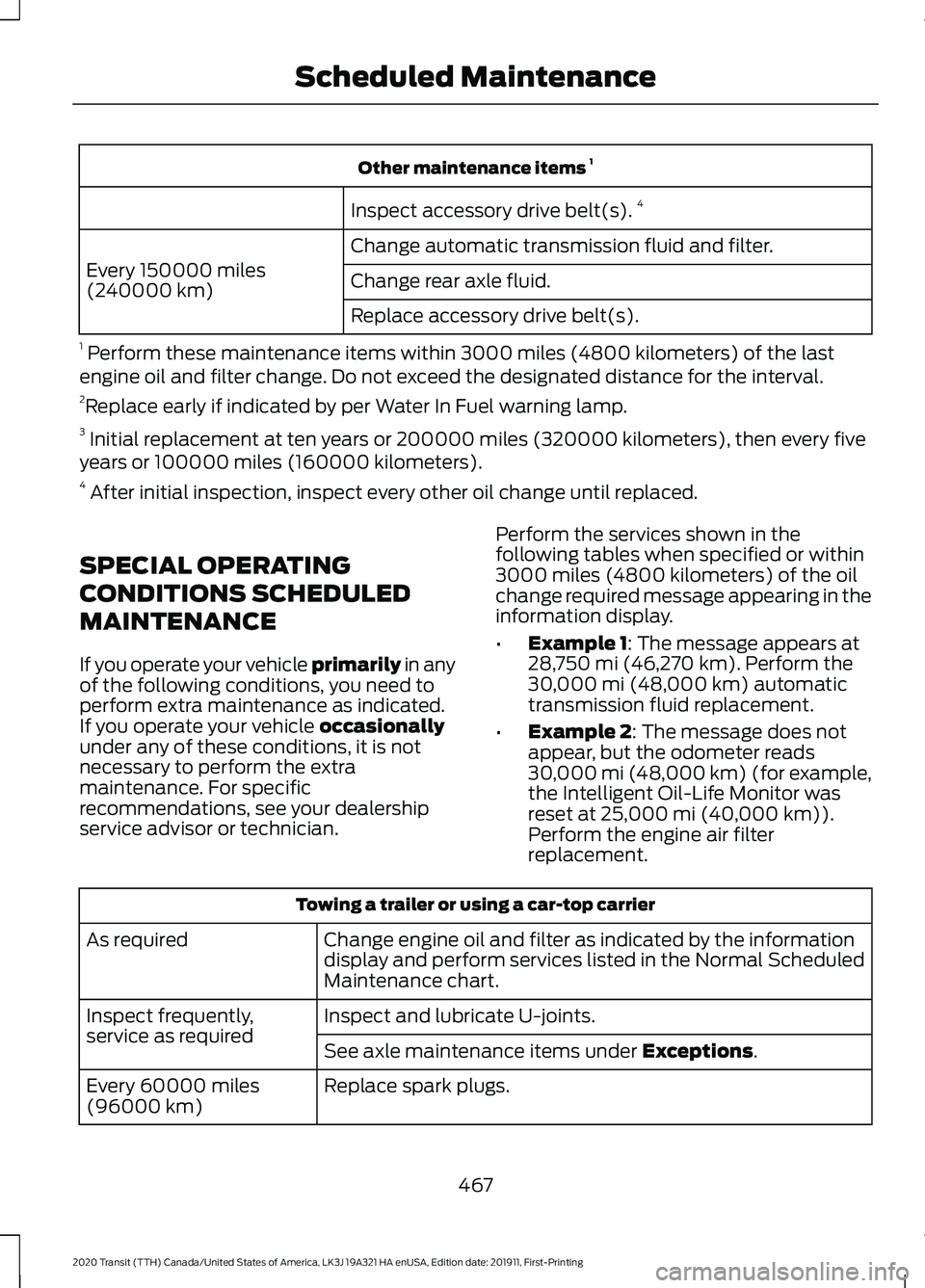
Other maintenance items
1
Inspect accessory drive belt(s). 4
Change automatic transmission fluid and filter.
Every 150000 miles
(240000 km) Change rear axle fluid.
Replace accessory drive belt(s).
1 Perform these maintenance items within 3000 miles (4800 kilometers) of the last
engine oil and filter change. Do not exceed the designated distance for the interval.
2 Replace early if indicated by per Water In Fuel warning lamp.
3 Initial replacement at ten years or 200000 miles (320000 kilometers), then every five
years or 100000 miles (160000 kilometers).
4 After initial inspection, inspect every other oil change until replaced.
SPECIAL OPERATING
CONDITIONS SCHEDULED
MAINTENANCE
If you operate your vehicle primarily in any
of the following conditions, you need to
perform extra maintenance as indicated.
If you operate your vehicle
occasionally
under any of these conditions, it is not
necessary to perform the extra
maintenance. For specific
recommendations, see your dealership
service advisor or technician. Perform the services shown in the
following tables when specified or within
3000 miles (4800 kilometers) of the oil
change required message appearing in the
information display.
•
Example 1
: The message appears at
28,750 mi (46,270 km). Perform the
30,000 mi (48,000 km) automatic
transmission fluid replacement.
• Example 2
: The message does not
appear, but the odometer reads
30,000 mi (48,000 km) (for example,
the Intelligent Oil-Life Monitor was
reset at
25,000 mi (40,000 km)).
Perform the engine air filter
replacement. Towing a trailer or using a car-top carrier
Change engine oil and filter as indicated by the information
display and perform services listed in the Normal Scheduled
Maintenance chart.
As required
Inspect and lubricate U-joints.
Inspect frequently,
service as required
See axle maintenance items under
Exceptions.
Replace spark plugs.
Every 60000 miles
(96000 km)
467
2020 Transit (TTH) Canada/United States of America, LK3J 19A321 HA enUSA, Edition date: 201911, First-Printing Scheduled Maintenance
Page 483 of 529
ELECTROMAGNETIC
COMPATIBILITY
WARNING: Do not place objects
or mount equipment on or near the
airbag cover, on the side of the front or
rear seatbacks, or in areas that may
come into contact with a deploying
airbag. Failure to follow these
instructions may increase the risk of
personal injury in the event of a crash. WARNING: Do not fasten antenna
cables to vehicle wiring, fuel pipes and
brake pipes. WARNING:
Keep antenna and
power cables at least 4 in (10 cm) from
any electronic modules and airbags. Note:
We test and certify your vehicle to
meet electromagnetic compatibility
legislation. It is your responsibility to make
sure that any equipment an authorized
dealer installs on your vehicle complies with
applicable local legislation and other
requirements. Installation of some
aftermarket electronic devices could
degrade the performance of vehicle
functions, which use radio frequency signals
such as broadcast radio receiver, tire
pressure monitoring system, push button
start, Bluetooth connectivity or satellite
navigation.
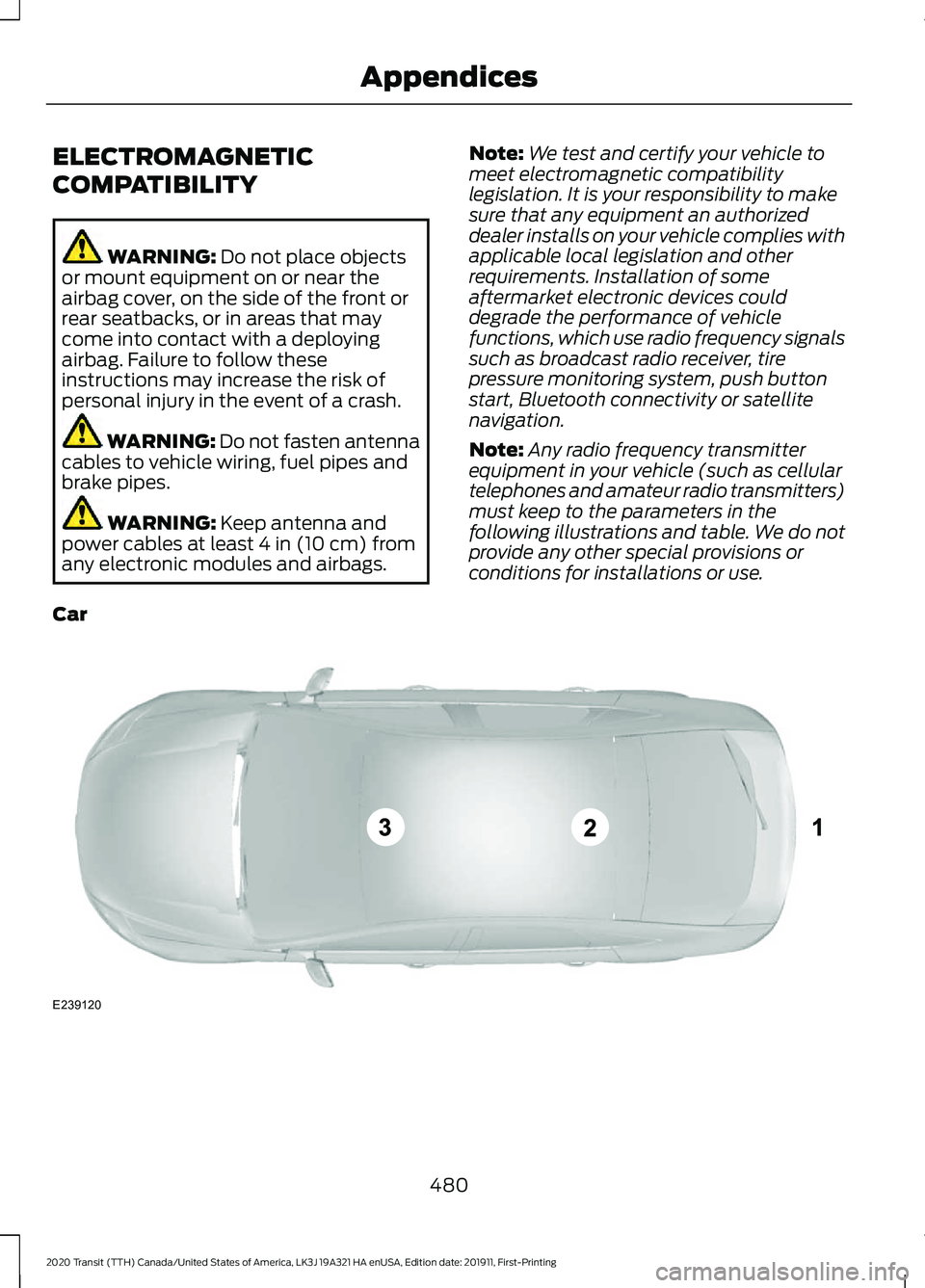
Note: Any radio frequency transmitter
equipment in your vehicle (such as cellular
telephones and amateur radio transmitters)
must keep to the parameters in the
following illustrations and table. We do not
provide any other special provisions or
conditions for installations or use.
Car 480
2020 Transit (TTH) Canada/United States of America, LK3J 19A321 HA enUSA, Edition date: 201911, First-Printing AppendicesE239120
Page 498 of 529
HERE holds a non-exclusive license from
the United States Postal Service® to
publish and sell ZIP+4® information.
©United States Postal Service® 2014.
Prices are not established, controlled or
approved by the United States Postal
Service®. The following trademarks and
registrations are owned by the USPS:
United States Postal Service, USPS, and
ZIP+4
The Data for Mexico includes certain data
from Instituto Nacional de Estadística y
Geografía.
9.2 End User Terms Required by NAV2
(Shanghai) Co., Ltd
The data (“Data
”) is provided for your
personal, internal use only and not for
resale. It is protected by copyright, and is
subject to the following terms and
conditions which are agreed to by you, on
the one hand, and NAV2 (Shanghai) Co.,
Ltd (“NAV2”) and its licensors (including
their licensors and suppliers) on the other
hand. 20xx. All rights reserved
Terms and Conditions
Permitted Use. You agree to use this Data
together with the Telenav Software solely
for the internal business and personal
purposes for which you were licensed, and
not for service bureau, time-sharing or
other similar purposes. Accordingly, but
subject to the restrictions set forth in the
following paragraphs, you agree not to
otherwise reproduce, copy, modify,
decompile, disassemble, create any
derivative works of, or reverse engineer any
portion of this Data, and may not transfer
or distribute it in any form, for any purpose,
except to the extent permitted by
mandatory laws. Restrictions. Except where you have been
specifically licensed to do so by Telenav,
and without limiting the preceding
paragraph, you may not use this Data (a)
with any products, systems, or applications
installed or otherwise connected to or in
communication with vehicles, capable of
vehicle navigation, positioning, dispatch,
real time route guidance, fleet
management or similar applications; or (b)
with or in communication with any
positioning devices or any mobile or
wireless-connected electronic or computer
devices, including without limitation
cellular phones, palmtop and handheld
computers, pagers, and personal digital
assistants or PDAs.
Warning. The Data may contain
inaccurate or incomplete information due
to the passage of time, changing
circumstances, sources used and the
nature of collecting comprehensive
geographic data, any of which may lead to
incorrect results.
No Warranty.
This Data is provided to you
“ as is, ” and you agree to use it at your own
risk. Telenav and its licensors (and their
licensors and suppliers) make no
guarantees, representations or warranties
of any kind, express or implied, arising by
law or otherwise, including but not limited
to, content, quality, accuracy,
completeness, effectiveness, reliability,
fitness for a particular purpose, usefulness,
use or results to be obtained from this
Data, or that the Data or server will be
uninterrupted or error-free.
Disclaimer of Warranty:
TELENAV AND
ITS LICENSORS (INCLUDING THEIR
LICENSORS AND SUPPLIERS) DISCLAIM
ANY WARRANTIES, EXPRESS OR IMPLIED,
OF QUALITY, PERFORMANCE,
MERCHANTABILITY, FITNESS FOR A
495
2020 Transit (TTH) Canada/United States of America, LK3J 19A321 HA enUSA, Edition date: 201911, First-Printing Appendices
Page 511 of 529

Services even if Intelematics or a Supplier
has been advised of the possibility of such
damages. You also acknowledge that the
neither Intelematics nor any Supplier
guarantees nor make any warranties that
relate to the availability, accuracy or
completeness of SUNA Products and/or
Services, and to the extent which it is
lawful to do so, both Intelematics and each
Supplier excludes any warranties which
might otherwise be implied by any State
or Federal legislation in relation to SUNA
Products and/or Services.
7. Please Note
Great care has been taken in preparing this
manual. Constant product development
may mean that some information is not
entirely up-to-date. The information in this
document is subject to change without
notice.
DECLARATION OF CONFORMITY
Radio Frequency Statement IC Identification Number
FCC Identification Number
SYNC Version
216B-SYNCG3-L
ACJ-SYNCG3-L
3.0
216B-FA170BCARHS
ACJ-FA-170-BCARHS
3.1
216B-FG185SG32MH
ACJ-FG-185-SG32MH
3.2 WARNING: Changes or
modifications not expressively approved
by the party responsible for compliance
could void the user's authority to operate
the equipment. The term "IC:" before the
radio certification number only signifies
that Industry Canada technical
specifications were met.
These devices comply with Part 15 of the
FCC Rules and with RSS-210 of Industry
Canada. Operation is subject to the
following two conditions:
1. The device does not cause harmful interference.
2. The device accepts any interference received, including interference that
could cause undesired operation.
508
2020 Transit (TTH) Canada/United States of America, LK3J 19A321 HA enUSA, Edition date: 201911, First-Printing Appendices
Page 513 of 529
Scrolling Through the Menu Options.........394
Seek Down and Previous Track
Button............................................................... 395
Seek Up and Next Track Button.................. 394
Selecting a Menu Option................................ 394
Selecting Media................................................. 394
Selecting the Radio........................................... 393
Sound Settings................................................... 395
Switching the Audio Unit On and Off........393
Switching the Screen On and Off...............395
System Settings................................................. 395
Using a Cell Phone............................................ 395
Autolamps......................................................102 Adjusting the Period of Time That the
Headlamps Remain On............................... 103
Automatic High Beam Control................104 Automatic High Beam Control Information
Messages.......................................................... 105
Automatic High Beam Indicator................... 105
Overriding Automatic High Beam Control............................................................... 105
Switching Automatic High Beam Control On or Off........................................................... 105
Automatic Transmission............................173 Automatic Transmission Information
Messages........................................................... 175
Brake Shift Interlock........................................... 174
Progressive Range Selection.......................... 173
Selector Lever Positions................................... 173
SelectShift™........................................................ 173
Transmission Not in Park (P) Audible Warning.............................................................. 175
Automatic Transmission Fluid Check............................................................302
Auto-Start-Stop...........................................149 Auto-Start-Stop – Troubleshooting...........150
Auto-Start-Stop Indicators......................150
Auto-Start-Stop Precautions..................149
Auto-Start-Stop – Troubleshooting.........................................150
Auto-Start-Stop – Frequently Asked Questions ........................................................... 151
Auto-Start-Stop – Information Messages.......................................................... 150
Autowipers.......................................................98 Settings................................................................... 99
Auxiliary Heater
.............................................124
Principle of Operation....................................... 124Using the Auxiliary Heater...............................
124
Auxiliary Power Points................................138 110 Volt - 150 Watt Capacity AC Power
Outlet................................................................. 138
110 Volt - 400 Watt Capacity AC Power Outlet................................................................. 139
Auxiliary Switches.......................................459
AWD See: All-Wheel Drive.......................................... 177
B
Battery See: Changing the 12V Battery..................... 303
Blind Spot Information System.............220 Blind Spot Information System
Indicator............................................................ 222
Blind Spot Information System Information Messages......................................................... 224
Blind Spot Information System Sensors.............................................................. 221
Blind Spot Information System Warning Lamp.................................................................. 223
Blind Spot Information System with Trailer Tow..................................................................... 222
Switching the Blind Spot Information System On and Off........................................ 221
Using the Blind Spot Information System............................................................... 221
BLIS See: Blind Spot Information System..........220
Body Styling Kits..........................................323
Bonnet Lock See: Opening and Closing the Hood..........288
Booster Seats
..................................................38
Types of Booster Seats...................................... 39
Bottle Holders.................................................141
Brake Fluid Check
........................................302
Brakes...............................................................182 General Information.......................................... 182
Breaking-In.....................................................255
Bulb Specification Chart..........................386
C
Capacities and Specifications - 2.0L EcoBlue.........................................................370
Air Conditioning System.................................. 370
510
2020 Transit (TTH) Canada/United States of America, LK3J 19A321 HA enUSA, Edition date: 201911, First-Printing Index
Page 516 of 529
Diesel Particulate Filter Manual
Regeneration................................................... 170
On-Board Diagnostics System..................... 168
Direction Indicators.....................................106 Direction Indicator............................................. 106
Switching the Direction Indicators On and Off....................................................................... 106
Doors and Locks..............................................77
Draining the Fuel Filter Water Trap - Diesel.............................................................297
Draining the Fuel Filter Water Trap..............297
Drive Belt Routing - 2.0L EcoBlue...........313
Drive Belt Routing - 3.5L Duratec/3.5L Ecoboost™, Vehicles With: Dual
Generators....................................................314
Drive Belt Routing - 3.5L Duratec/3.5L Ecoboost™, Vehicles With: Single
Generator......................................................314
Drive Control..................................................234 Selectable Drive Modes.................................. 234
Selectable Drive Modes Information Messages......................................................... 235
Driver Alert.......................................................214
Driver Alert System Display............................. 215
Driver Alert System Messages........................ 217
Driver Alert System Warnings........................ 215
Switching Driver Alert On or Off.................... 216
Driver and Passenger Airbags....................52 Children and Airbags........................................... 57
Passenger Airbag On and Off Switch ..........52
Proper Driver and Front Passenger Seating Adjustment........................................................ 57
Driving Aids
.....................................................214
Driving Hints..................................................254
Driving Through Water...............................255
DRL See: Daytime Running Lamps....................... 103
E
Eco
.....................................................................227
Eco Mode............................................................... 227
Efficient Drive Mode......................................... 228
Economical Driving
.....................................254
Electromagnetic Compatibility.............480
Emergency Call Limitations.......................63
Emergency Call Requirements.................62
Emergency Exit.............................................258 Emission Law
.................................................162
Noise Emissions Warranty, Prohibited
Tampering Acts and Maintenance..........163
Tampering With a Noise Control System............................................................... 162
End User License Agreement.................483 VEHICLE SOFTWARE END USER LICENSE
AGREEMENT (EULA) ................................ 483
Engine Block Heater.....................................147 Using the Engine Block Heater...................... 148
Engine Coolant Check...............................298 Adding Coolant.................................................. 298
Coolant Change................................................. 300
Engine Coolant Temperature Management................................................... 301
Fail-Safe Cooling.............................................. 300
Recycled Coolant.............................................. 300
Severe Climates................................................ 300
Engine Cooling Fan - Diesel.....................298
Engine Cooling Fan - Gasoline
...............298
Engine Emission Control............................162
Engine Immobilizer See: Passive Anti-Theft System - Vehicles
With: Passive Anti-Theft System
(PATS)................................................................ 90
Engine Oil Check
..........................................293
Adding Engine Oil.............................................. 294
Engine Oil Pressure Warning Lamp............294
Engine Oil Dipstick - 2.0L EcoBlue........293
Engine Oil Dipstick - 3.5L Duratec.........293
Engine Oil Dipstick - 3.5L Ecoboost™.................................................293
Engine Specifications - 2.0L EcoBlue........................................................362
Engine Specifications - 3.5L Duratec.........................................................363
Engine Specifications - 3.5L Ecoboost™.................................................364
Entertainment..............................................
424
AM/FM Radio...................................................... 425
Apps........................................................................\
433
Bluetooth Stereo or USB................................ 432
CD (If equipped)................................................. 431
HD Radio ™ Information (If
Available)........................................................ 428
SiriusXM® Satellite Radio (If Activated)........................................................ 426
Sources.................................................................. 425
513
2020 Transit (TTH) Canada/United States of America, LK3J 19A321 HA enUSA, Edition date: 201911, First-Printing Index