tires FORD TRANSIT 2020 Workshop Manual
[x] Cancel search | Manufacturer: FORD, Model Year: 2020, Model line: TRANSIT, Model: FORD TRANSIT 2020Pages: 529, PDF Size: 8.3 MB
Page 361 of 529
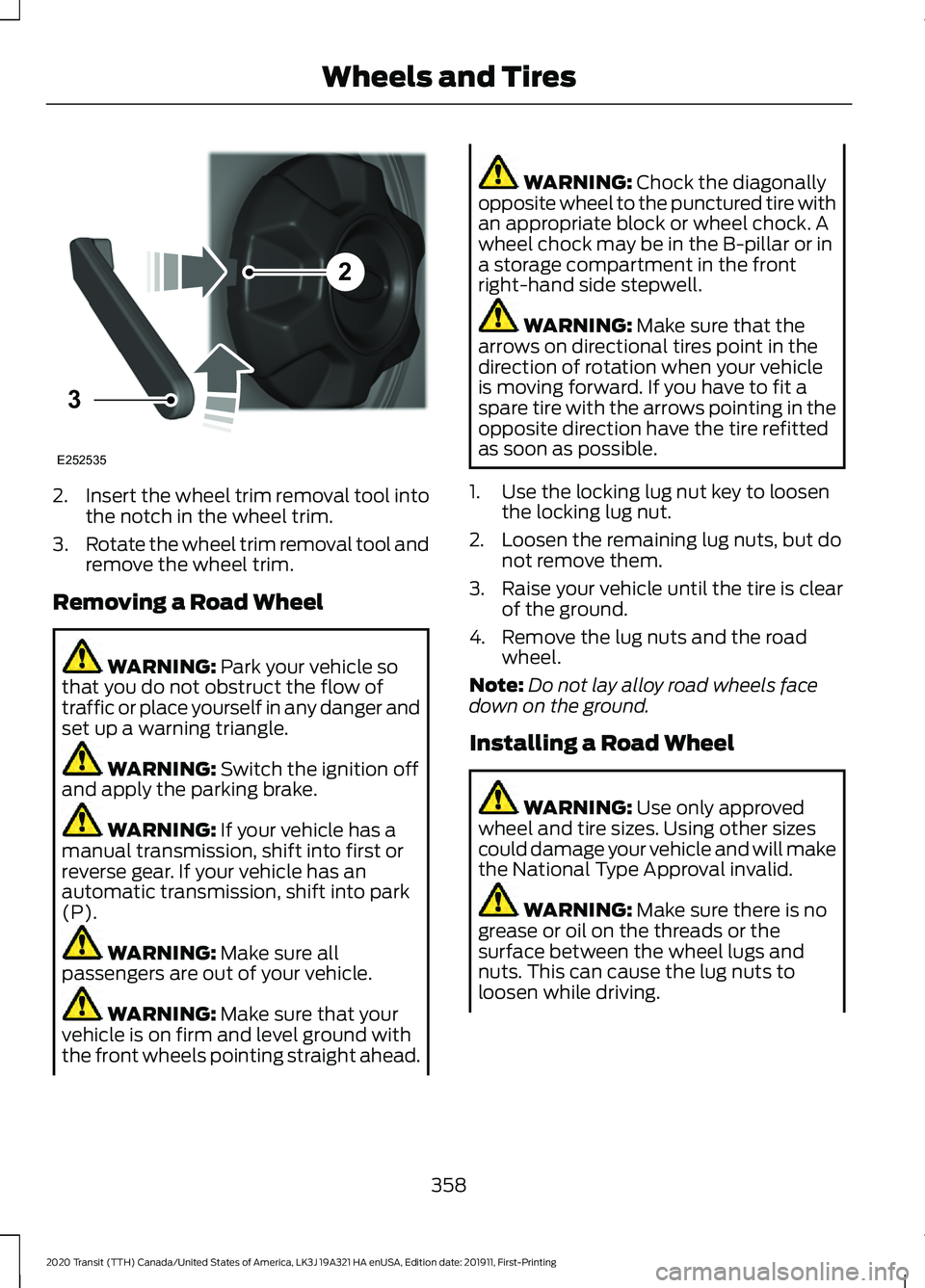
2.
Insert the wheel trim removal tool into
the notch in the wheel trim.
3. Rotate the wheel trim removal tool and
remove the wheel trim.
Removing a Road Wheel WARNING: Park your vehicle so
that you do not obstruct the flow of
traffic or place yourself in any danger and
set up a warning triangle. WARNING:
Switch the ignition off
and apply the parking brake. WARNING:
If your vehicle has a
manual transmission, shift into first or
reverse gear. If your vehicle has an
automatic transmission, shift into park
(P). WARNING:
Make sure all
passengers are out of your vehicle. WARNING:
Make sure that your
vehicle is on firm and level ground with
the front wheels pointing straight ahead. WARNING:
Chock the diagonally
opposite wheel to the punctured tire with
an appropriate block or wheel chock. A
wheel chock may be in the B-pillar or in
a storage compartment in the front
right-hand side stepwell. WARNING:
Make sure that the
arrows on directional tires point in the
direction of rotation when your vehicle
is moving forward. If you have to fit a
spare tire with the arrows pointing in the
opposite direction have the tire refitted
as soon as possible.
1. Use the locking lug nut key to loosen the locking lug nut.
2. Loosen the remaining lug nuts, but do not remove them.
3. Raise your vehicle until the tire is clear of the ground.
4. Remove the lug nuts and the road wheel.
Note: Do not lay alloy road wheels face
down on the ground.
Installing a Road Wheel WARNING:
Use only approved
wheel and tire sizes. Using other sizes
could damage your vehicle and will make
the National Type Approval invalid. WARNING:
Make sure there is no
grease or oil on the threads or the
surface between the wheel lugs and
nuts. This can cause the lug nuts to
loosen while driving.
358
2020 Transit (TTH) Canada/United States of America, LK3J 19A321 HA enUSA, Edition date: 201911, First-Printing Wheels and Tires2
3
E252535
Page 362 of 529
WARNING: When you install a
wheel, always remove any corrosion, dirt
or foreign materials present on the
mounting surfaces of the wheel or the
surface of the wheel hub, brake drum or
brake disc that contacts the wheel. Make
sure to secure any fasteners that attach
the rotor to the hub so they do not
interfere with the mounting surfaces of
the wheel. Installing wheels without
correct metal-to-metal contact at the
wheel mounting surfaces can cause the
wheel nuts to loosen and the wheel to
come off while your vehicle is in motion,
resulting in loss of vehicle control,
personal injury or death. WARNING:
Only use the specific
lug nuts and wheels supplied with your
vehicle. If in doubt, contact an authorized
dealer. WARNING:
Do not install alloy
wheels using lug nuts designed for use
with steel wheels. WARNING:
The lug nuts of alloy
wheels and spoked steel wheels can also
be used for the steel spare wheel for a
short time (maximum two weeks).
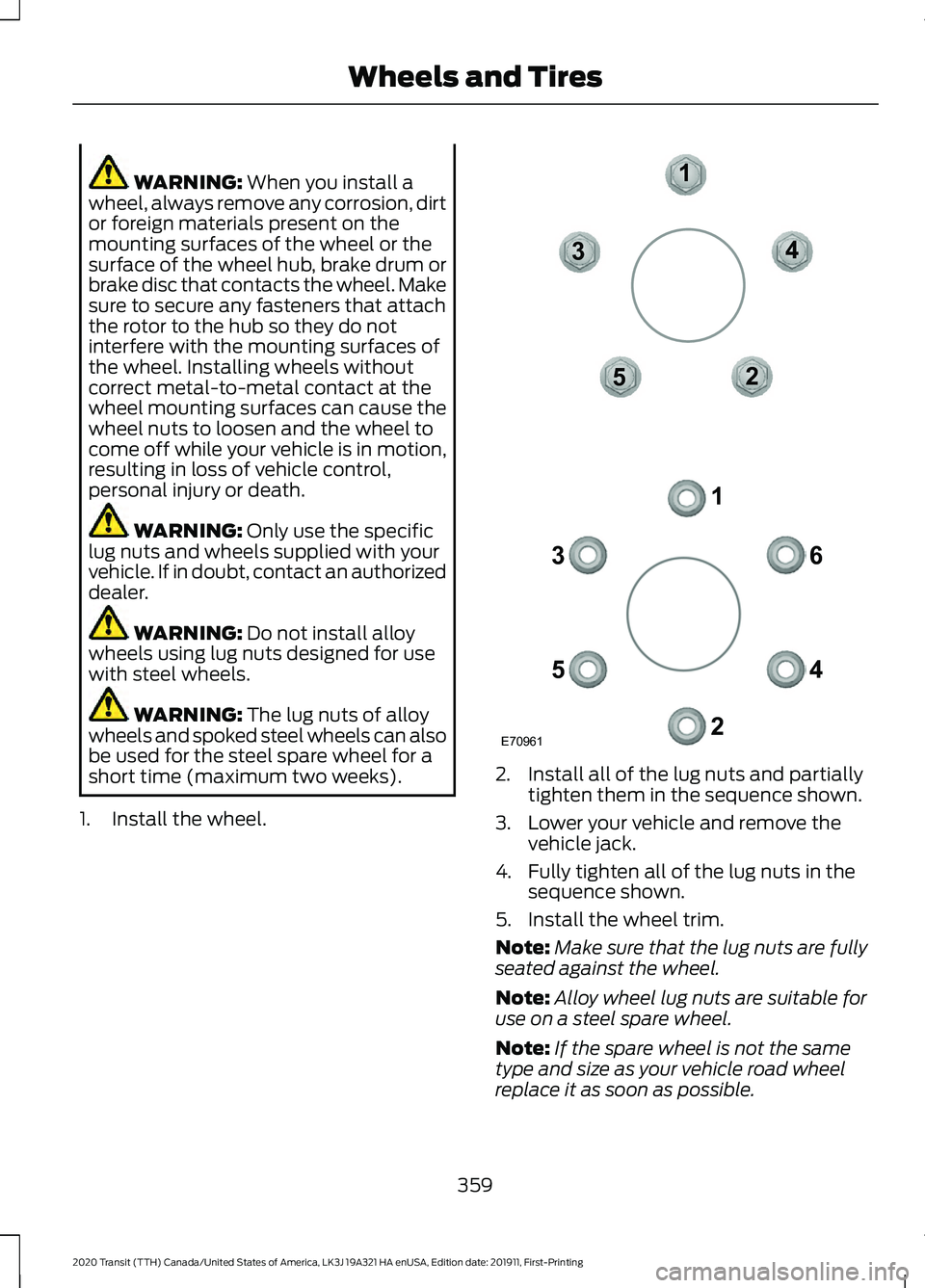
1. Install the wheel. 2. Install all of the lug nuts and partially
tighten them in the sequence shown.
3. Lower your vehicle and remove the vehicle jack.
4. Fully tighten all of the lug nuts in the sequence shown.
5. Install the wheel trim.
Note: Make sure that the lug nuts are fully
seated against the wheel.
Note: Alloy wheel lug nuts are suitable for
use on a steel spare wheel.
Note: If the spare wheel is not the same
type and size as your vehicle road wheel
replace it as soon as possible.
359
2020 Transit (TTH) Canada/United States of America, LK3J 19A321 HA enUSA, Edition date: 201911, First-Printing Wheels and TiresE70961
1
2
3
4
5 6
1
2
3
4
5
Page 363 of 529
Note:
Check the lug nuts for correct
tightness and check the tire pressure as
soon as possible. Note:
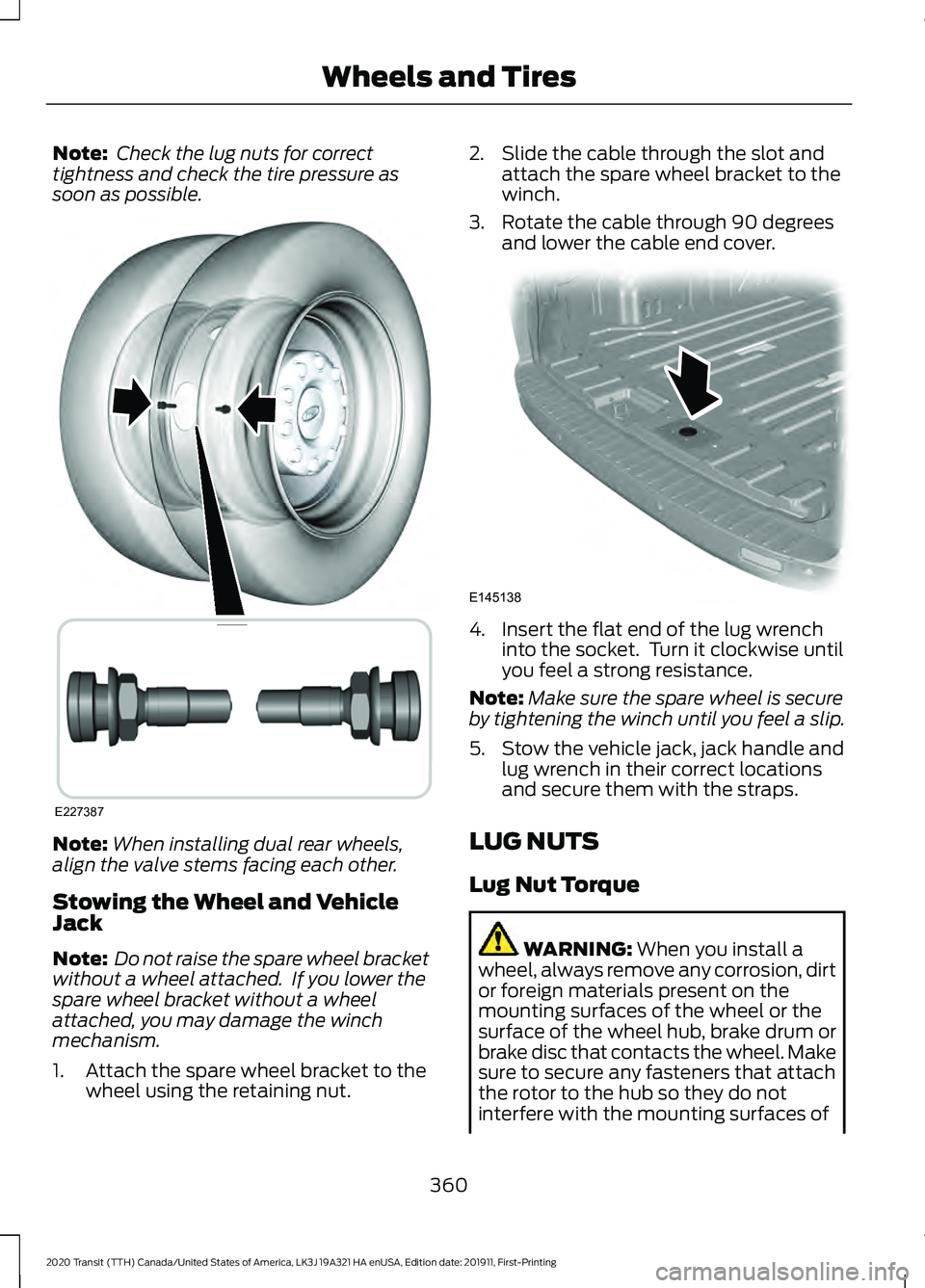
When installing dual rear wheels,
align the valve stems facing each other.
Stowing the Wheel and Vehicle
Jack
Note: Do not raise the spare wheel bracket
without a wheel attached. If you lower the
spare wheel bracket without a wheel
attached, you may damage the winch
mechanism.
1. Attach the spare wheel bracket to the wheel using the retaining nut. 2. Slide the cable through the slot and
attach the spare wheel bracket to the
winch.
3. Rotate the cable through 90 degrees and lower the cable end cover. 4. Insert the flat end of the lug wrench
into the socket. Turn it clockwise until
you feel a strong resistance.
Note: Make sure the spare wheel is secure
by tightening the winch until you feel a slip.
5. Stow the vehicle jack, jack handle and lug wrench in their correct locations
and secure them with the straps.
LUG NUTS
Lug Nut Torque WARNING: When you install a
wheel, always remove any corrosion, dirt
or foreign materials present on the
mounting surfaces of the wheel or the
surface of the wheel hub, brake drum or
brake disc that contacts the wheel. Make
sure to secure any fasteners that attach
the rotor to the hub so they do not
interfere with the mounting surfaces of
360
2020 Transit (TTH) Canada/United States of America, LK3J 19A321 HA enUSA, Edition date: 201911, First-Printing Wheels and TiresE227387 E145138
Page 364 of 529
the wheel. Installing wheels without
correct metal-to-metal contact at the
wheel mounting surfaces can cause the
wheel nuts to loosen and the wheel to
come off while your vehicle is in motion,
resulting in loss of vehicle control,
personal injury or death.
lb.ft (Nm)
Bolt size
150 (204)
M14 x 1.5
Locking Lug Nuts
You can obtain a replacement locking lug
nut key and replacement locking lug nuts
from an authorized dealer using the
reference number certificate.
361
2020 Transit (TTH) Canada/United States of America, LK3J 19A321 HA enUSA, Edition date: 201911, First-Printing Wheels and Tires
Page 466 of 529
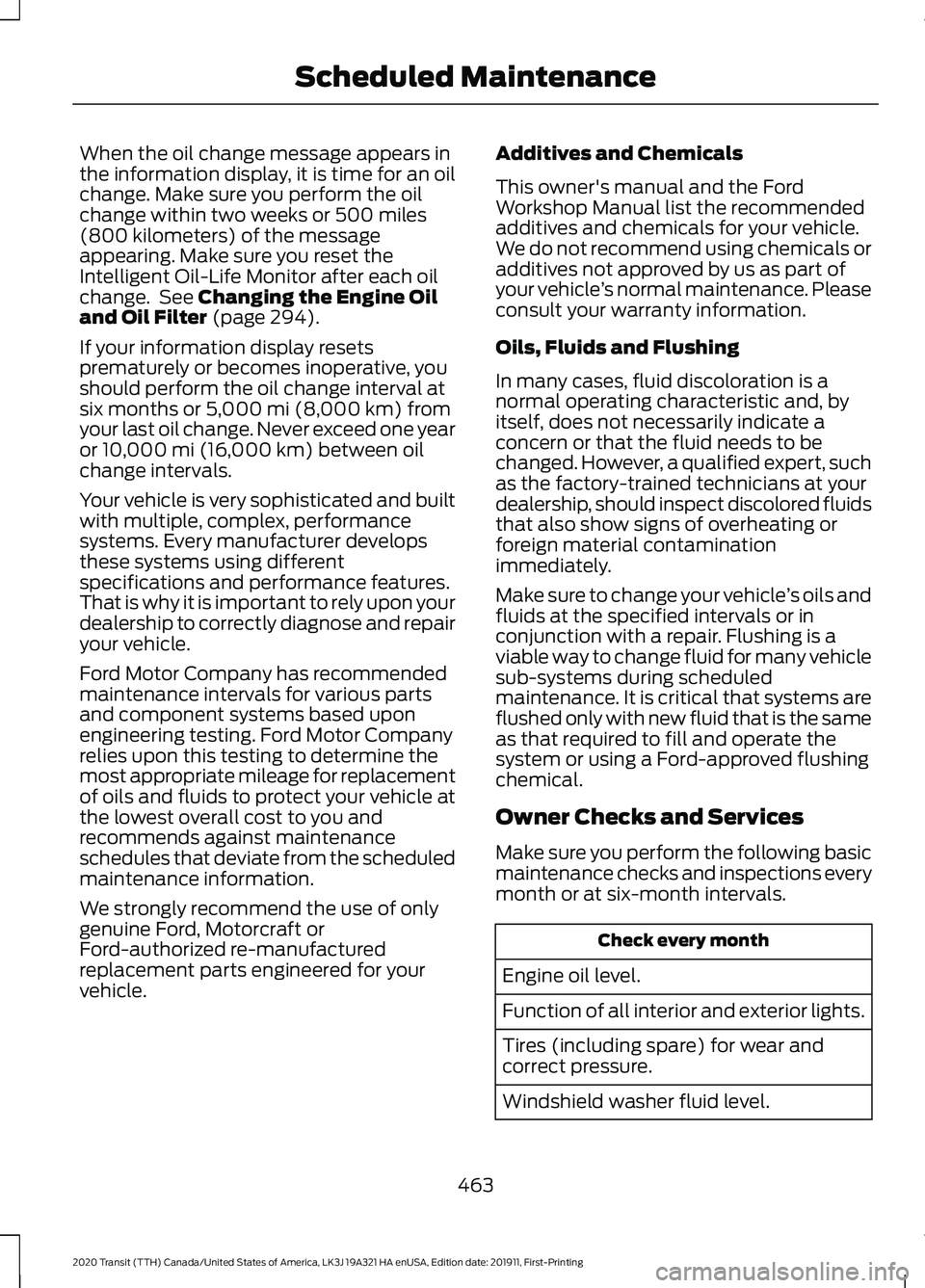
When the oil change message appears in
the information display, it is time for an oil
change. Make sure you perform the oil
change within two weeks or 500 miles
(800 kilometers) of the message
appearing. Make sure you reset the
Intelligent Oil-Life Monitor after each oil
change. See Changing the Engine Oil
and Oil Filter (page 294).
If your information display resets
prematurely or becomes inoperative, you
should perform the oil change interval at
six months or
5,000 mi (8,000 km) from
your last oil change. Never exceed one year
or
10,000 mi (16,000 km) between oil
change intervals.
Your vehicle is very sophisticated and built
with multiple, complex, performance
systems. Every manufacturer develops
these systems using different
specifications and performance features.
That is why it is important to rely upon your
dealership to correctly diagnose and repair
your vehicle.
Ford Motor Company has recommended
maintenance intervals for various parts
and component systems based upon
engineering testing. Ford Motor Company
relies upon this testing to determine the
most appropriate mileage for replacement
of oils and fluids to protect your vehicle at
the lowest overall cost to you and
recommends against maintenance
schedules that deviate from the scheduled
maintenance information.
We strongly recommend the use of only
genuine Ford, Motorcraft or
Ford-authorized re-manufactured
replacement parts engineered for your
vehicle. Additives and Chemicals
This owner's manual and the Ford
Workshop Manual list the recommended
additives and chemicals for your vehicle.
We do not recommend using chemicals or
additives not approved by us as part of
your vehicle
’s normal maintenance. Please
consult your warranty information.
Oils, Fluids and Flushing
In many cases, fluid discoloration is a
normal operating characteristic and, by
itself, does not necessarily indicate a
concern or that the fluid needs to be
changed. However, a qualified expert, such
as the factory-trained technicians at your
dealership, should inspect discolored fluids
that also show signs of overheating or
foreign material contamination
immediately.
Make sure to change your vehicle ’s oils and
fluids at the specified intervals or in
conjunction with a repair. Flushing is a
viable way to change fluid for many vehicle
sub-systems during scheduled
maintenance. It is critical that systems are
flushed only with new fluid that is the same
as that required to fill and operate the
system or using a Ford-approved flushing
chemical.
Owner Checks and Services
Make sure you perform the following basic
maintenance checks and inspections every
month or at six-month intervals. Check every month
Engine oil level.
Function of all interior and exterior lights.
Tires (including spare) for wear and
correct pressure.
Windshield washer fluid level.
463
2020 Transit (TTH) Canada/United States of America, LK3J 19A321 HA enUSA, Edition date: 201911, First-Printing Scheduled Maintenance
Page 467 of 529
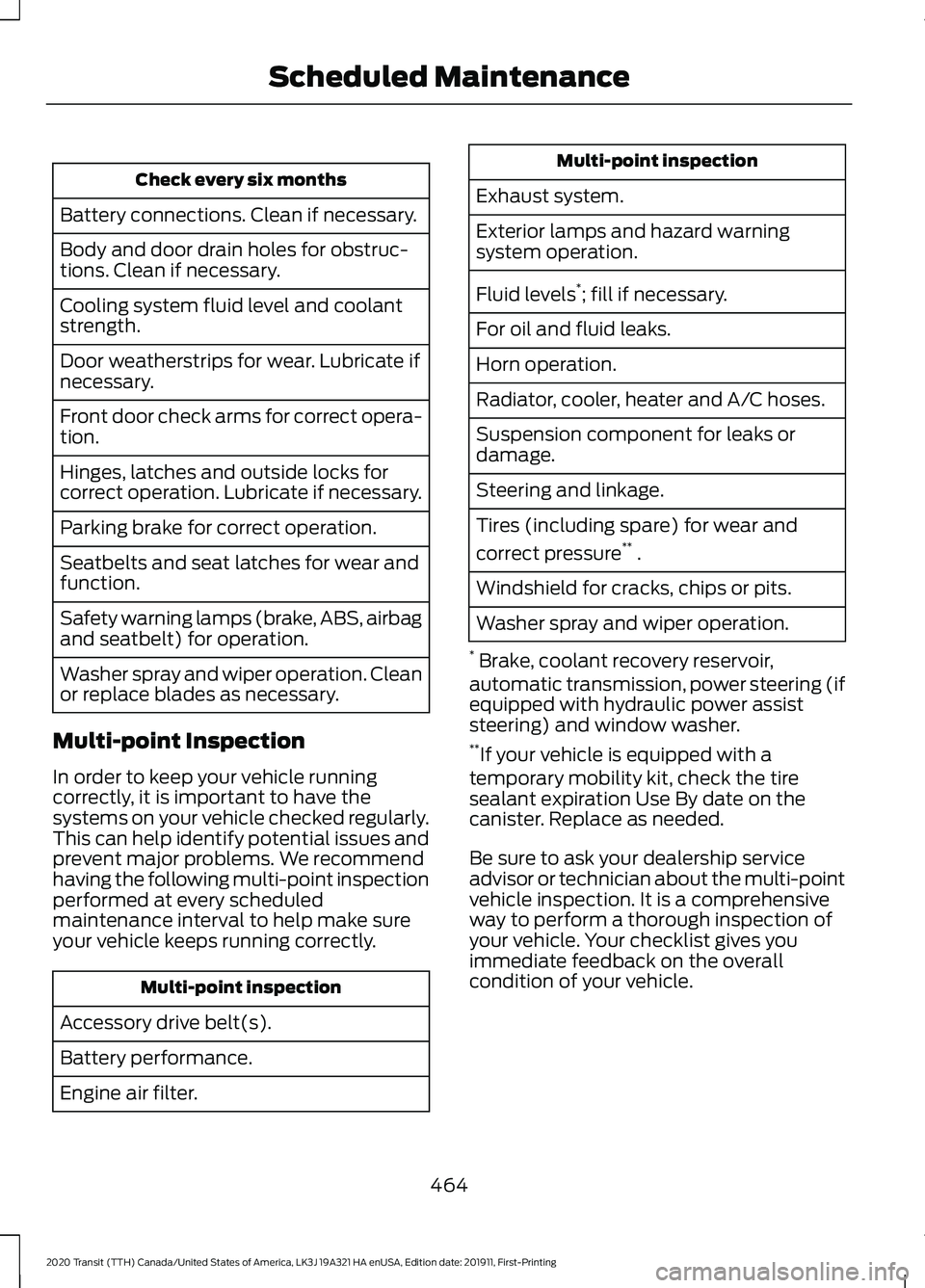
Check every six months
Battery connections. Clean if necessary.
Body and door drain holes for obstruc-
tions. Clean if necessary.
Cooling system fluid level and coolant
strength.
Door weatherstrips for wear. Lubricate if
necessary.
Front door check arms for correct opera-
tion.
Hinges, latches and outside locks for
correct operation. Lubricate if necessary.
Parking brake for correct operation.
Seatbelts and seat latches for wear and
function.
Safety warning lamps (brake, ABS, airbag
and seatbelt) for operation.
Washer spray and wiper operation. Clean
or replace blades as necessary.
Multi-point Inspection
In order to keep your vehicle running
correctly, it is important to have the
systems on your vehicle checked regularly.
This can help identify potential issues and
prevent major problems. We recommend
having the following multi-point inspection
performed at every scheduled
maintenance interval to help make sure
your vehicle keeps running correctly. Multi-point inspection
Accessory drive belt(s).
Battery performance.
Engine air filter. Multi-point inspection
Exhaust system.
Exterior lamps and hazard warning
system operation.
Fluid levels *
; fill if necessary.
For oil and fluid leaks.
Horn operation.
Radiator, cooler, heater and A/C hoses.
Suspension component for leaks or
damage.
Steering and linkage.
Tires (including spare) for wear and
correct pressure **
.
Windshield for cracks, chips or pits.
Washer spray and wiper operation.
* Brake, coolant recovery reservoir,
automatic transmission, power steering (if
equipped with hydraulic power assist
steering) and window washer.
** If your vehicle is equipped with a
temporary mobility kit, check the tire
sealant expiration Use By date on the
canister. Replace as needed.
Be sure to ask your dealership service
advisor or technician about the multi-point
vehicle inspection. It is a comprehensive
way to perform a thorough inspection of
your vehicle. Your checklist gives you
immediate feedback on the overall
condition of your vehicle.
464
2020 Transit (TTH) Canada/United States of America, LK3J 19A321 HA enUSA, Edition date: 201911, First-Printing Scheduled Maintenance
Page 468 of 529
NORMAL SCHEDULED
MAINTENANCE
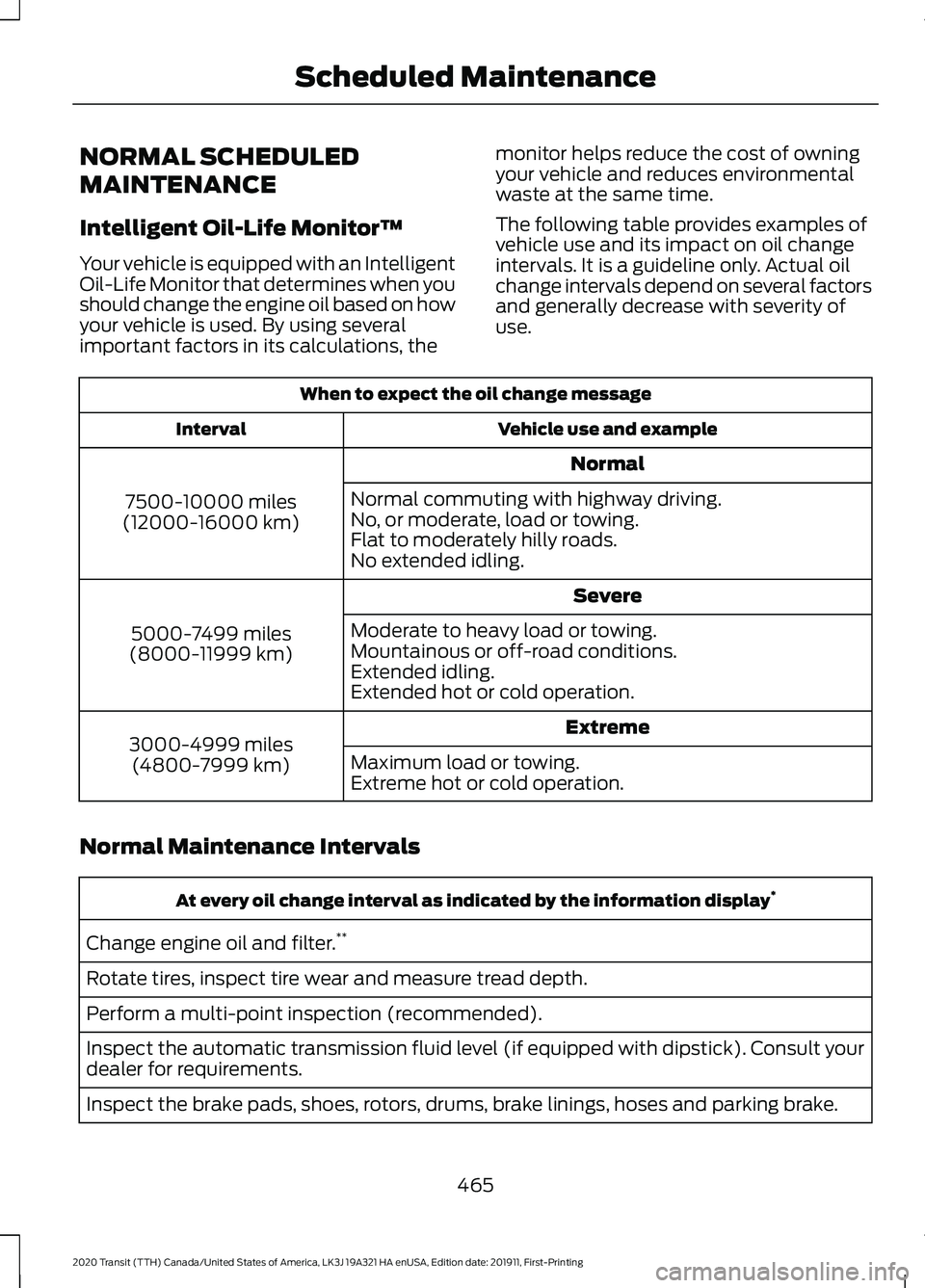
Intelligent Oil-Life Monitor™
Your vehicle is equipped with an Intelligent
Oil-Life Monitor that determines when you
should change the engine oil based on how
your vehicle is used. By using several
important factors in its calculations, the
monitor helps reduce the cost of owning
your vehicle and reduces environmental
waste at the same time.
The following table provides examples of
vehicle use and its impact on oil change
intervals. It is a guideline only. Actual oil
change intervals depend on several factors
and generally decrease with severity of
use.When to expect the oil change message
Vehicle use and example
Interval
Normal
7500-10000 miles
(12000-16000 km) Normal commuting with highway driving.
No, or moderate, load or towing.
Flat to moderately hilly roads.
No extended idling.
Severe
5000-7499 miles
(8000-11999 km) Moderate to heavy load or towing.
Mountainous or off-road conditions.
Extended idling.
Extended hot or cold operation.
Extreme
3000-4999 miles
(4800-7999 km) Maximum load or towing.
Extreme hot or cold operation.
Normal Maintenance Intervals At every oil change interval as indicated by the information display
*
Change engine oil and filter. **
Rotate tires, inspect tire wear and measure tread depth.
Perform a multi-point inspection (recommended).
Inspect the automatic transmission fluid level (if equipped with dipstick). Consult your
dealer for requirements.
Inspect the brake pads, shoes, rotors, drums, brake linings, hoses and parking brake.
465
2020 Transit (TTH) Canada/United States of America, LK3J 19A321 HA enUSA, Edition date: 201911, First-Printing Scheduled Maintenance
Page 471 of 529
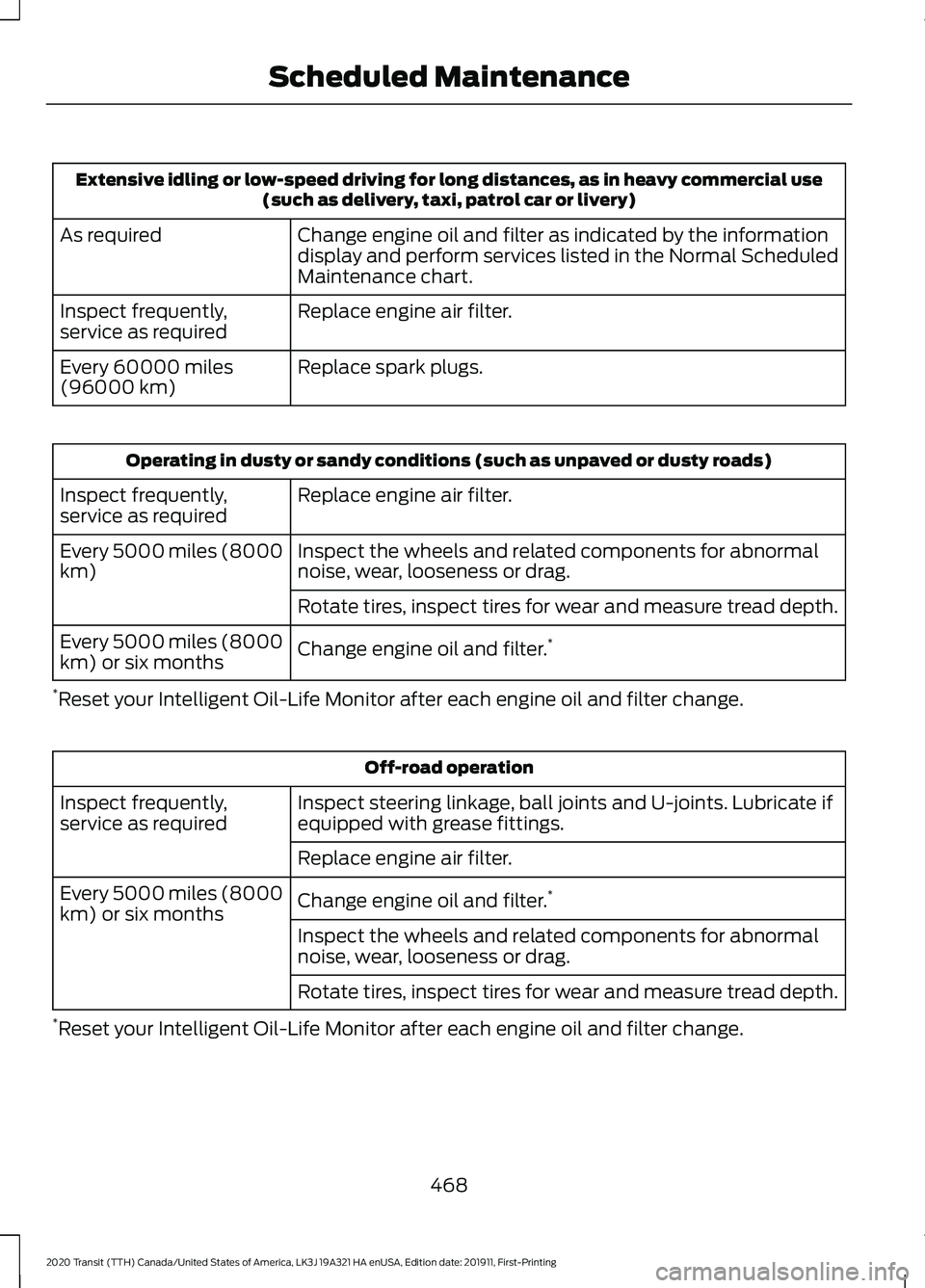
Extensive idling or low-speed driving for long distances, as in heavy commercial use
(such as delivery, taxi, patrol car or livery)
Change engine oil and filter as indicated by the information
display and perform services listed in the Normal Scheduled
Maintenance chart.
As required
Replace engine air filter.
Inspect frequently,
service as required
Replace spark plugs.
Every 60000 miles
(96000 km) Operating in dusty or sandy conditions (such as unpaved or dusty roads)
Replace engine air filter.
Inspect frequently,
service as required
Inspect the wheels and related components for abnormal
noise, wear, looseness or drag.
Every 5000 miles (8000
km)
Rotate tires, inspect tires for wear and measure tread depth.
Change engine oil and filter. *
Every 5000 miles (8000
km) or six months
* Reset your Intelligent Oil-Life Monitor after each engine oil and filter change. Off-road operation
Inspect steering linkage, ball joints and U-joints. Lubricate if
equipped with grease fittings.
Inspect frequently,
service as required
Replace engine air filter.
Change engine oil and filter. *
Every 5000 miles (8000
km) or six months
Inspect the wheels and related components for abnormal
noise, wear, looseness or drag.
Rotate tires, inspect tires for wear and measure tread depth.
* Reset your Intelligent Oil-Life Monitor after each engine oil and filter change.
468
2020 Transit (TTH) Canada/United States of America, LK3J 19A321 HA enUSA, Edition date: 201911, First-Printing Scheduled Maintenance
Page 524 of 529
Steering Information Messages...................
229
Steering Wheel................................................97
Stopping the Engine....................................149
Stopping the Sliding Door Movement.....................................................85
Storage Compartments
..............................141
Streaming Bluetooth Audio - Vehicles Without: SYNC...........................................397
Selecting a Bluetooth Source....................... 397
Supplementary Restraints System
..........51
Principle of Operation.......................................... 51
Switching Auto-Start-Stop On and Off...................................................................149
Switching Off the Engine...........................147 Vehicles With a Turbocharger........................ 147
Symbols Glossary
.............................................9
SYNC™ 3.........................................................416 General Information.......................................... 416
SYNC™ 3 Troubleshooting......................445 Additional Information and
Assistance....................................................... 457
Apps........................................................................\
452
Navigation............................................................. 451
Personal Profiles................................................ 455
Phone
.................................................................... 449
Resetting the System....................................... 457
USB and Bluetooth Audio.............................. 446
Voice Recognition.............................................. 445
Wi-Fi Connectivity............................................. 454
SYNC™ Applications and Services........................................................403
911 Assist.............................................................. 403
SYNC Mobile Apps........................................... 405
SYNC™...........................................................399 General Information......................................... 399
SYNC™ Troubleshooting
.........................407
T
Technical Specifications See: Capacities and Specifications............362
The Better Business Bureau (BBB) Auto Line Program (U.S. Only)......................268
Tire Care..........................................................325 Glossary of Tire Terminology......................... 327
Inflating the Tires............................................... 334
Information About Uniform Tire Quality Grades............................................................... 325Information Contained on the Tire
Sidewall............................................................ 328
Inspecting the Tires and Wheel Valve Stems ................................................................. 337
Location of the Tire Label.............................. 334
Tire Age.................................................................. 338
Tire and Wheel Alignment............................. 340
Tire Damage........................................................ 338
Tire Pressure Monitoring System.................339
Tire Replacement Requirements................338
Tire Rotation......................................................... 341
Tire Safety Practices........................................ 339
Tire Wear............................................................... 337
United States Department of Transportation Tire Quality
Grades............................................................... 326
Tire Pressure Monitoring System..........344 How Temperature Affects the Tire
Pressures......................................................... 345
Tire Pressure Monitoring System Reset Procedure........................................................ 349
Understanding the Tire Pressure Monitoring System.............................................................. 347
When Changing Tires....................................... 346
When Changing Wheels................................. 346
When Inflating Tires......................................... 346
Tires See: Wheels and Tires..................................... 324
Tow/Haul..........................................................175 Switching Tow/Haul On and Off................... 176
Towing a Trailer
.............................................242
Load Placement................................................. 242
Towing Points
...............................................265
Rear Towing Point............................................. 265
Towing the Vehicle on Four Wheels..........................................................253
Towing..............................................................242
Traction Control............................................188 Principle of Operation...................................... 188
Transmission Code Designation............369
Transmission...................................................173
Transporting the Vehicle
..........................264
Trip Computer.................................................118 Average Fuel.......................................................... 119
Average Speed..................................................... 119
Distance to Empty............................................... 119
Instantaneous Fuel............................................. 119
Personalization..................................................... 119
521
2020 Transit (TTH) Canada/United States of America, LK3J 19A321 HA enUSA, Edition date: 201911, First-Printing Index
Page 525 of 529
Resetting the Trip Computer...........................
118
Trip Odometer...................................................... 119
Trip Timer................................................................ 119
U
Under Hood Overview - 2.0L EcoBlue........................................................290
Under Hood Overview - 3.5L Duratec..........................................................291
Under Hood Overview - 3.5L Ecoboost™.................................................292
USB Port
.........................................................398
Using Adaptive Cruise Control................207 Adaptive Cruise Control Indicator................213
Adaptive Cruise Control Information
Messages.......................................................... 213
Adaptive Cruise Control System Sensors............................................................... 211
Automatic Cancellation................................... 210
Canceling the Set Speed................................. 210
Changing the Set Speed................................ 209
Detection Issues................................................. 210
Following a Vehicle........................................... 208
Hilly Condition Usage........................................ 210
Overriding the System..................................... 209
Resuming the Set Speed................................. 210
Setting the Adaptive Cruise Speed............208
Setting the Gap Distance............................... 209
Switching Adaptive Cruise Control Off....................................................................... 210
Switching Adaptive Cruise Control On....................................................................... 207
Switching to Normal Cruise Control............212
System Not Available......................................... 211
Using All-Wheel Drive..................................177 All-Wheel Drive Gauge...................................... 181
All-Wheel Drive Information Messages........................................................... 181
Driving In Special Conditions With All-Wheel Drive (AWD)................................ 177
Operating All-Wheel Drive (AWD) Vehicles with Mismatched Tires................................. 177
Using Cruise Control..................................206 Canceling the Set Speed................................ 206
Changing the Set Speed................................ 206
Cruise Control Indicator................................... 207
Resuming the Set Speed............................... 206Setting the Cruise Speed...............................
206
Switching Cruise Control Off........................ 206
Switching Cruise Control On......................... 206
Using MyKey With Remote Start Systems..........................................................76
Using Power Running Boards....................94 Automatic Power Deploy.................................. 94
Automatic Power Stow..................................... 94
Bounce-back......................................................... 95
Enabling and Disabling...................................... 95
Manual Operation................................................ 95
Manual Power Deploy........................................ 95
Resetting the System......................................... 96
Using Snow Chains.....................................343
Using Stability Control...............................190
Using SYNC™ With Your Media Player............................................................406
Audio Voice Commands................................. 407
Media Sources................................................... 406
Using SYNC™ With Your Phone............402 Accessing Features through the Phone
Menu................................................................. 403
Pairing a Phone.................................................. 402
Phone Controls.................................................. 403
Phone Voice Commands............................... 402
Using Traction Control...............................188 Switching the System Off or On................... 188
System Indicator Lights and Messages .......................................................... 188
Using Voice Recognition...........................398 Apps........................................................................\
423
Automatic Blower Motor Speed Reduction........................................................ 424
Climate.................................................................. 420
Entertainment
..................................................... 419
General................................................................... 418
Initiating a Voice Session............................... 400
Navigation............................................................. 422
Phone...................................................................... 421
Phone Voice Service......................................... 398
SiriusXM Traffic and Travel Link................... 423
System Interaction and Feedback..............401
Voice Settings..................................................... 424
Using Winter Tires.......................................342
Utilizing the Mediation/Arbitration Program (Canada Only)........................269
522
2020 Transit (TTH) Canada/United States of America, LK3J 19A321 HA enUSA, Edition date: 201911, First-Printing Index