lock FORD TRANSIT 2020 Manual PDF
[x] Cancel search | Manufacturer: FORD, Model Year: 2020, Model line: TRANSIT, Model: FORD TRANSIT 2020Pages: 529, PDF Size: 8.3 MB
Page 215 of 529
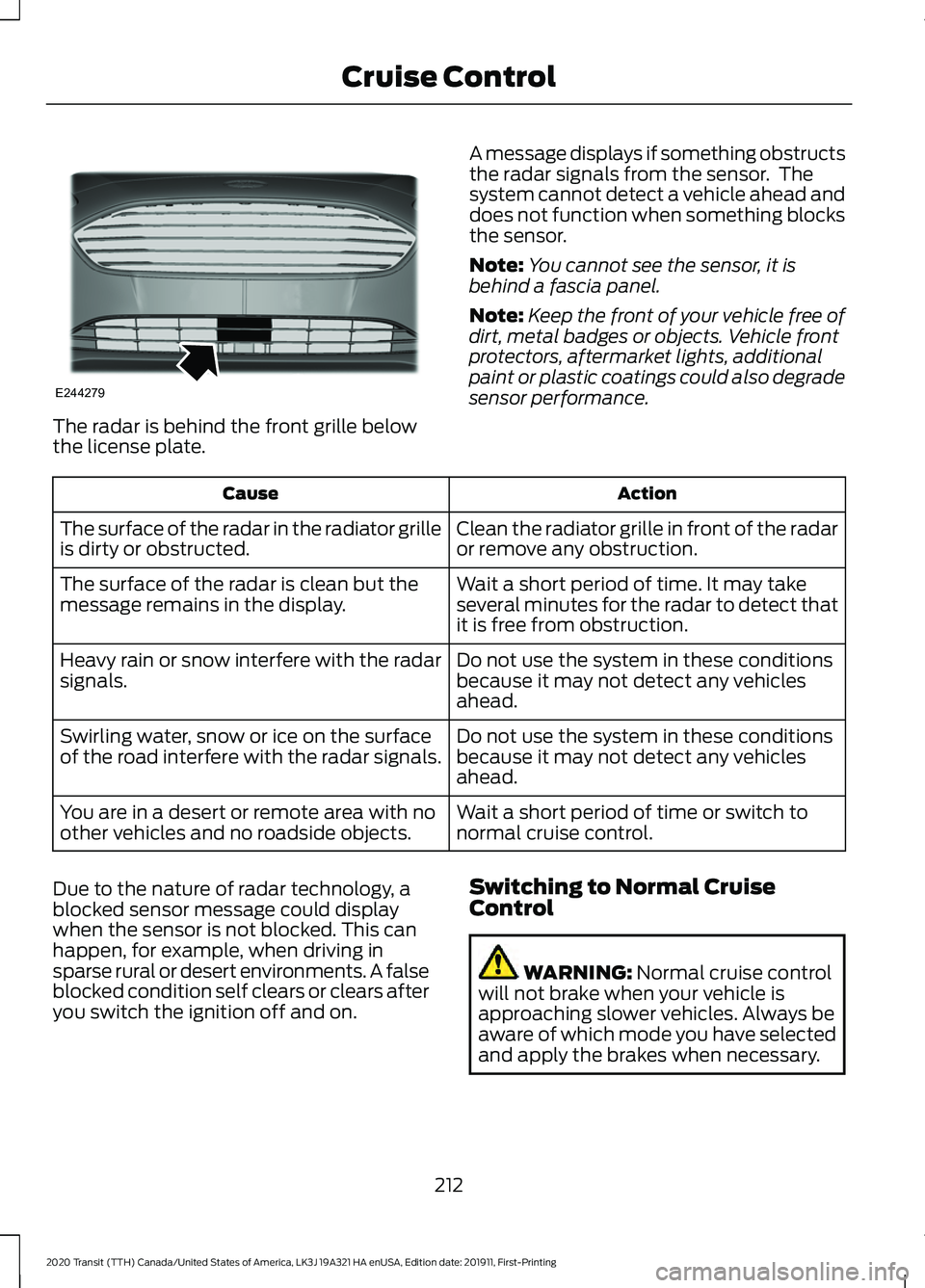
The radar is behind the front grille below
the license plate.
A message displays if something obstructs
the radar signals from the sensor. The
system cannot detect a vehicle ahead and
does not function when something blocks
the sensor.
Note:
You cannot see the sensor, it is
behind a fascia panel.
Note: Keep the front of your vehicle free of
dirt, metal badges or objects. Vehicle front
protectors, aftermarket lights, additional
paint or plastic coatings could also degrade
sensor performance. Action
Cause
Clean the radiator grille in front of the radar
or remove any obstruction.
The surface of the radar in the radiator grille
is dirty or obstructed.
Wait a short period of time. It may take
several minutes for the radar to detect that
it is free from obstruction.
The surface of the radar is clean but the
message remains in the display.
Do not use the system in these conditions
because it may not detect any vehicles
ahead.
Heavy rain or snow interfere with the radar
signals.
Do not use the system in these conditions
because it may not detect any vehicles
ahead.
Swirling water, snow or ice on the surface
of the road interfere with the radar signals.
Wait a short period of time or switch to
normal cruise control.
You are in a desert or remote area with no
other vehicles and no roadside objects.
Due to the nature of radar technology, a
blocked sensor message could display
when the sensor is not blocked. This can
happen, for example, when driving in
sparse rural or desert environments. A false
blocked condition self clears or clears after
you switch the ignition off and on. Switching to Normal Cruise
Control WARNING: Normal cruise control
will not brake when your vehicle is
approaching slower vehicles. Always be
aware of which mode you have selected
and apply the brakes when necessary.
212
2020 Transit (TTH) Canada/United States of America, LK3J 19A321 HA enUSA, Edition date: 201911, First-Printing Cruise ControlE244279
Page 216 of 529
You can change from adaptive cruise
control to cruise control using the
information display.
To switch between adaptive cruise control and normal cruise control, use the
information display controls on the steering wheel to select the following: Action
Menu Item
Press the menu button.
Driver Assist.
Press the OK button.
Cruise Control
Press the
OK button. Press the toggle button upward or
downward to choose your required setting. Press the OK
button.
Mode The cruise control indicator
replaces the adaptive cruise
control indicator if you select
normal cruise control. The gap setting
does not display, the system does not
automatically respond to lead vehicles and
adaptive braking does not activate. The
system remembers the last setting when
you start your vehicle. Adaptive Cruise Control Indicator The indicator appears when you
switch the system on.
The indicator appears in the information
display when the system is in standby
mode and when you set the adaptive
cruise speed.
Adaptive Cruise Control Information Messages Action
Message
The radar has reduced visibility.
Adaptive Cruise Not
Available Sensor Blocked
See Manual
The system is not available.
Adaptive Cruise Not
Available
The system has malfunctioned. Have your vehicle checked
as soon as possible.
Adaptive Cruise Malfunc-
tion
You have switched normal cruise control on. Adaptive braking
turns off.
Normal Cruise Active
Adaptive Braking Off
213
2020 Transit (TTH) Canada/United States of America, LK3J 19A321 HA enUSA, Edition date: 201911, First-Printing Cruise ControlE71340 E144524
Page 218 of 529
WARNING: At all times, you are
responsible for controlling your vehicle,
supervising the system and intervening,
if required. Failure to take care may result
in the loss of control of your vehicle,
serious personal injury or death. WARNING:
The system may not
operate properly if the sensor is blocked.
Keep the windshield free from
obstruction. WARNING:
Take regular rest
breaks if you feel tired. Do not wait for
the system to warn you. WARNING:
Certain driving styles
may result in the system warning you
even if you are not feeling tired. WARNING:
In cold and severe
weather conditions the system may not
function. Rain, snow and spray can all
limit sensor performance. WARNING:
The system will not
operate if the sensor cannot track the
road lane markings. WARNING:
If damage occurs in the
immediate area surrounding the sensor,
have your vehicle checked as soon as
possible. WARNING:
The system may not
correctly operate if your vehicle is fitted
with a suspension kit not approved by
us.
The system is designed to alert you if it
calculates that you are becoming drowsy
or if your driving deteriorates.
The system calculates your alertness level
based upon your driving behavior in relation
to the lane markings and other factors
when the vehicle speed is greater than
approximately
40 mph (65 km/h).
Driver Alert System Warnings
The warning system has two stages:
1. A temporary warning is issued to advise
you to take a rest. This message only
appears for a short time.
2. If you do not rest and the system continues to detect that your driving
deteriorates, it issues a further warning.
This remains in the information display
until you cancel it.
Note: The system does not warn you if the
vehicle speed falls below approximately
40 mph (65 km/h)
.
Driver Alert System Display
To view the driver alert system status, use the information display controls on
the steering wheel to select the following: Action
Menu Item
Press the menu button.
Settings
Press the
OK button.
Information
Press the
OK button.
Driver Alert
215
2020 Transit (TTH) Canada/United States of America, LK3J 19A321 HA enUSA, Edition date: 201911, First-Printing Driving Aids
Page 220 of 529
Driver Alert System Messages
Action
Message
Displays when we recommend that you take a break due to
low alertness levels.
Driver Alert Warning Rest
Suggested
Displays when you must take a break due to low alertness
levels.
Driver Alert Warning Rest
Now
LANE KEEPING SYSTEM WARNING: You are responsible for
controlling your vehicle at all times. The
system is designed to be an aid and does
not relieve you of your responsibility to
drive with due care and attention. Failure
to follow this instruction could result in
the loss of control of your vehicle,
personal injury or death. WARNING: The system may not
function if the sensor is blocked. WARNING:
The sensor may
incorrectly track lane markings as other
structures or objects. This can result in
a false or missed warning. WARNING:
In cold and severe
weather conditions the system may not
function. Rain, snow and spray can all
limit sensor performance. WARNING:
Large contrasts in
outside lighting can limit sensor
performance. WARNING:
The system will not
operate if the sensor cannot track the
road lane markings. WARNING:
If damage occurs in the
immediate area surrounding the sensor,
have your vehicle checked as soon as
possible. WARNING:
The system may not
correctly operate if your vehicle is fitted
with a suspension kit not approved by
us.
The system is designed to alert you by
providing temporary steering assistance
or steering wheel vibration when it detects
an unintended lane departure. The system
detects and tracks the road lane markings
using a camera mounted behind the
interior mirror. The system only operates
when the vehicle speed is greater than
approximately
37 mph (60 km/h). You
can view the system status in the
information display.
Note: The system works when the camera
can detect at least one lane marking or the
edge of the road.
The system may not correctly operate in
any of the following conditions:
• The system does not detect at least
one lane marking or the edge of the
road.
• You switch the direction indicator on.
• You apply direct steering, accelerate
fast or brake hard.
• The vehicle speed is less than
37 mph
(60 km/h).
217
2020 Transit (TTH) Canada/United States of America, LK3J 19A321 HA enUSA, Edition date: 201911, First-Printing Driving Aids
Page 221 of 529
•
The anti-lock brake, stability control or
traction control system activates.
• Narrow lane width.
The system may not correct lane
positioning in any of the following
conditions:
• High winds.
• Uneven road surfaces.
• Heavy or uneven loads.
• Incorrect tire pressure.
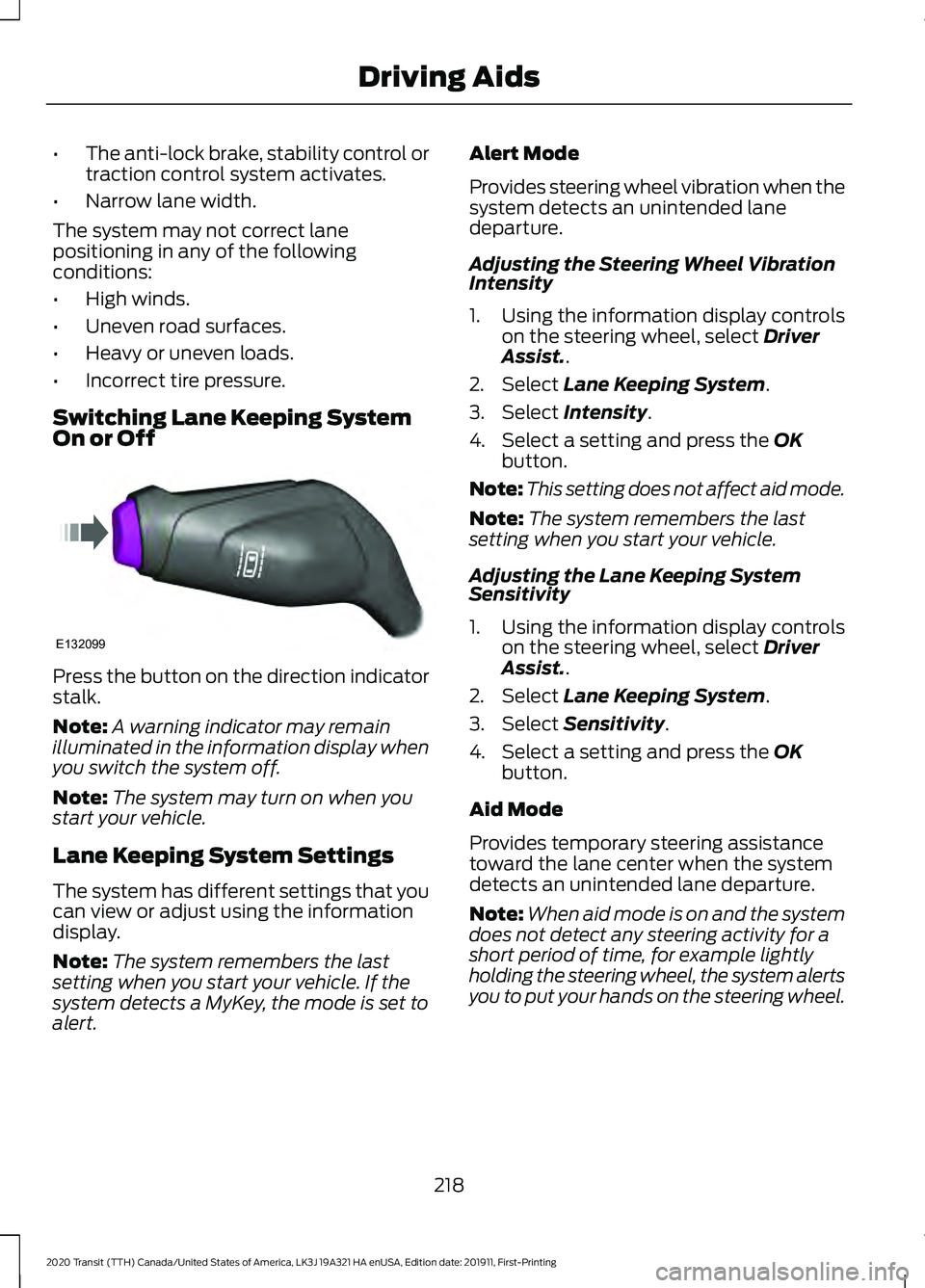
Switching Lane Keeping System
On or Off Press the button on the direction indicator
stalk.
Note:
A warning indicator may remain
illuminated in the information display when
you switch the system off.
Note: The system may turn on when you
start your vehicle.
Lane Keeping System Settings
The system has different settings that you
can view or adjust using the information
display.
Note: The system remembers the last
setting when you start your vehicle. If the
system detects a MyKey, the mode is set to
alert. Alert Mode
Provides steering wheel vibration when the
system detects an unintended lane
departure.
Adjusting the Steering Wheel Vibration
Intensity
1. Using the information display controls
on the steering wheel, select Driver
Assist..
2. Select
Lane Keeping System.
3. Select
Intensity.
4. Select a setting and press the
OK
button.
Note: This setting does not affect aid mode.
Note: The system remembers the last
setting when you start your vehicle.
Adjusting the Lane Keeping System
Sensitivity
1. Using the information display controls on the steering wheel, select
Driver
Assist..
2. Select
Lane Keeping System.
3. Select
Sensitivity.
4. Select a setting and press the
OK
button.
Aid Mode
Provides temporary steering assistance
toward the lane center when the system
detects an unintended lane departure.
Note: When aid mode is on and the system
does not detect any steering activity for a
short period of time, for example lightly
holding the steering wheel, the system alerts
you to put your hands on the steering wheel.
218
2020 Transit (TTH) Canada/United States of America, LK3J 19A321 HA enUSA, Edition date: 201911, First-Printing Driving AidsE132099
Page 224 of 529
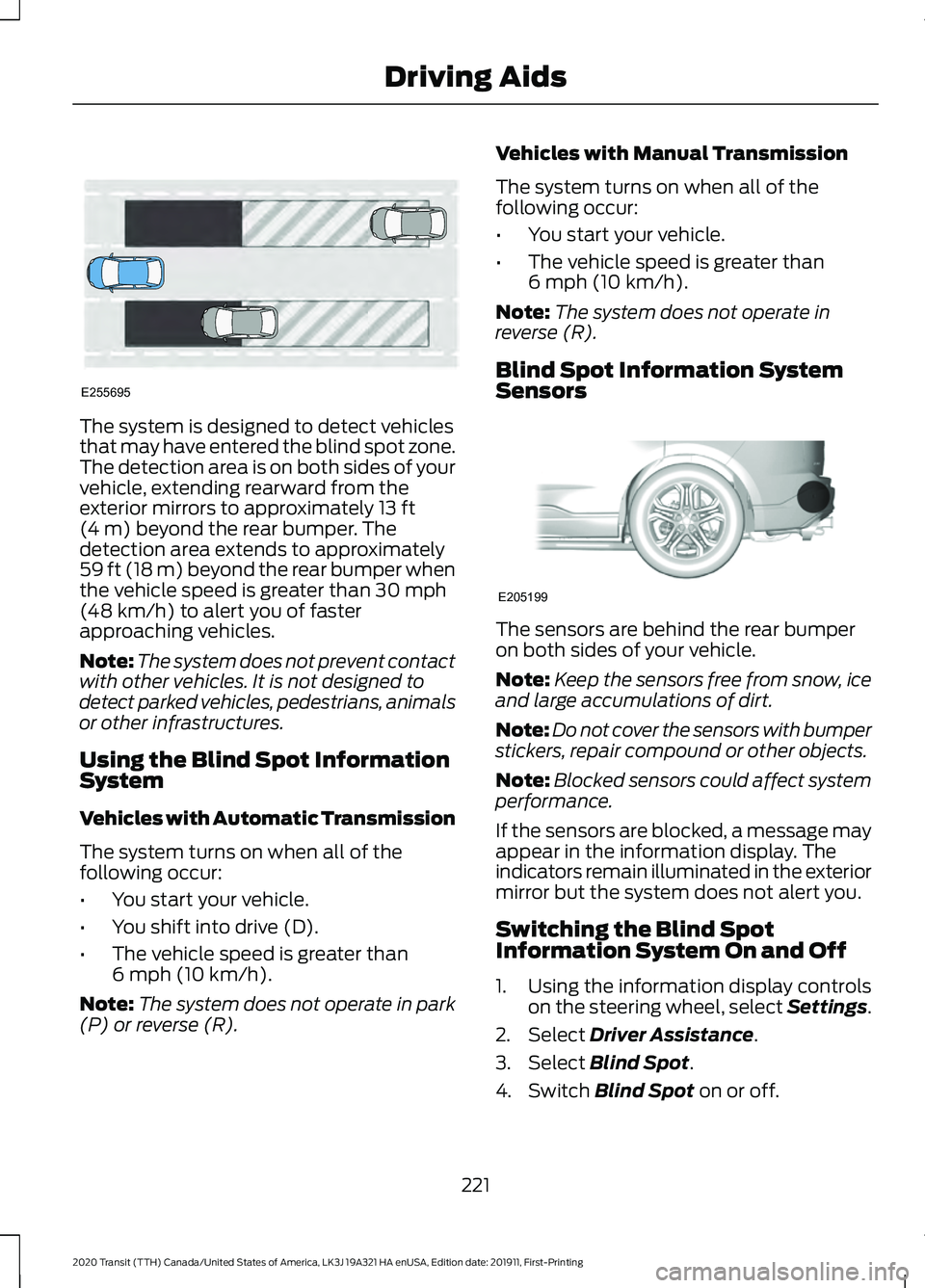
The system is designed to detect vehicles
that may have entered the blind spot zone.
The detection area is on both sides of your
vehicle, extending rearward from the
exterior mirrors to approximately 13 ft
(4 m) beyond the rear bumper. The
detection area extends to approximately
59 ft (18 m)
beyond the rear bumper when
the vehicle speed is greater than 30 mph
(48 km/h) to alert you of faster
approaching vehicles.
Note: The system does not prevent contact
with other vehicles. It is not designed to
detect parked vehicles, pedestrians, animals
or other infrastructures.
Using the Blind Spot Information
System
Vehicles with Automatic Transmission
The system turns on when all of the
following occur:
• You start your vehicle.
• You shift into drive (D).
• The vehicle speed is greater than
6 mph (10 km/h)
.
Note: The system does not operate in park
(P) or reverse (R). Vehicles with Manual Transmission
The system turns on when all of the
following occur:
•
You start your vehicle.
• The vehicle speed is greater than
6 mph (10 km/h)
.
Note: The system does not operate in
reverse (R).
Blind Spot Information System
Sensors The sensors are behind the rear bumper
on both sides of your vehicle.
Note:
Keep the sensors free from snow, ice
and large accumulations of dirt.
Note: Do not cover the sensors with bumper
stickers, repair compound or other objects.
Note: Blocked sensors could affect system
performance.
If the sensors are blocked, a message may
appear in the information display. The
indicators remain illuminated in the exterior
mirror but the system does not alert you.
Switching the Blind Spot
Information System On and Off
1. Using the information display controls on the steering wheel, select Settings.
2. Select
Driver Assistance.
3. Select
Blind Spot.
4. Switch
Blind Spot on or off.
221
2020 Transit (TTH) Canada/United States of America, LK3J 19A321 HA enUSA, Edition date: 201911, First-Printing Driving AidsE255695 E205199
Page 227 of 529
Blind Spot Information System Information Messages
Description
Message
Displays if the new trailer is attached but not selected. Select
a trailer.
Trailer Blind Spot Add
Trailer Exit Press OK to
Select
Displays if the blind spot information system sensors are
blocked.
Blind Spot Not Available
Sensor Blocked See
Manual
Displays if you attach a trailer to your vehicle.
Blind spot & cross Traffic
alert deact. Trailer
attached
The system has detected a fault that requires service. Have
your vehicle checked as soon as possible.
Blind Spot System Fault
CROSS TRAFFIC ALERT WARNING: Do not use the cross
traffic alert system as a replacement for
using the interior and exterior mirrors or
looking over your shoulder before
reversing out of a parking space. The
cross traffic alert system is not a
replacement for careful driving. WARNING:
The system may not
operate properly during severe weather
conditions, for example snow, ice, heavy
rain and spray. Always drive with due
care and attention. Failure to take care
may result in a crash. The system is designed to alert you of
vehicles approaching from the sides behind
your vehicle when you shift into reverse
(R).
Using Cross Traffic Alert
The system is designed to detect vehicles
that approach at a speed between
4 mph
(6 km/h) and 37 mph (60 km/h). Coverage
decreases when the sensors are partially,
mostly or fully obstructed. Slowly reversing
helps increase the coverage area and
effectiveness.
The system turns on when you start the
engine and you shift into reverse (R). The
system turns off when you shift out of
reverse (R).
224
2020 Transit (TTH) Canada/United States of America, LK3J 19A321 HA enUSA, Edition date: 201911, First-Printing Driving Aids
Page 229 of 529
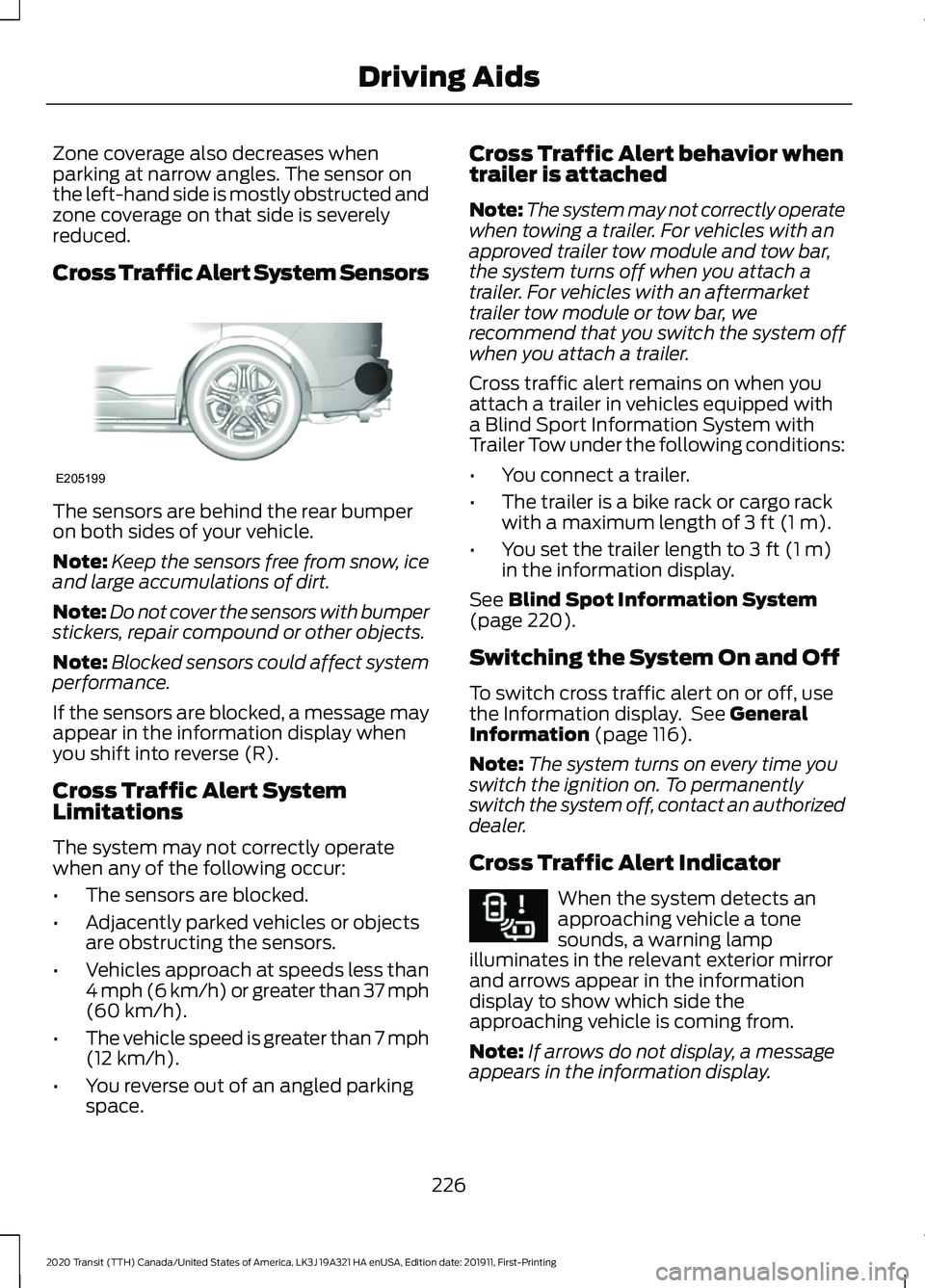
Zone coverage also decreases when
parking at narrow angles. The sensor on
the left-hand side is mostly obstructed and
zone coverage on that side is severely
reduced.
Cross Traffic Alert System Sensors
The sensors are behind the rear bumper
on both sides of your vehicle.
Note:
Keep the sensors free from snow, ice
and large accumulations of dirt.
Note: Do not cover the sensors with bumper
stickers, repair compound or other objects.
Note: Blocked sensors could affect system
performance.
If the sensors are blocked, a message may
appear in the information display when
you shift into reverse (R).
Cross Traffic Alert System
Limitations
The system may not correctly operate
when any of the following occur:
• The sensors are blocked.
• Adjacently parked vehicles or objects
are obstructing the sensors.
• Vehicles approach at speeds less than
4 mph (6 km/h) or greater than 37 mph
(60 km/h).
• The vehicle speed is greater than 7 mph
(12 km/h)
.
• You reverse out of an angled parking
space. Cross Traffic Alert behavior when
trailer is attached
Note:
The system may not correctly operate
when towing a trailer. For vehicles with an
approved trailer tow module and tow bar,
the system turns off when you attach a
trailer. For vehicles with an aftermarket
trailer tow module or tow bar, we
recommend that you switch the system off
when you attach a trailer.
Cross traffic alert remains on when you
attach a trailer in vehicles equipped with
a Blind Sport Information System with
Trailer Tow under the following conditions:
• You connect a trailer.
• The trailer is a bike rack or cargo rack
with a maximum length of
3 ft (1 m).
• You set the trailer length to
3 ft (1 m)
in the information display.
See
Blind Spot Information System
(page 220).
Switching the System On and Off
To switch cross traffic alert on or off, use
the Information display. See
General
Information (page 116).
Note: The system turns on every time you
switch the ignition on. To permanently
switch the system off, contact an authorized
dealer.
Cross Traffic Alert Indicator When the system detects an
approaching vehicle a tone
sounds, a warning lamp
illuminates in the relevant exterior mirror
and arrows appear in the information
display to show which side the
approaching vehicle is coming from.
Note: If arrows do not display, a message
appears in the information display.
226
2020 Transit (TTH) Canada/United States of America, LK3J 19A321 HA enUSA, Edition date: 201911, First-Printing Driving AidsE205199 E268294
Page 230 of 529
If the system malfunctions, a warning lamp
illuminates in the instrument cluster and
a message appears in the information
display. Have your vehicle checked as soon
as possible.
Note:
In exceptional conditions, the system
could alert you, even when there is nothing
in the detection zone, for example a vehicle
passing further away from your vehicle.
Cross Traffic Alert Information Messages Action
Message
Displays instead of indication arrows when the system
detects a vehicle. Check for approaching traffic.
Cross Traffic Alert
Displays if the cross traffic alert system sensors are blocked.
Clean the sensors. If the message continues to appear, have
your vehicle checked as soon as possible.
Cross Traffic Not Avail-
able Sensor Blocked See
Manual
The system has malfunctioned. Have your vehicle checked
as soon as possible.
Cross Traffic System
Fault
Displays if you attach a trailer to your vehicle.
Cross Traffic Alert Deac-
tivated Trailer Attached
ECO
Eco Mode
How Does Eco Mode Work
The system is designed to monitor certain
driving characteristics to help you drive
more efficiently. See Economical Driving
(page 254).
Note: The efficiency levels do not result in
a defined fuel consumption figure.
Note: The system only indicates the
efficiency level for the current trip. The
system resets each time you switch the
ignition on. Instantaneous Efficiency Level
The display ring increases as the
instantaneous efficiency level increases
and illuminates when it reaches maximum
efficiency. The level continuously updates
to indicate the efficiency level for the
current trip.
Viewing the Instantaneous Efficiency
Level
1. Using the information display controls
on the steering wheel, select
MyView.
2. Select
Eco Coach.
Trip Summary
The calculated trip summary is shown as
four colored bars. The bars travel from left
to right as the calculated efficiency levels
increase. The bars indicate the average
efficiency level for acceleration,
deceleration, speed and gear shifting
during the total distance traveled by your
vehicle for the current trip.
227
2020 Transit (TTH) Canada/United States of America, LK3J 19A321 HA enUSA, Edition date: 201911, First-Printing Driving Aids
Page 235 of 529
Switching Distance Indication On and
Off
1. Using the information display controls
on the steering wheel, select Driver
Assist..
2. Select
Pre-Collision Assist.
3. Switch
Distance Indication on or off.
Pre-Collision Assist System
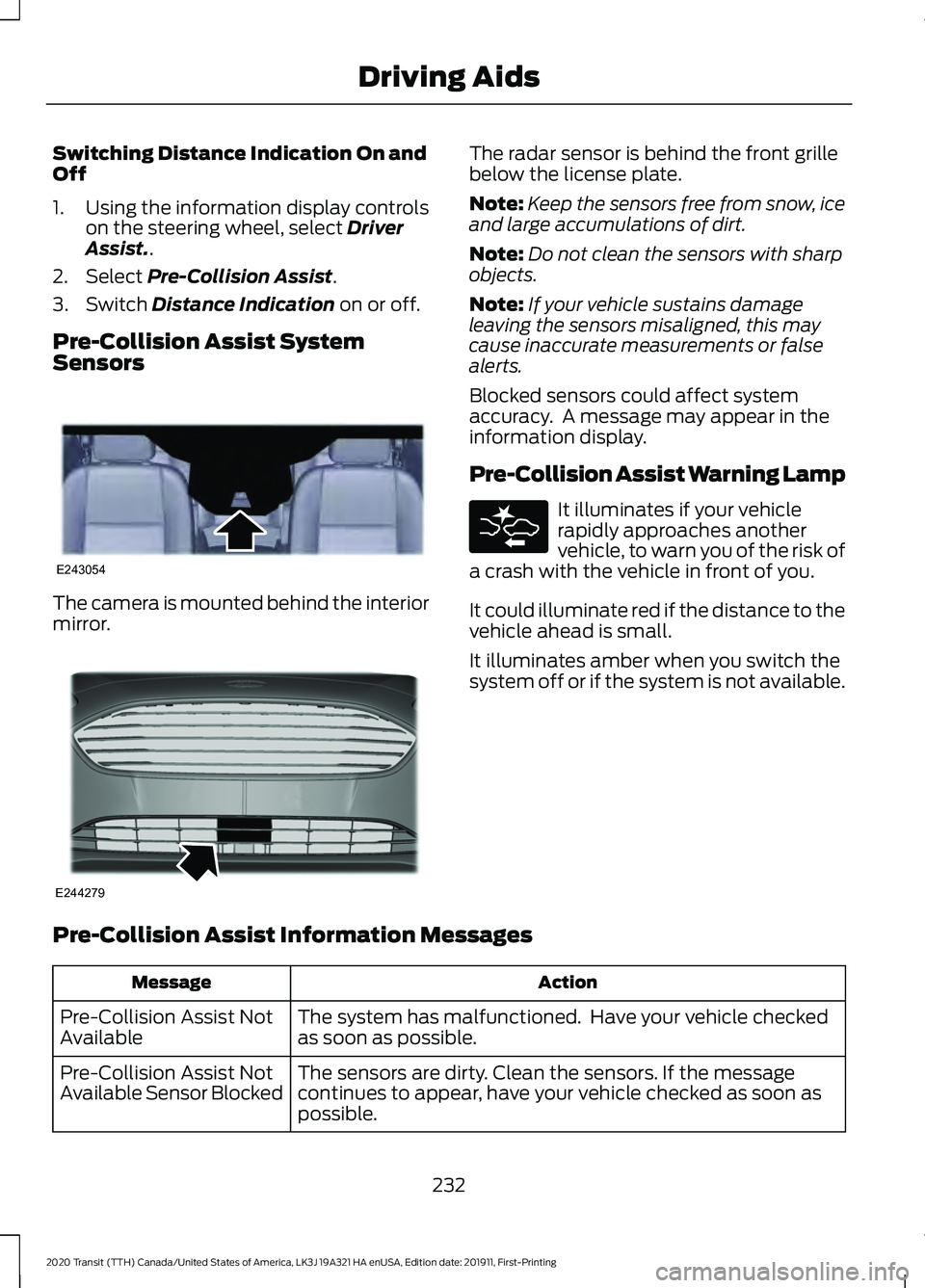
Sensors The camera is mounted behind the interior
mirror. The radar sensor is behind the front grille
below the license plate.
Note:
Keep the sensors free from snow, ice
and large accumulations of dirt.
Note: Do not clean the sensors with sharp
objects.
Note: If your vehicle sustains damage
leaving the sensors misaligned, this may
cause inaccurate measurements or false
alerts.
Blocked sensors could affect system
accuracy. A message may appear in the
information display.
Pre-Collision Assist Warning Lamp It illuminates if your vehicle
rapidly approaches another
vehicle, to warn you of the risk of
a crash with the vehicle in front of you.
It could illuminate red if the distance to the
vehicle ahead is small.
It illuminates amber when you switch the
system off or if the system is not available.
Pre-Collision Assist Information Messages Action
Message
The system has malfunctioned. Have your vehicle checked
as soon as possible.
Pre-Collision Assist Not
Available
The sensors are dirty. Clean the sensors. If the message
continues to appear, have your vehicle checked as soon as
possible.
Pre-Collision Assist Not
Available Sensor Blocked
232
2020 Transit (TTH) Canada/United States of America, LK3J 19A321 HA enUSA, Edition date: 201911, First-Printing Driving AidsE243054 E244279