420 FORD TRANSIT 2020 Owners Manual
[x] Cancel search | Manufacturer: FORD, Model Year: 2020, Model line: TRANSIT, Model: FORD TRANSIT 2020Pages: 529, PDF Size: 8.3 MB
Page 423 of 529
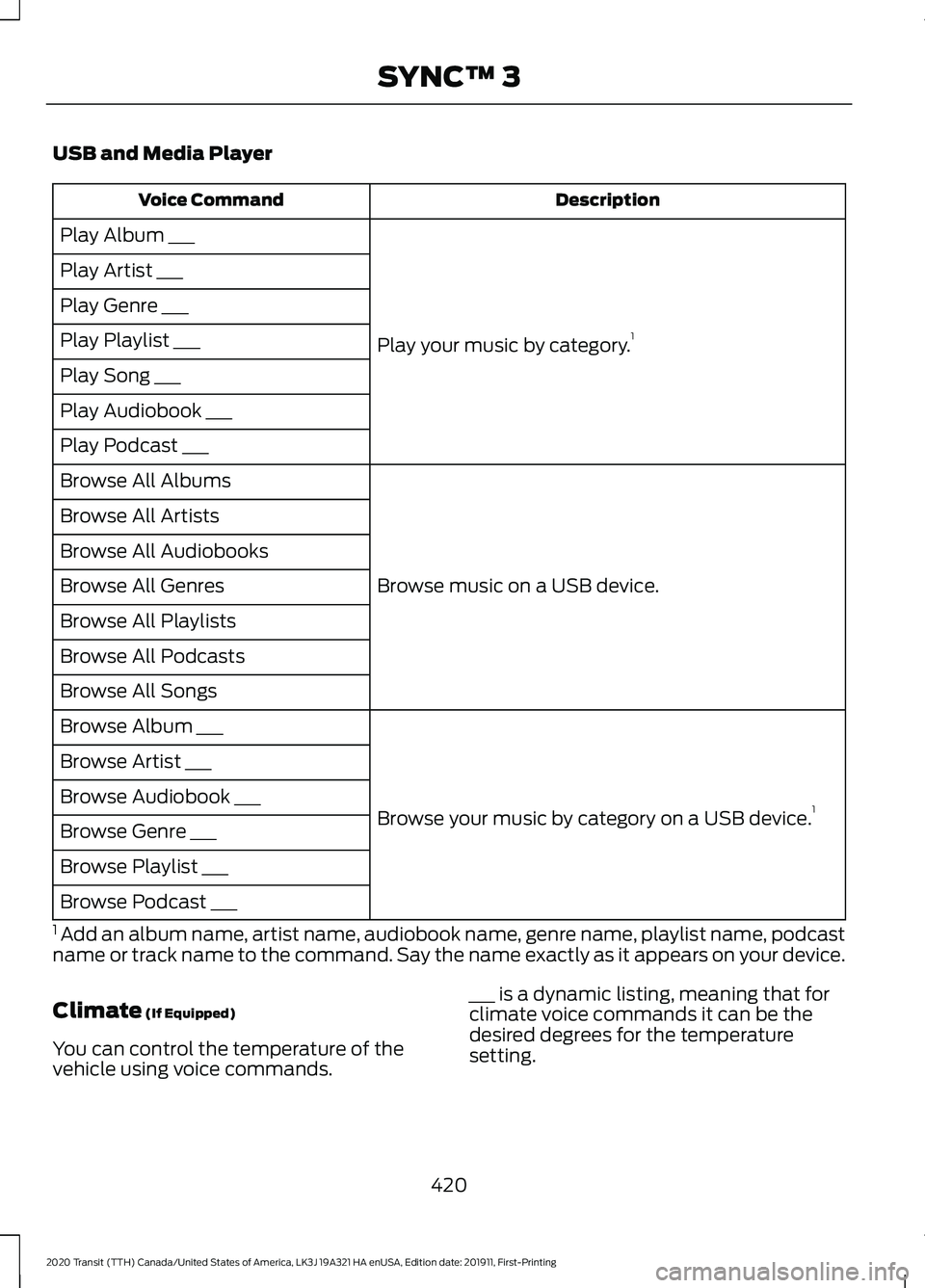
USB and Media Player
Description
Voice Command
Play your music by category. 1
Play Album ___
Play Artist ___
Play Genre ___
Play Playlist ___
Play Song ___
Play Audiobook ___
Play Podcast ___
Browse music on a USB device.
Browse All Albums
Browse All Artists
Browse All Audiobooks
Browse All Genres
Browse All Playlists
Browse All Podcasts
Browse All Songs
Browse your music by category on a USB device. 1
Browse Album ___
Browse Artist ___
Browse Audiobook ___
Browse Genre ___
Browse Playlist ___
Browse Podcast ___
1 Add an album name, artist name, audiobook name, genre name, playlist name, podcast
name or track name to the command. Say the name exactly as it appears on your device.
Climate (If Equipped)
You can control the temperature of the
vehicle using voice commands. ___ is a dynamic listing, meaning that for
climate voice commands it can be the
desired degrees for the temperature
setting.
420
2020 Transit (TTH) Canada/United States of America, LK3J 19A321 HA enUSA, Edition date: 201911, First-Printing SYNC™ 3
Page 525 of 529
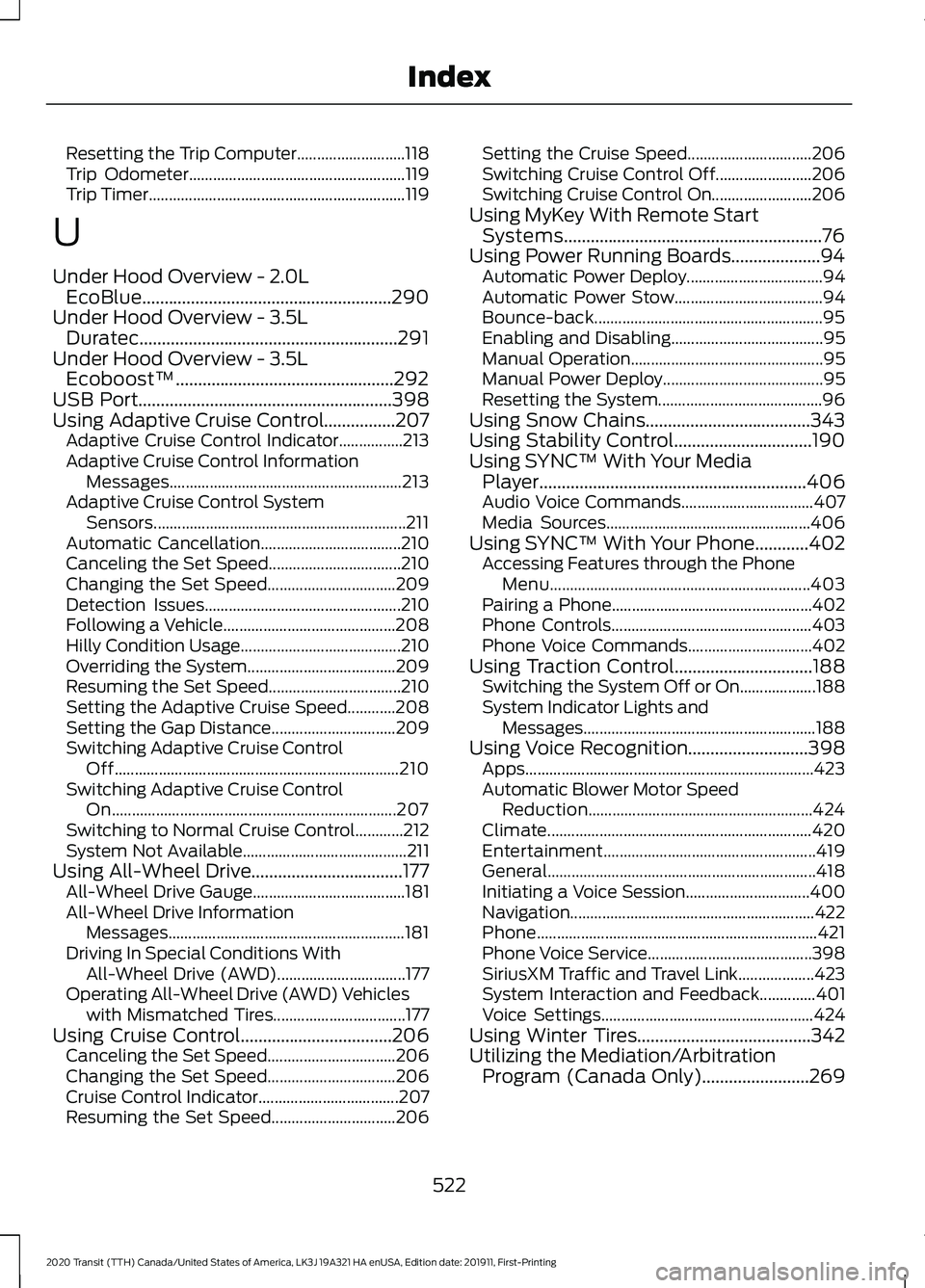
Resetting the Trip Computer...........................
118
Trip Odometer...................................................... 119
Trip Timer................................................................ 119
U
Under Hood Overview - 2.0L EcoBlue........................................................290
Under Hood Overview - 3.5L Duratec..........................................................291
Under Hood Overview - 3.5L Ecoboost™.................................................292
USB Port
.........................................................398
Using Adaptive Cruise Control................207 Adaptive Cruise Control Indicator................213
Adaptive Cruise Control Information
Messages.......................................................... 213
Adaptive Cruise Control System Sensors............................................................... 211
Automatic Cancellation................................... 210
Canceling the Set Speed................................. 210
Changing the Set Speed................................ 209
Detection Issues................................................. 210
Following a Vehicle........................................... 208
Hilly Condition Usage........................................ 210
Overriding the System..................................... 209
Resuming the Set Speed................................. 210
Setting the Adaptive Cruise Speed............208
Setting the Gap Distance............................... 209
Switching Adaptive Cruise Control Off....................................................................... 210
Switching Adaptive Cruise Control On....................................................................... 207
Switching to Normal Cruise Control............212
System Not Available......................................... 211
Using All-Wheel Drive..................................177 All-Wheel Drive Gauge...................................... 181
All-Wheel Drive Information Messages........................................................... 181
Driving In Special Conditions With All-Wheel Drive (AWD)................................ 177
Operating All-Wheel Drive (AWD) Vehicles with Mismatched Tires................................. 177
Using Cruise Control..................................206 Canceling the Set Speed................................ 206
Changing the Set Speed................................ 206
Cruise Control Indicator................................... 207
Resuming the Set Speed............................... 206Setting the Cruise Speed...............................
206
Switching Cruise Control Off........................ 206
Switching Cruise Control On......................... 206
Using MyKey With Remote Start Systems..........................................................76
Using Power Running Boards....................94 Automatic Power Deploy.................................. 94
Automatic Power Stow..................................... 94
Bounce-back......................................................... 95
Enabling and Disabling...................................... 95
Manual Operation................................................ 95
Manual Power Deploy........................................ 95
Resetting the System......................................... 96
Using Snow Chains.....................................343
Using Stability Control...............................190
Using SYNC™ With Your Media Player............................................................406
Audio Voice Commands................................. 407
Media Sources................................................... 406
Using SYNC™ With Your Phone............402 Accessing Features through the Phone
Menu................................................................. 403
Pairing a Phone.................................................. 402
Phone Controls.................................................. 403
Phone Voice Commands............................... 402
Using Traction Control...............................188 Switching the System Off or On................... 188
System Indicator Lights and Messages .......................................................... 188
Using Voice Recognition...........................398 Apps........................................................................\
423
Automatic Blower Motor Speed Reduction........................................................ 424
Climate.................................................................. 420
Entertainment
..................................................... 419
General................................................................... 418
Initiating a Voice Session............................... 400
Navigation............................................................. 422
Phone...................................................................... 421
Phone Voice Service......................................... 398
SiriusXM Traffic and Travel Link................... 423
System Interaction and Feedback..............401
Voice Settings..................................................... 424
Using Winter Tires.......................................342
Utilizing the Mediation/Arbitration Program (Canada Only)........................269
522
2020 Transit (TTH) Canada/United States of America, LK3J 19A321 HA enUSA, Edition date: 201911, First-Printing Index