Blower FORD TRANSIT 2020 Owners Manual
[x] Cancel search | Manufacturer: FORD, Model Year: 2020, Model line: TRANSIT, Model: FORD TRANSIT 2020Pages: 529, PDF Size: 8.3 MB
Page 124 of 529
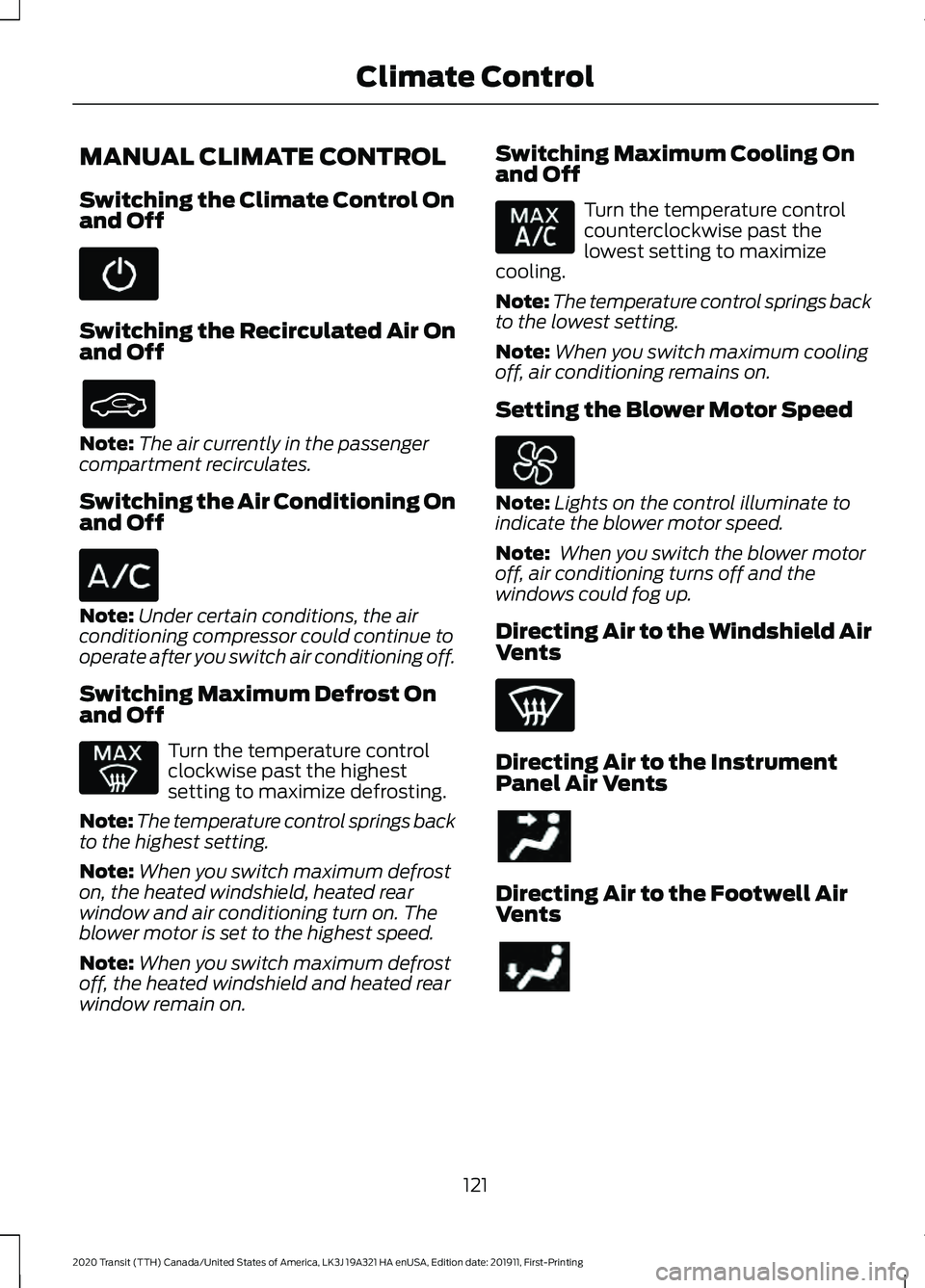
MANUAL CLIMATE CONTROL
Switching the Climate Control On
and Off
Switching the Recirculated Air On
and Off
Note:
The air currently in the passenger
compartment recirculates.
Switching the Air Conditioning On
and Off Note:
Under certain conditions, the air
conditioning compressor could continue to
operate after you switch air conditioning off.
Switching Maximum Defrost On
and Off Turn the temperature control
clockwise past the highest
setting to maximize defrosting.
Note: The temperature control springs back
to the highest setting.
Note: When you switch maximum defrost
on, the heated windshield, heated rear
window and air conditioning turn on. The
blower motor is set to the highest speed.
Note: When you switch maximum defrost
off, the heated windshield and heated rear
window remain on. Switching Maximum Cooling On
and Off Turn the temperature control
counterclockwise past the
lowest setting to maximize
cooling.
Note: The temperature control springs back
to the lowest setting.
Note: When you switch maximum cooling
off, air conditioning remains on.
Setting the Blower Motor Speed Note:
Lights on the control illuminate to
indicate the blower motor speed.
Note: When you switch the blower motor
off, air conditioning turns off and the
windows could fog up.
Directing Air to the Windshield Air
Vents Directing Air to the Instrument
Panel Air Vents
Directing Air to the Footwell Air
Vents
121
2020 Transit (TTH) Canada/United States of America, LK3J 19A321 HA enUSA, Edition date: 201911, First-Printing Climate Control
Page 125 of 529
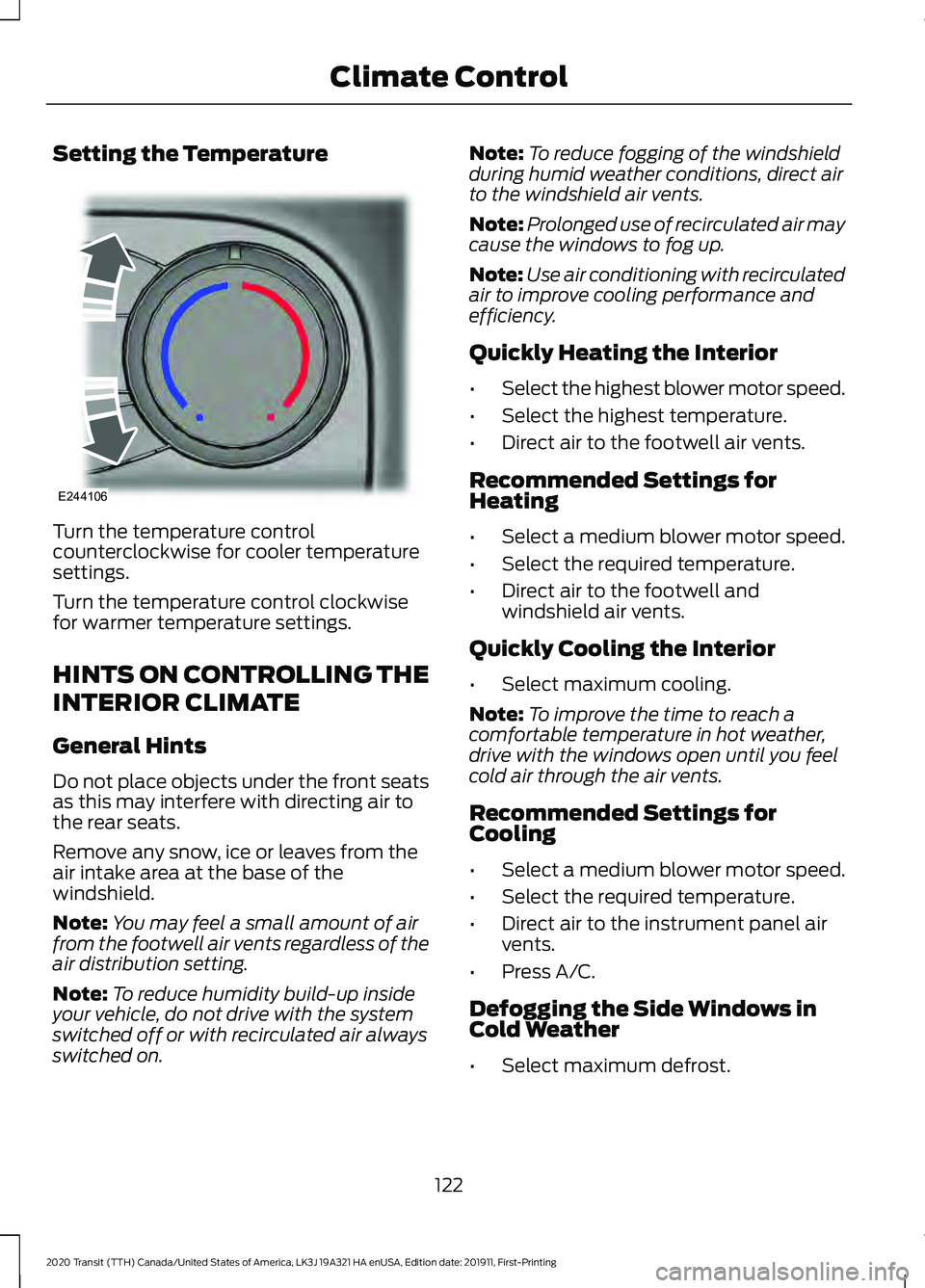
Setting the Temperature
Turn the temperature control
counterclockwise for cooler temperature
settings.
Turn the temperature control clockwise
for warmer temperature settings.
HINTS ON CONTROLLING THE
INTERIOR CLIMATE
General Hints
Do not place objects under the front seats
as this may interfere with directing air to
the rear seats.
Remove any snow, ice or leaves from the
air intake area at the base of the
windshield.
Note:
You may feel a small amount of air
from the footwell air vents regardless of the
air distribution setting.
Note: To reduce humidity build-up inside
your vehicle, do not drive with the system
switched off or with recirculated air always
switched on. Note:
To reduce fogging of the windshield
during humid weather conditions, direct air
to the windshield air vents.
Note: Prolonged use of recirculated air may
cause the windows to fog up.
Note: Use air conditioning with recirculated
air to improve cooling performance and
efficiency.
Quickly Heating the Interior
• Select the highest blower motor speed.
• Select the highest temperature.
• Direct air to the footwell air vents.
Recommended Settings for
Heating
• Select a medium blower motor speed.
• Select the required temperature.
• Direct air to the footwell and
windshield air vents.
Quickly Cooling the Interior
• Select maximum cooling.
Note: To improve the time to reach a
comfortable temperature in hot weather,
drive with the windows open until you feel
cold air through the air vents.
Recommended Settings for
Cooling
• Select a medium blower motor speed.
• Select the required temperature.
• Direct air to the instrument panel air
vents.
• Press A/C.
Defogging the Side Windows in
Cold Weather
• Select maximum defrost.
122
2020 Transit (TTH) Canada/United States of America, LK3J 19A321 HA enUSA, Edition date: 201911, First-Printing Climate ControlE244106
Page 126 of 529
Defogging or Clearing the
Windshield of Thin Ice
•
Select maximum defrost.
REAR PASSENGER CLIMATE
CONTROLS
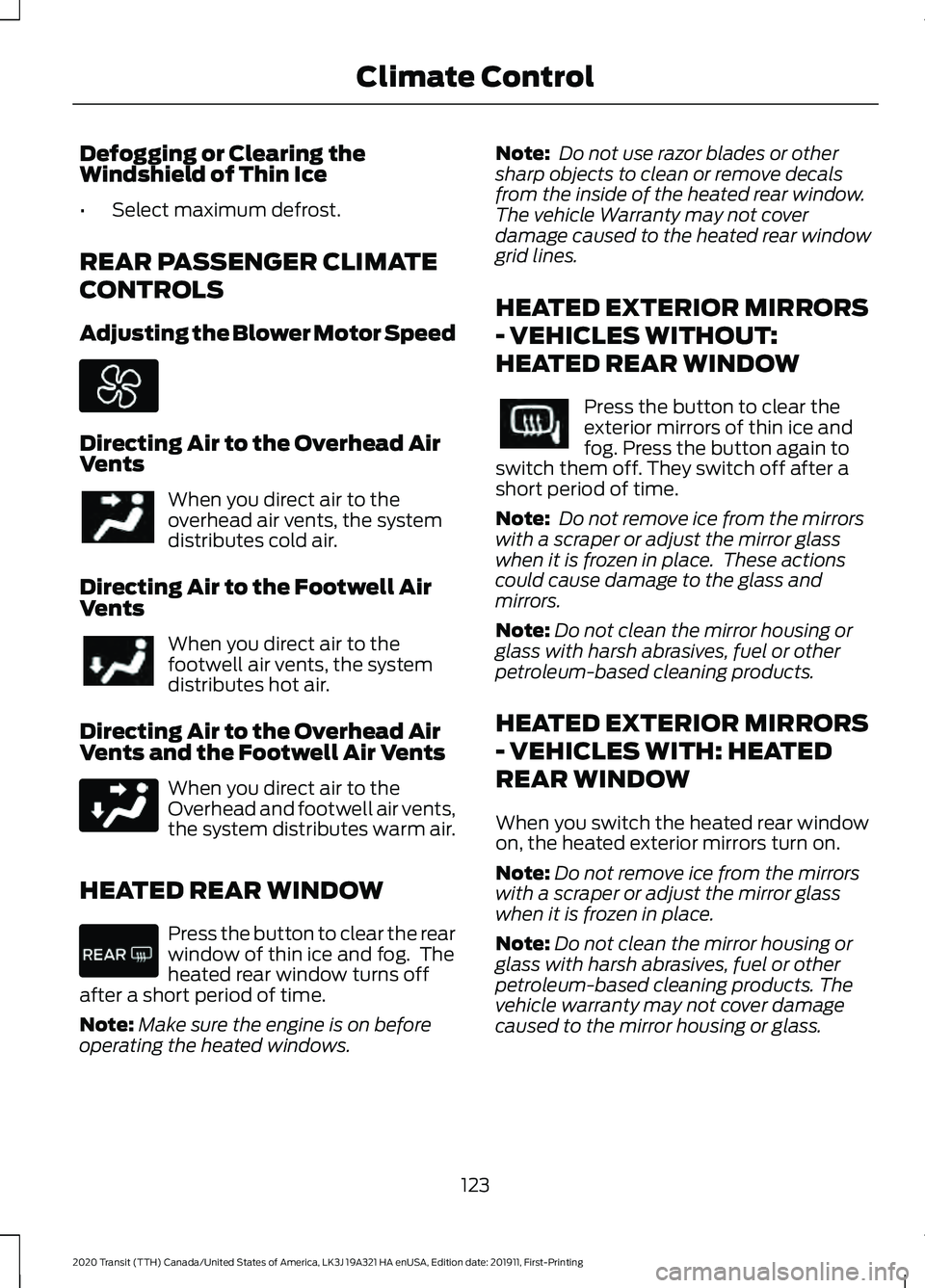
Adjusting the Blower Motor Speed Directing Air to the Overhead Air
Vents
When you direct air to the
overhead air vents, the system
distributes cold air.
Directing Air to the Footwell Air
Vents When you direct air to the
footwell air vents, the system
distributes hot air.
Directing Air to the Overhead Air
Vents and the Footwell Air Vents When you direct air to the
Overhead and footwell air vents,
the system distributes warm air.
HEATED REAR WINDOW Press the button to clear the rear
window of thin ice and fog. The
heated rear window turns off
after a short period of time.
Note: Make sure the engine is on before
operating the heated windows. Note:
Do not use razor blades or other
sharp objects to clean or remove decals
from the inside of the heated rear window.
The vehicle Warranty may not cover
damage caused to the heated rear window
grid lines.
HEATED EXTERIOR MIRRORS
- VEHICLES WITHOUT:
HEATED REAR WINDOW Press the button to clear the
exterior mirrors of thin ice and
fog. Press the button again to
switch them off. They switch off after a
short period of time.
Note: Do not remove ice from the mirrors
with a scraper or adjust the mirror glass
when it is frozen in place. These actions
could cause damage to the glass and
mirrors.
Note: Do not clean the mirror housing or
glass with harsh abrasives, fuel or other
petroleum-based cleaning products.
HEATED EXTERIOR MIRRORS
- VEHICLES WITH: HEATED
REAR WINDOW
When you switch the heated rear window
on, the heated exterior mirrors turn on.
Note: Do not remove ice from the mirrors
with a scraper or adjust the mirror glass
when it is frozen in place.
Note: Do not clean the mirror housing or
glass with harsh abrasives, fuel or other
petroleum-based cleaning products. The
vehicle warranty may not cover damage
caused to the mirror housing or glass.
123
2020 Transit (TTH) Canada/United States of America, LK3J 19A321 HA enUSA, Edition date: 201911, First-Printing Climate Control
Page 277 of 529
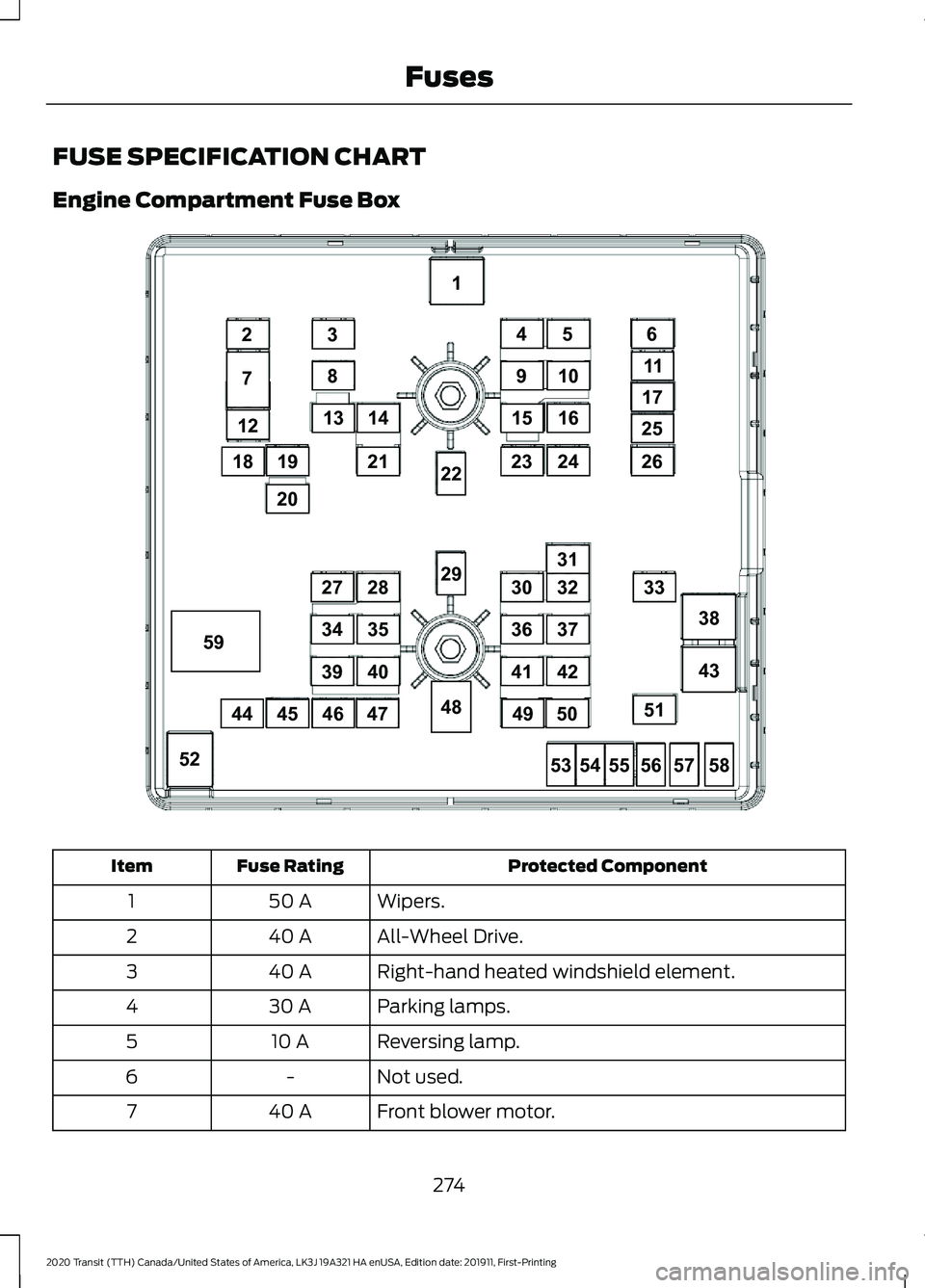
FUSE SPECIFICATION CHART
Engine Compartment Fuse Box
Protected Component
Fuse Rating
Item
Wipers.
50 A
1
All-Wheel Drive.
40 A
2
Right-hand heated windshield element.
40 A
3
Parking lamps.
30 A
4
Reversing lamp.
10 A
5
Not used.
-
6
Front blower motor.
40 A
7
274
2020 Transit (TTH) Canada/United States of America, LK3J 19A321 HA enUSA, Edition date: 201911, First-Printing Fuses12
18
7
23
8
13
1
38
43
52
21
28
35
4039
34
27
31
33
51
26
25
17
11
6
14
910
45
1516
2324
53
48
29
22
5455565758
19
20
45444647
32
37
4241
36
30
4950
59E308021
Page 278 of 529
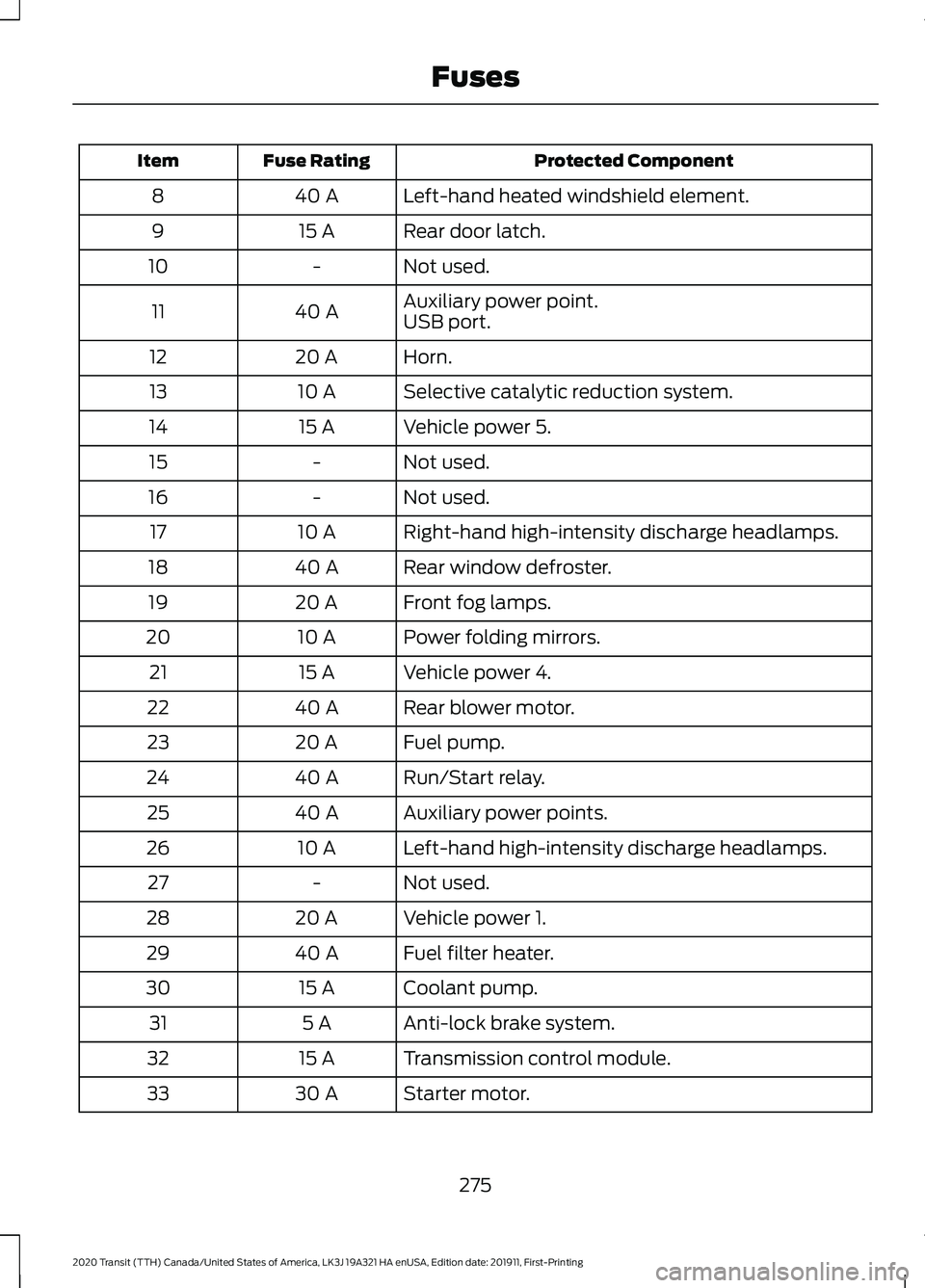
Protected Component
Fuse Rating
Item
Left-hand heated windshield element.
40 A
8
Rear door latch.
15 A
9
Not used.
-
10
Auxiliary power point.
40 A
11
USB port.
Horn.
20 A
12
Selective catalytic reduction system.
10 A
13
Vehicle power 5.
15 A
14
Not used.
-
15
Not used.
-
16
Right-hand high-intensity discharge headlamps.
10 A
17
Rear window defroster.
40 A
18
Front fog lamps.
20 A
19
Power folding mirrors.
10 A
20
Vehicle power 4.
15 A
21
Rear blower motor.
40 A
22
Fuel pump.
20 A
23
Run/Start relay.
40 A
24
Auxiliary power points.
40 A
25
Left-hand high-intensity discharge headlamps.
10 A
26
Not used.
-
27
Vehicle power 1.
20 A
28
Fuel filter heater.
40 A
29
Coolant pump.
15 A
30
Anti-lock brake system.
5 A
31
Transmission control module.
15 A
32
Starter motor.
30 A
33
275
2020 Transit (TTH) Canada/United States of America, LK3J 19A321 HA enUSA, Edition date: 201911, First-Printing Fuses
Page 319 of 529

Specification
Name
Motorcraft® Professional Strength Carpet &
Upholstery Cleaner / Nettoyant professionnel pour
sellerie et moquette Motorcraft® (Canada)
ZC-54 (U.S. & Canada) -
Motorcraft® Spot and Stain Remover (U.S.)
(Canada)
ZC-14 (U.S.)
ESR-M14P5-A
Motorcraft® Ultra-Clear Spray Glass Cleaner (U.S.)
Motorcraft® Premium Glass Cleaner / Nettoie-vitres
de qualité supérieure Motorcraft® (Canada)
ZC-23 (U.S.)
CXC-100 (Canada)
-
Motorcraft® Wheel and Tire Cleaner (U.S.)
Motorcraft® Wheel and Tire Cleaner / Nettoyant
pour roues et pneus Motorcraft® (Canada)
ZC-37-A (U.S. & Canada)
CLEANING THE EXTERIOR
We recommend that you wash your vehicle
with a sponge and lukewarm water
containing a car shampoo.
Note: If you use a car wash with a waxing
cycle, make sure that you remove the wax
from the windshield and the wiper blades.
Note: Before using a car wash, check that
it is suitable for your vehicle.
Note: Some car washes use water at high
pressure. Due to this, water droplets may
enter inside your vehicle and could also
damage certain parts of your vehicle.
Note: Remove the antenna before using an
automatic car wash.
Note: Switch the blower motor off to
prevent contamination of the cabin air filter.
Cleaning the Headlamps
Note: Do not scrape the headlamps. Note:
Do not use abrasives, alcoholic
solvents or chemical solvents to clean the
headlamps.
Note: Do not wipe the headlamps when
they are dry.
Cleaning the Rear Window
Note: Do not scrape the inside of the rear
window.
Note: Do not use abrasives, alcoholic
solvents or chemical solvents to clean the
inside of the rear window.
Clean the inside of the rear window with a
soft, lint-free cloth and non-abrasive
cleaner
Cleaning the Chrome Trim
Note: Do not use abrasives, alcoholic
solvents or chemical solvents to clean the
chrome trim. Use soapy water.
Dry the chrome trim with a clean, soft cloth
316
2020 Transit (TTH) Canada/United States of America, LK3J 19A321 HA enUSA, Edition date: 201911, First-Printing Vehicle Care
Page 427 of 529
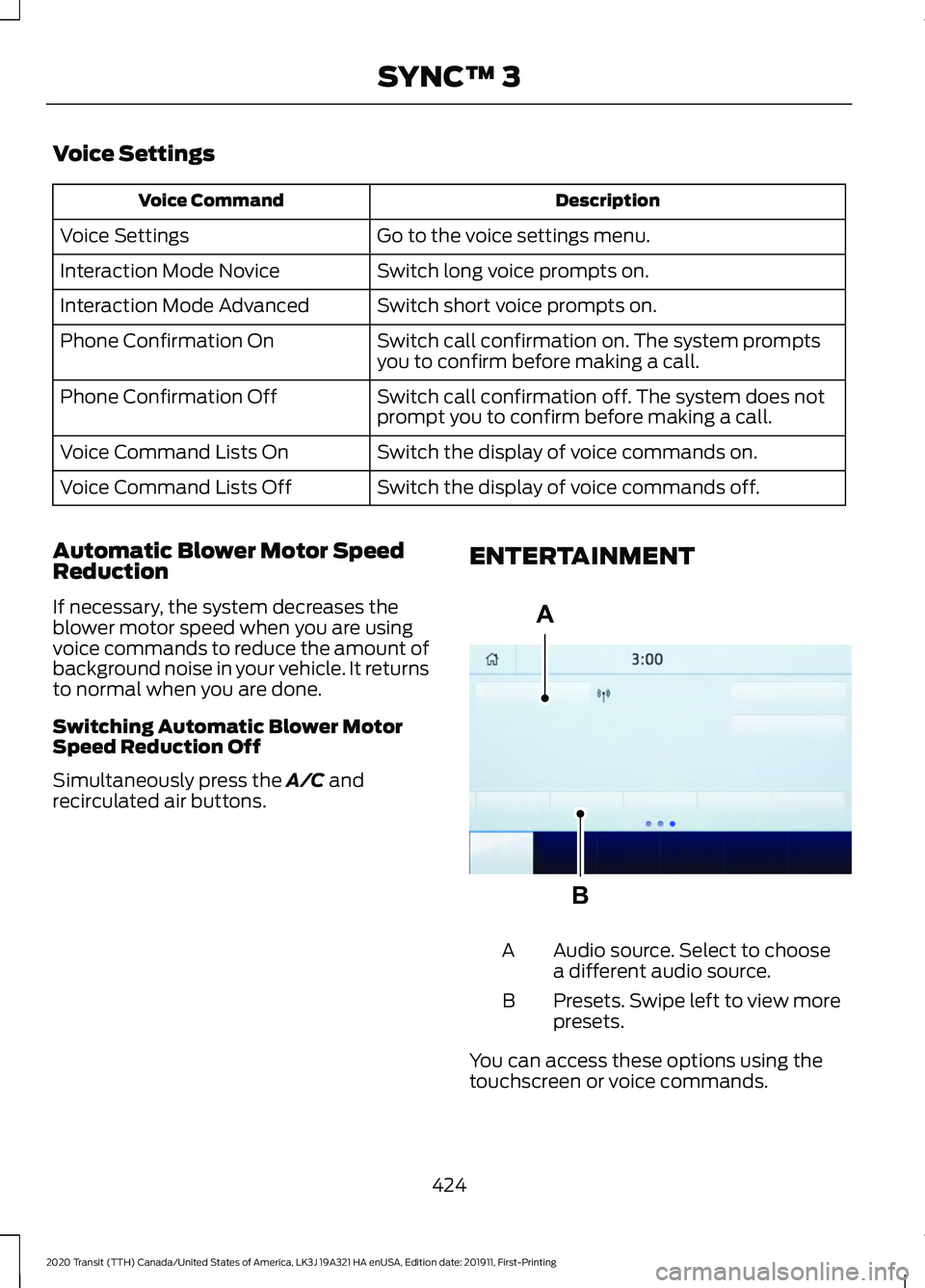
Voice Settings
Description
Voice Command
Go to the voice settings menu.
Voice Settings
Switch long voice prompts on.
Interaction Mode Novice
Switch short voice prompts on.
Interaction Mode Advanced
Switch call confirmation on. The system prompts
you to confirm before making a call.
Phone Confirmation On
Switch call confirmation off. The system does not
prompt you to confirm before making a call.
Phone Confirmation Off
Switch the display of voice commands on.
Voice Command Lists On
Switch the display of voice commands off.
Voice Command Lists Off
Automatic Blower Motor Speed
Reduction
If necessary, the system decreases the
blower motor speed when you are using
voice commands to reduce the amount of
background noise in your vehicle. It returns
to normal when you are done.
Switching Automatic Blower Motor
Speed Reduction Off
Simultaneously press the A/C and
recirculated air buttons. ENTERTAINMENT Audio source. Select to choose
a different audio source.
A
Presets. Swipe left to view more
presets.
B
You can access these options using the
touchscreen or voice commands.
424
2020 Transit (TTH) Canada/United States of America, LK3J 19A321 HA enUSA, Edition date: 201911, First-Printing SYNC™ 3A
BE293491
Page 520 of 529
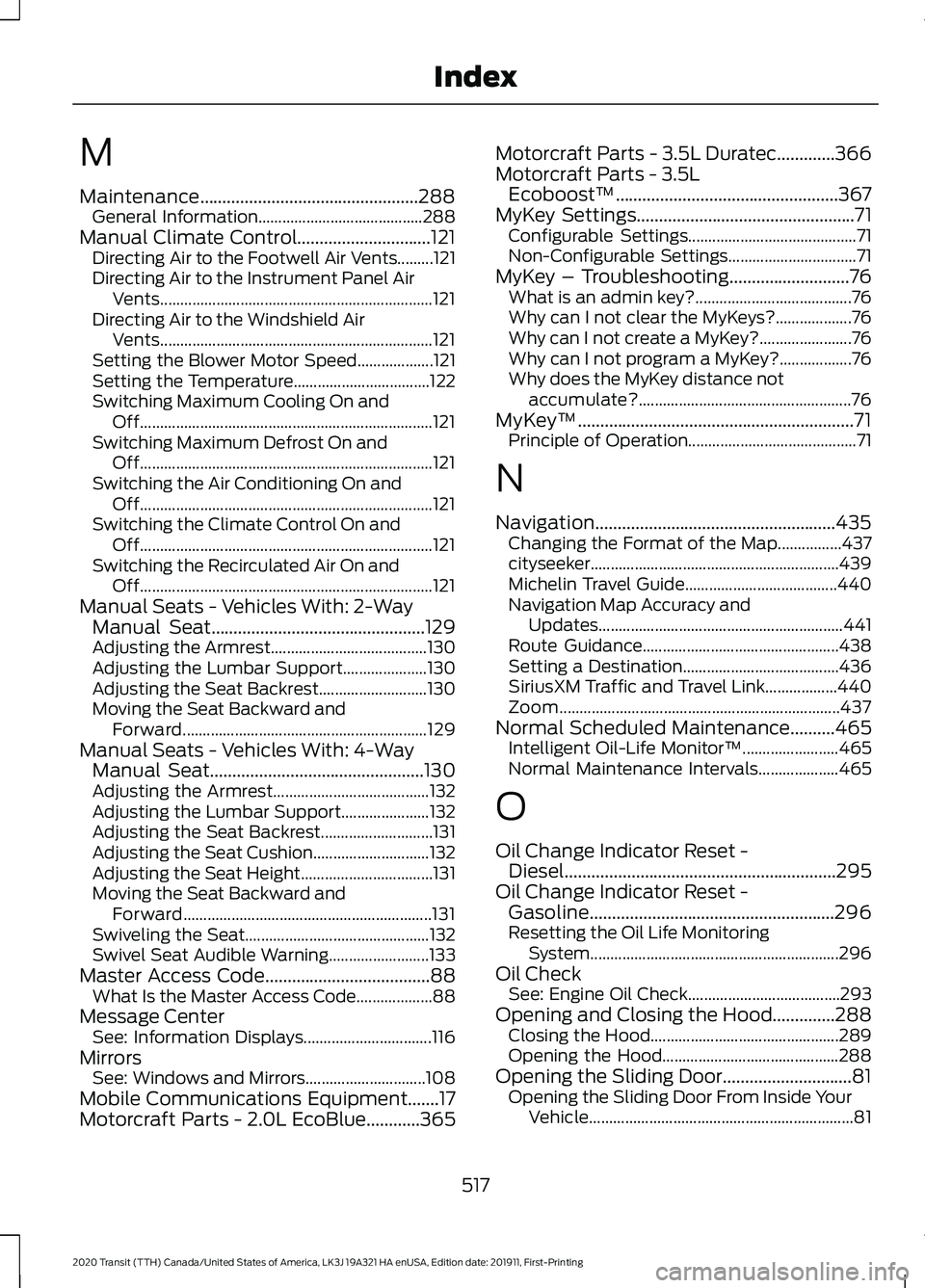
M
Maintenance.................................................288
General Information......................................... 288
Manual Climate Control..............................121 Directing Air to the Footwell Air Vents.........121
Directing Air to the Instrument Panel Air
Vents.................................................................... 121
Directing Air to the Windshield Air Vents.................................................................... 121
Setting the Blower Motor Speed................... 121
Setting the Temperature.................................. 122
Switching Maximum Cooling On and Off........................................................................\
. 121
Switching Maximum Defrost On and Off........................................................................\
. 121
Switching the Air Conditioning On and Off........................................................................\
. 121
Switching the Climate Control On and Off........................................................................\
. 121
Switching the Recirculated Air On and Off........................................................................\
. 121
Manual Seats - Vehicles With: 2-Way Manual Seat................................................129
Adjusting the Armrest....................................... 130
Adjusting the Lumbar Support..................... 130
Adjusting the Seat Backrest........................... 130
Moving the Seat Backward and Forward............................................................. 129
Manual Seats - Vehicles With: 4-Way Manual Seat................................................130
Adjusting the Armrest....................................... 132
Adjusting the Lumbar Support...................... 132
Adjusting the Seat Backrest............................ 131
Adjusting the Seat Cushion............................. 132
Adjusting the Seat Height................................. 131
Moving the Seat Backward and Forward.............................................................. 131
Swiveling the Seat.............................................. 132
Swivel Seat Audible Warning......................... 133
Master Access Code.....................................88 What Is the Master Access Code................... 88
Message Center See: Information Displays................................ 116
Mirrors See: Windows and Mirrors.............................. 108
Mobile Communications Equipment.......17
Motorcraft Parts - 2.0L EcoBlue............365 Motorcraft Parts - 3.5L Duratec
.............366
Motorcraft Parts - 3.5L Ecoboost™..................................................367
MyKey Settings
.................................................71
Configurable Settings.......................................... 71
Non-Configurable Settings................................ 71
MyKey – Troubleshooting
...........................76
What is an admin key?....................................... 76
Why can I not clear the MyKeys?................... 76
Why can I not create a MyKey?....................... 76
Why can I not program a MyKey?.................. 76
Why does the MyKey distance not accumulate?..................................................... 76
MyKey ™
..............................................................71
Principle of Operation.......................................... 71
N
Navigation
......................................................435
Changing the Format of the Map................437
cityseeker..............................................................439
Michelin Travel Guide...................................... 440
Navigation Map Accuracy and Updates............................................................. 441
Route Guidance................................................. 438
Setting a Destination....................................... 436
SiriusXM Traffic and Travel Link.................. 440
Zoom
...................................................................... 437
Normal Scheduled Maintenance..........465 Intelligent Oil-Life Monitor™........................ 465
Normal Maintenance Intervals.................... 465
O
Oil Change Indicator Reset - Diesel.............................................................295
Oil Change Indicator Reset - Gasoline.......................................................296
Resetting the Oil Life Monitoring System.............................................................. 296
Oil Check See: Engine Oil Check...................................... 293
Opening and Closing the Hood..............288 Closing the Hood............................................... 289
Opening the Hood............................................ 288
Opening the Sliding Door.............................81 Opening the Sliding Door From Inside Your
Vehicle.................................................................. 81
517
2020 Transit (TTH) Canada/United States of America, LK3J 19A321 HA enUSA, Edition date: 201911, First-Printing Index
Page 521 of 529
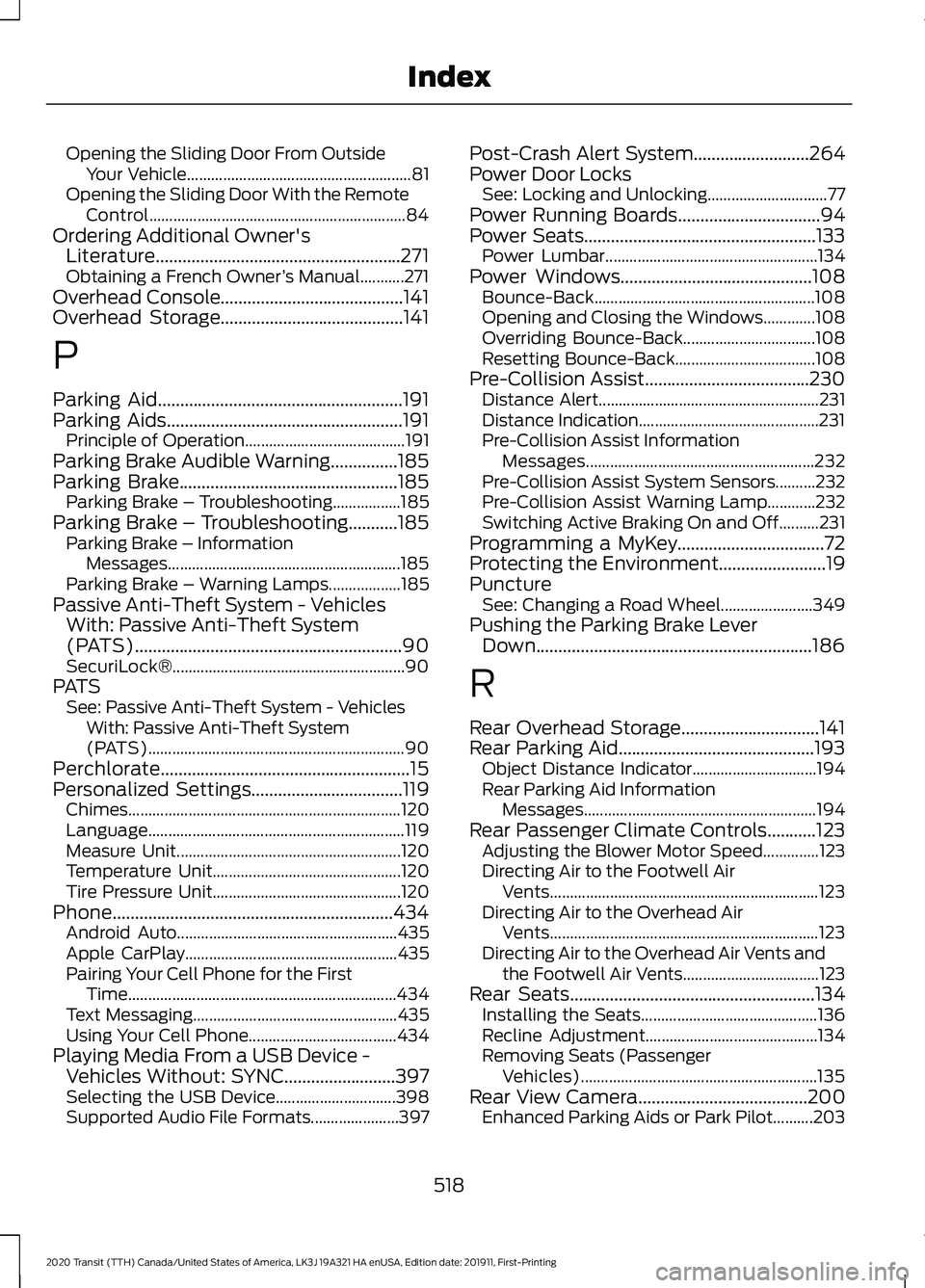
Opening the Sliding Door From Outside
Your Vehicle........................................................ 81
Opening the Sliding Door With the Remote Control................................................................ 84
Ordering Additional Owner's Literature.......................................................271
Obtaining a French Owner ’s Manual...........271
Overhead Console.........................................141
Overhead Storage.........................................141
P
Parking Aid.......................................................191
Parking Aids
.....................................................191
Principle of Operation........................................ 191
Parking Brake Audible Warning...............185
Parking Brake.................................................185 Parking Brake – Troubleshooting.................185
Parking Brake – Troubleshooting...........185 Parking Brake – Information
Messages.......................................................... 185
Parking Brake – Warning Lamps.................. 185
Passive Anti-Theft System - Vehicles With: Passive Anti-Theft System
(PATS)............................................................90
SecuriLock®.......................................................... 90
PATS See: Passive Anti-Theft System - Vehicles
With: Passive Anti-Theft System
(PATS)................................................................ 90
Perchlorate........................................................15
Personalized Settings..................................119 Chimes.................................................................... 120
Language................................................................ 119
Measure Unit........................................................ 120
Temperature Unit............................................... 120
Tire Pressure Unit............................................... 120
Phone...............................................................434 Android Auto....................................................... 435
Apple CarPlay..................................................... 435
Pairing Your Cell Phone for the First Time................................................................... 434
Text Messaging................................................... 435
Using Your Cell Phone..................................... 434
Playing Media From a USB Device - Vehicles Without: SYNC.........................397
Selecting the USB Device.............................. 398
Supported Audio File Formats...................... 397Post-Crash Alert System
..........................264
Power Door Locks See: Locking and Unlocking.............................. 77
Power Running Boards
................................94
Power Seats....................................................133 Power Lumbar..................................................... 134
Power Windows
...........................................108
Bounce-Back....................................................... 108
Opening and Closing the Windows.............108
Overriding Bounce-Back................................. 108
Resetting Bounce-Back................................... 108
Pre-Collision Assist.....................................230 Distance Alert....................................................... 231
Distance Indication.............................................231
Pre-Collision Assist Information Messages......................................................... 232
Pre-Collision Assist System Sensors..........232
Pre-Collision Assist Warning Lamp............232
Switching Active Braking On and Off..........231
Programming a MyKey
.................................72
Protecting the Environment........................19
Puncture See: Changing a Road Wheel....................... 349
Pushing the Parking Brake Lever Down..............................................................186
R
Rear Overhead Storage...............................141
Rear Parking Aid
............................................193
Object Distance Indicator............................... 194
Rear Parking Aid Information Messages.......................................................... 194
Rear Passenger Climate Controls...........123 Adjusting the Blower Motor Speed..............123
Directing Air to the Footwell Air
Vents................................................................... 123
Directing Air to the Overhead Air Vents................................................................... 123
Directing Air to the Overhead Air Vents and the Footwell Air Vents.................................. 123
Rear Seats
.......................................................134
Installing the Seats............................................ 136
Recline Adjustment........................................... 134
Removing Seats (Passenger Vehicles)........................................................... 135
Rear View Camera
......................................200
Enhanced Parking Aids or Park Pilot..........203
518
2020 Transit (TTH) Canada/United States of America, LK3J 19A321 HA enUSA, Edition date: 201911, First-Printing Index
Page 525 of 529
Resetting the Trip Computer...........................
118
Trip Odometer...................................................... 119
Trip Timer................................................................ 119
U
Under Hood Overview - 2.0L EcoBlue........................................................290
Under Hood Overview - 3.5L Duratec..........................................................291
Under Hood Overview - 3.5L Ecoboost™.................................................292
USB Port
.........................................................398
Using Adaptive Cruise Control................207 Adaptive Cruise Control Indicator................213
Adaptive Cruise Control Information
Messages.......................................................... 213
Adaptive Cruise Control System Sensors............................................................... 211
Automatic Cancellation................................... 210
Canceling the Set Speed................................. 210
Changing the Set Speed................................ 209
Detection Issues................................................. 210
Following a Vehicle........................................... 208
Hilly Condition Usage........................................ 210
Overriding the System..................................... 209
Resuming the Set Speed................................. 210
Setting the Adaptive Cruise Speed............208
Setting the Gap Distance............................... 209
Switching Adaptive Cruise Control Off....................................................................... 210
Switching Adaptive Cruise Control On....................................................................... 207
Switching to Normal Cruise Control............212
System Not Available......................................... 211
Using All-Wheel Drive..................................177 All-Wheel Drive Gauge...................................... 181
All-Wheel Drive Information Messages........................................................... 181
Driving In Special Conditions With All-Wheel Drive (AWD)................................ 177
Operating All-Wheel Drive (AWD) Vehicles with Mismatched Tires................................. 177
Using Cruise Control..................................206 Canceling the Set Speed................................ 206
Changing the Set Speed................................ 206
Cruise Control Indicator................................... 207
Resuming the Set Speed............................... 206Setting the Cruise Speed...............................
206
Switching Cruise Control Off........................ 206
Switching Cruise Control On......................... 206
Using MyKey With Remote Start Systems..........................................................76
Using Power Running Boards....................94 Automatic Power Deploy.................................. 94
Automatic Power Stow..................................... 94
Bounce-back......................................................... 95
Enabling and Disabling...................................... 95
Manual Operation................................................ 95
Manual Power Deploy........................................ 95
Resetting the System......................................... 96
Using Snow Chains.....................................343
Using Stability Control...............................190
Using SYNC™ With Your Media Player............................................................406
Audio Voice Commands................................. 407
Media Sources................................................... 406
Using SYNC™ With Your Phone............402 Accessing Features through the Phone
Menu................................................................. 403
Pairing a Phone.................................................. 402
Phone Controls.................................................. 403
Phone Voice Commands............................... 402
Using Traction Control...............................188 Switching the System Off or On................... 188
System Indicator Lights and Messages .......................................................... 188
Using Voice Recognition...........................398 Apps........................................................................\
423
Automatic Blower Motor Speed Reduction........................................................ 424
Climate.................................................................. 420
Entertainment
..................................................... 419
General................................................................... 418
Initiating a Voice Session............................... 400
Navigation............................................................. 422
Phone...................................................................... 421
Phone Voice Service......................................... 398
SiriusXM Traffic and Travel Link................... 423
System Interaction and Feedback..............401
Voice Settings..................................................... 424
Using Winter Tires.......................................342
Utilizing the Mediation/Arbitration Program (Canada Only)........................269
522
2020 Transit (TTH) Canada/United States of America, LK3J 19A321 HA enUSA, Edition date: 201911, First-Printing Index