park assist FORD TRANSIT 2020 Owners Manual
[x] Cancel search | Manufacturer: FORD, Model Year: 2020, Model line: TRANSIT, Model: FORD TRANSIT 2020Pages: 529, PDF Size: 8.3 MB
Page 7 of 529
Parking Brake - Vehicles With:
Conventional Mechanical
Parking Brake
Applying the Parking Brake ....................185
Releasing the Parking Brake ...................
185
Parking Brake Audible Warning ..............
185
Parking Brake – Troubleshooting ..........
185
Parking Brake - Vehicles With: Push Down Parking Brake
Applying the Parking Brake ....................
186
Releasing the Parking Brake ..................
186
Pushing the Parking Brake Lever Down ........................................................................\
186
Parking Brake Audible Warning .............
186
Parking Brake – Troubleshooting ..........
187
Traction Control
Principle of Operation ...............................
188
Using Traction Control ..............................
188
Stability Control
Principle of Operation ...............................
189
Using Stability Control ..............................
190
Parking Aids
Principle of Operation .................................
191
Parking Aid ......................................................
191
Rear Parking Aid ...........................................
193
Front Parking Aid .........................................
194
Side Sensing System .................................
196
Active Park Assist ........................................
198
Rear View Camera .....................................
200
180 Degree Camera ...................................
203
Cruise Control
Principle of Operation ..............................
206
Using Cruise Control .................................
206
Using Adaptive Cruise Control ...............
207Driving Aids
Speed Limiter
................................................
214
Driver Alert ......................................................
214
Lane Keeping System .................................
217
Blind Spot Information System ............
220
Cross Traffic Alert .......................................
224
Eco ....................................................................
227
Steering ..........................................................
228
Pre-Collision Assist ....................................
230
Front View Camera ....................................
233
Drive Control .................................................
234
Load Carrying
Roof Racks and Load Carriers - Bus .....
236
Roof Racks and Load Carriers - Van ........................................................................\
236
Load Retaining Fixtures ............................
236
Load Limit ......................................................
237
Towing
Towing a Trailer ............................................
242
Recommended Towing Weights - Chassis Cab/Crew Van/Cutaway/Van
........................................................................\
243
Recommended Towing Weights - M2 Bus ...............................................................
245
Essential Towing Checks ..........................
247
Towing the Vehicle on Four Wheels .....
253
Driving Hints
Reduced Engine Performance ...............
254
Economical Driving ....................................
254
Cold Weather Precautions ......................
254
Breaking-In ....................................................
255
Driving Through Water ..............................
255
Floor Mats ......................................................
255
Roadside Emergencies
Roadside Assistance .................................
257
Hazard Flashers ..........................................
258
4
2020 Transit (TTH) Canada/United States of America, LK3J 19A321 HA enUSA, Edition date: 201911, First-Printing Table of Contents
Page 74 of 529
PRINCIPLE OF OPERATION
The system is designed to promote good
driving behaviors using keys that you have
programmed with some restricted settings.
MYKEY SETTINGS
Non-Configurable Settings
Seatbelt Reminder
The audio system mutes when the seatbelt
reminder turns on. The seatbelt reminder
cannot be switched off with a MyKey.
Early Low Fuel
The low fuel level indicator turns on earlier.
Driving and Parking Aids
Parking aids, blind spot information system
and cross traffic alert turn on when you
start the engine and cannot be switched
off with a MyKey.
Pre-collision assist and lane keeping alert
turn on when you start the engine, but can
be switched off with a MyKey.
Satellite Radio
Adult content is restricted when using a
MyKey.
Configurable Settings
You can configure the following settings
after creating a MyKey. See Creating a
MyKey (page 72). Speed Limit WARNING:
Do not set MyKey
maximum speed limit to a limit that will
prevent the driver from maintaining a
safe speed considering posted speed
limits and prevailing road conditions. The
driver is always responsible to drive in
accordance with local laws and
prevailing conditions. Failure to do so
could result in accident or injury.
You can set a speed limit for your vehicle.
Warning messages appear in the
information display and a tone sounds if
your vehicle reaches the set speed. You
cannot override the set speed when using
a MyKey.
Speed Reminder
You can set a speed reminder for your
vehicle. Warning messages appear in the
information display and a tone sounds if
your vehicle exceeds the set speed.
Audio System Volume Limit
The audio system maximum volume is
reduced. A message appears in the
information display if you attempt to
exceed the volume limit. Automatic
volume control turns off.
Emergency Assistance
If you set emergency assistance to be
always on, it cannot be switched off with
a MyKey.
Do Not Disturb
If you set do not disturb to be always on,
it cannot be switched off with a MyKey.
Traction Control
If you set traction control to be always on,
it cannot be switched off with a MyKey.
71
2020 Transit (TTH) Canada/United States of America, LK3J 19A321 HA enUSA, Edition date: 201911, First-Printing MyKey
™
Page 108 of 529
Switching Automatic High Beam Control On or Off
To switch the system on or off, use the information display controls on the steering
wheel to select the following:
Action
Menu Item
Press the menu button.
Settings
Press the OK button.
Vehicle Settings
Press the
OK button.
Lighting
Press the
OK button.
Auto Highbeam
Automatic High Beam Indicator It illuminates to confirm when
the system is ready to assist.
Overriding Automatic High Beam
Control
Push the lever away from you to switch
between high beam and low beam.
Automatic High Beam Control Information Messages Description
Message
The camera has reduced visibility. Clean the windshield. If
the message continues to appear, have your vehicle checked
as soon as possible.
Front Camera Low Visib-
ility Clean Screen
The camera has malfunctioned. Wait a short period of time
for the camera to cool down. If the message continues to
appear, have your vehicle checked as soon as possible.
Front Camera Tempor-
arily Not Available
FRONT FOG LAMPS
Switching the Front Fog Lamps On
or Off
Only switch the front fog lamps on during
reduced visibility. You can switch the front fog lamps on if
any of the following occur:
•
You set the lighting control to the
parking lamps position.
• You set the lighting control to the
headlamps position.
• You set the lighting control to the
autolamps position and the headlamps
are on.
The front fog lamp button is on the lighting
control. Press the button to switch the
front fog lamps on or off.
105
2020 Transit (TTH) Canada/United States of America, LK3J 19A321 HA enUSA, Edition date: 201911, First-Printing Lighting
Page 118 of 529
Malfunction indicator lamp. If it
illuminates when the engine is
running this indicates a
malfunction. If it flashes, engine misfire
may be occurring. Increased exhaust gas
temperatures could damage the diesel
particulate filter or other vehicle
components. Avoid heavy acceleration
and deceleration and have your vehicle
checked as soon as possible. Mud/Ruts mode indicator. It
illuminates when the drive mode
is selected.
Parking brake warning lamp. It
illuminates when you engage the
parking brake and the ignition is
on. If it illuminates when your
vehicle is moving, make sure the
parking brake is disengaged. If
the parking brake is disengaged, this
indicates low brake fluid level or a brake
system fault. Have your vehicle checked
as soon as possible. Powertrain warning lamp. If it
illuminates when the engine is
running this indicates a
malfunction. If it flashes when you are
driving, immediately reduce the vehicle
speed. Avoid heavy acceleration and
deceleration and have your vehicle
checked as soon as possible. Pre-collision assist warning
lamp. It illuminates if your
vehicle rapidly approaches
another vehicle, to warn you of the risk of
a crash with the vehicle in front of you. It
could illuminate red if the distance to the
vehicle ahead is small. It illuminates
amber when you switch the system off or
if the system is not available. Selective catalytic reductant
system warning lamp. The
warning lamp illuminates if the
system detects the diesel exhaust fluid
level is low or if there is a system
malfunction. If the warning lamp
illuminates, the information display
messages give you an indication whether
the concern is fluid related or if there is a
selective catalytic reductant system
malfunction. If the warning lamp
illuminates when your vehicle is moving,
and the fluid is at a sufficient level, this
indicates a system malfunction. Have your
vehicle checked as soon as possible. Slippery mode indicator. It
illuminates when the drive mode
is selected.
Stability control and traction
control indicator. It flashes
during operation. If it does not
illuminate when you switch the ignition on,
or remains on when the engine is running,
this indicates a malfunction. Have your
vehicle checked as soon as possible. Stability control and traction
control off warning lamp. It
illuminates when you switch the
system off. Tire pressure monitoring system
warning lamp. It illuminates if
the tire pressure in one or more
tires is below the correct tire pressure. If it
does not illuminate when you switch the
ignition on, or flashes when the engine is
running, this indicates a malfunction. Have
your vehicle checked as soon as possible. Tow/haul mode indicator. It
illuminates when the drive mode
is selected.
115
2020 Transit (TTH) Canada/United States of America, LK3J 19A321 HA enUSA, Edition date: 201911, First-Printing Instrument Cluster E296606 E270480 E269320 E252028 E130458 E246592
Page 120 of 529
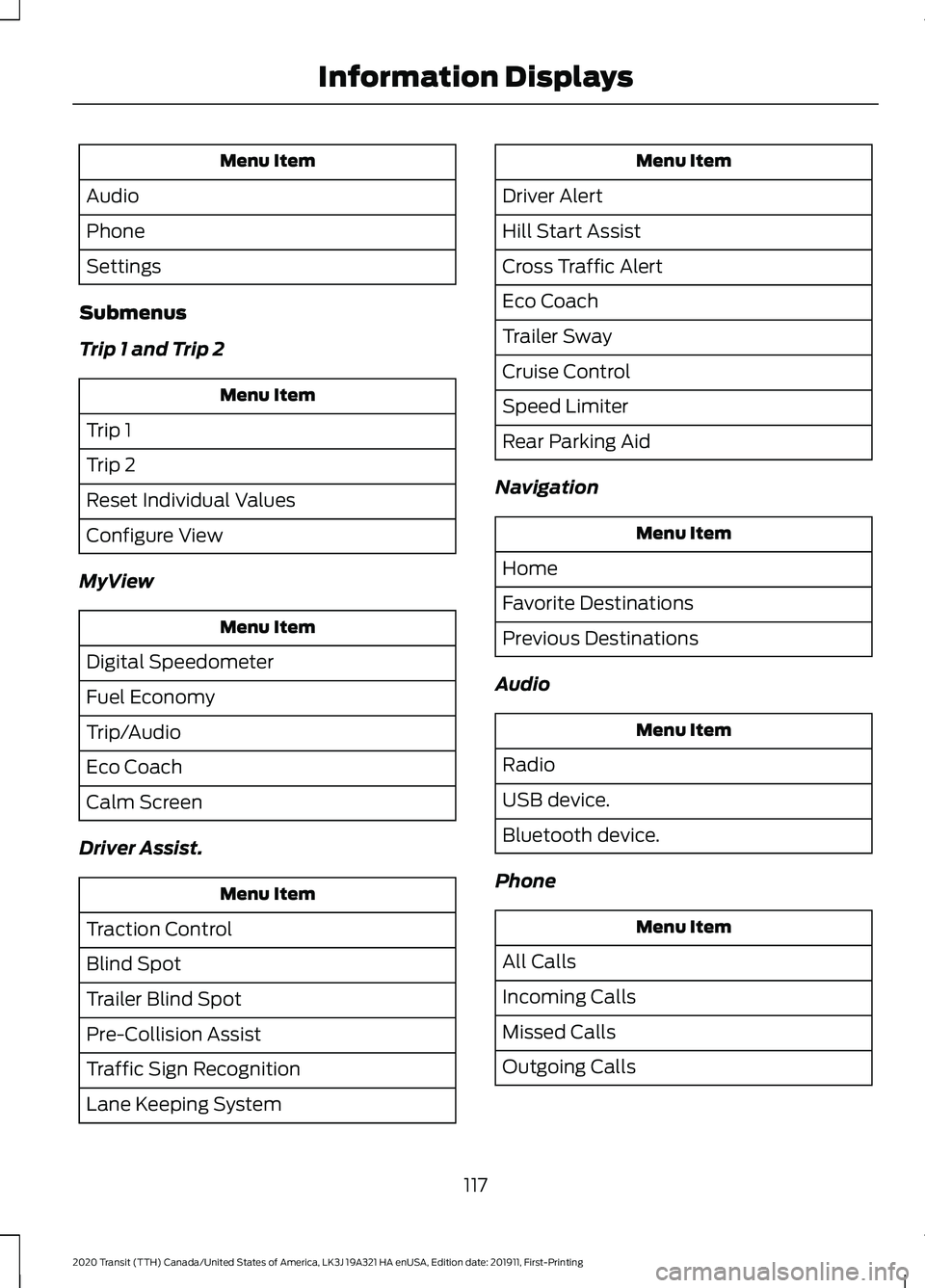
Menu Item
Audio
Phone
Settings
Submenus
Trip 1 and Trip 2 Menu Item
Trip 1
Trip 2
Reset Individual Values
Configure View
MyView Menu Item
Digital Speedometer
Fuel Economy
Trip/Audio
Eco Coach
Calm Screen
Driver Assist. Menu Item
Traction Control
Blind Spot
Trailer Blind Spot
Pre-Collision Assist
Traffic Sign Recognition
Lane Keeping System Menu Item
Driver Alert
Hill Start Assist
Cross Traffic Alert
Eco Coach
Trailer Sway
Cruise Control
Speed Limiter
Rear Parking Aid
Navigation Menu Item
Home
Favorite Destinations
Previous Destinations
Audio Menu Item
Radio
USB device.
Bluetooth device.
Phone Menu Item
All Calls
Incoming Calls
Missed Calls
Outgoing Calls
117
2020 Transit (TTH) Canada/United States of America, LK3J 19A321 HA enUSA, Edition date: 201911, First-Printing Information Displays
Page 147 of 529
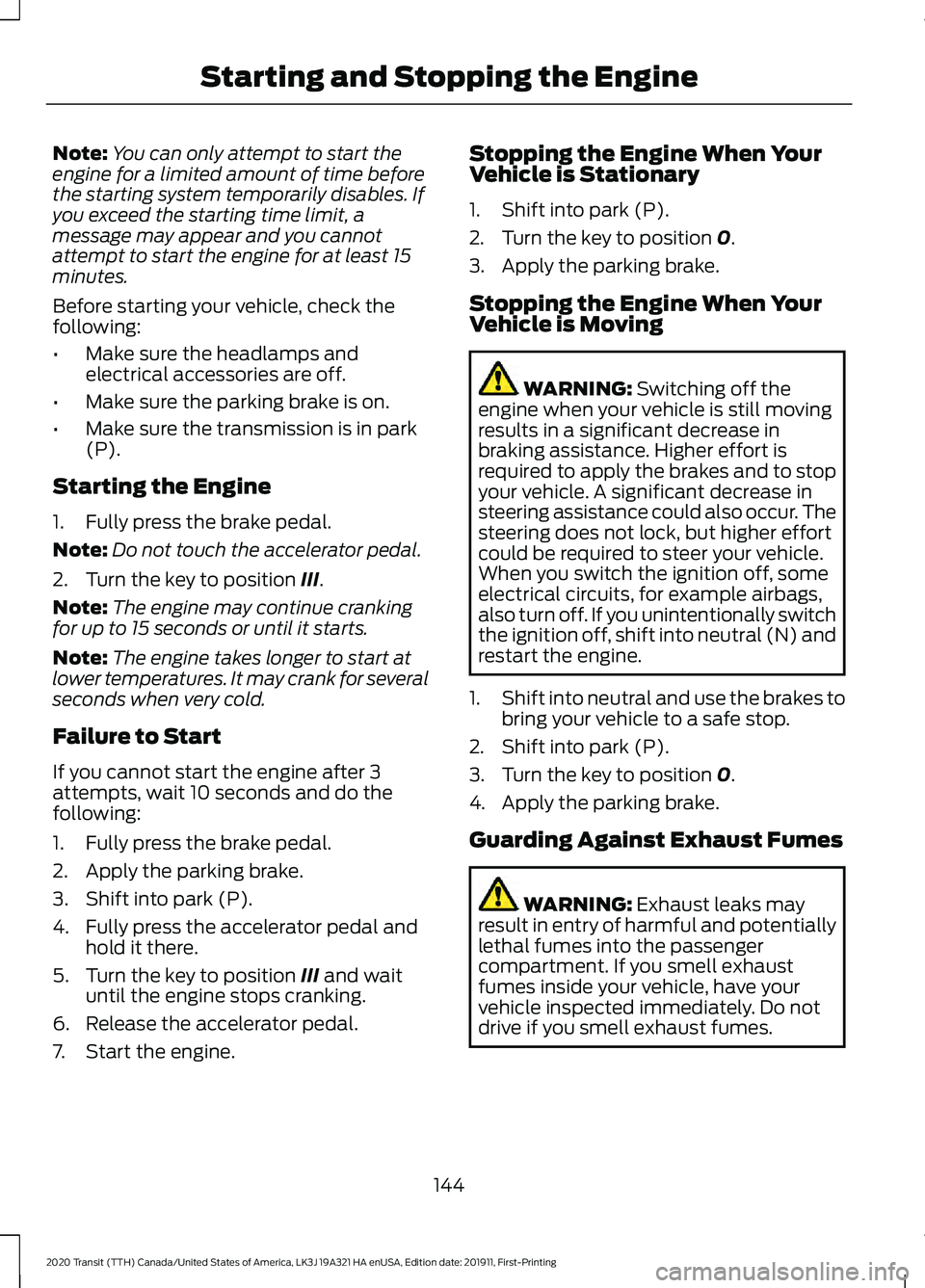
Note:
You can only attempt to start the
engine for a limited amount of time before
the starting system temporarily disables. If
you exceed the starting time limit, a
message may appear and you cannot
attempt to start the engine for at least 15
minutes.
Before starting your vehicle, check the
following:
• Make sure the headlamps and
electrical accessories are off.
• Make sure the parking brake is on.
• Make sure the transmission is in park
(P).
Starting the Engine
1. Fully press the brake pedal.
Note: Do not touch the accelerator pedal.
2. Turn the key to position III.
Note: The engine may continue cranking
for up to 15 seconds or until it starts.
Note: The engine takes longer to start at
lower temperatures. It may crank for several
seconds when very cold.
Failure to Start
If you cannot start the engine after 3
attempts, wait 10 seconds and do the
following:
1. Fully press the brake pedal.
2. Apply the parking brake.
3. Shift into park (P).
4. Fully press the accelerator pedal and hold it there.
5. Turn the key to position
III and wait
until the engine stops cranking.
6. Release the accelerator pedal.
7. Start the engine. Stopping the Engine When Your
Vehicle is Stationary
1. Shift into park (P).
2. Turn the key to position
0.
3. Apply the parking brake.
Stopping the Engine When Your
Vehicle is Moving WARNING:
Switching off the
engine when your vehicle is still moving
results in a significant decrease in
braking assistance. Higher effort is
required to apply the brakes and to stop
your vehicle. A significant decrease in
steering assistance could also occur. The
steering does not lock, but higher effort
could be required to steer your vehicle.
When you switch the ignition off, some
electrical circuits, for example airbags,
also turn off. If you unintentionally switch
the ignition off, shift into neutral (N) and
restart the engine.
1. Shift into neutral and use the brakes to
bring your vehicle to a safe stop.
2. Shift into park (P).
3. Turn the key to position
0.
4. Apply the parking brake.
Guarding Against Exhaust Fumes WARNING:
Exhaust leaks may
result in entry of harmful and potentially
lethal fumes into the passenger
compartment. If you smell exhaust
fumes inside your vehicle, have your
vehicle inspected immediately. Do not
drive if you smell exhaust fumes.
144
2020 Transit (TTH) Canada/United States of America, LK3J 19A321 HA enUSA, Edition date: 201911, First-Printing Starting and Stopping the Engine
Page 149 of 529
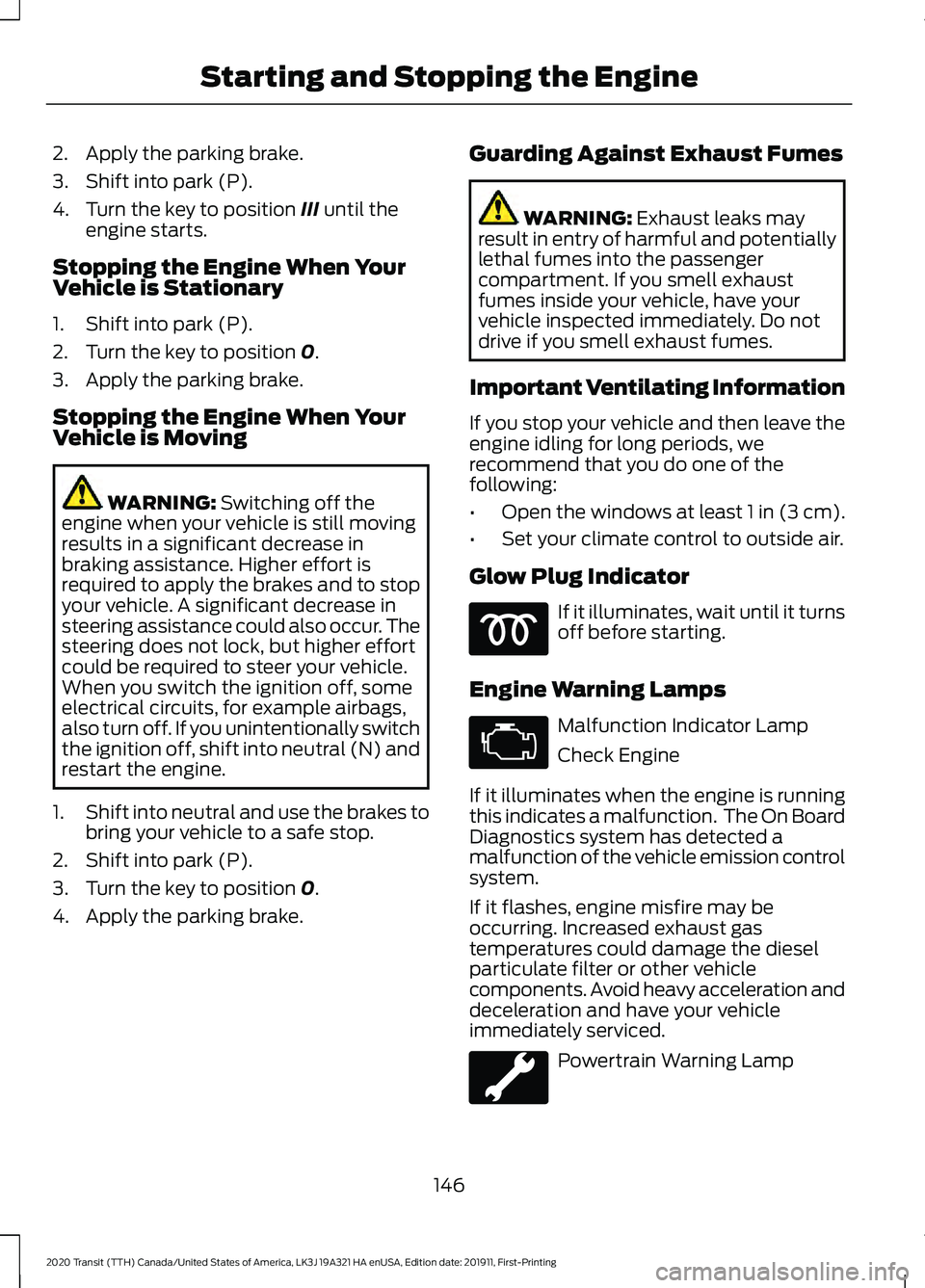
2. Apply the parking brake.
3. Shift into park (P).
4. Turn the key to position III until the
engine starts.
Stopping the Engine When Your
Vehicle is Stationary
1. Shift into park (P).
2. Turn the key to position
0.
3. Apply the parking brake.
Stopping the Engine When Your
Vehicle is Moving WARNING:
Switching off the
engine when your vehicle is still moving
results in a significant decrease in
braking assistance. Higher effort is
required to apply the brakes and to stop
your vehicle. A significant decrease in
steering assistance could also occur. The
steering does not lock, but higher effort
could be required to steer your vehicle.
When you switch the ignition off, some
electrical circuits, for example airbags,
also turn off. If you unintentionally switch
the ignition off, shift into neutral (N) and
restart the engine.
1. Shift into neutral and use the brakes to
bring your vehicle to a safe stop.
2. Shift into park (P).
3. Turn the key to position
0.
4. Apply the parking brake. Guarding Against Exhaust Fumes WARNING:
Exhaust leaks may
result in entry of harmful and potentially
lethal fumes into the passenger
compartment. If you smell exhaust
fumes inside your vehicle, have your
vehicle inspected immediately. Do not
drive if you smell exhaust fumes.
Important Ventilating Information
If you stop your vehicle and then leave the
engine idling for long periods, we
recommend that you do one of the
following:
• Open the windows at least 1 in (3 cm).
• Set your climate control to outside air.
Glow Plug Indicator If it illuminates, wait until it turns
off before starting.
Engine Warning Lamps Malfunction Indicator Lamp
Check Engine
If it illuminates when the engine is running
this indicates a malfunction. The On Board
Diagnostics system has detected a
malfunction of the vehicle emission control
system.
If it flashes, engine misfire may be
occurring. Increased exhaust gas
temperatures could damage the diesel
particulate filter or other vehicle
components. Avoid heavy acceleration and
deceleration and have your vehicle
immediately serviced. Powertrain Warning Lamp
146
2020 Transit (TTH) Canada/United States of America, LK3J 19A321 HA enUSA, Edition date: 201911, First-Printing Starting and Stopping the Engine
Page 152 of 529
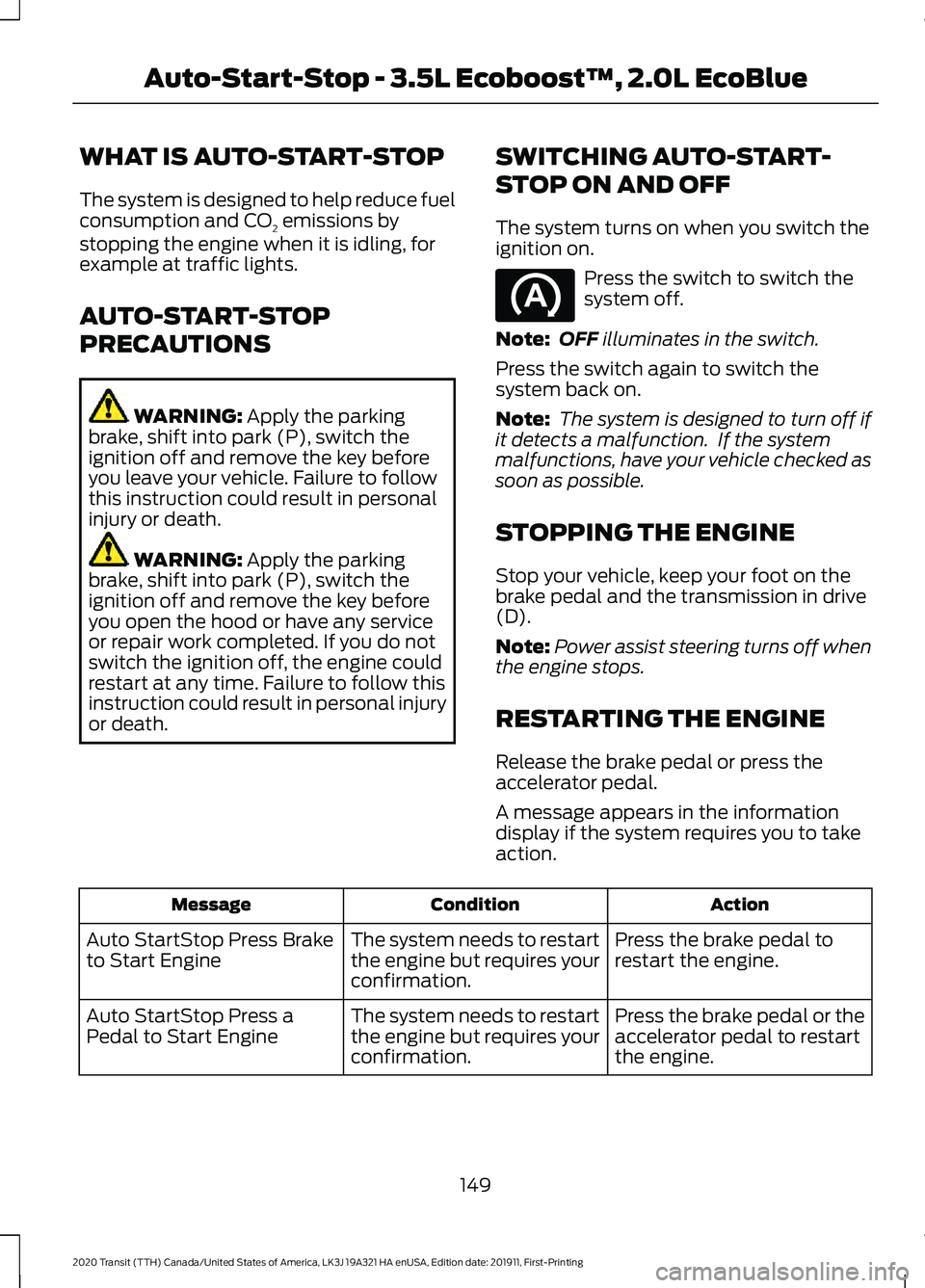
WHAT IS AUTO-START-STOP
The system is designed to help reduce fuel
consumption and CO
2 emissions by
stopping the engine when it is idling, for
example at traffic lights.
AUTO-START-STOP
PRECAUTIONS WARNING: Apply the parking
brake, shift into park (P), switch the
ignition off and remove the key before
you leave your vehicle. Failure to follow
this instruction could result in personal
injury or death. WARNING:
Apply the parking
brake, shift into park (P), switch the
ignition off and remove the key before
you open the hood or have any service
or repair work completed. If you do not
switch the ignition off, the engine could
restart at any time. Failure to follow this
instruction could result in personal injury
or death. SWITCHING AUTO-START-
STOP ON AND OFF
The system turns on when you switch the
ignition on. Press the switch to switch the
system off.
Note: OFF
illuminates in the switch.
Press the switch again to switch the
system back on.
Note: The system is designed to turn off if
it detects a malfunction. If the system
malfunctions, have your vehicle checked as
soon as possible.
STOPPING THE ENGINE
Stop your vehicle, keep your foot on the
brake pedal and the transmission in drive
(D).
Note: Power assist steering turns off when
the engine stops.
RESTARTING THE ENGINE
Release the brake pedal or press the
accelerator pedal.
A message appears in the information
display if the system requires you to take
action. Action
Condition
Message
Press the brake pedal to
restart the engine.
The system needs to restart
the engine but requires your
confirmation.
Auto StartStop Press Brake
to Start Engine
Press the brake pedal or the
accelerator pedal to restart
the engine.
The system needs to restart
the engine but requires your
confirmation.
Auto StartStop Press a
Pedal to Start Engine
149
2020 Transit (TTH) Canada/United States of America, LK3J 19A321 HA enUSA, Edition date: 201911, First-Printing Auto-Start-Stop - 3.5L Ecoboost™, 2.0L EcoBlue
Page 178 of 529
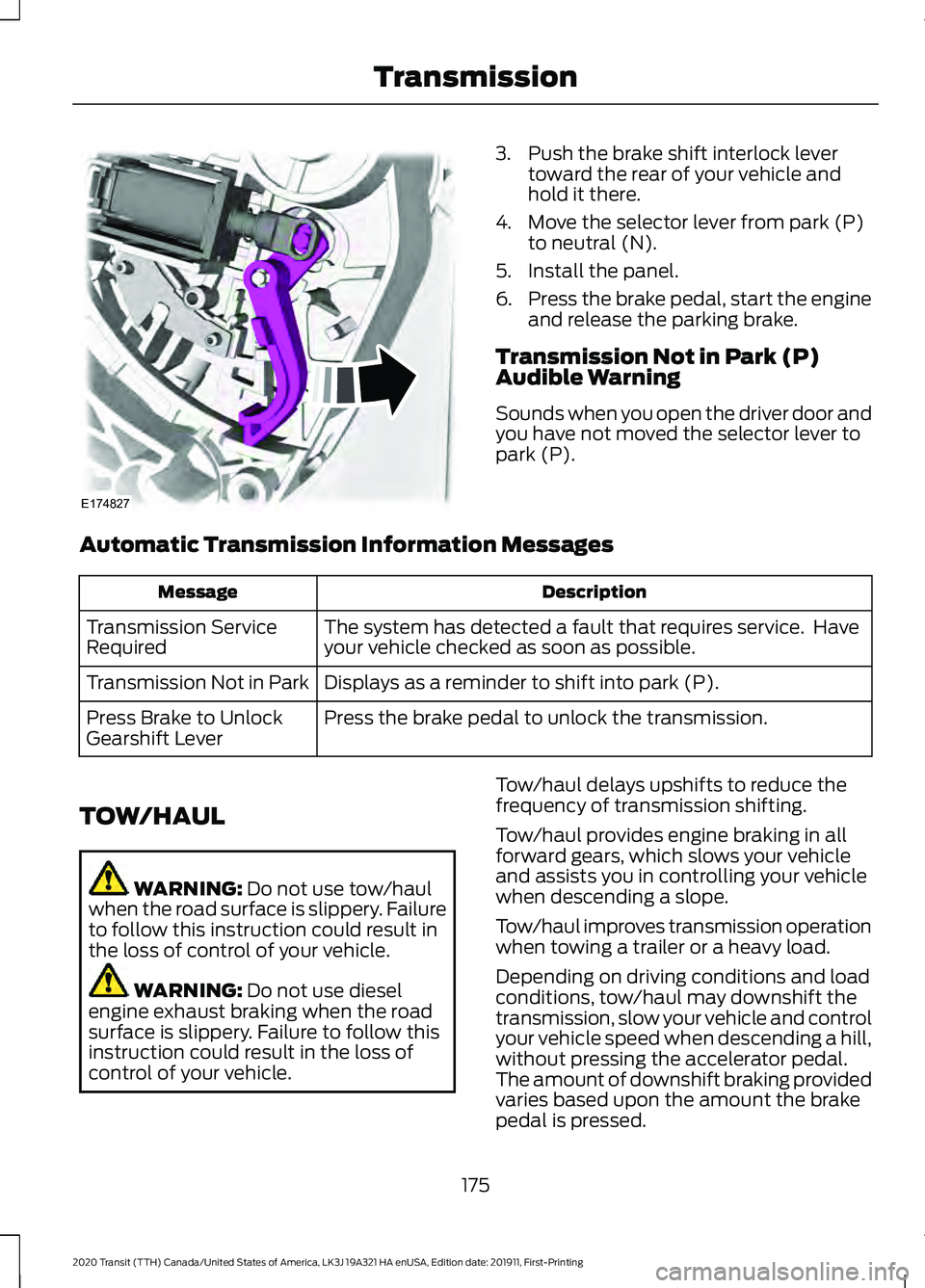
3. Push the brake shift interlock lever
toward the rear of your vehicle and
hold it there.
4. Move the selector lever from park (P) to neutral (N).
5. Install the panel.
6. Press the brake pedal, start the engine
and release the parking brake.
Transmission Not in Park (P)
Audible Warning
Sounds when you open the driver door and
you have not moved the selector lever to
park (P).
Automatic Transmission Information Messages Description
Message
The system has detected a fault that requires service. Have
your vehicle checked as soon as possible.
Transmission Service
Required
Displays as a reminder to shift into park (P).
Transmission Not in Park
Press the brake pedal to unlock the transmission.
Press Brake to Unlock
Gearshift Lever
TOW/HAUL WARNING: Do not use tow/haul
when the road surface is slippery. Failure
to follow this instruction could result in
the loss of control of your vehicle. WARNING:
Do not use diesel
engine exhaust braking when the road
surface is slippery. Failure to follow this
instruction could result in the loss of
control of your vehicle. Tow/haul delays upshifts to reduce the
frequency of transmission shifting.
Tow/haul provides engine braking in all
forward gears, which slows your vehicle
and assists you in controlling your vehicle
when descending a slope.
Tow/haul improves transmission operation
when towing a trailer or a heavy load.
Depending on driving conditions and load
conditions, tow/haul may downshift the
transmission, slow your vehicle and control
your vehicle speed when descending a hill,
without pressing the accelerator pedal.
The amount of downshift braking provided
varies based upon the amount the brake
pedal is pressed.
175
2020 Transit (TTH) Canada/United States of America, LK3J 19A321 HA enUSA, Edition date: 201911, First-Printing TransmissionE174827
Page 185 of 529
GENERAL INFORMATION
Note:
Occasional brake noise is normal. If
a metal-to-metal, continuous grinding or
continuous squeal sound is present, the
brake linings may be worn-out. Have the
system checked by an authorized dealer. If
your vehicle has continuous vibration or
shudder in the steering wheel while braking,
have it checked by an authorized dealer.
Note: Brake dust may accumulate on the
wheels, even under normal driving
conditions. Some dust is inevitable as the
brakes wear and does not contribute to
brake noise. See Cleaning the Wheels
(page 321). Wet brakes result in reduced braking
efficiency. Gently press the brake pedal a
few times when driving from a car wash or
standing water to dry the brakes.
Brake Over Accelerator
In the event the accelerator pedal
becomes stuck or entrapped, apply steady
and firm pressure to the brake pedal to
slow the vehicle and reduce engine power.
If you experience this condition, apply the
brakes and bring your vehicle to a safe
stop. Move the gearshift lever to park (P),
switch the engine off and apply the parking
brake. Inspect the accelerator pedal for
any interference. If none are found and the
condition persists, have your vehicle towed
to the nearest authorized dealer.
Brake Assist
Brake assist detects when you brake
rapidly by measuring the rate at which you
press the brake pedal. It provides
maximum braking efficiency as long as you
press the pedal, and can reduce stopping
distances in critical situations. Anti-lock Brake System
This system helps you maintain steering
control during emergency stops by keeping
the brakes from locking. This lamp momentarily
illuminates when you turn the
ignition on. If the light does not
illuminate during start up, remains on or
flashes, the system may be disabled. Have
the system checked by an authorized
dealer. If the system is disabled, normal
braking is still effective. If the
brake warning lamp illuminates
when you release the parking brake, have
the system checked by an authorized
dealer.
HINTS ON DRIVING WITH
ANTI-LOCK BRAKES
The anti-lock braking system does not
eliminate the risks when:
• You drive too closely to the vehicle in
front of you.
• Your vehicle is hydroplaning.
• You take corners too fast.
• The road surface is poor.
Note: If the system activates, the brake
pedal may pulse and may travel further.
Maintain pressure on the brake pedal. You
may also hear a noise from the system. This
is normal.
HILL START ASSIST WARNING:
The system does not
replace the parking brake. When you
leave your vehicle, always apply the
parking brake.
182
2020 Transit (TTH) Canada/United States of America, LK3J 19A321 HA enUSA, Edition date: 201911, First-Printing BrakesE138644 E138644