instrument panel FORD TRANSIT 2021 User Guide
[x] Cancel search | Manufacturer: FORD, Model Year: 2021, Model line: TRANSIT, Model: FORD TRANSIT 2021Pages: 509, PDF Size: 8.21 MB
Page 165 of 509
Press the – button again to lock out gears
beginning with the highest gear. For
example, press the
– button twice to lock
out 10th and 9th gears.
Note: The instrument cluster only displays
the available gears and the transmission
automatically shifts between the available
gears.
Press the + button to unlock gears to allow
the transmission to shift to higher gears.
Note: The transmission automatically shifts
within the gear range you select.
Brake Shift Interlock WARNING:
Do not drive your
vehicle until you verify that the
stoplamps are working. WARNING:
When doing this
procedure, you need to take the
transmission out of park (P) which
means your vehicle can roll freely. To
avoid unwanted vehicle movement,
always fully apply the parking brake prior
to doing this procedure. Use wheels
chocks if appropriate. WARNING:
If the parking brake is
fully released, but the brake warning
lamp remains illuminated, the brakes
may not be working properly. Have your
vehicle checked as soon as possible.
Brake shift interlock prevents you from
shifting out of park (P) when you have
switched the ignition on and not pressed
the brake pedal.
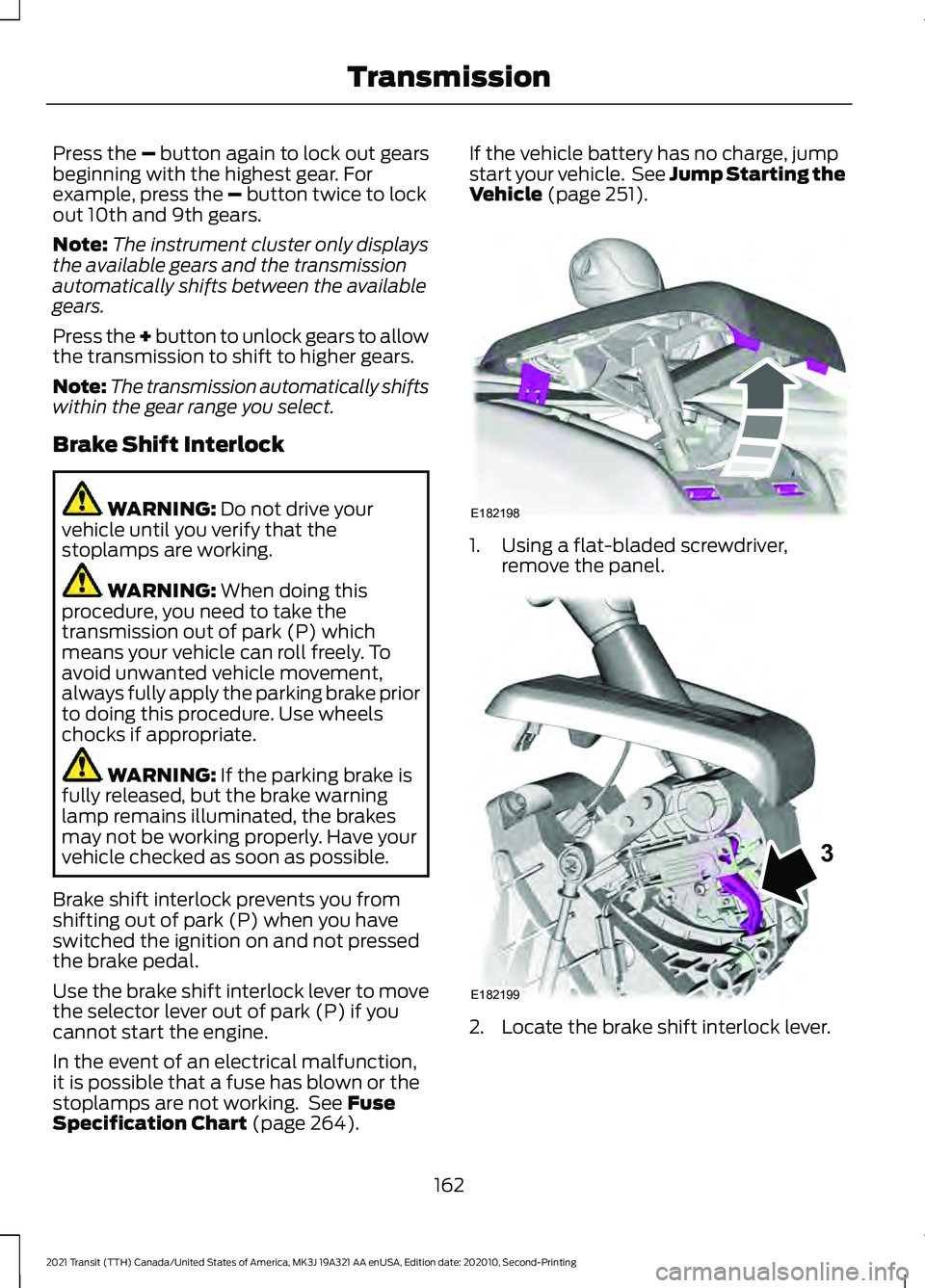
Use the brake shift interlock lever to move
the selector lever out of park (P) if you
cannot start the engine.
In the event of an electrical malfunction,
it is possible that a fuse has blown or the
stoplamps are not working. See
Fuse
Specification Chart (page 264). If the vehicle battery has no charge, jump
start your vehicle. See Jump Starting the
Vehicle
(page 251).
1. Using a flat-bladed screwdriver,
remove the panel. 2. Locate the brake shift interlock lever.
162
2021 Transit (TTH) Canada/United States of America, MK3J 19A321 AA enUSA, Edition date: 202010, Second-Printing TransmissionE182198 E182199
3
Page 180 of 509
WHAT IS THE ELECTRIC
PARKING BRAKE
The electric parking brake is used to hold
your vehicle on slopes and flat roads.
APPLYING THE ELECTRIC
PARKING BRAKE
WARNING: Always fully apply the
parking brake and make sure you shift
into park (P). Failure to follow this
instruction could result in personal injury
or death. WARNING:
If you drive extended
distances with the parking brake applied,
you could cause damage to the brake
system. The switch is next to the steering
wheel on the lower part of the
instrument panel.
1. Pull the switch up.
The red warning lamp flashes during
operation and illuminates when the parking
brake is applied.
Note: You can apply the electric parking
brake when the ignition is off.
Note: The electric parking brake could
apply when you shift into park (P).
See
Automatic Transmission (page 161).
APPLYING THE ELECTRIC
PARKING BRAKE IN AN
EMERGENCY
You can use the electric parking brake to
slow or stop your vehicle in an emergency.
1. Pull the switch up and hold it. The electric parking brake continues to
slow your vehicle down unless you release
the switch.
The red warning lamp illuminates, a tone
sounds and the stoplamps turn on when
you use the electric parking brake in an
emergency.
Note:
Do not apply the electric parking
brake when your vehicle is moving, except
in an emergency.
MANUALLY RELEASING THE
ELECTRIC PARKING BRAKE
1. Switch the ignition on.
2. Press and hold the brake pedal.
3. Push the switch down.
The red warning lamp turns off.
Pulling Away on a Hill When Towing a
Trailer
1. Press and hold the brake pedal.
2. Pull the switch upward and hold it.
3. Shift into gear.
4. Press the accelerator pedal until engine
has developed sufficient torque to
prevent your vehicle from rolling down
the hill.
5. Release the switch and pull away in a normal manner.
AUTOMATICALLY RELEASING
THE ELECTRIC PARKING
BRAKE
1. Close the driver door.
2. Shift into gear.
3. Press the accelerator pedal and pull away in a normal manner.
177
2021 Transit (TTH) Canada/United States of America, MK3J 19A321 AA enUSA, Edition date: 202010, Second-Printing Electric Parking BrakeE267156
Page 183 of 509
PRINCIPLE OF OPERATION
The traction control system helps avoid
drive wheel spin and loss of traction.
If your vehicle begins to slide, the system
applies the brakes to individual wheels
and, when needed, reduces engine power
at the same time. If the wheels spin when
accelerating on slippery or loose surfaces,
the system reduces engine power in order
to increase traction.
USING TRACTION CONTROL
WARNING: The stability and
traction control light illuminates steadily
if the system detects a failure. Make sure
you did not manually disable the traction
control system using the information
display controls or the switch. If the
stability control and traction control light
is still illuminating steadily, have the
system serviced by an authorized dealer
immediately. Operating your vehicle with
the traction control disabled could lead
to an increased risk of loss of vehicle
control, vehicle rollover, personal injury
and death.
The system automatically turns on each
time you switch the ignition on.
If your vehicle is stuck in mud or snow,
switching traction control off may be
beneficial as this allows the wheels to spin.
Note: When you switch traction control off,
stability control remains fully active.
Switching the System Off or On
When you switch the system off or on, a
message appears in the information
display showing system status. Press the traction control button
on the instrument panel to
switch the system off or on.
System Indicator Lights and
Messages The stability and traction control
light:
• Temporarily illuminates on engine
start-up.
• Flashes when a driving condition
activates either of the systems.
• Illuminates if a problem occurs in either
of the systems. The stability and traction control
off light temporarily illuminates
on engine start-up and stays on
when you switch the traction control
system off.
180
2021 Transit (TTH) Canada/United States of America, MK3J 19A321 AA enUSA, Edition date: 202010, Second-Printing Traction ControlE313166 E138639 E130458
Page 229 of 509
Using the Front View Camera
The front view camera provides a video
image of the area in front of your vehicle.
To use the front view camera system,
place the transmission in any gear except
reverse (R). An image of the front of your
vehicle appears once you press the camera
enable button and your vehicle speed is
below 6 mph (10 km/h).
Note: The area displayed on the screen may
vary according to your vehicle's orientation
or road condition.
Note: The front view camera will switch off
if your vehicle speed exceeds
6 mph
(10 km/h). You will have to switch the
system back on by using the enable button
once below the speed threshold.
Note: The camera system may not operate
correctly if mud, water or debris obstructs
the camera's view. You can clean the lens
with a soft, lint-free cloth and non-abrasive
cleaner or by using your front washer. See
Wipers and Washers
(page 97). The camera button is located on
the audio unit.
Camera Views
Press the camera button to toggle
between different views.
• Front Normal View: Provides an image
of what is directly in front of your
vehicle.
• Front Split View: Provides an extended
view of what is in front of your vehicle.
Access this view by pressing the
camera button from the Front Normal
View screen. DRIVE CONTROL
Selectable Drive Modes
Your vehicle has various drive modes that
you can select for different driving
conditions. Depending on the drive mode
that you select, the system adjusts various
vehicle settings, for example steering, gear
shifting, handling and powertrain response.
Selecting a Drive Mode
The button is on the instrument panel.
Repeatedly press the button to
scroll through the available drive
modes. Release the button to
confirm your selected drive mode.
Normal Vehicle settings suited for
balanced driving.
Note: This is the default mode each time
you switch the ignition on.
Eco Vehicle settings suited for
economical driving.
Slippery Vehicle settings suited for driving
on slippery roads.
Tow/Haul Vehicle settings suited for
towing or hauling.
Mud/Ruts Vehicle settings suited for driving
through mud and ruts.
226
2021 Transit (TTH) Canada/United States of America, MK3J 19A321 AA enUSA, Edition date: 202010, Second-Printing Driving AidsE188847 E298514 E225310 E267164 E269320 E246592 E296606
Page 253 of 509
Vehicles Sold in Canada: Getting
Roadside Assistance
To fully assist you should you have a
vehicle concern, Ford Motor Company of
Canada, Limited offers a complimentary
roadside assistance program. This program
is eligible within Canada or the continental
United States.
The service is available 24 hours a day,
seven days a week.
This program is separate from the New
Vehicle Limited Warranty, but the coverage
is concurrent with the powertrain coverage
period of your vehicle. Canadian roadside
coverage and benefits may differ from the
U.S. coverage.
If you require more information, please call
us in Canada at 1-800-665-2006, or visit
our website at www.ford.ca.
HAZARD FLASHERS
The hazard warning button is
located on the instrument panel.
Switch the hazard warning
flashers on when your vehicle is creating a
safety hazard.
Press the button to switch the hazard
warning flashers on. The front and rear
direction indicators will flash.
Press the button again to switch the
hazard warning flashers off.
Note: Prolonged use of the hazard warning
flashers will cause the battery to run out of
charge. There may be insufficient power to
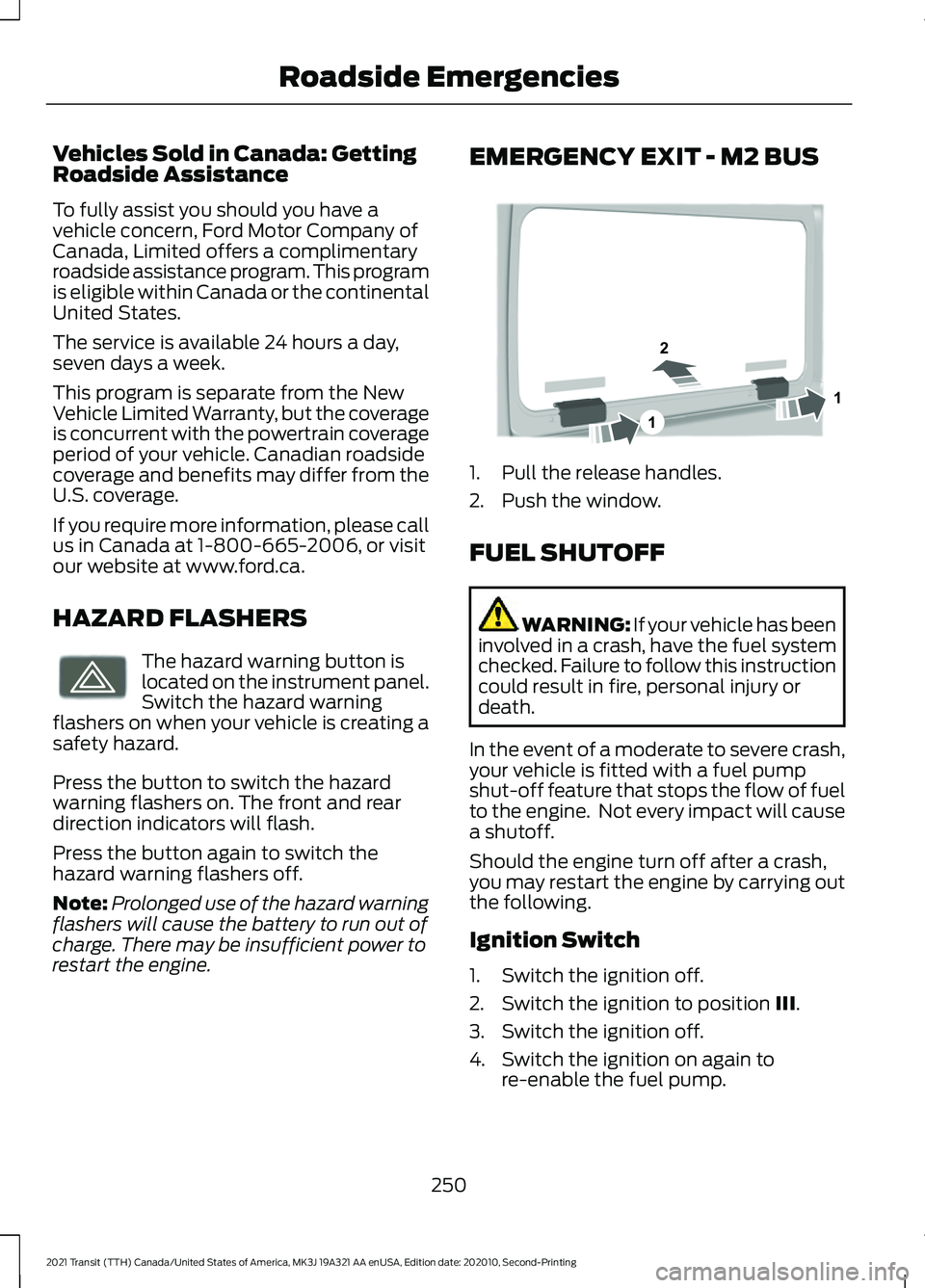
restart the engine. EMERGENCY EXIT - M2 BUS
1. Pull the release handles.
2. Push the window.
FUEL SHUTOFF
WARNING: If your vehicle has been
involved in a crash, have the fuel system
checked. Failure to follow this instruction
could result in fire, personal injury or
death.
In the event of a moderate to severe crash,
your vehicle is fitted with a fuel pump
shut-off feature that stops the flow of fuel
to the engine. Not every impact will cause
a shutoff.
Should the engine turn off after a crash,
you may restart the engine by carrying out
the following.
Ignition Switch
1. Switch the ignition off.
2. Switch the ignition to position III.
3. Switch the ignition off.
4. Switch the ignition on again to re-enable the fuel pump.
250
2021 Transit (TTH) Canada/United States of America, MK3J 19A321 AA enUSA, Edition date: 202010, Second-Printing Roadside EmergenciesE71943 1
2
1E323705
Page 275 of 509
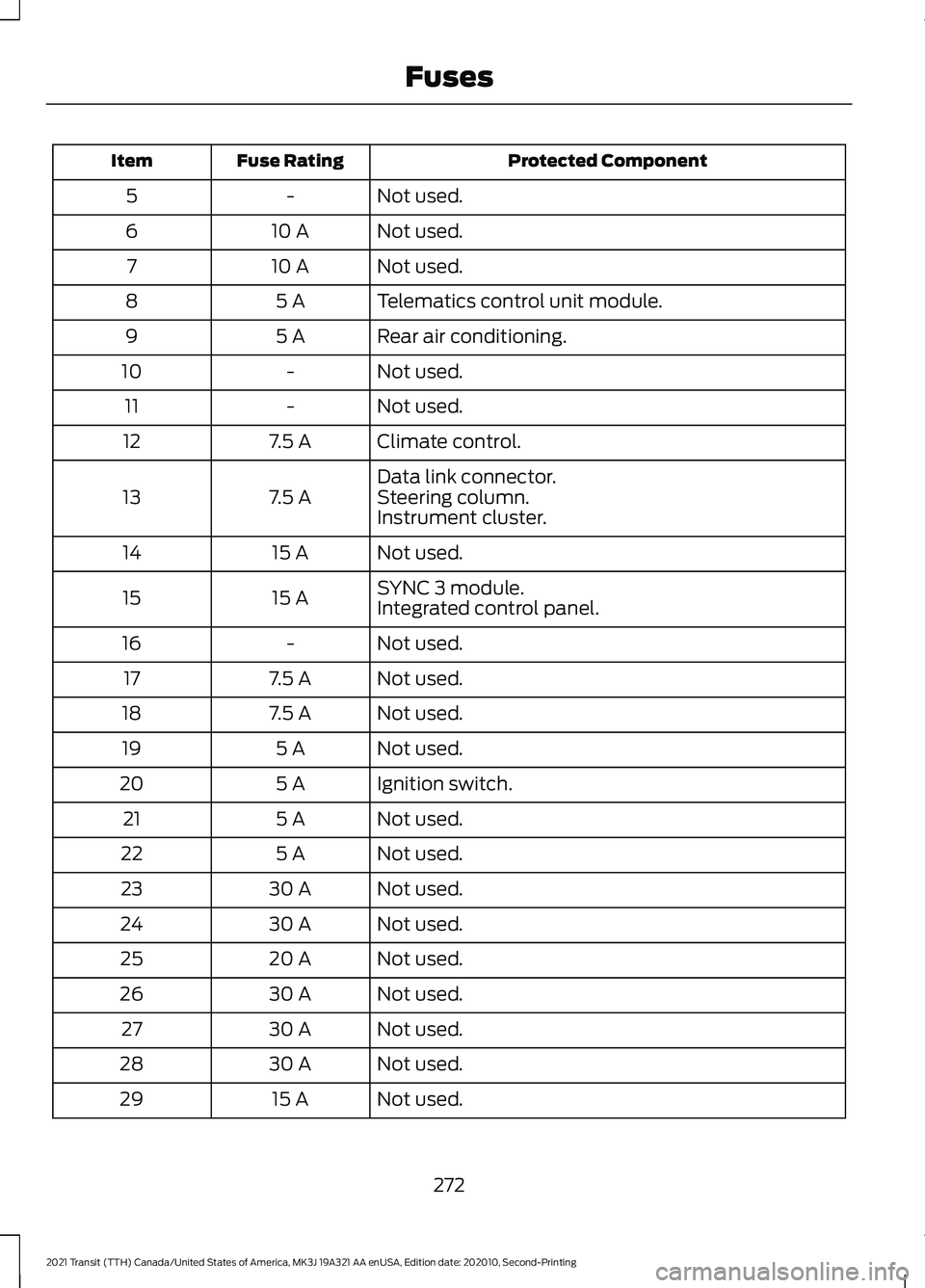
Protected Component
Fuse Rating
Item
Not used.
-
5
Not used.
10 A
6
Not used.
10 A
7
Telematics control unit module.
5 A
8
Rear air conditioning.
5 A
9
Not used.
-
10
Not used.
-
11
Climate control.
7.5 A
12
Data link connector.
7.5 A
13 Steering column.
Instrument cluster.
Not used.
15 A
14
SYNC 3 module.
15 A
15
Integrated control panel.
Not used.
-
16
Not used.
7.5 A
17
Not used.
7.5 A
18
Not used.
5 A
19
Ignition switch.
5 A
20
Not used.
5 A
21
Not used.
5 A
22
Not used.
30 A
23
Not used.
30 A
24
Not used.
20 A
25
Not used.
30 A
26
Not used.
30 A
27
Not used.
30 A
28
Not used.
15 A
29
272
2021 Transit (TTH) Canada/United States of America, MK3J 19A321 AA enUSA, Edition date: 202010, Second-Printing Fuses
Page 308 of 509
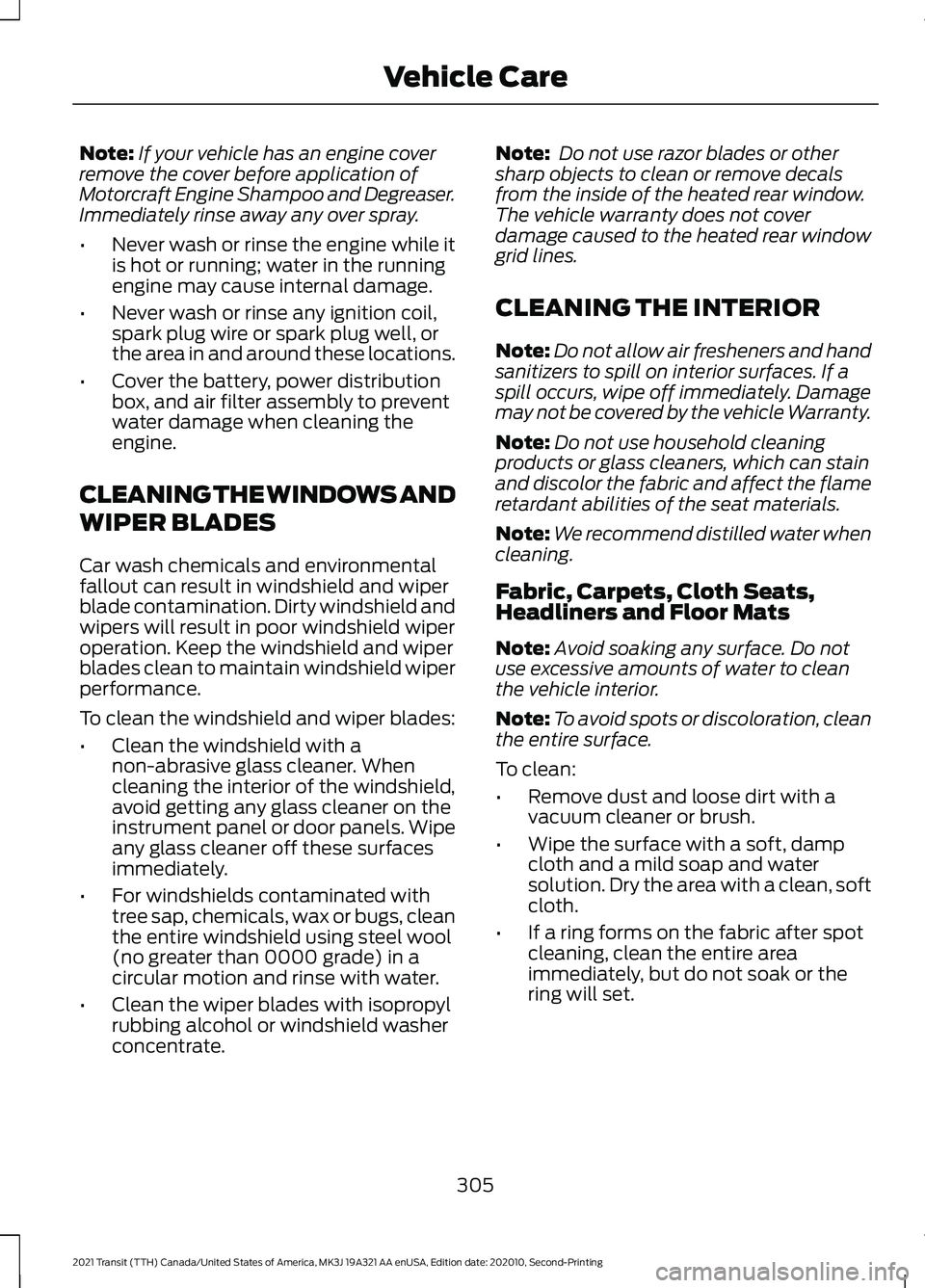
Note:
If your vehicle has an engine cover
remove the cover before application of
Motorcraft Engine Shampoo and Degreaser.
Immediately rinse away any over spray.
• Never wash or rinse the engine while it
is hot or running; water in the running
engine may cause internal damage.
• Never wash or rinse any ignition coil,
spark plug wire or spark plug well, or
the area in and around these locations.
• Cover the battery, power distribution
box, and air filter assembly to prevent
water damage when cleaning the
engine.
CLEANING THE WINDOWS AND
WIPER BLADES
Car wash chemicals and environmental
fallout can result in windshield and wiper
blade contamination. Dirty windshield and
wipers will result in poor windshield wiper
operation. Keep the windshield and wiper
blades clean to maintain windshield wiper
performance.
To clean the windshield and wiper blades:
• Clean the windshield with a
non-abrasive glass cleaner. When
cleaning the interior of the windshield,
avoid getting any glass cleaner on the
instrument panel or door panels. Wipe
any glass cleaner off these surfaces
immediately.
• For windshields contaminated with
tree sap, chemicals, wax or bugs, clean
the entire windshield using steel wool
(no greater than 0000 grade) in a
circular motion and rinse with water.
• Clean the wiper blades with isopropyl
rubbing alcohol or windshield washer
concentrate. Note:
Do not use razor blades or other
sharp objects to clean or remove decals
from the inside of the heated rear window.
The vehicle warranty does not cover
damage caused to the heated rear window
grid lines.
CLEANING THE INTERIOR
Note: Do not allow air fresheners and hand
sanitizers to spill on interior surfaces. If a
spill occurs, wipe off immediately. Damage
may not be covered by the vehicle Warranty.
Note: Do not use household cleaning
products or glass cleaners, which can stain
and discolor the fabric and affect the flame
retardant abilities of the seat materials.
Note: We recommend distilled water when
cleaning.
Fabric, Carpets, Cloth Seats,
Headliners and Floor Mats
Note: Avoid soaking any surface. Do not
use excessive amounts of water to clean
the vehicle interior.
Note: To avoid spots or discoloration, clean
the entire surface.
To clean:
• Remove dust and loose dirt with a
vacuum cleaner or brush.
• Wipe the surface with a soft, damp
cloth and a mild soap and water
solution. Dry the area with a clean, soft
cloth.
• If a ring forms on the fabric after spot
cleaning, clean the entire area
immediately, but do not soak or the
ring will set.
305
2021 Transit (TTH) Canada/United States of America, MK3J 19A321 AA enUSA, Edition date: 202010, Second-Printing Vehicle Care
Page 309 of 509
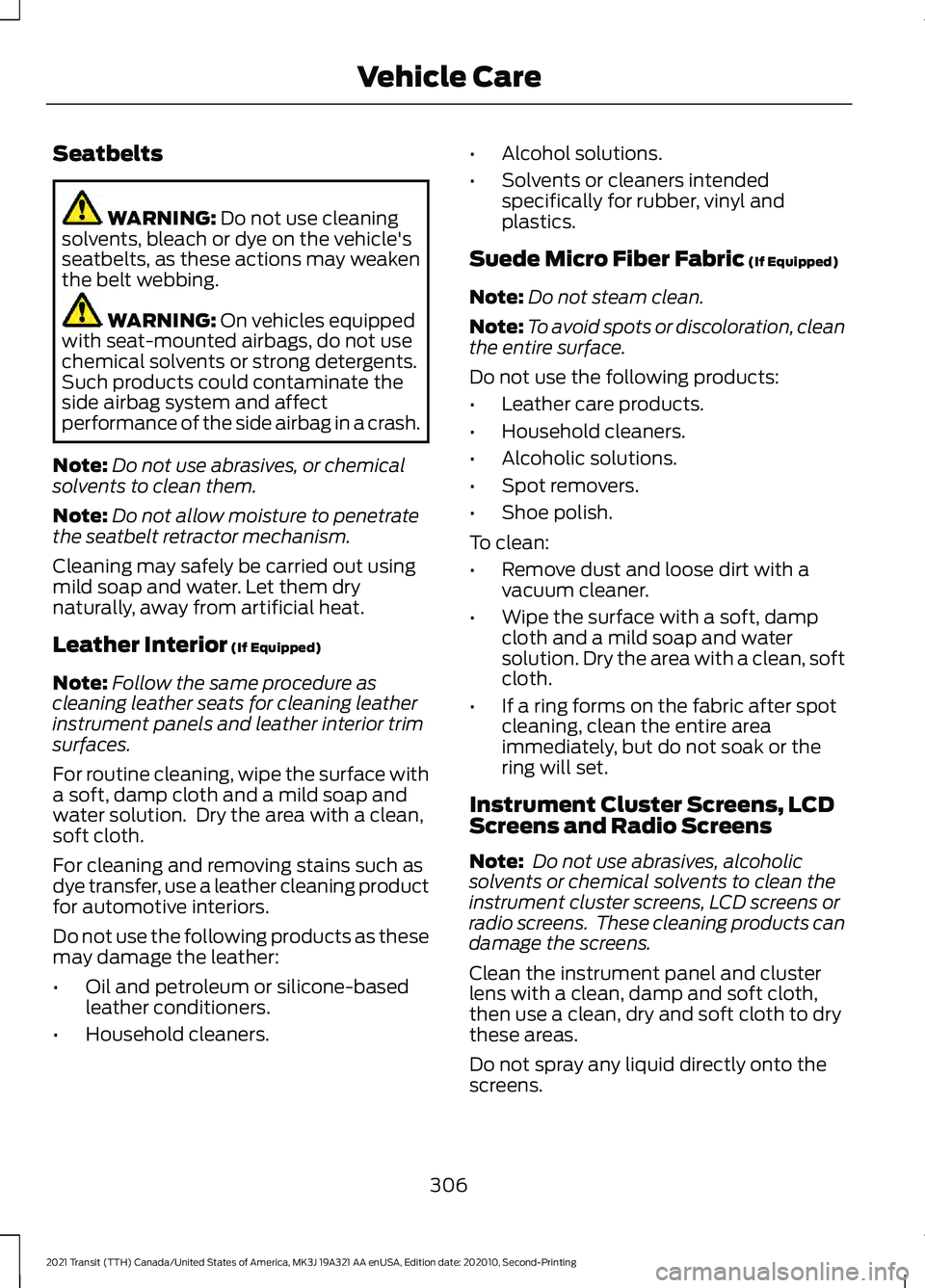
Seatbelts
WARNING: Do not use cleaning
solvents, bleach or dye on the vehicle's
seatbelts, as these actions may weaken
the belt webbing. WARNING:
On vehicles equipped
with seat-mounted airbags, do not use
chemical solvents or strong detergents.
Such products could contaminate the
side airbag system and affect
performance of the side airbag in a crash.
Note: Do not use abrasives, or chemical
solvents to clean them.
Note: Do not allow moisture to penetrate
the seatbelt retractor mechanism.
Cleaning may safely be carried out using
mild soap and water. Let them dry
naturally, away from artificial heat.
Leather Interior
(If Equipped)
Note: Follow the same procedure as
cleaning leather seats for cleaning leather
instrument panels and leather interior trim
surfaces.
For routine cleaning, wipe the surface with
a soft, damp cloth and a mild soap and
water solution. Dry the area with a clean,
soft cloth.
For cleaning and removing stains such as
dye transfer, use a leather cleaning product
for automotive interiors.
Do not use the following products as these
may damage the leather:
• Oil and petroleum or silicone-based
leather conditioners.
• Household cleaners. •
Alcohol solutions.
• Solvents or cleaners intended
specifically for rubber, vinyl and
plastics.
Suede Micro Fiber Fabric
(If Equipped)
Note: Do not steam clean.
Note: To avoid spots or discoloration, clean
the entire surface.
Do not use the following products:
• Leather care products.
• Household cleaners.
• Alcoholic solutions.
• Spot removers.
• Shoe polish.
To clean:
• Remove dust and loose dirt with a
vacuum cleaner.
• Wipe the surface with a soft, damp
cloth and a mild soap and water
solution. Dry the area with a clean, soft
cloth.
• If a ring forms on the fabric after spot
cleaning, clean the entire area
immediately, but do not soak or the
ring will set.
Instrument Cluster Screens, LCD
Screens and Radio Screens
Note: Do not use abrasives, alcoholic
solvents or chemical solvents to clean the
instrument cluster screens, LCD screens or
radio screens. These cleaning products can
damage the screens.
Clean the instrument panel and cluster
lens with a clean, damp and soft cloth,
then use a clean, dry and soft cloth to dry
these areas.
Do not spray any liquid directly onto the
screens.
306
2021 Transit (TTH) Canada/United States of America, MK3J 19A321 AA enUSA, Edition date: 202010, Second-Printing Vehicle Care
Page 310 of 509
Do not use a microfiber cloth to clean the
bezel around the display screens as it could
damage the surface.
Rear Windows
Note:
Do not use any abrasive materials to
clean the interior of the rear windows.
Note: Do not install stickers or labels to the
interior of the rear windows.
Mirrors
Do not clean the housing or glass of any
mirror with harsh abrasives, fuel or other
petroleum or ammonia-based cleaning
products.
Storage Compartments, Cup
Holders and Ashtrays
To clean:
• Take out any removable inserts.
• Wipe the surface with a soft, damp
cloth and a mild soap and water
solution. Dry the area with a clean, soft
cloth.
CLEANING THE INSTRUMENT
PANEL AND INSTRUMENT
CLUSTER LENS WARNING: Do not use chemical
solvents or strong detergents when
cleaning the steering wheel or
instrument panel to avoid contamination
of the airbag system.
Note: Follow the same procedure as
cleaning leather seats for cleaning leather
instrument panels and leather interior trim
surfaces. Clean the instrument panel and cluster
lens with a clean, damp and soft cloth,
then use a clean, dry and soft cloth to dry
these areas.
•
Avoid cleaners or polishes that increase
the gloss of the upper portion of the
instrument panel. The dull finish in this
area helps protect you from
undesirable windshield reflection.
• Do not use any household cleaning
products or glass cleaners as these
may damage the finish of the
instrument panel, interior trim and
cluster lens.
• Wash or wipe your hands clean if you
have been in contact with certain
products such as insect repellent and
suntan lotion to avoid possible damage
to the interior painted surfaces.
• Do not allow air fresheners and hand
sanitizers to spill onto interior surfaces.
If a spill occurs, wipe off immediately.
Your warranty may not cover these
damages.
If a staining liquid like coffee or juice has
been spilled on the instrument panel or on
interior trim surfaces:
1. Wipe up spilled liquid using a clean, soft cloth as quickly as possible.
2. Use Motorcraft Premium Leather and Vinyl Cleaner or a commercially
available leather cleaning product for
automotive interiors. Test any cleaner
or stain remover on an inconspicuous
area.
3. Alternatively, wipe the surface with a clean, soft cloth and a mild soap and
water solution. Dry the area with a
clean, soft cloth.
4. If necessary, apply more soap and water solution or cleaning product to
a clean, soft cloth and press it onto the
soiled area. Allow this to set at room
temperature for 30 minutes.
307
2021 Transit (TTH) Canada/United States of America, MK3J 19A321 AA enUSA, Edition date: 202010, Second-Printing Vehicle Care
Page 317 of 509
2. Peel off the label G showing the
maximum permissible speed of 50
mph (80 km/h) from the casing and
attach it to the instrument panel in the
driver ’s field of view. Make sure the
label does not obscure anything
important.
3. Take the hose C and the power plug with cable E out of the temporary
mobility kit.
4. Screw the hose C onto the sealant bottle.
5. Remove the valve cap from the damaged tire.
6. Remove the protective cap A from the sealant bottle hose and screw the hose
firmly onto the valve of the damaged
tire.
7. Make sure that the compressor switch
F is in position 0.
8. Insert the power plug E into the auxiliary power point. See Auxiliary
Power Points (page 138).
9. Start the engine.
10. Move the compressor switch F to position 1.
11. After a minimum of two minutes move the compressor switch F to
position 0 and unscrew the hose C
from the sealant bottle. Unscrew the
sealant bottle hose from the tire
valve.
12. Screw the hose C onto the tire valve and move the compressor switch F
to position 1.
13. Inflate the tire to the recommended inflation pressure, but do not use the
inflator for longer than 10 minutes.
Move the compressor switch F to
position 0 and check the current tire
pressure with pressure gauge D.
Unscrew the hose C from the tire
valve. 14. Remove the power plug E from the
auxiliary power point.
15. Make sure the tire sealant and inflator
kit, the bottle lid and the orange cap
are stored safely, but still easily
accessible in your vehicle. The tire
sealant and inflator kit will be
required again when you check the
tire pressure.
16. Immediately drive approximately six miles (10 kilometers) so that the
sealant can seal the damaged area.
Note: When pumping in the sealant through
the tire valve, the pressure may rise up to 87
psi (6 bar) but will drop again after about
30 seconds.
Note: : If the tire pressure has dropped to
26 psi (1.8 bar) or below, the tire could be
damaged beyond a temporary repair. Have
your vehicle immediately checked. Do not
drive your vehicle.
Note: If the tire pressure has dropped but
is still above 26 psi (1.8 bar), use the kit to
inflate the tire again.
After Using the Tire Sealant and
Inflator Kit WARNING:
If you experience any
unusual vibration, ride disturbance or
noise while driving, reduce your speed
until you can safely pull off to the side of
the road and call for roadside assistance.
Failure to do so could cause you to lose
control of your vehicle and increase the
risk of personal injury or death.
1. Stop your vehicle after driving approximately six miles (10
kilometers). Check, and where
necessary, adjust the pressure of the
damaged tire.
314
2021 Transit (TTH) Canada/United States of America, MK3J 19A321 AA enUSA, Edition date: 202010, Second-Printing Wheels and Tires