lock FORD TRANSIT 2021 Owner's Manual
[x] Cancel search | Manufacturer: FORD, Model Year: 2021, Model line: TRANSIT, Model: FORD TRANSIT 2021Pages: 509, PDF Size: 8.21 MB
Page 69 of 509
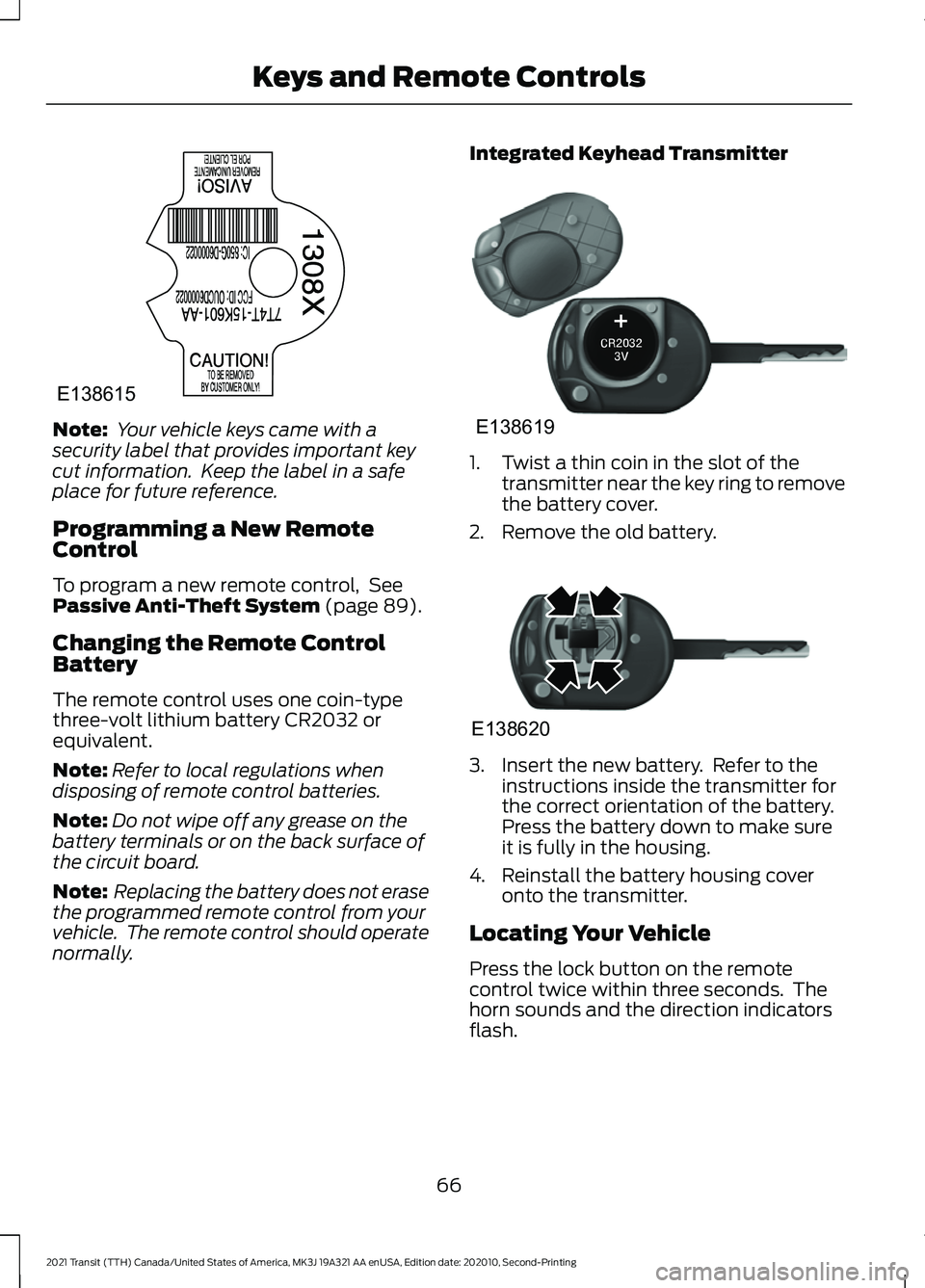
Note:
Your vehicle keys came with a
security label that provides important key
cut information. Keep the label in a safe
place for future reference.
Programming a New Remote
Control
To program a new remote control, See
Passive Anti-Theft System (page 89).
Changing the Remote Control
Battery
The remote control uses one coin-type
three-volt lithium battery CR2032 or
equivalent.
Note: Refer to local regulations when
disposing of remote control batteries.
Note: Do not wipe off any grease on the
battery terminals or on the back surface of
the circuit board.
Note: Replacing the battery does not erase
the programmed remote control from your
vehicle. The remote control should operate
normally. Integrated Keyhead Transmitter
1. Twist a thin coin in the slot of the
transmitter near the key ring to remove
the battery cover.
2. Remove the old battery. 3. Insert the new battery. Refer to the
instructions inside the transmitter for
the correct orientation of the battery.
Press the battery down to make sure
it is fully in the housing.
4. Reinstall the battery housing cover onto the transmitter.
Locating Your Vehicle
Press the lock button on the remote
control twice within three seconds. The
horn sounds and the direction indicators
flash.
66
2021 Transit (TTH) Canada/United States of America, MK3J 19A321 AA enUSA, Edition date: 202010, Second-Printing Keys and Remote ControlsE138615 E138619 E138620
Page 70 of 509
Note:
If locking was not successful, any
door is open, or if the hood is open on
vehicles with an alarm or remote start then
the horn sounds but the direction indicators
do not flash.
Switching the Panic Alarm On and
Off Press the button on the remote
control to switch the panic alarm
on. Press the button again or
switch the ignition on to switch the panic
alarm off.
We recommend you do not use this
method to locate your vehicle.
Note: The panic alarm only operates when
the ignition is off.
REMOTE CONTROL - VEHICLES
WITH: POWER SLIDING DOOR
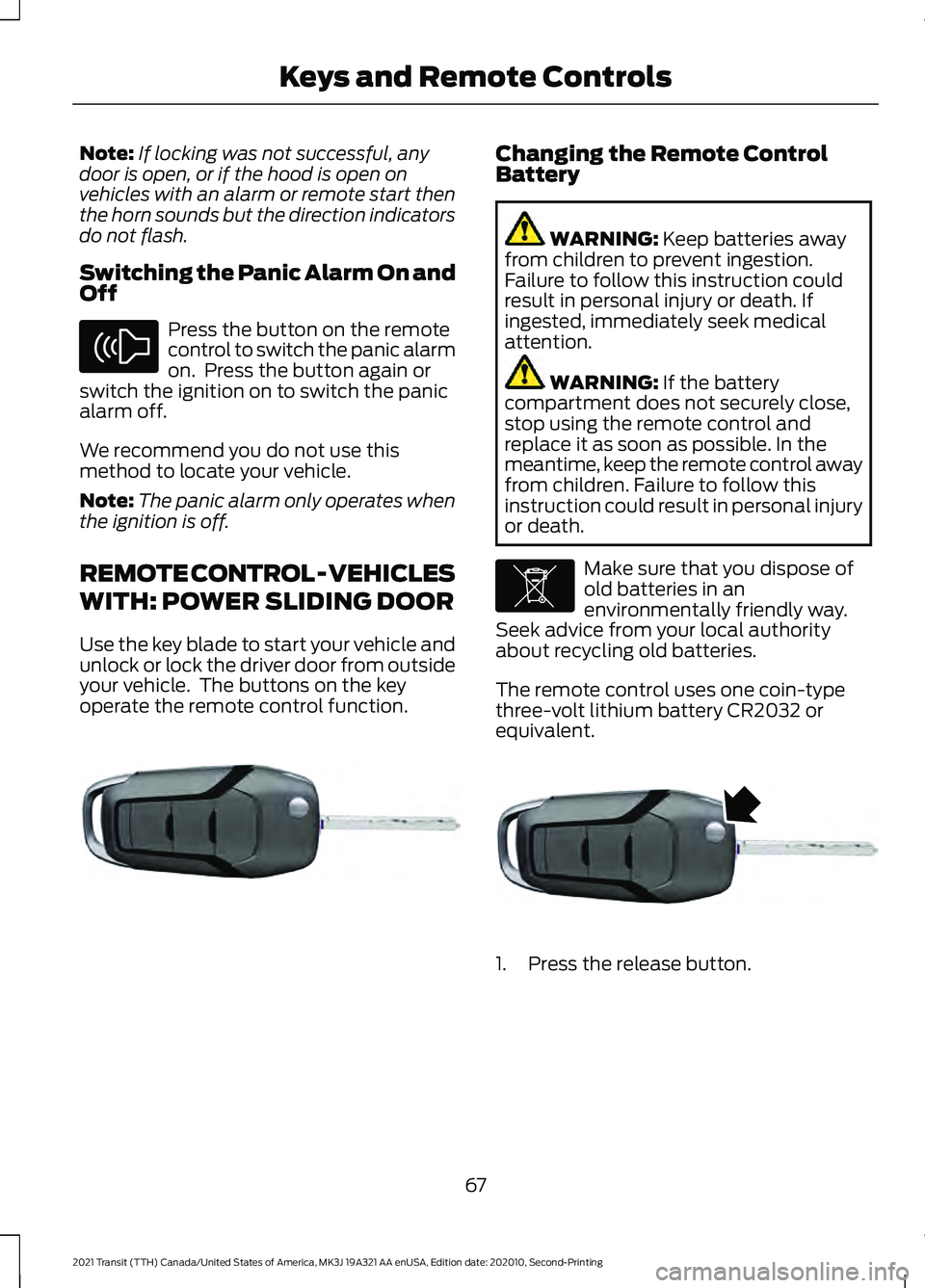
Use the key blade to start your vehicle and
unlock or lock the driver door from outside
your vehicle. The buttons on the key
operate the remote control function. Changing the Remote Control
Battery
WARNING: Keep batteries away
from children to prevent ingestion.
Failure to follow this instruction could
result in personal injury or death. If
ingested, immediately seek medical
attention. WARNING:
If the battery
compartment does not securely close,
stop using the remote control and
replace it as soon as possible. In the
meantime, keep the remote control away
from children. Failure to follow this
instruction could result in personal injury
or death. Make sure that you dispose of
old batteries in an
environmentally friendly way.
Seek advice from your local authority
about recycling old batteries.
The remote control uses one coin-type
three-volt lithium battery CR2032 or
equivalent. 1. Press the release button.
67
2021 Transit (TTH) Canada/United States of America, MK3J 19A321 AA enUSA, Edition date: 202010, Second-Printing Keys and Remote ControlsE138624 E302820 E107998 E302821
Page 71 of 509
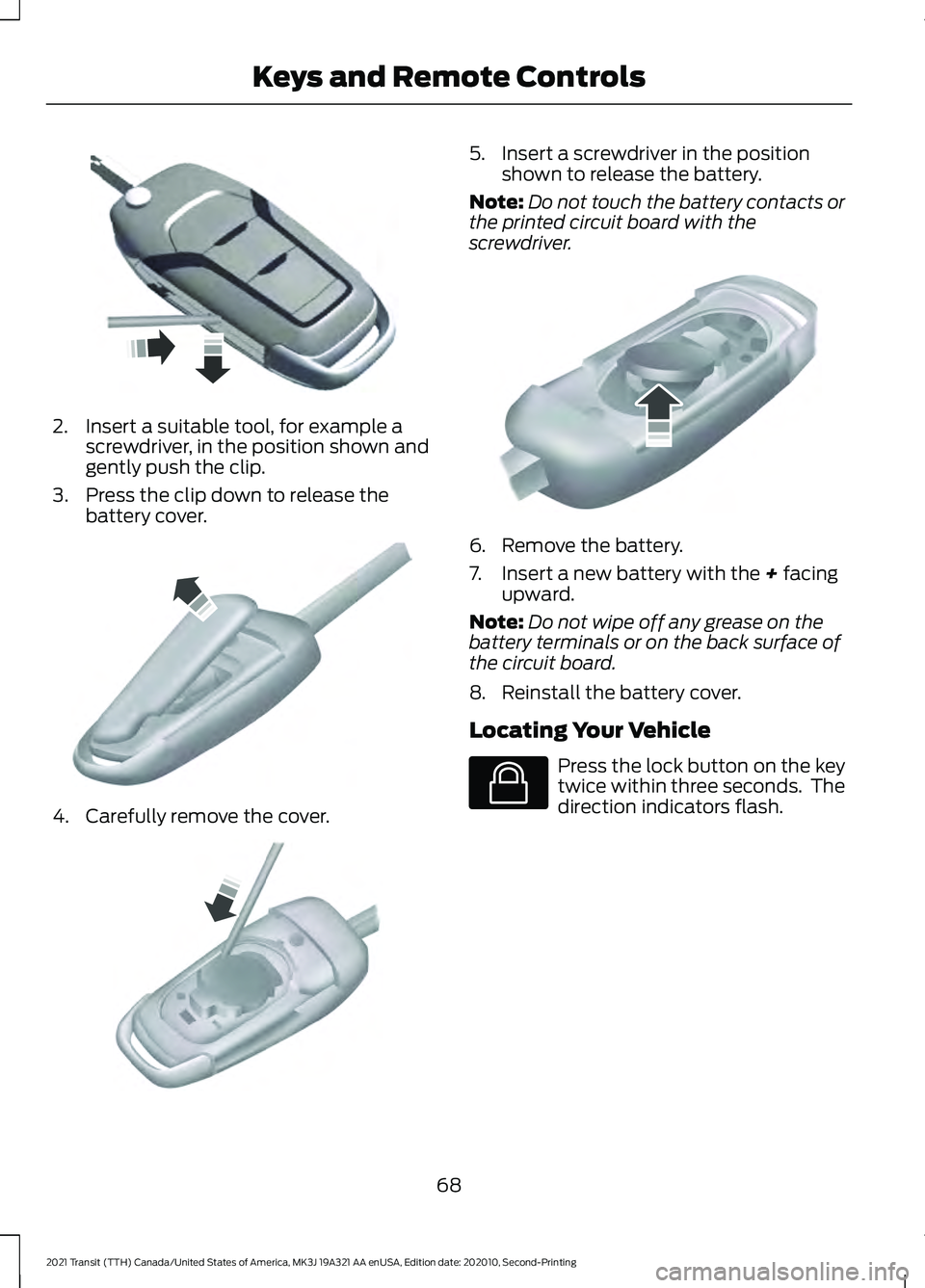
2. Insert a suitable tool, for example a
screwdriver, in the position shown and
gently push the clip.
3. Press the clip down to release the battery cover. 4. Carefully remove the cover. 5. Insert a screwdriver in the position
shown to release the battery.
Note: Do not touch the battery contacts or
the printed circuit board with the
screwdriver. 6. Remove the battery.
7. Insert a new battery with the + facing
upward.
Note: Do not wipe off any grease on the
battery terminals or on the back surface of
the circuit board.
8. Reinstall the battery cover.
Locating Your Vehicle Press the lock button on the key
twice within three seconds. The
direction indicators flash.
68
2021 Transit (TTH) Canada/United States of America, MK3J 19A321 AA enUSA, Edition date: 202010, Second-Printing Keys and Remote ControlsE302822 E151799 E151800 E151801 E138623
Page 79 of 509
LOCKING AND UNLOCKING
Locking
Locking With the Key
Turn the top of the key toward the rear of
your vehicle.
Locking With the Remote Control
Press the button once. The
direction indicators will flash.
Press the button again within
three seconds to confirm that all the doors
are closed. The horn sounds and the
direction indicators flash.
Note: You can lock the driver door with the
key. Use the key when the remote control
is not functioning.
Note: Make sure you have locked your
vehicle before leaving it unattended.
Note: Do not leave the keys in your vehicle.
Note: Do not use the door latch assembly
to attach any accessory, such as handles or
steps, as this can cause damage to your
vehicle.
Unlocking
Unlocking With the Key
Turn the top of the key toward the front of
your vehicle.
Unlocking With the Remote Control Press the button once. The
direction indicators will flash.
Note: You can unlock the driver door with
the key. Use the key when the remote
control is not functioning.
Note: When you leave your vehicle
unattended for several weeks, the remote
control turns off. Note:
Unlock your vehicle and start the
engine using the key. Unlocking and starting
your vehicle once enables the remote
control.
Unlocking the Cargo Doors Press the button.
Reprogramming the Unlocking
Function
You can program the unlocking function
so that all doors unlock or only the driver
door unlocks. See Reprogramming the
Unlocking Function (page 87).
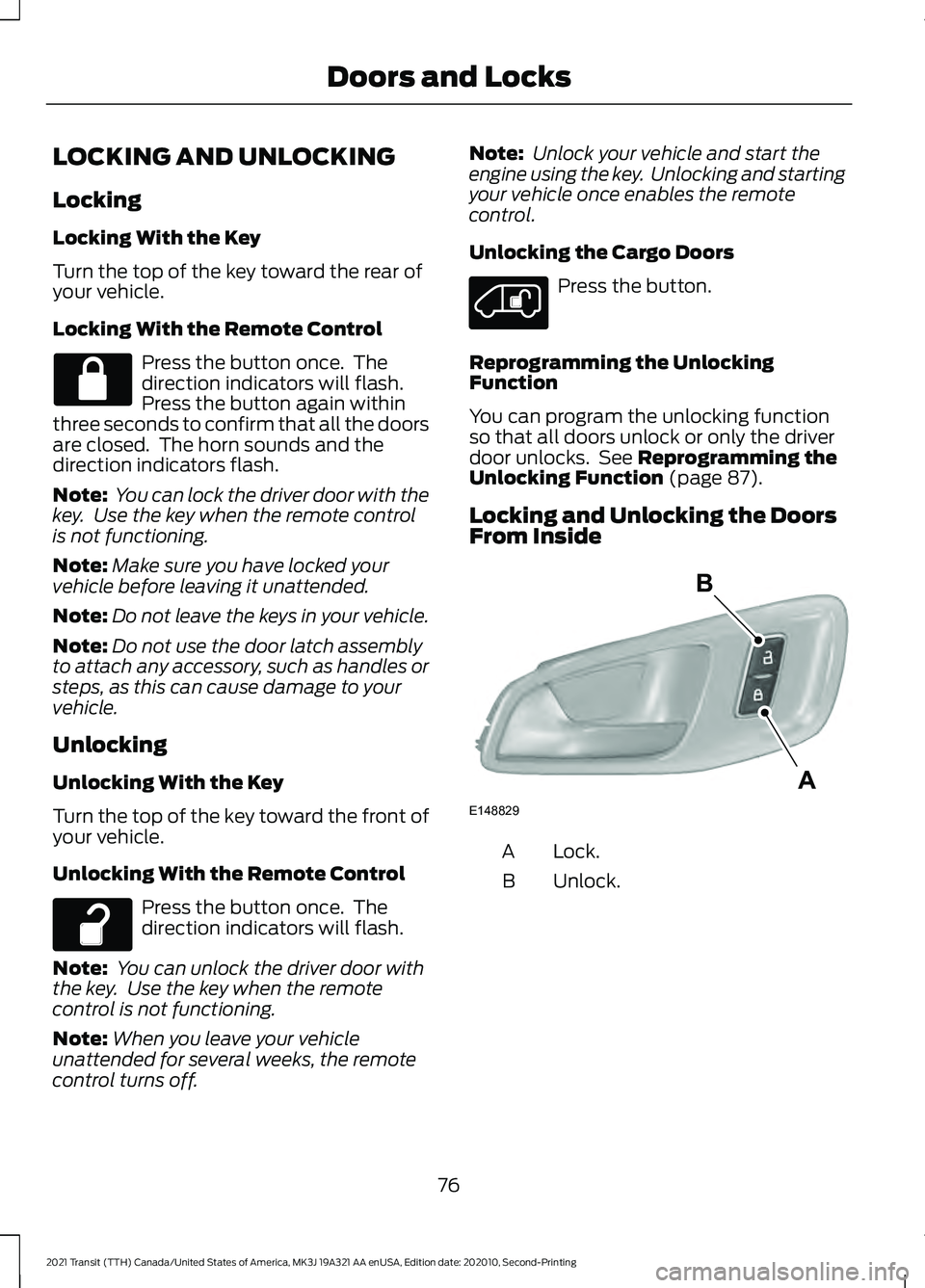
Locking and Unlocking the Doors
From Inside Lock.
A
Unlock.
B
76
2021 Transit (TTH) Canada/United States of America, MK3J 19A321 AA enUSA, Edition date: 202010, Second-Printing Doors and Locks E148829
A
B
Page 80 of 509
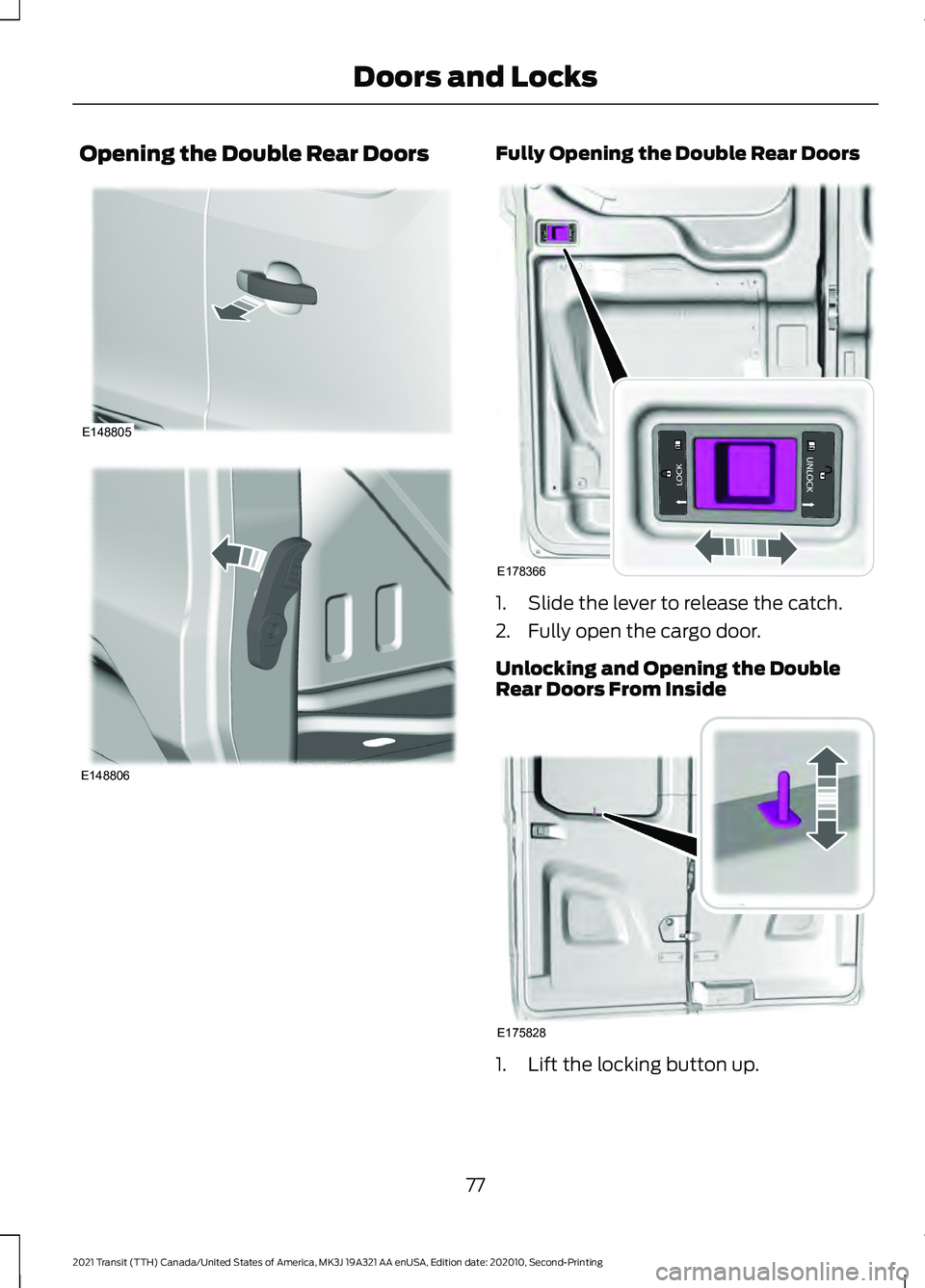
Opening the Double Rear Doors Fully Opening the Double Rear Doors
1. Slide the lever to release the catch.
2. Fully open the cargo door.
Unlocking and Opening the Double
Rear Doors From Inside
1. Lift the locking button up.
77
2021 Transit (TTH) Canada/United States of America, MK3J 19A321 AA enUSA, Edition date: 202010, Second-Printing Doors and LocksE148805 E148806 E178366 E175828
Page 81 of 509
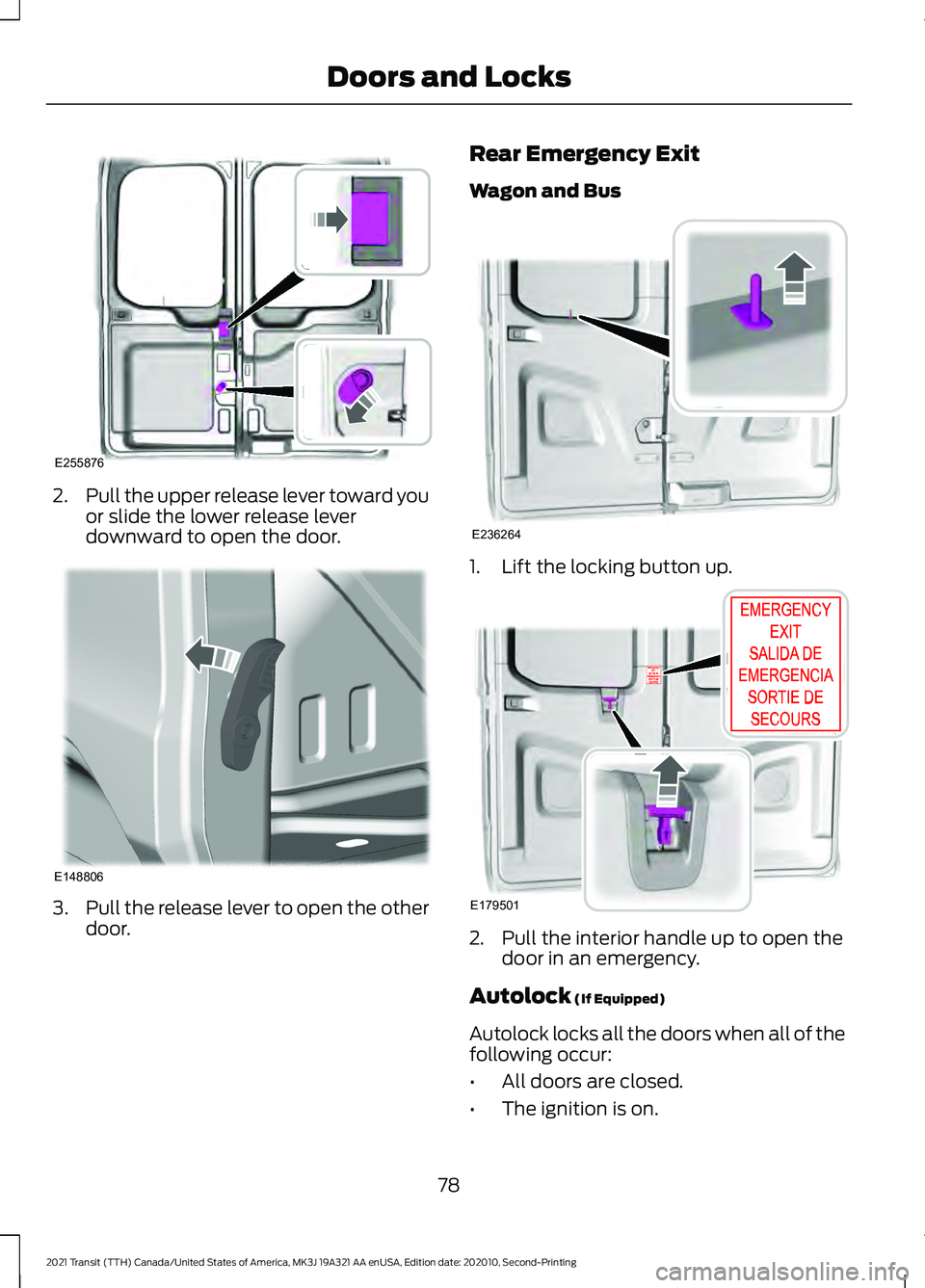
2.
Pull the upper release lever toward you
or slide the lower release lever
downward to open the door. 3.
Pull the release lever to open the other
door. Rear Emergency Exit
Wagon and Bus
1. Lift the locking button up.
2. Pull the interior handle up to open the
door in an emergency.
Autolock (If Equipped)
Autolock locks all the doors when all of the
following occur:
• All doors are closed.
• The ignition is on.
78
2021 Transit (TTH) Canada/United States of America, MK3J 19A321 AA enUSA, Edition date: 202010, Second-Printing Doors and LocksE255876 E148806 E236264 E179501
Page 82 of 509
•
You shift into any gear putting your
vehicle in motion.
• Your vehicle reaches a speed greater
than 5 mph (8 km/h).
Use the interior door unlock button or
switch the ignition off and use the key or
remote control to unlock the rear or sliding
door.
Autounlock
Autounlock unlocks all doors within 10
minutes of the end of a drive cycle, when
the driver door is opened and the ignition
is off.
Switching Autounlock On and Off
1. Using the information display controls on the steering wheel, select Settings.
2. Select
Vehicle Settings.
3. Select
Locks.
4. Switch
Autounlock on or off.
One-Stage Unlocking
You can switch on this function using the
information display.
If you have switched on this function, you
unlock all doors including the rear doors
and the sliding door.
You unlock all of the doors when you:
• Press the unlock button on the remote
control once.
• Press the interior unlock button once.
Two-Stage Unlocking
You unlock the front doors when you:
• Press the unlock button on the remote
control once.
• Press the interior unlock button once. You unlock the front doors and cargo area
when you:
•
Press the unlock button on the remote
control once.
• Press the unlock button on the remote
control twice within three seconds.
Zone Re-Locking
(If Equipped)
If you enable zone re-locking and open one
door, all other doors remain locked. See an
authorized dealer for further information.
The locks on van, bus or wagon have two
zones, cabin and cargo. For van, the cargo
area includes the rear doors and the sliding
door. For bus or wagon, the cargo area
includes the rear doors.
• Exit your vehicle and press the lock
button.
• Press the unlock button or the cargo
area unlock button once to open the
respective zone.
If you now open a door within the unlocked
zone, the other doors in that zone
automatically lock.
Configurable Unlocking
Configurable unlocking is set when you
purchase your vehicle. It allows you to
select which doors unlock when you press,
once or twice, the unlock button or the
cargo area unlock button on your remote
control. You cannot switch this feature
back on if you had it switched off. See an
authorized dealer for further information.
79
2021 Transit (TTH) Canada/United States of America, MK3J 19A321 AA enUSA, Edition date: 202010, Second-Printing Doors and Locks
Page 85 of 509
SLIDING DOOR PRECAUTIONS
WARNING: Fully close the power
sliding door before driving, to prevent
passengers and cargo from falling out.
Failure to follow this instruction could
result in personal injury or death. WARNING:
Do not open or close
the power sliding door when your hands
are near the tracks or rollers. Failure to
follow this instruction could result in
personal injury. WARNING:
When closing the
power sliding door, verify that it is free of
obstruction and make sure that people
and pets are not in the proximity of the
sliding door opening.
Note: Do not leave the sliding door open
when you are driving. This could damage
the sliding door and its components.
Note: If you operate the sliding door often
during a short period of time, the system
could become not available for a certain
time to prevent damage due to overheating.
Allow the system to open the sliding door.
Do not manually push or pull the sliding
door when it is moving. This could damage
the sliding door and its components.
OPENING THE SLIDING DOOR
OPENING THE SLIDING DOOR
FROM INSIDE YOUR VEHICLE
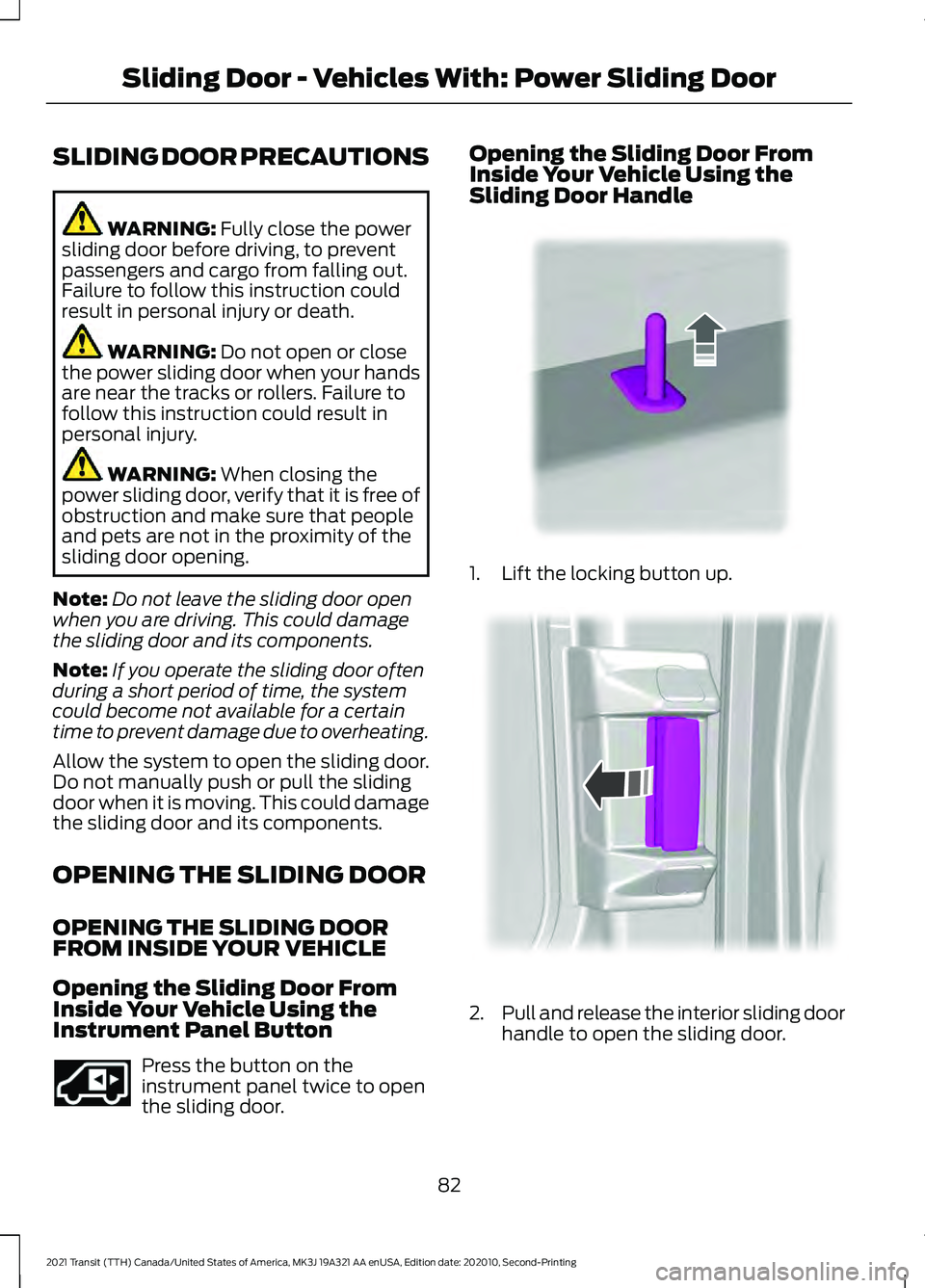
Opening the Sliding Door From
Inside Your Vehicle Using the
Instrument Panel Button Press the button on the
instrument panel twice to open
the sliding door. Opening the Sliding Door From
Inside Your Vehicle Using the
Sliding Door Handle
1. Lift the locking button up.
2.
Pull and release the interior sliding door
handle to open the sliding door.
82
2021 Transit (TTH) Canada/United States of America, MK3J 19A321 AA enUSA, Edition date: 202010, Second-Printing Sliding Door - Vehicles With: Power Sliding DoorE293692 E310708 E148804
Page 90 of 509
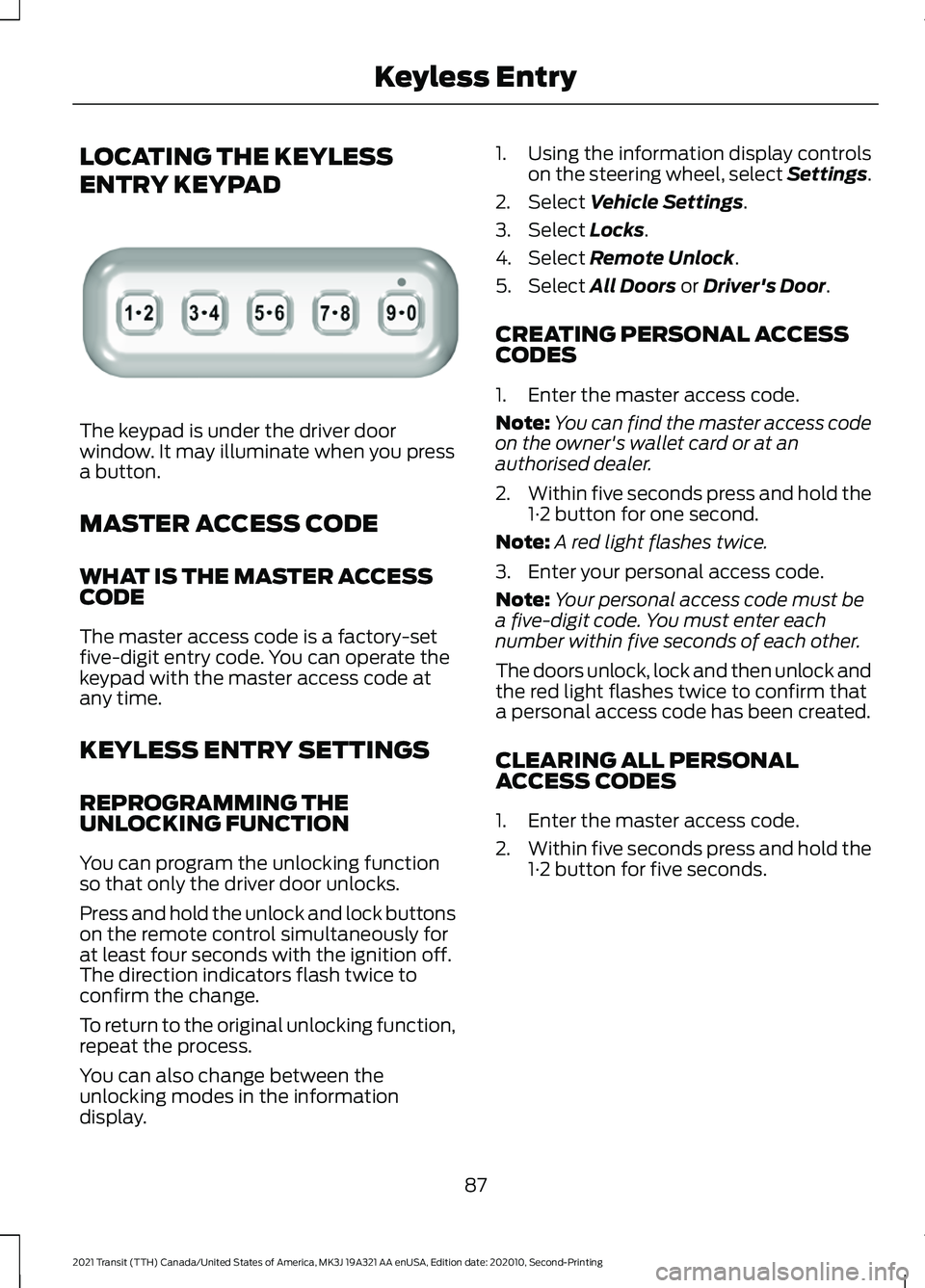
LOCATING THE KEYLESS
ENTRY KEYPAD
The keypad is under the driver door
window. It may illuminate when you press
a button.
MASTER ACCESS CODE
WHAT IS THE MASTER ACCESS
CODE
The master access code is a factory-set
five-digit entry code. You can operate the
keypad with the master access code at
any time.
KEYLESS ENTRY SETTINGS
REPROGRAMMING THE
UNLOCKING FUNCTION
You can program the unlocking function
so that only the driver door unlocks.
Press and hold the unlock and lock buttons
on the remote control simultaneously for
at least four seconds with the ignition off.
The direction indicators flash twice to
confirm the change.
To return to the original unlocking function,
repeat the process.
You can also change between the
unlocking modes in the information
display. 1. Using the information display controls
on the steering wheel, select Settings.
2. Select Vehicle Settings.
3. Select
Locks.
4. Select
Remote Unlock.
5. Select
All Doors or Driver's Door.
CREATING PERSONAL ACCESS
CODES
1. Enter the master access code.
Note: You can find the master access code
on the owner's wallet card or at an
authorised dealer.
2. Within five seconds press and hold the
1·2 button for one second.
Note: A red light flashes twice.
3. Enter your personal access code.
Note: Your personal access code must be
a five-digit code. You must enter each
number within five seconds of each other.
The doors unlock, lock and then unlock and
the red light flashes twice to confirm that
a personal access code has been created.
CLEARING ALL PERSONAL
ACCESS CODES
1. Enter the master access code.
2. Within five seconds press and hold the
1·2 button for five seconds.
87
2021 Transit (TTH) Canada/United States of America, MK3J 19A321 AA enUSA, Edition date: 202010, Second-Printing Keyless EntryE307685
Page 91 of 509
LOCKING AND UNLOCKING
THE DOORS USING KEYLESS
ENTRY
UNLOCKING THE DOORS
Enter the master access code or your
personal access code to unlock the driver's
door, then press the 3·4 button within five
seconds to unlock all doors.
Note:
If you program the unlocking function
so that all doors unlock, you do not have to
press the 3·4 button. See Reprogramming
the Unlocking Function (page 87).
The interior lamps illuminate to confirm
that the doors have been unlocked.
Unlocking the Rear Cargo Doors
Enter the master access code or your
personal access code, then press the 5·6
button within five seconds.
LOCKING THE DOORS
Press and hold the 7·8 and 9·0 buttons at
the same time with the driver door closed.
KEYLESS ENTRY –
TROUBLESHOOTING
KEYLESS ENTRY – FREQUENTLY
ASKED QUESTIONS
Why does the keypad not read the
access code? If you enter the access code too fast
on the keypad, the unlock function
may not work. Slowly re-enter the
access code. You must only press a
button once to enter the second digit
on that button. Why does the keypad not function?
The keypad goes into an anti-scan
mode if you enter a wrong code seven
times. The anti-scan mode disables
the keypad for one minute and the red
light flashes.
88
2021 Transit (TTH) Canada/United States of America, MK3J 19A321 AA enUSA, Edition date: 202010, Second-Printing Keyless Entry