light FORD TRANSIT 2021 Manual PDF
[x] Cancel search | Manufacturer: FORD, Model Year: 2021, Model line: TRANSIT, Model: FORD TRANSIT 2021Pages: 509, PDF Size: 8.21 MB
Page 417 of 509
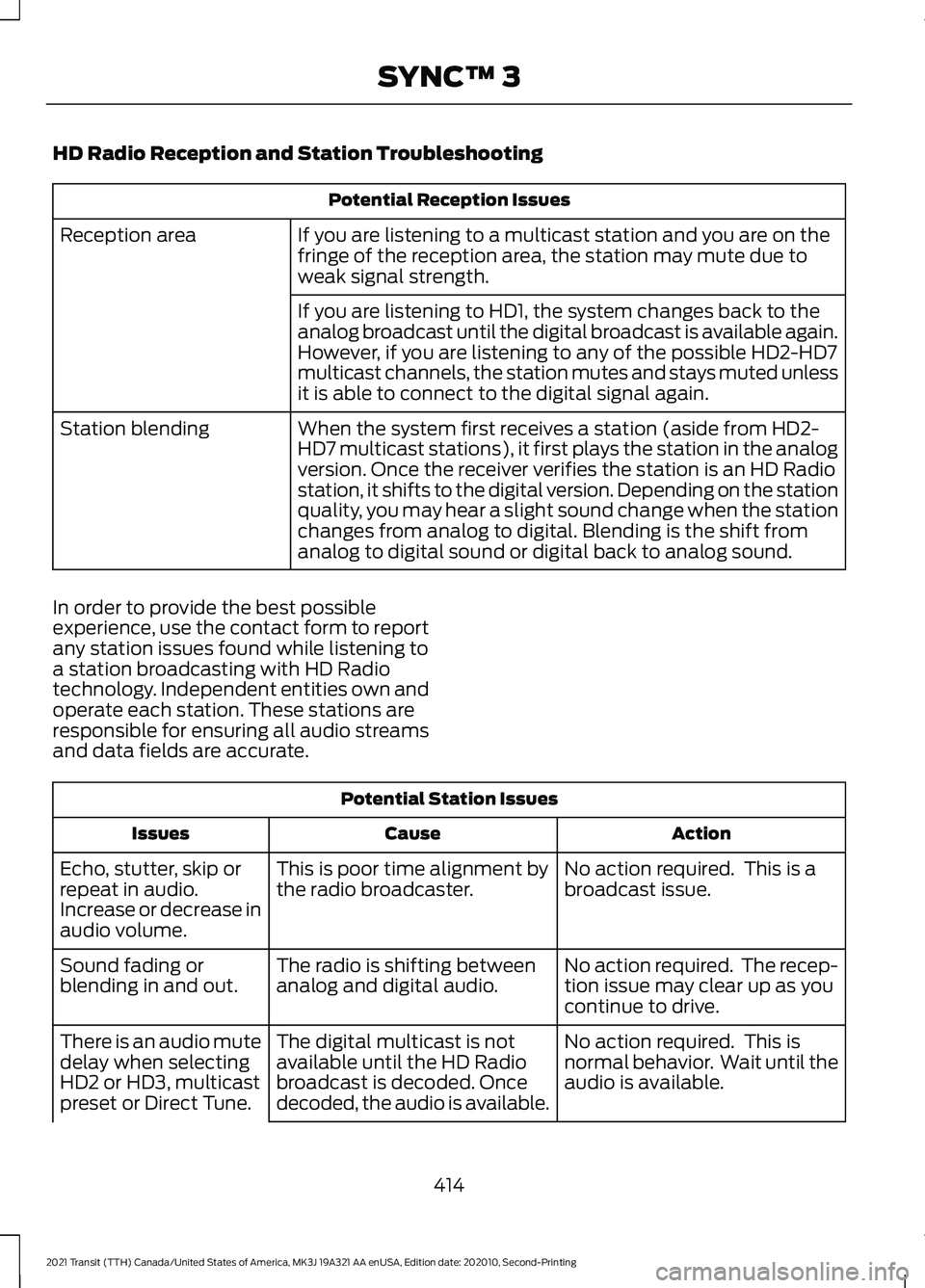
HD Radio Reception and Station Troubleshooting
Potential Reception Issues
If you are listening to a multicast station and you are on the
fringe of the reception area, the station may mute due to
weak signal strength.
Reception area
If you are listening to HD1, the system changes back to the
analog broadcast until the digital broadcast is available again.
However, if you are listening to any of the possible HD2-HD7
multicast channels, the station mutes and stays muted unless
it is able to connect to the digital signal again.
When the system first receives a station (aside from HD2-
HD7 multicast stations), it first plays the station in the analog
version. Once the receiver verifies the station is an HD Radio
station, it shifts to the digital version. Depending on the station
quality, you may hear a slight sound change when the station
changes from analog to digital. Blending is the shift from
analog to digital sound or digital back to analog sound.
Station blending
In order to provide the best possible
experience, use the contact form to report
any station issues found while listening to
a station broadcasting with HD Radio
technology. Independent entities own and
operate each station. These stations are
responsible for ensuring all audio streams
and data fields are accurate. Potential Station Issues
Action
Cause
Issues
No action required. This is a
broadcast issue.
This is poor time alignment by
the radio broadcaster.
Echo, stutter, skip or
repeat in audio.
Increase or decrease in
audio volume.
No action required. The recep-
tion issue may clear up as you
continue to drive.
The radio is shifting between
analog and digital audio.
Sound fading or
blending in and out.
No action required. This is
normal behavior. Wait until the
audio is available.
The digital multicast is not
available until the HD Radio
broadcast is decoded. Once
decoded, the audio is available.
There is an audio mute
delay when selecting
HD2 or HD3, multicast
preset or Direct Tune.
414
2021 Transit (TTH) Canada/United States of America, MK3J 19A321 AA enUSA, Edition date: 202010, Second-Printing SYNC™ 3
Page 419 of 509
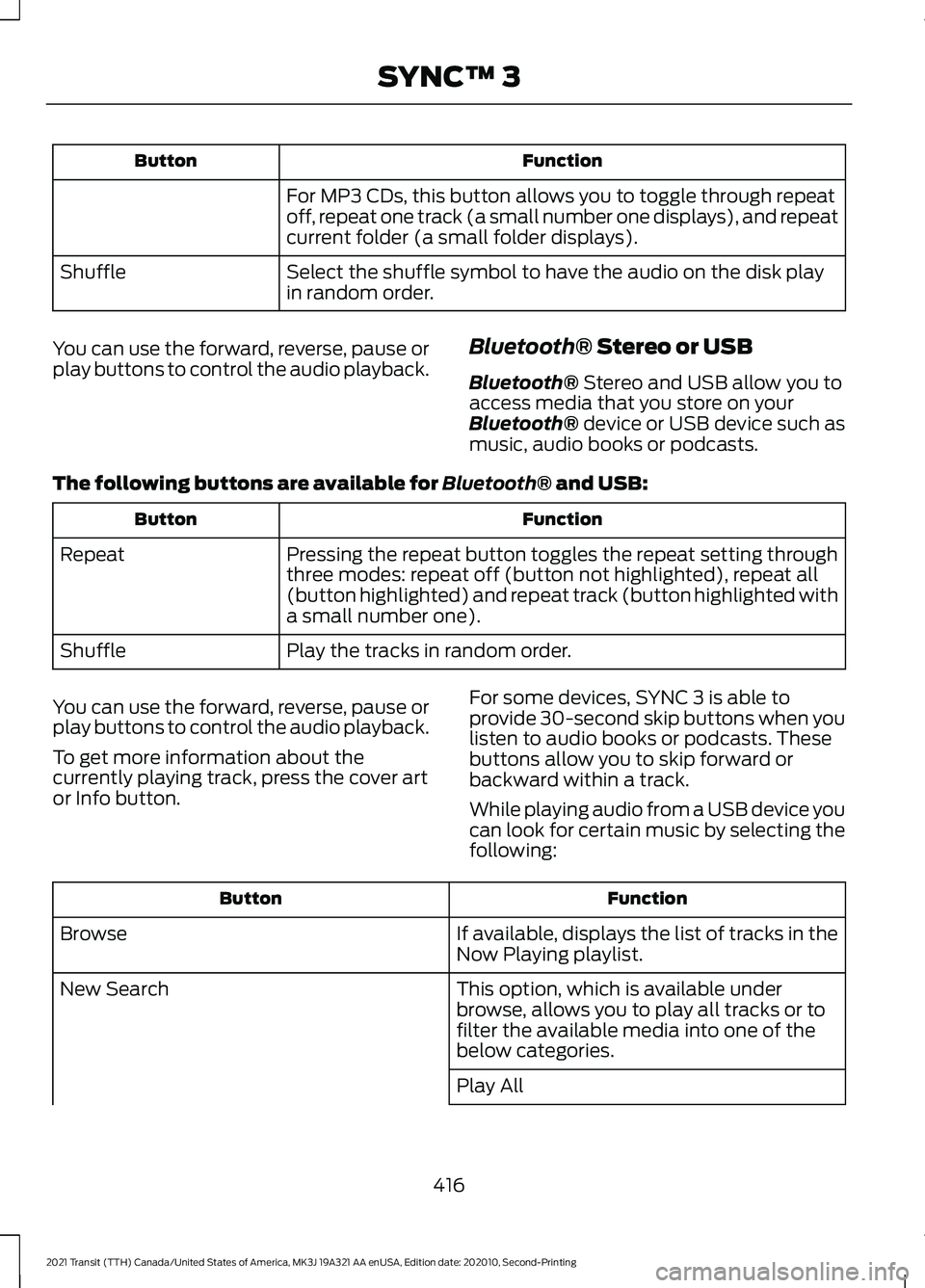
Function
Button
For MP3 CDs, this button allows you to toggle through repeat
off, repeat one track (a small number one displays), and repeat
current folder (a small folder displays).
Select the shuffle symbol to have the audio on the disk play
in random order.
Shuffle
You can use the forward, reverse, pause or
play buttons to control the audio playback. Bluetooth® Stereo or USB
Bluetooth®
Stereo and USB allow you to
access media that you store on your
Bluetooth®
device or USB device such as
music, audio books or podcasts.
The following buttons are available for
Bluetooth® and USB: Function
Button
Pressing the repeat button toggles the repeat setting through
three modes: repeat off (button not highlighted), repeat all
(button highlighted) and repeat track (button highlighted with
a small number one).
Repeat
Play the tracks in random order.
Shuffle
You can use the forward, reverse, pause or
play buttons to control the audio playback.
To get more information about the
currently playing track, press the cover art
or Info button. For some devices, SYNC 3 is able to
provide 30-second skip buttons when you
listen to audio books or podcasts. These
buttons allow you to skip forward or
backward within a track.
While playing audio from a USB device you
can look for certain music by selecting the
following: Function
Button
If available, displays the list of tracks in the
Now Playing playlist.
Browse
This option, which is available under
browse, allows you to play all tracks or to
filter the available media into one of the
below categories.
New Search
Play All
416
2021 Transit (TTH) Canada/United States of America, MK3J 19A321 AA enUSA, Edition date: 202010, Second-Printing SYNC™ 3
Page 427 of 509
cityseeker, when available, is a service that
provides more information about certain
points of interest such as restaurants,
hotels and attractions.
When you have selected a point of interest,
the location and information appear, such
as address, phone number and a star
rating.
Press More Information to see a photo,
a review, a list of services and facilities, the
average room or meal price and the web
address. This screen displays the point of
interest icons.
For restaurants, cityseeker can provide
information such as star rating, average
cost, review, handicap access, hours of
operation, and website address.
For hotels, cityseeker can provide
information such as star rating, price
category, review, check-in and checkout
times, hotel service icons and website
address. Hotel service icons include:
• Restaurant
• Business center
• Handicap facilities
• Laundry
• Refrigerator
• 24 hour room service
• Fitness center
• Internet access
• Pool
• Wi-Fi Attractions include nearby landmarks,
amusement parks, historic buildings and
more. cityseeker can provide information
such as star rating, reviews, hour of
operation and admission price.
SiriusXM Traffic and Travel Link (If
Equipped)
SiriusXM Traffic and Travel Link is available
on vehicles equipped with navigation and
only in select markets. You must activate
and subscribe to receive SiriusXM Traffic
and Travel Link information. It helps you
locate the best gas prices, find movie
listings, get current traffic alerts, view the
weather map, get accurate ski conditions
and see current sports scores.
The system calculates a reasonable
efficient route based on available speed
limits, traffic, and road conditions. You may
know a local short cut that is more efficient
at a given time than the route provided by
SYNC 3, but you should expect a slight
difference in minutes or miles with the
SYNC 3 route.
Michelin Travel Guide
(If Equipped)
The Michelin travel guide is a service which
provides additional information about
certain places of interest, for example
restaurants, hotels and tourist sites. Points
of interest that have Michelin travel guide
information display a button to show you
more information. Push the button to see
the additional information. If you have
paired your phone with the system, you
can press the phone button to directly
establish a call with the selected point of
interest.
424
2021 Transit (TTH) Canada/United States of America, MK3J 19A321 AA enUSA, Edition date: 202010, Second-Printing SYNC™ 3E225487
Page 431 of 509
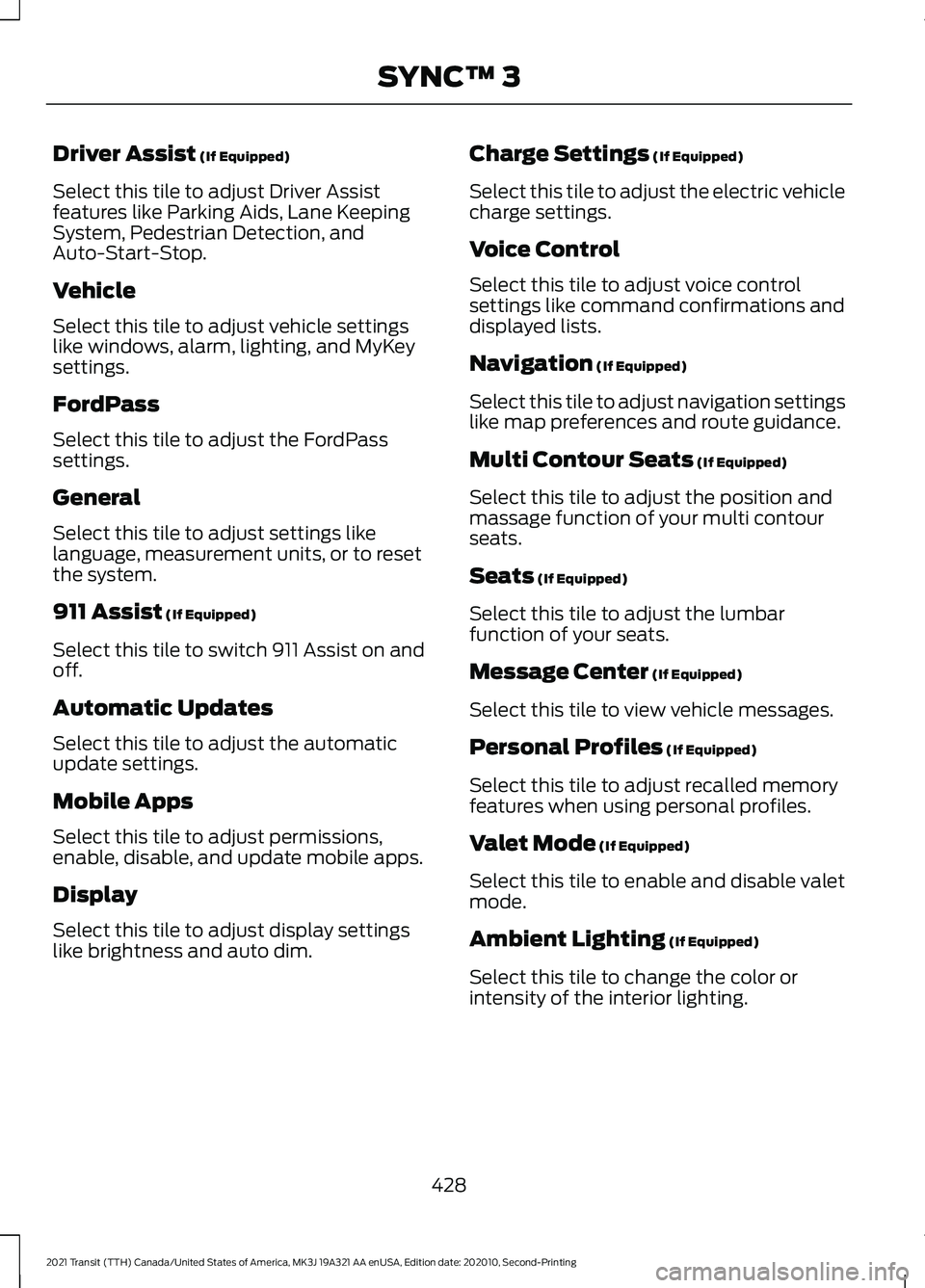
Driver Assist (If Equipped)
Select this tile to adjust Driver Assist
features like Parking Aids, Lane Keeping
System, Pedestrian Detection, and
Auto-Start-Stop.
Vehicle
Select this tile to adjust vehicle settings
like windows, alarm, lighting, and MyKey
settings.
FordPass
Select this tile to adjust the FordPass
settings.
General
Select this tile to adjust settings like
language, measurement units, or to reset
the system.
911 Assist
(If Equipped)
Select this tile to switch 911 Assist on and
off.
Automatic Updates
Select this tile to adjust the automatic
update settings.
Mobile Apps
Select this tile to adjust permissions,
enable, disable, and update mobile apps.
Display
Select this tile to adjust display settings
like brightness and auto dim. Charge Settings
(If Equipped)
Select this tile to adjust the electric vehicle
charge settings.
Voice Control
Select this tile to adjust voice control
settings like command confirmations and
displayed lists.
Navigation
(If Equipped)
Select this tile to adjust navigation settings
like map preferences and route guidance.
Multi Contour Seats
(If Equipped)
Select this tile to adjust the position and
massage function of your multi contour
seats.
Seats
(If Equipped)
Select this tile to adjust the lumbar
function of your seats.
Message Center
(If Equipped)
Select this tile to view vehicle messages.
Personal Profiles
(If Equipped)
Select this tile to adjust recalled memory
features when using personal profiles.
Valet Mode
(If Equipped)
Select this tile to enable and disable valet
mode.
Ambient Lighting
(If Equipped)
Select this tile to change the color or
intensity of the interior lighting.
428
2021 Transit (TTH) Canada/United States of America, MK3J 19A321 AA enUSA, Edition date: 202010, Second-Printing SYNC™ 3
Page 450 of 509
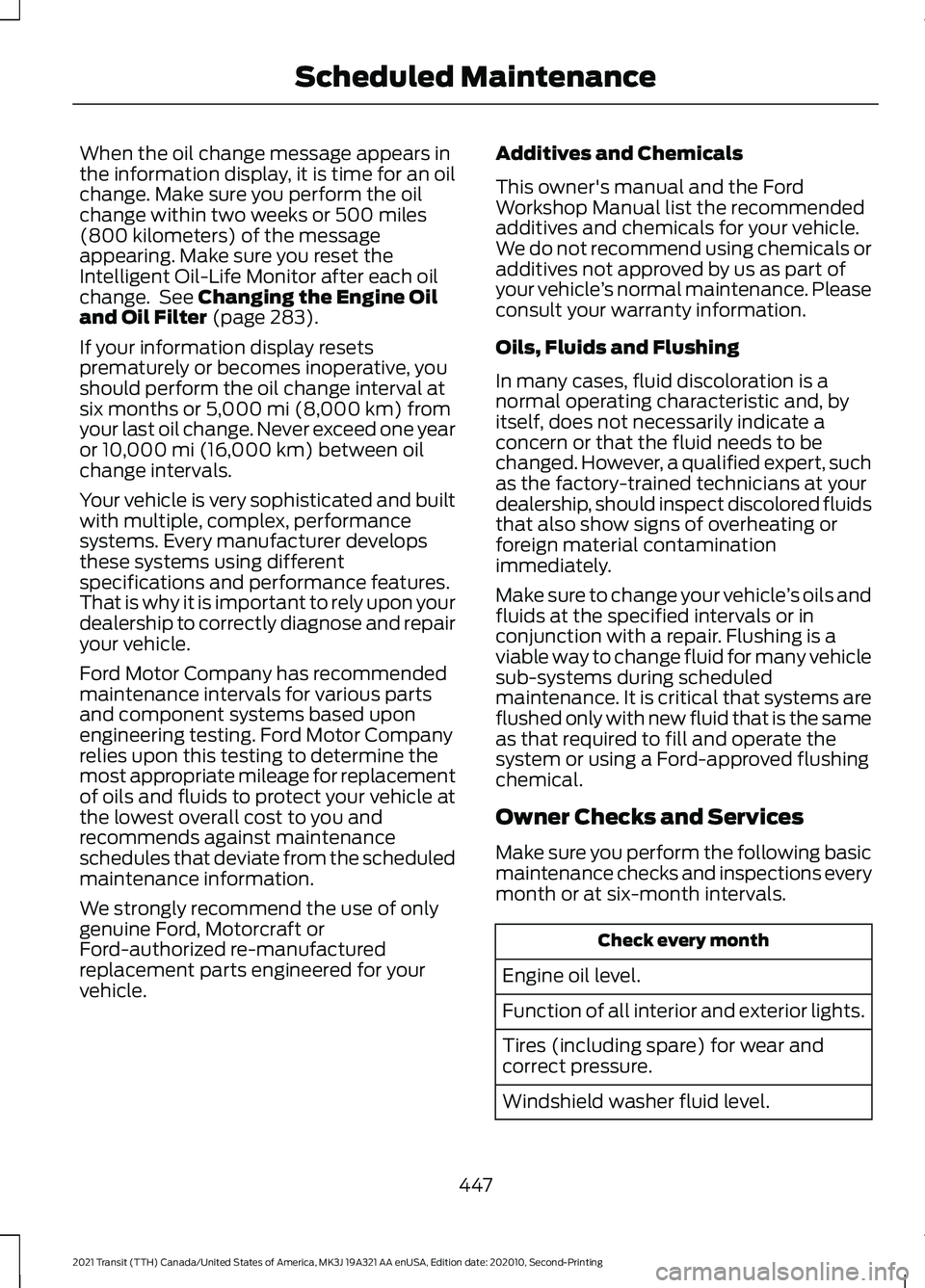
When the oil change message appears in
the information display, it is time for an oil
change. Make sure you perform the oil
change within two weeks or 500 miles
(800 kilometers) of the message
appearing. Make sure you reset the
Intelligent Oil-Life Monitor after each oil
change. See Changing the Engine Oil
and Oil Filter (page 283).
If your information display resets
prematurely or becomes inoperative, you
should perform the oil change interval at
six months or
5,000 mi (8,000 km) from
your last oil change. Never exceed one year
or
10,000 mi (16,000 km) between oil
change intervals.
Your vehicle is very sophisticated and built
with multiple, complex, performance
systems. Every manufacturer develops
these systems using different
specifications and performance features.
That is why it is important to rely upon your
dealership to correctly diagnose and repair
your vehicle.
Ford Motor Company has recommended
maintenance intervals for various parts
and component systems based upon
engineering testing. Ford Motor Company
relies upon this testing to determine the
most appropriate mileage for replacement
of oils and fluids to protect your vehicle at
the lowest overall cost to you and
recommends against maintenance
schedules that deviate from the scheduled
maintenance information.
We strongly recommend the use of only
genuine Ford, Motorcraft or
Ford-authorized re-manufactured
replacement parts engineered for your
vehicle. Additives and Chemicals
This owner's manual and the Ford
Workshop Manual list the recommended
additives and chemicals for your vehicle.
We do not recommend using chemicals or
additives not approved by us as part of
your vehicle
’s normal maintenance. Please
consult your warranty information.
Oils, Fluids and Flushing
In many cases, fluid discoloration is a
normal operating characteristic and, by
itself, does not necessarily indicate a
concern or that the fluid needs to be
changed. However, a qualified expert, such
as the factory-trained technicians at your
dealership, should inspect discolored fluids
that also show signs of overheating or
foreign material contamination
immediately.
Make sure to change your vehicle ’s oils and
fluids at the specified intervals or in
conjunction with a repair. Flushing is a
viable way to change fluid for many vehicle
sub-systems during scheduled
maintenance. It is critical that systems are
flushed only with new fluid that is the same
as that required to fill and operate the
system or using a Ford-approved flushing
chemical.
Owner Checks and Services
Make sure you perform the following basic
maintenance checks and inspections every
month or at six-month intervals. Check every month
Engine oil level.
Function of all interior and exterior lights.
Tires (including spare) for wear and
correct pressure.
Windshield washer fluid level.
447
2021 Transit (TTH) Canada/United States of America, MK3J 19A321 AA enUSA, Edition date: 202010, Second-Printing Scheduled Maintenance
Page 491 of 509
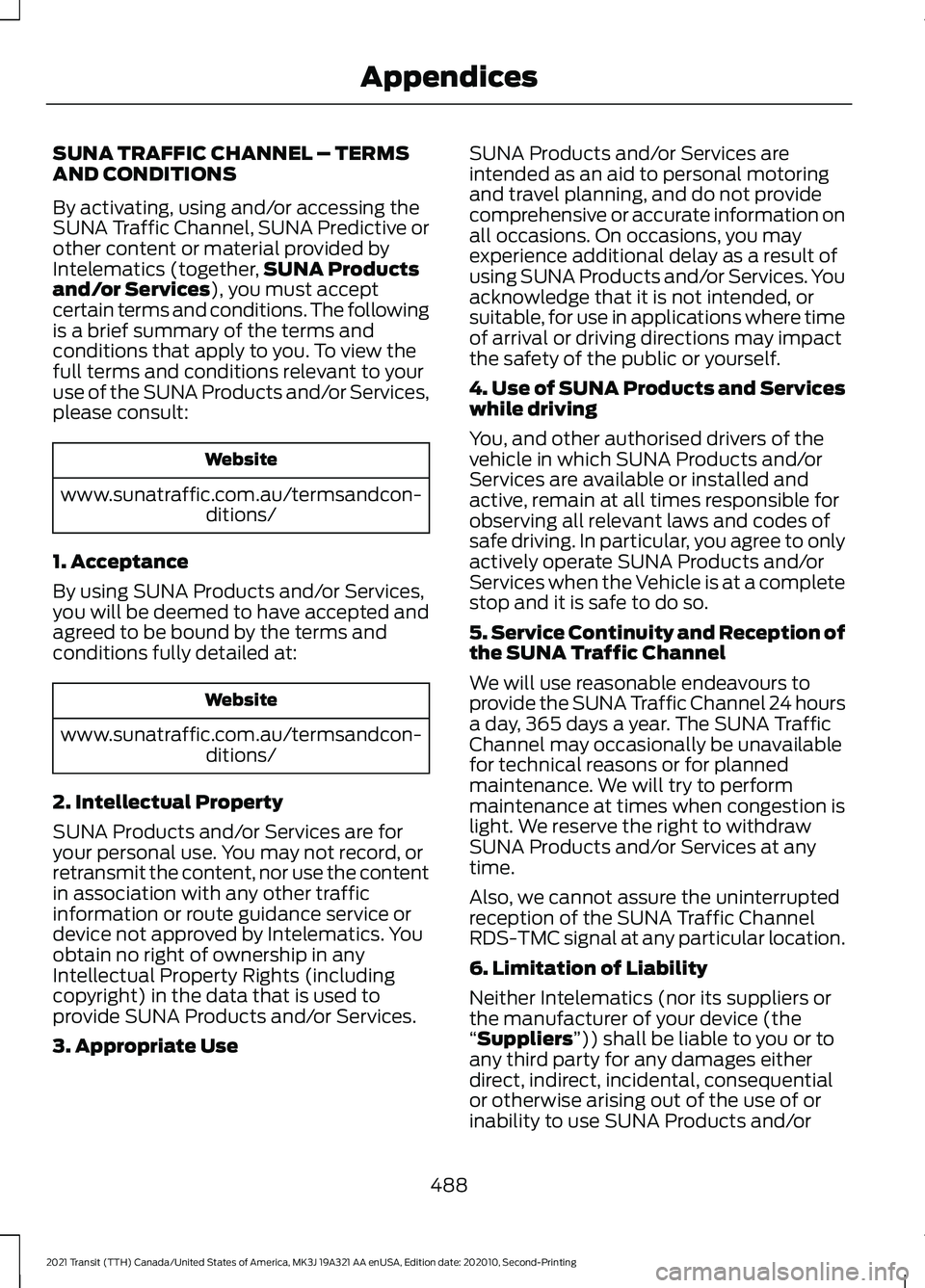
SUNA TRAFFIC CHANNEL – TERMS
AND CONDITIONS
By activating, using and/or accessing the
SUNA Traffic Channel, SUNA Predictive or
other content or material provided by
Intelematics (together,
SUNA Products
and/or Services), you must accept
certain terms and conditions. The following
is a brief summary of the terms and
conditions that apply to you. To view the
full terms and conditions relevant to your
use of the SUNA Products and/or Services,
please consult: Website
www.sunatraffic.com.au/termsandcon- ditions/
1. Acceptance
By using SUNA Products and/or Services,
you will be deemed to have accepted and
agreed to be bound by the terms and
conditions fully detailed at: Website
www.sunatraffic.com.au/termsandcon- ditions/
2. Intellectual Property
SUNA Products and/or Services are for
your personal use. You may not record, or
retransmit the content, nor use the content
in association with any other traffic
information or route guidance service or
device not approved by Intelematics. You
obtain no right of ownership in any
Intellectual Property Rights (including
copyright) in the data that is used to
provide SUNA Products and/or Services.
3. Appropriate Use SUNA Products and/or Services are
intended as an aid to personal motoring
and travel planning, and do not provide
comprehensive or accurate information on
all occasions. On occasions, you may
experience additional delay as a result of
using SUNA Products and/or Services. You
acknowledge that it is not intended, or
suitable, for use in applications where time
of arrival or driving directions may impact
the safety of the public or yourself.
4. Use of SUNA Products and Services
while driving
You, and other authorised drivers of the
vehicle in which SUNA Products and/or
Services are available or installed and
active, remain at all times responsible for
observing all relevant laws and codes of
safe driving. In particular, you agree to only
actively operate SUNA Products and/or
Services when the Vehicle is at a complete
stop and it is safe to do so.
5. Service Continuity and Reception of
the SUNA Traffic Channel
We will use reasonable endeavours to
provide the SUNA Traffic Channel 24 hours
a day, 365 days a year. The SUNA Traffic
Channel may occasionally be unavailable
for technical reasons or for planned
maintenance. We will try to perform
maintenance at times when congestion is
light. We reserve the right to withdraw
SUNA Products and/or Services at any
time.
Also, we cannot assure the uninterrupted
reception of the SUNA Traffic Channel
RDS-TMC signal at any particular location.
6. Limitation of Liability
Neither Intelematics (nor its suppliers or
the manufacturer of your device (the
“
Suppliers”)) shall be liable to you or to
any third party for any damages either
direct, indirect, incidental, consequential
or otherwise arising out of the use of or
inability to use SUNA Products and/or
488
2021 Transit (TTH) Canada/United States of America, MK3J 19A321 AA enUSA, Edition date: 202010, Second-Printing Appendices
Page 496 of 509
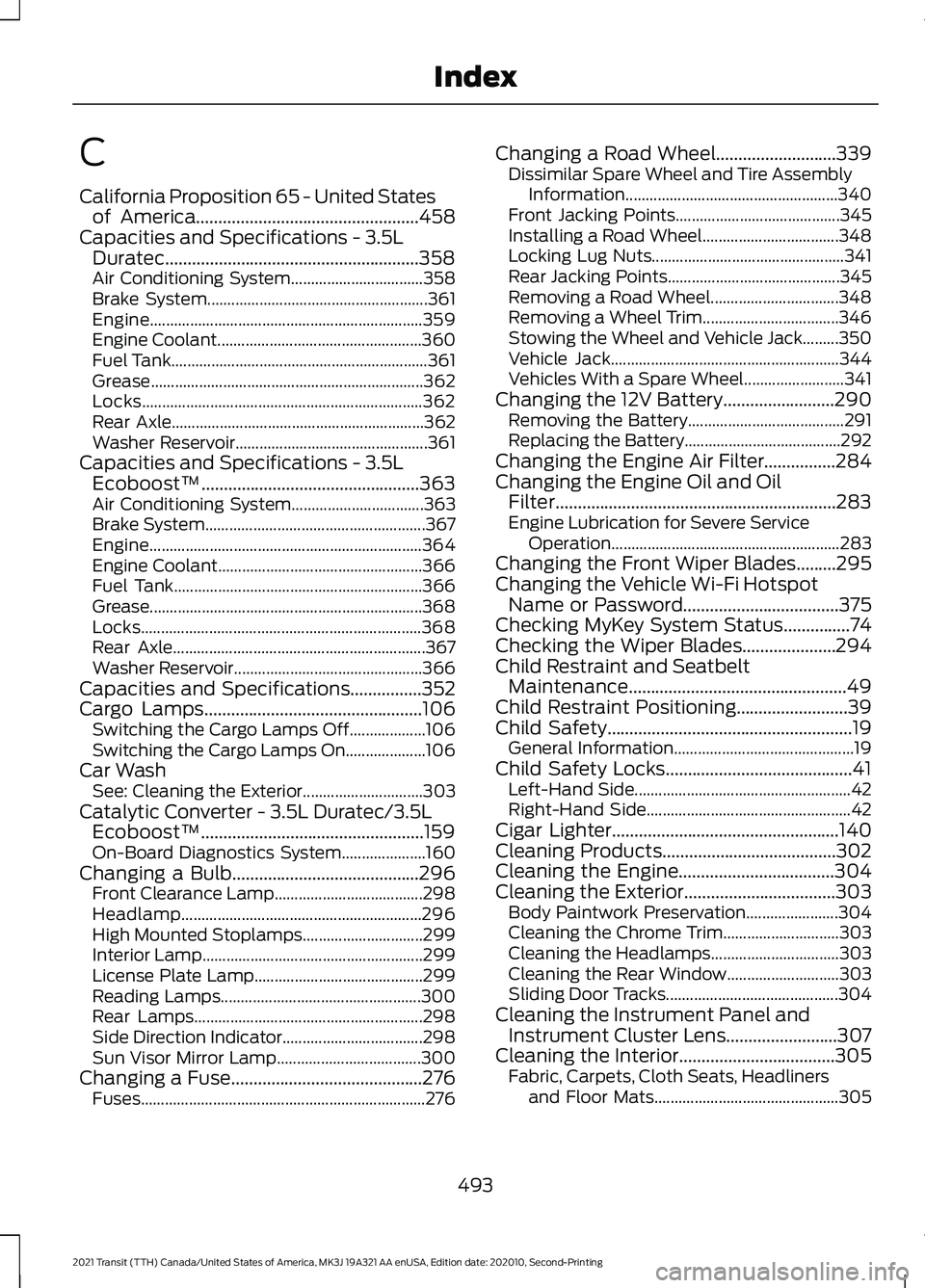
C
California Proposition 65 - United States
of America..................................................458
Capacities and Specifications - 3.5L Duratec.........................................................358
Air Conditioning System................................. 358
Brake System....................................................... 361
Engine.................................................................... 359
Engine Coolant................................................... 360
Fuel Tank................................................................ 361
Grease.................................................................... 362
Locks...................................................................... 362
Rear Axle............................................................... 362
Washer Reservoir................................................ 361
Capacities and Specifications - 3.5L Ecoboost™.................................................363
Air Conditioning System................................. 363
Brake System....................................................... 367
Engine.................................................................... 364
Engine Coolant................................................... 366
Fuel Tank.............................................................. 366
Grease....................................................................368
Locks...................................................................... 368
Rear Axle............................................................... 367
Washer Reservoir............................................... 366
Capacities and Specifications................352
Cargo Lamps.................................................106 Switching the Cargo Lamps Off................... 106
Switching the Cargo Lamps On.................... 106
Car Wash See: Cleaning the Exterior.............................. 303
Catalytic Converter - 3.5L Duratec/3.5L Ecoboost™..................................................159
On-Board Diagnostics System..................... 160
Changing a Bulb..........................................296 Front Clearance Lamp..................................... 298
Headlamp............................................................ 296
High Mounted Stoplamps.............................. 299
Interior Lamp....................................................... 299
License Plate Lamp.......................................... 299
Reading Lamps.................................................. 300
Rear Lamps......................................................... 298
Side Direction Indicator................................... 298
Sun Visor Mirror Lamp.................................... 300
Changing a Fuse
...........................................276
Fuses....................................................................... 276Changing a Road Wheel...........................339
Dissimilar Spare Wheel and Tire Assembly
Information..................................................... 340
Front Jacking Points......................................... 345
Installing a Road Wheel.................................. 348
Locking Lug Nuts................................................ 341
Rear Jacking Points........................................... 345
Removing a Road Wheel................................ 348
Removing a Wheel Trim.................................. 346
Stowing the Wheel and Vehicle Jack.........350
Vehicle Jack......................................................... 344
Vehicles With a Spare Wheel......................... 341
Changing the 12V Battery.........................290 Removing the Battery....................................... 291
Replacing the Battery....................................... 292
Changing the Engine Air Filter................284
Changing the Engine Oil and Oil Filter...............................................................283
Engine Lubrication for Severe Service Operation......................................................... 283
Changing the Front Wiper Blades
.........295
Changing the Vehicle Wi-Fi Hotspot Name or Password...................................375
Checking MyKey System Status
...............74
Checking the Wiper Blades.....................294
Child Restraint and Seatbelt Maintenance.................................................49
Child Restraint Positioning.........................39
Child Safety
.......................................................19
General Information............................................. 19
Child Safety Locks..........................................41 Left-Hand Side...................................................... 42
Right-Hand Side................................................... 42
Cigar Lighter
...................................................140
Cleaning Products.......................................302
Cleaning the Engine
...................................304
Cleaning the Exterior..................................303 Body Paintwork Preservation....................... 304
Cleaning the Chrome Trim............................. 303
Cleaning the Headlamps................................ 303
Cleaning the Rear Window............................ 303
Sliding Door Tracks........................................... 304
Cleaning the Instrument Panel and Instrument Cluster Lens
.........................307
Cleaning the Interior...................................305 Fabric, Carpets, Cloth Seats, Headliners
and Floor Mats.............................................. 305
493
2021 Transit (TTH) Canada/United States of America, MK3J 19A321 AA enUSA, Edition date: 202010, Second-Printing Index
Page 500 of 509
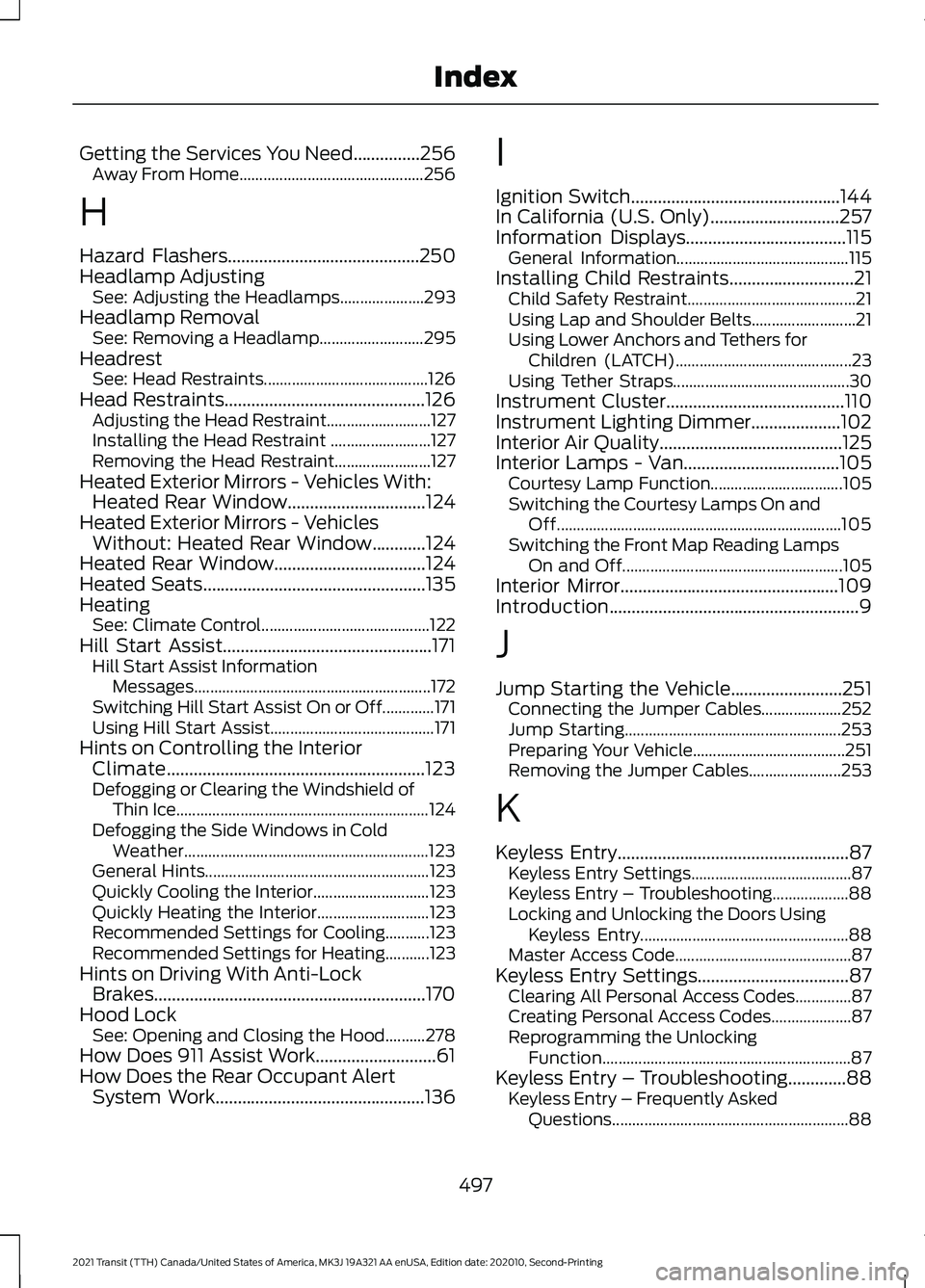
Getting the Services You Need...............256
Away From Home.............................................. 256
H
Hazard Flashers...........................................250
Headlamp Adjusting See: Adjusting the Headlamps..................... 293
Headlamp Removal See: Removing a Headlamp.......................... 295
Headrest See: Head Restraints......................................... 126
Head Restraints.............................................126 Adjusting the Head Restraint.......................... 127
Installing the Head Restraint ......................... 127
Removing the Head Restraint........................ 127
Heated Exterior Mirrors - Vehicles With: Heated Rear Window...............................124
Heated Exterior Mirrors - Vehicles Without: Heated Rear Window............124
Heated Rear Window..................................124
Heated Seats
..................................................135
Heating See: Climate Control.......................................... 122
Hill Start Assist...............................................171 Hill Start Assist Information
Messages........................................................... 172
Switching Hill Start Assist On or Off.............171
Using Hill Start Assist......................................... 171
Hints on Controlling the Interior Climate..........................................................123
Defogging or Clearing the Windshield of Thin Ice............................................................... 124
Defogging the Side Windows in Cold Weather............................................................. 123
General Hints........................................................ 123
Quickly Cooling the Interior............................. 123
Quickly Heating the Interior............................ 123
Recommended Settings for Cooling...........123
Recommended Settings for Heating...........123
Hints on Driving With Anti-Lock Brakes.............................................................170
Hood Lock See: Opening and Closing the Hood..........278
How Does 911 Assist Work...........................61
How Does the Rear Occupant Alert System Work
...............................................136 I
Ignition Switch...............................................144
In California (U.S. Only).............................257
Information Displays....................................115
General Information........................................... 115
Installing Child Restraints............................21 Child Safety Restraint.......................................... 21
Using Lap and Shoulder Belts.......................... 21
Using Lower Anchors and Tethers for Children (LATCH)............................................ 23
Using Tether Straps............................................ 30
Instrument Cluster........................................110
Instrument Lighting Dimmer....................102
Interior Air Quality
.........................................125
Interior Lamps - Van...................................105 Courtesy Lamp Function................................. 105
Switching the Courtesy Lamps On and Off....................................................................... 105
Switching the Front Map Reading Lamps On and Off....................................................... 105
Interior Mirror.................................................109
Introduction........................................................9
J
Jump Starting the Vehicle.........................251 Connecting the Jumper Cables.................... 252
Jump Starting...................................................... 253
Preparing Your Vehicle...................................... 251
Removing the Jumper Cables....................... 253
K
Keyless Entry
....................................................87
Keyless Entry Settings........................................ 87
Keyless Entry – Troubleshooting................... 88
Locking and Unlocking the Doors Using Keyless Entry.................................................... 88
Master Access Code............................................ 87
Keyless Entry Settings
..................................87
Clearing All Personal Access Codes..............87
Creating Personal Access Codes.................... 87
Reprogramming the Unlocking Function.............................................................. 87
Keyless Entry – Troubleshooting.............88 Keyless Entry – Frequently Asked
Questions........................................................... 88
497
2021 Transit (TTH) Canada/United States of America, MK3J 19A321 AA enUSA, Edition date: 202010, Second-Printing Index
Page 501 of 509
Keys and Remote Controls.........................63
Principle of Operation........................................ 63
L
Lane Keeping System................................208 Lane Keeping System Display....................... 210
Lane Keeping System Messages................... 211
Lane Keeping System Settings.................... 209
Lane Keeping System Warning Lamps and Indicators........................................................... 211
Switching Lane Keeping System On or Off...................................................................... 209
Lighting Control............................................100 Exterior Lamps On Audible Warning............101
Flashing High Beam Headlamps................... 101
High Beam Headlamp Indicator.................... 101
Lamps On Indicator............................................ 101
Lighting Control Positions.............................. 100
Switching High Beam Headlamps On and Off........................................................................\
101
Switching the Parking Lamps On................100
Lighting............................................................100 General Information......................................... 100
Load Carriers See: Roof Racks and Load Carriers -
Bus...................................................................... 228
See: Roof Racks and Load Carriers - Van..................................................................... 228
Load Carrying................................................228
Load Limit.......................................................229 Special Loading Instructions for Owners of
Pick-up Trucks and Utility-type
Vehicles............................................................. 233
Vehicle Loading - with and without a Trailer................................................................. 229
Load Retaining Fixtures
.............................228
Securing Cargo................................................... 228
Locating the Cabin Air Filter.....................125
Locating the Keyless Entry Keypad.........87
Locking and Unlocking.................................76 Autolock................................................................... 78
Autounlock.............................................................. 79
Configurable Unlocking...................................... 79
Locking..................................................................... 76
Locking and Unlocking the Doors From Inside.................................................................... 76
One-Stage Unlocking......................................... 79Opening the Double Rear Doors.....................
77
Rear Emergency Exit........................................... 78
Two-Stage Unlocking......................................... 79
Unlocking................................................................. 76
Zone Re-Locking................................................... 79
Locking and Unlocking the Doors Using Keyless Entry
................................................88
Locking the Doors................................................ 88
Unlocking the Doors........................................... 88
Locking the Steering Wheel.......................96 Unlocking the Steering Wheel........................ 96
Lug Nuts See: Changing a Road Wheel....................... 339
Lug Nuts
..........................................................350
Locking Lug Nuts................................................. 351
Lug Nut Torque................................................... 350
M
Maintenance..................................................278 General Information.......................................... 278
Manual Climate Control
.............................122
Directing Air to the Footwell Air Vents........122
Directing Air to the Instrument Panel Air
Vents................................................................... 122
Directing Air to the Windshield Air Vents................................................................... 122
Setting the Blower Motor Speed................... 122
Setting the Temperature.................................. 123
Switching Maximum Cooling On and Off........................................................................\
122
Switching Maximum Defrost On and Off........................................................................\
122
Switching the Air Conditioning On and Off........................................................................\
122
Switching the Climate Control On and Off........................................................................\
122
Switching the Recirculated Air On and Off........................................................................\
122
Manually Releasing the Electric Parking Brake...............................................................177
........................................................................\
............ 177
Manual Seats - Vehicles With: 2-Way Manual Seat.................................................127
Adjusting the Armrest....................................... 128
Adjusting the Lumbar Support...................... 128
Adjusting the Seat Backrest........................... 128
498
2021 Transit (TTH) Canada/United States of America, MK3J 19A321 AA enUSA, Edition date: 202010, Second-Printing Index
Page 505 of 509
Seatbelt Warning Lamp and Indicator
Chime..............................................................46
Conditions of operation..................................... 47
Seats.................................................................126
Security..............................................................89
Service Data......................................................15
Settings Data....................................................16
Comfort and Convenience Data...................... 16
Entertainment Data............................................. 16
Settings............................................................427 ........................................................................\
........... 427
911 Assist............................................................... 428
Ambient Lighting............................................... 428
Audio....................................................................... 427
Automatic Updates.......................................... 428
Charge Settings.................................................. 428
Clock....................................................................... 427
Display................................................................... 428
Driver Assist......................................................... 428
FordPass............................................................... 428
General.................................................................. 428
Message Center................................................. 428
Mobile Apps......................................................... 428
Multi Contour Seats.......................................... 428
Navigation............................................................ 428
Personal Profiles................................................ 428
Phone..................................................................... 427
Seats...................................................................... 428
Sound..................................................................... 427
Valet Mode........................................................... 428
Vehicle................................................................... 428
Voice Control....................................................... 428
Side Airbags
......................................................57
Side Sensing System..................................189 Object Distance Indicator............................... 190
Sitting in the Correct Position..................126
Sliding Door Precautions
............................80
Sliding Door.....................................................80
Closing the Sliding Door.................................... 80
Opening the Sliding Door................................. 80
Sliding Door – Troubleshooting...................... 85
Sliding Door – Troubleshooting
...............85
Sliding Door – Frequently Asked
Questions ........................................................... 86
Sliding Door – Information Messages..........85
Snow Chains See: Using Snow Chains................................. 333Spare Wheel
See: Changing a Road Wheel....................... 339
Special Notices
.................................................11
New Vehicle Limited Warranty.......................... 11
Special Operating Conditions Scheduled Maintenance...............................................451
Exceptions............................................................ 453
Speed Control See: Cruise Control............................................ 198
Speed Limiter
...............................................206
Principle of Operation..................................... 206
Using Speed Limiter......................................... 206
Stability Control
.............................................181
Principle of Operation........................................ 181
Starter Switch See: Ignition Switch........................................... 144
Starting a Gasoline Engine.......................144 Engine Warning Lamps.................................... 146
Failure to Start..................................................... 145
Guarding Against Exhaust Fumes................145
Important Ventilating Information..............146
Starting the Engine............................................ 145
Stopping the Engine When Your Vehicle is Moving............................................................... 145
Stopping the Engine When Your Vehicle is Stationary......................................................... 145
Starting and Stopping the Engine.........144 General Information.......................................... 144
Steering...........................................................220 Adaptive Learning............................................... 221
Electric Power Steering................................... 220
Steering Information Messages..................... 221
Steering Wheel...............................................96
Stopping the Engine
....................................148
Stopping the Sliding Door Movement.....................................................84
Storage Compartments
..............................141
Storage.............................................................142 Bottle Holders...................................................... 142
Overhead Storage.............................................. 142
Rear Overhead Storage.................................... 142
Streaming Bluetooth Audio - Vehicles Without: SYNC..........................................380
Selecting a Source............................................ 380
Supplementary Restraints System.........50 Principle of Operation........................................ 50
Switching Auto-Start-Stop On and Off...................................................................148
502
2021 Transit (TTH) Canada/United States of America, MK3J 19A321 AA enUSA, Edition date: 202010, Second-Printing Index