warning light FORD TRANSIT CONNECT 2013 1.G Owner's Guide
[x] Cancel search | Manufacturer: FORD, Model Year: 2013, Model line: TRANSIT CONNECT, Model: FORD TRANSIT CONNECT 2013 1.GPages: 321, PDF Size: 4.5 MB
Page 219 of 321
M.Maximum Inflation Pressure:Indicates the tire manufacturer’s
maximum permissible pressure or the pressure at which the maximum
load can be carried by the tire. This pressure is normally higher than the
manufacturer’s recommended cold inflation pressure, which can be found
on the Safety Compliance Certification Label (affixed to either the door
hinge pillar, door-latch post, or the door edge that meets the door-latch
post, next to the driver’s seating position), or Tire Label which is located
on the B-Pillar or the edge of the driver’s door. The cold inflation
pressure should never be set lower than the recommended pressure on
the vehicle label.
The tire suppliers may have additional markings, notes or warnings, such
as standard load, radial tubeless, etc.
Additional Information Contained on the Tire Sidewall for LT Type
Tires
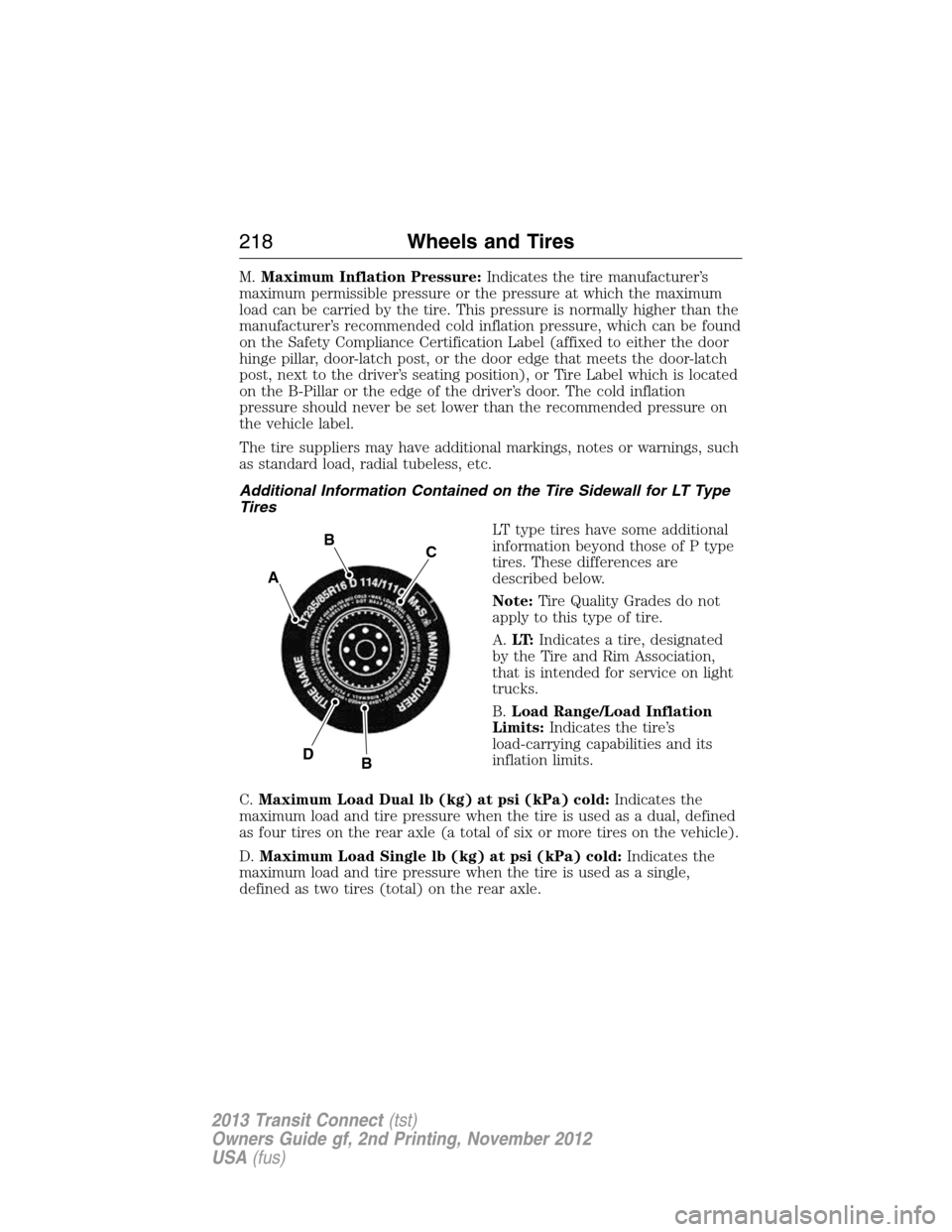
LT type tires have some additional
information beyond those of P type
tires. These differences are
described below.
Note:Tire Quality Grades do not
apply to this type of tire.
A.LT:Indicates a tire, designated
by the Tire and Rim Association,
that is intended for service on light
trucks.
B.Load Range/Load Inflation
Limits:Indicates the tire’s
load-carrying capabilities and its
inflation limits.
C.Maximum Load Dual lb (kg) at psi (kPa) cold:Indicates the
maximum load and tire pressure when the tire is used as a dual, defined
as four tires on the rear axle (a total of six or more tires on the vehicle).
D.Maximum Load Single lb (kg) at psi (kPa) cold:Indicates the
maximum load and tire pressure when the tire is used as a single,
defined as two tires (total) on the rear axle.
A
BC
BD
218Wheels and Tires
2013 Transit Connect(tst)
Owners Guide gf, 2nd Printing, November 2012
USA(fus)
Page 231 of 321
replacing one or more tires or wheels on your vehicle to ensure that the
replacement or alternate tires and wheels allow the TPMS to continue to
function properly.
The tire pressure monitoring system complies with part 15 of the FCC
rules and with RSS-210 of Industry Canada. Operation is subject to
the following two conditions: (1) This device may not cause harmful
interference, and (2) This device must accept any interference received,
including interference that may cause undesired operation.
Changing Tires with a Tire Pressure Monitoring System
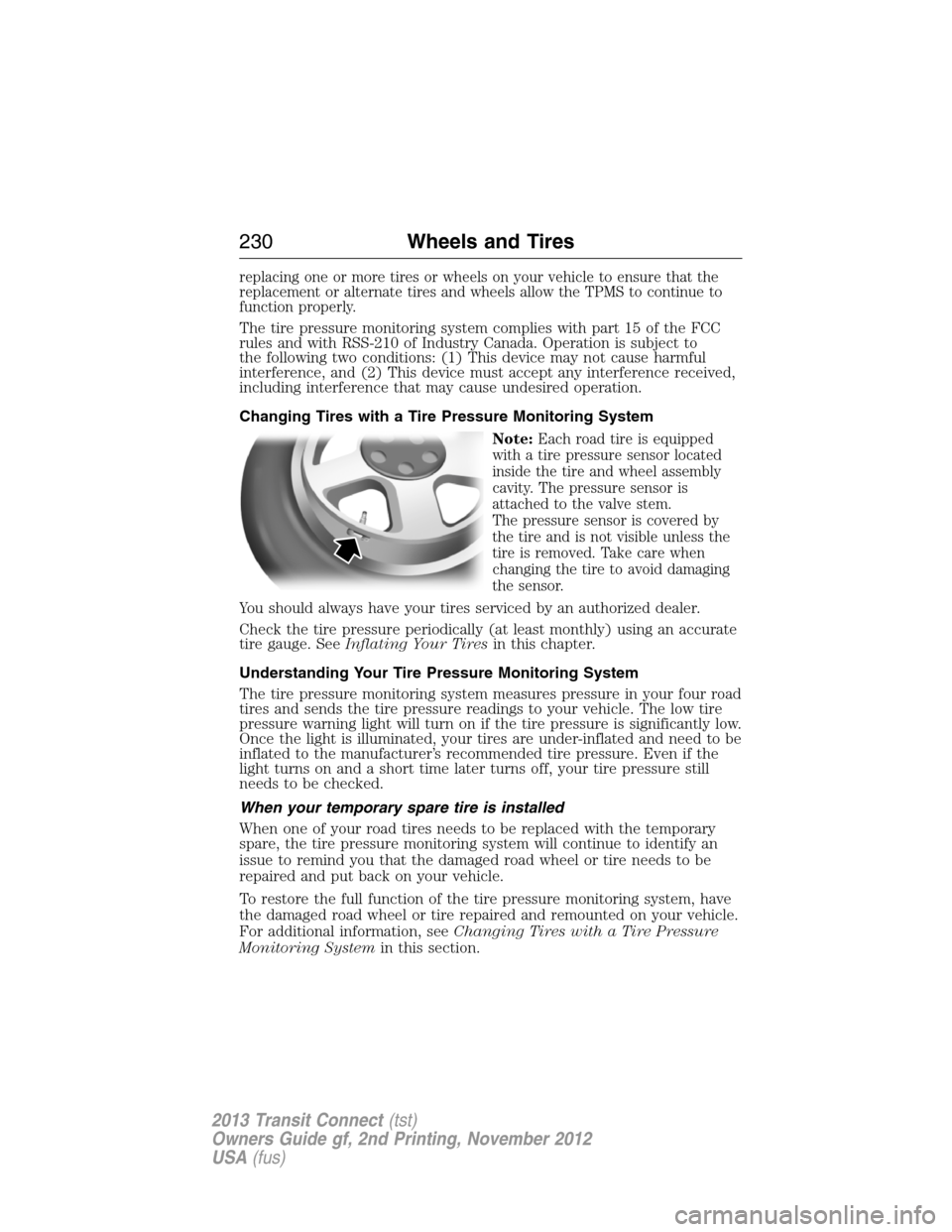
Note:
Each road tire is equipped
with a tire pressure sensor located
inside the tire and wheel assembly
cavity. The pressure sensor is
attached to the valve stem.
The pressure sensor is covered by
the tire and is not visible unless the
tire is removed. Take care when
changing the tire to avoid damaging
the sensor.
You should always have your tires serviced by an authorized dealer.
Check the tire pressure periodically (at least monthly) using an accurate
tire gauge. SeeInflating Your Tiresin this chapter.
Understanding Your Tire Pressure Monitoring System
The tire pressure monitoring system measures pressure in your four road
tires and sends the tire pressure readings to your vehicle. The low tire
pressure warning light will turn on if the tire pressure is significantly low.
Once the light is illuminated, your tires are under-inflated and need to be
inflated to the manufacturer’s recommended tire pressure. Even if the
light turns on and a short time later turns off, your tire pressure still
needs to be checked.
When your temporary spare tire is installed
When one of your road tires needs to be replaced with the temporary
spare, the tire pressure monitoring system will continue to identify an
issue to remind you that the damaged road wheel or tire needs to be
repaired and put back on your vehicle.
To restore the full function of the tire pressure monitoring system, have
the damaged road wheel or tire repaired and remounted on your vehicle.
For additional information, seeChanging Tires with a Tire Pressure
Monitoring Systemin this section.
230Wheels and Tires
2013 Transit Connect(tst)
Owners Guide gf, 2nd Printing, November 2012
USA(fus)
Page 232 of 321
When you believe your system is not operating properly
The main function of the tire pressure monitoring system is to warn you
when your tires need air. It can also warn you in the event the system is
no longer capable of functioning as intended. See the following chart for
information concerning your tire pressure monitoring system:
Low tire
pressure
warning lightPossible cause Customer action required
Solid warning
lightTire(s)
under-inflated1. Make sure tires are at the proper
pressure. SeeInflating your tires
in this chapter.
2.
After inflating your tires to the
manufacturer’s recommended
pressure as shown on the Tire Label
(located on the edge of driver’s door
or the B-Pillar), the vehicle must be
driven for at least two minutes over
20 mph (32 km/h) before the light
turns off.
Spare tire in use Repair the damaged road wheel
and tire and reinstall it on the
vehicle to restore system function.
For a description on how the
system functions, seeWhen your
temporary spare tire is installed
in this section.
Tire pressure
monitoring
system
malfunction
If the tires are properly inflated and
the spare tire is not in use but the
light remains on, contact your
authorized dealer as soon as possible.
Tire rotation
without sensor
trainingOn vehicles with different front and
rear tire pressures, the system must
be retrained following every tire
rotation. SeeTire rotationin this
chapter.
Wheels and Tires231
2013 Transit Connect(tst)
Owners Guide gf, 2nd Printing, November 2012
USA(fus)
Page 233 of 321
Low tire
pressure
warning lightPossible cause Customer action required
Flashing
warning lightSpare tire in use Repair the damaged road wheel
and tire and reinstall it on the
vehicle to restore system function.
For a description on how the
system functions, seeWhen your
temporary spare tire is installed
in this section.
Tire pressure
monitoring
system
malfunctionIf the tires are properly inflated
and the spare tire is not in use but
the light remains on, contact your
authorized dealer as soon as
possible.
When inflating your tires
When putting air into your tires (such as at a gas station or in your
garage), the tire pressure monitoring system may not respond
immediately to the air added to your tires.
It may take up to two minutes of driving over 20 mph (32 km/h) for the
light to turn off after you have filled your tires to the recommended
inflation pressure.
How temperature affects your tire pressure
The tire pressure monitoring system monitors tire pressure in each
pneumatic tire. While driving in a normal manner, a typical passenger
tire inflation pressure may increase approximately 2 to 4 psi (14 to
28 kPa) from a cold start situation. If the vehicle is stationary overnight
with the outside temperature significantly lower than the daytime
temperature, the tire pressure may decrease approximately 3 psi
(21 kPa) for a drop of 30°F (17°C) in ambient temperature. This lower
pressure value may be detected by the system as being significantly
lower than the recommended inflation pressure and activate the system
warning light for low tire pressure. If the low tire pressure warning light
is on, visually check each tire to verify that no tire is flat. If one or more
tires are flat, repair as necessary. Check air pressure in the road tires.
If any tire is under-inflated, carefully drive the vehicle to the nearest
location where air can be added to the tires. Inflate all the tires to the
recommended inflation pressure.
232Wheels and Tires
2013 Transit Connect(tst)
Owners Guide gf, 2nd Printing, November 2012
USA(fus)
Page 234 of 321
Tire pressure monitoring system reset procedure
WARNING:To determine the required pressure for your vehicle,
refer to the Safety Compliance Certification Label or Tire Label
located on the B-Pillar or the edge of the driver’s door. SeeVehicle
loadingin this chapter for more information.
Note:The system reset procedure needs to be performed after each tire
rotation.
Overview
To provide the vehicle’s load carrying capability, this vehicle requires
different recommended tire pressures in the front tires as compared to
the rear tires. The tire pressure monitoring system equipped on these
vehicles is designed to illuminate the low tire pressure warning light at
two different pressures; one for the front tires and one for the rear tires.
Since tires need to be rotated to provide consistent performance and
maximum tire life, the tire pressure monitoring system needs to know
when the tires are rotated to determine which set of tires are on the
front and which are on the rear. With this information, the system can
detect and properly warn of low tire pressures.
System reset tips:
•To reduce the chances of interference from another vehicle, the
system reset procedure should be performed at least three feet
(one meter) away from another Ford Motor Company vehicle
undergoing the system reset procedure at the same time.
•Do not wait more than two minutes between resetting each tire sensor
or the system will time-out and the entire procedure will have to be
repeated on all four wheels.
•A double horn chirp indicates the need to repeat the procedure.
Performing the system reset procedure
Read the entire procedure before attempting.
1. Drive the vehicle above 20 mph (32 km/h) for at least two minutes
and then park in a safe location where you can easily get to all four tires
and have access to an air pump.
2. Place the ignition in the off position and keep the key in the ignition.
3. Cycle the ignition to the on position with the engine off.
4. Turn the hazard flashers on then off three times. This must be
accomplished within 10 seconds.
Wheels and Tires233
2013 Transit Connect(tst)
Owners Guide gf, 2nd Printing, November 2012
USA(fus)
Page 236 of 321
CHANGING A ROAD WHEEL
WARNING:The use of tire sealants may damage your tire
pressure monitoring system and should not be used. However, if
you must use a sealant, the tire pressure monitoring system sensor and
valve stem on the wheel must be replaced by an authorized Ford dealer.
WARNING:SeeTire Pressure Monitoring Systemin this
chapter for important information. If the tire pressure monitoring
sensor becomes damaged, it will no longer function.
Note:The tire pressure monitoring system indicator light will illuminate
when the spare tire is in use. To restore the full function of the
monitoring system, all road wheels equipped with tire pressure
monitoring sensors must be mounted on this vehicle.
If you get a flat tire while driving, do not apply the brake heavily.
Instead, gradually decrease your speed. Hold the steering wheel firmly
and slowly move to a safe place on the side of the road.
Have a flat serviced by an authorized dealer in order to prevent damage
to the system sensors. SeeTire Pressure Monitoring Systemearlier in
this chapter. Replace the spare tire with a road tire as soon as possible.
During repairing or replacing of the flat tire, have the authorized dealer
inspect the tire pressure monitoring system sensor for damage.
Dissimilar Spare Tire and Wheel Assembly Information
WARNING:Failure to follow these guidelines could result in an
increased risk of loss of vehicle control, injury or death.
If you have a dissimilar spare tire and wheel assembly, then it is intended
for temporary use only. This means that if you need to use it, you should
replace it as soon as possible with a road tire and wheel assembly that is
the same size and type as the road tires and wheels that were originally
provided by Ford. If the dissimilar spare tire or wheel is damaged, it
should be replaced rather than repaired.
A dissimilar spare tire and wheel assembly is defined as a spare tire or
wheel that is different in brand, size or appearance from the road tires
and wheels and can be one of three types:
1.T-type mini-spare:This spare tire begins with the letter T for tire
size and may have Temporary Use Only molded in the sidewall.
Wheels and Tires235
2013 Transit Connect(tst)
Owners Guide gf, 2nd Printing, November 2012
USA(fus)
Page 257 of 321
Oils, Fluids and Flushing
In many cases, fluid discoloration is a normal operating characteristic
and, by itself, does not necessarily indicate a concern or that the fluid
needs to be changed. However, discolored fluids that also show signs
of overheating and foreign material contamination should be inspected
immediately by a qualified expert, such as the factory-trained technicians
at your dealership. Your vehicle’s oils and fluids should be changed at the
specified intervals or in conjunction with a repair. Flushing is a viable
way to change fluid for many vehicle sub-systems during scheduled
maintenance. It is critical that systems are flushed only with new fluid
that is the same as that required to fill and operate the system, or using
a Ford-approved flushing chemical.
Owner Checks and Services
Certain basic maintenance checks and inspections should be performed
monthly or at six month intervals.
Check Every Month
Engine oil level.
Function of all interior and exterior lights.
Tires (including spare) for wear and proper pressure.
Windshield washer fluid level.
Check Every Six Months
Battery connections; clean if necessary.
Body and door drain holes for obstructions. Clean if necessary.
Cooling system fluid level and coolant strength.
Door weatherstrips for wear. Lubricate if necessary.
Hinges, latches and outside locks for proper operation. Lubricate if
necessary.
Parking brake for proper operation.
Safety belts and seat latches for wear and function.
Safety warning lamps (brake, ABS, airbag, safety belt) for operation.
Washer spray and wiper operation. Clean or replace blades as necessary.
256Scheduled Maintenance
2013 Transit Connect(tst)
Owners Guide gf, 2nd Printing, November 2012
USA(fus)
Page 316 of 321
A
ABS (see Brakes) .....................125
Accessing call history/phone
book during active call .............278
Accessing your media menu
features ......................................293
Accessing your phone menu
features ......................................280
Active call menu options .........278
Advanced menu options ...287, 300
Advanced menu options
(prompts, languages, defaults,
master reset, installing
applications) ..............................287
Airbag supplemental restraint
system ..........................................46
and child safety seats ..............47
description ................................46
disposal ......................................54
driver airbag ..............................46
passenger airbag .......................46
side airbag ...........................46, 51
Air cleaner filter ...............188, 246
Air conditioning ..........................94
manual heating and air
conditioning system .................94
Air filter .....................................188
Ambulance packages ..................14
Antifreeze (see Engine
coolant) .....................................177
Anti-lock brake system
(see Brakes) ..............................125
Anti-theft system ........................62
arming the system ....................62
Audio system
Single CD ............................88–89Audio system (see Radio) ...88–89
Automatic transaxle
fluid, adding ............................181
fluid, checking ........................181
fluid, refill capacities ..............244
fluid, specification ..................244
Automatic transmission
driving an automatic
overdrive .................................121
fluid, adding ............................181
fluid, checking ........................181
fluid, refill capacities ..............244
fluid, specification ..................244
Auxiliary input jack (Line in) ....91
Auxiliary powerpoint ................106
B
Battery .......................................185
acid, treating emergencies .....185
how to service ........................185
jumping a disabled battery ....151
maintenance-free ....................185
replacement, specifications ...246
servicing ..................................185
Booster seats ...............................21
Brakelamp
bulb replacement ....................195
Brakes ........................................125
anti-lock ...................................125
anti-lock brake system (ABS)
warning light ...........................125
brake warning light ................125
fluid, checking and adding ....184
fluid, refill capacities ..............244
fluid, specifications .................244
lubricant specifications ..........244
parking ....................................126
shift interlock ..........................123
Bulbs ..........................191, 198, 200
Index315
2013 Transit Connect(tst)
Owners Guide gf, 2nd Printing, November 2012
USA(fus)
Page 319 of 321
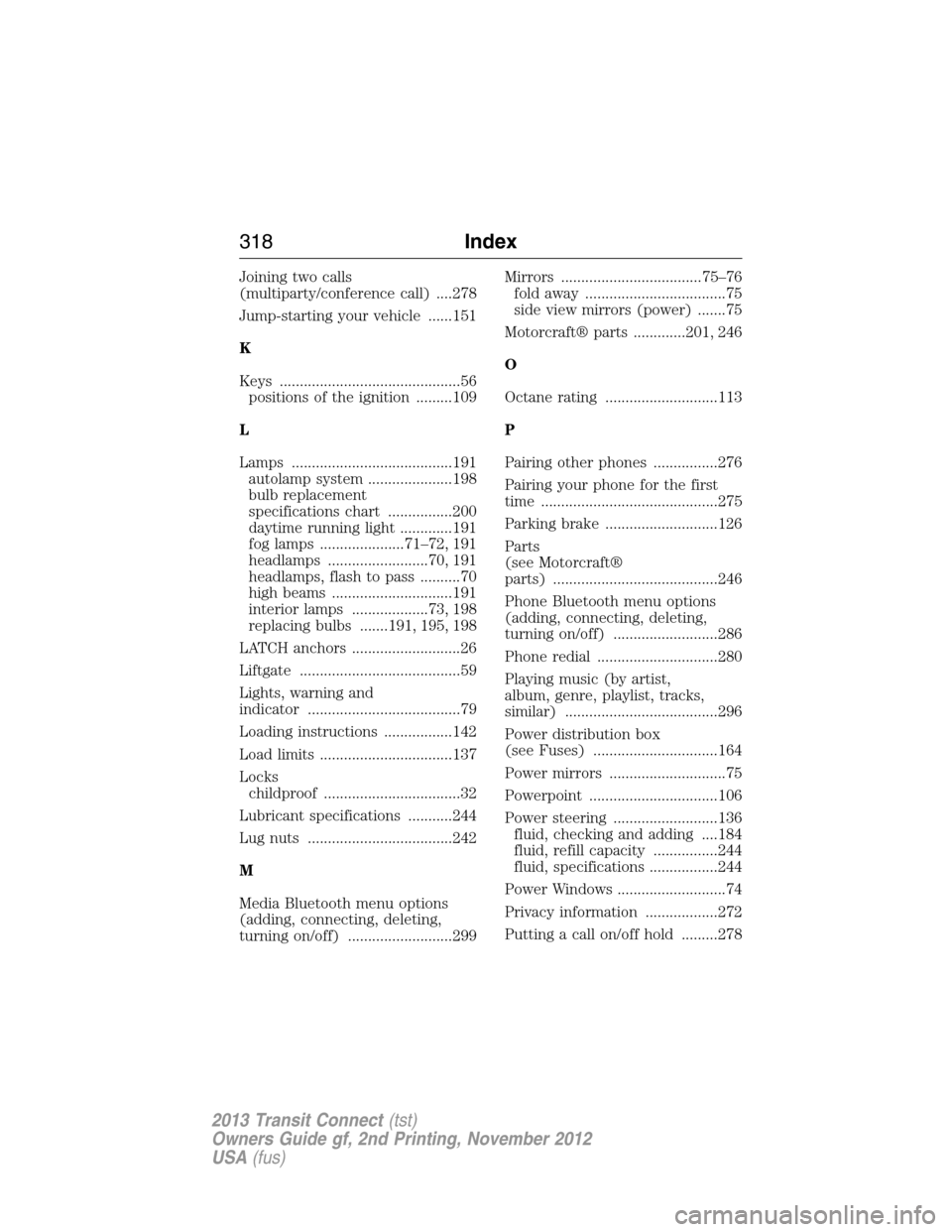
Joining two calls
(multiparty/conference call) ....278
Jump-starting your vehicle ......151
K
Keys .............................................56
positions of the ignition .........109
L
Lamps ........................................191
autolamp system .....................198
bulb replacement
specifications chart ................200
daytime running light .............191
fog lamps .....................71–72, 191
headlamps .........................70, 191
headlamps, flash to pass ..........70
high beams ..............................191
interior lamps ...................73, 198
replacing bulbs .......191, 195, 198
LATCH anchors ...........................26
Liftgate ........................................59
Lights, warning and
indicator ......................................79
Loading instructions .................142
Load limits .................................137
Locks
childproof ..................................32
Lubricant specifications ...........244
Lug nuts ....................................242
M
Media Bluetooth menu options
(adding, connecting, deleting,
turning on/off) ..........................299Mirrors ...................................75–76
fold away ...................................75
side view mirrors (power) .......75
Motorcraft® parts .............201, 246
O
Octane rating ............................113
P
Pairing other phones ................276
Pairing your phone for the first
time ............................................275
Parking brake ............................126
Parts
(see Motorcraft®
parts) .........................................246
Phone Bluetooth menu options
(adding, connecting, deleting,
turning on/off) ..........................286
Phone redial ..............................280
Playing music (by artist,
album, genre, playlist, tracks,
similar) ......................................296
Power distribution box
(see Fuses) ...............................164
Power mirrors .............................75
Powerpoint ................................106
Power steering ..........................136
fluid, checking and adding ....184
fluid, refill capacity ................244
fluid, specifications .................244
Power Windows ...........................74
Privacy information ..................272
Putting a call on/off hold .........278
318Index
2013 Transit Connect(tst)
Owners Guide gf, 2nd Printing, November 2012
USA(fus)
Page 320 of 321
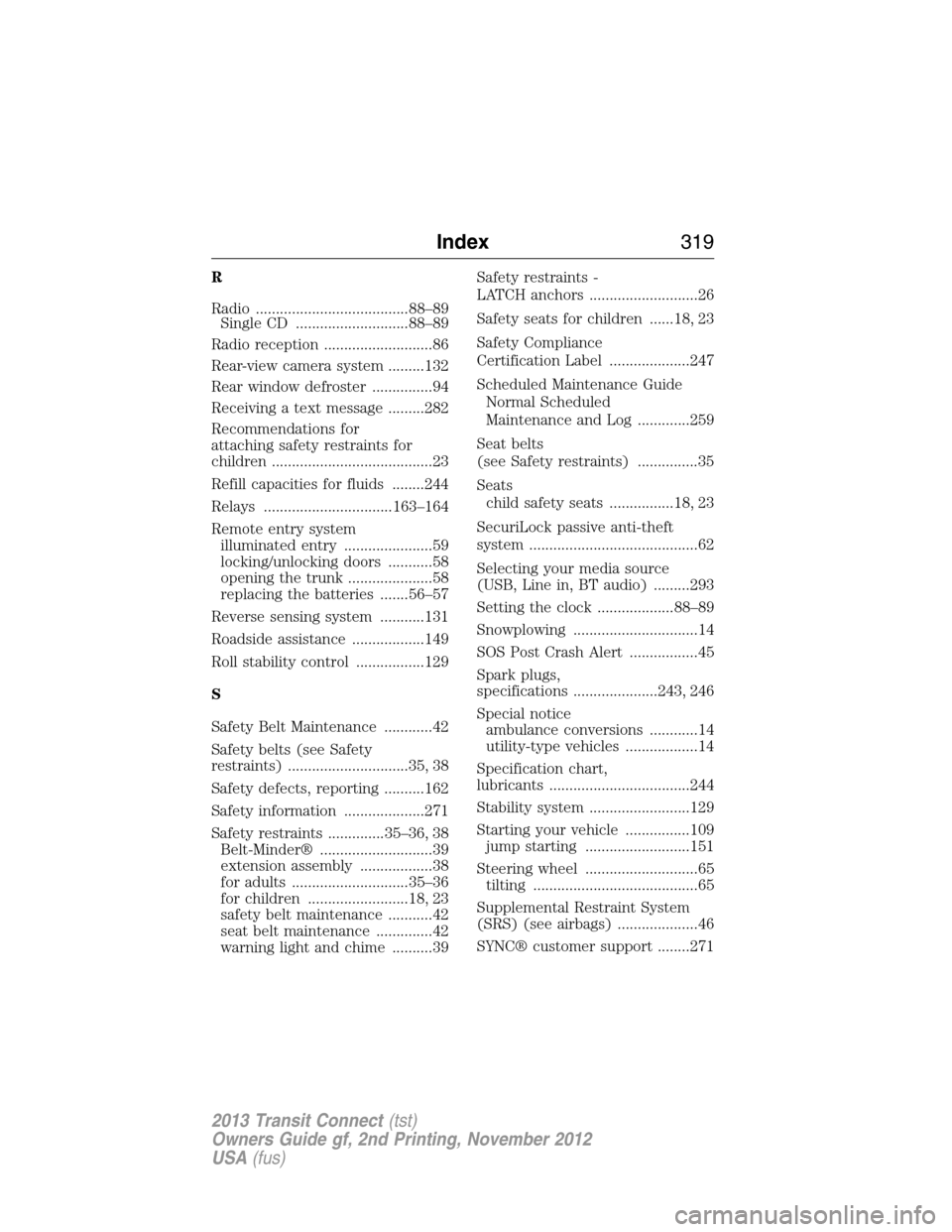
R
Radio ......................................88–89
Single CD ............................88–89
Radio reception ...........................86
Rear-view camera system .........132
Rear window defroster ...............94
Receiving a text message .........282
Recommendations for
attaching safety restraints for
children ........................................23
Refill capacities for fluids ........244
Relays ................................163–164
Remote entry system
illuminated entry ......................59
locking/unlocking doors ...........58
opening the trunk .....................58
replacing the batteries .......56–57
Reverse sensing system ...........131
Roadside assistance ..................149
Roll stability control .................129
S
Safety Belt Maintenance ............42
Safety belts (see Safety
restraints) ..............................35, 38
Safety defects, reporting ..........162
Safety information ....................271
Safety restraints ..............35–36, 38
Belt-Minder® ............................39
extension assembly ..................38
for adults .............................35–36
for children .........................18, 23
safety belt maintenance ...........42
seat belt maintenance ..............42
warning light and chime ..........39Safety restraints -
LATCH anchors ...........................26
Safety seats for children ......18, 23
Safety Compliance
Certification Label ....................247
Scheduled Maintenance Guide
Normal Scheduled
Maintenance and Log .............259
Seat belts
(see Safety restraints) ...............35
Seats
child safety seats ................18, 23
SecuriLock passive anti-theft
system ..........................................62
Selecting your media source
(USB, Line in, BT audio) .........293
Setting the clock ...................88–89
Snowplowing ...............................14
SOS Post Crash Alert .................45
Spark plugs,
specifications .....................243, 246
Special notice
ambulance conversions ............14
utility-type vehicles ..................14
Specification chart,
lubricants ...................................244
Stability system .........................129
Starting your vehicle ................109
jump starting ..........................151
Steering wheel ............................65
tilting .........................................65
Supplemental Restraint System
(SRS) (see airbags) ....................46
SYNC® customer support ........271
Index319
2013 Transit Connect(tst)
Owners Guide gf, 2nd Printing, November 2012
USA(fus)