service reset FORD TRANSIT CONNECT 2014 2.G User Guide
[x] Cancel search | Manufacturer: FORD, Model Year: 2014, Model line: TRANSIT CONNECT, Model: FORD TRANSIT CONNECT 2014 2.GPages: 411, PDF Size: 6.62 MB
Page 334 of 411
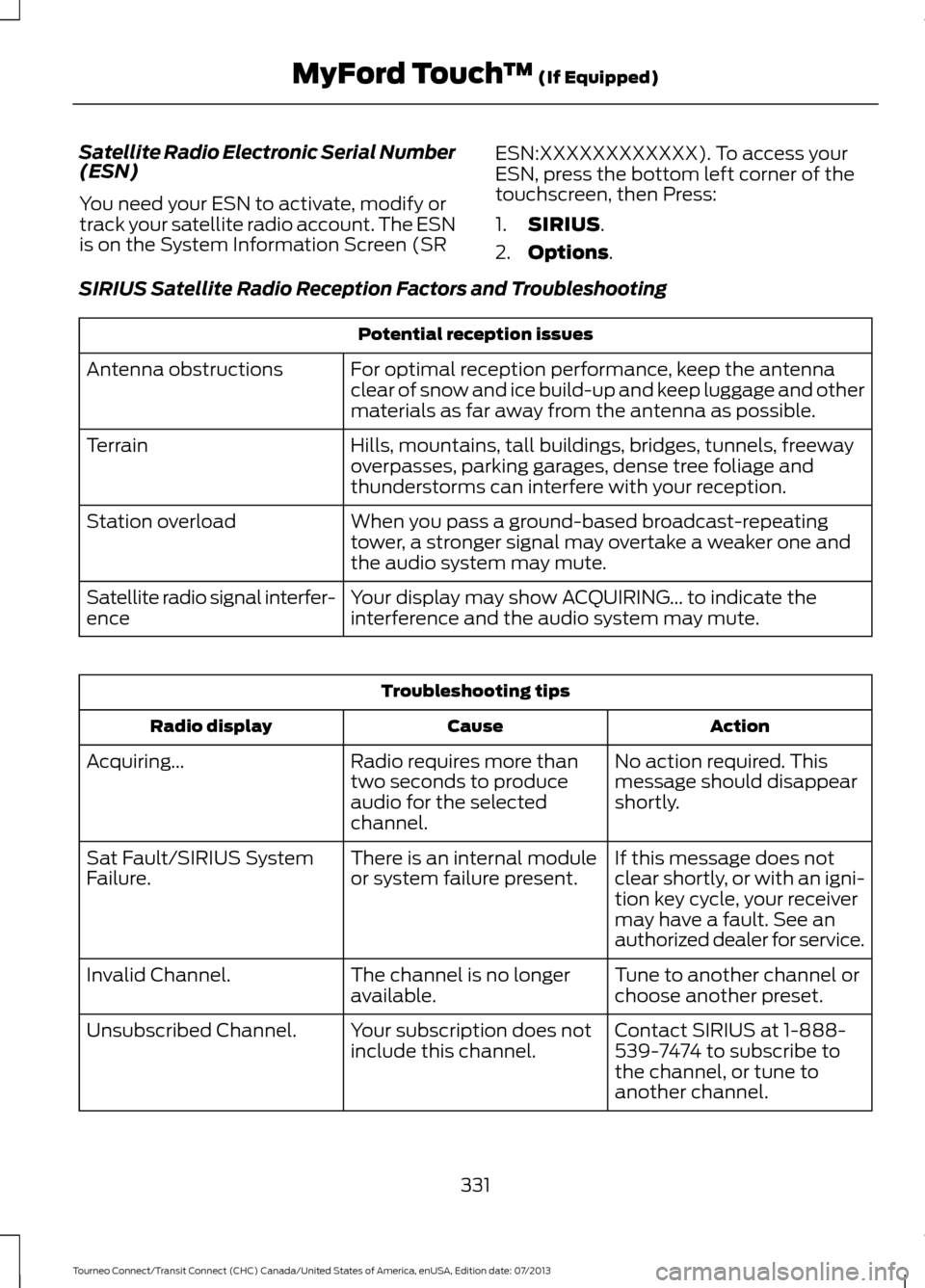
Satellite Radio Electronic Serial Number
(ESN)
You need your ESN to activate, modify or
track your satellite radio account. The ESN
is on the System Information Screen (SR
ESN:XXXXXXXXXXXX). To access your
ESN, press the bottom left corner of the
touchscreen, then Press:
1.
SIRIUS.
2. Options
.
SIRIUS Satellite Radio Reception Factors and Troubleshooting Potential reception issues
For optimal reception performance, keep the antenna
clear of snow and ice build-up and keep luggage and other
materials as far away from the antenna as possible.
Antenna obstructions
Hills, mountains, tall buildings, bridges, tunnels, freeway
overpasses, parking garages, dense tree foliage and
thunderstorms can interfere with your reception.
Terrain
When you pass a ground-based broadcast-repeating
tower, a stronger signal may overtake a weaker one and
the audio system may mute.
Station overload
Your display may show ACQUIRING... to indicate the
interference and the audio system may mute.
Satellite radio signal interfer-
ence Troubleshooting tips
Action
Cause
Radio display
No action required. This
message should disappear
shortly.
Radio requires more than
two seconds to produce
audio for the selected
channel.
Acquiring...
If this message does not
clear shortly, or with an igni-
tion key cycle, your receiver
may have a fault. See an
authorized dealer for service.
There is an internal module
or system failure present.
Sat Fault/SIRIUS System
Failure.
Tune to another channel or
choose another preset.
The channel is no longer
available.
Invalid Channel.
Contact SIRIUS at 1-888-
539-7474 to subscribe to
the channel, or tune to
another channel.
Your subscription does not
include this channel.
Unsubscribed Channel.
331
Tourneo Connect/Transit Connect (CHC) Canada/United States of America, enUSA, Edition date: 07/2013 MyFord Touch
™
(If Equipped)
Page 335 of 411
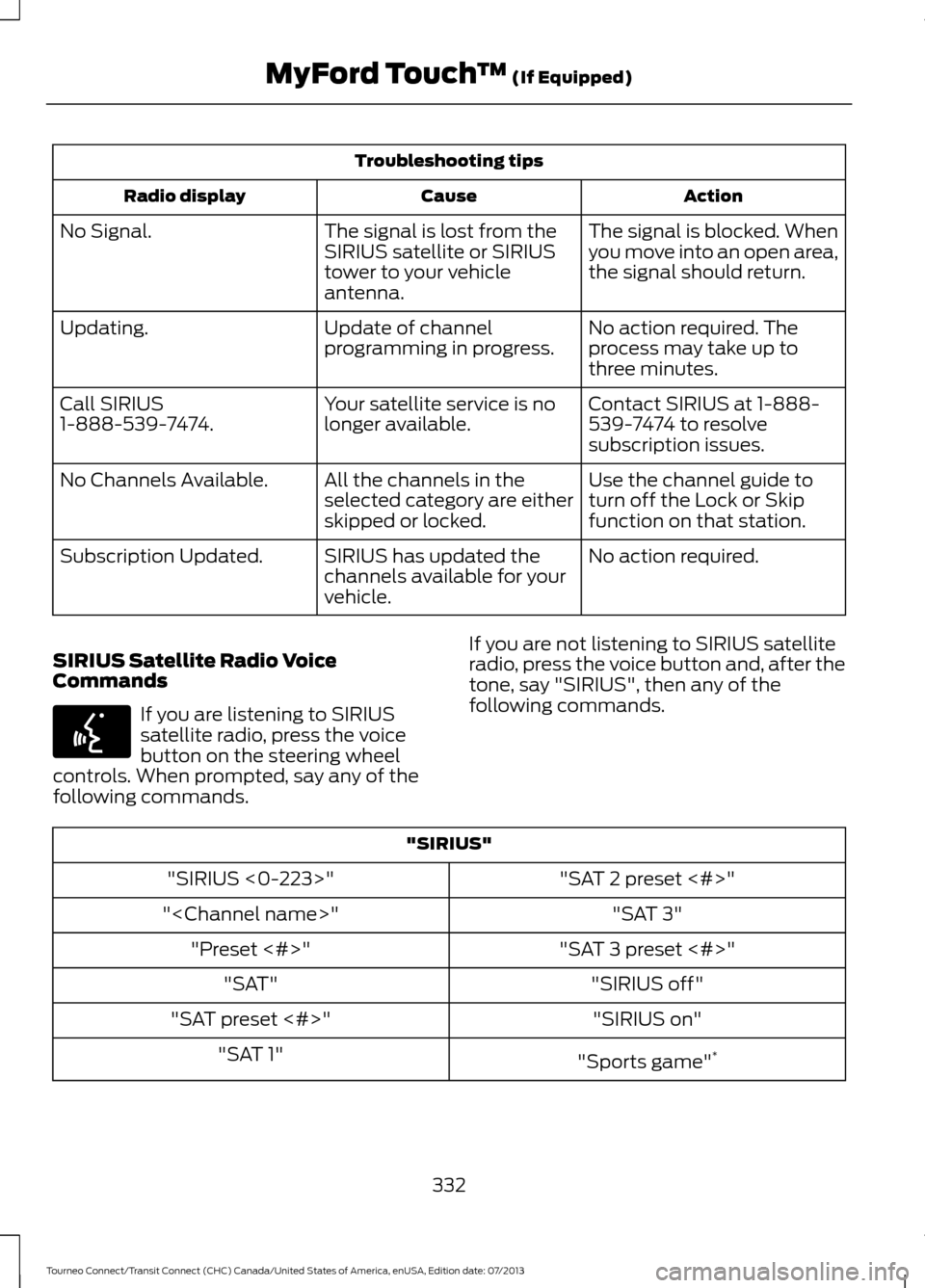
Troubleshooting tips
Action
Cause
Radio display
The signal is blocked. When
you move into an open area,
the signal should return.
The signal is lost from the
SIRIUS satellite or SIRIUS
tower to your vehicle
antenna.
No Signal.
No action required. The
process may take up to
three minutes.
Update of channel
programming in progress.
Updating.
Contact SIRIUS at 1-888-
539-7474 to resolve
subscription issues.
Your satellite service is no
longer available.
Call SIRIUS
1-888-539-7474.
Use the channel guide to
turn off the Lock or Skip
function on that station.
All the channels in the
selected category are either
skipped or locked.
No Channels Available.
No action required.
SIRIUS has updated the
channels available for your
vehicle.
Subscription Updated.
SIRIUS Satellite Radio Voice
Commands If you are listening to SIRIUS
satellite radio, press the voice
button on the steering wheel
controls. When prompted, say any of the
following commands. If you are not listening to SIRIUS satellite
radio, press the voice button and, after the
tone, say "SIRIUS", then any of the
following commands."SIRIUS"
"SAT 2 preset <#>"
"SIRIUS <0-223>"
"SAT 3"
"
"SAT 3 preset <#>"
"Preset <#>"
"SIRIUS off"
"SAT"
"SIRIUS on"
"SAT preset <#>"
"Sports game"*
"SAT 1"
332
Tourneo Connect/Transit Connect (CHC) Canada/United States of America, enUSA, Edition date: 07/2013 MyFord Touch
™ (If Equipped)E142599
Page 388 of 411
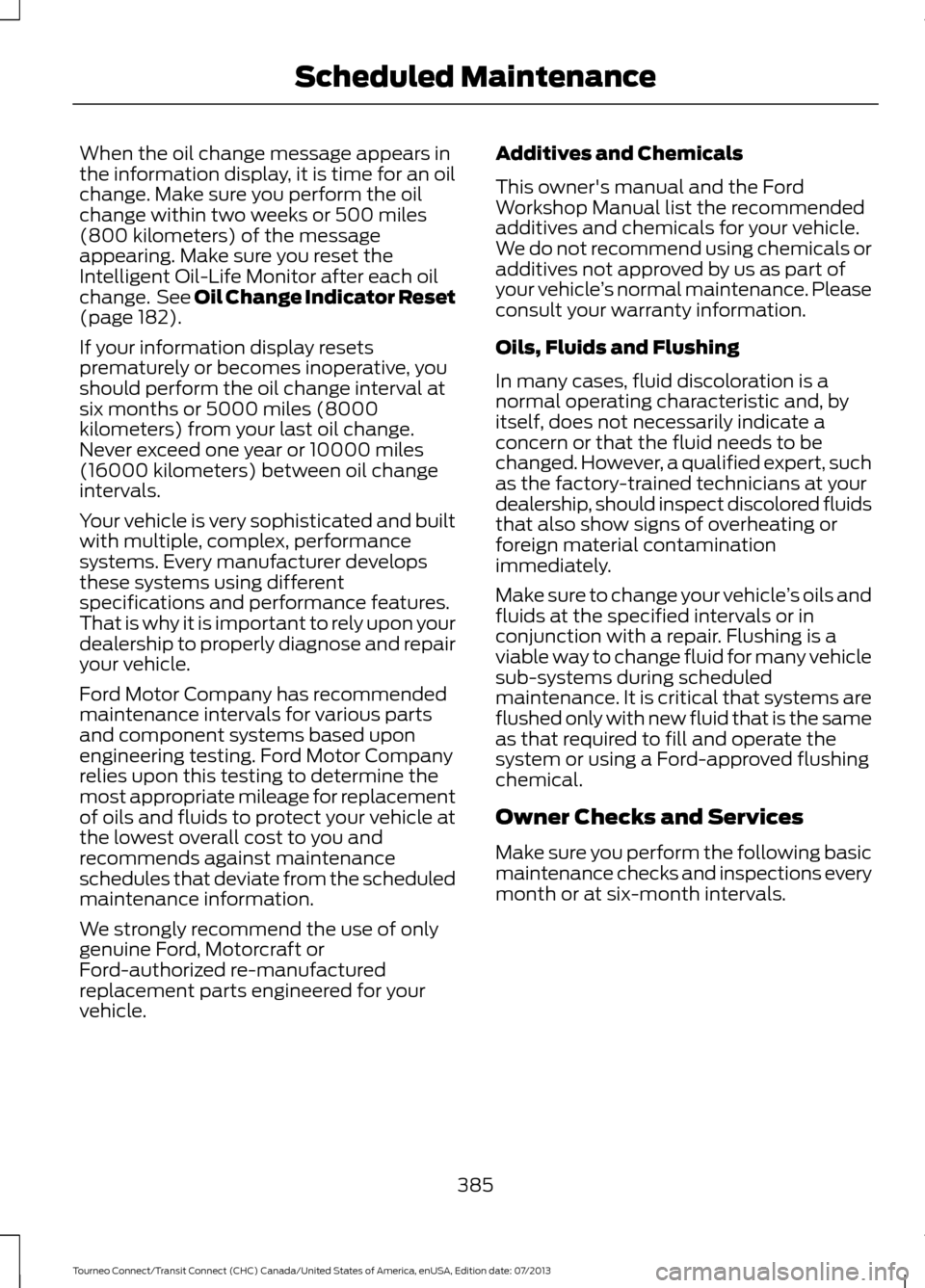
When the oil change message appears in
the information display, it is time for an oil
change. Make sure you perform the oil
change within two weeks or 500 miles
(800 kilometers) of the message
appearing. Make sure you reset the
Intelligent Oil-Life Monitor after each oil
change. See Oil Change Indicator Reset
(page 182).
If your information display resets
prematurely or becomes inoperative, you
should perform the oil change interval at
six months or 5000 miles (8000
kilometers) from your last oil change.
Never exceed one year or 10000 miles
(16000 kilometers) between oil change
intervals.
Your vehicle is very sophisticated and built
with multiple, complex, performance
systems. Every manufacturer develops
these systems using different
specifications and performance features.
That is why it is important to rely upon your
dealership to properly diagnose and repair
your vehicle.
Ford Motor Company has recommended
maintenance intervals for various parts
and component systems based upon
engineering testing. Ford Motor Company
relies upon this testing to determine the
most appropriate mileage for replacement
of oils and fluids to protect your vehicle at
the lowest overall cost to you and
recommends against maintenance
schedules that deviate from the scheduled
maintenance information.
We strongly recommend the use of only
genuine Ford, Motorcraft or
Ford-authorized re-manufactured
replacement parts engineered for your
vehicle. Additives and Chemicals
This owner's manual and the Ford
Workshop Manual list the recommended
additives and chemicals for your vehicle.
We do not recommend using chemicals or
additives not approved by us as part of
your vehicle
’s normal maintenance. Please
consult your warranty information.
Oils, Fluids and Flushing
In many cases, fluid discoloration is a
normal operating characteristic and, by
itself, does not necessarily indicate a
concern or that the fluid needs to be
changed. However, a qualified expert, such
as the factory-trained technicians at your
dealership, should inspect discolored fluids
that also show signs of overheating or
foreign material contamination
immediately.
Make sure to change your vehicle ’s oils and
fluids at the specified intervals or in
conjunction with a repair. Flushing is a
viable way to change fluid for many vehicle
sub-systems during scheduled
maintenance. It is critical that systems are
flushed only with new fluid that is the same
as that required to fill and operate the
system or using a Ford-approved flushing
chemical.
Owner Checks and Services
Make sure you perform the following basic
maintenance checks and inspections every
month or at six-month intervals.
385
Tourneo Connect/Transit Connect (CHC) Canada/United States of America, enUSA, Edition date: 07/2013 Scheduled Maintenance
Page 392 of 411
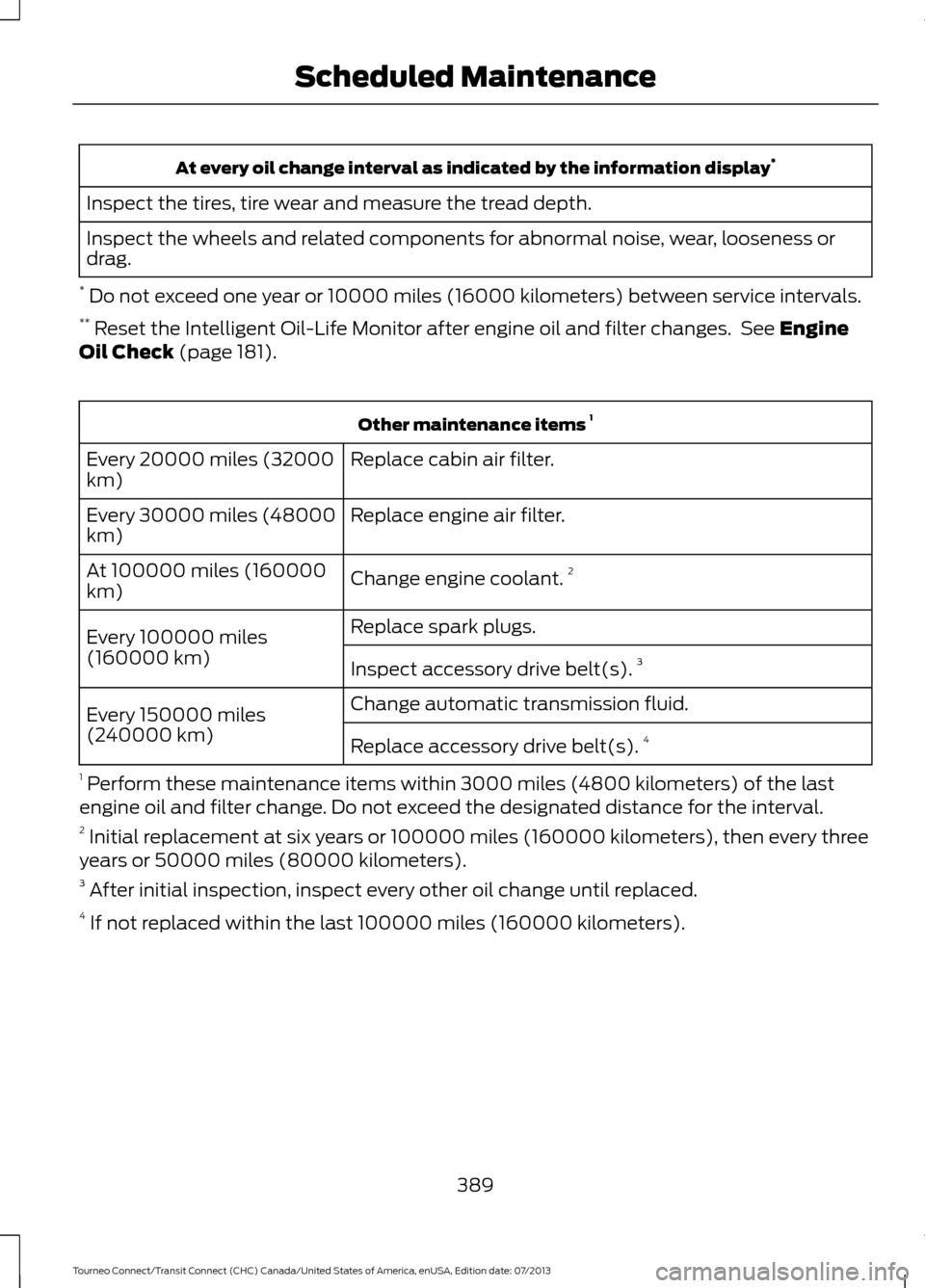
At every oil change interval as indicated by the information display
*
Inspect the tires, tire wear and measure the tread depth.
Inspect the wheels and related components for abnormal noise, wear, looseness or
drag.
* Do not exceed one year or 10000 miles (16000 kilometers) between service intervals.
** Reset the Intelligent Oil-Life Monitor after engine oil and filter changes. See Engine
Oil Check (page 181). Other maintenance items
1
Replace cabin air filter.
Every 20000 miles (32000
km)
Replace engine air filter.
Every 30000 miles (48000
km)
Change engine coolant.2
At 100000 miles (160000
km)
Replace spark plugs.
Every 100000 miles
(160000 km) Inspect accessory drive belt(s). 3
Change automatic transmission fluid.
Every 150000 miles
(240000 km)
Replace accessory drive belt(s). 4
1 Perform these maintenance items within 3000 miles (4800 kilometers) of the last
engine oil and filter change. Do not exceed the designated distance for the interval.
2 Initial replacement at six years or 100000 miles (160000 kilometers), then every three
years or 50000 miles (80000 kilometers).
3 After initial inspection, inspect every other oil change until replaced.
4 If not replaced within the last 100000 miles (160000 kilometers).
389
Tourneo Connect/Transit Connect (CHC) Canada/United States of America, enUSA, Edition date: 07/2013 Scheduled Maintenance
Page 393 of 411
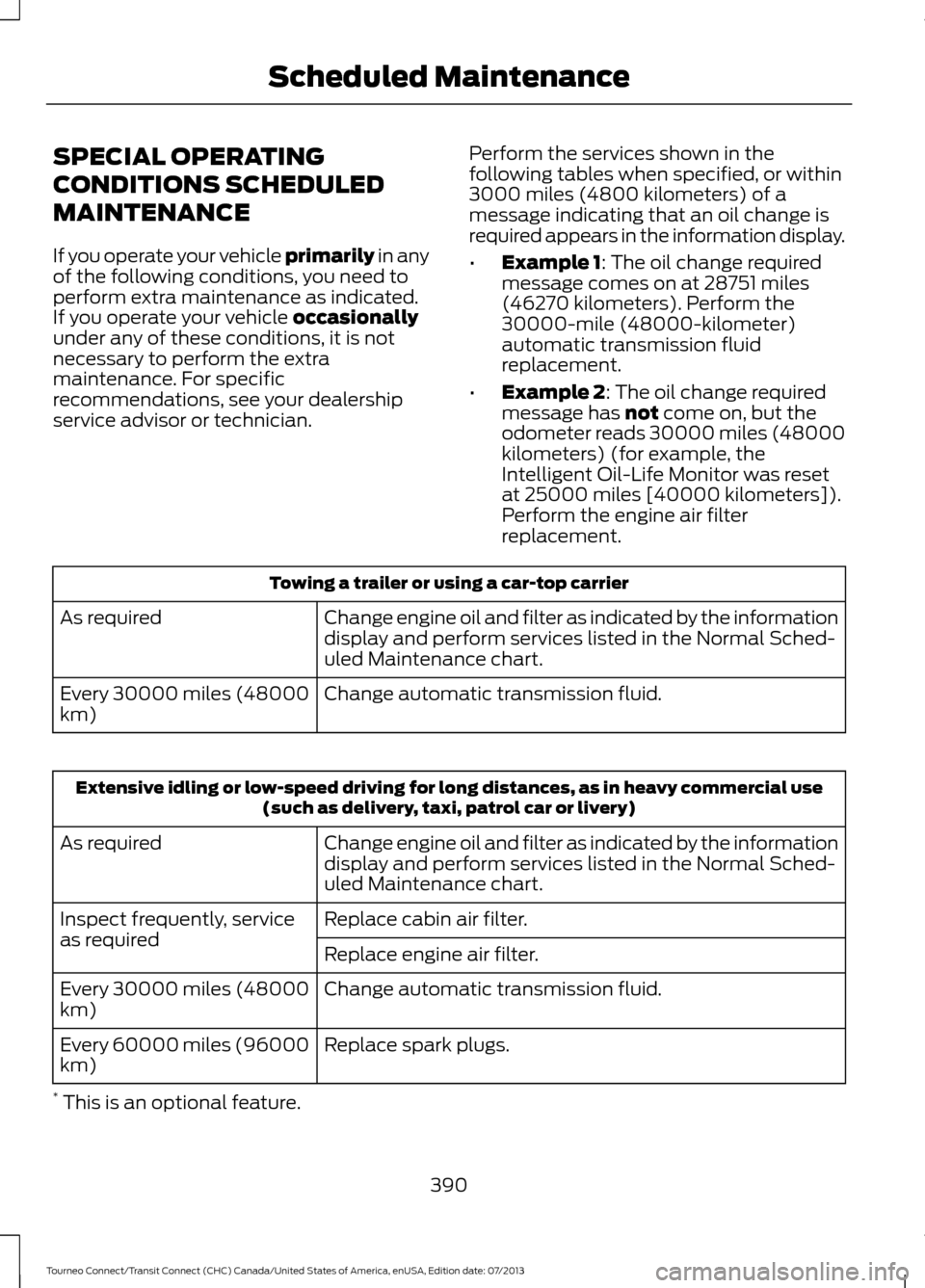
SPECIAL OPERATING
CONDITIONS SCHEDULED
MAINTENANCE
If you operate your vehicle primarily in any
of the following conditions, you need to
perform extra maintenance as indicated.
If you operate your vehicle
occasionally
under any of these conditions, it is not
necessary to perform the extra
maintenance. For specific
recommendations, see your dealership
service advisor or technician. Perform the services shown in the
following tables when specified, or within
3000 miles (4800 kilometers) of a
message indicating that an oil change is
required appears in the information display.
•
Example 1
: The oil change required
message comes on at 28751 miles
(46270 kilometers). Perform the
30000-mile (48000-kilometer)
automatic transmission fluid
replacement.
• Example 2
: The oil change required
message has not come on, but the
odometer reads 30000 miles (48000
kilometers) (for example, the
Intelligent Oil-Life Monitor was reset
at 25000 miles [40000 kilometers]).
Perform the engine air filter
replacement. Towing a trailer or using a car-top carrier
Change engine oil and filter as indicated by the information
display and perform services listed in the Normal Sched-
uled Maintenance chart.
As required
Change automatic transmission fluid.
Every 30000 miles (48000
km) Extensive idling or low-speed driving for long distances, as in heavy commercial use
(such as delivery, taxi, patrol car or livery)
Change engine oil and filter as indicated by the information
display and perform services listed in the Normal Sched-
uled Maintenance chart.
As required
Replace cabin air filter.
Inspect frequently, service
as required
Replace engine air filter.
Change automatic transmission fluid.
Every 30000 miles (48000
km)
Replace spark plugs.
Every 60000 miles (96000
km)
* This is an optional feature.
390
Tourneo Connect/Transit Connect (CHC) Canada/United States of America, enUSA, Edition date: 07/2013 Scheduled Maintenance
Page 394 of 411
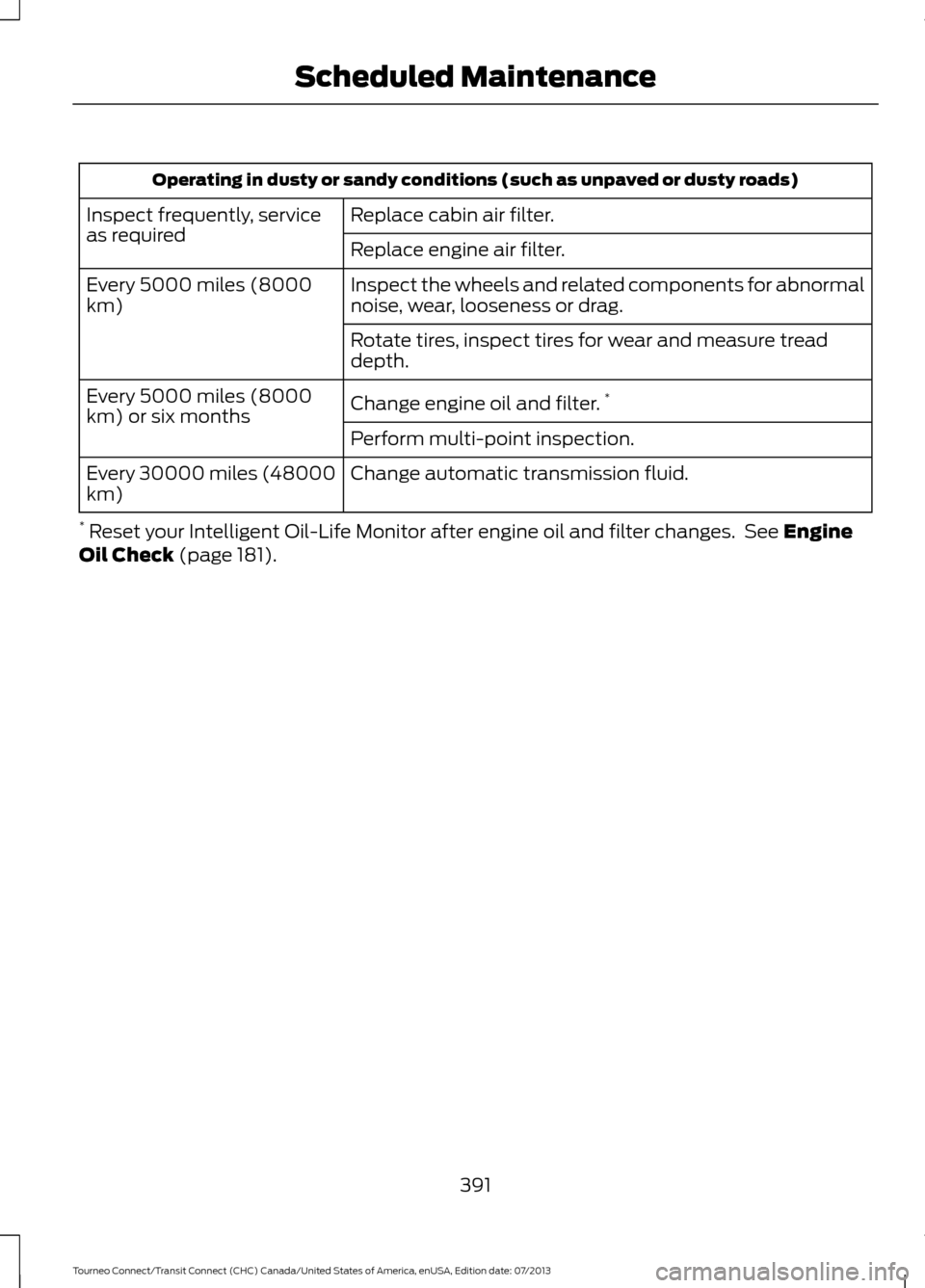
Operating in dusty or sandy conditions (such as unpaved or dusty roads)
Replace cabin air filter.
Inspect frequently, service
as required
Replace engine air filter.
Inspect the wheels and related components for abnormal
noise, wear, looseness or drag.
Every 5000 miles (8000
km)
Rotate tires, inspect tires for wear and measure tread
depth.
Change engine oil and filter.*
Every 5000 miles (8000
km) or six months
Perform multi-point inspection.
Change automatic transmission fluid.
Every 30000 miles (48000
km)
* Reset your Intelligent Oil-Life Monitor after engine oil and filter changes. See Engine
Oil Check (page 181).
391
Tourneo Connect/Transit Connect (CHC) Canada/United States of America, enUSA, Edition date: 07/2013 Scheduled Maintenance
Page 409 of 411
Starting a Gasoline Engine........................110
Before starting the engine check the
following:........................................................... 110
Cold or Hot Engine.............................................. 110
Engine Idle Speed after Starting................... 110
Flooded Engine.................................................... 110
Starting and Stopping the Engine.........109 General Information.......................................... 109
Steering............................................................133 Electric Power Steering.................................... 133
Steering Wheel...............................................55
Storage Compartments.............................107
Sun Shades - Vehicles With: Panoramic Roof Panel.....................................................70
Bounce-Back........................................................... 71
Opening and Closing the Sun Shade.............71
Sun Shade Relearning......................................... 71
Supplementary Restraints System.........33 Principle of Operation......................................... 33
Switching Off the Engine
...........................110
Vehicles With a Turbocharger........................ 110
Symbols Glossary
.............................................7
SYNC™ Applications and Services........................................................278
911 Assist............................................................... 278
SYNC AppLink.................................................... 284
SYNC Services: Traffic, Directions & Information (TDI) (If Equipped, Unites
States Only).................................................... 282
Vehicle Health Report..................................... 280
SYNC™...........................................................258 General Information......................................... 258
SYNC™ Troubleshooting
.........................296
T
Tailgate See: Manual Liftgate........................................... 52
Technical Specifications - 2.5L...............199 Capacities............................................................ 200
Specifications..................................................... 200
Technical Specifications See: Capacities and Specifications.............237
Technical Specifications............................197 Capacities.............................................................. 197
Specifications...................................................... 198
The Better Business Bureau (BBB) Auto Line Program (U.S. Only)........................162 Tire Care...........................................................210
Glossary of Tire Terminology........................... 211
Information About Uniform Tire Quality Grading.............................................................. 210
Information Contained on the Tire Sidewall............................................................. 212
Temperature A B C.............................................. 211
Traction AA A B C................................................. 211
Treadwear............................................................. 210
Tire Pressure Monitoring System...........226 Changing Tires With a Tire Pressure
Monitoring System........................................ 227
Tire Pressure Monitoring System Reset Procedure........................................................ 229
Understanding the Tire Pressure Monitoring System .............................................................. 227
Tires See: Wheels and Tires..................................... 209
Towing a Trailer
.............................................144
Load Placement................................................. 144
Trailer Lighting..................................................... 145
Towing Points................................................149
Towing the Vehicle on Four Wheels.......151 Emergency Towing.............................................. 151
Recreational Vehicle Towing .......................... 151
Towing..............................................................144
Traction Control
............................................124
Principle of Operation....................................... 124
Trailer Sway Control
....................................145
Transmission Code Designation.............241
Transmission...................................................119
Transmission See: Transmission............................................... 119
Transporting the Vehicle...........................150
Trip Computer - Vehicles Built From: 22-10-2013......................................................81
Average Fuel........................................................... 81
Digital Speedometer............................................ 81
Distance to Empty................................................ 81
Resetting the Trip Computer............................ 81
Trip Odometer........................................................ 81
U
Under Hood Overview - 1.6L.....................179
Under Hood Overview - 2.5L
...................180
USB Port.........................................................256
406
Tourneo Connect/Transit Connect (CHC) Canada/United States of America, enUSA, Edition date: 07/2013 Index