door lock FORD TRANSIT CONNECT 2016 2.G Owners Manual
[x] Cancel search | Manufacturer: FORD, Model Year: 2016, Model line: TRANSIT CONNECT, Model: FORD TRANSIT CONNECT 2016 2.GPages: 439, PDF Size: 6.96 MB
Page 11 of 439
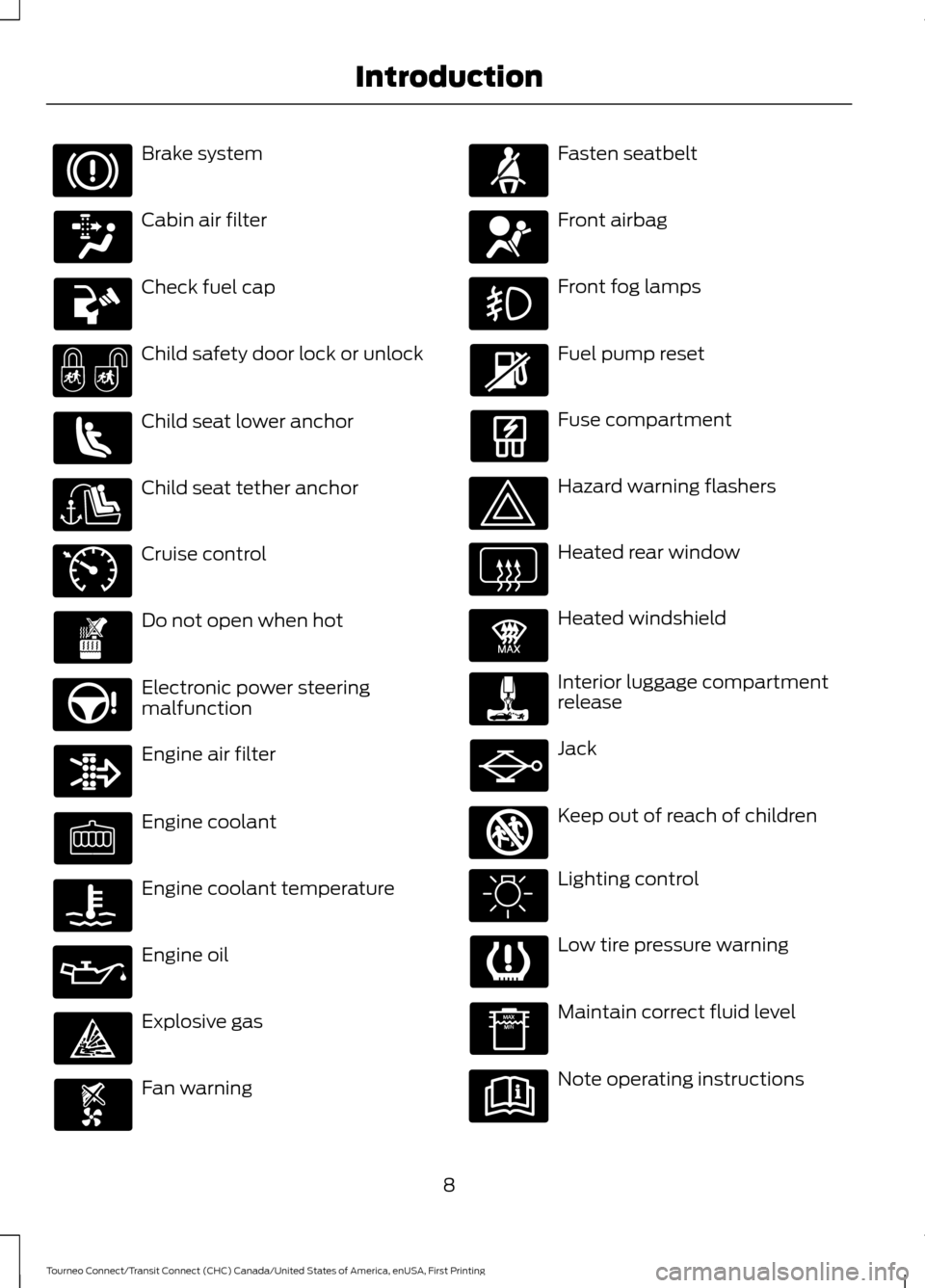
Brake system
Cabin air filter
Check fuel cap
Child safety door lock or unlock
Child seat lower anchor
Child seat tether anchor
Cruise control
Do not open when hot
Electronic power steering
malfunction
Engine air filter
Engine coolant
Engine coolant temperature
Engine oil
Explosive gas
Fan warning Fasten seatbelt
Front airbag
Front fog lamps
Fuel pump reset
Fuse compartment
Hazard warning flashers
Heated rear window
Heated windshield
Interior luggage compartment
release
Jack
Keep out of reach of children
Lighting control
Low tire pressure warning
Maintain correct fluid level
Note operating instructions
8
Tourneo Connect/Transit Connect (CHC) Canada/United States of America, enUSA, First Printing Introduction E71340 E91392 E161353
Page 30 of 439
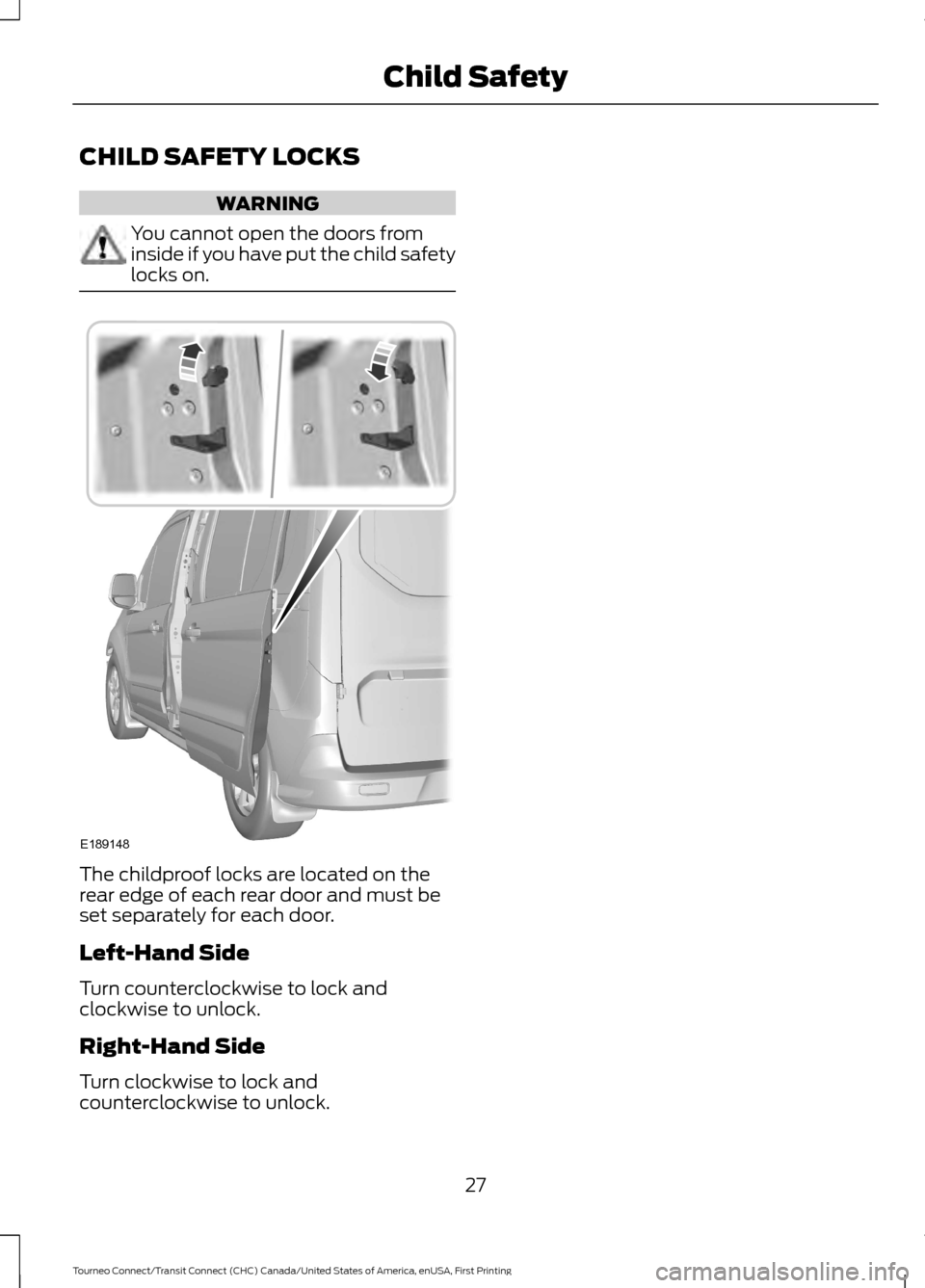
CHILD SAFETY LOCKS
WARNING
You cannot open the doors from
inside if you have put the child safety
locks on.
The childproof locks are located on the
rear edge of each rear door and must be
set separately for each door.
Left-Hand Side
Turn counterclockwise to lock and
clockwise to unlock.
Right-Hand Side
Turn clockwise to lock and
counterclockwise to unlock.
27
Tourneo Connect/Transit Connect (CHC) Canada/United States of America, enUSA, First Printing Child SafetyE189148
Page 48 of 439
GENERAL INFORMATION ON
RADIO FREQUENCIES
This device complies with Part 15 of the
FCC Rules and with Industry Canada
license-exempt RSS standard(s).
Operation is subject to the following two
conditions: (1) This device may not cause
harmful interference, and (2) This device
must accept any interference received,
including interference that may cause
undesired operation.
Note:
Changes or modifications not
expressively approved by the party
responsible for compliance could void the
user's authority to operate the equipment.
The term IC before the radio certification
number only signifies that Industry Canada
technical specifications were met.
The typical operating range for your
transmitter is approximately 33 feet (10
meters). Vehicles with the remote start
feature will have a greater range. One of
the following could cause a decrease in
operating range:
• weather conditions
• nearby radio towers
• structures around the vehicle
• other vehicles parked next to your
vehicle
The radio frequency used by your remote
control can also be used by other short
distance radio transmissions, for example
amateur radios, medical equipment,
wireless headphones, remote controls and
alarm systems. If the frequencies are
jammed, you will not be able to use your
remote control. You can lock and unlock
the doors with the key.
Note: Make sure to lock your vehicle before
leaving it unattended.
Note: If you are in range, the remote control
will operate if you press any button
unintentionally. Note:
The remote control contains sensitive
electrical components. Exposure to moisture
or impact may cause permanent damage.
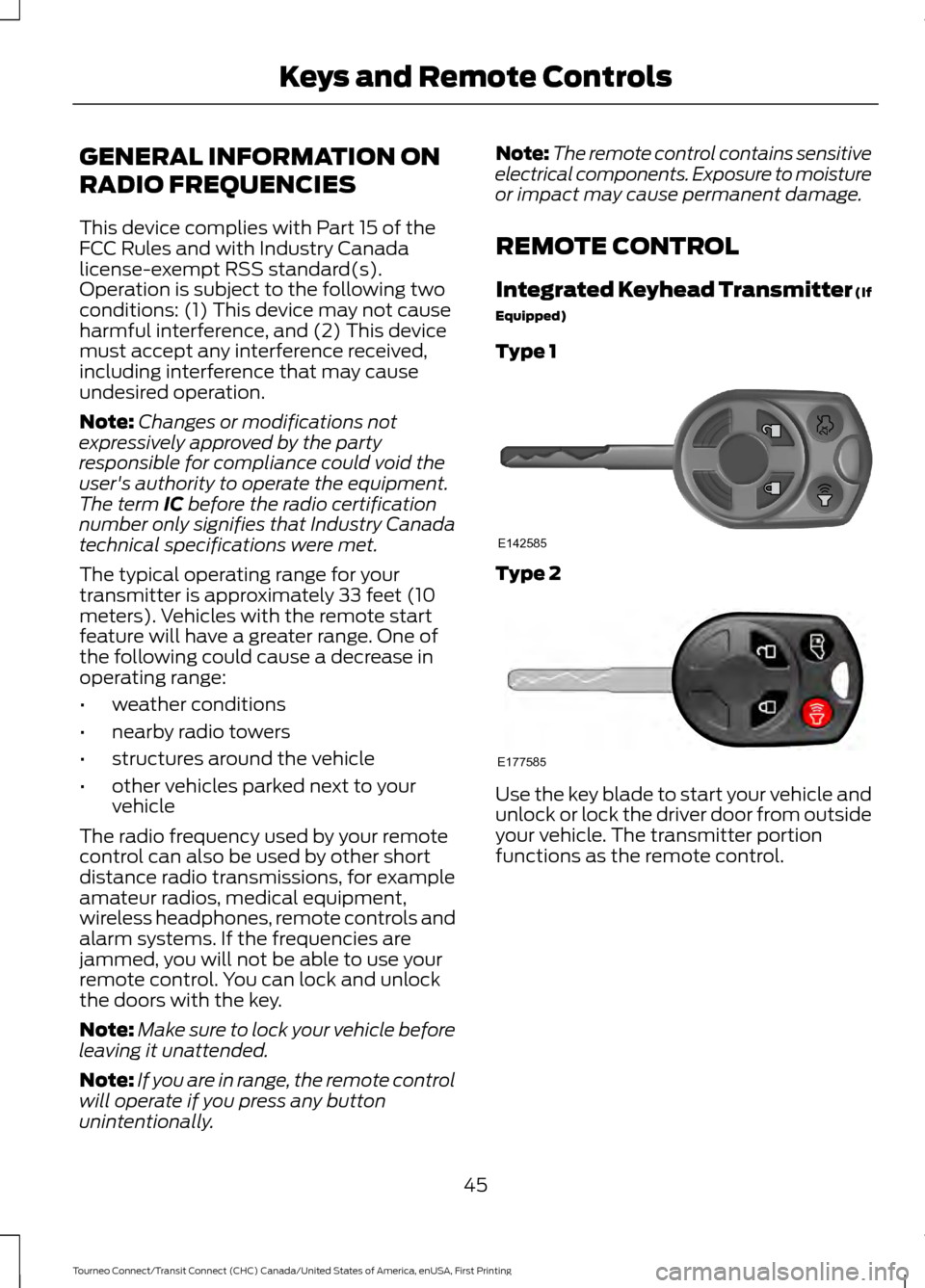
REMOTE CONTROL
Integrated Keyhead Transmitter (If
Equipped)
Type 1 Type 2
Use the key blade to start your vehicle and
unlock or lock the driver door from outside
your vehicle. The transmitter portion
functions as the remote control.
45
Tourneo Connect/Transit Connect (CHC) Canada/United States of America, enUSA, First Printing Keys and Remote ControlsE142585 E177585
Page 49 of 439
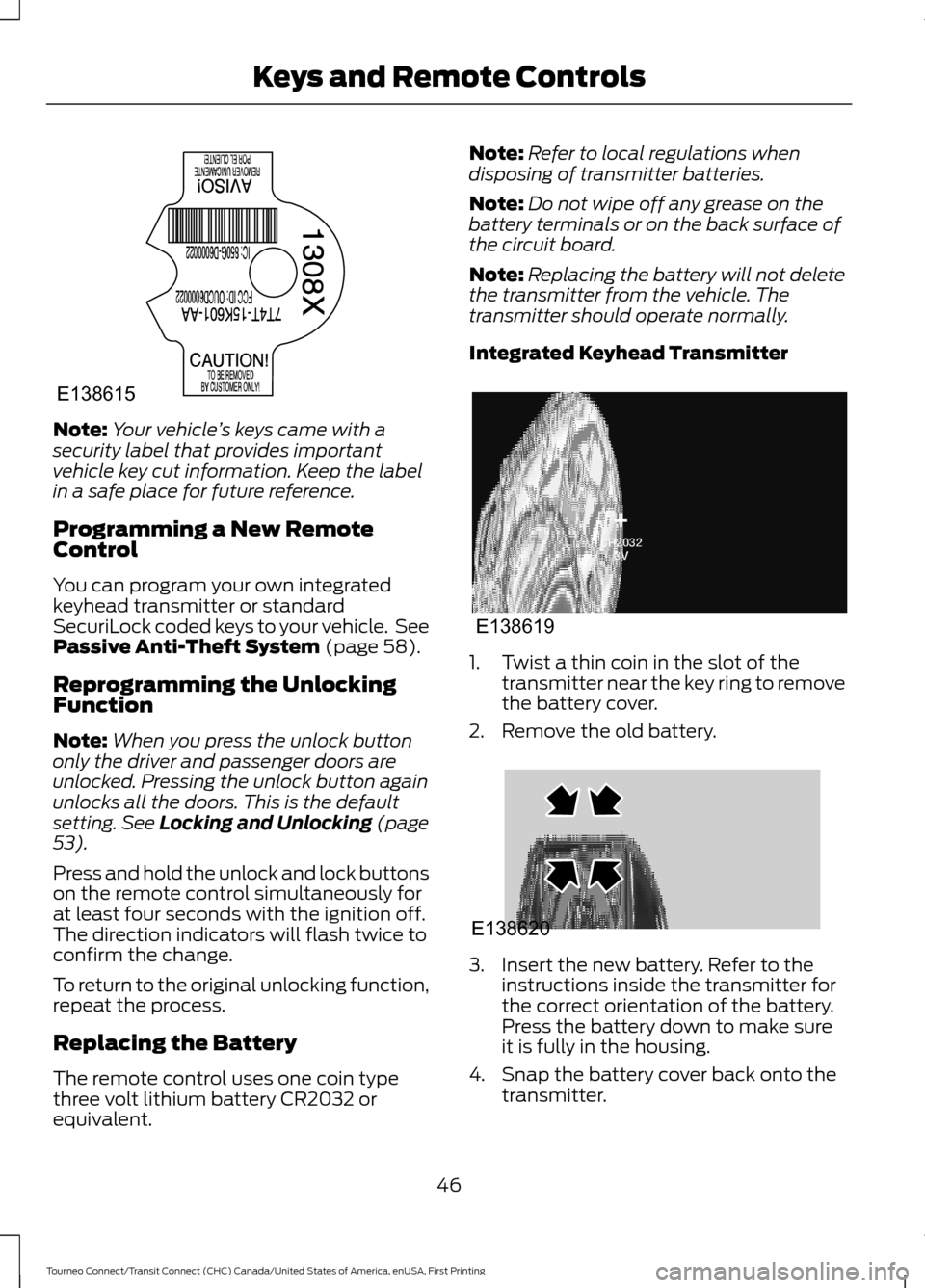
Note:
Your vehicle ’s keys came with a
security label that provides important
vehicle key cut information. Keep the label
in a safe place for future reference.
Programming a New Remote
Control
You can program your own integrated
keyhead transmitter or standard
SecuriLock coded keys to your vehicle. See
Passive Anti-Theft System (page 58).
Reprogramming the Unlocking
Function
Note: When you press the unlock button
only the driver and passenger doors are
unlocked. Pressing the unlock button again
unlocks all the doors. This is the default
setting.
See Locking and Unlocking (page
53).
Press and hold the unlock and lock buttons
on the remote control simultaneously for
at least four seconds with the ignition off.
The direction indicators will flash twice to
confirm the change.
To return to the original unlocking function,
repeat the process.
Replacing the Battery
The remote control uses one coin type
three volt lithium battery CR2032 or
equivalent. Note:
Refer to local regulations when
disposing of transmitter batteries.
Note: Do not wipe off any grease on the
battery terminals or on the back surface of
the circuit board.
Note: Replacing the battery will not delete
the transmitter from the vehicle. The
transmitter should operate normally.
Integrated Keyhead Transmitter 1. Twist a thin coin in the slot of the
transmitter near the key ring to remove
the battery cover.
2. Remove the old battery. 3. Insert the new battery. Refer to the
instructions inside the transmitter for
the correct orientation of the battery.
Press the battery down to make sure
it is fully in the housing.
4. Snap the battery cover back onto the transmitter.
46
Tourneo Connect/Transit Connect (CHC) Canada/United States of America, enUSA, First Printing Keys and Remote ControlsE138615 E138619 E138620
Page 50 of 439
Car Finder
Press the lock button on the key twice
within three seconds. The horn sounds and
the direction indicators will flash.
Note:
If locking was not successful or if any
door or the liftgate is open, or if the hood is
open on vehicles with a perimeter alarm or
remote start, the horn will sound and the
direction indicators will not flash.
REPLACING A LOST KEY OR
REMOTE CONTROL
You can purchase replacement keys or
remote controls from an authorized dealer.
Authorized dealers can program remote
controls for your vehicle. See Remote
Control (page 45).
To re-program the passive anti-theft
system see an authorized dealer.
47
Tourneo Connect/Transit Connect (CHC) Canada/United States of America, enUSA, First Printing Keys and Remote Controls
Page 56 of 439
LOCKING AND UNLOCKING
Remote Control
You can use the remote control at any
time.
Unlocking the Doors
The position lamps illuminate when you
unlock the doors. They automatically turn
off when you switch the ignition on.
Note:
You can unlock the driver door with
the key. Use the key when the remote
control is not functioning.
Note: When you lock your vehicle for
several weeks, the remote control will be
switched off. Your vehicle must be unlocked
and the engine started using the key.
Unlocking and starting your vehicle once will
enable the remote control.
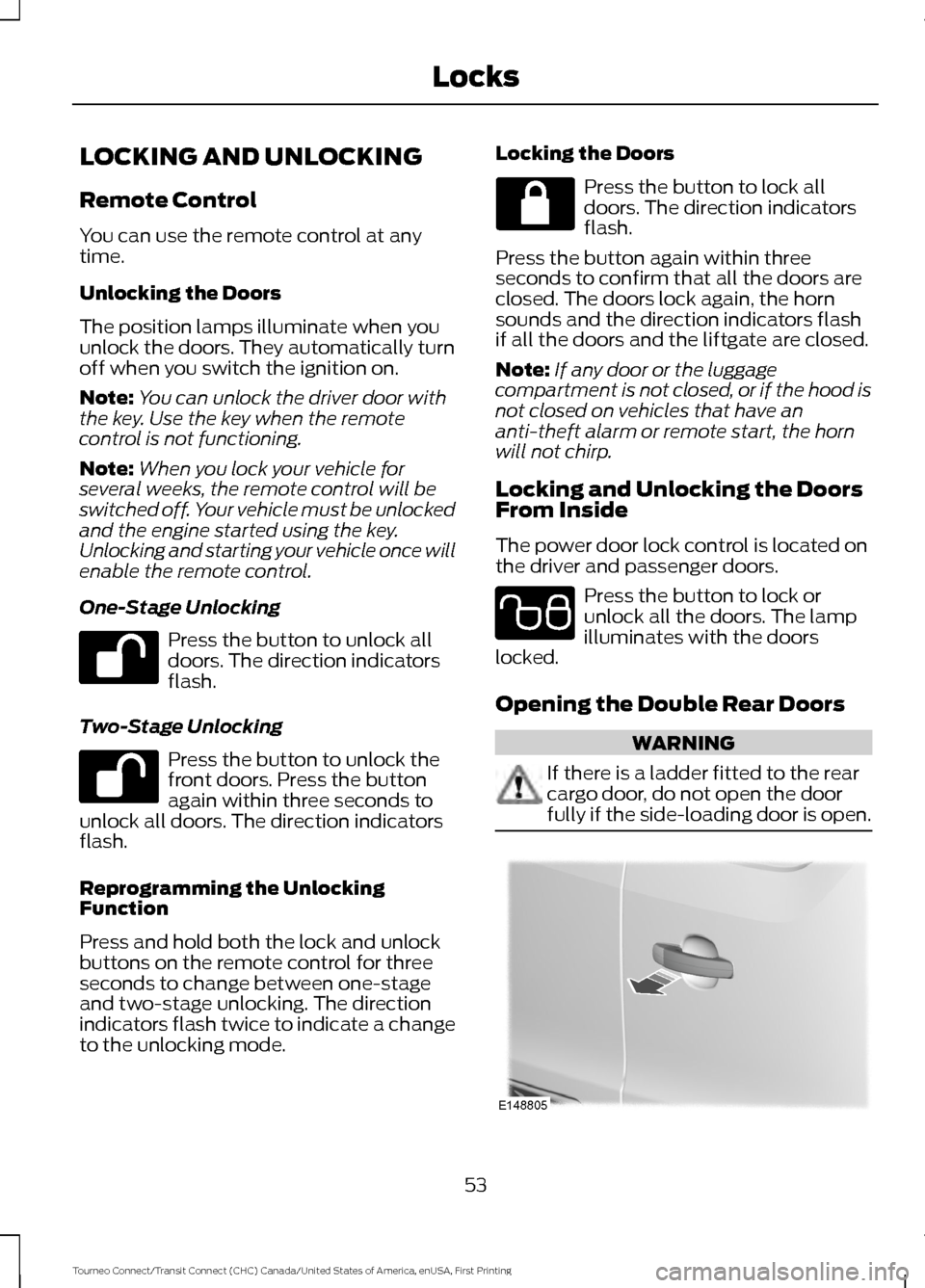
One-Stage Unlocking Press the button to unlock all
doors. The direction indicators
flash.
Two-Stage Unlocking Press the button to unlock the
front doors. Press the button
again within three seconds to
unlock all doors. The direction indicators
flash.
Reprogramming the Unlocking
Function
Press and hold both the lock and unlock
buttons on the remote control for three
seconds to change between one-stage
and two-stage unlocking. The direction
indicators flash twice to indicate a change
to the unlocking mode. Locking the Doors Press the button to lock all
doors. The direction indicators
flash.
Press the button again within three
seconds to confirm that all the doors are
closed. The doors lock again, the horn
sounds and the direction indicators flash
if all the doors and the liftgate are closed.
Note: If any door or the luggage
compartment is not closed, or if the hood is
not closed on vehicles that have an
anti-theft alarm or remote start, the horn
will not chirp.
Locking and Unlocking the Doors
From Inside
The power door lock control is located on
the driver and passenger doors. Press the button to lock or
unlock all the doors. The lamp
illuminates with the doors
locked.
Opening the Double Rear Doors WARNING
If there is a ladder fitted to the rear
cargo door, do not open the door
fully if the side-loading door is open.
53
Tourneo Connect/Transit Connect (CHC) Canada/United States of America, enUSA, First Printing Locks E102566 E148805
Page 57 of 439
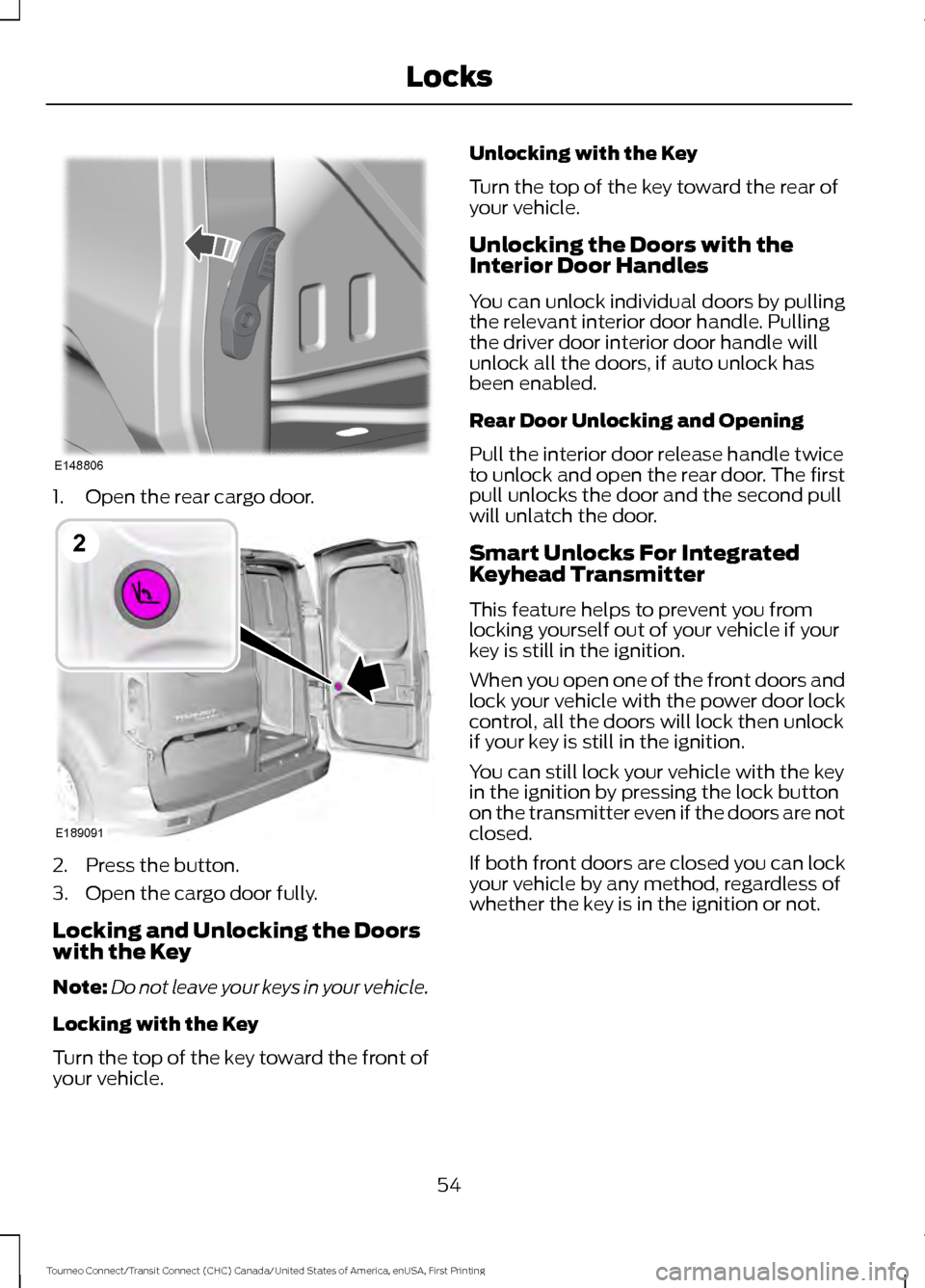
1. Open the rear cargo door.
2. Press the button.
3. Open the cargo door fully.
Locking and Unlocking the Doors
with the Key
Note:
Do not leave your keys in your vehicle.
Locking with the Key
Turn the top of the key toward the front of
your vehicle. Unlocking with the Key
Turn the top of the key toward the rear of
your vehicle.
Unlocking the Doors with the
Interior Door Handles
You can unlock individual doors by pulling
the relevant interior door handle. Pulling
the driver door interior door handle will
unlock all the doors, if auto unlock has
been enabled.
Rear Door Unlocking and Opening
Pull the interior door release handle twice
to unlock and open the rear door. The first
pull unlocks the door and the second pull
will unlatch the door.
Smart Unlocks For Integrated
Keyhead Transmitter
This feature helps to prevent you from
locking yourself out of your vehicle if your
key is still in the ignition.
When you open one of the front doors and
lock your vehicle with the power door lock
control, all the doors will lock then unlock
if your key is still in the ignition.
You can still lock your vehicle with the key
in the ignition by pressing the lock button
on the transmitter even if the doors are not
closed.
If both front doors are closed you can lock
your vehicle by any method, regardless of
whether the key is in the ignition or not.
54
Tourneo Connect/Transit Connect (CHC) Canada/United States of America, enUSA, First Printing LocksE148806 E189091
2
Page 58 of 439
Auto lock and Auto unlock Feature
Auto lock
The Auto lock feature will lock the doors
and liftgate when all of the following
conditions have been met:
•
All doors are closed.
• The ignition is on.
• Your vehicle is moving at a speed
greater than 4 mph (7 km/h) for more
than two seconds.
Auto unlock
The auto unlock feature will unlock all the
doors when all of the following conditions
have been met:
• The ignition is on, all doors are closed,
and your vehicle is moving at a speed
greater than
4 mph (7 km/h) for more
than two seconds.
• Your vehicle has come to a stop and
you switch the ignition off or to the
accessory position.
• The driver door is opened within 10
minutes of you switching the ignition
off or to the accessory position.
Note: The doors will not auto unlock if your
vehicle has been electronically locked after
the ignition is turned off and before the
driver door is opened.
Enabling or Disabling Auto lock and
Auto unlock
Note: An authorized dealer or you can carry
out this procedure.
To enable or disable these features, do the
following:
1. Switch the ignition on.
2. Press the power door unlock button three times.
3. Switch the ignition off. 4. Press the power door unlock button
three times.
5. Switch the ignition on. The horn will chirp indicating your vehicle is in
programming mode.
Auto lock:
Press the power door unlock
button and within five seconds, press the
power door lock button. The horn sounds
once if disabled or twice if enabled.
Auto unlock:
Press the power door lock
button and within five seconds, press the
power door unlock button. The horn
sounds once if disabled or twice if enabled.
After programming the feature, switch the
ignition off. The horn will chirp once
indicating programming is complete.
Note: You will have 30 seconds to
complete the procedure.
Note: You can enable or disable the auto
unlock feature independently of the auto
lock feature.
Emergency Locking with the Key
Note: If the child safety locks are on and
you pull the interior handle, you will only
turn off the emergency locking not the child
safety lock. You can only open the doors
using the external door handle.
Note: If the doors have been unlocked using
this method, the doors must be locked
individually until the central locking function
has been repaired.
Note: When the central locking function
fails to operate, lock the doors individually
using the key in the position shown.
55
Tourneo Connect/Transit Connect (CHC) Canada/United States of America, enUSA, First Printing Locks
Page 59 of 439
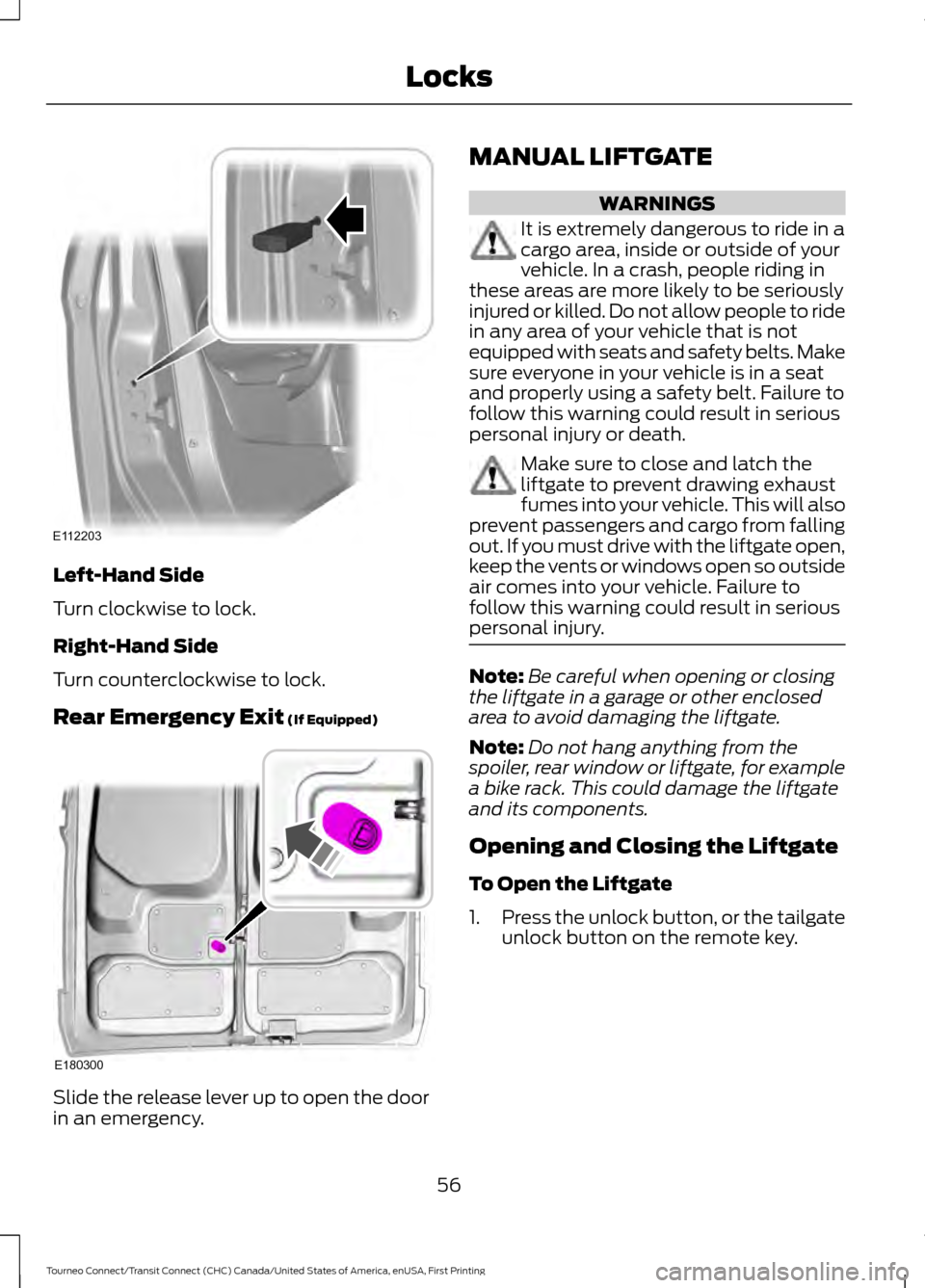
Left-Hand Side
Turn clockwise to lock.
Right-Hand Side
Turn counterclockwise to lock.
Rear Emergency Exit (If Equipped)
Slide the release lever up to open the door
in an emergency. MANUAL LIFTGATE WARNINGS
It is extremely dangerous to ride in a
cargo area, inside or outside of your
vehicle. In a crash, people riding in
these areas are more likely to be seriously
injured or killed. Do not allow people to ride
in any area of your vehicle that is not
equipped with seats and safety belts. Make
sure everyone in your vehicle is in a seat
and properly using a safety belt. Failure to
follow this warning could result in serious
personal injury or death. Make sure to close and latch the
liftgate to prevent drawing exhaust
fumes into your vehicle. This will also
prevent passengers and cargo from falling
out. If you must drive with the liftgate open,
keep the vents or windows open so outside
air comes into your vehicle. Failure to
follow this warning could result in serious
personal injury. Note:
Be careful when opening or closing
the liftgate in a garage or other enclosed
area to avoid damaging the liftgate.
Note: Do not hang anything from the
spoiler, rear window or liftgate, for example
a bike rack. This could damage the liftgate
and its components.
Opening and Closing the Liftgate
To Open the Liftgate
1. Press the unlock button, or the tailgate
unlock button on the remote key.
56
Tourneo Connect/Transit Connect (CHC) Canada/United States of America, enUSA, First Printing LocksE112203 E180300
Page 61 of 439
PASSIVE ANTI-THEFT
SYSTEM
Note:
The system is not compatible with
non-Ford aftermarket remote start systems.
Use of these systems may result in vehicle
starting problems and a loss of security
protection.
Note: Metallic objects, electronic devices
or a second coded key on the same key
chain may cause vehicle starting problems
if they are too close to the key when starting
the engine. Prevent these objects from
touching the coded key while starting the
engine. Switch the ignition off, move all
objects on the key chain away from the
coded key and restart the engine if a
problem occurs.
Note: Do not leave a duplicate coded key
in the vehicle. Always take your keys and
lock all doors when leaving the vehicle.
SecuriLock®
The system is an engine immobilization
system. It is designed to help prevent the
engine from being started unless a
correctly coded key for your vehicle is used.
Using an incorrectly coded key may
prevent the engine from starting. A
message may appear in the information
display.
If you are unable to start the engine with a
correctly coded key, a malfunction has
happened and a message may appear in
the information display.
Automatic Arming
The engine immobilization system arms
immediately after you switch the ignition
off. Automatic Disarming
Switching the ignition on with a correctly
coded key disarms the engine
immobilization system.
Replacement Keys
The integrated keyhead transmitter
functions as a programmed ignition key
that operates all the locks and starts your
vehicle, as well as a remote control.
If your keys are lost or stolen and you do
not have a spare correctly coded key, you
will need to have your vehicle towed to an
authorized dealer. You need to erase the
coded keys from your vehicle and program
new coded keys.
Store an extra correctly coded key away
from the vehicle in a safe place to help
prevent any inconveniences. See an
authorized dealer to purchase additional
spare or replacement keys.
Note:
Your vehicle comes with two
integrated keyhead transmitters.
Programming a Spare Integrated
Keyhead Transmitter
You can program your own integrated
keyhead transmitter or standard
SecuriLock coded keys to your vehicle. This
procedure will program both the engine
immobilizer keycode and the remote entry
portion of the remote control to your
vehicle
Only use integrated keyhead transmitters
or standard SecuriLock keys.
You must have two previously
programmed correctly coded keys and the
new unprogrammed key readily accessible.
See an authorized dealer to have the spare
key programmed if two previously
programmed correctly coded keys are not
available.
Read and understand the entire procedure
before you begin.
58
Tourneo Connect/Transit Connect (CHC) Canada/United States of America, enUSA, First Printing Security