brake FORD TRANSIT CONNECT 2018 User Guide
[x] Cancel search | Manufacturer: FORD, Model Year: 2018, Model line: TRANSIT CONNECT, Model: FORD TRANSIT CONNECT 2018Pages: 449, PDF Size: 6.73 MB
Page 93 of 449
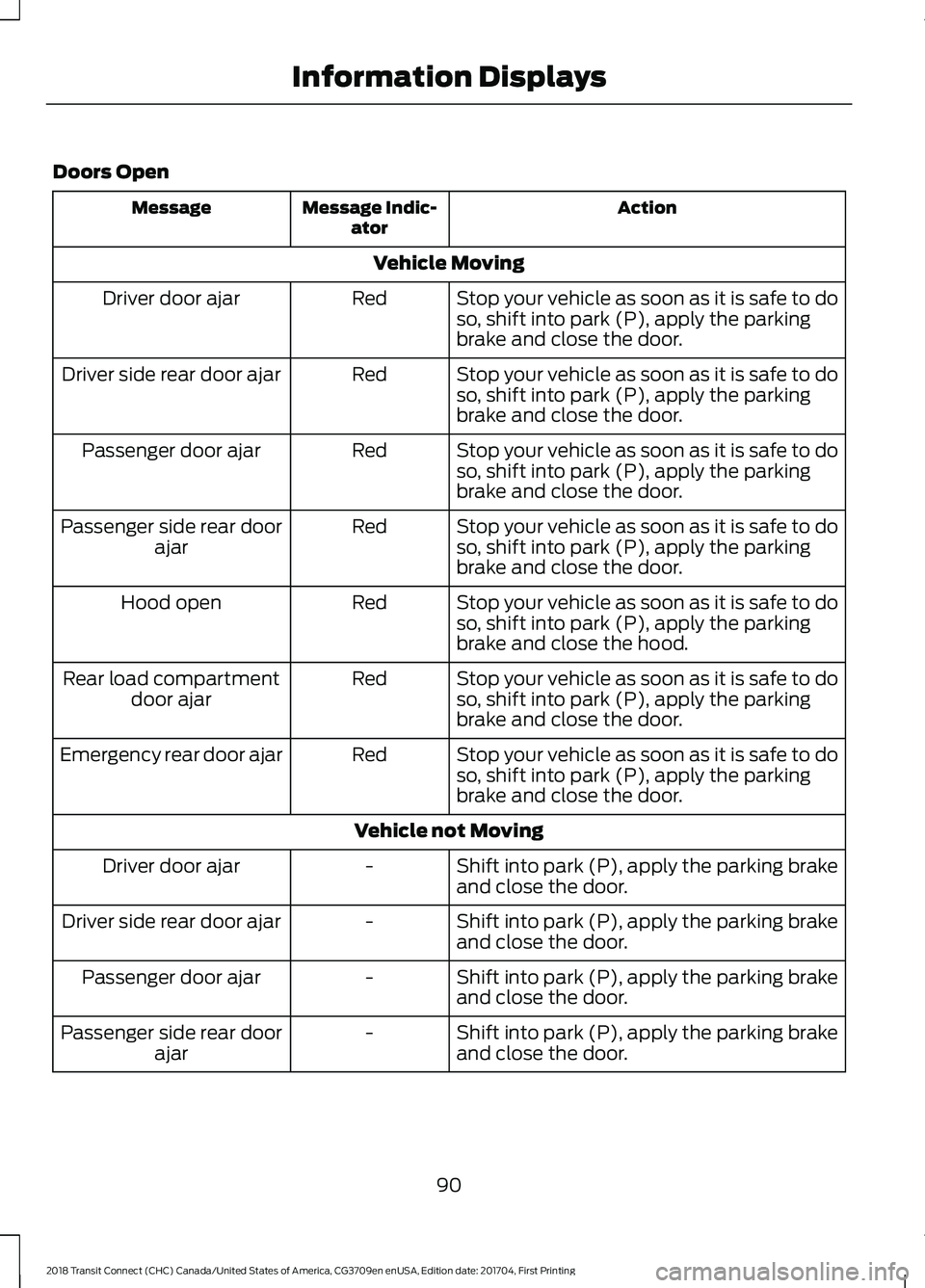
Doors Open
Action
Message Indic-
ator
Message
Vehicle MovingStop your vehicle as soon as it is safe to do
so, shift into park (P), apply the parking
brake and close the door.
Red
Driver door ajar
Stop your vehicle as soon as it is safe to do
so, shift into park (P), apply the parking
brake and close the door.
Red
Driver side rear door ajar
Stop your vehicle as soon as it is safe to do
so, shift into park (P), apply the parking
brake and close the door.
Red
Passenger door ajar
Stop your vehicle as soon as it is safe to do
so, shift into park (P), apply the parking
brake and close the door.
Red
Passenger side rear door
ajar
Stop your vehicle as soon as it is safe to do
so, shift into park (P), apply the parking
brake and close the hood.
Red
Hood open
Stop your vehicle as soon as it is safe to do
so, shift into park (P), apply the parking
brake and close the door.
Red
Rear load compartment
door ajar
Stop your vehicle as soon as it is safe to do
so, shift into park (P), apply the parking
brake and close the door.
Red
Emergency rear door ajar
Vehicle not MovingShift into park (P), apply the parking brake
and close the door.
-
Driver door ajar
Shift into park (P), apply the parking brake
and close the door.
-
Driver side rear door ajar
Shift into park (P), apply the parking brake
and close the door.
-
Passenger door ajar
Shift into park (P), apply the parking brake
and close the door.
-
Passenger side rear door
ajar
90
2018 Transit Connect (CHC) Canada/United States of America, CG3709en enUSA, Edition date: 201704, First Printing Information Displays
Page 94 of 449
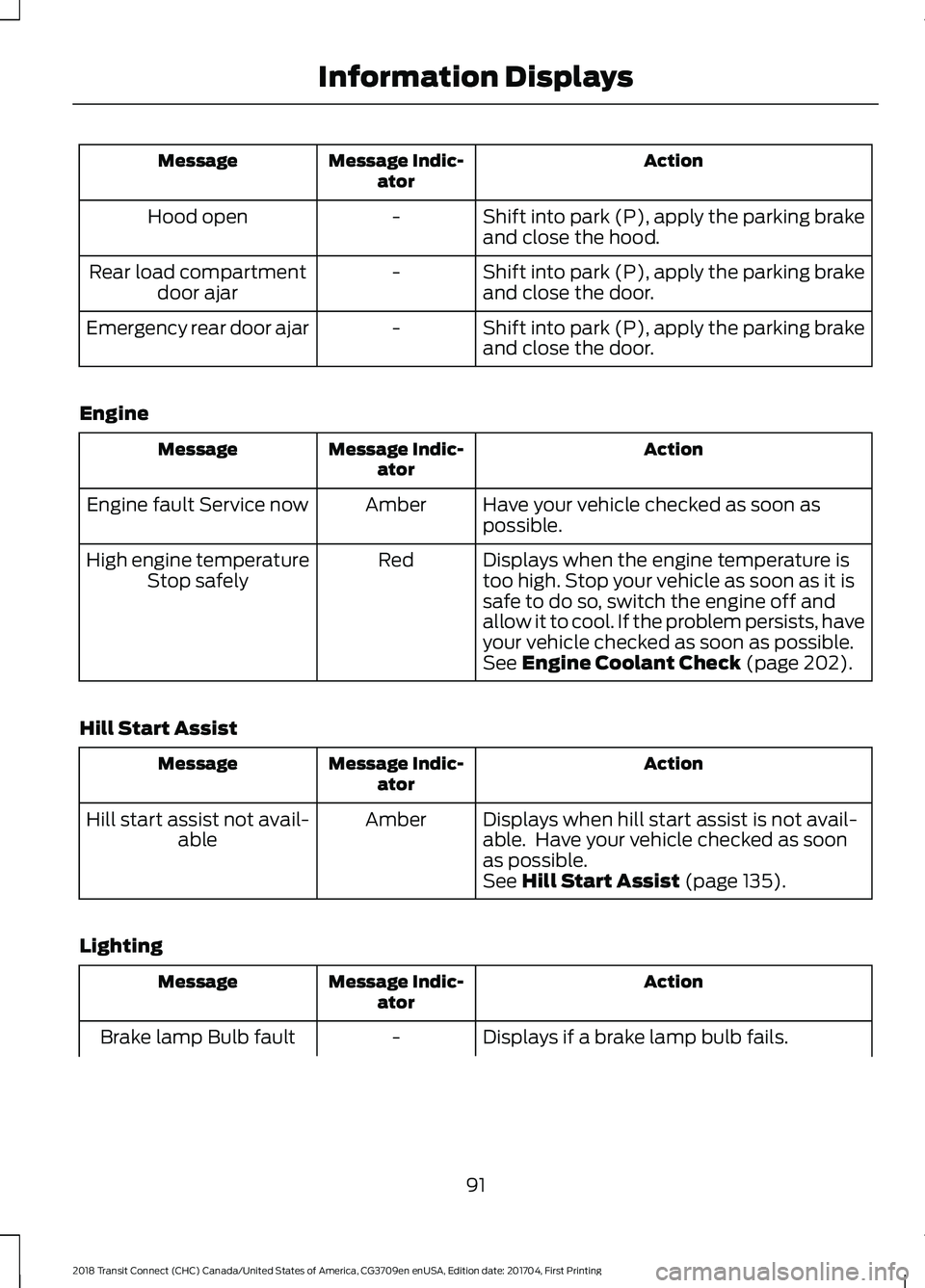
Action
Message Indic-
ator
Message
Shift into park (P), apply the parking brake
and close the hood.
-
Hood open
Shift into park (P), apply the parking brake
and close the door.
-
Rear load compartment
door ajar
Shift into park (P), apply the parking brake
and close the door.
-
Emergency rear door ajar
Engine Action
Message Indic-
ator
Message
Have your vehicle checked as soon as
possible.
Amber
Engine fault Service now
Displays when the engine temperature is
too high. Stop your vehicle as soon as it is
safe to do so, switch the engine off and
allow it to cool. If the problem persists, have
your vehicle checked as soon as possible.
See Engine Coolant Check (page 202).
Red
High engine temperature
Stop safely
Hill Start Assist Action
Message Indic-
ator
Message
Displays when hill start assist is not avail-
able. Have your vehicle checked as soon
as possible.
Amber
Hill start assist not avail-
able
See
Hill Start Assist (page 135).
Lighting Action
Message Indic-
ator
Message
Displays if a brake lamp bulb fails.
-
Brake lamp Bulb fault
91
2018 Transit Connect (CHC) Canada/United States of America, CG3709en enUSA, Edition date: 201704, First Printing Information Displays
Page 95 of 449
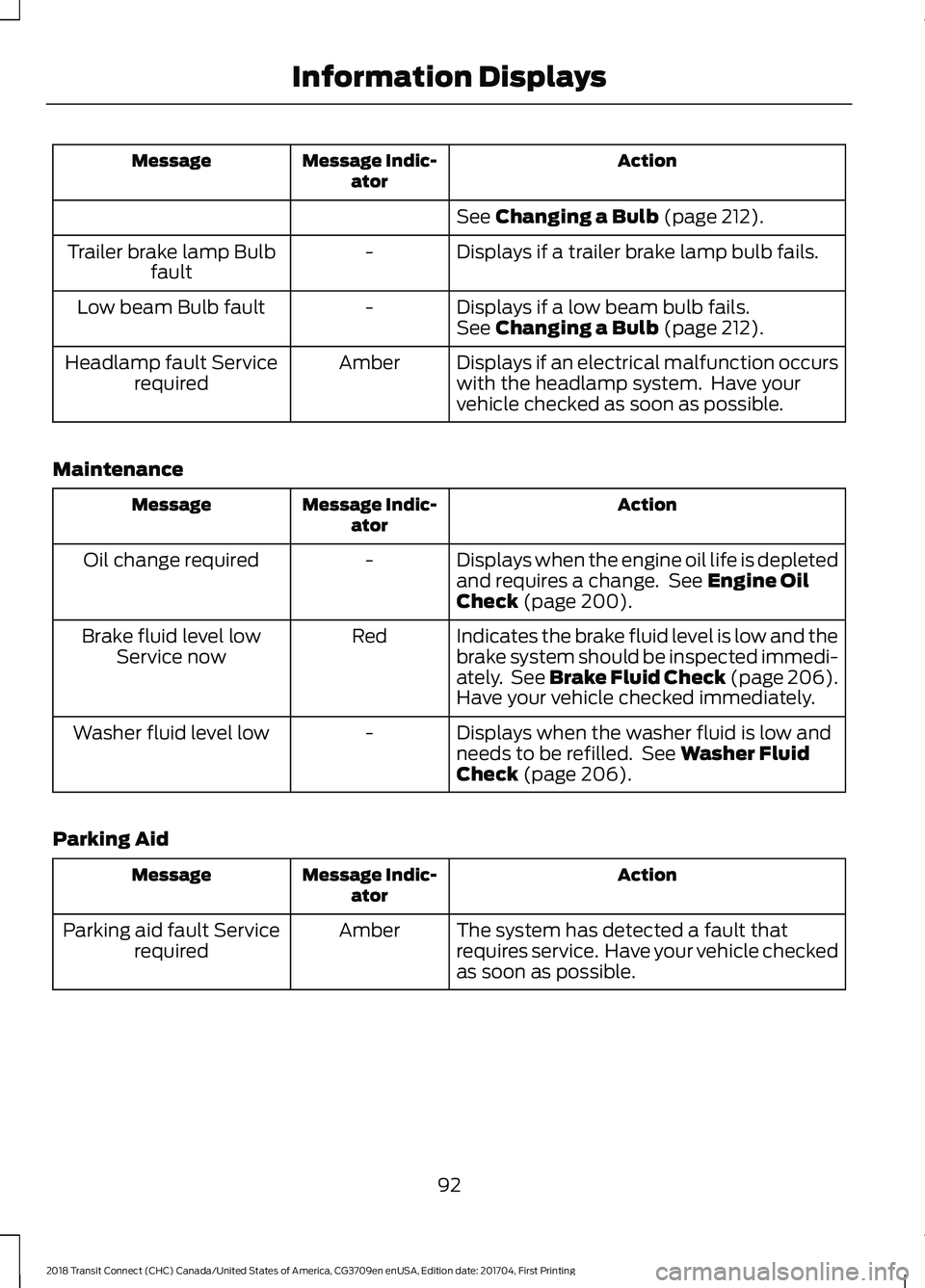
Action
Message Indic-
ator
Message
See Changing a Bulb (page 212).
Displays if a trailer brake lamp bulb fails.
-
Trailer brake lamp Bulb
fault
Displays if a low beam bulb fails.
-
Low beam Bulb fault
See
Changing a Bulb (page 212).
Displays if an electrical malfunction occurs
with the headlamp system. Have your
vehicle checked as soon as possible.
Amber
Headlamp fault Service
required
Maintenance Action
Message Indic-
ator
Message
Displays when the engine oil life is depleted
and requires a change. See
Engine Oil
Check (page 200).
-
Oil change required
Indicates the brake fluid level is low and the
brake system should be inspected immedi-
ately. See Brake Fluid Check (page 206).
Have your vehicle checked immediately.
Red
Brake fluid level low
Service now
Displays when the washer fluid is low and
needs to be refilled. See
Washer Fluid
Check (page 206).
-
Washer fluid level low
Parking Aid Action
Message Indic-
ator
Message
The system has detected a fault that
requires service. Have your vehicle checked
as soon as possible.
Amber
Parking aid fault Service
required
92
2018 Transit Connect (CHC) Canada/United States of America, CG3709en enUSA, Edition date: 201704, First Printing Information Displays
Page 96 of 449
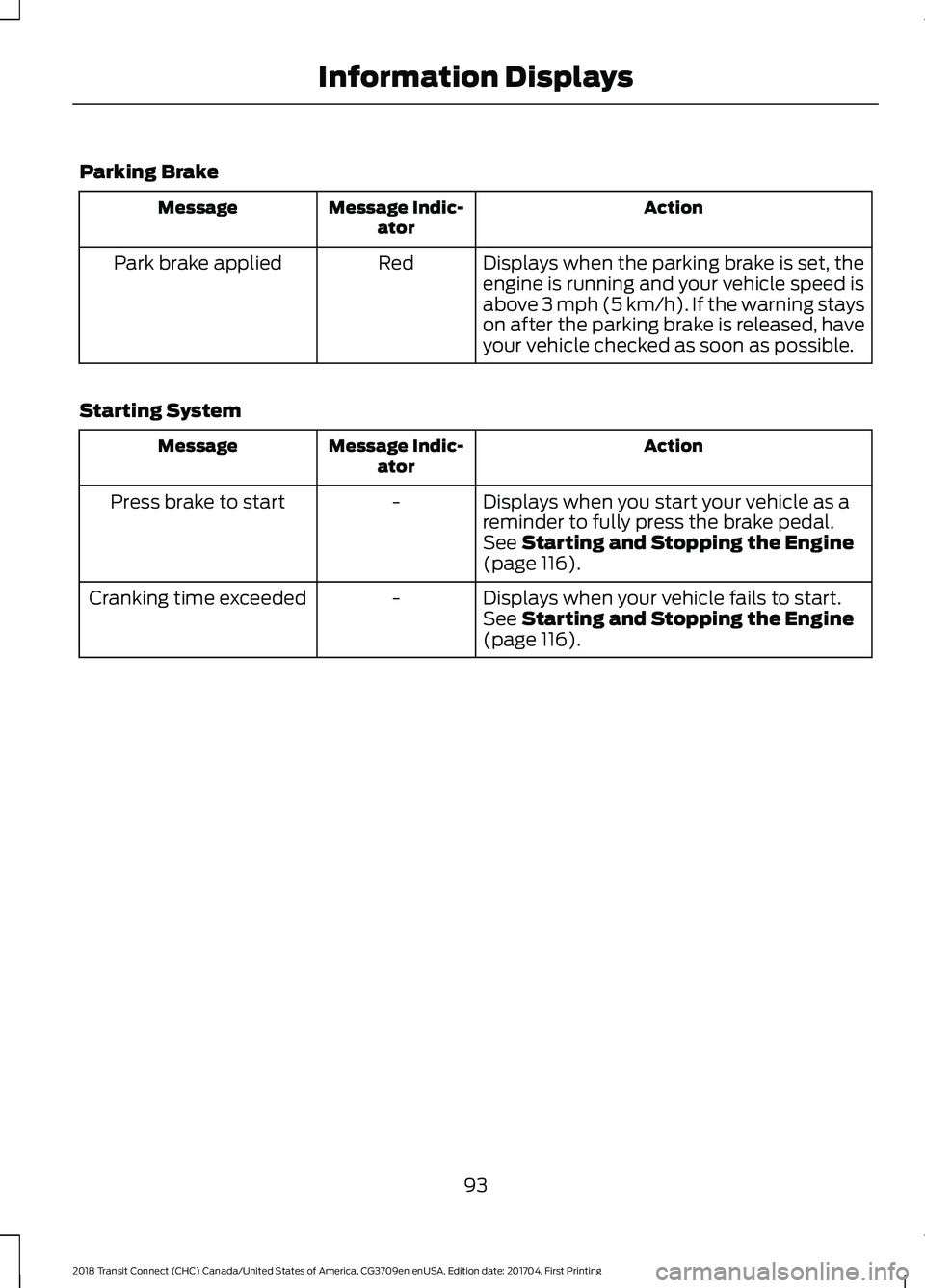
Parking Brake
Action
Message Indic-
ator
Message
Displays when the parking brake is set, the
engine is running and your vehicle speed is
above 3 mph (5 km/h). If the warning stays
on after the parking brake is released, have
your vehicle checked as soon as possible.
Red
Park brake applied
Starting System Action
Message Indic-
ator
Message
Displays when you start your vehicle as a
reminder to fully press the brake pedal.
-
Press brake to start
See
Starting and Stopping the Engine
(page 116).
Displays when your vehicle fails to start.
-
Cranking time exceeded
See
Starting and Stopping the Engine
(page 116).
93
2018 Transit Connect (CHC) Canada/United States of America, CG3709en enUSA, Edition date: 201704, First Printing Information Displays
Page 98 of 449
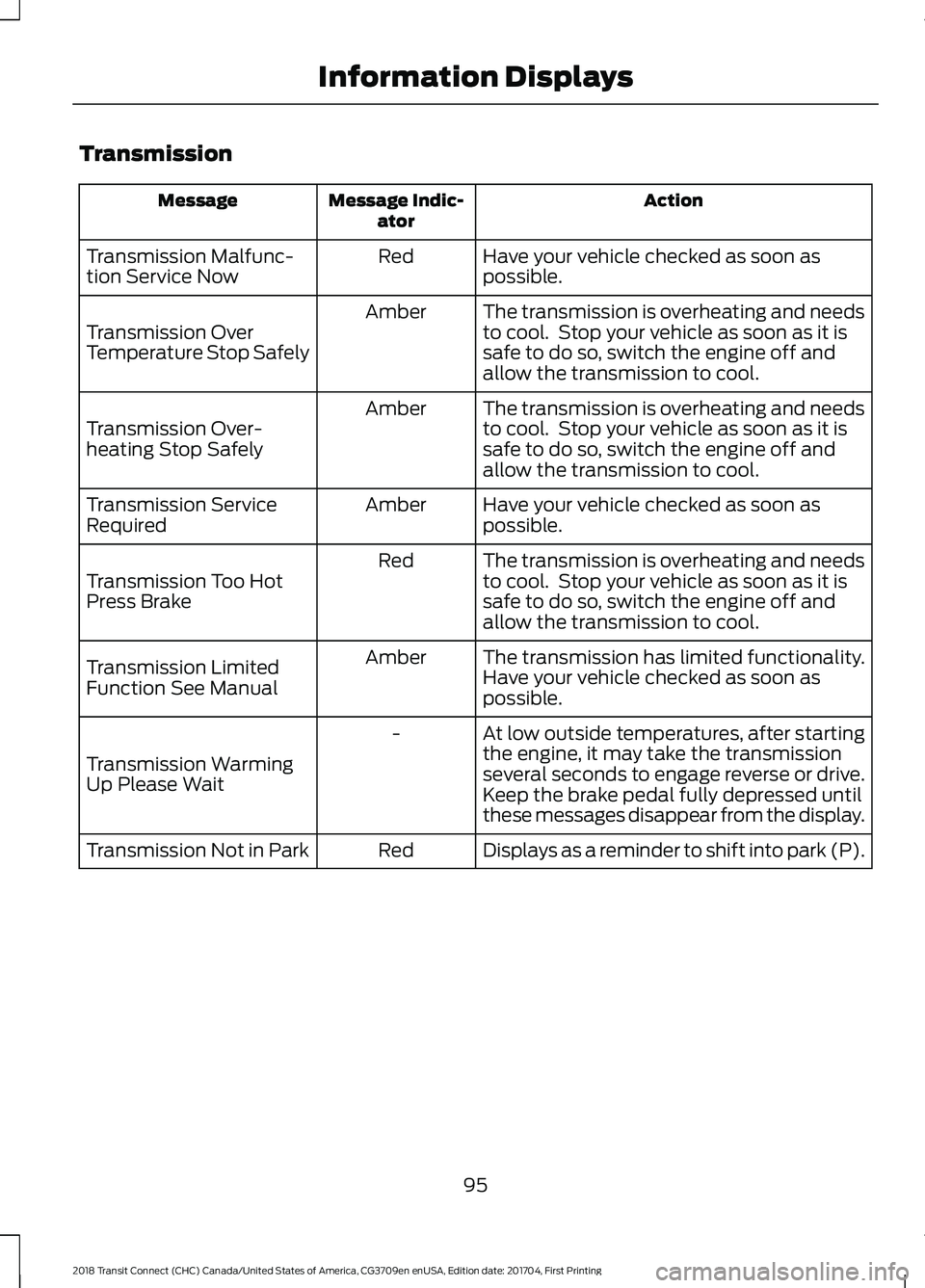
Transmission
Action
Message Indic-
ator
Message
Have your vehicle checked as soon as
possible.
Red
Transmission Malfunc-
tion Service Now
The transmission is overheating and needs
to cool. Stop your vehicle as soon as it is
safe to do so, switch the engine off and
allow the transmission to cool.
Amber
Transmission Over
Temperature Stop Safely
The transmission is overheating and needs
to cool. Stop your vehicle as soon as it is
safe to do so, switch the engine off and
allow the transmission to cool.
Amber
Transmission Over-
heating Stop Safely
Have your vehicle checked as soon as
possible.
Amber
Transmission Service
Required
The transmission is overheating and needs
to cool. Stop your vehicle as soon as it is
safe to do so, switch the engine off and
allow the transmission to cool.
Red
Transmission Too Hot
Press Brake
The transmission has limited functionality.
Have your vehicle checked as soon as
possible.
Amber
Transmission Limited
Function See Manual
At low outside temperatures, after starting
the engine, it may take the transmission
several seconds to engage reverse or drive.
Keep the brake pedal fully depressed until
these messages disappear from the display.
-
Transmission Warming
Up Please Wait
Displays as a reminder to shift into park (P).
Red
Transmission Not in Park
95
2018 Transit Connect (CHC) Canada/United States of America, CG3709en enUSA, Edition date: 201704, First Printing Information Displays
Page 102 of 449
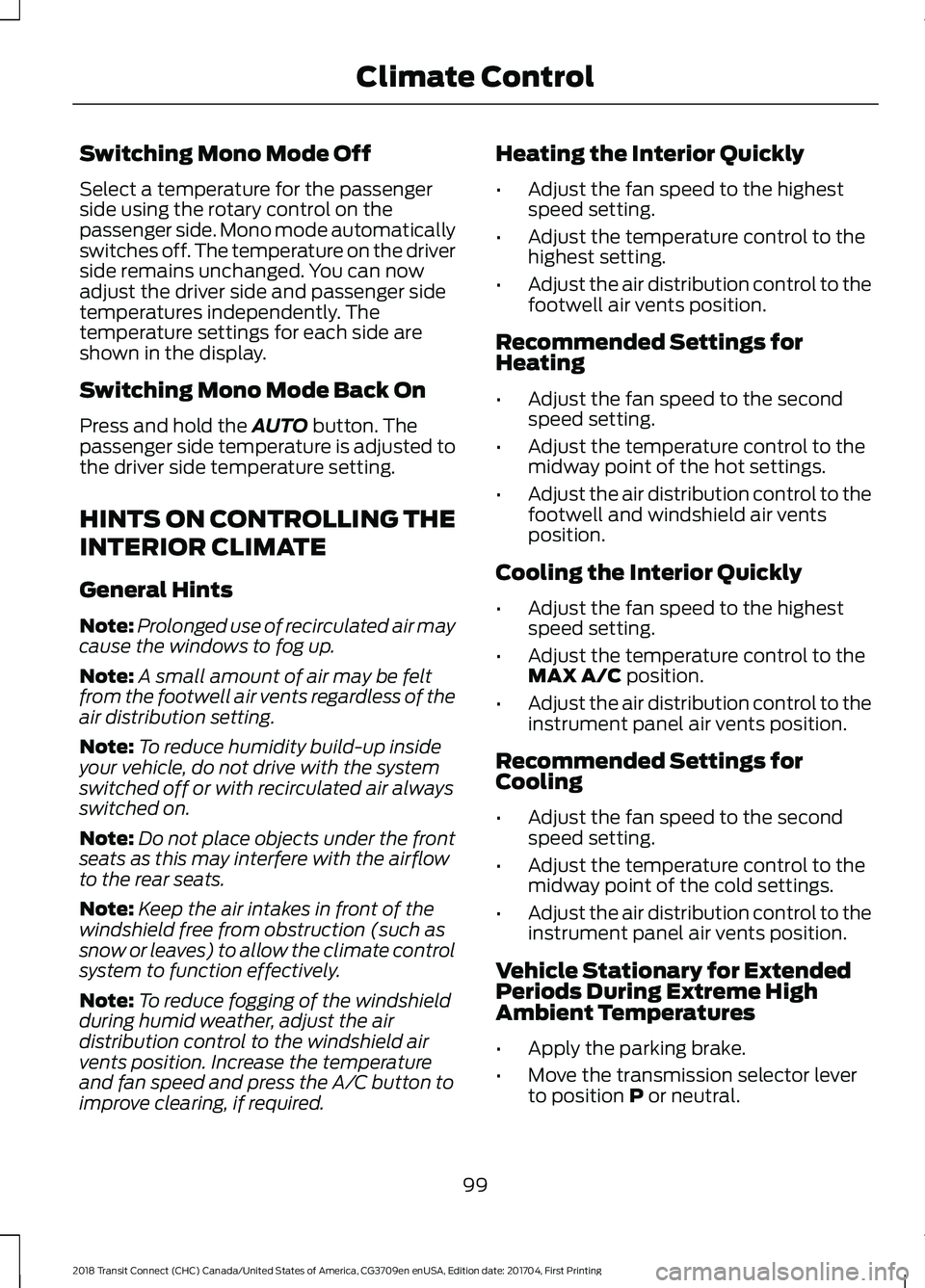
Switching Mono Mode Off
Select a temperature for the passenger
side using the rotary control on the
passenger side. Mono mode automatically
switches off. The temperature on the driver
side remains unchanged. You can now
adjust the driver side and passenger side
temperatures independently. The
temperature settings for each side are
shown in the display.
Switching Mono Mode Back On
Press and hold the AUTO button. The
passenger side temperature is adjusted to
the driver side temperature setting.
HINTS ON CONTROLLING THE
INTERIOR CLIMATE
General Hints
Note: Prolonged use of recirculated air may
cause the windows to fog up.
Note: A small amount of air may be felt
from the footwell air vents regardless of the
air distribution setting.
Note: To reduce humidity build-up inside
your vehicle, do not drive with the system
switched off or with recirculated air always
switched on.
Note: Do not place objects under the front
seats as this may interfere with the airflow
to the rear seats.
Note: Keep the air intakes in front of the
windshield free from obstruction (such as
snow or leaves) to allow the climate control
system to function effectively.
Note: To reduce fogging of the windshield
during humid weather, adjust the air
distribution control to the windshield air
vents position. Increase the temperature
and fan speed and press the A/C button to
improve clearing, if required. Heating the Interior Quickly
•
Adjust the fan speed to the highest
speed setting.
• Adjust the temperature control to the
highest setting.
• Adjust the air distribution control to the
footwell air vents position.
Recommended Settings for
Heating
• Adjust the fan speed to the second
speed setting.
• Adjust the temperature control to the
midway point of the hot settings.
• Adjust the air distribution control to the
footwell and windshield air vents
position.
Cooling the Interior Quickly
• Adjust the fan speed to the highest
speed setting.
• Adjust the temperature control to the
MAX A/C
position.
• Adjust the air distribution control to the
instrument panel air vents position.
Recommended Settings for
Cooling
• Adjust the fan speed to the second
speed setting.
• Adjust the temperature control to the
midway point of the cold settings.
• Adjust the air distribution control to the
instrument panel air vents position.
Vehicle Stationary for Extended
Periods During Extreme High
Ambient Temperatures
• Apply the parking brake.
• Move the transmission selector lever
to position
P or neutral.
99
2018 Transit Connect (CHC) Canada/United States of America, CG3709en enUSA, Edition date: 201704, First Printing Climate Control
Page 119 of 449
GENERAL INFORMATION
WARNINGS
Extended idling at high engine
speeds can produce very high
temperatures in the engine and
exhaust system, creating the risk of fire or
other damage. Do not park, idle or drive your vehicle
on dry grass or other dry ground
cover. The emission system heats up
the engine compartment and exhaust
system, creating the risk of fire. Do not start the engine in a closed
garage or in other enclosed areas.
Exhaust fumes can be toxic. Always
open the garage door before you start the
engine. Exhaust leaks may result in entry of
harmful and potentially lethal fumes
into the passenger compartment. If
you smell exhaust fumes inside your
vehicle, have your vehicle inspected
immediately. Do not drive if you smell
exhaust fumes. If you disconnect the battery, your vehicle
may exhibit some unusual driving
characteristics for approximately 5 mi
(8 km) after you reconnect it. This is
because the engine management system
must realign itself with the engine. You
can disregard any unusual driving
characteristics during this period.
The powertrain control system meets all
Canadian interference-causing equipment
standard requirements regulating the
impulse electrical field or radio noise.
When you start the engine, avoid pressing
the accelerator pedal before and during
operation. Only use the accelerator pedal
when you have difficulty starting the
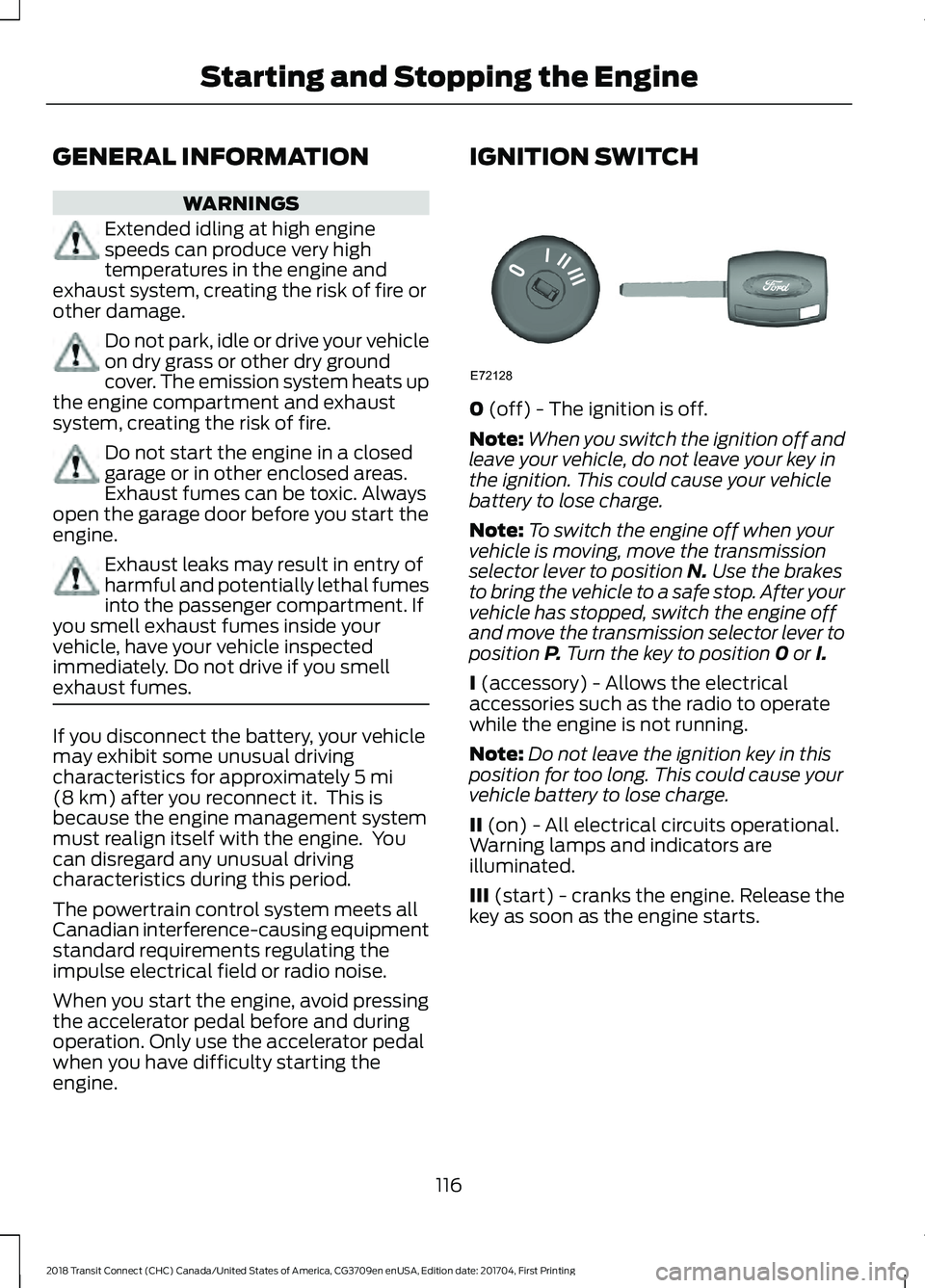
engine. IGNITION SWITCH
0
(off) - The ignition is off.
Note: When you switch the ignition off and
leave your vehicle, do not leave your key in
the ignition. This could cause your vehicle
battery to lose charge.
Note: To switch the engine off when your
vehicle is moving, move the transmission
selector lever to position
N. Use the brakes
to bring the vehicle to a safe stop. After your
vehicle has stopped, switch the engine off
and move the transmission selector lever to
position
P. Turn the key to position 0 or I.
I
(accessory) - Allows the electrical
accessories such as the radio to operate
while the engine is not running.
Note: Do not leave the ignition key in this
position for too long. This could cause your
vehicle battery to lose charge.
II
(on) - All electrical circuits operational.
Warning lamps and indicators are
illuminated.
III
(start) - cranks the engine. Release the
key as soon as the engine starts.
116
2018 Transit Connect (CHC) Canada/United States of America, CG3709en enUSA, Edition date: 201704, First Printing Starting and Stopping the EngineE72128
Page 120 of 449
STARTING A GASOLINE
ENGINE
Before starting the engine check the
following:
•
Make sure all occupants have fastened
their safety belts.
• Make sure the headlamps and
electrical accessories are off.
• Make sure the parking brake is on.
• Make sure the transmission is in park
(P).
When you start the engine, the idle speed
increases, this helps to warm up the
engine. If the engine idle speed does not
slow down automatically, have your
vehicle checked by an authorized dealer.
Note: Do not touch the accelerator pedal.
1. Fully press the brake pedal.
2. Turn the key to the on position to switch the ignition on.
3. Turn the key to the start position to start your vehicle. Release the key
when the engine starts.
Note: You can only operate the starter for
a limited period of time, for example 10
seconds. The number of start attempts is
limited to approximately six. If you exceed
this limit, the system will not allow you to
try again until a period of time has elapsed,
for example 30 minutes.
Engine Idle Speed after Starting
The speed at which the engine idles
immediately after starting will adjust
automatically to minimize vehicle
emissions and maximize cabin comfort
and fuel economy. The idle speed will vary depending on
certain factors. These include vehicle
component and ambient temperatures as
well as electrical and climate system
demands.
Cold or Hot Engine
If the engine does not start within 10
seconds, wait for a short period and try
again.
If the engine does not start after three
attempts, wait 10 seconds and follow the
flooded engine procedure.
If you have difficulty starting the engine
when the temperature is below -13°F
(-25°C), press the accelerator pedal to the
mid-way point of its travel and try again.
Flooded Engine
1. Shift into park (P).
2. Fully depress the accelerator pedal and
hold it there.
3. Start the engine.
Note: If the engine does not start, repeat
the cold or hot engine procedure.
SWITCHING OFF THE ENGINE
Vehicles With a Turbocharger WARNING
Do not switch the engine off when it
is running at high speed. If you do, the
turbocharger will continue running
after the engine oil pressure has dropped
to zero. This will lead to premature
turbocharger bearing wear. Release the accelerator pedal. Wait until
the engine has reached idle speed and then
switch it off.
117
2018 Transit Connect (CHC) Canada/United States of America, CG3709en enUSA, Edition date: 201704, First Printing Starting and Stopping the Engine
Page 127 of 449
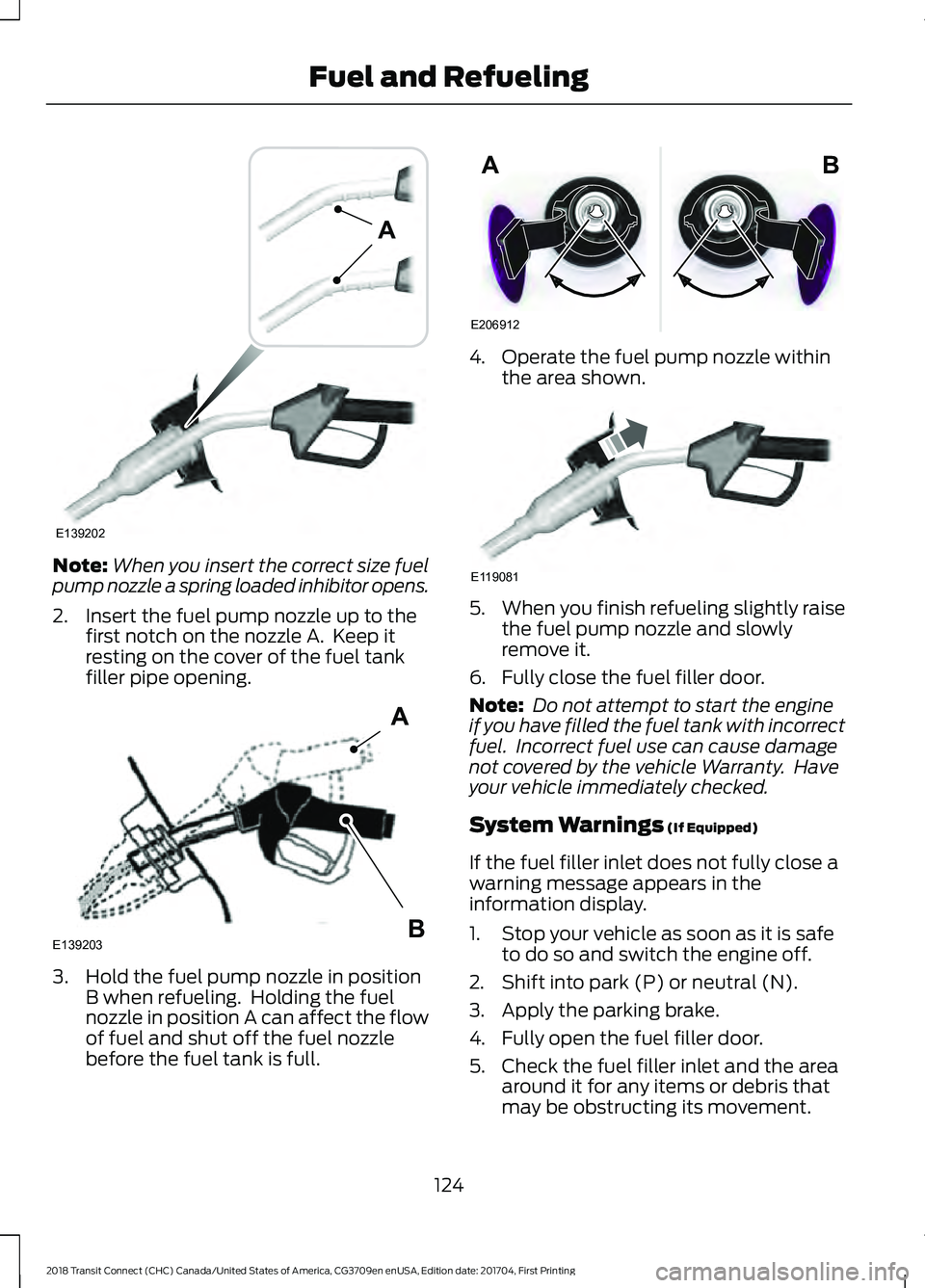
Note:
When you insert the correct size fuel
pump nozzle a spring loaded inhibitor opens.
2. Insert the fuel pump nozzle up to the first notch on the nozzle A. Keep it
resting on the cover of the fuel tank
filler pipe opening. 3. Hold the fuel pump nozzle in position
B when refueling. Holding the fuel
nozzle in position A can affect the flow
of fuel and shut off the fuel nozzle
before the fuel tank is full. 4. Operate the fuel pump nozzle within
the area shown. 5.
When you finish refueling slightly raise
the fuel pump nozzle and slowly
remove it.
6. Fully close the fuel filler door.
Note: Do not attempt to start the engine
if you have filled the fuel tank with incorrect
fuel. Incorrect fuel use can cause damage
not covered by the vehicle Warranty. Have
your vehicle immediately checked.
System Warnings (If Equipped)
If the fuel filler inlet does not fully close a
warning message appears in the
information display.
1. Stop your vehicle as soon as it is safe to do so and switch the engine off.
2. Shift into park (P) or neutral (N).
3. Apply the parking brake.
4. Fully open the fuel filler door.
5. Check the fuel filler inlet and the area around it for any items or debris that
may be obstructing its movement.
124
2018 Transit Connect (CHC) Canada/United States of America, CG3709en enUSA, Edition date: 201704, First Printing Fuel and RefuelingE139202
A E139203
A
B E206912
AB E119081
Page 134 of 449
AUTOMATIC TRANSMISSION
WARNINGS
Always set the parking brake fully
and make sure the gearshift is
latched in P (Park). Turn the ignition
to the off position and remove the key
whenever you leave your vehicle. Do not apply the brake pedal and
accelerator pedal simultaneously.
Applying both pedals simultaneously
for more than three seconds will limit
engine rpm, which may result in difficulty
maintaining speed in traffic and could lead
to serious injury. Understanding the Positions of
Your Automatic Transmission
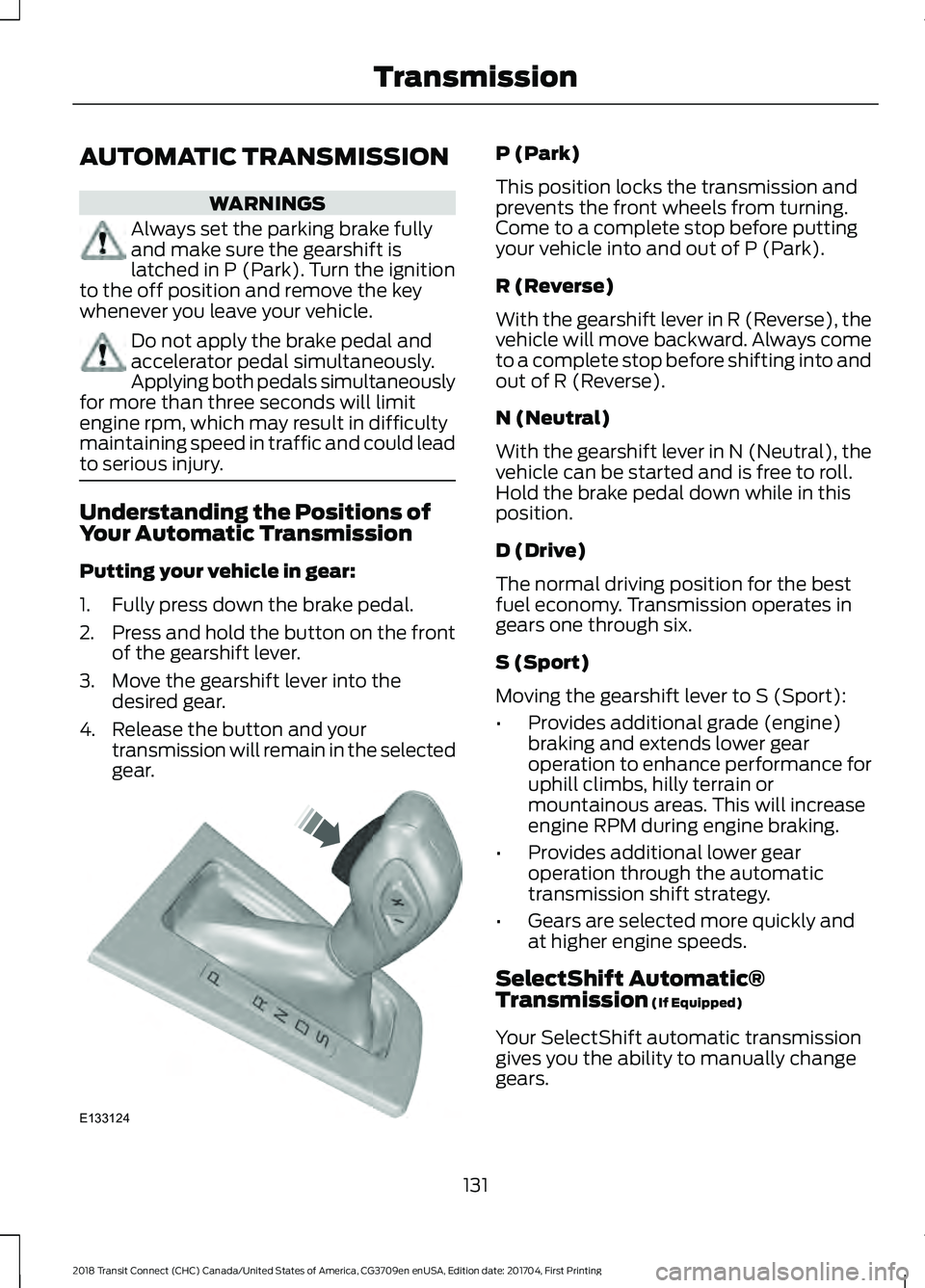
Putting your vehicle in gear:
1. Fully press down the brake pedal.
2.
Press and hold the button on the front
of the gearshift lever.
3. Move the gearshift lever into the desired gear.
4. Release the button and your transmission will remain in the selected
gear. P (Park)
This position locks the transmission and
prevents the front wheels from turning.
Come to a complete stop before putting
your vehicle into and out of P (Park).
R (Reverse)
With the gearshift lever in R (Reverse), the
vehicle will move backward. Always come
to a complete stop before shifting into and
out of R (Reverse).
N (Neutral)
With the gearshift lever in N (Neutral), the
vehicle can be started and is free to roll.
Hold the brake pedal down while in this
position.
D (Drive)
The normal driving position for the best
fuel economy. Transmission operates in
gears one through six.
S (Sport)
Moving the gearshift lever to S (Sport):
•
Provides additional grade (engine)
braking and extends lower gear
operation to enhance performance for
uphill climbs, hilly terrain or
mountainous areas. This will increase
engine RPM during engine braking.
• Provides additional lower gear
operation through the automatic
transmission shift strategy.
• Gears are selected more quickly and
at higher engine speeds.
SelectShift Automatic®
Transmission (If Equipped)
Your SelectShift automatic transmission
gives you the ability to manually change
gears.
131
2018 Transit Connect (CHC) Canada/United States of America, CG3709en enUSA, Edition date: 201704, First Printing TransmissionE133124