parking brake FORD TRANSIT CONNECT 2018 Owner's Manual
[x] Cancel search | Manufacturer: FORD, Model Year: 2018, Model line: TRANSIT CONNECT, Model: FORD TRANSIT CONNECT 2018Pages: 449, PDF Size: 6.73 MB
Page 203 of 449
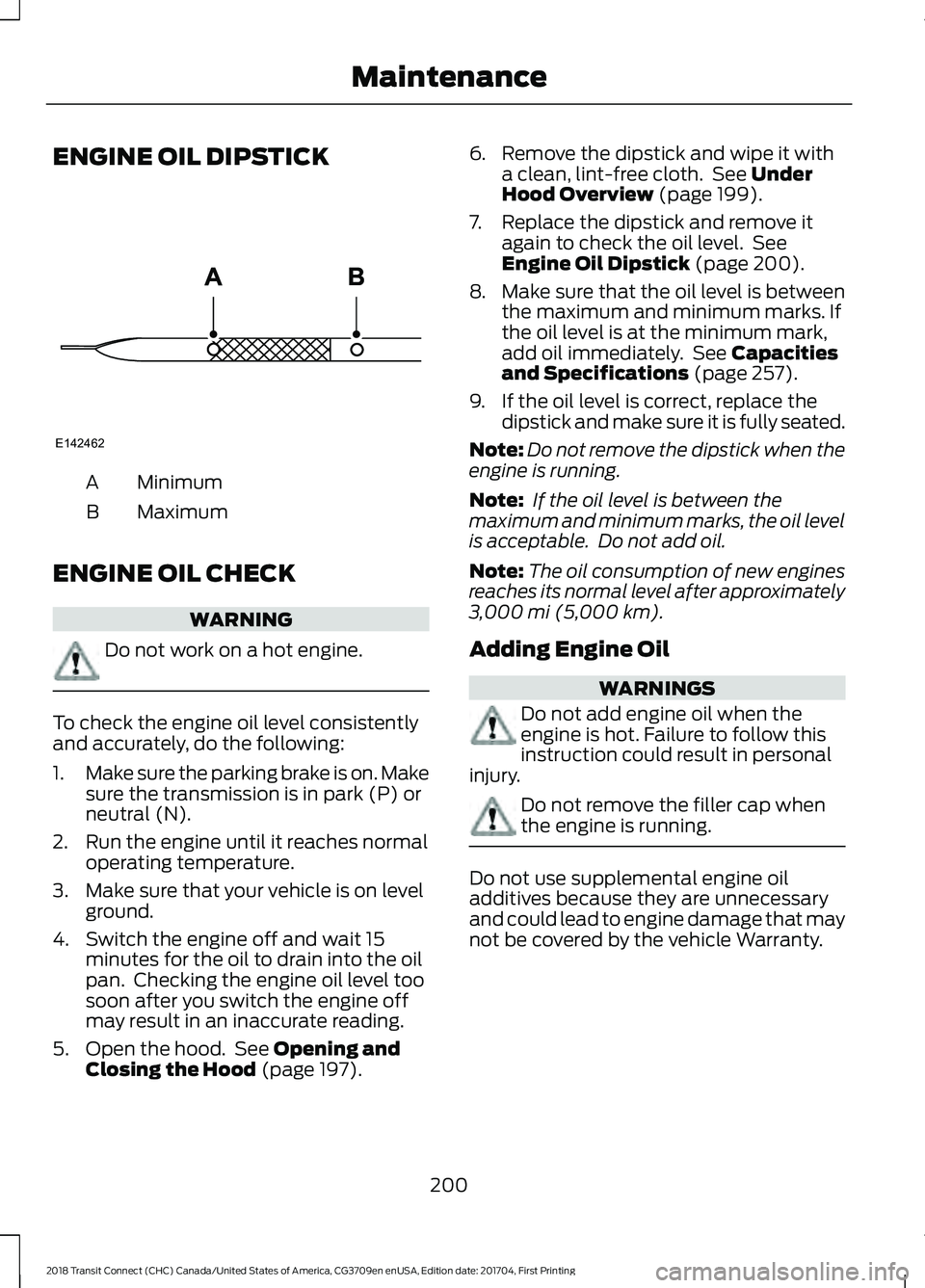
ENGINE OIL DIPSTICK
Minimum
A
Maximum
B
ENGINE OIL CHECK WARNING
Do not work on a hot engine.
To check the engine oil level consistently
and accurately, do the following:
1.
Make sure the parking brake is on. Make
sure the transmission is in park (P) or
neutral (N).
2. Run the engine until it reaches normal operating temperature.
3. Make sure that your vehicle is on level ground.
4. Switch the engine off and wait 15 minutes for the oil to drain into the oil
pan. Checking the engine oil level too
soon after you switch the engine off
may result in an inaccurate reading.
5. Open the hood. See Opening and
Closing the Hood (page 197). 6. Remove the dipstick and wipe it with
a clean, lint-free cloth. See
Under
Hood Overview (page 199).
7. Replace the dipstick and remove it again to check the oil level. See
Engine Oil Dipstick
(page 200).
8. Make sure that the oil level is between
the maximum and minimum marks. If
the oil level is at the minimum mark,
add oil immediately. See
Capacities
and Specifications (page 257).
9. If the oil level is correct, replace the dipstick and make sure it is fully seated.
Note: Do not remove the dipstick when the
engine is running.
Note: If the oil level is between the
maximum and minimum marks, the oil level
is acceptable. Do not add oil.
Note: The oil consumption of new engines
reaches its normal level after approximately
3,000 mi (5,000 km)
.
Adding Engine Oil WARNINGS
Do not add engine oil when the
engine is hot. Failure to follow this
instruction could result in personal
injury. Do not remove the filler cap when
the engine is running.
Do not use supplemental engine oil
additives because they are unnecessary
and could lead to engine damage that may
not be covered by the vehicle Warranty.
200
2018 Transit Connect (CHC) Canada/United States of America, CG3709en enUSA, Edition date: 201704, First Printing MaintenanceE142462
Page 211 of 449
1. With the vehicle at a complete stop,
set the parking brake.
2. Shift into park (P).
3. Switch off all accessories.
4. Fully press the brake pedal and start the vehicle.
5. Run the engine until it reaches normal operating temperature. While the
engine is warming up, complete the
following: Reset the clock. See Audio
System (page 261). Reset the power
windows bounce-back feature. See
Windows and Mirrors
(page 73).
Reset the radio station presets. See
Audio System
(page 261).
6. Allow the engine to idle for at least one
minute. If the engine turns off, press
the accelerator pedal to start the
engine.
7. While the engine is running, press the brake pedal and shift into neutral (N).
8. Allow the engine to run for at least one
minute by pressing on the accelerator
pedal.
9. Drive the vehicle at least 12 mi (20 km)
to completely relearn the idle and fuel
trim strategy.
Note: If you do not allow the engine to
relearn the idle and fuel trim strategy, the
idle quality of your vehicle may be adversely
affected until the engine computer
eventually relearns the idle trim and fuel
trim strategy.
Make sure that you dispose of old batteries
in an environmentally friendly way. Seek
advice from your local authority about
recycling old batteries. CHECKING THE WIPER
BLADES
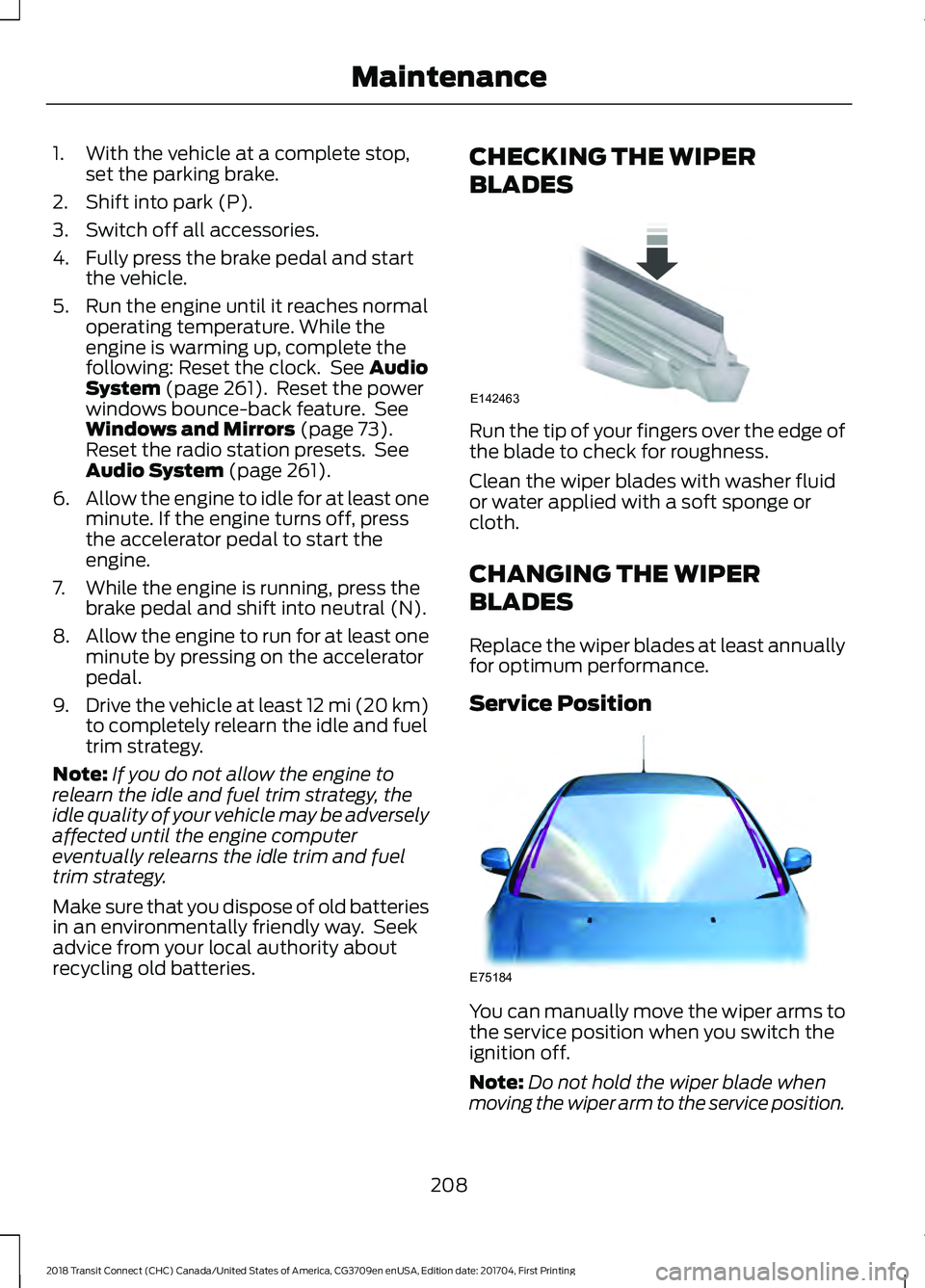
Run the tip of your fingers over the edge of
the blade to check for roughness.
Clean the wiper blades with washer fluid
or water applied with a soft sponge or
cloth.
CHANGING THE WIPER
BLADES
Replace the wiper blades at least annually
for optimum performance.
Service Position
You can manually move the wiper arms to
the service position when you switch the
ignition off.
Note:
Do not hold the wiper blade when
moving the wiper arm to the service position.
208
2018 Transit Connect (CHC) Canada/United States of America, CG3709en enUSA, Edition date: 201704, First Printing MaintenanceE142463 E75184
Page 227 of 449
REPAIRING MINOR PAINT
DAMAGE
You should repair paintwork damage
caused by stones from the road or minor
scratches as soon as possible. A choice of
products are available from an authorized
dealer.
Remove particles such as bird droppings,
tree sap, insect deposits, tar spots, road
salt and industrial fallout before repairing
paint chips.
Always read and follow the manufacturer
’s
instructions before using the products.
CLEANING THE WHEELS
Note: Do not apply a cleaning chemical to
warm or hot wheel rims and covers.
Note: Some automatic car washes may
cause damage to the finish on your wheel
rims and covers.
Note: Industrial-strength or heavy-duty
cleaners in combination with brush agitation
to remove brake dust and dirt, could wear
away the clear coat finish over a period time.
Note: Do not use hydrofluoric acid-based
or high caustic-based wheel cleaners, steel
wool, fuels or strong household detergents.
Note: If you intend parking your vehicle for
an extended period after cleaning the
wheels with a wheel cleaner, drive your
vehicle for a few minutes before doing so.
This will reduce the risk of increased
corrosion of the brake discs.
Alloy wheels and wheel covers are coated
with a clear coat paint finish. To maintain
their condition we recommend that you: •
Clean the wheels weekly using
Motorcraft Wheel and Tire Cleaner.
Apply using manufacturer's
instructions.
• Use a sponge to remove heavy
deposits of dirt and brake dust
accumulation.
• Rinse thoroughly with a strong stream
of water when you have completed the
cleaning process.
• To remove tar and grease, use
Motorcraft Bug and Tar Remover.
VEHICLE STORAGE
If you plan on storing your vehicle for 30
days or more, read the following
maintenance recommendations to make
sure your vehicle stays in good operating
condition.
We engineer and test all motor vehicles
and their components for reliable, regular
driving. Under various conditions,
long-term storage may lead to degraded
engine performance or failure unless you
use specific precautions to preserve engine
components.
General
• Store all vehicles in a dry, ventilated
place.
• Protect from sunlight, if possible.
• If vehicles are stored outside, they
require regular maintenance to protect
against rust and damage.
Body
• Wash your vehicle thoroughly to
remove dirt, grease, oil, tar or mud from
exterior surfaces, rear-wheel housing
and the underside of front fenders.
• Periodically wash your vehicle if it is
stored in exposed locations.
224
2018 Transit Connect (CHC) Canada/United States of America, CG3709en enUSA, Edition date: 201704, First Printing Vehicle Care
Page 228 of 449
•
Touch-up exposed or primed metal to
prevent rust.
• Cover chrome and stainless steel parts
with a thick coat of auto wax to prevent
discoloration. Re-wax as necessary
when you wash your vehicle.
• Lubricate all hood, door and luggage
compartment hinges and latches with
a light grade oil.
• Cover interior trim to prevent fading.
• Keep all rubber parts free from oil and
solvents.
Engine
• Change the engine oil and filter prior to
storage because used engine oil
contains contaminates which may
cause engine damage.
• Start the engine every 15 days for a
minimum of 15 minutes. Run at fast idle
with the climate controls set to defrost
until the engine reaches normal
operating temperature.
• With your foot on the brake, shift
through all the gears while the engine
is running.
• We recommend that you change the
engine oil before you use your vehicle
again.
Fuel system
• Fill the fuel tank with high-quality fuel
until the first automatic shutoff of the
fuel pump nozzle.
Cooling system
• Protect against freezing temperatures.
• When removing your vehicle from
storage, check coolant fluid level.
Confirm that there are no cooling
system leaks and that fluid is at the
recommended level. Battery
•
Check and recharge as necessary. Keep
connections clean.
• If storing your vehicle for more than 30
days without recharging the battery,
we recommend that you disconnect
the battery cables to maintain battery
charge for quick starting.
Note: It is necessary to reset memory
features if battery cables are disconnected.
Brakes
• Make sure the brakes and parking brake
release fully.
Tires
• Maintain recommended air pressure.
Miscellaneous
• Make sure all linkages, cables, levers
and pins under your vehicle are covered
with grease to prevent rust.
• Move vehicles at least 25 ft (7.5 m)
every 15 days to lubricate working parts
and prevent corrosion.
Removing Vehicle From Storage
When your vehicle is ready to come out of
storage, do the following:
• Wash your vehicle to remove any dirt
or grease film build-up on window
surfaces.
• Check windshield wipers for any
deterioration.
• Check under the hood for any foreign
material that may have collected
during storage such as mice or squirrel
nests.
• Check the exhaust for any foreign
material that may have collected
during storage.
225
2018 Transit Connect (CHC) Canada/United States of America, CG3709en enUSA, Edition date: 201704, First Printing Vehicle Care
Page 253 of 449
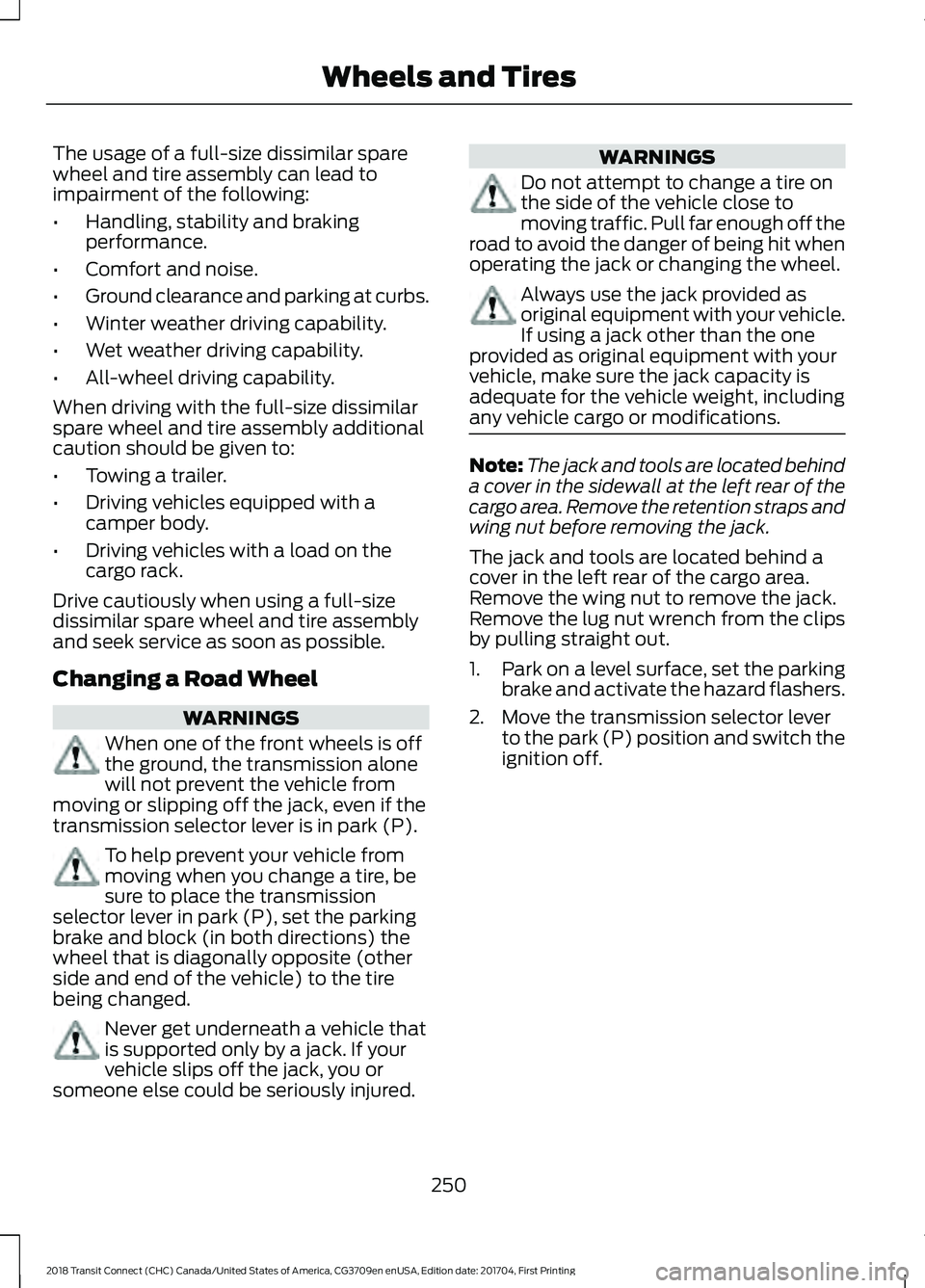
The usage of a full-size dissimilar spare
wheel and tire assembly can lead to
impairment of the following:
•
Handling, stability and braking
performance.
• Comfort and noise.
• Ground clearance and parking at curbs.
• Winter weather driving capability.
• Wet weather driving capability.
• All-wheel driving capability.
When driving with the full-size dissimilar
spare wheel and tire assembly additional
caution should be given to:
• Towing a trailer.
• Driving vehicles equipped with a
camper body.
• Driving vehicles with a load on the
cargo rack.
Drive cautiously when using a full-size
dissimilar spare wheel and tire assembly
and seek service as soon as possible.
Changing a Road Wheel WARNINGS
When one of the front wheels is off
the ground, the transmission alone
will not prevent the vehicle from
moving or slipping off the jack, even if the
transmission selector lever is in park (P). To help prevent your vehicle from
moving when you change a tire, be
sure to place the transmission
selector lever in park (P), set the parking
brake and block (in both directions) the
wheel that is diagonally opposite (other
side and end of the vehicle) to the tire
being changed. Never get underneath a vehicle that
is supported only by a jack. If your
vehicle slips off the jack, you or
someone else could be seriously injured. WARNINGS
Do not attempt to change a tire on
the side of the vehicle close to
moving traffic. Pull far enough off the
road to avoid the danger of being hit when
operating the jack or changing the wheel. Always use the jack provided as
original equipment with your vehicle.
If using a jack other than the one
provided as original equipment with your
vehicle, make sure the jack capacity is
adequate for the vehicle weight, including
any vehicle cargo or modifications. Note:
The jack and tools are located behind
a cover in the sidewall at the left rear of the
cargo area. Remove the retention straps and
wing nut before removing the jack.
The jack and tools are located behind a
cover in the left rear of the cargo area.
Remove the wing nut to remove the jack.
Remove the lug nut wrench from the clips
by pulling straight out.
1. Park on a level surface, set the parking
brake and activate the hazard flashers.
2. Move the transmission selector lever to the park (P) position and switch the
ignition off.
250
2018 Transit Connect (CHC) Canada/United States of America, CG3709en enUSA, Edition date: 201704, First Printing Wheels and Tires
Page 393 of 449
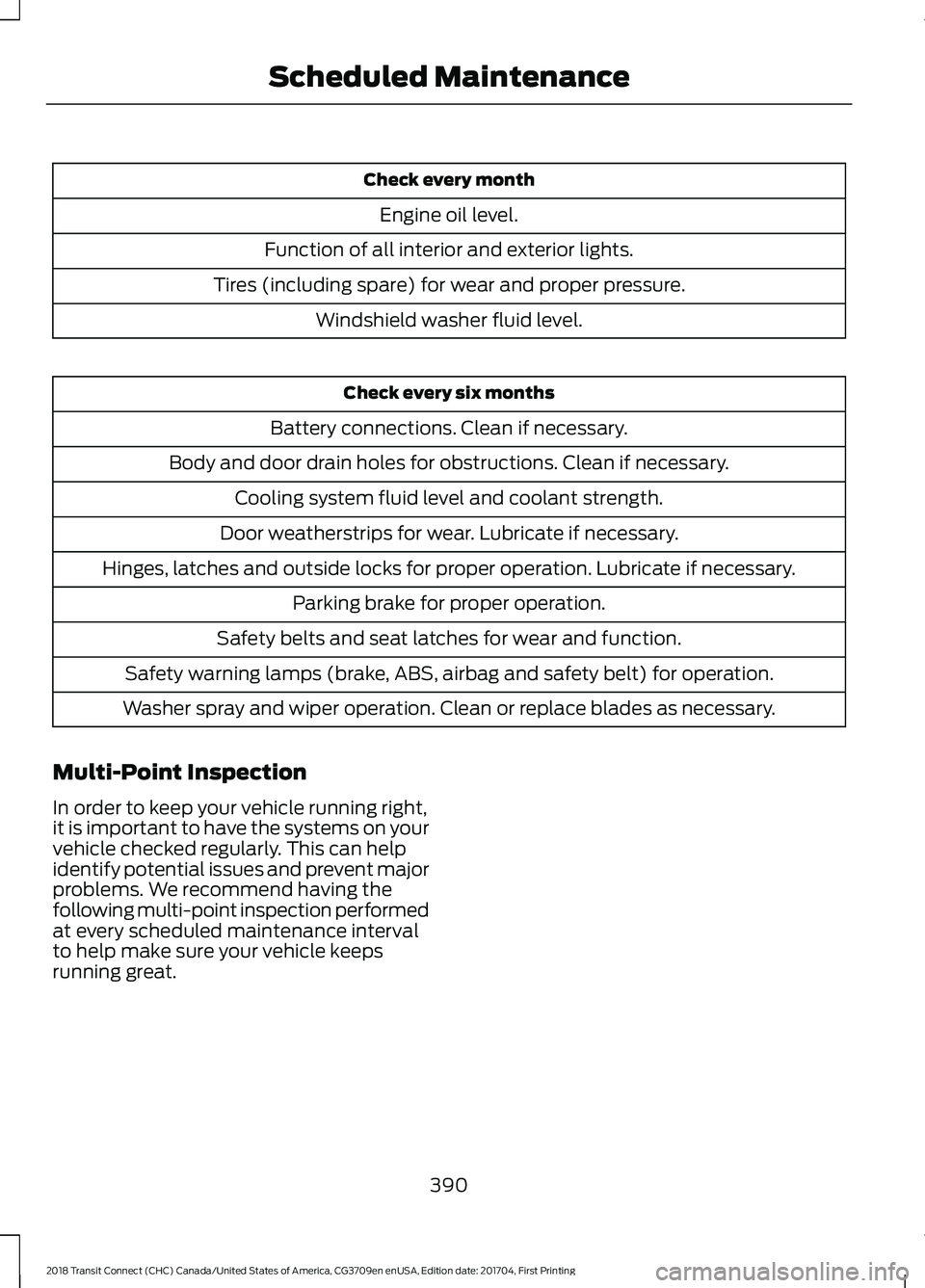
Check every month
Engine oil level.
Function of all interior and exterior lights.
Tires (including spare) for wear and proper pressure. Windshield washer fluid level. Check every six months
Battery connections. Clean if necessary.
Body and door drain holes for obstructions. Clean if necessary. Cooling system fluid level and coolant strength.
Door weatherstrips for wear. Lubricate if necessary.
Hinges, latches and outside locks for proper operation. Lubricate if necessary. Parking brake for proper operation.
Safety belts and seat latches for wear and function.
Safety warning lamps (brake, ABS, airbag and safety belt) for operation.
Washer spray and wiper operation. Clean or replace blades as necessary.
Multi-Point Inspection
In order to keep your vehicle running right,
it is important to have the systems on your
vehicle checked regularly. This can help
identify potential issues and prevent major
problems. We recommend having the
following multi-point inspection performed
at every scheduled maintenance interval
to help make sure your vehicle keeps
running great.
390
2018 Transit Connect (CHC) Canada/United States of America, CG3709en enUSA, Edition date: 201704, First Printing Scheduled Maintenance
Page 395 of 449
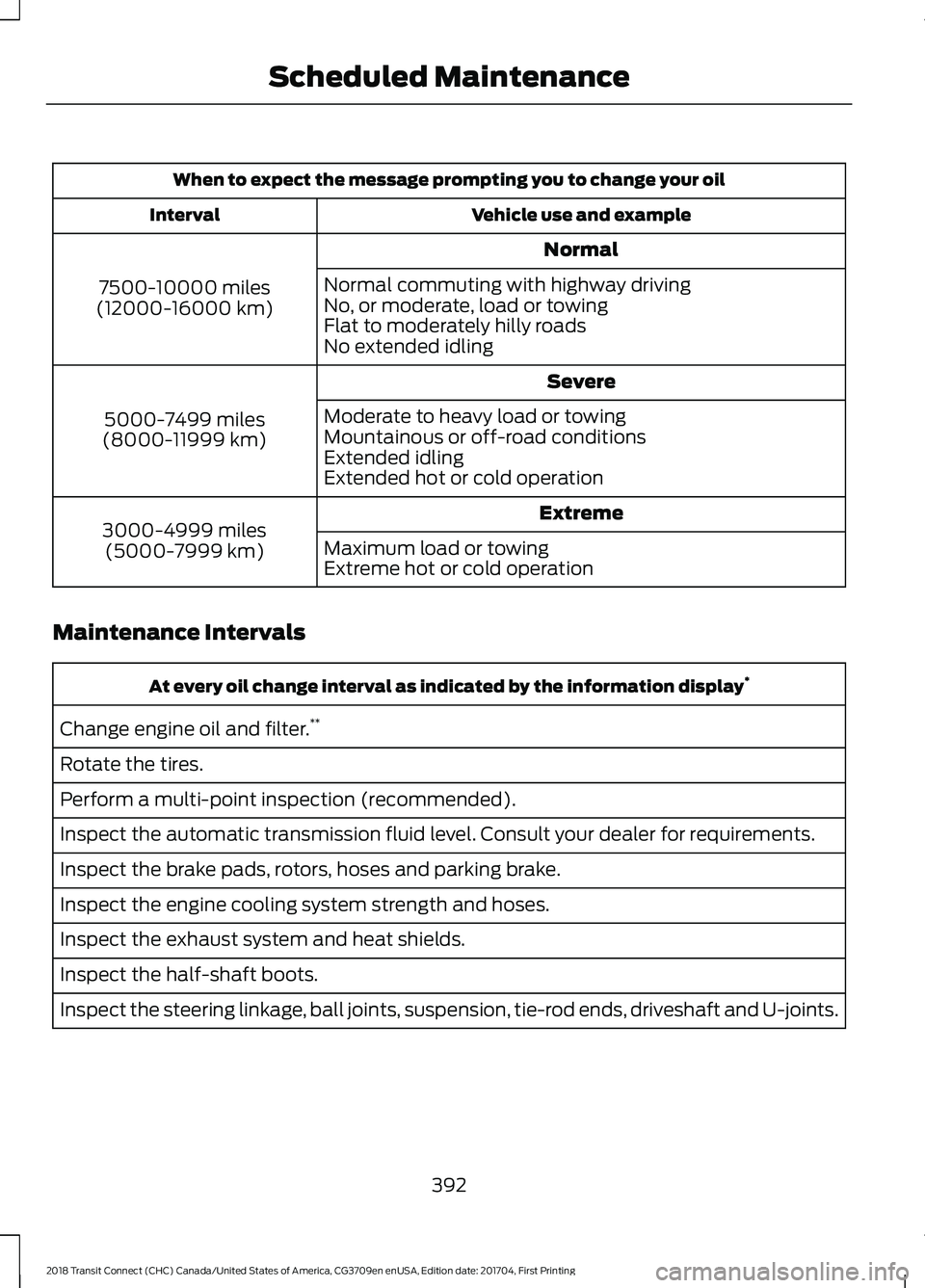
When to expect the message prompting you to change your oil
Vehicle use and example
Interval
Normal
7500-10000 miles
(12000-16000 km) Normal commuting with highway driving
No, or moderate, load or towing
Flat to moderately hilly roads
No extended idling
Severe
5000-7499 miles
(8000-11999 km) Moderate to heavy load or towing
Mountainous or off-road conditions
Extended idling
Extended hot or cold operation
Extreme
3000-4999 miles
(5000-7999 km) Maximum load or towing
Extreme hot or cold operation
Maintenance Intervals At every oil change interval as indicated by the information display
*
Change engine oil and filter. **
Rotate the tires.
Perform a multi-point inspection (recommended).
Inspect the automatic transmission fluid level. Consult your dealer for requirements.
Inspect the brake pads, rotors, hoses and parking brake.
Inspect the engine cooling system strength and hoses.
Inspect the exhaust system and heat shields.
Inspect the half-shaft boots.
Inspect the steering linkage, ball joints, suspension, tie-rod ends, driveshaft and U-joints.
392
2018 Transit Connect (CHC) Canada/United States of America, CG3709en enUSA, Edition date: 201704, First Printing Scheduled Maintenance
Page 440 of 449
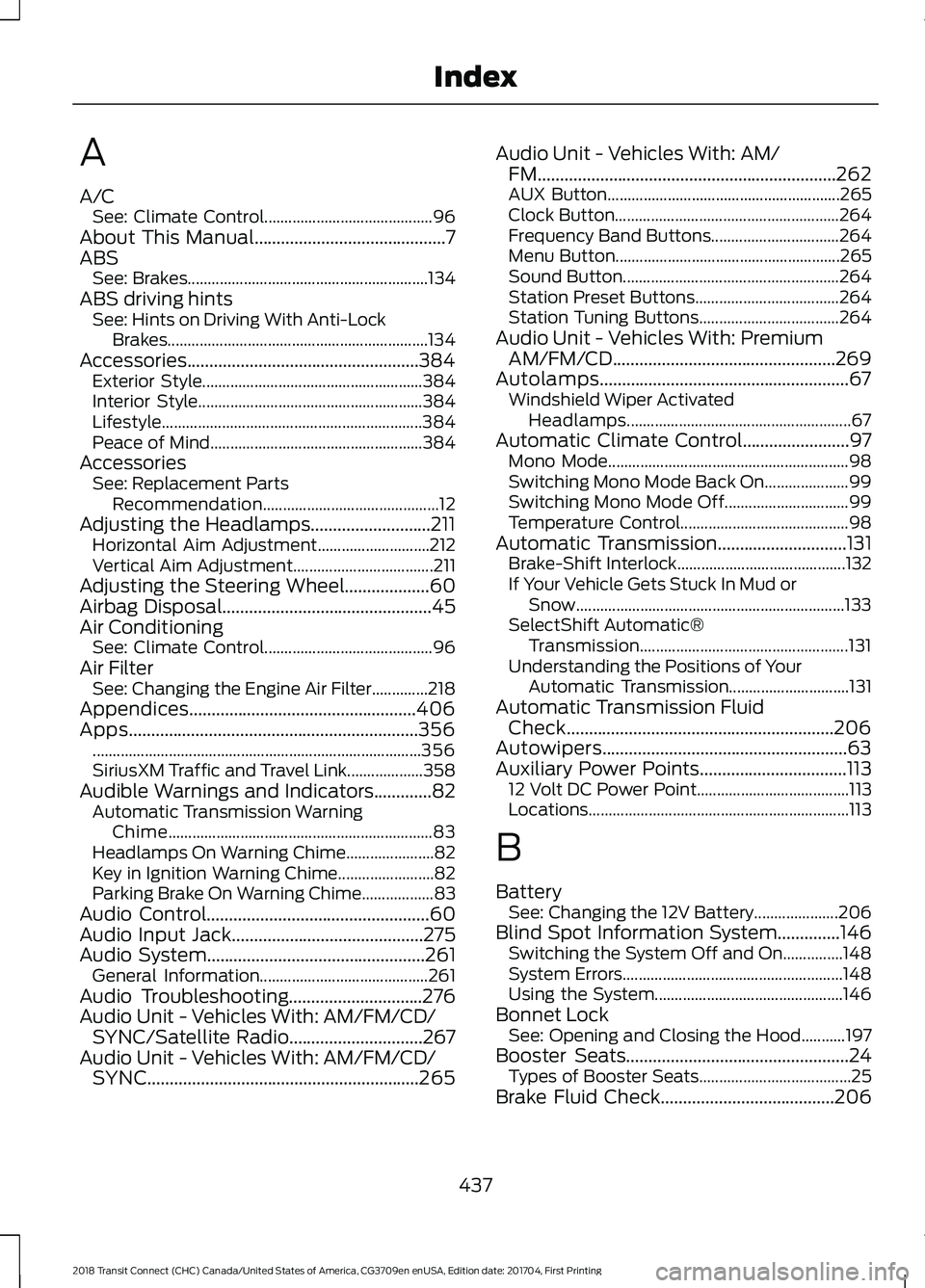
A
A/C
See: Climate Control.......................................... 96
About This Manual...........................................7
ABS See: Brakes............................................................ 134
ABS driving hints See: Hints on Driving With Anti-Lock
Brakes.................................................................134
Accessories....................................................384 Exterior Style....................................................... 384
Interior Style........................................................ 384
Lifestyle................................................................. 384
Peace of Mind..................................................... 384
Accessories See: Replacement Parts
Recommendation............................................ 12
Adjusting the Headlamps...........................211 Horizontal Aim Adjustment............................ 212
Vertical Aim Adjustment................................... 211
Adjusting the Steering Wheel...................60
Airbag Disposal...............................................45
Air Conditioning See: Climate Control.......................................... 96
Air Filter See: Changing the Engine Air Filter..............218
Appendices...................................................406
Apps.................................................................356 ........................................................................\
.......... 356
SiriusXM Traffic and Travel Link................... 358
Audible Warnings and Indicators.............82 Automatic Transmission Warning
Chime.................................................................. 83
Headlamps On Warning Chime...................... 82
Key in Ignition Warning Chime........................ 82
Parking Brake On Warning Chime.................. 83
Audio Control..................................................60
Audio Input Jack...........................................275
Audio System
.................................................261
General Information.......................................... 261
Audio Troubleshooting
..............................276
Audio Unit - Vehicles With: AM/FM/CD/ SYNC/Satellite Radio..............................267
Audio Unit - Vehicles With: AM/FM/CD/ SYNC.............................................................265 Audio Unit - Vehicles With: AM/
FM...................................................................262
AUX Button.......................................................... 265
Clock Button........................................................ 264
Frequency Band Buttons................................ 264
Menu Button........................................................ 265
Sound Button...................................................... 264
Station Preset Buttons.................................... 264
Station Tuning Buttons................................... 264
Audio Unit - Vehicles With: Premium AM/FM/CD..................................................269
Autolamps........................................................67 Windshield Wiper Activated
Headlamps........................................................ 67
Automatic Climate Control........................97 Mono Mode............................................................ 98
Switching Mono Mode Back On..................... 99
Switching Mono Mode Off............................... 99
Temperature Control.......................................... 98
Automatic Transmission.............................131 Brake-Shift Interlock.......................................... 132
If Your Vehicle Gets Stuck In Mud or Snow................................................................... 133
SelectShift Automatic® Transmission.................................................... 131
Understanding the Positions of Your Automatic Transmission.............................. 131
Automatic Transmission Fluid Check............................................................206
Autowipers.......................................................63
Auxiliary Power Points.................................113 12 Volt DC Power Point...................................... 113
Locations................................................................. 113
B
Battery See: Changing the 12V Battery..................... 206
Blind Spot Information System..............146 Switching the System Off and On...............148
System Errors....................................................... 148
Using the System............................................... 146
Bonnet Lock See: Opening and Closing the Hood...........197
Booster Seats..................................................24 Types of Booster Seats...................................... 25
Brake Fluid Check
.......................................206
437
2018 Transit Connect (CHC) Canada/United States of America, CG3709en enUSA, Edition date: 201704, First Printing Index
Page 443 of 449
F
Fan
See: Engine Cooling Fan.................................. 201
Fastening the Seatbelts..............................30 Seatbelt Locking Modes..................................... 31
Using Seatbelts During Pregnancy...............30
Floor Mats.........................................................171
Fog Lamps - Front See: Front Fog Lamps........................................ 69
Ford Credit..........................................................11
US Only...................................................................... 11
Ford Protect
..................................................386
Ford Protect Extended Service Plan
(CANADA ONLY)........................................... 387
Ford Protect Extended Service Plans (U.S. Only)................................................................. 386
Front Fog Lamps............................................69
Front Parking Aid...........................................141
Front Passenger Sensing System............39
Fuel and Refueling
........................................119
Fuel Consumption........................................125 Calculating Fuel Economy............................... 125
Filling the Fuel Tank........................................... 125
Fuel Filler Funnel Location - Kombi/ Tourneo...........................................................121
Fuel Filler Funnel Location - Van.............121
Fuel Quality - E85
........................................120
Choosing the Right Fuel - Flex Fuel
Vehicles............................................................. 120
Switching Between E85 and Gasoline........121
Fuel Quality - Gasoline................................119 Choosing the Right Fuel.................................... 119
Fuel Shutoff
....................................................174
Fuse Box Locations......................................185 Engine Compartment Fuse Box.................... 185
Luggage Compartment Fuse Box................185
Passenger Compartment Fuse Box............185
Fuses.................................................................185
Fuse Specification Chart
...........................186
Cargo Compartment Fuse Box...................... 192
Engine Compartment Fuse Box................... 186
Passenger Compartment Fuse Box............190
G
Gauges................................................................79 Engine Coolant Temperature Gauge.............79 Fuel Gauge.............................................................
80
Information Display............................................. 79
Gearbox See: Transmission................................................ 131
General Information on Radio Frequencies...................................................46
General Maintenance Information
.......388
Multi-Point Inspection.................................... 390
Owner Checks and Services......................... 389
Protecting Your Investment.......................... 388
Why Maintain Your Vehicle?......................... 388
Why Maintain Your Vehicle at Your Dealership?..................................................... 388
Getting Assistance Outside the U.S. and Canada...........................................................181
Getting the Services You Need................178 Away From Home............................................... 178
Global Opening and Closing
......................75
Global Closing........................................................ 75
Global Opening..................................................... 75
H
Handbrake See: Parking Brake.............................................. 135
Hazard Flashers
.............................................174
Headlamp Adjusting See: Adjusting the Headlamps....................... 211
Headlamp Exit Delay....................................68
Head Restraints............................................103 Adjusting the Head Restraint........................ 104
Heated Seats....................................................111
Heated Windows and Mirrors...................101 Heated Exterior Mirrors..................................... 101
Heated Rear Window......................................... 101
Heated Windshield............................................. 101
Heating See: Climate Control.......................................... 96
Hill Start Assist
..............................................135
Switching the System On and Off...............136
Using Hill Start Assist........................................ 135
Hints on Controlling the Interior Climate...........................................................99
Cooling the Interior Quickly.............................. 99
General Hints......................................................... 99
Heating the Interior Quickly............................. 99
440
2018 Transit Connect (CHC) Canada/United States of America, CG3709en enUSA, Edition date: 201704, First Printing Index
Page 444 of 449
Maximum Cooling Performance in
Instrument Panel or Instrument Panel
and Footwell Positions............................... 100
Recommended Settings for Cooling ...........99
Recommended Settings for Heating...........99
Side Window Defogging in Cold Weather............................................................ 100
Vehicle Stationary for Extended Periods During Extreme High Ambient
Temperatures................................................... 99
Hints on Driving With Anti-Lock Brakes............................................................134
Home Screen.................................................325
Hood Lock See: Opening and Closing the Hood...........197
I
Ignition Switch
................................................116
In California (U.S. Only)..............................179
Information Display Control.......................62
Information Displays....................................84
General Information........................................... 84
Information Messages
..................................87
Transmission.......................................................... 95
Installing Child Restraints.............................17 Child Restraints...................................................... 17
Using Lap and Shoulder Belts.......................... 18
Using Lower Anchors and Tethers for Children (LATCH)............................................ 20
Using Tether Straps............................................. 22
Instrument Cluster
.........................................79
Instrument Lighting Dimmer.....................68
Interior Lamps - Vehicles With: Panoramic Roof Panel................................71
Center Mounted Lamp........................................ 72
Luggage Compartment Lamp......................... 72
Side Mounted Lamp............................................. 71
Interior Lamps - Vehicles Without: Panoramic Roof Panel..............................70
Courtesy Lamp...................................................... 70
Luggage Compartment Lamp.......................... 71
Reading Lamps....................................................... 71
Interior Mirror....................................................77 Auto-Dimming Mirror........................................... 77
Introduction.........................................................7 J
Jump Starting the Vehicle
..........................175
Connecting the Jumper Cables...................... 175
Jump Starting....................................................... 176
Preparing Your Vehicle...................................... 175
Removing the Jumper Cables........................ 176
K
Keys and Remote Controls........................46
L
Lighting Control..............................................66 Headlamp Flasher................................................ 67
High Beams............................................................ 66
Parking Lamps...................................................... 66
Lighting..............................................................66 General Information........................................... 66
Load Carriers See: Roof Racks and Load Carriers..............155
Load Carrying
.................................................153
Load Limit.......................................................156 Special Loading Instructions for Owners of
Pick-up Trucks and Utility-type
Vehicles.............................................................. 161
Vehicle Loading - with and without a Trailer................................................................. 156
Locking and Unlocking
.................................53
Autolock................................................................... 55
Autounlock............................................................. 55
Emergency Locking with the Key................... 55
Locking and Unlocking the Doors From Inside.................................................................... 53
Locking and Unlocking the Doors with the Key Blade............................................................ 54
Opening the Double Rear Doors..................... 53
Opening the Double Rear Doors From Inside.................................................................... 56
Remote Control..................................................... 53
Smart Unlocks for Integrated Keyhead Transmitter........................................................ 54
Unlocking the Doors with the Interior Door Handles............................................................... 54
Luggage Anchor Points
..............................153
Lug Nuts See: Changing a Road Wheel....................... 248
441
2018 Transit Connect (CHC) Canada/United States of America, CG3709en enUSA, Edition date: 201704, First Printing Index