ignition FORD TRANSIT CONNECT 2018 Manual PDF
[x] Cancel search | Manufacturer: FORD, Model Year: 2018, Model line: TRANSIT CONNECT, Model: FORD TRANSIT CONNECT 2018Pages: 449, PDF Size: 6.73 MB
Page 319 of 449
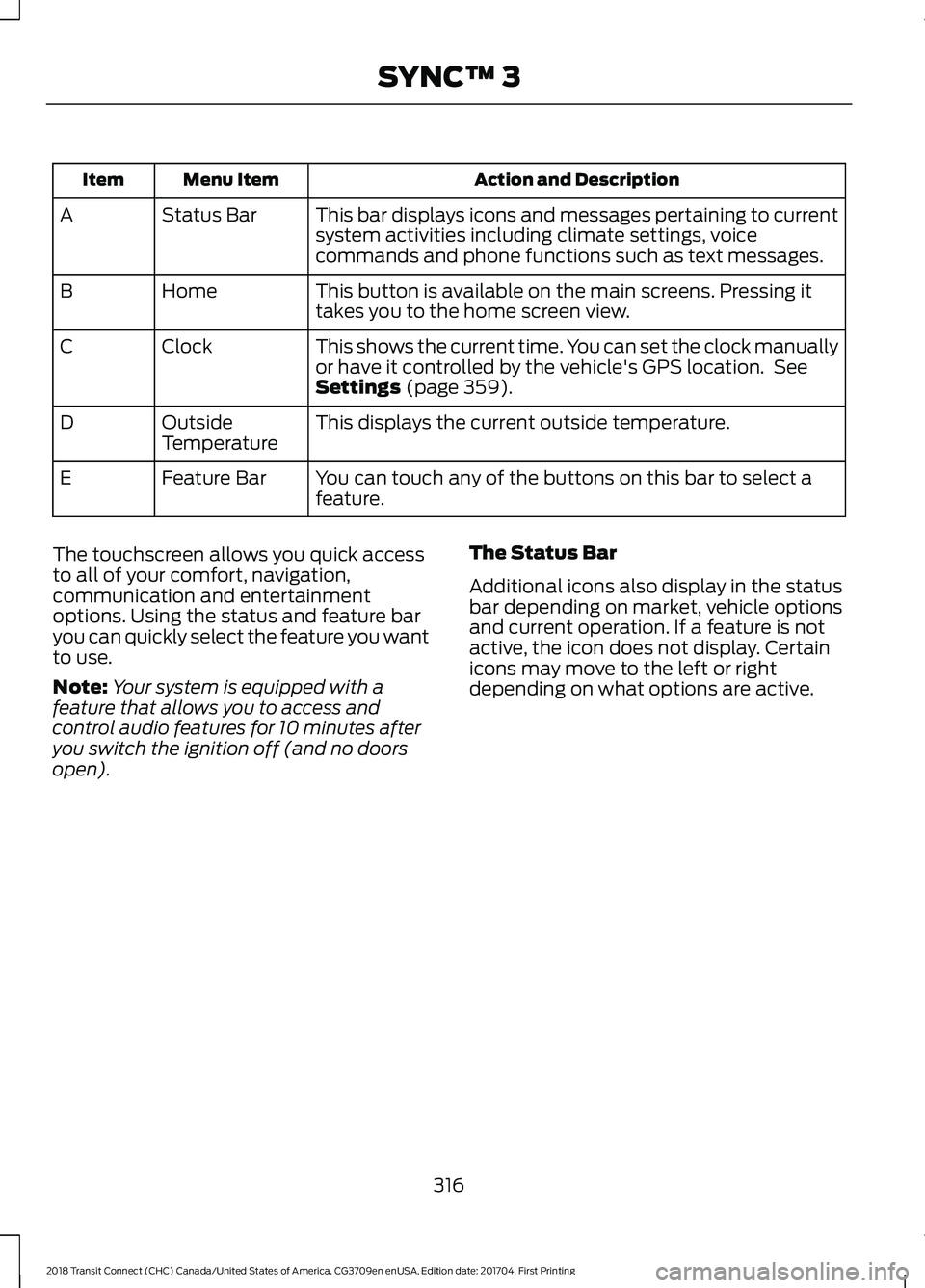
Action and Description
Menu Item
Item
This bar displays icons and messages pertaining to current
system activities including climate settings, voice
commands and phone functions such as text messages.
Status Bar
A
This button is available on the main screens. Pressing it
takes you to the home screen view.
Home
B
This shows the current time. You can set the clock manually
or have it controlled by the vehicle's GPS location. See
Settings (page 359).
Clock
C
This displays the current outside temperature.
Outside
Temperature
D
You can touch any of the buttons on this bar to select a
feature.
Feature Bar
E
The touchscreen allows you quick access
to all of your comfort, navigation,
communication and entertainment
options. Using the status and feature bar
you can quickly select the feature you want
to use.
Note: Your system is equipped with a
feature that allows you to access and
control audio features for 10 minutes after
you switch the ignition off (and no doors
open). The Status Bar
Additional icons also display in the status
bar depending on market, vehicle options
and current operation. If a feature is not
active, the icon does not display. Certain
icons may move to the left or right
depending on what options are active.
316
2018 Transit Connect (CHC) Canada/United States of America, CG3709en enUSA, Edition date: 201704, First Printing SYNC™ 3
Page 327 of 449
You must also give the system permission
to update automatically. Upon vehicle
delivery, the System asks you if you would
like to use the automatic update feature.
If you agree to automatic updates, you can
press OK to confirm. If this selection does
not appear upon vehicle delivery you can
access it through the General Settings. See
Settings (page 359). You can also perform
a master reset. See SYNC™ 3
Troubleshooting (page 371).
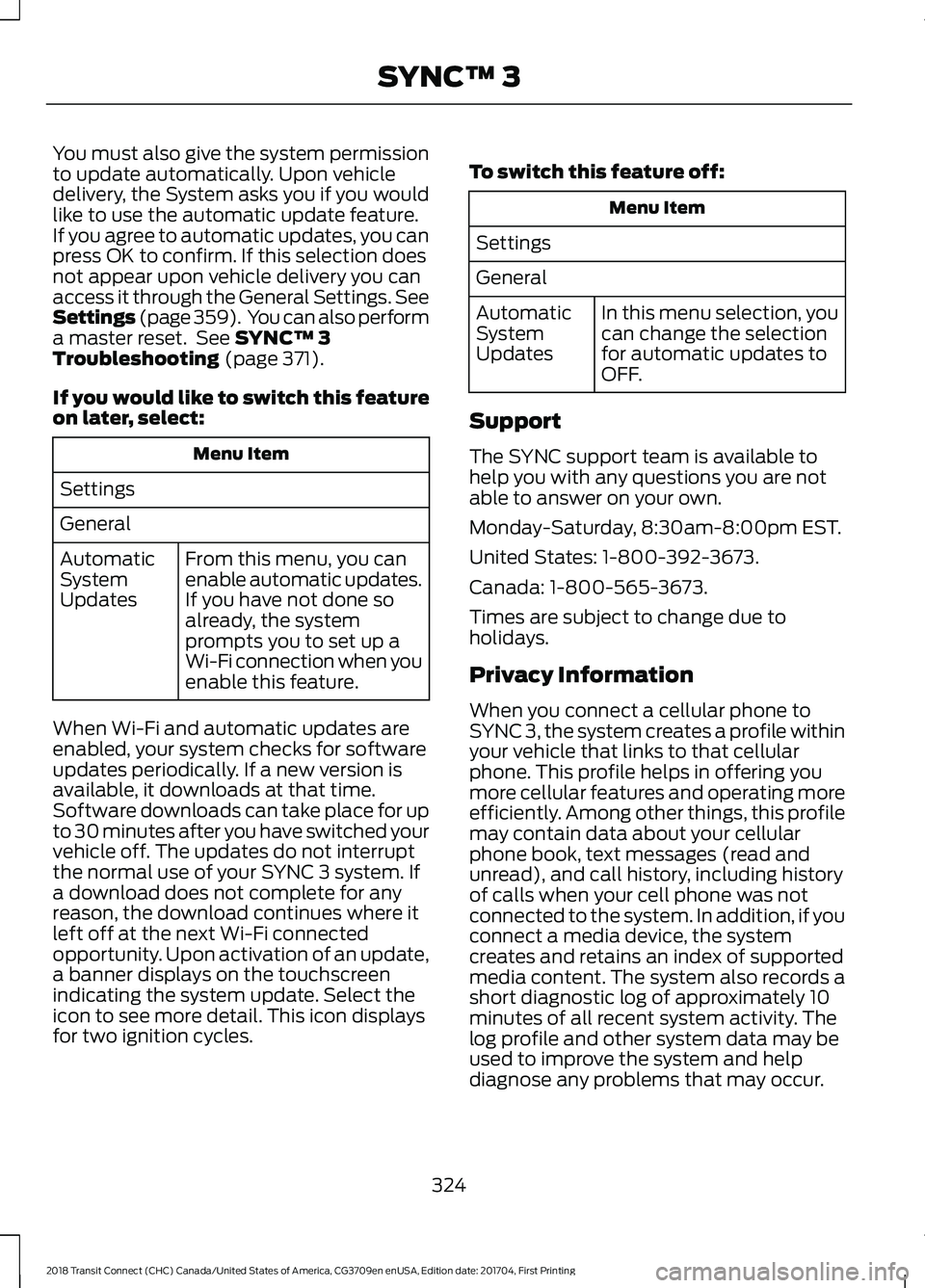
If you would like to switch this feature
on later, select: Menu Item
Settings
General From this menu, you can
enable automatic updates.
If you have not done so
already, the system
prompts you to set up a
Wi-Fi connection when you
enable this feature.
Automatic
System
Updates
When Wi-Fi and automatic updates are
enabled, your system checks for software
updates periodically. If a new version is
available, it downloads at that time.
Software downloads can take place for up
to 30 minutes after you have switched your
vehicle off. The updates do not interrupt
the normal use of your SYNC 3 system. If
a download does not complete for any
reason, the download continues where it
left off at the next Wi-Fi connected
opportunity. Upon activation of an update,
a banner displays on the touchscreen
indicating the system update. Select the
icon to see more detail. This icon displays
for two ignition cycles. To switch this feature off: Menu Item
Settings
General In this menu selection, you
can change the selection
for automatic updates to
OFF.
Automatic
System
Updates
Support
The SYNC support team is available to
help you with any questions you are not
able to answer on your own.
Monday-Saturday, 8:30am-8:00pm EST.
United States: 1-800-392-3673.
Canada: 1-800-565-3673.
Times are subject to change due to
holidays.
Privacy Information
When you connect a cellular phone to
SYNC 3, the system creates a profile within
your vehicle that links to that cellular
phone. This profile helps in offering you
more cellular features and operating more
efficiently. Among other things, this profile
may contain data about your cellular
phone book, text messages (read and
unread), and call history, including history
of calls when your cell phone was not
connected to the system. In addition, if you
connect a media device, the system
creates and retains an index of supported
media content. The system also records a
short diagnostic log of approximately 10
minutes of all recent system activity. The
log profile and other system data may be
used to improve the system and help
diagnose any problems that may occur.
324
2018 Transit Connect (CHC) Canada/United States of America, CG3709en enUSA, Edition date: 201704, First Printing SYNC™ 3
Page 340 of 449
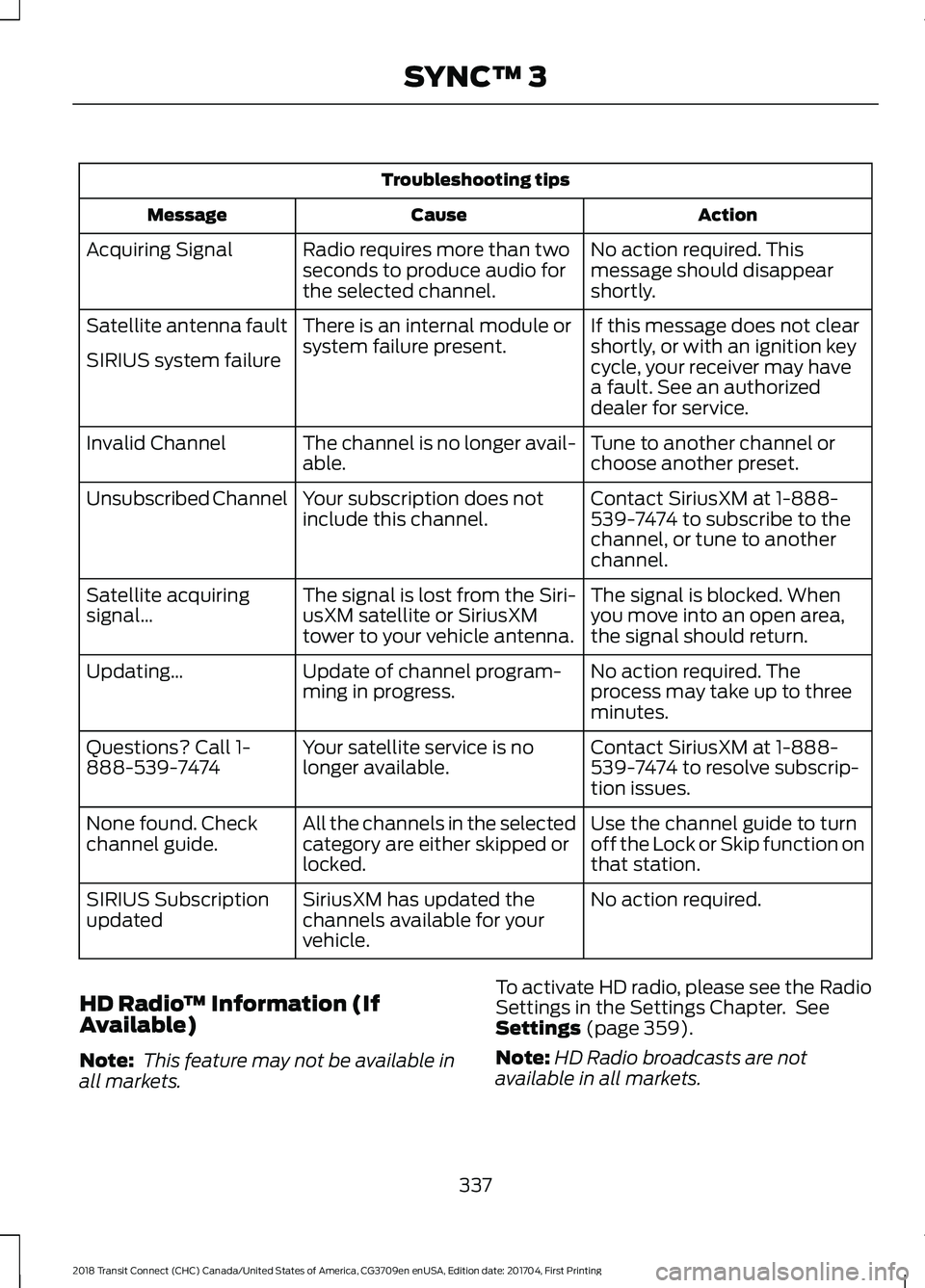
Troubleshooting tips
Action
Cause
Message
No action required. This
message should disappear
shortly.
Radio requires more than two
seconds to produce audio for
the selected channel.
Acquiring Signal
If this message does not clear
shortly, or with an ignition key
cycle, your receiver may have
a fault. See an authorized
dealer for service.
There is an internal module or
system failure present.
Satellite antenna fault
SIRIUS system failure
Tune to another channel or
choose another preset.
The channel is no longer avail-
able.
Invalid Channel
Contact SiriusXM at 1-888-
539-7474 to subscribe to the
channel, or tune to another
channel.
Your subscription does not
include this channel.
Unsubscribed Channel
The signal is blocked. When
you move into an open area,
the signal should return.
The signal is lost from the Siri-
usXM satellite or SiriusXM
tower to your vehicle antenna.
Satellite acquiring
signal\b
No action required. The
process may take up to three
minutes.
Update of channel program-
ming in progress.
Updating\b
Contact SiriusXM at 1-888-
539-7474 to resolve subscrip-
tion issues.
Your satellite service is no
longer available.
Questions? Call 1-
888-539-7474
Use the channel guide to turn
off the Lock or Skip function on
that station.
All the channels in the selected
category are either skipped or
locked.
None found. Check
channel guide.
No action required.
SiriusXM has updated the
channels available for your
vehicle.
SIRIUS Subscription
updated
HD Radio ™ Information (If
Available)
Note: This feature may not be available in
all markets. To activate HD radio, please see the Radio
Settings in the Settings Chapter. See
Settings (page 359).
Note: HD Radio broadcasts are not
available in all markets.
337
2018 Transit Connect (CHC) Canada/United States of America, CG3709en enUSA, Edition date: 201704, First Printing SYNC™ 3
Page 358 of 449

Menu Item
The waypoint list then appears and you are
able to re-order all of your waypoints by
selecting the menu icon on the right hand
side of the location. You can select up to
five waypoints.
Add Waypoint
Optimize Order
You can also have the system set the order
for you by pressing:
Go
To return to your route, press:
SYNC AppLink
The AppLink app allows you to use some
SYNC 3 navigation features on your phone.
First Mile Navigation
When you switch your ignition off, the
location of your vehicle is recorded and
sent to your SYNC AppLink app. The
location of your vehicle can be viewed
within the app. You can also view walking
directions to your vehicle.
Last Mile Navigation
When you park near your destination, the
system provides walking directions to your
destination.
POI Search
Your paired phone can be used to access
additional points of interest (POI). These
points of interest can only be access when
your phone is paired.
Send To Car
You can send destinations to your
navigation system using a computer or
phone using AppLink. cityseeker (If Equipped)
Note: cityseeker point of interest (POI)
information is limited to approximately 1,110
cities (1,049 in the United States, 36 in
Canada and 15 in Mexico). cityseeker, when available, is a service that
provides more information about certain
points of interest such as restaurants,
hotels and attractions.
When you have selected a point of interest,
the location and information appear, such
as address, phone number and a star
rating.
Press
More Information to see a photo,
a review, a list of services and facilities, the
average room or meal price and the web
address. This screen displays the point of
interest icons.
355
2018 Transit Connect (CHC) Canada/United States of America, CG3709en enUSA, Edition date: 201704, First Printing SYNC™ 3E225487
Page 381 of 449
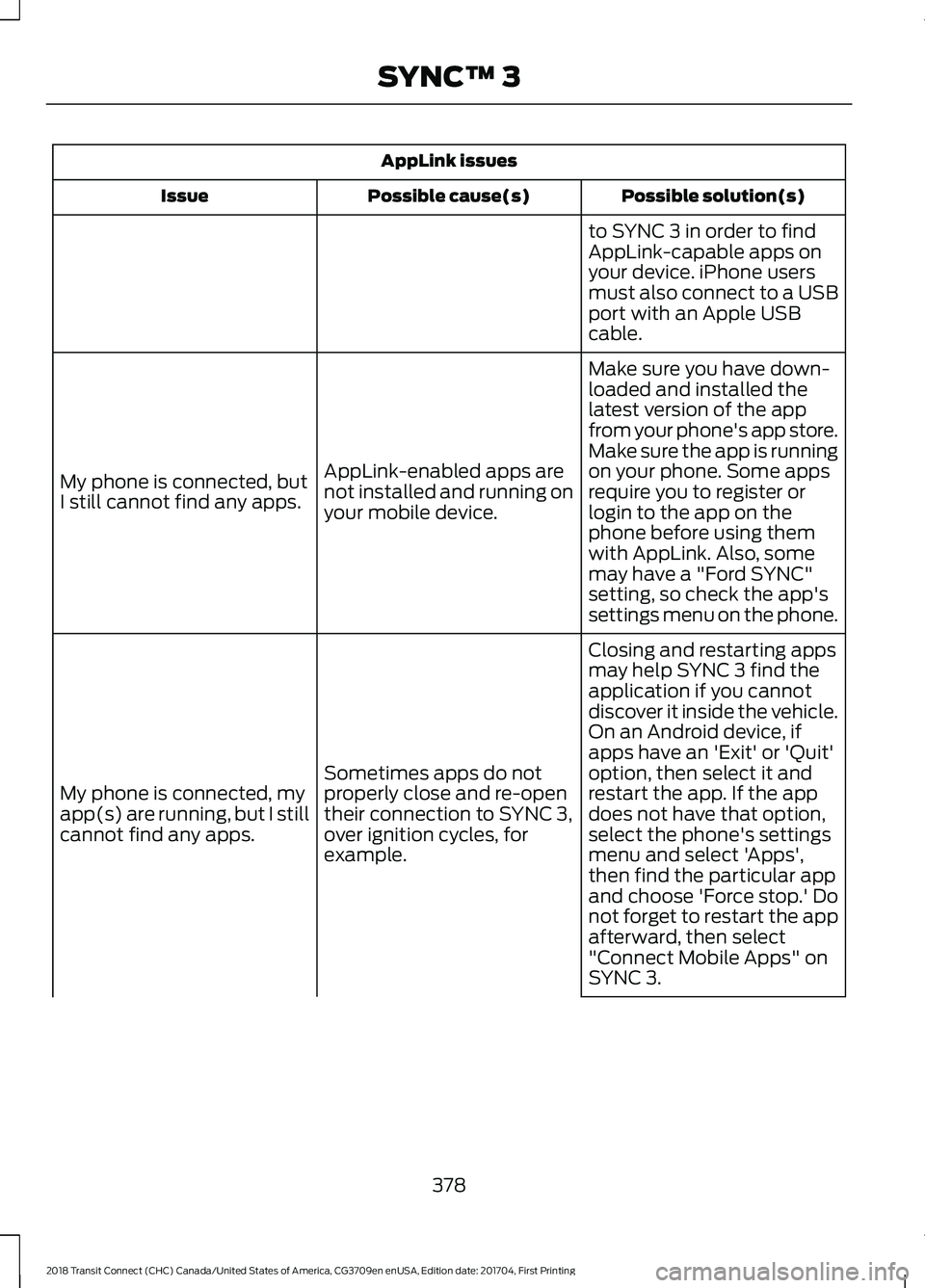
AppLink issues
Possible solution(s)
Possible cause(s)
Issue
to SYNC 3 in order to find
AppLink-capable apps on
your device. iPhone users
must also connect to a USB
port with an Apple USB
cable.
Make sure you have down-
loaded and installed the
latest version of the app
from your phone's app store.
Make sure the app is running
on your phone. Some apps
AppLink-enabled apps are
not installed and running on
your mobile device.
My phone is connected, but
I still cannot find any apps.
require you to register or
login to the app on the
phone before using them
with AppLink. Also, some
may have a "Ford SYNC"
setting, so check the app's
settings menu on the phone.
Closing and restarting apps
may help SYNC 3 find the
application if you cannot
discover it inside the vehicle.
On an Android device, if
apps have an 'Exit' or 'Quit'
Sometimes apps do not
properly close and re-open
their connection to SYNC 3,
over ignition cycles, for
example.
My phone is connected, my
app(s) are running, but I still
cannot find any apps. option, then select it and
restart the app. If the app
does not have that option,
select the phone's settings
menu and select 'Apps',
then find the particular app
and choose 'Force stop.' Do
not forget to restart the app
afterward, then select
"Connect Mobile Apps" on
SYNC 3.
378
2018 Transit Connect (CHC) Canada/United States of America, CG3709en enUSA, Edition date: 201704, First Printing SYNC™ 3
Page 440 of 449
A
A/C
See: Climate Control.......................................... 96
About This Manual...........................................7
ABS See: Brakes............................................................ 134
ABS driving hints See: Hints on Driving With Anti-Lock
Brakes.................................................................134
Accessories....................................................384 Exterior Style....................................................... 384
Interior Style........................................................ 384
Lifestyle................................................................. 384
Peace of Mind..................................................... 384
Accessories See: Replacement Parts
Recommendation............................................ 12
Adjusting the Headlamps...........................211 Horizontal Aim Adjustment............................ 212
Vertical Aim Adjustment................................... 211
Adjusting the Steering Wheel...................60
Airbag Disposal...............................................45
Air Conditioning See: Climate Control.......................................... 96
Air Filter See: Changing the Engine Air Filter..............218
Appendices...................................................406
Apps.................................................................356 ........................................................................\
.......... 356
SiriusXM Traffic and Travel Link................... 358
Audible Warnings and Indicators.............82 Automatic Transmission Warning
Chime.................................................................. 83
Headlamps On Warning Chime...................... 82
Key in Ignition Warning Chime........................ 82
Parking Brake On Warning Chime.................. 83
Audio Control..................................................60
Audio Input Jack...........................................275
Audio System
.................................................261
General Information.......................................... 261
Audio Troubleshooting
..............................276
Audio Unit - Vehicles With: AM/FM/CD/ SYNC/Satellite Radio..............................267
Audio Unit - Vehicles With: AM/FM/CD/ SYNC.............................................................265 Audio Unit - Vehicles With: AM/
FM...................................................................262
AUX Button.......................................................... 265
Clock Button........................................................ 264
Frequency Band Buttons................................ 264
Menu Button........................................................ 265
Sound Button...................................................... 264
Station Preset Buttons.................................... 264
Station Tuning Buttons................................... 264
Audio Unit - Vehicles With: Premium AM/FM/CD..................................................269
Autolamps........................................................67 Windshield Wiper Activated
Headlamps........................................................ 67
Automatic Climate Control........................97 Mono Mode............................................................ 98
Switching Mono Mode Back On..................... 99
Switching Mono Mode Off............................... 99
Temperature Control.......................................... 98
Automatic Transmission.............................131 Brake-Shift Interlock.......................................... 132
If Your Vehicle Gets Stuck In Mud or Snow................................................................... 133
SelectShift Automatic® Transmission.................................................... 131
Understanding the Positions of Your Automatic Transmission.............................. 131
Automatic Transmission Fluid Check............................................................206
Autowipers.......................................................63
Auxiliary Power Points.................................113 12 Volt DC Power Point...................................... 113
Locations................................................................. 113
B
Battery See: Changing the 12V Battery..................... 206
Blind Spot Information System..............146 Switching the System Off and On...............148
System Errors....................................................... 148
Using the System............................................... 146
Bonnet Lock See: Opening and Closing the Hood...........197
Booster Seats..................................................24 Types of Booster Seats...................................... 25
Brake Fluid Check
.......................................206
437
2018 Transit Connect (CHC) Canada/United States of America, CG3709en enUSA, Edition date: 201704, First Printing Index
Page 444 of 449
Maximum Cooling Performance in
Instrument Panel or Instrument Panel
and Footwell Positions............................... 100
Recommended Settings for Cooling ...........99
Recommended Settings for Heating...........99
Side Window Defogging in Cold Weather............................................................ 100
Vehicle Stationary for Extended Periods During Extreme High Ambient
Temperatures................................................... 99
Hints on Driving With Anti-Lock Brakes............................................................134
Home Screen.................................................325
Hood Lock See: Opening and Closing the Hood...........197
I
Ignition Switch
................................................116
In California (U.S. Only)..............................179
Information Display Control.......................62
Information Displays....................................84
General Information........................................... 84
Information Messages
..................................87
Transmission.......................................................... 95
Installing Child Restraints.............................17 Child Restraints...................................................... 17
Using Lap and Shoulder Belts.......................... 18
Using Lower Anchors and Tethers for Children (LATCH)............................................ 20
Using Tether Straps............................................. 22
Instrument Cluster
.........................................79
Instrument Lighting Dimmer.....................68
Interior Lamps - Vehicles With: Panoramic Roof Panel................................71
Center Mounted Lamp........................................ 72
Luggage Compartment Lamp......................... 72
Side Mounted Lamp............................................. 71
Interior Lamps - Vehicles Without: Panoramic Roof Panel..............................70
Courtesy Lamp...................................................... 70
Luggage Compartment Lamp.......................... 71
Reading Lamps....................................................... 71
Interior Mirror....................................................77 Auto-Dimming Mirror........................................... 77
Introduction.........................................................7 J
Jump Starting the Vehicle
..........................175
Connecting the Jumper Cables...................... 175
Jump Starting....................................................... 176
Preparing Your Vehicle...................................... 175
Removing the Jumper Cables........................ 176
K
Keys and Remote Controls........................46
L
Lighting Control..............................................66 Headlamp Flasher................................................ 67
High Beams............................................................ 66
Parking Lamps...................................................... 66
Lighting..............................................................66 General Information........................................... 66
Load Carriers See: Roof Racks and Load Carriers..............155
Load Carrying
.................................................153
Load Limit.......................................................156 Special Loading Instructions for Owners of
Pick-up Trucks and Utility-type
Vehicles.............................................................. 161
Vehicle Loading - with and without a Trailer................................................................. 156
Locking and Unlocking
.................................53
Autolock................................................................... 55
Autounlock............................................................. 55
Emergency Locking with the Key................... 55
Locking and Unlocking the Doors From Inside.................................................................... 53
Locking and Unlocking the Doors with the Key Blade............................................................ 54
Opening the Double Rear Doors..................... 53
Opening the Double Rear Doors From Inside.................................................................... 56
Remote Control..................................................... 53
Smart Unlocks for Integrated Keyhead Transmitter........................................................ 54
Unlocking the Doors with the Interior Door Handles............................................................... 54
Luggage Anchor Points
..............................153
Lug Nuts See: Changing a Road Wheel....................... 248
441
2018 Transit Connect (CHC) Canada/United States of America, CG3709en enUSA, Edition date: 201704, First Printing Index
Page 447 of 449

Clock........................................................................\
361
Display................................................................... 370
General.................................................................. 368
Media Player....................................................... 360
Mobile Apps......................................................... 367
Navigation............................................................ 365
Phone...................................................................... 361
Radio...................................................................... 364
Sound..................................................................... 359
Valet Mode............................................................. 371
Vehicle................................................................... 369
Voice Control........................................................ 371
Wi-Fi....................................................................... 369
Side Airbags.....................................................42
Sitting in the Correct Position..................103
Snow Chains See: Using Snow Chains................................. 243
Special Notices................................................12 New Vehicle Limited Warranty......................... 12
On Board Diagnostics Data Link Connector............................................................ 13
Special Instructions.............................................. 12
Special Operating Conditions Scheduled Maintenance..............................................394
Speed Control See: Cruise Control............................................ 145
Stability Control............................................138
Principle of Operation....................................... 138
Starter Switch See: Ignition Switch............................................ 116
Starting a Gasoline Engine.........................117 Cold or Hot Engine............................................... 117
Engine Idle Speed after Starting.................... 117
Flooded Engine..................................................... 117
Starting and Stopping the Engine...........116 General Information........................................... 116
Steering.............................................................151 Electric Power Steering..................................... 151
Steering Wheel
...............................................60
Storage Compartments..............................115
Sun Shades.......................................................77 Bounce-Back......................................................... 78
Opening and Closing the Sun Shade............78
Sun Shade Relearning........................................ 78
Supplementary Restraints System..........37 Principle of Operation......................................... 37
Switching Off the Engine............................117 Vehicles With a Turbocharger......................... 117Symbols Glossary
.............................................7
SYNC™ 3.........................................................315
General Information.......................................... 315
SYNC™ 3 Troubleshooting.......................371
SYNC™ Applications and Services........................................................293
911 Assist............................................................... 293
SYNC Mobile Apps............................................ 295
SYNC™.............................................................277 General Information.......................................... 277
SYNC™ Troubleshooting.........................306
T
Tailgate See: Manual Liftgate........................................... 56
Technical Specifications See: Capacities and Specifications............255
The Better Business Bureau (BBB) Auto Line Program (U.S. Only).......................180
Tire Care
..........................................................228
Glossary of Tire Terminology........................ 230
Information About Uniform Tire Quality Grading............................................................. 228
Information Contained on the Tire Sidewall............................................................. 231
Temperature A B C............................................ 229
Traction AA A B C............................................... 229
Treadwear............................................................. 229
Tire Pressure Monitoring System
...........244
Changing Tires With a Tire Pressure
Monitoring System....................................... 245
Tire Pressure Monitoring System Reset Procedure......................................................... 247
Understanding the Tire Pressure Monitoring System ............................................................. 245
Tires See: Wheels and Tires...................................... 227
Towing a Trailer.............................................162 Load Placement.................................................. 162
Towing Points
.................................................167
Recovery Hook..................................................... 167
Towing the Vehicle on Four Wheels..........................................................169
Emergency Towing............................................ 169
Recreational Vehicle Towing.......................... 169
Towing..............................................................162
444
2018 Transit Connect (CHC) Canada/United States of America, CG3709en enUSA, Edition date: 201704, First Printing Index