instrument panel FORD TRANSIT CONNECT 2018 Owners Manual
[x] Cancel search | Manufacturer: FORD, Model Year: 2018, Model line: TRANSIT CONNECT, Model: FORD TRANSIT CONNECT 2018Pages: 449, PDF Size: 6.73 MB
Page 5 of 449
Wipers and Washers
Windshield Wipers.........................................63
Autowipers.......................................................63
Windshield Washers
.....................................64
Rear Window Wiper and Washers...........65
Lighting
General Information.....................................66
Lighting Control..............................................66
Autolamps........................................................67
Instrument Lighting Dimmer.....................68
Headlamp Exit Delay....................................68
Daytime Running Lamps
............................68
Front Fog Lamps............................................69
Cornering Lamps...........................................69
Direction Indicators
.......................................70
Interior Lamps - Vehicles Without: Panoramic Roof Panel.............................70
Interior Lamps - Vehicles With: Panoramic Roof Panel
..............................71
Windows and Mirrors
Power Windows - Vehicles With: One-Touch Open Driver Window.........73
Power Windows - Vehicles With: Rear Power Windows
.........................................73
Global Opening and Closing......................75
Exterior Mirrors
................................................76
Interior Mirror....................................................77
Sun Shades.......................................................77
Instrument Cluster
Gauges................................................................79
Warning Lamps and Indicators................80
Audible Warnings and Indicators.............82
Information Displays
General Information
.....................................84
Clock...................................................................86
Trip Computer
.................................................86 Personalized Settings
...................................87
Information Messages
..................................87
Climate Control
Principle of Operation..................................96
Manual Climate Control..............................96
Automatic Climate Control
........................97
Hints on Controlling the Interior Climate
..........................................................99
Rear Passenger Climate Controls
..........100
Heated Windows and Mirrors...................101
Cabin Air Filter
................................................101
Seats
Sitting in the Correct Position..................103
Head Restraints............................................103
Manual Seats
.................................................105
Power Seats
...................................................106
Rear Seats
.......................................................107
Heated Seats....................................................111
Rear Seat Armrest.........................................112
Auxiliary Power Points
Auxiliary Power Points.................................113
Cigar Lighter
.....................................................113
Storage Compartments
Cup Holders
.....................................................115
Center Console...............................................115
Overhead Console
.........................................115
Starting and Stopping the Engine
General Information
.....................................116
Ignition Switch
................................................116
Starting a Gasoline Engine.........................117
Switching Off the Engine............................117
Engine Block Heater.....................................118
2
2018 Transit Connect (CHC) Canada/United States of America, CG3709en enUSA, Edition date: 201704, First Printing Table of Contents
Page 7 of 449
Customer Assistance
Getting the Services You Need................178
In California (U.S. Only)..............................179
The Better Business Bureau (BBB) Auto
Line Program (U.S. Only)......................180
Utilizing the Mediation/Arbitration Program (Canada Only).........................181
Getting Assistance Outside the U.S. and Canada..........................................................181
Ordering Additional Owner's Literature.....................................................182
Reporting Safety Defects (U.S. Only).............................................................183
Reporting Safety Defects (Canada Only).............................................................183
Fuses
Fuse Box Locations......................................185
Fuse Specification Chart
...........................186
Changing a Fuse...........................................195
Maintenance
General Information....................................197
Opening and Closing the Hood...............197
Under Hood Overview................................199
Engine Oil Dipstick
......................................200
Engine Oil Check
.........................................200
Oil Change Indicator Reset.......................201
Engine Cooling Fan......................................201
Engine Coolant Check...............................202
Automatic Transmission Fluid Check
...........................................................206
Brake Fluid Check
.......................................206
Washer Fluid Check
....................................206
Changing the 12V Battery.........................206
Checking the Wiper Blades
.....................208
Changing the Wiper Blades
....................208
Adjusting the Headlamps...........................211
Changing a Bulb............................................212
Bulb Specification Chart............................217
Changing the Engine Air Filter.................218 Drive Belt Routing.........................................218
Vehicle Care
Cleaning Products........................................219
Cleaning the Exterior
..................................220
Waxing..............................................................221
Cleaning the Engine
.....................................221
Cleaning the Windows and Wiper Blades...........................................................221
Cleaning the Interior....................................222
Cleaning the Instrument Panel and Instrument Cluster Lens........................222
Cleaning Leather Seats..............................223
Repairing Minor Paint Damage...............224
Cleaning the Wheels..................................224
Vehicle Storage.............................................224
Wheels and Tires
General Information
....................................227
Tire Care
..........................................................228
Using Snow Chains.....................................243
Tire Pressure Monitoring System..........244
Changing a Road Wheel...........................248
Technical Specifications...........................253
Capacities and Specific- ations
Engine Specifications
.................................255
Motorcraft Parts
...........................................255
Vehicle Identification Number................255
Vehicle Certification Label
.......................256
Transmission Code Designation.............257
Capacities and Specifications
................257
Audio System
General Information....................................261
Audio Unit - Vehicles With: AM/FM......262
Audio Unit - Vehicles With: AM/FM/CD/ SYNC............................................................265
4
2018 Transit Connect (CHC) Canada/United States of America, CG3709en enUSA, Edition date: 201704, First Printing Table of Contents
Page 43 of 449
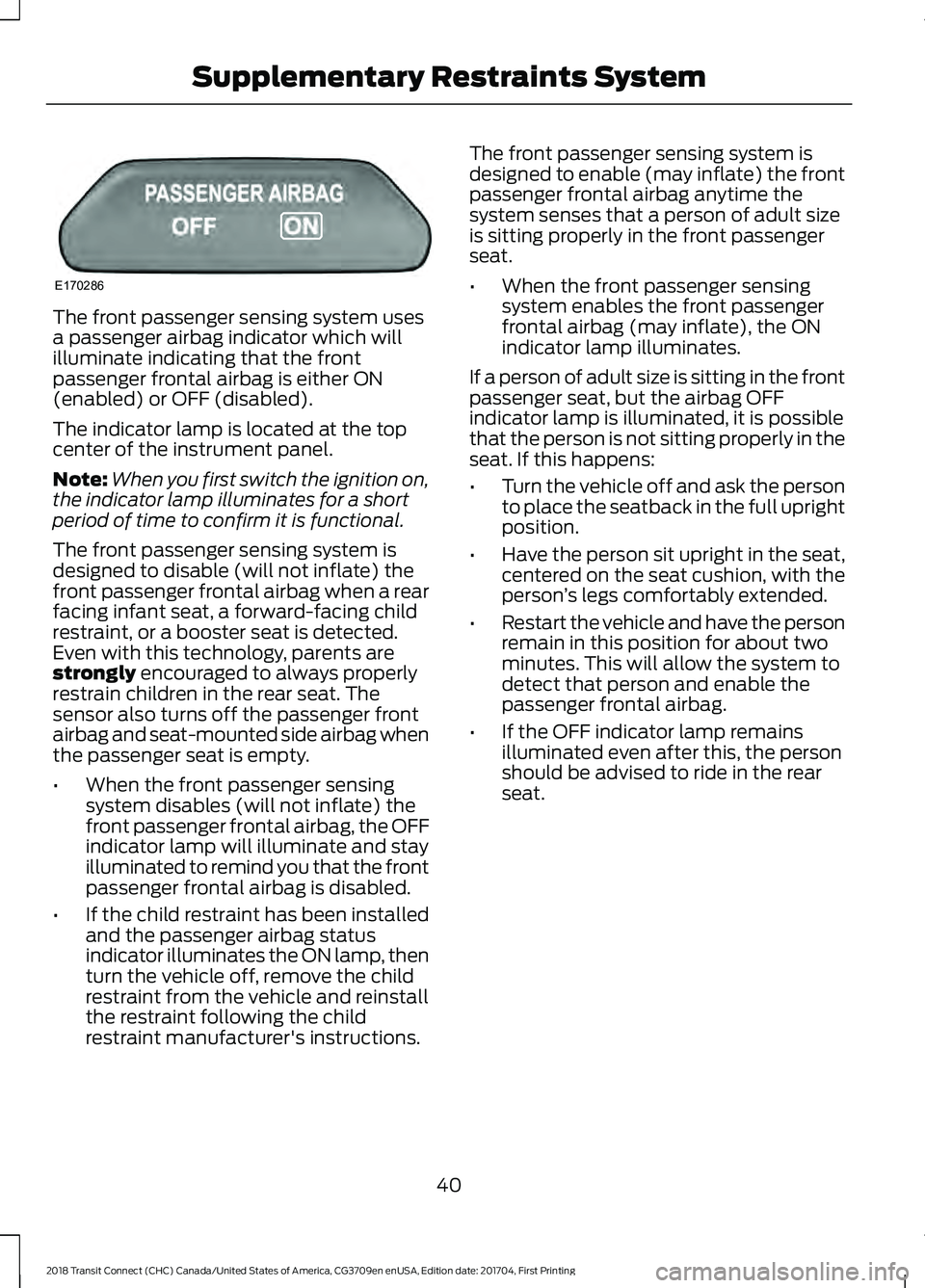
The front passenger sensing system uses
a passenger airbag indicator which will
illuminate indicating that the front
passenger frontal airbag is either ON
(enabled) or OFF (disabled).
The indicator lamp is located at the top
center of the instrument panel.
Note:
When you first switch the ignition on,
the indicator lamp illuminates for a short
period of time to confirm it is functional.
The front passenger sensing system is
designed to disable (will not inflate) the
front passenger frontal airbag when a rear
facing infant seat, a forward-facing child
restraint, or a booster seat is detected.
Even with this technology, parents are
strongly encouraged to always properly
restrain children in the rear seat. The
sensor also turns off the passenger front
airbag and seat-mounted side airbag when
the passenger seat is empty.
• When the front passenger sensing
system disables (will not inflate) the
front passenger frontal airbag, the OFF
indicator lamp will illuminate and stay
illuminated to remind you that the front
passenger frontal airbag is disabled.
• If the child restraint has been installed
and the passenger airbag status
indicator illuminates the ON lamp, then
turn the vehicle off, remove the child
restraint from the vehicle and reinstall
the restraint following the child
restraint manufacturer's instructions. The front passenger sensing system is
designed to enable (may inflate) the front
passenger frontal airbag anytime the
system senses that a person of adult size
is sitting properly in the front passenger
seat.
•
When the front passenger sensing
system enables the front passenger
frontal airbag (may inflate), the ON
indicator lamp illuminates.
If a person of adult size is sitting in the front
passenger seat, but the airbag OFF
indicator lamp is illuminated, it is possible
that the person is not sitting properly in the
seat. If this happens:
• Turn the vehicle off and ask the person
to place the seatback in the full upright
position.
• Have the person sit upright in the seat,
centered on the seat cushion, with the
person ’s legs comfortably extended.
• Restart the vehicle and have the person
remain in this position for about two
minutes. This will allow the system to
detect that person and enable the
passenger frontal airbag.
• If the OFF indicator lamp remains
illuminated even after this, the person
should be advised to ride in the rear
seat.
40
2018 Transit Connect (CHC) Canada/United States of America, CG3709en enUSA, Edition date: 201704, First Printing Supplementary Restraints SystemE170286
Page 47 of 449
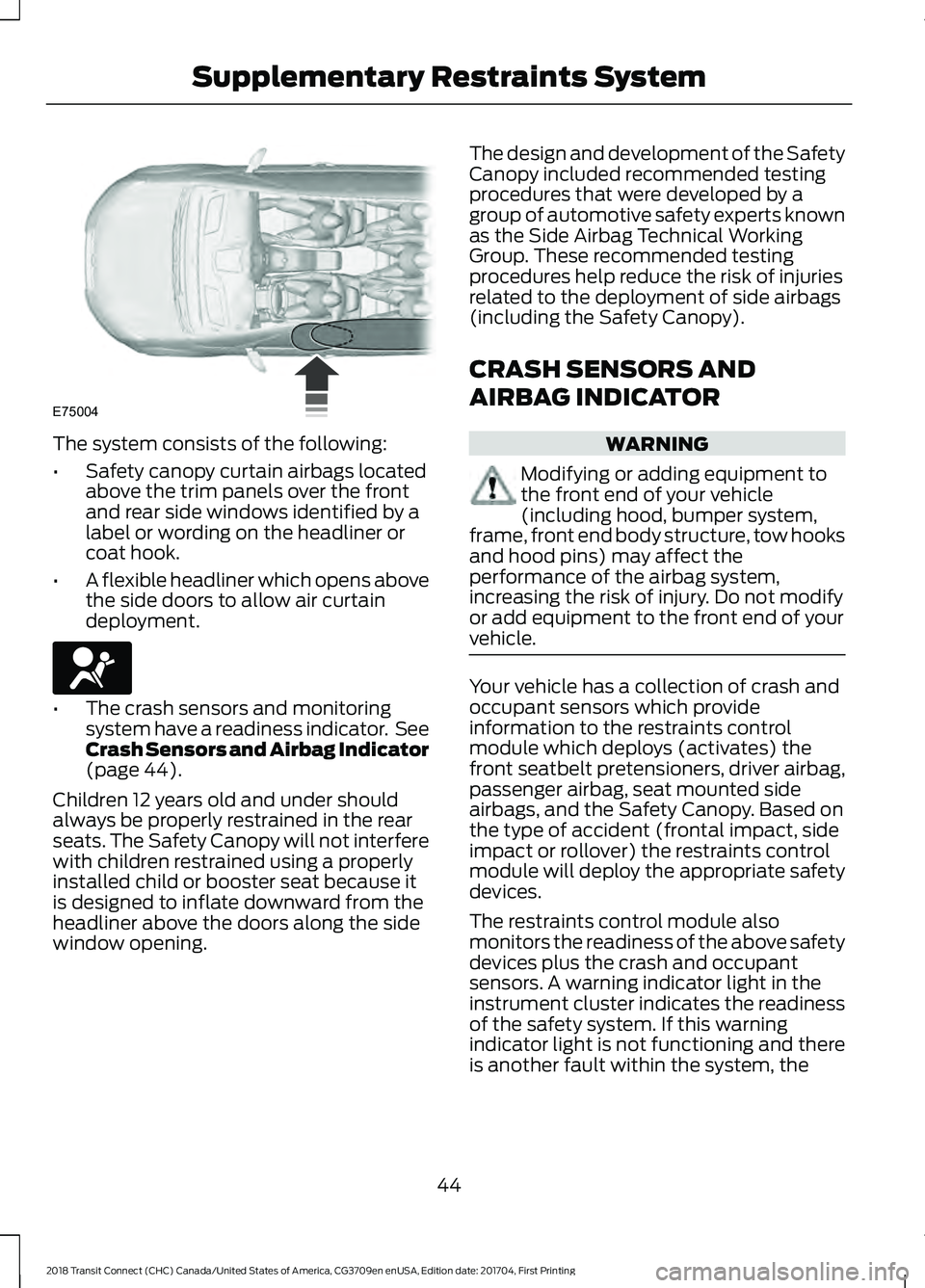
The system consists of the following:
•
Safety canopy curtain airbags located
above the trim panels over the front
and rear side windows identified by a
label or wording on the headliner or
coat hook.
• A flexible headliner which opens above
the side doors to allow air curtain
deployment. •
The crash sensors and monitoring
system have a readiness indicator. See
Crash Sensors and Airbag Indicator
(page 44).
Children 12 years old and under should
always be properly restrained in the rear
seats. The Safety Canopy will not interfere
with children restrained using a properly
installed child or booster seat because it
is designed to inflate downward from the
headliner above the doors along the side
window opening. The design and development of the Safety
Canopy included recommended testing
procedures that were developed by a
group of automotive safety experts known
as the Side Airbag Technical Working
Group. These recommended testing
procedures help reduce the risk of injuries
related to the deployment of side airbags
(including the Safety Canopy).
CRASH SENSORS AND
AIRBAG INDICATOR
WARNING
Modifying or adding equipment to
the front end of your vehicle
(including hood, bumper system,
frame, front end body structure, tow hooks
and hood pins) may affect the
performance of the airbag system,
increasing the risk of injury. Do not modify
or add equipment to the front end of your
vehicle. Your vehicle has a collection of crash and
occupant sensors which provide
information to the restraints control
module which deploys (activates) the
front seatbelt pretensioners, driver airbag,
passenger airbag, seat mounted side
airbags, and the Safety Canopy. Based on
the type of accident (frontal impact, side
impact or rollover) the restraints control
module will deploy the appropriate safety
devices.
The restraints control module also
monitors the readiness of the above safety
devices plus the crash and occupant
sensors. A warning indicator light in the
instrument cluster indicates the readiness
of the safety system. If this warning
indicator light is not functioning and there
is another fault within the system, the
44
2018 Transit Connect (CHC) Canada/United States of America, CG3709en enUSA, Edition date: 201704, First Printing Supplementary Restraints SystemE75004 E67017
Page 69 of 449
GENERAL INFORMATION
Condensation in the Exterior Front
Lamps and Rear Lamps
Exterior front lamps and rear lamps have
vents to accommodate normal changes
in air pressure.
Condensation can be a natural by-product
of this design. When moist air enters the
lamp assembly through the vents, there is
a possibility that condensation can occur
when the temperature is cold. When
normal condensation occurs, a fine mist
can form on the interior of the lens. The
fine mist eventually clears and exits
through the vents during normal operation.
Clearing time may take as long as 48 hours
under dry weather conditions.
Examples of acceptable condensation are:
•
The presence of a fine mist (no streaks,
drip marks or large droplets).
• A fine mist covers less than 50% of the
lens.
Examples of unacceptable condensation
are:
• A water puddle inside the lamp.
• Streaks, drip marks or large droplets
present on the interior of the lens.
If you see any unacceptable condensation,
have your vehicle checked by an authorized
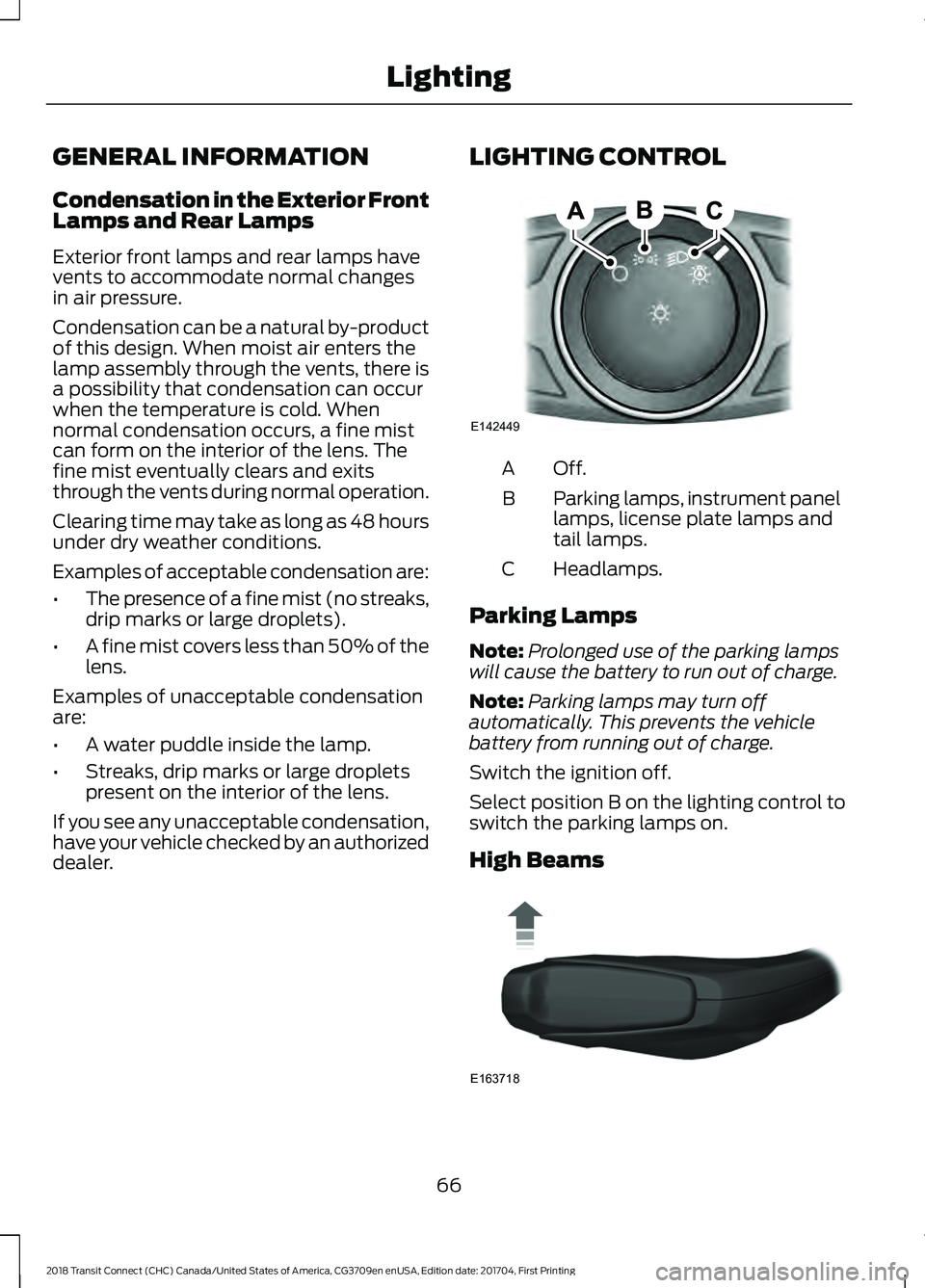
dealer. LIGHTING CONTROL Off.A
Parking lamps, instrument panel
lamps, license plate lamps and
tail lamps.
B
Headlamps.
C
Parking Lamps
Note: Prolonged use of the parking lamps
will cause the battery to run out of charge.
Note: Parking lamps may turn off
automatically. This prevents the vehicle
battery from running out of charge.
Switch the ignition off.
Select position B on the lighting control to
switch the parking lamps on.
High Beams 66
2018 Transit Connect (CHC) Canada/United States of America, CG3709en enUSA, Edition date: 201704, First Printing LightingE142449 E163718
Page 100 of 449
Fan speed control: Adjust the volume of air circulated in the vehicle.
A
Recirculated air:
Press the button to switch between outside air and
recirculated air. The air currently in the passenger compartment recirculates.
This can reduce the time needed to cool the interior and reduce unwanted odors
from entering your vehicle.
B
Temperature control:
Controls the temperature of the air circulated in your
vehicle.
C
A/C:
Press the button to switch the air conditioning on or off. Use air
conditioning with recirculated air to improve cooling performance and efficiency.
D
Air distribution control: Adjust the control to turn airflow from the windshield,
instrument panel, or footwell vents on or off.
E
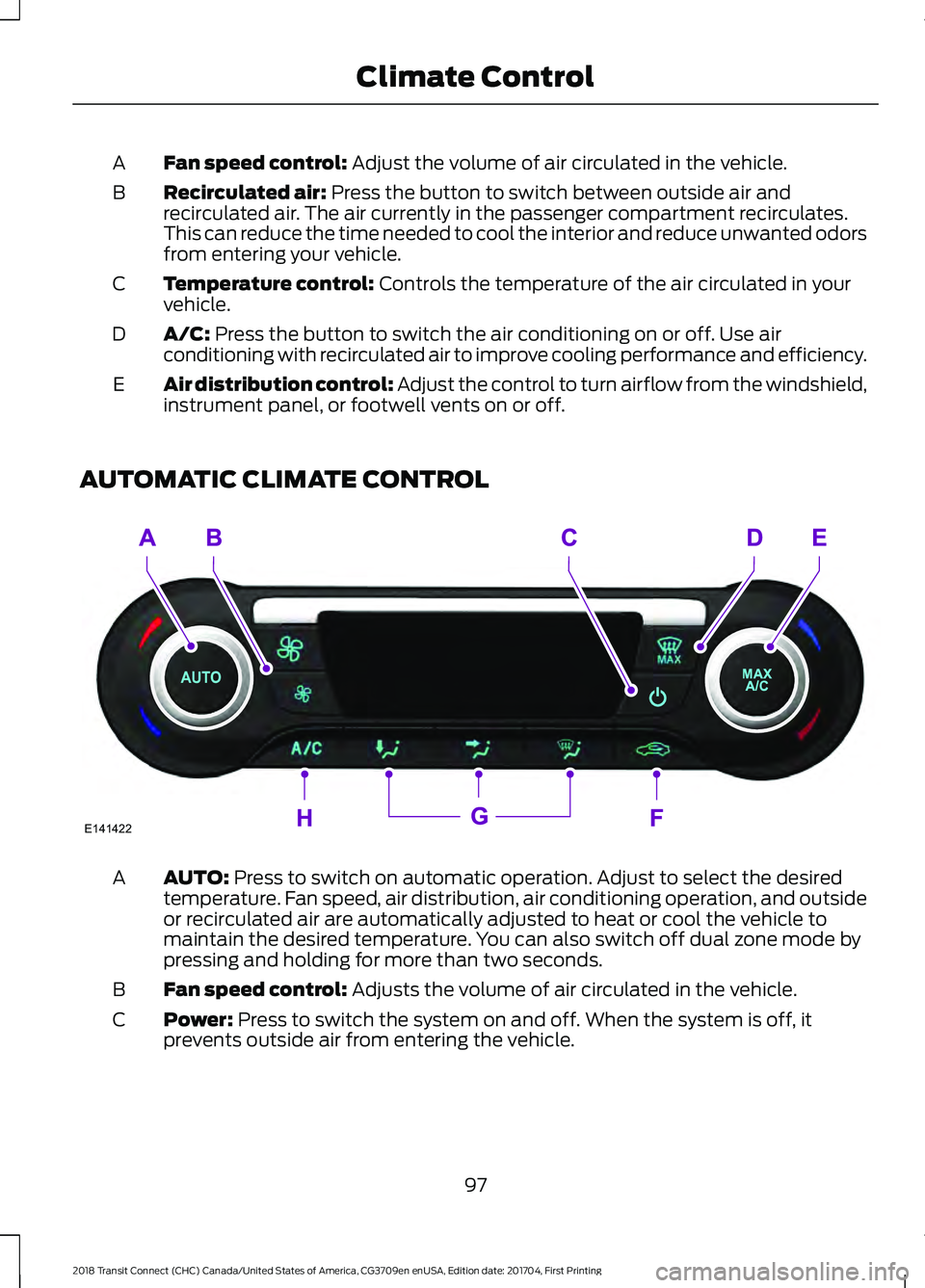
AUTOMATIC CLIMATE CONTROL AUTO:
Press to switch on automatic operation. Adjust to select the desired
temperature. Fan speed, air distribution, air conditioning operation, and outside
or recirculated air are automatically adjusted to heat or cool the vehicle to
maintain the desired temperature. You can also switch off dual zone mode by
pressing and holding for more than two seconds.
A
Fan speed control:
Adjusts the volume of air circulated in the vehicle.
B
Power:
Press to switch the system on and off. When the system is off, it
prevents outside air from entering the vehicle.
C
97
2018 Transit Connect (CHC) Canada/United States of America, CG3709en enUSA, Edition date: 201704, First Printing Climate ControlE141422
Page 101 of 449
MAX Defrost: Press to switch on defrost. The driver and passenger settings
set to HI, outside air flows through the windshield vents, and fan automatically
adjusts to the highest speed. You can also use this setting to defrost and clear
the windshield of a thin covering of ice. The heated rear window also
automatically turns on when you select maximum defrost.
D
Note:
To prevent window fogging, you cannot select recirculated air when
maximum defrost is on.
MAX A/C:
Press for maximum cooling. The driver and passenger settings set
to LO, recirculated air flows through the instrument panel vents, air conditioning
automatically turns on and the fan automatically adjusts to the highest speed.
E
Recirculated air:
Press to switch between outside air and recirculated air. The
air currently in the passenger compartment recirculates. This may reduce the
time needed to cool the interior (when used with A/C) and reduce unwanted
odors from entering your vehicle.
F
Note:
Recirculated air may turn on and off automatically (or prevent you from
switching on) in all modes except MAX A/C to reduce the risk of fogging or to
improve cooling efficiency.
Air distribution control:
Press to switch airflow from the windshield,
instrument panel, or footwell vents on or off. You can distribute air through any
combination of these vents.
G
A/C:
Press to switch the air conditioning on or off. Air conditioning cools your
vehicle using outside air. Use A/C with recirculated air to improve performance
and efficiency.
H
Note: In certain conditions (for example, maximum defrost), the air conditioning
compressor may continue to operate even though the air conditioning is
switched off.
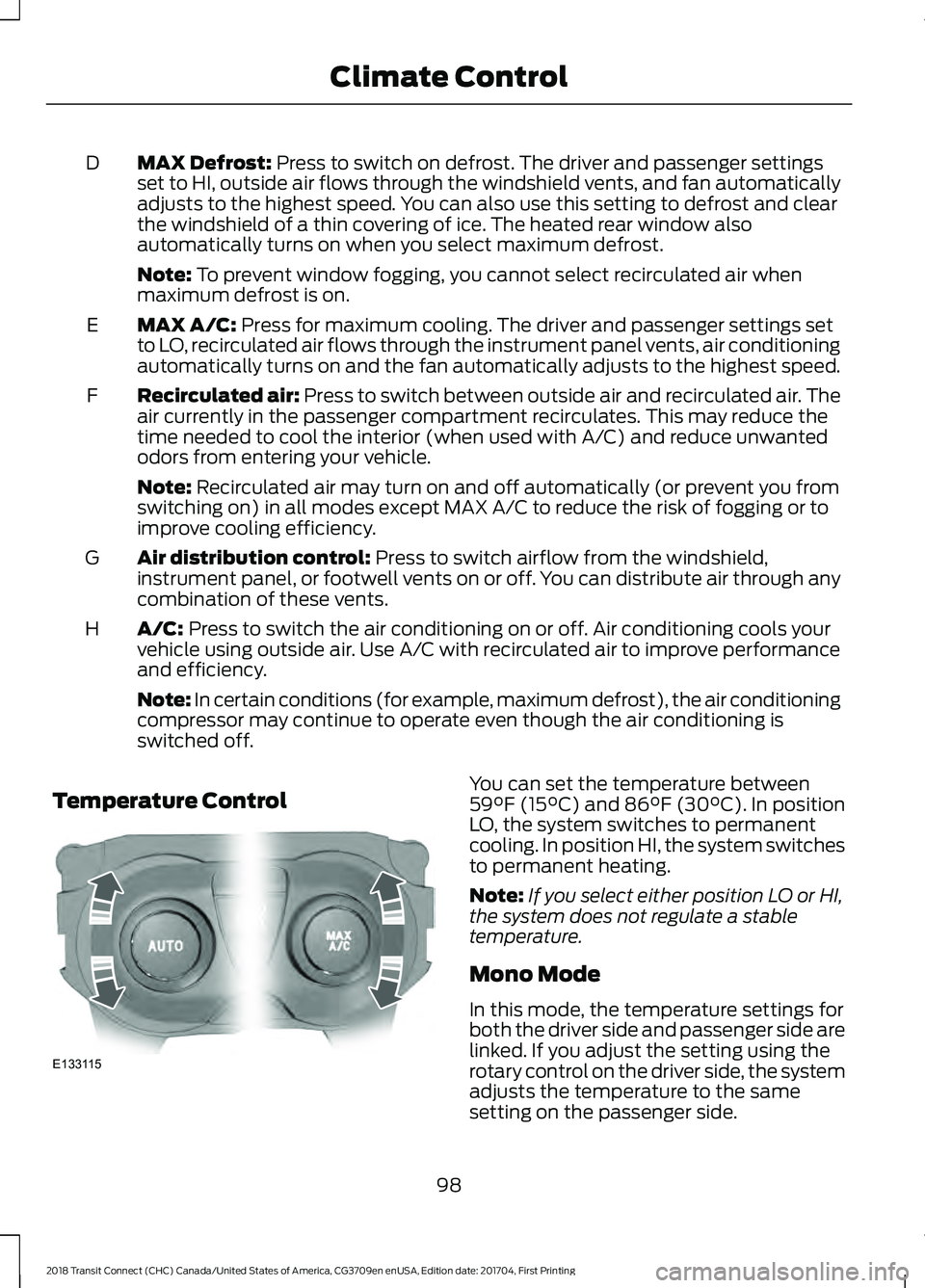
Temperature Control You can set the temperature between
59°F (15°C)
and 86°F (30°C). In position
LO, the system switches to permanent
cooling. In position HI, the system switches
to permanent heating.
Note: If you select either position LO or HI,
the system does not regulate a stable
temperature.
Mono Mode
In this mode, the temperature settings for
both the driver side and passenger side are
linked. If you adjust the setting using the
rotary control on the driver side, the system
adjusts the temperature to the same
setting on the passenger side.
98
2018 Transit Connect (CHC) Canada/United States of America, CG3709en enUSA, Edition date: 201704, First Printing Climate ControlE133115
Page 102 of 449
Switching Mono Mode Off
Select a temperature for the passenger
side using the rotary control on the
passenger side. Mono mode automatically
switches off. The temperature on the driver
side remains unchanged. You can now
adjust the driver side and passenger side
temperatures independently. The
temperature settings for each side are
shown in the display.
Switching Mono Mode Back On
Press and hold the AUTO button. The
passenger side temperature is adjusted to
the driver side temperature setting.
HINTS ON CONTROLLING THE
INTERIOR CLIMATE
General Hints
Note: Prolonged use of recirculated air may
cause the windows to fog up.
Note: A small amount of air may be felt
from the footwell air vents regardless of the
air distribution setting.
Note: To reduce humidity build-up inside
your vehicle, do not drive with the system
switched off or with recirculated air always
switched on.
Note: Do not place objects under the front
seats as this may interfere with the airflow
to the rear seats.
Note: Keep the air intakes in front of the
windshield free from obstruction (such as
snow or leaves) to allow the climate control
system to function effectively.
Note: To reduce fogging of the windshield
during humid weather, adjust the air
distribution control to the windshield air
vents position. Increase the temperature
and fan speed and press the A/C button to
improve clearing, if required. Heating the Interior Quickly
•
Adjust the fan speed to the highest
speed setting.
• Adjust the temperature control to the
highest setting.
• Adjust the air distribution control to the
footwell air vents position.
Recommended Settings for
Heating
• Adjust the fan speed to the second
speed setting.
• Adjust the temperature control to the
midway point of the hot settings.
• Adjust the air distribution control to the
footwell and windshield air vents
position.
Cooling the Interior Quickly
• Adjust the fan speed to the highest
speed setting.
• Adjust the temperature control to the
MAX A/C
position.
• Adjust the air distribution control to the
instrument panel air vents position.
Recommended Settings for
Cooling
• Adjust the fan speed to the second
speed setting.
• Adjust the temperature control to the
midway point of the cold settings.
• Adjust the air distribution control to the
instrument panel air vents position.
Vehicle Stationary for Extended
Periods During Extreme High
Ambient Temperatures
• Apply the parking brake.
• Move the transmission selector lever
to position
P or neutral.
99
2018 Transit Connect (CHC) Canada/United States of America, CG3709en enUSA, Edition date: 201704, First Printing Climate Control
Page 103 of 449
•
Adjust the temperature control to the
MAX A/C position.
• Adjust the fan speed to the lowest
speed setting.
Side Window Defogging in Cold
Weather
• Adjust the air distribution control to the
instrument panel and windshield air
vents positions.
• Press the
A/C button.
• Adjust the temperature control to the
desired setting.
• Adjust the fan speed to the highest
setting. •
Direct the instrument panel side air
vents toward the side windows.
• Close the instrument panel vents.
Maximum Cooling Performance in
Instrument Panel or Instrument
Panel and Footwell Positions
• Adjust the temperature control to the
lowest setting.
• Press the A/C and recirculated air
buttons.
• Adjust the fan speed to the highest
setting initially and then adjust it to suit
the desired comfort level.
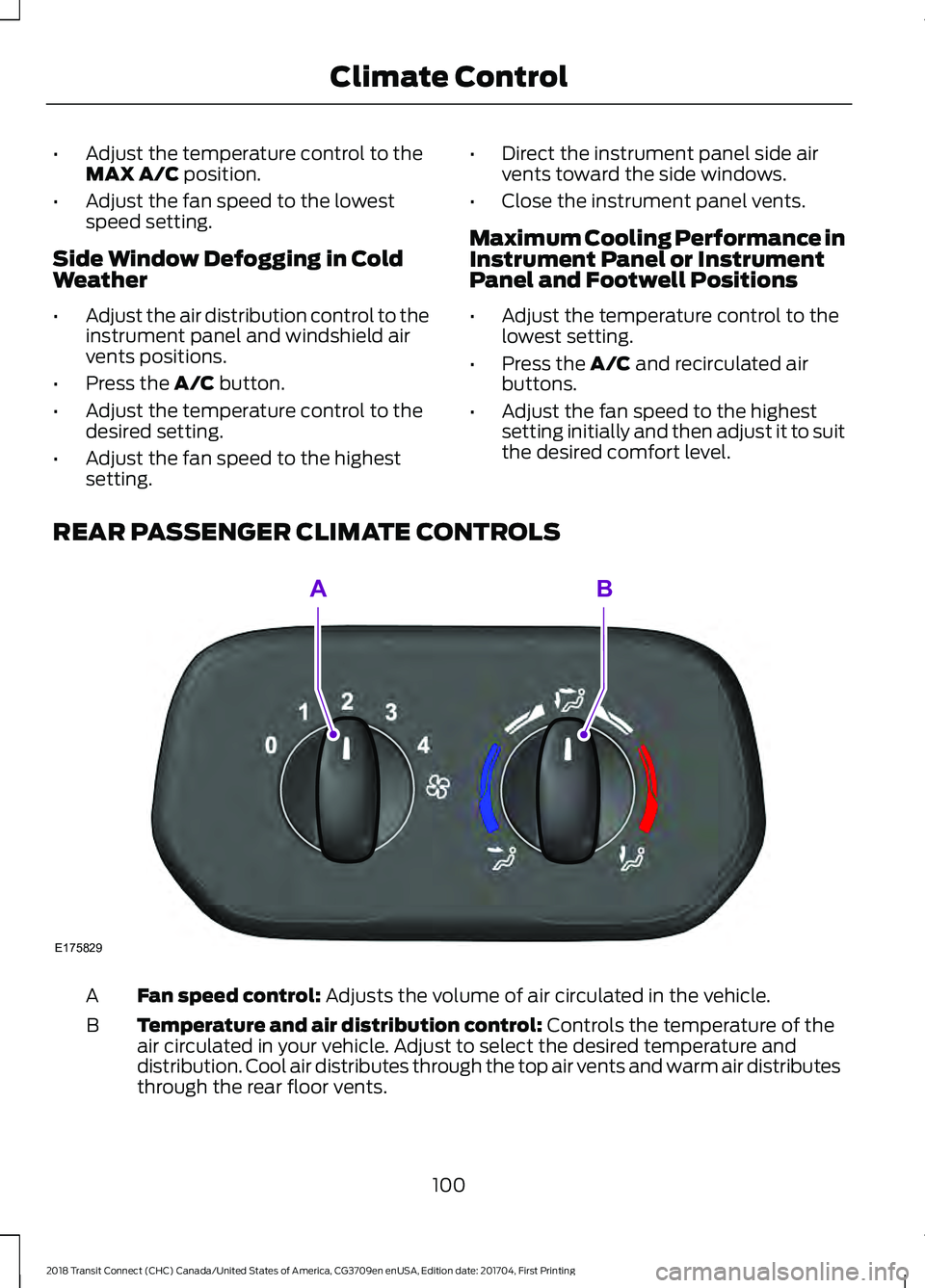
REAR PASSENGER CLIMATE CONTROLS Fan speed control:
Adjusts the volume of air circulated in the vehicle.
A
Temperature and air distribution control:
Controls the temperature of the
air circulated in your vehicle. Adjust to select the desired temperature and
distribution. Cool air distributes through the top air vents and warm air distributes
through the rear floor vents.
B
100
2018 Transit Connect (CHC) Canada/United States of America, CG3709en enUSA, Edition date: 201704, First Printing Climate ControlE175829
AB
Page 116 of 449
12 Volt DC Power Point
WARNINGS
Do not plug optional electrical
accessories into the cigar lighter
socket. Incorrect use of the cigar
lighter can cause damage not covered by
the vehicle warranty, and can result in fire
or serious injury. Do not use a power point for
operating a cigar lighter. Incorrect
use of the power points can cause
damage not covered by the vehicle
warranty, and can result in fire or serious
injury. Note:
When you switch the ignition on, you
can use the socket to power 12 volt
appliances with a maximum current rating
of 15 amps.
If the power supply does not work after you
switch the ignition off, switch the ignition
on.
Note: Do not hang any accessory from the
accessory plug.
Note: Do not use the power point over the
vehicle capacity of 12 volt DC 180 watts or
a fuse may blow.
Note: Always keep the power point caps
closed when not in use.
Do not insert objects other than an
accessory plug into the power point. This
will damage the power point and blow the
fuse.
Run the vehicle for full capacity use of the
power point.
To prevent the battery from running out of
charge:
• Do not use the power point longer than
necessary when the vehicle is not
running.
• Do not leave devices plugged in
overnight or when you park your vehicle
for extended periods. Locations
Power points may be in the following
locations:
•
Front of the floor console.
• Rear of the floor console.
• Right hand side of the luggage
compartment.
• Instrument panel cluster storage
compartment.
CIGAR LIGHTER WARNING
Do not plug optional electrical
accessories into the cigar lighter
socket. Incorrect use of the cigar
lighter can cause damage not covered by
the vehicle warranty, and can result in fire
or serious injury. Note:
Do not hold the cigar lighter element
pressed in.
Note: If the power supply does not work
after you switch the ignition off, switch the
ignition on.
Note: If you use the socket when the engine
is not running, the battery may lose charge.
Note: When you switch the ignition on, you
can use the socket to power 12 volt
appliances with a maximum current rating
of 15 amps.
113
2018 Transit Connect (CHC) Canada/United States of America, CG3709en enUSA, Edition date: 201704, First Printing Auxiliary Power Points