low beam FORD TRANSIT CONNECT 2018 Owners Manual
[x] Cancel search | Manufacturer: FORD, Model Year: 2018, Model line: TRANSIT CONNECT, Model: FORD TRANSIT CONNECT 2018Pages: 449, PDF Size: 6.73 MB
Page 67 of 449
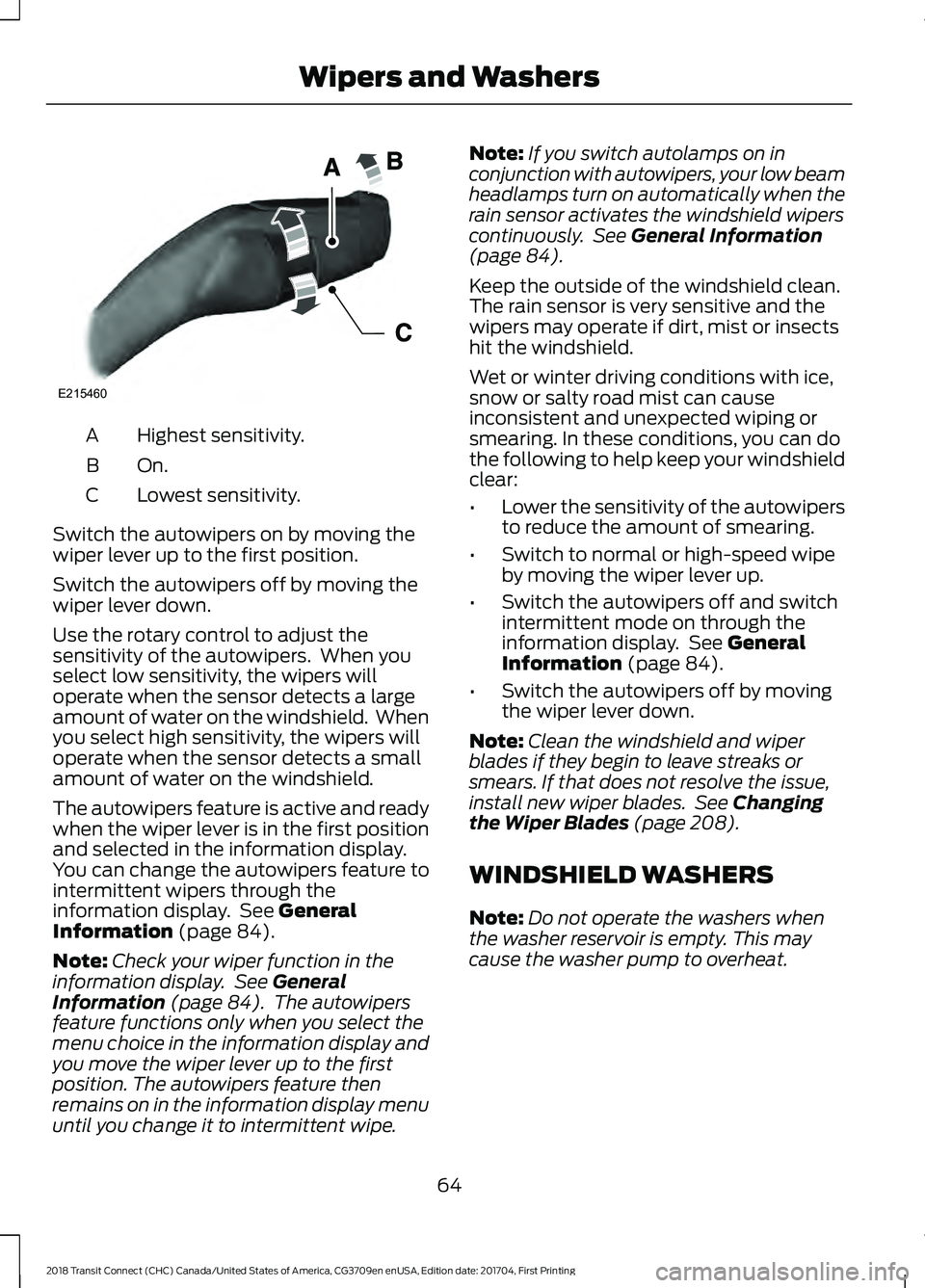
Highest sensitivity.
A
On.B
Lowest sensitivity.
C
Switch the autowipers on by moving the
wiper lever up to the first position.
Switch the autowipers off by moving the
wiper lever down.
Use the rotary control to adjust the
sensitivity of the autowipers. When you
select low sensitivity, the wipers will
operate when the sensor detects a large
amount of water on the windshield. When
you select high sensitivity, the wipers will
operate when the sensor detects a small
amount of water on the windshield.
The autowipers feature is active and ready
when the wiper lever is in the first position
and selected in the information display.
You can change the autowipers feature to
intermittent wipers through the
information display. See General
Information (page 84).
Note: Check your wiper function in the
information display. See
General
Information (page 84). The autowipers
feature functions only when you select the
menu choice in the information display and
you move the wiper lever up to the first
position. The autowipers feature then
remains on in the information display menu
until you change it to intermittent wipe. Note:
If you switch autolamps on in
conjunction with autowipers, your low beam
headlamps turn on automatically when the
rain sensor activates the windshield wipers
continuously. See
General Information
(page 84).
Keep the outside of the windshield clean.
The rain sensor is very sensitive and the
wipers may operate if dirt, mist or insects
hit the windshield.
Wet or winter driving conditions with ice,
snow or salty road mist can cause
inconsistent and unexpected wiping or
smearing. In these conditions, you can do
the following to help keep your windshield
clear:
• Lower the sensitivity of the autowipers
to reduce the amount of smearing.
• Switch to normal or high-speed wipe
by moving the wiper lever up.
• Switch the autowipers off and switch
intermittent mode on through the
information display. See
General
Information (page 84).
• Switch the autowipers off by moving
the wiper lever down.
Note: Clean the windshield and wiper
blades if they begin to leave streaks or
smears. If that does not resolve the issue,
install new wiper blades. See
Changing
the Wiper Blades (page 208).
WINDSHIELD WASHERS
Note: Do not operate the washers when
the washer reservoir is empty. This may
cause the washer pump to overheat.
64
2018 Transit Connect (CHC) Canada/United States of America, CG3709en enUSA, Edition date: 201704, First Printing Wipers and WashersE215460
Page 70 of 449
Push the lever away from you to switch
the high beam on.
Push the lever forward again or pull the
lever toward you to switch the high beams
off.
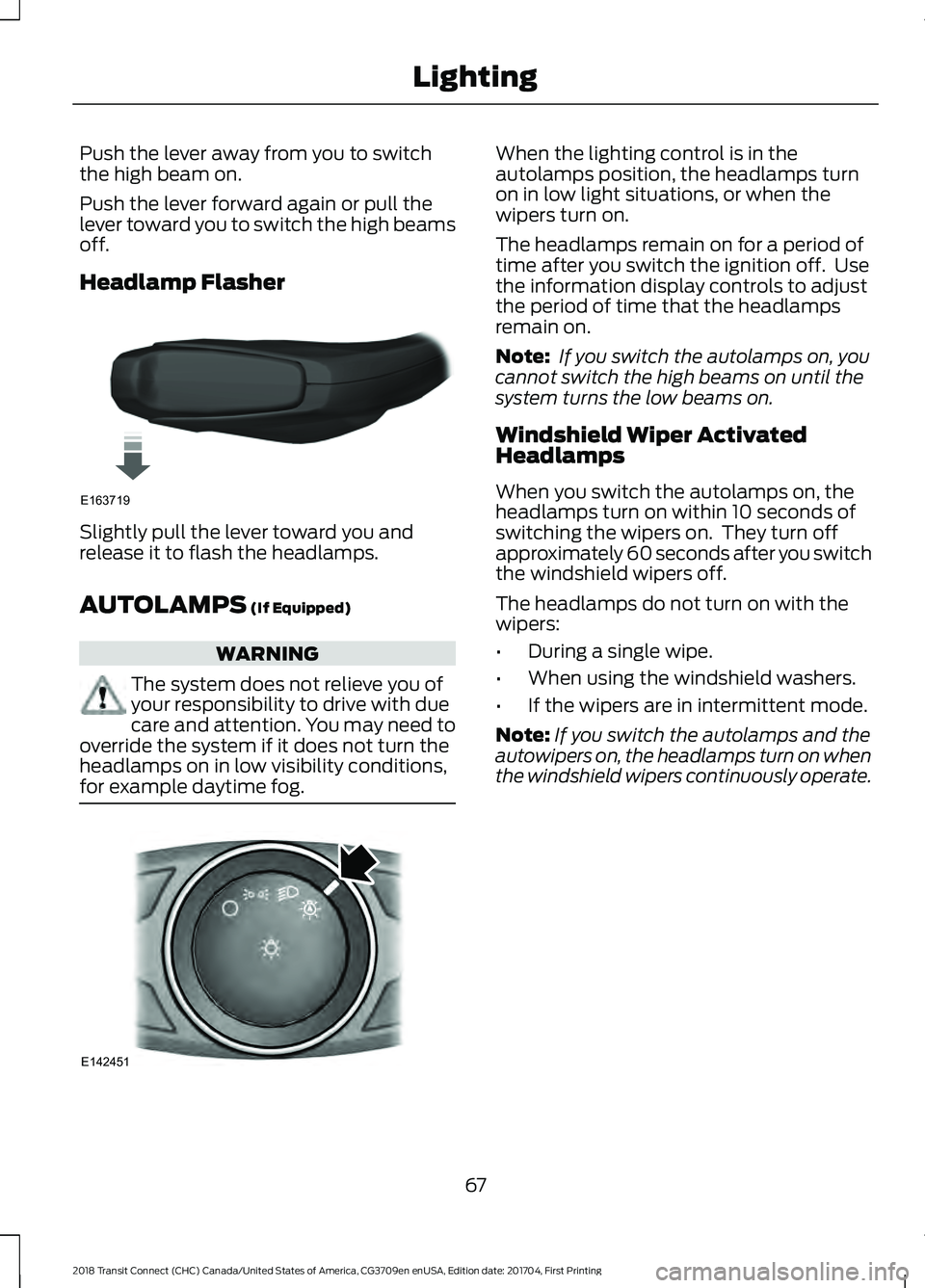
Headlamp Flasher
Slightly pull the lever toward you and
release it to flash the headlamps.
AUTOLAMPS (If Equipped)
WARNING
The system does not relieve you of
your responsibility to drive with due
care and attention. You may need to
override the system if it does not turn the
headlamps on in low visibility conditions,
for example daytime fog. When the lighting control is in the
autolamps position, the headlamps turn
on in low light situations, or when the
wipers turn on.
The headlamps remain on for a period of
time after you switch the ignition off. Use
the information display controls to adjust
the period of time that the headlamps
remain on.
Note:
If you switch the autolamps on, you
cannot switch the high beams on until the
system turns the low beams on.
Windshield Wiper Activated
Headlamps
When you switch the autolamps on, the
headlamps turn on within 10 seconds of
switching the wipers on. They turn off
approximately 60 seconds after you switch
the windshield wipers off.
The headlamps do not turn on with the
wipers:
• During a single wipe.
• When using the windshield washers.
• If the wipers are in intermittent mode.
Note: If you switch the autolamps and the
autowipers on, the headlamps turn on when
the windshield wipers continuously operate.
67
2018 Transit Connect (CHC) Canada/United States of America, CG3709en enUSA, Edition date: 201704, First Printing LightingE163719 E142451
Page 84 of 449
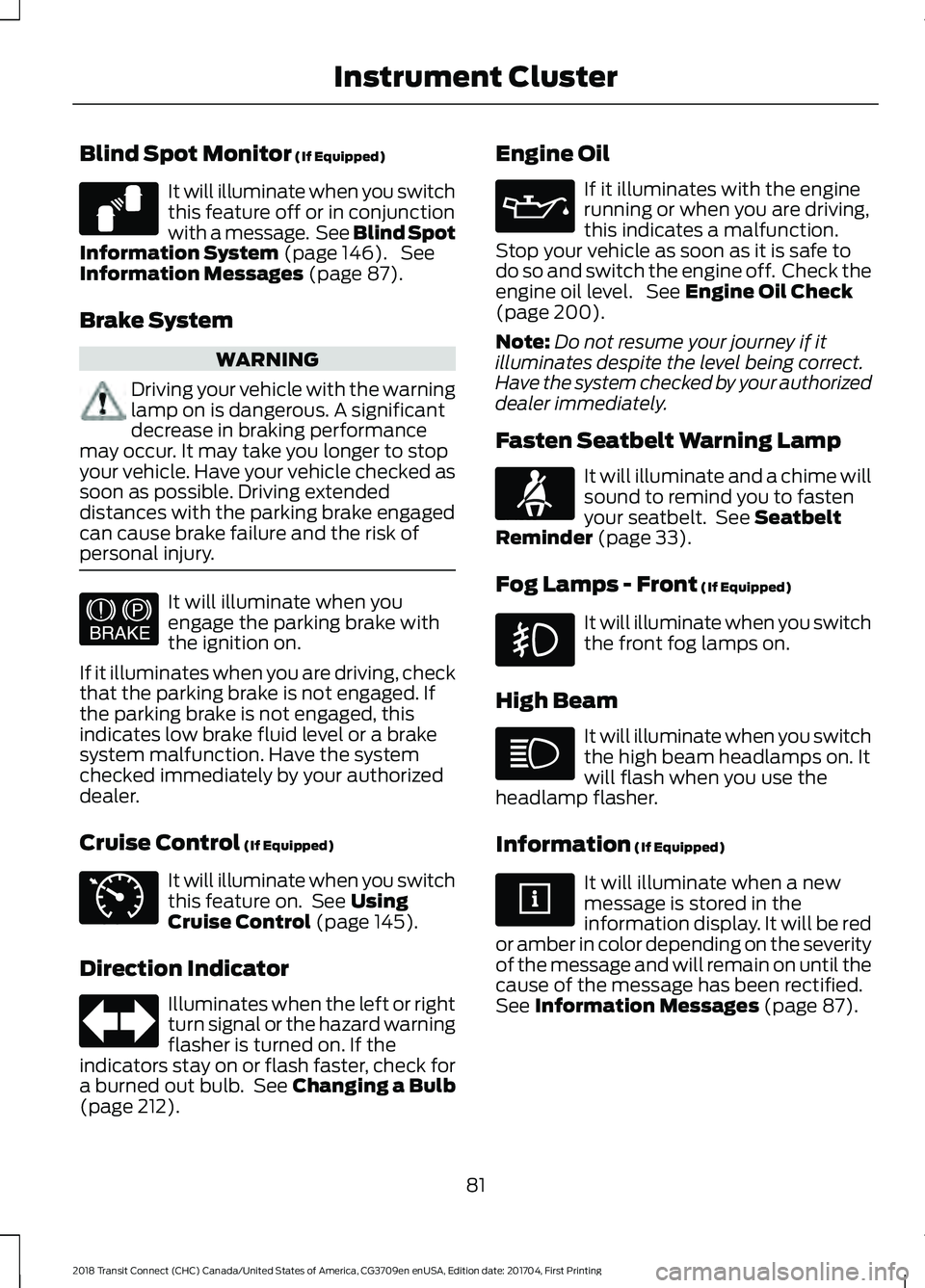
Blind Spot Monitor (If Equipped)
It will illuminate when you switch
this feature off or in conjunction
with a message. See Blind Spot
Information System
(page 146). See
Information Messages (page 87).
Brake System WARNING
Driving your vehicle with the warning
lamp on is dangerous. A significant
decrease in braking performance
may occur. It may take you longer to stop
your vehicle. Have your vehicle checked as
soon as possible. Driving extended
distances with the parking brake engaged
can cause brake failure and the risk of
personal injury. It will illuminate when you
engage the parking brake with
the ignition on.
If it illuminates when you are driving, check
that the parking brake is not engaged. If
the parking brake is not engaged, this
indicates low brake fluid level or a brake
system malfunction. Have the system
checked immediately by your authorized
dealer.
Cruise Control
(If Equipped) It will illuminate when you switch
this feature on. See
Using
Cruise Control (page 145).
Direction Indicator Illuminates when the left or right
turn signal or the hazard warning
flasher is turned on. If the
indicators stay on or flash faster, check for
a burned out bulb. See
Changing a Bulb
(page 212). Engine Oil If it illuminates with the engine
running or when you are driving,
this indicates a malfunction.
Stop your vehicle as soon as it is safe to
do so and switch the engine off. Check the
engine oil level. See
Engine Oil Check
(page 200).
Note: Do not resume your journey if it
illuminates despite the level being correct.
Have the system checked by your authorized
dealer immediately.
Fasten Seatbelt Warning Lamp It will illuminate and a chime will
sound to remind you to fasten
your seatbelt. See
Seatbelt
Reminder (page 33).
Fog Lamps - Front
(If Equipped) It will illuminate when you switch
the front fog lamps on.
High Beam It will illuminate when you switch
the high beam headlamps on. It
will flash when you use the
headlamp flasher.
Information
(If Equipped) It will illuminate when a new
message is stored in the
information display. It will be red
or amber in color depending on the severity
of the message and will remain on until the
cause of the message has been rectified.
See
Information Messages (page 87).
81
2018 Transit Connect (CHC) Canada/United States of America, CG3709en enUSA, Edition date: 201704, First Printing Instrument ClusterE124823 E144522 E71340 E71880
Page 95 of 449
Action
Message Indic-
ator
Message
See Changing a Bulb (page 212).
Displays if a trailer brake lamp bulb fails.
-
Trailer brake lamp Bulb
fault
Displays if a low beam bulb fails.
-
Low beam Bulb fault
See
Changing a Bulb (page 212).
Displays if an electrical malfunction occurs
with the headlamp system. Have your
vehicle checked as soon as possible.
Amber
Headlamp fault Service
required
Maintenance Action
Message Indic-
ator
Message
Displays when the engine oil life is depleted
and requires a change. See
Engine Oil
Check (page 200).
-
Oil change required
Indicates the brake fluid level is low and the
brake system should be inspected immedi-
ately. See Brake Fluid Check (page 206).
Have your vehicle checked immediately.
Red
Brake fluid level low
Service now
Displays when the washer fluid is low and
needs to be refilled. See
Washer Fluid
Check (page 206).
-
Washer fluid level low
Parking Aid Action
Message Indic-
ator
Message
The system has detected a fault that
requires service. Have your vehicle checked
as soon as possible.
Amber
Parking aid fault Service
required
92
2018 Transit Connect (CHC) Canada/United States of America, CG3709en enUSA, Edition date: 201704, First Printing Information Displays
Page 214 of 449
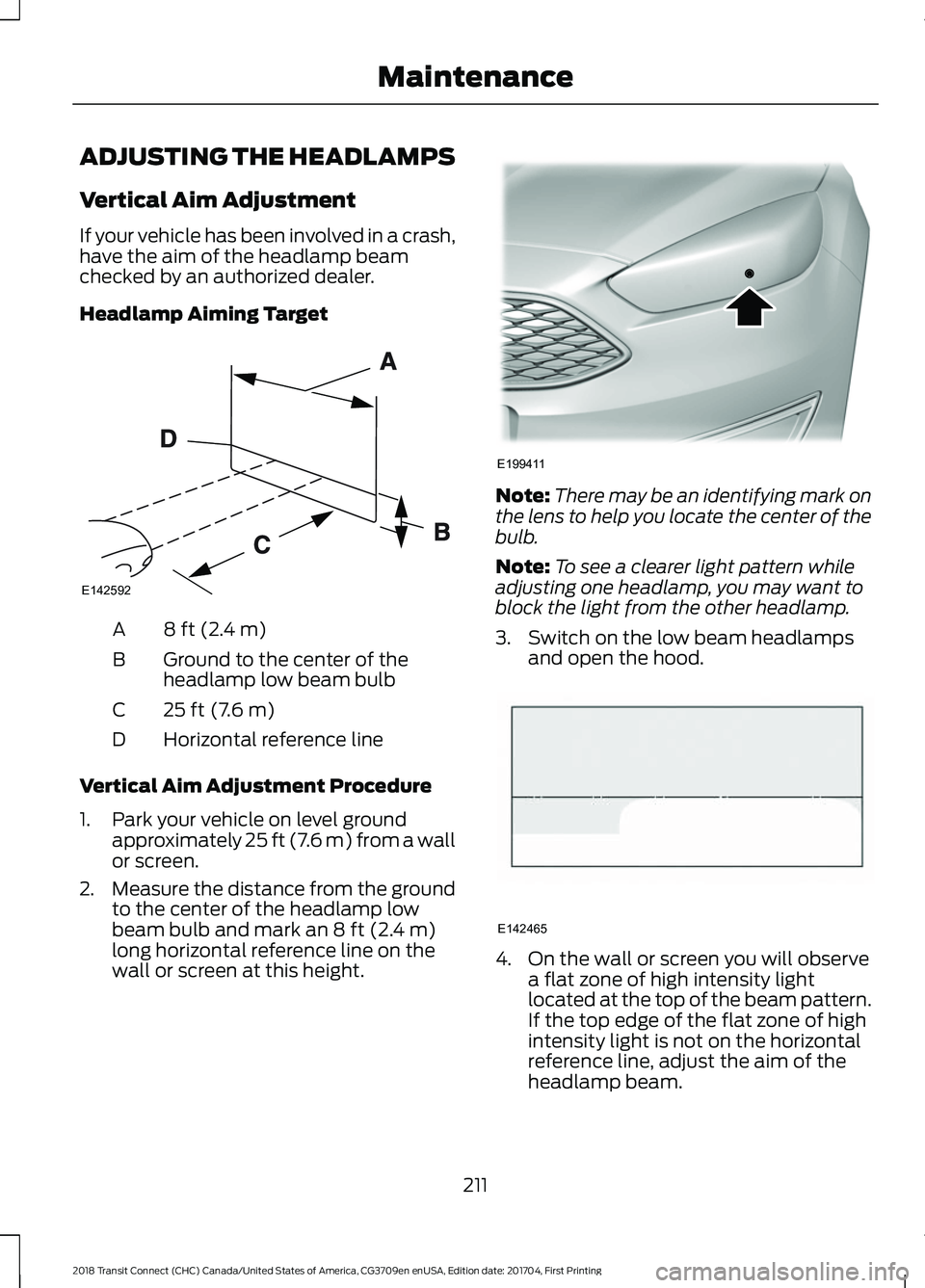
ADJUSTING THE HEADLAMPS
Vertical Aim Adjustment
If your vehicle has been involved in a crash,
have the aim of the headlamp beam
checked by an authorized dealer.
Headlamp Aiming Target
8 ft (2.4 m)
A
Ground to the center of the
headlamp low beam bulb
B
25 ft (7.6 m)
C
Horizontal reference line
D
Vertical Aim Adjustment Procedure
1. Park your vehicle on level ground approximately 25 ft (7.6 m) from a wall
or screen.
2. Measure the distance from the ground
to the center of the headlamp low
beam bulb and mark an
8 ft (2.4 m)
long horizontal reference line on the
wall or screen at this height. Note:
There may be an identifying mark on
the lens to help you locate the center of the
bulb.
Note: To see a clearer light pattern while
adjusting one headlamp, you may want to
block the light from the other headlamp.
3. Switch on the low beam headlamps and open the hood. 4. On the wall or screen you will observe
a flat zone of high intensity light
located at the top of the beam pattern.
If the top edge of the flat zone of high
intensity light is not on the horizontal
reference line, adjust the aim of the
headlamp beam.
211
2018 Transit Connect (CHC) Canada/United States of America, CG3709en enUSA, Edition date: 201704, First Printing MaintenanceE142592 E199411 E142465
Page 215 of 449
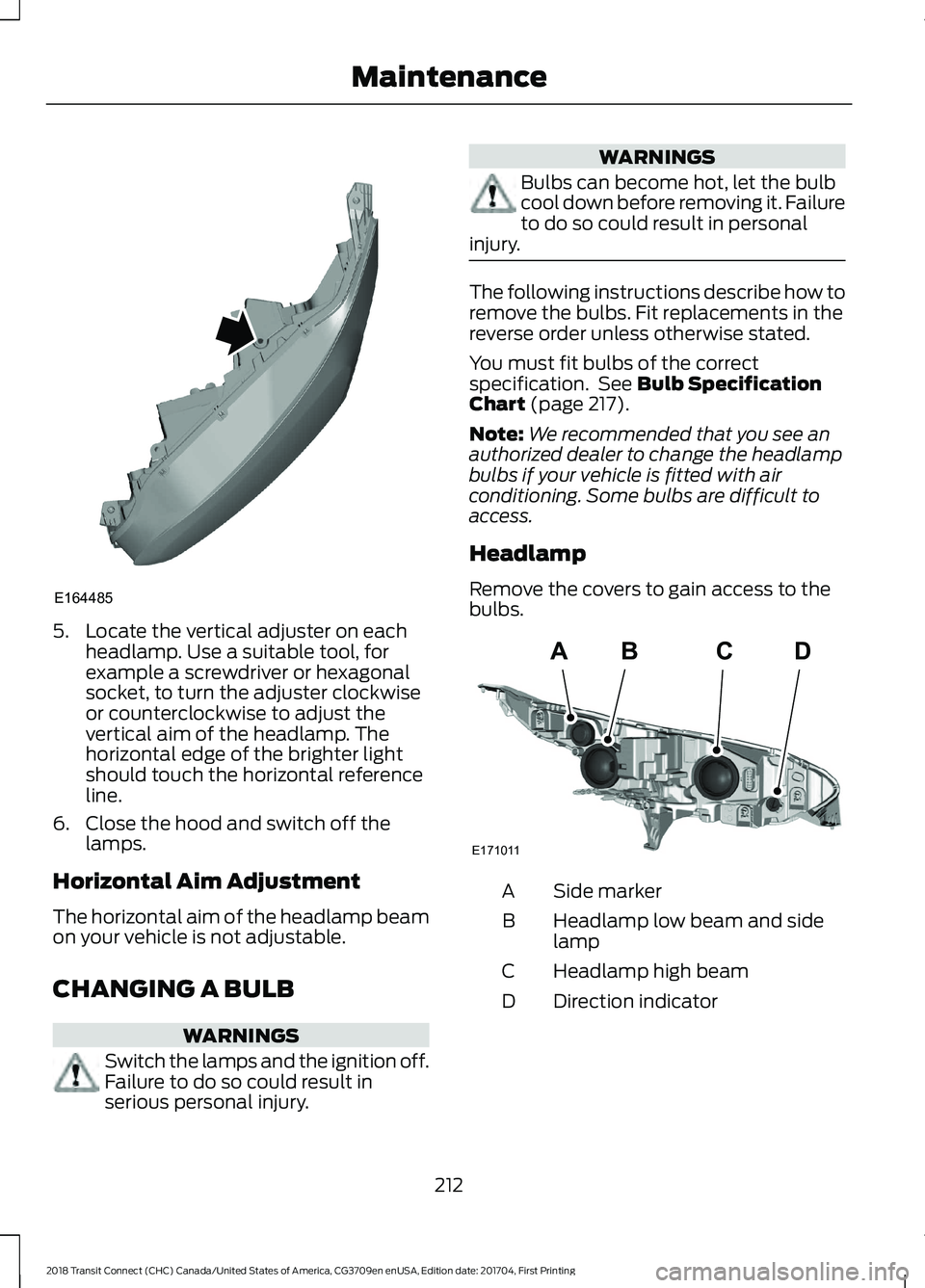
5. Locate the vertical adjuster on each
headlamp. Use a suitable tool, for
example a screwdriver or hexagonal
socket, to turn the adjuster clockwise
or counterclockwise to adjust the
vertical aim of the headlamp. The
horizontal edge of the brighter light
should touch the horizontal reference
line.
6. Close the hood and switch off the lamps.
Horizontal Aim Adjustment
The horizontal aim of the headlamp beam
on your vehicle is not adjustable.
CHANGING A BULB WARNINGS
Switch the lamps and the ignition off.
Failure to do so could result in
serious personal injury. WARNINGS
Bulbs can become hot, let the bulb
cool down before removing it. Failure
to do so could result in personal
injury. The following instructions describe how to
remove the bulbs. Fit replacements in the
reverse order unless otherwise stated.
You must fit bulbs of the correct
specification. See Bulb Specification
Chart (page 217).
Note: We recommended that you see an
authorized dealer to change the headlamp
bulbs if your vehicle is fitted with air
conditioning. Some bulbs are difficult to
access.
Headlamp
Remove the covers to gain access to the
bulbs. Side marker
A
Headlamp low beam and side
lamp
B
Headlamp high beam
C
Direction indicator
D
212
2018 Transit Connect (CHC) Canada/United States of America, CG3709en enUSA, Edition date: 201704, First Printing MaintenanceE164485 ABCD
E171011
Page 216 of 449
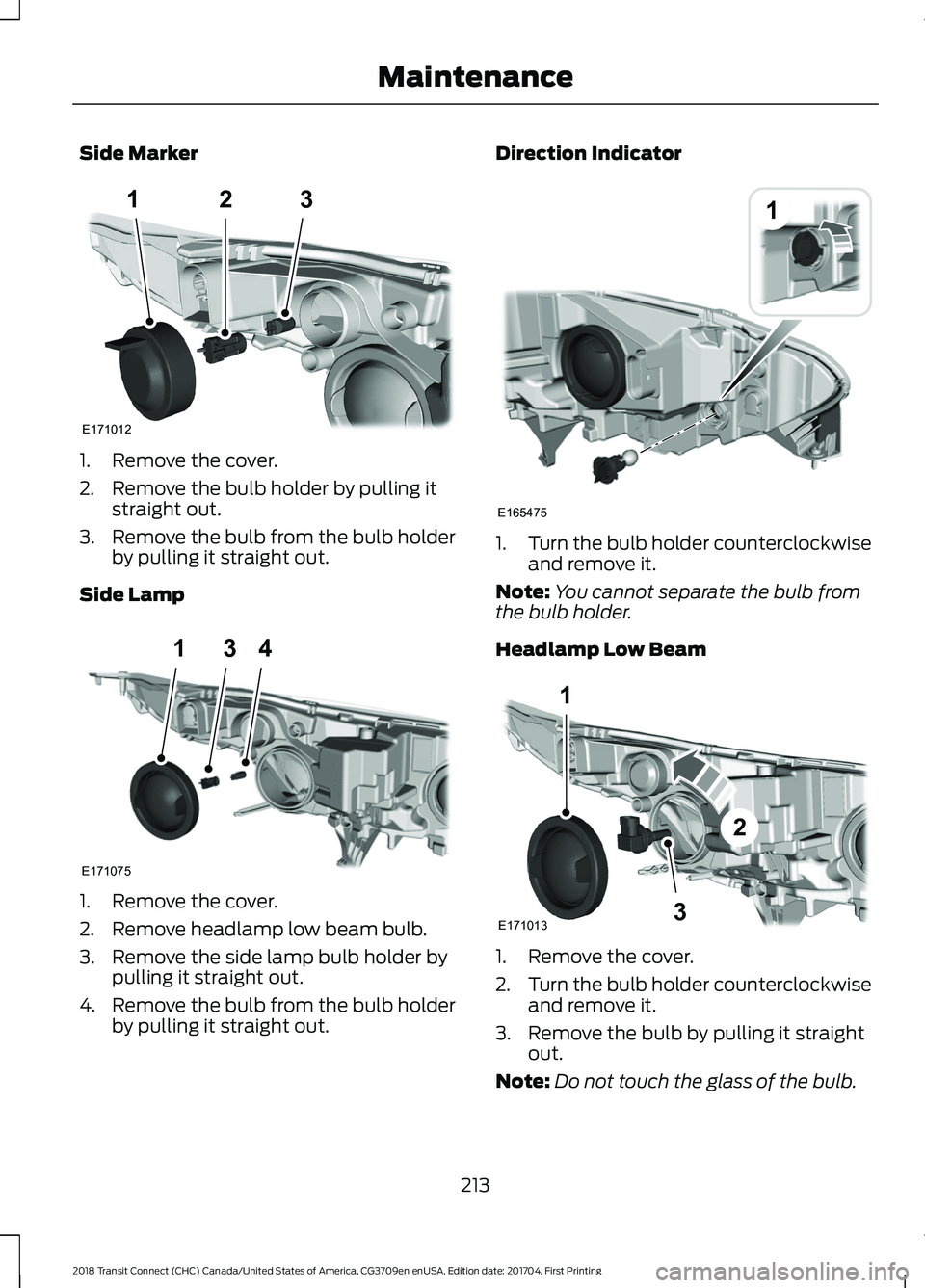
Side Marker
1. Remove the cover.
2. Remove the bulb holder by pulling it
straight out.
3. Remove the bulb from the bulb holder
by pulling it straight out.
Side Lamp 1. Remove the cover.
2. Remove headlamp low beam bulb.
3. Remove the side lamp bulb holder by
pulling it straight out.
4. Remove the bulb from the bulb holder
by pulling it straight out. Direction Indicator
1.
Turn the bulb holder counterclockwise
and remove it.
Note: You cannot separate the bulb from
the bulb holder.
Headlamp Low Beam 1. Remove the cover.
2.
Turn the bulb holder counterclockwise
and remove it.
3. Remove the bulb by pulling it straight out.
Note: Do not touch the glass of the bulb.
213
2018 Transit Connect (CHC) Canada/United States of America, CG3709en enUSA, Edition date: 201704, First Printing Maintenance123
E171012 E171075
314 1
E165475 1
3
2
E171013
Page 220 of 449
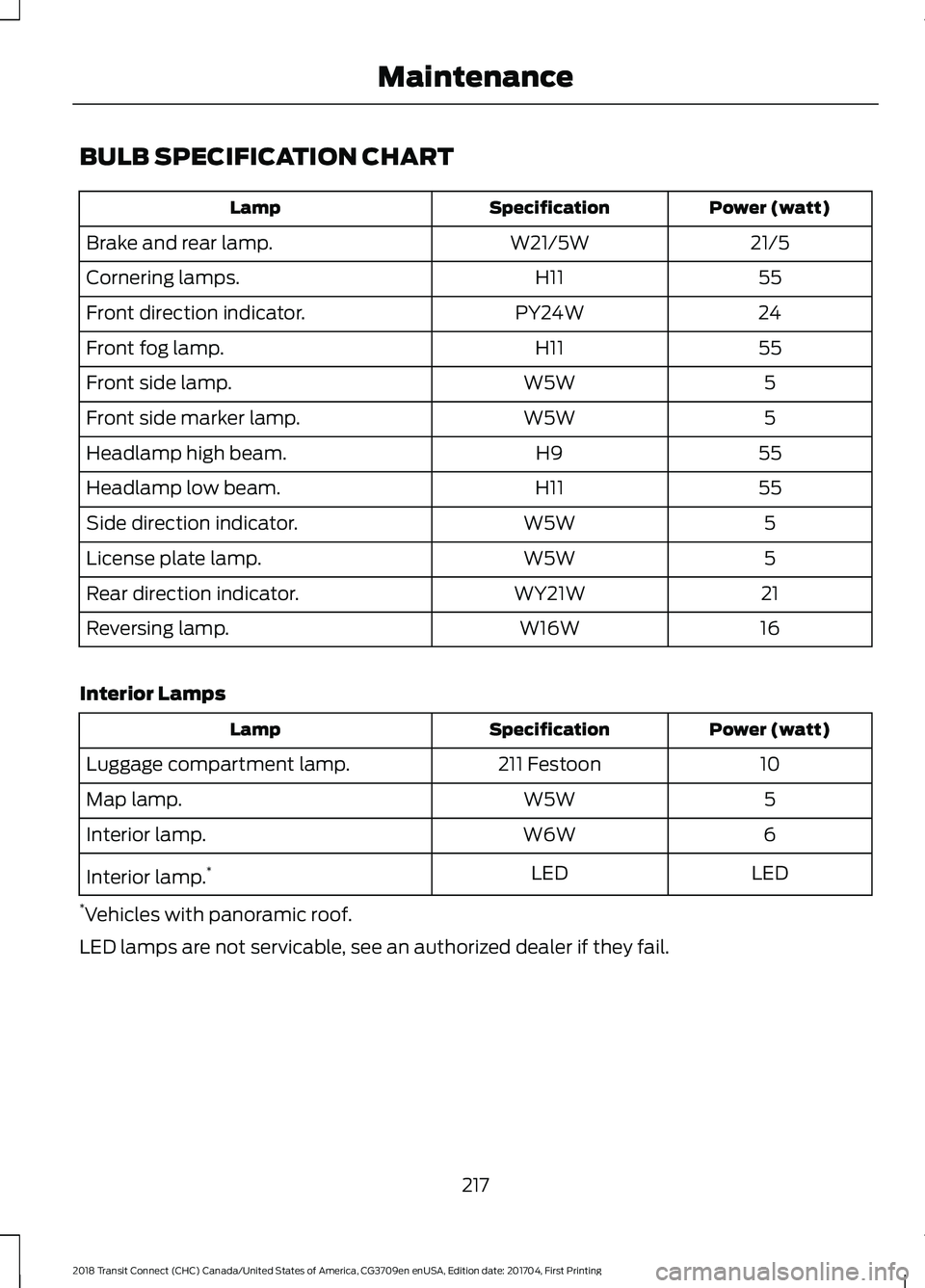
BULB SPECIFICATION CHART
Power (watt)
Specification
Lamp
21/5
W21/5W
Brake and rear lamp.
55
H11
Cornering lamps.
24
PY24W
Front direction indicator.
55
H11
Front fog lamp.
5
W5W
Front side lamp.
5
W5W
Front side marker lamp.
55
H9
Headlamp high beam.
55
H11
Headlamp low beam.
5
W5W
Side direction indicator.
5
W5W
License plate lamp.
21
WY21W
Rear direction indicator.
16
W16W
Reversing lamp.
Interior Lamps Power (watt)
Specification
Lamp
10
211 Festoon
Luggage compartment lamp.
5
W5W
Map lamp.
6
W6W
Interior lamp.
LED
LED
Interior lamp. *
* Vehicles with panoramic roof.
LED lamps are not servicable, see an authorized dealer if they fail.
217
2018 Transit Connect (CHC) Canada/United States of America, CG3709en enUSA, Edition date: 201704, First Printing Maintenance
Page 444 of 449
Maximum Cooling Performance in
Instrument Panel or Instrument Panel
and Footwell Positions............................... 100
Recommended Settings for Cooling ...........99
Recommended Settings for Heating...........99
Side Window Defogging in Cold Weather............................................................ 100
Vehicle Stationary for Extended Periods During Extreme High Ambient
Temperatures................................................... 99
Hints on Driving With Anti-Lock Brakes............................................................134
Home Screen.................................................325
Hood Lock See: Opening and Closing the Hood...........197
I
Ignition Switch
................................................116
In California (U.S. Only)..............................179
Information Display Control.......................62
Information Displays....................................84
General Information........................................... 84
Information Messages
..................................87
Transmission.......................................................... 95
Installing Child Restraints.............................17 Child Restraints...................................................... 17
Using Lap and Shoulder Belts.......................... 18
Using Lower Anchors and Tethers for Children (LATCH)............................................ 20
Using Tether Straps............................................. 22
Instrument Cluster
.........................................79
Instrument Lighting Dimmer.....................68
Interior Lamps - Vehicles With: Panoramic Roof Panel................................71
Center Mounted Lamp........................................ 72
Luggage Compartment Lamp......................... 72
Side Mounted Lamp............................................. 71
Interior Lamps - Vehicles Without: Panoramic Roof Panel..............................70
Courtesy Lamp...................................................... 70
Luggage Compartment Lamp.......................... 71
Reading Lamps....................................................... 71
Interior Mirror....................................................77 Auto-Dimming Mirror........................................... 77
Introduction.........................................................7 J
Jump Starting the Vehicle
..........................175
Connecting the Jumper Cables...................... 175
Jump Starting....................................................... 176
Preparing Your Vehicle...................................... 175
Removing the Jumper Cables........................ 176
K
Keys and Remote Controls........................46
L
Lighting Control..............................................66 Headlamp Flasher................................................ 67
High Beams............................................................ 66
Parking Lamps...................................................... 66
Lighting..............................................................66 General Information........................................... 66
Load Carriers See: Roof Racks and Load Carriers..............155
Load Carrying
.................................................153
Load Limit.......................................................156 Special Loading Instructions for Owners of
Pick-up Trucks and Utility-type
Vehicles.............................................................. 161
Vehicle Loading - with and without a Trailer................................................................. 156
Locking and Unlocking
.................................53
Autolock................................................................... 55
Autounlock............................................................. 55
Emergency Locking with the Key................... 55
Locking and Unlocking the Doors From Inside.................................................................... 53
Locking and Unlocking the Doors with the Key Blade............................................................ 54
Opening the Double Rear Doors..................... 53
Opening the Double Rear Doors From Inside.................................................................... 56
Remote Control..................................................... 53
Smart Unlocks for Integrated Keyhead Transmitter........................................................ 54
Unlocking the Doors with the Interior Door Handles............................................................... 54
Luggage Anchor Points
..............................153
Lug Nuts See: Changing a Road Wheel....................... 248
441
2018 Transit Connect (CHC) Canada/United States of America, CG3709en enUSA, Edition date: 201704, First Printing Index
Page 449 of 449
Blind Spot Monitor...............................................
81
Brake System.......................................................... 81
Cruise Control......................................................... 81
Direction Indicator................................................ 81
Engine Oil................................................................. 81
Fasten Seatbelt Warning Lamp....................... 81
Fog Lamps - Front................................................ 81
High Beam............................................................... 81
Information.............................................................. 81
Low Fuel Level....................................................... 82
Low Tire Pressure Warning............................... 82
Parking Lamps...................................................... 82
Service Engine Soon........................................... 82
Traction and Stability Control......................... 82
Traction and Stability Control Off.................82
Washer Fluid Check....................................206
Washers See: Cleaning the Exterior.............................. 220
See: Wipers and Washers................................. 63
Waxing..............................................................221
Wheel Nuts See: Changing a Road Wheel....................... 248
Wheels and Tires
..........................................227
General Information.......................................... 227
Technical Specifications................................. 253
Windows and Mirrors
....................................73
Windshield Washers.....................................64
Windshield Wipers.........................................63 Intermittent Wipe................................................. 63
Speed Dependent Wipers................................ 63
Wiper Blades See: Checking the Wiper Blades.................208
Wipers and Washers.....................................63
Wrecker Towing See: Transporting the Vehicle....................... 168
446
2018 Transit Connect (CHC) Canada/United States of America, CG3709en enUSA, Edition date: 201704, First Printing Index