wheel FORD TRANSIT CONNECT 2019 Owners Manual
[x] Cancel search | Manufacturer: FORD, Model Year: 2019, Model line: TRANSIT CONNECT, Model: FORD TRANSIT CONNECT 2019Pages: 493, PDF Size: 7.43 MB
Page 371 of 493
Cleaning the Touchscreen
You can remove fingerprints with a dry,
clean, soft cloth.
If dirt or fingerprints are still on the screen,
apply a small amount of alcohol to the
cloth and try to clean it again.
Note:
Do not use detergent or any type of
solvent to clean the touchscreen.
Note: Do not pour or spray alcohol onto the
touchscreen.
Using Voice Recognition
Using voice commands allows you to keep
your hands on the wheel and focus on
what is in front of you. The system provides
feedback through audible tones, prompts,
questions and spoken confirmations
depending on the situation and the chosen
level of interaction (voice settings).
The system also asks short questions
(confirmation prompts) when it is not sure
of your request or when there are multiple
possible responses to your request.
When using voice commands, words and
icons may appear in the status bar
indicating the status of the voice command
session. See Using Voice Recognition
(page 372).
Using the Steering Wheel Controls
Depending on your vehicle and option
package, you can use different controls on
your steering wheel to interact with the
touchscreen system in different ways.
VOL:
Control the volume of audio output.
Mute:
Mute the audio output.
Voice:
Press to start a voice session. Press
again to stop the voice prompt and
immediately begin speaking. Press and
hold to end a voice session. SEEK NEXT:
•
While in radio mode, press to seek
between memory presets.
• While in USB, Bluetooth Audio or CD
mode, press to seek between songs or
press and hold to fast seek.
SEEK PREVIOUS:
• While in radio mode, press to seek
between memory presets.
• While in USB, Bluetooth Audio or CD
mode, press to seek between songs or
press and hold to fast seek.
PHONE ACCEPT:
Press to answer a call
or switch between calls.
PHONE REJECT:
Press to end a call or
reject an incoming call.
Note: On some models, SEEK NEXT
may
be combined with PHONE REJECT and
SEEK PREVIOUS may be combined with
PHONE ACCEPT.
M:
Touch the control repeatedly to switch
between media sources (modes).
See
Steering Wheel (page 74).
Using Your Bezel Controls
Depending on your vehicle and option
package, you may also have these controls
on your instrument panel:
• Power:
Switch the audio system on
and off.
• VOL:
Control the volume of playing
audio.
• Seek
and Tune: se as you normally
would in audio modes.
• Eject:
Eject a CD from the audio
system.
• SOURCE
or MEDIA: Press repeatedly
to advance through available media
modes.
367
2019 Transit Connect (CHC) Canada/United States of America, CG3739en enUSA, Edition date: 201804, First-Printing SYNC™ 3
Page 376 of 493
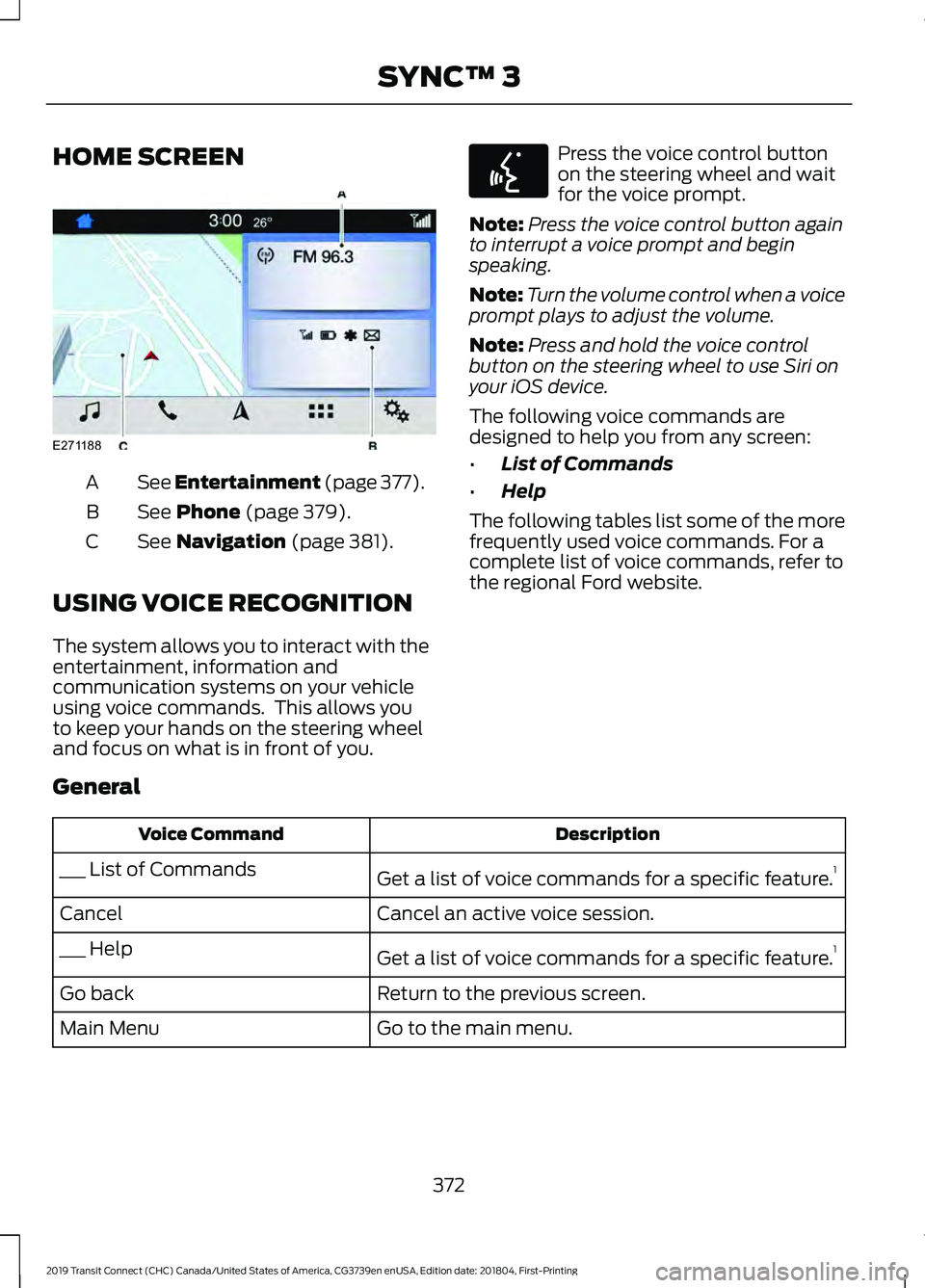
HOME SCREEN
See Entertainment (page 377).
A
See Phone (page 379).
B
See
Navigation (page 381).
C
USING VOICE RECOGNITION
The system allows you to interact with the
entertainment, information and
communication systems on your vehicle
using voice commands. This allows you
to keep your hands on the steering wheel
and focus on what is in front of you. Press the voice control button
on the steering wheel and wait
for the voice prompt.
Note: Press the voice control button again
to interrupt a voice prompt and begin
speaking.
Note: Turn the volume control when a voice
prompt plays to adjust the volume.
Note: Press and hold the voice control
button on the steering wheel to use Siri on
your iOS device.
The following voice commands are
designed to help you from any screen:
• List of Commands
• Help
The following tables list some of the more
frequently used voice commands. For a
complete list of voice commands, refer to
the regional Ford website.
General Description
Voice Command
Get a list of voice commands for a specific feature. 1
___ List of Commands
Cancel an active voice session.
Cancel
Get a list of voice commands for a specific feature. 1
___ Help
Return to the previous screen.
Go back
Go to the main menu.
Main Menu
372
2019 Transit Connect (CHC) Canada/United States of America, CG3739en enUSA, Edition date: 201804, First-Printing SYNC™ 3E271188 E142599
Page 425 of 493
At every oil change interval as indicated by the information display
*
Inspect the tires, tire wear and measure the tread depth.
Inspect the wheels and related components for abnormal noise, wear, looseness or
drag.
* Do not exceed one year or 10000 miles (16000 kilometers) between service intervals.
** Reset the Intelligent Oil-Life Monitor after engine oil and filter changes. See Engine
Oil Check (page 266). Other maintenance items
1
Replace cabin air filter.
Every 20000 miles (32000
km)
Replace engine air filter.
Every 30000 miles (48000
km)
Change engine coolant.2
At 100000 miles (160000
km)
Replace spark plugs.
Every 100000 miles
(160000 km) Inspect accessory drive belt(s). 3
Change automatic transmission fluid.
Every 150000 miles
(240000 km)
Replace accessory drive belt(s). 4
1 Perform these maintenance items within 3000 miles (4800 kilometers) of the last
engine oil and filter change. Do not exceed the designated distance for the interval.
2 Initial replacement at six years or 100000 miles (160000 kilometers), then every three
years or 50000 miles (80000 kilometers).
3 After initial inspection, inspect every other oil change until replaced.
4 If not replaced within the last 100000 miles (160000 kilometers).
421
2019 Transit Connect (CHC) Canada/United States of America, CG3739en enUSA, Edition date: 201804, First-Printing Scheduled Maintenance
Page 427 of 493
Extensive idling or low-speed driving for long distances, as in heavy commercial use
(such as delivery, taxi, patrol car or livery)
Change automatic transmission fluid.
Every 30000 miles (48000
km)
Replace spark plugs.
Every 60000 miles (96000
km)
* This is an optional feature. Operating in dusty or sandy conditions (such as unpaved or dusty roads)
Replace cabin air filter.
Inspect frequently, service
as required
Replace engine air filter.
Inspect the wheels and related components for abnormal
noise, wear, looseness or drag.
Every 5000 miles (8000
km)
Rotate tires, inspect tires for wear and measure tread
depth.
Change engine oil and filter.*
Every 5000 miles (8000
km) or six months
Perform multi-point inspection.
Change automatic transmission fluid.
Every 30000 miles (48000
km)
* Reset your Intelligent Oil-Life Monitor after engine oil and filter changes. See Engine
Oil Check (page 266).
423
2019 Transit Connect (CHC) Canada/United States of America, CG3739en enUSA, Edition date: 201804, First-Printing Scheduled Maintenance
Page 444 of 493
SYNC® Automotive Important Safety
Information Read and follow
instructions:
•
Before using your SYNC® system, read
and follow all instructions and safety
information provided in this end user
manual ("Owner Guide".) Not
following precautions found in the
Owner Guide can lead to an accident
or other serious injuries.
General Operation
• Voice Command Control: Certain
functions within the SYNC® system
may be accomplished using voice
commands. Using voice commands
while driving helps you to operate the
system without removing your hands
from the wheel or eyes from the road.
• Prolonged Views of Screen:
Do not
access any function requiring a
prolonged view of the screen while you
are driving. Pull over in a safe and legal
manner before attempting to access a
function of the system requiring
prolonged attention.
• Volume Setting:
Do not raise the
volume excessively. Keep the volume
at a level where you can still hear
outside traffic and emergency signals
while driving. Driving while unable to
hear these sounds could cause an
accident.
• Navigation Features:
Any navigation
features included in the system are
intended to provide turn by turn
instructions to get you to a desired
destination. Please make certain all
persons using this system carefully
read and follow instructions and safety
information fully. •
Distraction Hazard:
Any navigation
features may require manual
(non-verbal) setup. Attempting to
perform such set-up or insert data
while driving can distract your attention
and could cause an accident or other
serious injury. Stop the vehicle in a safe
and legal manner before attempting
these operations.
• Let Your Judgment Prevail:
Any
navigation features are provided only
as an aid. Make your driving decisions
based on your observations of local
conditions and existing traffic
regulations. Any such feature is not a
substitute for your personal judgment.
Any route suggestions made by this
system should never replace any local
traffic regulations or your personal
judgment or knowledge of safe driving
practices.
• Route Safety: Do not follow the route
suggestions if doing so would result in
an unsafe or illegal maneuver, if you
would be placed in an unsafe situation,
or if you would be directed into an area
that you consider unsafe. The driver is
ultimately responsible for the safe
operation of the vehicle and therefore,
must evaluate whether it is safe to
follow the suggested directions.
• Potential Map Inaccuracy:
Maps
used by this system may be inaccurate
because of changes in roads, traffic
controls or driving conditions. Always
use good judgment and common sense
when following the suggested routes.
• Emergency Services:
Do not rely on
any navigation features included in the
system to route you to emergency
services. Ask local authorities or an
emergency services operator for these
locations. Not all emergency services
such as police, fire stations, hospitals
and clinics are likely to be contained in
the map database for such navigation
features.
440
2019 Transit Connect (CHC) Canada/United States of America, CG3739en enUSA, Edition date: 201804, First-Printing Appendices
Page 479 of 493
9
911 Assist...........................................................49
911 Assist May Not Work If................................ 50
911 Assist Privacy Notice................................... 50
In the Event of a Crash....................................... 50
A
A/C See: Climate Control......................................... 108
About This Manual
...........................................7
ABS See: Brakes............................................................ 173
ABS driving hints See: Hints on Driving With Anti-Lock
Brakes................................................................. 174
Accessories.....................................................412 Exterior Style........................................................ 412
Interior Style.......................................................... 412
Lifestyle.................................................................. 412
Peace of Mind...................................................... 412
Accessories See: Replacement Parts
Recommendation............................................ 13
ACC See: Using Adaptive Cruise Control............196
Active Park Assist.........................................184 Using Active Park Assist.................................. 185
Adjusting the Headlamps.........................276 Horizontal Aim Adjustment........................... 278
Vertical Aim Adjustment................................. 276
Adjusting the Steering Wheel....................74
Airbag Disposal..............................................48
Air Conditioning See: Climate Control......................................... 108
Air Filter See: Changing the Engine Air Filter - 2.0L
Duratec-HE (MI4)/2.0L Flex Fuel, 1.5L
Duratorq-TDCi Diesel.................................. 283
See: Changing the Engine Air Filter - 2.5L..................................................................... 283
Alarm See: Anti-Theft Alarm......................................... 72
AM/FM Radio - Vehicles Without: SYNC 3
......................................................................358
Selecting a Radio Source............................... 358Anti-Theft Alarm
.............................................72
Alarm System......................................................... 72
Arming the Alarm................................................. 72
Disarming the Alarm........................................... 73
Full Guard and Reduced Guard....................... 72
Triggering the Alarm............................................ 72
Appendices
....................................................434
Apps.................................................................385 Using Apps on an Android Device...............386
Using Apps on an iOS Device........................ 385
At a Glance
.........................................................17
Audible Warnings and Indicators............90 Airbag Secondary Warning Audible
Warning.............................................................. 90
Automatic Transmission Audible Warning.............................................................. 90
Door Ajar Audible Warning................................ 91
Fasten Seatbelt Audible Warning................... 91
Headlamps On Audible Warning.................... 91
Key in Ignition Audible Warning....................... 91
Parking Brake On Audible Warning................91
Audio System
................................................352
General Information......................................... 352
Audio Unit Clock and Date Displays - Vehicles Without: SYNC 3
.....................358
Adjusting the Clock........................................... 358
Audio Unit - Vehicles With: SYNC 3
......................................................................356
Adjusting the Volume...................................... 356
Changing Radio Stations................................ 357
Pausing or Playing Media................................ 357
Scrolling Through the Menu Options.........357
Seek Down and Previous Track Button................................................................ 357
Seek Up and Next Track Button................... 357
Sound Settings................................................... 357
Switching the Audio Unit On and Off........356
Switching the Screen On and Off................357
Audio Unit - Vehicles Without: SYNC 3.......................................................................353
Adjusting the Volume....................................... 353
Changing Radio Stations................................ 354
Pausing or Playing Media............................... 356
Returning to the Previous Screen................356
Scrolling Through the Menu Options.........355
Seek Down and Previous Track Button............................................................... 356
Seek Up and Next Track Button.................. 356
475
2019 Transit Connect (CHC) Canada/United States of America, CG3739en enUSA, Edition date: 201804, First-Printing Index
Page 481 of 493
Capacities and Specifications - 2.0L
Duratec-HE (MI4)/2.0L Flex
Fuel................................................................340
Air Conditioning System.................................. 341
Automatic Transmission................................ 344
Brake System...................................................... 343
Engine..................................................................... 341
Fuel Tank............................................................... 343
Grease.................................................................... 344
Locks...................................................................... 344
Washer Reservoir............................................... 343
Capacities and Specifications - 2.5L................................................................345
Air Conditioning System................................. 345
Automatic Transmission................................ 349
Brake System...................................................... 348
Engine.................................................................... 346
Fuel Tank.............................................................. 348
Grease.................................................................... 350
Locks...................................................................... 349
Washer Reservoir............................................... 348
Capacities and Specifications.................327
Cargo Nets......................................................222
Installing the Net................................................ 222
Removing the Net.............................................. 224
Car Wash See: Cleaning the Exterior............................... 287
Catalytic Converter
......................................159
On-Board Diagnostics System...................... 159
Changing a Bulb...........................................278 Central High Mounted Brake Lamp.............281
Front Fog Lamps............................................... 280
Headlamp............................................................. 278
Interior Lamps...................................................... 281
License Plate Lamp........................................... 281
Rear Lamps........................................................... 281
Side Direction Indicator.................................. 280
Changing a Fuse..........................................260 Fuse Types........................................................... 260
General Information......................................... 260
Passenger Compartment Fuse Box...........260
Changing a Road Wheel...........................320 Changing a Road Wheel................................... 321
Dissimilar Spare Wheel and Tire Assembly Information
..................................................... 320
Stowing the Flat or Spare Tire...................... 324
Changing the 12V Battery..........................273 Changing the Engine Air Filter - 2.0L
Duratec-HE (MI4)/2.0L Flex Fuel, 1.5L
Duratorq-TDCi Diesel
..............................283
Changing the Engine Air Filter - 2.5L.................................................................283
Changing the Front Wiper Blades..........275
Changing the Rear Wiper Blades - Vehicles With: Manual Liftgate
............275
Changing the Rear Wiper Blades - Vehicles With: Rear Cargo Doors
........276
Checking MyKey System Status..............60
Checking the Wiper Blades......................275
Child Restraint and Seatbelt Maintenance.................................................38
Child Restraint Positioning.........................28
Child Safety
.......................................................18
General Information............................................. 18
Child Safety Locks.........................................30 Left-Hand Side....................................................... 31
Right-Hand Side.................................................... 31
Cigar Lighter
.....................................................131
Cleaning Leather Seats..............................291
Cleaning Products.......................................286
Cleaning the Exterior..................................287 Cleaning the Headlamps................................ 287
Exterior Chrome Parts..................................... 288
Exterior Plastic Parts........................................ 288
Stripes or Graphics........................................... 288
Underbody........................................................... 288
Under Hood......................................................... 288
Cleaning the Instrument Panel and Instrument Cluster Lens
........................290
Cleaning the Interior...................................289 Fabric, Carpets, Cloth Seats, Headliners
and Floor Mats.............................................. 289
Instrument Cluster Screens, LCD Screens and Radio Screens....................................... 290
Leather Interior................................................... 290
Rear Windows.................................................... 290
Seatbelts.............................................................. 289
Storage Compartments, Cup Holders and Ashtrays........................................................... 290
Suede Micro Fiber Fabric................................ 290
Cleaning the Wheels..................................292
Cleaning the Windows and Wiper Blades...........................................................289
Clearing All MyKeys......................................60 MyKey Information Messages......................... 60
477
2019 Transit Connect (CHC) Canada/United States of America, CG3739en enUSA, Edition date: 201804, First-Printing Index
Page 483 of 493
Engine Block Heater....................................144
Using the Engine Block Heater...................... 145
Engine Coolant Check...............................268
Adding Coolant.................................................. 268
Coolant Change................................................. 270
Engine Coolant Temperature Management....................................................271
Fail-Safe Cooling............................................... 270
Recycled Coolant............................................... 270
Severe Climates................................................. 270
Engine Cooling Fan - Diesel.....................268
Engine Cooling Fan - Gasoline................267
Engine Emission Control...........................158
Engine Immobilizer See: Passive Anti-Theft System..................... 70
Engine Oil Check..........................................266 Adding Engine Oil.............................................. 266
Engine Oil Dipstick - 1.5L Duratorq-TDCi Diesel.............................................................265
Engine Oil Dipstick - 2.0L Duratec-HE (MI4)/2.0L Flex Fuel/2.5L....................266
Engine Specifications - 1.5L Duratorq-TDCi Diesel..............................327
Engine Specifications - 2.0L Duratec-HE (MI4)/2.0L Flex Fuel
...............................328
Engine Specifications - 2.5L....................329
Entertainment...............................................377 Playing Music From a USB or Media
Player................................................................. 378
Streaming Music From a Bluetooth Device................................................................ 378
Using the Radio................................................... 377
Environment.....................................................16
Essential Towing Checks..........................233 Before Towing a Trailer.................................... 235
Hitches................................................................... 234
Launching or Retrieving a Boat or Personal Watercraft....................................................... 236
Safety Chains...................................................... 234
Trailer Brakes....................................................... 234
Trailer Lamps....................................................... 235
Trailer Towing Connector................................ 234
When Towing a Trailer..................................... 235
Event Data Recording See: Data Recording.............................................. 9
Export Unique Options.................................15
Exterior Mirrors
................................................84
Adjusting the Mirrors.......................................... 84Folding the Mirrors...............................................
84
F
Fan See: Engine Cooling Fan - Diesel.................268
See: Engine Cooling Fan - Gasoline............267
Fastening the Seatbelts...............................33 Seatbelt Locking Modes.................................... 34
Using Seatbelts During Pregnancy................34
Flat Tire See: Changing a Road Wheel....................... 320
Flat Tire Inflation See: Tire Sealant and Inflator Kit................296
Floor Mats.......................................................239
Fog Lamps - Front See: Front Fog Lamps......................................... 81
Ford Credit
.........................................................13
US Only..................................................................... 13
Ford Protect....................................................414 Ford Protect Extended Service Plan
(CANADA ONLY)........................................... 415
Ford Protect Extended Service Plans (U.S. Only)................................................................... 414
Front Fog Lamps.............................................81
Front Parking Aid...........................................181 Front Parking Aid Information
Messages.......................................................... 183
Object Distance Indicator................................ 182
Front Passenger Sensing System............42
Front Wiper Blades See: Changing the Front Wiper Blades.......275
Fuel and Refueling.......................................148
Fuel Consumption
........................................157
Advertised Capacity........................................... 157
Fuel Economy....................................................... 157
Fuel Filler Funnel Location........................153
Fuel Quality - Diesel....................................148 Biodiesel................................................................ 149
Diesel Fuel Additives ........................................ 150
Fuel Requirements - Choosing The Right Fuel: Vehicles Operated Where Ultra Low
Sulfur Diesel Fuel Is Not Required ..........149
Fuel Requirements - Choosing The Right Fuel: Vehicles Operated Where Ultra Low
Sulfur Diesel Fuel Is Required (United
States/Canada/Puerto Rico/U.S. Virgin
Islands And Other Locales) ...................... 148
479
2019 Transit Connect (CHC) Canada/United States of America, CG3739en enUSA, Edition date: 201804, First-Printing Index
Page 486 of 493
Vehicle Loading - with and without a
Trailer................................................................. 225
Locking and Unlocking.................................63 Autolock.................................................................. 65
Autounlock............................................................. 65
Emergency Locking with the Key................... 65
Locking and Unlocking the Doors From Inside.................................................................... 63
Locking and Unlocking the Doors with the Key Blade........................................................... 64
Opening the Double Rear Doors..................... 63
Opening the Double Rear Doors From Inside................................................................... 66
Remote Control.................................................... 63
Smart Unlocks for Integrated Keyhead Transmitter........................................................ 64
Unlocking the Doors with the Interior Door Handles............................................................... 64
Luggage Anchor Points...............................221
Lug Nuts See: Changing a Road Wheel....................... 320
Lug Nuts..........................................................325
M
Maintenance..................................................261 General Information.......................................... 261
Manual Climate Control............................108
Directing Air to the Footwell Air
Vents.................................................................. 109
Directing Air to the Instrument Panel Air Vents.................................................................. 109
Directing Air to the Windshield Air Vents.................................................................. 109
Setting the Blower Motor Speed.................. 108
Setting the Temperature................................. 109
Switching Maximum Cooling On and Off....................................................................... 108
Switching Maximum Defrost On and Off....................................................................... 108
Switching the Air Conditioning On and Off....................................................................... 108
Switching the Climate Control On and Off....................................................................... 108
Switching the Recirculated Air On and Off....................................................................... 108
Manual Liftgate
..............................................69
Closing the Liftgate............................................. 69Opening the Liftgate...........................................
69
Unlocking the Liftgate........................................ 69
Manual Seats
...................................................117
Adjusting the Lumbar Support....................... 118
Adjusting the Seat Backrest............................ 118
Adjusting the Seat Height................................ 118
Moving the Seat Backward and Forward............................................................... 117
Single Passenger Seat....................................... 118
Message Center See: Information Displays................................. 92
Mirrors See: Windows and Mirrors................................ 83
Mobile Communications Equipment.......15
Motorcraft Parts - 1.5L Duratorq-TDCi Diesel............................................................330
Motorcraft Parts - 2.0L Duratec-HE (MI4)/2.0L Flex Fuel.................................331
Motorcraft Parts - 2.5L...............................332
MyKey Settings...............................................56 Configurable Settings......................................... 56
Non-Configurable Settings.............................. 56
MyKey Troubleshooting - Vehicles With: Push Button Start........................................61
What is an admin key?........................................ 61
Why can I not clear the MyKeys?.................... 61
Why can I not create a MyKey?....................... 61
Why can I not program a MyKey?................... 61
Why can I not start the engine with a MyKey?................................................................ 62
Why does the MyKey distance not accumulate?..................................................... 62
MyKey Troubleshooting - Vehicles Without: Push Button Start.....................61
What is an admin key?........................................ 61
Why can I not clear the MyKeys?.................... 61
Why can I not create a MyKey?....................... 61
Why can I not program a MyKey?................... 61
Why does the MyKey distance not accumulate?...................................................... 61
MyKey ™
.............................................................56
Principle of Operation........................................ 56
N
Navigation.......................................................381 Changing the Format of the Map................382
Live Traffic............................................................ 384
482
2019 Transit Connect (CHC) Canada/United States of America, CG3739en enUSA, Edition date: 201804, First-Printing Index
Page 487 of 493
Michelin Travel Guide.......................................
385
Navigation Map Updates................................ 385
Route Guidance................................................. 383
Setting a Destination........................................ 381
Zoom...................................................................... 382
Normal Scheduled Maintenance...........419 Intelligent Oil-Life Monitor™......................... 419
Maintenance Intervals..................................... 420
O
Oil Change Indicator Reset.......................267
Resetting the Oil Life Monitoring
System.............................................................. 267
Oil Check See: Engine Oil Check...................................... 266
Opening and Closing the Hood...............261 Closing the Hood............................................... 262
Opening the Hood.............................................. 261
Ordering Additional Owner's Literature......................................................252
Obtaining a French Owner ’s Manual..........252
Overhead Console........................................133 Rear Door Storage Compartment................133
P
Parking Aids
....................................................179
Principle of Operation....................................... 179
Parking Brake
..................................................174
Passive Anti-Theft System.........................70 Programming a Passive Key.............................. 71
Programming a Remote Flip Key................... 70
SecuriLock®........................................................... 70
Passive Key Backup Position.....................55
PATS See: Passive Anti-Theft System..................... 70
Perchlorate........................................................13
Personalized Settings..................................94 Measure Units....................................................... 94
Switching Chimes Off........................................ 94
Personal Safety System ™
..........................39
How Does the Personal Safety System
Work?.................................................................. 39
Phone...............................................................379 Android Auto........................................................ 381
Apple CarPlay..................................................... 380Pairing Your Cell Phone for the First
Time................................................................... 379
Text Messaging.................................................. 380
Using Your Cell Phone..................................... 380
Playing Media From a USB Device - Vehicles Without: SYNC 3......................361
Selecting the USB Device................................ 361
Supported Audio File Formats...................... 361
Post-Crash Alert System..........................245
Power Door Locks See: Locking and Unlocking............................. 63
Power Seats....................................................119
Power Windows - Vehicles With: One-Touch Open Driver Window.........84
One-Touch Open................................................. 84
Power Windows - Vehicles With: Rear Power Windows ..........................................83
Bounce-Back......................................................... 83
One-Touch Close................................................. 83
One-Touch Open................................................. 83
Rear Window Lock............................................... 83
Pre-Collision Assist
......................................215
Distance Alert....................................................... 217
Distance Indication............................................. 217
Pre-Collision Assist Information Messages.......................................................... 219
Pre-Collision Assist System Sensors..........218
Pre-Collision Assist Warning Lamp.............219
Programming a MyKey
.................................58
Protecting the Environment........................16
Puncture See: Changing a Road Wheel....................... 320
Push Button Ignition Switch.....................135 Failure to Start - Vehicles with Manual
Transmission................................................... 135
Fast Restart.......................................................... 136
Key Outside Vehicle Audible Warning.........137
Starting System Information Messages........................................................... 137
Starting The Engine - Vehicles with Automatic Transmission............................. 135
Starting The Engine - Vehicles with Manual Transmission................................................... 135
Stopping the Engine When Your Vehicle is Moving - Vehicles with Automatic
Transmission................................................... 136
483
2019 Transit Connect (CHC) Canada/United States of America, CG3739en enUSA, Edition date: 201804, First-Printing Index