alarm FORD TRANSIT CONNECT 2019 User Guide
[x] Cancel search | Manufacturer: FORD, Model Year: 2019, Model line: TRANSIT CONNECT, Model: FORD TRANSIT CONNECT 2019Pages: 493, PDF Size: 7.43 MB
Page 99 of 493
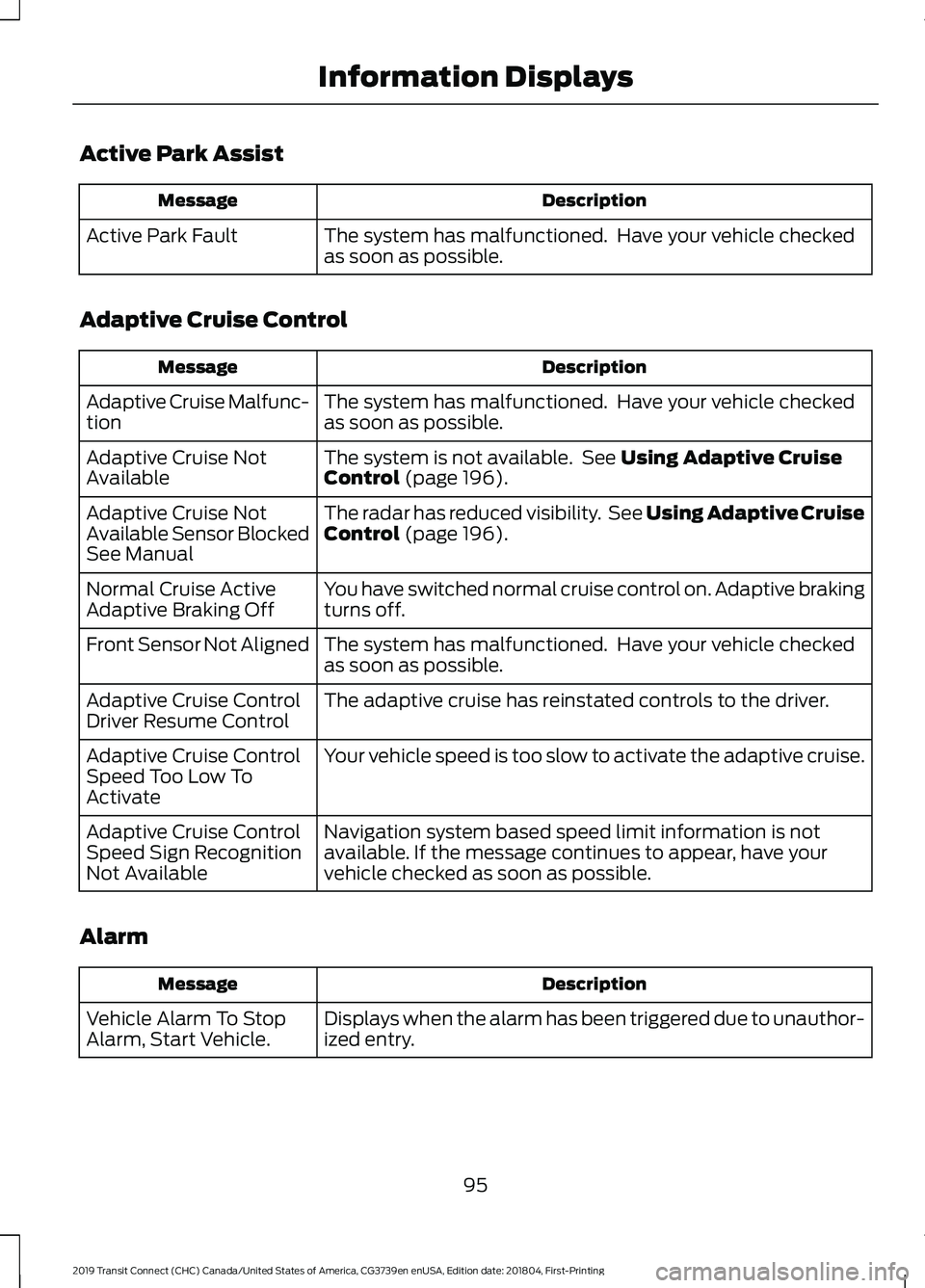
Active Park Assist
Description
Message
The system has malfunctioned. Have your vehicle checked
as soon as possible.
Active Park Fault
Adaptive Cruise Control Description
Message
The system has malfunctioned. Have your vehicle checked
as soon as possible.
Adaptive Cruise Malfunc-
tion
The system is not available. See Using Adaptive Cruise
Control (page 196).
Adaptive Cruise Not
Available
The radar has reduced visibility. See Using Adaptive Cruise
Control
(page 196).
Adaptive Cruise Not
Available Sensor Blocked
See Manual
You have switched normal cruise control on. Adaptive braking
turns off.
Normal Cruise Active
Adaptive Braking Off
The system has malfunctioned. Have your vehicle checked
as soon as possible.
Front Sensor Not Aligned
The adaptive cruise has reinstated controls to the driver.
Adaptive Cruise Control
Driver Resume Control
Your vehicle speed is too slow to activate the adaptive cruise.
Adaptive Cruise Control
Speed Too Low To
Activate
Navigation system based speed limit information is not
available. If the message continues to appear, have your
vehicle checked as soon as possible.
Adaptive Cruise Control
Speed Sign Recognition
Not Available
Alarm Description
Message
Displays when the alarm has been triggered due to unauthor-
ized entry.
Vehicle Alarm To Stop
Alarm, Start Vehicle.
95
2019 Transit Connect (CHC) Canada/United States of America, CG3739en enUSA, Edition date: 201804, First-Printing Information Displays
Page 183 of 493
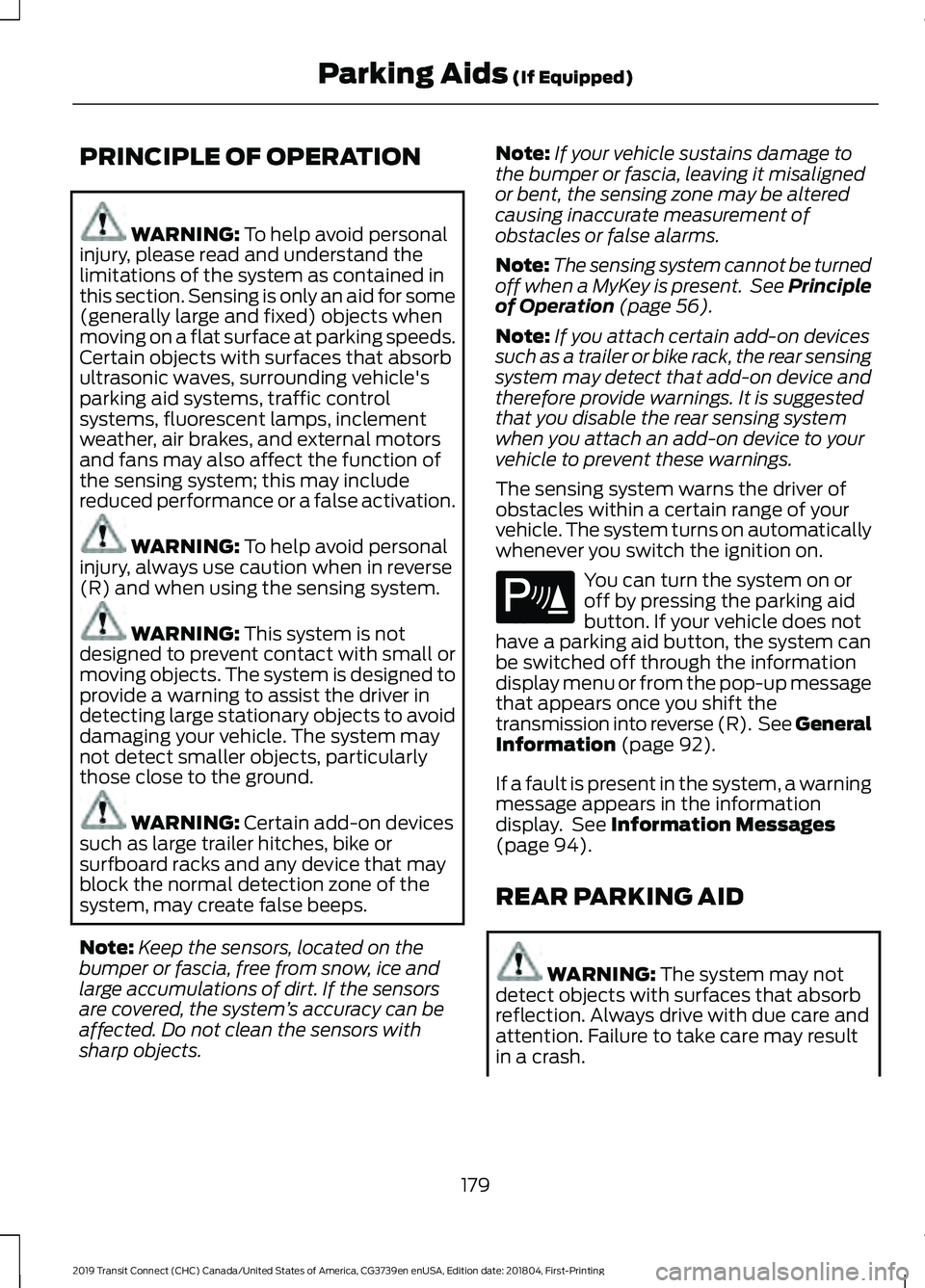
PRINCIPLE OF OPERATION
WARNING: To help avoid personal
injury, please read and understand the
limitations of the system as contained in
this section. Sensing is only an aid for some
(generally large and fixed) objects when
moving on a flat surface at parking speeds.
Certain objects with surfaces that absorb
ultrasonic waves, surrounding vehicle's
parking aid systems, traffic control
systems, fluorescent lamps, inclement
weather, air brakes, and external motors
and fans may also affect the function of
the sensing system; this may include
reduced performance or a false activation. WARNING:
To help avoid personal
injury, always use caution when in reverse
(R) and when using the sensing system. WARNING:
This system is not
designed to prevent contact with small or
moving objects. The system is designed to
provide a warning to assist the driver in
detecting large stationary objects to avoid
damaging your vehicle. The system may
not detect smaller objects, particularly
those close to the ground. WARNING:
Certain add-on devices
such as large trailer hitches, bike or
surfboard racks and any device that may
block the normal detection zone of the
system, may create false beeps.
Note: Keep the sensors, located on the
bumper or fascia, free from snow, ice and
large accumulations of dirt. If the sensors
are covered, the system ’s accuracy can be
affected. Do not clean the sensors with
sharp objects. Note:
If your vehicle sustains damage to
the bumper or fascia, leaving it misaligned
or bent, the sensing zone may be altered
causing inaccurate measurement of
obstacles or false alarms.
Note: The sensing system cannot be turned
off when a MyKey is present. See Principle
of Operation
(page 56).
Note: If you attach certain add-on devices
such as a trailer or bike rack, the rear sensing
system may detect that add-on device and
therefore provide warnings. It is suggested
that you disable the rear sensing system
when you attach an add-on device to your
vehicle to prevent these warnings.
The sensing system warns the driver of
obstacles within a certain range of your
vehicle. The system turns on automatically
whenever you switch the ignition on. You can turn the system on or
off by pressing the parking aid
button. If your vehicle does not
have a parking aid button, the system can
be switched off through the information
display menu or from the pop-up message
that appears once you shift the
transmission into reverse (R). See General
Information
(page 92).
If a fault is present in the system, a warning
message appears in the information
display. See
Information Messages
(page 94).
REAR PARKING AID WARNING:
The system may not
detect objects with surfaces that absorb
reflection. Always drive with due care and
attention. Failure to take care may result
in a crash.
179
2019 Transit Connect (CHC) Canada/United States of America, CG3739en enUSA, Edition date: 201804, First-Printing Parking Aids
(If Equipped)E139213
Page 203 of 493
Note:
Press and hold the toggle button
upward or downward to change the set
speed in larger increments.
The system may apply the brakes to slow
the vehicle to the new set speed. The set
speed displays continuously in the
information display when the system is
active.
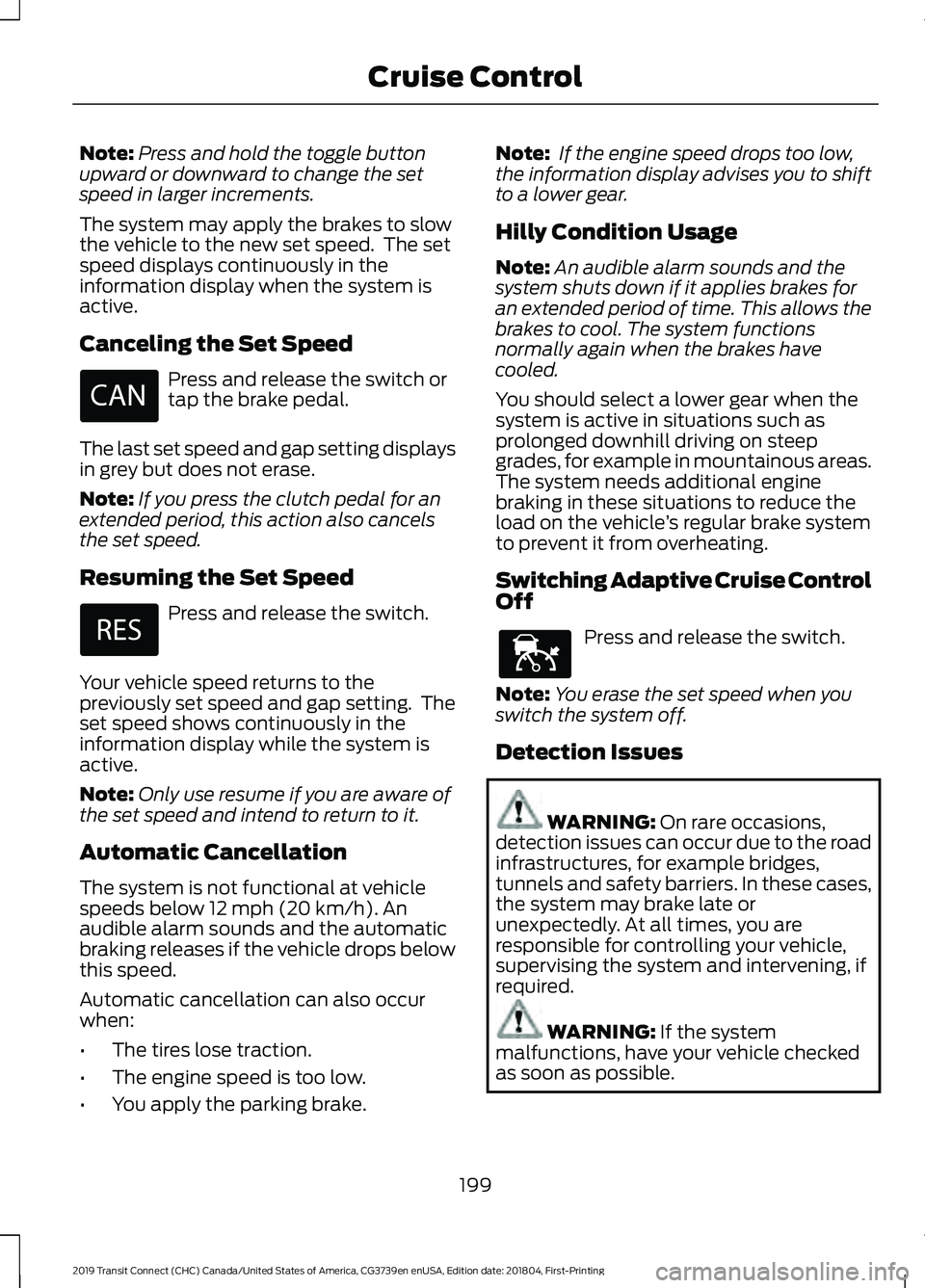
Canceling the Set Speed Press and release the switch or
tap the brake pedal.
The last set speed and gap setting displays
in grey but does not erase.
Note: If you press the clutch pedal for an
extended period, this action also cancels
the set speed.
Resuming the Set Speed Press and release the switch.
Your vehicle speed returns to the
previously set speed and gap setting. The
set speed shows continuously in the
information display while the system is
active.
Note: Only use resume if you are aware of
the set speed and intend to return to it.
Automatic Cancellation
The system is not functional at vehicle
speeds below 12 mph (20 km/h). An
audible alarm sounds and the automatic
braking releases if the vehicle drops below
this speed.
Automatic cancellation can also occur
when:
• The tires lose traction.
• The engine speed is too low.
• You apply the parking brake. Note:
If the engine speed drops too low,
the information display advises you to shift
to a lower gear.
Hilly Condition Usage
Note: An audible alarm sounds and the
system shuts down if it applies brakes for
an extended period of time. This allows the
brakes to cool. The system functions
normally again when the brakes have
cooled.
You should select a lower gear when the
system is active in situations such as
prolonged downhill driving on steep
grades, for example in mountainous areas.
The system needs additional engine
braking in these situations to reduce the
load on the vehicle ’s regular brake system
to prevent it from overheating.
Switching Adaptive Cruise Control
Off Press and release the switch.
Note: You erase the set speed when you
switch the system off.
Detection Issues WARNING:
On rare occasions,
detection issues can occur due to the road
infrastructures, for example bridges,
tunnels and safety barriers. In these cases,
the system may brake late or
unexpectedly. At all times, you are
responsible for controlling your vehicle,
supervising the system and intervening, if
required. WARNING:
If the system
malfunctions, have your vehicle checked
as soon as possible.
199
2019 Transit Connect (CHC) Canada/United States of America, CG3739en enUSA, Edition date: 201804, First-Printing Cruise Control E144529
Page 263 of 493
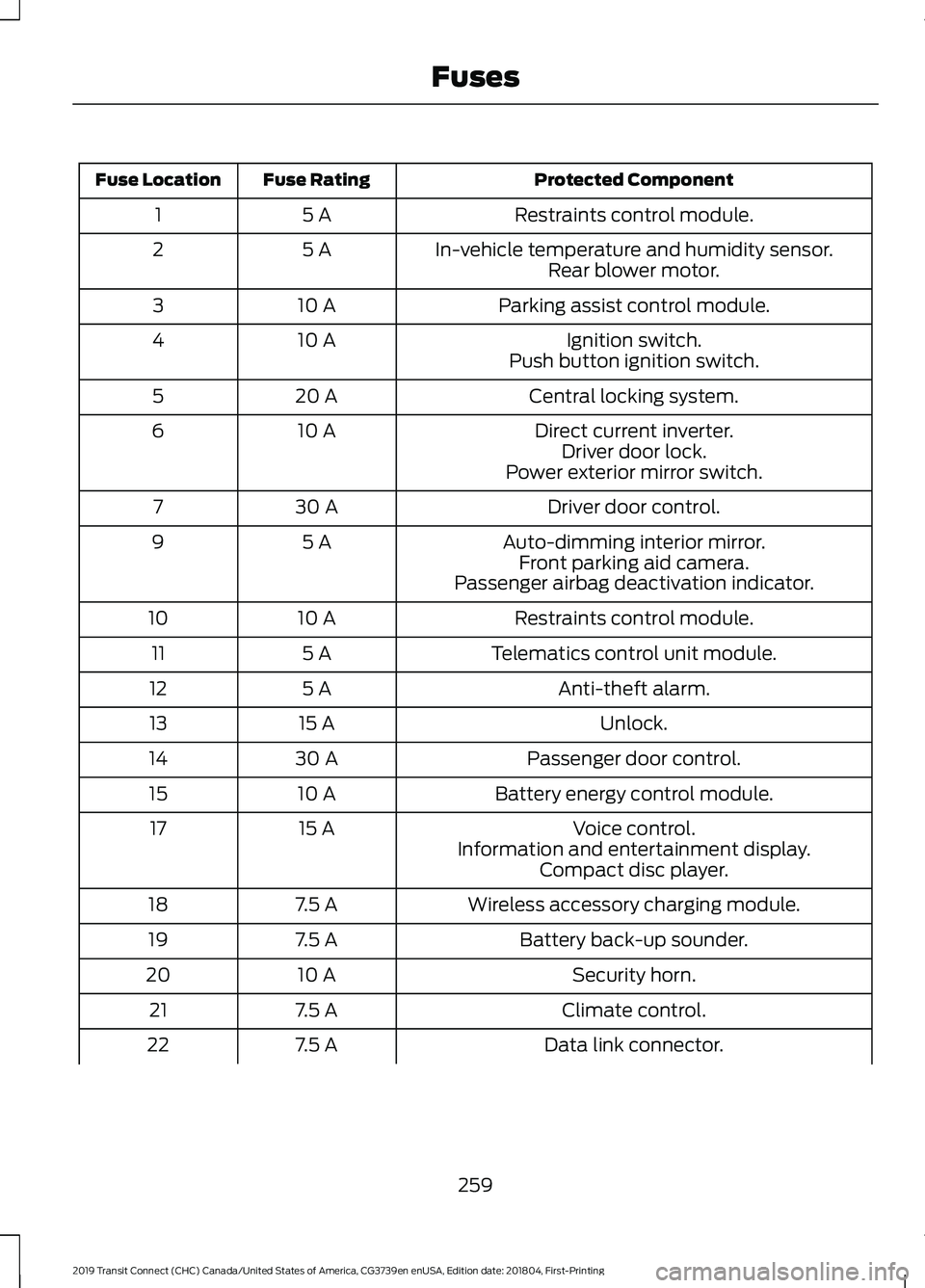
Protected Component
Fuse Rating
Fuse Location
Restraints control module.
5 A
1
In-vehicle temperature and humidity sensor.
5 A
2
Rear blower motor.
Parking assist control module.
10 A
3
Ignition switch.
10 A
4
Push button ignition switch.
Central locking system.
20 A
5
Direct current inverter.
10 A
6
Driver door lock.
Power exterior mirror switch.
Driver door control.
30 A
7
Auto-dimming interior mirror.
5 A
9
Front parking aid camera.
Passenger airbag deactivation indicator.
Restraints control module.
10 A
10
Telematics control unit module.
5 A
11
Anti-theft alarm.
5 A
12
Unlock.
15 A
13
Passenger door control.
30 A
14
Battery energy control module.
10 A
15
Voice control.
15 A
17
Information and entertainment display.Compact disc player.
Wireless accessory charging module.
7.5 A
18
Battery back-up sounder.
7.5 A
19
Security horn.
10 A
20
Climate control.
7.5 A
21
Data link connector.
7.5 A
22
259
2019 Transit Connect (CHC) Canada/United States of America, CG3739en enUSA, Edition date: 201804, First-Printing Fuses
Page 416 of 493
For a complete listing of the accessories
that are available for your vehicle, please
contact your authorized dealer or visit the
online store web site:
Web Address (United States)
www.Accessories.Ford.com Web Address (Canada)
www.Accessories.Ford.ca
Ford Accessories are available for your
vehicle through an authorized Ford dealer.
Ford Motor Company will repair or replace
any properly authorized dealer-installed
Ford Original Accessory found to be
defective in factory-supplied materials or
workmanship during the warranty period,
as well as any component damaged by the
defective accessories.
Ford Motor Company warrants your
accessory through the warranty that
provides the greatest benefit:
• 24 months, unlimited mileage.
• The remainder of your new vehicle
limited warranty.
Contact an authorized dealer for details
and a copy of the warranty.
Exterior Style
• Hood deflector*.
• Hitch and towing accessories.
• Keyless entry.
• Side window deflectors.
• Splash guards.
• Window grilles.
Interior Style
• All-weather floor mats.
• Cargo area protectors. •
Cargo organizers.
• Carpeted floor mats.
• Interior light kit.
Lifestyle
• Ash cup and smokers packages.
• Roof racks and carriers*.
• Telematics*.
• In-vehicle safe*.
• Bluetooth speakers*.
• Rear seat entertainment*.
Peace of Mind
• Back-up alarm*.
• Bumper-mounted parking sensor*.
• Remote start.
• Roadside assistance kit*.
• Vehicle security systems.
*Ford Licensed Accessory. The accessory
manufacturer designs, develops and
therefore warrants Ford Licensed
Accessories, and does not design or test
these accessories to Ford Motor Company
engineering requirements. Contact an
authorized Ford dealer for the
manufacturer's limited warranty details,
and request a copy of the Ford Licensed
Accessories product limited warranty from
the accessory manufacturer.
412
2019 Transit Connect (CHC) Canada/United States of America, CG3739en enUSA, Edition date: 201804, First-Printing Accessories
Page 417 of 493
For maximum vehicle performance, keep
the following information in mind when
adding accessories or equipment to your
vehicle:
•
When adding accessories, equipment,
passengers and luggage to your
vehicle, do not exceed the total weight
capacity of the vehicle or of the front
or rear axle (GVWR or GAWR as
indicated on the Safety Compliance
Certification label). Ask an authorized
dealer for specific weight information.
• The Federal Communications
Commission (FCC) and Canadian
Radio Telecommunications
Commission (CRTC) regulate the use
of mobile communications systems
that are equipped with radio
transmitters, for example two-way
radios, telephones and anti-theft
alarms. Any such equipment installed
in your vehicle should comply with
Federal Communications Commission
(FCC) and Canadian Radio
Telecommunications Commission
(CRTC) regulations and should be
installed only by an authorized dealer.
• Mobile communications systems may
harm the operation of your vehicle,
particularly if their manufacturer did
not design them specifically for
automotive use.
• If you or an authorized Ford dealer add
any non-Ford custom electrical or
electronic accessories or components
to your vehicle, you may adversely
affect battery performance and
durability, and may adversely affect
the performance of other electrical
systems in the vehicle.
413
2019 Transit Connect (CHC) Canada/United States of America, CG3739en enUSA, Edition date: 201804, First-Printing Accessories
Page 479 of 493
9
911 Assist...........................................................49
911 Assist May Not Work If................................ 50
911 Assist Privacy Notice................................... 50
In the Event of a Crash....................................... 50
A
A/C See: Climate Control......................................... 108
About This Manual
...........................................7
ABS See: Brakes............................................................ 173
ABS driving hints See: Hints on Driving With Anti-Lock
Brakes................................................................. 174
Accessories.....................................................412 Exterior Style........................................................ 412
Interior Style.......................................................... 412
Lifestyle.................................................................. 412
Peace of Mind...................................................... 412
Accessories See: Replacement Parts
Recommendation............................................ 13
ACC See: Using Adaptive Cruise Control............196
Active Park Assist.........................................184 Using Active Park Assist.................................. 185
Adjusting the Headlamps.........................276 Horizontal Aim Adjustment........................... 278
Vertical Aim Adjustment................................. 276
Adjusting the Steering Wheel....................74
Airbag Disposal..............................................48
Air Conditioning See: Climate Control......................................... 108
Air Filter See: Changing the Engine Air Filter - 2.0L
Duratec-HE (MI4)/2.0L Flex Fuel, 1.5L
Duratorq-TDCi Diesel.................................. 283
See: Changing the Engine Air Filter - 2.5L..................................................................... 283
Alarm See: Anti-Theft Alarm......................................... 72
AM/FM Radio - Vehicles Without: SYNC 3
......................................................................358
Selecting a Radio Source............................... 358Anti-Theft Alarm
.............................................72
Alarm System......................................................... 72
Arming the Alarm................................................. 72
Disarming the Alarm........................................... 73
Full Guard and Reduced Guard....................... 72
Triggering the Alarm............................................ 72
Appendices
....................................................434
Apps.................................................................385 Using Apps on an Android Device...............386
Using Apps on an iOS Device........................ 385
At a Glance
.........................................................17
Audible Warnings and Indicators............90 Airbag Secondary Warning Audible
Warning.............................................................. 90
Automatic Transmission Audible Warning.............................................................. 90
Door Ajar Audible Warning................................ 91
Fasten Seatbelt Audible Warning................... 91
Headlamps On Audible Warning.................... 91
Key in Ignition Audible Warning....................... 91
Parking Brake On Audible Warning................91
Audio System
................................................352
General Information......................................... 352
Audio Unit Clock and Date Displays - Vehicles Without: SYNC 3
.....................358
Adjusting the Clock........................................... 358
Audio Unit - Vehicles With: SYNC 3
......................................................................356
Adjusting the Volume...................................... 356
Changing Radio Stations................................ 357
Pausing or Playing Media................................ 357
Scrolling Through the Menu Options.........357
Seek Down and Previous Track Button................................................................ 357
Seek Up and Next Track Button................... 357
Sound Settings................................................... 357
Switching the Audio Unit On and Off........356
Switching the Screen On and Off................357
Audio Unit - Vehicles Without: SYNC 3.......................................................................353
Adjusting the Volume....................................... 353
Changing Radio Stations................................ 354
Pausing or Playing Media............................... 356
Returning to the Previous Screen................356
Scrolling Through the Menu Options.........355
Seek Down and Previous Track Button............................................................... 356
Seek Up and Next Track Button.................. 356
475
2019 Transit Connect (CHC) Canada/United States of America, CG3739en enUSA, Edition date: 201804, First-Printing Index
Page 485 of 493
Information Displays.....................................92
General Information............................................ 92
Information Messages.................................94
Active Park Assist................................................. 95
Adaptive Cruise Control.................................... 95
Alarm........................................................................\
95
Automatic High Beam Control....................... 96
Auto-Start-Stop................................................... 96
Blind Spot Information and Cross Traffic Alert Systems.................................................... 97
Brake System......................................................... 97
Doors and Locks................................................... 98
Driver Alert.............................................................. 98
Engine...................................................................... 98
Fuel System........................................................... 99
Headlamps............................................................. 99
Hill Start Assist..................................................... 99
Lane Keeping System........................................ 99
Maintenance........................................................ 100
MyKey...................................................................... 101
Parking Aid............................................................. 101
Parking Brake....................................................... 102
Pre-Collision Assist............................................ 102
Rear Window Lock............................................. 102
Remote Control................................................... 102
Selective Catalytic Reductant System............................................................... 103
Stability Control.................................................. 105
Starting System.................................................. 105
Steering System................................................. 105
Tire Pressure Monitoring System.................106
Transmission ........................................................ 106
Wireless Accessory Charging......................... 107
Installing Child Restraints............................19 Child Restraints...................................................... 19
Using Lap and Shoulder Belts......................... 20
Using Lower Anchors and Tethers for Children (LATCH)............................................ 22
Using Tether Straps............................................. 24
Instrument Cluster.........................................87
Instrument Lighting Dimmer......................79
Instrument Panel Overview.........................17
Interior Lamps.................................................82 Courtesy Lamp...................................................... 82
Reading Lamps..................................................... 82
Interior Mirror - Vehicles With: Auto-Dimming Interior Mirror
.................85 Interior Mirror - Vehicles Without:
Auto-Dimming Interior Mirror
.................85
Introduction.........................................................7
J
Jump Starting the Vehicle........................243 Connecting the Jumper Cables.................... 243
Jump Starting...................................................... 244
Preparing Your Vehicle..................................... 243
Removing the Jumper Cables....................... 244
K
Keyless Entry
....................................................67
Disabled Keys........................................................ 68
General Information............................................ 67
Locking and Unlocking the Doors with the Key Blade........................................................... 68
Locking Your Vehicle........................................... 67
Passive Key............................................................. 67
Unlocking Your Vehicle...................................... 68
Keys and Remote Controls..........................51
L
Lane Keeping System
................................205
Lane Keeping System Display...................... 208
Lane Keeping System Messages.................209
Lane Keeping System Settings.................... 206
Lane Keeping System Warning Lamps and Indicators......................................................... 208
Switching Lane Keeping System On or Off...................................................................... 206
Liftgate...............................................................69
Lighting Control
..............................................78
Headlamp Flasher................................................ 79
High Beams............................................................ 78
Parking Lamps....................................................... 78
Lighting...............................................................78 General Information............................................ 78
Load Carriers See: Roof Racks and Load Carriers.............224
Load Carrying
.................................................221
Load Limit.......................................................225
Special Loading Instructions for Owners of
Pick-up Trucks and Utility-type
Vehicles............................................................ 229
481
2019 Transit Connect (CHC) Canada/United States of America, CG3739en enUSA, Edition date: 201804, First-Printing Index
Page 488 of 493
Stopping the Engine When Your Vehicle is
Moving - Vehicles with Manual
Transmission................................................... 136
Stopping the Engine When Your Vehicle is Stationary - Vehicles with Automatic
Transmission................................................... 136
Stopping the Engine When Your Vehicle is Stationary - Vehicles with Manual
Transmission................................................... 136
Switching the Ignition On to Accessory Mode................................................................... 135
Vehicles with a Diesel Engine......................... 135
R
Rear Parking Aid............................................179 Object Distance Indicator............................... 180
Rear Parking Aid Information Messages........................................................... 181
Rear Passenger Climate Controls............112 Adjusting the Blower Motor Speed...............113
Directing Air to the Footwell Air Vents.........113
Directing Air to the Overhead Air
Vents.................................................................... 113
Directing Air to the Overhead Air Vents and the Footwell Air Vents................................... 113
Switching the Rear Passenger Climate Controls On and Off....................................... 112
Rear Seats - Long Wheelbase, Vehicles With: 60/40 Split Second Row
Seating...........................................................127
Second Row Seats.............................................. 127
Third Row Seats.................................................. 128
Rear Seats - Long Wheelbase, Vehicles With: Second Row Dual Captain
Chairs.............................................................124
Second Row Seats............................................. 124
Third Row Seats.................................................. 125
Rear Seats - Short Wheelbase................120
Second Row Seats............................................. 120
Third Row Seats.................................................. 122
Rear Under Floor Storage..........................221 Adjustable Load Floor....................................... 221
Passenger Compartment Floor..................... 221
Rear View Camera........................................192 Switching the Rear View Camera Off.........194
Switching the Rear View Camera On..........193
Using the Display................................................ 193Vehicles With Parking Aid...............................
194
Rear View Camera See: Rear View Camera.................................... 192
Rear Window Wiper and Washers............77 Rear Window Washer.......................................... 77
Rear Window Wiper............................................. 77
Rear Wiper Blades See: Changing the Rear Wiper Blades -
Vehicles With: Manual Liftgate................275
See: Changing the Rear Wiper Blades - Vehicles With: Rear Cargo Doors.............276
Recommended Towing Weights.............231 Calculating the Maximum Loaded Trailer
Weight............................................................... 232
Reduced Engine Performance................238
Refueling..........................................................154 Refueling System Overview........................... 154
Refueling System Warning............................. 156
Refueling Your Vehicle...................................... 155
Remote Control - Vehicles With: Keyless Entry and Push Button Start....................51
Locating Your Vehicle......................................... 53
Removable Key Blade.......................................... 51
Replacing the Battery......................................... 52
Sounding the Panic Alarm................................ 53
Remote Control - Vehicles With: Remote Flip Key............................................................54
Locating Your Vehicle......................................... 55
Replacing the Battery......................................... 54
Sounding the Panic Alarm................................ 55
Repairing Minor Paint Damage...............292
Replacement Parts Recommendation........................................13
Collision Repairs.................................................... 14
Scheduled Maintenance and Mechanical Repairs.................................................................. 14
Warranty on Replacement Parts..................... 14
Replacing a Lost Key or Remote Control.............................................................55
Reporting Safety Defects (Canada Only)..............................................................252
Reporting Safety Defects (U.S. Only)..............................................................252
Roadside Assistance...................................241 Vehicles Sold in Canada: Getting Roadside
Assistance....................................................... 242
Vehicles Sold in Canada: Roadside Assistance Program Coverage.................242
484
2019 Transit Connect (CHC) Canada/United States of America, CG3739en enUSA, Edition date: 201804, First-Printing Index