mirror FORD TRANSIT CONNECT 2019 User Guide
[x] Cancel search | Manufacturer: FORD, Model Year: 2019, Model line: TRANSIT CONNECT, Model: FORD TRANSIT CONNECT 2019Pages: 493, PDF Size: 7.43 MB
Page 214 of 493
Note:
The system does not operate in
reverse (R).
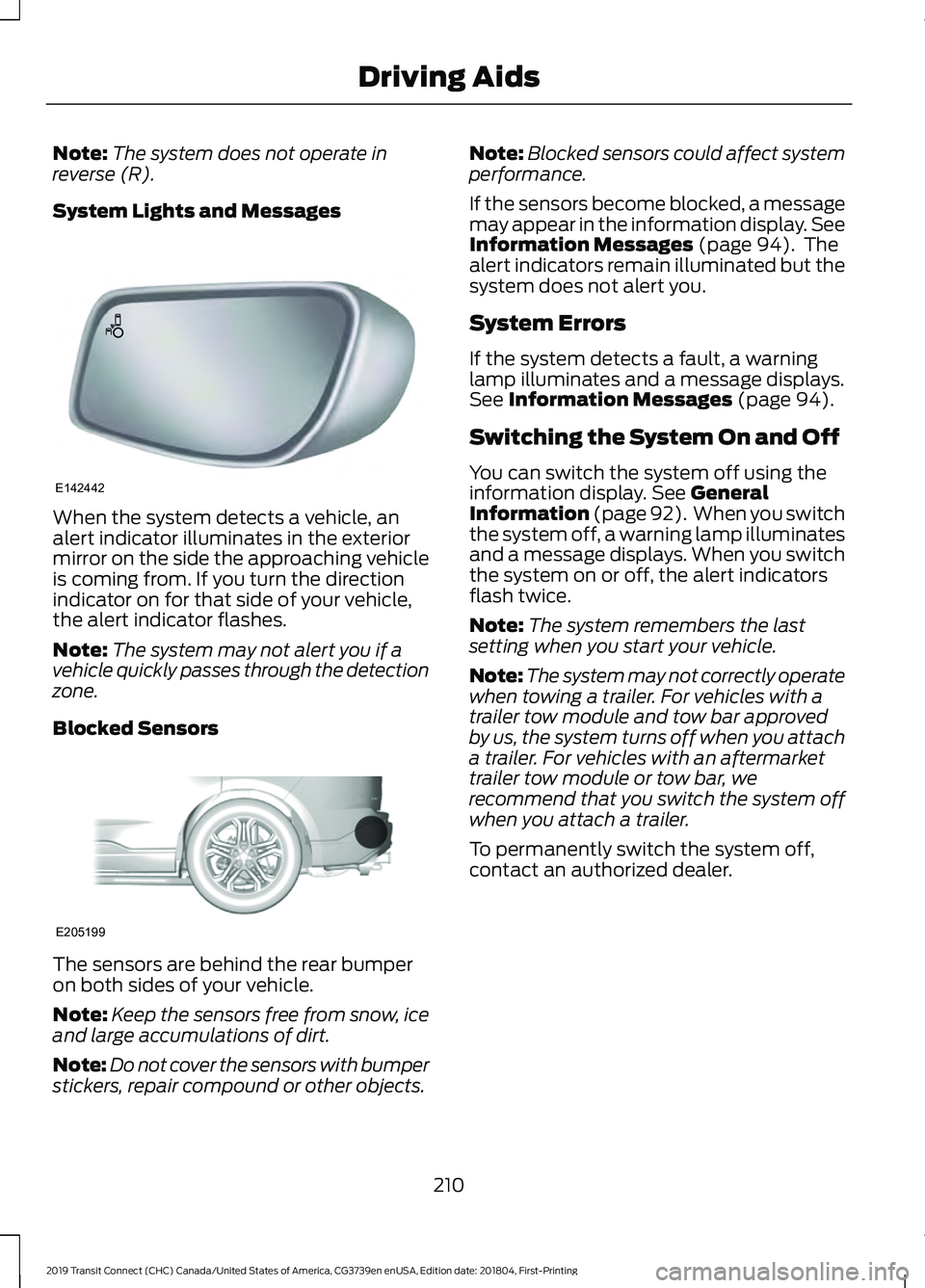
System Lights and Messages When the system detects a vehicle, an
alert indicator illuminates in the exterior
mirror on the side the approaching vehicle
is coming from. If you turn the direction
indicator on for that side of your vehicle,
the alert indicator flashes.
Note:
The system may not alert you if a
vehicle quickly passes through the detection
zone.
Blocked Sensors The sensors are behind the rear bumper
on both sides of your vehicle.
Note:
Keep the sensors free from snow, ice
and large accumulations of dirt.
Note: Do not cover the sensors with bumper
stickers, repair compound or other objects. Note:
Blocked sensors could affect system
performance.
If the sensors become blocked, a message
may appear in the information display. See
Information Messages (page 94). The
alert indicators remain illuminated but the
system does not alert you.
System Errors
If the system detects a fault, a warning
lamp illuminates and a message displays.
See
Information Messages (page 94).
Switching the System On and Off
You can switch the system off using the
information display.
See General
Information (page 92). When you switch
the system off, a warning lamp illuminates
and a message displays. When you switch
the system on or off, the alert indicators
flash twice.
Note: The system remembers the last
setting when you start your vehicle.
Note: The system may not correctly operate
when towing a trailer. For vehicles with a
trailer tow module and tow bar approved
by us, the system turns off when you attach
a trailer. For vehicles with an aftermarket
trailer tow module or tow bar, we
recommend that you switch the system off
when you attach a trailer.
To permanently switch the system off,
contact an authorized dealer.
210
2019 Transit Connect (CHC) Canada/United States of America, CG3739en enUSA, Edition date: 201804, First-Printing Driving AidsE142442 E205199
Page 215 of 493
CROSS TRAFFIC ALERT
WARNING: Do not use the cross
traffic alert system as a replacement for
using the interior and exterior mirrors or
looking over your shoulder before reversing
out of a parking space. The cross traffic
alert system is not a replacement for
careful driving. WARNING:
The system may not
operate properly during severe weather
conditions, for example snow, ice, heavy
rain and spray. Always drive with due care
and attention. Failure to take care may
result in a crash. Cross Traffic Alert is designed to warn you
of vehicles approaching from the sides
when the transmission is in reverse (R).
Using the System
Cross Traffic Alert turns on when you start
the engine and you shift into reverse (R).
Once shifted out of reverse (R), Cross
Traffic Alert turns off.
Note:
Cross Traffic Alert only functions
while your transmission is in reverse (R).
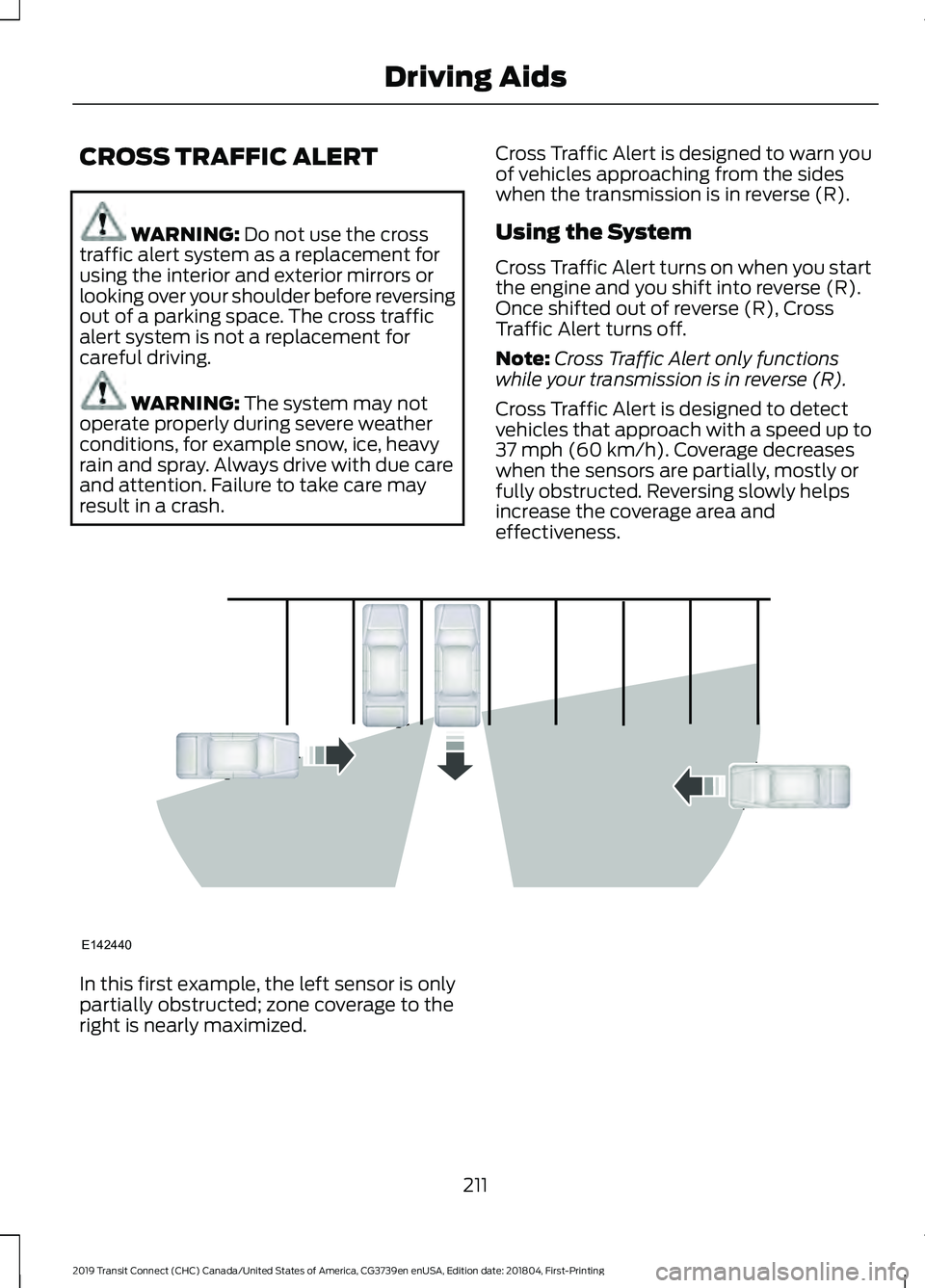
Cross Traffic Alert is designed to detect
vehicles that approach with a speed up to
37 mph (60 km/h)
. Coverage decreases
when the sensors are partially, mostly or
fully obstructed. Reversing slowly helps
increase the coverage area and
effectiveness. In this first example, the left sensor is only
partially obstructed; zone coverage to the
right is nearly maximized.
211
2019 Transit Connect (CHC) Canada/United States of America, CG3739en enUSA, Edition date: 201804, First-Printing Driving AidsE142440
Page 216 of 493
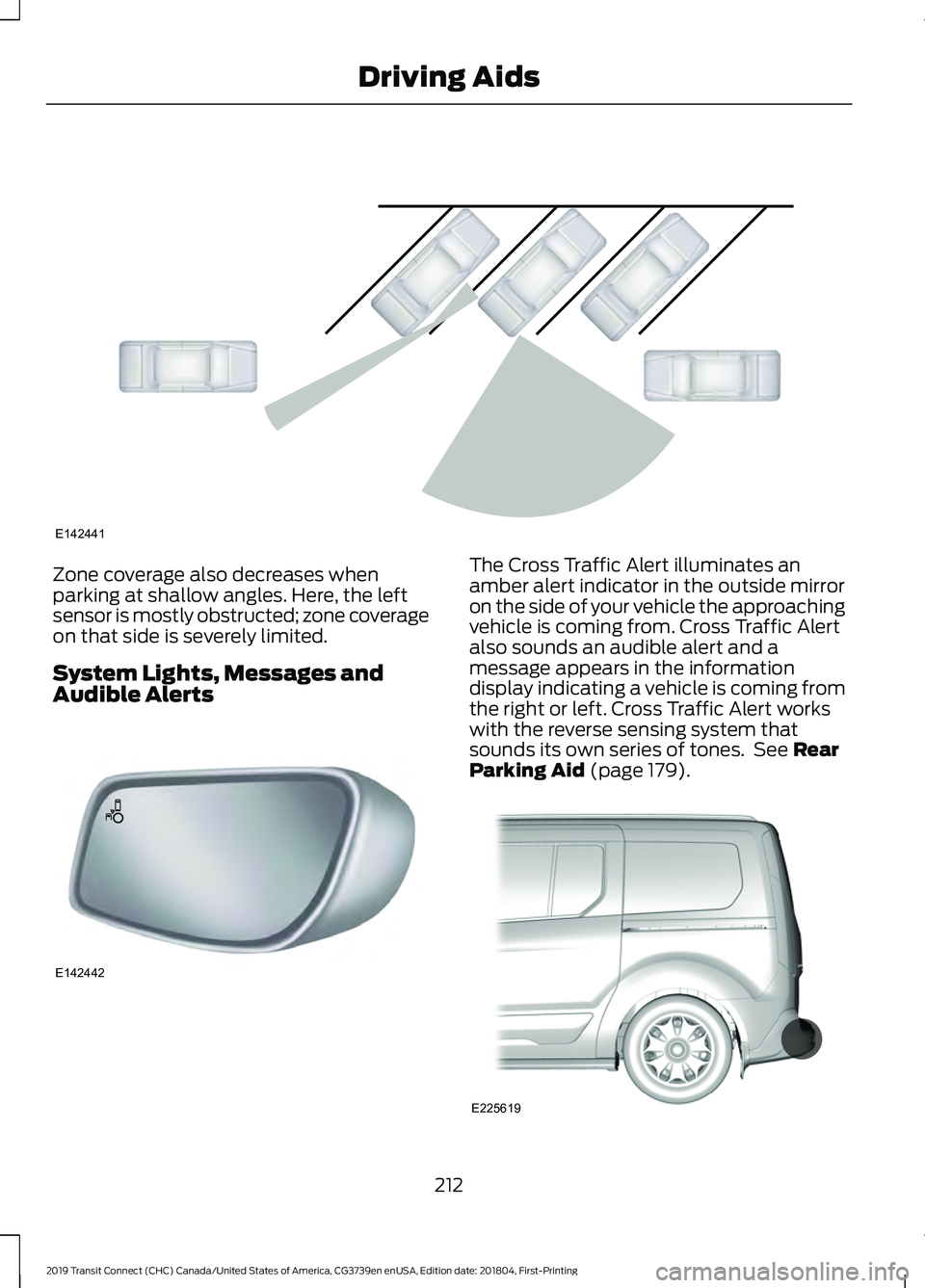
Zone coverage also decreases when
parking at shallow angles. Here, the left
sensor is mostly obstructed; zone coverage
on that side is severely limited.
System Lights, Messages and
Audible Alerts The Cross Traffic Alert illuminates an
amber alert indicator in the outside mirror
on the side of your vehicle the approaching
vehicle is coming from. Cross Traffic Alert
also sounds an audible alert and a
message appears in the information
display indicating a vehicle is coming from
the right or left. Cross Traffic Alert works
with the reverse sensing system that
sounds its own series of tones. See Rear
Parking Aid (page 179). 212
2019 Transit Connect (CHC) Canada/United States of America, CG3739en enUSA, Edition date: 201804, First-Printing Driving AidsE142441 E142442 E225619
Page 222 of 493
Time Gap
Distance Gap
Distance Indic-
ator Color
System Sensit-
ivity
Vehicle Speed
Greater than 0.9seconds.
Greater than
82.0 ft (25 m) .
Gray.
Normal.
62 mph
(100 km/h)
0.6-0.9
seconds.
55.8–82.0 ft
(17 –25 m)
Yellow.
Less than 0.6seconds.
Less than
55.8 ft (17 m)
.
Red.
Switching Distance Indication On or Off
To switch distance indication on or off, use the information display controls on
the steering wheel to select the following: Action
Menu Item
Press the menu button.
Driver Assist.
Press the
OK button.
Pre-Collision Assist
Press the
OK button.
Distance Indication
Pre-Collision Assist System
Sensors
Vehicles without Adaptive Cruise
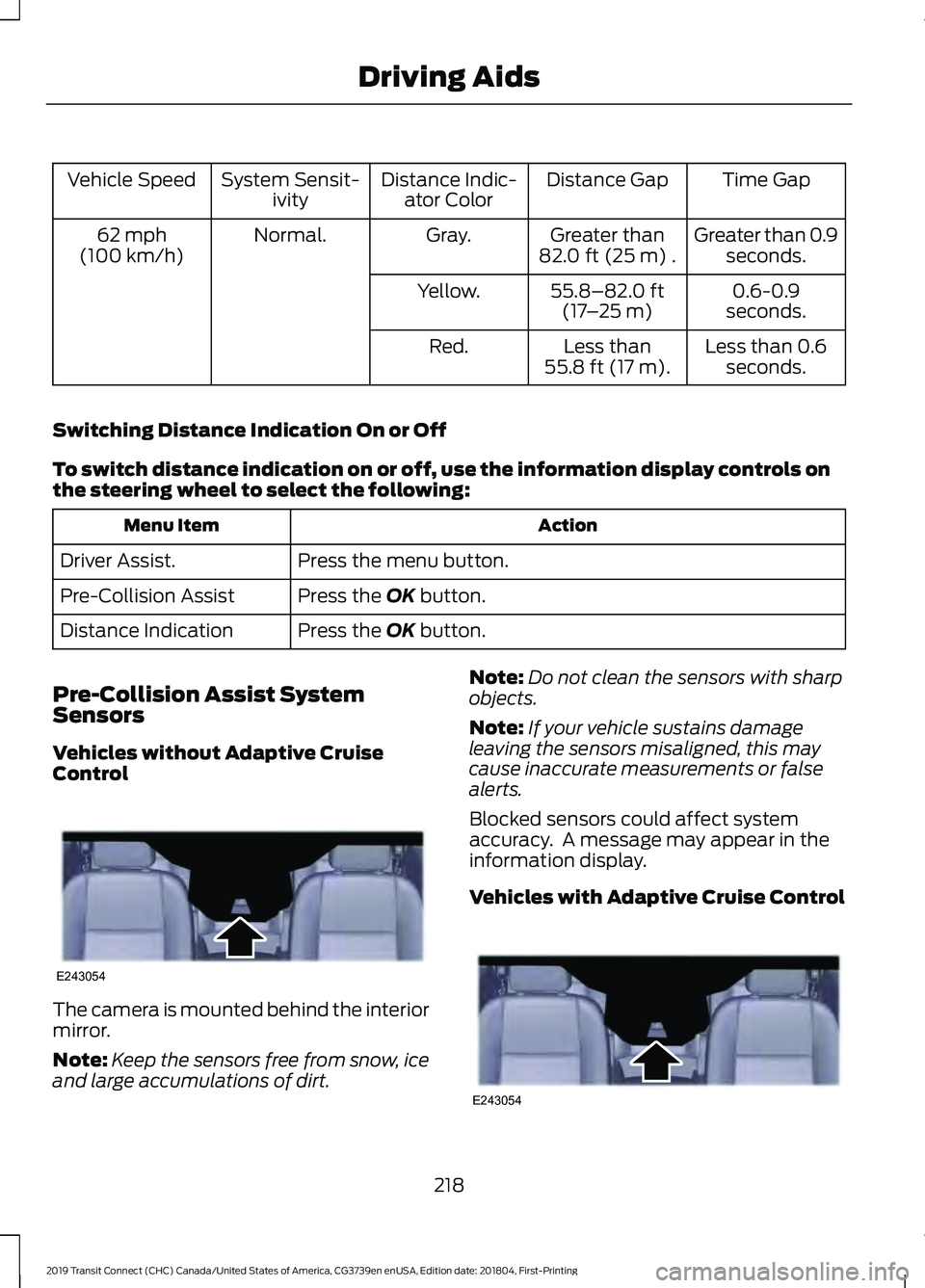
Control The camera is mounted behind the interior
mirror.
Note:
Keep the sensors free from snow, ice
and large accumulations of dirt. Note:
Do not clean the sensors with sharp
objects.
Note: If your vehicle sustains damage
leaving the sensors misaligned, this may
cause inaccurate measurements or false
alerts.
Blocked sensors could affect system
accuracy. A message may appear in the
information display.
Vehicles with Adaptive Cruise Control 218
2019 Transit Connect (CHC) Canada/United States of America, CG3739en enUSA, Edition date: 201804, First-Printing Driving AidsE243054 E243054
Page 223 of 493
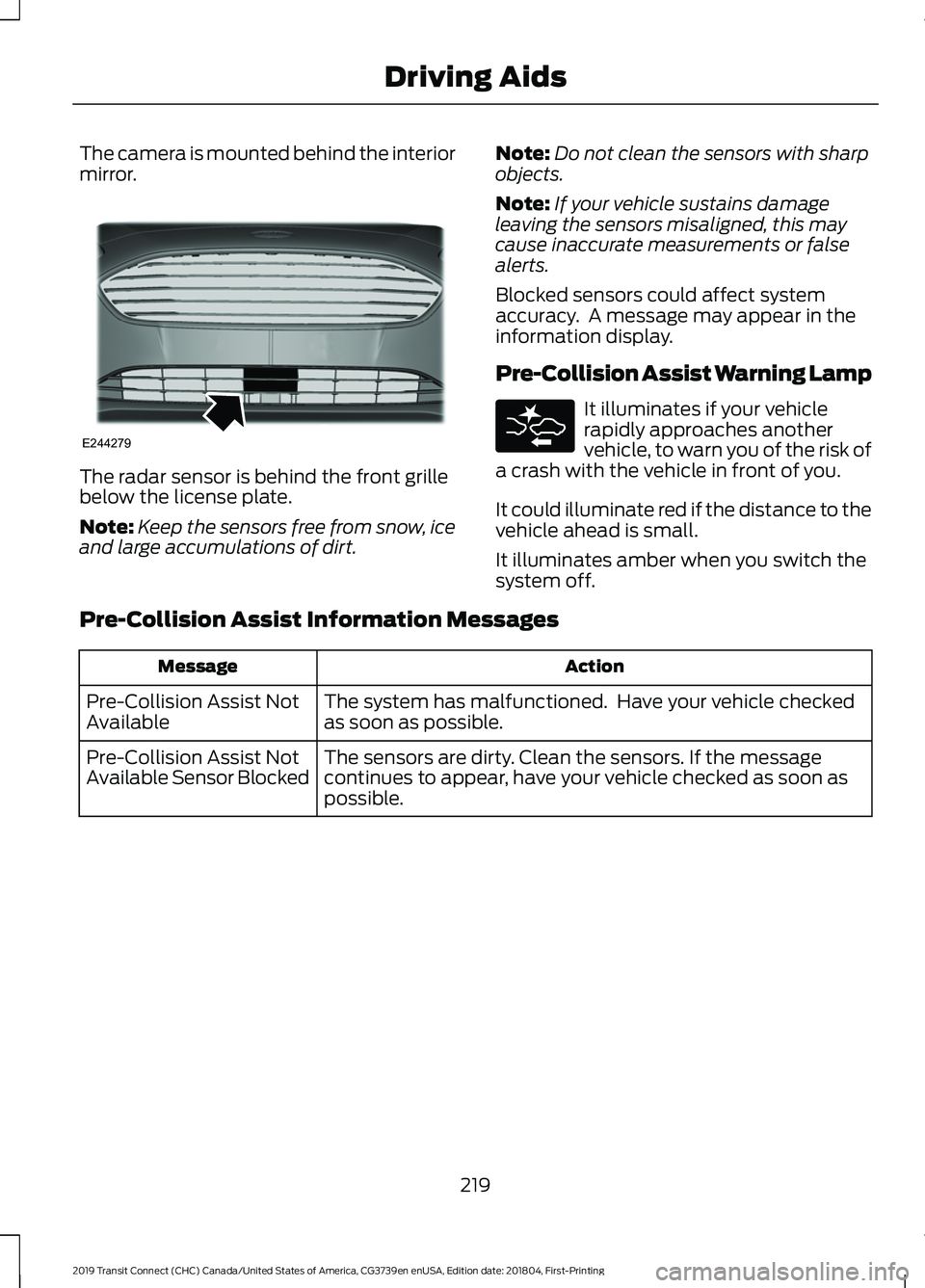
The camera is mounted behind the interior
mirror.
The radar sensor is behind the front grille
below the license plate.
Note:
Keep the sensors free from snow, ice
and large accumulations of dirt. Note:
Do not clean the sensors with sharp
objects.
Note: If your vehicle sustains damage
leaving the sensors misaligned, this may
cause inaccurate measurements or false
alerts.
Blocked sensors could affect system
accuracy. A message may appear in the
information display.
Pre-Collision Assist Warning Lamp It illuminates if your vehicle
rapidly approaches another
vehicle, to warn you of the risk of
a crash with the vehicle in front of you.
It could illuminate red if the distance to the
vehicle ahead is small.
It illuminates amber when you switch the
system off.
Pre-Collision Assist Information Messages Action
Message
The system has malfunctioned. Have your vehicle checked
as soon as possible.
Pre-Collision Assist Not
Available
The sensors are dirty. Clean the sensors. If the message
continues to appear, have your vehicle checked as soon as
possible.
Pre-Collision Assist Not
Available Sensor Blocked
219
2019 Transit Connect (CHC) Canada/United States of America, CG3739en enUSA, Edition date: 201804, First-Printing Driving AidsE244279
Page 262 of 493
Protected Component
Fuse Rating
Fuse Location
Mass air flow and intake air temperature sensor.
5 A
73
Heated exterior mirrors.
10 A
79
Modified vehicle connection.
5 A
80
Horn.
20 A
81
Left-hand heated windshield element.
40 A
82
Windshield heated washer jets.
5 A
83
Cooling fan.
60 A
84
Fuel pump.
30 A
85
Starter motor.
20 A
86
Glow plug module - diesel.
60 A
87
Blower motor.
40 A
89
Heated rear window.
25 A
90
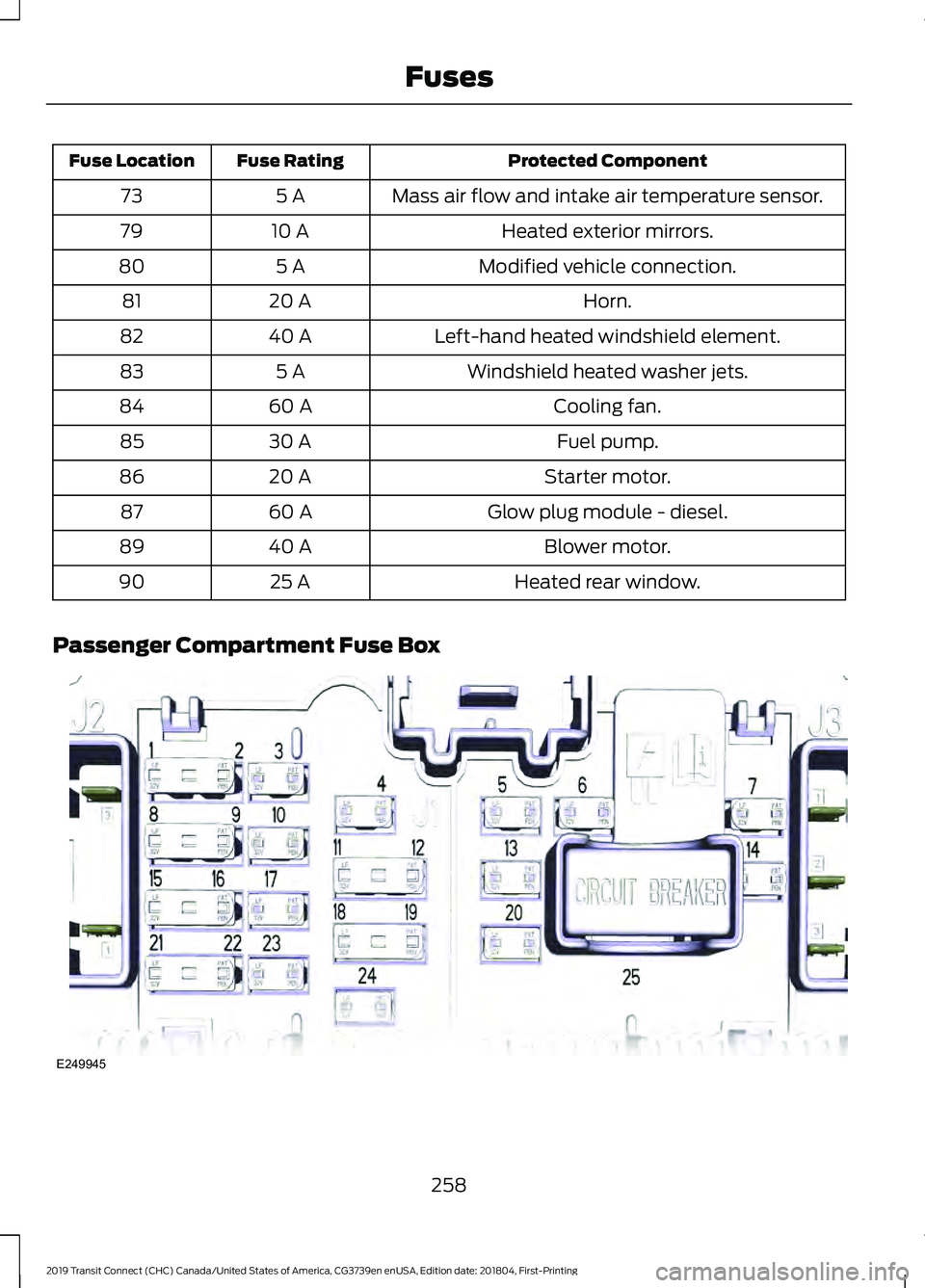
Passenger Compartment Fuse Box 258
2019 Transit Connect (CHC) Canada/United States of America, CG3739en enUSA, Edition date: 201804, First-Printing FusesE249945
Page 263 of 493
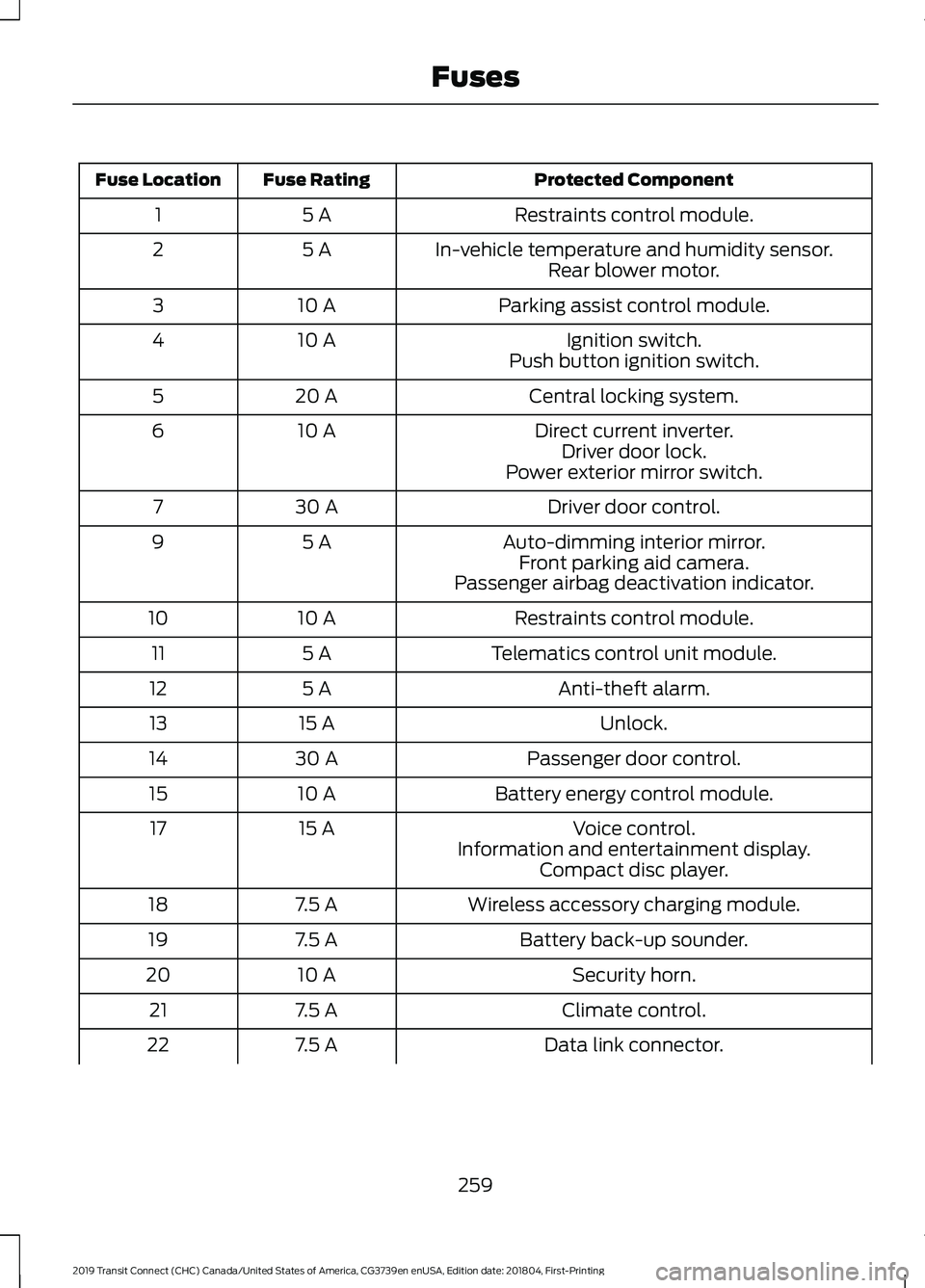
Protected Component
Fuse Rating
Fuse Location
Restraints control module.
5 A
1
In-vehicle temperature and humidity sensor.
5 A
2
Rear blower motor.
Parking assist control module.
10 A
3
Ignition switch.
10 A
4
Push button ignition switch.
Central locking system.
20 A
5
Direct current inverter.
10 A
6
Driver door lock.
Power exterior mirror switch.
Driver door control.
30 A
7
Auto-dimming interior mirror.
5 A
9
Front parking aid camera.
Passenger airbag deactivation indicator.
Restraints control module.
10 A
10
Telematics control unit module.
5 A
11
Anti-theft alarm.
5 A
12
Unlock.
15 A
13
Passenger door control.
30 A
14
Battery energy control module.
10 A
15
Voice control.
15 A
17
Information and entertainment display.Compact disc player.
Wireless accessory charging module.
7.5 A
18
Battery back-up sounder.
7.5 A
19
Security horn.
10 A
20
Climate control.
7.5 A
21
Data link connector.
7.5 A
22
259
2019 Transit Connect (CHC) Canada/United States of America, CG3739en enUSA, Edition date: 201804, First-Printing Fuses
Page 278 of 493
Note:
See an authorized dealer for low
voltage battery access, testing, or
replacement.
When a low voltage battery replacement
is necessary, see an authorized dealer to
replace the low voltage battery with a Ford
recommended replacement low voltage
battery that matches the electrical
requirements of the vehicle.
To ensure proper operation of the battery
management system (BMS), do not allow
a technician to connect any electrical
device ground connection directly to the
low voltage battery negative post. A
connection at the low voltage battery
negative post can cause inaccurate
measurements of the battery condition
and potential incorrect system operation.
Note: If a person adds electrical or
electronic accessories or components to the
vehicle, the accessories or components may
adversely affect the low voltage battery
performance and durability and may also
affect the performance of other electrical
systems in the vehicle.
For longer, trouble-free operation, keep the
top of the battery clean and dry. Also,
make certain the battery cables are always
tightly fastened to the battery terminals.
If you see any corrosion on the battery or
terminals, remove the cables from the
terminals and clean with a wire brush. You
can neutralize the acid with a solution of
baking soda and water.
When a battery replacement is required,
the battery should only be replaced with
a Ford recommended replacement battery
that matches the electrical requirements
of the vehicle.
Because your vehicle ’s engine is
electronically-controlled by a computer,
some engine control settings are
maintained by power from the low voltage
battery. Some engine computer settings,
like the idle trim and fuel trim strategy, optimize the driveability and performance
of the engine. Some other computer
settings, like the clock and radio station
presets, are also maintained in memory by
power from the low voltage battery. When
a technician disconnects and connects the
low voltage battery, these settings are
erased. Complete the following procedure
in order to restore the settings:
1. With the vehicle at a complete stop,
set the parking brake.
2. Shift the transmission into park (P).
3. Switch off all accessories.
4. Fully press the brake pedal and start the vehicle.
5. Run the engine until it reaches normal operating temperature. While the
engine is warming up, complete the
following: Reset the clock. See Audio
System (page 352). Reset the power
windows bounce-back feature. See
Windows and Mirrors
(page 83).
Reset the radio station presets. See
Audio System
(page 352).
6. Allow the engine to idle for at least one
minute. If the engine turns off, press
the accelerator pedal to start the
engine.
7. While the engine is running, press the brake pedal and shift into neutral (N).
8. Allow the engine to run for at least one
minute by pressing on the accelerator
pedal.
9. Drive the vehicle at least 12 mi (20 km)
to completely relearn the idle and fuel
trim strategy.
Note: If you do not allow the engine to
relearn the idle and fuel trim strategy, the
idle quality of your vehicle may be adversely
affected until the engine computer
eventually relearns the idle trim and fuel
trim strategy.
274
2019 Transit Connect (CHC) Canada/United States of America, CG3739en enUSA, Edition date: 201804, First-Printing Maintenance
Page 292 of 493
Exterior Chrome Parts
•
Apply a high quality-cleaning product
to bumpers and other chrome parts.
Follow the manufacturer ’s instructions.
We recommend Motorcraft Custom
Bright Metal Cleaner.
• Do not apply the cleaning product to
hot surfaces. Do not leave the cleaning
product on chrome surfaces longer
than the time recommended.
• Using non-recommended cleaners can
result in severe and permanent
cosmetic damage.
Note: Never use abrasive materials, for
example steel wool or plastic pads as they
can scratch the chrome surface.
Note: Do not use chrome cleaner, metal
cleaner or polish on wheels or wheel covers.
Exterior Plastic Parts
For routine cleaning we recommend
Motorcraft Detail Wash. If tar or grease
spots are present, we recommend
Motorcraft Bug and Tar Remover.
Stripes or Graphics (If Equipped)
Hand washing your vehicle is preferred
however, pressure washing may be used
under the following conditions:
• Do not use water pressure higher than
2,000 psi (14,000 kPa)
.
• Do not use water hotter than
179°F
(82°C).
• Use a spray with a
40° wide spray
angle pattern.
• Keep the nozzle at a
12 in (305 mm)
distance and 90° angle to your
vehicle's surface.
Note: Holding the pressure washer nozzle
at an angle to the vehicle's surface may
damage graphics and cause the edges to
peel away from the vehicle's surface. Underbody
Regularly clean the underside of your
vehicle using water. Keep body and door
drain holes free of debris or foreign
material.
Under Hood
For removing black rubber marks from
under the hood we recommend Motorcraft
Wheel and Tire Cleaner or Motorcraft Bug
and Tar Remover.
WAXING
Regular waxing is necessary to protect your
car's paint from the elements. We
recommend that you wash and wax the
painted surface once or twice a year.
When washing and waxing, park your
vehicle in a shaded area out of direct
sunlight. Always wash your vehicle before
applying wax.
•
Use a quality wax that does not contain
abrasives.
• Follow the manufacturer ’s instructions
to apply and remove the wax.
• Apply a small amount of wax in a
back-and-forth motion, not in circles.
• Do not allow wax to come in contact
with any non-body (low-gloss black)
colored trim. The wax will discolor or
stain the parts over time.
•Roof racks.
• Bumpers.
• Grained door handles.
• Side moldings.
• Mirror housings.
• Windshield cowl area.
• Do not apply wax to glass areas.
• After waxing, your car's paint should
feel smooth, and be free of streaks and
smudges.
288
2019 Transit Connect (CHC) Canada/United States of America, CG3739en enUSA, Edition date: 201804, First-Printing Vehicle Care
Page 483 of 493
Engine Block Heater....................................144
Using the Engine Block Heater...................... 145
Engine Coolant Check...............................268
Adding Coolant.................................................. 268
Coolant Change................................................. 270
Engine Coolant Temperature Management....................................................271
Fail-Safe Cooling............................................... 270
Recycled Coolant............................................... 270
Severe Climates................................................. 270
Engine Cooling Fan - Diesel.....................268
Engine Cooling Fan - Gasoline................267
Engine Emission Control...........................158
Engine Immobilizer See: Passive Anti-Theft System..................... 70
Engine Oil Check..........................................266 Adding Engine Oil.............................................. 266
Engine Oil Dipstick - 1.5L Duratorq-TDCi Diesel.............................................................265
Engine Oil Dipstick - 2.0L Duratec-HE (MI4)/2.0L Flex Fuel/2.5L....................266
Engine Specifications - 1.5L Duratorq-TDCi Diesel..............................327
Engine Specifications - 2.0L Duratec-HE (MI4)/2.0L Flex Fuel
...............................328
Engine Specifications - 2.5L....................329
Entertainment...............................................377 Playing Music From a USB or Media
Player................................................................. 378
Streaming Music From a Bluetooth Device................................................................ 378
Using the Radio................................................... 377
Environment.....................................................16
Essential Towing Checks..........................233 Before Towing a Trailer.................................... 235
Hitches................................................................... 234
Launching or Retrieving a Boat or Personal Watercraft....................................................... 236
Safety Chains...................................................... 234
Trailer Brakes....................................................... 234
Trailer Lamps....................................................... 235
Trailer Towing Connector................................ 234
When Towing a Trailer..................................... 235
Event Data Recording See: Data Recording.............................................. 9
Export Unique Options.................................15
Exterior Mirrors
................................................84
Adjusting the Mirrors.......................................... 84Folding the Mirrors...............................................
84
F
Fan See: Engine Cooling Fan - Diesel.................268
See: Engine Cooling Fan - Gasoline............267
Fastening the Seatbelts...............................33 Seatbelt Locking Modes.................................... 34
Using Seatbelts During Pregnancy................34
Flat Tire See: Changing a Road Wheel....................... 320
Flat Tire Inflation See: Tire Sealant and Inflator Kit................296
Floor Mats.......................................................239
Fog Lamps - Front See: Front Fog Lamps......................................... 81
Ford Credit
.........................................................13
US Only..................................................................... 13
Ford Protect....................................................414 Ford Protect Extended Service Plan
(CANADA ONLY)........................................... 415
Ford Protect Extended Service Plans (U.S. Only)................................................................... 414
Front Fog Lamps.............................................81
Front Parking Aid...........................................181 Front Parking Aid Information
Messages.......................................................... 183
Object Distance Indicator................................ 182
Front Passenger Sensing System............42
Front Wiper Blades See: Changing the Front Wiper Blades.......275
Fuel and Refueling.......................................148
Fuel Consumption
........................................157
Advertised Capacity........................................... 157
Fuel Economy....................................................... 157
Fuel Filler Funnel Location........................153
Fuel Quality - Diesel....................................148 Biodiesel................................................................ 149
Diesel Fuel Additives ........................................ 150
Fuel Requirements - Choosing The Right Fuel: Vehicles Operated Where Ultra Low
Sulfur Diesel Fuel Is Not Required ..........149
Fuel Requirements - Choosing The Right Fuel: Vehicles Operated Where Ultra Low
Sulfur Diesel Fuel Is Required (United
States/Canada/Puerto Rico/U.S. Virgin
Islands And Other Locales) ...................... 148
479
2019 Transit Connect (CHC) Canada/United States of America, CG3739en enUSA, Edition date: 201804, First-Printing Index