clock FORD TRANSIT CONNECT 2019 Owner's Manual
[x] Cancel search | Manufacturer: FORD, Model Year: 2019, Model line: TRANSIT CONNECT, Model: FORD TRANSIT CONNECT 2019Pages: 493, PDF Size: 7.43 MB
Page 326 of 493
WARNING: Always use the jack
provided as original equipment with your
vehicle. If using a jack other than the one
provided as original equipment with your
vehicle, make sure the jack capacity is
adequate for the vehicle weight, including
any vehicle cargo or modifications.
Note: The jack and tools are located behind
a cover in the sidewall at the left rear of the
cargo area. Remove the retention straps and
wing nut before removing the jack.
The jack and tools are located behind a
cover in the left rear of the cargo area.
Remove the wing nut to remove the jack.
Remove the lug nut wrench from the clips
by pulling straight out.
1. Park on a level surface, set the parking
brake and activate the hazard flashers.
2. Move the transmission selector lever to the park (P) position and switch the
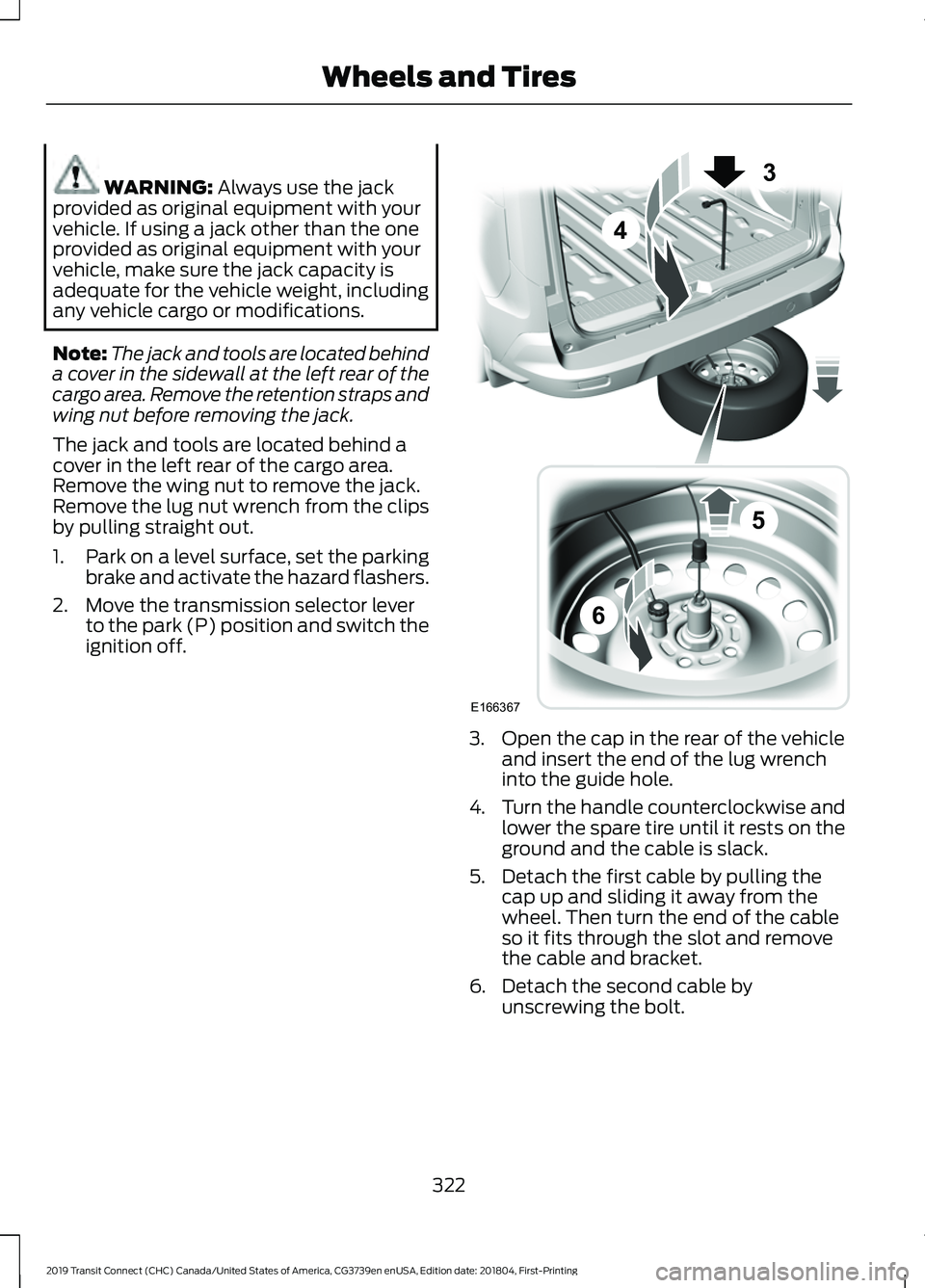
ignition off. 3. Open the cap in the rear of the vehicle
and insert the end of the lug wrench
into the guide hole.
4. Turn the handle counterclockwise and
lower the spare tire until it rests on the
ground and the cable is slack.
5. Detach the first cable by pulling the cap up and sliding it away from the
wheel. Then turn the end of the cable
so it fits through the slot and remove
the cable and bracket.
6. Detach the second cable by unscrewing the bolt.
322
2019 Transit Connect (CHC) Canada/United States of America, CG3739en enUSA, Edition date: 201804, First-Printing Wheels and TiresE166367
3
4
5
6
Page 327 of 493
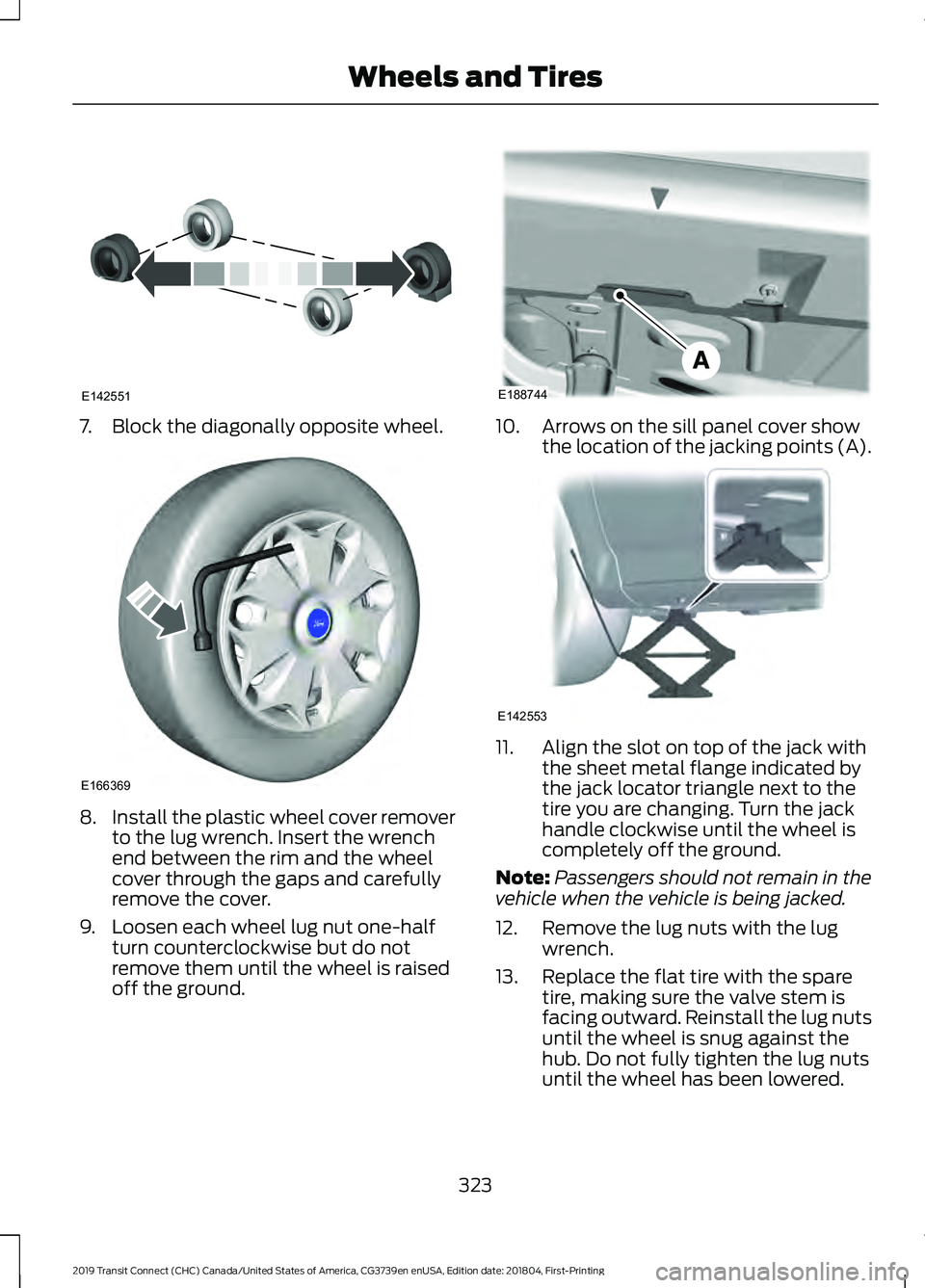
7. Block the diagonally opposite wheel.
8.
Install the plastic wheel cover remover
to the lug wrench. Insert the wrench
end between the rim and the wheel
cover through the gaps and carefully
remove the cover.
9. Loosen each wheel lug nut one-half turn counterclockwise but do not
remove them until the wheel is raised
off the ground. 10. Arrows on the sill panel cover show
the location of the jacking points (A). 11. Align the slot on top of the jack with
the sheet metal flange indicated by
the jack locator triangle next to the
tire you are changing. Turn the jack
handle clockwise until the wheel is
completely off the ground.
Note: Passengers should not remain in the
vehicle when the vehicle is being jacked.
12. Remove the lug nuts with the lug wrench.
13. Replace the flat tire with the spare tire, making sure the valve stem is
facing outward. Reinstall the lug nuts
until the wheel is snug against the
hub. Do not fully tighten the lug nuts
until the wheel has been lowered.
323
2019 Transit Connect (CHC) Canada/United States of America, CG3739en enUSA, Edition date: 201804, First-Printing Wheels and TiresE142551 E166369 E188744 E142553
Page 328 of 493
14. Lower the wheel by turning the jack
handle counterclockwise.15.
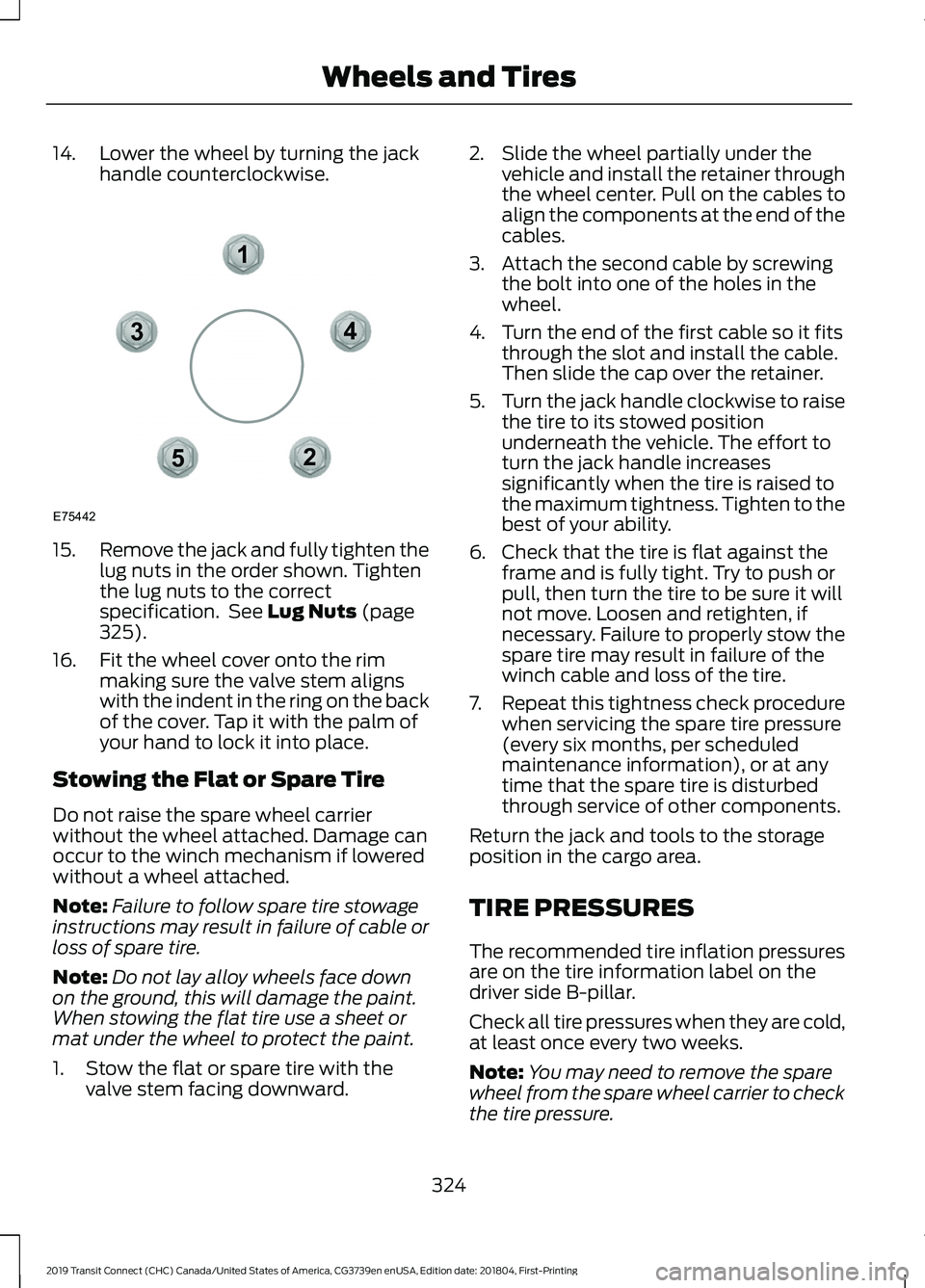
Remove the jack and fully tighten the
lug nuts in the order shown. Tighten
the lug nuts to the correct
specification. See Lug Nuts (page
325).
16. Fit the wheel cover onto the rim making sure the valve stem aligns
with the indent in the ring on the back
of the cover. Tap it with the palm of
your hand to lock it into place.
Stowing the Flat or Spare Tire
Do not raise the spare wheel carrier
without the wheel attached. Damage can
occur to the winch mechanism if lowered
without a wheel attached.
Note: Failure to follow spare tire stowage
instructions may result in failure of cable or
loss of spare tire.
Note: Do not lay alloy wheels face down
on the ground, this will damage the paint.
When stowing the flat tire use a sheet or
mat under the wheel to protect the paint.
1. Stow the flat or spare tire with the valve stem facing downward. 2. Slide the wheel partially under the
vehicle and install the retainer through
the wheel center. Pull on the cables to
align the components at the end of the
cables.
3. Attach the second cable by screwing the bolt into one of the holes in the
wheel.
4. Turn the end of the first cable so it fits through the slot and install the cable.
Then slide the cap over the retainer.
5. Turn the jack handle clockwise to raise
the tire to its stowed position
underneath the vehicle. The effort to
turn the jack handle increases
significantly when the tire is raised to
the maximum tightness. Tighten to the
best of your ability.
6. Check that the tire is flat against the frame and is fully tight. Try to push or
pull, then turn the tire to be sure it will
not move. Loosen and retighten, if
necessary. Failure to properly stow the
spare tire may result in failure of the
winch cable and loss of the tire.
7. Repeat this tightness check procedure
when servicing the spare tire pressure
(every six months, per scheduled
maintenance information), or at any
time that the spare tire is disturbed
through service of other components.
Return the jack and tools to the storage
position in the cargo area.
TIRE PRESSURES
The recommended tire inflation pressures
are on the tire information label on the
driver side B-pillar.
Check all tire pressures when they are cold,
at least once every two weeks.
Note: You may need to remove the spare
wheel from the spare wheel carrier to check
the tire pressure.
324
2019 Transit Connect (CHC) Canada/United States of America, CG3739en enUSA, Edition date: 201804, First-Printing Wheels and Tires12
3
4
5
E75442
Page 362 of 493
AM/FM RADIO - VEHICLES
WITHOUT: SYNC 3
Selecting a Radio Source
Press the button to display the
available radio sources.
Repeatedly press the button to scroll to
the desired radio source.
Press the OK button.
Station Presets
To store a radio station, press and hold one
of the numeric preset buttons.
Note: Six presets can be stored for each
radio source.
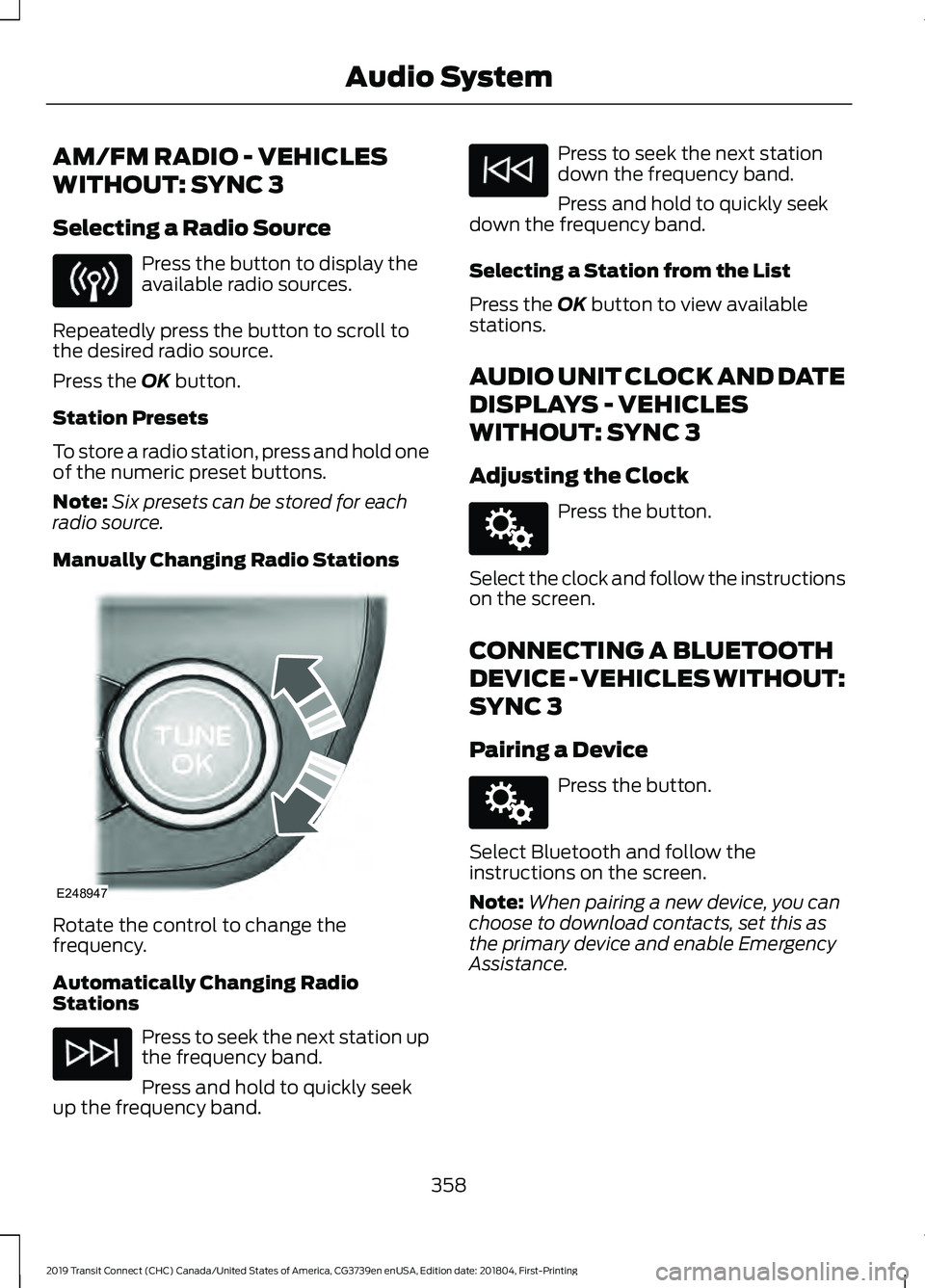
Manually Changing Radio Stations Rotate the control to change the
frequency.
Automatically Changing Radio
Stations
Press to seek the next station up
the frequency band.
Press and hold to quickly seek
up the frequency band. Press to seek the next station
down the frequency band.
Press and hold to quickly seek
down the frequency band.
Selecting a Station from the List
Press the
OK button to view available
stations.
AUDIO UNIT CLOCK AND DATE
DISPLAYS - VEHICLES
WITHOUT: SYNC 3
Adjusting the Clock Press the button.
Select the clock and follow the instructions
on the screen.
CONNECTING A BLUETOOTH
DEVICE - VEHICLES WITHOUT:
SYNC 3
Pairing a Device Press the button.
Select Bluetooth and follow the
instructions on the screen.
Note: When pairing a new device, you can
choose to download contacts, set this as
the primary device and enable Emergency
Assistance.
358
2019 Transit Connect (CHC) Canada/United States of America, CG3739en enUSA, Edition date: 201804, First-Printing Audio System E248947 E142607 E142607
Page 368 of 493
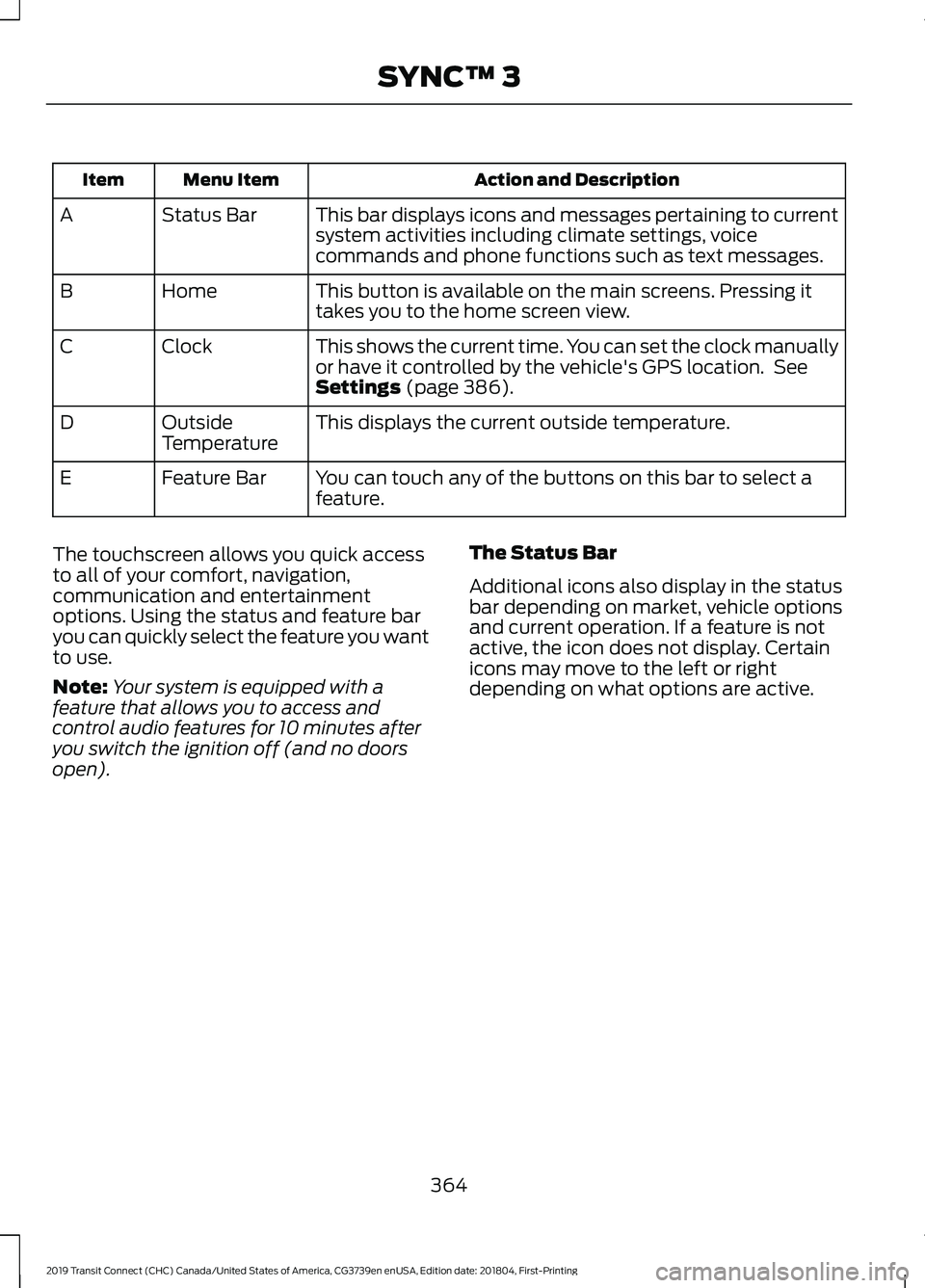
Action and Description
Menu Item
Item
This bar displays icons and messages pertaining to current
system activities including climate settings, voice
commands and phone functions such as text messages.
Status Bar
A
This button is available on the main screens. Pressing it
takes you to the home screen view.
Home
B
This shows the current time. You can set the clock manually
or have it controlled by the vehicle's GPS location. See
Settings (page 386).
Clock
C
This displays the current outside temperature.
Outside
Temperature
D
You can touch any of the buttons on this bar to select a
feature.
Feature Bar
E
The touchscreen allows you quick access
to all of your comfort, navigation,
communication and entertainment
options. Using the status and feature bar
you can quickly select the feature you want
to use.
Note: Your system is equipped with a
feature that allows you to access and
control audio features for 10 minutes after
you switch the ignition off (and no doors
open). The Status Bar
Additional icons also display in the status
bar depending on market, vehicle options
and current operation. If a feature is not
active, the icon does not display. Certain
icons may move to the left or right
depending on what options are active.
364
2019 Transit Connect (CHC) Canada/United States of America, CG3739en enUSA, Edition date: 201804, First-Printing SYNC™ 3
Page 391 of 493
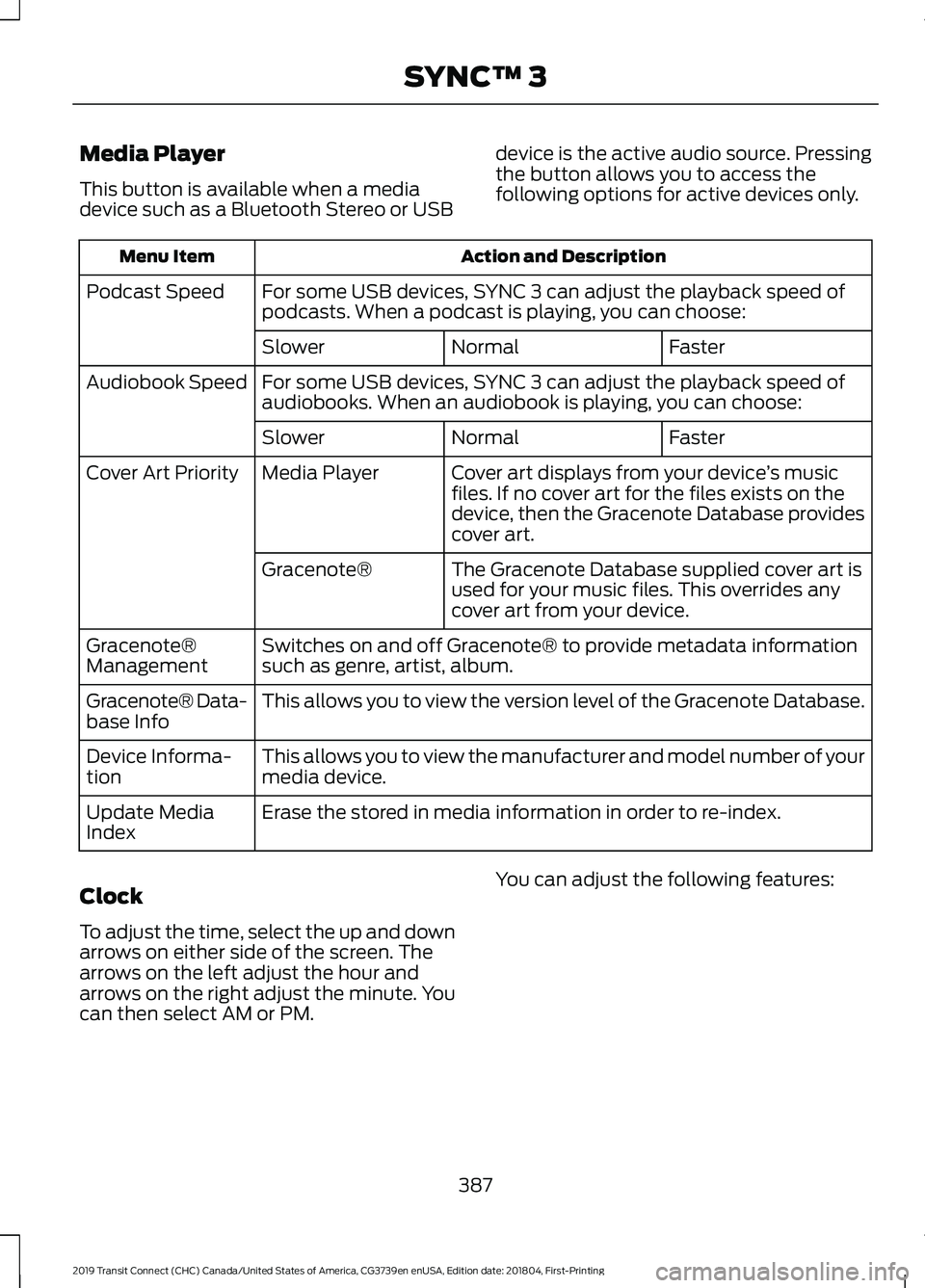
Media Player
This button is available when a media
device such as a Bluetooth Stereo or USB
device is the active audio source. Pressing
the button allows you to access the
following options for active devices only. Action and Description
Menu Item
For some USB devices, SYNC 3 can adjust the playback speed of
podcasts. When a podcast is playing, you can choose:
Podcast Speed
Faster
Normal
Slower
For some USB devices, SYNC 3 can adjust the playback speed of
audiobooks. When an audiobook is playing, you can choose:
Audiobook Speed
Faster
Normal
Slower
Cover art displays from your device ’s music
files. If no cover art for the files exists on the
device, then the Gracenote Database provides
cover art.
Media Player
Cover Art Priority
The Gracenote Database supplied cover art is
used for your music files. This overrides any
cover art from your device.
Gracenote®
Switches on and off Gracenote® to provide metadata information
such as genre, artist, album.
Gracenote®
Management
This allows you to view the version level of the Gracenote Database.
Gracenote® Data-
base Info
This allows you to view the manufacturer and model number of your
media device.
Device Informa-
tion
Erase the stored in media information in order to re-index.
Update Media
Index
Clock
To adjust the time, select the up and down
arrows on either side of the screen. The
arrows on the left adjust the hour and
arrows on the right adjust the minute. You
can then select AM or PM. You can adjust the following features:
387
2019 Transit Connect (CHC) Canada/United States of America, CG3739en enUSA, Edition date: 201804, First-Printing SYNC™ 3
Page 392 of 493
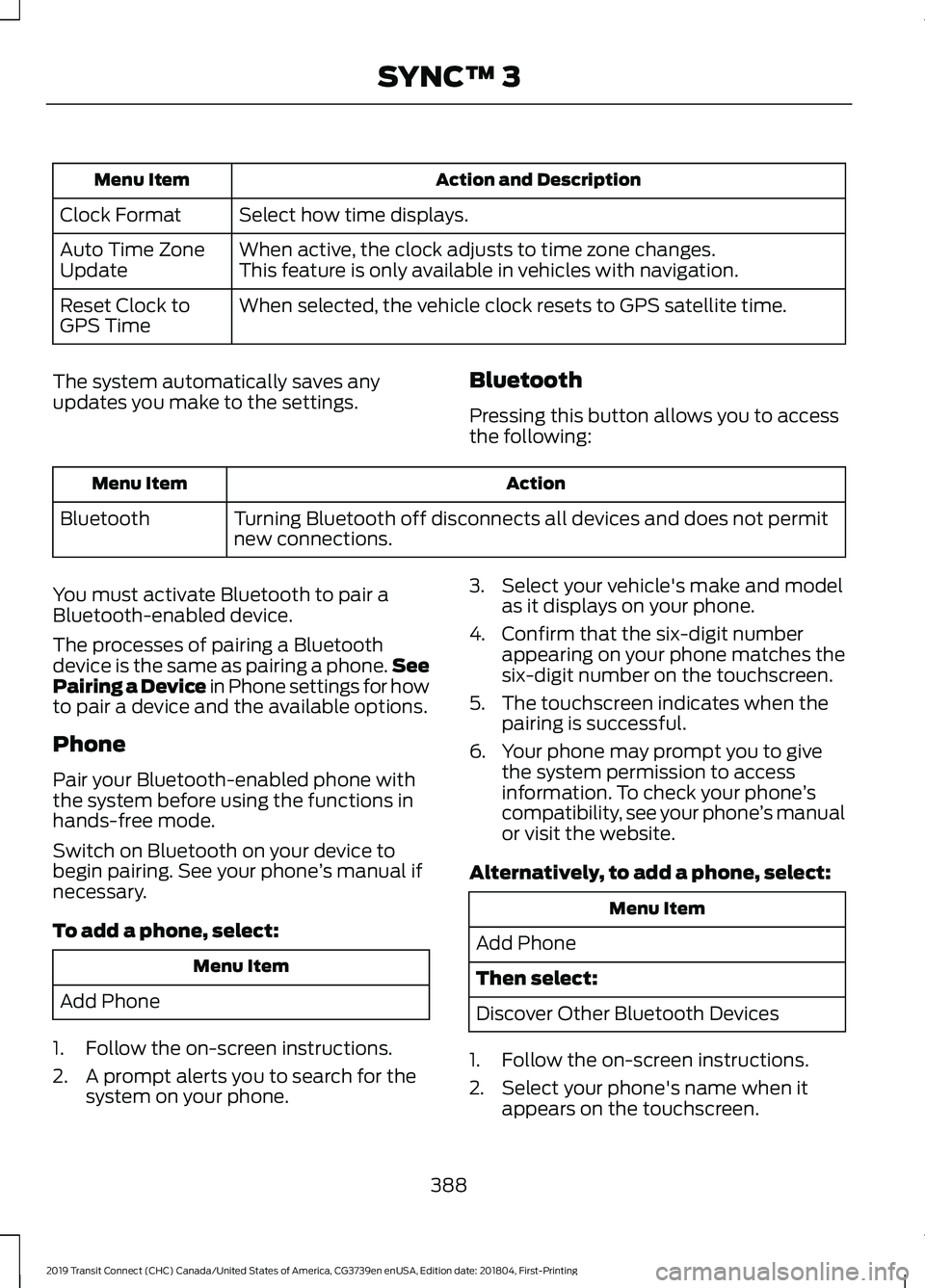
Action and Description
Menu Item
Select how time displays.
Clock Format
When active, the clock adjusts to time zone changes.
Auto Time Zone
Update This feature is only available in vehicles with navigation.
When selected, the vehicle clock resets to GPS satellite time.
Reset Clock to
GPS Time
The system automatically saves any
updates you make to the settings. Bluetooth
Pressing this button allows you to access
the following: Action
Menu Item
Turning Bluetooth off disconnects all devices and does not permit
new connections.
Bluetooth
You must activate Bluetooth to pair a
Bluetooth-enabled device.
The processes of pairing a Bluetooth
device is the same as pairing a phone. See
Pairing a Device in Phone settings for how
to pair a device and the available options.
Phone
Pair your Bluetooth-enabled phone with
the system before using the functions in
hands-free mode.
Switch on Bluetooth on your device to
begin pairing. See your phone ’s manual if
necessary.
To add a phone, select: Menu Item
Add Phone
1. Follow the on-screen instructions.
2. A prompt alerts you to search for the system on your phone. 3. Select your vehicle's make and model
as it displays on your phone.
4. Confirm that the six-digit number appearing on your phone matches the
six-digit number on the touchscreen.
5. The touchscreen indicates when the pairing is successful.
6. Your phone may prompt you to give the system permission to access
information. To check your phone ’s
compatibility, see your phone ’s manual
or visit the website.
Alternatively, to add a phone, select: Menu Item
Add Phone
Then select:
Discover Other Bluetooth Devices
1. Follow the on-screen instructions.
2. Select your phone's name when it appears on the touchscreen.
388
2019 Transit Connect (CHC) Canada/United States of America, CG3739en enUSA, Edition date: 201804, First-Printing SYNC™ 3
Page 479 of 493
9
911 Assist...........................................................49
911 Assist May Not Work If................................ 50
911 Assist Privacy Notice................................... 50
In the Event of a Crash....................................... 50
A
A/C See: Climate Control......................................... 108
About This Manual
...........................................7
ABS See: Brakes............................................................ 173
ABS driving hints See: Hints on Driving With Anti-Lock
Brakes................................................................. 174
Accessories.....................................................412 Exterior Style........................................................ 412
Interior Style.......................................................... 412
Lifestyle.................................................................. 412
Peace of Mind...................................................... 412
Accessories See: Replacement Parts
Recommendation............................................ 13
ACC See: Using Adaptive Cruise Control............196
Active Park Assist.........................................184 Using Active Park Assist.................................. 185
Adjusting the Headlamps.........................276 Horizontal Aim Adjustment........................... 278
Vertical Aim Adjustment................................. 276
Adjusting the Steering Wheel....................74
Airbag Disposal..............................................48
Air Conditioning See: Climate Control......................................... 108
Air Filter See: Changing the Engine Air Filter - 2.0L
Duratec-HE (MI4)/2.0L Flex Fuel, 1.5L
Duratorq-TDCi Diesel.................................. 283
See: Changing the Engine Air Filter - 2.5L..................................................................... 283
Alarm See: Anti-Theft Alarm......................................... 72
AM/FM Radio - Vehicles Without: SYNC 3
......................................................................358
Selecting a Radio Source............................... 358Anti-Theft Alarm
.............................................72
Alarm System......................................................... 72
Arming the Alarm................................................. 72
Disarming the Alarm........................................... 73
Full Guard and Reduced Guard....................... 72
Triggering the Alarm............................................ 72
Appendices
....................................................434
Apps.................................................................385 Using Apps on an Android Device...............386
Using Apps on an iOS Device........................ 385
At a Glance
.........................................................17
Audible Warnings and Indicators............90 Airbag Secondary Warning Audible
Warning.............................................................. 90
Automatic Transmission Audible Warning.............................................................. 90
Door Ajar Audible Warning................................ 91
Fasten Seatbelt Audible Warning................... 91
Headlamps On Audible Warning.................... 91
Key in Ignition Audible Warning....................... 91
Parking Brake On Audible Warning................91
Audio System
................................................352
General Information......................................... 352
Audio Unit Clock and Date Displays - Vehicles Without: SYNC 3
.....................358
Adjusting the Clock........................................... 358
Audio Unit - Vehicles With: SYNC 3
......................................................................356
Adjusting the Volume...................................... 356
Changing Radio Stations................................ 357
Pausing or Playing Media................................ 357
Scrolling Through the Menu Options.........357
Seek Down and Previous Track Button................................................................ 357
Seek Up and Next Track Button................... 357
Sound Settings................................................... 357
Switching the Audio Unit On and Off........356
Switching the Screen On and Off................357
Audio Unit - Vehicles Without: SYNC 3.......................................................................353
Adjusting the Volume....................................... 353
Changing Radio Stations................................ 354
Pausing or Playing Media............................... 356
Returning to the Previous Screen................356
Scrolling Through the Menu Options.........355
Seek Down and Previous Track Button............................................................... 356
Seek Up and Next Track Button.................. 356
475
2019 Transit Connect (CHC) Canada/United States of America, CG3739en enUSA, Edition date: 201804, First-Printing Index
Page 482 of 493
Climate Control............................................108
Clock...................................................................94
Type 1........................................................................\
94
Type 2....................................................................... 94
Cold Weather Precautions.......................239
Connecting a Bluetooth Device - Vehicles Without: SYNC 3.....................358
Pairing a Device.................................................. 358
Coolant Check See: Engine Coolant Check........................... 268
Cornering Lamps
.............................................81
Crash Sensors and Airbag Indicator........47
Creating a MyKey - Vehicles With: Push Button Start
...................................................57
MyKey Information Messages......................... 58
Creating a MyKey - Vehicles Without: Push Button Start........................................57
MyKey Information Messages.......................... 57
Cross Traffic Alert..........................................211 False Alerts............................................................ 213
Switching the System Off and On................213
System Errors....................................................... 213
System Lights, Messages and Audible Alerts................................................................... 212
System Limitations............................................ 213
Using the System................................................. 211
Cruise Control................................................195 Principle of Operation....................................... 195
Cruise control See: Using Cruise Control................................ 195
Cup Holders....................................................133
Customer Assistance
..................................247
D
Data Recording
..................................................9
Comfort, Convenience and Entertainment
Data........................................................................\
11
Event Data................................................................. 11
Service Data............................................................ 10
Services That Third Parties Provide...............12
Services That We Provide.................................. 12
Vehicles With a Modem...................................... 12
Vehicles With SYNC............................................. 12
Declaration of Conformity - Vehicles With: SYNC 3..............................................462
Radio Frequency Statement......................... 462Declaration of Conformity - Vehicles
With: Wireless Accessory
Charging.......................................................462
Declaration of Conformity - Vehicles Without: SYNC 3
........................................461
Radio Frequency Statement.......................... 461
Diesel Particulate Filter..............................163 Diesel Particulate Filter Automatic
Regeneration................................................... 164
Diesel Particulate Filter Manual Regeneration................................................... 165
On-Board Diagnostics System...................... 163
Direction Indicators
.......................................82
Doors and Locks.............................................63
Drive Belt Routing - 1.5L Duratorq-TDCi Diesel............................................................284
Drive Belt Routing - 2.0L Duratec-HE (MI4)/2.0L Flex Fuel
...............................284
Drive Belt Routing - 2.5L...........................285
Driver Alert.....................................................203 Driver Alert System Display........................... 204
Driver Alert System Messages...................... 205
Driver Alert System Warnings....................... 203
Switching Driver Alert On or Off.................. 204
Driver and Passenger Airbags....................41 Children and Airbags........................................... 42
Proper Driver and Front Passenger Seating Adjustment......................................................... 41
Driver Knee Airbag
.........................................46
Driving Aids....................................................202
Driving Hints..................................................238
Driving Through Water
...............................239
E
Eco Mode
.........................................................213
Eco Mode System Display............................... 214
Principle of Operation....................................... 213
Economical Driving.....................................238
Electromagnetic Compatibility
..............434
Emission Law.................................................158 Noise Emissions Warranty, Prohibited
Tampering Acts and Maintenance..........159
Tampering With a Noise Control System............................................................... 158
End User License Agreement.................436 VEHICLE SOFTWARE END USER LICENSE
AGREEMENT (EULA) ................................. 436
478
2019 Transit Connect (CHC) Canada/United States of America, CG3739en enUSA, Edition date: 201804, First-Printing Index
Page 489 of 493
Vehicles Sold in Canada: Using Roadside
Assistance....................................................... 242
Vehicles Sold in the United States: Getting Roadside Assistance.................................... 241
Vehicles Sold in the United States: Using Roadside Assistance.................................... 241
Roadside Emergencies...............................241
Roof Racks and Load Carriers.................224 Maximum Load Weights................................. 224
Running-In See: Breaking-In................................................. 238
Running Out of Fuel.....................................153 Adding Fuel From a Portable Fuel
Container.......................................................... 153
Filling a Portable Fuel Container.................. 153
S
Safety Canopy ™
............................................46
Safety Precautions......................................148
Satellite Radio
..............................................359
Satellite Radio Electronic Serial Number
(ESN)................................................................ 360
Satellite Radio Reception Factors..............359
SiriusXM Satellite Radio Service.................359
Troubleshooting................................................ 360
Scheduled Maintenance Record...........424
Scheduled Maintenance
...........................416
Seatbelt Extension........................................38
Seatbelt Height Adjustment......................35
Seatbelt Reminder........................................36 Belt-Minder™........................................................ 36
Seatbelts...........................................................32 Principle of Operation......................................... 32
Seatbelt Warning Lamp and Indicator Chime..............................................................36
Conditions of operation..................................... 36
Seats...................................................................115
Security..............................................................70
Selective Catalytic Reductant System..........................................................160
Diesel Exhaust Fluid Guidelines................... 160
Filling the Diesel Exhaust Fluid Tank..........160
Filling the Diesel Exhaust Fluid Tank Using a Container....................................................... 162
Filling the Diesel Exhaust Fluid Tank Using a Fuel Station Pump...................................... 161Selective Catalytic Reductant System
Warning Lamp................................................ 163
Settings...........................................................386 911 Assist................................................................ 391
Ambient Lighting............................................... 398
Bluetooth............................................................. 388
Clock....................................................................... 387
Display................................................................... 399
General.................................................................. 396
Media Player........................................................ 387
Mobile Apps......................................................... 394
Navigation............................................................ 392
Phone
.................................................................... 388
Radio....................................................................... 391
Sound.................................................................... 386
Valet Mode.......................................................... 400
Vehicle................................................................... 398
Voice Control....................................................... 399
Wi-Fi & Hotspot................................................. 396
Side Airbags
.....................................................45
Side Sensing System..................................183 Object Distance Indicator............................... 184
Sitting in the Correct Position...................115
Sliding Door
.....................................................66
Snow Chains See: Using Snow Chains.................................. 315
Spare Wheel See: Changing a Road Wheel....................... 320
Special Notices
................................................14
New Vehicle Limited Warranty......................... 14
On Board Diagnostics Data Link Connector ............................................................ 14
Special Instructions.............................................. 14
Special Operating Conditions Scheduled Maintenance...............................................422
Speed Control See: Cruise Control............................................ 195
Speed Limiter
................................................202
Principle of Operation...................................... 202
Using the System.............................................. 202
Stability Control
.............................................177
Principle of Operation........................................ 177
Starter Switch See: Ignition Switch........................................... 134
Starting a Diesel Engine.............................142 Engine Warning Lamps.................................... 143
Failure to Start..................................................... 142
Glow Plug Indicator............................................ 143
485
2019 Transit Connect (CHC) Canada/United States of America, CG3739en enUSA, Edition date: 201804, First-Printing Index