key battery FORD TRANSIT CONNECT 2019 Owners Manual
[x] Cancel search | Manufacturer: FORD, Model Year: 2019, Model line: TRANSIT CONNECT, Model: FORD TRANSIT CONNECT 2019Pages: 493, PDF Size: 7.43 MB
Page 56 of 493
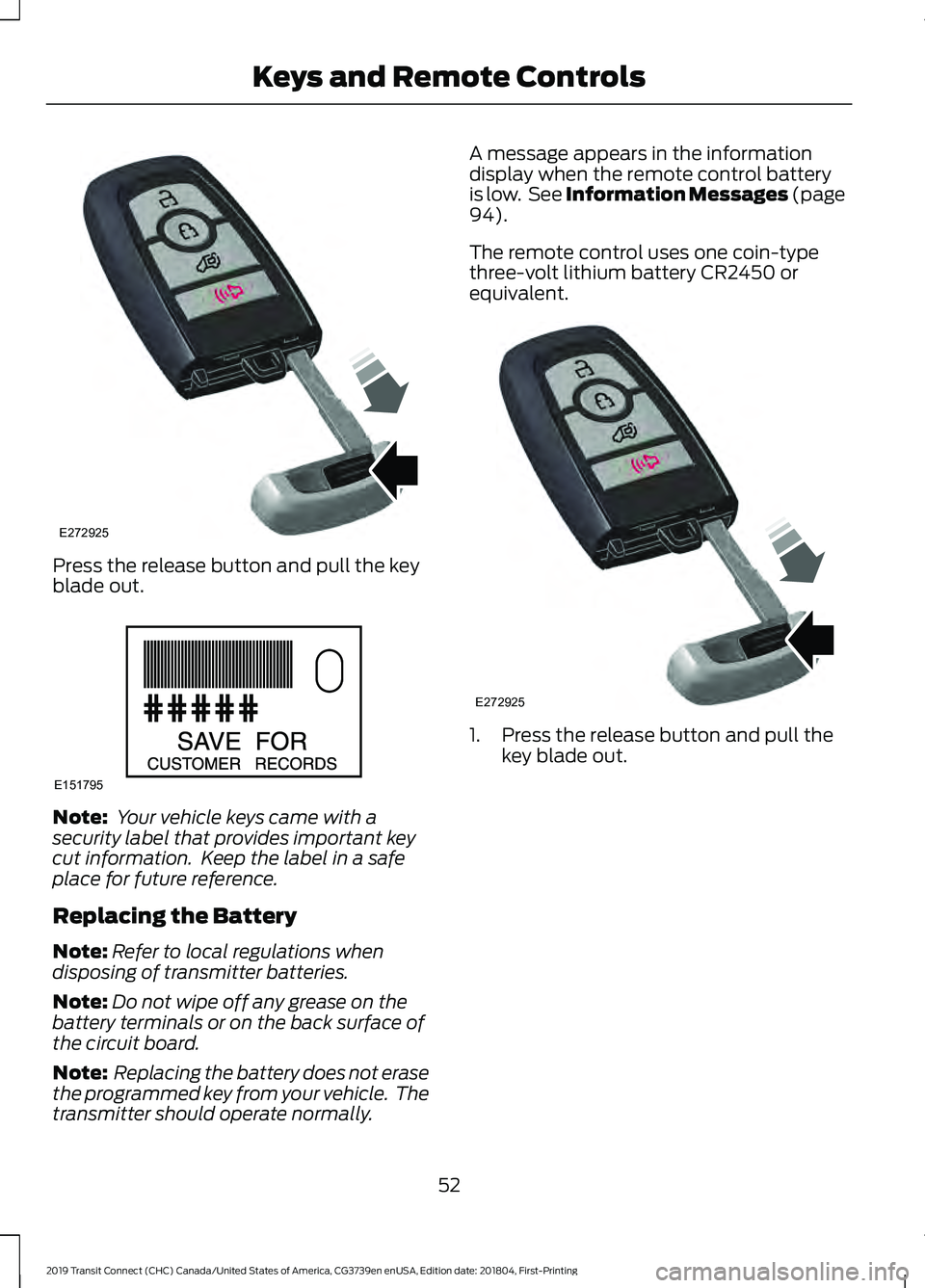
Press the release button and pull the key
blade out.
Note:
Your vehicle keys came with a
security label that provides important key
cut information. Keep the label in a safe
place for future reference.
Replacing the Battery
Note: Refer to local regulations when
disposing of transmitter batteries.
Note: Do not wipe off any grease on the
battery terminals or on the back surface of
the circuit board.
Note: Replacing the battery does not erase
the programmed key from your vehicle. The
transmitter should operate normally. A message appears in the information
display when the remote control battery
is low. See Information Messages (page
94).
The remote control uses one coin-type
three-volt lithium battery CR2450 or
equivalent. 1. Press the release button and pull the
key blade out.
52
2019 Transit Connect (CHC) Canada/United States of America, CG3739en enUSA, Edition date: 201804, First-Printing Keys and Remote ControlsE272925 E151795 E272925
Page 57 of 493
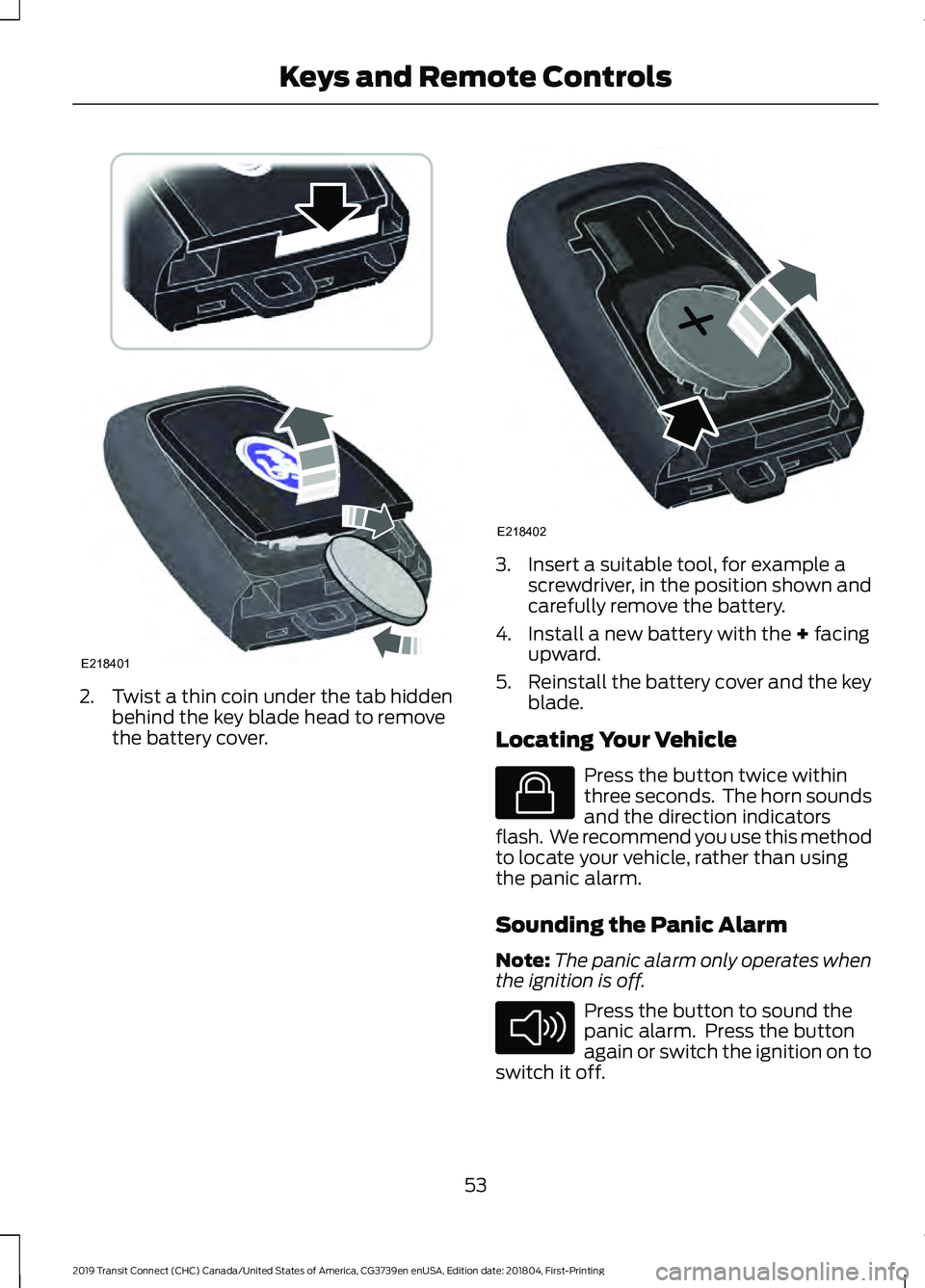
2. Twist a thin coin under the tab hidden
behind the key blade head to remove
the battery cover. 3. Insert a suitable tool, for example a
screwdriver, in the position shown and
carefully remove the battery.
4. Install a new battery with the + facing
upward.
5. Reinstall the battery cover and the key
blade.
Locating Your Vehicle Press the button twice within
three seconds. The horn sounds
and the direction indicators
flash. We recommend you use this method
to locate your vehicle, rather than using
the panic alarm.
Sounding the Panic Alarm
Note: The panic alarm only operates when
the ignition is off. Press the button to sound the
panic alarm. Press the button
again or switch the ignition on to
switch it off.
53
2019 Transit Connect (CHC) Canada/United States of America, CG3739en enUSA, Edition date: 201804, First-Printing Keys and Remote ControlsE218401 E218402 E138623 E138624
Page 58 of 493
REMOTE CONTROL - VEHICLES
WITH: REMOTE FLIP KEY
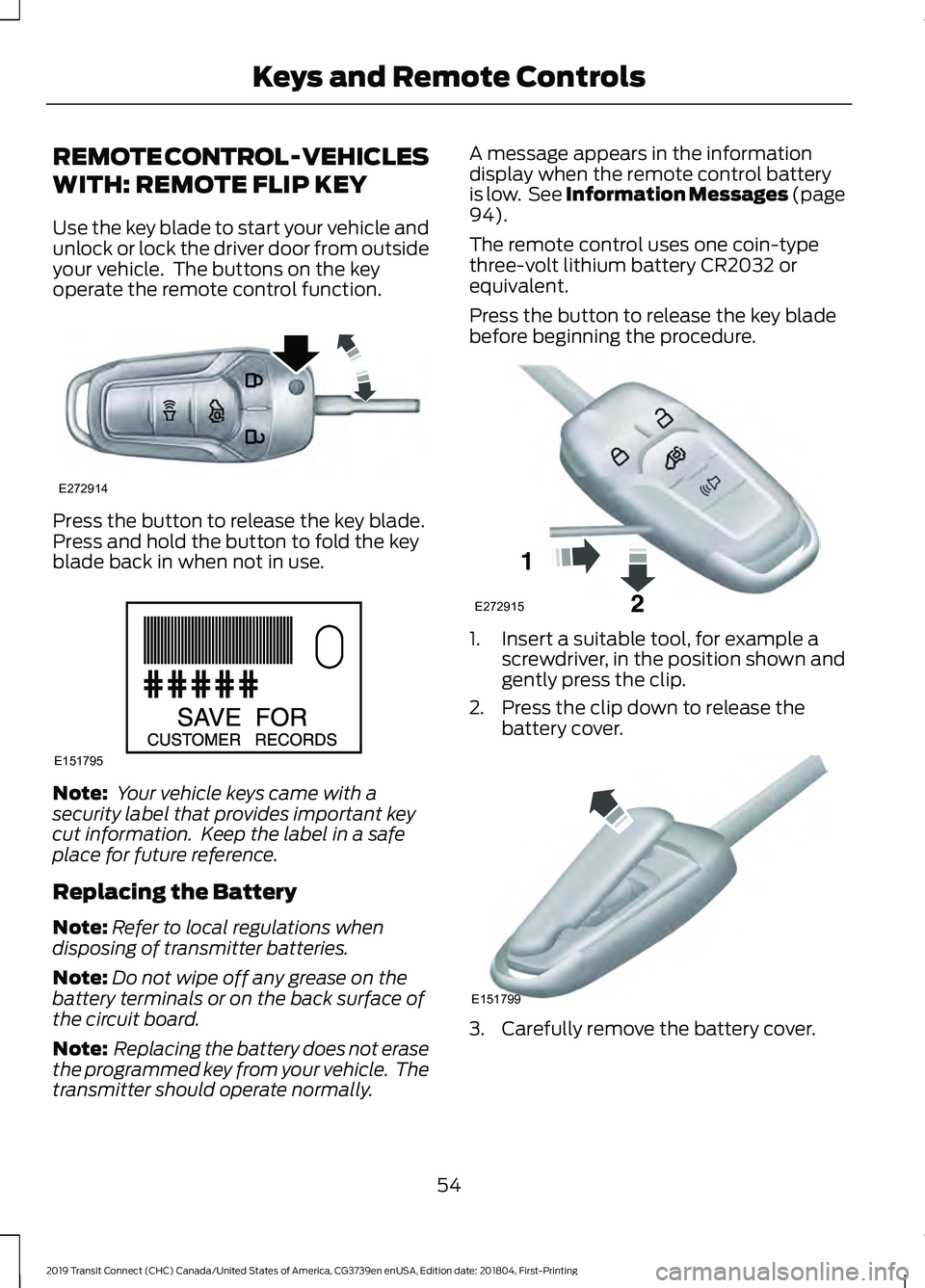
Use the key blade to start your vehicle and
unlock or lock the driver door from outside
your vehicle. The buttons on the key
operate the remote control function.
Press the button to release the key blade.
Press and hold the button to fold the key
blade back in when not in use.
Note:
Your vehicle keys came with a
security label that provides important key
cut information. Keep the label in a safe
place for future reference.
Replacing the Battery
Note: Refer to local regulations when
disposing of transmitter batteries.
Note: Do not wipe off any grease on the
battery terminals or on the back surface of
the circuit board.
Note: Replacing the battery does not erase
the programmed key from your vehicle. The
transmitter should operate normally. A message appears in the information
display when the remote control battery
is low. See Information Messages (page
94).
The remote control uses one coin-type
three-volt lithium battery CR2032 or
equivalent.
Press the button to release the key blade
before beginning the procedure. 1. Insert a suitable tool, for example a
screwdriver, in the position shown and
gently press the clip.
2. Press the clip down to release the battery cover. 3. Carefully remove the battery cover.
54
2019 Transit Connect (CHC) Canada/United States of America, CG3739en enUSA, Edition date: 201804, First-Printing Keys and Remote ControlsE272914 E151795 E272915 E151799
Page 59 of 493
Note:
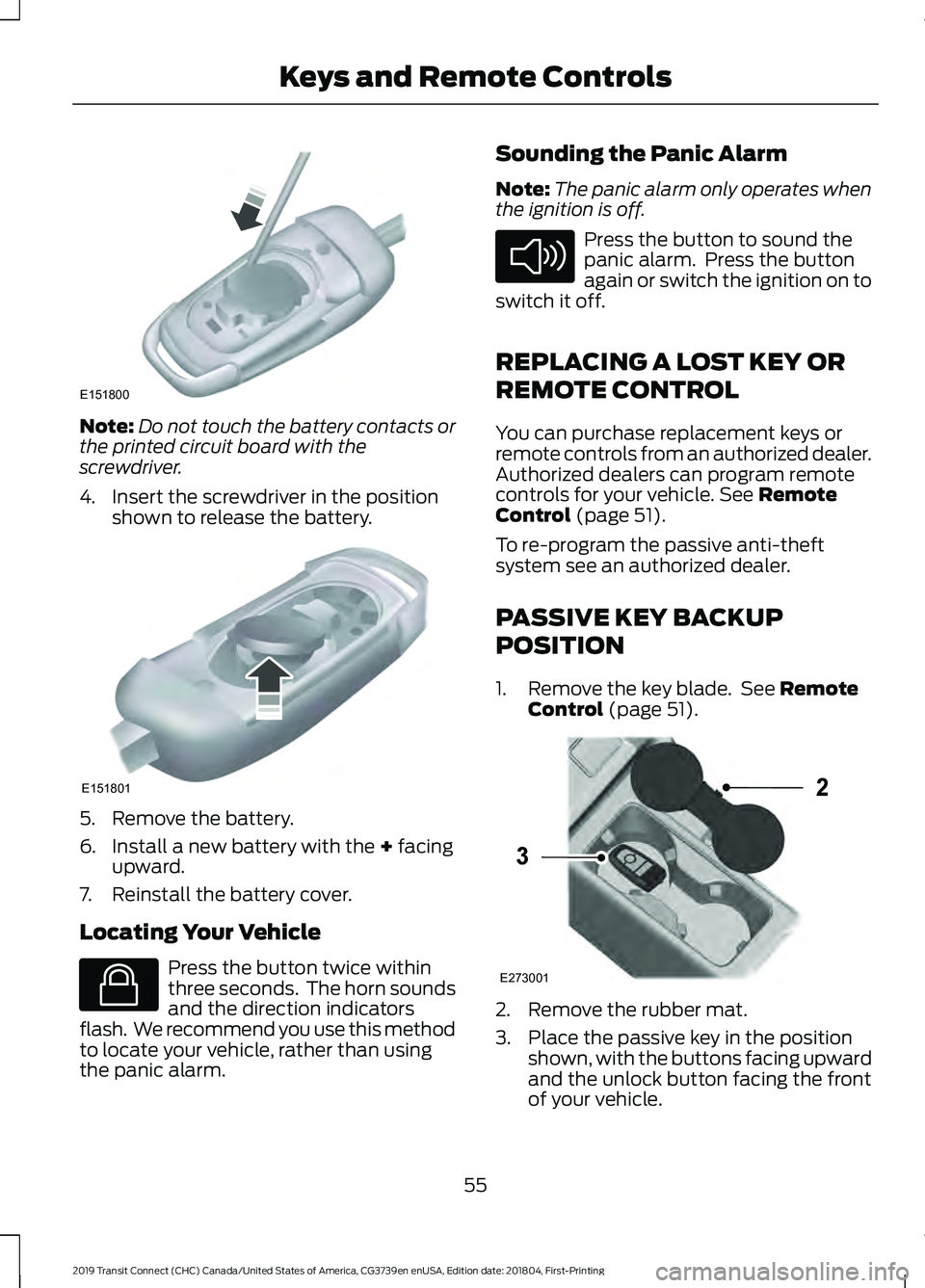
Do not touch the battery contacts or
the printed circuit board with the
screwdriver.
4. Insert the screwdriver in the position shown to release the battery. 5. Remove the battery.
6. Install a new battery with the + facing
upward.
7. Reinstall the battery cover.
Locating Your Vehicle Press the button twice within
three seconds. The horn sounds
and the direction indicators
flash. We recommend you use this method
to locate your vehicle, rather than using
the panic alarm. Sounding the Panic Alarm
Note:
The panic alarm only operates when
the ignition is off. Press the button to sound the
panic alarm. Press the button
again or switch the ignition on to
switch it off.
REPLACING A LOST KEY OR
REMOTE CONTROL
You can purchase replacement keys or
remote controls from an authorized dealer.
Authorized dealers can program remote
controls for your vehicle.
See Remote
Control (page 51).
To re-program the passive anti-theft
system see an authorized dealer.
PASSIVE KEY BACKUP
POSITION
1. Remove the key blade. See
Remote
Control (page 51). 2. Remove the rubber mat.
3. Place the passive key in the position
shown, with the buttons facing upward
and the unlock button facing the front
of your vehicle.
55
2019 Transit Connect (CHC) Canada/United States of America, CG3739en enUSA, Edition date: 201804, First-Printing Keys and Remote ControlsE151800 E151801 E138623 E138624 E273001
2
3
Page 71 of 493
KEYLESS ENTRY
General Information
The system will not function if:
•
The vehicle battery has no charge.
• The passive key battery has no charge.
• The passive key frequencies are
jammed.
• The door handle is not clean.
Note: If the system does not function, you
will need to use the key blade to lock and
unlock your vehicle.
The system allows you to operate your
vehicle without the use of a key or remote
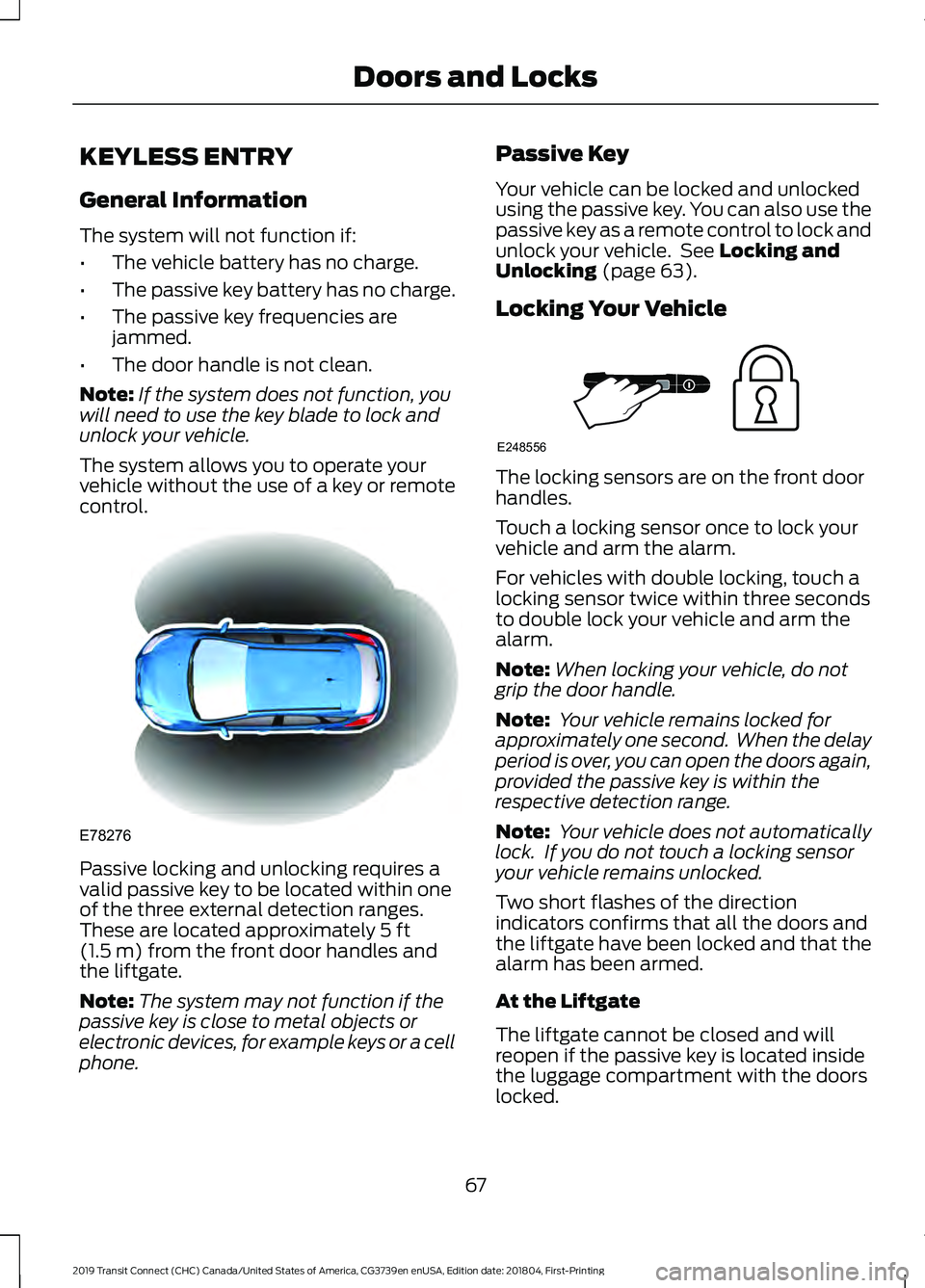
control. Passive locking and unlocking requires a
valid passive key to be located within one
of the three external detection ranges.
These are located approximately 5 ft
(1.5 m) from the front door handles and
the liftgate.
Note: The system may not function if the
passive key is close to metal objects or
electronic devices, for example keys or a cell
phone. Passive Key
Your vehicle can be locked and unlocked
using the passive key. You can also use the
passive key as a remote control to lock and
unlock your vehicle. See
Locking and
Unlocking (page 63).
Locking Your Vehicle The locking sensors are on the front door
handles.
Touch a locking sensor once to lock your
vehicle and arm the alarm.
For vehicles with double locking, touch a
locking sensor twice within three seconds
to double lock your vehicle and arm the
alarm.
Note:
When locking your vehicle, do not
grip the door handle.
Note: Your vehicle remains locked for
approximately one second. When the delay
period is over, you can open the doors again,
provided the passive key is within the
respective detection range.
Note: Your vehicle does not automatically
lock. If you do not touch a locking sensor
your vehicle remains unlocked.
Two short flashes of the direction
indicators confirms that all the doors and
the liftgate have been locked and that the
alarm has been armed.
At the Liftgate
The liftgate cannot be closed and will
reopen if the passive key is located inside
the luggage compartment with the doors
locked.
67
2019 Transit Connect (CHC) Canada/United States of America, CG3739en enUSA, Edition date: 201804, First-Printing Doors and LocksE78276 E248556
Page 106 of 493
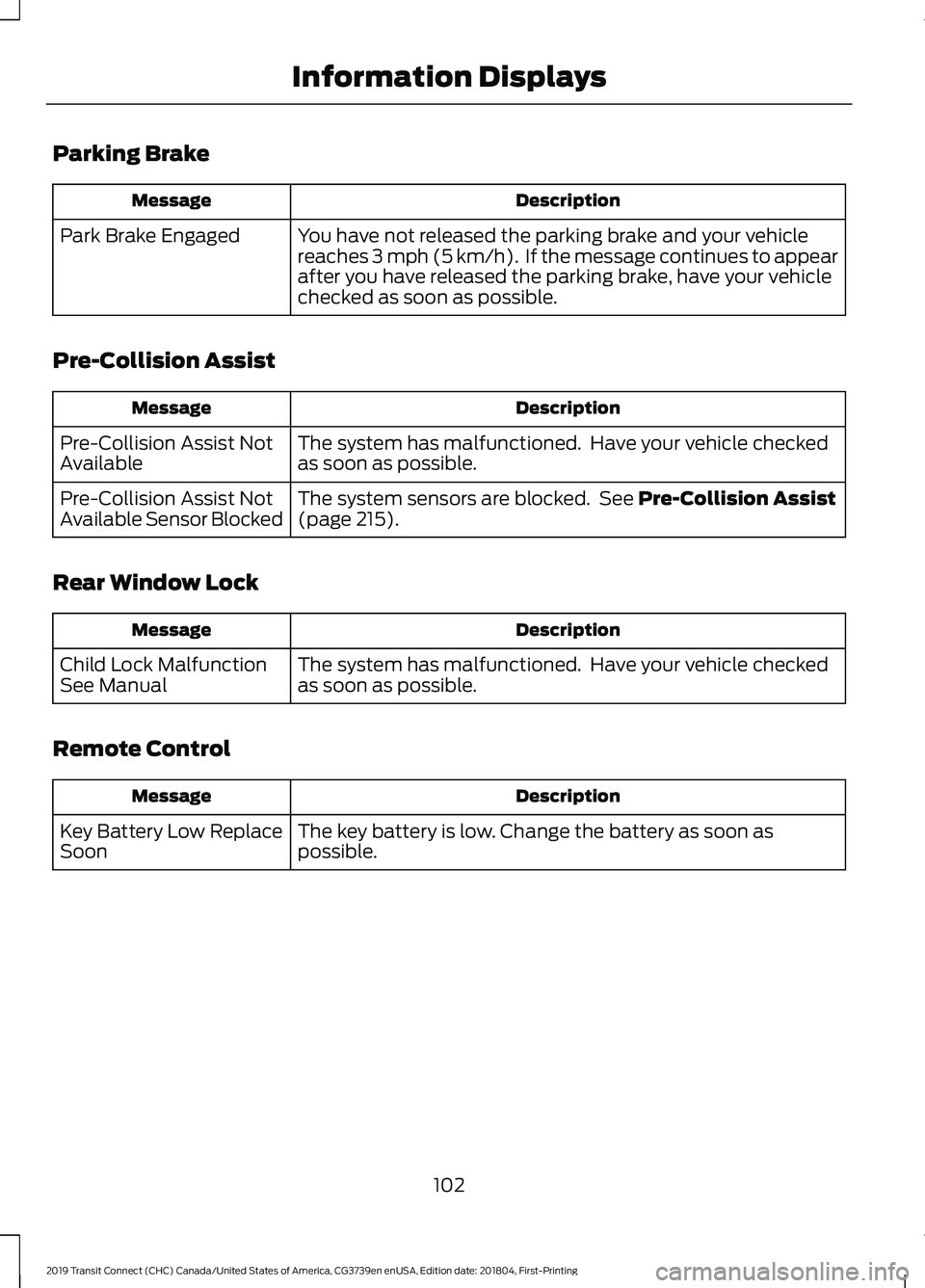
Parking Brake
Description
Message
You have not released the parking brake and your vehicle
reaches 3 mph (5 km/h). If the message continues to appear
after you have released the parking brake, have your vehicle
checked as soon as possible.
Park Brake Engaged
Pre-Collision Assist Description
Message
The system has malfunctioned. Have your vehicle checked
as soon as possible.
Pre-Collision Assist Not
Available
The system sensors are blocked. See
Pre-Collision Assist
(page 215).
Pre-Collision Assist Not
Available Sensor Blocked
Rear Window Lock Description
Message
The system has malfunctioned. Have your vehicle checked
as soon as possible.
Child Lock Malfunction
See Manual
Remote Control Description
Message
The key battery is low. Change the battery as soon as
possible.
Key Battery Low Replace
Soon
102
2019 Transit Connect (CHC) Canada/United States of America, CG3739en enUSA, Edition date: 201804, First-Printing Information Displays
Page 136 of 493
Note:
If you use the socket when the engine
is not running, the battery may run out of
charge.
Note: When you switch the ignition on, you
can use the socket to power 12 volt
appliances with a maximum current rating
of 15 amps.
WIRELESS ACCESSORY
CHARGING WARNING: Wireless charging
devices can affect the operation of
implanted medical devices, including
cardiac pacemakers. If you have any
implanted medical devices, we
recommend that you consult with your
physician.
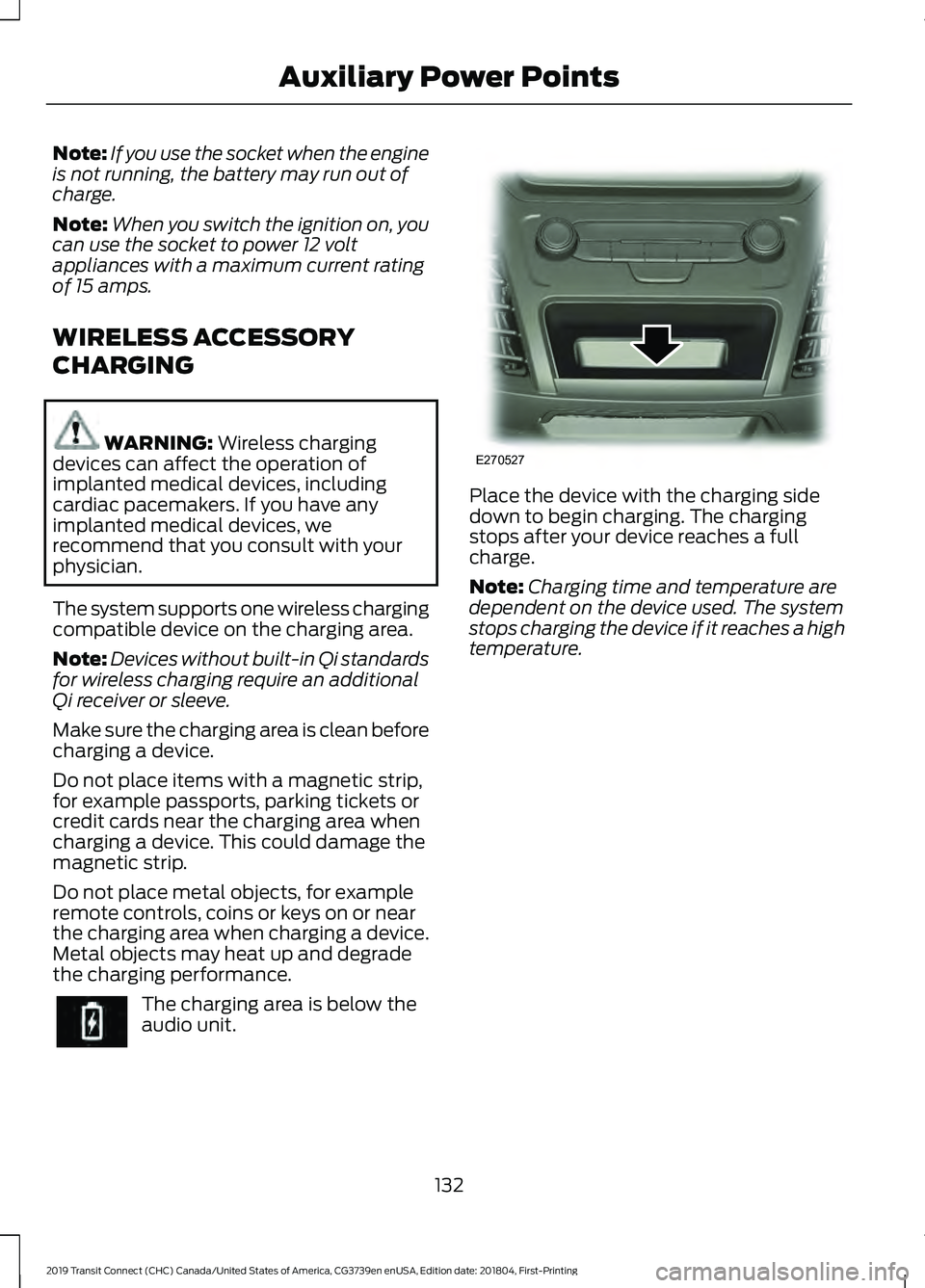
The system supports one wireless charging
compatible device on the charging area.
Note: Devices without built-in Qi standards
for wireless charging require an additional
Qi receiver or sleeve.
Make sure the charging area is clean before
charging a device.
Do not place items with a magnetic strip,
for example passports, parking tickets or
credit cards near the charging area when
charging a device. This could damage the
magnetic strip.
Do not place metal objects, for example
remote controls, coins or keys on or near
the charging area when charging a device.
Metal objects may heat up and degrade
the charging performance. The charging area is below the
audio unit. Place the device with the charging side
down to begin charging. The charging
stops after your device reaches a full
charge.
Note:
Charging time and temperature are
dependent on the device used. The system
stops charging the device if it reaches a high
temperature.
132
2019 Transit Connect (CHC) Canada/United States of America, CG3739en enUSA, Edition date: 201804, First-Printing Auxiliary Power Points E270527
Page 138 of 493
GENERAL INFORMATION
WARNING: Extended idling at high
engine speeds can produce very high
temperatures in the engine and exhaust
system, creating the risk of fire or other
damage. WARNING: Do not park, idle or drive
your vehicle on dry grass or other dry
ground cover. The emission system heats
up the engine compartment and exhaust
system, creating the risk of fire. WARNING:
Do not start the engine
in a closed garage or in other enclosed
areas. Exhaust fumes can be toxic. Always
open the garage door before you start the
engine. WARNING: Exhaust leaks may result
in entry of harmful and potentially lethal
fumes into the passenger compartment.
If you smell exhaust fumes inside your
vehicle, have your vehicle inspected
immediately. Do not drive if you smell
exhaust fumes.
If you disconnect the battery, your vehicle
may exhibit some unusual driving
characteristics for approximately
5 mi
(8 km) after you reconnect it. This is
because the engine management system
must realign itself with the engine. You
can disregard any unusual driving
characteristics during this period.
The powertrain control system meets all
Canadian interference-causing equipment
standard requirements regulating the
impulse electrical field or radio noise. When you start the engine, avoid pressing
the accelerator pedal before and during
operation. Only use the accelerator pedal
when you have difficulty starting the
engine.
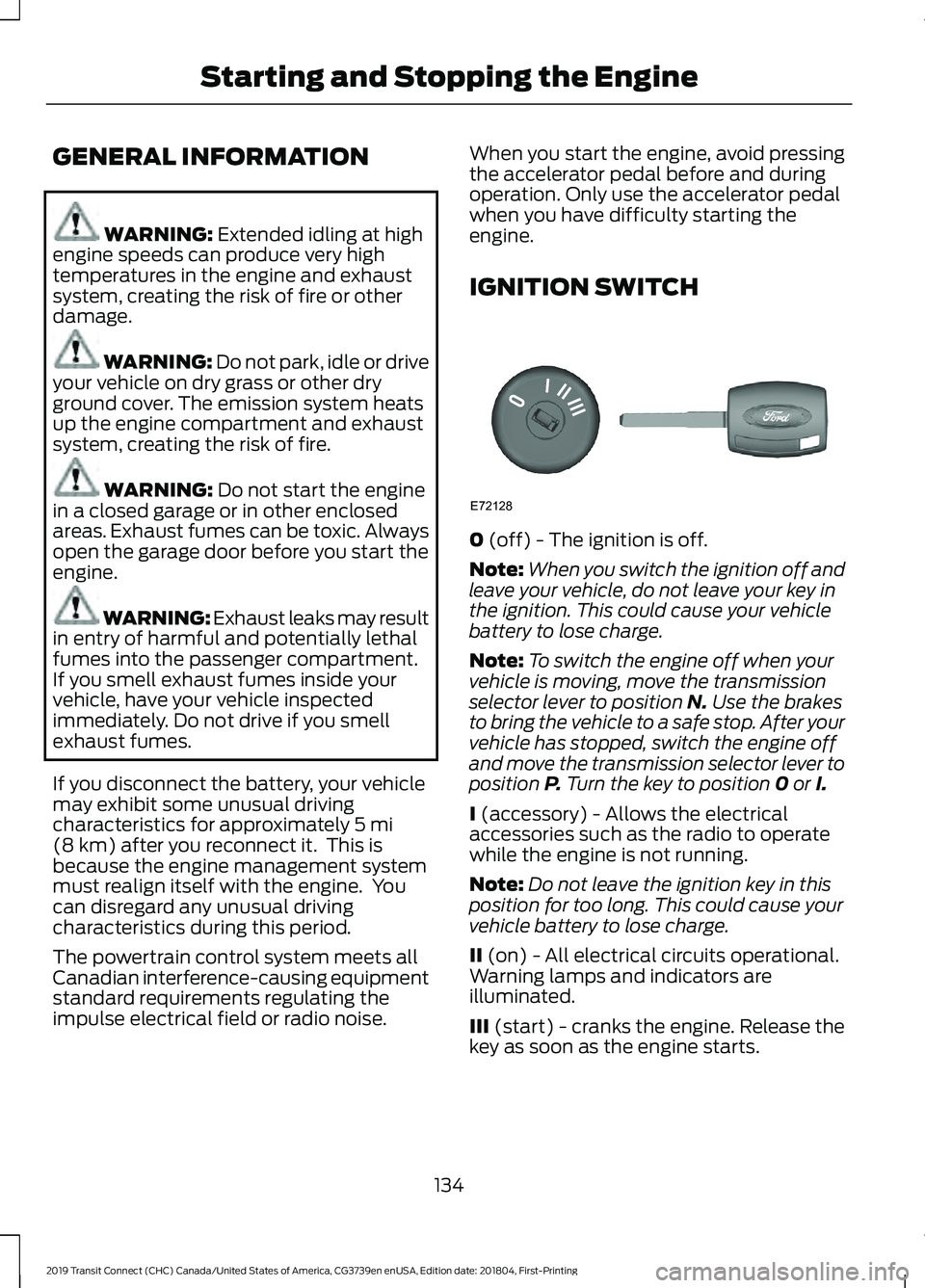
IGNITION SWITCH
0
(off) - The ignition is off.
Note: When you switch the ignition off and
leave your vehicle, do not leave your key in
the ignition. This could cause your vehicle
battery to lose charge.
Note: To switch the engine off when your
vehicle is moving, move the transmission
selector lever to position
N. Use the brakes
to bring the vehicle to a safe stop. After your
vehicle has stopped, switch the engine off
and move the transmission selector lever to
position
P. Turn the key to position 0 or I.
I
(accessory) - Allows the electrical
accessories such as the radio to operate
while the engine is not running.
Note: Do not leave the ignition key in this
position for too long. This could cause your
vehicle battery to lose charge.
II
(on) - All electrical circuits operational.
Warning lamps and indicators are
illuminated.
III
(start) - cranks the engine. Release the
key as soon as the engine starts.
134
2019 Transit Connect (CHC) Canada/United States of America, CG3739en enUSA, Edition date: 201804, First-Printing Starting and Stopping the EngineE72128
Page 139 of 493
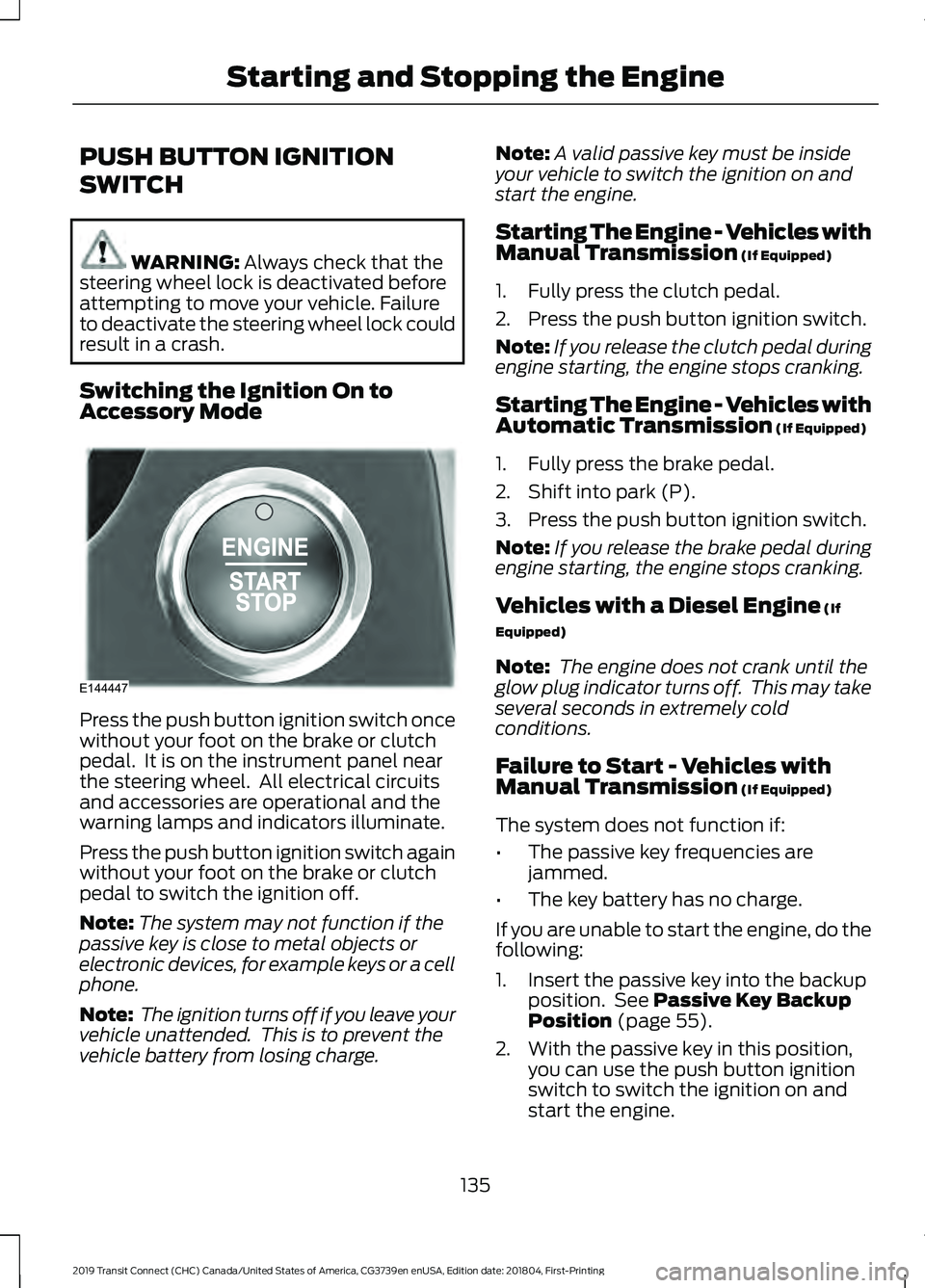
PUSH BUTTON IGNITION
SWITCH
WARNING: Always check that the
steering wheel lock is deactivated before
attempting to move your vehicle. Failure
to deactivate the steering wheel lock could
result in a crash.
Switching the Ignition On to
Accessory Mode Press the push button ignition switch once
without your foot on the brake or clutch
pedal. It is on the instrument panel near
the steering wheel. All electrical circuits
and accessories are operational and the
warning lamps and indicators illuminate.
Press the push button ignition switch again
without your foot on the brake or clutch
pedal to switch the ignition off.
Note:
The system may not function if the
passive key is close to metal objects or
electronic devices, for example keys or a cell
phone.
Note: The ignition turns off if you leave your
vehicle unattended. This is to prevent the
vehicle battery from losing charge. Note:
A valid passive key must be inside
your vehicle to switch the ignition on and
start the engine.
Starting The Engine - Vehicles with
Manual Transmission (If Equipped)
1. Fully press the clutch pedal.
2. Press the push button ignition switch.
Note: If you release the clutch pedal during
engine starting, the engine stops cranking.
Starting The Engine - Vehicles with
Automatic Transmission
(If Equipped)
1. Fully press the brake pedal.
2. Shift into park (P).
3. Press the push button ignition switch.
Note: If you release the brake pedal during
engine starting, the engine stops cranking.
Vehicles with a Diesel Engine
(If
Equipped)
Note: The engine does not crank until the
glow plug indicator turns off. This may take
several seconds in extremely cold
conditions.
Failure to Start - Vehicles with
Manual Transmission
(If Equipped)
The system does not function if:
• The passive key frequencies are
jammed.
• The key battery has no charge.
If you are unable to start the engine, do the
following:
1. Insert the passive key into the backup position. See
Passive Key Backup
Position (page 55).
2. With the passive key in this position, you can use the push button ignition
switch to switch the ignition on and
start the engine.
135
2019 Transit Connect (CHC) Canada/United States of America, CG3739en enUSA, Edition date: 201804, First-Printing Starting and Stopping the EngineE144447
Page 142 of 493
Vehicles with an Ignition Key
1. Fully press the brake pedal.
Note:
Do not touch the accelerator pedal.
2. Turn the key to position III.
Note: The engine may continue cranking
for up to 15 seconds or until it starts.
Note: The engine takes longer to start at
lower temperatures. It may crank for several
seconds when very cold.
Vehicles with a Push Button
Ignition Switch
See
Push Button Ignition Switch (page
135).
Failure to Start
Vehicles with an Ignition Key
If you cannot start the engine after 3
attempts, wait 10 seconds and do the
following:
1. Fully press the brake pedal.
2. Apply the parking brake.
3. Shift into park (P).
4. Fully press the accelerator pedal and hold it there.
5. Turn the key to position
III until the
engine starts. Vehicles with a Push Button Ignition
Switch
See
Push Button Ignition Switch (page
135).
Automatic Engine Shutdown
For vehicles with a push button ignition
switch, the engine shuts down if it has been
idling for an extended period. The ignition
also turns off to save battery power.
Before your vehicle shuts down, a message
appears in the information display showing
a timer counting down. If you do not
intervene within 30 seconds, your vehicle
shuts down. Another message appears in
the information display to inform you that
your vehicle has shut down to save fuel.
Start your vehicle as normal.
Automatic Engine Shutdown Override
You can stop the shutdown, or reset the
timer, at any point before the 30-second
countdown has expired by doing any of the
following:
• Pressing the brake or accelerator pedal.
• Switching off the automatic engine
shutdown in the information display.
• Pressing the
OK or RESET button
during the 30-second countdown.
Switching the Automatic Engine Shutdown On or Off
To switch the automatic engine shutdown on or off, use the information display
controls on the steering wheel to select the following: Action
Menu Item
Press the menu button.
Settings
Press the
OK button.
Vehicle Settings
Press the
OK button.
Auto Engine Off
138
2019 Transit Connect (CHC) Canada/United States of America, CG3739en enUSA, Edition date: 201804, First-Printing Starting and Stopping the Engine