turn GENESIS G70 2021 Quick Reference Guide
[x] Cancel search | Manufacturer: GENESIS, Model Year: 2021, Model line: G70, Model: GENESIS G70 2021Pages: 24, PDF Size: 6.85 MB
Page 19 of 24

Quick Reference Guide I 3231 I Quick Reference Guide
The Driver Attention Warning (DAW) system is designed as a safety
feature to help reduce drowsy or inattentive driving.
• To adjust the Driver Attention Alert sensitivity,
go to: User Settings > Driving Assist > Driver
Attention Warning > Normal or High in the
instrument cluster.
OFF - Driver Attention Warning system is
deactivated.
NORMAL - Driver Attention Warning system
alerts the driver of his/her fatigue level or
inattentive driving practices.
HIGH - Driver Attention Warning alerts the driver
of his/her fatigue level or inattentive driving
practices faster than Normal mode.
The Driver Attention Warning system is operable,
when driving speed is above 40 mph.
DRIVER ATTENTION WARNING (DAW)SHIFT BY WIRE (Electronic type shifter)
P (Park)
Always stop completely before
shifting into P (Park). To shift the
gear from R (Reverse), N (Neutral),
D (Drive) or Manual mode to P
(Park), press the [P] button while
depressing the brake pedal.
R (Reverse) / N (Neutral) / D
(Drive)
To select gear, press the
[UNLOCK] button while
depressing the brake pedal and
then move the shift lever forward (R
side) or backward (D side).
Paddle Shifter (Manual Shift Mode)
Press (-) to
downshift
Press (+) to
upshiftThe Paddle shifter is available
when the shift lever is in the D
position.
Press the [+] or [-] paddle shifter
once to shift up or down one gear.
Scan to view a video of: Shift by Wire
Scan to view a video of: Driver Attention Warning
ELECTRONIC STABILITY CONTROL (ESC)CLIMATE
The ESC system is an electronic
system designed to help the driver
maintain vehicle control under
adverse conditions.
Press to turn ESC on or off.
DRIVING
GENESIS G70
Page 20 of 24
Quick Reference Guide I 3433 I Quick Reference Guide
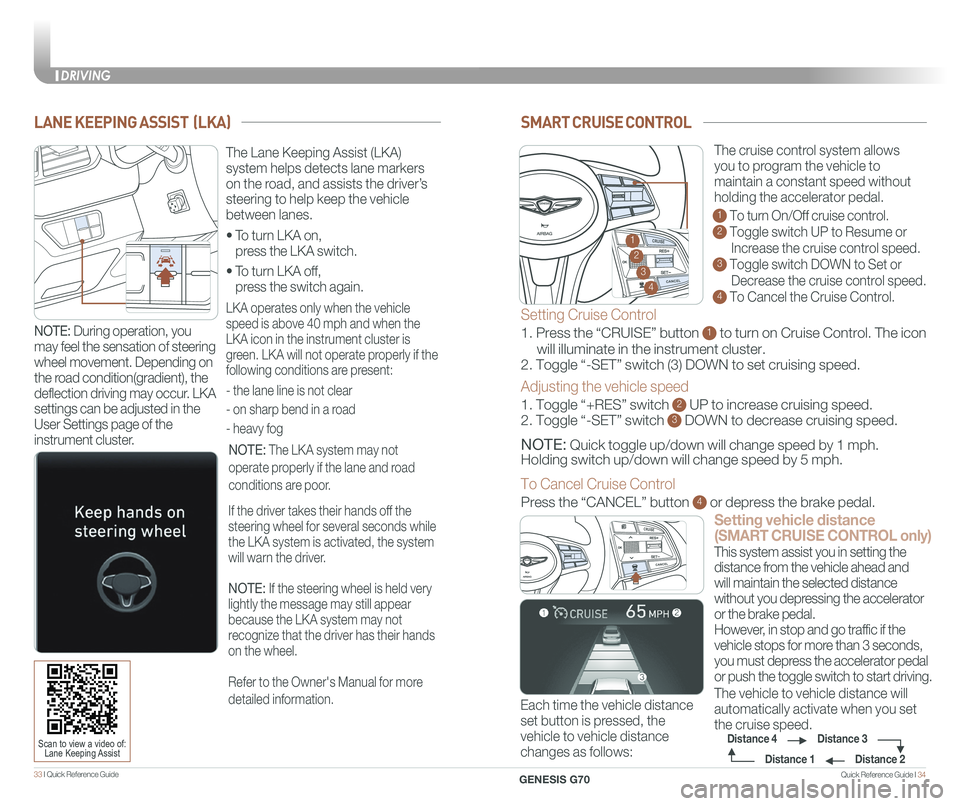
SMART CRUISE CONTROL
Setting vehicle distance
(SMART CRUISE CONTROL only)
The vehicle to vehicle distance will
automatically activate when you set
the cruise speed.
This system assist you in setting the
distance from the vehicle ahead and
will maintain the selected distance
without you depressing the accelerator
or the brake pedal.
However, in stop and go traffic if the
vehicle stops for more than 3 seconds,
you must depress the accelerator pedal
or push the toggle switch to start driving.
Each time the vehicle distance
set button is pressed, the
vehicle to vehicle distance
changes as follows:
GENESIS
The cruise control system allows
you to program the vehicle to
maintain a constant speed without
holding the accelerator pedal.
1 To turn On/Off cruise control.
2 Toggle switch UP to Resume or
Increase the cruise control speed.
3 Toggle switch DOWN to Set or
Decrease the cruise control speed.
4 To Cancel the Cruise Control.
Distance 2
Distance 3Distance 4
Distance 1
Setting Cruise Control
1. Press the “CRUISE” button 1 to turn on Cruise Control. The icon
will illuminate in the instrument cluster.
2. Toggle “-SET” switch (3) DOWN to set cruising speed.
Adjusting the vehicle speed
1. Toggle “+RES” switch 2 UP to increase cruising speed.
2. Toggle “-SET” switch 3 DOWN to decrease cruising speed.
NOTE: Quick toggle up/down will change speed by 1 mph.
Holding switch up/down will change speed by 5 mph.
To Cancel Cruise Control
Press the “CANCEL” button 4 or depress the brake pedal.
GENESIS2
3
4
1
GENESIS
LANE KEEPING ASSIST (LKA)
• To turn LKA on,
press the LKA switch.
• To turn LKA off,
press the switch again.
The Lane Keeping Assist (LKA)
system helps detects lane markers
on the road, and assists the driver’s
steering to help keep the vehicle
between lanes.
LKA operates only when the vehicle
speed is above 40 mph and when the
LKA icon in the instrument cluster is
green. LKA will not operate properly if the
following conditions are present:
- the lane line is not clear
- on sharp bend in a road
- heavy fog
NOTE: The LKA system may not
operate properly if the lane and road
conditions are poor.
If the driver takes their hands off the
steering wheel for several seconds while
the LKA system is activated, the system
will warn the driver.
NOTE: If the steering wheel is held very
lightly the message may still appear
because the LKA system may not
recognize that the driver has their hands
on the wheel.
Refer to the Owner's Manual for more
detailed information.
Scan to view a video of: Lane Keeping Assist
NOTE: During operation, you
may feel the sensation of steering
wheel movement. Depending on
the road condition(gradient), the
deflection driving may occur. LKA
settings can be adjusted in the
User Settings page of the
instrument cluster.
DRIVING
GENESIS G70
Page 21 of 24

Quick Reference Guide I 3635 I Quick Reference Guide
FORWARD COLLISION-AVOIDANCE ASSIST (FCA)
The Forward Collision Avoidance (FCA)
system is designed to help detect and
monitor the vehicle ahead and warn
the driver if a collision is imminent. On
vehicles equipped with both camera
and radar sensor, pedestrian detection
is also available.
Early: This setting maximizes the amount of distance between the
vehicle or pedestrian ahead before the initial warning occurs.
Normal: This setting allows for a nominal amount of distance between
the vehicle or pedestrian ahead before the initial warning occurs.
Late: This setting reduces the amount of distance between the
vehicle or pedestrian ahead before the initial warning occurs.
The BCW (Blind-
Spot Collision
Warning)
system uses
radar sensors to
alert the driver
while driving.
It senses the rear
side territory of the vehicle and
provides information to the driver.
1 Blind-Spot Collision Warning
2 Lane change assist
3 Rear Cross-Traffic Collision
Warning (RCCW)
The BCW system will activate once vehicle speed exceeds 20 mph.
The The RCCW (Rear Cross-Traffic Collision Warning) alert will activate,
if vehicle is in reverse at speeds below 6 mph and BCW is activated.
BLIND-SPOT COLLISION WARNING (BCW)
• To turn the BCW on, press the BCW button. (indicator illuminated)
• To turn the BCW off, press the BCW button again.
1
2
3
Scan to view a video of: Rear Cross Traffic Collision Warning (RCCW)
NOTE: The RCCW system will only acticvate on the first reverse application
from park.
Please refer to your Owner’s Manual for further information.
REAR VIEW MONITOR
The rearview camera will activate when
the engine is running and the shift lever
is in the R (Reverse) position.Rearview display
- In the dark or at night.
- When it is raining, or when water droplets are on the camera.
- When the sun or the beam of headlights are shining into the camera lens.
Use care to keep the camera lens clean and avoid applying any type
of solvents, car wax, or window cleaners to the camera lens.
If the lens becomes dirty, wipe the lens with a clean, soft cloth.
NOTE: Rearview display is selectable,
see Owner’s Manual for further details.
The image displayed on the screen may
become difficult to see under the
following conditions:
To operate the system, select the FCA (Forward Collision Avoidance
Assist) sub menu in the LCD cluster display under User Settings.
Please refer to your Owner’s Manual for further information.
PARKING ASSIST SYSTEM (PAS)
The parking assist system assists
the driver during movement of the
vehicle by chiming if any object is
sensed within the distance of 3.3 ft
in front and 4 ft behind the vehicle.
Press button to turn ON/OFF:
ON – indicator light on
OFF – indicator light off
If the PAS is OFF, the system will
turn ON automatically when the
shift lever is in R (reverse).
The system will automatically turn
OFF when vehicle is driven forward
at speed above 6 mph.
NOTE: Front parking sensor
will not operate if the PAS is
OFF.
CLIMATE
GENESIS G70
DRIVING
Page 22 of 24
Quick Reference Guide I 3837 I Quick Reference Guide
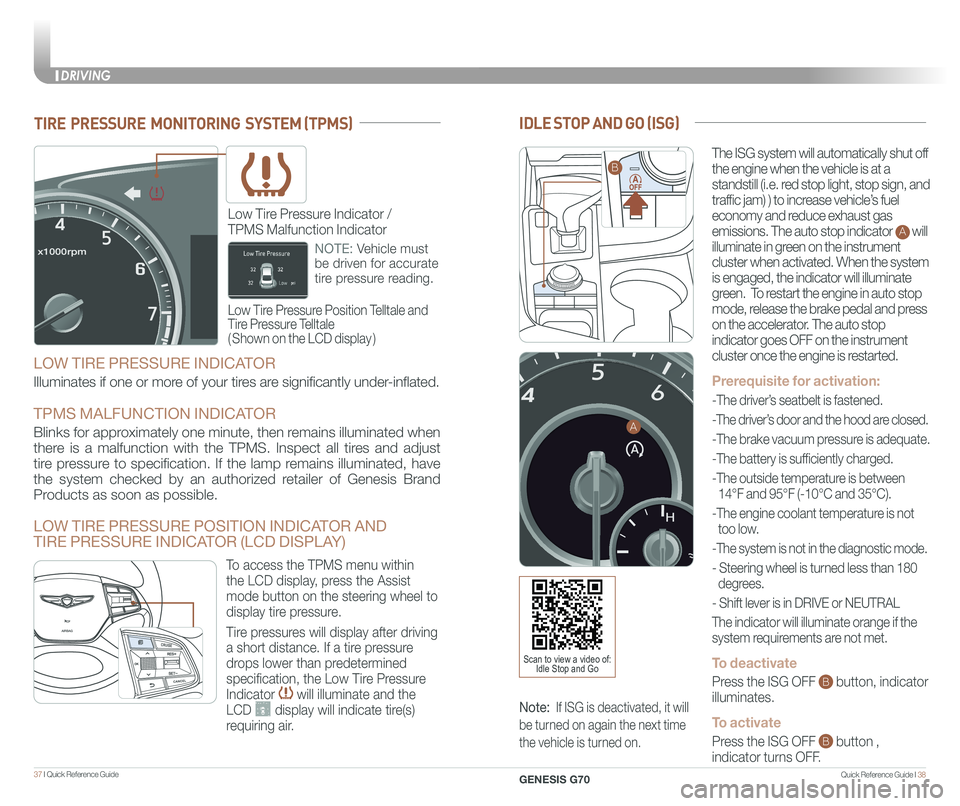
CLIMATEIDLE STOP AND GO (ISG)
The ISG system will automatically shut off
the engine when the vehicle is at a
standstill (i.e. red stop light, stop sign, and
traffic jam) ) to increase vehicle’s fuel
economy and reduce exhaust gas
emissions. The auto stop indicator A will
illuminate in green on the instrument
cluster when activated. When the system
is engaged, the indicator will illuminate
green. To restart the engine in auto stop
mode, release the brake pedal and press
on the accelerator. The auto stop
indicator goes OFF on the instrument
cluster once the engine is restarted.
Prerequisite for activation:
-The driver’s seatbelt is fastened.
-The driver’s door and the hood are closed.
-The brake vacuum pressure is adequate.
-The battery is sufficiently charged.
-The outside temperature is between
14°F and 95°F (-10°C and 35°C).
-The engine coolant temperature is not
too low.
-The system is not in the diagnostic mode.
- Steering wheel is turned less than 180
degrees.
- Shift lever is in DRIVE or NEUTRAL
The indicator will illuminate orange if the
system requirements are not met.
To deactivate
Press the ISG OFF B button, indicator
illuminates.
To activate
Press the ISG OFF B button ,
indicator turns OFF.
Note: If ISG is deactivated, it will
be turned on again the next time
the vehicle is turned on.
TIRE PRESSURE MONITORING SYSTEM (TPMS)
Low Tire Pressure Position Telltale and
Tire Pressure Telltale
( Shown on the LCD display )
Low Tire Pressure Indicator /
TPMS Malfunction Indicator
NOTE: Vehicle must
be driven for accurate
tire pressure reading.
B
A
Scan to view a video of: Idle Stop and Go
LOW TIRE PRESSURE INDICATOR
Illuminates if one or more of your tires are significantly under-inflated.
TPMS MALFUNCTION INDICATOR
Blinks for approximately one minute, then remains illuminated when
there is a malfunction with the TPMS. Inspect all tires and adjust
tire pressure to specification. If the lamp remains illuminated, have
the system checked by an authorized retailer of Genesis Brand
Products as soon as possible.
LOW TIRE PRESSURE POSITION INDICATOR AND
TIRE PRESSURE INDICATOR (LCD DISPLAY)
GENESIS
GENESIS
To access the TPMS menu within
the LCD display, press the Assist
mode button on the steering wheel to
display tire pressure.
Tire pressures will display after driving
a short distance. If a tire pressure
drops lower than predetermined
specification, the Low Tire Pressure
Indicator will illuminate and the
LCD display will indicate tire(s)
requiring air.
DRIVING
GENESIS G70