air condition GENESIS G80 2018 User Guide
[x] Cancel search | Manufacturer: GENESIS, Model Year: 2018, Model line: G80, Model: GENESIS G80 2018Pages: 516, PDF Size: 81.01 MB
Page 90 of 516
LCD display ...........................................................3-64
LCD Modes ........................................................................3-64
User Settings Mode ........................................................3-68
Warning Messages..........................................................3-75
Trip computer .......................................................3-87
Warning and indicator lights ..............................3-90
Warning lights ..................................................................3-90
Indicator Lights ................................................................3-98
Head Up Display (HUD).....................................3-103
Light .....................................................................3-106
Exterior lights ................................................................3-106
Smart High Beam ..........................................................3-108
Welcome system ...........................................................3-115
Interior lights..................................................................3-116
Wipers and washers ..........................................3-120
Windshield wipers .........................................................3-120
Windshield washers ......................................................3-122
Driver assist system ..........................................3-123
Rear view camera .........................................................3-123
Multi-View Camera System ........................................3-124
Parking Assist System .................................................3-125
Defroster .............................................................3-129
Rear window defroster ...............................................3-129
Automatic climate control system ...................3-131
Automatic heating and air conditioning ..................3-132
Manual heating and air conditioning .......................3-133
System operation ..........................................................3-141
Climate control air filter ..............................................3-143
Air conditioner refrigerant and compressor
lubricant ..........................................................................3-144
Air Conditioning refrigerant label .............................3-144
Windshield defrosting and defogging ............3-146
Auto defogging system ON/OFF...............................3-148
Climate control additional features.................3-149
Cluster ionizer ................................................................3-149
Smart ventilation ...........................................................3-149
Rear climate system ON/OFF ....................................3-150
CO2 control auto air conditioner ..............................3-150
Storage compartment ........................................3-151
Center console storage ...............................................3-151
Glove box ........................................................................3-152
Sunglass holder .............................................................3-152
Cellular Phone Holder ..................................................3-153
Wireless Cellular Phone Charging System..............3-153
3
Page 114 of 516
3-26
Convenient features of your vehicle
There are some conditions that can
cause changes to the vehicle mag-
nets, such as installing a ski rack or
a CB antenna. Body repair work on
the vehicle can also cause changes
to the vehicle's magnetic field. In
these situations, the compass will
need to be re-calibrated to quickly
correct these changes.
If you need to recalibrate the com-
pass:
1. Press and hold the Control Button
for more than 6 seconds. When
the compass memory is cleared, a
"C" will appear in the display.
2. Drive the vehicle in 2 complete cir-
cles at less than 5 mph (8 km/h).
Integrated HomeLink®Wireless
Control System
The HomeLink®Wireless Control
System can replace up to three
hand-held radio-frequency (RF)
transmitters with a single built-in
device. This innovative feature will
learn the radio frequency codes of
most current transmitters to operate
devices such as gate operators,
garage door openers, entry door
locks, security systems, even home
lighting. Both standard and rolling
code-equipped transmitters can be
programmed by following the out-
lined procedures.
Additional HomeLink
®information
can be found at: www.homelink.com,
www.youtube.com/HomeLinkGentex
or by calling 1-800-355-3515.
Retain the original transmitter of the
RF device you are programming for
use in other vehicles as well as for
future HomeLink
®programming. It is
also suggested that upon the sale of
the vehicle, the programmed
HomeLink
®buttons be erased for
security purposes.Before programming HomeLink
®
to a garage door opener or gate
operator, make sure people and
objects are out of the way of the
device to prevent potential harm
or damage. Do not use the
HomeLink
®with any garage
door opener that lacks the safe-
ty stop and reverse features
required by U.S. federal safety
standards (this includes any
garage door opener model man-
ufactured before April 1, 1982). A
garage door that cannot detect
an object - signaling the door to
stop and reverse - does not meet
current U.S. federal safety stan-
dards. Using a garage door
opener without these features
increases the risk of serious
injury or death.
WARNING
Page 135 of 516

3-47
Convenient features of your vehicle
3
✽ ✽
NOTICE
In cold and wet climates, trunk lock
and trunk mechanisms may not
work properly due to freezing condi-
tions.Power Trunk Non-Opening or
Closing Conditions:
The Power Trunk will not open or
close automatically, when the vehi-
cle is moving more than 1.8 mph (3
km/h).
The Power Trunk can be operated
when the engine is not running.
However, the Power Trunk operation
consumes large amounts of vehicle
electric power. To prevent the bat-
tery from draining, do not operate it
excessively (e.g., more than
approximately 10 times repeatedly.)
Do not modify or repair any part of
the Power Trunk by yourself. This
must be done by an authorized
retailer of Genesis Branded prod-
ucts.
Before jacking up the vehicle to
change a tire or repair the vehicle,
open the Power Trunk. Do not oper-
ate the Power Trunk when the vehi-
cle is raised or this could cause the
Power Trunk to operate improperly.
If there are obstacles such as snow
on the Power Trunk, it may not open
automatically. After removing the
obstacle, try to open it again.Do not close or open the Power
Trunk manually. This may
cause damage to the Power
Trunk. If it is necessary to close
or open the Power Trunk manu-
ally when the battery is drained
or disconnected, do not apply
excessive force.
Do not leave the Power Trunk
open for a long period of time.
This may drain the battery.
To prevent damage to the
trunk lift cylinders and the
attached hardware, always
close the trunk before driving.
CAUTION
Never leave children or animals
unattended in your vehicle.
Children or animals might oper-
ate the power trunk that could
result in injury to themselves or
others, or damage to the vehicle.
WARNING
Always keep the trunk lid com-
pletely closed while the vehicle is
in motion. If it is left open or ajar,
poisonous exhaust gases con-
taining carbon monoxide (CO)
may enter the vehicle and seri-
ous illness or death may result.
WARNING
Make sure there are no people
or objects around the trunk
before opening or closing the
Power Trunk. Wait until the trunk
is open fully and stopped
before loading or unloading
cargo from the vehicle.
WARNING
Page 198 of 516

3-110
Convenient features of your vehicle
(Continued)
When headlamp aiming is not
properly adjusted.
When driving on a narrow
curved road or rough road.
When driving downhill or uphill.
When only part of the vehicle
in front is visible on a cross-
road or curved road.
When there is a traffic light,
reflecting sign, flashing sign
or mirror.
When the road conditions are
bad such as being wet or cov-
ered with snow.
When the front vehicle's head-
lamps are off but the fog lamps
on.
When a vehicle suddenly
appears from a curve.
When the vehicle is tilted from
a flat tire or being towed.
When the LKAS (Lane keep-
ing Assist System) warning
light illuminates. (if equipped)
(Continued)
(Continued)
When you replace or reinstall
the windshield glass/LKAS
camera (if equipped), take
your vehicle to an authorized
retailer of Genesis Branded
products and have the system
checked.The system may not operate nor-
mally in the below conditions.
When the light from the on-
coming or front vehicle is not
detected because of lamp dam-
age, hidden from sight, etc.
When the lamp of the on-com-
ing or front vehicle is covered
with dust, snow or water.
When the light from the on-
coming or front vehicle is not
detected because of exhaust
fume, smoke, fog, snow, etc.
When the front window is cov-
ered with foreign matters such
as ice, dust, fog, or is damaged.
When there is a similar shape
lamp with the front vehicle’s
lamps.
When it is hard to see because
of fog, heavy rain or snow.
When the headlamp is not
repaired or replaced at an
authorized retailer.
(Continued)
CAUTION
Page 215 of 516

3-127
Convenient features of your vehicle
3
Non-operational conditions of
Parking Assist System
Parking Assist System may not
operate normally when:
Moisture is frozen to the sensor.
Sensor is covered with foreign mat-
ter, such as snow or water, or the
sensor cover is blocked.
There is a possibility of Parking
Assist System malfunction when:
Driving on uneven road surfaces
such as unpaved roads, gravel,
bumps, or gradient.
Objects generating excessive noise
such as vehicle horns, loud motor-
cycle engines, or truck air brakes
can interfere with the sensor.
Heavy rain or water spray is present.
Wireless transmitters or mobile
phones are present near the sensor.
The sensor is covered with snow.
Any non-factory equipment or
accessories have been installed, or
if the vehicle bumper height or sen-
sor installation has been modified.
Distance
from object Warning indicator
Warning soundWhen driving
forwardWhen driving
rearward
24 ~ 39
(61 ~ 100)Front-Buzzer beeps
intermittently
24 ~ 47
(61 ~ 120)Rear-Buzzer beeps
intermittently
12 ~ 24
(31 ~ 60)FrontBuzzer beeps
frequently
Rear-Buzzer beeps
frequently
12
(30)FrontBuzzer sounds
continuously
Rear-Buzzer sounds
continuously
✽ ✽
NOTICE
• The indicator may differ from the illustration as objects or sensors status.
If the indicator blinks, have your vehicle checked by an authorized retail-
er of Genesis Branded products.
• If the audible warning does not sound or if the buzzer sounds intermit-
tently when shifting into R (Reverse) position, this may indicate a mal-
function with the Parking Assist System. If this occurs, have your vehicle
checked by an authorized retailer of Genesis Branded products as soon as
possible. Types of warning sound and indicator
inches (cm)
Page 219 of 516
3-131
Convenient features of your vehicle
3
A AU
UT
TO
OM
MA
AT
TI
IC
C
C
CL
LI
IM
MA
AT
TE
E
C
CO
ON
NT
TR
RO
OL
L
S
SY
YS
ST
TE
EM
M
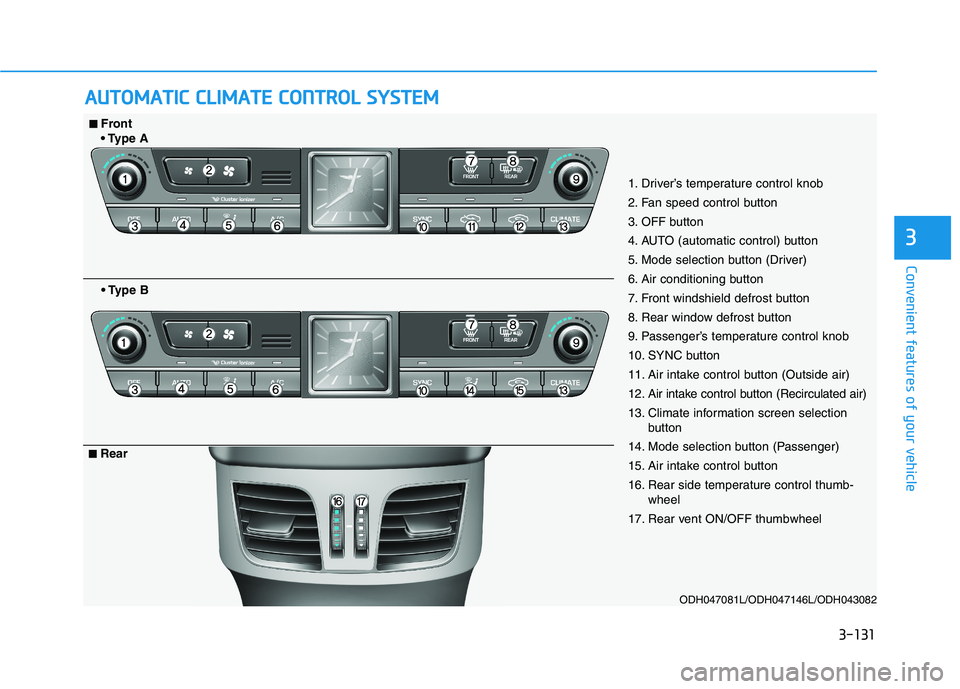
ODH047081L/ODH047146L/ODH043082
1. Driver’s temperature control knob
2. Fan speed control button
3. OFF button
4. AUTO (automatic control) button
5. Mode selection button (Driver)
6. Air conditioning button
7. Front windshield defrost button
8. Rear window defrost button
9. Passenger’s temperature control knob
10. SYNC button
11. Air intake control button (Outside air)
12. Air intake control button (Recirculated air)
13. Climate information screen selection
button
14. Mode selection button (Passenger)
15. Air intake control button
16. Rear side temperature control thumb-
wheel
17. Rear vent ON/OFF thumbwheel
■ ■Front
A
B
■ ■Rear
Page 220 of 516
3-132
Convenient features of your vehicle
Automatic heating and air con-
ditioning
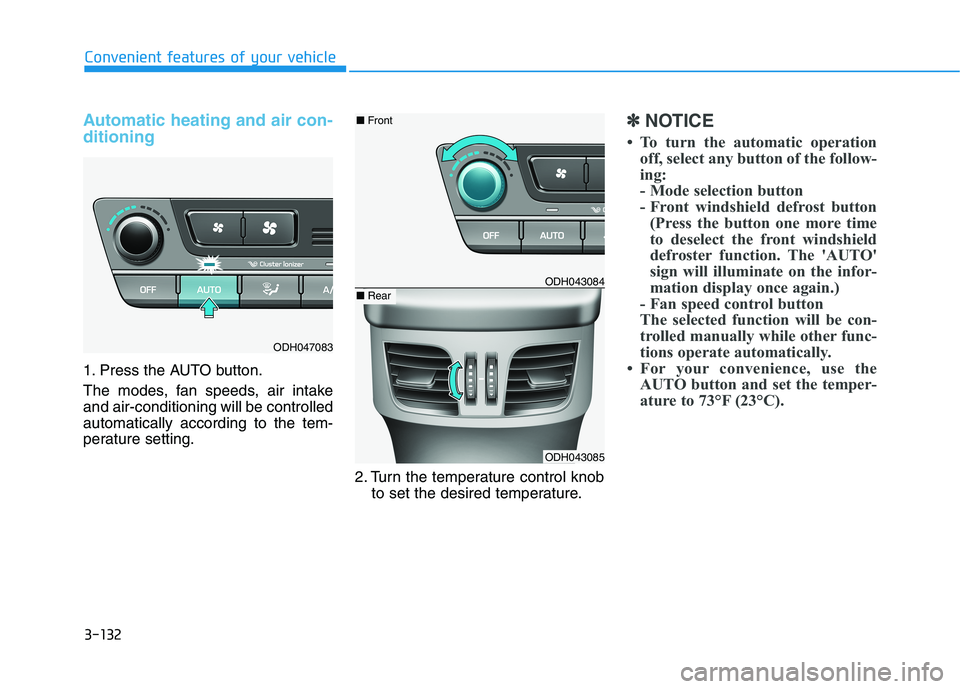
1. Press the AUTO button.
The modes, fan speeds, air intake
and air-conditioning will be controlled
automatically according to the tem-
perature setting.
2. Turn the temperature control knob
to set the desired temperature.
✽ ✽
NOTICE
• To turn the automatic operation
off, select any button of the follow-
ing:
- Mode selection button
- Front windshield defrost button
(Press the button one more time
to deselect the front windshield
defroster function. The 'AUTO'
sign will illuminate on the infor-
mation display once again.)
- Fan speed control button
The selected function will be con-
trolled manually while other func-
tions operate automatically.
• For your convenience, use the
AUTO button and set the temper-
ature to 73°F (23°C).
ODH047083
ODH043084
ODH043085
■Front
■Rear
Page 221 of 516
3-133
Convenient features of your vehicle
3
✽ ✽
NOTICE
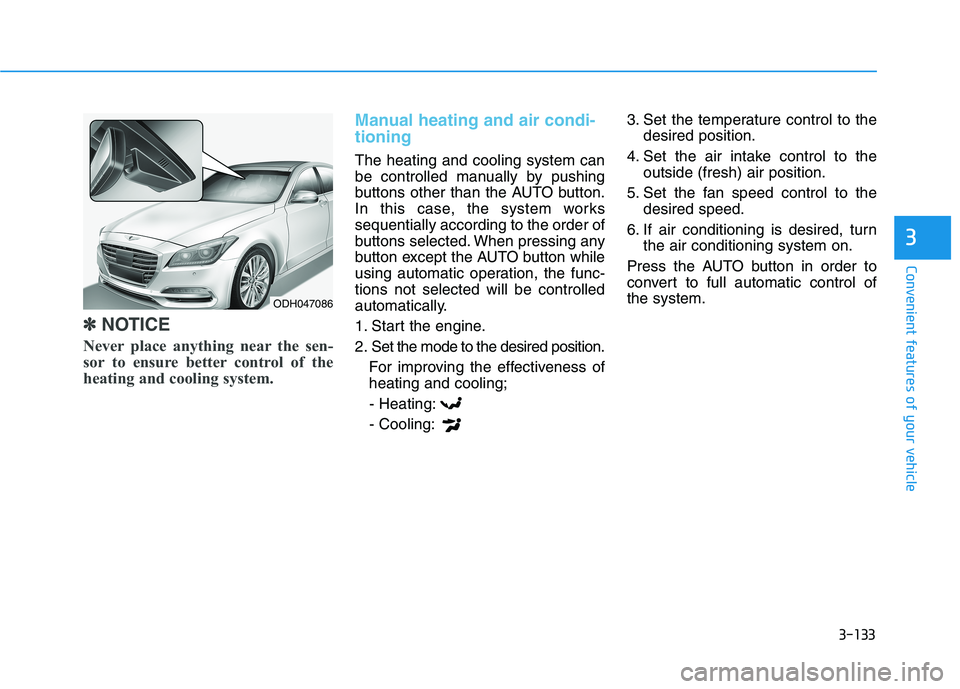
Never place anything near the sen-
sor to ensure better control of the
heating and cooling system.
Manual heating and air condi-
tioning
The heating and cooling system can
be controlled manually by pushing
buttons other than the AUTO button.
In this case, the system works
sequentially according to the order of
buttons selected. When pressing any
button except the AUTO button while
using automatic operation, the func-
tions not selected will be controlled
automatically.
1. Start the engine.
2. Set the mode to the desired position.
For improving the effectiveness of
heating and cooling;
- Heating:
- Cooling:3. Set the temperature control to the
desired position.
4. Set the air intake control to the
outside (fresh) air position.
5. Set the fan speed control to the
desired speed.
6. If air conditioning is desired, turn
the air conditioning system on.
Press the AUTO button in order to
convert to full automatic control of
the system.
ODH047086
Page 226 of 516

3-138
Convenient features of your vehicle
Adjusting temperature and mode
of the driver & passenger side
individually (Type B)
Press the "SYNC" button again to
adjust the temperature and mode
of the driver & passenger side indi-
vidually. The illumination of button
turns off.
Operate the driver side tempera-
ture control knob to adjust the driv-
er side temperature.
Operate the driver side mode
selection button to adjust the direc-
tion of the driver side air flow.
Operate the passenger side tem-
perature control knob to adjust the
passenger side temperature.
Operate the passenger side mode
selection button to adjust the direc-
tion of the passenger side air flow.
Temperature conversion
If the battery has been discharged or
disconnected, the temperature mode
display will reset to Fahrenheit.
This is a normal condition. You can
switch the temperature mode
between Centigrade to Fahrenheit as
follows;
- Automatic climate control system
While pressing the OFF button,
depress the AUTO button for 3 sec-
onds or more. The display will
change from Centigrade to
Fahrenheit, or from Fahrenheit to
Centigrade.
- "User Setting mode" in the cluster :
You can change the temperature
unit in the "Other features –
Temperature unit".
Air intake control
This is used to select the outside
(fresh) air position or recirculated air
position.
To change the air intake control posi-
tion, push the control button.
ODH047151L
■Type BODH043093
■Type A
Page 227 of 516
3-139
Convenient features of your vehicle
3
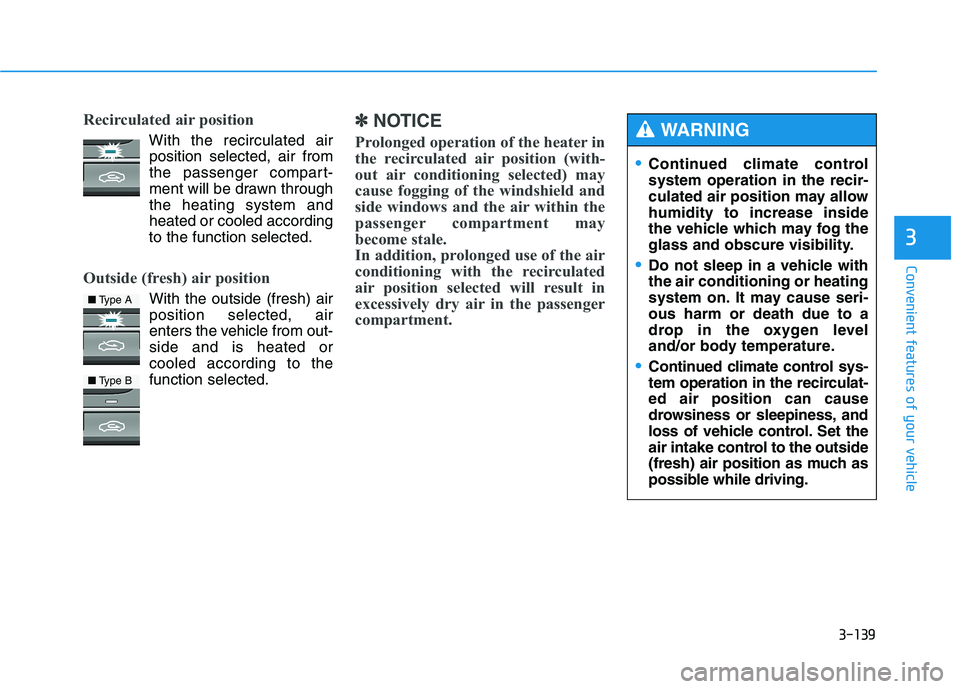
Recirculated air position
With the recirculated air
position selected, air from
the passenger compart-
ment will be drawn through
the heating system and
heated or cooled according
to the function selected.
Outside (fresh) air position
With the outside (fresh) air
position selected, air
enters the vehicle from out-
side and is heated or
cooled according to the
function selected.
✽ ✽
NOTICE
Prolonged operation of the heater in
the recirculated air position (with-
out air conditioning selected) may
cause fogging of the windshield and
side windows and the air within the
passenger compartment may
become stale.
In addition, prolonged use of the air
conditioning with the recirculated
air position selected will result in
excessively dry air in the passenger
compartment.
■Type A
■Type B
Continued climate control
system operation in the recir-
culated air position may allow
humidity to increase inside
the vehicle which may fog the
glass and obscure visibility.
Do not sleep in a vehicle with
the air conditioning or heating
system on. It may cause seri-
ous harm or death due to a
drop in the oxygen level
and/or body temperature.
Continued climate control sys-
tem operation in the recirculat-
ed air position can cause
drowsiness or sleepiness, and
loss of vehicle control. Set the
air intake control to the outside
(fresh) air position as much as
possible while driving.
WARNING