brake light GENESIS G80 2018 User Guide
[x] Cancel search | Manufacturer: GENESIS, Model Year: 2018, Model line: G80, Model: GENESIS G80 2018Pages: 516, PDF Size: 81.01 MB
Page 263 of 516

5-8
Driving your vehicle
Button Position Action Notice
ON
Press the Engine Start/Stop button while it is
in the ACC position without depressing the
brake pedal.
The warning lights can be checked before
the engine is started.Do not leave the Engine Start/Stop button in
the ON position when the engine is not run-
ning to help prevent the battery from discharg-
ing.
START
To start the engine, depress the brake pedal
and press the Engine Start/Stop button with
the shift lever in the P (Park) or in the N
(Neutral) position.
For your safety, start the engine with the shift
lever in the P (Park) position.If you press the Engine Start/Stop button with-
out depressing the brake pedal, the engine
does not start and the Engine Start/Stop but-
ton changes as follows:
OFF → →
ACC → →
ON → →
OFF
However, the engine may start if you depress
the brake pedal within 0.5 second after press-
ing the Engine Start/Stop button when it is in
the OFF position.
Page 272 of 516

5-17
Driving your vehicle
Parking
Always come to a complete stop and
continue to depress the brake pedal.
Move the shift lever into the P (Park)
position, apply the parking brake,
and place the Engine Start/Stop but-
ton in the OFF position. Take the Key
with you when exiting the vehicle.
Good driving practices
Never move the shift lever from P
(Park) or N (Neutral) to any other
position with the accelerator pedal
depressed.
Never move the shift lever into P
(Park) when the vehicle is in
motion.
Be sure the vehicle is completely
stopped before you attempt to shift
into R (Reverse) or D (Drive).
Do not move the shift lever to N
(Neutral) when driving. Doing so
may result in an accident because
of a loss of engine braking. Also, the
transmission could be damaged.
Do not drive with your foot resting
on the brake pedal. Even light, but
consistent pedal pressure can
result in the brakes overheating,
brake wear and possibly even
brake failure.
Depressing both accelerator and
brake pedals at the same time can
trigger logic for engine power
reduction to assure vehicle decel-
eration. Vehicle acceleration will
resume after the brake pedal is
released. When driving in Manual mode with
the paddle shifter, slow down
before shifting to a lower gear.
Otherwise, the lower gear may not
be engaged if the engine rpms are
outside of the allowable range.
Always apply the parking brake
when leaving the vehicle. Do not
depend on placing the transmis-
sion in P (Park) to keep the vehicle
from moving.
Exercise extreme caution when
driving on a slippery surface. Be
especially careful when braking,
accelerating or shifting gears. On a
slippery surface, an abrupt change
in vehicle speed can cause the
drive wheels to lose traction and
may cause loss of vehicle control
resulting in an accident.
Optimum vehicle performance and
economy is obtained by smoothly
depressing and releasing the
accelerator.
Do not use engine braking (shifting
from a high gear to lower gear) rap-
idly on slippery roads. The vehicle
may slip causing an accident.
5
When you stay in the vehicle
with the engine running, be
careful not to depress the
accelerator pedal for a long
period of time. The engine or
exhaust system may overheat
and start a fire.
The exhaust gas and the
exhaust system are very hot.
Keep away from the exhaust
system components.
Do not stop or park over flam-
mable materials, such as dry
grass, paper or leaves. They
may ignite and cause a fire.
WARNING
Page 282 of 516

5-27
Driving your vehicle
5
PARK engaged
The message appears on the LCD
display, when the P (Park) position is
engaged.
NEUTRAL engaged
The message appears on the LCD
display, when the N (Neutral) posi-
tion is engaged.
Good driving practices
Never move the shift lever from P
(Park) or N (Neutral) to any other
position with the accelerator pedal
depressed.
Never move the shift lever into P
(Park) when the vehicle is in
motion.
Be sure the vehicle is completely
stopped before you attempt to shift
into R (Reverse) or D (Drive).
Do not move the shift lever to N
(Neutral) when driving. Doing so
may result in an accident because
of a loss of engine braking. Also, the
transmission could be damaged.
Do not drive with your foot resting
on the brake pedal. Even light, but
consistent pedal pressure can
result in the brakes overheating,
brake wear and possibly even
brake failure.
Depressing both accelerator and
brake pedals at the same time can
trigger logic for engine power
reduction to assure vehicle decel-
eration. Vehicle acceleration will
resume after the brake pedal is
released.
ODH057255LODH057256L
Page 285 of 516

5-30
Driving your vehicle
For safe AWD operation
Before driving
Make sure all passengers are
wearing seat belts.
Sit upright and adjust the steering
wheel to a position comfortable for
you to drive.
Driving on snow-covered or icy
roads
Start off slowly by applying the
accelerator pedal gently.
Use of snow tires is recommended.
For more information on Snow
Tires refer to "Winter Driving" in
this chapter.
Keep sufficient distance between
your vehicle and the vehicle in front
of you.
When approaching a stop sign or
stop light, release the accelerator
pedal to provide engine braking
during deceleration.
Avoid speeding, rapid acceleration,
sudden brake applications, and
sharp turns to prevent skids.
Driving in sand or mud
Maintain slow and constant speed.
Keep sufficient distance between
your vehicle and the vehicle in front
of you.
Reduce vehicle speed and always
check the road condition.
Avoid speeding, rapid acceleration,
sudden brake applications, and
sharp turns to prevent getting
stuck.
Driving up or down hills
Driving uphill
- Before starting off, check if it is
possible to drive uphill.
- Drive as straight as possible.
Driving downhill
- Do not change gear while driving
downhill. Select gear before driv-
ing downhill.
- Drive slowly and select Manual
Shift Mode to provide engine
braking while driving downhill.
- Drive straight as possible.
When the vehicle is stuck in
snow, sand or mud, avoid run-
ning the engine continuously at
high rpm, doing so may damage
the tires, transmission, differen-
tial or AWD system.
CAUTION
Exercise extreme caution driv-
ing up or down steep hills. The
vehicle may flip depending on
the grade, terrain and water/
mud conditions.
WARNING
Page 288 of 516

5-33
Driving your vehicle
5
Power brakes
Your vehicle has power-assisted
brakes that adjust automatically
through normal usage.
If the engine is not running or is
turned off while driving, the power
assist for the brakes will not work.
You can still stop your vehicle by
applying greater force to the brake
pedal than typical. The stopping dis-
tance, however, will be longer than
with power brakes.
When the engine is not running, the
reserve brake power is partially
depleted each time the brake pedal
is applied. Do not pump the brake
pedal when the power assist has
been interrupted.
Pump the brake pedal only when
necessary to maintain steering con-
trol on slippery surfaces.
B BR
RA
AK
KI
IN
NG
G
S
SY
YS
ST
TE
EM
M
Take the following precautions:
Do not drive with your foot
resting on the brake pedal.
This will create abnormal high
brake temperatures, exces-
sive brake lining and pad
wear, and increased stopping
distances.
When descending a long or
steep hill, shift to a lower gear
and avoid continuous applica-
tion of the brakes. Applying
the brakes continuously will
cause the brakes to overheat
and could result in a tempo-
rary loss of braking perform-
ance.
(Continued)
(Continued)
Wet brakes may impair the
vehicle's ability to safely slow
down; the vehicle may also
pull to one side when the
brakes are applied. Applying
the brakes lightly will indicate
whether they have been
affected in this way. Always
test your brakes in this fash-
ion after driving through deep
water. To dry the brakes, light-
ly tap the brake pedal to heat
up the brakes while maintain-
ing a safe forward speed until
brake performance returns to
normal. Avoid driving at high
speeds until the brakes func-
tion correctly.
WARNING
Page 289 of 516

5-34
Driving your vehicle
Disc brakes wear indicator
When your brake pads are worn and
new pads are required, you will hear
a high pitched warning sound from
your front or rear brakes. You may
hear this sound come and go or it
may occur whenever you depress
the brake pedal.
Please remember some driving con-
ditions or climates may cause a
brake squeal when you first apply (or
lightly apply) the brakes. This is nor-
mal and does not indicate a problem
with your brakes.
✽ ✽
NOTICE
Always replace brake pads as com-
plete front or rear axle sets.
Foot parking brake
(if equipped)
Always set the parking brake before
leaving the vehicle, to apply:
Firmly depress the brake pedal.
Depress the parking brake pedal
down as far as possible.To release:
Firmly depress the brake pedal.
Depress the parking brake pedal
down and it will release automatical-
ly.
If the parking brake does not release
or does not release all the way, have
your vehicle checked by an author-
ized retailer of Genesis Branded
products. To avoid costly brake repairs,
do not continue to drive with
worn brake pads.CAUTION
ODH053142
ODH053143
To reduce the risk of SERIOUS
INJURY or DEATH, do not oper-
ate the parking brake while the
vehicle is moving except in an
emergency situation. It could
damage the brake system and
lead to an accident.
WARNING
Page 290 of 516

5-35
Driving your vehicle
5
Check the Parking
Brake Warning Light
by placing the Engine
Start/Stop button to
the ON position (do
not start the engine).
This light will be illuminated when the
parking brake is applied with the
Engine Start/Stop button in the
START or ON position.
Before driving, be sure the parking
brake is released and the Brake
Warning Light is OFF.
If the Parking Brake Warning Light
remains on after the parking brake is
released while engine is running,
there may be a malfunction in the
brake system. Immediate attention is
necessary.
If at all possible, cease driving the
vehicle immediately. If that is not pos-
sible, use extreme caution while
operating the vehicle and only con-
tinue to drive the vehicle until you
can reach a safe location.
Whenever leaving the vehicle
or parking, always come to a
complete stop and continue
to depress the brake pedal.
Move the shift lever into P
(Park) position, then apply the
parking brake, and place the
Engine Start/Stop button in
the OFF position.
Vehicles with the parking
brake not fully engaged are at
risk for moving inadvertently
and causing injury to yourself
or others.
NEVER allow anyone who is
unfamiliar with the vehicle to
touch the parking brake. If the
parking brake is released
unintentionally, serious injury
may occur.
Only release the parking
brake when you are seated
inside the vehicle with your
foot firmly on the brake pedal.
WARNING
Do not apply the accelerator
pedal while the parking brake
is engaged. If you depress the
accelerator pedal with the
parking brake engaged, warn-
ing will sound. Damage to the
parking brake may occur.
Driving with the parking brake
on can overheat the braking
system and cause premature
wear or damage to brake
parts. Make sure the parking
brake is released and the
Brake Warning Light is off
before driving.
CAUTION
Page 291 of 516

5-36
Driving your vehicle
Electronic parking brake (EPB)
Applying the parking brake
To apply the EPB (Electronic
Parking Brake):
1. Depress the brake pedal.
2. Pull up the EPB switch.
Make sure the Parking Brake
Warning Light comes on.Also, the EPB is applied automatical-
ly if the [AUTO HOLD] switch is on
when the engine is turned off.
However, if you press the EPB switch
within one second after the engine is
turned off, the EPB will not be
applied.
Releasing the parking brake
To release the EPB (Electronic
Parking Brake), press the EPB
switch in the following condition:
Place the Engine Start/Stop button
in the ON position.
Depress the brake pedal.
Make sure the Parking Brake
Warning Light goes off.
ODH053016
ODH053017
To reduce the risk of SERIOUS
INJURY or DEATH, do not oper-
ate the EPB while the vehicle is
moving except in an emergency
situation. It could damage the
brake system and lead to an
accident.
WARNING
Page 292 of 516

5-37
Driving your vehicle
5
To release EPB (Electronic Parking
Brake) automatically:
Shift lever in P (Park)
With the engine running depress
the brake pedal and shift out of P
(Park) to R (Rear) or D (Drive).
Shift lever in N (Neutral)
With the engine running depress
the brake pedal and shift out of N
(Neutral) to R (Rear) or D (Drive).
Satisfy the following conditions
1. Start the engine.
2. Fasten the driver's seat belt.
3. Close the driver's door, engine
hood and trunk.
4. Depress the accelerator pedal
while the shift lever is in D
(Drive) or R (Reverse).
Make sure the Parking Brake
Warning Light goes off.
✽ ✽
NOTICE
• For your safety, you can engage
the EPB even though the Engine
Stop/Start button is in the OFF
position, but you cannot release it.
• For your safety, depress the brake
pedal and release the parking
brake manually with the EPB
switch when you drive downhill or
when backing up the vehicle.When the EPB (Electronic Parking
Brake) does not release:Contact an authorized retailer of
Genesis Branded products by load-
ing the vehicle on a flatbed tow truck
and have the system checked.
If the Parking Brake Warning
Light is still on even though
the EPB has been released,
have your vehicle checked by
an authorized retailer of
Genesis Branded products.
Do not drive your vehicle with
the EPB applied. It may cause
excessive brake pad and
brake rotor wear.
CAUTION
Page 294 of 516
5-39
Driving your vehicle
✽ ✽
NOTICE
• A clicking sound may be heard
while operating or releasing the
EPB. These conditions are normal
and indicate that the EPB is func-
tioning properly.
• When leaving your keys with a
parking lot attendant or valet,
make sure to inform him/her how
to operate the EPB.
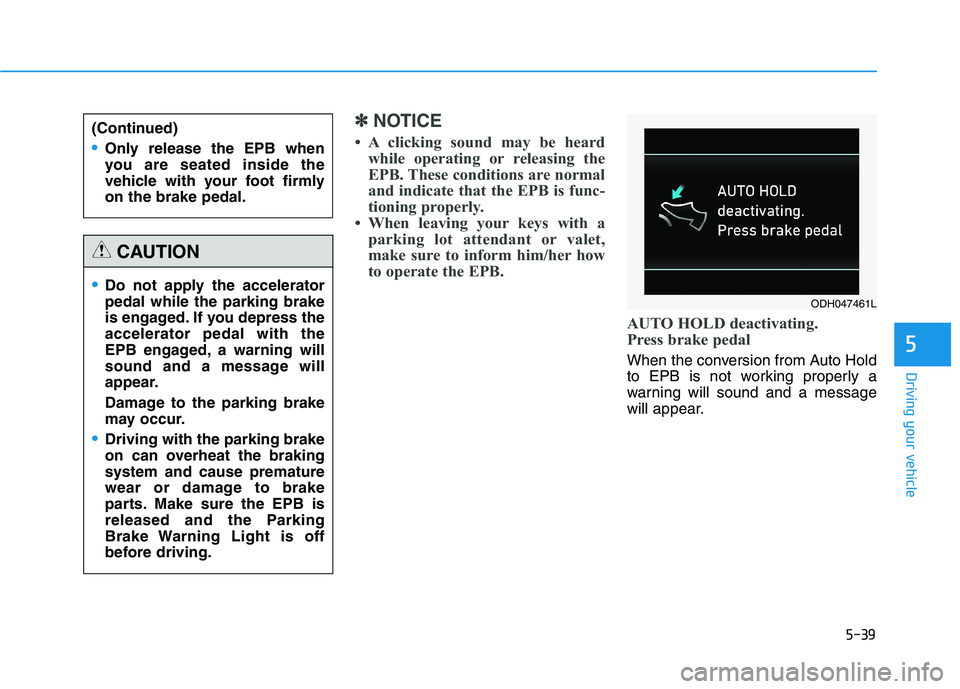
AUTO HOLD deactivating.
Press brake pedal
When the conversion from Auto Hold
to EPB is not working properly a
warning will sound and a message
will appear.5
(Continued)
Only release the EPB when
you are seated inside the
vehicle with your foot firmly
on the brake pedal.
Do not apply the accelerator
pedal while the parking brake
is engaged. If you depress the
accelerator pedal with the
EPB engaged, a warning will
sound and a message will
appear.
Damage to the parking brake
may occur.
Driving with the parking brake
on can overheat the braking
system and cause premature
wear or damage to brake
parts. Make sure the EPB is
released and the Parking
Brake Warning Light is off
before driving.
CAUTION
ODH047461L