brakes GENESIS G80 2018 User Guide
[x] Cancel search | Manufacturer: GENESIS, Model Year: 2018, Model line: G80, Model: GENESIS G80 2018Pages: 516, PDF Size: 81.01 MB
Page 302 of 516

5-47
Driving your vehicle
5
✽ ✽
NOTICE
When you jump start your vehicle
because of a drained battery, the
ABS warning light ( ) may turn
on at the same time. This happens
because of the low battery voltage. It
does not mean your ABS is malfunc-
tioning. Have the battery recharged
before driving the vehicle.
If the ABS warning light ( ) is
on and stays on, you may have
a problem with the ABS. Your
power brakes will work normal-
ly. To reduce the risk of serious
injury or death, contact your
authorized retailer of Genesis
Branded products as soon as
possible.
WARNING
When you drive on a road hav-
ing poor traction, such as an icy
road, and apply your brakes
continuously, the ABS will be
active continuously and the
ABS warning light ( ) may
illuminate. Pull your car over to
a safe place and turn the engine
off.
Restart the engine. If the ABS
warning light is off, then your
ABS system is normal.
Otherwise, you may have a
problem with your ABS system.
Contact an authorized retailer
of Genesis Branded products
as soon as possible.
CAUTION
Page 303 of 516

5-48
Driving your vehicle
Electronic Stability Control
(ESC)
The Electronic Stability Control
(ESC) system helps to stabilize the
vehicle during cornering maneuvers.
ESC checks where you are steering
and where the vehicle is actually
going. ESC applies braking pressure
to any one of the vehicle's brakes
and intervenes in the engine man-
agement system to assist the driver
with keeping the vehicle on the
intended path. It is not a substitute
for safe driving practices. Always
adjust your speed and driving to the
road conditions.
ESC operation
ESC ON condition
When the Engine Start/Stop button
is in the ON position, the ESC and
the ESC OFF indicator lights illumi-
nate for approximately three seconds
and goes off, then the ESC is turned
on.
When operating
When the ESC is in opera-
tion, the ESC indicator light
blinks:
conditions which may lock the
wheels, you may hear sounds from
the brakes, or feel a corresponding
sensation in the brake pedal. This
is normal and it means your ESC is
active.
engine may not respond to the
accelerator as it does under rou-
tine conditions.
when the ESC activates, the
Cruise Control automatically disen-
gages. The Cruise Control can be
reengaged when the road condi-
tions allow. See "Cruise Control
System" later in this chapter. (if
equipped) Never drive too fast for the road
conditions or too quickly when
cornering. The ESC system will
not prevent accidents.
Excessive speed in turns, abrupt
maneuvers, and hydroplaning
on wet surfaces can result in
severe accidents.WARNING
ODH054163N
Page 306 of 516

5-51
Driving your vehicle
Vehicle Stability Management
(VSM) (if equipped)
The Vehicle Stability Management
(VSM) is a function of the Electronic
Stability Control (ESC) system. It
helps ensure the vehicle stays stable
when accelerating or braking sud-
denly on wet, slippery and rough
roads where traction over the four
tires can suddenly become uneven.
VSM operation
VSM ON condition
The VSM operates when:
The Electronic Stability Control
(ESC) is on.
Vehicle speed is approximately
above 9 mph (15 km/h) on curve
roads.
Vehicle speed is approximately
above 12 mph (20 km/h) when the
vehicle is braking on rough roads.
When operating
When you apply your brakes under
conditions which may activate the
ESC, you may hear sounds from the
brakes, or feel a corresponding sen-
sation in the brake pedal. This is nor-
mal and it means your VSM is active.
✽ ✽
NOTICE
The VSM does not operate when:
• Driving on a banked road such as
gradient or incline
• Driving rearward.
• ESC OFF indicator light is on.
• EPS (Electric Power Steering)
warning light ( ) is on or blinks.
5Take the following precautions
when using the Vehicle Stability
Management (VSM):
ALWAYS check the speed and
the distance to the vehicle
ahead. The VSM is not a sub-
stitute for safe driving prac-
tices.
Never drive too fast for the
road conditions. The VSM sys-
tem will not prevent acci-
dents. Excessive speed in bad
weather, slippery and uneven
roads can result in severe
accidents.
WARNING
Driving with wheels and tires
with different sizes may cause
the ESC system to malfunction.
Before replacing tires, make
sure all four tires and wheels
are the original size. Never drive
the vehicle with different sized
tires and wheels than what is
recommended.
CAUTION
If ESC indicator light ( ) or
EPS warning light ( ) stays on
or blinks, your vehicle may have
a malfunction with the VSM sys-
tem. When the warning light illu-
minates we recommend that the
vehicle be checked by an
authorized retailer of Genesis
Branded products as soon as
possible.
WARNING
Page 307 of 516
5-52
Driving your vehicle
Hill-Start Assist Control (HAC)
The Hill-Start Assist Control (HAC)
helps prevent the vehicle from rolling
backwards when starting a vehicle
from a stop on a hill. The system
operates the brakes automatically for
approximately 2 seconds and releas-
es the brake when the accelerator
pedal is depressed or after 2 sec-
onds.
✽ ✽
NOTICE
• The HAC does not operate when
the shift lever is in P (Park) or N
(Neutral)
• The HAC activates even though
the ESC (Electronic Stability
Control) is off but does not acti-
vate when the ESC has malfunc-
tioned.
Good braking practices
Wet brakes can be dangerous! The
brakes may get wet if the vehicle is
driven through standing water or if it
is washed. Your vehicle will not stop
as quickly if the brakes are wet. Wet
brakes may cause the vehicle to pull
to one side.To dry the brakes, apply the brakes
lightly until the braking action returns
to normal, taking care to keep the
vehicle under control at all times. If
the braking action does not return to
normal, stop as soon as it is safe to
do so and call an authorized retailer
of Genesis Branded products for
assistance.
DO NOT drive with your foot resting
on the brake pedal. Even light, but
constant pedal pressure can result in
the brakes overheating, brake wear,
and possibly even brake failure.
If a tire goes flat while you are driv-
ing, apply the brakes gently and
keep the vehicle pointed straight
ahead while you slow down. When
you are moving slowly enough for it
to be safe to do so, pull off the road
and stop in a safe location.
Keep your foot firmly on the brake
pedal when the vehicle is stopped to
prevent the vehicle from rolling for-
ward. Always be ready to depress the
accelerator pedal when starting
off on a incline. The HAC acti-
vates only for approximately 2
seconds.
WARNING
Whenever leaving the vehicle or
parking, always come to a com-
plete stop and continue to
depress the brake pedal. Move
the shift lever into the P (Park)
position, then apply the parking
brake, and place the Engine
Start/Stop button in the OFF
position.
Vehicles with the parking brake
not fully engaged are at risk for
moving inadvertently and caus-
ing injury to yourself or others.
WARNING
Page 322 of 516

5-67
Driving your vehicle
5
Prerequisite for activation
The AEB gets ready to be activated,
when the AEB is selected on the
LCD display, and when the following
prerequisites are satisfied.
- The ESC (Electronic Stability
Control ) is on.
- To enable the system to detect
pedestrians ahead, the vehicle
driving speed must be between 5
mph – 45 mph (8 km/h – 70 km/h).
- To enable the system to detect a
vehicle ahead, the vehicle driving
speed must be between 5 mph –
110 mph (8 km/h – 180 km/h).
When traveling above 50 mph (80
km/h), the AEB system only initiates
partial braking. This is to prevent
unintended full braking to stop in the
middle of the highway.
AEB warning message and
system control
The AEB produces warning mes-
sages and warning alarms in accor-
dance with the collision risk levels,
such as abrupt stopping of the vehi-
cle in front, insufficient braking dis-
tance, or pedestrian detection. Also,
it controls the brakes in accordance
with the collision risk levels.Completely stop the vehicle
on a safe location before
operating the switch on the
steering wheel to activate/
deactivate the AEB system.
The AEB automatically acti-
vates upon placing the Engine
Start/Stop button to the ON
position. The driver can deac-
tivate the AEB by canceling
the system setting on the LCD
display.
The AEB automatically deacti-
vates upon canceling the ESC
(Electronic Stability Control).
When the ESC is canceled,
the AEB cannot be activated
on the LCD display.
WARNING
Page 323 of 516

5-68
Driving your vehicle
The driver can select the initial warn-
ing activation time in the User
Settings in the LCD display. The
options for the initial Forward
Collision Warning include Early,
Normal, or Late initial warning time.
Forward Warning (1stwarning)
This initial warning message
appears on the LCD display and the
head up display (if equipped) with a
warning chime.
Collision Warning (2ndwarning)
This warning message appears on
the LCD display and the head up dis-
play (if equipped) with a warning
chime.
Additionally, some vehicle system
intervention occurs by the engine
management system to help decel-
erate the vehicle.
- Your vehicle speed may decelerate
moderately.
- The AEB system limitedly controls
the brakes to preemptively mitigate
impact in a collision.
Emergency braking (3rdwarning)
This warning message appears on
the LCD display and the head up dis-
play (if equipped) with a warning
chime.
Additionally, some vehicle system
intervention occurs by the engine
management system to help decel-
erate the vehicle.
- The AEB system limitedly controls
the brakes to preemptively mitigate
impact in a collision. The brake
control is maximized just before a
collision.
ODH047469L
ODH047471LODH047473L
Page 344 of 516
5-89
Driving your vehicle
5
Limitations of the system
The Smart Cruise Control System
may have limits to its ability to detect
distance to the vehicle ahead due to
road and traffic conditions.
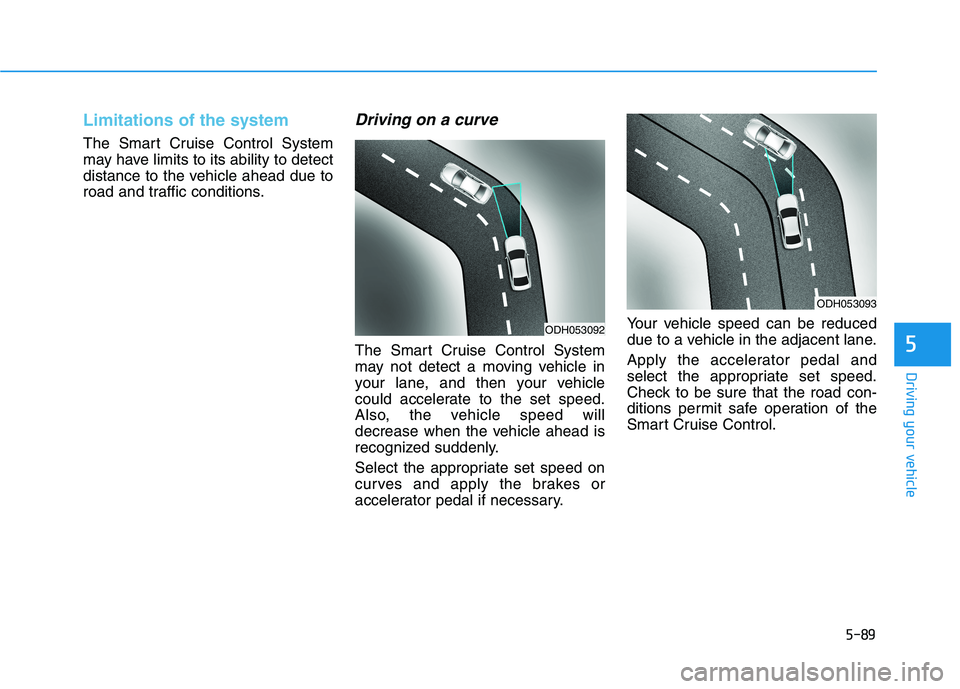
Driving on a curve
The Smart Cruise Control System
may not detect a moving vehicle in
your lane, and then your vehicle
could accelerate to the set speed.
Also, the vehicle speed will
decrease when the vehicle ahead is
recognized suddenly.
Select the appropriate set speed on
curves and apply the brakes or
accelerator pedal if necessary.Your vehicle speed can be reduced
due to a vehicle in the adjacent lane.
Apply the accelerator pedal and
select the appropriate set speed.
Check to be sure that the road con-
ditions permit safe operation of the
Smart Cruise Control.
ODH053093
ODH053092
Page 347 of 516

5-92
Driving your vehicle
Always look out for pedestrians when
your vehicle is maintaining a dis-
tance with the vehicle ahead.Always be cautious for vehicles with
higher height or vehicles carrying
loads that sticks out from the back of
the vehicle.When using the Smart Cruise
Control take the following pre-
cautions:
If an emergency stop is nec-
essary, you must apply the
brakes. The vehicle cannot be
stopped at every emergency
situation by using the Smart
Cruise Control System.
Keep a safe distance accord-
ing to road conditions and
vehicle speed. If the vehicle to
vehicle distance is too close
during a high-speed driving, a
serious collision may result.
Always maintain sufficient
braking distance and deceler-
ate your vehicle by applying
the brakes if necessary.
(Continued)
WARNING
ODH053100ODH053099
Page 366 of 516

5-111
Driving your vehicle
5
Driving in the rain
Rain and wet roads can make driving
dangerous. Here are a few things to
consider when driving in the rain or
on slick pavement:
Slow down and allow extra follow-
ing distance. A heavy rainfall
makes it harder to see and increas-
es the distance needed to stop
your vehicle.
Turn OFF your Cruise Control. (if
equipped)
Replace your windshield wiper
blades when they show signs of
streaking or missing areas on the
windshield.
Be sure your tires have enough
tread. If your tires do not have
enough tread, making a quick stop
on wet pavement can cause a skid
and possibly lead to an accident.
Refer to "Tire Tread" in chapter 7.
Turn on your headlamps to make it
easier for others to see you.
Driving too fast through large pud-
dles can affect your brakes. If you
must go through puddles, try to
drive through them slowly. If you believe your brakes may be
wet, apply them lightly while driv-
ing until normal braking operation
returns.
Hydroplaning
If the road is wet enough and you are
going fast enough, your vehicle may
have little or no contact with the road
surface and actually ride on the
water. The best advice is SLOW
DOWN when the road is wet. The
risk of hydroplaning increases as the
depth of tire tread decreases.(Refer
to "Tire Tread" in chapter 7.)
Driving in flooded areas
Avoid driving through flooded areas
unless you are sure the water is no
higher than the bottom of the wheel
hub. Drive through any water slowly.
Allow adequate stopping distance
because brake performance may be
reduced.
After driving through water, dry the
brakes by gently applying them sev-
eral times while the vehicle is moving
slowly.
Page 367 of 516

5-112
Driving your vehicle
Snow or icy conditions
You need to keep sufficient distance
between your vehicle and the vehicle
in front of you.
Apply the brakes gently. Speeding,
rapid acceleration, sudden brake
applications, and sharp turns are
potentially very hazardous practices.
During deceleration, use engine
braking to the fullest extent. Sudden
brake applications on snowy or icy
roads may cause skids to occur.
To drive your vehicle in deep snow, it
may be necessary to use snow tires
or to install tire chains on your tires.
Always carry emergency equipment.
Some of the items you may want to
carry include tire chains, tow straps
or chains, a flashlight, emergency
flares, sand, a shovel, jumper cables,
a window scraper, gloves, ground
cloth, coveralls, a blanket, etc.
Snow tires
W WI
IN
NT
TE
ER
R
D
DR
RI
IV
VI
IN
NG
G
Standard tire Recommended snow tire
Front Rear Front Rear
Tire sizeWheel
sizeTire sizeWheel
sizeTire size
Wheel
sizeTire sizeWheel
size
245/45R18 8.0Jx18 245/45R18 8.0Jx18 245/45R18
8.0Jx18 245/45R18 8.0Jx18
245/40R19
8.5Jx19245/40R19
or
275/35R198.5Jx19
or
9.0Jx19
245/40R19 8.5Jx19 275/35R19 9.0Jx19 245/40R19
8.5Jx19245/40R19
or
275/35R19 8.5Jx19
or
9.0Jx19
We recommend you use snow tires when road temperature is below 45°F
(7°C). Refer to the below chart, and mount the recommended snow tire for
your vehicle.