automatic transmission GENESIS G80 2018 Owner's Manual
[x] Cancel search | Manufacturer: GENESIS, Model Year: 2018, Model line: G80, Model: GENESIS G80 2018Pages: 516, PDF Size: 81.01 MB
Page 16 of 516
1-5
Your vehicle at a glance
1
I IN
NS
ST
TR
RU
UM
ME
EN
NT
T
P
PA
AN
NE
EL
L
O
OV
VE
ER
RV
VI
IE
EW
W
(
(I
I)
)
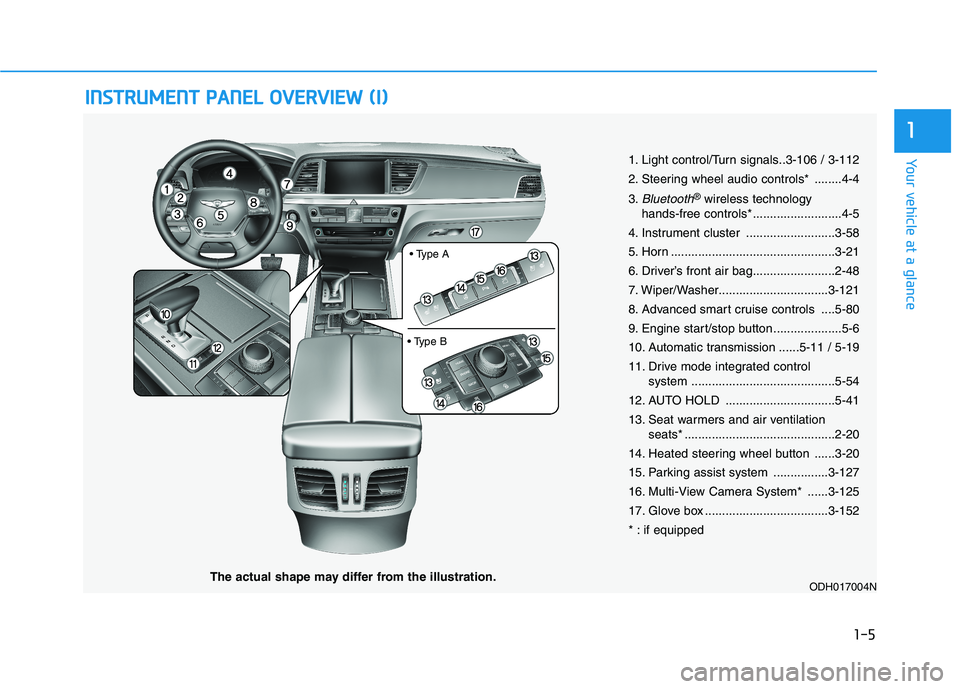
1. Light control/Turn signals..3-106 / 3-112
2. Steering wheel audio controls* ........4-4
3.
Bluetooth®wireless technology
hands-free controls* ..........................4-5
4. Instrument cluster ..........................3-58
5. Horn ................................................3-21
6. Driver’s front air bag........................2-48
7. Wiper/Washer................................3-121
8. Advanced smart cruise controls ....5-80
9. Engine start/stop button ....................5-6
10. Automatic transmission ......5-11 / 5-19
11. Drive mode integrated control
system ..........................................5-54
12. AUTO HOLD ................................5-41
13. Seat warmers and air ventilation
seats* ............................................2-20
14. Heated steering wheel button ......3-20
15. Parking assist system ................3-127
16. Multi-View Camera System* ......3-125
17. Glove box ....................................3-152
* : if equipped
ODH017004NThe actual shape may differ from the illustration.
Page 32 of 516
2-13
Safety system of your vehicle
2
Make sure the engine is off,
the shift lever is in P and the
parking brake is applied
whenever loading or unload-
ing cargo. The Vehicle may
move if the shift lever is inad-
vertently moved to another
position.
Be careful when loading
cargo through the rear pas-
senger seats to prevent dam-
age to the vehicle interior.
When cargo is loaded through
the rear passenger seats,
ensure the cargo is properly
secured to prevent it from
moving while driving.
Unsecured cargo in the pas-
senger compartment can
cause damage to the vehicle
or injury to its occupants.
CAUTION
Cargo
Cargo should always be
secured to prevent it from being
thrown about the vehicle in a
collision and causing injury to
the vehicle occupants. Do not
place objects in the rear seats,
since they cannot be properly
secured and may hit the front
seat occupants in a collision.
WARNING
Cargo loading
Make sure the engine is off, the
automatic transmission is in P
(Park) and the parking brake is
securely applied whenever
loading or unloading cargo.
Failure to take these steps may
allow the vehicle to move if the
shift lever is inadvertently
moved to another position.
WARNING
Page 151 of 516
3-63
Convenient features of your vehicle
3
- User Settings Mode in the Cluster :
You can change the temperature
unit in the "Other Features -
Temperature unit".
- Automatic climate control system :
While pressing the OFF button,
press the AUTO button for 3 sec-
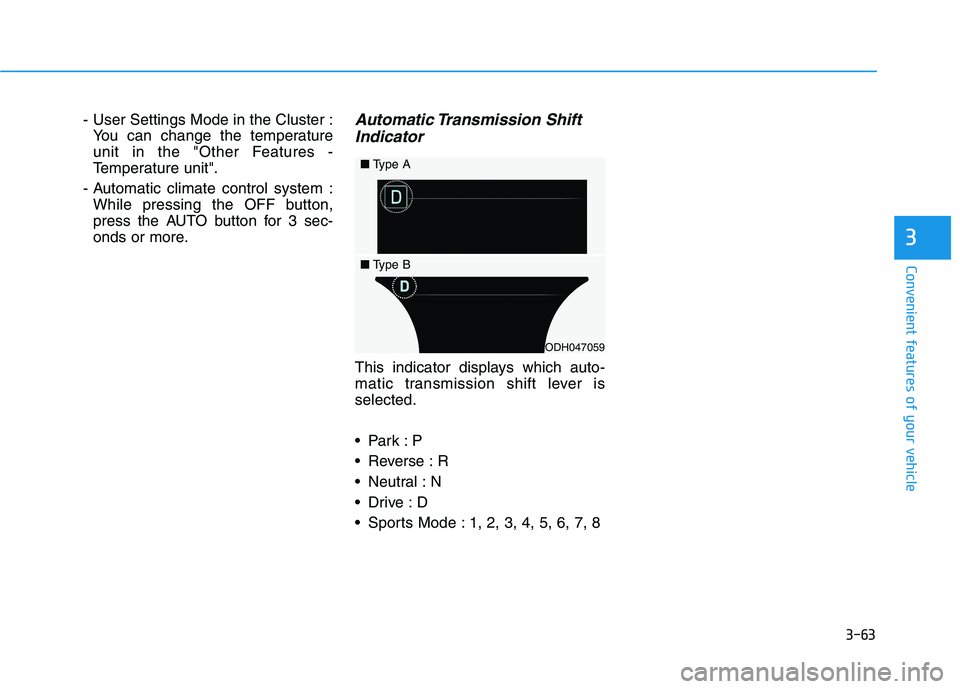
onds or more.Automatic Transmission Shift
Indicator
This indicator displays which auto-
matic transmission shift lever is
selected.
Reverse : R
Neutral : N
Sports Mode : 1, 2, 3, 4, 5, 6, 7, 8
ODH047059
■Type A
■Type B
Page 158 of 516
3-70
Convenient features of your vehicle
ItemsExplanation
Automatically Lock
The auto door lock operation will be deactivated.
All doors will be automatically locked when the vehicle speed exceeds 15 km/h (9.3 mph).
All doors will be automatically locked if the automatic transmission shift lever is shift-
ed from the P (Park) position to the R (Reverse), N (Neutral), or D (Drive) position.
Automatically Unlock
The auto door unlock operation will be canceled.
All doors will be automatically unlocked when the Engine Start/Stop button is set to the
OFF position.
All doors will be automatically unlocked if the automatic transmission shift lever is
shifted to the P (Park) position.
Two Press UnlockTo activate or deactivate the two press unlock function. If activated, the driver's door will unlock if
the door is unlocked. When the door is unlocked again within 4 seconds, all doors will unlock.
Lock/Unlock SoundTo activate or deactivate the lock sound when the doors are locked and unlocked.
Smart TrunkTo activate or deactivate the Smart Trunk system.
For more details, refer to "Smart Trunk" in this chapter.
Door
Page 256 of 516
Driving your vehicle
5
Before driving.........................................................5-4
Before entering the vehicle ...........................................5-4
Before starting...................................................................5-4
Engine Start/Stop button ................................................5-6
Automatic transmission (SBC)............................5-11
Automatic transmission operation ..............................5-11
Parking ...............................................................................5-17
Good driving practices ...................................................5-17
Automatic transmission (SBW) ..........................5-19
Automatic transmission operation ..............................5-19
Parking ...............................................................................5-24
LCD display messages ....................................................5-25
Good driving practices ...................................................5-27
All Wheel Drive (AWD) ........................................5-29
Using All Wheel Drive (AWD) .......................................5-29
Emergency precautions .................................................5-31
Braking system.....................................................5-33
Power brakes ...................................................................5-33
Disc brakes wear indicator ...........................................5-34
Foot parking brake .........................................................5-34
Electronic parking brake (EPB) ...................................5-36
AUTO HOLD ......................................................................5-41
Anti-lock Brake System (ABS) ....................................5-45
Electronic Stability Control (ESC)................................5-48
Vehicle Stability Management (VSM).........................5-51Hill-Start Assist Control (HAC) ....................................5-52
Good braking practices..................................................5-52
Genesis Adaptive Control Suspension ..............5-53
Electronic control suspension (ECS) ..........................5-53
Dynamic stability damping control (DSDC) ...............5-53
Drive mode integrated control system ..............5-54
Blind Spot Detection System (BSD) ...................5-57
BSD (Blind Spot Detection) /
LCA (Lane Change Assist) .............................................5-58
RCTA (Rear Cross Traffic Alert) ..................................5-60
Limitation of the System ...............................................5-63
Automatic Emergency Braking (AEB) ...............5-65
System setting and activation......................................5-65
AEB warning message and system control ..............5-67
AEB front radar sensor .................................................5-70
System malfunction ........................................................5-71
Limitation of the System ...............................................5-72
Advanced smart cruise control system ............5-78
To Adjust the Sensitivity of Smart Cruise Control...5-79
To convert to cruise control mode .............................5-80
Smart cruise control speed ..........................................5-80
Smart cruise control vehicle-to-vehicle distance ..5-85
Sensor to detect distance to the vehicle ahead .....5-87
Limitations of the system .............................................5-89
Page 262 of 516
5-7
Driving your vehicle
5
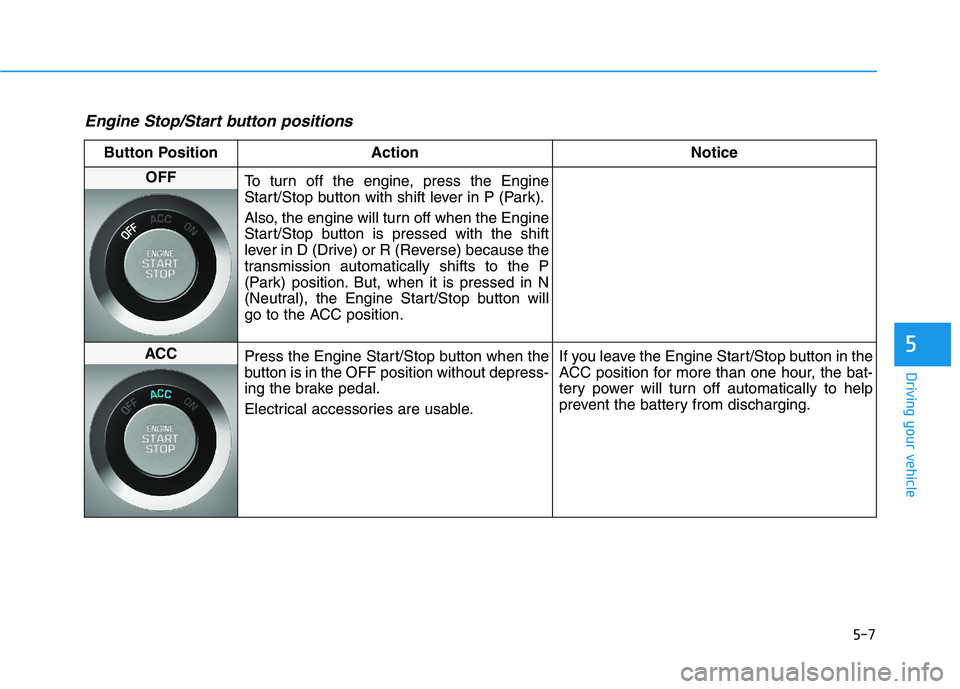
Engine Stop/Start button positions
Button Position Action Notice
OFF
To turn off the engine, press the Engine
Start/Stop button with shift lever in P (Park).
Also, the engine will turn off when the Engine
Start/Stop button is pressed with the shift
lever in D (Drive) or R (Reverse) because the
transmission automatically shifts to the P
(Park) position. But, when it is pressed in N
(Neutral), the Engine Start/Stop button will
go to the ACC position.
ACC
Press the Engine Start/Stop button when the
button is in the OFF position without depress-
ing the brake pedal.
Electrical accessories are usable.If you leave the Engine Start/Stop button in the
ACC position for more than one hour, the bat-
tery power will turn off automatically to help
prevent the battery from discharging.
Page 266 of 516
5-11
Driving your vehicle
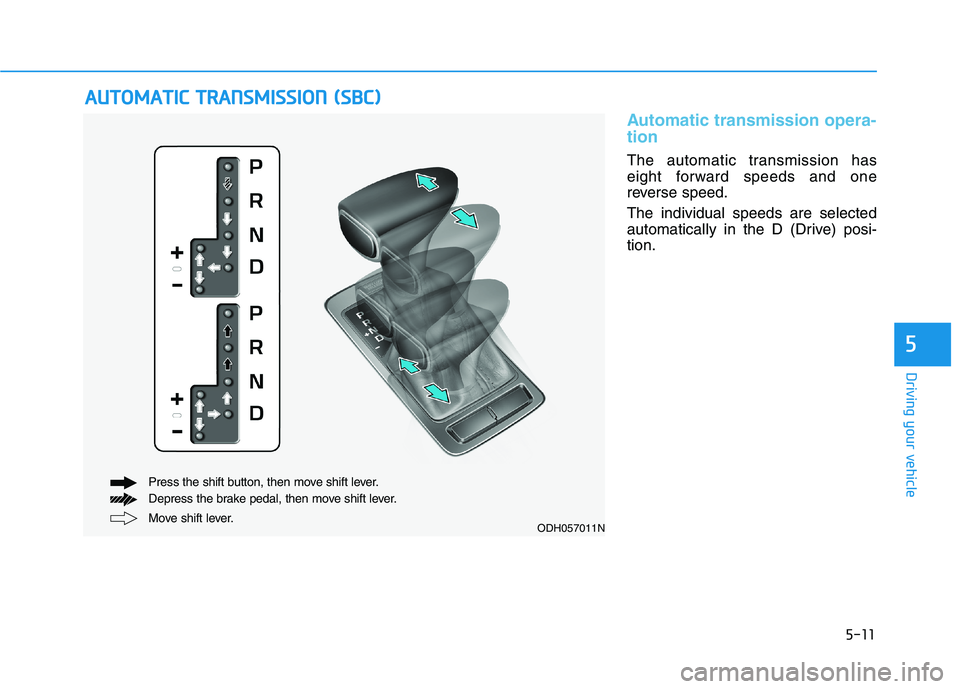
Automatic transmission opera-
tion
The automatic transmission has
eight forward speeds and one
reverse speed.
The individual speeds are selected
automatically in the D (Drive) posi-
tion.
A AU
UT
TO
OM
MA
AT
TI
IC
C
T
TR
RA
AN
NS
SM
MI
IS
SS
SI
IO
ON
N
(
(S
SB
BC
C)
)
5
Move shift lever. Press the shift button, then move shift lever.
Depress the brake pedal, then move shift lever.ODH057011N
Page 268 of 516
5-13
Driving your vehicle
R (Reverse)
Use this position to drive the vehicle
backward.
N (Neutral)
The wheels and transmission are not
engaged.
Use N (Neutral) if you need to restart
a stalled engine, or if it is necessary
to stop with the engine ON. Shift into
P (Park) if you need to leave your
vehicle for any reason.
Always depress the brake pedal
when you are shifting from N
(Neutral) to another gear.
D (Drive)
This is the normal driving position.
The transmission will automatically
shift through a 8-gear sequence, pro-
viding the best fuel economy and
power.
For extra power when passing anoth-
er vehicle or driving uphill depress
the accelerator pedal further until
you feel the transmission downshift
to a lower gear.
The DRIVE MODE switch, located
on the shift lever console, allows the
driver to switch from NORMAL mode
to SPORT, ECO or SNOW mode.
When driving in ice or snow condi-
tions, it is recommended you switch
to SNOW mode. Press the DRIVE
MODE switch for 2~3 seconds until
"SNOW" displays in the center of the
instrument cluster. To cancel SNOW
mode, press the DRIVE MODE
switch one time to select NORMAL
mode.
For more information, refer to
"Drive Mode Integrated Control
System" later in this chapter.
5
Always come to a complete
stop before shifting into or out
of R (Reverse); you may dam-
age the transmission if you shift
into R (Reverse) while the vehi-
cle is in motion.
CAUTION
Do not shift into gear unless
your foot is firmly on the brake
pedal. Shifting into gear when
the engine is running at high
speed can cause the vehicle to
move very rapidly. You could
lose control of the vehicle and
hit people or objects.
WARNING
Page 269 of 516

5-14
Manual shift mode
Whether the vehicle is stationary or
in motion, manual shift mode is
selected by pushing the shift lever
from the D (Drive) position into the
manual gate. To return to D (Drive)
range operation, push the shift lever
back into the main gate.In Manual Shift Mode, moving the
shift lever backwards and forwards
will allow you to select the desired
range of gears for the current driving
conditions.
+ (Up) : Push the lever forward once
to shift up one gear.
- (Down) : Pull the lever backwards
once to shift down one
gear.
✽ ✽
NOTICE
• Only the eight forward gears can
be selected. To reverse or park the
vehicle, move the shift lever to the
R (Reverse) or P (Park) position as
required.
• Downshifts are made automatical-
ly when the vehicle slows down.
When the vehicle stops, 1st gear is
automatically selected.
• When the engine rpm approaches
the red zone the transmission will
upshift automatically.
(Continued)(Continued)
• If the driver presses the lever to +
(Up) or - (Down) position, the
transmission may not make the
requested gear change if the next
gear is outside of the allowable
engine rpm range. The driver
must execute upshifts in accor-
dance with road conditions, taking
care to keep the engine rpms
below the red zone.
• When accelerating from a stop on
a slippery road, push the shift
lever forward into the + (Up) posi-
tion. This causes the transmission
to shift into the 2nd gear which is
better for smooth driving on a
slippery road. Push the shift lever
to the - (Down) side to shift back to
the 1st gear.
Driving your vehicle
ODH057012
+ (UP)
- (DOWN)
Page 271 of 516

5-16
Shift-lock system
For your safety, the automatic trans-
mission has a shift-lock system
which prevents shifting the transmis-
sion from P (Park) into R (Reverse)
unless the brake pedal is depressed.
To shift the transmission from P
(Park) into R (Reverse):
1. Depress and hold the brake pedal.
2. Start the engine or place the
Engine Start/Stop button in the
ON position.
3. Move the shift lever.
Shift-lock override
If the shift lever cannot be moved
from the P (Park) position into R
(Reverse) position with the brake
pedal depressed, continue depress-
ing the brake, and then do the follow-
ing:1. Place the Engine Start/Stop but-
ton in the OFF position.
2. Apply the parking brake.
3. Carefully remove the cap (1) cov-
ering the shift-lock override
access hole.
4. Insert a screwdriver into the
access hole and press down on
the screwdriver.
5. Move the shift lever.
6. Remove the screwdriver from the
shift-lock override access hole
then install the cap.
If you need to use the shift-lock
release, have your vehicle inspected
by an authorized retailer of Genesis
Branded products.
Driving your vehicle
ODH057014N