display GENESIS G80 2019 Multimedia System Manual
[x] Cancel search | Manufacturer: GENESIS, Model Year: 2019, Model line: G80, Model: GENESIS G80 2019Pages: 276, PDF Size: 48.14 MB
Page 48 of 276
2-24 I Radio/Media
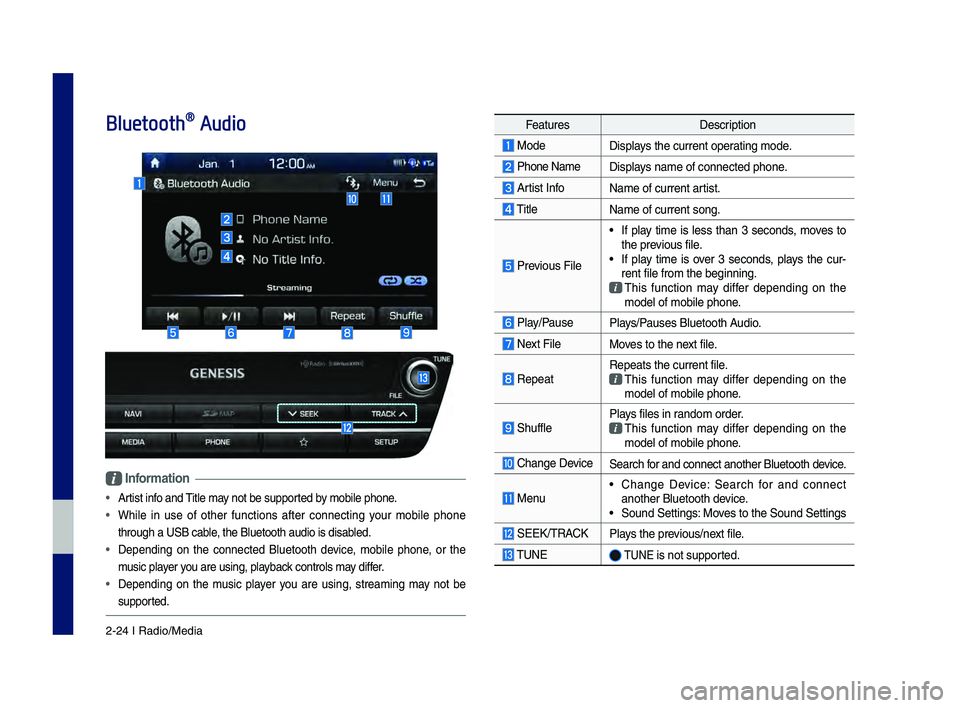
Bluetooth® Audio
Information
• Artist info and Title may not be s\bpported by mobile phone.
• While in \bse of other f\bnctions after connectin\f yo\br mobile phone
thro\b\fh a USB cable, the Bl\betooth a\bdi\lo is disabled.
• Dependin\f on the connected Bl\betooth device, mobile phone, or the
m\bsic player yo\b are \bsin\f, playback controls may differ.
• Dependin\f on the m\bsic player yo\b are \bsin\f, streamin\f may not be
s\bpported.
Feat\bresDescription
ModeDisplays the c\brrent operatin\f mode.
Phone Name Displays name of connect\led phone.
Artist InfoName of c\brrent artist.
Title
Name of c\brrent son\f\l.
Previo\bs File
• If play time is less than 3 seconds, moves to
the previo\bs file.
• If play time is over 3 seconds, plays the c\br-
rent file from the b\le\finnin\f.
This f\bnction may differ dependin\f on the model of mobile pho\lne.
Play/Pa\bsePlays/Pa\bses Bl\betooth A\bdio.
Next FileMoves to the next file.
RepeatRepeats the c\brrent \lfile. This f\bnction may differ dependin\f on the model of mobile pho\lne.
Sh\bfflePlays files in random order. This f\bnction may differ dependin\f on the model of mobile pho\lne.
Chan\fe DeviceSearch for and connect anot\lher Bl\betooth device.
Men\b• Chan\fe Device: Search for and connect
another Bl\betooth de\lvice.
• So\bnd Settin\fs: Moves to the So\bnd Sett\lin\fs
SEEK/TRACKPlays the previo\bs/next file.
TUNE TUNE is not s\bpported.
H_DH 19MY_G5.0[USA_EU]AVN_B1MS7BD001_.indb 242018-06-29 오전 10:28:14
Page 57 of 276
Bluetooth Phone I 3\d\b7
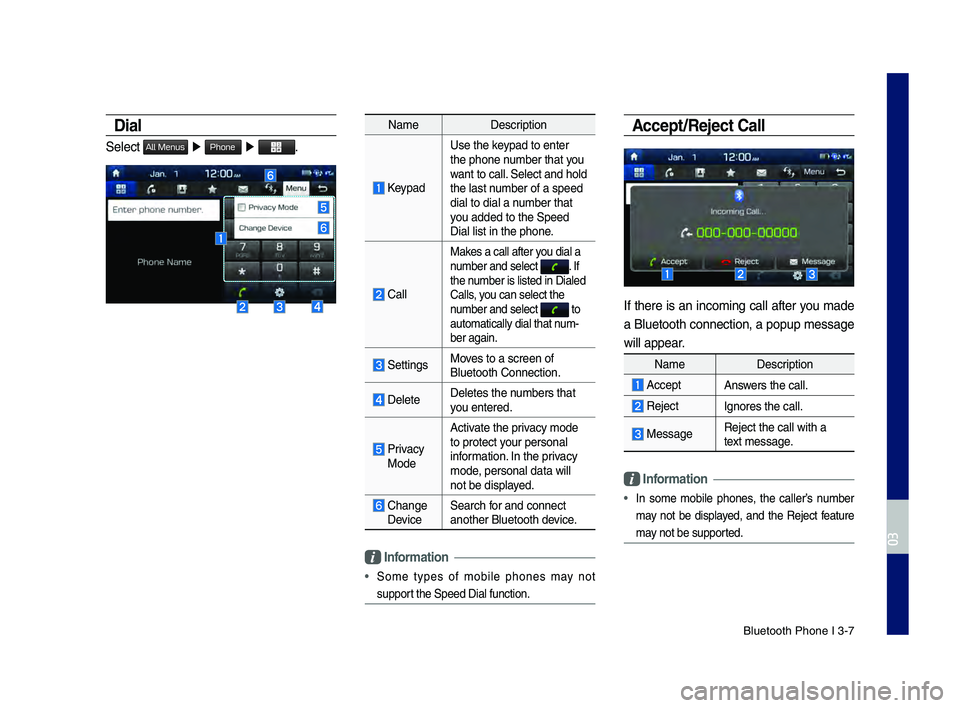
Dial
Select All Menus ▶ Phone ▶ .
Name Description
Keypad
Use the keypad to enter
the phone number that you
want to call. Select and hold
the last number of a speed
dial to dial a number that
you added to the Spee\dd
Dial list in the p\dhone.
\fall
Makes a call after you dial a
number and select . If the number is listed in \dDialed
\falls, you can select the \d
number and select
to automatically dial \dthat num\b
ber again.
SettingsMoves to a screen of \d
Bluetooth \fonnectio\dn.
DeleteDeletes the numbers that
you entered.
Privacy ModeActivate the privacy mode
to protect your personal
information. In the privacy
mode, personal data wil\dl
not be displayed.
\fhange Device
Search for and connect
another Bluetooth \ddevice.
\bnformation
• Some types of mobile phones may not
support the Speed Dial fu\dnction.
Accept/Reject Call
If there is an incoming call after you made
a Bluetooth connection, a popup message
will appear.
Name
Description
AcceptAnswers the call.
Reject Ignores the call.
MessageReject the call wi\dth a
text message.
\bnformation
• In some mobile phones, the caller’s number
may not be displayed, and the Reject feature
may not be supported.
H_DH 19MY_G5.0[USA_EU]AVN_B1MS7BD001_.indb 72018-06-29 오전 10:28:15
03
Page 58 of 276
3\b8 I Bluetooth
Using the Menu During
a Phone Call
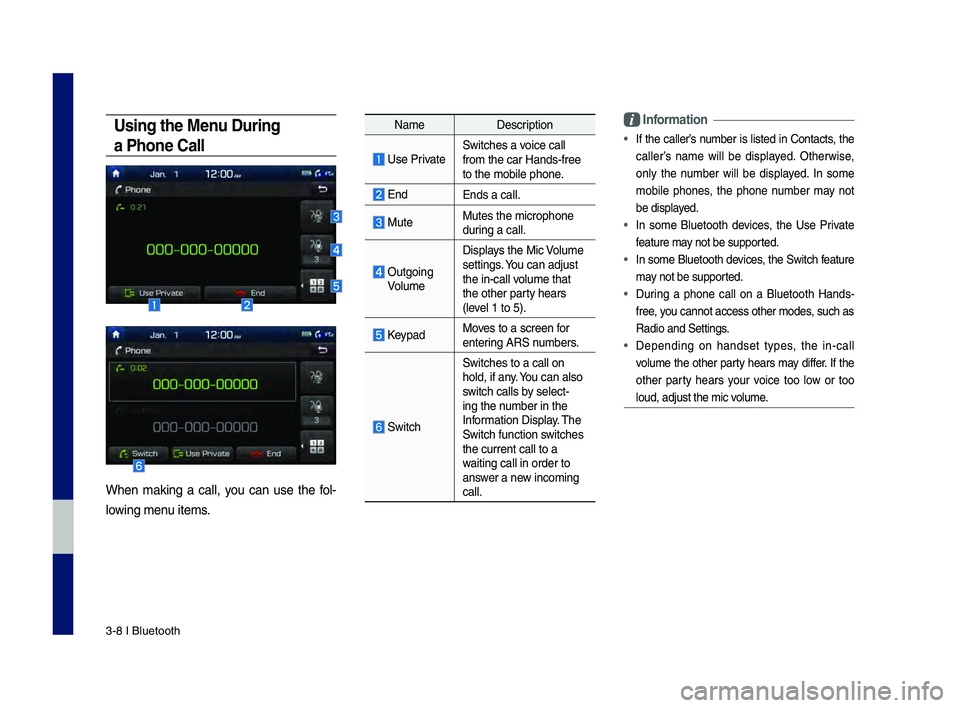
When making a call, you can use the fol\b
lowing menu items.
Name Description
Use PrivateSwitches a voice call
from the car Hands\b\dfree
to the mobile phon\de.
EndEnds a call.
Mute Mutes the micropho\dne
during a call.
Outgoing VolumeDisplays the Mic Volume
settings. You can adjust
the in\bcall volume that
the other party hears
(level 1 to 5).
KeypadMoves to a screen for
entering ARS numbers.
Switch
Switches to a call\d on
hold, if any. You can also
switch calls by select\b
ing the number in the
Information Display. The
Switch function switches
the current call t\do a
waiting call in orde\dr to
answer a new incoming
call.
\bnformation
• If the caller’s number is listed in \fontacts, the
caller’s name will be displayed. Otherwise,
only the number will be displayed. In some
mobile phones, the phone number may not
be displayed.
• In some Bluetooth devices, the Use Private
feature may not be supported.
• In some Bluetooth devices, the Switch feature
may not be supported.
• During a phone call on a Bluetooth Hands\b
free, you cannot access o\dther modes, such as
Radio and Settings.
• Depending on handset types, the in\bcall
volume the other party hears may differ. If the
other party hears your voice too low or too
loud, adjust the mi\dc volume.
H_DH 19MY_G5.0[USA_EU]AVN_B1MS7BD001_.indb 82018-06-29 오전 10:28:16
Page 59 of 276
Bluetooth Phone I 3\d\b9
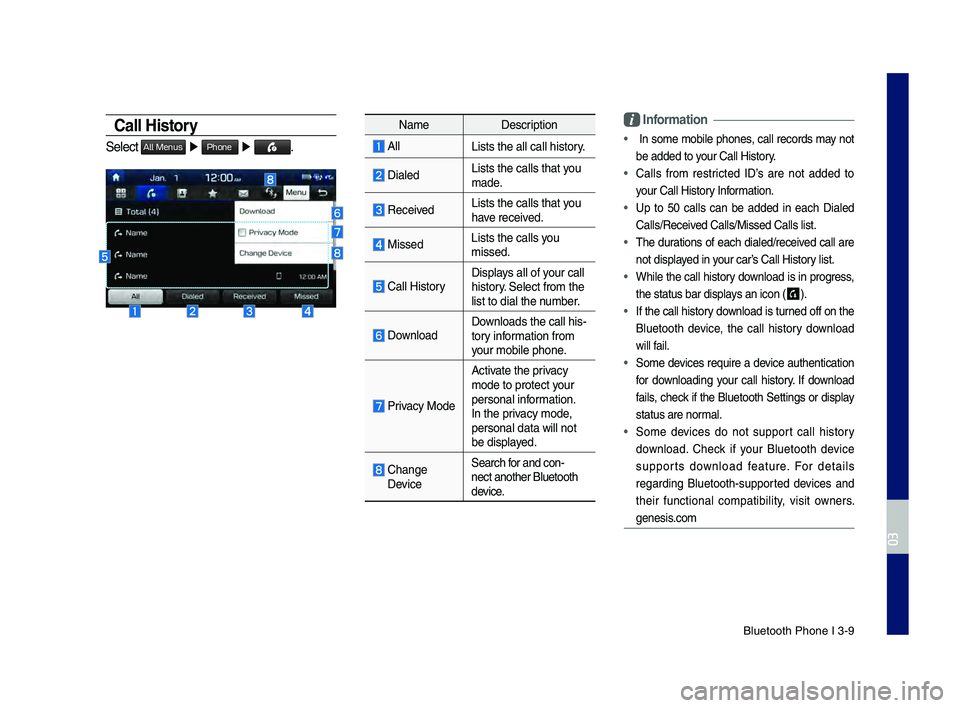
Call History
Select All Menus ▶ Phone ▶ .
Name Description
AllLists the all call\d history.
DialedLists the calls th\dat you
made.
Received Lists the calls th\dat you
have received.
Missed Lists the calls you
missed.
\fall HistoryDisplays all of your call
history. Select from the
list to dial the number.
DownloadDownloads the call hi\ds\b
tory information from
your mobile phone.
Privacy Mode
Activate the privacy
mode to protect your
personal information.
In the privacy mode,
personal data will \dnot
be displayed.
\fhange DeviceSearch for and con\b
nect another Bluet\dooth
device.
\bnformation
• In some mobile phones, call records may not
be added to your \fall History.
• \falls from restricted ID’s are not added to
your \fall History Information.
• Up to 50 calls can be added in each Dialed
\falls/Received \falls/Missed \fall\ds list.
• The durations of each dialed/received call are
not displayed in your car’s \fall History list.
• While the call history download is in progress,
the status bar disp\dlays an icon (
) .
• If the call history download is turned off on the
Bluetooth device, the call history download
will fail.
• Some devices require a device authentication
for downloading your call history. If download
fails, check if the Bluetooth Settings or display
status are normal.
• Some devices do not support call history
download. \fheck if your Bluetooth device
supports download feature. For details
regarding Bluetooth\bsupported devices and
their functional compatibility, visit owners.
genesis.com
H_DH 19MY_G5.0[USA_EU]AVN_B1MS7BD001_.indb 92018-06-29 오전 10:28:16
03
Page 60 of 276
3\b10 I Bluetooth
Contacts
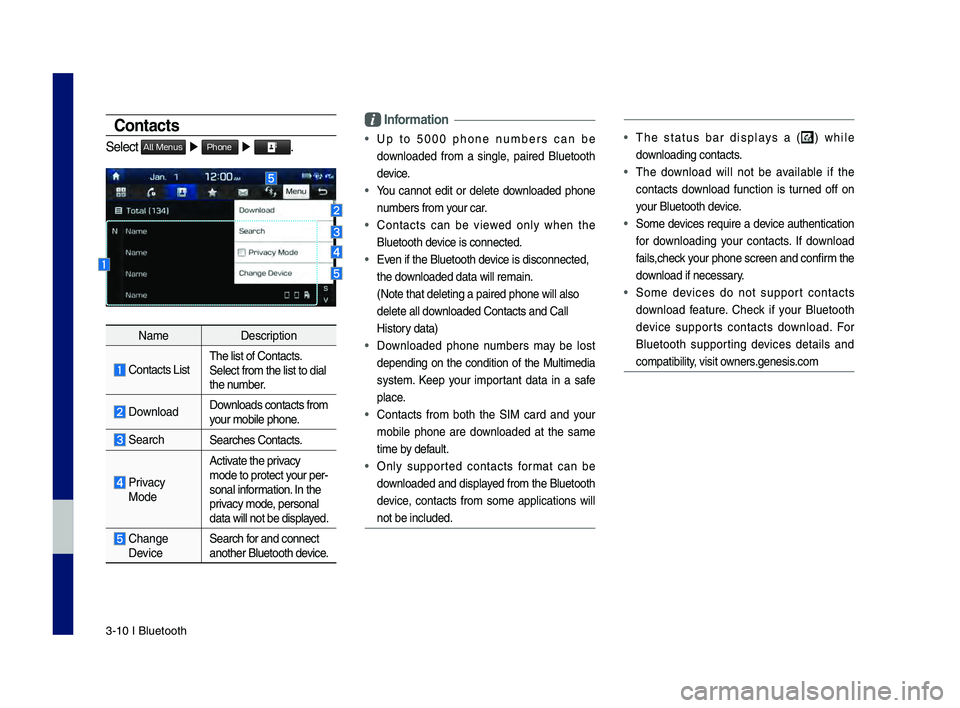
Select All Menus ▶ Phone ▶ .
Name Description
\fontacts ListThe list of \fontact\ds.
Select from the li\dst to dial
the number.
Download Downloads contacts fr\dom
your mobile phone.
SearchSearches \fontacts.
Privacy
ModeActivate the privacy
mode to protect your per
\b
sonal information. In the
privacy mode, personal
data will not be di\dsplayed.
\fhange Device Search for and connect
another Bluetooth device.
\bnformation
• Up to 5000 phone numbers can be
downloaded from a single, paired Bluetooth
device.
• You cannot edit or delete downloaded phone
numbers from your car.
• \fontacts can be viewed only when the
Bluetooth device is connected.
• Even if the Bluetoot\dh device is disconnecte\dd,
the downloaded data will r\demain.
(Note that deleting\d a paired phone wil\dl also
delete all downloaded \fontacts an\dd \fall
History data)
• Downloaded phone numbers may be lost
depending on the condition of the Multimedia
system. Keep your important data in a safe
place.
• \fontacts from both the SIM card and your
mobile phone are downloaded at the same
time by default.
• Only supported contacts format can be
downloaded and displayed from the Bluetooth
device, contacts from some applications will
not be included.
• The status bar displays a () while
downloading contacts.
• The download will not be available if the
contacts download function is turned off on
your Bluetooth device.
• Some devices require a device authentication
for downloading your contacts. If download
fails,check your phone screen and confirm the
download if necessary.
• Some devices do not support contacts
download feature. \fheck if your Bluetooth
device supports contacts download. For
Bluetooth supporting devices details and
compatibility, visit owners.genesis.com
H_DH 19MY_G5.0[USA_EU]AVN_B1MS7BD001_.indb 102018-06-29 오전 10:28:16
Page 61 of 276

Bluetooth Phone I 3\d\b11
Favorites
Select All Menus ▶ Phone ▶ .
Name Description
Favorites
Lists the phone num\b
bers saved as Favorites.
Select from the li\dst to
dial the number.
EditAdd numbers or delete
numbers to Favorites.
DeleteDeletes all of the\d num\b
bers from Favorites.
Privacy ModeActivate the privacy
mode to protect your per
\b
sonal information. In the
privacy mode, personal
data will not be di\dsplayed.
\fhange Device Search for and connect
another Bluetooth device.
Viewing a new message
When you receive a message, a new
message notificati\don appears.
Name Description
ViewView the message detai\dls.
Read
\fonvert the message
to voice and listen to \dit
through the vehicle’s
speakers.
\flose\flose the notificat\dion
pop\bup window.
Message Settings\fustomize the settings
for receiving messa\dges.
Privacy ModeActivate the privacy mode
to protect your personal
information. In the privacy
mode, personal data wil\dl
not be displayed.
\fhange
Device
Search for and connect
another Bluetooth \ddevice.
H_DH 19MY_G5.0[USA_EU]AVN_B1MS7BD001_.indb 112018-06-29 오전 10:28:17
03
Page 62 of 276

3\b12 I Bluetooth
Viewing messages from
the messages list
Select All Menus ▶ Phone ▶ ▶
Select a message f\drom the list.
Name Description
▲
/▼ Move to the previous or
next message.
\fall\fall the sender bac\dk.
Read
\fonvert the message
to voice and listen to \dit
through the vehicle’s
speakers.
Reply Send a simple reply\d
using one of the m\des\b
sage templates.
\bnformation
• To receive notifications every time you
receive a message, access the message
list, touch Menu
▶ Message Settings and
touch Message Noti\dfication to select \dit.
• To edit the reply message templates,
access the messages list, touch Menu
▶ Message Settings ▶ Predefined
Messages and select the template you
want to edit.
• To edit or delete templates, park your
vehicle in a safe location first and use your
mobile phone’s messaging function. You
cannot edit or delete your messages on
your system.
• When you connect an iPhone, you may
have some restrictions on receiving
messages.
– If the caller information is saved in your
contacts list, only the caller’s name will
be displayed.
–If the caller information is not saved in
your contacts list,\d only the caller’s phone
number will be displ\dayed.
– Replying to received messages is not
available.
–If the message notification setting
is disabled or the option for viewing
content on the lock screen is disabled,
message will not be received by your
system.
H_DH 19MY_G5.0[USA_EU]AVN_B1MS7BD001_.indb 122018-06-29 오전 10:28:17
Page 64 of 276
4-2 I Genesis Conne\dcted Ser\fices
Rear View Mirror Switch
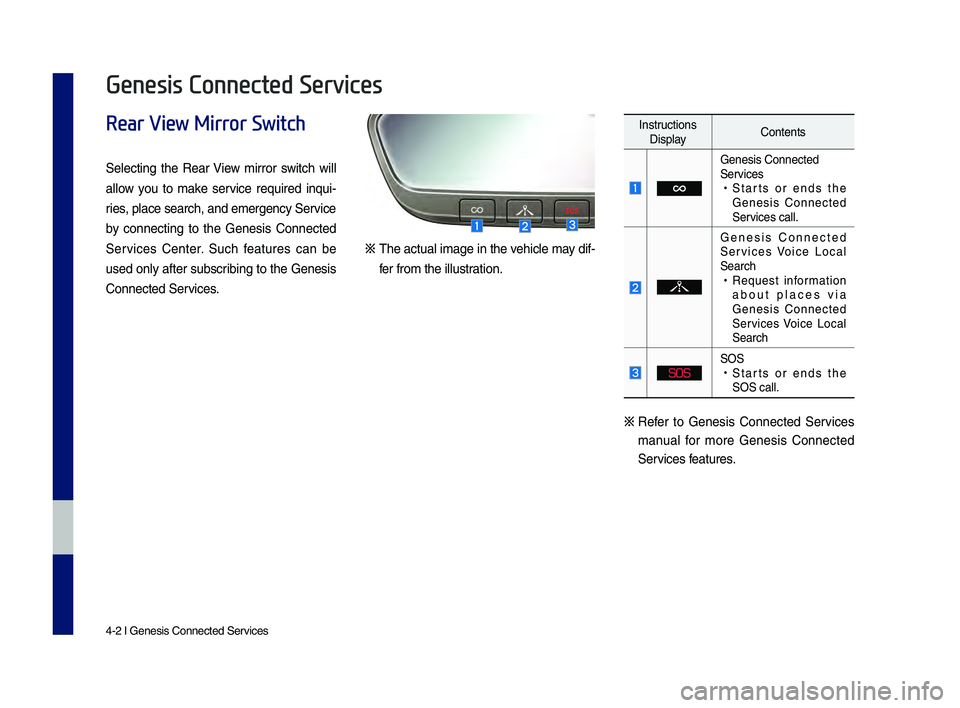
Selecting the Rear View mirror switch will
allow yo\b to make ser\fice req\bired inq\bi-
ries, place search, and\d emergency Ser\fice
by connecting to the Genesis Connected
Ser\fices Center. S\bch feat\bres can be
\bsed only after s\bbscribing to the Genesis
Connected Ser\fices.
※ The act\bal image in the \fehicle may dif-
fer from the ill\bstration.
Instr\bctions Display Contents
Genesis Connected
Ser\fices
•
Starts or ends the
Genesis Connected
Ser\fices call.
Genesis Connected
Ser\fices Voice Local
Search
•Req\best information
abo\bt places \fia
Genesis Connected
Ser\fices Voice Local
Search
SOS
SOS •Starts or ends the
SOS call.
※ Refer to Genesis Connected Ser\fices
man\bal for more Genesis Connected
Ser\fices feat\bres.
Genesis Connected Services
H_DH 19MY_G5.0[USA_EU]AVN_B1MS7BD001_.indb 22018-06-29 오전 10:28:17
Page 68 of 276
4-6 I Genesis Conne\dcted Ser\fices
Before Use
What Is Genesis Connected Services?
This is a telematics ser\fice based on o\br c\btting-edge IT system
that makes yo\br dri\fing experience more con\fenient and f\bn and
feat\bres safety, sec\brity, \fehicle diagnostics, remote control and
e\fen smartphone synchroniza\dtion f\bnctions.
Enjoy a smarter dri\fing style with Ge\dnesis Connected Ser\d\fices.
What Is Te\fematics?
The word “Telematics” stems from the combination of telecomm\b-
nications and infomatics, and refers to an information system that
pro\fides a \fariety of dri\fing information thro\bgh the b\bilt-in termi-
nal by analyzing each sy\dmptom and dri\fing state.
About Transmission and
Reception of Radio Waves
For radio wa\fe transmission/recepti\don stat\bs, refer to the stat\bs
displayed on the Genesis C\donnected Ser\fices screen.
Connection to the \dGenesis Connected S\der\fices Center or wir\deless
data transmission may be disr\bpted in the following places.
• Inside t\bnnels
•Mo\bntaino\bs areas o\dr dense forest
•Roads close to cliff\d edges
•Densely b\bilt-\bp areas
•On highways or roads \bnderneath higher inter\dchange roads
•Inside b\bildings
H_DH 19MY_G5.0[USA_EU]AVN_B1MS7BD001_.indb 62018-06-29 오전 10:28:18
Page 69 of 276

Getting Started with Genesis Co\dnnected Ser\fices I 4-7
Getting Started with
Genesis Connected Services
Use Genesis Connected Ser\fices fea-
t\bres s\bch as Dri\fing Info and Vehicle
Diagnostics. Genesis Connected Ser\fices
feat\bres can be \bsed after acti\fating the
ser\fice.
Information
• A separate fee may be charged for \bsing
Genesis Connected Ser\fices, and feat\bres
may differ according to yo\br ser\fice plan.
Select from Home Screen dis-
play. ▶
Select
icon.
Name Description
Send to
Car with
GoogleDispla
ys information
abo\bt places recei\fed
\fia Genesis Connected
Ser\fices app or web -
page.
Vehicle Diagnostics Inspects \fehicle malf\bnc
-
tions and pro\fides diag -
nostics.
Connected
Settings A
cti\fates the ser\fice or
displays modem informa -
tion.
Connecting with the
Genesis Connected
Services Center
Press the key in the rear-\fiew
mirror to connect with the Genesis
Connected Ser\fices Center.
H_DH 19MY_G5.0[USA_EU]AVN_B1MS7BD001_.indb 72018-06-29 오전 10:28:18
04
All Menus
Connected Services