park assist GENESIS G90 2017 User Guide
[x] Cancel search | Manufacturer: GENESIS, Model Year: 2017, Model line: G90, Model: GENESIS G90 2017Pages: 524, PDF Size: 19.3 MB
Page 262 of 524

Before Driving ........................................................................\
......5-5
Before Entering the Vehicle......................................................................5-\
5
Before Starting ........................................................................\
.....................5-5
Engine Start/Stop Button ........................................................................\
..5-7
Automatic Transmission ............................................................5-11
Automatic Transmission Operation .......................................................5-11
LCD Display Messages........................................................................\
......5-17
Good Driving Practices ........................................................................\
.....5-19
All Wheel Drive (AWD) ..............................................................5-21
Using All Wheel Drive (AWD) ..................................................................5-21
Emergency Precautions ........................................................................\
...5-23
Braking System ........................................................................\
..5-25
Power Brakes........................................................................\
......................5-25
Disc Brakes Wear Indicator.....................................................................5-2\
6
Electronic Parking Brake (EPB) .............................................................5-26
Auto Hold ........................................................................\
.............................5-31
Anti-lock Brake System (ABS) ...............................................................5-35
Electronic Stability Control (ESC) ..........................................................5-37
Vehicle Stability Management (VSM) ...................................................5-40
Hill-Start Assist Control (HAC) ...............................................................5-41
Good Braking Practices.................................................................\
...........5-42
Genesis Adaptive Control Suspension.....................................5-43
Electronic Control Suspension (ECS) ....................................................5-43
Dynamic Stability Damping Control (DSDC) ........................................5-43
Drive Mode Integrated Control System ..................................5-44
Blind Spot Detection System (BSD) ........................................5-49
Blind Spot Detection (BSD) / Lane Change Assist (LCA) ................5-50
Rear Cross Traffic Alert (RCTA) .............................................................5-53
Limitations of the System .......................................................................5\
-56
Smart Blind Spot Detection System (SBSD) ..........................5-57
Limitations of the System .......................................................................5\
-58
5
D Dr
ri
iv
v i
in
n g
g
y
y o
o u
ur
r
v
v e
e h
h i
ic
c l
le
e
Page 268 of 524
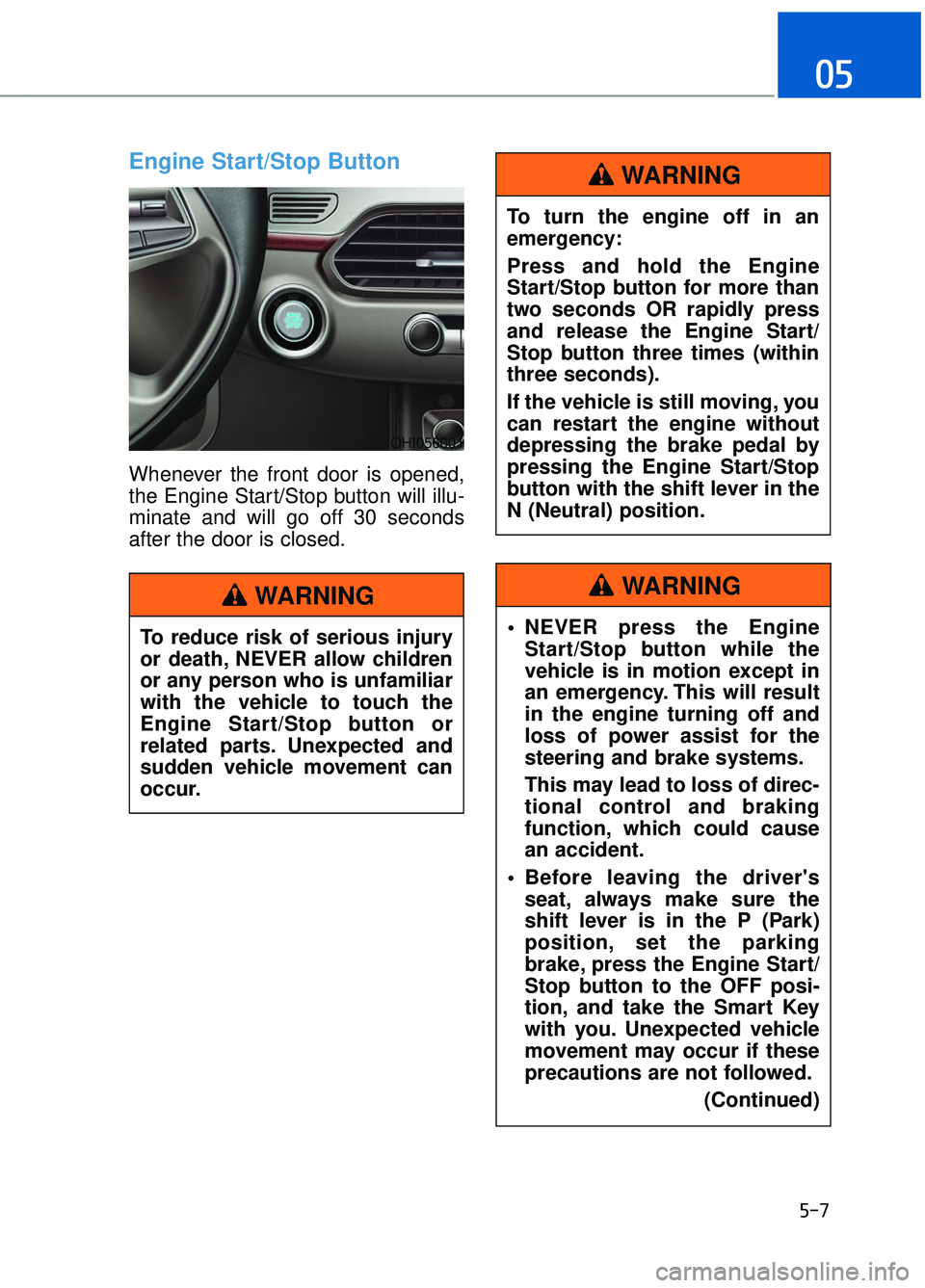
Engine Start/Stop Button
Whenever the front door is opened,
the Engine Start/Stop button will illu-
minate and will go off 30 seconds
after the door is closed.
5-7
05
To reduce risk of serious injury
or death, NEVER allow children
or any person who is unfamiliar
with the vehicle to touch the
Engine Start/Stop button or
related parts. Unexpected and
sudden vehicle movement can
occur.
WARNING
To turn the engine off in an
emergency:
Press and hold the Engine
Start/Stop button for more than
two seconds OR rapidly press
and release the Engine Start/
Stop button three times (within
three seconds).
If the vehicle is still moving, you
can restart the engine without
depressing the brake pedal by
pressing the Engine Start/Stop
button with the shift lever in the
N (Neutral) position.
WARNING
NEVER press the EngineStart/Stop button while the
vehicle is in motion except in
an emergency. This will result
in the engine turning off and
loss of power assist for the
steering and brake systems.
This may lead to loss of direc-
tional control and braking
function, which could cause
an accident.
Before leaving the driver's seat, always make sure the
shift lever is in the P (Park)
position, set the parking
brake, press the Engine Start/
Stop button to the OFF posi-
tion, and take the Smart Key
with you. Unexpected vehicle
movement may occur if these
precautions are not followed.
(Continued)
WARNING
OHI056001
Page 302 of 524
5-41
05
VSM OFF condition
To cancel VSM operation, press the
ESC OFF button. ESC OFF indicator
light ( ) will illuminate.
To turn on VSM, press the ESC OFF
button again. The ESC OFF indicator
light will go out.
Driving with wheel and tire sizes dif-
ferent than original-equipment may
cause the ESC system to malfunc-
tion. Before replacing tires, make
sure all four tires and wheels are the
same as the original size. Never
drive the vehicle with different sized
tires and wheels installed.
Hill-Start Assist Control (HAC)
The Hill-Start Assist Control (HAC)
helps prevent the vehicle from rolling
backwards when starting a vehicle
from a stop on a hill. The system
operates the brakes automatically for
approximately 2 seconds and releas-
es the brake after 2 seconds or when
the accelerator pedal is depressed.
The HAC does not operate whenthe shift lever is in P (Park) or N
(Neutral).
The HAC activates even though the ESC (Electronic Stability
Control) is off but does not acti-
vate when the ESC has malfunc-
tioned.
NOTICE
Always be ready to depress the
accelerator pedal when starting
off on a incline. The HAC acti-
vates only for approximately 2
seconds.
WARNINGIf ESC indicator light ( ) or
MDPS warning light ( ) stays
on or blinks, your vehicle may
have a malfunction with the
VSM system. When the warning
light illuminates, have your vehi-
cle checked by an authorized
Dealer of Genesis Brand
Products as soon as possible.
WARNING
Page 342 of 524

5-81
05
To Adjust the Sensitivity of
Smart Cruise Control
The sensitivity of vehicle speed
when following a vehicle in front to
maintain the set distance can be
adjusted. Go to the 'User Settings →
Driving Assist →Smart Cruise
Control Response → Slow/Normal/
Fast' on the LCD display. You may
select one of the three stages you
prefer.
Slow:
Vehicle speed following the vehicle
in front to maintain the set distance
is slower than normal speed.
Normal: Vehicle speed following the vehicle
in front to maintain the set distance
is normal
Fast: Vehicle speed following the vehicle
in front to maintain the set distance
is faster than normal speed.
(Continued)
Do not use the Smart Cruise
Control when it may not be
safe to keep the vehicle at a
constant speed:
- When driving in heavy trafficor when traffic conditions
make it difficult to drive at a
constant speed
- When driving on rainy, icy, or snow-covered roads
- When driving on hilly or windy roads
- When driving in windy areas
- When driving in parking lots
- When driving near crash bar- riers
- When driving on a sharp curve
- When driving with limited view (possibly due to bad
weather, such as fog, snow,
rain, or sandstorm)
OHI056091L
Page 378 of 524

If the Engine Stalls While
Driving
Reduce your speed gradually,keeping a straight line. Move cau-
tiously off the road to a safe place.
Turn on your hazard warning flash- er.
Try to start the engine again. If your vehicle will not start, contact an
authorized Dealer of Genesis
Brand Products or seek other qual-
ified assistance.
If the Engine Stalls at a
Crossroad or Crossing
If the engine stalls at a crossroad or
crossing, if safe to do so, move the
shift lever to the N (Neutral) position
and then push the vehicle to a safe
location.
If you Have a Flat Tire While
Driving
If a tire goes flat while you are driv-
ing:
Take your foot off the acceleratorpedal and let the vehicle slow
down while driving straight ahead.
Do not apply the brakes immedi-
ately or attempt to pull off the road
as this may cause loss of vehicle
control resulting in an accident.
When the vehicle has slowed to
such a speed that it is safe to do
so, brake carefully and pull off the
road. Drive off the road as far as
possible and park on firm, level
ground. If you are on a divided
highway, do not park in the median
area between the two traffic lanes.
When the vehicle is stopped, press the hazard warning flasher button,
move the shift lever into P(Park),
and apply the parking brake, and
place the Engine Start/Stop button
in the OFF position.
Have all passengers get out of the vehicle. Be sure they all get out on
the side of the vehicle that is away
from traffic.
When changing a flat tire, follow the instructions provided later in
this chapter.
I IN
N
C
C A
A S
SE
E
O
O F
F
A
A N
N
E
E M
M E
ER
R G
G E
EN
N C
CY
Y
W
W H
HI
IL
L E
E
D
D R
RI
IV
V I
IN
N G
G
6-3
06
Page 381 of 524
Information
An inappropriately disposedbattery can be harmful to the
environment and human
health. Dispose the battery
according to your local law(s)
or regulations.
To prevent damage to your vehi-
cle:
Only use a 12-volt power supply (battery or jumper system) to
jump start your vehicle.
Do not attempt to jump start your vehicle by push-starting.
Jump starting procedure
Information
Your vehicle has a battery in the trunk
compartment, but when you jump
start your vehicle, use the jumper ter-
minal in the engine compartment.
1. Position the vehicles close enough that the jumper cables will reach,
but do not allow the vehicles to
touch.
2. Avoid fans or any moving parts in the engine compartment at all
times, even when the vehicles are
turned off.
3. Turn off all electrical devices such as radios, lights, air conditioning,
etc. Put the vehicles in P (Park)
and set the parking brakes. Turn
both vehicles OFF.
4. Open the engine hood. 5. Open the small service cover with
a screwdriver.
6. Remove the engine room fuse box cover.
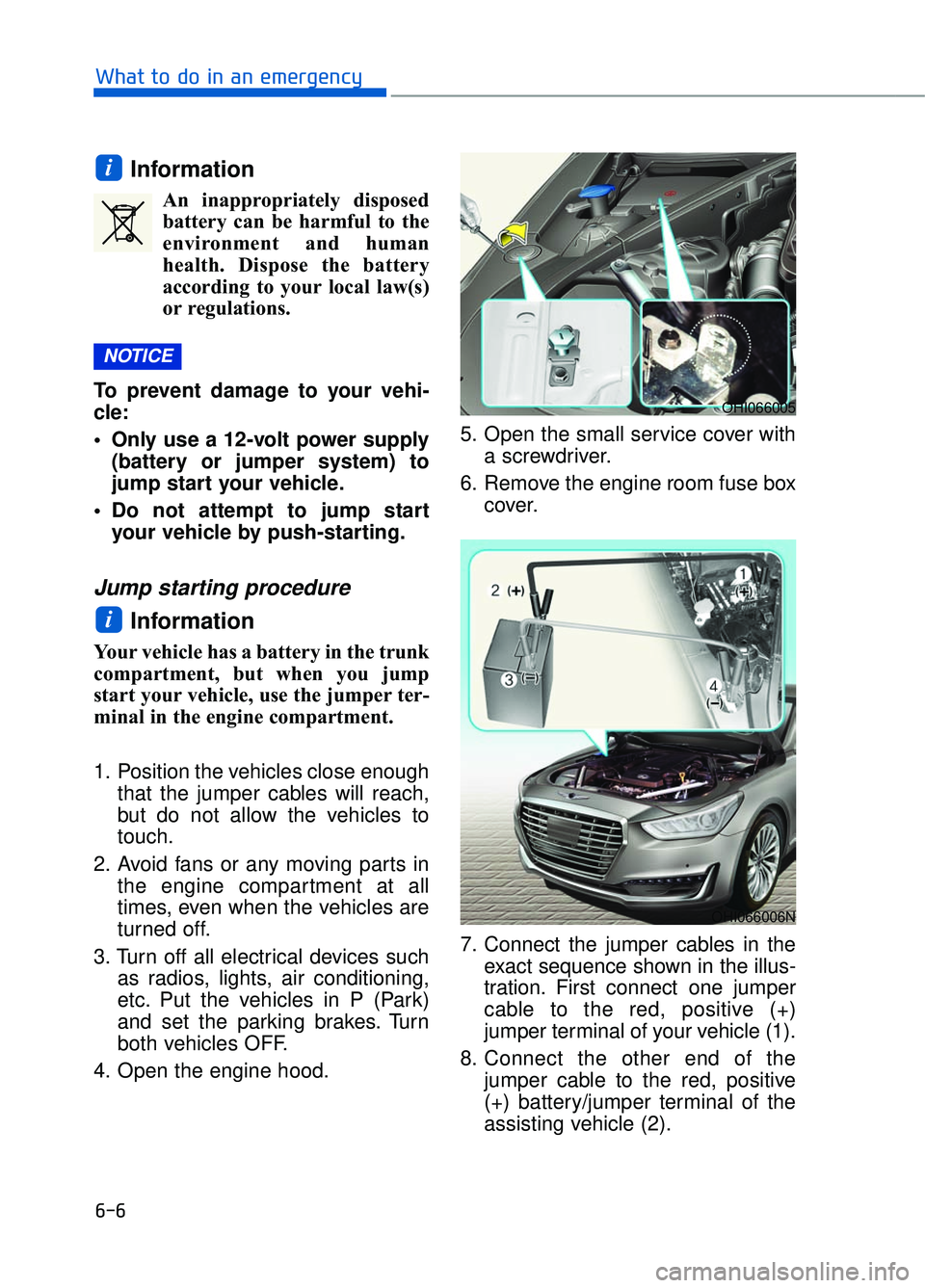
7. Connect the jumper cables in the exact sequence shown in the illus-
tration. First connect one jumper
cable to the red, positive (+)
jumper terminal of your vehicle (1).
8. Connect the other end of the jumper cable to the red, positive
(+) battery/jumper terminal of the
assisting vehicle (2).
i
NOTICE
i
6-6
What to do in an emergency
OHI066005
OHI066006N
Page 383 of 524
6-8
What to do in an emergency
If your temperature gauge indicates
overheating, you experience a loss
of power, or hear loud pinging or
knocking, the engine may be over-
heating. If this happens, you should:
1. Pull off the road and stop as soon as it is safe to do so.
2. Place the shift lever in P (Park) and set the parking brake. If the air
conditioning is ON, turn it OFF.
3. If engine coolant is running out under the vehicle or steam is com-
ing out from the hood, stop the
engine. Do not open the hood until
the coolant has stopped running
or the steaming has stopped. If
there is no visible loss of engine
coolant and no steam, leave the
engine running and check to be
sure the engine cooling fan is
operating. If the fan is not running,
turn the engine off. 4. Check for coolant leaking from the
radiator, hoses or under the vehi-
cle. (If the air conditioning had
been in use, it is normal for cold
water to be draining from it when
you stop.)
5. If engine coolant is leaking out, stop the engine immediately and
call the nearest authorized Dealer
of Genesis Brand Products for
assistance.
I IF
F
T
T H
H E
E
E
E N
N G
GI
IN
N E
E
O
O V
VE
ER
R H
H E
EA
A T
TS
S
While the engine is
running, keep hands,
clothing and tools
away from the moving
parts such as the
cooling fan and drive
belt to prevent seri-
ous injury.
WARNING
Page 467 of 524

7-65
07
Instrument panel fuse panel
Fuse name Fuse rating Circuit protected
MODULE5 10AStop Lamp Switch, Driver/Passenger Door Module
MODULE7 10A
Electro Chromic Mirror, A/V & Navigation Head Unit, AMP,
A/C Control Module, Front A/C Controller, Air Quality
Sensor, Rear Seat Warmer Control Module LH/RH Head
Lamp LH/RH Driver/Passenger CCS Module
Rear CCS Module LH/RH, Driver/Passenger IMS Control
Module, Rear IMS Control Module LH/RH, Rear Seat
Console Switch
IBU3 10AIBU Control Module
E-SHIFTER2 10AElectronic ATM Shift Lever
MEMORY1 10A
Security Indicator, A/C Control Module, Front A/C Controller,
Instrument Cluster, Driver/Passenger IMS Control Module,
Rear IMS Control Module LH/RH, Head-Up Display, Analog
Clock
Driver/Passenger Seat Control Switch, Power Trunk Module,
Rear Seat Control Switch LH/RHM Driver/Passenger Smart
Key, Outside Handle Rear Smart Key Outside Handle
LH/RH
RR LH2P/SEAT25ARear IMS Control Module LH
DRIVER
P/SEAT225ADriver IMS Control Module
P/WINDOW RH30APassenger Power Window Module
Rear Power Window Module RH
MODULE 610A
Crash Pad Switch, Blind Spot Detection Radar LH/RH ECS
Unit, Electric Parking Brake Module, Lane Keeping Assist
Module, Front Console Switch, Steering Tilt & Telescopic
Module
MODULE 10 10ACooling Fan Controller (BLDC), Rear Seat Console Switch,
Around View Unit, Parking Guide Unit
MODULE3 10AGATEWAY (B+ (MCU)), Data Link Connector, Hazard
Switch
SUNROOF 25ASunroof Motor
PASSENGER P/SEAT2 25APassenger IMS Control Module
Page 508 of 524

Bottle holder ........................................................................\
...............................3-147
Brake fluid ........................................................................\
....................................7-33
Brake system ........................................................................\
................................5-25Anti-lock brake system (ABS) ....................................................................5-35\
Auto hold........................................................................\
.............................5-31
Disc brakes wear indicator ........................................................................\
..5-26
Electronic parking brake (EPB) ..................................................................5-26
Electronic stability control (ESC) ...............................................................5-37
Good braking practices ........................................................................\
.......5-42
Hill-start assist control (HAC) ....................................................................5-41\
Power brakes ........................................................................\
.......................5-25
Vehicle stability management (VSM) .........................................................5-40
Bulb replacement Daytime running light ........................................................................\
.........7-77
Front turn signal lamp ........................................................................\
.........7-77
Headlamp ........................................................................\
............................7-77
High mounted stop lamp ........................................................................\
.....7-79
Interior light bulb ........................................................................\
................7-80
License plate light bulb ........................................................................\
.......7-79
Rear combination light bulb........................................................................\
7-79
Side marker ........................................................................\
.........................7-77
Side repeater lamp ........................................................................\
..............7-79
Bulb wattage........................................................................\
...................................8-3
Button start/stop, see engine start/stop button .......................................................5-7
California perchlorate notice ........................................................................\
........7-91
Camera (Rear view) ........................................................................\
...................3-115
Capacities (Lubricants) ........................................................................\
..................3-6
Care Exterior care ........................................................................\
........................7-81 Interior care ........................................................................\
.........................7-86
Tire care........................................................................\
...............................7-43
Cartridge type fuse ........................................................................\
.......................7-63
Cellular phone holder ........................................................................\
.................3-145
Center console storage ........................................................................\
...............3-143
Central door lock switch ........................................................................\
..............3-11
Certification label ........................................................................\
...........................8-8
Chains Tire chains ........................................................................\
.........................5-106
I-4
Index
C
Page 515 of 524
........................................................................\
.3-86Assist mode ........................................................................\
...")
LCD display (instrument cluster)........................................................................\
.3-86Assist mode ........................................................................\
.........................3-89
LCD modes ........................................................................\
.........................3-87
Trip computer mode ........................................................................\
............3-88
Turn By Turn (TBT) mode........................................................................\
..3-88
User settings mode ........................................................................\
..............3-90
LCD display control ........................................................................\
.....................3-86
LCD display messages ........................................................................\
.................3-75
LCD modes ........................................................................\
..................................3-87
Light bulbs........................................................................\
....................................7-77
Lighting ........................................................................\
......................................3-101 AFLS (Adaptive Front Lighting System) .................................................3-107
Auto light position ........................................................................\
............3-101
Battery saver function ........................................................................\
.......3-106
Daytime running light (DRL) ...................................................................3-107\
Dynamic bending light ........................................................................\
......3-107
Headlamp delay function ........................................................................\
..3-106
Headlamp position ........................................................................\
............3-102
High beam operation ........................................................................\
.........3-102
Parking lamp position ........................................................................\
.......3-102
Smart high beam ........................................................................\
...............3-103
Turn signals ........................................................................\
.......................3-105
Lubricants and capacities ........................................................................\
...............8-6
Luggage net (holder) ........................................................................\
..................3-155
Luggage volume ........................................................................\
.............................8-5
Main fuse ........................................................................\
......................................7-62
Maintenance Explanation of scheduled maintenance items .............................................7-25
Maintenance services ........................................................................\
............7-5
Maintenance under severe usage conditions ...............................................7-23
Normal maintenance service ........................................................................\
.7-9
Owner maintenance........................................................................\
...............7-6
Scheduled maintenance services ...................................................................7-8
Tire maintenance ........................................................................\
.................7-49
Maintenance services ........................................................................\
.....................7-5
I-11
I
M