air condition GENESIS G90 2017 Owner's Guide
[x] Cancel search | Manufacturer: GENESIS, Model Year: 2017, Model line: G90, Model: GENESIS G90 2017Pages: 524, PDF Size: 19.3 MB
Page 236 of 524
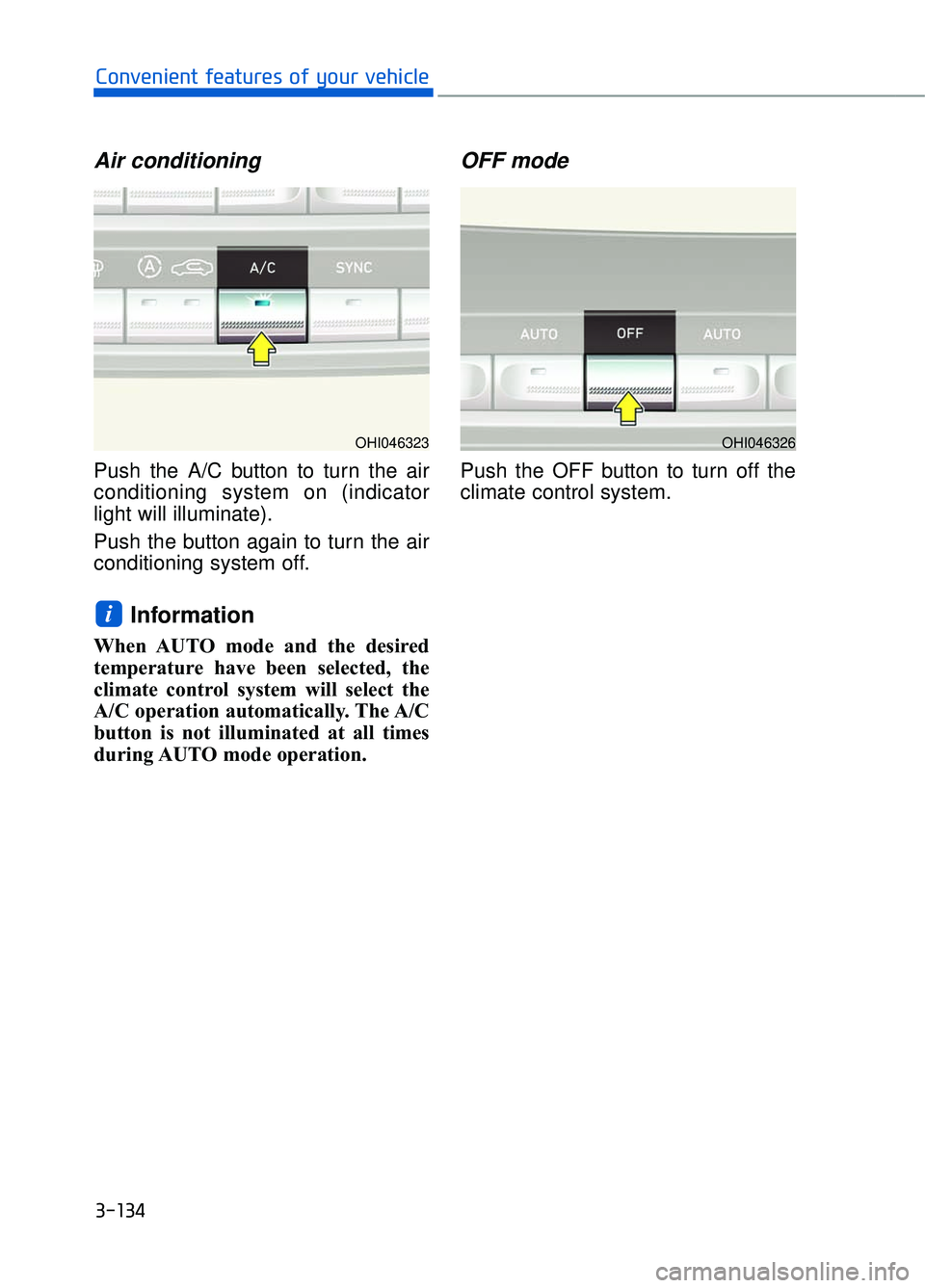
Air conditioning
Push the A/C button to turn the air
conditioning system on (indicator
light will illuminate).
Push the button again to turn the air
conditioning system off.
Information
When AUTO mode and the desired
temperature have been selected, the
climate control system will select the
A/C operation automatically. The A/C
button is not illuminated at all times
during AUTO mode operation.
OFF mode
Push the OFF button to turn off the
climate control system.
i
3-134
Convenient features of your vehicle
OHI046326OHI046323
Page 237 of 524
System Operation
Ventilation
1. Select the Face Level mode.
2. Set the air intake control to theoutside (fresh) air position.
3. Set the temperature control to the desired position.
4. Set the fan speed control to the desired speed.
Heating
1. Select the Floor Level mode.
2. Set the air intake control to theoutside (fresh) air position.
3. Set the temperature control to the desired position.
4. Set the fan speed control to the desired speed.
5. If dehumidified heating is desired, turn the air conditioning system on.
If the windshield fogs up, select the
Floor & Defrost mode or press
the Front Defrost mode.
Operation Tips
To keep dust or unpleasant fumes from entering the car through the
ventilation system, temporarily set
the air intake control to the recircu-
lated air position. Return the con-
trol to the fresh air position when
the irritation has passed. This will
help keep the driver alert and com-
fortable.
To prevent the inside of the wind- shield from fogging, set the air
intake control to the fresh air posi-
tion and fan speed to the desired
position, turn on the air conditioning
system, and adjust the temperature
control to desired temperature.
Air conditioning
All Genesis Brand Air Conditioning
Systems are filled with environmen-
tally friendly R-134a refrigerant.
1. Start the engine.
2. Push the air conditioning button.
3. Set the mode to the Face Level mode.
4. Set the air intake control to the recirculated air position. However,
prolonged operation of the recircu-
lated air position will excessively
dry the air. In this case, change the
air position.
5. Adjust the fan speed control and temperature control to maintain
maximum comfort.
When maximum cooling is desired,
set the temperature control to the
extreme left position then set the fan
speed control to the highest speed.
When using the air conditioning
system, monitor the engine tem-
perature gauge closely while driv-
ing up hills or in heavy traffic
when outside temperatures are
high. Air conditioning system
operation can cause engine over-
heating. Continue to use the blow-
er fan, but turn the air condition-
ing system off if the engine tem-
perature gauge indicates engine
overheating.
NOTICE
3-135
03
Page 238 of 524
Air conditioning system operation
tips
If the vehicle has been parked indirect sunlight during hot weather,
open the windows for a short time
to let the hot air inside the vehicle
escape.
After sufficient cooling has been achieved, switch back from the
recirculated air to the fresh outside
air position.
To help reduce moisture inside of the windows on rainy or humid
days, decrease the humidity inside
the vehicle by operating the air
conditioning system with the win-
dows and sunroof closed.
Use the air conditioning system every month only for a few minutes
to ensure maximum system per-
formance.
If you operate air conditioner excessively, the difference between
the temperature of the outside air
and that of the windshield could
cause the outer surface of the
windshield to fog up, causing loss
of visibility. In this case, set the
mode selection knob or button to
the position and fan speed
control to the lower speed.
System Maintenance
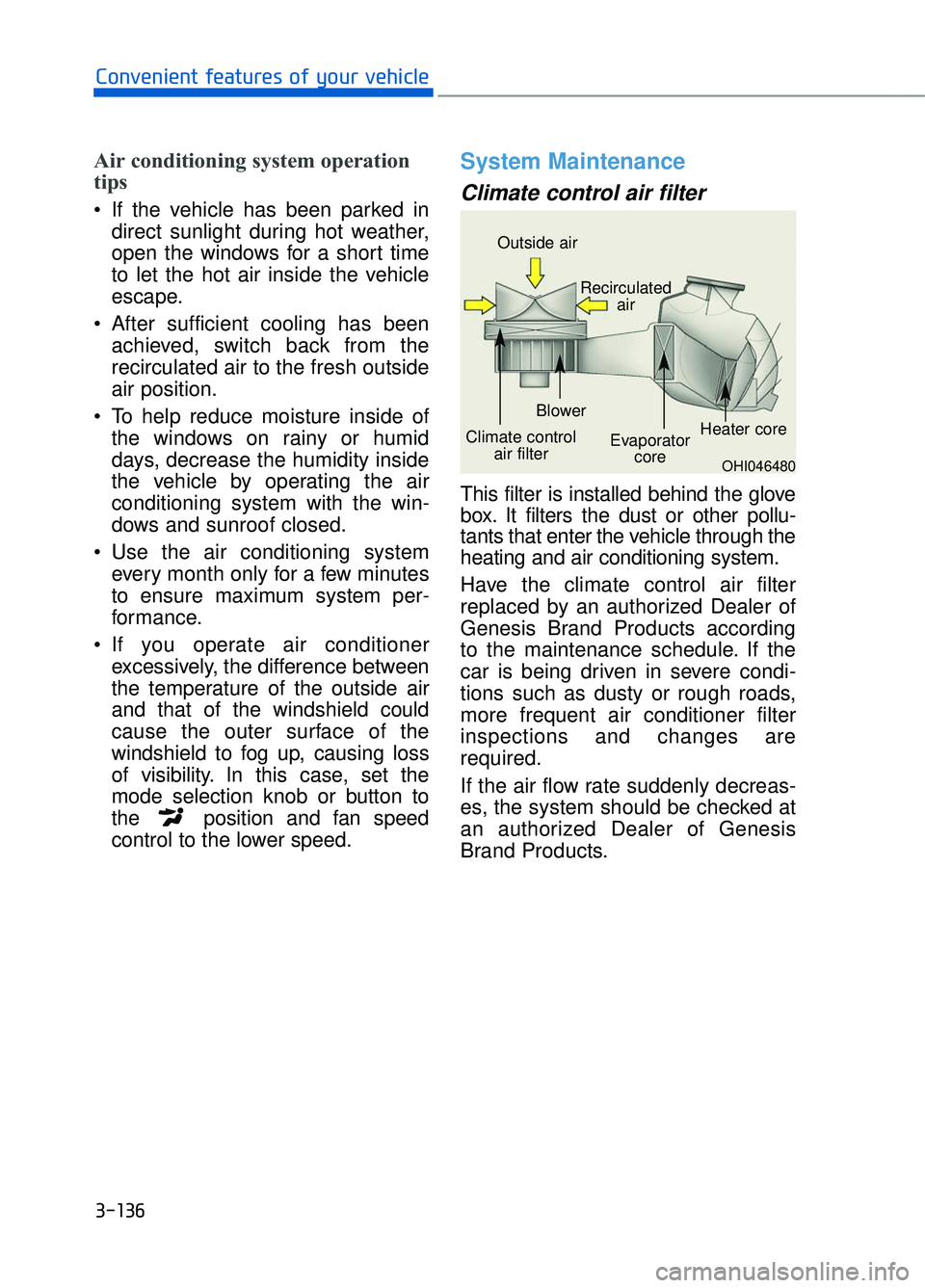
Climate control air filter
This filter is installed behind the glove
box. It filters the dust or other pollu-
tants that enter the vehicle through the
heating and air conditioning system.
Have the climate control air filter
replaced by an authorized Dealer of
Genesis Brand Products according
to the maintenance schedule. If the
car is being driven in severe condi-
tions such as dusty or rough roads,
more frequent air conditioner filter
inspections and changes are
required.
If the air flow rate suddenly decreas-
es, the system should be checked at
an authorized Dealer of Genesis
Brand Products.
3-136
Convenient features of your vehicle
OHI046480
Outside air
Recirculatedair
Climate control air filter Blower
Evaporatorcore Heater core
Page 239 of 524
Checking the amount of air conditioner refrigerant andcompressor lubricant
When the amount of refrigerant is
low, the performance of the air condi-
tioning is reduced. Overfilling also
has a negative influence on the air
conditioning system.
Therefore, if abnormal operation is
found, have the system inspected by
an authorized Dealer of Genesis
Brand Products.
It is important that the correct
type and amount of oil and refrig-
erant is used. Otherwise, damage
to the compressor and abnormal
system operation may occur.
The air conditioning system should
be serviced by an authorized Dealer
of Genesis Brand Products.
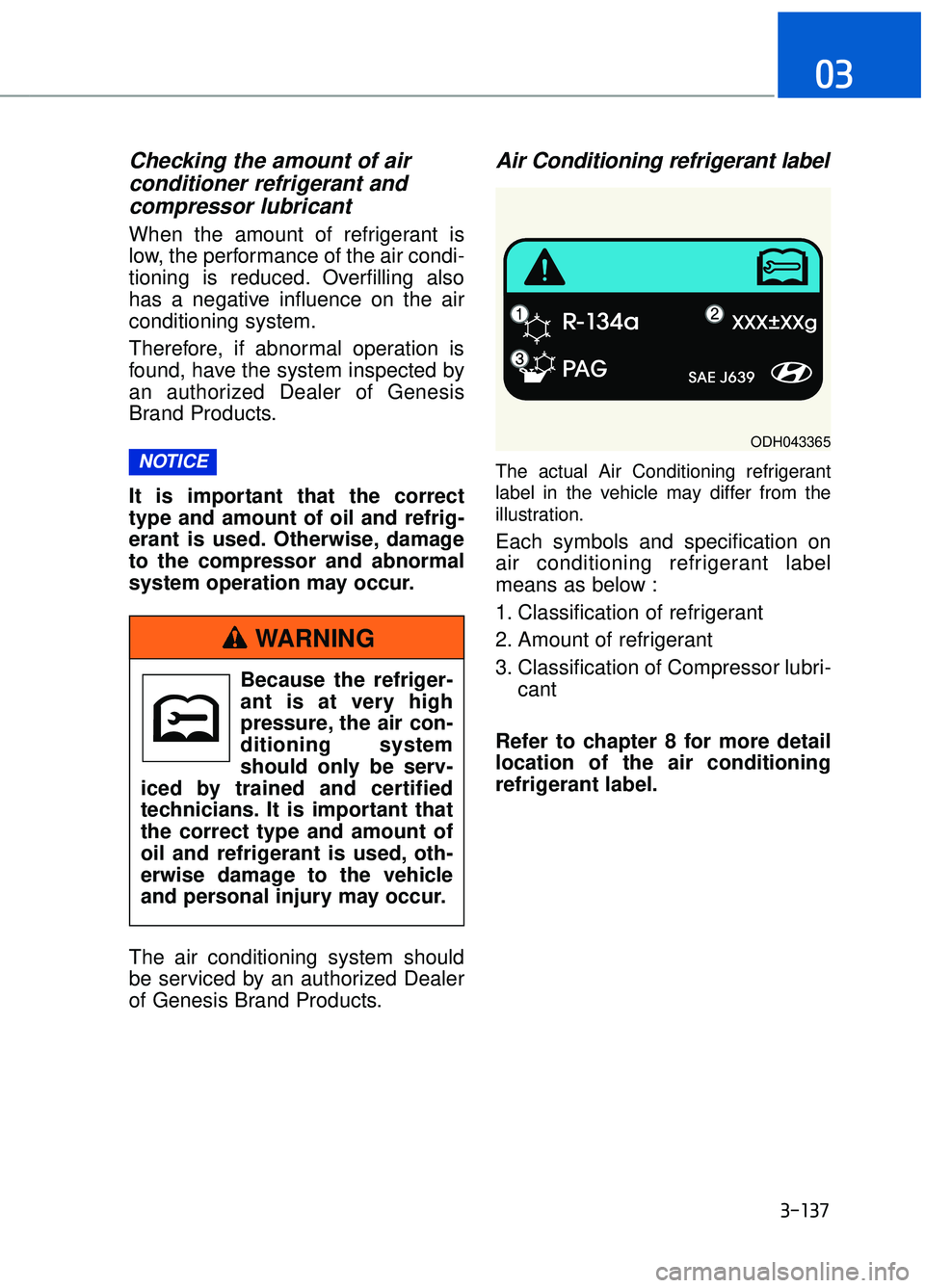
Air Conditioning refrigerant label
The actual Air Conditioning refrigerant
label in the vehicle may differ from the
illustration.
Each symbols and specification on
air conditioning refrigerant label
means as below :
1. Classification of refrigerant
2. Amount of refrigerant
3. Classification of Compressor lubri-
cant
Refer to chapter 8 for more detail
location of the air conditioning
refrigerant label.
NOTICE
3-137
03
ODH043365
Because the refriger-
ant is at very high
pressure, the air con-
ditioning system
should only be serv-
iced by trained and certified
technicians. It is important that
the correct type and amount of
oil and refrigerant is used, oth-
erwise damage to the vehicle
and personal injury may occur.
WARNING
Page 240 of 524
W
WI
IN
N D
DS
SH
H I
IE
E L
LD
D
D
D E
EF
FR
R O
O S
ST
T I
IN
N G
G
A
A N
N D
D
D
D E
EF
FO
O G
GG
GI
IN
N G
G
3-138
Convenient features of your vehicle
For maximum defrosting, set the temperature control to the extreme
right/hot position and the fan speed
control to the highest speed.
If warm air to the floor is desired while defrosting or defogging, set the
mode to the floor-defrost position.
Before driving, clear all snow and ice from the windshield, rear win-
dow, side view mirrors, and all side
windows.
Clear all snow and ice from the hood and air inlet in the cowl grill to
improve heater and defroster effi-
ciency and to reduce the probability
of fogging up the inside of the wind-
shield.
If the engine temperature is still
cold after starting, then a brief
engine warm up period may be
required for the vented air flow to
become warm or hot.
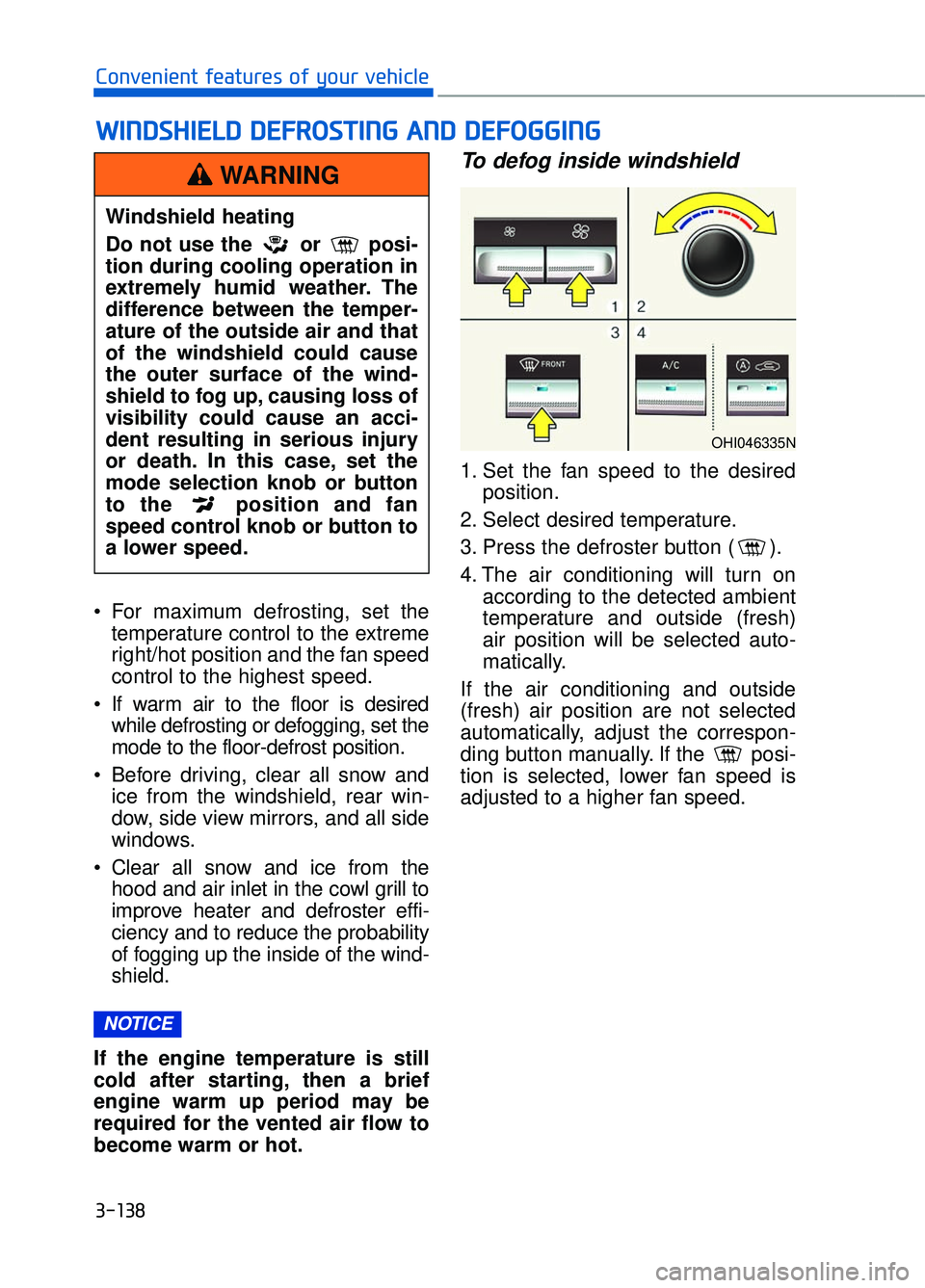
To defog inside windshield
1. Set the fan speed to the desired position.
2. Select desired temperature.
3. Press the defroster button ( ).
4. The air conditioning will turn on according to the detected ambient
temperature and outside (fresh)
air position will be selected auto-
matically.
If the air conditioning and outside
(fresh) air position are not selected
automatically, adjust the correspon-
ding button manually. If the posi-
tion is selected, lower fan speed is
adjusted to a higher fan speed.
NOTICE
Windshield heating
Do not use the or posi-
tion during cooling operation in
extremely humid weather. The
difference between the temper-
ature of the outside air and that
of the windshield could cause
the outer surface of the wind-
shield to fog up, causing loss of
visibility could cause an acci-
dent resulting in serious injury
or death. In this case, set the
mode selection knob or button
to the position and fan
speed control knob or button to
a lower speed.
WARNING
OHI046335N
Page 241 of 524

To defrost outside windshield
1. Set the fan speed to the highestposition.
2. Set the temperature to the extreme hot (HI) position.
3. Press the defroster button ( ).
4. The air conditioning will turn on according to the detected ambient
temperature and outside (fresh)
air position will be selected auto-
matically.
Defogging logic
To reduce the possibility of fogging
up the inside of the windshield, the
air intake is controlled automatically
according to certain conditions such
as or position. To cancel or
return the defogging logic, perform
the following steps:
1. Turn the Engine Start/Stop Buttonto the ON position.
2. Select the defrost position press- ing defrost button ( ).
3. While holding the air conditioning button (A/C) pressed, press the air
intake control button at least 5
times within 3 seconds.
The indicator on the air intake control
button blinks 3 times with 0.5 second
of interval. It indicates that the defog-
ging logic is canceled or returned to
the programmed status.
If the battery has been discharged or
disconnected, the system resets to
the preprogrammed defogging logic.
3-139
03
OHI046328NOHI046329N
Page 242 of 524
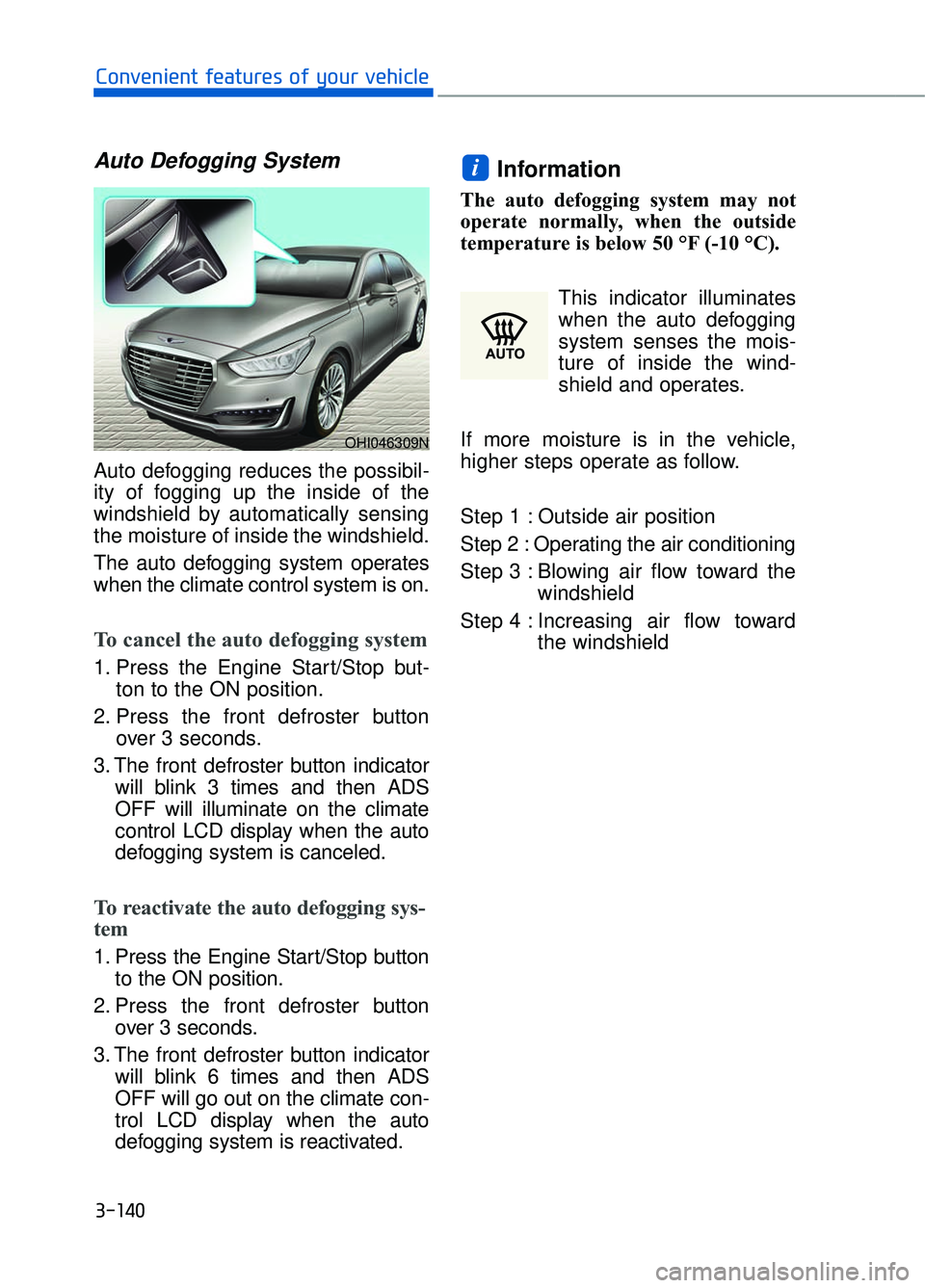
Auto Defogging System
Auto defogging reduces the possibil-
ity of fogging up the inside of the
windshield by automatically sensing
the moisture of inside the windshield.
The auto defogging system operates
when the climate control system is on.
To cancel the auto defogging system
1. Press the Engine Start/Stop but-ton to the ON position.
2. Press the front defroster button over 3 seconds.
3. The front defroster button indicator will blink 3 times and then ADS
OFF will illuminate on the climate
control LCD display when the auto
defogging system is canceled.
To reactivate the auto defogging sys-
tem
1. Press the Engine Start/Stop buttonto the ON position.
2. Press the front defroster button over 3 seconds.
3. The front defroster button indicator will blink 6 times and then ADS
OFF will go out on the climate con-
trol LCD display when the auto
defogging system is reactivated.
Information
The auto defogging system may not
operate normally, when the outside
temperature is below 50 °F (-10 °C).
This indicator illuminates
when the auto defogging
system senses the mois-
ture of inside the wind-
shield and operates.
If more moisture is in the vehicle,
higher steps operate as follow.
Step 1 : Outside air position
Step 2 : Operating the air conditioning
Step 3 : Blowing air flow toward the windshield
Step 4 : Increasing air flow toward the windshield
i
3-140
Convenient features of your vehicle
OHI046309N
Page 243 of 524
Clean Air
When the Engine Start/Stop button
is in the ON position, the clean air
function turns on automatically.
Also, the clean air function turns off
automatically, when the Engine
Start/Stop button is in the OFF posi-
tion.
Automatic Ventilation
The system automatically selects the
outside (fresh) air position when the
climate control system operates over a
certain period of time (approximately
30 minutes) in low temperature with
the recirculated air position selected.
To cancel or reactivate the Automatic Ventilation
When the air conditioning system is
on, select Face Level mode and
press the recirculated air position
button for more than 3 seconds.
When the automatic ventilation is
canceled, the indicator blinks 3
times. When the automatic ventila-
tion is activated, the indicator blinks
6 times.
Sunroof Inside Air Recirculation
The outside (fresh) air position is auto-
matically selected, when the sunroof
is opened while operating the heat-
ing/air conditioning system.
When you select the recirculated air
position, the system maintains the
recirculated air position for 3 minutes
and then automatically converts to the
outside (fresh) air position.
When the sunroof is closed, the air
intake position will return to the origi-
nal position that was selected.
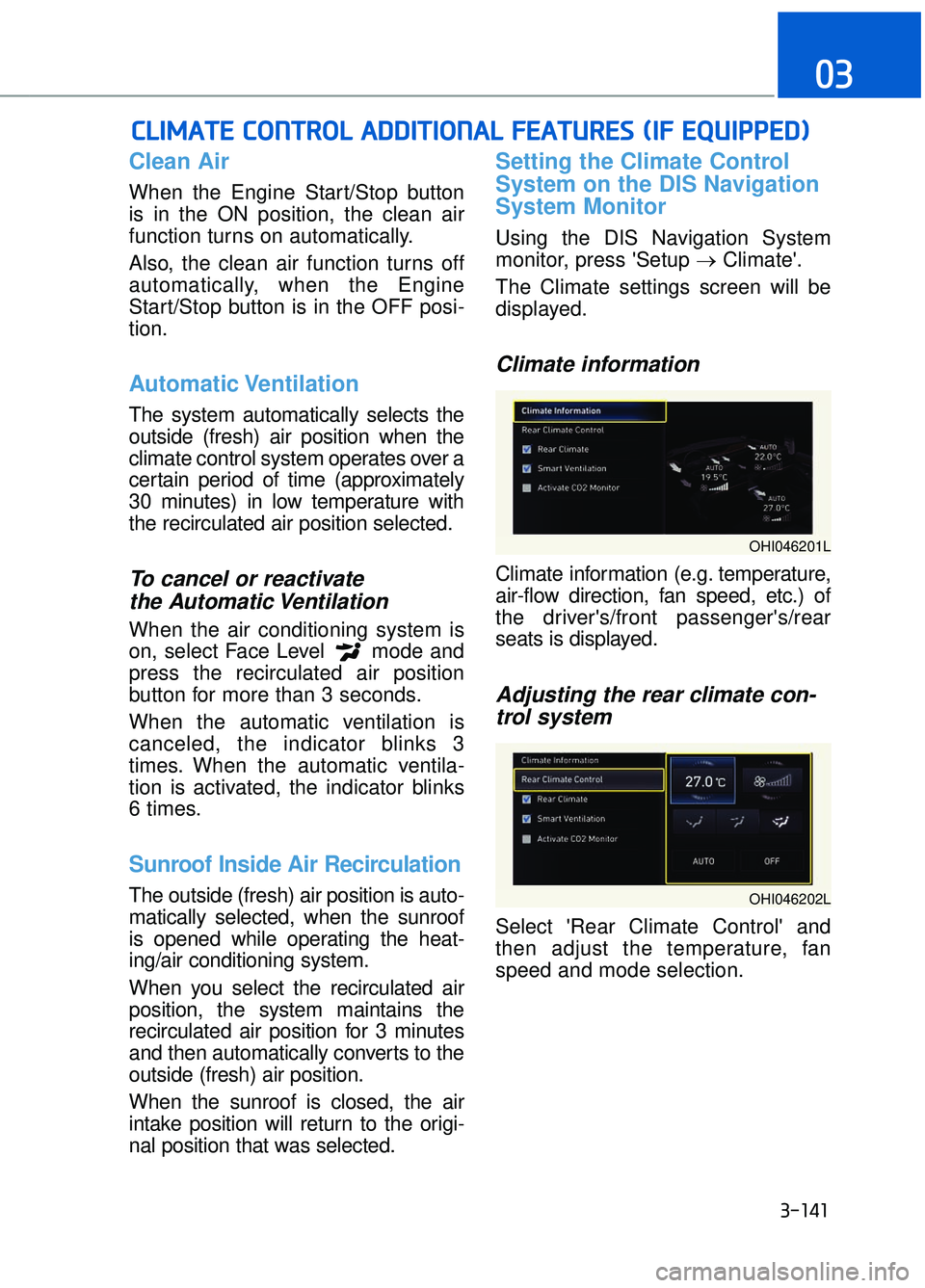
Setting the Climate Control
System on the DIS Navigation
System Monitor
Using the DIS Navigation System
monitor, press 'Setup →Climate'.
The Climate settings screen will be
displayed.
Climate information
Climate information (e.g. temperature,
air-flow direction, fan speed, etc.) of
the driver's/front passenger's/rear
seats is displayed.
Adjusting the rear climate con- trol system
Select 'Rear Climate Control' and
then adjust the temperature, fan
speed and mode selection.
C
C L
LI
IM
M A
AT
TE
E
C
C O
O N
NT
TR
R O
O L
L
A
A D
DD
DI
IT
T I
IO
O N
NA
AL
L
F
F E
E A
A T
TU
U R
RE
ES
S
(
( I
IF
F
E
E Q
Q U
UI
IP
P P
PE
ED
D )
)
3-141
03
OHI046201L
OHI046202L
Page 244 of 524

3-142
Convenient features of your vehicle
Rear climate control systemON/OFF
Check the box next to 'Rear Climate'
to turn on the rear climate control
system and uncheck the box to turn
off the system.
Smart ventilation
The smart ventilation system main-
tains pleasant/fresh air condition
inside the passenger compartment
by automatically detecting/controlling
the temperature, humidity, etc., when
you drive the vehicle with the climate
control system in the OFF position.
When the smart ventilation system
starts to operate, the message,
"SMART VENTILATION ON" appears
for 5 seconds.
Information
• The smart ventilation system stops
operating, when the OFF button of
the climate control system is selected.
• The smart ventilation system stops operating, when any button of the
climate control system is selected for
operation.
• The smart ventilation system may not operate, when the vehicle is
driven at low speed.
Pay extreme caution not to damage
the CO2 sensor, which is located
inside the glove box undercover.
Activate CO2 monitor (if equipped)
When driving, the climate control
system controls CO2 concentration
and helps maintain pleasant air in
the vehicle.
Check the box next to 'Activate CO2
monitor' to turn on the function and
uncheck the box to turn off the func-
tion.
For more information on the fea-
tures described, refer to the sepa-
rately supplied DIS Navigation
System manual.
NOTICE
i
OHI046203L
OHI046207N
OHI046205L
Page 251 of 524
3-149
03
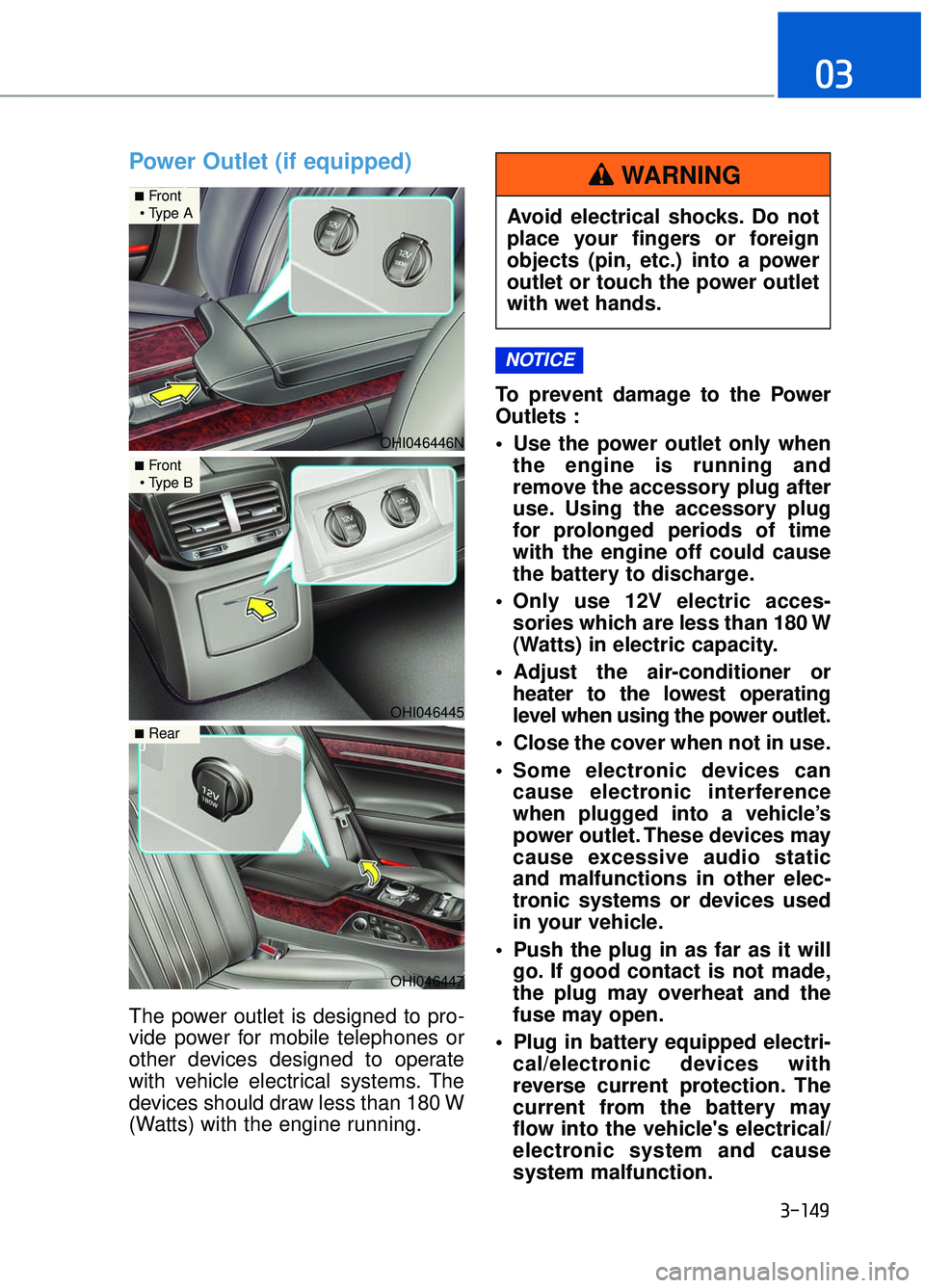
Power Outlet (if equipped)
The power outlet is designed to pro-
vide power for mobile telephones or
other devices designed to operate
with vehicle electrical systems. The
devices should draw less than 180 W
(Watts) with the engine running.To prevent damage to the Power
Outlets :
Use the power outlet only when
the engine is running and
remove the accessory plug after
use. Using the accessory plug
for prolonged periods of time
with the engine off could cause
the battery to discharge.
Only use 12V electric acces- sories which are less than 180 W
(Watts) in electric capacity.
Adjust the air-conditioner or heater to the lowest operating
level when using the power outlet.
Close the cover when not in use.
Some electronic devices can cause electronic interference
when plugged into a vehicle’s
power outlet. These devices may
cause excessive audio static
and malfunctions in other elec-
tronic systems or devices used
in your vehicle.
Push the plug in as far as it will go. If good contact is not made,
the plug may overheat and the
fuse may open.
Plug in battery equipped electri- cal/electronic devices with
reverse current protection. The
current from the battery may
flow into the vehicle's electrical/
electronic system and cause
system malfunction.
NOTICE
OHI046446N
■Front
OHI046445
■Front
OHI046447
■Rear
Avoid electrical shocks. Do not
place your fingers or foreign
objects (pin, etc.) into a power
outlet or touch the power outlet
with wet hands.
WARNING