brake light GENESIS G90 2017 Owner's Guide
[x] Cancel search | Manufacturer: GENESIS, Model Year: 2017, Model line: G90, Model: GENESIS G90 2017Pages: 524, PDF Size: 19.3 MB
Page 300 of 524
5-39
05
Indicator lights
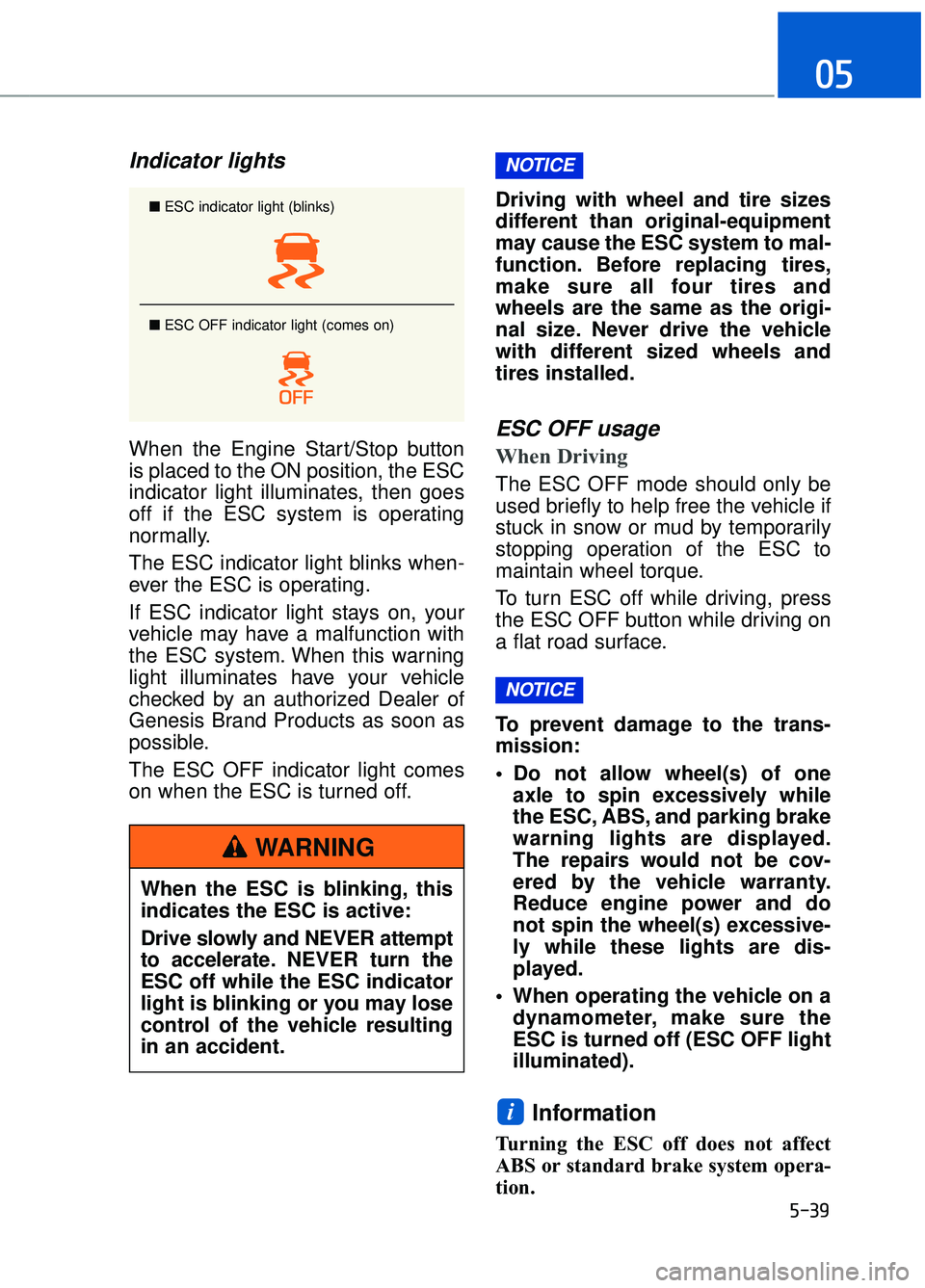
When the Engine Start/Stop button
is placed to the ON position, the ESC
indicator light illuminates, then goes
off if the ESC system is operating
normally.
The ESC indicator light blinks when-
ever the ESC is operating.
If ESC indicator light stays on, your
vehicle may have a malfunction with
the ESC system. When this warning
light illuminates have your vehicle
checked by an authorized Dealer of
Genesis Brand Products as soon as
possible.
The ESC OFF indicator light comes
on when the ESC is turned off.Driving with wheel and tire sizes
different than original-equipment
may cause the ESC system to mal-
function. Before replacing tires,
make sure all four tires and
wheels are the same as the origi-
nal size. Never drive the vehicle
with different sized wheels and
tires installed.ESC OFF usage
When Driving
The ESC OFF mode should only be
used briefly to help free the vehicle if
stuck in snow or mud by temporarily
stopping operation of the ESC to
maintain wheel torque.
To turn ESC off while driving, press
the ESC OFF button while driving on
a flat road surface.
To prevent damage to the trans-
mission:
Do not allow wheel(s) of one
axle to spin excessively while
the ESC, ABS, and parking brake
warning lights are displayed.
The repairs would not be cov-
ered by the vehicle warranty.
Reduce engine power and do
not spin the wheel(s) excessive-
ly while these lights are dis-
played.
When operating the vehicle on a dynamometer, make sure the
ESC is turned off (ESC OFF light
illuminated).
Information
Turning the ESC off does not affect
ABS or standard brake system opera-
tion.
i
NOTICE
NOTICE
■ ESC indicator light (blinks)
■ ESC OFF indicator light (comes on)
When the ESC is blinking, this
indicates the ESC is active:
Drive slowly and NEVER attempt
to accelerate. NEVER turn the
ESC off while the ESC indicator
light is blinking or you may lose
control of the vehicle resulting
in an accident.
WARNING
Page 301 of 524
5-40
Driving your vehicle
Vehicle Stability Management
(VSM)
The Vehicle Stability Management
(VSM) is a function of the Electronic
Stability Control (ESC) system. It
helps ensure the vehicle stays stable
when accelerating or braking sud-
denly on wet, slippery and rough
roads where traction over the four
tires can suddenly become uneven.
VSM operation
VSM ON condition
The VSM operates when:
The Electronic Stability Control(ESC) is on.
Vehicle speed is approximately above 9 mph (15 km/h) on curve
roads.
Vehicle speed is approximately above 12 mph (20 km/h) when the
vehicle is braking on rough roads.
When operating
When you apply your brakes under
conditions which may activate the
ESC, you may hear sounds from the
brakes, or feel a corresponding sen-
sation in the brake pedal. This is nor-
mal and it means your VSM is active.
The VSM does not operate when:
Driving on a banked road suchas gradient or incline.
Driving rearward.
ESC OFF indicator light is on.
MDPS (Motor-Driven Power Steering) warning light ( ) is
on or blinks.
NOTICE
Take the following precautions
when using the Vehicle Stability
Management (VSM):
ALWAYS check the speed andthe distance to the vehicle
ahead. The VSM is not a sub-
stitute for safe driving prac-
tices.
Never drive too fast for the road conditions. The VSM sys-
tem will not prevent acci-
dents. Excessive speed in bad
weather, slippery and uneven
roads can result in severe
accidents.
WARNING
Page 302 of 524
5-41
05
VSM OFF condition
To cancel VSM operation, press the
ESC OFF button. ESC OFF indicator
light ( ) will illuminate.
To turn on VSM, press the ESC OFF
button again. The ESC OFF indicator
light will go out.
Driving with wheel and tire sizes dif-
ferent than original-equipment may
cause the ESC system to malfunc-
tion. Before replacing tires, make
sure all four tires and wheels are the
same as the original size. Never
drive the vehicle with different sized
tires and wheels installed.
Hill-Start Assist Control (HAC)
The Hill-Start Assist Control (HAC)
helps prevent the vehicle from rolling
backwards when starting a vehicle
from a stop on a hill. The system
operates the brakes automatically for
approximately 2 seconds and releas-
es the brake after 2 seconds or when
the accelerator pedal is depressed.
The HAC does not operate whenthe shift lever is in P (Park) or N
(Neutral).
The HAC activates even though the ESC (Electronic Stability
Control) is off but does not acti-
vate when the ESC has malfunc-
tioned.
NOTICE
Always be ready to depress the
accelerator pedal when starting
off on a incline. The HAC acti-
vates only for approximately 2
seconds.
WARNINGIf ESC indicator light ( ) or
MDPS warning light ( ) stays
on or blinks, your vehicle may
have a malfunction with the
VSM system. When the warning
light illuminates, have your vehi-
cle checked by an authorized
Dealer of Genesis Brand
Products as soon as possible.
WARNING
Page 303 of 524
5-42
Driving your vehicle
Good Braking Practices
Wet brakes can be dangerous! The
brakes may get wet if the vehicle is
driven through standing water or if it
is washed. Your vehicle will not stop
as quickly if the brakes are wet. Wet
brakes may cause the vehicle to pull
to one side.
To dry the brakes, apply the brakes
lightly until the braking action returns
to normal, taking care to keep the
vehicle under control at all times. If
the braking action does not return to
normal, stop as soon as it is safe to
do so and call an authorized Dealer
of Genesis Brand Products for assis-
tance.
DO NOT drive with your foot resting
on the brake pedal. Even light, but
constant pedal pressure can result in
the brakes overheating, brake wear,
and possibly even brake failure.If a tire goes flat while you are driv-
ing, apply the brakes gently and
keep the vehicle pointed straight
ahead while you slow down. When
you are moving slowly enough for it
to be safe to do so, pull off the road
and stop in a safe location.
Keep your foot firmly on the brake
pedal when the vehicle is stopped to
prevent the vehicle from rolling for-
ward.
Whenever leaving the vehicle or
parking, always come to a com-
plete stop and continue to
depress the brake pedal. Move
the shift lever into the P (Park)
position, then apply the parking
brake, and place the Engine
Start/Stop button in the OFF
position.
Vehicles with the parking brake
not fully engaged are at risk for
moving inadvertently and caus-
ing injury to yourself or others.
WARNING
Page 320 of 524

5-59
05
When the temperature of the rearbumper is high.
When the sensors are blocked by other vehicles, walls or parking-lot
pillars.
When the detected vehicle also moves back, as your vehicle drives
back.
If there are small objects in the detecting area such as a shopping
cart or a baby stroller.
If there is a low height vehicle such as a sports car.
When other vehicles are close to your vehicle.
The lanes ahead are not visible due to rain, snow, water on the
road, damaged or stained road
surface, or other factors.
The brightness outside changes suddenly such as when entering or
exiting a tunnel.
The brightness outside is too low such as when the headlamps are
not on at night or the vehicle is
going through a tunnel.
It is difficult to distinguish the lane marking from the road surface or
the lane marking is faded or not
clearly marked.
Driving on a steep grade, over a hill, or when driving on a curved
road.
When light coming from a street light or an oncoming vehicle is
reflected on a wet road surface
such as a puddle in the road.
The field of view in front is obstructed by sun glare.
The lanes are incomplete or the area is in a construction zone.
There are more than two lane lines on the road in front of you. The lane markings are not clearly
visible from the road.
The lane width is too wide or too narrow.
The windshield glass is fogged up; a clear view of the road is obstruct-
ed.
There are markings on the road surface that look like a lane line
that is inadvertently being detected
by the camera.
There is a boundary structure in the roadway such as a concrete
barrier that is inadvertently being
detected by the camera.
There is not enough distance between you and the vehicle in
front to be able to detect the lane
line or the vehicle ahead is driving
on the lane line.
The road pavement (or the periph- eral ground) abnormally contains
metallic components (i.e. possibly
due to subway construction).
The brake pedal is depressed.
ESC (Electronic Stability Control) is activated.
The tire pressure is low or a tire is damaged.
The brake is reworked.
The vehicle is driven near a guardrail or near the boundary line
of a road.
The windshield or the camera lens is blocked with dirt or debris.
The vehicle drives on a small- radius curve.
The vehicle drives in the opposite direction from the designated lane
direction.
The lane sensing operation is inter- rupted by another vehicle in front.
Page 338 of 524

5-77
05
Information
• Even though the steering is assistedby the system, the driver can still
steer to control the steering wheel.
• The steering wheel may feel heavier when the steering wheel is assisted
by the system than when it is not.
The LKAS system will not be in the
ENABLED state and the steering
wheel will not be assisted when:
Vehicle speed is below 40 mph (64 km/h) and over 110 mph (177
km/h).
Only one lane line is detected.
The turn signal is turned on before changing a lane. If you change
lanes without the turn signal on, the
steering wheel might be controlled.
The hazard warning flasher is on.
The width of the lane is below 10 feet (3.1 m) and over 15 feet
(4.5 m).
ESC (Electronic Stability Control) or VSM (Vehicle Stability Management)
is activated.
The vehicle is driven on a sharp curve.
The vehicle brakes suddenly.
The vehicle makes sharp lane changes.
There are more than two lane lines on the road. (e.g. construction area)
The vehicle is driven on a steep incline.
Information
When the system is turned on or right
after changing a lane, drive in the
middle of the lane. If not, the system
will not provide steering assist func-
tion.
Warning light and message
Check LKAS
If there is a problem with the system
a message will appear for a few sec-
onds. If the problem continues the
LKAS failure indicator will illuminate.
LKAS failure indicator
The LKAS failure indica-
tor (yellow) will illuminate
if the LKAS is not working
properly. Have your vehi-
cle checked by an authorized Dealer
of Genesis Brand Products.
When there is a problem with the
system do one of the following:
Turn the system on after turning the engine off and on again.
Check if the Engine Start/Stop but- ton is in the ON position.
Check if the system is affected by the weather. (ex: fog, heavy rain,
etc.)
Check if there is foreign matter on the windshield glass in front of the
camera lens.
If the problem is not solved, have your
vehicle checked by an authorized
Dealer of Genesis Brand Products.
i
i
OHI056117L
Page 341 of 524

5-80
Driving your vehicle
(
(I
IF
F
E
E Q
Q U
UI
IP
P P
PE
ED
D )
)
➀ Cruise Indicator
➁ Set Speed
➂ Vehicle-to-Vehicle Distance
The Smart Cruise Control System
allows you to program the vehicle to
maintain constant speed and dis-
tance detecting the vehicle ahead
without depressing the accelerator/
brake pedal.
A A D
DV
VA
A N
N C
CE
E D
D
S
S M
M A
AR
RT
T
C
C R
R U
U I
IS
S E
E
C
C O
O N
NT
TR
R O
O L
L
S
S Y
Y S
ST
T E
EM
M
OHI056080N
OHI056081N
■ Type A
■Type B
For your safety, please read the
owner's manual before using
the Smart Cruise Control sys-
tem.
WARNING
The Smart Cruise Control
System is not a substitute for
safe driving practices, but a
convenience function only. It is
the responsibility of the driver
to always check the speed and
distance to the vehicle ahead.
WARNING
Take the following precautions:
If the Smart Cruise Control is
left on, (cruise ( )
indicator light in the instru-
ment cluster is illuminated)
the Smart Cruise Control can
be activated unintentionally.
Keep the Smart Cruise
Control System off (cruise
( ) indicator light
OFF) when the Smart Cruise
Control is not in use, to avoid
inadvertently setting a speed.
Set the Smart Cruise Control speed under the posted
speed, which is regulated by
the law.
Use the Smart Cruise Control System when traveling on
open highways in good weath-
er.
(Continued)
WARNING
Page 364 of 524
5-103
05
Information
The ESC system must be turned OFF
before rocking the vehicle.
If you are still stuck after rocking
the vehicle a few times, have the
vehicle pulled out by a tow vehicle
to avoid engine overheating, pos-
sible damage to the transmission,
and tire damage. See "Towing" in
chapter 6.
Smooth Cornering
Avoid braking or gear changing in
corners, especially when roads are
wet. Ideally, corners should always
be taken under gentle acceleration.
Driving at Night
Night driving presents more hazards
than driving in the daylight. Here are
some important tips to remember:
Slow down and keep more dis-tance between you and other vehi-
cles, as it may be more difficult to
see at night, especially in areas
where there may not be any street
lights.
Adjust your mirrors to reduce the glare from other driver's head-
lamps.
Keep your headlamps clean and properly aimed. Dirty or improperly
aimed headlamps will make it
much more difficult to see at night.
Avoid staring directly at the head- lamps of oncoming vehicles. You
could be temporarily blinded, and it
will take several seconds for your
eyes to readjust to the darkness.
Driving in the Rain
Rain and wet roads can make driving
dangerous. Here are a few things to
consider when driving in the rain or
on slick pavement:
Slow down and allow extra follow-ing distance. A heavy rainfall
makes it harder to see and increas-
es the distance needed to stop
your vehicle.
Turn OFF your Cruise Control.
Replace your windshield wiper blades when they show signs of
streaking or missing areas on the
windshield.
Be sure your tires have enough tread. If your tires do not have
enough tread, making a quick stop
on wet pavement can cause a skid
and possibly lead to an accident.
See "Tire Tread" in chapter 7.
Turn on your headlamps to make it easier for others to see you.
Driving too fast through large pud- dles can affect your brakes. If you
must go through puddles, try to
drive through them slowly.
If you believe your brakes may be wet, apply them lightly while driv-
ing until normal braking operation
returns.
Hydroplaning
If the road is wet enough and you are
going fast enough, your vehicle may
have little or no contact with the road
surface and actually ride on the
water. The best advice is SLOW
DOWN when the road is wet.
The risk of hydroplaning increases
as the depth of tire tread decreas-
es, refer to "Tire Tread" in chapter 7.
NOTICE
i
Page 366 of 524
5-105
05
The severe weather conditions of winter quickly wear out tires and cause
other problems. To minimize winter driving problems, you should take the fol-
lowing suggestions:
Snow or Icy Conditions
You need to keep sufficient distance between your vehicle and the vehicle in
front of you.
Apply the brakes gently. Speeding, rapid acceleration, sudden brake applica-
tions, and sharp turns are potentially very hazardous practices. During decel-
eration, use engine braking to the fullest extent. Sudden brake applications on
snowy or icy roads may cause the vehicle to skid.
To drive your vehicle in deep snow, it may be necessary to use snow tires or
to install tire chains on your tires.
Always carry emergency equipment. Some of the items you may want to carry
include tire chains, tow straps or chains, a flashlight, emergency flares, sand,
a shovel, jumper cables, a window scraper, gloves, ground cloth, coveralls, a
blanket, etc.
We recommend you use snow tires when road temperature is below 45°F
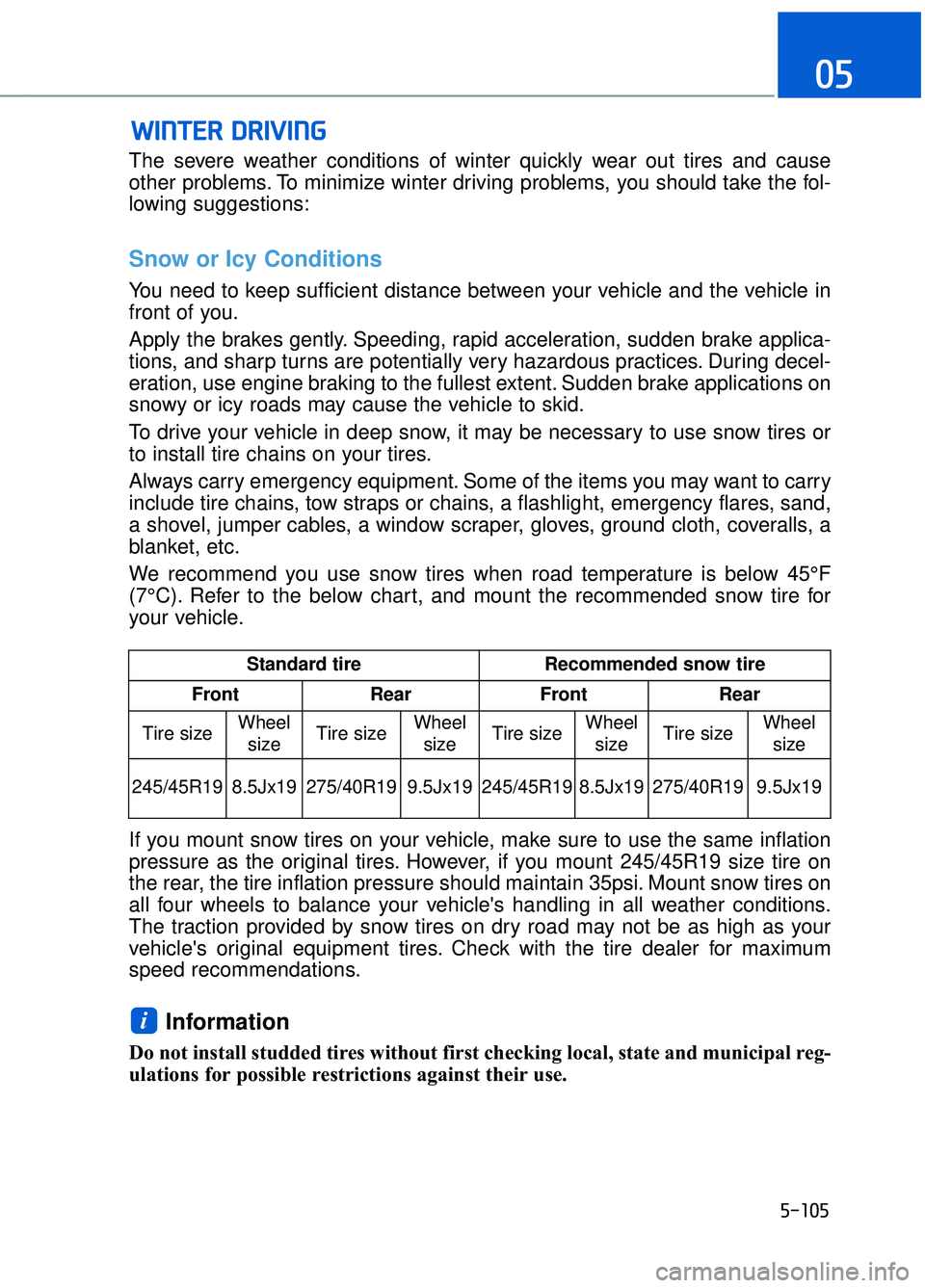
(7°C). Refer to the below chart, and mount the recommended snow tire for
your vehicle.
If you mount snow tires on your vehicle, make sure to use the same inflation
pressure as the original tires. However, if you mount 245/45R19 size tire on
the rear, the tire inflation pressure should maintain 35psi. Mount snow tires on
all four wheels to balance your vehicle's handling in all weather conditions.
The traction provided by snow tires on dry road may not be as high as your
vehicle's original equipment tires. Check with the tire dealer for maximum
speed recommendations.
Information
Do not install studded tires without first checking local, state and municipal reg-
ulations for possible restrictions against their use.
i
W WI
IN
N T
TE
ER
R
D
D R
RI
IV
V I
IN
N G
G
Standard tire Recommended snow tire
Front Rear Front Rear
Tire size Wheel
size Tire size Wheel
size Tire size
Wheel
size Tire size Wheel
size
245/45R19 8.5Jx19 275/40R19 9.5Jx19 245/45R19
8.5Jx19 275/40R19 9.5Jx19
Page 381 of 524
Information
An inappropriately disposedbattery can be harmful to the
environment and human
health. Dispose the battery
according to your local law(s)
or regulations.
To prevent damage to your vehi-
cle:
Only use a 12-volt power supply (battery or jumper system) to
jump start your vehicle.
Do not attempt to jump start your vehicle by push-starting.
Jump starting procedure
Information
Your vehicle has a battery in the trunk
compartment, but when you jump
start your vehicle, use the jumper ter-
minal in the engine compartment.
1. Position the vehicles close enough that the jumper cables will reach,
but do not allow the vehicles to
touch.
2. Avoid fans or any moving parts in the engine compartment at all
times, even when the vehicles are
turned off.
3. Turn off all electrical devices such as radios, lights, air conditioning,
etc. Put the vehicles in P (Park)
and set the parking brakes. Turn
both vehicles OFF.
4. Open the engine hood. 5. Open the small service cover with
a screwdriver.
6. Remove the engine room fuse box cover.
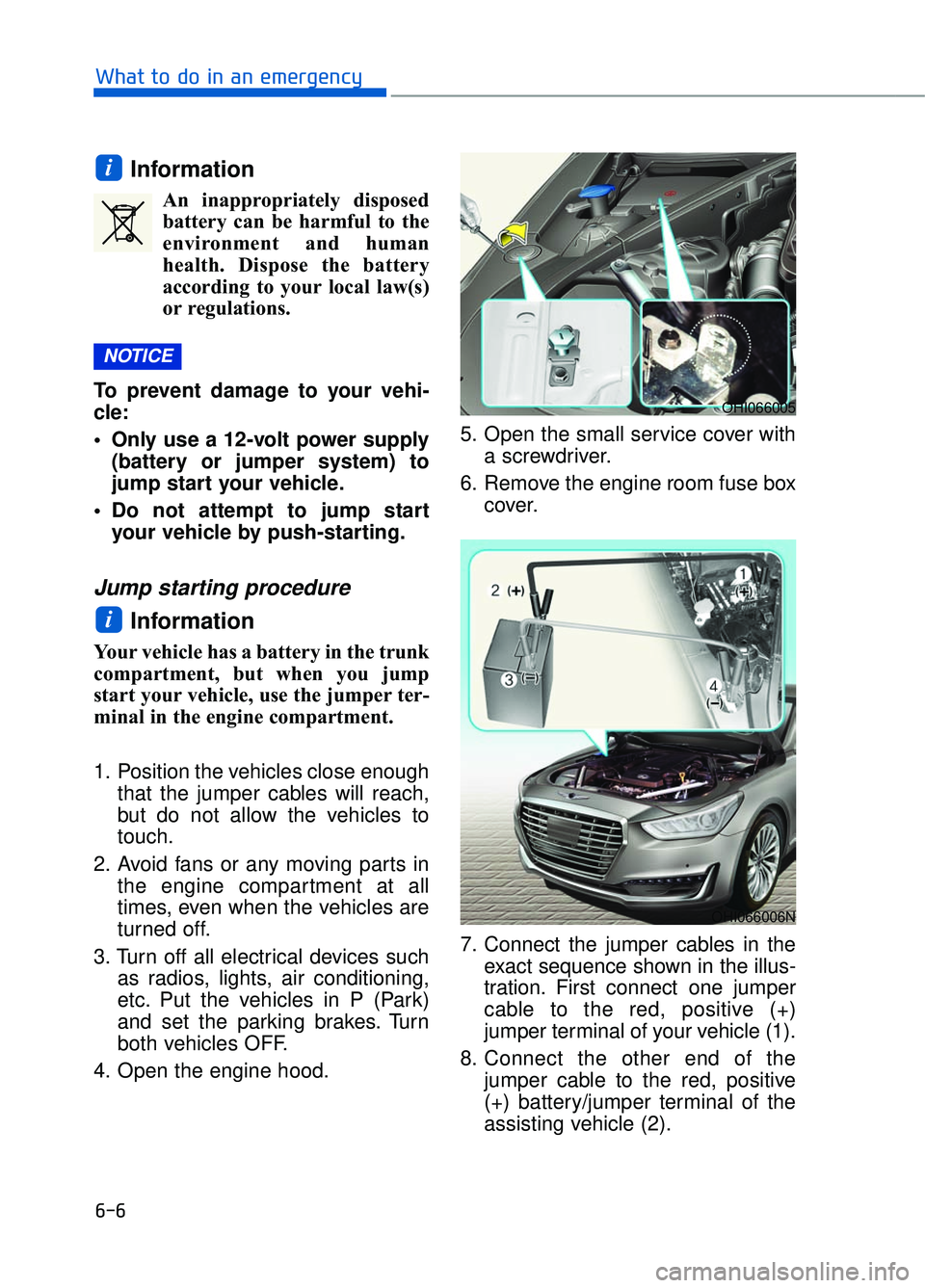
7. Connect the jumper cables in the exact sequence shown in the illus-
tration. First connect one jumper
cable to the red, positive (+)
jumper terminal of your vehicle (1).
8. Connect the other end of the jumper cable to the red, positive
(+) battery/jumper terminal of the
assisting vehicle (2).
i
NOTICE
i
6-6
What to do in an emergency
OHI066005
OHI066006N