parking brake GENESIS G90 2017 Owner's Guide
[x] Cancel search | Manufacturer: GENESIS, Model Year: 2017, Model line: G90, Model: GENESIS G90 2017Pages: 524, PDF Size: 19.3 MB
Page 291 of 524

5-30
Driving your vehicle
EPB warning light
This warning light illuminates if the
Engine Start/Stop button is changed
to the ON position and goes off in
approximately 3 seconds if the sys-
tem is operating normally.
If the EPB warning light remains on,
comes on while driving, or does not
come on when the Engine Start/Stop
button is in the ON position, this indi-
cates the EPB may have malfunc-
tioned. Have your vehicle checked by
an authorized Dealer of Genesis
Brand Products as soon as possible.
The EPB warning light may illumi-
nate when the ESC (Electronic
Stability Control) indicator comes on
to indicate that the ESC is not work-
ing properly, but it does not indicate a
malfunction of the EPB. If the EPB warning light is still
on, have the system checked by
an authorized Dealer of Genesis
Brand Products.
If the parking brake warning light does not illuminate or
blinks even though the EPB
switch was pulled up, the EPB
may not be applied.
If the parking brake warning light blinks when the EPB warn-
ing light is on, press the EPB
switch, then pull it up. Once
more, press the switch back to
its original position and pull it
back up. If the EPB warning light
does not go off, have your vehi-
cle checked by an authorized
Dealer of Genesis Brand
Products.
NOTICE
OHI056040
Page 292 of 524

5-31
05
Emergency braking
If there is a problem with the brake
pedal while driving, emergency brak-
ing is possible by pulling up and
holding the EPB switch. Braking is
possible only while you are holding
the EPB switch. However, braking
distance will be longer than normal.
Information
During emergency braking the park-
ing brake warning light will illumi-
nate to indicate that the system is
operating.
If you continuously notice a noise
or burning smell when the EPB is
used for emergency braking, have
your vehicle checked by an
authorized Dealer of Genesis
Brand Products as soon as possi-
ble.
Auto Hold
The Auto Hold maintains the vehicle
in a standstill even though the brake
pedal is not depressed after the driv-
er brings the vehicle to a complete
stop by depressing the brake pedal.
To apply:
1. With the driver's door, enginehood and trunk closed, fasten the
driver's seat belt or depress the
brake pedal and then press the
[AUTO HOLD] switch. The white
AUTO HOLD indicator will come
on and the system will be in the
standby position.
NOTICE
iOHI056131L
■Type A
OHI056034L
■Type B W
W
W
W
h
h
h
h
i
i
i
i
t
t
t
t
e
e
e
e
W
W
W
W
h
h
h
h
i
i
i
i
t
t
t
t
e
e
e
e
Do not operate the parking
brake while the vehicle is mov-
ing except in an emergency sit-
uation. It could damage the
brake system and lead to a
severe accident.
WARNING
Page 294 of 524
5-33
05
Information
• The Auto Hold does not operatewhen:
- The driver's seat belt is unbuckledand the driver's door is opened
- The engine hood is opened
- The trunk is opened
- The shift lever is in P (Park)
- The EPB is applied
• For your safety, the Auto Hold auto- matically switches to EPB when:
- The driver's seat belt is unfastenedand the driver's door is opened
- The engine hood is opened with the shift lever in D (Drive)
- The vehicle is in a standstill for more than 10 minutes
- The vehicle is standing on a steep slope
- The vehicle moved several times
In these cases, the parking brake
warning light comes on, the AUTO
HOLD indicator changes from
green to white, and warning sounds
and a message will appear to inform
you that EPB has been automatical-
ly engaged. Before driving again,
depress the brake pedal, check the
surrounding area near your vehicle
and release the parking brake man-
ually with the EPB switch.
• If the AUTO HOLD indicator changes to yellow, the Auto Hold is
not working properly. Take your
vehicle to an authorized Dealer of
Genesis Brand Products and have
the system checked. If there is a malfunction with the
driver's door, engine hood or
trunk open detection system, the
Auto Hold may not work properly.
Take your vehicle to an authorized
Dealer of Genesis Brand Products
and have the system checked.
NOTICE
i
Depress the accelerator pedal
slowly when you start the
vehicle.
For your safety, cancel the Auto Hold when you drive
downhill, back up the vehicle
or park the vehicle.
WARNING
Page 295 of 524
5-34
Driving your vehicle
Warning messages
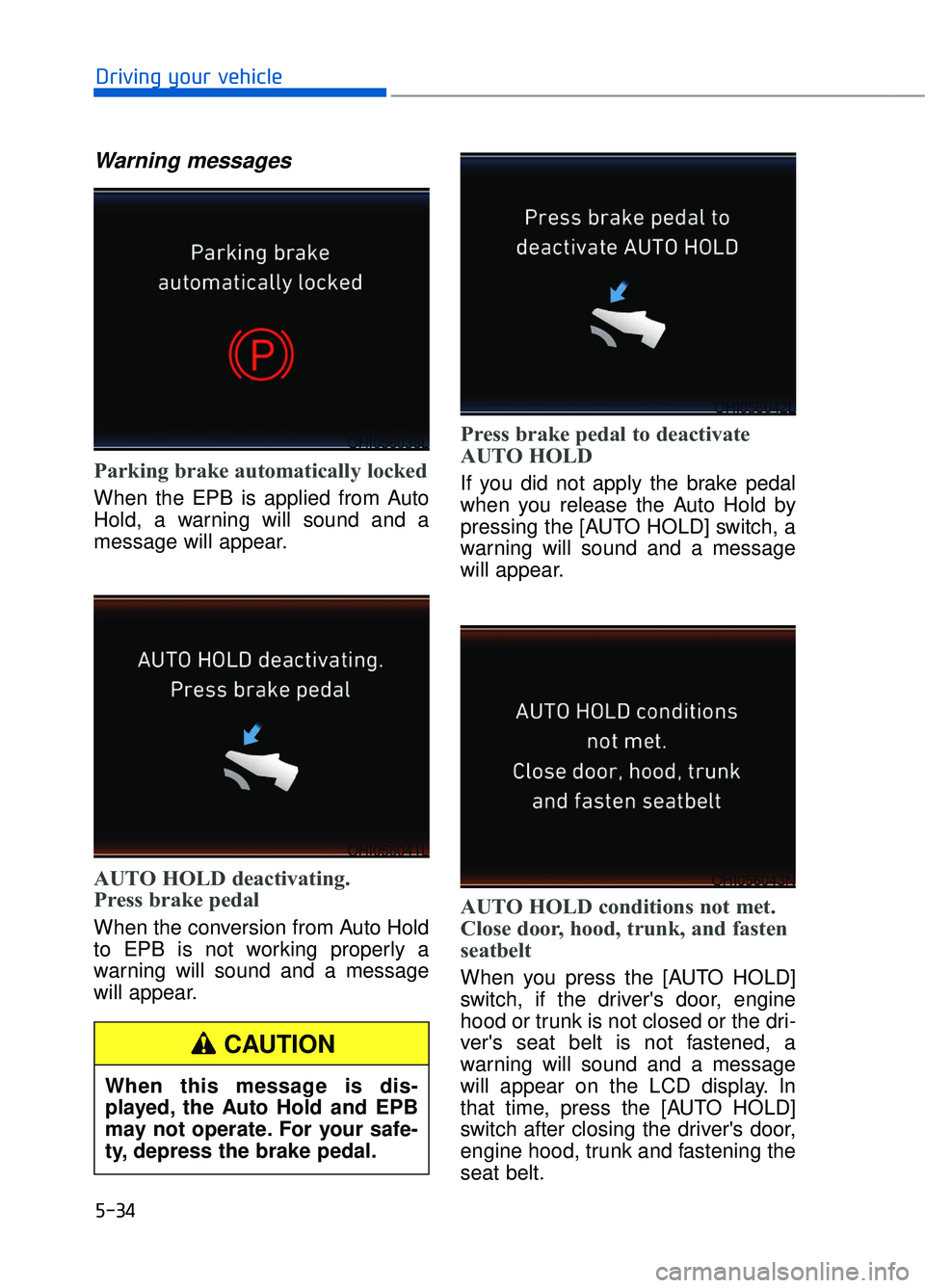
Parking brake automatically locked
When the EPB is applied from Auto
Hold, a warning will sound and a
message will appear.
AUTO HOLD deactivating.
Press brake pedal
When the conversion from Auto Hold
to EPB is not working properly a
warning will sound and a message
will appear.
Press brake pedal to deactivate
AUTO HOLD
If you did not apply the brake pedal
when you release the Auto Hold by
pressing the [AUTO HOLD] switch, a
warning will sound and a message
will appear.
AUTO HOLD conditions not met.
Close door, hood, trunk, and fasten
seatbelt
When you press the [AUTO HOLD]
switch, if the driver's door, engine
hood or trunk is not closed or the dri-
ver's seat belt is not fastened, a
warning will sound and a message
will appear on the LCD display. In
that time, press the [AUTO HOLD]
switch after closing the driver's door,
engine hood, trunk and fastening the
seat belt.
OHI056038L
OHI056041L
OHI056043N
OHI056042L
When this message is dis-
played, the Auto Hold and EPB
may not operate. For your safe-
ty, depress the brake pedal.
CAUTION
Page 300 of 524
5-39
05
Indicator lights
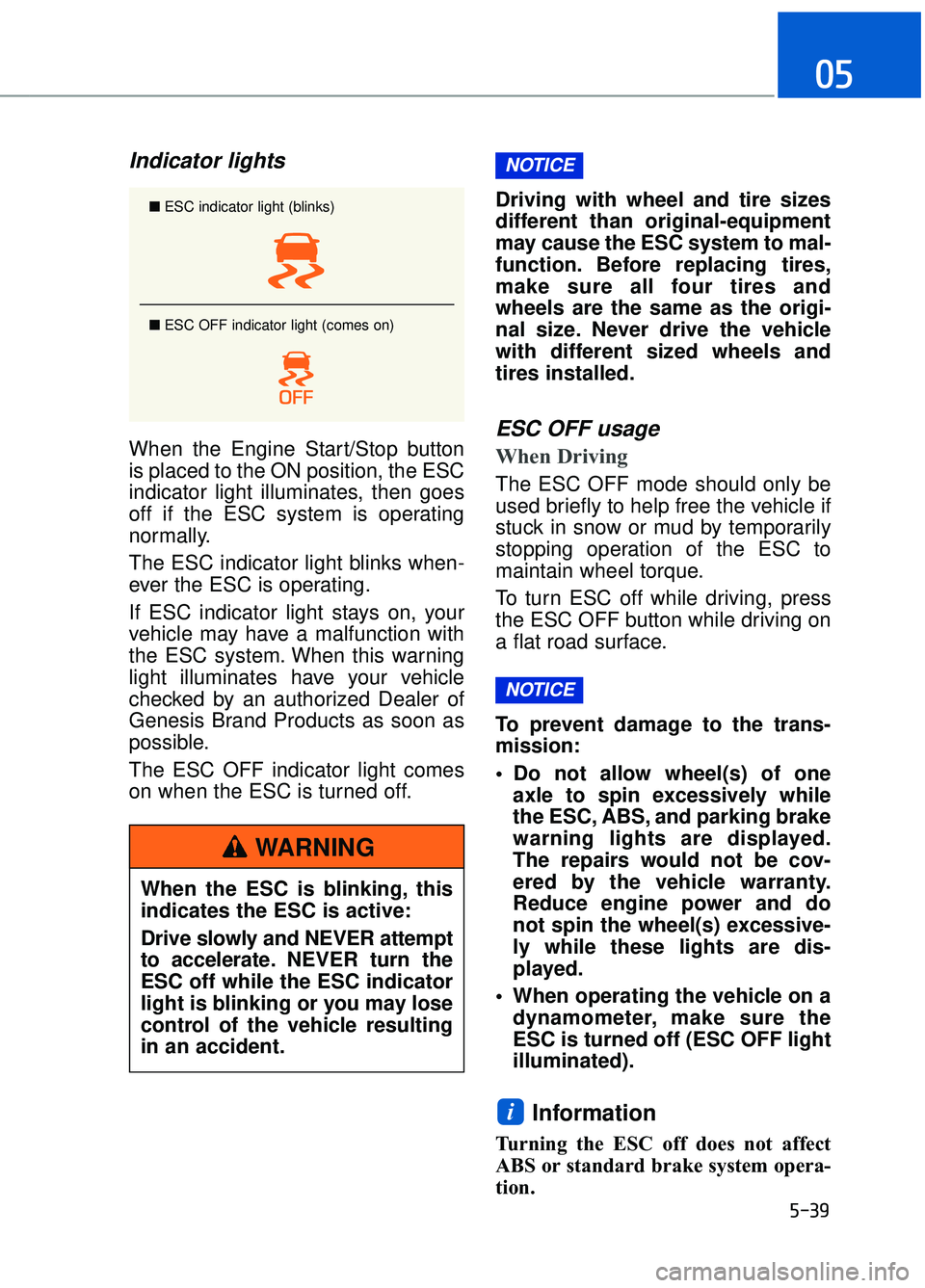
When the Engine Start/Stop button
is placed to the ON position, the ESC
indicator light illuminates, then goes
off if the ESC system is operating
normally.
The ESC indicator light blinks when-
ever the ESC is operating.
If ESC indicator light stays on, your
vehicle may have a malfunction with
the ESC system. When this warning
light illuminates have your vehicle
checked by an authorized Dealer of
Genesis Brand Products as soon as
possible.
The ESC OFF indicator light comes
on when the ESC is turned off.Driving with wheel and tire sizes
different than original-equipment
may cause the ESC system to mal-
function. Before replacing tires,
make sure all four tires and
wheels are the same as the origi-
nal size. Never drive the vehicle
with different sized wheels and
tires installed.ESC OFF usage
When Driving
The ESC OFF mode should only be
used briefly to help free the vehicle if
stuck in snow or mud by temporarily
stopping operation of the ESC to
maintain wheel torque.
To turn ESC off while driving, press
the ESC OFF button while driving on
a flat road surface.
To prevent damage to the trans-
mission:
Do not allow wheel(s) of one
axle to spin excessively while
the ESC, ABS, and parking brake
warning lights are displayed.
The repairs would not be cov-
ered by the vehicle warranty.
Reduce engine power and do
not spin the wheel(s) excessive-
ly while these lights are dis-
played.
When operating the vehicle on a dynamometer, make sure the
ESC is turned off (ESC OFF light
illuminated).
Information
Turning the ESC off does not affect
ABS or standard brake system opera-
tion.
i
NOTICE
NOTICE
■ ESC indicator light (blinks)
■ ESC OFF indicator light (comes on)
When the ESC is blinking, this
indicates the ESC is active:
Drive slowly and NEVER attempt
to accelerate. NEVER turn the
ESC off while the ESC indicator
light is blinking or you may lose
control of the vehicle resulting
in an accident.
WARNING
Page 303 of 524
5-42
Driving your vehicle
Good Braking Practices
Wet brakes can be dangerous! The
brakes may get wet if the vehicle is
driven through standing water or if it
is washed. Your vehicle will not stop
as quickly if the brakes are wet. Wet
brakes may cause the vehicle to pull
to one side.
To dry the brakes, apply the brakes
lightly until the braking action returns
to normal, taking care to keep the
vehicle under control at all times. If
the braking action does not return to
normal, stop as soon as it is safe to
do so and call an authorized Dealer
of Genesis Brand Products for assis-
tance.
DO NOT drive with your foot resting
on the brake pedal. Even light, but
constant pedal pressure can result in
the brakes overheating, brake wear,
and possibly even brake failure.If a tire goes flat while you are driv-
ing, apply the brakes gently and
keep the vehicle pointed straight
ahead while you slow down. When
you are moving slowly enough for it
to be safe to do so, pull off the road
and stop in a safe location.
Keep your foot firmly on the brake
pedal when the vehicle is stopped to
prevent the vehicle from rolling for-
ward.
Whenever leaving the vehicle or
parking, always come to a com-
plete stop and continue to
depress the brake pedal. Move
the shift lever into the P (Park)
position, then apply the parking
brake, and place the Engine
Start/Stop button in the OFF
position.
Vehicles with the parking brake
not fully engaged are at risk for
moving inadvertently and caus-
ing injury to yourself or others.
WARNING
Page 320 of 524

5-59
05
When the temperature of the rearbumper is high.
When the sensors are blocked by other vehicles, walls or parking-lot
pillars.
When the detected vehicle also moves back, as your vehicle drives
back.
If there are small objects in the detecting area such as a shopping
cart or a baby stroller.
If there is a low height vehicle such as a sports car.
When other vehicles are close to your vehicle.
The lanes ahead are not visible due to rain, snow, water on the
road, damaged or stained road
surface, or other factors.
The brightness outside changes suddenly such as when entering or
exiting a tunnel.
The brightness outside is too low such as when the headlamps are
not on at night or the vehicle is
going through a tunnel.
It is difficult to distinguish the lane marking from the road surface or
the lane marking is faded or not
clearly marked.
Driving on a steep grade, over a hill, or when driving on a curved
road.
When light coming from a street light or an oncoming vehicle is
reflected on a wet road surface
such as a puddle in the road.
The field of view in front is obstructed by sun glare.
The lanes are incomplete or the area is in a construction zone.
There are more than two lane lines on the road in front of you. The lane markings are not clearly
visible from the road.
The lane width is too wide or too narrow.
The windshield glass is fogged up; a clear view of the road is obstruct-
ed.
There are markings on the road surface that look like a lane line
that is inadvertently being detected
by the camera.
There is a boundary structure in the roadway such as a concrete
barrier that is inadvertently being
detected by the camera.
There is not enough distance between you and the vehicle in
front to be able to detect the lane
line or the vehicle ahead is driving
on the lane line.
The road pavement (or the periph- eral ground) abnormally contains
metallic components (i.e. possibly
due to subway construction).
The brake pedal is depressed.
ESC (Electronic Stability Control) is activated.
The tire pressure is low or a tire is damaged.
The brake is reworked.
The vehicle is driven near a guardrail or near the boundary line
of a road.
The windshield or the camera lens is blocked with dirt or debris.
The vehicle drives on a small- radius curve.
The vehicle drives in the opposite direction from the designated lane
direction.
The lane sensing operation is inter- rupted by another vehicle in front.
Page 346 of 524
5-85
05
To temporarily accelerate withthe Smart Cruise Control on
If you want to speed up temporarily
when the Smart Cruise Control is on,
depress the accelerator pedal.
Increased speed will not interfere
with Smart Cruise Control operation
or change the set speed.
To return to the set speed, take your
foot off the accelerator pedal.
If you push the toggle switch down
(SET-) at increased speed, the cruis-
ing speed will be set again.
Smart Cruise Control will betemporarily canceled when:
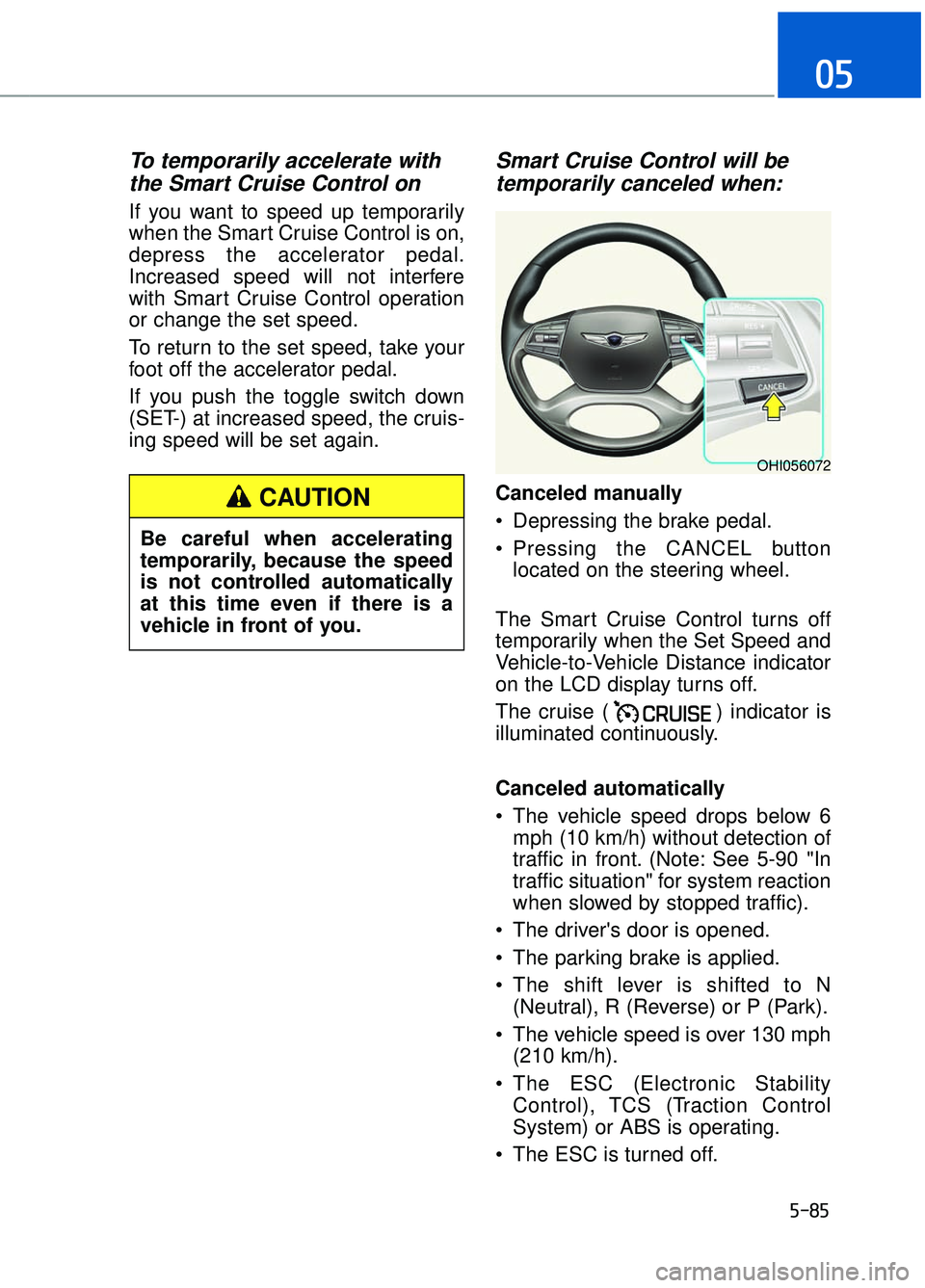
Canceled manually
Depressing the brake pedal.
Pressing the CANCEL button
located on the steering wheel.
The Smart Cruise Control turns off
temporarily when the Set Speed and
Vehicle-to-Vehicle Distance indicator
on the LCD display turns off.
The cruise ( ) indicator is
illuminated continuously.
Canceled automatically
The vehicle speed drops below 6 mph (10 km/h) without detection of
traffic in front. (Note: See 5-90 "In
traffic situation" for system reaction
when slowed by stopped traffic).
The driver's door is opened.
The parking brake is applied.
The shift lever is shifted to N (Neutral), R (Reverse) or P (Park).
The vehicle speed is over 130 mph (210 km/h).
The ESC (Electronic Stability Control), TCS (Traction Control
System) or ABS is operating.
The ESC is turned off.
OHI056072
Be careful when accelerating
temporarily, because the speed
is not controlled automatically
at this time even if there is a
vehicle in front of you.
CAUTION
Page 347 of 524

5-86
Driving your vehicle
The radar or the cover is dirty or blocked with foreign matter.
The vehicle is stopped for more than 5 minutes.
The vehicle stops and goes repeat- edly for a long period of time.
The driver starts driving by pushing the toggle switch up (RES+)/down
(SET-) or depressing the accelera-
tor pedal, approximately 3 minutes
after the vehicle is stopped by the
Smart Cruise Control System with
no other vehicle ahead.
The driver starts driving by pushing the toggle switch up (RES+)/down
(SET-) or depressing the accelera-
tor pedal, after stopping the vehicle
with a vehicle stopped far away in
front.
The accelerator pedal is continu- ously depressed for a long period.
The engine RPM enters the red zone.
The AEB is activated.
Each of these actions will cancel the
Smart Cruise Control operation. The
Set Speed and Vehicle-to-Vehicle
Distance on the LCD display will go
off.
In a condition the Smart Cruise
Control is cancelled automatically,
the Smart Cruise Control will not
resume even though the RES+ or
SET- toggle switch is pushed. Also,
the EPB (Electronic Parking Brake)
will be applied when the vehicle is
stopped. If the Smart Cruise Control is can-
celed by other than the reasons
mentioned, have your vehicle
checked by an authorized Dealer of
Genesis Brand Products.
Smart Cruise Control canceled
If the system is canceled, the warn-
ing chime will sound and a message
will appear for a few seconds.
You must adjust the vehicle speed by
depressing the accelerator or brake
pedal according to the road condition
ahead and driving condition.
Always check the road conditions.
Do not rely on the warning chime.
NOTICE
OHI056082L
Page 368 of 524
5-107
05
Chain Installation
When installing AutoSock®(fabric
snow chain), follow the manufactur-
er's instructions and mount them as
tightly as possible. Drive slowly (less
than 20 mph (30 km/h)) with chains
installed. If you hear the chains con-
tacting the body or chassis, stop and
tighten them. If they still make con-
tact, slow down until the noise stops.
Remove the AutoSock
®(fabric snow
chain) as soon as you begin driving
on cleared roads.
When mounting AutoSock
®(fabric
snow chain), park the vehicle on
level ground away from traffic.
Turn on the vehicle Hazard Warning
Flasher and place a triangular emer-
gency warning device behind the
vehicle (if available).
Always place the vehicle in P (Park),
apply the parking brake and turn off
the engine before installing tire
chains.
When using AutoSock
®(fabric
snow chain):
Wrong size chains or improperly installed chains can damage
your vehicle's brake lines, sus-
pension, body and wheels.
If you hear noise caused by chains contacting the body,
retighten the chain to prevent
contact with the vehicle body.
To prevent body damage, retighten the chains after driving
0.3~0.6 miles (0.5~1.0 km).
AutoSock
®is a Registered trade-
mark of AutoSock.
Winter Precautions
Use high quality ethylene glycol coolant
Your vehicle is delivered with high
quality ethylene glycol coolant in the
cooling system. It is the only type of
coolant that should be used because
it helps prevent corrosion in the cool-
ing system, lubricates the water
pump and prevents freezing. Be sure
to replace or replenish your coolant
in accordance with the maintenance
schedule in chapter 7. Before winter,
have your coolant tested to assure
that its freezing point is sufficient for
the temperatures anticipated during
the winter.
Change to "winter weight" oil ifnecessary
In some climates it is recommended
that a lower viscosity "winter weight"
oil be used during cold weather. See
chapter 8 for recommendations. If
you aren't sure what weight oil you
should use, consult an authorized
Dealer of Genesis Brand Products.
Check battery and cables
Winter puts additional burdens on
the battery system. Visually inspect
the battery and cables as described
in chapter 7. The level of charge in
your battery can be checked by an
authorized Dealer of Genesis Brand
Products or a service station.
NOTICE