brake GENESIS G90 2017 Repair Manual
[x] Cancel search | Manufacturer: GENESIS, Model Year: 2017, Model line: G90, Model: GENESIS G90 2017Pages: 524, PDF Size: 19.3 MB
Page 338 of 524

5-77
05
Information
• Even though the steering is assistedby the system, the driver can still
steer to control the steering wheel.
• The steering wheel may feel heavier when the steering wheel is assisted
by the system than when it is not.
The LKAS system will not be in the
ENABLED state and the steering
wheel will not be assisted when:
Vehicle speed is below 40 mph (64 km/h) and over 110 mph (177
km/h).
Only one lane line is detected.
The turn signal is turned on before changing a lane. If you change
lanes without the turn signal on, the
steering wheel might be controlled.
The hazard warning flasher is on.
The width of the lane is below 10 feet (3.1 m) and over 15 feet
(4.5 m).
ESC (Electronic Stability Control) or VSM (Vehicle Stability Management)
is activated.
The vehicle is driven on a sharp curve.
The vehicle brakes suddenly.
The vehicle makes sharp lane changes.
There are more than two lane lines on the road. (e.g. construction area)
The vehicle is driven on a steep incline.
Information
When the system is turned on or right
after changing a lane, drive in the
middle of the lane. If not, the system
will not provide steering assist func-
tion.
Warning light and message
Check LKAS
If there is a problem with the system
a message will appear for a few sec-
onds. If the problem continues the
LKAS failure indicator will illuminate.
LKAS failure indicator
The LKAS failure indica-
tor (yellow) will illuminate
if the LKAS is not working
properly. Have your vehi-
cle checked by an authorized Dealer
of Genesis Brand Products.
When there is a problem with the
system do one of the following:
Turn the system on after turning the engine off and on again.
Check if the Engine Start/Stop but- ton is in the ON position.
Check if the system is affected by the weather. (ex: fog, heavy rain,
etc.)
Check if there is foreign matter on the windshield glass in front of the
camera lens.
If the problem is not solved, have your
vehicle checked by an authorized
Dealer of Genesis Brand Products.
i
i
OHI056117L
Page 341 of 524

5-80
Driving your vehicle
(
(I
IF
F
E
E Q
Q U
UI
IP
P P
PE
ED
D )
)
➀ Cruise Indicator
➁ Set Speed
➂ Vehicle-to-Vehicle Distance
The Smart Cruise Control System
allows you to program the vehicle to
maintain constant speed and dis-
tance detecting the vehicle ahead
without depressing the accelerator/
brake pedal.
A A D
DV
VA
A N
N C
CE
E D
D
S
S M
M A
AR
RT
T
C
C R
R U
U I
IS
S E
E
C
C O
O N
NT
TR
R O
O L
L
S
S Y
Y S
ST
T E
EM
M
OHI056080N
OHI056081N
■ Type A
■Type B
For your safety, please read the
owner's manual before using
the Smart Cruise Control sys-
tem.
WARNING
The Smart Cruise Control
System is not a substitute for
safe driving practices, but a
convenience function only. It is
the responsibility of the driver
to always check the speed and
distance to the vehicle ahead.
WARNING
Take the following precautions:
If the Smart Cruise Control is
left on, (cruise ( )
indicator light in the instru-
ment cluster is illuminated)
the Smart Cruise Control can
be activated unintentionally.
Keep the Smart Cruise
Control System off (cruise
( ) indicator light
OFF) when the Smart Cruise
Control is not in use, to avoid
inadvertently setting a speed.
Set the Smart Cruise Control speed under the posted
speed, which is regulated by
the law.
Use the Smart Cruise Control System when traveling on
open highways in good weath-
er.
(Continued)
WARNING
Page 343 of 524

5-82
Driving your vehicle
To Convert to Cruise Control
Mode
The driver may choose to only use
the Cruise Control Mode (speed con-
trol function) by doing as follows:
1. Turn the Smart Cruise ControlSystem on (the cruise indicator
will be on but the system will not
be activated).
2. Press and hold the Vehicle-to- Vehicle Distance button for more
than 2 seconds.
3. Choose between "Smart Cruise Control" mode and "Cruise
Control" mode. When the system is canceled using
the CRUISE button or the CRUISE
button is used after the engine is
turned on, the Smart Cruise Control
mode will turn on.
OHI056092L
OHI056093L
When using the Cruise Control
mode, you must manually
adjust the distance to other
vehicles by depressing the
accelerator or brake pedal. The
system does not automatically
adjust the distance to vehicles
in front of you.
WARNING
Page 346 of 524
5-85
05
To temporarily accelerate withthe Smart Cruise Control on
If you want to speed up temporarily
when the Smart Cruise Control is on,
depress the accelerator pedal.
Increased speed will not interfere
with Smart Cruise Control operation
or change the set speed.
To return to the set speed, take your
foot off the accelerator pedal.
If you push the toggle switch down
(SET-) at increased speed, the cruis-
ing speed will be set again.
Smart Cruise Control will betemporarily canceled when:
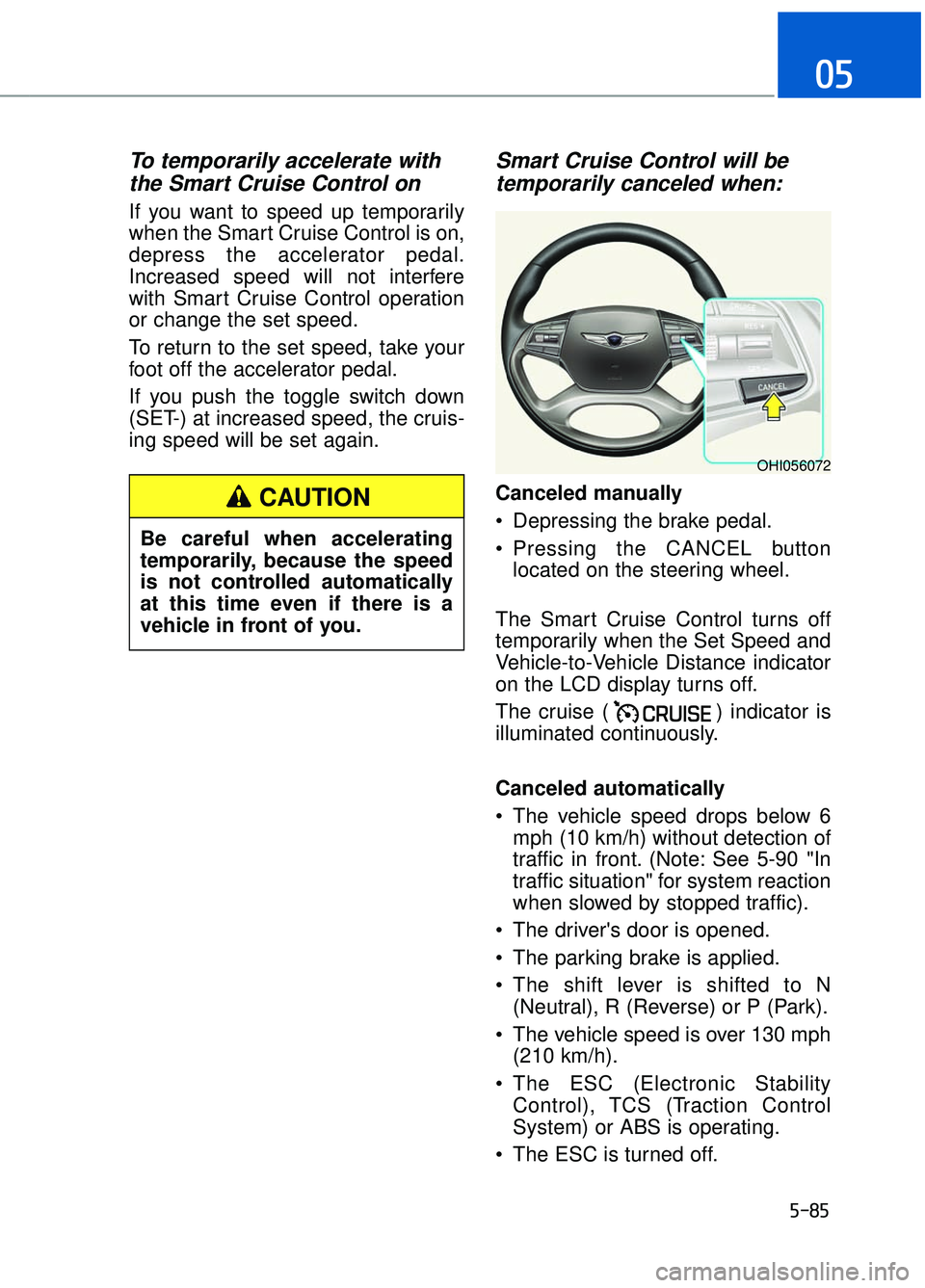
Canceled manually
Depressing the brake pedal.
Pressing the CANCEL button
located on the steering wheel.
The Smart Cruise Control turns off
temporarily when the Set Speed and
Vehicle-to-Vehicle Distance indicator
on the LCD display turns off.
The cruise ( ) indicator is
illuminated continuously.
Canceled automatically
The vehicle speed drops below 6 mph (10 km/h) without detection of
traffic in front. (Note: See 5-90 "In
traffic situation" for system reaction
when slowed by stopped traffic).
The driver's door is opened.
The parking brake is applied.
The shift lever is shifted to N (Neutral), R (Reverse) or P (Park).
The vehicle speed is over 130 mph (210 km/h).
The ESC (Electronic Stability Control), TCS (Traction Control
System) or ABS is operating.
The ESC is turned off.
OHI056072
Be careful when accelerating
temporarily, because the speed
is not controlled automatically
at this time even if there is a
vehicle in front of you.
CAUTION
Page 347 of 524

5-86
Driving your vehicle
The radar or the cover is dirty or blocked with foreign matter.
The vehicle is stopped for more than 5 minutes.
The vehicle stops and goes repeat- edly for a long period of time.
The driver starts driving by pushing the toggle switch up (RES+)/down
(SET-) or depressing the accelera-
tor pedal, approximately 3 minutes
after the vehicle is stopped by the
Smart Cruise Control System with
no other vehicle ahead.
The driver starts driving by pushing the toggle switch up (RES+)/down
(SET-) or depressing the accelera-
tor pedal, after stopping the vehicle
with a vehicle stopped far away in
front.
The accelerator pedal is continu- ously depressed for a long period.
The engine RPM enters the red zone.
The AEB is activated.
Each of these actions will cancel the
Smart Cruise Control operation. The
Set Speed and Vehicle-to-Vehicle
Distance on the LCD display will go
off.
In a condition the Smart Cruise
Control is cancelled automatically,
the Smart Cruise Control will not
resume even though the RES+ or
SET- toggle switch is pushed. Also,
the EPB (Electronic Parking Brake)
will be applied when the vehicle is
stopped. If the Smart Cruise Control is can-
celed by other than the reasons
mentioned, have your vehicle
checked by an authorized Dealer of
Genesis Brand Products.
Smart Cruise Control canceled
If the system is canceled, the warn-
ing chime will sound and a message
will appear for a few seconds.
You must adjust the vehicle speed by
depressing the accelerator or brake
pedal according to the road condition
ahead and driving condition.
Always check the road conditions.
Do not rely on the warning chime.
NOTICE
OHI056082L
Page 349 of 524

5-88
Driving your vehicle
Smart Cruise Control Vehicle-
to-Vehicle Distance
To set Vehicle-to-VehicleDistance
When the Smart Cruise Control
System is ON, you can set and main-
tain the distance from the vehicle
ahead of you without pressing the
accelerator or brake pedal.
Each time the button is pressed, the
vehicle to vehicle distance changes
as follows:
For example, if you drive at 56 mph
(90 km/h), the distance maintain as
follows:
Distance 4 - approximately 172 feet
(52.5 m)
Distance 3 - approximately 130 feet (40 m)
Distance 2 - approximately 106 feet (32.5 m)
Distance 1 - approximately 82 feet
(25 m)
Information
The distance is set to the last set dis-
tance when the system is used for the
first time after starting the engine.
When the lane ahead is clear:
The vehicle speed will maintain the
set speed.
i
OHI056073
Distance 4 Distance 3 Distance 2
Distance 1
OHI046199N
Page 350 of 524
5-89
05
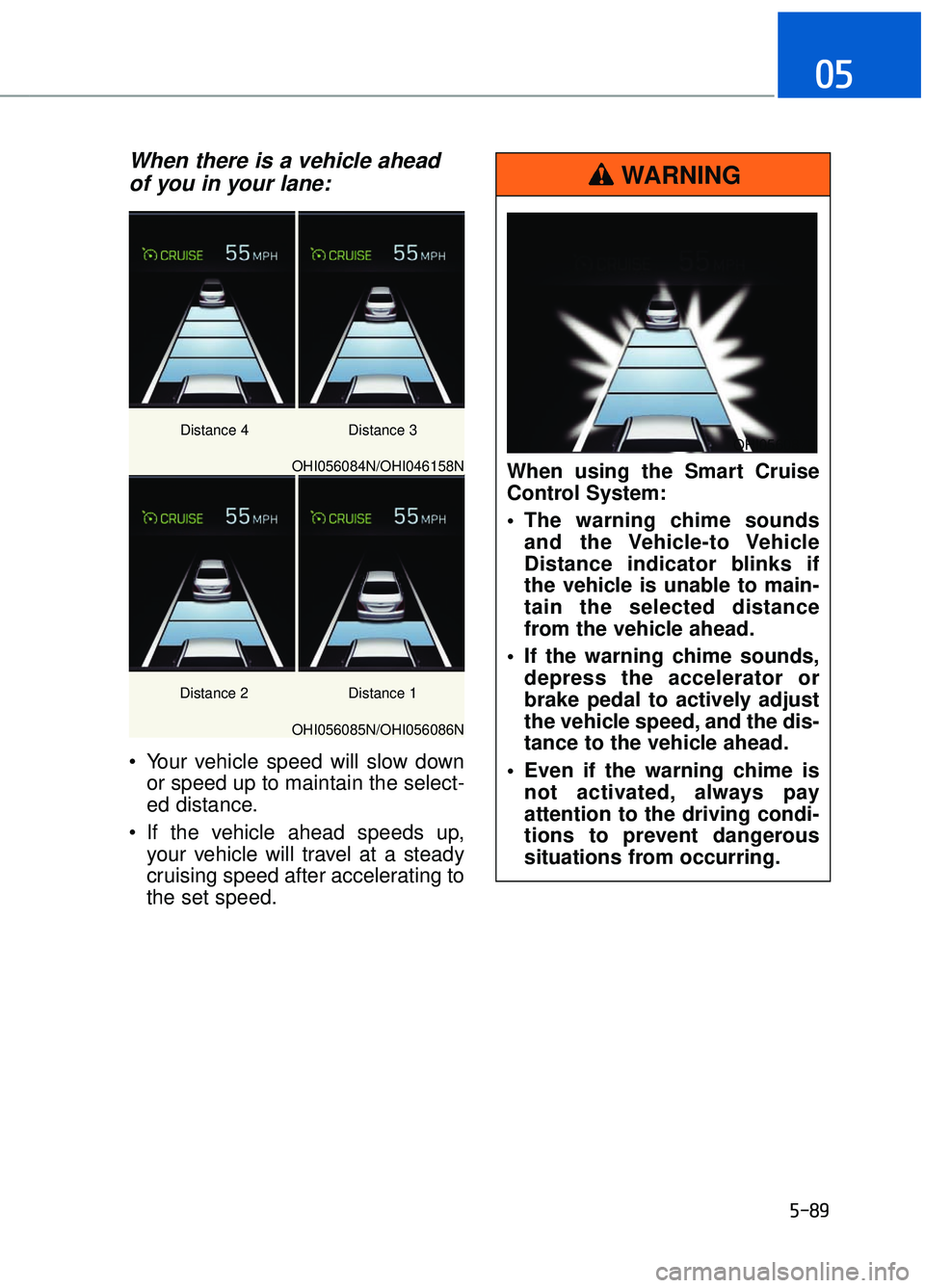
When there is a vehicle aheadof you in your lane:
Your vehicle speed will slow down
or speed up to maintain the select-
ed distance.
If the vehicle ahead speeds up, your vehicle will travel at a steady
cruising speed after accelerating to
the set speed.
OHI056084N/OHI046158N
OHI056085N/OHI056086N Distance 3
Distance 1
Distance 2 Distance 4
When using the Smart Cruise
Control System:
The warning chime sounds
and the Vehicle-to Vehicle
Distance indicator blinks if
the vehicle is unable to main-
tain the selected distance
from the vehicle ahead.
If the warning chime sounds, depress the accelerator or
brake pedal to actively adjust
the vehicle speed, and the dis-
tance to the vehicle ahead.
Even if the warning chime is not activated, always pay
attention to the driving condi-
tions to prevent dangerous
situations from occurring.
WARNING
OHI056087N
Page 351 of 524

5-90
Driving your vehicle
In traffic situation
In traffic, your vehicle will stop if thevehicle ahead of you stops. Also, if
the vehicle ahead of you starts
moving, your vehicle will start as
well. However, if the vehicle stops
for more than 3 seconds, you must
depress the accelerator pedal or
push up the toggle switch (RES+)
to start driving.
If you push the advanced smart cruise control toggle switch (RES+
or SET-) while Auto Hold and
advanced smart cruise control is
operating the Auto Hold will be
released regardless of accelerator
pedal operation and the vehicle will
start to move. The AUTO HOLD
indicator changes from green to
white.
OHI056088L
If the vehicle ahead (vehicle
speed: less than 20 mph
(30km/h)) disappears to the next
lane, the warning chime will
sound and a message "Watch
for surrounding vehicles" will
appear. Adjust your vehicle
speed for vehicles or objects
that can suddenly appear in
front of you by depressing the
brake pedal.
Always pay attention to the road
condition ahead.
CAUTION
OHI056089L
Page 353 of 524

5-92
Driving your vehicle
Limitations of the System
The Smart Cruise Control System
may have limits to its ability to detect
distance to the vehicle ahead due to
road and traffic conditions.
On curves
The Smart Cruise Control Systemmay not detect a moving vehicle in
your lane, and then your vehicle
could accelerate to the set speed.
Also, the vehicle speed will
decrease when the vehicle ahead
is recognized suddenly.
Select the appropriate set speed on curves and apply the brakes or
accelerator pedal if necessary.
Do not apply foreign objects
such as a bumper sticker or a
bumper guard near the radar
sensor. Doing so may
adversely affect the sensing
performance of the radar.
Always keep the radar sensor and lens cover clean and free
of dirt and debris.
Use only a soft cloth to wash the vehicle. Do not spray pres-
surized water directly on the
sensor or sensor cover.
Be careful not to apply unnec- essary force on the radar sen-
sor or sensor cover. If the sen-
sor is forcibly moved out of
proper alignment, the Smart
Cruise Control System may
not operate correctly. In this
case, a warning message may
not be displayed. Have the
vehicle inspected by an
authorized Dealer of Genesis
Brand Products.
If the front bumper becomes damaged in the area around
the radar sensor, the Smart
Cruise Control System may
not operate properly. Have the
vehicle inspected by an
authorized Dealer of Genesis
Brand Products.
Use only genuine Genesis Brand parts to repair or
replace a damaged sensor or
sensor cover. Do not apply
paint to the sensor cover.
CAUTION
OHI056200
Page 354 of 524
5-93
05
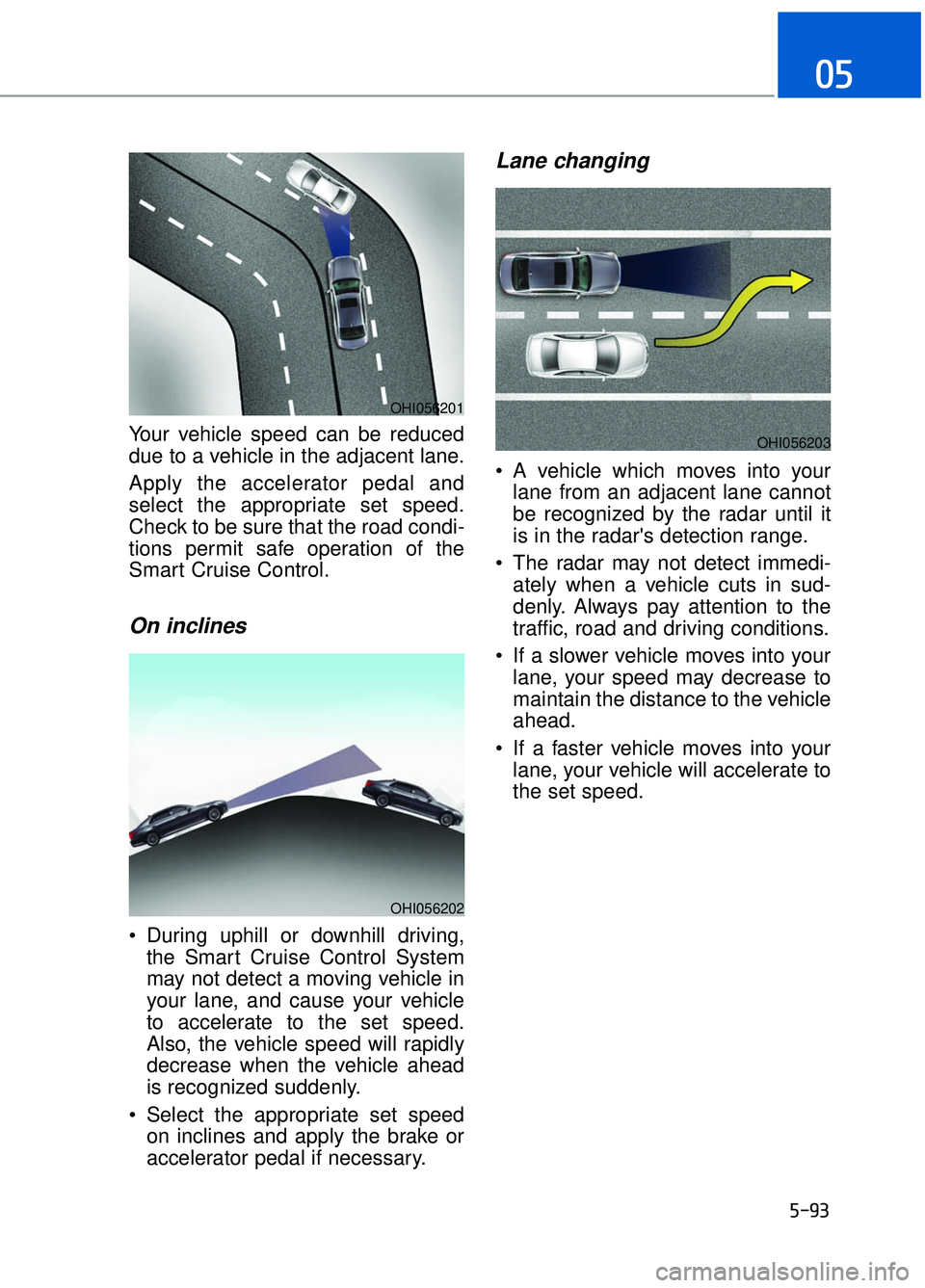
Your vehicle speed can be reduced
due to a vehicle in the adjacent lane.
Apply the accelerator pedal and
select the appropriate set speed.
Check to be sure that the road condi-
tions permit safe operation of the
Smart Cruise Control.
On inclines
During uphill or downhill driving,the Smart Cruise Control System
may not detect a moving vehicle in
your lane, and cause your vehicle
to accelerate to the set speed.
Also, the vehicle speed will rapidly
decrease when the vehicle ahead
is recognized suddenly.
Select the appropriate set speed on inclines and apply the brake or
accelerator pedal if necessary.
Lane changing
A vehicle which moves into yourlane from an adjacent lane cannot
be recognized by the radar until it
is in the radar's detection range.
The radar may not detect immedi- ately when a vehicle cuts in sud-
denly. Always pay attention to the
traffic, road and driving conditions.
If a slower vehicle moves into your lane, your speed may decrease to
maintain the distance to the vehicle
ahead.
If a faster vehicle moves into your lane, your vehicle will accelerate to
the set speed.
OHI056201
OHI056202
OHI056203