tire pressure GENESIS G90 2018 User Guide
[x] Cancel search | Manufacturer: GENESIS, Model Year: 2018, Model line: G90, Model: GENESIS G90 2018Pages: 519, PDF Size: 19.52 MB
Page 317 of 519

5-56
Driving your vehicle
Limitations of the System
The driver must be cautious in the
below situations, because the sys-
tem may not detect other vehicles or
objects in certain circumstances.
The vehicle drives on a curvedroad or through a tollgate.
The sensor is polluted with rain, snow, mud, etc.
The rear bumper where the sensor is located is covered with a foreign
object such as a bumper sticker, a
bumper guard, a bike rack, etc.
The rear bumper is damaged, or the sensor is out of the original
default position.
The vehicle height gets lower or higher due to heavy loading in a
trunk, abnormal tire pressure, etc.
The vehicle drives in inclement weather such as heavy rain or
snow.
There is a fixed object near the vehicle, such as a guardrail.
A big vehicle is near such as a bus or truck.
A motorcycle or bicycle is near.
A flat trailer is near.
If the vehicle has started at the same time as the vehicle next to
you and has accelerated.
When the other vehicle passes at a very fast speed.
While changing lanes.
While going down or up a steep road where the height of the lane is
different.
When the other vehicle approach- es very close. When a trailer or carrier is
installed.
When the temperature of the rear bumper is high or low.
When the sensors are blocked by the other vehicles, walls or park-
ing-lot pillars.
When the detected vehicle also moves back, as your vehicle drives
back.
If there are small objects in the detecting area such as a shopping
cart or a baby stroller.
If there is a low height vehicle such as a sports car.
When other vehicles are close to your vehicle.
When the vehicle in the next lane moves two lanes away from you
OR when the vehicle two lanes
away moves to the next lane from
you.
When driving through a narrow road with many trees or bushes.
When driving on wet surface.
Information
This device complies with Part 15 of
the FCC rules.
Operation is subject to the following
two conditions:
1. This device may not cause harmful interference, and
2. This device must accept any inter- ference received, including interfer-
ence that may cause undesired
operation.
i
Page 319 of 519

5-58
Driving your vehicle
When the turn signals operate, the
Smart Blind Spot Detection System
operates only once. However, when
the turn signals are turned OFF, the
system re-enters the activation con-
ditions.
The driver should drive the vehicle in
the middle of the vehicle lanes to
keep the system in the ready status.
When the vehicle drives too close to
one side of the vehicle lanes, the
system may not properly operate.
In addition, the system may not prop-
erly control your vehicle in accor-
dance with driving situations. Thus,
always pay close attention to road
situations.
Warning message
Smart BSD braking system mal-
function
When there is a malfunction with the
Smart Blind Spot Detection System,
warning message appears on the
LCD display and deactivates the
Smart Blind Spot Detection System.
In this case, have your vehicle
inspected by an authorized retailer of
Genesis Branded products.
Limitations of the System
The driver must be cautious in the
below situations, because the sys-
tem may not detect other vehicles or
objects in certain circumstances.
The vehicle drives on a curved road or through a tollgate.
The sensor is polluted with rain, snow, mud, etc.
The rear bumper where the sensor is located is covered with a foreign
object such as a bumper sticker, a
bumper guard, a bike rack, etc.
The rear bumper is damaged, or the sensor is out of the original
default position.
The vehicle height gets lower or higher due to heavy loading in a
trunk, abnormal tire pressure, etc.
The vehicle drives in inclement weather such as heavy rain or
snow.
There is a fixed object near the vehicle, such as a guardrail.
A big vehicle is near such as a bus or truck.
A motorcycle or bicycle is near.
A flat trailer is near.
If the vehicle has started at the same time as the vehicle next to
you and has accelerated.
When the other vehicle passes at a very fast speed.
While changing lanes.
While going down or up a steep road where the height of the lane is
different.
When the other vehicle approach- es very close.
When a trailer or carrier is installed.
OHI056116L
Page 320 of 519

5-59
05
When the temperature near therear bumper area is high or low.
When the sensors are blocked by other vehicles, walls or parking-lot
pillars.
When the detected vehicle also moves back, as your vehicle drives
back.
If there are small objects in the detecting area such as a shopping
cart or a baby stroller.
If there is a low height vehicle such as a sports car.
When other vehicles are close to your vehicle.
The lanes ahead are not visible due to rain, snow, water on the
road, damaged or stained road
surface, or other factors.
The brightness outside changes suddenly such as when entering or
exiting a tunnel.
The brightness outside is too low such as when the headlamps are
not on at night or the vehicle is
going through a tunnel.
It is difficult to distinguish the lane marking from the road surface or
the lane marking is faded or not
clearly marked.
Driving on a steep grade, over a hill, or when driving on a curved
road.
When light coming from a street light or an oncoming vehicle is
reflected on a wet road surface
such as a puddle in the road.
The field of view in front is obstructed by sun glare.
The lanes are incomplete or the area is in a construction zone.
There are more than two lane lines on the road in front of you. The lane markings are not clearly
visible from the road.
The lane width is too wide or too narrow.
The windshield glass is fogged up; a clear view of the road is obstruct-
ed.
There are markings on the road surface that look like a lane line
that is inadvertently being detected
by the camera.
There is a boundary structure in the roadway such as a concrete
barrier that is inadvertently being
detected by the camera.
There is not enough distance between you and the vehicle in
front to be able to detect the lane
line or the vehicle ahead is driving
on the lane line.
The road pavement (or the periph- eral ground) abnormally contains
metallic components (i.e. possibly
due to subway construction).
The brake pedal is depressed.
ESC (Electronic Stability Control) is activated.
The tire pressure is low or a tire is damaged.
The brake is reworked.
The vehicle is driven near a guardrail or near the boundary line
of a road.
The windshield or the camera lens is blocked with dirt or debris.
The vehicle drives on a small- radius curve.
The vehicle drives in the opposite direction from the designated lane
direction.
The lane sensing operation is inter- rupted by another vehicle in front.
Page 357 of 519

5-96
Driving your vehicle
The Smart Cruise Control System
may not operate temporarily due
to:
Electrical interference
Modifying the suspension
Differences of tire abrasion or tire pressure
Installing different type of tires
Information
This device complies with Part 15 of
the FCC rules.
Operation is subject to the following
three conditions:
1. This device may not cause harmful interference, and
2. This device must accept any interfer- ence received, including interference
that may cause undesired operation.
3. Changes or modifications not expressly approved by the party
responsible for compliance could
void the user's authority to operate
the device.
Information
Radio frequency radiation exposure
information:
This equipment complies with FCC
radiation exposure limits set forth for
an uncontrolled environment.
This equipment should be installed
and operated with minimum distance
of 8 in. (20 cm) between the radiator
(antenna) and your body.
This transmitter must not be co-locat-
ed or operating in conjunction with
any other antenna or transmitter.
i
i
NOTICE
(Continued)
The Smart Cruise Control
System may not recognize
complex driving situations so
always pay attention to driv-
ing conditions and control
your vehicle speed.
Page 362 of 519

5-101
05
The Driver Attention Alert sys-
tem may not properly operate
with limited alerting in the fol-
lowing situations:
The lane detection perform-ance is limited. (For more infor-
mation, refer to "Lane Keeping
Assist System (LKAS)" in this
chapter.)
The vehicle is violently driven or is abruptly turned for obsta-
cle avoidance (e.g. construc-
tion area, other vehicles, fallen
objects, bumpy road).
Forward drivability of the vehi- cle is severely undermined
(possibly due to wide variation
in tire pressures, uneven tire
wear-out, toe-in/toe-out align-
ment).
The vehicle drives on a curvy road.
The vehicle drives on a bumpy road.
The vehicle drives through a windy area.
The vehicle is controlled by the following driving assist sys-
tems:
- Lane Keeping Assist System(LKAS)
- Smart Blind Spot Detection System
- Automatic Emergency Braking (AEB) System
CAUTION
Page 365 of 519
5-104
Driving your vehicle
Driving in Flooded Areas
Avoid driving through flooded areas
unless you are sure the water is no
higher than the bottom of the wheel
hub. Drive through any water slowly.
Allow adequate stopping distance
because brake performance may be
reduced.
After driving through water, dry the
brakes by gently applying them sev-
eral times while the vehicle is moving
slowly.
Highway Driving
Tires
Adjust the tire inflation, as specified.
Under-inflation may overheat or
damage the tires.
Do not install worn-out or damaged
tires, which may reduce traction or
fail the braking operation.
Information
Never over-inflate your tires above the
maximum inflation pressure, as speci-
fied on your tires.
Fuel, engine coolant and engineoil
Driving at higher speeds on the high-
way consumes more fuel and is less
efficient than driving at a slower,
more moderate speed. Maintain a
moderate speed in order to conserve
fuel when driving on the highway.
Be sure to check both the engine
coolant level and the engine oil
before driving.
Drive belt
A loose or damaged drive belt may
overheat the engine.
i
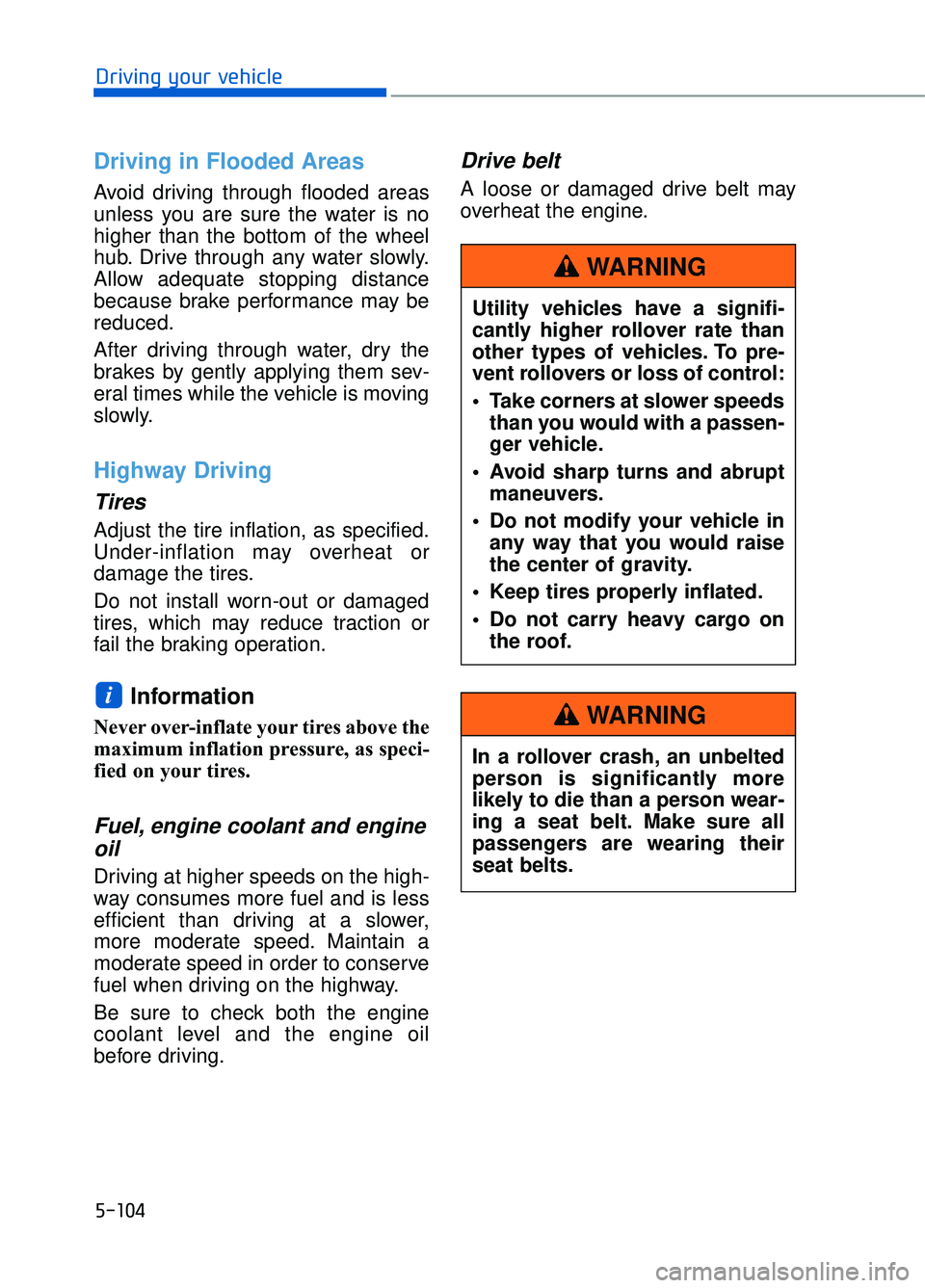
Utility vehicles have a signifi-
cantly higher rollover rate than
other types of vehicles. To pre-
vent rollovers or loss of control:
Take corners at slower speeds
than you would with a passen-
ger vehicle.
Avoid sharp turns and abrupt maneuvers.
Do not modify your vehicle in any way that you would raise
the center of gravity.
Keep tires properly inflated.
Do not carry heavy cargo on the roof.
WARNING
In a rollover crash, an unbelted
person is significantly more
likely to die than a person wear-
ing a seat belt. Make sure all
passengers are wearing their
seat belts.
WARNING
Page 366 of 519
5-105
05
The severe weather conditions of winter quickly wear out tires and cause
other problems. To minimize winter driving problems, you should take the fol-
lowing suggestions:
Snow or Icy Conditions
You need to keep sufficient distance between your vehicle and the vehicle in
front of you.
Apply the brakes gently. Speeding, rapid acceleration, sudden brake applica-
tions, and sharp turns are potentially very hazardous practices. During decel-
eration, use engine braking to the fullest extent. Sudden brake applications on
snowy or icy roads may cause the vehicle to skid.
To drive your vehicle in deep snow, it may be necessary to use snow tires or
to install tire chains on your tires.
Always carry emergency equipment. Some of the items you may want to carry
include tire chains, tow straps or chains, a flashlight, emergency flares, sand,
a shovel, jumper cables, a window scraper, gloves, ground cloth, coveralls, a
blanket, etc.
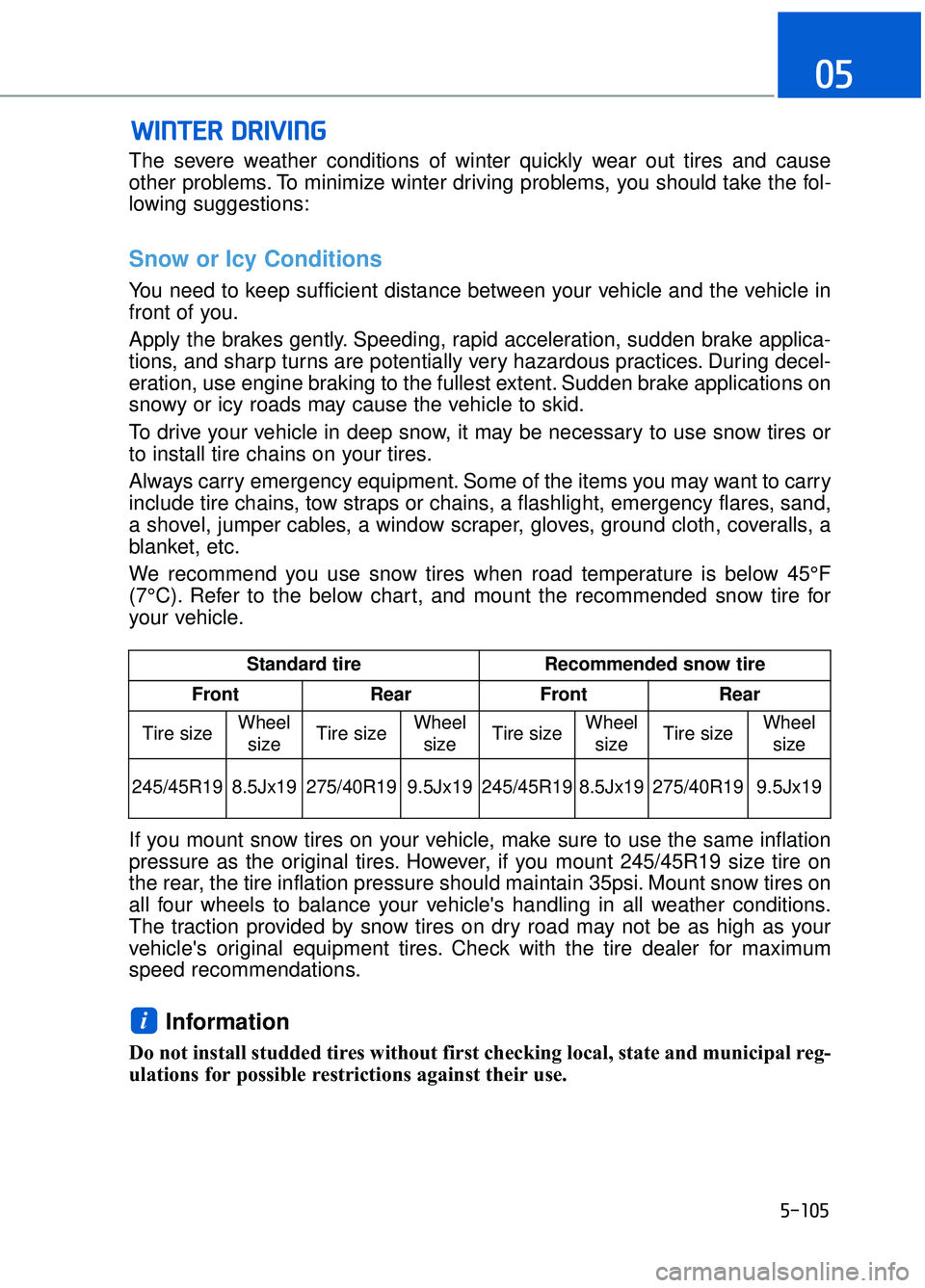
We recommend you use snow tires when road temperature is below 45°F
(7°C). Refer to the below chart, and mount the recommended snow tire for
your vehicle.
If you mount snow tires on your vehicle, make sure to use the same inflation
pressure as the original tires. However, if you mount 245/45R19 size tire on
the rear, the tire inflation pressure should maintain 35psi. Mount snow tires on
all four wheels to balance your vehicle's handling in all weather conditions.
The traction provided by snow tires on dry road may not be as high as your
vehicle's original equipment tires. Check with the tire dealer for maximum
speed recommendations.
Information
Do not install studded tires without first checking local, state and municipal reg-
ulations for possible restrictions against their use.
i
W WI
IN
N T
TE
ER
R
D
D R
RI
IV
V I
IN
N G
G
Standard tire Recommended snow tire
Front Rear Front Rear
Tire size Wheel
size Tire size Wheel
size Tire size
Wheel
size Tire size Wheel
size
245/45R19 8.5Jx19 275/40R19 9.5Jx19 245/45R19
8.5Jx19 275/40R19 9.5Jx19
Page 371 of 519

5-110
Driving your vehicle
Tire Loading Information Label
The label located on the driver's door
sill gives the original tire size, cold
tire pressures recommended for your
vehicle, the number of people that
can be in your vehicle and vehicle
capacity weight.
Vehicle capacity weight
882 lbs. (400 kg)
Vehicle capacity weight is the maxi-
mum combined weight of occupants
and cargo. If your vehicle is equipped
with a trailer, the combined weight
includes the tongue load.
Seating capacity
Total : 5 persons (Front seat : 2 persons,
Rear seat : 3 persons)
Seating capacity is the maximum
number of occupants including a
driver, your vehicle may carry.
However, the seating capacity may
be reduced based upon the weight of
all of the occupants, and the weight
of the cargo being carried or towed.
Do not overload the vehicle as there
is a limit to the total weight, or load
limit including occupants and cargo,
the vehicle can carry.
Towing capacity
We do not recommend using this
vehicle for trailer towing.
Cargo capacity
The cargo capacity of your vehicle
will increase or decrease depending
on the weight and the number of
occupants and the tongue load, if
your vehicle is equipped with a trailer.
OHI056219N
Page 376 of 519

Hazard Warning Flasher .............................................................6-2
If the Engine Stalls While Driving ............................................................6-3
If the Engine Stalls at a Crossroad or Crossing...................................6-3
If you Have a Flat Tire While Driving .....................................................6-3
In Case of an Emergency While Driving ...................................6-3
If the Engine Doesn't Turn Over or Turns Over Slowly.....................6-4
If the Engine Turns Over Normally but Doesn't Start ........................6-4
If the Engine Will Not Start ........................................................6-4
Jump Starting ........................................................................\
........6-5
Push-Starting........................................................................\
........................6-7
If the Engine Overheats ..............................................................6-8
Tire Pressure Monitoring System (TPMS) .............................6-10
Check Tire Pressure........................................................................\
..........6-10
Tire Pressure Monitoring System .........................................................6-11
Low Tire Pressure Telltale.......................................................................6\
-12
Low Tire Pressure LCD Display with Position Indicator ..................6-12
TPMS Malfunction Indicator...................................................................6-13
Changing a Tire with TPMS ....................................................................6-14\
If You Have a Flat Tire ..............................................................6-16
Jack Label ........................................................................\
............................6-22
Towing........................................................................\
..................6-23
Towing Service ........................................................................\
...................6-23
Removable Towing Hook ........................................................................\
..6-25
Emergency Towing ........................................................................\
............6-25
6
W Wh
ha
at
t
t
t o
o
d
d o
o
i
in
n
a
a n
n
e
e m
m e
er
rg
g e
en
n c
cy
y
Page 385 of 519

6-10
What to do in an emergency
(1) Low Tire Pressure / TPMS Malfunction Indicator Lamp
(2) Low Tire Pressure / Tire Pressure Monitor /
TPMS Malfunction Display
(shown on the cluster LCD dis-
play)
Check Tire Pressure
You can check the tire pressure inthe Assist mode on the cluster.
Refer to the "LCD Modes" in
chapter 3.
Tire pressure is displayed after a few minutes of driving after initial
engine start up.
If tire pressure is not displayed when the vehicle is stopped, "Drive
to display" message will appear.
After driving, check the tire pres-
sure.
The displayed tire pressure values may differ from those measured
with a tire pressure gauge.
You can change the tire pressure unit in the User Settings mode on
the cluster.
- psi, kpa, bar (Refer to the "LCDModes" in chapter 3) .
T TI
IR
R E
E
P
P R
R E
ES
SS
SU
U R
RE
E
M
M O
ON
NI
IT
T O
O R
RI
IN
N G
G
S
S Y
Y S
ST
T E
EM
M
(
( T
T P
P M
M S
S)
)
OHI066008
OHI046129N
OHI046160L