battery GENESIS G90 2018 Owner's Manual
[x] Cancel search | Manufacturer: GENESIS, Model Year: 2018, Model line: G90, Model: GENESIS G90 2018Pages: 519, PDF Size: 19.52 MB
Page 10 of 519
Introduction
F10
This vehicle should not be modified. Modification of your vehicle could affectits performance, safety or durability and may even violate governmental
safety and emissions regulations.
In addition, damage or performance problems resulting from any modifica-
tion may not be covered under warranty.
If you use unauthorized electronic devices, it may cause the vehicle to oper- ate abnormally, wire damage, battery discharge and fire. For your safety, do
not use unauthorized electronic devices.
All warning sounds (e.g. welcome/good-bye sound, virtual engine
sound) are generated from the exterior amplifiers. If necessary, we rec-
ommend you to purchase Genesis/Hyundai Part to replace an exterior
amplifier. Any unauthorized product may cause a malfunction of the
exterior amplifiers.
NOTICE
V V E
EH
H I
IC
C L
LE
E
M
M O
OD
DI
IF
F I
IC
C A
A T
TI
IO
O N
NS
S
Page 11 of 519
F11
Introduction
By following a few simple precautions for the first 600 miles (1,000 km) you
may add to the performance, economy and life of your vehicle.
Do not race the engine.
While driving, keep your engine speed (rpm, or revolutions per minute)between 2,000 rpm and 4,000 rpm.
Do not maintain a single speed for long periods of time, either fast or slow. Varying engine speed is needed to properly break-in the engine.
Avoid hard stops, except in emergencies, to allow the brakes to seat prop- erly.
V VE
EH
H I
IC
C L
LE
E
B
B R
RE
EA
A K
K-
-I
IN
N
P
P R
R O
O C
CE
E S
SS
S
CALIFORNIA PROPOSITION 65 WARNING
Items contained in motor vehicles or emitted from them are known to
the State of California to cause cancer and birth defects or reproduc-
tive harm. These include:
Gasoline and its vapors
Engine exhaust
Used engine oil
Interior passenger compartment components and materials
Component parts which are subject to heat and wear
In addition, battery posts, terminals and related accessories contain
lead, lead compounds and other chemicals known to the State of
California to cause cancer and reproductive harm.
WARNING
Page 29 of 519
2-9
02
To prevent damage to the seats:
Always stop adjusting the seatswhen the seat has been adjusted
as far forward or rearward as
possible.
Do not adjust the seats longer than necessary when the engine
is turned off. This may result in
unnecessary battery drain.
Do not operate two or more seats at the same time. This may
result in an electrical malfunc-
tion.
NOTICE
To prevent injury:
Do not adjust your seat whilewearing your seat belt.
Moving the seat cushion for-
ward may cause strong pres-
sure on your abdomen.
Do not allow your hands or fingers to get caught in the
seat mechanisms while the
seat is moving.
WARNING
NEVER allow children in the
vehicle unattended. The power
seats are operable when the
engine is turned off.
WARNING
Page 108 of 519
Information
The trunk handle button will only oper-
ate when the smart key is within 28
inches (0.7 m) from the trunk handle.
Information
The power trunk (if equipped) can be
operated when the engine is not run-
ning. However, the power trunk con-
sumes large amounts of vehicle elec-
tric power. To prevent the battery
from being discharged, do not operate
consecutively (more than approxi-
mately 10 times).
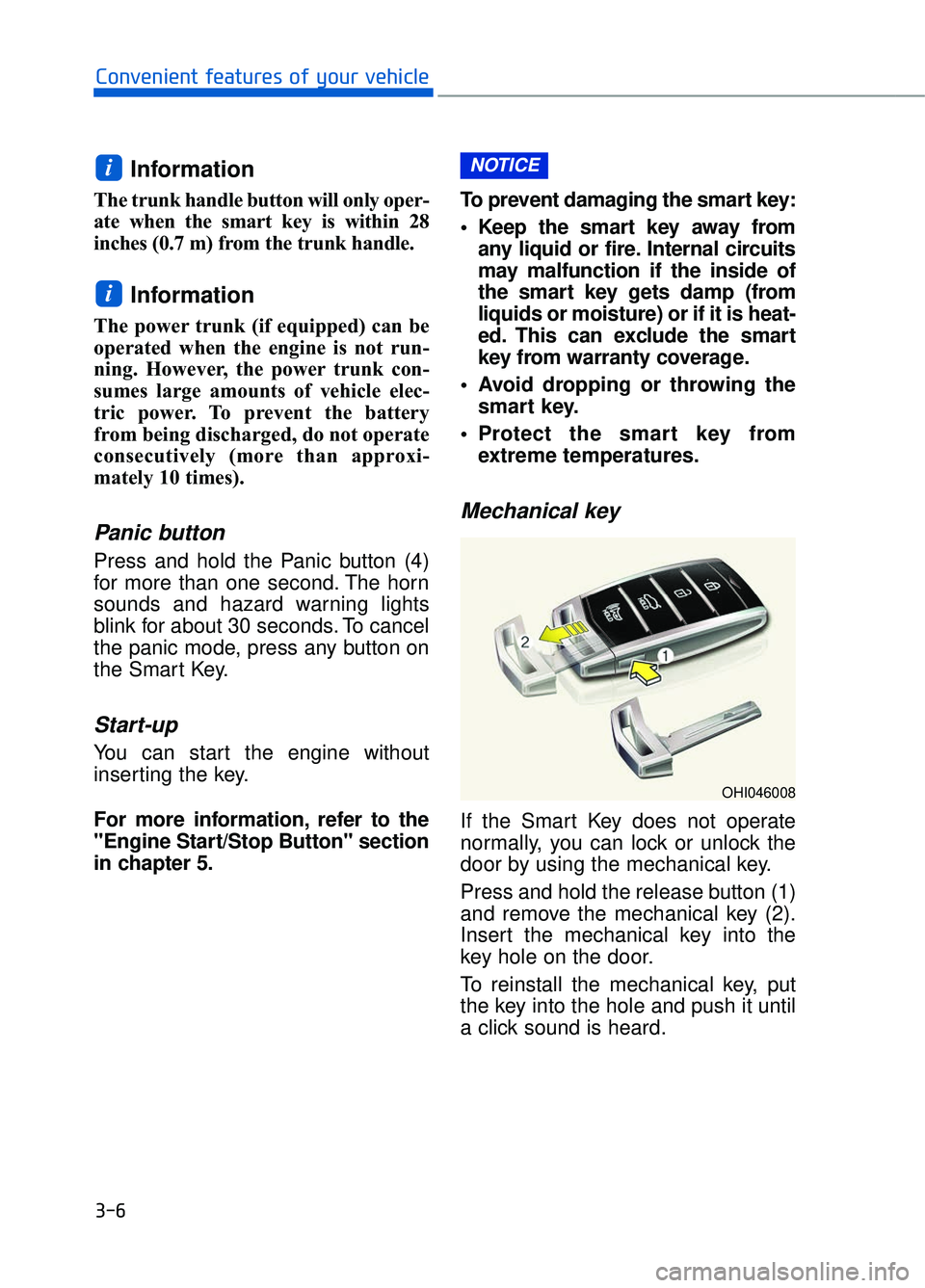
Panic button
Press and hold the Panic button (4)
for more than one second. The horn
sounds and hazard warning lights
blink for about 30 seconds. To cancel
the panic mode, press any button on
the Smart Key.
Start-up
You can start the engine without
inserting the key.
For more information, refer to the
"Engine Start/Stop Button" section
in chapter 5.To prevent damaging the smart key:
• Keep the smart key away from
any liquid or fire. Internal circuits
may malfunction if the inside of
the smart key gets damp (from
liquids or moisture) or if it is heat-
ed. This can exclude the smart
key from warranty coverage.
Avoid dropping or throwing the smart key.
Protect the smart key from extreme temperatures.
Mechanical key
If the Smart Key does not operate
normally, you can lock or unlock the
door by using the mechanical key.
Press and hold the release button (1)
and remove the mechanical key (2).
Insert the mechanical key into the
key hole on the door.
To reinstall the mechanical key, put
the key into the hole and push it until
a click sound is heard.
NOTICE
i
i
3-6
Convenient features of your vehicle
OHI046008
Page 109 of 519
Loss of a smart key
A maximum of two Smart Keys can
be registered to a single vehicle. If
you happen to lose your smart key,
you should immediately take the
vehicle and remaining keys to your
authorized retailer of Genesis
Branded products or tow the vehicle,
if necessary.
Smart key precautions
The smart key will not work if any of
the following occur:
The smart key is close to a radiotransmitter such as a radio station
or an airport which can interfere
with normal operation of the trans-
mitter.
The smart key is near a mobile two way radio system or a cellular
phone.
Another vehicle's smart key is being operated close to your vehicle.
If the smart key is in close proximi- ty to your mobile phone, the signal
could be blocked by your mobile
phones normal operational signals.
This is especially important when
the phone is active such as making
and receiving calls, text messag-
ing, and/or sending/receiving
emails. Avoid placing the smart key
and your mobile phone in the same
pants or jacket pocket and always
try to maintain an adequate dis-
tance between the two devices.
When the smart key does not work
correctly, open and close the door with
the mechanical key. If you have a
problem with the smart key, contact an
authorized retailer of Genesis
Branded products. Always have the smart key with
you when leaving the vehicle. If
the smart key is left near the vehi-
cle, the vehicle battery may be dis-
charged.
Information
This device complies with Part 15 of
the FCC rules.
Operation is subject to the following
three conditions:
1. This device may not cause harmful
interference, and
2. This device must accept any inter- ference received, including interfer-
ence that may cause undesired
operation.
3. Changes or modifications not express- ly approved by the party responsible
for compliance could void the user 's
authority to operate the device.
i
NOTICE
3-7
03
Keep the smart key away from
electromagnetic materials that
blocks electromagnetic waves
to the key surface.
CAUTION
Page 110 of 519
Restrictions in handling keys
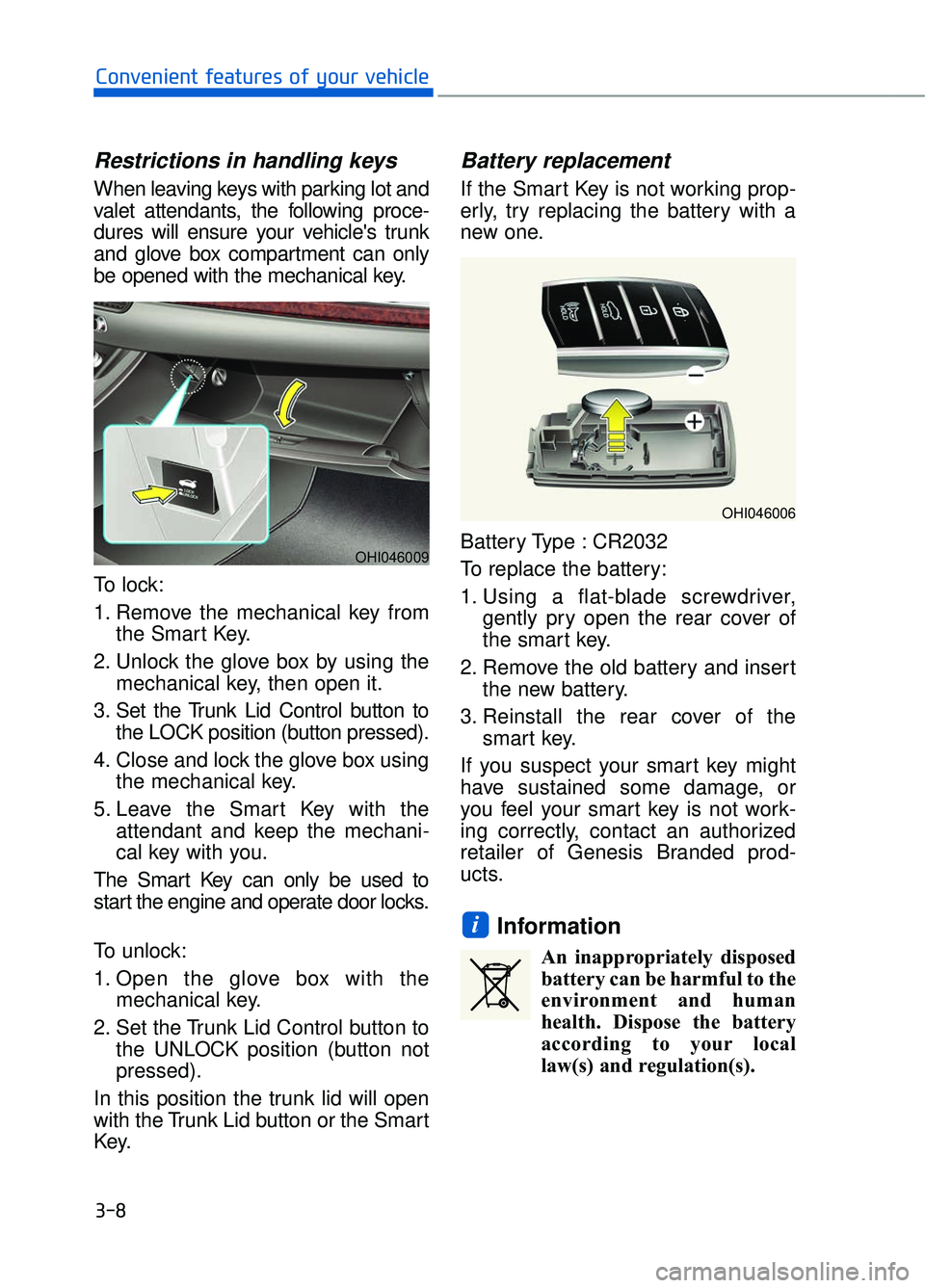
When leaving keys with parking lot and
valet attendants, the following proce-
dures will ensure your vehicle's trunk
and glove box compartment can only
be opened with the mechanical key.
To lock:
1. Remove the mechanical key fromthe Smart Key.
2. Unlock the glove box by using the mechanical key, then open it.
3. Set the Trunk Lid Control button to the LOCK position (button pressed).
4. Close and lock the glove box using the mechanical key.
5. Leave the Smart Key with the attendant and keep the mechani-
cal key with you.
The Smart Key can only be used to
start the engine and operate door locks.
To unlock:
1. Open the glove box with the mechanical key.
2. Set the Trunk Lid Control button to the UNLOCK position (button not
pressed).
In this position the trunk lid will open
with the Trunk Lid button or the Smart
Key.
Battery replacement
If the Smart Key is not working prop-
erly, try replacing the battery with a
new one.
Battery Type : CR2032
To replace the battery:
1. Using a flat-blade screwdriver, gently pry open the rear cover of
the smart key.
2. Remove the old battery and insert the new battery.
3. Reinstall the rear cover of the smart key.
If you suspect your smart key might
have sustained some damage, or
you feel your smart key is not work-
ing correctly, contact an authorized
retailer of Genesis Branded prod-
ucts.
Information
An inappropriately disposed battery can be harmful to the
environment and human
health. Dispose the battery
according to your local
law(s) and regulation(s).
i
3-8
Convenient features of your vehicle
OHI046006
OHI046009
Page 117 of 519

3-15
03
The Seat Position Memory System is
provided to store and recall the fol-
lowing memory settings with a sim-
ple button operation.
1) Driver's seat position- Seat/Steering wheel/Outer sideview mirror position
- Instrument panel illumination inten- sity
- Head-Up Display (HUD) position, brightness, and angle (if equipped)
2) Passenger/Rear seat position - Seat position
Information
• If the battery is disconnected, thememory settings will be erased.
• If the Seat Position Memory System does not operate normally, have the
system checked by an authorized
retailer of Genesis Branded prod-
ucts.
Storing memory positions
1. Move the shift lever into P (Park) while the Engine Start/Stop button
is in the ON position.
2. Adjust the driver's seat position, outer side view mirror position,
steering wheel position, instru-
ment panel illumination intensity
and head-up display height/bright-
ness to the desired position.
3. Press the SET button. The system will beep once and notify you
"Press button to save settings"on
the LCD display.
4. Press one of the memory buttons (1 or 2) within 4 seconds. The sys-
tem will beep twice when the mem-
ory has been successfully stored.
5.
"Driver 1 (or 2) settings saved" will
appear on the LCD display.
i
S SE
E A
A T
T
P
P O
O S
SI
IT
T I
IO
O N
N
M
M E
EM
M O
OR
RY
Y
S
S Y
Y S
ST
T E
EM
M
OHI046057L
■ Driver’s seat
OHI046043
■Passenger/Rear seat
Never attempt to operate the
seat position memory system
while the vehicle is moving.
This could result in loss of con-
trol, and an accident causing
death, serious injury, or property
damage.
WARNING
OHI046178L/OHI046179L
Page 120 of 519

3-18
Convenient features of your vehicle
Tilt Steering / Telescope Steering
Adjust the steering wheel so it points
toward your chest, not toward your
face. Make sure you can see the
instrument cluster warning lights and
gauges. Always adjust the position of
the steering wheel before driving.
To change the steering wheel angle
and height:
Move the switch (1) up and down toadjust the angle (2).
Move the switch forward or rear- ward to adjust the height (3).
Do not adjust the steering wheel
longer than necessary when the
engine is turned off. This may result
in unnecessary battery drain.
Heated Steering Wheel
When the Engine Start/Stop button is
in the ON position or when the engine
is running, press the heated steering
wheel button to warm the steering
wheel. The indicator on the button will
illuminate.
To turn the heated steering wheel off,
press the button again. The indicator
on the button will turn off.
Each time you push the switch, the temperature setting changes as
follows:
When the heated steering wheel switch is pressed to high ( ) :
The heated steering wheel switch
automatically changes to the low
position after 30 minutes. You can
turn off the heated steering wheel
by pressing the switch to the OFF
position.
Do not install any cover or accesso-
ry on the steering wheel. This cover
or accessory could cause damage
to the heated steering wheel sys-
tem.
NOTICE
NOTICE
OHI046046
NEVER adjust the steering
wheel while driving. This may
cause loss of vehicle control
resulting in an accident.
WARNING
OHI046047
OFF →HIGH ( ) →LOW ( )
→
Page 148 of 519

3-46
Convenient features of your vehicle
To open the sunroof, push the sun-
roof control lever upward to the sec-
ond detent. The sunroof will tilt all the
way open. To stop the sunroof tilting
at any point, operate the control lever.
To close the sunroof, push the sunroof
control lever forward until the sunroof
moves to the desired position.
Periodically remove any dirt that may accumulate on the sunroof
guide rail or between the sun-
roof and roof panel which can
make a noise.
Do not try to open the sunroof when the temperature is below
freezing or when the sunroof is
covered with snow or ice, other-
wise the motor could be dam-
aged. In cold and wet climates,
the sunroof may not work prop-
erly.
Sunshade
The sunshade will automatically
open with the glass panel when the
glass panel moves. Close it manual-
ly if you want it closed.
Resetting the Sunroof
Sunroof needs to be reset if (in the
followings)
- Battery is discharged or discon-nected or the related fuse has been
replaced or disconnected.
- The one-touch sliding function of the sunroof does not normally oper-
ate.
1. Turn the Engine Start/Stop button to the ON position and close the
sunroof completely.
2. Release the control lever.
3. Pull and hold the control lever for- ward until the sunroof tilts and
slightly moves up and down. Then,
release the lever.
4. Pull and hold the control lever for- ward until the sunroof is operated
as follows;
TILT DOWN
→SLIDE OPEN →
SLIDE CLOSE
Then, release the control lever.
Information
• If the sunroof does not reset when the vehicle battery is disconnected
or discharged, or related fuse is
blown, the sunroof may not operate
normally.
• For more detailed information, con- tact an authorized retailer of
Genesis Branded products.
i
NOTICE
OHI046041
Page 152 of 519
3-50
Convenient features of your vehicle
Information
The Power Trunk Lock button will
not work if you press the button when:
- Any door is open.
- The Engine Start/Stop button is notin the OFF position.
- The Smart Key is in the vehicle. Do not close or open the Power
Trunk manually. This may cause
damage to the Power Trunk. If it
is necessary to close or open the
Power Trunk manually when the
battery is drained or disconnect-
ed, do not apply excessive force.
Do not leave the Power Trunk open for a long period of time.
This may drain the battery.
To prevent damage to the trunk lift cylinders and the attached
hardware, always close the trunk
before driving.
Information
In cold and wet climates, trunk lock
and trunk mechanisms may not work
properly due to freezing conditions.
Power trunk non-opening orclosing conditions:
The Power Trunk will not open or
close automatically, when the vehi-
cle is moving more than 1.8 mph (3
km/h).
The Power Trunk can be operated when the engine is not running.
However, the Power Trunk operation
consumes large amounts of vehicle
electric power. To prevent the bat-
tery from draining, do not operate it
excessively (e.g., more than
approximately 10 times repeatedly.)
Do not modify or repair any part of the Power Trunk by yourself. This
must be done by an authorized
retailer of Genesis Branded prod-
ucts.
Before jacking up the vehicle to change a tire or repair the vehicle,
open the Power Trunk. Do not oper-
ate the Power Trunk when the vehi-
cle is raised or this could cause the
Power Trunk to operate improperly.
i
NOTICEi
Never leave children or animals
unattended in your vehicle.
Children or animals might oper-
ate the power trunk that could
result in injury to themselves or
others, or damage to the vehicle.
WARNING
Always keep the trunk lid com-
pletely closed while the vehicle is
in motion. If it is left open or ajar,
poisonous exhaust gases con-
taining carbon monoxide (CO)
may enter the vehicle and seri-
ous illness or death may result.
WARNING
Make sure there are no people
or objects around the trunk
before opening or closing the
Power Trunk. Wait until the trunk
is open fully and stopped before
loading or unloading cargo from
the vehicle.
WARNING